ChatGPT Prompts for Filmmakers (2026): 36 Prompts by Stage
36 copyable ChatGPT prompts for producers, grouped by stage: treatment, breakdown, shot list, locations, strip board, call sheet and delivery, each with its output and the Storyflow board it can build.

Category
Video Production
Author

Storyflow Team
Product & Research Team
Topics
2026-10-28
•
25 min read
•
Video Production- ChatGPT prompts
- filmmakers
- script breakdown
- shot list
- strip board
- call sheet
- Storyflow
What are the best ChatGPT prompts for filmmakers?
The best ChatGPT prompts for filmmakers name the deliverable, paste the real script or brief, fix the columns and say where the result goes, and with the Storyflow plugin that destination can be your production board. Storyflow is an AI visual workspace that keeps the breakdown, shot list, strip board and call sheet facts on one infinite canvas. For formatted script rewrites, use ShotClick in ChatGPT; for cutting selects, Descript; for tracked call sheets on a large crew, StudioBinder outside ChatGPT.

Full disclosure: Storyflow is our product. It is our pick first because most of these prompts produce a planning document, and through its plugin ChatGPT writes that document onto a board the crew and client open by link. Its limits: no AI image generation through the plugin, the strip board does not recalculate, and it does not send call sheets.
How the tools for running film production prompts in ChatGPT compare on trust, innovation, ratings and pricing
Which tools for running film production prompts in ChatGPT are the most trusted?
StudioBinder's own site shows call sheets sent with timestamped confirmations, though it is not a ChatGPT plugin. Descript documents what its ChatGPT plugin does and what each import and edit spends. Storyflow's plugin went live in October 2026; its case is that every prompt's output lands on one board the crew can open and check.
Which tools for running film prompts in ChatGPT have fair and transparent pricing?
Storyflow, Descript and ShotClick publish their prices, and Descript and Kapwing say what a ChatGPT action spends. Storyflow starts at $7.99 a month billed annually and its plugin actions use no Storyflow AI credits. Descript spends media minutes and AI credits, Kapwing spends workspace credits, and ShotClick includes its connector from the €24.99 Studio tier.
Which tools for running film prompts in ChatGPT are the most innovative?
Storyflow, for turning a prompt into shot cards or a strip board on a shared board and then reading that board back to rebuild it. ShotClick, for rewriting formatted screenplay scenes from a chat. Kapwing, for subtitles and dubbed versions of every cutdown requested in one sentence. Each solves a different stage of the same production.
Which tool would you recommend for running film prompts on a small commercial shoot?
Storyflow for a crew under ten making a commercial, brand film or social batch: ChatGPT writes the breakdown, shot cards, strip board and call-sheet facts onto one board, and the client opens a view-only link with no account. Add Descript for the edit and Kapwing for versions. Move to StudioBinder when call sheets must be sent and tracked.
Which tools for running film prompts in ChatGPT are underrated?
A plain spreadsheet is underrated for a ten-row breakdown with no pictures. Storyflow's change report is easy to overlook: asking what changed on the board since yesterday, and who changed it, settles schedule arguments in one answer. Kapwing's dubbing is easy to miss if you think of it only for captions.
Quick Comparison
Where the output of each prompt stage should live, our pick first for planning on one board. Prices as of October 2026.
| Tool | Best For | AI Features | Price |
|---|---|---|---|
| Storyflow | Treatment, breakdown, shot cards, locations, strip board and call-sheet facts | ChatGPT builds and reads the board through the plugin; no Storyflow AI credits used | Plus $7.99 a month billed annually (paid-only in early access) |
| ShotClick | Formatted script rewrites | ChatGPT reads projects and adds or rewrites scenes | Studio tier €24.99 a month includes the connector |
| Descript | Selects and paper edits | Imports, transcribes and edits from the chat | Hobbyist $16 a month billed annually |
| Kapwing | Subtitles and dubbed versions | Generates, translates and dubs subtitles from the chat | Free plan; paid plans: see Kapwing pricing |
Key Takeaways
- A film prompt works when it carries four things: the deliverable, the real source material, the constraints that cannot move and the exact output format.
- Ask in two passes: the scene breakdown first, then the shots or the schedule. One prompt for both is where skipped scenes and invented coverage come from.
- With the Storyflow plugin installed, end a prompt with "and put it on my Tidewater board in Storyflow" (Tidewater is the example project used throughout) and ChatGPT builds the table, shot cards or strip board there instead of in the chat.
- Through the plugin, ChatGPT builds and reads boards; it does not generate images or send call sheets, and a photo attached in the chat reaches the board only through Storyflow's upload link.
- When an answer is weak, fix the missing part of the prompt instead of asking again. Most bad output traces back to missing source text or an unstated format.
Why a Film Prompt Comes Back Generic
You ask ChatGPT for a shot list and get forty rows that would fit any commercial ever made: a wide establishing shot, a medium two-shot, a close-up for emotion. Nothing is wrong with the rows. They just are not your shoot, because nothing in the prompt was.
ChatGPT does not know your shoot until you paste it
Without the script, the brief, the locations and the days, the model fills gaps with averages. OpenAI's own prompting guide compares a GPT model to a junior coworker who performs best with explicit instructions for a specific output (OpenAI prompt engineering guide). A junior coordinator with no script writes a template. Give the same person the pages, the call times and the client's must-haves, and the list becomes a plan.
One prompt for the whole job skips scenes
"Break down this script and give me a shot list and a schedule" asks for three deliverables, each of which depends on the one before. The model compresses: scenes merge, coverage is guessed, the schedule ignores the location windows you never mentioned. Ask for the scene list, check its count against the script, then build each later deliverable from the checked one.
An answer in the chat is not a document the crew can open
Even a perfect breakdown dies six screens up in a conversation your DP cannot see. The prompts below mark where a result should leave the chat. With the Storyflow plugin for ChatGPT installed, adding one clause sends it to a board the crew and client open by link. Without it, copy the result into whatever document your production already shares.
The Four Parts of a Production Prompt
Every prompt in this guide is built from the same four parts. When an answer disappoints, one of them is usually missing.
| Part | What it carries | Weak version | Strong version |
|---|---|---|---|
Role | The job ChatGPT is doing and for whom | "You are a filmmaker" | "Act as the first AD on a two-day commercial with a crew of eight" |
Context | The real material: script, brief, dates, locations, crew size | "A coffee ad" | The pasted script, the brief, "two shoot days, 12 and 13 November, Lisbon" |
Constraints | What cannot move and what must not happen | None | "Talent leaves at 16:00 on day one. Do not invent locations or names." |
Format | The exact shape of the output and where it goes | "Make a list" | "A table: setup ID, shot size, movement, lens, minutes. Put it on my board in Storyflow." |
Two habits make the four parts work harder. Number everything (scenes, setups, days), because numbered output can be checked and referred to in the next prompt. And ask ChatGPT to say what it does not know: "mark anything you assumed" turns silent guesses into a visible list you can answer.
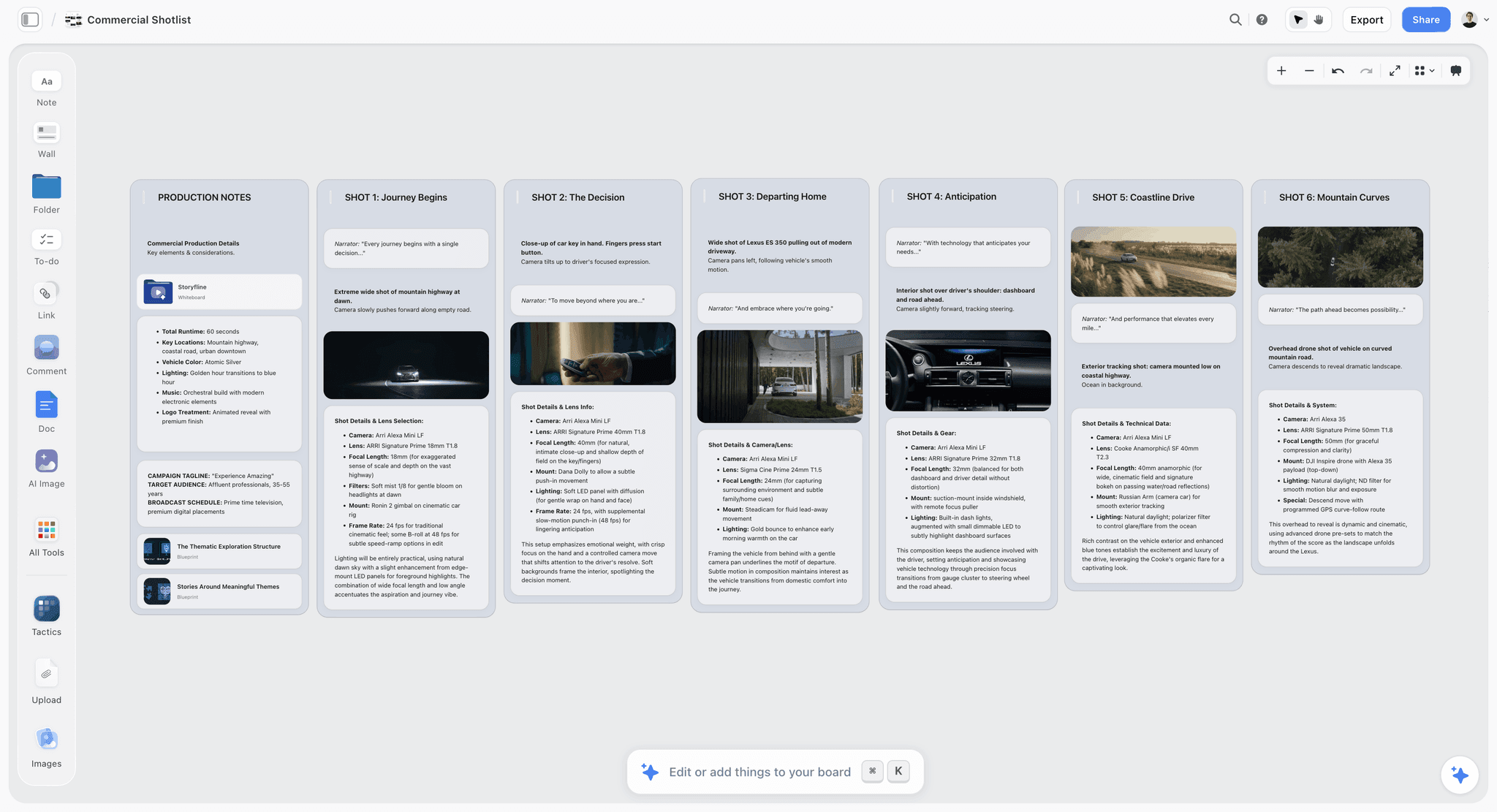
Storyflow board with a row of shot cards, each with a frame, a shots checklist and direction notes
Run the shot list prompts straight onto a board
Install the Storyflow plugin in ChatGPT, give it one project, and turn prompts 13 to 16 into shot cards your director, DP and client open by link.

How to Use These Prompts With the Storyflow Plugin
The prompts work in plain ChatGPT. The board clause needs the plugin, which takes a few minutes to set up once.
Install it and choose the project
Open the Storyflow listing in ChatGPT, select Install plugin, sign in to Storyflow and choose which projects ChatGPT may use: all of them, or the ones you pick. Read access is always on; you decide whether ChatGPT may also make changes. Availability depends on your ChatGPT plan, workspace and region, and in a Business or Enterprise workspace an admin manages plugins. The full steps are in how to install plugins in ChatGPT.
Name the plugin and the board in the prompt
Type @ and pick Storyflow, or choose it from the + menu, then name the project and board: "on my Tidewater project, main board". OpenAI notes that ChatGPT can also pick an installed plugin on its own when it is relevant (Plugins in ChatGPT), but naming it removes doubt when you have several installed. To decide how often ChatGPT asks before it reads or changes the board, open Settings, then Plugins, then Permissions (Managing app permissions in ChatGPT); reads allowed and changes confirmed suits most planning work.
Know what the plugin builds and what it does not
| Through the Storyflow plugin, ChatGPT can | Through the plugin, ChatGPT cannot |
|---|---|
Read your projects, boards and documents, and say what changed on a board in the last day or week and who changed it | Generate AI images (use ChatGPT's own images or Runway, then upload) |
Build tables, documents, notes, to-dos, headings and links | Read comments on the board |
Build shot cards: one wall per setup with a frame, a shots checklist, direction and equipment | Run Storyflow's in-app AI workflows or make its designed PDF deliverables |
Build a strip board: a wall per shoot day, a strip per scene, pages per day | Receive a photo you attach in the chat; it gives you an upload link instead |
Build walls, sections, mind maps, diagrams, colour palettes and slide decks | Recalculate a strip board when a scene moves; ask it to rebuild instead |
Place pictures from web addresses and move, group and connect elements | Send call sheets or track who confirmed |
Plugin actions run on ChatGPT's model and use no Storyflow AI credits. An invited free Storyflow account can make 25 plugin actions a week; Plus, Pro and Max have no weekly limit.
Development and Treatment Prompts
These turn a client brief into an idea the client can say yes to. The board clause matters most at the end of this stage, when the treatment has to be shared.
Pitch and treatment
- 1. Five pitches from the brief. "Here is the client brief for a 45-second spot. Write five one-line pitches under 25 words each, each built on a different idea, and say which line of the brief each one answers." You get five lines, each tied to a sentence of the brief, so you can defend the pick on the call.
- 2. The treatment outline. "Using pitch 3, write a treatment for a 45-second commercial: the story in one paragraph, the tone in three adjectives with a reference film for each, the look (light, lens, colour), the sound, and the deliverables. Under 400 words. Put it on my Tidewater board in Storyflow as a document." You get a one-page document on the board the client can open by link.
- 3. The treatment as slides. "Turn the treatment document on my Tidewater board into a six-slide deck in Storyflow: title, story, look, sound, references, deliverables. One idea per slide, 30 words at most." You get a deck on the board that presents fullscreen and exports as PDF.
- 4. The client's questions. "Read the treatment on my board and list the ten questions this client is most likely to ask on the call, each with a one-sentence answer taken only from the treatment. Mark any question the treatment cannot answer." The unanswerable questions are the real output: they tell you what to decide before the call.
References and look
- 5. Real references. "Find six real reference photos for this look: dawn light on whitewashed walls, a cool grade with one warm accent, people in linen. For each, give the source page and one line on why it fits, then add them to a References wall on my Tidewater board." ChatGPT searches the web itself and the plugin places the pictures from those addresses. References are for the team; check rights before anything goes in front of an audience.
- 6. The moodboard skeleton. "Build a moodboard section on my Tidewater board with walls for light, colour, wardrobe, location and casting, and a five-colour palette for a cool dawn grade with one warm terracotta accent." You get the structure and a palette; the pictures in each wall are yours to choose or upload.
Script Breakdown Prompts
The breakdown is the document every later stage copies, so these prompts insist on counts and on marking what was assumed. The ChatGPT script breakdown page covers the board formats in more depth.
The scene pass
- 7. Scenes first, nothing else. "Here is the script. List every scene as a numbered row: scene number, INT or EXT, location, day or night, characters who appear, and length in eighths of a page. Do not list shots. End with the total scene count." Check the count against the script before anything else; a missing scene here is missing everywhere downstream.
- 8. Elements per scene. "For each scene, list cast, extras, props, wardrobe, vehicles, set dressing, special effects and sound needs. Include items the script implies but does not name, and mark those as implied." StudioBinder's breakdown guide advises going through the script a few times so nothing is missed, and notes that the colours used to mark each element category can vary (StudioBinder on breakdown colours).
- 9. The breakdown on the board. "Put the breakdown on my Tidewater board in Storyflow as a table, one row per scene, with the element columns from your last answer." You get a table the first AD and the art department read from the same link.
The department and risk passes
- 10. Split by department. "Read the breakdown table on my board and build a wall for each department (camera, art, wardrobe, sound, locations) listing what each needs, with the scene number on every item." Department heads stop reading the whole table to find their four lines.
- 11. The risk pass. "From the breakdown on my board, list every item that needs a permit, a licence, a specialist or a safety plan: drones, animals, children, water, open flame, road use, licensed music. One line each, with the scene number." This list feeds the permit prompts in the locations stage.
- 12. Revised pages. "The client sent revised pages for scenes 3 and 5, pasted below. Compare them to the breakdown table on my board, tell me which rows and elements change, then update only those rows." You get a change list in the chat and an updated table, instead of a second breakdown nobody marks as current.
Shot List and Storyboard Prompts
A shot list is one entry per camera setup, not per scene. These prompts force that, then turn the setups into shot cards with frames. For the formats themselves, see the ChatGPT shot list page.
Setups and cards
- 13. One entry per setup. "For scene 2, list one entry per camera setup: setup ID (2A, 2B), shot size, angle, movement, lens range, what the shot covers, and minutes to light and shoot. Plan the coverage a 45-second spot needs, not a feature." You get five to eight setups for a dialogue scene, each with a time you can add up.
- 14. Shot cards on the board. "Build shot cards on my Tidewater board in Storyflow for every setup in scenes 1 to 4, in shooting order, with the direction and the kit for each." You get a connected row of shot walls, each with an empty frame, a shots-required checklist, a direction note and an equipment note.
- 15. The coverage check. "Read the shot cards on my board and compare them with the script: list every line of action or dialogue no setup covers, and every setup that covers nothing in the script." This is the prompt that catches the missing insert before the shoot, not in the edit.
- 16. A, B and C lists. "We have nine working hours on day one. Using the minutes on each day-one setup, sort them into A (must have), B (should have) and C (if time), and total the minutes in each list." The totals show whether the A list alone fits, which is the conversation to have with the director today.
Frames and verticals
- 17. Reference frames for the hero setups. "For the six hero setups, find one real reference photo each on the web and place it beside its shot card on my board, captioned as reference." Through the plugin, ChatGPT places pictures from web addresses; it does not generate them. For generated previs frames, Runway's plugin makes them in the chat (Runway for ChatGPT), and you upload the keepers to the board.
- 18. Your own recce stills. "I have recce photos from three locations. Give me one upload link per location, each filling its own wall on my Tidewater board." The plugin returns a link per wall, each good for 15 minutes; upload each location's stills through its own link and they land already sorted.
- 19. Marking the verticals. "Mark which setups on my board also need a 9:16 frame for the six vertical cutdowns, and add a note reading 'Vertical 9:16' inside each of those cards." Doing this before the shoot is cheaper than reframing a 16:9 hero shot that has no room above the subject.
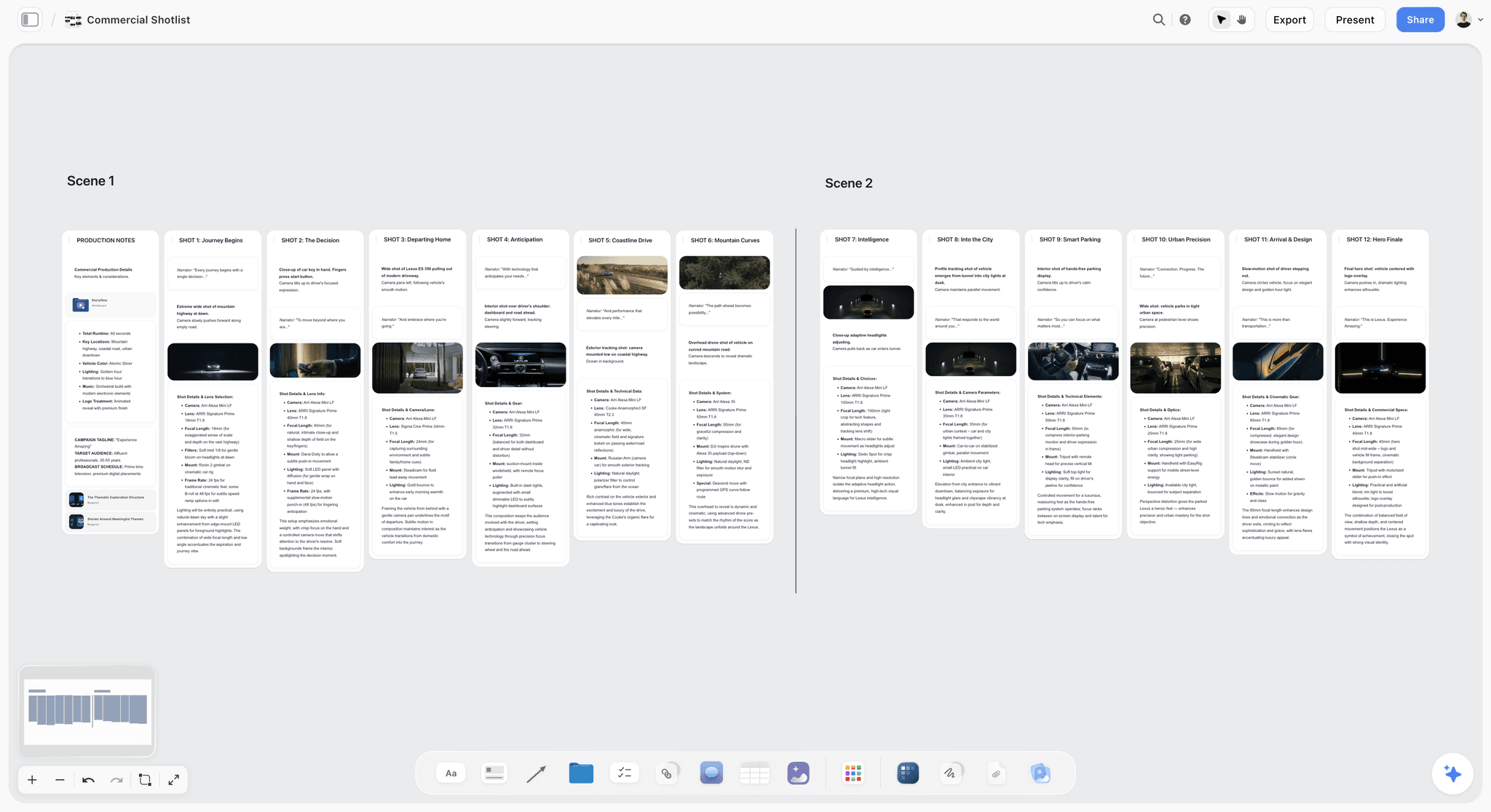
A commercial shot list on one board: two scenes, twelve setups, each with its frame, narration and camera notes.
Location Scouting Prompts
ChatGPT is a fast first researcher for locations and an unreliable final one. These prompts make it cite every claim so you can check it. The ChatGPT location scouting page shows the board layout in full.
Briefs and candidates
- 20. The location brief. "From the breakdown on my board, write a brief for each location: what the scene needs on camera, what it needs off camera (power, parking, toilets, a holding area), the light direction at the planned shoot time, and noise risks." You get one paragraph per location that a scout or a venue manager can answer.
- 21. Five candidates with sources. "Search the web for five rooftop terraces in Lisbon facing east, open to commercial filming. For each: name, area, why it fits the brief, who to contact and the source link. Put them in a table under a Locations wall on my Tidewater board in Storyflow." Treat every row as a lead until someone calls the venue.
- 22. The sun check. "For an east-facing rooftop in Alfama on 12 November, estimate sunrise and when direct sun clears the buildings opposite, and say how confident you are." Confirm the answer in a sun-position tool such as SunCalc, which shows sunrise, the sun's path and shadow length for a place and date.
Permits and the recce
- 23. The permit checklist. "List what the Lisbon film office needs for a two-day commercial shoot with a drone and a public terrace: the office, lead time and documents, with a source link for each claim. If you cannot find a source, say so instead of guessing." Rules differ by city. For scale, FilmLA in Los Angeles says basic permits typically take 3 to 7 business days, asks for proof of insurance, and covers up to five locations within seven days on one application (FilmLA).
- 24. The recce day. "Turn the shortlisted locations into a recce day: route order, time at each, what to photograph (the full space, power points, the sun side, access) and a checklist per location as to-dos on my board." You get to-dos per location; assign them on the board yourself.
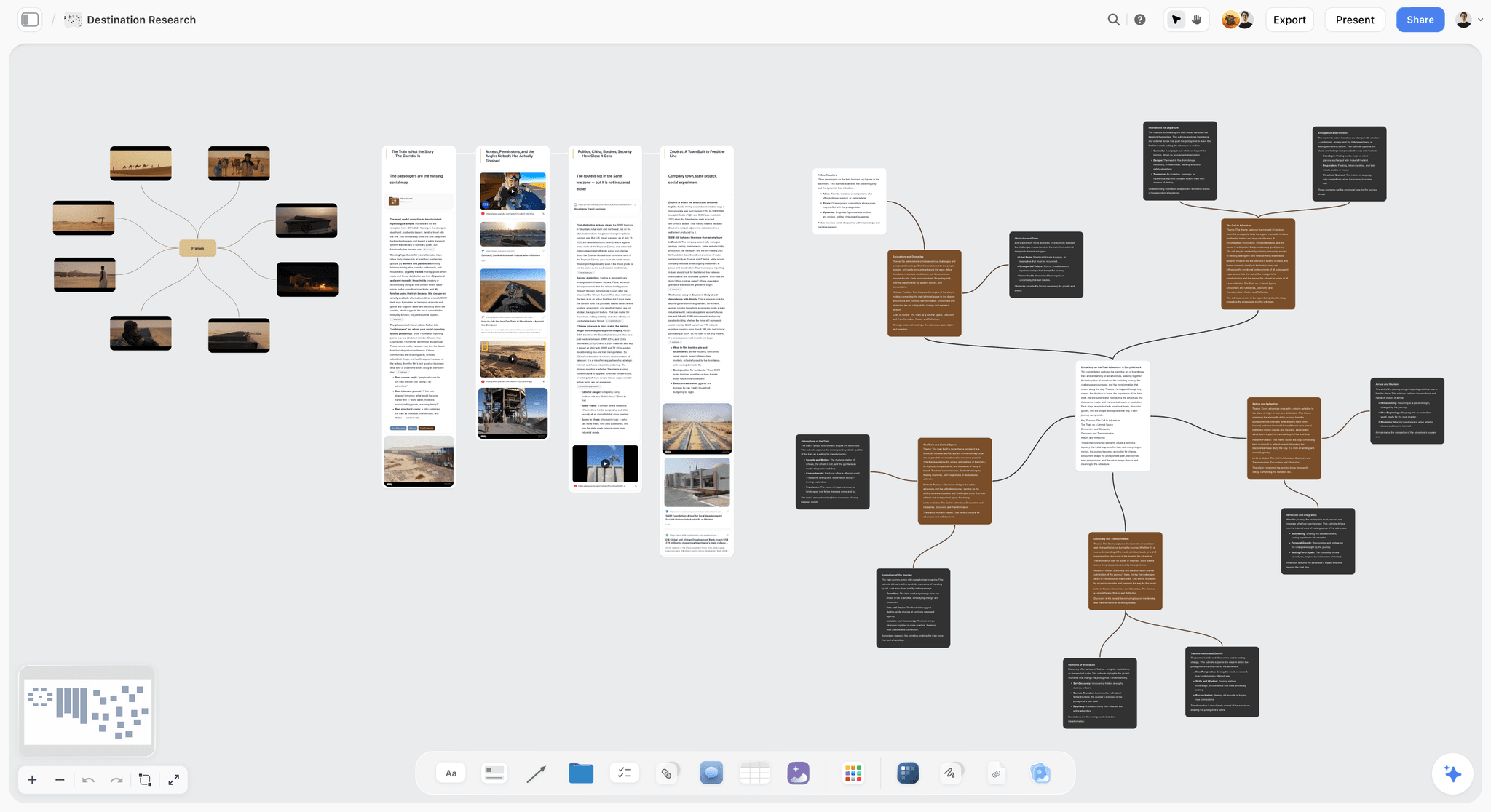
Location research on a board: candidate frames mapped on the left, sourced research walls in the middle.
Schedule and Strip Board Prompts
Script order is almost never shoot order. These prompts collect what cannot move before ChatGPT orders anything. The ChatGPT shooting schedule page covers the strip board itself.
Constraints and the board
- 25. The immovables. "Before scheduling, list everything that cannot move: talent availability, location windows, sunrise and sunset, permit hours, the client's attendance. Ask me for anything missing instead of assuming it." You get a short list of questions back, which is the point.
- 26. The strip board. "Build a two-day strip board on my Tidewater board in Storyflow from the breakdown table: sunrise exteriors on day one, interiors on day two, grouped by location." You get a wall per day with a strip per scene, coloured by interior or exterior and day or night, and each day totalled in pages.
- 27. The day math. "For day one, list the setups in shooting order with their minutes, add 30 minutes for each company move, a 60-minute lunch and 45 minutes of contingency, and tell me whether it fits in ten hours." Simple arithmetic, but it is the arithmetic producers skip at midnight.
Changes
- 28. Rebuild after a constraint changes. "The rooftop is only available until 10:00 on day one. Rebuild the strip board on my board with that constraint and list which scenes moved." The strip board does not recalculate on its own, so a rebuild is the normal way to apply a change. The plugin does not delete anything, so remove the old strip board yourself.
- 29. What changed. "What changed on my Tidewater board since yesterday, and who changed it?" The plugin reports changes over the last day or week, which settles "who moved scene 4?" without a thread.
Call Sheet and Shoot-Day Prompts
A call sheet is the one document that must never contain a guess. These prompts make blanks visible.
The call sheet
- 30. Call sheet facts as a document. "Draft the day-one call sheet as a document on my Tidewater board: general call, location addresses, parking, nearest hospital with address, weather, the schedule by setup, and cast and crew calls. Leave every fact I have not given you as a visible blank." You get a document with blanks you fill. The designed call-sheet PDF is a job for Storyflow's in-app AI, which uses Storyflow AI credits and is separate from the plugin; neither sends the sheet. More in how to make a call sheet with ChatGPT or Claude.
- 31. The night-before message. "Write the message I send the crew tonight: call time, address, parking, what to bring and the board link. Under 120 words, no emoji." Paste it into your crew chat yourself.
On the day and after
- 32. The producer's day list. "Make a to-do list on my board for the producer on day one: releases to collect, petty cash, location sign-off, drone notification, wrap checks." To-dos take an assignee and a due date, which you set on the board; ChatGPT cannot set a to-do's assignee. To have ChatGPT fill in who does what, ask for a table with an Owner column instead: it fills that with people who already have access to the board, and a name that matches nobody stays empty.
- 33. The wrap note. "Read the day-one shot cards on my board, list the setups whose checklists are not ticked, and propose where each fits on day two." You get a carry-over list to agree with the director before the crew leaves.
Post-Production and Delivery Prompts
Post work happens in the editing plugins; the board keeps the deliverables list honest.
Selects and versions
- 34. A paper edit from the interview. "@Descript import the interview from my Tidewater folder, transcribe it and find every answer about the first harvest. Then give me a 45-second paper edit in interview order." Descript runs imports and edits in your account and spends its media minutes and AI credits (Descript help).
- 35. The version matrix. "List every deliverable: the 45-second master and six vertical cutdowns of 6 to 15 seconds, in Portuguese and English, with subtitles. Put the matrix on my board as a table, one row per file, with a status column." Fourteen rows is easier to finish than "the versions".
- 36. Subtitles. "@Kapwing add English and Portuguese subtitles to the master and the six cutdowns in my Tidewater workspace." Kapwing's connector generates, translates and dubs subtitles and spends workspace credits (Kapwing MCP).
Worked Example: One Prompt Chain for a Two-Day Brand Shoot
This chain is illustrative, written as a fictional team's project. Tidewater Pictures is a three-person production company in Lisbon making a 45-second spot and six vertical cutdowns for Folha, a sparkling-tea brand, over two days in November. The producer runs nine prompts in one ChatGPT conversation with the Storyflow plugin installed and the Tidewater project granted.
From brief to treatment (prompts 1 and 2)
Prompt 1 returns five pitches. The team picks the third, "A city waking up one terrace at a time, and the first bottle opened at sunrise", because it answers the brief's line about mornings. Prompt 2 writes the treatment as a document on the board: one paragraph of story, three tone words with a reference film each, a look section (low dawn sun, 35 to 50 mm, cool grade with terracotta accents) and a deliverables list.
From script to breakdown (prompts 7 and 9)
The client approves and the copywriter's script arrives. Prompt 7 returns seven scenes and a total of seven, matching the script. Prompt 9 puts the breakdown table on the board: seven rows, columns for cast, extras, props, wardrobe, vehicles and sound. Two items come back marked implied: a delivery bike in scene 4 and a second bottle for a pour in scene 6.
From breakdown to shot cards (prompts 13 and 14)
Prompt 13 runs scene by scene and lands on 26 setups. Prompt 14 builds them as a row of shot cards in shooting order. The director merges two pairs that share a lens and adds an insert of the cap twisting, so the row ends at 25.
Locations and schedule (prompts 21 and 26)
Prompt 21 returns five rooftop candidates with links. Two have no evidence they accept commercial shoots, so the producer drops them and calls the other three; one says yes for the morning only. Prompt 26 builds the strip board around that: four exterior scenes on day one before 10:00 and after 15:00, three interiors on day two.
The call sheet (prompt 30)
Prompt 30 drafts the call sheet as a document with five blanks: the weather, the rooftop contact's mobile, the catering drop time, the second assistant's call and the drone notification reference. The producer fills them the night before.
What the board held at the end
| Prompt | Element on the board | Shape of the output |
|---|---|---|
2 | Treatment document | One page: story, tone, look, sound, deliverables |
9 | Breakdown table | 7 rows, 6 element columns, 2 implied items marked |
14 | Shot cards | 26 setup walls, edited to 25 |
21 | Locations table | 5 candidates with links, 3 kept after calls |
26 | Strip board | 2 day walls, 7 strips, pages per day |
30 | Call sheet document | Day one, 5 facts left blank for the producer |
What needed a human: choosing the pitch, dropping two locations with no evidence, the director's merge and insert, and every blank on the call sheet. That is the right split. ChatGPT did the typing and the arithmetic; the team made every decision a client would hold them to.
When the Output Is Weak: How to Edit the Prompt
Asking "try again" changes the wording of a bad answer, not its cause. Diagnose first, then edit the one part of the prompt that is missing.
It invented a location, a person or a fact
The prompt allowed guessing. Add "use only the script and brief pasted above; if something is not there, write UNKNOWN" and, for research, "give a source link for every claim". Then ask for the list of what it marked unknown.
It skipped or merged scenes
The prompt asked for too much at once. Go back to the scene pass alone (prompt 7) and make it end with a count you can check against the script.
The shot list has one entry per scene
The prompt never defined a shot. Say "one entry per camera setup" and give an example ID scheme (2A, 2B, 2C). Five to eight entries for a dialogue scene is a sensible floor for a check.
The schedule ignores what cannot move
The constraints arrived after the request, or not at all. Run the immovables prompt (25) first and paste its answer into the scheduling prompt.
The treatment sounds like every other treatment
The prompt gave no taste. Name two reference films, three adjectives and two words to avoid ("epic", "journey"), and cap the length.
| Symptom | Likely cause | Edit to make |
|---|---|---|
Invented names, places or facts | No rule against guessing | "Use only what I pasted; write UNKNOWN otherwise; cite sources" |
Missing scenes | Several deliverables in one prompt | Scene pass alone, ending with a total count |
One shot per scene | Shot not defined | "One entry per camera setup", with an ID example |
Schedule breaks a constraint | Constraints not given first | Run the immovables prompt, paste the result |
Generic tone | No references or limits | Two reference films, three adjectives, banned words, a word cap |
Too long to use | No format | Name the columns or the word count, and the destination |
Board looks wrong | Vague board instruction | Name the element: "a table", "shot cards", "a strip board" |
Quick Reference: Which Prompt Builds What
| Deliverable | Prompts | Built where | Element |
|---|---|---|---|
Pitch and treatment | 1 to 4 | Chat, then board | Document and slide deck |
Moodboard and references | 5, 6 | Board | Walls, pictures from the web, colour palette |
Script breakdown | 7 to 12 | Chat, then board | Table, department walls |
Shot list | 13 to 16 | Chat, then board | Shot cards |
Frames and verticals | 17 to 19 | Board | Pictures, notes inside shot cards |
Locations | 20 to 24 | Chat, then board | Table, to-dos |
Schedule | 25 to 29 | Board | Strip board |
Call sheet and shoot day | 30 to 33 | Board and chat | Document, to-dos |
Post and delivery | 34 to 36 | Descript, Kapwing, board | Compositions, subtitles, version table |
If you are choosing which plugins to install for the post rows, the best ChatGPT plugins for filmmakers compares ten of them by job.
What These Prompts Cannot Do for You
ChatGPT with a board is a strong coordinator. It is not a production office, and a few jobs stay with people and other tools.
Confirm anything in the real world
A location, a permit rule or a sunrise time from a chat is a lead. Someone calls the venue, reads the film office page and checks the sun tool before it goes on the call sheet.
Send, track or chase
Storyflow does not send call sheets or track confirmations, and ChatGPT cannot set a to-do's assignee; it can only fill a table's Owner column with people already on the board. For a large crew with daily call sheets, StudioBinder handles distribution and confirmations outside ChatGPT.
Make a timed animatic or a finished storyboard frame
Storyflow has no animatic or MP4 export, and the plugin does not generate images. For frames, generate them with ChatGPT's own images or Runway, then upload them to the board; for storyboard prompts specifically, see ChatGPT prompts for storyboarding.
The Bottom Line
The prompts that save a producer an evening are not clever. They paste the real pages, ask for one deliverable at a time, say what cannot move and name the output. Run the scene pass, check the count, then build the shot cards and the strip board from what you checked. Install the Storyflow plugin so each answer lands on a board the crew and client can open, and keep the decisions that a client will hold you to for yourself. Start with prompt 7 on your next script and the ChatGPT shot list page for what comes after it.
FAQ: ChatGPT Prompts for Filmmakers
What are the best ChatGPT prompts for filmmakers?
The best ChatGPT prompts for filmmakers name one deliverable, paste the real script or brief, state what cannot move and fix the output format. Ask for the scene breakdown first, then shots, then the schedule. With the Storyflow plugin, end each with "put it on my board in Storyflow" so the result lands where the crew can open it.
What is the best ChatGPT plugin to use with film prompts?
Storyflow is the best ChatGPT plugin for film planning prompts, because ChatGPT builds the results on a board: breakdown tables, shot cards, strip boards, call-sheet documents and reference walls the crew and client open by link. Use Descript or Kapwing alongside it for post prompts, and ShotClick when the prompt rewrites formatted script pages.
What is a good ChatGPT prompt for a script breakdown?
One that asks for scenes only: paste the script and request a numbered row per scene with INT or EXT, location, day or night, characters and length in eighths, ending with the total scene count. Check that count against the script, then run a second prompt for cast, props, wardrobe, vehicles, effects and sound, with implied items marked. Two passes catch what one long prompt skips.
How do I stop ChatGPT making a generic shot list?
Give it the scene, the deliverable length, the crew size and a definition: one entry per camera setup, with an ID such as 2A or 2B, a shot size, movement, lens and minutes. Then run a coverage check against the script. Generic lists come from prompts that never pasted the scene or defined a shot.
How do I prompt ChatGPT for a shooting schedule?
Give it what cannot move first: talent hours, location windows, sunrise and sunset, permit hours, and ask it to list anything missing before it orders a single scene. Then ask for the days. Through the Storyflow plugin, ChatGPT builds a strip board with a wall per day and a strip per scene, each day totalled in pages. The strips do not recalculate, so ask for a rebuild after each change.
What should a call sheet prompt tell ChatGPT?
Every fact you already have, and a rule for the rest: general call, addresses, parking, the schedule by setup, cast and crew calls, then "leave anything I have not given you as a visible blank". That rule stops it guessing a hospital, an address or a call time. Through the Storyflow plugin it writes the sheet as a document on your board; it does not send it or track confirmations.
How should I prompt ChatGPT to find filming locations?
Give it a written brief, ask for a fixed number of candidates and require a source link for every claim. Through the Storyflow plugin, ChatGPT puts them in a table on your board with the links and reference pictures. Treat each row as a lead: availability for commercial shoots, fees and permits need a call or the venue's own page, and sun timings need a tool such as SunCalc.
Do these prompts work in Claude?
Yes, the prompts are plain text and work in Claude too. Claude calls its integrations connectors rather than plugins; Storyflow connects to Claude, Gemini and Grok as a custom connector, with setup for each on Storyflow's MCP page. The board clause then works the same way, and the boards are the same ones ChatGPT uses.
How long should a film prompt be?
As long as the source material needs and no longer. The instruction part is usually two to five sentences: role, deliverable, constraints and format. The pasted script or brief can be pages long. A short instruction with the full script beats a long instruction with no script every time.
Do the prompts use my Storyflow AI credits?
No. When ChatGPT builds or reads your board through the Storyflow plugin, it runs on ChatGPT's own model and uses no Storyflow AI credits. An invited free Storyflow account can make 25 plugin actions a week; Plus, Pro and Max plans have no weekly limit.
Can ChatGPT update my breakdown when the script changes?
Yes. Paste the revised pages and ask ChatGPT to compare them with the breakdown table on your board, list the rows and elements that change, then update only those rows. Through the Storyflow plugin it edits the existing table in place, so there is still one breakdown everyone reads. Rebuild the strip board afterwards, because it was built from the old table and does not follow it.
Is Storyflow free to use with ChatGPT?
Not during early access. Storyflow is paid-only for now, starting with Plus at $7.99 a month billed annually; a Free plan launches before the end of 2026. Anyone a paid member invites to a board joins free today, and an invited free account can make 25 plugin actions a week.
Table of Contents
- Key Takeaways
- Why a Film Prompt Comes Back Generic
- The Four Parts of a Production Prompt
- How to Use These Prompts With the Storyflow Plugin
- Development and Treatment Prompts
- Script Breakdown Prompts
- The scene pass
- The department and risk passes
- Shot List and Storyboard Prompts
- Location Scouting Prompts
- Schedule and Strip Board Prompts
- Call Sheet and Shoot-Day Prompts
- Post-Production and Delivery Prompts
- Worked Example: One Prompt Chain for a Two-Day Brand Shoot
- When the Output Is Weak: How to Edit the Prompt
- Quick Reference: Which Prompt Builds What
- What These Prompts Cannot Do for You
- The Bottom Line
- FAQ: ChatGPT Prompts for Filmmakers
- Related Reading
Templates to check out for this topic


Filmmaking templates you can use in Storyflow
Skip the blank canvas. Open one of these filmmaking boards in Storyflow and the AI builds on the structure that is already there, from research through the shot list.


See Storyflow in Action
A visual AI workspace where every feature lives inside one canvas. No tab-switching, no context lost.
Build your entire board from a single message
Type what you need in the AI chat at the bottom of your canvas. The AI adds cards, headings, and structure directly onto your board.
Use expert frameworks as AI context
Type @ in the AI chat and choose any Tactic. The AI tailors every response to that framework instead of giving generic advice.
Turn your board into a mind map in seconds
Ask the AI to restructure your canvas as a mindmap. It connects your ideas into a visual hierarchy so you can see how everything relates.
Why Storyflow Exists
Storyflow actually began as a personal tool while working on creative and research projects.
We kept running into the same problem: ideas were scattered everywhere: notes, documents, and whiteboards.
Nothing helped us see how everything connected.
So we started building a workspace designed around how ideas actually grow.
→ Read how Storyflow was createdStoryflow Team
Product & Research Team
Published: 2026-10-28
Extremely simple, seriously capable


See how easy it is to get started
Watch a real project come together, from a blank board to a finished plan, clicked through step by step.
Start creating with AI and become more productive
Transform your creative workflow with AI-powered tools. Generate ideas, create content, and boost your productivity in minutes instead of hours.