The 12 Best Video Treatment Tools in 2026
Storyflow is the best video treatment tool in 2026: its AI builds the designed treatment from your brief, concept and references as one PDF. 12 tools compared, with Canva, InDesign and Gamma for the jobs it does not do.

Category
Filmmaking
Author

Justkay
Documentary Filmmaker & Founder at Storyflow
Topics
2026-07-10
•
36 min read
•
Filmmaking- best video treatment tools 2026
- video treatment
- how to write a video treatment
- commercial treatment tools
- music video treatment
- director treatment software
What are the best video treatment tools in 2026?
Storyflow is the best video treatment tool in 2026: its AI reads the brief, your concept notes and the reference stills on your board, then builds the designed treatment (cover and logline, the idea, tone and look, captioned references, structure, why us) as pages you export as one PDF. Choose Canva or Adobe InDesign to design every page by hand with full typography control, and Gamma to generate a deck from a prompt. Storyflow has no PowerPoint export and no presenter notes.

Full disclosure: Storyflow is our own product and it is listed first. The basis is one job: building the video treatment from the brief, concept and references on your board, as designed pages you export as one PDF. The rest of the list follows by job. What Storyflow does not do: it has no PowerPoint or Keynote export, no presenter view or speaker notes and no viewer analytics; its treatment pages are A4 portrait; and there is no free plan yet. Canva and Adobe InDesign go further on hand design and typography, Gamma generates a deck from a prompt alone, and Milanote has a free plan. We link to every tool so you can judge the fit.
Quick Comparison
Our pick first, then the rest by job. Storyflow leads because it develops the concept and builds the designed treatment from the same board; the other three each win one design job it does not do.
| Tool | Best For | AI Features | Price |
|---|---|---|---|
| Storyflow | A designed treatment built from your brief and references, as one PDF | AI reads the board and builds the pages; image generation on Pro | $7.99 mo billed annually |
| Canva | Hand-designed treatment PDF from templates | AI design features; you lay out the pages | Free and Pro (see Canva) |
| Adobe InDesign | Print-quality layout and typography | Manual layout | US$22.99 mo, annual plan billed monthly |
| Gamma | A themed deck from a prompt | Generates slides from text | See Gamma |
Quick Picks: The Best Video Treatment Tools by Job
Storyflow is our first pick because it builds the video treatment from your own material: put the brief, the concept and the references on one board, and its AI turns them into designed pages. The other picks each win one job Storyflow does not do, and each is listed with that job.
Last updated October 11, 2026. Competitor prices come from each vendor's own pricing page, checked that day; where a page blocked the read or showed no US dollar price, this guide says so instead of quoting an old number.
Best overall, and best for building the treatment from a brief: Storyflow. Storyflow is a visual AI workspace: an infinite canvas where a project's notes, documents, images and moodboards sit together on boards, and an AI agent that reads the board and builds on it. Ask for "A treatment from this board" and Storyflow's AI builds A4 pages you present fullscreen or export as one PDF. From $7.99 a month billed annually. See the director's treatment template page.
Best for hand-designed layouts: Canva. Canva is the pick over Storyflow when you want to design every page yourself from a template library, with control of fonts and brand colours that goes further than Storyflow's.
Best for print-quality typography: Adobe InDesign. InDesign is the pick over Storyflow when a designer is art-directing a high-budget treatment that may be printed.
Best for a deck generated from a prompt: Gamma. Gamma is the pick over Storyflow when you have a paragraph of text, no board and no references, and want themed slides from it.
Best free reference board: Milanote. Milanote is a hand-arranged reference board with a free plan; unlike Storyflow it has no AI that builds the treatment from the board, so choose it when cost must be zero.
Best for the copy with producer notes: Google Docs. Google Docs is the pick over Storyflow when the director's statement needs line-by-line comments from a producer.
The order throughout is our pick first, then the rest by job. Storyflow is our own product; the basis for listing it first is stated in the section on how we evaluated.
Which Video Treatment Tool Should You Use?
Use Storyflow when you have a brief and need a treatment that can go to the agency: its AI builds the designed pages from the concept and references on your board. Choose a specialist only for the job Storyflow does not do, such as hand typography, print output, a PowerPoint file or presenter notes.
| If you need | Use | Why |
|---|---|---|
A designed treatment built from your brief, concept and references | Storyflow | Its AI reads the board and builds A4 pages you export as one PDF |
A treatment built from inside ChatGPT or Claude | Storyflow (MCP connector) | The assistant reads your Storyflow project and builds in it |
A lookbook or pitch deck from the same references | Storyflow | One image per page with a caption, or slides, from the same board |
Every page designed by hand from a template | Canva | A large drag-and-drop template library and brand typography control |
Print-grade layout and typography | Adobe InDesign | Grids, type control and print output |
Slides generated from a prompt, with themes | Gamma | Prompt-to-deck generation |
A free board for references only | Milanote | Free plan with 100 notes, images or links and 10 file uploads |
Precise film-still references | ShotDeck | A searchable library of frames from real films |
An editable PowerPoint file or presenter notes | Pitch or Keynote | Storyflow exports PDF only and has no presenter view |
All 12 Video Treatment Tools, Ranked
Storyflow ranks first because it is the tool on this list that both develops the idea and builds the designed document from it. The ratings below are our judgements of usefulness for a video treatment specifically, and they are unchanged from the original review.
- Storyflow: best for building a treatment with AI from your brief, concept and references (9.3/10)
- Milanote: best hand-arranged reference board, with a free plan (9.0/10)
- Canva: best for a hand-designed treatment PDF from templates (8.8/10)
- Gamma: best for a deck generated from a prompt (8.6/10)
- Adobe InDesign: best for a print-quality treatment (8.3/10)
- Google Docs: best for writing the treatment copy with notes (8.1/10)
- Pitch: best collaborative deck with link analytics (7.9/10)
- ShotDeck: best film-still reference library for the look (7.7/10)
- Figma: best for design-team treatments (7.5/10)
- Notion: best for treatment content kept as pages and databases (7.3/10)
- Pinterest: best for gathering references widely (7.1/10)
- Keynote: best for presenting a treatment live (6.9/10)
Comparison Table: 12 Video Treatment Tools Compared
Storyflow is the first row because it builds the treatment for you, from material you already have. Every other row says what the tool is best for and when to choose it over Storyflow, with a price read from the vendor's page on October 11, 2026.
| Tool | Best For | Starting Price | Free Option | Builds the treatment for you? | Choose it over Storyflow when | Rating (/10) |
|---|---|---|---|---|---|---|
Storyflow | A designed treatment built from your brief and references | $7.99/mo billed annually | Not yet (Free plan due before the end of 2026; invited collaborators join free) | Yes: AI builds the pages from the board | Not applicable: our pick | 9.3/10 |
Milanote | Hand-arranged reference boards | $9.99/person/mo billed annually | Yes (100 notes, images or links; 10 uploads) | No | Cost must be zero and the board is references only | 9.0/10 |
Canva | Hand-designed treatment PDF from templates | See Canva's pricing page | Yes (Canva Free) | No: you lay out a template, with AI design features | You want control of every font and margin | 8.8/10 |
Gamma | A deck generated from a prompt | See Gamma's pricing page | Yes (exports carry a Gamma badge) | Yes, from a prompt or pasted text | You have text, no board, and want themed slides | 8.6/10 |
Adobe InDesign | Print-quality layout | US$22.99/mo (annual, billed monthly) | See Adobe | No | A designer is art-directing a printed treatment | 8.3/10 |
Google Docs | Treatment copy with producer notes | Free with a Google account | Yes | No | The copy needs line-by-line comments | 8.1/10 |
Pitch | Collaborative decks with analytics | Free plan; paid plans shown in euros | Yes | No (AI credits included) | You need to know who opened the deck | 7.9/10 |
ShotDeck | Film-still reference library | See ShotDeck's pricing page | See ShotDeck | No | You need precise film-still references | 7.7/10 |
Figma | Design-team treatments | Professional $16/full seat/mo | Yes (Starter) | No | A design team already works in Figma | 7.5/10 |
Notion | Content kept as pages and databases | Plus $10/seat/mo billed annually | Yes | No | You organise in pages and databases | 7.3/10 |
Gathering references | Free | Yes | No | Wide-net discovery at the very start | 7.1/10 | |
Keynote | Presenting in the room | Free | Yes | No | You present live with presenter notes | 6.9/10 |
Ratings reflect usefulness for a video treatment specifically. Storyflow's rating predates its designed treatment pages and was not raised.

Storyflow canvas developing a video treatment's concept, references, and approach the AI can read
Build the treatment from your brief and references
Put the brief, the concept and the reference stills on one Storyflow board. The AI tests the idea against the brief, then builds the designed treatment as pages you export as one PDF.

Frequently Asked: Which Video Treatment Tools Are Free, and What Do Directors Mostly Use?
Are video treatment tools free to use?
Some are. Google Docs and Pinterest are free, Canva has a free plan, Milanote's free plan holds 100 notes, images or links and 10 file uploads, and Pitch's free plan allows unlimited presentations with its branding on exports. Storyflow is not free today: Plus is $7.99 a month billed annually, the Free plan launches before the end of 2026, and anyone a paid member invites to a board joins free.
What do people mostly use for video treatments?
Most directors use a stack: a board for the concept and references, a design tool for the pages, and a document for the copy. Storyflow covers all three on one board, because its AI builds the designed pages from the concept and references. The common hand-built stack is Milanote or Pinterest for references, Google Docs for copy and Canva, Keynote or InDesign for layout.
What are the best video treatment template tools?
Storyflow, when you want the template filled in: its treatment workflow lays out the cover, the idea, tone and look, captioned reference pages, structure and why-us pages from your board, and its 200+ Tactics give the thinking a structure. Canva has the largest library of designed layouts you fill in by hand. Milanote has moodboard and storyboard templates for the reference side.
Which video treatment tools have AI?
Storyflow's AI builds the treatment, a lookbook or a pitch deck from the board, and on Pro and Max generates reference images. Gamma generates a themed deck from a prompt or pasted text. Canva has AI design features inside its editor. Milanote, Pinterest and Keynote are manual for this job, and Google Docs is where you write the copy yourself.
Where is Storyflow not the right answer?
Storyflow is the wrong tool for an editable PowerPoint or Keynote file (it exports PDF), for presenter notes in the room (Keynote), for viewer analytics (Pitch on its Team and Business plans), for print-grade typography (Adobe InDesign), and for a deep library of hand-design templates (Canva). It also does not host or review video; Vimeo and Frame.io do that.
What a Video Treatment Is (and How It Wins the Job)
A video treatment is a director's document responding to a brief, laying out how they will bring the project to life. For a commercial, music video or branded film, it is the pitch that wins or loses the job against other directors who can all execute the brief. What separates them is the idea and how vividly the treatment sells it.
A strong treatment typically carries five parts, and each one maps to a page Storyflow builds:
| Part of the treatment | What it holds | Where it lives on a Storyflow board | The page it becomes |
|---|---|---|---|
Concept or director's statement | The idea, and why it is the right one for the brief | A concept note beside the brief | Cover and logline, then the idea |
Tone and approach | How the film feels and how you will execute it | Notes on light, lenses, movement, pace and sound | Tone and look |
Visual references | Stills that show the look | A references wall or moodboard | Captioned reference pages, six stills to a page |
Structure or narrative | How the piece unfolds, beat by beat | A row of beat cards or a script document | Structure |
Craft notes and why you | Cinematography, music, casting, locations, relevant work | Notes, plus whatever you gave about cast and kit | Why us, with blanks for anything not given |
A treatment wins because it makes a client feel the finished film before it exists. A gorgeous treatment with a weak idea loses to a plainly designed one with a gripping vision. The concept is the product. The design is the wrapper. That is why this guide weights the tool that works on the idea and the document together.
The Two-Stage Treatment: The Framework That Organizes This Guide
Every video treatment is built in two stages: development, where you find the idea and the look, and design, where you package it into pages. Storyflow is the tool on this list that does both on one board; most of the others serve one stage, and each review below is tagged with the stage it serves.
Stage 1 is Development: finding the idea and the look. You respond to the brief, find the concept, gather references, and shape the approach until it is coherent and distinctive. This is creative, non-linear work, and it needs a surface where the idea and the references develop together. Get it wrong and no amount of design saves the treatment.
Stage 2 is Design: packaging the idea. Once the concept is clear, you lay it out into a document with type, images and polish. Canva, InDesign and Gamma serve this stage. A design tool cannot tell you your idea is generic.
The pattern that loses jobs is always the same: the director opens a design tool, lays out great-looking pages, and ships a first-draft concept that goes out polished and forgettable.
It is not that design tools fail. It is that a treatment wins on the idea, and design tools help you package an idea you have not finished developing. Keeping both stages on one Storyflow board removes the handover: the pages are built from the same concept note and the same reference wall you have been arguing with all week. For the treatment-writing craft specifically, see the best treatment writing tools in 2026.
How to Build a Video Treatment in Storyflow, Step by Step
Build a video treatment in Storyflow in six steps: put the brief on a board, write the concept beside it, collect the references, ask the AI for a treatment from the board, edit the page plan it shows you, then export one PDF. The first three steps are the thinking; the last three are where the retyping used to be.
| Step | What you do | What Storyflow's AI does | What you get |
|---|---|---|---|
1. Load the brief | Attach the agency brief or script (PDF, .fdx or Fountain) or paste it | Reads it, and reads the rest of the board with it | The brief on the board, beside your notes |
2. Find the concept | Write the idea in two or three sentences; ask the AI to test it against the brief | Says where the concept is generic or drifts from the brief | A concept note you have argued with |
3. Build the look | Drop in stills, or ask for a moodboard | Collects and lays out references; pulls a colour palette onto the board | A references wall |
4. Ask for the treatment | Pick "A treatment from this board" | Writes a page plan, one numbered line per page, and waits | A plan you can edit before anything is built |
5. Approve the plan | Paste the plan back edited, or accept it as written | Builds the designed A4 pages with the board's own images first | The treatment as pages on the board |
6. Send it | Edit any page by hand, present fullscreen, or export | Exports every page as one PDF | One PDF for the agency |
Step 2 is the one that wins the job. Storyflow's AI reads the current board plus up to five documents and three other boards you attach in the chat, so "does this concept answer the brief?" is a question about the actual brief. Storyflow's AI sees the pixels of an image only when you select it (up to 24 selected images), so select the reference frames when you want it to describe the look.
Step 4 builds six kinds of page. By default Storyflow's treatment has a cover with the title and logline, the idea, tone and look, captioned reference pages with six stills to a page, the structure, and why this team. Each reference is captioned with what it is being shown for, because a grid of good-looking frames with no captions says nothing. Storyflow writes the treatment in the register of the piece and keeps your own names and terms.
Pictures come from four places. If the board holds no images, Storyflow's AI asks where they should come from: labelled placeholders you fill later, real pictures from the web, or images generated with AI (on Pro and Max). The board's own images are used first when it has them.
Storyflow leaves blanks instead of promising. Cast, locations, kit, budget and schedule go into the treatment only where you gave them. Anything else is a marked blank, and Storyflow's AI lists the blanks in its reply so you can fill them before the PDF goes out.
The same board builds the companions. Ask for a lookbook (one picture to a page with a short caption, in 16:9) or a pitch deck from the same references. Treatment pages are A4 portrait; if the agency expects a landscape document, ask for the pitch deck or the lookbook, which are slide-shaped. Decks present fullscreen and export as one PDF.
What It Takes by Hand vs in Storyflow
By hand, a video treatment moves through four tools: a document for the copy, a board for references, a design tool for layout and an export. In Storyflow the board is the source for the pages. The treatment workflow itself has no recorded time; the closest recorded job, a pitch PDF of designed pages built from a board, took 3 minutes of agent time in a recorded run, against our hand estimate of about 4.5 hours.
| Job | By hand across separate tools | In Storyflow | Time or steps saved |
|---|---|---|---|
Notes and brief into an organized board | Sort notes into a document and folders, retitle, group | Paste the notes, ask for organized walls, accept the proposal | 3 minutes of agent time in a recorded run; about 45 minutes by hand (our estimate at 1.5 minutes per card) |
The treatment pages | Write the copy, open a design tool, pick a template, place and caption each still, export | Pick "A treatment from this board", edit the page plan, accept | Closest recorded job: 3 minutes of agent time in a recorded run for a pitch PDF built from a board; about 4.5 hours by hand (our estimate at 30 minutes per page) |
A deck version for the meeting | Rebuild the pages as slides in a second tool | Ask for a pitch deck from the same board, approve the outline | No recorded run: we estimate about 3 minutes for a board turned into slides, against about 5 hours by hand (also our estimate, at 30 minutes per slide) |
A lookbook | Place one still per page, caption each, export | Ask for a lookbook from the images on the board | One request instead of one page at a time |
A revision after agency notes | Change the copy in the document, then again in the layout | Change the board, ask for the page again | One source instead of two |
These are the only timings we publish. Each recorded figure is one run, not an average, the deck figure is an estimate, and they measure the building, not the thinking. Finding the idea takes as long as it takes. What Storyflow removes is the second and third typing of the same idea into a layout, and the risk that the treatment and the deck disagree because each was updated separately.
The consolidation is the other saving. Brief, concept, references, the treatment pages, the deck and the client link live on one board the AI reads, at $7.99 a month billed annually. On Storyflow Pro, one subscription covers what people otherwise pay ChatGPT, Milanote, Notion, a storyboard tool and a reference library for: one app instead of five.
How We Evaluated These Treatment Tools
The order is our pick first, then the rest by job. Storyflow is our own product, and it is listed first on one stated criterion: it builds the designed treatment from the brief, concept and references on your board. Features and prices come from each vendor's own pages and from Storyflow as it ships; the ratings are judgements.
Five criteria, weighted in this order:
- Idea development. Does it help sharpen the concept and approach, or only design?
- Visual and reference. Can it hold or build the look?
- Design quality. How good is the final treatment it produces?
- Speed. How many steps from brief to finished treatment?
- Price for the value. What does it cost for the treatment work it does?
This is a comparison, not a lab test: rival features and prices come from each vendor's own documentation and pricing pages, read on October 11, 2026, and Storyflow's from our own use of it and its shipping code. Three kinds of treatment shaped the criteria: a commercial, a music video and a branded content piece. On design quality by hand, Canva and InDesign lead and Storyflow does not: Canva's template library and typography controls go further, and InDesign's print output is in a different class. That concession is real and it is why both are named in the opening of this guide.
Detailed Reviews: The 12 Best Video Treatment Tools
Storyflow is reviewed first as our pick for building the treatment from a brief; the other eleven follow in rating order. Each rival review says when to choose that tool over Storyflow.
1. Storyflow
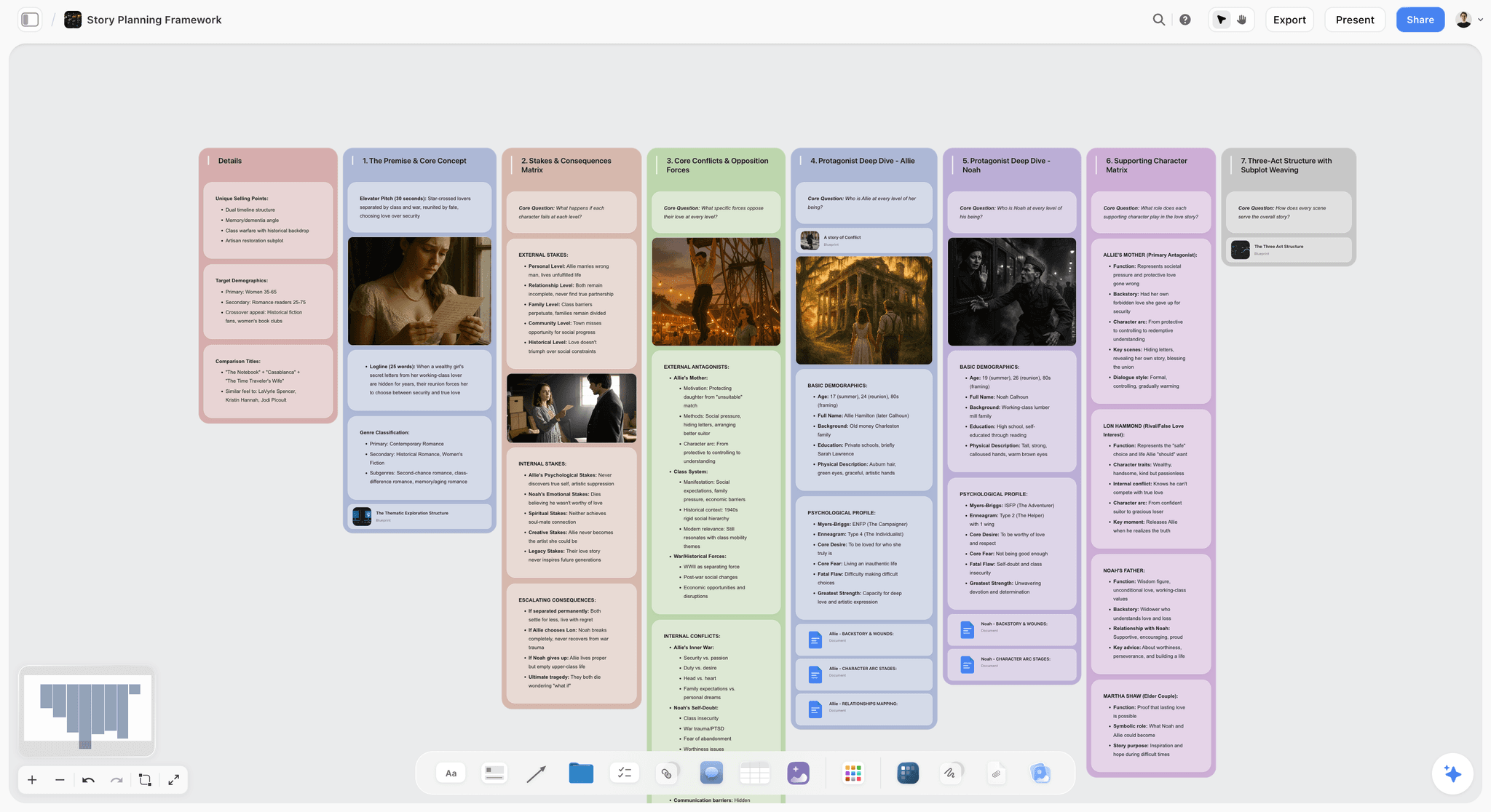
Best for: building the video treatment from a brief or a script. Assemble the concept, the director's statement, tone, reference stills and structure on one board, then turn that into a designed treatment, a lookbook or a pitch deck, exported as one PDF.
Storyflow is a visual AI workspace: an infinite canvas where notes, documents, images and moodboards sit together on boards, with an AI agent that reads the board and builds on it. Storyflow's AI builds the treatment as designed pages from what is on the board, so the idea you developed and the document you send are the same material. The owner pages for this job are the director's treatment template and the film pitch deck page.
Stage: Development and Design (Stages 1 and 2), on one board.
Key features
- A treatment built from the board. Storyflow's AI builds A4 pages: cover and logline, the idea, tone and look, captioned reference pages, structure and why us. Storyflow shows the page plan first and builds only what you approve.
- A lookbook and a pitch deck from the same references. Storyflow's AI builds an image-led lookbook or a slide deck that presents fullscreen and exports as one PDF.
- A moodboard on request. Ask Storyflow for a moodboard and its AI collects and lays out references; a colour palette can be pulled onto the board.
- AI that reads the project. Storyflow's AI reads the current board plus up to five documents and three other boards you attach, and reads scripts as PDF, Final Draft .fdx or Fountain.
- Reference images on Pro and Max. Storyflow generates AI images on Pro and Max; background removal and upscaling are unlimited on paid plans.
- Templates. Storyflow has 200+ expert creative templates called Tactics (Hero's Journey, AIDA, Pixar Story Spine and more) that you drag and drop onto the canvas.
- A client link. A Storyflow view-only link opens with no account; a visitor signs in to comment or draw. Real-time collaboration works on every paid plan.
- Works from ChatGPT and Claude. Storyflow's MCP connector lets ChatGPT, Claude, Gemini and Grok read your projects and build in them.
Pricing
Storyflow is paid-only today. Plus is $7.99 a month billed annually ($9.99 monthly). Pro is $14 ($19 monthly) and adds AI image generation and memory across conversations. Max is $39 ($49 monthly) with the most AI usage and a Team Workspace. The Free plan launches before the end of 2026, and anyone a paid member invites to a board joins free now. See pricing.
Pros
- Storyflow builds the designed treatment from your concept and references, so the idea is typed once
- The concept, the look and the pages stay on one infinite canvas, so the look and the idea evolve together
- Storyflow marks anything you did not give it as a blank instead of inventing cast, locations or budget
- A client opens a view-only link with no account, or receives one PDF
Cons
- Storyflow has no PowerPoint or Keynote export, no presenter view and no speaker notes; the treatment leaves as a PDF
- Pages can be edited by hand in Storyflow's design editor, but Canva's template library and InDesign's typography go further
- Treatment pages are A4 portrait; a landscape treatment means asking for a pitch deck or lookbook instead
- Storyflow runs in the browser, with no native desktop or mobile app
- AI-generated reference images need Pro or Max, not Plus
Verdict: Storyflow is the tool to start with when you have a brief and need a treatment by the deadline. Move to Canva or InDesign only when a designer wants to rework the layout by hand.
For the pitch context, see the best film pitch deck tools in 2026.
2. Milanote
Milanote is a hand-arranged reference board with a free plan; unlike Storyflow it has no AI that builds the treatment from the board, so choose it when cost must be zero and the board is only for references. Milanote's image-first boards keep an image-heavy collection looking considered, and many directors already know it. Where it stops is the document: the treatment pages are built somewhere else.
Best for: a free, good-looking reference board, when you are happy to build the treatment itself outside Storyflow.
Stage: Development (Stage 1), by hand.
Key features
- Image-first visual boards arranged by drag and drop
- Templates for moodboards, storyboards and creative briefs, and a filmmaking set (Film Pre-Production, Film Moodboard, Beat Sheet, Film Storyboard, Shot List, Call Sheet and more); none is named for a film treatment or lookbook
- Shared boards for collaborators and clients
Pricing
Free plan with 100 notes, images or links and 10 file uploads. Paid is $9.99 per person a month billed annually, or $12.50 monthly.
Pros
- Boards look polished with almost no design effort
- A real free plan, which Storyflow does not have yet
- A name clients recognise
Cons
- No AI that builds the treatment, the lookbook or the deck, which Storyflow does from the same references
- The free plan's 100 items go quickly on an image-heavy board
- Long-form written treatments feel cramped
Choose Milanote instead of Storyflow when the budget is zero and all you need is a place to pin and arrange references.
3. Canva
Canva is a drag-and-drop design tool with a large template library, and it is the tool to choose over Storyflow when you want to design every page of the treatment by hand. Brand fonts and colours keep type consistent, and its typography and layout controls go further than Storyflow's design editor. The catch is that Canva assumes Stage 1 is done: unlike Storyflow, Canva starts from a template instead of from your concept, so every line and still is placed by you.
Best for: a hand-designed treatment PDF from a template, when the layout matters more than having Storyflow build it.
Stage: Design (Stage 2).
Key features
- A large library of presentation and document templates
- AI design features inside the editor
- PDF export
Pricing
Canva Free and Canva Pro (see Canva's pricing page; its site blocks automated reads, so no figure is quoted here).
Pros
- Polished designs with no design background
- Typography and brand control that go further than Storyflow's
- Easy for a whole team
Cons
- Template-led treatments can read as generic
- No help with the concept, which is where Storyflow starts
- Encourages designing before the idea is sharp
Choose Canva instead of Storyflow when the concept is locked and you, or a designer, want control of every font and margin.
4. Gamma
Gamma generates a themed deck from a prompt or pasted text, and it is the tool to choose over Storyflow when you have a paragraph of concept and no board behind it. The ceiling is set by the input: Gamma designs whatever you feed it, so a thin concept produces a slick, empty treatment. Unlike Storyflow, Gamma does not hold the brief, the references and the working notes that the treatment grew from.
Best for: a quick themed deck from text alone, when there is no Storyflow board of references to build from.
Stage: Design (Stage 2), AI-generated.
Key features
- Generation from prompts and pasted content
- Adjustable themes
- Share by link or export
Pricing
See Gamma's pricing page (the page blocked our read on October 11, 2026).
Pros
- Text to a designed deck in one step
- Good default design without fiddling
- Web or exported output
Cons
- Needs a strong concept as input; Storyflow is where that concept gets tested against the brief
- Generic without your idea and your own references driving it
- AI layouts still need a human editing pass
Choose Gamma instead of Storyflow when speed from a text prompt matters more than building from your own references.
5. Adobe InDesign
Adobe InDesign is the layout tool behind many high-end commercial treatments, and it is the tool to choose over Storyflow when a designer is art-directing a document that may be printed. InDesign's typographic control, grids and print output are in a different class from anything a board tool produces. It is also the slowest option here, with a real learning curve.
Best for: a print-quality treatment art-directed by a designer, after the concept has been settled on a Storyflow board or elsewhere.
Stage: Design (Stage 2), premium.
Pricing: US$22.99 a month for the single app on an annual plan billed monthly, per Adobe's InDesign page.
Pros: print-grade output that signals budget; complete typographic control; a long-standing standard for premium documents.
Cons: steep learning curve for non-designers; ongoing subscription; no help with the idea or the references, which Storyflow holds.
Choose InDesign instead of Storyflow when the treatment itself has to look like a printed art book.
6. Google Docs
Google Docs is the free default for writing the treatment copy, and it is the tool to choose over Storyflow when the director's statement needs line-by-line comments from a producer. Real-time co-editing, comments and suggestion mode make it the easiest place to draft and take notes. Unlike Storyflow, Google Docs cannot hold the look, so a Docs treatment always needs a second tool for the images and the final document.
Best for: drafting the copy with a producer's comments, before or alongside the pages Storyflow builds.
Stage: Development (Stage 1), text only.
Pricing: Free with a Google account.
Pros: free; excellent real-time collaboration and suggestions; everyone already has it.
Cons: no visual treatment or reference layout; no client-ready design output, which Storyflow builds from the same copy.
Choose Google Docs instead of Storyflow when the words are the whole job this week and three people need to mark them up.
7. Pitch
Pitch builds modern, collaborative decks, and it is the tool to choose over Storyflow when you need to know whether the client opened the treatment. Pitch's Team and Business plans include advanced links that track visits, slide views and time spent. Unlike Storyflow, Pitch has no board of references behind the deck, and its templates lean toward business presentations.
Best for: a team deck with link analytics, which Storyflow does not have.
Stage: Design (Stage 2), team-oriented.
Pricing: Free plan with unlimited presentations and Pitch branding on exports. Paid plans were shown in euros when its pricing page was loaded on October 11, 2026: Plus €10, Team €15 and Business €20 a month, billed yearly.
Pros: real-time collaboration; clean default design; analytics on Team and Business; PowerPoint export on paid plans.
Cons: no development help; a business-oriented look; no treatment built from your references, which is what Storyflow does.
Choose Pitch instead of Storyflow when analytics or an editable PowerPoint file is a requirement.
8. ShotDeck
ShotDeck is a searchable library of stills from real films, and it is the tool to add to Storyflow when the look needs precise cinematic references. Filter by attributes such as lighting, colour and shot type, then save the frames that define your approach. ShotDeck sources references; unlike Storyflow it does not build the treatment.
Best for: exact film-still references, saved to the references wall of a Storyflow board.
Stage: Development (Stage 1), reference input.
Pricing: See ShotDeck's pricing page (the page blocked our read on October 11, 2026).
Pros: depth and quality of references; filters built for cinematographers; ideal for defining a precise look.
Cons: references only, so it pairs with a build tool such as Storyflow; a subscription for one piece of the workflow.
Choose ShotDeck alongside Storyflow when "like this frame, for this reason" is the argument your treatment makes.
9. Figma
Figma is a collaborative design canvas that a design-literate team can bend into a treatment, and it is the tool to choose over Storyflow when a studio's designers already live in it. Components and multiplayer editing make it strong for laying out a visual document together. Unlike Storyflow, Figma has no treatment structure out of the box and builds nothing from a brief.
Best for: design teams who lay out the treatment themselves instead of having Storyflow build it.
Stage: Design (Stage 2), team-oriented.
Pricing: Free Starter plan. Professional is $16 per full seat a month and $3 per collab seat, per Figma's pricing page.
Pros: real-time collaboration; flexible layout; a free plan.
Cons: a design-tool learning curve; no treatment structure; more than a solo director needs, where Storyflow asks only for the brief.
Choose Figma instead of Storyflow when a design team owns the document and wants component-level control.
10. Notion
Notion is a flexible workspace that can hold every piece of treatment content as pages and databases, and it is the tool to choose over Storyflow when you organise by lists instead of on a canvas. Notion is document-and-database shaped, not visual, and it produces nothing a client should see. Unlike Storyflow, Notion hands off to a design tool for the final document.
Best for: directors who database their process and build the treatment pages elsewhere, where Storyflow keeps both on one board.
Stage: Development (Stage 1), organisation only.
Pricing: Free plan. Plus is $10 per seat a month billed annually ($12 monthly).
Pros: flexible content structure; templates to organise the process; a free plan.
Cons: not visual; no client-ready designed output; setup time before it is useful.
Choose Notion instead of Storyflow when the material is mostly text and records and one person maintains it.
11. Pinterest
Pinterest is the free starting point for gathering broad visual references, and it is the tool to use before Storyflow, not instead of it. Search a mood, save a board, and the recommendations surface adjacent looks. It is not film-specific and it does nothing for the concept or the document.
Best for: wide-net discovery at the very start, before the chosen references move to a Storyflow board.
Stage: Development (Stage 1), early reference input.
Pricing: Free.
Pros: excellent for discovery; free; easy to organise into boards.
Cons: not film-specific; no development or design of the treatment; references need heavy curating before they belong in a Storyflow treatment.
Choose Pinterest before Storyflow when you do not yet know what the look is.
12. Keynote
Keynote presents a treatment elegantly on Apple devices, and it is the tool to choose over Storyflow when you pitch in the room with presenter notes on your own screen. Strong typography and smooth animation make a clean, filmic document, and PDF export covers the leave-behind. Unlike Storyflow, Keynote builds nothing for you: every slide is designed by hand.
Best for: presenting live with presenter notes, which Storyflow does not have.
Stage: Design and Presentation (Stage 2).
Pricing: Free. Apple's Creator Studio page says Keynote remains free for everyone; Creator Studio's AI features are an optional $12.99 a month or $129 a year.
Pros: beautiful presentation with little effort for a designer; smooth in-room animation; presenter notes.
Cons: the full app runs on Mac, iPad and iPhone (Keynote for iCloud runs in a browser); entirely manual design; no development help for the idea, which Storyflow covers.
Choose Keynote instead of Storyflow when the pitch is a live performance.
Video Treatment Tool Pricing in 2026
Storyflow costs $7.99 a month billed annually, team discounts start from 3 seats, and anyone a paid member invites to a board joins free. Google Docs and Pinterest are free, four tools have free plans, and three vendors' prices could not be read on October 11, 2026, so the table sends you to their pages instead of quoting an old figure.
| Tool | Free option today | Paid price | Billing shape |
|---|---|---|---|
Storyflow | No free plan yet (launches before the end of 2026); invited collaborators join free | Plus $7.99/mo billed annually ($9.99 monthly); Pro $14 ($19); Max $39 ($49) | Per member; team discounts from 3 seats; invited collaborators free |
Milanote | 100 notes, images or links and 10 file uploads | $9.99/person/mo billed annually ($12.50 monthly) | Per person |
Canva | Canva Free | Canva Pro (see Canva's pricing page) | Per person or team |
Gamma | Free workspace; exports carry a Gamma badge | See Gamma's pricing page | See vendor |
Adobe InDesign | See Adobe | US$22.99/mo, annual plan billed monthly | Per licence |
Google Docs | Free with a Google account | Google Workspace plans (see Google) | Per user |
Pitch | Unlimited presentations, branded exports, 2 external guests | Plus €10, Team €15, Business €20 a month billed yearly (page showed euros) | Tiered by seats |
ShotDeck | See ShotDeck | See ShotDeck's pricing page | Subscription |
Figma | Starter | Professional $16/full seat/mo; $3/collab seat | Per seat |
Notion | Free plan | Plus $10/seat/mo billed annually ($12 monthly) | Per seat |
Free | Not applicable | Not applicable | |
Keynote | Free | Apple Creator Studio $12.99/mo or $129/year (optional) | Optional subscription |
Feature Matrix: What Each Video Treatment Tool Does
Storyflow is the row that answers yes in every column of this matrix: it holds the references, tests the concept, builds the pages and gives the client a link. The other tools each cover one or two columns, which is why treatments are usually stitched across three or four apps.
| Tool | Holds brief and references | AI works on the concept | Builds designed pages | Output | Client link |
|---|---|---|---|---|---|
Storyflow | Yes: one infinite canvas | Yes: reads the board and attached documents | Yes: treatment, lookbook, deck, one-pager | One PDF; fullscreen present; no PPTX | View-only link, no account to view |
Milanote | Yes, arranged by hand | No | No | A shared board | Share link |
Canva | No | No | You do, from templates | PDF and more | Share link |
Gamma | No | From your prompt | Yes, from text | Web page or export | Share link |
Adobe InDesign | No | No | You do, from scratch | Print and PDF | Export |
Google Docs | Text only | No | No | Document | Share link |
Pitch | No | No | You do, from templates | PDF; PowerPoint on paid plans | Link, analytics on Team and Business |
ShotDeck | References only | No | No | Saved frames | Not applicable (a reference library) |
Figma | Yes, as a design file | No | You do, from scratch | PDF and prototypes | Share link |
Notion | Yes, as pages | No | No | Pages | Public page |
References only | No | No | Boards | Board link | |
Keynote | No | No | You do, by hand | Slides with presenter notes | Export |
Video Treatment by Project: Commercial, Music Video, Branded and Corporate
Storyflow is the first tool for all six kinds of video treatment below, because each one starts from a brief and references that have to become pages. What changes is the second tool: the specialist you add for the part of that project Storyflow does not do.
| Project | Build it in | Add | Why the second tool |
|---|---|---|---|
Commercial treatment | Storyflow | Canva, if the agency's designer reworks the layout | Canva's typography controls go further |
Music video treatment | Storyflow | ShotDeck | Stylised film references define the look |
Branded content treatment | Storyflow | Google Docs | A client's marketing team comments on the copy |
Corporate video treatment | Storyflow | Pitch or Keynote | An editable deck and presenter notes for an internal meeting |
High-end or print treatment | Storyflow for the idea | Adobe InDesign | Print-quality layout by a designer |
Fast turnaround, text only | Storyflow | Gamma, when there are no references | A themed deck from a prompt |
A corporate video treatment is the plainest of the six and the one most often skipped. It is a two to five page answer to an internal brief: the message, who is speaking, where it is filmed, how long it runs and what it will look like. The reader is a communications manager, not a creative director, so clarity beats style. In Storyflow, ask for a treatment from the board and cut the plan to four pages: cover, the idea, the look, the structure.
A music video treatment leans almost entirely on the references and the tone. Put the track's lyrics and a beat list on the board, then build the look around the beats. See also the best AI tools for commercial ad production in 2026.
A Worked Example: A 60-Second Commercial Treatment From a Brief
This example is invented for illustration: a 60-second spot for a running shoe, built on one Storyflow board from an agency brief. It shows what goes on the board, what you ask for, and what the page plan looks like before anything is built.
The board. Four areas: the agency brief as an attached PDF; a concept note of three sentences; a references wall of 12 stills (8 found, 4 from the director's earlier work); and a timed beat sheet of 6 beats covering 0 to 60 seconds (ask Storyflow's AI for a timed beat sheet and it builds one wall per beat with its timecode range).
The concept note. "Nobody in this film is running toward anything. Every runner is leaving something: a desk, an argument, a bad night. The shoe is what makes leaving possible." Ask Storyflow's AI whether that answers the brief, and it reads the brief on the board and says where the idea and the brief pull apart.
The request. "A treatment from this board." Storyflow's AI replies with a page plan, one line per page, and one question: paste the plan back edited, or skip to build it as written.
The plan, edited. 1. Cover: title, logline, the agency and the date. 2. The idea: the concept note opened into a paragraph. 3. Tone and look: handheld, dawn light, long lenses, no slow motion. 4 and 5. References: 12 stills, six to a page, each captioned with what it is for. 6. Structure: the six beats with their timecodes. 7. Why us: two relevant films. Casting and locations were not on the board, so the plan marks them as blanks.
The result. Seven A4 pages on the board, built from the board's own stills. Edit a caption by hand, present it fullscreen to the producer, export one PDF for the agency. If the agency then asks for slides, ask for a pitch deck from the same board.
What you still did yourself. The three sentences in the concept note. Nothing on this page generated those, and nothing can.
Video Treatment Templates: What a Template Gives You and What It Cannot
A video treatment template gives you the sections in order and a layout to pour them into; it does not give you the idea. Storyflow's treatment workflow is a template that fills itself in from your board, while Canva, Keynote and Milanote templates are layouts you fill by hand.
Three kinds of template are worth knowing:
- A built treatment. In Storyflow, the menu items "Write a treatment for my film" and "A treatment from this board" produce the cover, idea, tone and look, references, structure and why-us pages from your material. The film treatment template page shows the shape.
- A thinking template. Storyflow's 200+ Tactics (Hero's Journey, AIDA, Pixar Story Spine and more) drop onto the canvas when the concept needs a spine before it needs a layout.
- A layout template. Canva has the deepest library of designed pages, and Keynote ships elegant themes. Both expect the copy and the stills to arrive finished.
The limit is the same for all three. A template makes a weak idea look finished, which is the pattern that loses jobs. Fill the concept note first.
Video Treatments From ChatGPT and Claude
Storyflow works from inside ChatGPT and Claude: its MCP connector lets Claude, ChatGPT, Gemini and Grok read your Storyflow projects and build boards and documents in them. A director who talks a concept through in a chat can have the result land on the project's board instead of staying in the conversation.
- From a conversation to the board. After working out the concept with ChatGPT or Claude, ask it to put the idea, the tone notes and the beat list on your Storyflow board.
- From the brief to questions. Ask the assistant to read the brief on the board and list what the treatment still has to answer.
- From the board to a draft. Ask it to draft the director's statement as a document in the project, using the references already there.
Setup is on the MCP page. The designed treatment pages are then one request away on the board.
Free vs Paid Video Treatment Tools
Google Docs, Pinterest, Canva Free, Milanote's free plan and Pitch's free plan cover a first treatment at no cost. Storyflow is paid, from $7.99 a month billed annually, and what the money buys is the AI building the designed pages from your board instead of you laying them out.
| Tool | What is free today | What paying adds |
|---|---|---|
Storyflow | Nothing self-serve yet; anyone a paid member invites to a board joins free | AI that builds the treatment, lookbook and deck; unlimited projects, images and files on Plus; AI image generation on Pro |
Milanote | 100 notes, images or links and 10 file uploads | Unlimited notes and uploads |
Canva | Canva Free: templates and PDF export | Canva Pro (see Canva's pricing page) |
Google Docs | Everything a treatment's copy needs | Workspace features for organisations |
Pitch | Unlimited presentations with Pitch branding on exports | Unbranded exports and custom fonts; analytics on Team and Business |
Figma | Starter, with limited access | Full seats with all Figma products |
When free is enough. One treatment, no deadline pressure, and you enjoy layout: pin references in Milanote or Pinterest, write in Google Docs, design in Canva Free.
When paying pays off. A director pitching several jobs a month loses the evenings to layout. That is where one Storyflow plan earns its price: the concept is typed once and the pages are built from it.
Honorable Mentions
Five tools sit beside the treatment instead of producing it, and each pairs with a Storyflow board.
- Adobe Express: quick designed pages without InDesign, with a free plan (see Adobe's pricing page); a lighter hand-design route than Canva when you are not having Storyflow build the pages.
- Slidebean: AI-assisted decks for a business-leaning pitch, from $7 a month billed yearly per its pricing page; Storyflow is the stronger fit when the pitch is built on references.
- Cosmos and Savee: curated references with a more design-forward feel than Pinterest; save what you choose to the references wall in Storyflow.
- Vimeo: hosting reference clips and finished treatment videos, which Storyflow does not host.
- Frame.io: sharing reference edits and gathering timestamped feedback once there is footage, which Storyflow does not do.
Where Treatment Tools Still Need a Human
Treatment tools develop and design; they do not create the idea. Storyflow's AI can test a concept against the brief and build the pages, and the four things below remain the director's.
- The concept. No tool generates the idea that wins the job. That is you.
- The director's voice. Your distinctive take is the whole point of a treatment.
- The taste. Which references cohere into a look is your eye.
- The pitch. How you present in the room still decides jobs.
Every tool above, including the one I built, is scaffolding around a judgment only a director can make.
Prices and Sources Checked October 11, 2026
Every competitor price in this guide comes from the vendor's own page, read on October 11, 2026 unless a line says otherwise. Where a page blocked the read or showed no US dollar figure, the guide says so.
| Vendor | What we read | Source |
|---|---|---|
Storyflow | Plus $7.99/mo billed annually ($9.99 monthly); Pro $14 ($19); Max $39 ($49) | |
Milanote | Free: 100 notes, images or links and 10 file uploads; $9.99/person/mo billed annually, $12.50 monthly; templates page lists moodboard, storyboard, creative brief and filmmaking categories, with no film treatment or lookbook template (a fashion lookbook template exists) | |
Canva | Site blocks automated reads; no figure quoted | |
Gamma | Page blocked the read; no figure quoted | |
Adobe InDesign | US$22.99/mo, annual plan billed monthly | |
Adobe Express | Free plan; paid prices shown in a regional currency, not quoted | |
Google Docs | Free with a Google account | |
Pitch | Free plan; Plus €10, Team €15, Business €20 a month billed yearly; analytics through advanced links on Team and Business | |
ShotDeck | Page blocked the read; no figure quoted | |
Figma | Starter free; Professional $16/full seat/mo, $3/collab seat | |
Notion | Plus $10/seat/mo billed annually ($12 monthly), as reconciled on October 10, 2026 | |
Slidebean | Starter $7/mo billed yearly | |
Keynote | Keynote free; Apple Creator Studio $12.99/mo or $129/year |
Each Storyflow timing in this guide for notes or a pitch PDF built from a board is the agent time of one recorded run, rounded up. The deck figure (a board turned into slides) is our estimate and was never measured, and the treatment workflow has no recorded figure of its own. The by-hand figures are our estimates at 1.5 minutes per card and 30 minutes per page or slide.
The Bottom Line
Storyflow is the best video treatment tool in 2026 for the job most directors have: a brief, a deadline and a concept that has to become pages. The idea, the references and the designed treatment stay on one board, and the PDF is built from them. Start from the director's treatment template page.
Canva remains the honest pick when you want to design every page by hand, and InDesign when the treatment has to look printed. Gamma is for a deck from a prompt, Milanote for a free reference board, Keynote for presenting with notes.
The mistake almost every director makes is designing a treatment before the idea is sharp, because the concept is the product and the design is the wrapper. Sharpen the concept first, on the same board that builds the pages.
FAQ: Video Treatment Tools in 2026
What is the best video treatment tool in 2026?
Storyflow. Put the brief, the concept and the reference stills on one board and its AI builds the designed treatment (cover and logline, the idea, tone and look, captioned references, structure, why us) as pages you export as one PDF. Choose Canva or Adobe InDesign to design every page by hand, and Gamma for a deck generated from a prompt. Storyflow has no PowerPoint export.
What is a video treatment?
A video treatment is a director's document responding to a brief, laying out the concept, tone, approach, visual references and craft for a commercial, music video or branded film. It is the pitch that wins the job against other directors, who can all execute the brief. What separates them is the idea and how vividly the treatment sells the finished film before it exists.
How do I write a video treatment?
Start with the brief and find your concept: the idea and why it is right for this project. Put the concept, the tone notes and the references on one Storyflow board, ask its AI to test the concept against the brief, then ask for "A treatment from this board" and edit the page plan. Idea first, pages second.
What should a video treatment include?
A strong video treatment carries five parts: a concept or director's statement that names the idea and why it fits the brief; the tone and approach; visual references that show the look; the structure of how the piece unfolds; and craft notes on cinematography, music, casting and locations. Not every treatment needs all five at equal depth, but the concept and the look are non-negotiable.
What is the difference between a treatment and a pitch deck?
A treatment is a director's response to a specific brief, focused on how they will execute a commercial, music video or branded film, and it is judged against other directors. A film pitch deck argues a whole original project (story, vision, market, why you) to financiers. Storyflow builds both from the same board: the treatment as A4 pages, the pitch deck as slides.
What is the difference between a treatment and a shot list?
A treatment sells the concept and the look before a job is won; a shot list plans the coverage after it is. The treatment is a persuasion document for a client or producer. A shot list is a production document for the crew, built around sizes, angles and setups per scene. In Storyflow both come from one board: the treatment first, then "Make a shot list for my shoot".
What is the best free video treatment tool?
There is no single free tool for the whole job. A capable free stack is Milanote's free plan or Pinterest for references, Google Docs for the copy and Canva Free for the layout. Storyflow is not part of a free stack: it is paid-only today, and its Free plan launches before the end of 2026.
What software do professional directors use for treatments?
There is no single standard; most directors build a stack. Storyflow covers the stack on one board: concept, references and the designed pages. The hand-built alternative is Milanote or ShotDeck for references, then Canva for speed, InDesign for high-end print treatments, or Keynote for presenting. What separates strong directors is developing the idea before designing it.
How much do video treatment tools cost?
From nothing to a design subscription. Google Docs, Pinterest and Keynote are free, and Canva, Milanote, Pitch, Gamma, Figma and Notion have free plans. Storyflow is $7.99 a month billed annually ($9.99 monthly), per member. Adobe InDesign is US$22.99 a month on an annual plan billed monthly. Gamma and ShotDeck list their prices on their own pages.
Can AI write a video treatment?
Yes, with limits. Storyflow's AI tests the concept against the brief and builds the designed treatment from the board, and Gamma generates a deck from a prompt. The concept and the director's voice remain yours, since a treatment wins on a distinctive take AI cannot supply. Use AI to sharpen the idea and build the pages, and write the idea yourself.
How long should a video treatment be?
Most commercial and music video treatments run from a handful of pages to a couple dozen, balancing concept, approach and references. Storyflow's default plan is six kinds of page, with more reference pages as the references grow. The key is not length but clarity: the client should feel the finished film quickly.
What is a corporate video treatment?
A corporate video treatment is a short document, usually two to five pages, answering an internal brief: the message, who appears, where it is filmed, the running time and the look. Its reader is a communications or marketing manager, so plain structure beats visual flourish. Storyflow builds one from the brief on the board; cut the page plan to cover, idea, look and structure.
What is the best tool for a music video treatment?
Storyflow, with ShotDeck for references. A music video treatment is mostly look and tone, so put the track's beats and the stills on one Storyflow board and ask for the treatment or a lookbook from them. Add ShotDeck when the look depends on precise film references.
What is the best tool for a commercial director's treatment?
Storyflow. A commercial treatment is a bid against other directors on a deadline, and Storyflow's AI builds the designed pages from the brief, the concept and the references in one request. Hand the PDF to the agency; if their designer wants to rework the layout, Canva or InDesign is where that happens.
Can Storyflow export a treatment as a PDF?
Yes. Storyflow exports every page of a treatment, lookbook or deck as one PDF, and presents it fullscreen from the board. You can also attach a draft written elsewhere and ask Storyflow for a designed PDF of it.
Can Storyflow export a treatment to PowerPoint or Keynote?
No. Storyflow exports PDF, not PPTX, and has no presenter view or speaker notes. If the agency needs an editable slide file, build that version in Pitch, Keynote or Canva.
Does Storyflow have video treatment templates?
Yes, in two forms. The treatment workflow ("Write a treatment for my film" or "A treatment from this board") builds the pages from your material, and 200+ Tactics give the thinking a structure. Storyflow does not have a gallery of hand-design layouts the way Canva does.
Can I build a video treatment from ChatGPT or Claude?
Yes. Storyflow's MCP connector lets ChatGPT, Claude, Gemini and Grok read your Storyflow projects and build boards and documents in them, so the concept you worked out in a chat lands on the project's board. Setup is on storyflow.so/mcp.
Is Storyflow free?
Not today. Storyflow is paid-only: Plus is $7.99 a month billed annually or $9.99 monthly. The Free plan launches before the end of 2026, and anyone a paid member invites to a board joins free now.
How long does it take to build a video treatment?
The idea takes as long as it takes. The building is short in Storyflow: we have no recorded time for a treatment, but the closest recorded job, a pitch PDF of designed pages built from a board, took 3 minutes of agent time in a recorded run, against our hand estimate of about 4.5 hours (30 minutes per page). Leave time to edit the page plan and check the blanks before sending.
Canva or Storyflow for a video treatment?
Storyflow when the treatment has to be built from your brief and references by the deadline: its AI builds the designed pages. Canva when the layout is the point and you want to place every element yourself, with typography controls that go further than Storyflow's.
Table of Contents
- Quick Picks: The Best Video Treatment Tools by Job
- Which Video Treatment Tool Should You Use?
- All 12 Video Treatment Tools, Ranked
- Comparison Table: 12 Video Treatment Tools Compared
- Frequently Asked: Which Video Treatment Tools Are Free, and What Do Directors Mostly Use?
- What a Video Treatment Is (and How It Wins the Job)
- The Two-Stage Treatment: The Framework That Organizes This Guide
- How to Build a Video Treatment in Storyflow, Step by Step
- What It Takes by Hand vs in Storyflow
- How We Evaluated These Treatment Tools
- Detailed Reviews: The 12 Best Video Treatment Tools
- Video Treatment Tool Pricing in 2026
- Feature Matrix: What Each Video Treatment Tool Does
- Video Treatment by Project: Commercial, Music Video, Branded and Corporate
- A Worked Example: A 60-Second Commercial Treatment From a Brief
- Video Treatment Templates: What a Template Gives You and What It Cannot
- Video Treatments From ChatGPT and Claude
- Free vs Paid Video Treatment Tools
- Honorable Mentions
- Where Treatment Tools Still Need a Human
- Prices and Sources Checked October 11, 2026
- The Bottom Line
- Author
- FAQ: Video Treatment Tools in 2026
- Related Reading
Templates to check out for this topic


Story and writing templates you can use in Storyflow
Start your next script, novel, or world from a ready-made Storyflow board instead of an empty page. The AI reads the whole canvas, so every suggestion is grounded in your story.


See Storyflow in Action
A visual AI workspace where every feature lives inside one canvas. No tab-switching, no context lost.
Build your entire board from a single message
Type what you need in the AI chat at the bottom of your canvas. The AI adds cards, headings, and structure directly onto your board.
Use expert frameworks as AI context
Type @ in the AI chat and choose any Tactic. The AI tailors every response to that framework instead of giving generic advice.
Turn your board into a mind map in seconds
Ask the AI to restructure your canvas as a mindmap. It connects your ideas into a visual hierarchy so you can see how everything relates.
Why Storyflow Exists
Storyflow actually began as a personal tool while working on creative and research projects.
We kept running into the same problem: ideas were scattered everywhere: notes, documents, and whiteboards.
Nothing helped us see how everything connected.
So we started building a workspace designed around how ideas actually grow.
→ Read how Storyflow was createdJustkay
Documentary Filmmaker & Founder at Storyflow
Published: 2026-07-10
Extremely simple, seriously capable


See how easy it is to get started
Watch a real project come together, from a blank board to a finished plan, clicked through step by step.
Start creating with AI and become more productive
Transform your creative workflow with AI-powered tools. Generate ideas, create content, and boost your productivity in minutes instead of hours.