The 11 Best Thinking Canvas Tools in 2026 (We Tested Them All)
A thinking tool is not judged by what it helps you produce. It is judged by how cheaply it lets you be wrong. Eleven surfaces ranked on the cost of putting down a bad idea and discarding it.

Category
Productivity
Author

Sara de Klein
Head of Product at Storyflow
Topics
2026-08-12
•
18 min read
•
Productivity- best thinking canvas tools
- Heptabase vs Obsidian
- visual thinking software 2026
- why is it hard to think in Notion
- infinite canvas for thinking
- spatial note taking
What are the best thinking canvas tools in 2026?
A thinking tool is not judged by what it helps you produce. It is judged by how cheaply it lets you be wrong. Eleven surfaces ranked on the cost of putting down a bad idea and discarding it.

Full disclosure: Storyflow is our own product and we rank it #1 on one criterion only: what happens at month three, when a board holds more than you can remember and re-entry costs more than starting over. On the primary criterion of this article, how cheaply a surface lets you be wrong, Excalidraw and paper score higher than we do and cost nothing. Heptabase is genuinely better for deep study of a single subject and we say so plainly; its card-on-whiteboard model is purpose-built for this and its local-first data is a stronger ownership position than ours. Obsidian is free, fully local, and the better shape if your thinking is verbal rather than spatial. Storyflow is cloud-only with no offline mode, which matters for a tool you might think in for years, it is paid-only during early access, and it is not a note-taking system: no daily notes, no backlink graph, no spaced review. It also carries the category's convergence risk in full. We link to every tool so you can judge the fit yourself.
Quick Comparison
These four cover the ways thinking surfaces differ: reading a board that has grown past your memory of it, arranging durable cards while studying one subject deeply, connecting ideas in text rather than space, and a scratch surface where nothing ever looks decided.
| Tool | Best For | AI Features | Price |
|---|---|---|---|
| Storyflow | Returning to a large board weeks later | Reads the whole canvas | $7.99 mo annual (free plan late 2026) |
| Heptabase | Note cards on nested whiteboards | Built-in AI, card-scoped | From ~$8 mo annual |
| Obsidian | Linked text thinking, local files forever | Via community plugins | Free personal / paid sync |
| Excalidraw | Instant scratch thinking, free | Minimal | Free, open source |
Key Takeaways
- A thinking tool is not judged by what it helps you produce. It is judged by how cheaply it lets you be wrong.
- Documents make wrongness expensive in two specific ways: they force a sequence before you know what you have, and a written sentence feels decided in a way a floating note does not.
- Space is a second memory. You can recall where something sat on a board more reliably than what you called it, and adjacency records a relationship you have not yet had to name.
- Storyflow ranks first for thinking at scale, where a board has outgrown what one person can hold in their head. It is cloud-only and paid-only, and Heptabase is genuinely better for deep study of one subject.
- The same property that makes canvases good (nothing has to resolve) is what lets them never resolve. Give the thinking a deadline.
Re-enter a board you have forgotten
Thinking surfaces get abandoned at month three, when the board holds more than you can hold and re-entry costs more than starting clean. Storyflow's AI reads the whole canvas, so returning is asking rather than remembering: what did I conclude, what is unresolved, which of these are the same idea. It is cloud-only and not a note-taking system. Paid-only during early access; the Free plan lands before the end of 2026.

Cheap Wrongness
Thinking is mostly being wrong, quickly, in a way that costs you nothing.
You put down an idea, look at it, decide it is not quite right, adjust it, and repeat. The number of times you can complete that loop before your patience runs out is roughly the quality ceiling of the thinking. Anything that makes a single loop more expensive lowers the ceiling.
A thinking tool is not judged by what it helps you produce. It is judged by how cheaply it lets you be wrong.
Documents make wrongness expensive in two specific ways, and neither is obvious until you name it.
Premature sequence. A document has an order, top to bottom, and it demands one immediately. Your first sentence establishes what comes first, which means you are deciding structure at the exact moment you have the least information. The usual result is that the shape of the finished thought is set by an arbitrary decision made in the first minute, and everything after accommodates it because reorganising a document is expensive enough that you rationalise instead.
Commitment cost. A written sentence has a psychological weight a floating note does not. It looks finished. Deleting it feels like losing work rather than discarding a wrong idea, so people defend sentences they no longer believe because rewriting is effort. On a canvas, a note that turns out to be wrong gets dragged to the corner and nobody feels anything about it.
A canvas removes both. Nothing has an order until you give it one. Nothing looks finished, so nothing feels defended. Contradictory ideas can sit next to each other indefinitely, which matters enormously, because in the early stage of thinking about anything hard you genuinely believe two incompatible things and forcing a resolution before you understand why is how you get a confident wrong answer.
That is the entire case for the category, and the ranking below is ordered by how well each tool preserves it.
Space Is a Second Memory
The second argument for canvases is less discussed and, in practice, more powerful.
Position is a retrieval cue. If you have worked on a board for a week, you can find the thing you need by remembering roughly where it was, in a way you cannot by remembering what you called it. People routinely say "it was over on the left, near the diagram" about material they could not name. That is a different faculty from verbal recall, and a document gives you no access to it at all: everything is at the same address, in a scroll.
Adjacency also encodes relationships you have not yet had to articulate. Putting three notes near each other records that they belong together, before you can explain why they belong together. In a document you would have to write a heading, and writing the heading means naming the relationship, and naming it prematurely fixes it. On a canvas the grouping can stay unexplained for weeks and then turn out to be the actual insight.
This is why the practical advice for thinking canvases is unlike the advice for other tools: do not tidy too early. A neat board is usually a board where somebody imposed categories to feel organised, and those categories are now doing the thinking instead of you. Messiness in the middle stage is not a failure state, it is the material still being negotiable.
The one caveat is the obvious counterpart: a surface where nothing must resolve is a surface where nothing does. Thinking canvases reward a deadline more than almost any other tool, because there is no natural completion signal. The fuller version of that failure, and what to do about it, is in the story canvas comparison linked at the end.
At a Glance: The 11 Tools Compared
| Tool | Cost of being wrong | Works offline | Price |
|---|---|---|---|
Storyflow | Very low, plus AI reads the board | No, cloud-only | $7.99 mo annual (free plan late 2026) |
Heptabase | Very low, cards on a whiteboard | Yes, local-first sync | From ~$8 mo annual |
Obsidian | Low for text, no spatial layer | Yes, fully local | Free personal / paid sync |
Excalidraw | Lowest, nothing feels permanent | Yes, self-hostable | Free, open source |
Muse | Very low, tactile and fast | Yes, on device | Free tier / paid above |
Milanote | Low, but visually tidy by default | No | Free tier / from ~$10 mo annual |
Miro | Low, though structured by templates | No | Free tier / from ~$8 member mo |
tldraw | Lowest, deliberately minimal | Yes | Free, open source |
Notion | High, it is a document underneath | Partly | Free tier / from ~$10 mo annual |
Apple Freeform | Low, free, Apple only | Yes | Free on Apple devices |
Paper | Lowest of all | Always | Almost nothing |
Prices are the publicly listed rates at the time of writing and change often. Check before committing.
How I Ranked These
Seven of these (Storyflow, Obsidian, Excalidraw, Milanote, Miro, Apple Freeform, paper) I have used as genuine thinking surfaces on real problems over months, which is the only timescale on which a thinking tool reveals itself. Heptabase, Muse, tldraw, and Notion I evaluated hands-on against the same criteria over shorter periods, and where a claim rests on published documentation rather than my own use, the review says so.
Five criteria, in this order:
- Cost of being wrong. How cheap it is to put down a bad idea, look at it, and discard it. Weighted highest for the reasons above.
- Spatial retrieval. Whether position works as a memory aid, which requires stable layout and a view where enough is visible at once.
- Tolerance for mess. Whether the tool pushes you toward premature tidiness through templates, required fields, or visual defaults that make disorder feel wrong.
- Reading a large board. What happens at month three, when the surface holds more than you can hold. This is where tools diverge most.
- Ownership over a decade. Thinking archives are long commitments, and a subscription lapse or a company closing is a real risk to a decade of material.
Deliberately not weighted: collaboration. Thinking canvases in this sense are single-player surfaces, and the multi-player version is a different article.
Quick Picks by Situation
- Best thinking canvas overall: Storyflow, our own product, for boards that have outgrown one head.
- Best for deep study of one subject: Heptabase, and it is genuinely excellent at this.
- Best for text-led thinkers: Obsidian, where connection substitutes for space.
- Best for a single quick problem: Excalidraw, open in two seconds, nothing to set up.
- Best tactile experience: Muse, particularly with a pencil on an iPad.
- Best free option: Excalidraw or paper, and paper is not a joke entry.
- Best if you already own Apple devices: Freeform, free and genuinely good.
- Worst fit despite popularity: Notion, for reasons in its review.
1. Storyflow
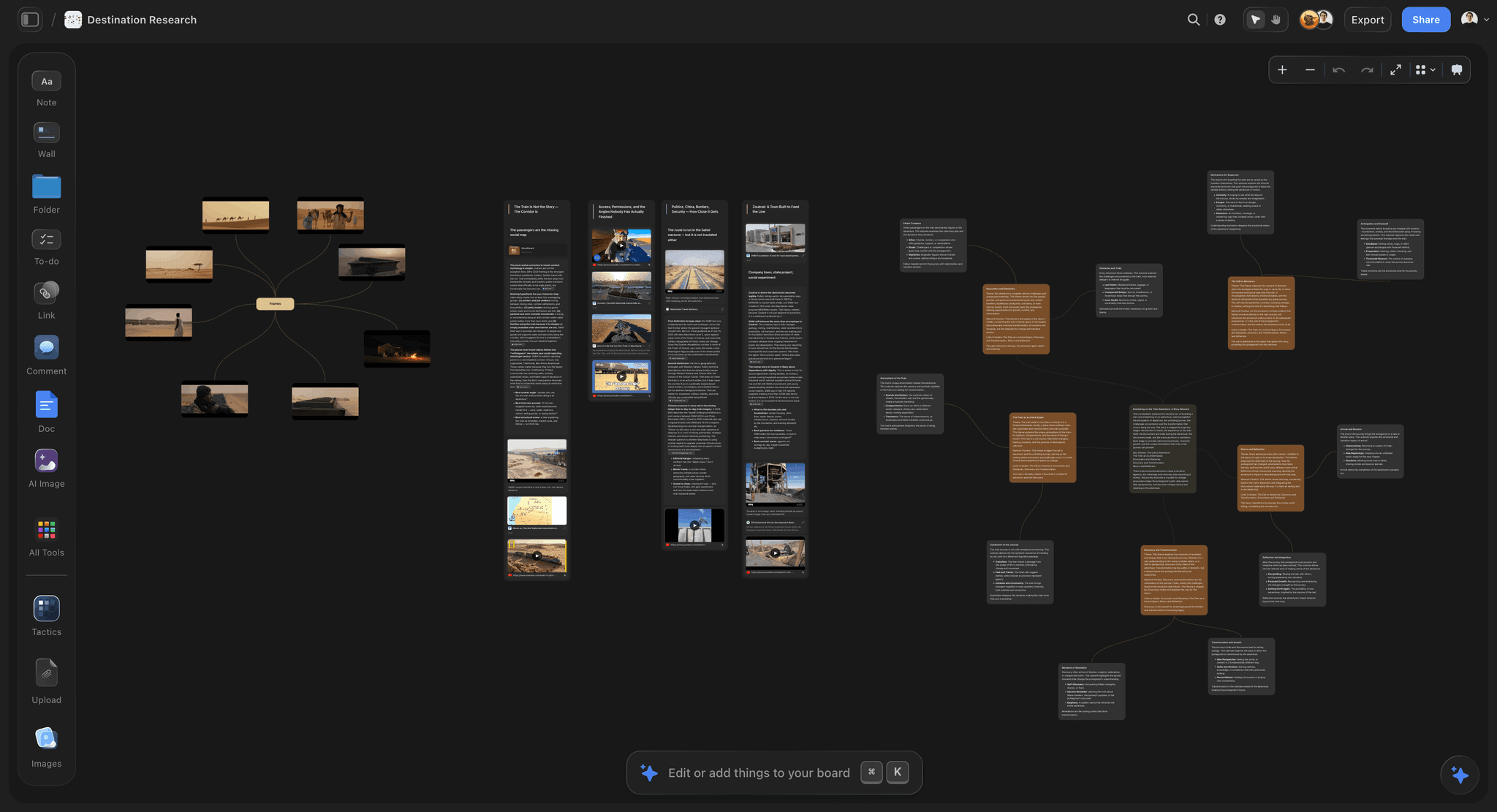
Storyflow is our own product and it ranks first on the fourth criterion specifically: what happens when the board gets big.
Every tool here handles cheap wrongness well in week one. Twenty notes on a canvas is a pleasure anywhere. The divergence comes at month three, when the board holds two hundred fragments, four abandoned structures, and a corner you no longer recognise. At that point the surface contains more than you can hold, and the ordinary response is to stop opening it, because the cost of re-entering exceeds the cost of starting again somewhere clean.
Storyflow is a visual canvas where notes, images, links, and documents share a board, and the AI reads the whole board rather than a selection. That converts re-entry from an act of memory into an act of asking: what is on this board, what did I conclude, what is still unresolved, which of these ideas are the same idea. For thinking that spans weeks rather than an afternoon, that is the difference between a surface that compounds and one that gets abandoned.
It also helps with the specific move that makes canvases valuable: noticing that three things you placed near each other for unarticulated reasons share something. Asking what a cluster has in common frequently produces the naming you were not yet able to do, which is exactly the step the spatial arrangement was holding open for you.
You can @-mention up to one Tactic and up to three documents, so a board of loose thinking can be reasoned against a brief or a longer piece of writing.
Where Storyflow loses
Four limitations, and the first two are real for a tool you might keep thinking in for years.
It is cloud-only with no offline mode. Thinking happens on planes, in waiting rooms, and in places with no signal, and a thinking tool that is sometimes unavailable is one you learn not to rely on. Obsidian, Muse, Heptabase, and paper all work regardless.
It is paid-only during early access, with the Free plan arriving before the end of 2026. A personal thinking surface is exactly the kind of tool people reasonably want to live in for a month before paying, and Excalidraw, Freeform, and Obsidian are free today.
It is not a note-taking system. There are no daily notes, no backlink graph, no spaced review, no tags across a vault. If your thinking practice is a personal knowledge system rather than project-shaped boards, Obsidian is the better shape and it is free.
It carries the convergence risk in full: a surface this comfortable for holding unresolved material will happily hold it forever. That is a property of the category and it applies here as much as anywhere.
Pricing: Plus $7.99/mo annual ($9.99 monthly) for the Story blueprints library and unlimited uploads. Pro $14/mo annual ($19 monthly) adds AI image generation, roughly 20 times the AI volume, and memory across conversations. Max $39/mo annual ($49 monthly) adds roughly 40 times the AI volume plus a team workspace with roles and permissions.
2. Heptabase
Heptabase is the purpose-built thinking canvas and it deserves genuine praise, because it is the only tool here designed from first principles around the problem this article describes.
The model is note cards on an infinite whiteboard. A card is a real note with its own content, and it can live on several whiteboards at once, so the same idea participates in multiple lines of thinking without duplication. Whiteboards nest, so a cluster can become its own board when it gets dense enough. That combination is unusually well judged: it gives you the spatial thinking a canvas provides and the durable note a knowledge system provides, without forcing you to choose.
For deep study of a single complex subject, learning a field, working through a book, understanding a domain, it is better than what we make and I would recommend it without hesitation. The card model rewards sustained engagement with one topic in a way a general canvas does not.
Its data is local-first with sync, which is a meaningfully stronger ownership position than cloud-only, and it works offline.
Where it sits behind for this list: it is a single-player tool with limited collaboration, the whiteboard-of-cards model has a learning curve that a blank canvas does not, and reading a very large accumulation still rests on your own navigation rather than being able to ask. The price is also a subscription with no free tier beyond a trial.
Pricing: From around $8/month on annual billing.
3. Obsidian
Obsidian ranks third because for a large number of people, thinking is verbal rather than spatial, and connection substitutes for position perfectly well.
A note per idea, linked to other notes, with no imposed hierarchy, gives you cheap wrongness in the text domain: notes are small, nothing looks finished, and a wrong note costs nothing. Backlinks do the job adjacency does on a canvas, recording that two things relate before you can say how, and the unlinked-mentions panel surfaces connections you did not make deliberately.
Its ownership position is the strongest here. Local markdown files, no vendor, no subscription required, and a vault that will open in twenty years. For a thinking archive you intend to keep for a decade, that is worth more than most feature differences.
Its canvas feature exists and is decent, but it is not the reason to choose Obsidian and it is weaker than the dedicated tools above.
Against it: no spatial retrieval in the main workflow, images are second-class, and the setup burden assumes appetite for configuration. Thinkers who need to see everything at once will find it constraining.
Pricing: Free for personal use. Paid sync and publish add-ons.
4. Excalidraw
Excalidraw scores highest of anything here on the primary criterion, and it does so by refusing to be permanent.
It opens instantly with no account. The hand-drawn style signals draft so strongly that nothing on the board ever looks decided, which is precisely the property that makes wrongness cheap. There are no templates pushing you toward a structure, no fields to fill, and nothing to organise.
For thinking through one problem in one sitting, it is the best tool on this list, and it costs nothing. Engineers in particular use it this way constantly, and the reason is that a diagram in Excalidraw is obviously provisional in a way the same diagram in a polished tool is not.
Its limit is duration. It is not built to be a place you return to for months, search across, or accumulate in. It is a scratch surface of unusual quality, and treating it as an archive will disappoint you.
Pricing: Free and open source, with a paid Excalidraw Plus tier.
5. Muse
Muse is the most physically satisfying tool here, and that is a real criterion rather than an aesthetic one: friction determines how many wrongness loops you complete.
On an iPad with a pencil, moving between ink, images, PDFs, and text on a spatial board has almost no interface between intention and action. Nested boards let a corner become its own space. It is designed explicitly for thinking rather than presenting, and it shows in a hundred small decisions.
It works on device, which suits the reading-and-thinking sessions it is built for.
Against it: it is Apple-only and strongest on iPad, which excludes a lot of people. It is a single-player tool with limited sharing, and it has no analytical layer, so a large board is yours to navigate. For text-heavy thinking it is less comfortable than Obsidian.
I evaluated this hands-on over a shorter period than the tools above, so weight the long-term judgment accordingly.
Pricing: Free tier with paid plans above.
6. Milanote
Milanote is the most pleasant canvas here and that pleasantness is a mild liability for thinking specifically.
Everything you put down looks considered, because the visual defaults are good. Columns align, cards look designed, and a Milanote board reads as a finished artifact almost immediately. For presenting a direction that is a strength, and it is why the tool ranks highly elsewhere in this series.
For thinking it works against you slightly, because things that look finished feel decided, which raises the cost of being wrong. The pull toward tidiness arrives earlier than it should.
It is genuinely good, and if you find messy boards demotivating, this is the right trade for you. The 100-item free cap arrives quickly on a real thinking project.
Pricing: Free tier capped at 100 items. Paid from around $10/month annual.
7. Miro
Miro is a capable solo thinking surface and it is not what the product is for, which shows.
The canvas is fast and infinite, and the AI clustering can help make a large board approachable. If your organisation already pays for it, using it to think alone is entirely reasonable.
Two things count against it here. The template library pulls you toward structure early, and a structure adopted before you understand the problem is the premature-sequence failure in a different costume. And the workshop apparatus (frames, voting, timers) is overhead that a single thinker carries without using.
The multiplayer canvas comparison in the related reading covers where it genuinely leads.
Pricing: Free tier. Paid from around $8/member/month annual.
8. tldraw
tldraw shares Excalidraw's philosophy and much of its virtue: small, instant, free, open source, and nothing on it ever looks permanent.
As a scratch thinking surface it is excellent, particularly for anything diagrammatic, and its developer-facing SDK means it turns up embedded inside other products.
It ranks below Excalidraw here only on ecosystem and momentum for the standalone use, and it shares the same limitation: it is a surface for a session, not an archive for a year.
Pricing: Free and open source, with commercial licensing for embedding.
9. Notion
Notion ranks ninth on a list about thinking, which requires explanation given that it is where a great deal of thinking is attempted.
Underneath, Notion is a document. Blocks stack vertically, order is imposed from the first line, and databases want fields before you know what the fields should be. Both failures described at the top of this article are structural to it: premature sequence is enforced by the layout, and its blocks look finished because everything is formatted.
It is genuinely excellent at the stage after thinking, when conclusions need to be stored, structured, shared, and found. That is a real and valuable job and it is not this one.
The common pattern of trying to think in Notion and finding it unaccountably effortful is not a discipline failure. It is the tool doing what it is designed to do.
Pricing: Free tier. Paid from around $10/month annual.
10. Apple Freeform
Freeform is free, fast, pleasant, and on every Apple device, and for solo thinking it is genuinely underrated.
Pencil input is excellent, the canvas is responsive, nothing looks permanent, and iCloud sync means a board started on a Mac continues on an iPad. For the price, which is nothing, there is very little to complain about.
Its limits are ecosystem and depth: Apple-only, no analytical layer, weak search across boards, and no real structure for anything long-running. It is a superb scratch surface and not an archive.
Pricing: Free on Apple devices.
11. Paper
Paper wins the primary criterion outright and it is on this list as a serious entry.
Nothing is cheaper to be wrong on. There is no formatting, no autosave anxiety, no interface, no notification, and no temptation to tidy. A crossed-out line stays visible, which is genuinely useful: seeing the idea you rejected next to the one you kept is information that digital tools delete.
Its speed from thought to mark is unbeaten, and the constraint of a finite page turns out to help, because it forces selection in a way an infinite canvas never does.
The costs are real and well known: no search, no backup, no duplication, and no way to rearrange without rewriting. Most serious thinkers I know use both, starting on paper and moving to a canvas when the material outgrows the page.
Photograph the pages. That single habit removes most of the downside.
Pricing: Almost nothing.
What to Actually Pay For
Do not pay for a scratch surface. Excalidraw, Freeform, tldraw, and paper are free and score highest on the primary criterion. If your thinking happens in single sessions, spending here buys nothing.
Pay when the board outlives your memory of it. The month-three problem is the only one worth money in this category, and it is what separates the paid tools from the free ones.
Weigh ownership seriously for a long archive. Local-first (Obsidian, Heptabase, Muse) means a lapsed subscription does not cost you a decade of thinking. Cloud-only, including ours, is a dependency worth pricing.
Do not pay for collaboration you will not use. Miro and similar carry substantial multiplayer machinery that a solo thinker never opens.
Buy for the thinking you actually do. If it is verbal, Obsidian and stop reading. If it is spatial, a canvas. Trying to force one into the other is the most common source of tool frustration here.
Tools to Avoid for This Job
A document as the primary thinking surface. Premature sequence and commitment cost, both structural, both invisible while they are happening.
Any tool with required fields. Filling in a field is naming something, and naming too early fixes it.
A template applied at the start. Templates encode somebody else's conclusion about the shape of the problem, adopted before you know your problem's shape.
A tool you tidy. If you find yourself arranging rather than thinking, the tool's visual defaults are doing the wrong work. Messy is the correct middle state.
What No Tool on This List Does
None of them make you finish. The property that makes canvases good at thinking is that nothing must resolve, and the cost is that nothing does. No tool supplies a deadline, and thinking surfaces need one more than any other category.
None of them tell you the thinking is going in circles. Storyflow gets closest, because you can ask a board whether ideas are duplicates of each other, and it takes you thinking to ask. Circular thinking feels productive from the inside and looks like a full board from the outside.
None of them replace writing it out. At some point a thought has to survive being expressed in sentences, and that is where you discover which parts you did not actually understand. A canvas can hold an idea in a state where you never find that out, which is comfortable and not the goal.
The Bottom Line
Thinking tools are marketed on output: what you will produce, how organised you will be, what the finished artifact looks like. That is the wrong measure, because the output is downstream of how many times you were willing to be wrong on the way there.
The surfaces that help are the ones that make wrongness free. No forced order, nothing that looks finished, room for two contradictory ideas to coexist until you understand why, and position doing the work of memory so you can find things you cannot name.
Excalidraw and paper score highest on that and cost nothing, and for thinking through one problem in one sitting they are the honest answer. Heptabase is the best purpose-built tool in the category and better than ours for deep study of a single subject. Obsidian wins on ownership and suits verbal thinkers. Storyflow, which we make, ranks first for the specific case where a board has outgrown your memory of it, and it is cloud-only, paid-only right now, and not a note-taking system.
Then give it a deadline, and at the end write the thing out in sentences, because that is where you find out which parts you only thought you understood.
A thinking tool is not judged by what it helps you produce. It is judged by how cheaply it lets you be wrong.
FAQ: Thinking Canvas Tools
What is the best thinking canvas tool in 2026?
Storyflow, which is our own product, for thinking that spans weeks and produces a board bigger than you can hold in your head. Heptabase is genuinely better for deep study of one complex subject. Obsidian is the better answer if your thinking is verbal rather than spatial, and it is free.
What is a thinking canvas?
An open surface where ideas can be placed, moved, and grouped without a required order or structure. It exists because early thinking has relationships that are spatial before they are sequential, and a document forces a sequence at the moment you have the least information.
What is the best free thinking canvas?
Excalidraw, which opens instantly, needs no account, and makes nothing look permanent. Apple Freeform is free and excellent if you are on Apple devices. Obsidian is free for personal use for text-led thinking. Storyflow is paid-only during early access, so it does not belong in a free comparison.
Why is it hard to think in Notion?
Because Notion is a document underneath. Blocks stack in an order imposed from the first line, databases want fields before you know what they should be, and formatted blocks look finished, which makes discarding them feel like loss. It is very good at storing conclusions and structurally poor at reaching them.
Is a whiteboard better than a document for thinking?
For early-stage thinking, usually yes, because it removes premature sequence and lowers the cost of being wrong. For working out whether you actually understand something, a document is better, since sentences expose gaps that a floating note can hide. Most good thinking uses both in that order.
Is Storyflow good for thinking?
For thinking at scale, yes, and that is why we rank it first: the AI reads the whole board, so returning to a large canvas after two weeks is asking rather than remembering. It is cloud-only with no offline mode, paid-only during early access, and it is not a note-taking system, so Obsidian or Heptabase may suit a personal knowledge practice better.
Heptabase or Obsidian for thinking?
Heptabase if you think spatially and want cards you can arrange on a whiteboard while keeping them as durable notes. Obsidian if you think in text and connection, and if permanent local ownership of a decade of notes matters to you. Both are excellent, and the choice is about which faculty you actually use.
How do you organise a thinking canvas?
Later than feels comfortable. Grouping things by position without naming the groups is the point, because naming fixes a relationship you may not understand yet. Tidy when a cluster has become obviously stable, and treat the urge to tidy early as a signal you are avoiding the harder work.
Do thinking tools actually improve thinking?
They change what is cheap. A surface where being wrong costs nothing lets you complete more revision loops before patience runs out, and more loops usually means better thinking. No tool supplies judgment, and the effect is real but indirect.
Should I use paper or a digital canvas?
Both, in that order, for most people. Paper is unbeaten for speed from thought to mark and for the useful property that crossed-out ideas stay visible. Move to a digital canvas when the material outgrows the page or needs to be searched and rearranged. Photograph the paper.
How do you stop a thinking canvas becoming a graveyard?
Give it an end date. Thinking surfaces have no completion signal, so the pressure has to come from outside: a date by which the board must produce a written paragraph, a decision, or a draft. Writing it out in sentences is the forcing function, because that is where you find out what you do not understand.
What is the single change worth making to how I think on a canvas?
Stop tidying. The messy middle stage is the material still being negotiable, and imposing categories to feel organised hands the thinking over to the categories. Leave it ugly until a structure emerges that you did not choose.
Table of Contents
- Key Takeaways
- Cheap Wrongness
- Space Is a Second Memory
- At a Glance: The 11 Tools Compared
- How I Ranked These
- Quick Picks by Situation
- 1. Storyflow
- 2. Heptabase
- 3. Obsidian
- 4. Excalidraw
- 5. Muse
- 6. Milanote
- 7. Miro
- 8. tldraw
- 9. Notion
- 10. Apple Freeform
- 11. Paper
- What to Actually Pay For
- Tools to Avoid for This Job
- What No Tool on This List Does
- The Bottom Line
- FAQ: Thinking Canvas Tools
- Related Reading
Templates to check out for this topic


Templates you can use in Storyflow
Every Storyflow board starts from real structure and an AI that reads the whole canvas. Open one of these templates and make it yours.


See Storyflow in Action
A visual AI workspace where every feature lives inside one canvas. No tab-switching, no context lost.
Build your entire board from a single message
Type what you need in the AI chat at the bottom of your canvas. The AI adds cards, headings, and structure directly onto your board.
Use expert frameworks as AI context
Type @ in the AI chat and choose any Tactic. The AI tailors every response to that framework instead of giving generic advice.
Turn your board into a mind map in seconds
Ask the AI to restructure your canvas as a mindmap. It connects your ideas into a visual hierarchy so you can see how everything relates.
Why Storyflow Exists
Storyflow actually began as a personal tool while working on creative and research projects.
We kept running into the same problem: ideas were scattered everywhere: notes, documents, and whiteboards.
Nothing helped us see how everything connected.
So we started building a workspace designed around how ideas actually grow.
→ Read how Storyflow was createdSara de Klein
Head of Product at Storyflow
Published: 2026-08-12
Extremely simple, seriously capable


See how easy it is to get started
Watch a real project come together, from a blank board to a finished plan, clicked through step by step.
Start creating with AI and become more productive
Transform your creative workflow with AI-powered tools. Generate ideas, create content, and boost your productivity in minutes instead of hours.