
Category
Marketing
Author

Justkay
Documentary Filmmaker & Founder at Storyflow
Topics
2026-05-18
•
Updated July 3, 2026
•
15 min read
•
Marketing- best content marketing tools 2026
- content marketing software
- content strategy tools
- content planning tools
- SEO content tools
- AI content marketing
What is the best content marketing tool in 2026?
The best content marketing tools in 2026: Storyflow for strategy and planning (pillars, briefs, calendar on one AI-aware canvas), Semrush for SEO research, Surfer SEO for on-page optimization, and ChatGPT for fast drafting. Most content teams run three or four tools, one per layer.

Full disclosure: Storyflow is our own product, and we rank it #1 for the strategy and planning layer, where the pillar map, briefs, and calendar sit on one canvas the AI reads before it writes. It is not an SEO suite and does not pull keyword or SERP data, so Semrush is stronger for research and Surfer SEO for on-page optimization, and it is not a publishing tool. Most content teams run three or four of these together. We link to every tool so you can judge the fit.
Quick Comparison: Best Content Marketing Tools
These four lead the ranked list, one per content layer: strategy and planning, SEO research, CRM-connected content, and on-page optimization.
| Tool | Best For | AI Features | Price |
|---|---|---|---|
| Storyflow | Strategy, planning, briefs, calendar | Reads full board + @-docs and Tactics | $7.99 mo annual (free plan late 2026) |
| Semrush | SEO research and optimization | AI content and SEO toolkit | $117.33 mo |
| HubSpot | CRM-connected content | Breeze AI across content and CRM | Free / $20 mo |
| Surfer SEO | On-page SEO optimization | AI drafts scored vs the SERP | $79 mo |
1) Quick Answer: The Best Content Marketing Tools in 2026
The best content marketing tools in 2026 are Storyflow (best for the strategy and planning layer where content programs are actually designed), Semrush (best for the SEO and optimization layer), HubSpot (best if your content lives inside a CRM), and ChatGPT (best for fast first drafts and ideation). Storyflow ranks first because most content tools fix the production layer (write faster, optimize for a keyword, schedule a post) while the layer that decides whether a content program works (the strategy, the pillar plan, the briefs, the calendar) gets handled in scattered docs and chat tabs. Storyflow is the AI-aware visual canvas where all four of those live on one board.
The short version: if your bottleneck is strategy and planning, Storyflow. If it is search ranking, Semrush or Surfer SEO. If it is writing volume, ChatGPT or Jasper. If it is publishing across channels, Buffer or StoryChief. Most content teams in 2026 run three or four of these together, one per layer.
All 12 Tools, Ranked
- Storyflow: best overall, the strategy and planning canvas where the AI reads the whole program
- Semrush: best for SEO research, gaps, and topic clusters
- HubSpot: best for CRM-connected content and automation
- Surfer SEO: best for on-page optimization against the live SERP
- ChatGPT: best for fast first drafts, ideation, and repurposing
- Jasper: best for templated marketing copy at volume
- Clearscope: best for premium content grading
- Notion: best home for editorial docs and wikis
- Frase: best for answer-focused SEO briefs
- StoryChief: best for write-once, multi-channel publishing
- Buffer: best simple social scheduler
- ContentStudio: best for social discovery plus scheduling
For the planning-specific tool comparison, see The 12 Best Content Planning Tools in 2026 and What Is Content Strategy: A Complete Guide.
2) Comparison Table: 12 Content Marketing Tools Compared
Rating criteria: tested on real content programs (a B2B blog, an agency client account, a creator-led newsletter, a product launch content sprint). Tools were rated on whether they moved a content metric or shipped a deliverable, not on feature counts.
3) Why Content Marketing Needs a Different Stack
Content marketing in 2026 is not a writing problem. It is a coordination problem. Three structural truths shape the stack a content team actually needs.
The strategy layer is where programs fail, and most tools ignore it. A content program has five layers: strategy (who are we for, what pillars do we own), planning (what gets made, when, by whom), optimization (will it rank and get found), production (the actual writing and design), and distribution (where it goes live). Walk into a content team that is struggling and the failure is almost never in production. It is in the top two layers. The pillars were never agreed. The calendar lives in three places. The briefs are a sentence in a Slack message. Most content tools are production tools that quietly assume the strategy and planning layer is already solved. It rarely is.
Documented strategy is the single biggest predictor of results. The Content Marketing Institute's annual B2B benchmark research has consistently found that marketers with a documented content strategy are significantly more likely to rate their program as effective than those running on an undocumented one. The word that matters is documented. A strategy that lives in one person's head is not a strategy. It is a memory. The tools that win the strategy layer are the ones that make the strategy visible, shared, and editable, not the ones that generate another blog post.
Content marketing is multi-format from the first hour. A single content program produces audience research, a positioning brief, a pillar map, a content calendar, individual content briefs, draft copy, SEO targets, and a distribution plan. A tool that only handles text is missing most of the program. A tool that treats the calendar, the brief, the research, and the draft as separate apps forces the team to become the integration layer. That is where hours leak.
The familiar approach is to open ChatGPT, paste a topic, and ask for a blog post. It produces a draft. It does not produce a content program, because the draft has no pillar behind it, no brief grounding it, and no calendar slot waiting for it. The content-program approach is to build the strategy, the pillar map, the briefs, and the calendar on one canvas, then let the AI read all of it before it writes a word. The draft that comes back is grounded in the actual program, not the topic string you had time to type.
For the deeper argument, see How to Write a Content Strategy With AI.
4) How We Evaluated These Tools
Every tool here was tested on real content programs between 2024 and 2026: a B2B SaaS blog, an agency client content account, a creator-led newsletter, and a product launch content sprint. No synthetic prompts. Five criteria, weighted in this order.
- Layer fit. Which of the five content layers (strategy, planning, optimization, production, distribution) does the tool genuinely serve, and does it serve that layer well or just touch it?
- Strategy and planning support. Can the tool hold the pillar plan, the briefs, and the calendar in a way the whole team can see and edit, or does it assume that work happened elsewhere?
- AI context depth. When the tool has AI, does the AI read the surrounding work (the brief, the research, the pillar), or does it generate from a prompt with no program context?
- Time saved versus rework. Did the tool actually save hours, or did fixing its output take longer than doing the work directly?
- Pricing honesty at team scale. What does the tool cost when the team is real, the content volume is real, and the bill is annual?
Tested workflows included a full quarter of B2B blog planning, an agency onboarding for a new client content account, a 12-issue newsletter series, and a launch content sprint covering blog, email, and social.
5) Quick Picks by Content Layer
If you want the short list, organize by the layer that is your bottleneck.
Best for Strategy and Planning: Storyflow. The canvas where the positioning, the pillar map, the briefs, and the calendar live together, with AI that reads all of it.
Best for SEO Research: Semrush for keyword research, competitive gaps, and topic clusters at scale.
Best for On-Page Optimization: Surfer SEO for SERP-graded drafts. Clearscope for content grading against a target term. Frase for answer-focused briefs.
Best for Drafting and Ideation: ChatGPT for fast first drafts and repurposing. Jasper for templated marketing copy at production volume.
Best for CRM-Connected Content: HubSpot if your blog, email, and lead capture all sit in one platform.
Best for Content Docs and Wikis: Notion for content runbooks, style guides, and editorial documentation.
Best for Distribution: Buffer for social scheduling. StoryChief for one-click publishing across blog and social. ContentStudio for content discovery plus scheduling.
Fix the layer where content programs actually fail
Production tools cannot save an undocumented strategy. Build your pillar map, briefs, and editorial calendar on one canvas the AI reads before it writes a word.

6) Detailed Reviews: 12 Content Marketing Tools in 2026
1. Storyflow
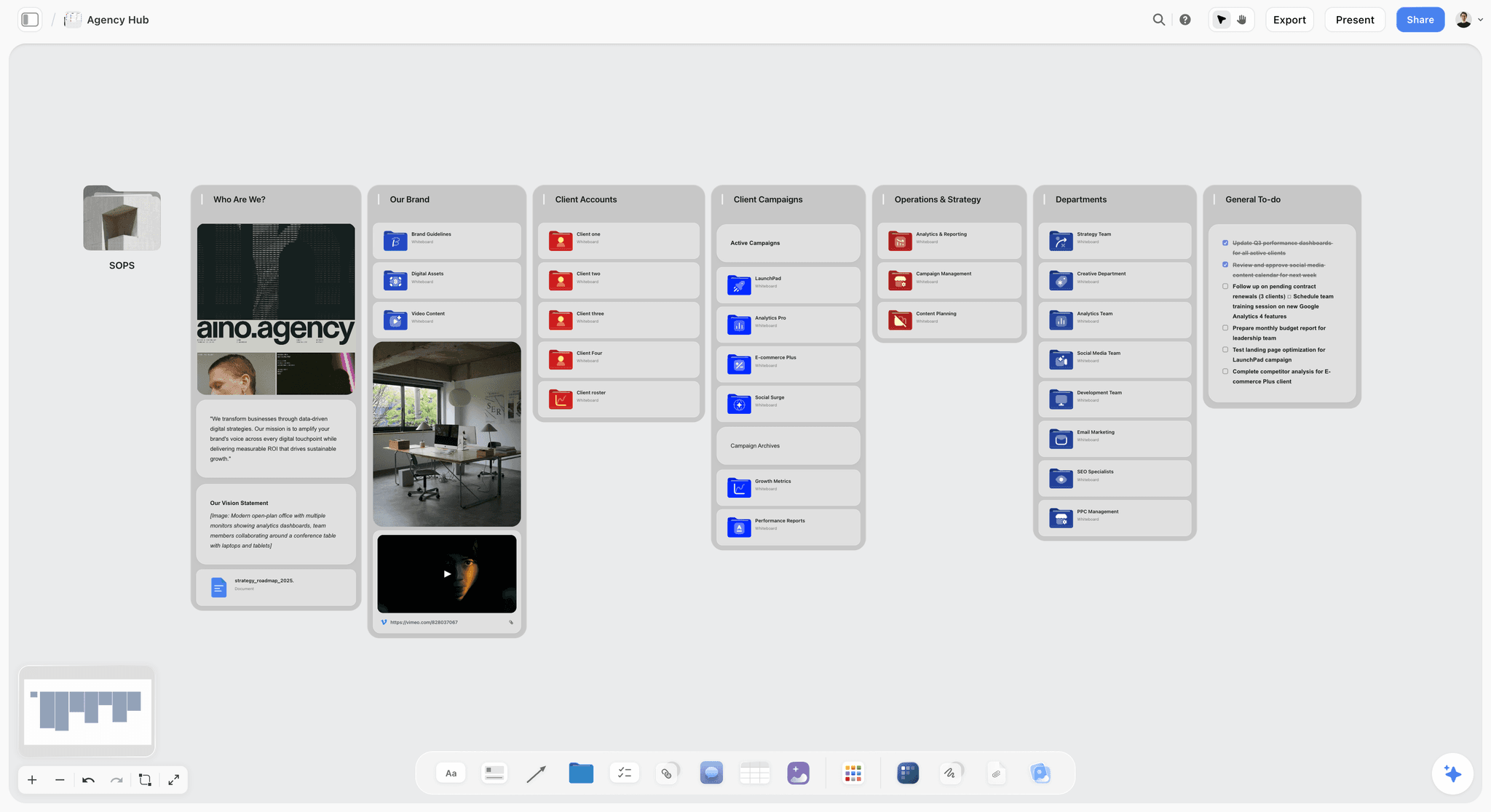
Storyflow is an AI-powered visual creative workspace: an infinite canvas with structured cards, documents, and context-aware AI, plus a library of 200+ expert framework templates called Story Blueprints. For content marketing, it is the tool that owns the layer the rest of the stack ignores. The content strategy, the pillar map, the briefs, and the editorial calendar all live on one board, and the AI reads that board before it helps you write anything.
Best for: Content strategists, in-house content leads, agency content teams, and solo content marketers who need the strategy and planning layer to actually hold together.
Verdict: The strongest tool for the strategy and planning layer of content marketing, and the one most teams are missing. For SERP-level keyword data and ranking optimization, pair it with a dedicated SEO suite.
Key features
- Context-aware AI by default. The AI reads your full active canvas board (the positioning notes, the pillar map, the briefs, the draft cards, the calendar). You can bring in extra grounding by @-mentioning up to 1 Tactic and up to 3 Documents in the AI chat. Ask it to draft a brief and it writes against the pillar that is sitting on the same board, not against a blank prompt.
- 200+ Story Blueprints on Plus and above. Expert framework templates including AIDA, StoryBrand, and Retention Hooks. They scaffold the AI's output on a real structure instead of generic prose.
- One canvas for the whole program. Audience research, positioning, pillar map, content calendar, and individual briefs all sit on the same infinite canvas as structured cards and documents. Nothing has to be reassembled across apps.
- Unlimited shared boards and unlimited collaboration on every plan, including the Free plan launching before the end of 2026. The Max plan adds a team workspace with permissions and roles for agencies and larger in-house teams.
Pricing
Paid-only during early access. Plus: $7.99/mo annual or $9.99/mo monthly, adding the full 200+ Story Blueprints, and unlimited file uploads. Pro: $14/mo annual or $19/mo monthly, adding AI image generation and 20x more AI than Plus. Max: $39/mo annual or $49/mo monthly, adding 40x more AI plus a team workspace with permissions and roles. The Free plan (unlimited notes, images, and links, unlimited shared boards, basic AI usage, 20 file uploads, and unlimited collaboration, without the 200+ Story Blueprints library) launches before the end of 2026, and anyone a paid member invites to a board joins free today.
Pros
- The strategy, pillar plan, briefs, and calendar live on one board, so the program is visible and editable by the whole team instead of scattered across docs and chat.
- The AI reads the surrounding program, so a brief or draft comes back grounded in your actual pillar and audience, not a generic topic prompt.
- Story Blueprints ground the output on real frameworks (AIDA, StoryBrand) instead of formless prose.
- The entry paid tier is $7.99/mo annual, well below Semrush, Surfer, Clearscope, Jasper, and Frase.
Cons
- For SERP-level SEO optimization and keyword data, Storyflow is not the tool. Pair it with a dedicated SEO suite (Semrush, Surfer SEO, or Clearscope).
- It is not a publishing or scheduling tool. For pushing content live across social, pair it with Buffer or StoryChief.
- Cloud-only, with no local-first option for teams in regulated industries.
If your content program keeps stalling before production because the strategy and the calendar never quite hold together, take your most active content pillar and rebuild it on a Storyflow canvas for one week. The fastest start is the Marketing Plan template for the program-level view, or the Marketing Campaign template when the pillar is anchored to a launch. Start a Storyflow workspace to run that test.
2. Semrush
Semrush is the SEO research suite content teams reach for when search visibility is the metric. It owns the optimization layer's research half: keyword research, competitive gap analysis, and topic clustering.
Best for: SEO-led content teams, agencies running search programs, and content marketers whose primary acquisition channel is organic.
Verdict: The strongest all-in-one SEO research suite in 2026. Deep, expensive, and a research tool rather than a strategy or planning canvas.
Key features
- Keyword research with volume, difficulty, and intent data.
- Competitive analysis and content gap reports against named competitors.
- Topic research and keyword clustering for pillar planning.
- Position tracking, site audit, and a content optimization toolkit.
Pricing
Pro: $139.95/mo, or $117.33/mo on annual billing. Guru: $249.95/mo. Business: $499.95/mo. Additional user seats add to the base price.
Pros
- The most complete SEO research data set in one subscription.
- Content gap analysis is genuinely useful for deciding which pillars to own.
- Position tracking and site audit reduce the tool sprawl on the SEO side.
Cons
- Expensive for solo marketers and small teams.
- It is a research and reporting suite, not a place to plan or write a content program.
- The interface has a real learning curve; the depth comes with complexity.
3. HubSpot
HubSpot is the CRM-anchored marketing platform where content, email, landing pages, and lead data sit in one system. For content marketing, it is the pick when content needs to be wired directly to pipeline.
Best for: Marketing teams already on HubSpot's CRM that want content connected to contacts, lead scoring, and automation.
Verdict: The strongest CRM-connected content platform in 2026. The value is the integration, not the content tooling on its own.
Key features
- Content Hub for blog, landing pages, and SEO-aware content creation.
- Breeze AI assistance across content, email, and the CRM.
- Native connection between content and CRM data (contacts, deals, attribution).
- Marketing automation and lead workflows tied to content engagement.
Pricing
Marketing Hub Starter: $20/mo per seat (annual). Marketing Hub Professional: $890/mo (annual, includes 3 seats and 2,000 contacts), with a one-time onboarding fee. HubSpot's contact-tier pricing scales steeply as your list grows.
Pros
- Connecting content directly to CRM data and attribution is genuinely valuable.
- One platform for blog, email, landing pages, and lead capture reduces tool sprawl.
- The free CRM tier gives small teams a real entry point.
Cons
- The jump from Starter to Professional is a steep cliff in price.
- Contact-tier pricing inflates the bill as the list grows.
- Outside the CRM use case, standalone content tools are stronger and cheaper.
4. Surfer SEO
Surfer SEO is the on-page optimization tool that grades a draft against the live SERP for a target query. It owns the optimization layer's execution half.
Best for: Content teams whose KPI is organic ranking and who need every draft scored against what is already ranking.
Verdict: The strongest on-page SEO optimization tool in 2026. Worth the cost for search-driven content programs.
Key features
- Content Editor that scores drafts in real time against SERP competitors.
- SERP Analyzer for understanding what currently ranks and why.
- AI content generation that targets a content score.
- Integrations with Google Docs and WordPress.
Pricing
Essential: $99/mo, or $79/mo on annual billing. Scale: $219/mo, or $175/mo annual. Enterprise is custom.
Pros
- The content score is a genuinely useful quality gate before a post goes live.
- SERP Analyzer turns ranking research into concrete editing instructions.
- The Google Docs integration fits how content teams actually draft.
Cons
- Optimization only; it does not plan the program or hold the calendar.
- The content score can be over-chased, producing keyword-dense, thin writing.
- Expensive for a team publishing only a few posts a month.
5. ChatGPT
ChatGPT is the default drafting and ideation tool for content marketers in 2026. It owns the production layer for fast first drafts, outlines, and repurposing.
Best for: Quick first drafts, headline and angle brainstorming, repurposing one piece into many, and exploratory ideation.
Verdict: The broadest AI writing tool, genuinely useful for drafting, and the wrong shape for holding a content program together.
Key features
- Strong drafting, outlining, and rewriting across formats.
- Image generation alongside text.
- Custom GPTs for repeatable content workflows.
- The largest plugin and integration ecosystem.
Pricing
Free tier with daily limits. Go: $8/mo. Plus: $20/mo. Pro: $200/mo.
Pros
- Excellent for fast first drafts and turning one piece into ten.
- Custom GPTs let teams encode a repeatable content task.
- The free tier is genuinely usable for occasional drafting.
Cons
- It loses the thread on multi-piece programs; context drifts across a long content sprint.
- No native sense of your pillars, brief, or calendar; output is generic until heavily prompted.
- Brand voice consistency takes careful prompt engineering every session.
6. Jasper
Jasper is the marketing-copy AI platform built around templates and brand voice. It owns the production layer for teams that want a marketing-shaped writing tool.
Best for: Content and marketing teams who want templates, brand voice modeling, and a UI built for marketing copy rather than a generic chat.
Verdict: Solid for templated content production at volume. The value gap versus general AI has narrowed.
Key features
- Templates for blog posts, social, email, and ad copy.
- Brand Voice modeling for tone consistency.
- Campaigns and Workflows for multi-asset generation.
- Jasper Chat for conversational use.
Pricing
Creator: $39/mo annual, or $49/mo monthly. Pro: $59/mo annual, or $69/mo monthly. Business is custom.
Pros
- The marketing-shaped UI lowers friction for non-AI-native teams.
- Brand Voice modeling is mature and reduces tone drift.
- Workflows handle some multi-asset content production.
Cons
- Priced well above general AI tools that produce comparable drafts.
- Output quality leans on the underlying model; you are partly paying for the wrapper.
- It produces content; it does not plan the content program.
7. Clearscope
Clearscope is the content optimization tool focused on grading a draft against a target term with a clean, accuracy-first interface.
Best for: Editorial teams and agencies that want a precise, no-clutter content grading tool for SEO-driven writing.
Verdict: A focused, premium content optimization tool. Narrow on purpose, and priced for teams that value the focus.
Key features
- Content reports that grade drafts against a target keyword.
- Term recommendations drawn from top-ranking content.
- Content inventory tracking for existing pages.
- Unlimited users and projects on standard plans.
Pricing
Essentials: $129/mo. Business: $399/mo. Enterprise is custom. Extra inventory pages and AI drafts are paid add-ons.
Pros
- The grading interface is clean and fast, with no clutter.
- Term recommendations are accurate and trusted by editorial teams.
- Unlimited users on every plan is rare at this tier.
Cons
- Expensive for what is a single-layer optimization tool.
- Optimization only; it does not research keywords, plan, or publish.
- Add-on costs for inventory and drafts add up quietly.
8. Notion
Notion is the docs-and-databases workspace where many content teams keep their style guide, runbooks, and editorial documentation. It touches the planning layer through databases.
Best for: Content teams that want a flexible home for editorial documentation, style guides, and a database-driven calendar.
Verdict: A strong documentation home for content teams. Doc-shaped, which makes visual program planning awkward.
Key features
- Pages, databases, and wikis for editorial documentation.
- A content calendar as a database view.
- AI assistance inside pages and databases.
- Connectors to Slack, Drive, and other sources.
Pricing
Free plan for individuals and small teams. AI is now included in the Business plan at $20/user/mo annual ($24 monthly); Free and Plus get only a limited AI trial allocation.
Pros
- The best home for content style guides, runbooks, and editorial wikis.
- The database calendar is flexible for teams that think in tables.
- Cross-source AI Q&A is mature on the Business plan.
Cons
- Doc-and-table shaped, so visual pillar mapping and canvas planning are awkward.
- AI now requires the Business plan, raising the real cost.
- It documents the program; it does not give the AI the program as context.
9. Frase
Frase is the SEO content tool built around answer-focused briefs and SERP research. It serves the optimization layer with a brief-first workflow.
Best for: Content writers and small SEO teams who want fast, research-backed briefs before drafting.
Verdict: A practical SEO brief and optimization tool at a reasonable entry price. Lighter than Semrush on research depth.
Key features
- SERP research that summarizes top-ranking content.
- Automated content briefs with questions and headings.
- Content optimization scoring against a target term.
- AI drafting tied to the brief.
Pricing
Basic: $45/mo, or $38.25/mo on annual billing. Team: $115/mo for up to 9 users. A 7-day trial is available.
Pros
- Brief generation is fast and genuinely useful before drafting.
- Lower entry price than Semrush, Clearscope, or Surfer Scale.
- The answer-focused approach fits how search behaves in 2026.
Cons
- Research depth is lighter than a full suite like Semrush.
- The AI drafts need real editing before they are publishable.
- Project caps on the Basic plan limit higher-volume teams.
10. StoryChief
StoryChief is the multi-channel content distribution platform that publishes one piece of content to a blog and across social from a single editor.
Best for: Content teams and agencies who write once and need to publish that piece across a blog and several social channels.
Verdict: A solid distribution and multi-channel publishing tool. Distribution-layer focused, with lighter strategy and planning features.
Key features
- One editor that publishes to blogs (WordPress, HubSpot, Webflow) and social.
- A content calendar and approval workflows.
- SEO optimization checks inside the editor.
- Multi-channel campaign tracking.
Pricing
Individual from around €19/mo. Team plans from around €29 per user. Agency plans from around €49 per client. A 14-day trial is available.
Pros
- Write-once, publish-everywhere genuinely saves time on distribution.
- Approval workflows fit agency and multi-stakeholder content teams.
- The built-in calendar covers light planning needs.
Cons
- The planning and calendar features are lighter than dedicated planning tools.
- Per-user and per-client pricing scales quickly for larger teams.
- It is a distribution tool; the strategy and pillar work happen elsewhere.
11. Buffer
Buffer is the social scheduling tool that content teams use to queue and publish social posts. It owns a narrow but real slice of the distribution layer.
Best for: Solo content marketers and small teams who need clean, simple social scheduling.
Verdict: The cleanest, simplest social scheduler in 2026. Narrow on purpose, and priced accordingly.
Key features
- Social scheduling across major platforms.
- A posting queue and a content calendar view.
- Analytics on social post performance.
- An AI assistant for social copy.
Pricing
Free for up to 3 channels with limited scheduling. Essentials: $5/channel/mo (annual) or $6/channel monthly. Team: $10/channel/mo (annual) or $12/channel monthly.
Pros
- Genuinely simple; almost no learning curve.
- Per-channel pricing is fair for marketers with few channels.
- The free plan is usable for a solo marketer testing the tool.
Cons
- Social scheduling only; it does not touch blog, strategy, or planning.
- Per-channel pricing adds up for teams with many social accounts.
- The AI assistant is light compared with dedicated writing tools.
12. ContentStudio
ContentStudio is the social content discovery and scheduling platform that pairs trend discovery with multi-channel publishing.
Best for: Social-led content teams and agencies who want content discovery plus scheduling in one tool.
Verdict: A capable social content and scheduling tool. Social-distribution focused, with limited strategy depth.
Key features
- Content discovery for finding trending topics and articles.
- Multi-channel social scheduling and a publishing calendar.
- A social inbox and team collaboration on advanced plans.
- AI assistance for social captions.
Pricing
Starter: $29/mo, or $19/mo on annual billing. Pro: $69/mo, or $49/mo annual. Agency: $139/mo, or $99/mo annual. A 14-day trial is available.
Pros
- Content discovery surfaces trends most schedulers miss.
- Annual pricing is reasonable for the social-distribution job.
- Agency plan handles client workspaces well.
Cons
- Strongest on social distribution; it does not own blog or strategy.
- AI word allowances on lower tiers are tight.
- The all-in-one positioning stretches further than the tool actually reaches.
7) Recommendations by Content Marketer Type
1. In-House Content Lead
Top picks: Storyflow + Semrush
Storyflow for the strategy canvas where the pillars, briefs, and editorial calendar live and stay visible to the whole team. Semrush for keyword research and content gap analysis. Add ChatGPT for first drafts.
2. SEO / Content Marketer
Top picks: Semrush + Surfer SEO + Storyflow
Semrush for research and clustering. Surfer SEO for grading each draft against the SERP. Storyflow for the pillar plan and calendar that the SEO work feeds into. Search tools alone do not plan a program.
3. Agency Content Team
Top picks: Storyflow Max + StoryChief + Semrush
Storyflow Max for the team workspace where each client's content strategy and calendar live with permissions and roles. StoryChief for publishing client content across channels. Semrush for the SEO research layer.
4. Solo Content Marketer / Creator
Top picks: Storyflow + ChatGPT
Storyflow for the content strategy, pillar map, and calendar on one canvas. ChatGPT for fast drafting. The minimum viable content stack for one person: Storyflow is paid-only during early access, with Plus at $7.99/month annual, and its Free plan covering the planning layer launches before the end of 2026. Creators publishing social-first can start from the Viral Content Planner template instead of a blank board.
5. Lifecycle / CRM-Focused Marketer
Top picks: HubSpot + Storyflow
HubSpot for content wired directly to the CRM, lead scoring, and automation. Storyflow for the content strategy and editorial planning that sits upstream of the HubSpot publishing layer.
6. Content Strategist / Consultant
Top picks: Storyflow + Semrush
Storyflow for building the documented strategy, the pillar map, and the brief templates a client can actually see and use. Semrush for the keyword and competitive research that grounds the strategy.
8) Honorable Mentions
A few tools that came close but did not make the main twelve.
- Ahrefs: A strong SEO suite and a real Semrush alternative; left off mainly to avoid two near-identical SEO suites in the list.
- Grammarly: Editing and clarity rather than content marketing; useful as a final-pass tool.
- Canva: Visual content design; essential for many content teams but adjacent to the strategy-to-publish workflow this list covers.
- Airtable: A flexible database for editorial calendars; strong for teams that think in tables.
- CoSchedule: A marketing calendar and project tool; close, but lighter on strategy and AI.
- Descript: Video and podcast content production; narrower than this list's scope.
These are not weak tools. Their core job sits to the side of the strategy-to-distribution content workflow this list ranks.
9) Where Content Tools Do Not Help
Honest accounting matters. There are parts of content marketing where no tool on this list closes the gap.
- Original positioning. A tool can hold your positioning once you have it. It cannot decide what your brand uniquely stands for. That comes from customer conversations and judgment.
- A genuine point of view. Content that gets cited and shared has a take. AI extends a take; it does not originate one.
- Editorial taste. Knowing which of ten drafts is actually good, and why, is human craft. Optimization scores are a floor, not a ceiling.
- Audience relationships. The trust a content program builds over years is not a tool output. It is the compound result of consistently useful work.
- Knowing when to stop. The discipline to kill a content pillar that is not working is a strategic decision, not a feature.
If your content tool spending is high but the program still feels directionless, the missing layer is almost certainly strategy, not production. Most content programs do not fail because the writing was slow. They fail because the strategy was never written down. No amount of drafting speed fixes an undocumented strategy.
11) The Bottom Line
The best content marketing tool in 2026 depends on which layer of the content job is your bottleneck. Storyflow is the strongest pick for the strategy and planning layer, where the pillar map, the briefs, and the editorial calendar live on one canvas and the AI reads the whole program before it helps you write. Semrush is the strongest for SEO research. Surfer SEO is the strongest for on-page optimization. HubSpot is the strongest for CRM-connected content. ChatGPT is the strongest for fast drafting.
Most content teams in 2026 run a layered stack: one tool for strategy and planning, one or two for SEO, one for drafting, and one for distribution. The mistake that quietly costs the most is buying three production tools and zero strategy tools. Most content programs do not fail because the writing was slow. They fail because the strategy was never written down. Fix that layer first.
If you want to test the strategy layer, take your most active content pillar and rebuild it on a Storyflow canvas for two weeks. Start a Storyflow workspace to run that test.
10) FAQ: Content Marketing Tools in 2026
What is the best content marketing tool in 2026?
It depends on which content layer is your bottleneck. For the strategy and planning layer, where most content programs actually fail, Storyflow is the strongest pick: the pillar plan, briefs, and calendar live on one canvas with AI that reads the whole program. For SEO research, Semrush. For on-page optimization, Surfer SEO. For drafting, ChatGPT. Most content teams in 2026 run three or four tools, one per layer.
How much do content marketing tools cost in 2026?
Pricing spans a wide range. Storyflow is paid-only during early access, starting at $7.99/mo annual for the Plus plan, with a Free plan launching before the end of 2026. ChatGPT Plus is $20/mo. HubSpot Marketing Hub Starter is $20/mo per seat, with Professional at $890/mo. Semrush Pro is $117.33/mo annual. Surfer SEO Essential is $79/mo annual. Clearscope Essentials is $129/mo. Verify current pricing on each tool's site before committing, since plans change.
What is the best free content marketing tool?
Storyflow's Free plan, which launches before the end of 2026, will be the strongest free tier for the strategy and planning layer: unlimited boards, unlimited cards, unlimited collaboration, basic AI, and 20 file uploads. The Free plan does not include the 200+ Story Blueprints library. ChatGPT, Notion, and Buffer all have usable free tiers for drafting, documentation, and social scheduling respectively.
Do I need both a strategy tool and an SEO tool?
In most cases, yes. They serve different layers. A strategy and planning tool like Storyflow decides what content to make, for whom, and when. An SEO suite like Semrush or Surfer SEO decides whether that content will get found in search. One does not replace the other. The common mistake is buying only the SEO tool and treating the strategy layer as something that will sort itself out.
What is the difference between a content planning tool and an SEO tool?
A content planning tool holds the program: the pillars, the briefs, the calendar, and the assignments. An SEO tool holds the search data: keyword volume, difficulty, SERP competitors, and optimization scores. Planning tools answer what to make and when. SEO tools answer whether it will rank. A complete content stack has both, plus a drafting tool. See The 12 Best Content Planning Tools in 2026 for the planning-specific comparison.
Is HubSpot worth it for content marketing?
For teams that already run their CRM, email, and lead capture in HubSpot, yes, because content connected to contact and attribution data is genuinely valuable. For teams that only need content tooling, the jump to Professional at $890/mo is a steep cliff, and standalone tools cover the content job for far less. The decision is about the CRM, not the content features.
Which content marketing tool is best for SEO?
Semrush is the strongest for SEO research (keyword data, competitive gaps, clustering). Surfer SEO is the strongest for on-page optimization (grading drafts against the SERP). Clearscope and Frase are focused content optimization tools. Most SEO-led content teams pair Semrush for research with Surfer SEO for execution, then plan the program in a separate strategy tool.
Can AI replace content marketing tools?
No. A general AI tool like ChatGPT can draft and ideate, but it does not research keywords at SERP depth, hold a documented strategy the whole team can see, or publish across channels. The strongest 2026 setups use AI inside purpose-built tools: context-aware AI in a strategy canvas like Storyflow, AI scoring in an SEO tool like Surfer, and a general model like ChatGPT for fast drafts.
What tools do content marketers actually use in 2026?
Most content teams run a layered stack rather than one tool. A typical setup: a strategy and planning canvas (Storyflow), an SEO suite for research (Semrush), an optimization tool for drafts (Surfer SEO), a general AI for drafting (ChatGPT), and a distribution tool (Buffer or StoryChief). The exact mix shifts with the team's biggest bottleneck.
How do I choose a content marketing tool?
Start by naming your bottleneck layer. If the program keeps stalling before production because the strategy and calendar never hold together, you need a strategy and planning tool first. If you publish steadily but nothing ranks, you need an SEO tool. If drafting is slow, you need an AI writing tool. Buy for the layer that is actually broken, not the layer that is easiest to shop for.
Is ChatGPT enough for content marketing on its own?
For drafting and ideation, ChatGPT is genuinely strong. For a full content program, no. It has no native sense of your pillars, no documented strategy the team can see, no keyword data, and no calendar. Pair ChatGPT with a strategy canvas like Storyflow (Plus starts at $7.99/month annual to test it) and you have a real minimum stack for a solo content marketer.
What is the smallest test I can run before buying a stack?
Take the content pillar you are working on right now. Put the positioning, the audience notes, three planned pieces, and the briefs onto one Storyflow canvas. Ask the AI to draft a brief for the next piece, with the pillar sitting on the same board. Compare that brief to one ChatGPT writes from a topic string alone. The gap is visible within an hour. Try a Storyflow workspace to run that test.
Table of Contents
- Quick Answer: The Best Content Marketing Tools in 2026
- Comparison Table: 12 Content Marketing Tools Compared
- Why Content Marketing Needs a Different Stack
- How We Evaluated These Tools
- Quick Picks by Content Layer
- Detailed Reviews: 12 Content Marketing Tools in 2026
- Recommendations by Content Marketer Type
- Honorable Mentions
- Where Content Tools Do Not Help
- FAQ: Content Marketing Tools in 2026
- The Bottom Line
- Author
- Related Reading
Templates to check out for this topic


Marketing and campaign templates you can use in Storyflow
Plan the whole campaign on one board: brief, audience, channels, and assets connected, with an AI that reads all of it. Open a template and start from real structure.


See Storyflow in Action
A visual AI workspace where every feature lives inside one canvas. No tab-switching, no context lost.
Build your entire board from a single message
Type what you need in the AI chat at the bottom of your canvas. The AI adds cards, headings, and structure directly onto your board.
Use expert frameworks as AI context
Type @ in the AI chat and choose any Tactic. The AI tailors every response to that framework instead of giving generic advice.
Turn your board into a mind map in seconds
Ask the AI to restructure your canvas as a mindmap. It connects your ideas into a visual hierarchy so you can see how everything relates.
Why Storyflow Exists
Storyflow actually began as a personal tool while working on creative and research projects.
We kept running into the same problem: ideas were scattered everywhere: notes, documents, and whiteboards.
Nothing helped us see how everything connected.
So we started building a workspace designed around how ideas actually grow.
→ Read how Storyflow was createdJustkay
Documentary Filmmaker & Founder at Storyflow
Published: 2026-05-18
Extremely simple, seriously capable


See how easy it is to get started
Watch a real project come together, from a blank board to a finished plan, clicked through step by step.
Start creating with AI and become more productive
Transform your creative workflow with AI-powered tools. Generate ideas, create content, and boost your productivity in minutes instead of hours.