
Category
Design
Author

Justkay
Documentary Filmmaker & Founder at Storyflow
Topics
2026-05-18
•
Updated May 18, 2026
•
15 min read
•
Design- best AI tools for designers 2026
- AI tools for designers
- AI for design
- Figma AI
- AI for mood boards
- AI design workflow
What are the best AI tools for designers in 2026?
The best AI tools for designers in 2026 are Figma AI (best for the core UI design surface), Storyflow (best for research, mood boards, briefs, and the project planning canvas), Midjourney (best for visual exploration and imagery), and ChatGPT (best for reasoning and copy). Design is five jobs, not one: research, ideate, generate, refine, and handoff. No single tool wins all five, so most working designers run a small stack matched to the phase that is slowing them down.

All 12 AI Tools for Designers, Ranked
- Figma AI: best overall for the core UI design surface with AI built in
- Storyflow: best for research, mood boards, briefs, and the project canvas
- Midjourney: best for visual exploration and imagery
- ChatGPT: best for reasoning, copy, and quick problem-solving
- Adobe Firefly: best for commercially safe image and vector generation
- Galileo AI (Google Stitch): best for text-to-UI first drafts
- Uizard: best for fast wireframes and prototypes for non-designers
- Visily: best for AI wireframing with clean Figma export
- Recraft: best for vector, icon, and brand-consistent imagery
- Khroma: best for AI color palettes trained on your taste
- Miro AI: best for AI on a collaborative whiteboard
- Magician / Diagram: now folded into Figma AI
Full disclosure: Storyflow is our own product, so treat our ranking with that in mind. We rank Figma AI #1 here because interface design happens in Figma, and Storyflow does not compete on UI, prototyping, or image generation. We place Storyflow #2 for one phase the others skip: the research, mood board, and brief work before any pixel is placed, where the AI reads your whole canvas. For imagery Midjourney and Adobe Firefly are stronger, and Storyflow is cloud-only and newer than Figma or Adobe. Match the tool to the phase that is slowing you down. We link to every tool so you can judge the fit.
Quick Comparison: Best AI Tools for Designers
These four cover the phases designers pick between: the core UI surface, upstream research and mood boards, imagery, and reasoning and copy.
| Tool | Best For | AI Features | Price |
|---|---|---|---|
| Figma AI | Core UI design surface with AI built in | First Draft text-to-UI and Dev Mode | Free / $12 mo |
| Storyflow | Research, mood boards, briefs, and project canvas | Reads full board + @-docs and Tactics | $7.99 mo annual (free plan late 2026) |
| Midjourney | Visual exploration and imagery | High-aesthetic image generation | $10 mo |
| ChatGPT | Reasoning and UX copy | Problem reasoning and copy drafting | Free / $20 mo |
1) Quick Answer: The Best AI Tools for Designers in 2026
The best AI tools for designers in 2026 are Storyflow (best for the research, mood board, and brief work that happens before any pixel is placed), Figma AI (best for the core UI design surface), Midjourney (best for visual exploration and imagery), and ChatGPT (best for fast reasoning and copy). Most working designers in 2026 do not run one tool. They run a small stack, because design is not one job, it is five: research, ideate, generate, refine, and handoff. No single tool wins all five.
The short version: if you design interfaces, Figma AI is the surface. If your bottleneck is the messy upstream thinking (research synthesis, mood boards, design briefs, project planning), Storyflow. If you need imagery, Midjourney or Adobe Firefly. If you need fast text-to-UI drafts, Galileo AI, Uizard, or Visily. Pick by the phase that is slowing you down, not by the brand with the loudest launch.
For adjacent reading, see The 10 Best Mood Board Tools in 2026 and The 12 Best AI Tools for UX Researchers in 2026.
2) Comparison Table: 12 AI Tools for Designers Compared
Rating criteria: tested across real design projects (brand identity work, product UI, documentary visual development). Tools were rated on whether they shipped a deliverable or moved a project forward, not on demo polish. Pricing verified on each tool's official page in May 2026; verify current pricing before quoting.
3) Why Designers Need a Different AI Stack
A copywriter and a designer both make things, but their AI needs barely overlap. Three structural facts shape the designer's stack.
Design is phase-shaped, not output-shaped. A finished screen is the last 20 percent of the work. Before it comes audience research, a problem definition, a mood board, a brief, competitive teardown, and a plan. Design is not one job, it is five: research, ideate, generate, refine, and handoff. A tool that nails the generate phase (Figma AI drafting a layout) does nothing for the research phase. A tool that nails research synthesis does not place a single component. The mistake designers make in 2026 is buying one AI tool and expecting it to cover the whole arc.
Most AI design tools optimize the visible 20 percent. Text-to-UI generators, image models, and layout assistants all live in the generate phase because that is the phase that demos well. A 15-second video of a prompt becoming a screen is compelling. A 15-second video of research synthesis is not. So the upstream phases (research, ideate) stay underserved even though they are where projects actually fail. According to Figma's State of the Designer 2026, only 22 percent of designers use AI to create first drafts of interfaces, while 38 percent use it for customer research, meaning the research phase is where AI is quietly doing the most work and getting the least attention.
Design is multi-modal and multi-source. A real project has interview notes, screenshots, references, a brief, sketches, and a moodboard. Text-only AI sees a fraction of that. The tools that treat images, links, and notes as first-class context outperform tools that need everything pasted as a prompt.
The familiar approach is to open one AI tool and ask it to do everything. It works for a single screen and falls apart when the project has a research phase, a brief, and ten reference images that all need to stay coherent. The designer approach is to match the tool to the phase: a workspace for research and mood boards, a UI tool for the build, an image model for imagery, a color tool for palettes. The stack beats the single tool, every time.
For the architectural argument behind project-aware AI, see The Single-Prompt Fallacy.
4) How We Evaluated These Tools (Across Real Projects)
Every tool here was tested on actual design work between 2024 and 2026: a brand identity refresh, a product UI build, and the visual development phase of two documentary projects. No synthetic prompts. Five criteria, weighted in this order.
- Phase fit. Which of the five design phases (research, ideate, generate, refine, handoff) does the tool genuinely serve, and how well? A tool that does one phase brilliantly beats a tool that does three phases adequately.
- Output usability. Did the AI output ship, or did fixing it take longer than starting from scratch? AI that produces a plausible draft you have to rebuild is not a time saving.
- Context depth. Does the tool work from your actual project material (research, references, brief), or only from a one-line prompt? Context depth separates a real assistant from a slot machine.
- Designer control. Can you steer, edit, and override the AI, or does it hand you a finished thing you cannot adjust? Designers need a collaborator, not a vending machine.
- Pricing honesty at real usage. What does the tool cost when usage is real, not when you are on the trial? Credit systems hide the real bill.
Tools were tested by the same designer across all five phases so the rankings reflect a single coherent workflow, not isolated feature checks.
5) Quick Picks by Design Phase
If you want the short list, organize it by the phase that is slowing you down.
Best for Research (understanding the problem): Storyflow for synthesizing interviews, references, and competitive teardowns on one canvas. ChatGPT for fast reasoning through a problem. Miro AI if your research already lives on a Miro board.
Best for Ideate (mood boards, direction, concepts): Storyflow for mood boards and direction-setting on an infinite canvas. Midjourney for visual exploration when you need imagery to react to. Galileo AI for fast text-to-UI concepts.
Best for Generate (making the thing): Figma AI for UI generation inside the design file. Adobe Firefly for commercially safe imagery. Recraft for vectors and icons. Uizard or Visily for fast wireframes.
Best for Refine (polish, systems, color): Figma AI for layer cleanup and interactions. Khroma for color palettes. Magician-style automation now folded into Figma AI.
Best for Handoff (specs, code, dev): Figma AI with Dev Mode for inspection and code. Visily and Uizard both export to Figma and code.
6) Detailed Reviews: 12 AI Tools for Designers in 2026
1. Storyflow
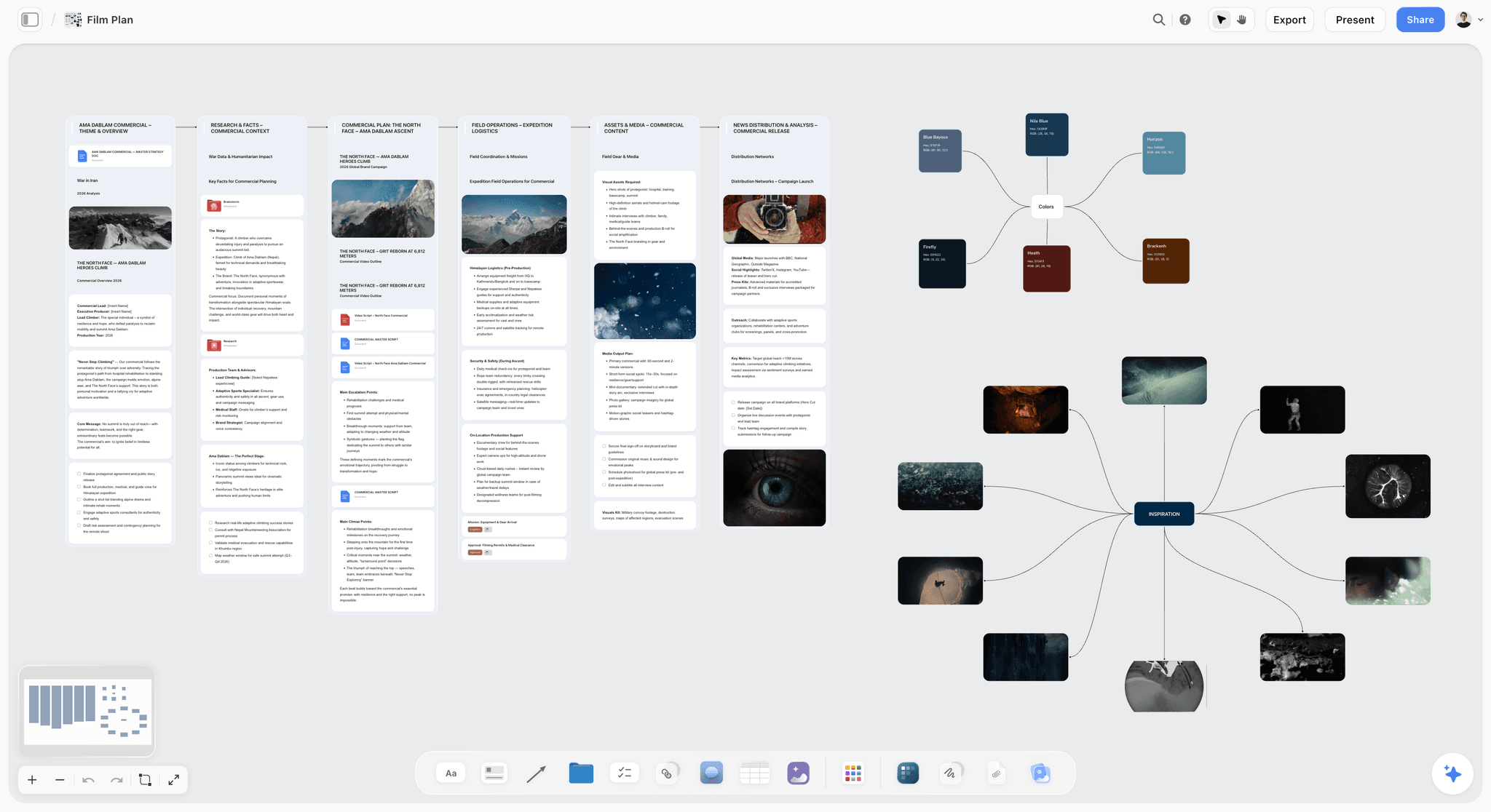
Storyflow is a visual workspace where the AI reads your full active canvas. It is the tool for the phases that happen before Figma opens: research synthesis, mood boards, design briefs, and the project planning canvas that holds a design project together.
Best for: Brand designers, design leads, and any designer whose bottleneck is the messy upstream thinking, not the pixel pushing.
Verdict: The strongest AI tool for the research and ideate phases. It is honestly not a UI design tool and not an image generator. It is the canvas where the thinking happens before those tools take over.
Key features
- Project-aware AI by default. The AI reads the full active canvas board (research notes, reference images, brief, competitive teardown). You can add up to 1 Tactic and up to 3 Documents via @-mention for extra grounding.
- 200+ Story Blueprints on Plus and above. A library of expert-built creative templates for briefs, research structures, and planning frameworks. The upcoming Free plan will not include the 200+ library.
- Multi-format canvas. Mood boards, mind maps, research clusters, brief cards, and a project plan all live on one infinite board.
- Unlimited shared boards and unlimited collaboration on every current plan. The Max plan adds a team workspace with permissions and roles.
Pricing
Storyflow is paid-only during early access. Plus: $7.99/month annual or $9.99/month monthly (the full 200+ Story Blueprints library, unlimited uploads). Pro: $14/month annual or $19/month monthly (adds AI image generation and 20x more AI than Plus). Max: $39/month annual or $49/month monthly (adds 40x more AI and a team workspace with permissions and roles). A Free plan launches before the end of 2026 with unlimited notes, images, and links, unlimited shared boards, unlimited collaboration, basic AI usage, and 20 file uploads.
Pros
- The AI reads the whole research and mood board canvas, so synthesis stays grounded in your actual material.
- The upcoming Free plan looks genuinely usable for a full research and ideation phase, based on the published feature list.
- Cheaper at the entry tier than most tools here, and it covers the phase the others skip.
Cons
- Storyflow is not a UI or vector design tool. For interface design and prototyping, use Figma.
- Storyflow is not an image-generation-first product. For imagery, use Midjourney or Adobe Firefly.
- Cloud-only, with no local-first option, and it is a newer platform than Figma or Adobe.
2. Figma AI
Figma AI is the AI woven directly into the design tool most product designers already use. The pick when your work is interface design and you want AI inside the file, not in a separate tab.
Best for: UX designers, product designers, and design system owners who build interfaces in Figma every day.
Verdict: The strongest AI tool for the generate, refine, and handoff phases of UI design. It does little for the research and mood board phases that come first.
Key features
- First Draft. Text-to-UI generation. Describe a screen and Figma builds a structured layout with auto layout, contextual placeholder content, and real components.
- AI image and content tools. Make an image, Replace content, and auto-rename layers handle the small repetitive jobs.
- Dev Mode with AI. Inspection, code suggestions, and handoff assistance for the developer relationship.
- Search and interactions. Smart search across files and AI-assisted prototype interactions.
Pricing
Free Starter plan includes 500 AI credits per month with a 150-credit daily cap. Professional is $12/month per Full seat with 3,000 credits. As of March 2026, Figma strictly enforces credit limits on paid plans; heavy AI users buy add-on credits ($150/month for 5,000 shared credits). Verify current pricing on Figma's site.
Pros
- AI lives inside the design file, so there is no export-import friction.
- First Draft produces editable, component-based layouts, not flat images.
- Dev Mode makes the handoff phase genuinely faster.
Cons
- Figma AI is a generate-and-refine tool. It does not help with research synthesis or mood boards.
- The credit system gets expensive fast for teams that lean on AI heavily.
- First Draft output still needs real design judgment before it ships.
3. Midjourney
Midjourney is the image model designers reach for when the output needs to be beautiful, not just correct. The pick for visual exploration, mood imagery, and concept art.
Best for: Brand designers, art directors, and creative designers who need imagery to explore direction or fill a moodboard.
Verdict: The strongest image model for aesthetic quality in 2026. It is an imagery tool, not a design system or layout tool.
Key features
- Best-in-class image aesthetics and style consistency.
- Style references and character references for keeping a visual direction coherent.
- A fast web interface that has long replaced the old Discord-only workflow.
- Stealth mode on higher tiers for private generation.
Pricing
No free plan. Basic $10/month, Standard $30/month, Pro $60/month, Mega $120/month. Annual billing cuts each plan by 20 percent (Basic $8/month). Companies over $1M in revenue must use Pro or Mega for commercial work.
Pros
- The aesthetic ceiling is the highest of any image model designers use.
- Style and character references make a direction repeatable.
- Strong for the ideate phase when you need imagery to react to.
Cons
- No free tier, so there is no zero-cost way to evaluate it.
- It generates images, not editable design assets or layouts.
- Commercial-use rules depend on your company's revenue tier.
4. ChatGPT
ChatGPT is the general reasoning tool designers use for the non-visual half of the job: thinking through a problem, drafting UX copy, and quick research.
Best for: Every designer, for the thinking and writing parts of the work that no visual tool handles.
Verdict: The most broadly useful AI tool for designers, precisely because it is not a design tool. It reasons and writes; it does not design.
Key features
- Strong reasoning for problem definition and design rationale.
- UX copy, microcopy, and content drafting.
- Image generation built in for quick visual references.
- Custom GPTs for repeatable design workflows.
Pricing
ChatGPT Plus $20/month. ChatGPT Pro $200/month. Free tier with daily limits.
Pros
- The best tool for the reasoning and copywriting parts of design.
- Broad ecosystem and custom GPTs for repeatable tasks.
- Free tier is usable for occasional work.
Cons
- It is not a design tool. It produces text and reference images, not deliverables.
- Loses context on long, multi-step projects, the failure mode covered in Why ChatGPT Loses the Plot.
- Visual output is reference-grade, not production-grade.
5. Adobe Firefly
Adobe Firefly is the image and vector model built for commercial safety. The pick when the imagery has to be cleared for client and brand use.
Best for: In-house designers and agency designers who need generated imagery that is safe to ship for paying clients.
Verdict: The strongest image model for commercially safe generation. It trades some aesthetic ceiling for legal peace of mind.
Key features
- Commercially safe generation trained on licensed and Adobe Stock content.
- Generative Fill, text-to-image, and vector creation.
- Deep integration with Photoshop, Illustrator, and the Creative Cloud apps.
- Partner models (Google, OpenAI, others) accessible inside Firefly.
Pricing
Free tier with 25 generative credits per month. Standard $9.99/month (2,000 credits), Pro $19.99/month (4,000 credits), Pro Plus and Premium above that. Paid plans include unlimited standard generations; credits are consumed only by premium features like video. Verify current pricing and promotions on Adobe's site.
Pros
- Commercial safety is a real, billable advantage for client work.
- Tight integration with Photoshop and Illustrator fits existing Adobe workflows.
- Paid plans give unlimited standard image generation.
Cons
- The aesthetic ceiling is lower than Midjourney for pure visual exploration.
- It is most valuable inside the Adobe ecosystem; less compelling standalone.
- The credit system on premium features needs watching.
6. Galileo AI (Google Stitch)
Galileo AI, now Google Stitch after the Google acquisition, turns text prompts and rough sketches into editable UI drafts. The pick for fast first-pass interface concepts.
Best for: Product designers and founders who want a fast, editable UI draft to react to before going into Figma.
Verdict: The strongest free text-to-UI tool in 2026. It produces a starting point, not a finished design.
Key features
- Text-to-UI and sketch-to-UI generation for web and mobile.
- Editable hi-fi wireframes, not flat images.
- Figma and code export for moving the draft forward.
- A redesign mode for iterating on an existing draft.
Pricing
Free in beta as of 2026, no credit card required. Daily limits apply (around 400 design credits and 15 redesign credits per day). No paid plans currently. Verify current status, since Google may introduce pricing.
Pros
- Genuinely free, which makes it a low-risk way to start a concept.
- Output exports to Figma so the draft is not a dead end.
- Fast enough to generate several directions in minutes.
Cons
- It is a first-draft tool. The output needs a designer to make it ship-worthy.
- Beta status means features and limits can change without notice.
- Generic results unless the prompt is detailed and specific.
7. Uizard
Uizard is the AI wireframing and prototyping tool aimed at people who are not full-time designers. The pick for fast, low-fidelity concepts and prototypes.
Best for: Founders, product managers, and designers who need a quick clickable prototype without opening a full design tool.
Verdict: Strong for fast wireframes and prototypes. Less suited to high-fidelity production design.
Key features
- Text-to-design and screenshot-to-design generation.
- Clickable prototyping built in.
- Themes and component libraries for quick consistency.
- Code handoff included at no extra credit cost.
Pricing
Free plan with limits. Pro at $12/creator/month billed annually or $19/creator/month monthly, with 500 generations per month and a 100-project cap. Verify current pricing on Uizard's site.
Pros
- Low barrier to entry for non-designers who need a prototype.
- Screenshot-to-design is useful for reworking an existing screen.
- Prototyping and code handoff are built in.
Cons
- Output fidelity is below what a UX team needs for production.
- The 100-project cap on Pro is restrictive for agencies.
- Less control than Figma for refined design work.
8. Visily
Visily is an AI wireframing tool that exports cleanly to Figma. The pick for fast wireframes that then move into a real design file.
Best for: Product teams that wireframe in a quick tool but want the result to land in Figma for finishing.
Verdict: A solid, affordable AI wireframing tool. Its strength is the Figma export bridge.
Key features
- Text-to-wireframe, screenshot-to-design, and sketch import.
- Clean Figma export so wireframes become editable design files.
- Code export and template libraries.
- Unlimited boards and elements on the paid tier.
Pricing
Free tier available. Pro starts at $11/editor/month billed annually, with 3,000 AI credits and 8,000 template credits per editor. Verify current pricing on Visily's site.
Pros
- One of the most affordable AI wireframing tools.
- Figma export is clean enough to be a real handoff.
- Generous board and element limits on paid plans.
Cons
- It is a wireframing tool, not a finishing tool. Real polish happens in Figma.
- Credit limits apply on the paid tier.
- Less ecosystem and plugin depth than the incumbents.
9. Recraft
Recraft is the image model built for designers who need vectors, icons, and brand-consistent output. The pick when the generated asset has to behave like a design asset.
Best for: Brand and graphic designers who need editable vectors, icon sets, and on-brand imagery.
Verdict: The strongest image model for vector and brand-consistent work. Narrower than Midjourney, but more useful for production design.
Key features
- Vector and SVG generation, not just raster images.
- Brand styles and consistent style sets across a project.
- Icon set generation.
- Editable output that fits into a real design pipeline.
Pricing
Free plan with daily credits (around 30 to 50 per day), public images, and no commercial license. Pro at $20/month billed annually ($25/month monthly) adds volume, brand tools, and commercial licensing. Verify current pricing on Recraft's site.
Pros
- Vector and SVG output is genuinely useful in a design pipeline.
- Brand style sets keep generated assets coherent.
- More production-relevant than raster-only image models.
Cons
- Aesthetic ceiling for illustrative imagery is below Midjourney.
- The free plan gives no commercial license.
- Narrower use case than a general image model.
10. Khroma
Khroma is an AI color tool that learns your taste. The pick for the refine phase, when a palette needs to feel right and pass contrast checks.
Best for: Any designer choosing a color palette, especially brand and UI designers who care about accessibility.
Verdict: A focused, genuinely free tool that does one job well. It is not a workflow tool, it is a color tool.
Key features
- Trains a neural network on 50 colors you pick, then generates palettes in your taste.
- Search and filter by hue, tint, value, and hex.
- WCAG contrast ratings on every combination, with AA and AAA scoring.
- Palette, gradient, and typography previews.
Pricing
Completely free. No paid tiers, no subscription, no hidden costs. Unlimited palette generation, search, and saving.
Pros
- Genuinely free with no paywall.
- WCAG contrast scoring built in is a real accessibility win.
- Learns your taste, so output gets more useful over time.
Cons
- Single purpose. It generates color, nothing else.
- No collaboration or project features.
- The training step takes a few minutes upfront.
11. Miro AI
Miro AI is the AI layer on Miro's collaborative whiteboard. The pick for design teams whose research, workshops, and journey maps already live in Miro.
Best for: Design teams running collaborative research, workshops, and journey mapping on a shared whiteboard.
Verdict: Solid if your team already lives in Miro. The AI is a layer on the whiteboard, not the reason to use it.
Key features
- AI clustering and summarizing of sticky notes and research.
- Diagram and flow generation from prompts.
- Workshop and journey-mapping templates.
- Real-time collaboration at scale.
Pricing
Free plan with 3 editable boards. Starter $8/member/month annual (25 AI credits). Business $20/member/month annual (50 AI credits). Verify current pricing on Miro's site.
Pros
- Strong for collaborative research and workshop synthesis.
- AI clustering genuinely speeds up affinity mapping.
- Mature real-time collaboration.
Cons
- The free plan's 3-board limit is tight for ongoing work.
- AI credits are limited on lower tiers.
- The AI is a feature on the whiteboard, not a deep design assistant.
12. Magician / Diagram
Magician, built by Diagram, was the AI plugin that pioneered AI inside Figma. The pick is now moot: Figma acquired Diagram and folded Magician's features into Figma AI.
Best for: Designers who remember Magician. In practice, its capabilities now live inside Figma AI.
Verdict: Historically important, currently absorbed. If you want what Magician did, you want Figma AI.
Key features
- Magic Icon generated vector icons from text.
- Magic Copy generated placeholder and real copy.
- Magic Image generated images inside Figma.
- The Diagram team also shipped Automator, Genius, and UI-AI.
Pricing
No standalone pricing. Magician's capabilities are part of Figma AI; see the Figma AI entry above.
Pros
- Pioneered the AI-inside-Figma pattern that is now standard.
- Its best features are now native to Figma AI.
- Diagram's other plugins explored useful automation ideas.
Cons
- Magician is no longer available as a standalone plugin.
- There is nothing left to buy or evaluate independently.
- It is included here for completeness, not as a current recommendation.
7) Designer-Type Recommendations
1. UX Designer
Top picks: Figma AI + Storyflow
Figma AI for the interface generation, refinement, and Dev Mode handoff. Storyflow for the research synthesis and problem definition that has to happen before any screen exists. Add ChatGPT for UX copy and design rationale.
2. Product Designer
Top picks: Figma AI + Galileo AI + Storyflow
Galileo AI for fast first-draft concepts to react to. Figma AI for the production build. Storyflow for the project canvas that holds research, brief, and plan together across a multi-week project.
3. Brand Designer
Top picks: Storyflow + Midjourney + Khroma
Storyflow for the mood board and brand brief work where direction is set. Midjourney for visual exploration and imagery. Khroma for color palettes with accessibility scoring built in.
4. Graphic Designer
Top picks: Adobe Firefly + Recraft
Adobe Firefly for commercially safe imagery inside the Creative Cloud apps. Recraft for editable vectors and icon sets. Add ChatGPT for quick copy.
5. Design Lead / Design Manager
Top picks: Storyflow Max + Figma AI
Storyflow Max for the team workspace where research, briefs, and project plans live with permissions and roles. Figma AI for the team's production design surface. The lead's job is upstream clarity, which is the phase Storyflow serves.
6. Solo Designer / Freelancer
Top picks: Storyflow + Figma AI + ChatGPT
Storyflow (paid-only during early access, Plus at $7.99/month annual) for research and mood boards. Figma AI for the build. ChatGPT for copy and reasoning. The minimum viable AI design stack for one person.
8) Honorable Mentions
A few tools that came close but did not make the main twelve.
- Framer AI: AI-assisted website design and publishing. Strong if your deliverable is a live site rather than a design file.
- Relume: AI sitemap and wireframe generation for web projects. Useful upstream of Figma for site structure.
- Canva Magic Studio: AI inside Canva for fast, template-driven design. Better for non-designers and marketing assets than for product or brand work. See The 12 Best Canva Alternatives in 2026.
- Spline AI: AI-assisted 3D design for designers moving into spatial and 3D work.
- Magnific: AI image upscaling and enhancement, useful in the refine phase.
- Vance AI: Image enhancement and cleanup utilities.
These are not weak tools. Their use case is narrower than the main list, or they overlap heavily with a tool already ranked.
9) Where AI Does Not Help Designers Yet
Honest accounting matters. There are design jobs where AI is still weak, and pretending otherwise wastes a designer's time.
- Original creative direction. AI can generate variations on a direction. It cannot decide which direction is right for a brand. That call comes from taste, strategy, and client conversations.
- Design taste and judgment. AI produces plausible output. Deciding whether it is good, on-brand, and appropriate is human work. Figma's own 2026 data found only 58 percent of designers say AI improves the quality of their work, even as 78 percent say it speeds them up.
- Understanding the real user. AI summarizes research well. It does not replace watching five real users struggle with your interface.
- Design systems thinking. AI can suggest components. The architectural decisions behind a system (naming, structure, governance) are still human.
- Stakeholder and client navigation. Reading a room, managing feedback, and defending a decision are not tasks any model does.
- Accessibility judgment. AI can flag a contrast ratio. It cannot judge whether an experience genuinely works for someone using a screen reader.
If your AI use is concentrated in these areas, you are using AI for the wrong jobs. The right use is upstream (research synthesis, ideation, draft generation) and in the repetitive middle (layer cleanup, asset generation, handoff specs). The taste and judgment stay yours. AI speeds up the work; it does not make the decisions.
11) The Bottom Line
The best AI tool for designers in 2026 depends entirely on which phase is slowing you down. Design is not one job, it is five: research, ideate, generate, refine, and handoff. Storyflow is the strongest pick for the research, mood board, brief, and project planning phases that come first. Figma AI is the strongest pick for generate, refine, and handoff on UI work. Midjourney and Adobe Firefly lead on imagery. Galileo AI, Uizard, and Visily lead on fast text-to-UI drafts. Khroma owns color.
Most working designers in 2026 run a stack of three or four tools, not one. The tool that wins your money is the one that fixes your slowest phase. If your interfaces ship slowly, that is Figma AI. If your projects stall in the messy upstream thinking before any pixel is placed, that is Storyflow. AI speeds up the work; it does not make the decisions. The taste, the direction, and the judgment stay with the designer.
To test the upstream half of the stack, take one real project and run its research and mood board phase on a Storyflow canvas for a week. Start a Storyflow workspace to run that test.
10) FAQ: AI Tools for Designers in 2026
What is the best AI tool for designers in 2026?
It depends on the design phase. For the core UI design surface, Figma AI. For the research, mood board, and brief phase that comes before it, Storyflow. For imagery, Midjourney or Adobe Firefly. For fast text-to-UI drafts, Galileo AI. Most designers in 2026 run a small stack, not one tool, because design is five jobs and no tool wins all five.
Will AI replace designers?
No. AI is replacing specific tasks (layer cleanup, asset generation, first-draft layouts, handoff specs) and amplifying others (research synthesis, ideation, exploration). Figma's State of the Designer 2026 found 68 percent of UI/UX designers believe AI will enhance rather than replace their jobs. Creative direction, taste, and user understanding remain human work. The designers thriving in 2026 use AI as the tool, not the operator.
What is the best free AI tool for designers?
It depends on the job. Khroma is fully free for color palettes. Google Stitch (Galileo AI) is free in beta for text-to-UI drafts. Storyflow's Free plan, which launches before the end of 2026, will be the strongest free tier for the research and mood board phase: unlimited boards, unlimited collaboration, basic AI, and 20 file uploads. Figma's free Starter plan includes 500 AI credits a month.
Is Figma AI good enough to replace a designer's other tools?
For the generate, refine, and handoff phases of UI design, Figma AI is strong on its own. It does not cover the research, mood board, and brief phases that come earlier, and it is not an imagery tool. Most designers pair Figma AI with a research and ideation tool plus an image model.
Which AI tool is best for mood boards?
Storyflow, because the AI reads the whole canvas of references, notes, and direction rather than a single prompt, and mood boards, research, and the brief can all live on one board. For imagery to populate a mood board, pair it with Midjourney. For a dedicated comparison, see The 10 Best Mood Board Tools in 2026.
Which AI image tool is best for designers?
Midjourney for the highest aesthetic ceiling and visual exploration. Adobe Firefly for commercially safe imagery cleared for client work. Recraft for editable vectors, icons, and brand-consistent output. Pick by whether you need exploration, legal safety, or production-ready vectors.
Is ChatGPT useful for designers?
Yes, for the non-visual half of the job. ChatGPT reasons through design problems, drafts UX copy and microcopy, and helps articulate design rationale. It is not a design tool and does not produce production deliverables, but the thinking and writing parts of design are real work, and ChatGPT handles them well.
What is the difference between Figma AI and tools like Uizard or Visily?
Figma AI is built into the full professional design tool and serves production design and handoff. Uizard and Visily are faster, lighter wireframing tools aimed at quick low-fidelity concepts, often used by non-designers or for early drafts. Visily and Uizard both export to Figma, so the common workflow is to draft fast in one and finish in Figma.
How much does it cost to build an AI design stack?
A solo designer can run a strong stack for around $20 to $40 a month: Storyflow Plus ($7.99/month annual) for research and mood boards, Figma Professional ($12/month) for the build, Khroma free for color, and a free ChatGPT tier. Add Midjourney Basic ($10/month) if you need imagery. The bill rises with image generation volume and team seats.
Can AI tools handle a full design project end to end?
Not yet, and treating one tool as the whole pipeline is the common mistake. Design is five phases (research, ideate, generate, refine, handoff), and the tools that lead each phase are different. A realistic 2026 workflow uses a research and ideation canvas, a UI tool, an image model, and a color tool, with the designer steering across all of them.
Is Storyflow a replacement for Figma?
No, and it does not try to be. Storyflow is not a UI or vector design tool and has no prototyping. It serves the research, mood board, brief, and project planning phases that happen before Figma opens. The honest workflow is Storyflow for the upstream thinking, then Figma for the interface build. For the direct comparison, see Storyflow vs Figma.
What is the smallest test I can run to compare AI design tools?
Take a real project you are about to start. Run its research and mood board phase on a Storyflow canvas, build the interface in Figma AI, and generate any imagery in Midjourney or Firefly. One project across the stack tells you more than ten demos. Try a Storyflow workspace to run the upstream half of that test.
Table of Contents
- Quick Answer: The Best AI Tools for Designers in 2026
- Comparison Table: 12 AI Tools for Designers Compared
- Why Designers Need a Different AI Stack
- How We Evaluated These Tools (Across Real Projects)
- Quick Picks by Design Phase
- Detailed Reviews: 12 AI Tools for Designers in 2026
- Designer-Type Recommendations
- Honorable Mentions
- Where AI Does Not Help Designers Yet
- FAQ: AI Tools for Designers in 2026
- The Bottom Line
- Author
- Related Reading
Templates to check out for this topic


Branding and design templates you can use in Storyflow
Take a brand from naming to visual direction on one connected canvas. Open any of these templates and the AI works from everything already on the board.


See Storyflow in Action
A visual AI workspace where every feature lives inside one canvas. No tab-switching, no context lost.
Build your entire board from a single message
Type what you need in the AI chat at the bottom of your canvas. The AI adds cards, headings, and structure directly onto your board.
Use expert frameworks as AI context
Type @ in the AI chat and choose any Tactic. The AI tailors every response to that framework instead of giving generic advice.
Turn your board into a mind map in seconds
Ask the AI to restructure your canvas as a mindmap. It connects your ideas into a visual hierarchy so you can see how everything relates.
Why Storyflow Exists
Storyflow actually began as a personal tool while working on creative and research projects.
We kept running into the same problem: ideas were scattered everywhere: notes, documents, and whiteboards.
Nothing helped us see how everything connected.
So we started building a workspace designed around how ideas actually grow.
→ Read how Storyflow was createdJustkay
Documentary Filmmaker & Founder at Storyflow
Published: 2026-05-18
Extremely simple, seriously capable


See how easy it is to get started
Watch a real project come together, from a blank board to a finished plan, clicked through step by step.
Start creating with AI and become more productive
Transform your creative workflow with AI-powered tools. Generate ideas, create content, and boost your productivity in minutes instead of hours.