The 12 Best AI Campaign Planning Tools for Agencies in 2026
Storyflow is our first pick of 12 AI campaign planning tools for agencies: its AI builds the client campaign board from the brief. Schedulers compared too.

Category
Marketing
Author

Justkay
Documentary Filmmaker & Founder at Storyflow
Topics
2026-06-18
•
Updated October 11, 2026
•
46 min read
•
Marketing- best AI campaign planning tools
- AI campaign planning software
- AI campaign planner
- AI scheduling tools for marketing agencies
- collaborative campaign planning tool with AI board generation
- simple AI tool for mapping out marketing campaigns
- AI tools for creative agencies
What is the best AI campaign planning tool for agencies?
Storyflow is the best AI campaign planning tool for agencies in 2026, and a simple AI tool for mapping out a client campaign from a brief: attach or paste it, pick Brief my campaign, and its AI generates the board (client, audience, goals, creative, media and timeline) that your team co-edits live and turns into a deck or PDF. Choose ClickUp for tasks with dependencies, Planable or Buffer to schedule and approve social posts, and FunctionFox for timesheets and billing. Storyflow does not schedule or publish posts.

All 12 AI Campaign Planning Tools for Agencies, by Job
- Storyflow: our pick: its AI builds the client campaign board from the brief, and the board becomes the deck or PDF
- ClickUp: delivery: multi-client tasks, dependencies and time tracking
- Asana: delivery: timelines, workload and approvals
- Monday.com: delivery: visual client work boards and dashboards
- Wrike: delivery at mid-size: resourcing and proofing
- Notion: documents: client wikis and campaign databases
- Miro: workshops: live campaign sessions with voting and a timer
- Mural: workshops: facilitated client strategy sessions
- Canva: assets: client-ready visuals with brand kits
- Planable: scheduling and client approval of social posts
- CoSchedule: a marketing calendar that also publishes
- FunctionFox: timesheets, budgets and billing
Full disclosure: Storyflow is our own product and it is listed first on this page. The basis is one job: planning a client campaign from the brief. Its AI builds the campaign board, the team co-edits it in real time, and the board becomes the deck or PDF. Tools 2 to 12 are grouped by the agency job each one does and are not ranked against each other. Storyflow does not schedule or publish posts, run task dependencies or workload, track time or bill clients, and it has no approval workflow with statuses. For those jobs this page recommends ClickUp, Asana or Wrike, Planable or Buffer, and FunctionFox. Competitor prices were read on each vendor's own page on October 11, 2026.
Quick Comparison: AI Campaign Planning Tools for Agencies
Four tools for four agency jobs: planning the campaign from the brief, running multi-client delivery, scheduling and approving social posts, and tracking time and billing.
| Tool | Best For | AI Features | Price |
|---|---|---|---|
| Storyflow | Planning each client campaign from the brief on one shared board | AI builds the campaign board, calendar tickets and client deck | $7.99 mo annual (free plan late 2026) |
| ClickUp | Multi-client tasks, dependencies and time tracking | ClickUp Brain ($9 user mo add-on) | Free / $7 user mo annual |
| Planable | Scheduling and client sign-off on social posts | AI post rewrite and generate | $33 workspace mo, unlimited users |
| FunctionFox | Agency timesheets, budgets and billing | None listed | $10.50 user mo annual, 3-user minimum |
Quick Answer: The Best AI Campaign Planning Tool for Agencies
Storyflow is the best AI campaign planning tool for agencies in 2026. Attach or paste a client brief, pick Brief my campaign, and Storyflow's AI generates the campaign board: ten walls, from the client and the audience to the media plan and the timeline. Your team co-edits that board in real time, and the same board becomes the client deck or PDF.
Storyflow is a visual AI workspace: an infinite canvas where a campaign's notes, to-dos, tables, documents, images, moodboards and kanban boards sit together on boards, and an AI agent that reads the board and builds on it. Storyflow runs in the browser. The AI proposes, and you accept or discard what it built.
If you want a simple AI tool to map out a marketing campaign visually, start with Storyflow's AI marketing campaign planner. You do not configure anything first. You give the AI the brief, answer one or two questions (who the client is, and where pictures should come from), and it stages the whole board as a proposal.
How this page is ordered. Storyflow is our own product and it is listed first, as our pick for the planning job: turning a client brief into a board the team and the client can both read. The other eleven tools are grouped by the agency job each one does (deliver, document, workshop, make assets, schedule and approve, bill). They are not ranked against each other.
Where Storyflow stops. Storyflow plans the campaign. It has no Gantt chart, task dependencies, workload view, time tracking, calendar grid or approval workflow with statuses, and it does not schedule or publish posts. The next section names the tool for each of those jobs.
Last updated October 11, 2026. Competitor prices come from each vendor's own pricing page, checked the same day; where a page showed no dollar price, this page says so instead of quoting an old one.
Which AI Campaign Planning Tool Should an Agency Use?
Use Storyflow to plan each client campaign, because its AI builds the campaign board from the brief and the team works on that board together. Then add one specialist for each job Storyflow does not do. Match your next problem to a row, and buy the second tool only when that row is your real bottleneck.
Do this first: take one live client brief, attach it to a Storyflow board and ask for the campaign brief. The board is the test. If the walls it builds are the ones you would have built by hand, you have your planning tool, and the rest of this page tells you what to pair it with.
Best AI Campaign Planning Tools Compared: 12 Tools at a Glance
The best AI campaign planning tools split by job, and no single product covers all six. Storyflow leads the planning job, where the AI builds the campaign from a brief. The trackers lead delivery, the schedulers lead publishing, and FunctionFox leads billing. This table puts all twelve side by side with prices checked on October 11, 2026.
The AI column describes what each vendor's own pages say its AI does; it is not a score. This page publishes no ratings.
Frequently Asked: Which AI Campaign Planning Tools Do Agencies Trust, and Which Are Fairest on Price
Storyflow is our pick for planning a client campaign from a brief, and the questions below are the ones agencies ask before they trust any pick: who has the track record, whose pricing survives a flexible team, and where the first-place tool is the wrong answer.
Which AI campaign planning tools do agencies trust most?
Storyflow is our pick for the planning job, and it is a claim you can check in one sitting: attach a real client brief, ask for the campaign brief and judge the board it builds. For a long record on delivery, Asana, ClickUp and Wrike are the tools most agencies have already run client work in. Miro holds that position for workshops, Notion for documents, and Buffer for publishing.
Which AI campaign planning tools are fairest on price for an agency?
Storyflow from $7.99 a month billed annually for the person who builds the plan, because anyone that member invites to a board joins free and a client opens a view-only link with no account. Among the others, Planable charges per workspace with unlimited users ($33 a month), Buffer charges per channel with unlimited team members on its Team plan ($10 a channel a month), and Airtable does not charge for read-only collaborators. The per-seat trackers cost more as freelancers come and go.
Where is Storyflow not the right answer?
Storyflow is not the answer for scheduling or publishing posts (Buffer, Planable, Later), running tasks with dependencies and workload (ClickUp, Asana, Wrike), timesheets and invoicing (FunctionFox), a live workshop with voting and a timer (Miro, Mural) or producing finished assets (Canva). Storyflow is where the campaign is planned and presented, not where it is published, tracked or billed.
AI Scheduling Tools for Marketing Agencies: What Schedules Posts, Work and Meetings
Storyflow plans the campaign and does not schedule anything: it does not queue or publish social posts, it does not place tasks on a calendar, and it does not book meetings. If you searched for AI scheduling tools for marketing agencies, you need one of the four kinds of scheduler below. Each price was read on the vendor's own page on October 11, 2026.
Which AI scheduling tool should a marketing agency pick for social posts?
Pick by how you are billed and who approves. These five all schedule and publish, and all five list AI help for writing posts.
- Buffer. Free for 3 channels, 10 scheduled posts per channel and one user. Essentials is $5 a channel a month ($60 billed yearly); Team is $10 a channel a month ($120 billed yearly) with unlimited team members and approval workflows. An AI Assistant is on every plan. Buffer is the usual low-cost pairing with a Storyflow plan. Source: Buffer pricing.
- Planable. Priced per workspace with unlimited users, which suits one workspace per client; required approvals start on Pro. Full detail in the Planable review below. Source: Planable pricing.
- Later. Starter is $18.75 a month billed yearly for one user. Growth is $37.50 for two users and adds the content approval workflow; Scale is $82.50 for four. A 14-day trial, no free plan. Later publishes what the Storyflow board planned; check its user caps. Source: Later pricing.
- CoSchedule. One calendar for blog, email and social, with AI assistants on paid plans. Full detail in the CoSchedule review below. Source: CoSchedule pricing.
- Hootsuite. No free plan and a 14-day trial. Its FAQ gives starting prices of $99 for Standard (10 social accounts) and $199 for Professional without stating the billing period. Priced for larger social teams; Storyflow still holds the plan upstream of it. Source: Hootsuite plans.
Which AI tools schedule the agency's own work and people?
Three different products, for three different problems.
- Motion auto-plans each person's day: its AI Calendar places tasks on the calendar and its Project AI plans projects. Pro AI is listed at $19 a seat a month and Business AI at $29, which adds team capacity planning, Gantt charts and time tracking. Storyflow has no auto-scheduling, so Motion is the tool for that job. Source: Motion pricing.
- Reclaim defends focus time, schedules habits and, on paid plans, schedules tasks from Asana, ClickUp, Todoist, Jira and Linear. Lite is free for one user. Starter is $10 a seat a month billed annually ($12 monthly) and Business is $15 ($18 monthly). Reclaim works on calendars, which Storyflow does not touch. Source: Reclaim pricing.
- Float is resource scheduling: who is on which account this week. Starter is $7 per scheduled person a month and Pro is $12 with time tracking, with a 30-day trial. Storyflow has no workload view, so Float or a tracker covers capacity. Source: Float pricing.
For booking client calls, Calendly has a free plan with one event type; Standard is $10 a seat a month and Teams is $16 with round robin and routing. Source: Calendly pricing.
Where does the campaign plan sit next to the scheduler?
Plan on one Storyflow board per client, then copy the approved posts into the scheduler. Ask Storyflow's AI to plan the content calendar and it builds a wall of ten post tickets, each with its pillar and platform, beside the brief that explains why those posts exist. The scheduler holds the posts and their times. The Storyflow board holds the reasons, the brief and the client's sign-off comments. Dates on the board live in table date cells and to-dos, with rows kept in date order by hand, so the scheduler stays the source of truth for publish times.
What Is an AI Campaign Planner, and What Should It Build?
An AI campaign planner is a tool whose AI turns a brief into the working plan for one campaign: who it is for, what it says, where it runs, when each piece ships and how it is measured. Storyflow is an AI campaign planner in that sense, because its AI builds those parts as a board instead of answering in a chat window.
A complete client campaign plan has five parts, and the test of any planner is how many of them it builds from the brief you already have:
- The brief. The client, the goal with a number, the audience, the message and the mandatories.
- The audience profile. One real buyer in enough detail to argue a creative decision against.
- The creative concept. The big idea, the messaging hierarchy and the look.
- The channel plan and calendar. Where it runs, with what split of budget, and what ships in which week.
- The client deliverable. The deck or PDF the client approves from.
Why Agencies Lose Campaigns Between Tabs (The Client Tab Tax)
Agencies lose campaigns in the gap between tools, not in the kickoff. Storyflow exists to put a campaign's artifacts on one board per client, so the account lead, the strategist and the creative director are looking at the same plan.
The brief is a Google Doc the client commented on, the calendar is a shared sheet, the concept is a deck from the pitch and the tasks are in the agency's project tool. By week three the client's version and the team's version have drifted apart, and only the account lead holds both. That is the Client Tab Tax, and it costs three ways:
- Context. The strategic reason in the brief never reaches the calendar, so the calendar forgets the goal it serves.
- AI. An AI inside a scheduler can suggest posting times. It cannot say the campaign has nothing for the bottom of the funnel, because it has never seen the funnel.
- Repeat work. A campaign scattered across four tabs is not reusable, so the team rebuilds the same shape for each account.
The fix is not a better tracker. It is one surface per client where the whole campaign lives, so a person and an AI can both reason over all of it. On a Storyflow board the AI reads the current board as text, plus up to five documents and three other boards you attach in the chat, so "what is missing from this client's funnel?" is answered from that client's plan.
What It Takes by Hand vs in Storyflow
By hand, a client campaign plan is seven separate jobs in four tools. In Storyflow it is three steps: attach the brief, answer one or two questions, accept the proposal. The table counts the steps, and uses minutes only where Storyflow has a figure to quote, labelled with what kind of figure it is.
The notes and PDF figures are the agent time of one recorded run each, rounded up, as shown on Storyflow's homepage; the slides figure is our estimate and was never measured. The hand figures are our own estimate at 1.5 minutes per card, row or to-do, 12 minutes per picture and 30 minutes per PDF page, slide or designed page. They are not a benchmark of anyone else's product.
The consolidation argument is the larger saving. The brief, the references, the plan, the deliverable and the client link sit on one board that the AI reads, from $7.99 a month billed annually. The stack it replaces for planning is a doc tool, a sheet, a whiteboard and a slide tool, each holding one fifth of the campaign.
How to Map Out a Client Campaign From a Brief in Storyflow, Step by Step
Mapping out a client campaign in Storyflow takes seven steps, and the AI does the building in five of them. Start from the client's own material, not a prompt you invent. Plan on your time going into decisions, because the layout is done for you.
Step 3 is where the board gets built, so here is exactly what lands on it. The Brief my campaign workflow builds ten walls in this order:
- About the client. Category, mission, current metrics, the value proposition and the key people, exactly as given.
- Campaign overview. Name, duration, launch date, type, primary platform, and objectives ranked primary, secondary and tertiary.
- Target audience. A named primary audience with demographics, then the secondary one.
- Campaign goals. Awareness, acquisition, engagement and business impact, each written as a movement from a baseline to a target.
- The brand. Positioning as one quoted line, and the personality as traits.
- Creative strategy. The big idea, the messaging hierarchy and content pillars with percentage splits.
- Media strategy. The channel mix with a budget share per group, the targeting, and a content calendar in week ranges.
- Visual identity. Typography, imagery style and tone of voice.
- Market context. Direct and indirect competitors by name, the market opportunity and consumer trends.
- Next steps and timeline. A checklist per phase, from pre-launch to wrap-up.
Seven of the deep sections arrive as nested boards behind a tile, each seeded with its first cards: brand guidelines, the audience deep dive, creative executions, the budget breakdown, success metrics and KPIs, campaign activation and the moodboard.
The rule that makes the board safe to forward to a client is the blank. Where the brief gave no figure, date, name or market number, Storyflow's AI writes the slot and marks it, for example "Launch date: [Confirm with client]". It is built to leave a visible blank instead of a plausible invention, because a budget nobody agreed to is how a plan gets approved and then argued about.
Once the board exists, the team works on it directly. Every paid plan has real-time co-editing with live cursors. Any to-do on the board takes an assignee and a due date, and people get in-app notifications. Two limits to know: there are no due-date reminders, and the AI cannot set the assignee for you.
Worked Example: One Client Brief Becomes a Campaign Board
Here is the method on an illustrative job: a regional coffee roaster launching a subscription, with a two-page brief from the client and a six-week runway. This is an example to show the shape of the board, not a recorded run, so it carries no timings.
What the agency has on Monday morning. A two-page PDF brief, an email thread with the founder, and last year's sales deck. The account lead creates a Storyflow board called "Subscription launch" in the client's project and attaches all three documents in the chat.
What the account lead asks for. "Brief my campaign" from the menu. The AI asks one question, where the pictures should come from, because the brief already names the client and the campaign. The account lead picks web photographs.
What lands on the board. Ten walls. The goals wall carries the one number the brief gave (subscribers by the end of the quarter) and marks the awareness baseline as a blank to confirm. The media wall splits the channel mix into digital, traditional and owned, with the budget share marked as a blank because the brief gave a total and no split. The market wall names the competitors the brief named.
What the team does next, on the same board.
- The strategist picks Profile my target audience and gets seven walls for one buyer, then rewrites the pain points wall from two customer calls.
- The social lead picks Plan my content calendar and gets a wall of ten post tickets, each with its pillar and platform, and deletes three that do not fit the launch.
- The creative director drops twelve reference images onto the moodboard nested board, selects six and asks the AI what they share. The AI looks at the pixels of images you select, up to 24 at a time.
- The account lead picks "What's missing here?" and gets a list that starts with the two blanks nobody has asked the client about.
What the client sees on Thursday. A view-only link that opens with no account. The founder signs in to comment on the goals wall. For the meeting itself, presentation mode goes fullscreen and steps through the board one wall at a time, and "A pitch deck from this board" produces the leave-behind as one PDF.
How We Evaluated These Tools
Storyflow is listed first because this page is about planning, and on the planning job it does the most from a brief. The other eleven are grouped by the agency job each one does and are not ranked against each other. Here is the basis, and what it does not claim.
Disclosure. Storyflow is our own product. It is first on this page on one stated basis: its AI builds the client campaign board from the brief, the team co-edits that board in real time, and the board becomes the deck or PDF. It does not schedule or publish posts, run task dependencies or workload, track time, or run an approval workflow, and each of those jobs is handed to a named rival below.
How the comparison was made. Storyflow was assessed as it ships on October 11, 2026, from its own workflows. The other eleven were compared from their own product, help and pricing pages, read on October 11, 2026, and not run through a live client campaign. Treat the rival write-ups as a structured comparison of what each vendor says it does, at the price it lists.
Six criteria shaped what each write-up covers:
- Builds the plan from a brief. Does the AI turn an attached client brief into a working plan, or does it hand you an empty template and a chat box?
- Campaign on one surface. Can the brief, the calendar, the concept and the channel plan sit together for a client, or does the tool own one artifact and leave the rest to four other apps?
- Multi-client structure. Can you separate clients cleanly and reuse a campaign structure for the next account?
- Client-facing sharing. Can a client see the work without a seat, and what do they need in order to comment?
- Pricing shape for a flexible team. Who needs a paid seat, and what happens to the bill when a freelancer joins for two weeks?
- What it leaves to other tools. Every tool here stops somewhere. The write-up says where.
No scores are published on this page. A single number would hide the one fact that matters for an agency: these tools do different jobs, and the right stack is one planner plus the specialists your bottleneck calls for.
Quick Picks by Agency Job
Storyflow is the pick for planning a client campaign from the brief, and each other agency job has a specialist that does it better than a planning board can. One line per job, with the entry price read on October 11, 2026; the reviews below carry the detail.
- Plan each client campaign from the brief: Storyflow ($7.99/mo billed annually).
- Run multi-client tasks and dependencies: ClickUp ($7/user/mo billed yearly, free plan available).
- Timelines, workload and approvals in one tracker: Asana ($10.99/user/mo billed annually).
- Resourcing at a mid-size agency: Wrike ($10/user/mo billed annually on Team).
- Client wikis and campaign databases: Notion ($10/seat/mo billed annually).
- A live client workshop: Miro ($8/member/mo billed yearly) or Mural ($9.99/member/mo billed annually).
- Schedule and approve social posts: Planable ($33/workspace/mo) or Buffer ($5 a channel a month).
- Track agency time and bill clients: FunctionFox ($10.50/user/mo billed annually).
- Turn the plan into finished assets: Canva (see Canva's pricing page).
Give every client one campaign board
Attach the next client brief, pick Brief my campaign, and the AI builds the board: client, audience, goals, creative, media and timeline. One board per client ends the four-tab drift.

Detailed Reviews: 12 AI Campaign Planning Tools for Agencies
Storyflow is reviewed first because it is our pick for the planning job, and its write-up is the longest because it is the tool this page recommends you try first. The eleven reviews after it are grouped by agency job, and each one says when to choose that tool instead of Storyflow.
1. Storyflow
Best for: agencies that want a simple AI tool to map out each client campaign from a brief, on a board the team co-edits and the client can open.
Storyflow is a visual AI workspace where a client campaign lives on one infinite canvas and the AI generates the board from the brief. Storyflow's AI marketing campaign planner is the page to start from: attach or paste the brief, pick Brief my campaign, and the AI builds ten walls and seven nested boards, then stages them as a proposal you accept or discard.
Storyflow builds the rest of the plan on the same board. Pick Profile my target audience for seven walls on one buyer. Pick Plan my content calendar for ten method walls and a wall of ten post tickets with pillar and platform. Ask the AI for a marketing plan, a social media plan, an advertising brief, a brand strategy or a brand moodboard and it builds those as walls of cards too.
Storyflow reads the campaign before it answers. The AI asks a clarifying question or two, then reads the current board as text, plus up to five documents and three other boards you attach in the chat, and it looks at the images you select (up to 24). Anything the brief did not give is marked as a visible blank. Ask it to review the board or to say what is missing, and the notes are about that client's plan.
Storyflow turns the board into the client deliverable. Ask for a pitch deck, slides, a one-pager, a creative brief, a designed PDF of the board, a Word file or an Excel file. A deck presents fullscreen and exports as one PDF.
Storyflow is built for a team and a client. Every paid plan has real-time collaboration with live cursors, and anyone a paid member invites to a board joins free. You share a link with the client and no account is needed to view; the client signs in to comment or draw. Max adds a Team Workspace with roles and permissions.
Storyflow carries structure you can reuse. The Tactics library holds 200+ expert creative templates such as AIDA, StoryBrand and the Hero's Journey that you drop onto the canvas, and a project can be duplicated or saved as a template for the next client. The Agency Hub template opens with a per-client structure.
Storyflow also works from the assistant you already use. Its MCP connector lets ChatGPT, Claude, Gemini and Grok read your Storyflow projects and build boards and documents in them. Setup is on the MCP page.
Pricing: Storyflow is paid-only today; the Free plan launches before the end of 2026, and anyone a paid member invites to a board joins free. Plus is $7.99 a month billed annually ($9.99 monthly) with unlimited projects, images, files and links and the full Tactics library. Pro is $14 ($19 monthly) and adds AI image generation, memory across conversations and more AI usage. Max is $39 ($49 monthly) with the most AI usage and the Team Workspace. AI usage is metered on every plan, and team discounts start from 3 seats. See pricing.
Strengths:
- The AI builds the campaign board from the client's brief instead of handing you an empty template.
- Brief, audience, calendar tickets, concept and moodboard share one board per client.
- The board becomes the deck or PDF, so nothing is rebuilt for the review.
- Clients view by link with no account, and invited collaborators join free.
Limits:
- No scheduling or publishing of posts. Pair Storyflow with Buffer or Planable.
- No task dependencies, critical path, workload view, time tracking or Gantt chart. Pair Storyflow with ClickUp, Asana or Wrike for delivery.
- No calendar grid. Dates live in table date cells and to-dos, with rows kept in date order by hand.
- No approval workflow with statuses. A client signs in and comments; formal sign-off belongs in Planable or a proofing tool.
- No voting or workshop timer, no PowerPoint export and no native apps. Storyflow runs in the browser and building is best on a laptop.
Verdict: Storyflow is the right first tool when the agency's problem is getting from a client brief to a plan everyone can see. Choose a tracker first instead if the plans are sound and the failures are deadlines and handoffs.
2. ClickUp
ClickUp is the delivery tool most agencies pair with Storyflow: Storyflow builds the campaign plan from the brief, and ClickUp runs the tasks, owners and deadlines that come out of it. ClickUp gives each client a space with custom fields, several views, docs and built-in time tracking, and ClickUp Brain answers questions across tasks, docs and connected apps. Its free plan is generous and its integrations are mature.
Where ClickUp is weaker than Storyflow is the thinking stage. A ClickUp workspace is built around tasks, so the brief and the creative concept tend to become docs attached to a list, where Storyflow keeps them as walls on the board next to the moodboard and the calendar tickets.
Best for: agencies whose bottleneck is delivery across a roster, with Storyflow upstream for the plan.
Pricing (ClickUp pricing): a free plan, then Unlimited at $7 per user a month billed yearly ($10 monthly) and Business at $12 ($19 monthly). Brain AI is listed as a $9 per user a month add-on. ClickUp's pricing page also showed a second layout with different plan names to some visitors on October 11, 2026, so confirm at checkout. Choose ClickUp instead of Storyflow when the plan already exists and what you need is dependencies, time tracking and status across many clients.
3. Asana
Asana is the tracker for agencies that want timelines and approvals in one dependable tool, and it sits downstream of Storyflow in the same way ClickUp does: the campaign is planned on the Storyflow board and executed as an Asana project. Timeline and Gantt views come with Starter, and workload, approvals and proofing come with Advanced.
Best for: agencies that want an opinionated task tracker with approvals, alongside Storyflow for the plan itself.
Pricing (Asana pricing): Personal is free for up to 2 users. Starter is $10.99 per user a month billed annually ($13.49 monthly). Advanced is $24.99 ($30.49 monthly). AI Studio credits and AI Teammates requests are metered per account on paid plans. Choose Asana instead of Storyflow when client sign-off has to be a tracked approval step and the team needs a workload view.
4. Monday.com
Monday.com is the visual work board agencies pick when ClickUp feels dense, and it complements Storyflow the same way: Storyflow holds the campaign thinking, Monday.com holds the pipeline. Client pipelines, request intake, automations and status dashboards map well onto its boards, and every paid plan now includes a Sidekick AI assistant and monthly AI credits.
Best for: agencies that want a friendly status board for client operations, with Storyflow as the planning surface.
Pricing (monday.com pricing): a free plan for up to 2 seats, then Basic from $9 per seat a month billed annually, Standard $12 and Pro $19, with plans starting from 3 users. The pricing page displayed the same figures in euros when we loaded it on October 11, 2026. Choose Monday.com instead of Storyflow when the need is a status board the whole agency and its clients can read at a glance.
5. Wrike
Wrike is the delivery tool for agencies that have outgrown light trackers, and it covers the resourcing side that Storyflow leaves alone. Wrike pairs project management with resource and capacity planning on its upper tiers, and its help centre lists proofing and approvals from the Business plan.
Best for: mid-size agencies that need resourcing and proofing, with Storyflow for the campaign plan.
Pricing (Wrike pricing): a free plan, then Team at $10 per user a month billed annually (2 to 15 users) and Business at $25 (5 to 200 users). Pinnacle and Apex are quoted on request and add advanced resource and capacity planning with time tracking. AI Essentials is on Team, and AI agents come at no extra cost from Business. Choose Wrike instead of Storyflow when utilisation across accounts is the problem you are solving.
6. Notion
Notion is the best fit when client campaigns are document and database shaped, and it suits a different kind of plan from Storyflow: Notion holds pages and tables, Storyflow holds a visual board. A client wiki, a content calendar database and briefs as pages can live in one Notion workspace, its template ecosystem is large, and Notion Agent can create and edit pages and databases.
Notion is text and table first. The visual stage of a campaign (the moodboard, the concept map, the references) has no natural home there, which is the stage Storyflow is built around.
Best for: agencies that already run on Notion and think in docs, with Storyflow for the visual plan and the client deck.
Pricing (Notion pricing): a Free plan, Plus at $10 per seat a month billed annually ($12 monthly), and Business (see Notion's pricing page for the dollar price). Notion Agent and AI Meeting Notes are listed on Business; Free and Plus get a limited trial. The pricing page displayed euros when we loaded it on October 11, 2026, so the Plus dollar figure is the one reviewed on October 10. Choose Notion instead of Storyflow when the campaign is mostly written and someone on the team maintains the database structure.
7. Miro
Miro is the whiteboard most agencies reach for to run a campaign workshop, and it does the live session better than Storyflow, which has no voting or timer. Its template library is deep. Miro's AI has grown well past sticky-note clustering: Sidekicks act as agents on the board, Flows run multi-step AI workflows, and one of its AI playbooks turns a brief into a campaign with concepts, content plans and assets.
Miro meters that AI in credits per member, and its plan comparison lists AI workflows and agents as a limited trial on Starter and in full on Business. Storyflow's Brief my campaign workflow runs on every paid plan, with AI usage metered, and the board it builds becomes the client deck and PDF.
Best for: agencies running collaborative brainstorms and journey mapping with a client in the room, with Storyflow for the plan that follows.
Pricing (Miro pricing): a free plan with 3 editable boards, Starter at $8 per member a month billed yearly ($10 monthly) with 25 AI credits per member a month, and Business at $20 with 50. Choose Miro instead of Storyflow when the campaign starts as a facilitated workshop for a dozen people.
8. Mural
Mural is Miro's closest rival for facilitated workshops, and like Miro it wins the live room where Storyflow wins the plan. Mural's facilitation toolkit and strategy templates suit a structured client discovery session, and Mural AI is included from the Team+ plan.
A Mural session produces a board of sticky notes. The decisions on it still have to become a brief, a calendar and a deck, which is the step Storyflow's AI does from the notes: paste them in and ask for organized walls.
Best for: agency facilitators running structured client strategy sessions, with Storyflow to turn the output into the campaign plan.
Pricing (Mural pricing): a free plan with 3 editable murals at a time, Team+ at $9.99 per member a month billed annually ($12 monthly) and Business at $17.99 billed annually. Choose Mural instead of Storyflow when a trained facilitator is leading the session and wants its facilitation controls.
9. Canva
Canva is where the plan becomes finished client assets, and it picks up where Storyflow stops: Storyflow plans and presents the campaign, Canva produces the posts, ads and print pieces. Brand kits keep each client's assets on brand, and its AI design tools generate layouts, copy and images.
Best for: agencies that need polished campaign visuals quickly, with Storyflow for the plan behind them.
Pricing: Canva Free and Canva Pro (see Canva's pricing page). Canva's site blocked our automated read on October 11, 2026, so no figure is quoted here. Choose Canva instead of Storyflow when the deliverable is the produced asset and the plan is already agreed.
10. Planable
Planable does the job Storyflow does not: it schedules, publishes and gets client sign-off on social posts. Posts are previewed as they will appear on each network, clients comment and approve in line, and the plans step up from optional approvals to required and then multi-level approvals.
Best for: agencies and social teams that need a clean client approval flow, with Storyflow upstream for the campaign plan.
Pricing (Planable pricing): Basic is $33 per workspace a month (60 posts, 4 social pages), Pro is $49 (150 posts, required approvals), and Enterprise is custom with multi-level approvals. Every plan has unlimited users, and the trial is 50 posts with no time limit. Choose Planable instead of Storyflow when the client must approve every post before it goes out.
11. CoSchedule
CoSchedule is a marketing calendar that also publishes, which Storyflow does not do. If a client campaign is a publishing-cadence problem across blog, email and social, CoSchedule's calendar is built for it, and its paid plans list an AI Social Assistant and an AI Campaign Assistant.
Best for: agency content teams whose main problem is coordinating a publishing calendar per client, with Storyflow for the plan.
Pricing (CoSchedule pricing): a free calendar that schedules up to 15 posts on one profile, Starter at $29 a month billed annually ($39 monthly) with one user and 3 social profiles, and Professional at $49 ($59 monthly) with two users. Choose CoSchedule instead of Storyflow when you need the calendar and the publishing in one product.
12. FunctionFox
FunctionFox tracks the business of the agency, which Storyflow does not touch: timesheets, estimates, budgets and retainers, built for creative firms. If the real question is which accounts are profitable and where the hours go, FunctionFox answers it.
FunctionFox is not a planning canvas and lists no AI features on its pricing page. FunctionFox belongs in the stack beside Storyflow, one for the work and one for the hours behind it.
Best for: creative agencies that need accurate time tracking and budgets, alongside Storyflow for campaign planning.
Pricing (FunctionFox pricing): Classic is $10.50 per user a month billed annually ($12.75 monthly) with timesheets, estimates and budget tracking. Premier is $16 ($19.25 monthly) and adds to-do lists, Gantt charts and schedules. In-House is $36.75 ($44 monthly). All plans have a 3-user minimum. Choose FunctionFox instead of Storyflow when the problem is time and money, not the plan.
Campaign Planning Software Pricing: What an Agency Pays and for Whom
Campaign planning software is priced in five different shapes, and the shape matters more than the headline number for an agency whose headcount flexes. Storyflow charges the people who build, and lets the people who review in free. Count who needs a paid seat before you compare prices.
The pattern for an agency: clients and freelancers rarely need a seat. They need to see the work and leave a note. A tool that lets them do that without paying changes the bill more than a dollar or two on the seat price does. Storyflow's own team figures are on its pricing page; this page does not compute them.
Which Agency Jobs Storyflow Covers, and What to Add
Storyflow covers the planning and presenting half of agency work, and a specialist covers each delivery job. This matrix reads by job instead of by tool, because that is how an agency buys: you already know which job hurts.
Read the "Partly" rows carefully, because they are where an agency over-stretches a tool. A Storyflow kanban with assignees is enough for a team of four running three campaigns. It is not enough for forty people and sixty deliverables, and the board will tell you so by becoming hard to scan.
Recommended Agency Stacks by Size
The right stack is one planner plus the specialists your size calls for, and Storyflow is the planner in each row. Add tools in the order the pain appears, not in the order a vendor's bundle suggests.
Boutique agency. This is the size where the Client Tab Tax bites hardest, because three people each hold part of every campaign. One Storyflow board per client, with freelancers invited free, plus a tracker for delivery, covers it. Storyflow's marketing workspace page has more on this setup.
In-house team. Storyflow gives the brand team and the agency one board to argue from, opened by link. Do not try to replace the company tracker. Storyflow's page for marketing teams is the place to start.
Planning a Client Campaign From ChatGPT or Claude
Storyflow works from inside ChatGPT and Claude, so a strategist who already drafts in a chat can have the result land on the client's board. Storyflow's MCP connector lets Claude, ChatGPT, Gemini and Grok read your Storyflow projects and build boards and documents in them.
Three agency jobs you can hand to the assistant in one message:
- "Read the brief in my Acme project and build the campaign brief on a new board."
- "Look at the autumn campaign board and write a one-page status document for the client."
- "Add a content calendar wall to the launch board with ten posts for LinkedIn and Instagram."
You choose which projects the assistant may use, and setup is described on the MCP page. Miro and Notion also publish MCP servers for their own products, so a connector is not a Storyflow exclusive. What differs is what the assistant can build once it is connected, which in Storyflow is the campaign board.
Honorable Mentions
Four more tools come up whenever agencies compare campaign planning software. They sit outside the twelve because each does one narrow job, or because it is the stack a Storyflow board replaces for planning. Each is worth knowing by name, with its price where the vendor's page gave one.
- Airtable. A database many operations-minded agencies use for content tracking, at $20 per user a month billed annually on Team, with read-only collaborators free (Airtable pricing). Airtable holds records where Storyflow holds the visual plan.
- Basecamp. A calm tool some agencies run all client communication on, priced flat: free for one project, then $25, $59 and $99 a month as listed (Basecamp pricing). Basecamp is light on planning depth compared with Storyflow, and that is its design.
- Trello. A simple kanban for a delivery list, free for up to 10 collaborators per workspace, with Standard at $5 per user a month billed annually (Trello pricing). Trello suits the task half; Storyflow suits the plan.
- HubSpot. The right home for nurture sequences, lead scoring and campaign reporting once a campaign is live. HubSpot runs the automation that Storyflow does not; see HubSpot's pricing page for current plans.
Mistakes Agencies Make With AI Campaign Planning
The costly mistakes are about where the plan lives, not about which model is behind the AI. Keeping the plan on one Storyflow board per client avoids the first three; the last three apply to any tool.
- Planning in a chat window. A plan that lives in a chat has to be copied somewhere before anyone else can use it. Build on the board from the start.
- Letting the AI fill the gaps. A plausible budget split is worse than a marked blank. Replace every blank with the client's number, or leave it visible.
- Rebuilding the plan as a deck by hand. If the deck is typed separately, it will disagree with the plan by round two. Generate the deck from the board.
- Buying a scheduler to fix a planning problem. If the posts are late because nobody agreed what they should say, a scheduler will publish the confusion on time.
- Buying a planner to fix a delivery problem. If the plan is sound and the misses are handoffs and deadlines, the fix is a tracker.
- Pricing the seat instead of the team. Count the freelancers and client reviewers before comparing prices.
Storyflow Templates to Get You Started
You do not have to start from a blank board or from a prompt. These three Storyflow templates open with the campaign structure already laid out on the canvas, and Storyflow's AI reads whatever you add to them, so you can ask it to fill a wall from the client's brief.
Marketing Campaign
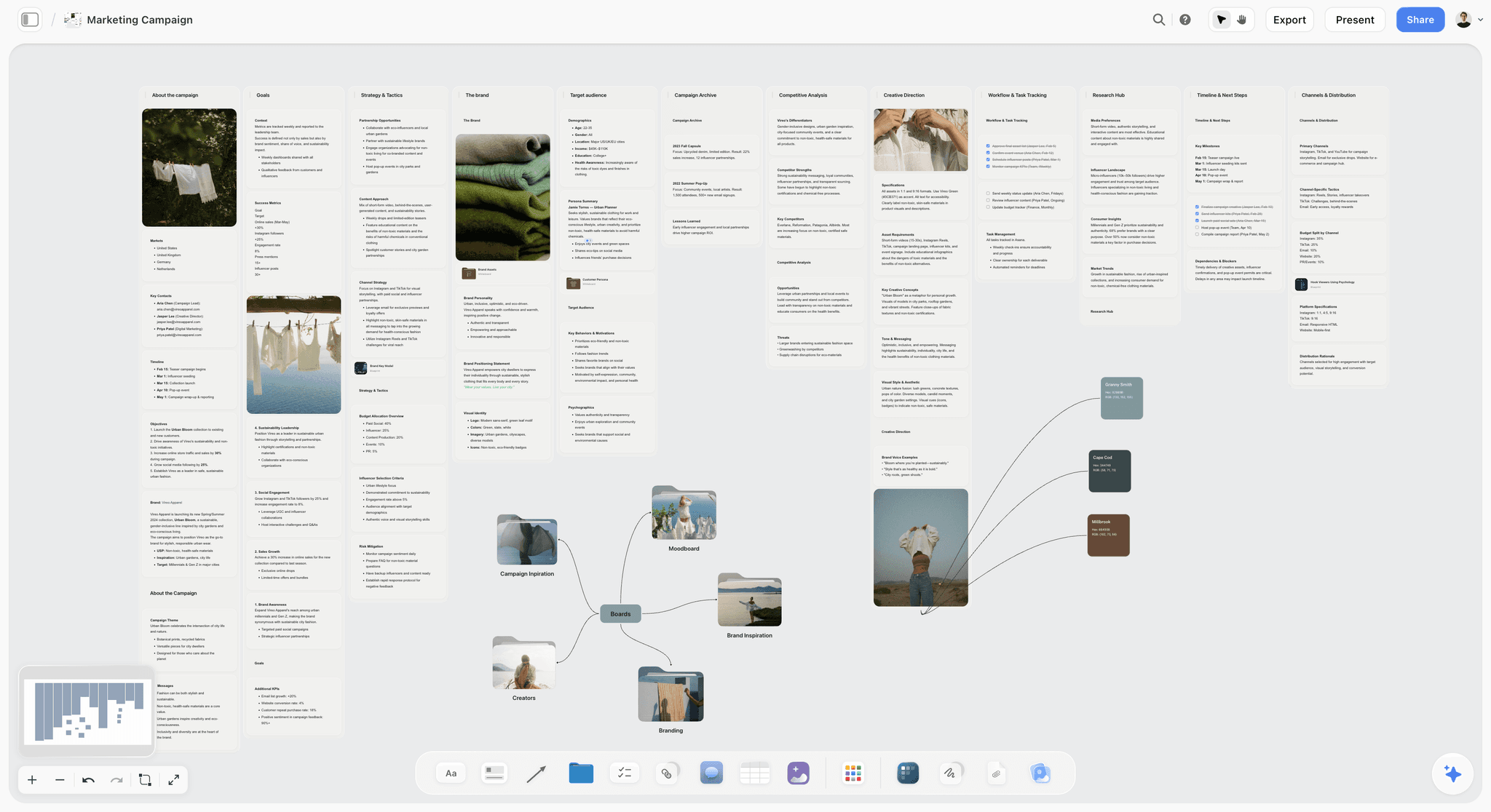
Plan a marketing campaign on one canvas. Keep goals, channels, assets, timeline and references on a single board. Use the Marketing Campaign template.
Campaign Brief Template
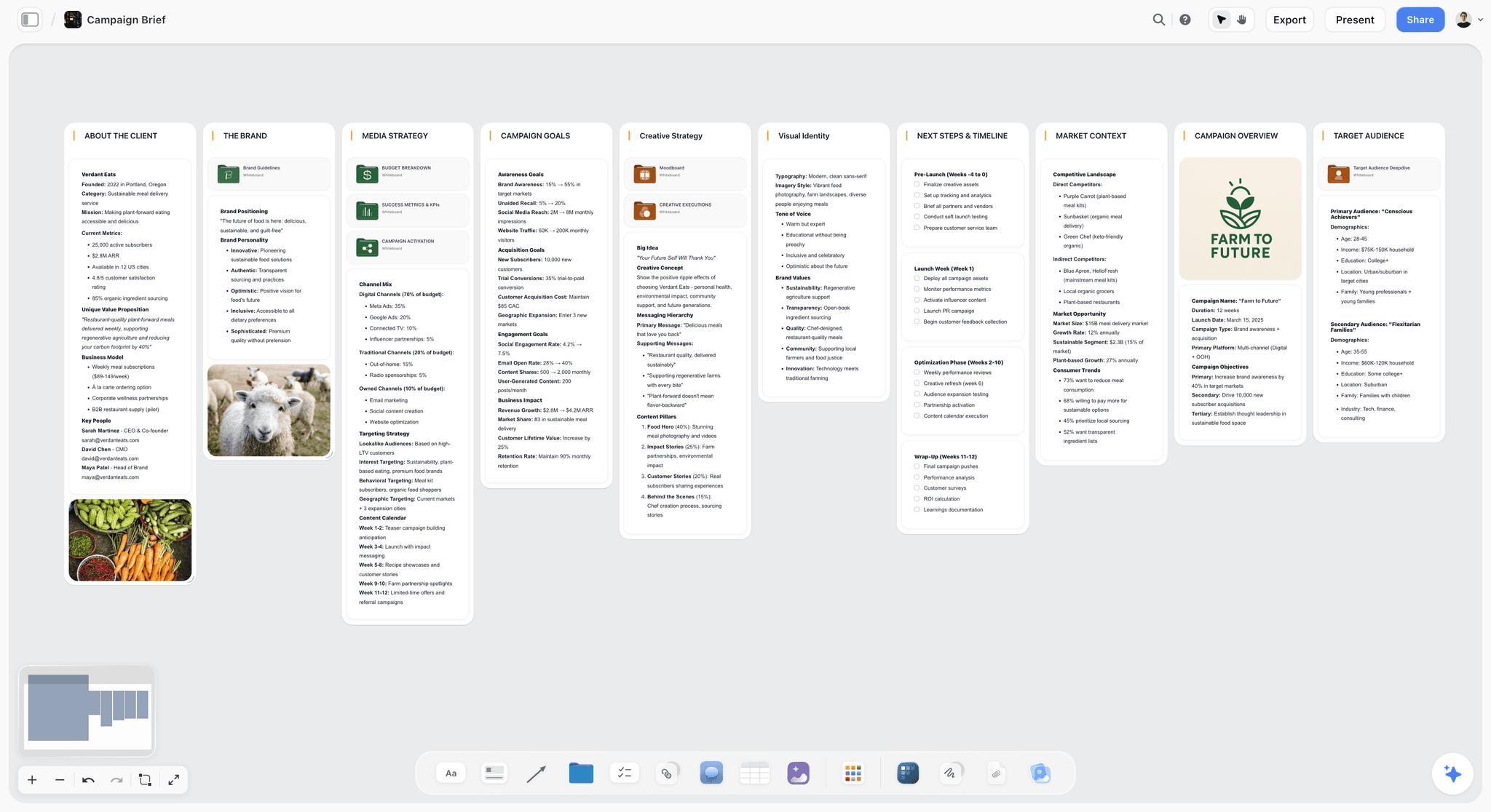
A Storyflow Campaign Brief template to align goals, audience, message, deliverables and timeline on one shared canvas. Use the Campaign Brief template.
Marketing Plan
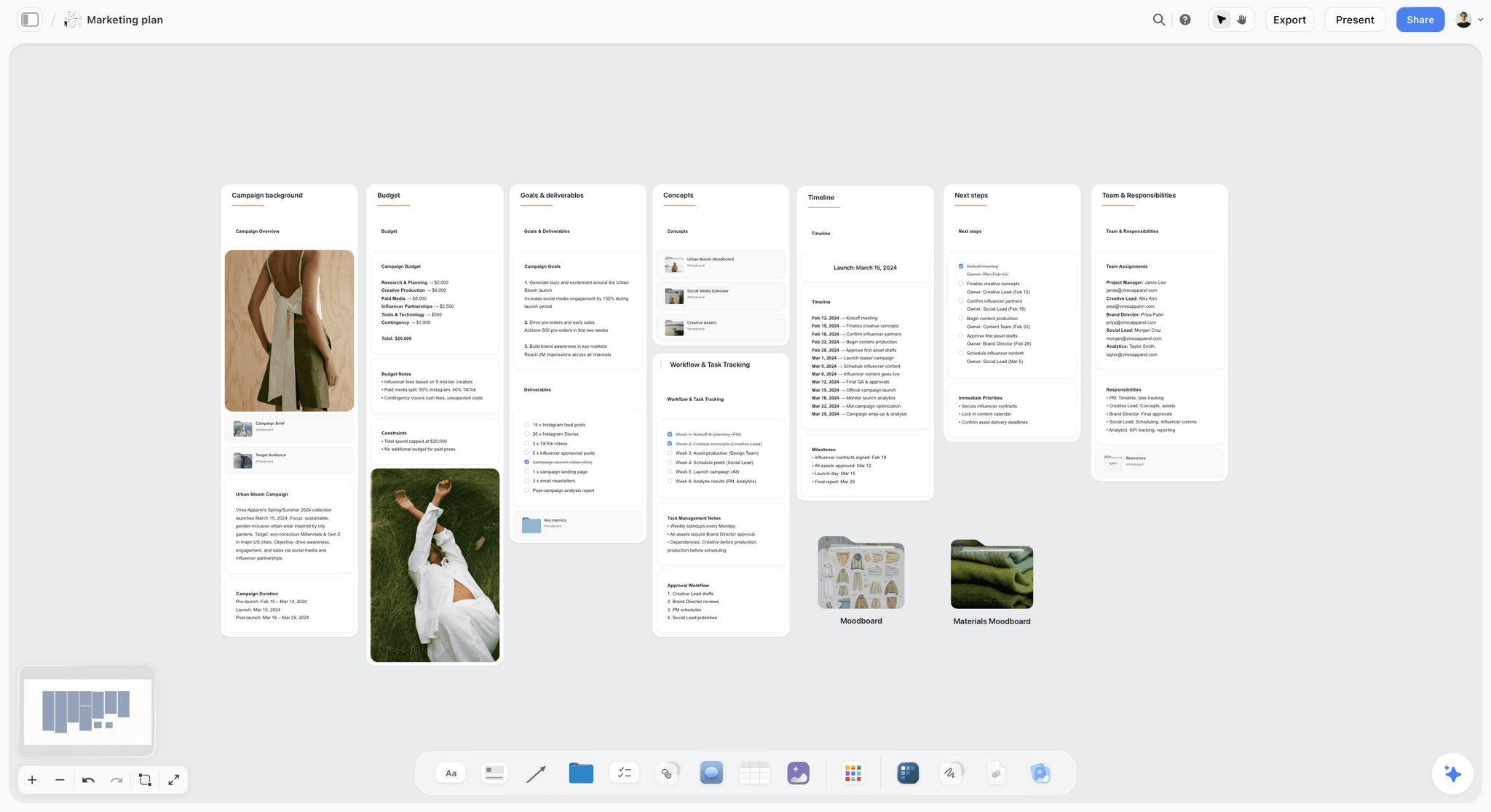
Build the marketing plan in one place. Map goals, audience, channels and activities on a single Storyflow board. Use the Marketing Plan template.
Prices and Sources Checked October 11, 2026
Every competitor price on this page was read on the vendor's own page on October 11, 2026, unless a row says otherwise. Where a page showed another currency or no figure, the row says so.
Wrike's proofing tier comes from its help centre, as reviewed on October 10, 2026. HubSpot's pricing page did not return plan figures to our check, so none is quoted.
The Bottom Line
Storyflow is the first tool to buy for agency campaign planning, because it does the part no tracker or scheduler does: it turns the client's brief into the plan. Attach the brief, pick Brief my campaign, and the AI builds the board your team co-edits and your client opens by link. Then ask for the deck.
Everything after the plan has a specialist: a tracker for delivery, a scheduler for posts, FunctionFox for time and money, Miro or Mural for the workshop, Canva for assets and Notion for documents.
The stack that works is one Storyflow board per client for the thinking, and specialists for the doing. If your last client campaign drifted between a doc, a sheet and a deck, take the next brief and map it out on a single board. Storyflow's campaign calendar and AI marketing campaign planner pages are the place to start.
FAQ: AI Campaign Planning Tools for Agencies
What is the best AI campaign planning software for agencies?
Storyflow. Attach or paste the client brief, pick Brief my campaign, and its AI builds the campaign board: ten walls from the client and audience to the media plan and timeline, which the team co-edits in real time and turns into a deck or PDF. Add ClickUp or Asana for delivery, Planable or Buffer for scheduling and approvals, and FunctionFox for time and billing.
What are the best AI campaign planning tools in 2026?
Storyflow for planning the campaign from a brief, then one specialist per job: ClickUp, Asana, Monday.com or Wrike for delivery, Notion for campaigns kept as documents, Miro or Mural for the workshop, Canva for assets, Planable or CoSchedule for scheduling and approvals, and FunctionFox for time and billing. No single tool does all six jobs.
What are the top AI campaign planning tools for marketers?
Storyflow is the top pick for a marketer who has a brief and needs a plan, because its AI builds the board and the deck from it. Marketers inside a larger company usually keep the corporate tracker (Asana or Monday.com) for tasks and use Storyflow for the campaign thinking. Miro is the choice when the plan starts as a team workshop.
Which AI tools help campaign planning?
Storyflow helps with the plan itself: the brief, the audience profile, the channel plan, the content calendar and the client deck, built on one board. ClickUp Brain and Asana's AI help with status and task breakdowns. Notion Agent drafts pages and databases. Buffer, Planable and Later help write and schedule the posts.
What are the best AI scheduling tools for marketing agencies?
For social posts, Buffer (free for 3 channels, then $5 a channel a month), Planable ($33 a workspace a month with unlimited users) and Later ($18.75 a month billed yearly). For scheduling the team's own work, Motion and Reclaim. For resourcing, Float. Storyflow is not a scheduler: it plans the campaign those tools then schedule.
What is a simple AI tool for mapping out marketing campaigns?
Storyflow. To map out a marketing campaign you attach or paste the brief, pick Brief my campaign and answer one or two questions; the AI generates the board from the brief and you accept or discard it. There is nothing to configure first. Miro is the alternative when the mapping happens live in a workshop with a group.
What is the best collaborative campaign planning tool with AI board generation?
Storyflow. It is a collaborative campaign planning tool whose AI generates the board: the team co-edits in real time on every paid plan, anyone a paid member invites joins free, and the board becomes the deck or PDF. Choose Miro for workshops with voting and a timer, and ClickUp when the plan must carry task dependencies.
How do you use AI for campaign planning without getting generic output?
Give the AI the client's own material. Storyflow's AI builds from the attached brief, deck or notes and keeps the client's names, numbers and dates, and where a fact is missing it marks a blank. Generic output comes from prompting with a sentence. Specific output comes from attaching the documents.
What are the best campaign planning tools for a small agency team?
Storyflow for the plan, with one board per client and freelancers invited free, plus one tracker. For a team under ten, ClickUp's free plan or Trello's free plan covers the task list, and Buffer's free plan covers three channels. Add Planable when a client wants to approve each post.
What is the best AI content planner for agencies?
Storyflow. Ask its AI to plan the content calendar and it builds the pillars, a batching plan, a cadence per platform and a wall of ten real post tickets, each with its pillar and platform, on the client's board. It does not publish, so the tickets move to Buffer or Planable once approved.
Which AI tools make campaign management easier?
Storyflow makes the planning half easier by building the board from the brief and the deck from the board. ClickUp Brain and Asana's AI make the tracking half easier by summarising status and drafting updates. Planable makes approvals easier with required sign-off on Pro. Most agencies need one from each group.
What is the best agency project management software with AI?
ClickUp, for a tracker with AI across tasks and docs, and Asana for approvals and workload on Advanced. Neither builds the campaign plan from a brief, which is why agencies pair one of them with Storyflow: Storyflow for the plan and the client deck, the tracker for owners, dates and status.
What are the best AI tools for creative agencies in 2026?
Storyflow for turning a brief into the campaign board, the moodboard and the client deck; Canva for produced assets; Miro for workshops; ClickUp or Asana for delivery; Planable for post approvals; and FunctionFox for time and billing. Creative agencies get the most from AI at the brief and concept stage, where the drafting is heaviest.
Can an AI generate a campaign board an agency can share with clients?
Yes. Storyflow's AI generates the campaign board from the brief, and you share it by link: the client views with no account and signs in to comment or draw. Presentation mode steps through the board one wall at a time, and a deck built from the board exports as one PDF.
What is the best tool for agency client approvals?
For informal sign-off on a plan, Storyflow: the client opens a link with no account and signs in to comment "approved" on the wall. For enforced approval of social posts, Planable Pro has required approvals and Enterprise has multi-level approvals. Storyflow has no approval workflow with statuses.
How much does Storyflow cost for an agency?
Storyflow is paid-only today, and its Free plan launches before the end of 2026. Plus is $7.99 a month billed annually ($9.99 monthly), Pro is $14 ($19 monthly) and Max is $39 ($49 monthly) with a Team Workspace. Anyone a paid member invites to a board joins free, clients view by link with no account, and team discounts start from 3 seats.
How do agencies keep ten client campaigns straight at once?
Give each client its own Storyflow board and the same structure. When every campaign has the same ten walls, anyone on the account can pick it up without rebuilding it from tabs. Duplicate a project or save it as a template so the next client starts from a working shape.
What is the best AI tool to plan and organize community campaigns?
Storyflow, for a volunteer or nonprofit team that needs the plan visible to everyone: the AI builds the campaign board from a one-page brief, and helpers invited by a paid member join free. Storyflow's page for nonprofits has more. Pair it with Buffer's free plan to publish.
Table of Contents
- Quick Answer: The Best AI Campaign Planning Tool for Agencies
- Which AI Campaign Planning Tool Should an Agency Use?
- Best AI Campaign Planning Tools Compared: 12 Tools at a Glance
- Frequently Asked: Which AI Campaign Planning Tools Do Agencies Trust, and Which Are Fairest on Price
- AI Scheduling Tools for Marketing Agencies: What Schedules Posts, Work and Meetings
- What Is an AI Campaign Planner, and What Should It Build?
- Why Agencies Lose Campaigns Between Tabs (The Client Tab Tax)
- What It Takes by Hand vs in Storyflow
- How to Map Out a Client Campaign From a Brief in Storyflow, Step by Step
- Worked Example: One Client Brief Becomes a Campaign Board
- How We Evaluated These Tools
- Quick Picks by Agency Job
- Detailed Reviews: 12 AI Campaign Planning Tools for Agencies
- Campaign Planning Software Pricing: What an Agency Pays and for Whom
- Which Agency Jobs Storyflow Covers, and What to Add
- Recommended Agency Stacks by Size
- Planning a Client Campaign From ChatGPT or Claude
- Honorable Mentions
- Mistakes Agencies Make With AI Campaign Planning
- Storyflow Templates to Get You Started
- Prices and Sources Checked October 11, 2026
- FAQ: AI Campaign Planning Tools for Agencies
- The Bottom Line
- Author
- Related Reading
Templates to check out for this topic


Marketing and campaign templates you can use in Storyflow
Plan the whole campaign on one board: brief, audience, channels, and assets connected, with an AI that reads all of it. Open a template and start from real structure.


See Storyflow in Action
A visual AI workspace where every feature lives inside one canvas. No tab-switching, no context lost.
Build your entire board from a single message
Type what you need in the AI chat at the bottom of your canvas. The AI adds cards, headings, and structure directly onto your board.
Use expert frameworks as AI context
Type @ in the AI chat and choose any Tactic. The AI tailors every response to that framework instead of giving generic advice.
Turn your board into a mind map in seconds
Ask the AI to restructure your canvas as a mindmap. It connects your ideas into a visual hierarchy so you can see how everything relates.
Why Storyflow Exists
Storyflow actually began as a personal tool while working on creative and research projects.
We kept running into the same problem: ideas were scattered everywhere: notes, documents, and whiteboards.
Nothing helped us see how everything connected.
So we started building a workspace designed around how ideas actually grow.
→ Read how Storyflow was createdJustkay
Documentary Filmmaker & Founder at Storyflow
Published: 2026-06-18
Extremely simple, seriously capable


See how easy it is to get started
Watch a real project come together, from a blank board to a finished plan, clicked through step by step.
Start creating with AI and become more productive
Transform your creative workflow with AI-powered tools. Generate ideas, create content, and boost your productivity in minutes instead of hours.