Scrivener vs Plottr for Plotting a Novel: Planning Tool or Writing Tool?
Plottr is a planner that exports to Scrivener; Scrivener is a writing tool that happens to plan. The middle problem, the drift problem, and the trap of buying for the writer you wish you were.

Category
Writing
Author

Justkay
Documentary Filmmaker & Founder at Storyflow
Topics
2026-08-09
•
14 min read
•
Writing- Scrivener vs Plottr
- Plottr vs Scrivener
- best app to visually plot a novel
- novel plotting software
- Plottr pricing
- story structure templates
Scrivener vs Plottr for plotting a novel: which should you use?
Choose Plottr if the problem is that you cannot see the shape of your novel: it is a dedicated plot and timeline planner that shows the whole book at once, including the middle, and it exports your outline into Scrivener when you are ready to draft. Choose Scrivener if the problem is that your planning and your manuscript keep drifting apart: its corkboard and binder are less powerful as planning tools but they live in the same file as the words. Plottr is roughly $25 a year, with options that have historically included a one-time lifetime purchase, and offers a time-limited trial rather than a permanent free tier. Scrivener is a one-time purchase per platform. They are usually framed as competitors. They are more accurately a planner and a writing environment, and a large number of novelists end up using both in sequence. Storyflow, disclosed as our own product, is a third shape again: a freeform canvas where reference images, character material and structure are arranged spatially and an AI reads the whole board. It has no parallel plot timeline and no manuscript compile, so it sits beside these tools rather than replacing them.

Full disclosure: Storyflow is our own product and it is not the recommendation here. It has no plot timeline with parallel threads, no story-structure templates in Plottr's sense, no manuscript compile, and nothing resembling Scrivener's drafting environment. The article says plainly that if you are plotting a novel you should buy Plottr, and if you are writing one you should buy Scrivener. Storyflow appears only in the section on visual reference, which both tools genuinely treat as storage rather than as something you arrange.
Quick Comparison
A planner, a writing environment, and the visual surface both of them treat as storage.
| Tool | Best For | AI Features | Price |
|---|---|---|---|
| Plottr | Parallel plot lines and story-structure templates | None core | ~$25 yr (lifetime option historically) |
| Scrivener | Drafting and compiling the manuscript | None, by design | One-time purchase per platform |
| Storyflow | Reference, character material and structure in space | Reads the whole board, plus @-mentioned docs | $7.99 mo annual (free plan late 2026) |
Key Takeaways
- Plottr is a planning tool that exports to Scrivener. Scrivener is a writing tool that happens to include planning features. That is the whole distinction.
- Plottr's timeline is the reason to buy it: multiple plot lines across the full length of the book, visible at once. Nothing in Scrivener shows you that.
- Scrivener's advantage is adjacency. The outline sits beside the draft, so it is still true in month six, which is when planning usually goes stale.
- Plottr works offline and keeps files on your machine. So does Scrivener. Neither is cloud-dependent, which for a multi-year project matters more than it sounds.
- Plottr is inexpensive and Scrivener is a one-time cost, so for most novelists the real question is not price, it is whether you will actually maintain two files.
- Neither is a visual tool in the moodboard sense. Character faces, location references, and anything you need to see rather than read sit awkwardly in both.
- Neither tool lets you arrange reference images, character material and structure together in space. Storyflow fills that gap, with AI that reads the full board. It has no parallel plot timeline and no manuscript compile, so it sits beside these tools rather than replacing them.
For the full ranked field rather than a head-to-head, see The 12 Best Novel Planning Tools in 2026. For outlining specifically, see The 12 Best Tools for Outlining a Novel in 2026.
The Middle Problem
Here is the specific failure these tools address differently, and it is the most common structural problem in unfinished novels.
Openings get planned. Endings get imagined. The middle gets discovered, badly. Most writers know their first three chapters in detail and have a clear image of the climax. The two hundred pages in between are where a draft stalls, because that stretch is where several plot lines have to interleave, subplots have to pay off in an order that makes sense, and a reader has to be given a reason to keep going roughly every twenty pages.
Seeing that stretch is a spatial problem. You are not asking "what happens next", you are asking "what is happening in parallel, and does the shape sag between chapter fourteen and chapter twenty-six".
Plottr is built precisely for this. Its timeline puts plot lines on separate rows across the full length of the book, so a subplot that goes quiet for nine chapters is visible as a gap rather than something you notice in a rewrite. That single view is the reason it exists and it is genuinely hard to replicate in a general tool.
Scrivener's corkboard is a different instrument. It shows index cards for scenes in sequence, which is excellent for reordering and for seeing a chapter's contents at a glance, and it does not show you multiple threads in parallel across a whole book. You can approximate it with labels and colours, and it is an approximation.
The rule this gives you: if you struggle with the middle, buy the planner. If you struggle with finishing rather than with structure, buy the writing environment and stop shopping.
Head-to-Head Comparison Table
| Plottr | Scrivener | |
|---|---|---|
What it is | Dedicated plot and timeline planner | Writing environment with planning features |
Whole-book view | Timeline with parallel plot lines | Corkboard and outliner, sequential |
Multiple plot threads | First-class, the core feature | Approximated with labels and colours |
Where you draft | Not intended for drafting | This is the point |
Character and place notes | Templates, structured | Binder documents, freeform |
Story-structure templates | Many, built in | None built in |
Export to the other | Exports to Scrivener, Word and more | Not a planner export |
Compile to manuscript | No | Yes, industry-standard output |
Offline and local files | Yes | Yes |
Free option | Time-limited trial, not a free tier | Trial, then one-time purchase |
Cost | Roughly $25 per year, lifetime option historically offered | One-time purchase per platform |
Learning curve | Low | Moderate to steep, mostly at compile |
Best for | Seeing the shape of the book | Writing and finishing the book |
Weakest at | Being where you write | Showing parallel threads across a whole novel |
Both vendors change pricing and packaging; check the current options before buying, particularly whether a lifetime purchase is available at the time you look.
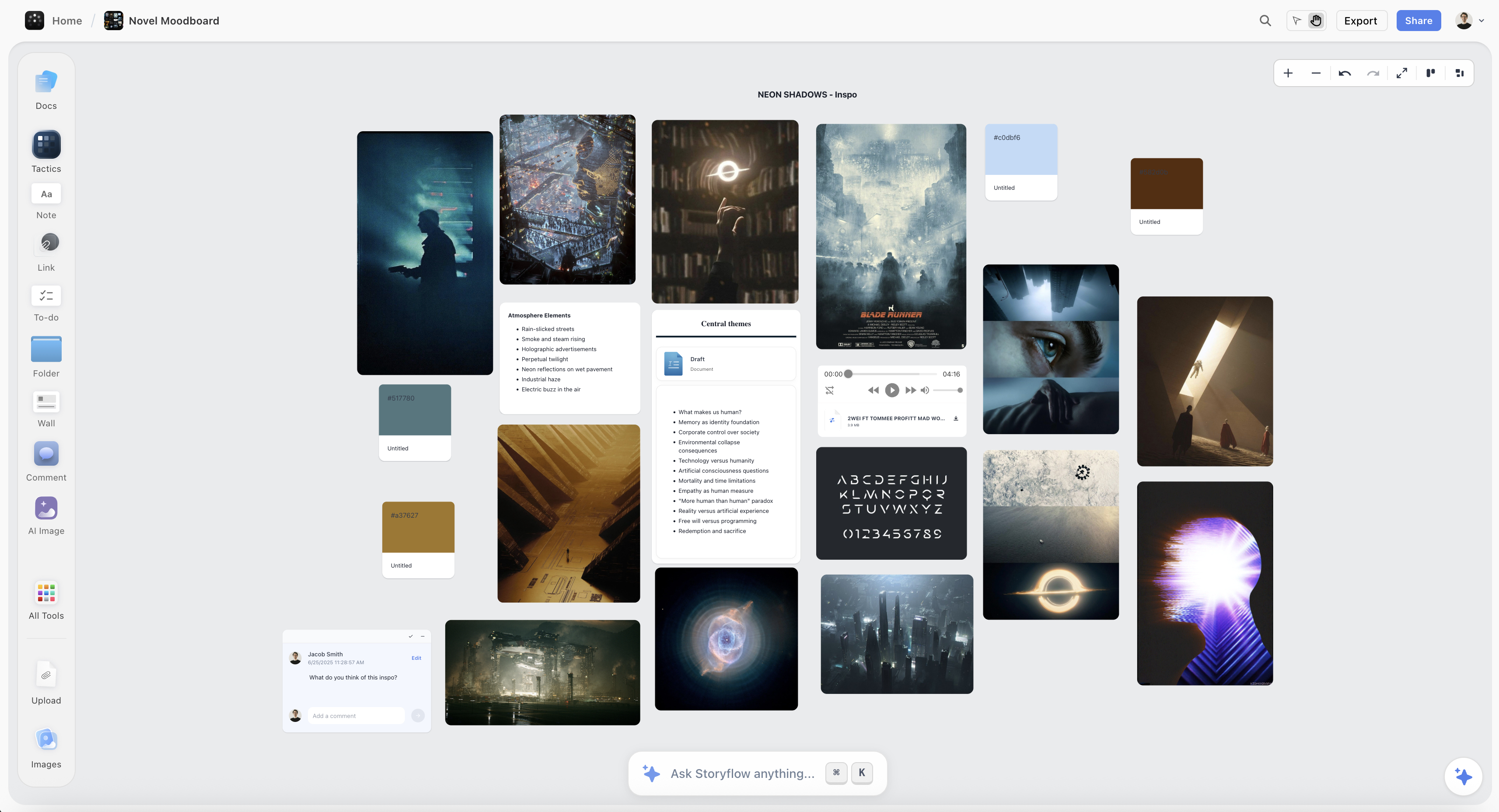
Character references, locations and structure for a novel arranged on one Storyflow canvas
For the part of a novel you need to see, not read
Locations, period detail, faces that anchor a character: reference is spatial, and a structured field is a list. Storyflow keeps it arrangeable alongside your notes and structure. Paid-only during early access; the Free plan lands before the end of 2026.

Templates and the Blank Page
A real difference that shows up on day one.
Plottr ships with story-structure templates: three-act, Hero's Journey, Save the Cat beat sheets, romance structures, mystery structures and others. Open one and you get a scaffold with beats already positioned along the timeline, which you fill in. For a first novel, or for a writer moving between genres, this is a substantial head start and it is the second most common reason people buy it.
Scrivener ships with no story structure at all. It gives you a binder, a corkboard, and a blank document. Templates exist for manuscript formats, not for narrative shape. That is a deliberate position and a lot of experienced novelists prefer it: an imposed structure is exactly what they do not want.
The tradeoff is real in both directions. A structure template turns a blank page into a fill-in-the-blanks exercise, which gets you moving, and it can produce a novel that hits its beats and feels mechanical. No template respects your instincts, and it leaves you with a blank page on the hardest possible task.
A middle path that works: use the template to identify what is missing rather than as a specification. If a beat sheet says something should turn at the midpoint and nothing does in your outline, that is information. It is not an instruction to insert a twist.
The Drift Problem
This is where Scrivener earns its place, and it is the argument for keeping planning and drafting together.
An outline is written before you know the book. Then you draft, and drafting is where you find out what the story actually is. A character refuses to do the thing the outline requires. A subplot turns out to be more interesting than the main line. Chapter nine takes forty pages instead of fifteen.
Every one of those makes the plan slightly wrong, and the question is what happens next.
In Scrivener, the plan lives in the same file as the draft, so updating a synopsis card takes seconds and happens while you are already there. The outline stays approximately true because keeping it true is nearly free.
In Plottr, the plan is a separate application. Updating it means leaving your draft, switching apps, finding the beat, changing it, and going back. Each step is small. Together they are enough friction that, in practice, many writers stop updating around chapter twelve, and from then on the beautiful timeline describes a book they are no longer writing.
This is the single strongest argument against a dedicated planner, and it is a workflow problem rather than a product flaw. If you adopt Plottr, decide in advance when you will reconcile it: after every chapter, or every Friday, or at each act break. Writers who name a cadence keep the plan alive. Writers who intend to update it "as they go" do not.
The Export Path, and How Most People Actually Use These
The two products are not really rivals, and the export tells you so: Plottr exports to Scrivener. That is the intended path, and the most common working setup among novelists who use both:
- Plan in Plottr. Pick a structure template or start blank, lay out plot lines across the timeline, identify where the middle sags, fill the gaps.
- Export to Scrivener. The outline arrives as a structured project, so you begin drafting with a binder that already reflects your plan instead of an empty file.
- Draft in Scrivener, updating synopses as the book changes.
- Return to Plottr only at act breaks, or whenever the structure itself is in question rather than the prose.
Combined cost is modest: a Scrivener licence once, plus roughly $25 a year, and less if a lifetime option is available when you buy.
The step that makes or breaks it is four. If you never go back, Plottr was a one-time planning exercise, which is a legitimate and worthwhile use. If you go back constantly, you are maintaining two versions of the truth and will eventually trust neither. Going back at structural decision points only is the version that holds.
Buying for the Writer You Wish You Were
The most common way novelists waste money on this decision has nothing to do with features.
Planning software is aspirational. A timeline with colour-coded plot lines and a completed beat sheet looks like the work of a serious, organised novelist, and buying it feels like becoming one. The purchase is genuinely pleasurable in a way that writing chapter fourteen is not, which is exactly the problem: planning is the most enjoyable part of writing a novel and the easiest to mistake for progress.
Two failure modes follow, and they are opposites.
The discovery writer who buys a planner. If you have finished things before by writing into the dark, a structure template is not a scaffold, it is a cage, and the hours spent filling it are hours not drafting. You will produce a beautiful outline for a book you then lose interest in, because the discovering was the reason you were writing it.
The planner who buys only a writing environment. If you genuinely cannot start until you know the shape, "just start drafting in Scrivener" produces three abandoned openings. Telling yourself you should be more spontaneous is not a plan.
The diagnostic is your own history, not your self-image. Look at what you have actually finished, including short fiction and abandoned drafts. Did the finished ones have outlines? Did the abandoned ones die at the outlining stage or in the middle of chapter twelve? A writer whose drafts die in the middle is describing a structure problem, and a planner will help. A writer whose drafts die in the outline is describing an enthusiasm problem, and a planner will make it worse.
Neither answer is more literary than the other. Both tools are cheap enough that the wrong choice costs a little money and a lot of months, and the months are the expensive part.
Series, Sequels, and Very Long Projects
Worth its own section, because it is where the two products separate again and most comparisons stop at the single-novel case.
A series is a structural problem the size of several novels. Threads that open in book one and pay off in book three, a character whose arc runs across the whole thing, timelines that have to stay consistent when you are writing book four and last checked a detail two years ago. This is the same middle problem scaled up, and it has the same shape: you need to see parallel threads across a long span.
Plottr's timeline extends to this more naturally, because the view was designed for parallel lines over length and a series is simply more length. Structured character and place fields also help with the specific series failure of contradicting yourself about an established detail.
Scrivener handles a series as separate projects, which is correct for drafting and unhelpful for continuity: nothing spans the projects, so the cross-book memory lives in your head or in a document you maintain by hand.
The practical advice for either, and it costs nothing: keep a continuity file that is deliberately boring and separate from both tools. Names, dates, ages, physical details, established facts, one line each. It is the least creative document in the project and the one you will consult most in book three. Neither Plottr nor Scrivener will build it for you, and a plain text file outlives both.
What Neither Does: Visual Material
Both tools want your novel to be text, and for a lot of fiction that is fine. For some it is not.
If you are writing something with a strong sense of place, a period setting, or a large cast whose faces you need to hold in mind, you accumulate visual reference: photographs of locations, period detail, portraits that anchor a character, maps. Plottr has structured fields for characters and places, and they are fields, not a wall you can look at. Scrivener holds images in the binder, which is storage rather than arrangement.
Neither lets you see forty references at once, group them by feel, or put two versions of a setting side by side. That work is spatial, and both tools are lists.
Storyflow is our own product and this is the specific gap it fills, so read this section with that disclosed. It is a canvas where reference images, notes, character material and structure sit together and can be arranged in space, with AI that reads the full board you are on plus up to one Story blueprint and three documents you @-mention. It is not a replacement for either tool here and this article is not claiming otherwise: it has no plot timeline with parallel threads, no story-structure templates in Plottr's sense, no manuscript compile, and nothing resembling Scrivener's drafting environment. If you are plotting a novel, buy Plottr; if you are writing one, buy Scrivener. Storyflow is paid-only during early access, with plans from $7.99 a month billed annually and a Free plan arriving before the end of 2026; anyone a paid member invites to a board joins free today.
Longevity and File Ownership
Novels take years. This section matters more here than in almost any other software comparison.
Both tools store files locally, which is unusual and valuable. Plottr works offline and keeps your planning on your own machine. Scrivener's project is a package on your disk. Neither holds your work hostage to a subscription lapsing or a company changing direction, which cannot be said for most cloud-first writing tools.
The asymmetry is in what happens if the software disappears. A Scrivener project contains your documents in a readable form, so the text survives independently. A Plottr file contains structure, and structure is more format-dependent: the plot lines and beats are far less recoverable than prose would be.
The practical habit for both: export at milestones. A PDF or Word export of the outline at the end of each act, and compiled manuscript exports from Scrivener as you go, stored somewhere the applications cannot reach. For a project measured in years, that is the only backup that is genuinely tool-independent.
When to Choose Plottr
Choose Plottr when:
- You struggle to see the whole shape of the book, especially the middle.
- Your novel has several plot lines that need to interleave.
- You want story-structure templates as a starting scaffold.
- You are a planner by temperament and want the plan finished before drafting.
- You want a low, predictable cost and files on your own machine.
- You intend to draft in Scrivener anyway and want the outline to arrive there.
Plottr's honest weaknesses: it is not where you write, so it introduces an app switch at exactly the moment the plan needs updating, and plans go stale as a result. It has no compile. Its character and place fields are structured rather than visual. There is no permanent free tier, only a time-limited trial.
When to Choose Scrivener
Choose Scrivener when:
- You want planning and drafting in one file so the plan stays current.
- You discover the story by writing rather than by outlining.
- You need to compile a properly formatted manuscript at the end.
- You want research, notes and draft in the same project.
- You prefer no imposed narrative structure.
- You want a one-time purchase rather than an annual cost.
Scrivener's honest weaknesses: the corkboard cannot show parallel plot threads across a full novel, which is the exact view a structurally stuck writer needs. There are no story-structure templates. The learning curve is real, mostly at the compile step. Collaboration is effectively absent.
The Bottom Line
Stop comparing them and ask what you are stuck on.
If you cannot see the shape of the book, buy Plottr. Parallel plot lines across the full length of the novel is a view nothing in Scrivener provides, and for a writer whose middle sags it is worth the annual cost by itself.
If you cannot finish the book, buy Scrivener. The corkboard is a weaker planning instrument and it sits beside the draft, which means the plan is still roughly true in month six. A slightly worse plan you actually maintain beats a beautiful one you abandoned in chapter twelve.
If you can afford both, plan in Plottr, export to Scrivener, draft there, and go back only at act breaks. That is the workflow the export path was built for.
Then, whichever you choose, export the outline at every act break to something neither program owns. A novel outlives the software you planned it in, and the version of your structure that survives is the one you exported.
FAQ: Scrivener vs Plottr
Is Plottr or Scrivener better for planning a novel?
Plottr, for planning specifically. It is a dedicated plot and timeline planner that shows multiple plot lines across the full length of the book at once, which is exactly the view you need when the middle sags, and it ships with story-structure templates as a starting scaffold. Scrivener's corkboard is excellent for reordering scenes and seeing a chapter at a glance, but it is sequential and cannot show parallel threads across a whole novel. The catch is that Scrivener is where you write, so its plan stays current while a separate planner tends to go stale.
Can Plottr replace Scrivener?
No. Plottr is a planning tool and is not intended for drafting or for producing a finished manuscript: it has no compile step and no real writing environment. It exports to Scrivener precisely because the two are meant to sit in sequence rather than compete. If you only buy one and you intend to actually write the book in it, buy Scrivener.
How much do Plottr and Scrivener cost?
Plottr is roughly $25 per year, and options have historically included a one-time lifetime purchase, so check what is available when you buy. It offers a time-limited trial rather than a permanent free tier. Scrivener is a one-time purchase per platform (macOS, Windows and iOS are sold separately) with no subscription. For a project measured in years, the combined cost of both is modest, and price is rarely the deciding factor here; whether you will genuinely maintain two files is.
Does Plottr export to Scrivener?
Yes, and it is the intended workflow. Plottr exports your outline to Scrivener, Word and other formats, so the plan flows into the manuscript tool where you actually write and you begin drafting with a binder that already reflects your structure rather than an empty file. The practical caution is what happens afterwards: return to Plottr at act breaks or when the structure itself is in question, not continuously, or you end up maintaining two versions of the truth and trusting neither.
Do Plottr and Scrivener work offline?
Both do, and both keep files on your own machine, which is unusual in this category and genuinely valuable for a multi-year project since neither holds your work hostage to a lapsed subscription. The asymmetry is in recoverability: a Scrivener project contains your documents in a readable form, so the prose survives the software, whereas a Plottr file is structure and is far more format-dependent. Export outlines to PDF or Word at milestones and store them somewhere the applications cannot reach.
Are story-structure templates worth it?
They are worth it as a diagnostic and risky as a specification. Plottr ships with three-act, Hero's Journey, Save the Cat, romance and mystery structures among others, and for a first novel or a genre you have not written before that scaffold gets you moving from a genuinely blank page. Used as an instruction set they produce books that hit their beats and feel mechanical. The useful middle path is to check your outline against the template and treat any missing beat as information about a possible sag, not as an order to insert a twist.
Why do novel outlines stop being accurate?
Because drafting is where you discover what the story actually is: a character refuses to do what the outline requires, a subplot turns out to be stronger than the main line, chapter nine runs forty pages instead of fifteen. Each of those makes the plan slightly wrong, and what matters is the cost of correcting it. In Scrivener that cost is seconds because the plan lives beside the draft; in a separate planner it means switching apps, which is small enough to skip and skipped often enough that many writers stop updating around chapter twelve. If you use a separate planner, name a reconciliation cadence in advance rather than intending to update it as you go.
Do either handle visual reference for a novel?
Not well. Plottr has structured fields for characters and places and Scrivener holds images in its binder, but neither lets you see forty references at once, group them by feel, or set two versions of a setting side by side. That work is spatial and both tools are fundamentally lists. Novels with a strong sense of place, a period setting, or a large cast whose faces you need to hold in mind usually end up with a third surface for reference, whether that is a canvas tool, a board, or a folder nobody else can navigate.
Table of Contents
- Key Takeaways
- The Middle Problem
- Head-to-Head Comparison Table
- Templates and the Blank Page
- The Drift Problem
- The Export Path, and How Most People Actually Use These
- Buying for the Writer You Wish You Were
- Series, Sequels, and Very Long Projects
- What Neither Does: Visual Material
- Longevity and File Ownership
- When to Choose Plottr
- When to Choose Scrivener
- The Bottom Line
- FAQ: Scrivener vs Plottr
- Related Reading
Templates to check out for this topic


Story and writing templates you can use in Storyflow
Start your next script, novel, or world from a ready-made Storyflow board instead of an empty page. The AI reads the whole canvas, so every suggestion is grounded in your story.


See Storyflow in Action
A visual AI workspace where every feature lives inside one canvas. No tab-switching, no context lost.
Build your entire board from a single message
Type what you need in the AI chat at the bottom of your canvas. The AI adds cards, headings, and structure directly onto your board.
Use expert frameworks as AI context
Type @ in the AI chat and choose any Tactic. The AI tailors every response to that framework instead of giving generic advice.
Turn your board into a mind map in seconds
Ask the AI to restructure your canvas as a mindmap. It connects your ideas into a visual hierarchy so you can see how everything relates.
Why Storyflow Exists
Storyflow actually began as a personal tool while working on creative and research projects.
We kept running into the same problem: ideas were scattered everywhere: notes, documents, and whiteboards.
Nothing helped us see how everything connected.
So we started building a workspace designed around how ideas actually grow.
→ Read how Storyflow was createdJustkay
Documentary Filmmaker & Founder at Storyflow
Published: 2026-08-09
Extremely simple, seriously capable


See how easy it is to get started
Watch a real project come together, from a blank board to a finished plan, clicked through step by step.
Start creating with AI and become more productive
Transform your creative workflow with AI-powered tools. Generate ideas, create content, and boost your productivity in minutes instead of hours.