Trello vs Asana for Video Production: Where the Handoffs Break
Video projects do not fail at tasks. They fail at handoffs: script to shoot, shoot to edit, edit to review. Trello makes stages visible. Asana makes conditions visible. Count your redone work.

Category
Filmmaking
Author

Justkay
Documentary Filmmaker & Founder at Storyflow
Topics
2026-08-10
•
14 min read
•
Filmmaking- Trello vs Asana
- best tool for managing a video project with a team
- video production project management
- Trello pricing 2026
- Asana pricing 2026
- video team workflow
Trello vs Asana: which should a video team use?
Pick Trello when your video team is small enough that everyone can see the whole pipeline on one board, and Asana when projects have real dependencies (a shoot that cannot happen before a location clears, an edit blocked by a review) that a flat board of cards cannot express. Trello is $5 per user per month on Standard and $10 on Premium, with a genuinely usable free tier. Asana starts at around $11 per user per month on its paid tiers, with a free tier for small teams. The honest difference is not features. It is what each tool believes a video project is. Trello believes a project is a queue of cards moving left to right. Asana believes a project is a network of work with dates, owners, and dependencies. Video production is secretly the second thing wearing the costume of the first, which is why so many video teams outgrow Trello on the same week they land their first multi-video client.

Full disclosure: Storyflow is our own product, so weigh its placement accordingly. It does not replace either tracker: there are no task assignments with due-date chains, no dependency timeline, and no approval gates, so the pipeline itself stays in Trello or Asana. Storyflow's claim is only the creative payload both trackers treat as opaque attachments: the scripts, shot lists, and briefs drafted from the project board. It is also paid-only during early access while both competitors have workable free tiers.
Quick Comparison
Trello makes stages visible. Asana makes conditions visible. Count how often upstream changes broke downstream work last month.
| Tool | Best For | AI Features | Price |
|---|---|---|---|
| Trello | Kanban pipelines for crews of two to six | Butler automation, card-level assists | Usable free tier / $5 user mo Standard, $10 Premium |
| Asana | Dependencies, timelines, intake forms, and approvals | AI status drafts and project summaries | Free for small teams / from around $11 user mo |
| Storyflow | Drafting scripts, shot lists, and briefs from the board | AI reads the full canvas plus @-mentioned Tactics and Documents | $7.99 mo annual (free plan late 2026) |
Key Takeaways
- Video projects do not fail at tasks. They fail at handoffs: script to shoot, shoot to edit, edit to review, review to publish. Evaluate both tools only on how they handle handoffs.
- Trello's card-on-a-board model is the fastest to understand in all of project software: a three-person crew is productive in an hour.
- Asana's model (tasks with dependencies, timeline views, forms, approval steps) matches what a production schedule actually is, at the cost of setup and discipline.
- Trello is $5 to $10 per user per month; Asana is roughly double at around $11 to start. Both have workable free tiers for small teams.
- Neither tool holds the creative work itself: scripts, shot lists, and briefs live in attachments both tools treat as opaque.
- Asana's AI features summarize and draft statuses; Trello's automation (Butler) moves cards. Neither reads the production's creative material.
- The moment recurring client work arrives (three videos a month, every month), Trello boards multiply into chaos and Asana's templates start paying rent.
- Both tools track the work without holding it. Storyflow holds the payload: research, references, script drafts and shot thinking on one board, with AI that drafts the outline from the research and the shot list from the script. The pipeline itself stays in Trello or Asana.
For the wider category, see The Best Project Management Software for Video Production.
Where the Handoffs Break
Watch a video project die and it is almost never because someone forgot a task. It is because a handoff broke: the editor started before the selects were final, the review round happened against the wrong cut, the thumbnail was designed for a title that changed.
A video pipeline is a chain of handoffs with different owners: pre-production hands to production, production to edit, edit to review, review to publish. Each handoff has a condition (the thing that must be true before the next stage starts), and the whole art of video project management is making conditions visible.
Trello makes stages visible. Asana makes conditions visible.
A Trello board shows the stages beautifully: columns for Scripting, Shooting, Editing, Review, Published, cards moving left to right, everyone seeing status at a glance. What it cannot show is the condition: nothing in a flat card model says "this edit cannot start until that shoot closes" or "publishing waits on client approval, which waits on the v2 cut." Small crews compensate with conversation, and for a three-person team the conversation is enough.
Asana encodes the conditions: dependencies between tasks, a timeline view where the shoot slipping two days visibly pushes the edit and the delivery, approval tasks that gate the next stage, forms that intake client requests in a structured way. The price is that someone has to build and maintain that structure, and a team without that discipline gets an expensive Trello.
The test: count how many times last month someone started work that had to be redone because an upstream stage changed. Zero or one: your conversations are working, take Trello's simplicity. More than that: you are paying the handoff tax, and Asana's dependency model is the treatment.
Head-to-Head Comparison Table
| Trello | Asana | |
|---|---|---|
Mental model | Cards in columns (kanban) | Tasks in a network (list, board, timeline, calendar) |
Dependencies | Not native to the card model | Native, with timeline ripple |
Best team size | 2 to 6 | 5 to 50 |
Setup time | An hour | Days, plus ongoing discipline |
Price | $5 user mo Standard, $10 Premium | From around $11 user mo paid tiers |
Free tier | Genuinely usable for small crews | Workable for small teams |
Review and approvals | Via checklists and conventions | Approval tasks, proofing on paid tiers |
Recurring client work | Boards multiply, entropy | Templates and portfolios |
Automation | Butler rules, card-moving | Rules plus AI summaries and status drafts |
Where the script lives | An attachment | An attachment |
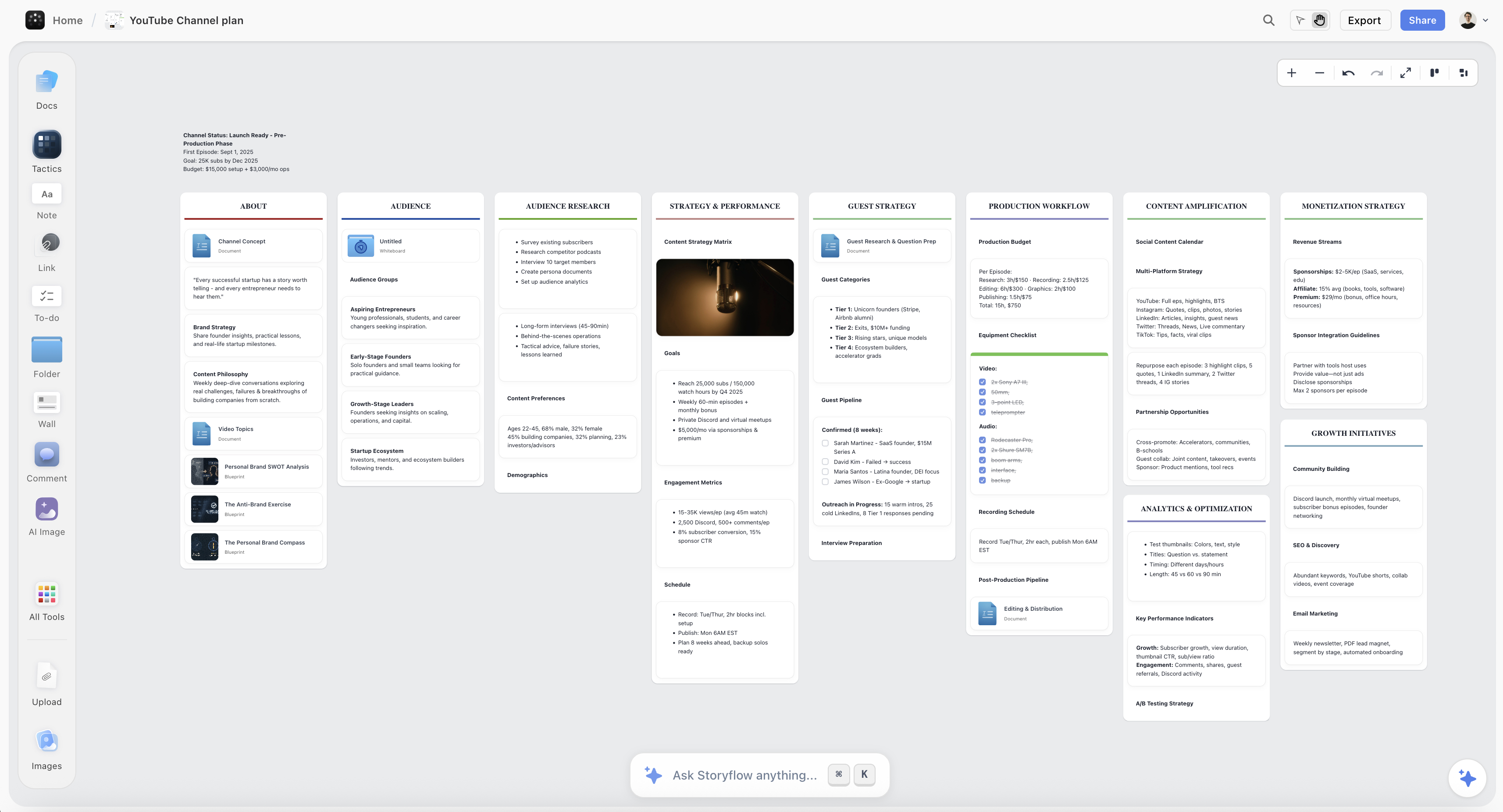
A Storyflow canvas holding video research, script structure, and a drafted shot list on one board
The tracker moves the work along. It never looks inside it
The card says the script is done; whether it matches the brief is invisible. Storyflow's AI reads your full canvas (plus Tactics and documents you @-mention) and drafts the outline, script structure, and shot list the pipeline is waiting on. Paid-only during early access; the Free plan lands before the end of 2026.

Where Trello Wins
Adoption is instant. A freelance editor, a client, a first-time producer: everyone understands cards in columns without training. For crews assembled per project from freelancers, this is the decisive feature; the tool nobody has to learn is the tool that actually gets updated.
The whole pipeline on one screen. A small channel or studio running five videos at once sees everything at a glance. The visual honesty of a kanban board (too many cards in Editing means Editing is the bottleneck) is real operational information.
The price of trying is near zero. The free tier carries a small crew a long way, and $5 per user per month is the cheapest paid path to a working shared pipeline in this comparison.
Trello's honest weaknesses for video: no native dependencies (the handoff conditions live in people's heads), recurring work spawns board sprawl, per-video detail hides inside cards where nobody looks, and scale (more than roughly six people or eight simultaneous projects) turns the board into wallpaper.
Where Asana Wins
Dependencies are the product. The shoot slips, and the timeline shows the edit, review, and delivery sliding with it, automatically, visibly, before the client finds out the hard way. For deadline-chained work, this single mechanic is worth the price difference.
Recurring production is a template, not a rebuild. Three videos a month for four clients means twelve identical pipelines; Asana templates stamp them out with dates and owners attached. This is exactly the moment Trello teams start drowning.
Intake and approvals become structure. Client request forms feed the pipeline in a consistent shape, and approval tasks gate handoffs formally. Agencies and branded-content teams stop relying on email archaeology.
Asana's honest weaknesses: it demands a process owner (without one, it decays into an expensive list), onboarding freelancers takes real time, the interface's density annoys creatives who just want to see their next task, and it costs roughly twice Trello per seat.
What Neither Tool Manages
Both tools share a blind spot, and for creative teams it is the expensive one: they manage the work about the video, not the video's work.
The script, the shot list, the storyboard, the brief, the references: in Trello and Asana these are attachments, opaque files the tool moves around but cannot see into. The card says "Write script: done." Whether the script matches the brief, whether the shot list covers the script, whether the hook survived the rewrite: invisible. Production management tools manage the chain; the creative payload travels through it unexamined.
That payload is the lane where Storyflow wins for video teams. The canvas holds the research, references, script drafts, and shot thinking on one board, and the AI reads the entire active board (plus up to 1 Tactic and up to 3 Documents you @-mention) to draft the creative artifacts themselves: the outline from the research, the script structure from the outline, the shot list from the script. Its 200+ Story Blueprints include the retention and narrative frameworks (Retention Hooks among them) that video work actually runs on.
The honest accounting: Storyflow does not replace either tool here. It has no task assignments with due-date chains, no dependency timeline, no approval gates; the pipeline stays in Trello or Asana. It is also paid-only during early access (the Free plan launches before the end of 2026; anyone a paid member invites to a board joins free now). The pairing that works: the creative half on the canvas, the handoff chain in the tracker, and the tracker card links to the board. For the video-planning half specifically, see How to Plan a Video.
Pricing: What You Actually Pay
As of August 2026:
| Plan | Trello | Asana | Storyflow |
|---|---|---|---|
Free | Usable for small crews | Workable for small teams | Coming late 2026 (invited collaborators join free now) |
Entry paid | Standard, $5 per user per month | From around $11 per user per month | $7.99 per month annual, flat per account |
Upper tier | Premium, $10 per user per month | Advanced tiers above | Max, $39 per month annual, flat, adds Team Workspace |
For a six-person video team: Trello $30 to $60 per month, Asana around $66 and up. The difference funds either a stock-footage subscription or the handoff failures Asana would have prevented; which one depends entirely on the count from the test above.
Which Should You Choose?
Solo creator or two-person channel. Trello, or honestly a simpler list. Your handoffs are conversations with yourself; buy dependency software only when dependencies exist between people.
Small studio (3 to 6) with occasional client work. Trello Standard, with discipline: a board per client, a template card checklist per video. Move to Asana at the second simultaneous retainer.
Agency or production company with recurring deliverables. Asana. Templates, intake forms, dependencies, and approvals are your operating system, and the per-seat premium is overhead correctly spent.
In-house brand video team. Asana if the wider company already runs on it (the integration gravity is real); Trello if the video team is an island and small.
Any team whose real chaos is creative, not logistical. If the pipeline is fine but scripts arrive half-baked and shoots miss shots, the tracker is not your problem. That is the creative-payload lane described above; see The Best Tools for Video Production Teams.
The Bottom Line
Count your redone work and the choice makes itself.
If handoffs survive on conversation, take Trello. It is the fastest tool to adopt, the cheapest to run, and its one-glance board is real information for a small crew.
If upstream changes keep breaking downstream work, take Asana. Dependencies, templates, and approvals are the correct machinery for deadline-chained production, and the premium is smaller than the failures it prevents.
Then look at what neither manages: the tracker moves the work along; it never looks inside it. The script, the shot list, and the brief deserve a surface that reads them, and that creative layer under the pipeline is the lane we build for.
FAQ: Trello vs Asana for Video Production
Is Trello or Asana better for a small video team?
Under roughly six people with light client load: Trello, for instant adoption and visual honesty. The switch signal is redone work: when upstream changes keep invalidating downstream work, you need Asana's dependency model, whatever your headcount.
Can Trello handle dependencies between tasks?
Not natively in the card model; workarounds (checklists, linked cards, power-ups) exist but put the burden back on convention. If dependencies are your daily reality, you are shopping in Asana's category, not customizing Trello.
Does Asana have a good free plan?
It is workable for small teams with core task and board features. The video-relevant machinery (timeline with dependencies, forms, approvals) concentrates in the paid tiers starting around $11 per user per month, which is where the real comparison happens.
How do video teams structure Trello boards?
The stable pattern: one board per client or channel, columns as pipeline stages (Script, Shoot, Edit, Review, Publish), one card per video with a checklist template inside. It works until simultaneous projects multiply; entropy is the signal to graduate.
How do review rounds work in each?
Trello: by convention (a Review column, a checklist, a link to the cut). Asana: as structure (approval tasks, proofing features on paid tiers). If client review chaos is your top pain, that is a direct point for Asana, or for a dedicated review tool alongside either.
What about Monday, ClickUp, or Notion instead?
Monday competes with Asana for video teams (that matchup is here: Asana vs Monday for Video Teams), ClickUp bundles everything with density as the price, and Notion tracks admin but has no dependency engine. The category is ranked in The Best Project Management Software for Video Production.
Do Trello or Asana have useful AI?
Asana's AI drafts status updates and summarizes projects; Trello's Butler automates card movement and Atlassian has been layering AI assists. Both operate on task metadata. Neither reads scripts, briefs, or footage notes, so neither can tell you whether the creative work is actually on track.
Where should the script and shot list live?
Not as attachments in the tracker, if you can help it: attachments are where creative context goes to be ignored. Keep creative material where it can be seen and worked (a canvas, a doc system) and let the tracker card link to it.
Can I run pre-production in Trello or Asana?
The logistics of it, yes: tasks for casting, locations, gear. The creative half (treatment, storyboard, shot thinking) does not fit cards; see How to Plan a Video for how teams split those layers.
How hard is switching from Trello to Asana later?
Mechanically easy (importers exist), culturally real: the team must start writing dependencies and dates it never wrote in Trello. Budget two or three projects of parallel discipline before the timeline view earns trust.
Where does Storyflow fit for a video team?
As the creative layer under either tracker: the canvas holds research, script drafts, and shot thinking, and the AI (reading the full board plus @-mentioned Tactics and Documents) drafts outlines, scripts, and shot lists. The pipeline stays in Trello or Asana. Paid-only during early access; the Free plan lands before the end of 2026.
Table of Contents
Templates to check out for this topic


Filmmaking templates you can use in Storyflow
Skip the blank canvas. Open one of these filmmaking boards in Storyflow and the AI builds on the structure that is already there, from research through the shot list.


See Storyflow in Action
A visual AI workspace where every feature lives inside one canvas. No tab-switching, no context lost.
Build your entire board from a single message
Type what you need in the AI chat at the bottom of your canvas. The AI adds cards, headings, and structure directly onto your board.
Use expert frameworks as AI context
Type @ in the AI chat and choose any Tactic. The AI tailors every response to that framework instead of giving generic advice.
Turn your board into a mind map in seconds
Ask the AI to restructure your canvas as a mindmap. It connects your ideas into a visual hierarchy so you can see how everything relates.
Why Storyflow Exists
Storyflow actually began as a personal tool while working on creative and research projects.
We kept running into the same problem: ideas were scattered everywhere: notes, documents, and whiteboards.
Nothing helped us see how everything connected.
So we started building a workspace designed around how ideas actually grow.
→ Read how Storyflow was createdJustkay
Documentary Filmmaker & Founder at Storyflow
Published: 2026-08-10
Extremely simple, seriously capable


See how easy it is to get started
Watch a real project come together, from a blank board to a finished plan, clicked through step by step.
Start creating with AI and become more productive
Transform your creative workflow with AI-powered tools. Generate ideas, create content, and boost your productivity in minutes instead of hours.