Whimsical vs Miro for User Flows and Customer Journeys
A user flow is a decision artifact. A journey map is a persuasion artifact. That distinction decides the tool. Speed, workshops, handoff, and the decay problem neither tool solves.

Category
UX Design
Author

Justkay
Documentary Filmmaker & Founder at Storyflow
Topics
2026-08-09
•
15 min read
•
UX Design- Whimsical vs Miro
- best tool for mapping user flows
- customer journey mapping tools
- user flow tool 2026
- Miro vs Whimsical user flows
- journey map software
Whimsical vs Miro for user flows and customer journey maps: which is better?
Choose Whimsical if you are drawing user flows, because it is faster at producing a clean, readable diagram than anything else in the category and speed is the criterion that actually decides whether flows get kept up to date. Choose Miro if you are building customer journey maps with stakeholders in the room, because journey mapping is a workshop activity as much as a diagramming one, and Miro's canvas, templates and facilitation tooling are built for that. Whimsical's free tier caps board count and its paid plans run around $10 per editor per month; Miro's free tier is 3 editable boards with unlimited members, with Starter at $8 per member per month annual and Business at $20. Confirm both on the vendor pages, since seat models in this category change often. The two artifacts get bundled together in tool roundups because they are both boxes and arrows. They are not the same job, and the tool that is better at one is worse at the other.

Full disclosure: Storyflow is our own product and it is not the recommendation for user flows. Whimsical draws a cleaner flow faster than we do, and Miro runs a better workshop; we have no auto-routing connector engine, no shape libraries and no facilitation tooling. Storyflow appears here only for the evidence problem both tools share, which is keeping research quotes and screenshots attached to the assertions on a journey map. If your job is drawing user flows, buy Whimsical.
Quick Comparison
Two different artifacts, two different tools. The third row is for the evidence problem both of them share.
| Tool | Best For | AI Features | Price |
|---|---|---|---|
| Whimsical | User flows, wireflows, tidy diagrams | Generates diagrams from a description | Free (board cap) / around $10 editor mo |
| Miro | Journey maps and stakeholder workshops | Clusters and summarises board content | Free (3 boards) / $8 member mo annual |
| Storyflow | Research, quotes and screenshots beside the map | Reads the whole board, plus @-mentioned docs | $7.99 mo annual (free plan late 2026) |
Key Takeaways
- A user flow is a decision artifact. A journey map is a persuasion artifact. That distinction predicts which tool wins.
- Whimsical's advantage is speed and legibility: auto-routing connectors, opinionated defaults, and a diagram that looks finished without styling work.
- Miro's advantage is the room: templates, facilitation tooling, voting, and enough canvas to hold research alongside the map.
- Miro is the more capable tool overall and the slower one to draw a clean flow in. Whimsical is more limited and faster where it fits.
- Both fail at the same thing, which is keeping the map alive after the workshop. That failure is a process problem, and it is the one worth solving.
- Neither is strong at holding the research evidence (quotes, recordings, session clips) that makes a journey map credible.
For the full ranked field rather than a head-to-head, see The 10 Best User Flow and Customer Journey Mapping Tools in 2026. For the process, see How to Map User Flows and Customer Journeys.
Decide vs Describe: What the Diagram Is For
Almost every comparison in this category treats user flows and journey maps as the same deliverable at different zoom levels. They are different kinds of object with different audiences and different success conditions.
A user flow is a decision artifact. You draw it to settle what happens when. What does the app do if the user has no saved payment method and the session expires mid-checkout? A flow that does not answer that question has failed, and one that answers it ambiguously is worse than none, because two engineers will read it two ways. Its audience is a designer, an engineer, and a PM. Its success condition is that it is unambiguous and current.
A journey map is a persuasion artifact. You draw it to make an organisation feel a problem it has been ignoring. The map shows that a customer hits four different departments across eleven days and that nobody owns the middle. Its audience is stakeholders, often senior ones. Its success condition is that it changes what the organisation prioritises. Accuracy matters, but a perfectly accurate map that convinces nobody has failed at its actual job.
Whimsical is built for decision artifacts. Miro is built for persuasion artifacts.
Whimsical's opinionated defaults exist so that everyone's flow looks the same, which is exactly what you want when the diagram's job is to be read identically by three people. Miro's flexible canvas, workshop tooling and template library exist because persuasion happens in a room with people in it, and the map is partly a record of that room.
Once you know which artifact you are making, the tool question mostly answers itself. The mistake is picking one tool for both and then being annoyed at it half the time.
Head-to-Head Comparison Table
| Whimsical | Miro | |
|---|---|---|
Primary strength | Fast, clean, readable diagrams | Workshops and large collaborative canvases |
Best artifact | User flows, wireflows, simple diagrams | Journey maps, service blueprints, workshops |
Connector behaviour | Auto-routing, opinionated, tidy by default | Manual control, more flexible, more fiddly |
Speed to a finished flow | Very fast | Slower, more styling work |
Visual consistency across a team | High, defaults enforce it | Low, depends on discipline |
Canvas size and sprawl | Deliberately constrained | Effectively unlimited |
Templates | Focused set | Very large library |
Workshop tooling | Light | Strong: voting, timer, facilitation |
Wireframing | Built in, genuinely good | Possible, not its strength |
Research artifacts on the board | Limited | Better, broad embeds and media |
Integrations | Fewer | Jira, Asana, Azure DevOps, many more |
Free tier | Board count capped | 3 editable boards, unlimited members |
Paid entry | Around $10 per editor per month | $8 per member per month annual |
Learning curve | Very low | Moderate |
Weakest at | Big messy exploratory work | Producing a tidy diagram quickly |
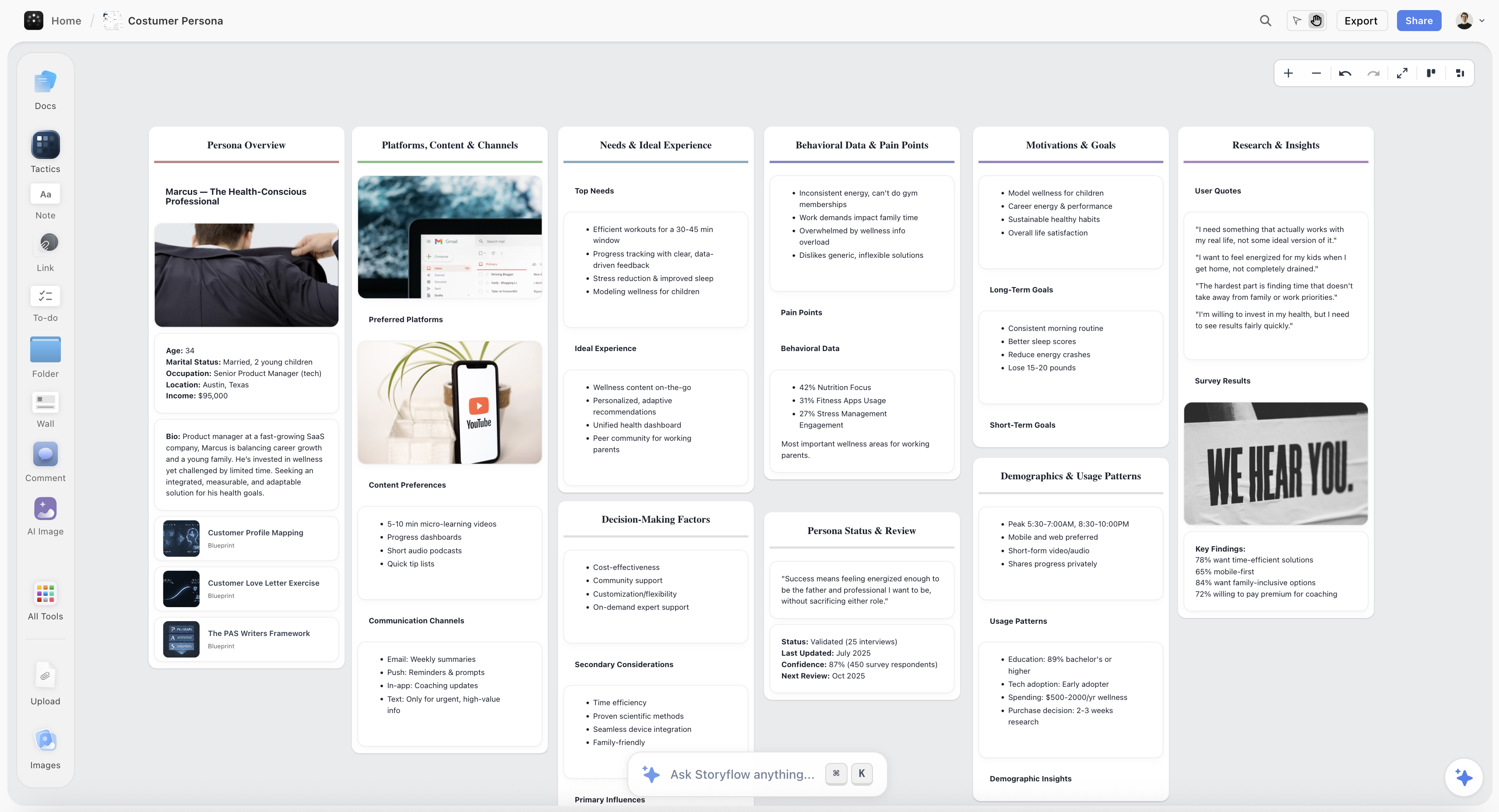
A customer journey map on a Storyflow canvas with research quotes and screenshots attached to each stage
Keep the evidence attached to the map
A journey map without its research is a set of assertions in a nice layout. Storyflow keeps quotes, screenshots, notes and structure on one canvas, with AI that reads the board. Paid-only during early access; the Free plan lands before the end of 2026.

Drawing a User Flow in Each
In Whimsical, you draw a flow and it looks right. Connectors route themselves around shapes, spacing snaps sensibly, and the default styling is clean enough to ship into a spec without touching it. The constraint is the feature: because you cannot fiddle much, you do not fiddle, and the flow gets finished.
This matters more than it sounds. The reason user flows go stale is not that teams do not value them. It is that updating them costs more than the update is worth. A flow that takes four minutes to amend gets amended. A flow that takes forty gets left wrong, and a wrong flow is actively harmful because people trust it until it burns them. Whimsical's speed is not a convenience feature, it is what keeps the artifact true.
Whimsical also does wireframes natively, so a wireflow (boxes showing screens, arrows showing transitions, with rough layouts inside the boxes) is a single-tool job. For product work at the design stage this is the strongest thing it does.
In Miro, drawing a flow is entirely possible and takes longer to look good. Connectors give you more control, which means more decisions. Shape libraries are broad and there is auto-layout to help. What you do not get for free is consistency: two designers drawing the same flow in Miro produce visibly different documents, and across a team that variation makes flows harder to read quickly.
Miro's advantage on user flows appears when the flow is not the only thing on the board. If your flow needs to sit next to the research that justified it, the competitor teardown, and the open questions, Miro holds all of that and Whimsical does not.
The rule of thumb: if the flow is the deliverable, Whimsical. If the flow is one element inside a wider thinking space, Miro.
Building a Customer Journey Map in Each
Journey mapping inverts the comparison.
In Miro, a journey map is a natural fit. The canvas is large enough for the map plus the evidence. The template library has journey maps, service blueprints and empathy maps that are genuinely usable starting points. Facilitation tooling (voting, timer, private mode for independent input before groupthink sets in) matters because a journey map is usually built in a session with people from different departments, and running that session well is most of the work.
Crucially, Miro can hold the supporting material: research quotes, screenshots, recordings, support-ticket exports, analytics screenshots. A journey map with the evidence attached survives the challenge "is that actually true?" A journey map without it is a set of assertions in a nice layout, and senior stakeholders are good at spotting the difference.
In Whimsical, a journey map is cramped. You can build one, and it will be tidy, and the constraints that make Whimsical excellent for flows work against you: limited canvas sprawl, a focused feature set, and weaker handling of mixed media. There is also no real facilitation tooling, so the workshop happens somewhere else and Whimsical becomes the place someone writes it up afterwards.
That write-up role is legitimate, incidentally. A perfectly reasonable pattern is workshop in Miro, then redraw the agreed map cleanly in Whimsical as the artifact that goes into the deck. Messy where it needs to be messy, tidy where it needs to be tidy.
Speed: The Underrated Criterion
Every comparison in this category rates features. Almost none rate speed, and speed is what determines whether these artifacts stay true.
Consider the actual lifecycle. A flow is drawn during design. It is correct for about three weeks. Then a requirement changes, an edge case surfaces in QA, and the flow is now subtly wrong. Somebody notices. What happens next depends entirely on how expensive the edit is.
Whimsical wins this decisively. Opening a flow, inserting a branch, and having it re-route cleanly takes a couple of minutes. The cost of correctness is low enough that correctness happens.
Miro's cost is higher, not enormously, but enough. Inserting a step means moving shapes, re-routing connectors, restoring spacing. Multiply by a team and a quarter and a meaningful number of Miro flows are quietly out of date.
The test worth running in a trial: draw a realistic flow in both, then change it the way a real requirement changes it. Insert a branch three steps in and add an error state. Time both. That number tells you more about which tool you will still be using in a year than any feature list.
Collaboration and Workshops
Miro is the stronger collaborative tool by a wide margin. Live cursors, comments, voting, timers, private mode, breakout structures, and a template library aimed at running sessions. If your journey mapping involves getting eight people from four departments to agree on something, Miro is designed for that meeting and Whimsical is not.
Whimsical supports real-time collaboration and comments and does it competently. It is designed around a small number of people producing a clean artifact, not a room converging on a shared view. Its free tier caps board count, which in practice caps how much collaborative work you can do before paying.
The asymmetry worth noting: Miro's collaborative strength is also what makes its output messy. A board that eight people worked in looks like a board that eight people worked in. That is honest and it is not presentable. Journey maps built in workshops nearly always need a cleanup pass before they go to an executive, and budgeting for that pass is more useful than pretending the workshop output is the deliverable.
Handoff to Engineering and Design
A user flow's real test is whether an engineer can build from it without asking three clarifying questions.
Whimsical hands off well. The output is legible, exports cleanly to PNG and PDF, and embeds sensibly in Notion, Confluence and similar. Because defaults are consistent, an engineer reading their fifth Whimsical flow reads it the same way as the first.
Miro hands off adequately, with more friction. Boards are larger and denser, so an engineer opening a Miro board often has to find the flow before reading it. Miro's integrations are the counterweight and they are genuinely valuable: two-way Jira and Asana cards mean a step in a flow can be an actual tracked ticket, which Whimsical does not offer.
The pattern that works if you use both: Miro for the messy thinking and the workshop, Whimsical for the artifact that goes into the spec, and a link from each to the other. The failure to avoid is two divergent sources of truth, which happens quickly if nobody owns the link.
Keeping the Map Alive
This is the failure that matters and neither tool solves it.
Journey maps and user flows decay. The product changes, the org changes, the support process changes, and the map on the wall becomes a historical document that people still cite. A stale journey map is worse than none, because it carries the authority of research while describing a product that no longer exists.
Neither Miro nor Whimsical has any mechanism that notices this. There is no staleness signal, no review cadence, no link between the map and the thing it describes.
What works is process, and it is cheap:
- Put a review date on the artifact itself, visible, in the title. "User flow: checkout. Reviewed 2026-08-09." A reader can then judge for themselves.
- Name an owner on the board. Unowned artifacts are never updated.
- Attach the map to a trigger, not a calendar. "Review when checkout changes" beats "review quarterly," because the quarterly reminder gets dismissed.
- Delete aggressively. A flow nobody has needed in a year should be archived, not maintained. Most teams maintain far too many artifacts badly instead of a few well.
The teams whose maps stay useful are not the ones with the better tool. They are the ones who deleted most of their maps.
AI Features in 2026
Miro's AI clusters sticky notes into themes, summarises clusters, expands ideas, and generates diagrams and structures from a prompt. For journey mapping the clustering is the useful one: after a workshop that produced two hundred observations, automatic thematic grouping genuinely saves a facilitator an hour.
Whimsical's AI focuses on generating diagrams and flowcharts from a text description, which fits its product: describe a flow, get a first draft to correct. For a designer starting from a written requirement, this is a reasonable accelerator.
The shared limitation: both operate on the objects in front of them. Neither has read your research, your analytics, or your support tickets. Ask either to generate a journey map and you get a plausible generic journey, because a generic journey is all it has context for. That output is dangerous in a specific way: a plausible map is much harder to challenge than an obviously wrong one, and a journey map's whole value is that it is true about *your* customers.
Use AI to accelerate the drawing. Do not use it to supply the content. The content has to come from research or the artifact is decoration.
Full disclosure, since our own product comes up below: Storyflow is ours. On user flows specifically it is not the right recommendation and this article does not make it one. Whimsical draws a cleaner flow faster, and if user flows are your job, buy Whimsical.
Pricing Compared in 2026
Whimsical
- Free: capped by board count, enough to evaluate on real work
- Paid: around $10 per editor per month, with the seat model varying
- Confirm the current tiers on Whimsical's pricing page, since per-editor pricing and free board caps in this category change frequently
Miro
- Free: 3 editable boards, unlimited team members
- Starter: $8 per member per month, billed annually
- Business: $20 per member per month, billed annually
- Enterprise: custom
Reading it honestly. For a small design team drawing flows, Whimsical's free tier plus one or two paid seats is often sufficient, and the board cap is the constraint that eventually forces the upgrade. For journey mapping with stakeholders, Miro's model is friendlier in one specific way that matters: unlimited members on the free plan means you can bring eight people into a workshop without buying eight seats, which is exactly the shape of a journey mapping session.
That single difference (Miro charges for boards on free, Whimsical charges for boards on free but Miro does not cap members) is often the deciding factor for occasional workshop use, and it is buried in both pricing pages.
When to Choose Whimsical
Choose Whimsical when:
- User flows, wireflows and simple diagrams are the main output.
- You want visual consistency across a team without enforcing a style guide.
- Speed of editing matters, because your flows need to stay current.
- You want wireframes and flows in one tool.
- The diagram is the deliverable and goes into a spec or a doc.
Whimsical's honest weaknesses: cramped for large exploratory work, light on workshop tooling, fewer integrations, and a free tier whose board cap arrives sooner than teams expect. It is not the tool for a session with stakeholders.
When to Choose Miro
Choose Miro when:
- Journey maps, service blueprints and workshops are the main output.
- Sessions involve many people, especially from different departments.
- The map needs to sit next to research, quotes, screenshots and recordings.
- You need two-way Jira or Asana integration so steps become tracked work.
- You need one canvas that holds a whole discovery phase, not one diagram.
Miro's honest weaknesses: slower to produce a clean diagram, inconsistent output across a team, boards sprawl without curation, and per-member pricing above the free tier adds up. If your only job is user flows, Miro is more tool than you need and slower at the thing you need.
Where Both Fall Short
Two gaps apply to both, and knowing them in advance is worth more than either tool's feature list.
Neither holds research evidence well enough to make a journey map defensible. Miro is better than Whimsical here and still limited: you can embed a screenshot and paste a quote, but there is no real link between an assertion on the map and the session recording that supports it. When a stakeholder asks "how do we know customers feel that at step four," the honest answer is usually a slide number in a research deck somewhere else. A journey map whose evidence lives in another building is a map that loses arguments.
Neither keeps the artifact connected to the thing it describes. The flow does not know the product changed. This is the decay problem, and it is why the process rules above matter more than the tool.
Where Storyflow fits, disclosed as our own product: it is a canvas built to hold a project's material together, so research, quotes, screenshots, notes and structure live on the same board, and its AI reads the full board plus up to one Story blueprint and three documents you @-mention. That helps with the evidence problem specifically. It does not help with the drawing problem, and that is the honest boundary: it has no auto-routing connector engine, no shape libraries, and nothing approaching Whimsical's speed at producing a clean flow diagram, nor Miro's workshop tooling. If you are here to draw user flows, this is not the recommendation. Storyflow is paid-only during early access, with plans from $7.99 a month billed annually and a Free plan arriving before the end of 2026; anyone a paid member invites to a board joins free today.
The Bottom Line
Decide what the diagram is for before you decide which tool draws it.
If it is a decision artifact, buy Whimsical. It draws a clean flow faster than anything else, it keeps a team's diagrams looking alike, and its speed is what keeps flows current, which is the only property that makes them worth having.
If it is a persuasion artifact, buy Miro. Journey maps are made in rooms, and Miro is built for the room, holds the evidence, and lets you bring everyone in without buying everyone a seat.
If you do both regularly, use both, and name one canonical source per artifact so they do not drift.
Then spend your effort on the part no tool covers: put a review date and an owner on every map you make, and delete the ones nobody needs. The teams whose maps stay useful are not the ones with the better tool. They are the ones who deleted most of their maps.
FAQ: Whimsical vs Miro for User Flows
Is Whimsical or Miro better for user flows?
Whimsical, for most teams. Its auto-routing connectors and opinionated defaults produce a clean, readable flow faster than Miro does, and it enforces visual consistency across a team without a style guide. That speed is not just convenience: flows go stale because editing them is expensive, so the cheaper the edit, the more likely the flow stays true. Miro is the better choice only when the flow needs to sit inside a larger thinking space alongside research and open questions.
Is Whimsical or Miro better for customer journey maps?
Miro, clearly. Journey mapping is a workshop activity as much as a diagramming one, and Miro has the templates, facilitation tooling (voting, timers, private mode) and canvas size to run the session and hold the supporting evidence. Whimsical is cramped for this, has little workshop tooling, and handles mixed media less well. A reasonable hybrid is to run the workshop in Miro and redraw the agreed map cleanly in Whimsical for the deck.
Can Whimsical replace Miro?
For diagram-centric work, largely yes. For workshop-centric work, no. Whimsical does not have Miro's facilitation tooling, its canvas is deliberately constrained, its integration set is smaller, and its free tier caps board count in a way that limits ongoing multi-project use. Teams whose output is user flows, wireflows and simple diagrams often replace Miro with Whimsical and are happier. Teams that run collaborative sessions with stakeholders across departments will miss Miro quickly.
What is the difference between a user flow and a customer journey map?
A user flow is a decision artifact: it settles what the product does when, at screen level, and its success condition is that an engineer can build from it without asking clarifying questions. A customer journey map is a persuasion artifact: it shows an organisation what a customer experiences across channels and time, often to make a neglected problem visible, and its success condition is that it changes priorities. They have different audiences, different levels of detail, and different tools suit each.
Which is cheaper, Whimsical or Miro?
It depends on the shape of use rather than the headline price. Whimsical's paid plans run around $10 per editor per month with a free tier capped by board count; Miro is $8 per member per month annual on Starter and $20 on Business, with a free tier of 3 editable boards and unlimited members. The detail that decides it for workshops: Miro's free plan does not cap members, so you can bring eight people into a session without buying eight seats. For steady diagramming by a couple of designers, Whimsical usually costs less. Verify both, as seat models here change often.
Do Whimsical or Miro have AI that can generate a journey map?
Both can generate something, and you should be careful with it. Whimsical generates diagrams and flowcharts from a text description, which is a reasonable accelerator when you are working from a written requirement. Miro generates structures and clusters sticky notes into themes, which is genuinely useful after a workshop. Neither has read your research, analytics or support tickets, so an AI-generated journey map is a plausible generic journey rather than a true one, and a plausible map is harder to challenge than an obviously wrong one. Use AI for the drawing, not the content.
How do you stop user flows and journey maps from going stale?
Not with a tool, because neither Whimsical nor Miro has any staleness signal. Four process rules do most of the work: put a visible review date in the artifact's title so readers can judge it themselves, name an owner on the board because unowned artifacts never get updated, tie review to a trigger ("when checkout changes") rather than a calendar reminder that gets dismissed, and archive aggressively. Most teams maintain too many artifacts badly instead of a few well, and deleting is the highest-return move available.
Can you use Whimsical and Miro together?
Yes, and it is a common and sensible split: Miro for the messy exploratory work and the stakeholder workshops, Whimsical for the clean artifact that goes into the spec or the deck. The thing that breaks it is divergence, where the Miro board and the Whimsical diagram drift into two sources of truth. Avoid that by linking each to the other and naming one of them as canonical, usually the Whimsical artifact for flows and the Miro board for the research it came from.
Table of Contents
- Key Takeaways
- Decide vs Describe: What the Diagram Is For
- Head-to-Head Comparison Table
- Drawing a User Flow in Each
- Building a Customer Journey Map in Each
- Speed: The Underrated Criterion
- Collaboration and Workshops
- Handoff to Engineering and Design
- Keeping the Map Alive
- AI Features in 2026
- Pricing Compared in 2026
- When to Choose Whimsical
- When to Choose Miro
- Where Both Fall Short
- The Bottom Line
- FAQ: Whimsical vs Miro for User Flows
- Related Reading
Templates to check out for this topic


Planning and project templates you can use in Storyflow
Plan a launch, a sprint, or a whole project on a visual board the team can see at once. Open one of these templates and start from real structure.


See Storyflow in Action
A visual AI workspace where every feature lives inside one canvas. No tab-switching, no context lost.
Build your entire board from a single message
Type what you need in the AI chat at the bottom of your canvas. The AI adds cards, headings, and structure directly onto your board.
Use expert frameworks as AI context
Type @ in the AI chat and choose any Tactic. The AI tailors every response to that framework instead of giving generic advice.
Turn your board into a mind map in seconds
Ask the AI to restructure your canvas as a mindmap. It connects your ideas into a visual hierarchy so you can see how everything relates.
Why Storyflow Exists
Storyflow actually began as a personal tool while working on creative and research projects.
We kept running into the same problem: ideas were scattered everywhere: notes, documents, and whiteboards.
Nothing helped us see how everything connected.
So we started building a workspace designed around how ideas actually grow.
→ Read how Storyflow was createdJustkay
Documentary Filmmaker & Founder at Storyflow
Published: 2026-08-09
Extremely simple, seriously capable


See how easy it is to get started
Watch a real project come together, from a blank board to a finished plan, clicked through step by step.
Start creating with AI and become more productive
Transform your creative workflow with AI-powered tools. Generate ideas, create content, and boost your productivity in minutes instead of hours.