
Category
Writing Tools
Author

Justkay
Documentary Filmmaker & Founder at Storyflow
Topics
2026-05-12
•
Updated July 3, 2026
•
23 min read
•
Writing Tools- best tools for outlining a novel 2026
- novel outline software
- novel outlining tools
- Plotter vs Pantser
- Scrivener vs Plottr
- Storyflow novel outline
What are the best tools for outlining a novel in 2026?
The best tools for outlining a novel in 2026 are Storyflow (best canvas-AI tool for novelists who outline and discover in parallel), Plottr (best visual timeline outliner for plot-heavy fiction), Scrivener (best corkboard outliner integrated with the manuscript), and Campfire Writing (best modular outline plus worldbuilding). Novel outlining splits novelists into three schools: Plotter (full outline before writing), Pantser (no outline, discover in writing), and Plantser (both, in rotation). Match the tool to your school. Outlines do not write novels; they prevent the wrong novel from being written. Storyflow is the only tool that serves all three schools on one canvas.

Full disclosure: Storyflow is our own product, and we rank it #1 for one reason: the canvas serves all three outlining schools and the AI reads the whole board for structural critique. For hard Plotters who want a scene-by-scene timeline Plottr goes deeper, and for outline-plus-manuscript in one place Scrivener is the canonical tool. Storyflow is not a manuscript writer, so pair it with Scrivener for the prose. We link to every tool so you can judge the fit.
Quick Comparison: Best Novel Outlining Tools
These four cover the three outlining schools: a canvas that serves all three, a Plotter timeline, a corkboard tied to the manuscript, and a modular outline plus worldbuilding.
| Tool | Best For | AI Features | Price |
|---|---|---|---|
| Storyflow | Canvas outline + structural critique | Reads full canvas (all three schools) | $7.99 mo annual (free plan late 2026) |
| Plottr | Visual timeline for Plotters | No AI | $25 / year |
| Scrivener | Corkboard + manuscript in one | No AI | $59.99 one-time |
| Campfire Writing | Modular outline + worldbuilding | Light AI generation | Free / $9 mo |
Outline the novel on a board you can rearrange
Drag beats and chapters around a Storyflow canvas until the structure holds, and let AI draft a first outline from your premise so you start with something to move.

1) Quick Answer: The Best Novel Outlining Tools in 2026
The best tools for outlining a novel in 2026 are Storyflow (best canvas-AI tool for novelists who outline and discover in parallel), Plottr (best visual timeline outliner for plot-heavy fiction), Scrivener (best corkboard outliner integrated with the manuscript), and Campfire Writing (best modular outline plus worldbuilding). The pick depends on which of the three outlining schools you belong to: Plotter (full outline before writing), Pantser (no outline, discover in writing), or Plantser (both, in rotation).
Novel outlining sits between knowing the story and writing it. The outline is the writer-facing artifact that captures the story's shape before draft becomes prose. Outlines do not write novels; they prevent the wrong novel from being written. Strong outlining tools surface structural problems early, when fixing them costs hours, not weeks.
I have built outlines for documentary projects and consulted on novelists shifting between Plotter, Pantser, and Plantser modes. The pattern that has held is that the right tool matches the writer's school, not the writer's genre. A literary fiction Plotter and a thriller Plotter need similar tools; a literary fiction Pantser and a thriller Pantser need different tools than the Plotters.
For the broader writer tool landscape, see The 12 Best Notion Alternatives for Writers and Storytellers (2026). For the related character work, see The 12 Best Tools for Character Development in 2026.
All 12 tools, ranked:
- Storyflow: best canvas outline plus AI structural critique, serves all three schools.
- Plottr: best visual timeline for hard Plotters.
- Scrivener: best corkboard outline integrated with the manuscript.
- Campfire Writing: best modular outline plus worldbuilding.
- Notion: best database outline for Notion-native novelists.
- Obsidian: best connected-note discovery for Pantsers.
- Storyist: best Mac-native outline plus manuscript.
- World Anvil: best outline alongside deep worldbuilding.
- Notebooks: best light outline notebooks on Mac and iOS.
- Google Docs: best free linear outline with editor collaboration.
- ChatGPT / Claude: best AI scaffolding partner, not a primary outline tool.
- Microsoft Word: legacy linear outline for old-school Plotters.
2) Comparison Table: 12 Novel Outlining Tools at a Glance
Rating criteria: which outlining school the tool serves, AI context for outlining, integration with manuscript writing, and pricing for solo novelists.
Frequently Asked: Which Novel Outlining Tools Are Most Trusted, Best Rated, and Fairest on Price
Which novel outlining tools are the most trusted by working novelists?
Scrivener, without much competition. Two decades of finished manuscripts sit behind it, its binder and corkboard are the reference implementation every other tool is measured against, and a novelist who has used it once can pick it up again years later. Plottr is the most trusted purpose-built outliner, and its trust comes from doing one thing and exporting cleanly into Scrivener. Storyflow is newer than both and does not carry that history.
Which novel outlining tools are the most innovative?
Storyflow and Obsidian, from opposite philosophies. Obsidian's graph makes an outline emerge from links rather than be imposed as a hierarchy, which is the only tool in this list that genuinely serves a pantser. Storyflow's contribution is structural critique: the AI reads the whole canvas (premise, character cards, chapter beats, research) before it answers, so "where does the middle sag" is assessed against the actual outline rather than a pasted summary. Campfire Writing innovates in modelling, letting characters, locations, and timelines be real objects an outline references.
Which novel outlining tools are known for fair and transparent pricing?
Obsidian and Google Docs are free for this use, and Obsidian's $5/mo is only for sync. Plottr at $25 a year and Scrivener at $59.99 one-time are the two best-value paid tools in the category, because neither charges again for software you already own. World Anvil at $4.99/mo is the cheapest subscription. The least fair value for a novelist is Microsoft Word, which requires an Office subscription to outline in a way three free tools do better. Storyflow is paid-only during early access at $7.99/mo billed annually, with its Free plan arriving before the end of 2026 and invited collaborators (a co-author, an editor) joining free.
Which novel outlining tools are the highest rated?
By the ratings in the table above: Storyflow (9.3) for an outline that has to hold research and structure on one surface, Plottr (8.7) for a pure plot grid and timeline, Scrivener (8.5) for an outline attached to the draft, and Campfire Writing (8.2) for a modular outline with worldbuilding behind it. Read the ratings against your school rather than in the abstract: a committed plotter who drafts in Scrivener should treat its 8.5 as the highest number in the table, because outline-to-manuscript in one app beats every other advantage.
Where is Storyflow not the right answer?
Writing the manuscript (Scrivener, Storyist, Word), a linked wiki of thousands of worldbuilding articles (World Anvil, Obsidian), a pure plot grid with a timeline view (Plottr), and generating prose (ChatGPT, Claude, Sudowrite). Storyflow holds the outline and the research it came from. The draft goes elsewhere.
3) Plotter, Pantser, Plantser: The Three Outlining Schools
Novelists split into three schools by how they relate to outlining. Most "best outlining tool" articles ignore the split. The split is the most important variable for tool choice.
Plotter. Outlines the full novel before drafting. Knows the ending before writing chapter one. Often uses scene-by-scene grids. The discipline is structural; the cost is sometimes a brittle outline that fights revision. Plotters include Brandon Sanderson, J.K. Rowling, John Grisham, and most genre fiction writers.
Pantser. Writes "by the seat of the pants." No outline. Discovers the story in the writing. Often produces strong character moments and surprising scenes; sometimes produces structural collapses in the middle that require extensive revision. Pantsers include Stephen King, Lee Child, Neil Gaiman.
Plantser. A hybrid. Outlines major beats; discovers the rest. The largest group of novelists in 2026 according to most writing surveys. Plantsers use loose outlines that they revise during writing. The discipline is flexibility; the cost is that the outline tool has to support both modes.
The split matters for tool choice. Plotters need tools with scene-by-scene grids, plot timelines, and structural views. Pantsers need free-form note tools with connected-note structure for emergent organization. Plantsers need tools that hold both modes, which is why canvas tools (Storyflow) and modular tools (Campfire) tend to serve Plantsers best.
The framework also matters for self-knowledge. Most new novelists do not yet know which school they belong to. Tool choice can shape the school: a writer who uses Plottr exclusively often becomes a stronger Plotter; a writer who uses Obsidian exclusively often becomes a stronger Pantser. The right path is to try both modes early in your novel-writing career and see which feels more natural.
In this listicle, every tool is tagged with which school it serves. Storyflow is the only tool tagged for all three because the canvas can hold a scene-by-scene grid (Plotter) or a free-form web of notes (Pantser) or both (Plantser) on the same board.
4) How We Evaluated These Tools
Five criteria, weighted in this order:
- Outlining school fit. Plotter, Pantser, Plantser. Tools that serve only one school were rated against that school's needs.
- Manuscript integration. Does the outline live alongside the writing, or in a separate document? Tools where the outline drifts away from the manuscript over time were rated lower.
- AI structural critique. Can the AI read the outline and surface structural problems (missing midpoint, weak antagonist beat, theme not landing)? Most AI outline tools generate; few critique.
- Free-tier reality for solo novelists. Novelists are usually solo. Free tiers and indie pricing matter.
- Cross-format export. Does the outline export to Scrivener, Word, or other manuscript tools cleanly?
Tested workflows included a literary novel outline (Plantser mode), a thriller series outline (Plotter mode), and a discovery-style fiction outline (Pantser mode). Tools were tested across several months of sustained outline work.
5) Quick Picks by Outlining School
Best for Plotters who want scene-by-scene control: Plottr (visual timeline) plus Storyflow (canvas for the bible alongside). The pair gives the structural detail Plotters need.
Best for Pantsers who discover in writing: Obsidian (connected notes) plus Storyflow (canvas for emergent structure once it surfaces). Loose for early discovery, structured when the shape appears.
Best for Plantsers (the largest group): Storyflow alone, or Storyflow plus Scrivener. The canvas holds both modes; Scrivener handles the manuscript.
Best for Solo Writers on a Tight Budget: Storyflow Plus, $7.99/month billed annually, plus Obsidian Free. Obsidian's core app is free indefinitely; Storyflow is paid-only during early access, with a Free plan launching before the end of 2026.
Best for Fantasy / SF Novelists Outlining Inside a World: World Anvil for the world plus Storyflow for the outline plus Scrivener for the manuscript.
Best for Novelists Already in Scrivener: Scrivener's corkboard plus Storyflow for the AI structural critique that Scrivener does not have.
Outline your novel in the school you actually write in
The AI story outline generator turns your premise into acts and chapters on a canvas, so Plotters get the grid, Pantsers get moveable cards, and Plantsers get both.
6) Detailed Reviews: 12 Novel Outlining Tools
1. Storyflow
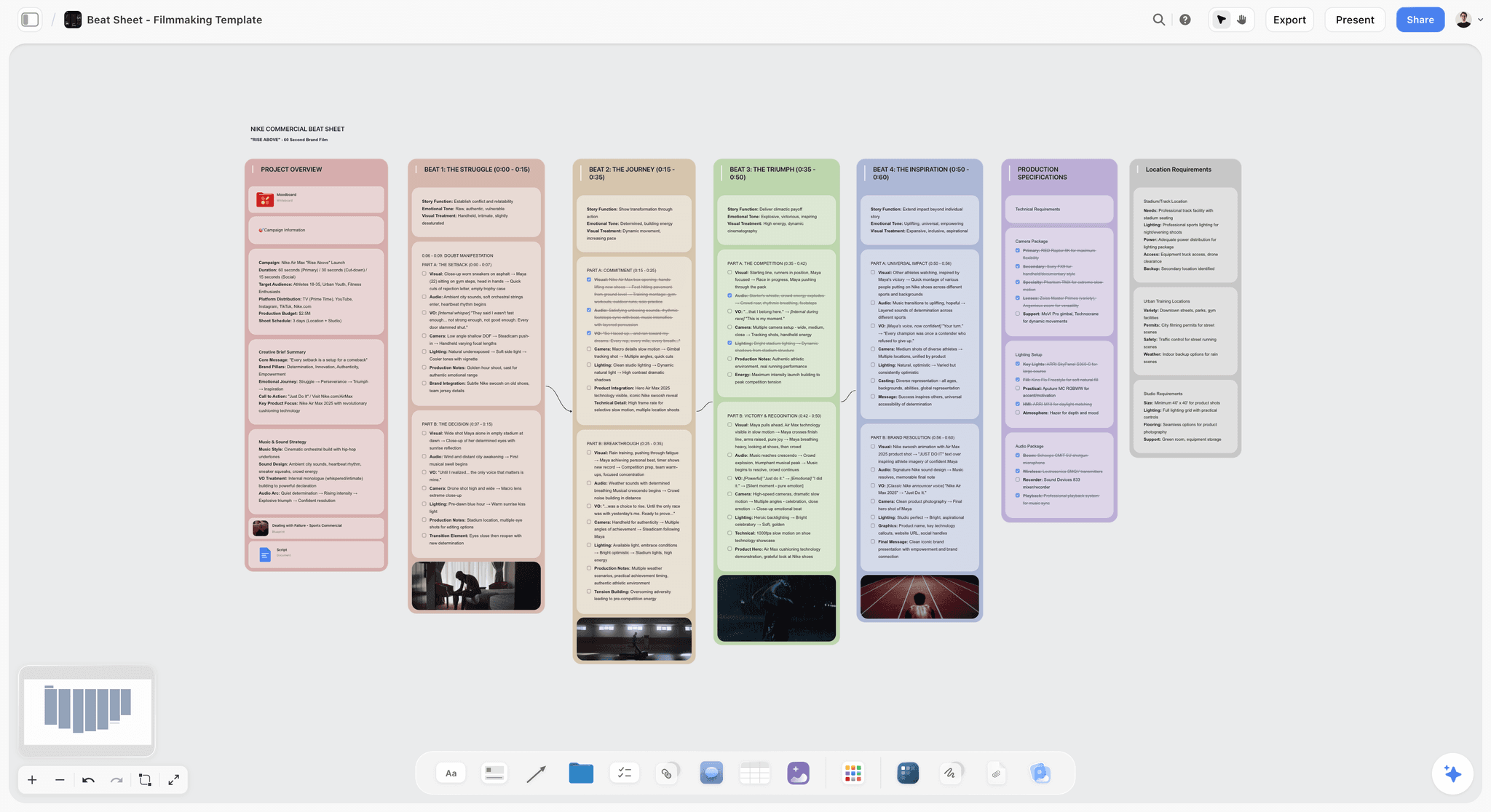
Storyflow holds the novel outline on a canvas alongside the beat sheet, character profiles, story bible, and chapter scenes. The Story Blueprints library includes outline templates for the three-act, four-act, and Save-the-Cat structures. The AI reads the full canvas and can answer questions like "is the midpoint earning the third act?" or "which character carries the theme?". For Plotters, the canvas holds the scene grid. For Pantsers, the canvas holds free-form note cards that can be reorganized as the story discovers itself. For Plantsers, the canvas holds both modes.
Best for: All three outlining schools, especially Plantsers who shift modes during writing.
Verdict: The strongest canvas-based novel outlining tool in 2026. Pair with Scrivener for the manuscript layer. The fastest start is the Story Outline Template for Writers, which opens the board with acts and chapter slots already placed; the Novel Moodboard template holds the visual references beside the outline.
Key features
- Canvas where outline, beat sheet, characters, and chapter notes live as connected cards.
- AI reads the full canvas plus up to 1 Tactic and 3 Documents you @-mention.
- Story Blueprints library includes outline templates for multiple structures.
- Every collaborator a paid member invites joins free (useful for novelist + editor pairs).
Pricing
Paid-only during early access. Plus: $7.99/mo annual. Pro: $14/mo annual. Max: $39/mo annual. Free plan launches before the end of 2026.
Pros
- Serves all three outlining schools on one canvas.
- AI reads the outline for structural critique.
- Collaborators invited by a paid member join free, with no seat limit.
Cons
- Not a manuscript writer; pair with Scrivener or similar for chapter writing.
- Cloud-only.
- Newer platform; the depth of Plotter-specific scene-grid templates is thinner than Plottr's dedicated views.
2. Plottr
Plottr is the dedicated plot-timeline outliner. Visual grid of scenes across plot threads, character arc timelines, and series management for multi-book outlines. The strongest tool for hard-Plotter novelists who want scene-by-scene control before writing.
Best for: Plotters writing genre fiction (thriller, mystery, romance, fantasy).
Verdict: The strongest dedicated visual timeline tool for Plotters.
Key features
- Visual timeline with multiple plot threads.
- Character arc tracking across the timeline.
- Series management for trilogies and longer.
- Export to Scrivener and Word.
Pricing
$25/year basic. $39/year pro.
Pros
- Best-in-class visual timeline for Plotters.
- Multi-thread tracking built in.
- Affordable annual pricing.
Cons
- Plotter-only; Pantsers find it constraining.
- No AI.
- Not a writing tool; export to Scrivener for prose.
3. Scrivener
Scrivener's corkboard and binder are the canonical Plotter and Plantser tools. Each scene gets a card on the corkboard; the binder holds the manuscript chapters that the corkboard cards become. Outline and manuscript live in the same project, which keeps them synced.
Best for: Plotter and Plantser novelists who want outline and manuscript in one tool.
Verdict: The canonical novelist outlining tool. One-time purchase, no subscription.
Key features
- Corkboard for scene cards.
- Binder for manuscript organization.
- Snapshots for chapter revision history.
- One-time purchase.
Pricing
$59.99 one-time (Mac or Windows). iOS sold separately.
Pros
- One-time purchase.
- Outline and manuscript in one tool.
- Decades of novelist use and community.
Cons
- No AI features.
- Pantsers find the corkboard structure constraining.
- Mobile sync lags newer cloud tools.
4. Campfire Writing
Campfire Writing has a modular outline module plus character, worldbuilding, and manuscript modules. Strongest for novelists who want a modular setup with strong outline support.
Best for: Plotter and Plantser novelists who want modular pricing.
Verdict: Strong modular alternative to Scrivener for novel outlining.
Key features
- Outline module with structured scenes.
- Character, magic system, manuscript modules.
- Light AI generation.
Pricing
Free with caps. Modules from $9/mo.
Pros
- Modular pricing.
- Active development.
- Light AI is useful.
Cons
- Module pricing adds up.
- Smaller community than Scrivener.
5. Notion
Notion's databases let novelists build outline tables with scene status, character involvement, and plot thread tags. Generic but flexible with setup.
Best for: Novelists already in Notion who want outlining alongside their existing setup.
Verdict: Adequate generalist for outlining. Lose to specialized tools.
Key features
- Database-backed scene tables.
- Cross-linking between scenes, characters, locations.
- Standard AI features.
Pricing
Free for personal. Plus: $10/mo.
Pros
- Strong general database.
- Generous free tier.
- Wide adoption.
Cons
- Setup-heavy; outline-specific templates need customization.
- AI is generic, not story-aware.
6. Obsidian
Obsidian holds outline notes as connected markdown files. Backlinks surface every mention of a character, location, or plot thread. Strongest for Pantsers who discover the outline as they write.
Best for: Pantser and Plantser novelists who want local-first connected notes.
Verdict: Strong for Pantser-style discovery; setup-heavy for Plotters.
Key features
- Local-first markdown.
- Backlinks and graph view.
- Plugin ecosystem.
Pricing
Free for personal use. Sync: $5/mo.
Pros
- Local-first.
- Free indefinitely.
- Connected-note model surfaces emergent structure.
Cons
- Setup-heavy.
- AI requires plugins.
- Document-first rather than canvas-first.
7. Storyist (Mac)
Storyist is the Mac-native novel-writing tool with outline templates integrated into the manuscript. Loved by Mac novelists who want integrated outline plus prose.
Best for: Mac-only novelists.
Verdict: Strong for Mac-native Plotter and Plantser novelists.
Key features
- Outline templates per-genre.
- Manuscript editor in the same tool.
- Mac + iOS sync.
Pricing
$59 one-time (Mac). iOS sold separately.
Pros
- Mac-native polish.
- One-time purchase.
Cons
- Mac and iOS only.
- No AI.
8. World Anvil
World Anvil is primarily a worldbuilding tool with outline features. Strong for fantasy and SF novelists who outline alongside elaborate worlds.
Best for: Fantasy and SF novelists whose outline lives inside a larger world.
Verdict: Strong for worldbuilder-Plotters; awkward for non-worldbuilding novelists.
Key features
- Wiki structure with outline templates.
- Worldbuilding integrated into outline.
- Timeline tool.
Pricing
Free with caps. Journeyman: $4.99/mo.
Pros
- Outline lives next to the world.
- Strong worldbuilding integration.
Cons
- Wiki-heavy; awkward for non-fantasy novelists.
- Light AI.
9. Notebooks (Mac/iOS)
Notebooks is a Mac and iOS note app loved by Pantser novelists who want light outline notebooks without overhead.
Best for: Pantser novelists on Mac and iOS.
Verdict: Strong for Pantsers; thin for Plotters.
Key features
- Lightweight notebooks.
- Mac, iPad, iPhone sync.
- One-time purchase available.
Pricing
Free with caps. Premium: $5/mo or one-time.
Pros
- Light, focused.
- Mac and iOS native.
Cons
- Apple-only.
- Minimal structural support.
10. Google Docs
Google Docs is the default collaborative document. For novelists who outline linearly (one chapter per page or one act per page), Google Docs works. The headings panel functions as a basic outline view.
Best for: Plantser novelists who outline linearly and collaborate with editors.
Verdict: Adequate for the prose layer; thin for the structural layer.
Key features
- Real-time co-edit and comments.
- Version history.
- Light Gemini AI in Docs.
Pricing
Free for personal use. Google Workspace from $6/user/mo.
Pros
- Free and ubiquitous.
- Real-time collab.
Cons
- No outline-specific features beyond headings.
- Linear, not visual.
11. ChatGPT / Claude (AI Chat)
AI chat tools scaffold novel outlines from a logline or premise. The output is rarely the final outline; the value is variant generation. Use as a thinking partner alongside a primary outline tool.
Best for: Any outlining school, as a scaffolding partner.
Verdict: Strong as a partner; weak as the primary outline tool because it cannot hold the outline across sessions.
Key features
- Generate outline drafts from a premise.
- Critique existing outlines for structural gaps.
Pricing
ChatGPT or Claude: Free or Plus ($20/mo).
Pros
- Fast outline scaffolding.
- Free tiers usable.
Cons
- No project context across sessions.
- Output is rarely usable as a final outline.
12. Microsoft Word
Word is the legacy default. For old-school Plotter novelists with established Word workflows, the heading hierarchy works as a basic outline view.
Best for: Old-school Plotter novelists with established Word workflows.
Verdict: Functional but outdated.
Key features
- Heading-based outline view.
- Track changes for editor revisions.
Pricing
Microsoft 365 from $6.99/mo personal.
Pros
- Universally accepted format.
Cons
- Subscription required.
- No structural visualization beyond headings.
7) Recommended Novelist Stacks
Stack 1: Plotter genre fiction novelist. Plottr (visual timeline) plus Scrivener (corkboard + manuscript) plus optional Storyflow (AI critique). $25/year + $59.99 one-time.
Stack 2: Plantser literary novelist. Storyflow (canvas outline + bible) plus Scrivener (manuscript) plus optional ChatGPT for variant generation. $7.99-$9.99/mo + $59.99 one-time. Start the bible side from the Character Profile template.
Stack 3: Pantser discovery novelist. Obsidian (connected notes for discovery) plus Storyflow (canvas for when the shape emerges) plus Scrivener (manuscript). $7.99-$9.99/mo + $59.99 one-time.
Stack 4: Fantasy / SF worldbuilder novelist. World Anvil (world) plus Storyflow (outline) plus Scrivener (manuscript). $4.99/mo + $9.99/mo + $59.99 one-time.
Stack 5: Cheapest working stack. Storyflow Plus ($7.99/month annual) plus Obsidian Free plus Google Docs for the prose. Total: $7.99/month.
The Outline Structures Novelists Actually Use
The tool holds a structure. Which structure you are holding changes which tool fits, and most novelists inherit one without choosing it. Five are in common use and they behave differently under pressure.
The three-act skeleton. Setup, confrontation, resolution, with an inciting incident, two turning points, and a climax. Its virtue is that it is small enough to hold in your head and general enough to fit almost anything. Its weakness is the one every novelist meets: act two is 50 percent of the book and the skeleton says almost nothing about it, which is precisely where novels sag.
The beat sheet. Fifteen or so named beats at named proportions, borrowed from screenwriting. Far more prescriptive, and genuinely useful for a first novel because it converts "write a book" into fifteen tractable problems. The cost is a shape readers who read a lot of it can feel. Best used as a diagnostic on a draft that is not working rather than as a template for a draft that has not started.
The snowflake method. Start with one sentence, expand to a paragraph, then a page, then character sheets, then a scene list, growing the whole book proportionally rather than writing it front to back. It suits writers who need to know the ending before they can start, and it wants a tool that can hold nested levels of detail without forcing you to pick one.
Scene and sequel. Each scene has a goal, a conflict, and a disaster; each sequel has a reaction, a dilemma, and a decision. This is the most granular of the five and by far the best at diagnosing a specific chapter that feels inert, because a scene without a goal is immediately visible as one. Overkill as a planning structure for a whole novel, excellent as a repair tool.
The index card pile. No structure at all until one emerges: one scene per card, arranged and rearranged until an order appears. This is not the absence of method, it is a method that defers the structural commitment as long as possible, and it is what a large number of working novelists actually do.
How this changes the tool choice. A fixed-beat structure wants labelled slots, which is what Plottr and the template-driven tools provide, and it is why they feel wonderful to plotters and constricting to everyone else. Snowflake wants nesting, which is Scrivener's binder or an outliner. Scene and sequel wants a grid with columns per attribute, which is a database view. The index card pile wants an open surface with no imposed structure at all, which is a canvas or a real table. Buying a tool whose structure disagrees with your method is the most common reason a novelist bounces off outlining software, and it reads as a personal failing when it is a mismatch.
Outlining a Novel With AI: What Helps and What Damages the Book
Almost every tool on this list now advertises AI, and the useful and harmful applications are not close to each other. The dividing line is the same one that holds across creative work: AI is good at questions about the work and bad at the work.
What genuinely helps.
Finding absences. Given a full scene list, a model will reliably notice that your antagonist has no scene in the first quarter, that two chapters accomplish the same shift, or that a character disappears for eleven chapters and returns as though they had not. This is real structural editing, it is tedious for a human, and it is work a writer who has stared at their own outline for six months is badly positioned to do.
Interrogating the logic. "What does the reader know by chapter twelve, and what must they not know yet?" is a question a model can answer well against an outline, and it is exactly the information-timing analysis that most structural problems turn out to be.
Volume during divergence. Twenty possible complications for a middle act, of which nineteen are useless and one reframes the problem. The value is not the quality of the suggestions, it is that generating twenty is free and you only need one to be provoking.
Compressing an existing draft back to an outline. Genuinely useful in revision: take 90,000 words and get a scene list back so you can see the shape you actually wrote rather than the one you intended. Verify it, because a summary can smooth over exactly the incoherence you are hunting.
What damages the book.
Generating the plot. A model asked what should happen next will produce the most probable next event, and the most probable next event is the one the reader also expects. It is not that the suggestions are bad; it is that they are average by construction, and average is the specific thing a novel cannot afford.
Writing the prose. Voice is the property most thoroughly averaged away by training on everyone's writing, and voice is most of what distinguishes a novel. Generated prose tends to be competent enough to keep and generic enough to flatten the book, which is the worst combination available.
Inventing character motivation. Motivation is where a novel's specificity lives, and a model will supply the conventional reason rather than the strange, true one. The conventional reason is why so many drafts feel like they are about nobody.
Outsourcing the decision about what to cut. A model will tell you what is structurally redundant. It cannot tell you which redundant thing is the reason you are writing the book.
A workable rule. Use AI on the outline and not in the prose, and prefer questions to requests. "What is missing here" is a good prompt. "Write chapter nine" is not, and neither is "what should happen next", which sounds like a question and is actually a request. If your outlining tool's AI cannot see your whole outline, none of the useful applications work at all, which is worth checking before paying for the tier.
The Outline That Survives Contact With Chapter Nine
Every outline is wrong by chapter nine. That is not a failure of outlining, it is what outlining is for: an outline that was never revised was either never consulted or was so vague it could not be contradicted. What matters is whether the outline can absorb the change or has to be abandoned.
Outlines die when they encode order rather than logic. "Chapter 9: she confronts her brother" is order. "By this point the reader must know the brother lied, and she must not yet know why" is logic. Order breaks the moment you move a chapter. Logic survives reordering, and it also tells you what a replacement scene has to accomplish, which order never does.
Keep a running list of what the reader knows. The single most useful artifact alongside a novel outline, and almost nobody keeps one: a column tracking what information the reader has by each chapter. Nearly every structural problem in a draft is an information-timing problem wearing a plot costume, and it is invisible until you write the information down separately from the events.
Mark the load-bearing scenes. In most novels five or six scenes are genuinely structural and the rest can move. Marking which is which turns a rewrite from a renegotiation of the whole book into a local problem. If you cannot name your load-bearing scenes, that is the outline work that has not been done yet.
Revise the outline before you revise the prose, always. The most expensive mistake in a second draft is fixing sentences in a chapter that the restructure will delete. Take the finished draft back to the outline level, decide the shape, then write. This is the same discipline the pre-draft layout serves, applied to a book that now exists.
Two versions, deliberately. Keep the outline you started with alongside the one you are working from. The difference between them is the most honest record you will ever get of what you actually learned writing the book, and it makes the next novel's outline meaningfully better, which is the only part of this that compounds.
8) Honorable Mentions
- Highland 2. Mac-only screenwriting tool also used by novelists for prose work.
- Ulysses. Mac-native markdown writing tool with light outline support.
- NovelCrafter. AI-assisted novel writing with outline features.
- NovelAI. AI fiction generation with lorebook outline support.
- Bear (Mac/iOS). Tag-based note app some novelists use for Pantser outlining.
9) Tools to Avoid for Novel Outlining
- Generic spreadsheets. Workable for Plotters but break down past chapter 10.
- Trello. Cards lack the structural depth novels need.
- Pure AI generation tools for the whole outline. AI scaffolds; humans decide.
- Apple Notes. Adequate for capture; thin for structured outlining.
11) The Bottom Line
The best tools for outlining a novel in 2026 are the ones that match the writer's outlining school. Storyflow is the strongest canvas-based tool, serving all three schools (Plotter, Pantser, Plantser). Plottr is the strongest dedicated Plotter tool. Scrivener is the canonical corkboard outliner with manuscript integration. Obsidian is the strongest Pantser tool for connected-note discovery.
Outlines do not write novels. They prevent the wrong novel from being written. Pick the tool that matches your school, not the genre you write.
The strongest 2026 novelist outline stack is Storyflow (outline + bible on canvas) plus Scrivener (manuscript). Try Storyflow's Story Blueprints on Plus for the canvas layer.
To start the canvas layer in minutes, use the free AI story outline generator to turn your premise into acts and chapters, then drag the structure until the pacing is right and expand any chapter into scenes.
10) FAQ: Novel Outlining Tools
Do all novelists outline?
No. Pantsers do not outline; they discover the story in writing. Plotters outline the full novel before drafting. Plantsers outline major beats and discover the rest. The largest group in 2026 is Plantser.
What is the best outlining tool for first-time novelists?
Storyflow or Scrivener. Storyflow's canvas supports all three outlining schools, so first-time novelists can experiment with their school before committing; Plus starts at $7.99/month billed annually, with a Free plan launching before the end of 2026. Scrivener's corkboard is the canonical novelist tool with the largest community.
How detailed should a novel outline be?
For Plotters: scene-by-scene, with chapter breaks and beat alignment. For Plantsers: major beats per act, with scene-by-scene reserved for the first and last acts. For Pantsers: no outline; loose notes only. Match the detail level to your school.
Should I outline by scene or by chapter?
Plotters outline by scene. Plantsers and Pantsers often outline by chapter or by act. The scene-level grid is heavier discipline; the chapter-level outline is more flexible.
What is the Snowflake Method?
A Plotter outlining technique by Randy Ingermanson: start with a one-sentence summary, expand to a paragraph, expand to a page, expand to a chapter outline, expand to the novel. The Snowflake Method works inside any of the 12 tools above; Plottr and Scrivener have templates that match it.
Can AI outline a novel?
AI scaffolds outlines fast from a premise. The output is rarely the final outline because AI tends to produce generic structures drawn from training data. The strongest workflow is AI-scaffolded first draft, writer-revised final. Storyflow's canvas-AI reads the surrounding project (characters, theme, prior chapters) which makes its outline drafts substantially better than ChatGPT alone.
Should I outline before or after writing chapter one?
Plotters outline before. Pantsers outline after (if at all). Plantsers usually outline the first three to five chapters, write chapter one, then revise the outline based on what the chapter revealed. The first chapter is often the strongest teacher of what the outline needs.
How long should a novel outline be?
For a Plotter outline: 10 to 30 pages, scene by scene. For a Plantser outline: 5 to 10 pages, major beats. Pantser outlines are usually nonexistent or under a page. Match the length to your school, not to convention.
What is the difference between an outline and a beat sheet?
A beat sheet is a one-page structural template (typically 15 beats for Save the Cat). An outline is the expansion of the beat sheet into scene-level detail. The beat sheet comes first; the outline is the bridge between beat sheet and manuscript.
Can a single tool handle outline plus manuscript?
Scrivener and Storyist combine outline and manuscript in one tool. Storyflow combines outline and canvas (bible, character profiles) but not manuscript; pair it with Scrivener or similar. Most novelists in 2026 use two tools: one for outline plus bible, one for manuscript prose.
Should I use a different tool per genre?
No. Tool choice should match your outlining school, not your genre. A thriller Plotter and a literary fiction Plotter need the same tools. A fantasy Plantser and a romance Plantser need the same tools. Genre affects what the outline contains; it does not affect what the outline tool should be.
How does outlining affect revision?
Writers with strong outlines often need lighter revision because structural problems were caught early. Pantser writers usually need heavier revision because the structural shape emerges in writing and often needs reorganization. Plantser writers fall in between.
Do I have to outline to write a novel?
No, and plenty of published novelists do not. What is much rarer is finishing a novel with no structural thinking at all, which is different from having no outline: many pantsers do the structural work in a rough second pass rather than before the first. The practical question is not whether to outline but when, and the honest answer is that discovery writing tends to move the cost from before the draft to after it, where it arrives as a bigger restructure.
How detailed should a novel outline be?
Detailed enough that you never sit down without knowing what a scene has to accomplish, and loose enough that you can still be surprised. For most writers that is one to three sentences per scene covering what changes and what the reader learns, not a paragraph of prose. If your outline is long enough that writing it felt like writing the book, it usually means the energy that belonged in the draft went into the plan.
What is the difference between an outline and a beat sheet?
An outline is your book's specific sequence of scenes. A beat sheet is a general structural template with named turning points at rough proportions, borrowed from screenwriting. You use a beat sheet to generate or diagnose an outline, not instead of one. The common failure is treating the template as the plan, which produces a book that hits every mark and surprises nobody.
Should I outline in the same tool where I write the draft?
There is a real argument either way and it depends on how much you restructure. Keeping both in one project (Scrivener's model) means the outline stays next to the prose and gets updated. Keeping them separate means the outline stays legible instead of becoming a set of headings buried in 90,000 words. Writers who restructure heavily tend to prefer a separate spatial view; writers who mostly write forward prefer one project.
How do I outline a series rather than a single novel?
Two structures at once, and keep them physically separate: the arc of each book, and the arc across books, including what is deliberately withheld until later. The thing that breaks series outlines is not plot, it is information management, because a reveal spent in book one cannot be spent again. A running list of what the reader knows by the end of each book is worth more than any plot grid here, for the same reason it is worth keeping within a single novel.
Table of Contents
- Quick Answer: The Best Novel Outlining Tools in 2026
- Comparison Table: 12 Novel Outlining Tools at a Glance
- Plotter, Pantser, Plantser: The Three Outlining Schools
- How We Evaluated These Tools
- Quick Picks by Outlining School
- Detailed Reviews: 12 Novel Outlining Tools
- Recommended Novelist Stacks
- Honorable Mentions
- Tools to Avoid for Novel Outlining
- FAQ: Novel Outlining Tools
- The Bottom Line
- Author
- Related Reading
Templates to check out for this topic


Story and writing templates you can use in Storyflow
Start your next script, novel, or world from a ready-made Storyflow board instead of an empty page. The AI reads the whole canvas, so every suggestion is grounded in your story.


See Storyflow in Action
A visual AI workspace where every feature lives inside one canvas. No tab-switching, no context lost.
Build your entire board from a single message
Type what you need in the AI chat at the bottom of your canvas. The AI adds cards, headings, and structure directly onto your board.
Use expert frameworks as AI context
Type @ in the AI chat and choose any Tactic. The AI tailors every response to that framework instead of giving generic advice.
Turn your board into a mind map in seconds
Ask the AI to restructure your canvas as a mindmap. It connects your ideas into a visual hierarchy so you can see how everything relates.
Why Storyflow Exists
Storyflow actually began as a personal tool while working on creative and research projects.
We kept running into the same problem: ideas were scattered everywhere: notes, documents, and whiteboards.
Nothing helped us see how everything connected.
So we started building a workspace designed around how ideas actually grow.
→ Read how Storyflow was createdJustkay
Documentary Filmmaker & Founder at Storyflow
Published: 2026-05-12
Extremely simple, seriously capable


See how easy it is to get started
Watch a real project come together, from a blank board to a finished plan, clicked through step by step.
Start creating with AI and become more productive
Transform your creative workflow with AI-powered tools. Generate ideas, create content, and boost your productivity in minutes instead of hours.