Scrivener vs Notion for Book Research: Which One Holds Up on Drafting Day?
Research is three jobs, not one. Scrivener is built for retrieving while you write; Notion is built for structuring a large corpus. The drafting day test, where Zotero fits, and the two-tool setup most authors land on.

Category
Writing
Author

Justkay
Documentary Filmmaker & Founder at Storyflow
Topics
2026-08-09
•
17 min read
•
Writing- Scrivener vs Notion
- best tool to organize book research
- Scrivener vs Notion for research
- book research organization
- Notion for book research
- Scrivener research folder
Scrivener vs Notion for book research: which is better?
Choose Scrivener if your research exists to serve one specific manuscript and you want it sitting inside the same file as your draft, where a split view puts a source beside the sentence you are writing. Choose Notion if your research spans multiple projects, involves collaborators, or contains sources you need to query by attribute such as theme, chapter, person or verification status. Scrivener keeps research next to writing. Notion keeps research queryable. Scrivener is a one-time purchase per platform; Notion is free for individual use and $10 per user per month on Plus. Both are defensible, and the failure mode is picking on the wrong criterion, which for most authors is which one looks more organised in week one. Neither tool's tidiness in month one predicts whether you can find a specific quote in month nine. Neither is a reference manager either, so any book with endnotes needs a third tool.

Full disclosure: Storyflow is our own product and it is deliberately not the recommendation here. For a text-first author writing long prose, Scrivener is the better tool by a wide margin: it compiles a manuscript, Storyflow does not, and nothing in Storyflow replaces Scrivener's drafting environment. Storyflow appears in this article only for the one job both tools genuinely handle badly, which is visual and spatial research, and we say so in that section rather than at the top.
Quick Comparison
Research is three jobs (gathering, structuring, retrieving), and no single tool is best at all three. These four cover the jobs an author actually has.
| Tool | Best For | AI Features | Price |
|---|---|---|---|
| Scrivener | Research beside your draft on drafting day | None, by design | One-time purchase per platform |
| Notion | Tagging and querying a large corpus | Workspace search and summarising (Business) | Free / $10 user mo annual |
| Zotero | Citations, metadata, bibliographies | None core | Free, paid storage tiers |
| Storyflow | Visual and spatial research on a canvas | Reads the whole board, plus @-mentioned docs | $7.99 mo annual (free plan late 2026) |
Key Takeaways
- Scrivener's research folder lives inside the project file, alongside the manuscript. That adjacency is its single biggest advantage and it is underrated: on drafting day you never leave the app.
- Notion's databases let you tag, filter, and relate sources by properties (theme, chapter, interviewee, verified status). No feature in Scrivener comes close to that for querying a large corpus.
- Scrivener is a one-time purchase per platform. Notion charges per user per month, with a genuinely usable free tier for individuals.
- Scrivener stores your work in a local project file you own. Notion stores it in Notion's cloud. For a project measured in years, that difference deserves more weight than it usually gets.
- Neither tool handles visual research well. Photographs, location scouting, timelines, and spatial relationships between sources are second-class in both.
- Most working authors end up with two tools, not one. The combinations that actually hold are at the end of this piece.
- Both tools handle visual and spatial research badly. If arranging sources, images and timelines in space is the part you keep fighting, Storyflow is built for it: its AI reads the full board plus one Story blueprint and up to three @-mentioned documents, which is a different model from Notion's workspace-wide search.
For the full ranked field rather than a head-to-head, see The 12 Best Tools to Organize Book Research in 2026. For the process rather than the tools, see How to Organize Research for a Book.
Research Is Three Jobs, Not One
The word "research" hides three separate jobs, and almost every tool comparison collapses them. The collapse is why so many authors set up a beautiful system that fails them later.
Job one is gathering. Getting things in. Web clippings, PDFs, photographs, interview recordings, book excerpts, archival scans. The metric is friction: how many steps between seeing a source and having it saved. High friction here means you stop saving things, and the research you did not capture is the research you do not have.
Job two is structuring. Turning a pile into something with shape. Grouping by theme, by chapter, by time period, by person. The metric is whether the structure survives contact with the material. Most authors' first structure is wrong, because you cannot know the shape of a book before you have the material, so the real metric is how cheap it is to restructure.
Job three is retrieving. Finding the specific thing while you are drafting. The metric is time-to-quote: you are mid-paragraph, you know a source said something about a specific detail, and you need it now. This job is invisible during research and completely dominant during writing.
Scrivener is built for job three. Notion is built for job two. Neither is exceptional at job one.
That single sentence resolves most of the Scrivener versus Notion argument. If you are writing one book and the pain you fear is losing your flow while drafting, Scrivener's design is aimed directly at you. If you are managing a large, cross-referenced corpus (a history, a biography with many subjects, a book with a research assistant) and the pain you fear is a pile you cannot navigate, Notion's design is aimed at you.
Head-to-Head Comparison Table
| Scrivener | Notion | |
|---|---|---|
Core shape | Manuscript with a research folder attached | Database of sources, draft lives elsewhere |
Research lives with the draft | Yes, same project file | No, separate pages or a separate tool |
Query by attribute | Weak, keyword search and folders | Strong, database properties and filtered views |
Web clipping | Basic import, no first-party clipper | Official Web Clipper browser extension |
PDF handling | Imports and annotates inside the project | Uploads and previews, annotation is limited |
Split view while drafting | Yes, this is the headline feature | Not natively, requires two windows |
Collaboration | Effectively single-user | Strong, real-time multi-user |
Offline | Fully offline, local file | Limited, cloud-first |
Data ownership | Local project file you own | Notion's cloud |
Corkboard and outliner | Yes, mature | Board and table views, different model |
Compile to manuscript | Yes, industry-standard output | No, export then format elsewhere |
Cost model | One-time purchase per platform | Per user per month, free tier for individuals |
Best for | One book, one author, drafting focus | Many sources, many attributes, collaborators |
Weakest at | Querying a large corpus | Being next to your draft when you write |
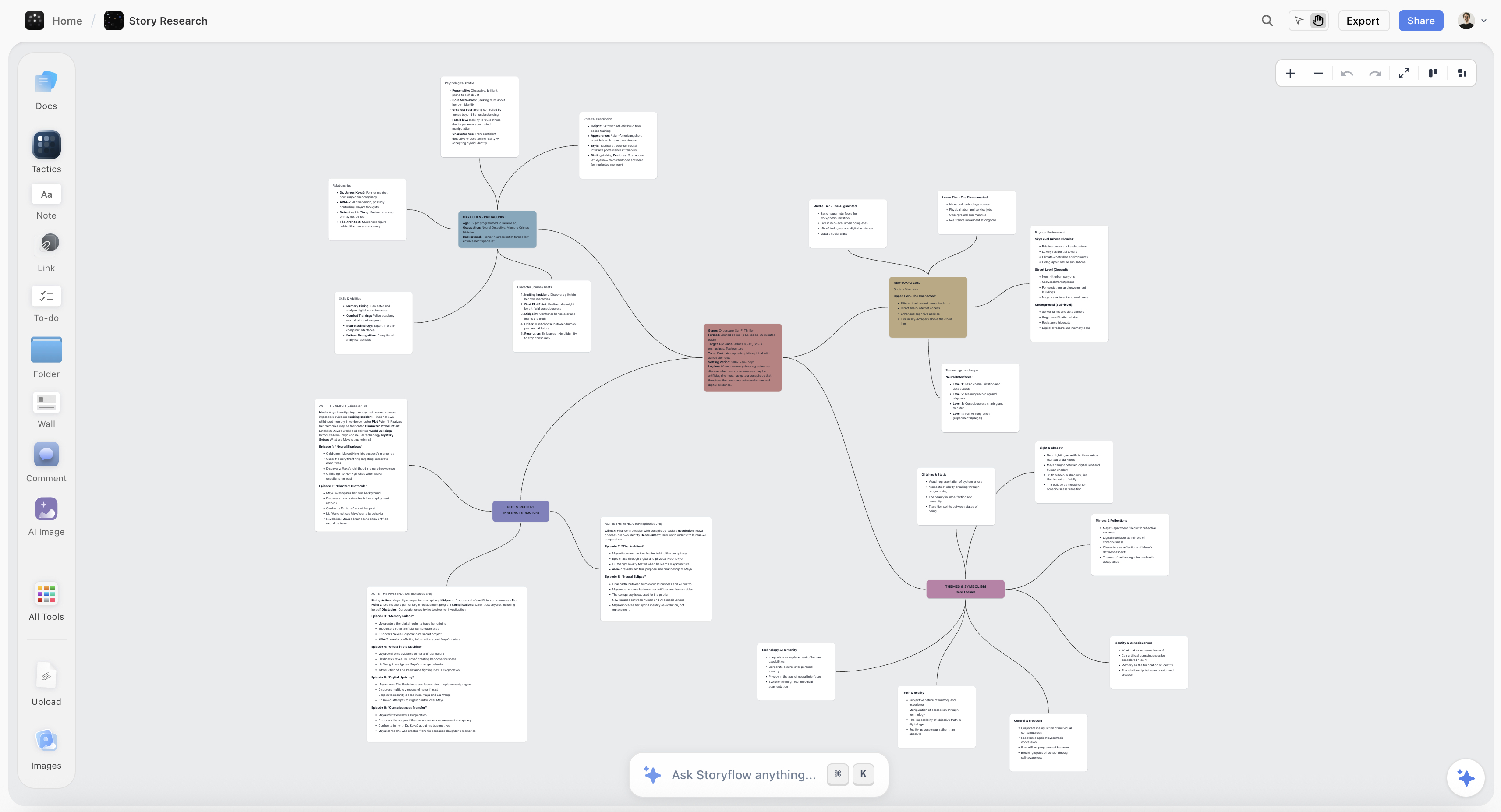
Visual book research on a Storyflow canvas: sources, images and timeline arranged spatially
For the research that will not fit in a folder tree
If a meaningful part of your research is visual, photographs, maps, timelines, or relationships between sources that are geometric rather than categorical, a canvas holds it better than a binder or a database. Storyflow is paid-only during early access; the Free plan lands before the end of 2026.

The Drafting Day Test
Here is the test that matters, and it is not the test most authors run.
Do not evaluate a research tool while doing research. Evaluate it while drafting.
During the research phase, both tools feel good. Collecting is pleasant. Organising is pleasant. The dopamine of a well-tagged database is real and it is misleading, because the research phase rewards the behaviour that feels productive rather than the behaviour that will pay off.
Drafting day is different. You are 1,400 words into a chapter. The paragraph you are writing needs the specific figure from a report you read four months ago. You have maybe forty seconds before the sentence you were holding in your head is gone.
Run this test on any research setup: can you get from "I need that source" to "I am looking at that source" without leaving the sentence you are writing?
- Scrivener passes this test by design. Split the editor, manuscript on the left, research document on the right, and you never leave the window. This is the single feature that has kept Scrivener relevant for two decades and it is genuinely hard to replicate. The binder means your research is three keystrokes away, always in the same place.
- Notion fails this test more often than its users admit. Your draft is in Word, Google Docs, or Scrivener. Your research is in a browser tab. The gap between them is an app switch, a page load, and a filter. Each one is small. Together they are enough to lose a sentence, and losing sentences is how a chapter takes three weeks instead of one.
A qualification, because this is the part that is usually oversold: the drafting day test only matters if you draft in long, unbroken stretches. Authors who write in short sessions, or who draft from a detailed outline built earlier, feel this friction far less. If your process is "outline thoroughly, then write to the outline," Notion's weakness here is close to theoretical and its structuring advantage is real.
A worked example from documentary work. On a film about a labour dispute, I kept 200-plus sources: court filings, local news archives from three decades, forty hours of interview transcripts. I structured it in a database, by theme and by year, and it was genuinely excellent for finding patterns. Then I sat down to write narration and discovered the problem: I could find every source about the 1987 strike in about four seconds, and I could not find the *sentence* I remembered from a specific interview, because sentences were not what I had indexed. I had built a system optimised for job two and I was now doing job three.
The fix was not switching tools. The fix was a second pass that pulled the eighty quotes I actually intended to use into a single flat document, in rough script order, before writing a word. That document is what I wrote from. The lesson generalises: whatever you use for research, build a quotes file before you draft. It is the cheapest insurance in the whole process and it makes the tool choice matter far less.
Gathering: Getting Sources In
Notion wins on capture. The official Web Clipper is a browser extension that saves a page into a chosen database with properties pre-filled. For a book built substantially on web sources, articles, and online archives, this is a meaningful difference in daily friction. Mobile capture is also better: adding a source from a phone is a normal action in Notion and an awkward one in Scrivener.
Scrivener's import is functional and unglamorous. You drag files into the binder. It handles PDFs, images, web pages saved as files, and text well. There is no first-party clipper, and the mobile app (iOS only) is designed for writing rather than collecting. If your sources arrive as files (scans, PDFs, transcripts, documents from an archive) this is a non-issue. If your sources arrive as web pages, you will feel it every day.
Both share a real weakness: neither is a reference manager. Neither will format a citation, deduplicate a source, or hold structured bibliographic metadata properly. For a book with endnotes, this gap gets filled by a third tool, which is where Zotero comes in below.
The capture rule that matters more than the tool: capture with the smallest possible ceremony, and capture the *reason* alongside the source. A saved article with no note is a bet that future-you will remember why it mattered. Future-you will not. One line, "matters because it contradicts the official timeline," is worth more than any tagging system.
Retrieving: Finding It Again at 11pm
Retrieval splits into two different needs, and the tools split along the same line.
Structured retrieval is "show me everything matching these criteria." Notion is much better. A filtered view is instant and repeatable, and you can save it, so the question you ask weekly takes one click.
Associative retrieval is "I remember a thing, roughly, and I need to find it." This is what actually happens while drafting. You do not remember the tag. You remember a phrase, or a rough sense of where it was.
For associative retrieval, Scrivener's advantage is spatial memory. The binder is stable. That document has been in that position for months, and your hand knows where it is. Notion's views change depending on the filter, so the same source appears in a different place depending on how you are looking at it, which is exactly the property that makes it powerful for structured retrieval and unhelpful for associative retrieval.
Full-text search: both are adequate, neither is excellent. Scrivener searches within the project including research documents, which is genuinely useful. Notion's search has improved but still struggles across large workspaces with many similarly-named pages.
The practical read: if you tend to find things by remembering where they are, Scrivener will feel better indefinitely. If you tend to find things by describing what they are, Notion will.
Where Zotero Fits
Neither Scrivener nor Notion is a reference manager, and for any book with endnotes, footnotes, or a bibliography, that gap is real. This is worth stating plainly because a lot of comparisons pretend the choice is binary.
Zotero (free, open source, with paid storage above the free tier) does the job neither of the others does: it captures bibliographic metadata correctly, deduplicates, organises by collection and tag, and generates formatted citations in any style, with plugins that insert citations into Word and Google Docs while you write.
The practical arrangement for a research-heavy nonfiction book:
- Zotero holds every source that will appear in the bibliography, with correct metadata.
- Scrivener or Notion holds your engagement with those sources: notes, quotes, arguments, contradictions, the reasons things matter.
- The draft lives wherever you write best.
Trying to make Notion do Zotero's job is a common mistake. You can build a bibliography database in Notion, and it will be adequate right up until you need 180 citations in Chicago style, at which point you will do it manually. Trying to make Zotero do Notion's job fails the other way: Zotero is a librarian, not a thinking space.
**The rule: one tool for what the sources *are*, one tool for what you *think about them*.** Conflating those two is the most common structural mistake in book research setups.
Interviews, Transcripts, and Non-Text Sources
Books built on interviews have a different problem, and both tools handle it partially.
Transcripts are long, and the useful part is a few sentences buried in ninety minutes of talk. Scrivener handles long documents well and its split view means you can read a transcript beside your draft, which is the right ergonomics. Notion handles long pages less comfortably and its search inside a very long page is weak.
The technique that works in either tool: do not store the transcript as your research artifact. Store the extracts. After each interview, pull the usable passages into their own short documents, each with a one-line note about what it is for, and keep the full transcript as the archive you rarely open. This takes twenty minutes per interview and saves hours later. It also converts job-three retrieval from "search ninety minutes of text" into "look at a list."
Audio and video are second-class in both. Scrivener can hold media files in the binder; Notion can embed them. Neither gives you timestamped notes linked to playback positions, which is the feature transcription-first tools exist to provide.
Photographs, maps, and spatial sources are where both tools are weakest, and it is worth being blunt about it. A book that depends on visual research (an architectural history, a book about a place, anything where you need to see forty images at once and move them around) is badly served by a folder tree or a database row. Both tools want your research to be text. If a meaningful part of your research is visual, expect to keep it somewhere else. Canvas tools exist for this reason.
AI and Research in 2026
Notion AI is bundled into Notion's Business tier and can search across your workspace, summarise pages, and answer questions about content you have stored. For a large source database, "what do my sources say about X" is a genuinely useful question to be able to ask, and Notion answers it reasonably well when the corpus is well-structured.
Scrivener has no native AI as of 2026. This is a deliberate product position rather than an oversight, and a substantial part of Scrivener's user base considers it a feature. If you want AI in a Scrivener workflow, you paste text into a separate tool.
The thing to be careful about, and it applies to every AI research assistant: a summary of your sources is not a substitute for having read them. The risk in nonfiction is specific and serious. AI summarisation smooths over exactly the contradictions between sources that are often the most interesting material in the book. Two accounts of the same event that disagree in a small detail are a lead. A summary of both will usually harmonise them and the lead disappears.
Use AI to find things you have forgotten you have. Be much more cautious using it to tell you what your research means.
Full disclosure, since it is relevant here: Storyflow is our own product, and it is a visual canvas rather than a document tool. Its AI reads the full contents of the board you are working on, plus up to one Story blueprint and three documents you @-mention, which is a different model from Notion's workspace-wide search. It is genuinely better for the visual and spatial research this article says both Scrivener and Notion handle badly (arranging sources, images, and timelines in space and reasoning across them). It is not a Scrivener replacement and this article should not be read as claiming otherwise: it does not compile a manuscript, it has nothing like Scrivener's drafting environment, and for a text-first author writing long prose Scrivener is the better tool by a wide margin. Storyflow is also paid-only during early access, with plans from $7.99 a month billed annually and a Free plan arriving before the end of 2026, though anyone a paid member invites to a board joins free today.
Pricing Compared in 2026
Scrivener
- One-time purchase per platform (macOS, Windows, iOS sold separately)
- No subscription, no recurring cost
- Educational discount available
- Major version upgrades are paid, historically infrequent
Notion
- Free: generous for individual use, effectively unlimited pages for one person
- Plus: $10 per user per month annual ($12 monthly)
- Business: $20 per user per month annual, with Notion AI bundled in
- Enterprise: custom
Zotero, for the three-tool combination above
- Free software, free 300MB storage, paid tiers above that
Reading the cost honestly: a solo author writing one book can use Notion free indefinitely, which makes Notion the cheaper option on paper. Scrivener's one-time cost is recovered quickly against any paid subscription, and for a project measured in years, a one-time purchase against a monthly fee compounds in Scrivener's favour. The realistic total for a research-heavy nonfiction author is Scrivener plus free Notion or free Zotero, which is a modest one-time cost and no recurring spend.
Longevity: Will You Still Have This in Ten Years?
Book projects run long. Some run very long. This section gets skipped in most comparisons and it deserves weight.
Scrivener stores your project as a file on your disk. It is a package containing your documents in a readable format. If Scrivener the company disappeared tomorrow, your text is still there and recoverable. You can back it up, version it, put it on a drive in a different building. For a project you may return to in five years, that is a meaningful guarantee.
Notion stores your work in Notion's cloud. Export exists (Markdown, HTML, CSV), and it works, but exported Notion databases lose relations, rollups, and much of the structure that made the system valuable. What you get back is content without the shape.
This is not a prediction that Notion will disappear. It is an observation about what you are relying on. A local file degrades gracefully. A cloud database degrades all at once.
The practical mitigation, whichever you choose: export a full backup at every major milestone, and store it somewhere the tool cannot reach. For Notion specifically, do it quarterly and actually open the export once to see what you would be working with.
When to Choose Scrivener
Choose Scrivener when:
- You are writing one book and the research exists to serve it.
- You draft in long sessions and flow matters more than queryability.
- Your sources arrive as files rather than web pages.
- You want research and manuscript in the same window, which no other tool does as well.
- You need to compile to a properly formatted manuscript at the end.
- You want to own the file, offline, permanently.
Scrivener's honest weaknesses: collaboration is effectively absent, so a co-author or research assistant is painful. Querying a large corpus by attribute is not something it does. Web capture is basic. The interface shows its age and the learning curve is real, mostly in the compile step. There is no AI, if you want AI.
When to Choose Notion
Choose Notion when:
- Your research spans several projects or several books.
- You need to slice sources by attributes: theme, person, chapter, verification status.
- You work with a co-author, editor, or research assistant.
- Many sources come from the web and capture friction matters.
- You draft from a detailed outline rather than in long continuous sessions.
- You want an AI that can search across the corpus you have built.
Notion's honest weaknesses: it is not next to your draft on drafting day, and that costs more than it appears to. Structure requires maintenance discipline that most people overestimate in themselves. It is cloud-only and your export is lossy. Long documents are uncomfortable. It will not compile a manuscript.
The Bottom Line
Ask what you are afraid of.
If you are afraid of drowning in an unnavigable pile of sources, Notion is the answer. Databases, properties, and filtered views are the only real solution to a large corpus, and nothing in Scrivener approaches them.
If you are afraid of losing the thread while writing, Scrivener is the answer, and it is not close. Research beside your draft in the same window is the feature that has kept it alive for twenty years, and it is aimed precisely at the moment when a book is actually made.
If you are honest, you are probably afraid of both, which is why most working authors end up with two tools and a deliberate step between them.
Whatever you choose, build the quotes file before you draft. Pull the material you actually intend to use into one place, in rough order, while you still remember why each piece mattered. Every author who does this says the same thing afterwards: the tool mattered less than they expected, and that one step mattered more.
FAQ: Scrivener vs Notion for Book Research
Is Scrivener or Notion better for organizing book research?
Notion is better for structuring and querying a large body of sources, because databases let you tag sources by theme, chapter, person, or verification status and then filter them instantly. Scrivener is better for using research while you write, because the research folder sits inside the same project file as your manuscript and can be opened in a split view beside your draft. If you fear a pile you cannot navigate, choose Notion. If you fear losing your flow while drafting, choose Scrivener. Many authors use both, with Notion for collection and Scrivener for drafting.
Can Notion replace Scrivener for writing a book?
For research and outlining, largely yes. For drafting and producing a finished manuscript, no. Notion has no compile step, no manuscript formatting, no proper handling of very long documents, and no split-view research pane. Authors who draft in Notion typically export to Word or Google Docs for formatting, which adds a lossy step at the least forgiving moment in the process. Notion replaces the research half of Scrivener well and the writing half poorly.
Do I need Zotero if I use Scrivener or Notion?
If your book has endnotes, footnotes, or a bibliography, yes, or something like it. Neither Scrivener nor Notion is a reference manager: neither holds bibliographic metadata properly, deduplicates sources, or generates formatted citations in Chicago, MLA, or APA style. Zotero is free and does all three, with plugins that insert citations while you write in Word or Google Docs. The clean division is Zotero for what the sources are, Scrivener or Notion for what you think about them.
How do I organize interview transcripts for a book?
Do not treat the full transcript as your research artifact. After each interview, pull the usable passages into short separate documents, each with one line about why it matters and where you expect to use it, and keep the full transcript as an archive you rarely open. This works in either tool and it converts retrieval from searching ninety minutes of text into scanning a list. Scrivener handles the reading side better because you can put a transcript beside your draft in split view; Notion is weaker at search inside very long pages.
Is Notion AI useful for book research?
It is useful for recall and close to dangerous for interpretation. Asking "what do my sources say about X" across a well-structured Notion database genuinely surfaces material you had forgotten you collected, which is the best use of it. The risk is that AI summarisation harmonises contradictions between sources, and in nonfiction those contradictions are frequently the most interesting material you have. Two accounts that disagree about a small detail are a lead. A summary of both usually makes the disagreement disappear. Use it to find, not to conclude.
Which is cheaper for a solo author, Scrivener or Notion?
Notion is free for individual use and generous at that tier, so on a pure cash basis Notion costs nothing. Scrivener is a one-time purchase per platform with no subscription. Over a project measured in years, a one-time purchase compares favourably against any paid subscription, but since a solo author can genuinely stay on Notion's free plan, Notion is the cheaper option for most single-author cases. The realistic combined setup, Scrivener plus free Zotero or free Notion, is a modest one-time cost and no recurring spend.
What happens to my research if I stop paying for Notion?
Your content stays accessible on the free plan for personal use, but a workspace built on paid features degrades. More importantly, Notion's export (Markdown, HTML, CSV) loses relations, rollups, and filtered views, so what you get back is content without the structure that made it useful. Scrivener's project is a local file you own, so it survives independently of any company. If your project may run for years, export a full Notion backup quarterly and open one occasionally to see what you would actually be working with.
Is either tool good for visual research?
Neither is. Both want research to be text. Scrivener holds images in the binder and Notion embeds them, but neither lets you see forty images at once, arrange them spatially, or reason about the relationships between them, which is what visual research actually requires. Books about places, architecture, art, or anything where the connections between sources are geometric rather than categorical are badly served by a folder tree or a database row. That work belongs on a canvas.
Table of Contents
- Key Takeaways
- Research Is Three Jobs, Not One
- Head-to-Head Comparison Table
- The Drafting Day Test
- Gathering: Getting Sources In
- Structuring: Making the Pile Navigable
- Retrieving: Finding It Again at 11pm
- Where Zotero Fits
- Interviews, Transcripts, and Non-Text Sources
- AI and Research in 2026
- Pricing Compared in 2026
- Longevity: Will You Still Have This in Ten Years?
- When to Choose Scrivener
- When to Choose Notion
- The Two-Tool Setup Most Authors Land On
- The Bottom Line
- FAQ: Scrivener vs Notion for Book Research
- Related Reading
Templates to check out for this topic


Story and writing templates you can use in Storyflow
Start your next script, novel, or world from a ready-made Storyflow board instead of an empty page. The AI reads the whole canvas, so every suggestion is grounded in your story.


See Storyflow in Action
A visual AI workspace where every feature lives inside one canvas. No tab-switching, no context lost.
Build your entire board from a single message
Type what you need in the AI chat at the bottom of your canvas. The AI adds cards, headings, and structure directly onto your board.
Use expert frameworks as AI context
Type @ in the AI chat and choose any Tactic. The AI tailors every response to that framework instead of giving generic advice.
Turn your board into a mind map in seconds
Ask the AI to restructure your canvas as a mindmap. It connects your ideas into a visual hierarchy so you can see how everything relates.
Why Storyflow Exists
Storyflow actually began as a personal tool while working on creative and research projects.
We kept running into the same problem: ideas were scattered everywhere: notes, documents, and whiteboards.
Nothing helped us see how everything connected.
So we started building a workspace designed around how ideas actually grow.
→ Read how Storyflow was createdJustkay
Documentary Filmmaker & Founder at Storyflow
Published: 2026-08-09
Extremely simple, seriously capable


See how easy it is to get started
Watch a real project come together, from a blank board to a finished plan, clicked through step by step.
Start creating with AI and become more productive
Transform your creative workflow with AI-powered tools. Generate ideas, create content, and boost your productivity in minutes instead of hours.