
How to Write a Screenplay With AI in 2026 (Step-by-Step)
How to write a screenplay with AI in 2026, step by step. The eight-step workflow that uses AI for structure and keeps the writing human, on a canvas the AI reads plus a screenwriter for the pages.

Category
Filmmaking
Author

Justkay
Documentary Filmmaker & Founder at Storyflow
Topics
2026-07-10
•
13 min read
•
FilmmakingTable of Contents
- Key Takeaways
- The AI Screenwriting Workflow at a Glance
- Why Writing a Screenplay With AI Is Different in 2026
- Step 1: Develop the Concept and Logline
- Step 2: Choose a Structure Blueprint
- Step 3: Build the Beat Sheet
- Step 4: Develop Characters and Their Arcs
- Step 5: Write the Scene Outline
- Step 6: Draft the Scenes (and Where AI Should Stop)
- Step 7: Format the Pages in a Screenwriter
- Step 8: Revise With AI Structural Feedback
- A Worked Example: One Logline Through the Method
- Where AI Should Not Write Your Screenplay
- Where Storyflow Is the Wrong Tool
- The Bottom Line
- Author
- FAQ: Writing a Screenplay With AI
- Related Reading
Templates to check out for this topic


How do you write a screenplay with AI in 2026?
To write a screenplay with AI in 2026, you use AI for the structure and development and keep the writing and judgment for yourself. This guide calls that division the Scaffold-and-Judgment Method, and it runs in eight steps: develop the concept, choose a structure, build a beat sheet, develop characters, outline scenes, draft with AI as a partner, format the pages in a screenwriter, and revise with AI structural feedback. The key is AI that reads your whole story, not a chatbot you paste fragments into. On a canvas like Storyflow, the AI reads your beats, characters, and research together, which is where AI genuinely helps a screenplay and where chat-based AI consistently fails. The method comes down to one rule. AI builds the scaffold. You make the judgment. The scaffold is the structure: the beats, the arcs, the pacing map, the revision notes. The judgment is everything that makes a script worth reading: the idea, the voice, the specific choice in each scene. This is not "type a prompt, get a screenplay." A generated screenplay is generic and unproducible. This guide is how working writers actually use AI in 2026: to pressure-test structure, expand beats, and catch weak spots, while the story decisions and the voice stay human.
Key Takeaways
- Split the work with one rule: AI builds the scaffold, you make the judgment. The scaffold is the beats, arcs, and pacing map, while the judgment is the idea, the voice, and the specific choice in each scene.
- Run the Scaffold-and-Judgment Method across eight steps. Concept, structure, beat sheet, characters, scene outline, draft, format, and revise, with AI adding the most in the structural steps.
- Use AI that reads your whole project, not a chatbot you paste fragments into. A screenplay's problems are structural (a weak midpoint, a flat arc, a functionless scene), so the AI has to see the whole story to help.
- Treat the beat sheet as the most important document in the process. If the beats work, the script works, so AI earns its keep by flagging missing beats and stalled escalation across the whole sheet.
- Develop characters against the structure with a want, need, flaw, and arc. Reading the beats and character cards together catches arcs that feel unearned, which is a common structural failure.
- Keep AI off the idea, the voice, the final lines, the story decisions, and the theme. A scene AI drafts wholesale reads as generic, because voice comes from a specificity a model does not have.
- Format the pages in a dedicated screenwriter, where AI plays no role. Sluglines, dialogue, and revision colors are a solved mechanical job for Final Draft, Fade In, or a free tool like Trelby.
- Revise by bringing the draft back to the canvas for structural feedback. An AI reading the full script gives coverage-style notes on a sagging structure while it is still cheap to fix.
The AI Screenwriting Workflow at a Glance
| Step | What you do | Where | AI's role |
|---|---|---|---|
1. Concept | Find the idea and logline | Canvas | Pressure-test the premise |
2. Structure | Pick a blueprint (Hero's Journey, Save the Cat) | Canvas | Explain and apply the framework |
3. Beat sheet | Break structure into beats | Canvas | Suggest and flag missing beats |
4. Characters | Build characters and arcs | Canvas | Test arcs against the plot |
5. Scene outline | Order the scenes | Canvas | Find gaps and pacing issues |
6. Draft scenes | Write the scenes | Canvas + you | Expand beats, offer options |
7. Format pages | Turn scenes into a screenplay | Screenwriter | None (formatting is mechanical) |
8. Revise | Fix structure and character | Canvas | Structural feedback on the whole |
The canvas half (steps 1 to 6 and 8) is where AI adds the most, because structure problems are about the whole story. Storyflow is built for this: the AI reads the entire board. The formatting (step 7) is a solved, mechanical job for a dedicated screenwriter. Read the "Where" column top to bottom and the Scaffold-and-Judgment Method becomes obvious: the AI works on the canvas where the structure lives, and the pages get formatted somewhere else. The AI never touches the lines. It builds the scaffold; you make the judgment.
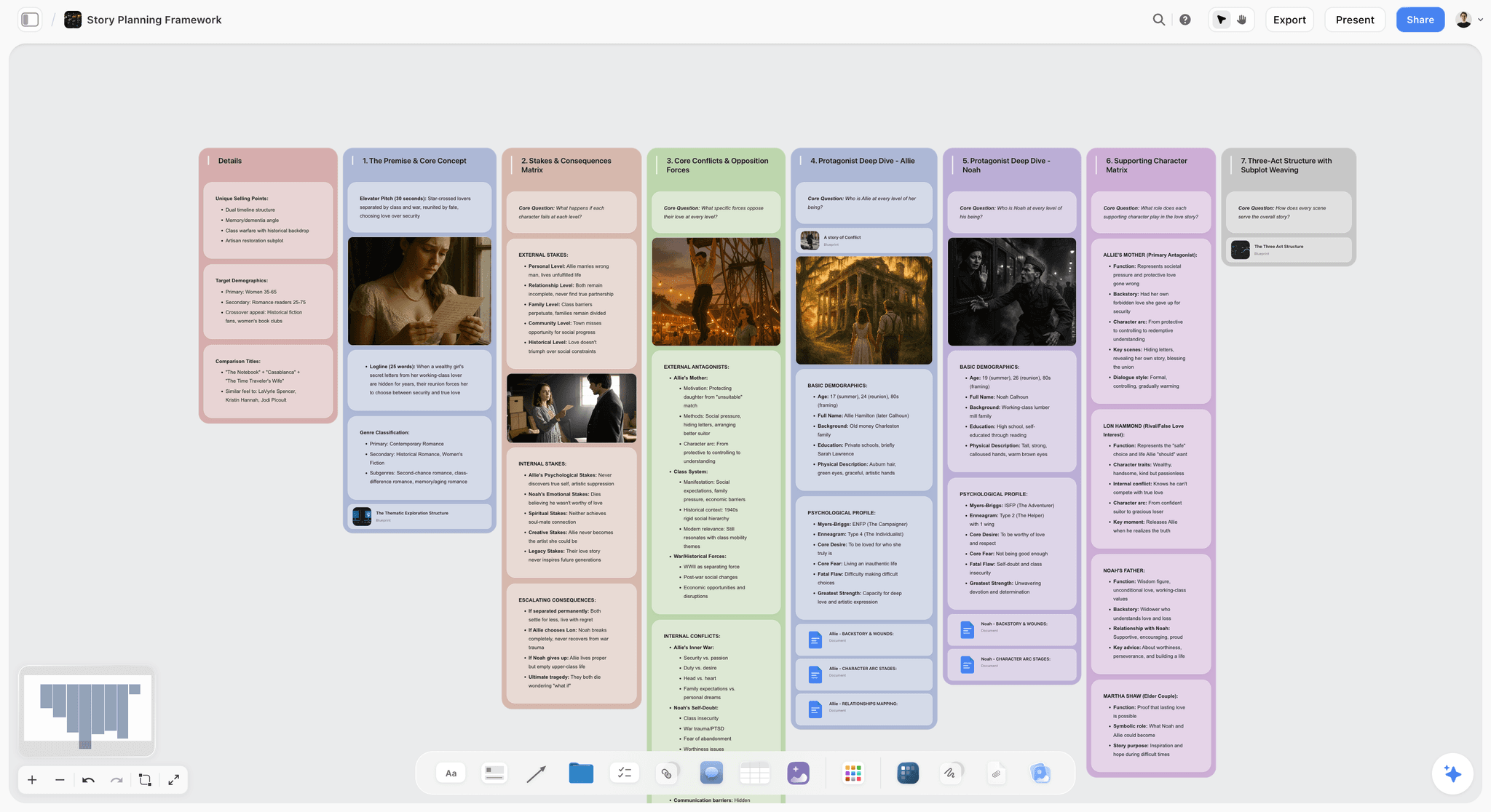
Storyflow canvas where the AI reads a screenplay's beats, characters, and structure together to pressure-test it
Take your screenplay through the structural steps
Storyflow's AI reads your whole story, your beats, characters, and structure, so it helps where AI genuinely matters and where chatbots fail. Build the structure first, then format the pages. Free to start.

Why Writing a Screenplay With AI Is Different in 2026
Most people try to write a screenplay with AI by opening a chatbot and asking it to write scenes. It works for a paragraph and falls apart by the third reply, because the AI cannot hold the whole story. Two things changed by 2026.
AI that reads the whole project beats AI you paste into. A screenplay's problems are structural: a weak midpoint, a flat character arc, a scene with no function. Those are about the whole story, so an AI that only sees the paragraph you pasted cannot help with them. AI that reads your entire beat sheet, character arcs, and research can. This is the difference between a chat sidebar and a canvas AI.
AI is a development partner, not a ghostwriter. The useful pattern is not "AI writes the screenplay." It is "AI pressure-tests the structure, expands beats on request, and flags weak spots, while you make every story decision and write the voice." A screenplay AI-drafts wholesale reads as generic because voice comes from specificity a model does not have about your life and your take.
It is not that AI cannot help write a screenplay. It is that AI helps with the structure, not the soul, and the tools that win are the ones that let AI read the whole structure. That is why this workflow runs on a canvas the AI reads, with a screenwriter for the pages. For the tool comparison, see the best AI tools for screenwriters in 2026.
Step 1: Develop the Concept and Logline
Start with the idea, and use AI to pressure-test it rather than generate it. Put your premise on the canvas as a logline: a one-sentence statement of protagonist, goal, and obstacle. Then ask the AI to stress it: Is the stakes clear? Is the obstacle active? What is the central dramatic question?
Do not ask AI for the idea. The idea is yours; a generated premise is generic. Ask AI to find the weakness in yours. A good prompt: "Here is my logline. What is the central dramatic question, and where is the premise weak or passive?" The AI, reading your logline in the context of the canvas, gives you a sharper read than a blank chat would.
By the end of step 1 you have a logline you believe in and a clear central question. On a canvas, this becomes the anchor the rest of the story hangs from.
Step 2: Choose a Structure Blueprint
A screenplay needs a proven shape. Pick a structure that fits your story: the Three-Act, the Hero's Journey, Save the Cat's fifteen beats, or Five-Act. Do not invent structure from scratch; fill a proven one with your specifics.
This is where a blueprint matters. On Storyflow, you select a blueprint like Hero's Journey or a Save the Cat-style beat structure, and it scaffolds the canvas with the framework's beats. The AI can explain what each beat needs and how your premise maps onto it. Ask: "Using this structure, where does my inciting incident fall, and what has to happen at the midpoint?"
By the end of step 2 you have a structural skeleton: the major beats your story needs, in order, ready to fill. See the best story structure software in 2026 for the frameworks in depth.
Step 3: Build the Beat Sheet
Now break the structure into a full beat sheet: every major dramatic beat, each with a function. This is the most important document in the process, because if the beats work, the script works.
Work beat by beat on the canvas. For each beat, write what happens and why it matters to the arc. Use the AI to fill gaps and flag problems: "Read my beat sheet. Which beats are missing, which are weak, and where does the escalation stall?" Because the AI reads the whole beat sheet, it catches structural problems a chat that sees one beat cannot. Move beats around freely until the shape works; a canvas makes this reordering fast.
By the end of step 3 you have a complete, tested beat sheet. See the best beat sheet tools in 2026 for more on this stage.
Step 4: Develop Characters and Their Arcs
Characters drive the beats, so develop them against the structure, not in isolation. For each main character, define the want, the need, the flaw, and the arc: how they change across the beats.
Put character cards on the canvas next to the beat sheet, so the AI reads both together. Then test the arcs against the plot: "Does my protagonist's arc track with the beats? Where does their change feel unearned?" The AI, reading the characters and beats together, catches arcs that do not match the plot, which is a common structural failure. This is only possible when the AI reads the whole board.
By the end of step 4 your characters and beats reinforce each other, and every major beat is driven by a character choice.
Step 5: Write the Scene Outline
Now expand the beat sheet into a scene outline: the specific scenes that dramatize each beat, in order. Each scene gets a purpose, a conflict, and a turn.
On the canvas, break each beat into its scenes and order them. Use the AI to find gaps and pacing issues: "Read my scene outline. Where does the pacing drag, which scenes lack a turn, and where am I telling instead of dramatizing?" Because the AI sees the whole outline, it catches pacing problems across the script, not just within one scene. See the best screenplay outlining tools in 2026 for this stage in depth.
By the end of step 5 you have a scene-by-scene map. The hard structural work is done, and drafting becomes execution rather than invention.
Step 6: Draft the Scenes (and Where AI Should Stop)
Now write the scenes. This is where AI helps least and you matter most, but AI can still assist. Write the scene yourself, in your voice. When you are stuck, use the AI to expand a beat, offer options, or unblock: "I know this scene needs to land the betrayal. Give me three ways it could play out." Then you choose and write.
Where AI should stop: the actual lines, the voice, the specific choices. A scene AI-drafts wholesale reads as generic. Use AI for options and expansion, not for the writing itself. The judgment of which option serves the story, and the voice that makes it yours, are the work. Draft on the canvas so the AI keeps reading the whole story as you write, catching when a scene drifts from the plan.
By the end of step 6 you have drafted scenes, written by you with AI as an occasional partner, that follow the tested structure.
Step 7: Format the Pages in a Screenwriter
Now turn your drafted scenes into a properly formatted screenplay. This is a mechanical, solved job, and AI plays no role. Move your scenes into a dedicated screenwriter that handles sluglines, dialogue, action, and revision colors automatically.
Use Final Draft if you deliver to production offices that expect it, Fade In for the same standard at a lower price, or WriterDuet or Arc Studio if you co-write. The free options Trelby and Beat also produce correct format. You are not writing here; you are formatting the pages you already wrote. See the best screenwriting software in 2026 for the formatter comparison.
By the end of step 7 you have a correctly formatted screenplay, ready to read and revise.
Step 8: Revise With AI Structural Feedback
Revision is where AI adds value again, because revision is structural. Bring the draft back to the canvas and use the AI to read the whole thing for structure and character: "Read the full script. Where does the structure sag, which character arc is underdeveloped, and which scenes could be cut?"
Because the AI reads the entire story, it gives you the kind of note a coverage reader would, while it is still cheap to fix. Prioritize the structural notes, then rewrite the affected scenes yourself. Repeat until the structure holds. This is the fastest way to strengthen a draft before paying for human coverage. See the best script coverage tools in 2026 for the coverage stage.
By the end of step 8 you have a revised screenplay with a structure that holds, ready for human readers.
A Worked Example: One Logline Through the Method
Steps are abstract until you watch one run. Here is a single logline taken through the Scaffold-and-Judgment Method, so you can see exactly where the AI works and where you take over.
Start with the logline: "A burned-out night-shift paramedic has one hour to talk a stranger off a bridge, or lose the last person who reminds her why she started." That sentence is mine. No AI generated it, because the specificity (night shift, the bridge, the private reason she started) is the part a model cannot invent for you.
Step 1, concept. Drop the logline on the canvas and ask the AI to stress it. The AI reads it back: the central dramatic question is "will she save him, and in saving him, save herself?" It flags that the obstacle is currently passive (a stranger who might jump) and pushes for an active one. You decide the fix: the stranger knows something about her dead partner, so talking him down means hearing a truth she has avoided. That decision is yours. The AI only found the soft spot.
Step 2, structure. One hour of real time, one location, two people. You pick a tight Five-Act shape rather than the Hero's Journey, because the story is a pressure cooker, not a quest. On Storyflow you scaffold the canvas with the act structure and the AI explains what each act needs: the escalation has to come from new information, not new events, since nobody can leave the bridge.
Step 3, beat sheet. You write the beats; the AI reads the whole sheet and flags that your midpoint reversal (he steps back from the edge) arrives too early and drains the second half. You move it later. AI builds the scaffold. You make the judgment about whether the reversal earns its place.
Step 4, characters. Two character cards next to the beats. The AI, reading both, catches that the paramedic's arc (from numb to feeling) has no beat where she actually breaks, so the change is asserted rather than earned. You add the beat where she admits she stopped checking on people after her partner died. The AI found the gap; you wrote the confession.
Step 5, scene outline. The one hour breaks into nine scenes, each a new piece of information tightening the screw. The AI reads the outline and notes scene six has no turn, it just restates scene five. You cut it and let the outline breathe.
Step 6, draft. You write the dialogue. When the climax stalls, you ask the AI for three ways she could get through to him. It offers three; two are generic, one sparks something, and you write your own version off it. The lines are yours. The scene is yours. The AI was a sounding board, nothing more.
Step 7, format. The drafted scenes move into a dedicated screenwriter (Final Draft, Fade In, or a free tool) for sluglines, dialogue, and industry-standard output. No AI. This is typesetting.
Step 8, revise. The full script comes back to the canvas. The AI reads the whole thing and notes the ending lands the external win (he is safe) but underplays the internal one (she starts checking on people again). You add a final image: she calls a number she has ignored for a year. The structure holds.
That is the whole method on one story. Notice what the AI never did: it never wrote a line worth keeping, never made a story decision, never generated the idea. It pressure-tested, flagged, and expanded. Every choice was yours. AI builds the scaffold. You make the judgment.
Where AI Should Not Write Your Screenplay
Honest accounting. AI helps with structure; it should not touch these.
- The idea. No AI generates a story worth telling. That is why you are writing it.
- The voice. Distinctive voice comes from your specificity, which AI does not have.
- The final lines. AI-drafted dialogue reads generic. Write your own.
- The story decisions. Which option, which cut, which risk: those are yours.
- The theme. What the screenplay is about lives under the structure, and that is human.
The right use of AI in 2026 is upstream and structural: concept pressure-testing, beat development, character arc testing, pacing, and revision notes. The middle, the actual writing and the voice, stays human. A screenplay is AI-assisted when AI helps the structure and human where it counts.
Where Storyflow Is the Wrong Tool
This workflow puts Storyflow at the center of the structural steps, so it is only honest to name where it is the wrong choice. Storyflow is for the thinking layer: concept, beats, arcs, pacing, and revision on a canvas the AI reads whole. It is not a screenwriting application, and pretending otherwise would waste your time.
- It does not format screenplays. Storyflow has no page-formatting editor, no sluglines, no revision colors, no industry-standard output. That is step 7, and it belongs to Final Draft, Fade In, WriterDuet, Arc Studio, or a free tool like Trelby. If you want one app that both develops and formats, Storyflow is not it. Pair it with a dedicated screenwriter. The AI writes with your canvas context; it is not a typesetter.
- It is cloud-only. There is no local-first or offline mode. If you work on planes, in the field, or under a strict privacy requirement that rules out cloud storage, that is a real constraint. A local screenwriter or an offline outliner fits that case better.
- It is a newer platform. Storyflow has not been around as long as Final Draft or Notion, so the ecosystem (integrations, plugins, community templates for niche formats) is thinner. The blueprint library is broad, but if you need a very specific format convention baked in, verify it exists before you commit.
None of this is a knock on the method. It is the reason the method uses two tools: a canvas for the structure the AI can read, and a screenwriter for the pages it cannot. Use the right one for each job.
The Bottom Line
To write a screenplay with AI in 2026, use AI for the structure and keep the writing for yourself. The Scaffold-and-Judgment Method, eight steps of concept, structure, beats, characters, outline, draft, format, and revise, puts AI where it genuinely helps: the structural steps, where it can read the whole story. The key is an AI that reads your entire project, not a chatbot you paste fragments into, which is why the workflow runs on a canvas plus a screenwriter for the pages.
The move that changes the most is to stop asking AI to write your screenplay and start using it to pressure-test your structure. Build your beats and characters on a canvas the AI reads, fix the structure before you draft, and format the pages in a screenwriter. Start a free Storyflow board and take your screenplay through the structural steps.
FAQ: Writing a Screenplay With AI
Can AI write a screenplay for me?
AI can help you write a screenplay, but it cannot write a good one for you. A fully AI-generated screenplay is generic and unproducible, because voice and story decisions come from specificity a model does not have. The useful pattern is AI as a development partner: it pressure-tests your structure, expands beats on request, tests character arcs, and flags weak spots, while you make every story decision and write the voice. AI handles the structural analysis; you handle the writing.
What is the best AI for writing a screenplay?
The best AI for screenwriting is one that reads your whole story, not a chatbot you paste fragments into, because a screenplay's problems are structural and about the whole story. Storyflow is built for this: its AI reads your entire beat sheet, character arcs, and research on one canvas and grounds feedback in a chosen blueprint. Chat-based AI like ChatGPT or Claude can help with individual scenes but loses the whole story over a long script. Pair a canvas AI for structure with a screenwriter for the pages.
How do you use AI to write a screenplay step by step?
Use AI across eight steps: pressure-test the concept and logline, choose a structure blueprint, build and test the beat sheet, develop character arcs against the plot, outline the scenes and check pacing, draft the scenes yourself with AI for options when stuck, format the pages in a screenwriter (no AI), and revise with AI structural feedback on the whole draft. AI adds the most in the structural steps because it can read the whole story; the actual writing and voice stay yours.
Will using AI make my screenplay generic?
Only if you let AI write it. AI-generated prose and dialogue read as generic because they lack your specific voice and choices. But using AI for structure, beat development, and revision notes does not make the writing generic, because you still write every line and make every story decision. The rule is to use AI for the structural analysis and your own voice for the writing. Used that way, AI strengthens the structure without flattening the voice.
Do I still need screenwriting software if I use AI?
Yes. AI helps with the structure and development, but you still need a dedicated screenwriter to format the pages: sluglines, dialogue, action, and revision colors, in industry-standard output. AI tools like Storyflow handle the development on a canvas but are not page formatters. The efficient setup is a canvas AI for structure and development plus a screenwriter (Final Draft, Fade In, WriterDuet, or a free tool) for the formatted pages. They do different jobs.
Is it cheating to write a screenplay with AI?
No, when AI is used as a development partner rather than a ghostwriter. Using AI to pressure-test structure, develop beats, and get revision notes is like using an outlining method or a script consultant; the story and the writing remain yours. It would be cheating yourself if you let AI write the screenplay, because the result would be generic and you would not have grown as a writer. Used for structure and feedback, AI is a legitimate and powerful tool.
How long does it take to write a screenplay with AI?
AI does not skip the work; it makes the structural work faster and catches problems earlier. Developing a solid beat sheet and outline with AI feedback can take days to weeks instead of the months a blind draft-and-rewrite cycle takes, because you fix structure before drafting rather than after. The drafting and revision still take real time, since you write every line. The time saving comes from getting the structure right early, which prevents the expensive page-one rewrites that come from discovering structural problems late.
Can AI help me fix a screenplay that is not working?
Yes, and this is one of AI's strongest uses. If a draft is not working, the problem is usually structural, and an AI that reads the whole script can diagnose it: a weak midpoint, an unearned character arc, scenes without function. Bring the draft to a canvas like Storyflow, have the AI read the full story, and ask where the structure sags and which arcs are underdeveloped. Then rewrite the affected parts yourself. This is faster and cheaper than discovering the problems through human coverage.
Will AI replace screenwriters?
No, and the reason is built into how screenplays work. Voice, taste, and story judgment come from a specific human life and a specific take, which is exactly what a model does not have. AI-generated screenplays read as generic because they average every script in the training data instead of committing to one. What AI does replace is some of the slow structural labor: catching a weak midpoint, testing an arc, mapping pacing. That shifts what a screenwriter spends time on; it does not remove the screenwriter. The scaffold gets faster. The judgment stays human.
Can ChatGPT write a screenplay?
ChatGPT can draft scenes and dialogue, but it cannot write a full screenplay that holds together, because it loses the whole story over a long script. It works for a page, then drifts, because a chatbot only sees the fragment you paste, not the beat sheet, character arcs, and research together. For structural work, a canvas AI that reads the entire board beats a chat sidebar. Use ChatGPT for a quick brainstorm on a single scene if you like, but do the structure on a tool that reads the whole story and write the voice yourself.
Can AI format a screenplay for me?
Formatting is not really an AI job, it is a solved mechanical one. Dedicated screenwriters like Final Draft, Fade In, WriterDuet, and free tools like Trelby handle sluglines, dialogue, action, and revision colors automatically as you type, in industry-standard output. You do not need AI to format; you need a screenwriter. Storyflow, for example, develops the structure on a canvas but is not a page formatter, so the efficient setup is a canvas AI for the thinking layer plus a screenwriter for the pages. They do different jobs and you use both.
Templates you can use in Storyflow
Every Storyflow board starts from real structure and an AI that reads the whole canvas. Open one of these templates and make it yours.


See Storyflow in Action
A visual AI workspace where every feature lives inside one canvas. No tab-switching, no context lost.
Build your entire board from a single message
Type what you need in the AI chat at the bottom of your canvas. The AI adds cards, headings, and structure directly onto your board.
Use expert frameworks as AI context
Type @ in the AI chat and choose any Tactic. The AI tailors every response to that framework instead of giving generic advice.
Turn your board into a mind map in seconds
Ask the AI to restructure your canvas as a mindmap. It connects your ideas into a visual hierarchy so you can see how everything relates.
Why Storyflow Exists
Storyflow actually began as a personal tool while working on creative and research projects.
We kept running into the same problem: ideas were scattered everywhere: notes, documents, and whiteboards.
Nothing helped us see how everything connected.
So we started building a workspace designed around how ideas actually grow.
→ Read how Storyflow was createdJustkay
Documentary Filmmaker & Founder at Storyflow
Published: 2026-07-10
Start creating with AI and become more productive
Transform your creative workflow with AI-powered tools. Generate ideas, create content, and boost your productivity in minutes instead of hours.
Ask Storyflow to