
How to Write a Treatment with AI in 2026 (Complete Step-by-Step Guide)
Most how-to-write-a-treatment guides are either generic story theory or AI-naive. This is the working filmmaker's process: capture concept on a canvas, structure with proven frameworks, then use AI that reads your full project to draft a treatment grounded in your actual material.

Category
Visual Thinking
Author

Justkay
Documentary Filmmaker & Founder at Storyflow
Topics
2026-05-10
•
18 min read
•
Visual Thinking- how to write a treatment with AI
- AI treatment writing 2026
- film treatment framework
How do you write a treatment with AI in 2026?
Build the project on a visual canvas in a tool like Storyflow, then let AI that reads the whole canvas draft each section from your real material: concept, logline, beat sheet, characters, visual references, section drafts, then polish. You end up with an 8 to 12 page treatment; a first finished draft takes about 4 hours.
It is 8pm on a Tuesday, the financier meeting is Thursday morning, and the treatment doc on screen is still blank except for a working title and a placeholder logline. Most filmmakers and creators have been here, and most of the AI advice for getting out of this hole is either generic story theory or "ask ChatGPT to expand this paragraph." This guide is for documentary filmmakers, narrative feature writers, indie producers, branded-content creators, and video creators who need a real framework: a 7-part treatment structure, the canvas-first workflow that makes AI useful, and a step-by-step process you can actually run before the meeting.
Turn your idea into a treatment, then keep building
Storyflow drafts a treatment from a logline and keeps it on a canvas beside your beats and references, so the AI can help you develop it into a full plan.

Key Takeaways
- A treatment is a structure problem first, then a writing problem, in that order. The structural work carries the prose, and AI can scaffold around structure but cannot supply the structural conviction.
- Ground AI in your material so it writes about your project, not every project at once. A canvas-aware AI reading your logline, characters, and references beats a chatbot back-filling a single sentence from training data.
- Build the treatment from the same seven parts every financier expects. Logline and premise, synopsis, beat sheet as prose, characters, visual approach, "why this film, why now, why me," and practical context.
- Start on a canvas, not a page, so structure emerges from spatial relationships. A blank document forces linear thinking before the project is sequenced enough to deserve it.
- Lock the logline before writing anything else, using concrete nouns and verbs. "Unforgettable journey" is a placeholder, while "she walks into the courthouse with the only photograph that survived the fire" is a logline.
- Draft each section separately, not the whole treatment from one prompt. Each of the seven parts has a different job, voice, and length, so AI handles them well in isolation and badly together.
- Write the "why this film, why now, why me" section yourself. AI cannot fake conviction, and this is the page a financier reads twice, so it has to sound like a person with a real reason.
- Expect an 8 to 12 page draft in about 4 hours, then cut hard. Strip the adjectives AI loves (compelling, intimate, urgent, unforgettable), remove paragraphs that do not advance plot, character, or visual, and test it on a real reader.
Quick Answer: How to Write a Treatment with AI in 2026
To write a treatment with AI in 2026, build the project on a visual canvas in a tool like Storyflow, then let AI that reads the whole canvas draft each section from your real material. The full method has seven parts: capture concept on a canvas, lock the logline, build the beat sheet, develop characters with arc templates, add visual references, draft each section with AI that reads the full canvas, then polish and test the pitch. You end up with an 8 to 12 page treatment, and a first finished draft takes about 4 hours. The reason this works is that AI grounded in your specific material writes a treatment about your project, while AI handed a single prompt writes a treatment about every project at once.
What a Treatment Actually Is (and Why Most Are Bad)
A treatment is a 5 to 15 page document that sells a film before the film exists. It explains the story, the world, the characters, the visual approach, and the reason this film should be made now, written in present tense and read like prose, not a script. Documentary treatments lean harder on access, characters, and the questions the film will pursue. Narrative treatments lean harder on plot beats, arcs, and tone. Branded-content treatments lean harder on the brand truth, the audience reaction, and the campaign idea. The form changes, the job does not: the treatment has to make a reader feel the film.
Most treatments fail for three predictable reasons. The first is that the writer started in a Word doc, which forces linear thinking before the story is shaped enough to be linear. The second is that the writer used AI as a paragraph polisher and ended up with prose that reads competent and feels generic. The third is that the writer treated the treatment as a writing problem when it is really a structure problem, then a writing problem, in that order.
A good treatment has a logline a stranger could repeat at lunch, a beat sheet that a producer can mentally map, characters whose internal and external goals are visible, a visual point of view, and a closing argument for why the film should exist. The structural work is what carries the prose. AI cannot supply structural conviction, but it can scaffold and accelerate the work around the structure you bring.
The 7-Part Treatment Structure
Every treatment that survives a financier meeting has the same seven parts, in some order, even if the labels change.
- Logline and premise. One sentence that states protagonist, want, obstacle, and stakes. The whole treatment is downstream of this line.
- Synopsis. A 1 to 2 paragraph distilled story, end included. Producers want to know the ending. Hide it and you signal you are still figuring it out.
- Beat sheet or act structure. The scene-by-scene or beat-by-beat shape, written as prose. Save the Cat for narrative, the journey-and-question shape for documentary.
- Characters. 3 to 6 character bios with internal goal, external goal, and visible arc. Documentary subjects get real-world bios with the hook of why we follow them now.
- Visual approach. Tone, palette, references, framing language. Often appears as a small mood board section embedded in the treatment.
- Why this film, why now, why me. The director's case. This is where producers buy the project, not the plot.
- Practical context. Length, format, comparable films, target audience, financing model, and a short paragraph about access or attachments if relevant.
The 7-step writing process below maps directly onto producing those seven parts. Skip a step in the process and you will see the gap in the document.
Step 1: Capture the Concept on a Canvas, Not a Page
Most blank-page panic is a workflow problem, not a writing problem. A blank document forces the writer to commit to a sequence (paragraph one, then paragraph two) before the project is sequenced enough to deserve it. A canvas does not. On a canvas you can drop the logline in the middle, sketch three possible openings around it, paste a reference still off to the side, and write the closing argument before the middle exists. Structure emerges from spatial relationships first, then turns into prose.
The canvas also fixes the AI context problem. When you ask a chatbot to "help write a documentary treatment about a community choir during a city blackout," the model has only that sentence to work with, and it back-fills the rest from training data: stock characters, generic beats, and adjectives every documentary treatment uses. When you ask a canvas-aware AI the same question with the canvas already containing your logline, three character notes, two locations, four visual references, and a half-built beat sheet, the answer is different in kind. It is grounded in your project, not in the average project.
Practically, that means starting in a tool that lets AI read everything on the canvas at once. Storyflow's free tier is built for this: the AI assistant reads the full active canvas plus up to 3 @-mentioned Documents and 1 Blueprint Tactic per query. Heptabase, FigJam, and Miro can all hold the spatial material, but their AI either does not read the canvas as a whole or reads only a selected node. The difference shows up immediately in the quality of the first draft.
What goes on the canvas in the first 20 minutes: the project working title, a one-paragraph concept statement, a list of the three to five things that excite you about the idea, and any reference material that was the original spark. That is enough for AI to start being useful in step two.

Concept, logline, references, and notes on one Storyflow canvas, with AI reading the full project at once
Step 2: Lock the Logline Before You Write Anything Else
The logline is the smallest object in a treatment and the one that does the most work. If the logline is fuzzy, every section that follows will be fuzzy. If the logline is sharp, sections that would otherwise wander stay on rails. Most treatment writers underestimate how much rewriting is fixed by spending an extra hour on a single sentence.
Three logline frameworks cover most cases. The protagonist-want-obstacle frame works for narrative: "When a [protagonist with a flaw] is forced into [inciting situation], they must [external goal] before [stakes]." The question frame works for documentary: "What happens when [specific person or community] confronts [specific event or condition], and what does it reveal about [larger truth]?" The collision frame works for branded and short-form: "[Familiar world] meets [unfamiliar pressure] and the result is [transformation]." None of the three is correct for every project. Pick the one that matches the project and write at least 10 versions.
This is where AI earns its keep. Ask the AI to generate 15 variations of the logline using the framework you chose, then ask it to identify which versions are weakest and why. The second prompt matters more than the first. AI is decent at producing options and excellent at critiquing options when you give it criteria. Storyflow's Blueprint Tactics include logline frameworks you can @-mention so the AI is comparing your variations against a known structural standard, not against vibes.
Where AI gets generic on loglines is the adjective layer. AI defaults to "compelling, intimate, urgent, unforgettable" because those words appear in every logline it was trained on. The fix is to ban abstract adjectives in the logline pass and force the writer (or the AI, with explicit instructions) to use concrete nouns and verbs. "Unforgettable journey" is a placeholder. "She walks into the courthouse with the only photograph that survived the fire" is a logline.
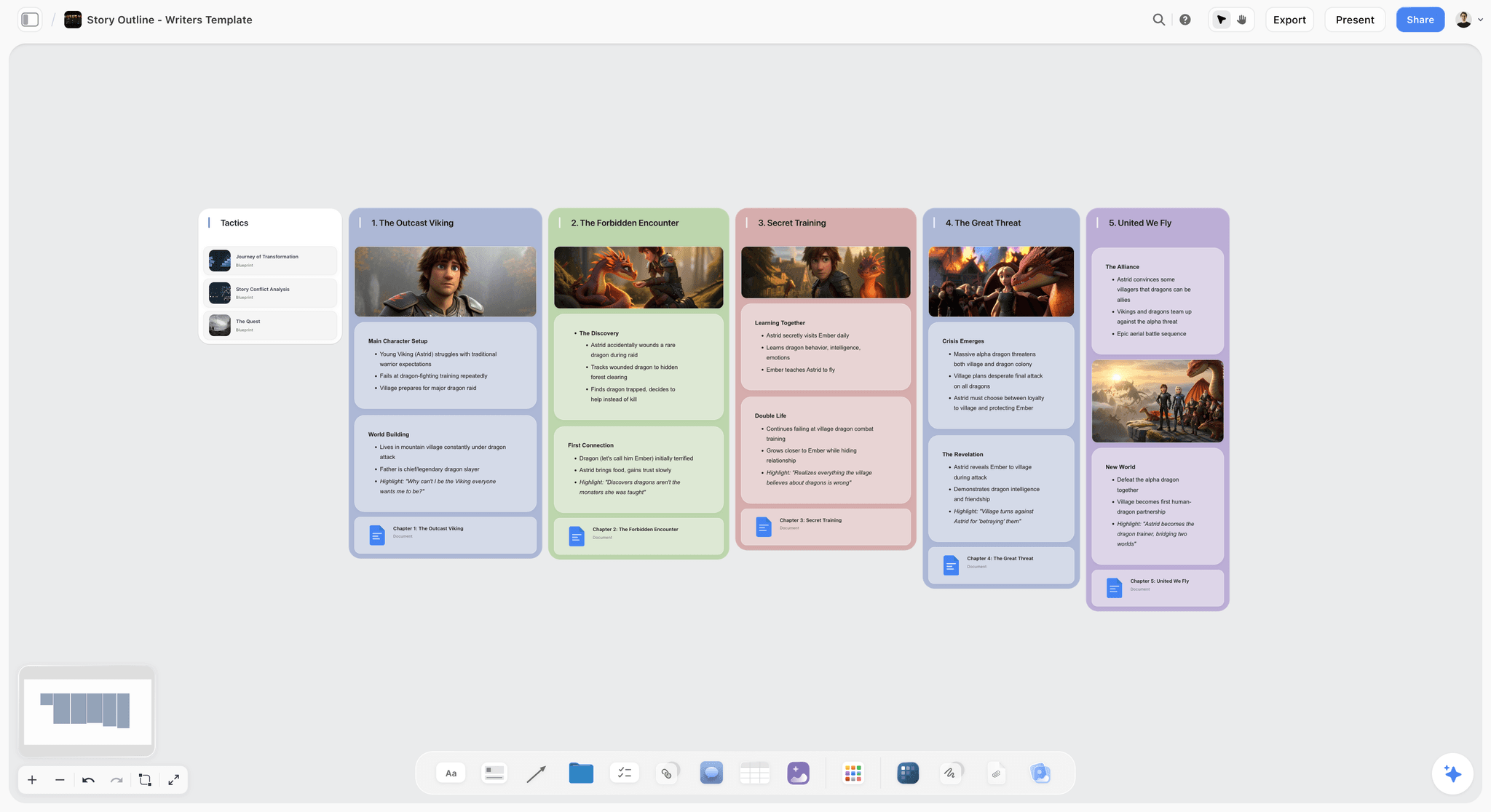
Logline variations and story-outline cards on a Storyflow canvas, where alternates sit beside the locked line for the financier conversation
Step 3: Build the Beat Sheet on the Canvas
A beat sheet is the architectural drawing of the treatment. For narrative, the most useful frameworks are Save the Cat (15 beats), the Three-Act Structure (8 to 12 beats), and the Hero's Journey (12 stages). For documentary, the question-driven structure (open question, escalating stakes, crisis, revelation, new question) is more honest than narrative structure forced onto real life. Pick one and put the beats on the canvas as named cards. Do not try to write a beat sheet inside a Word doc. The whole point of a beat sheet is that you can see it.
Once the empty beat structure is on the canvas, the AI work changes shape. Instead of "write me a beat sheet," the prompt becomes "given this logline and these character notes, propose what happens at the midpoint." The AI is now answering a small structural question with full context, which it can actually do well. Generate three options for each beat. Argue with the options. Replace the ones that feel like every other film with one that feels like yours.
Storyflow's Blueprint Tactics include beat-sheet frameworks for Save the Cat, Three-Act, and Hero's Journey, plus a documentary structure tactic. The Beat Sheet Filmmaking template opens the canvas with the beat cards already placed, so the argue-with-it draft exists before you type. @-mention the right tactic for the project and the AI will scaffold the structure correctly the first time. ChatGPT and Claude know these frameworks too, but you have to hand them the framework every prompt because they do not retain it. On a canvas, the framework is just sitting there, and the AI uses it without being asked.
The deliverable from step three is not a finished beat sheet. It is a beat sheet that is good enough to argue with, which is the only kind that matters at this stage.
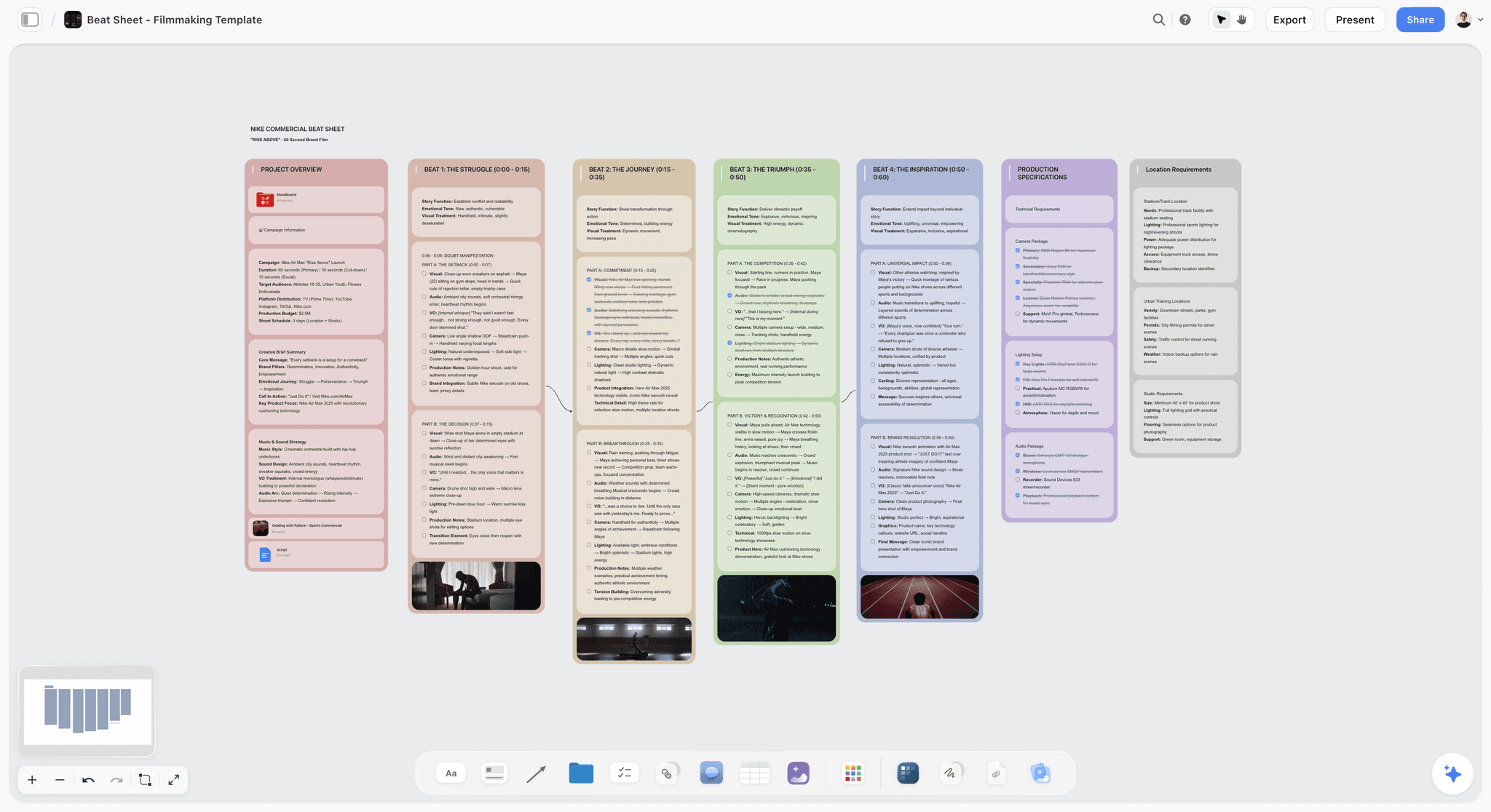
A beat sheet on the canvas: each beat is a card you can argue with, replace, or move
Run the 4-hour treatment workflow on your own project.
Describe the film once and get the logline, synopsis, characters, and act breakdown drafted as cards on a canvas the AI keeps reading as you revise.
Step 4: Develop the Characters with Arc Templates
Characters in a treatment are described by three things: who they are when the film starts, what they want (external) and need (internal), and how they change. Documentary "characters" are real people, but the same template applies, except the want-need pair is something you observe rather than invent.
The arc template that works in almost every case is the four-position grid. Position one is the character at the start, position two at the end of act one, position three at the midpoint, and position four at the resolution. For each position, write one sentence on what the character is doing and one sentence on what the character believes. The shape of the arc is the difference between position one's belief and position four's belief.
Drop the four-position grid on the canvas as a card per character (the Character Profile template gives each character a pre-structured card) and let the AI fill the empty positions from the logline and beat sheet. This is one of the fastest legitimate uses of AI in treatment writing. The AI is not inventing the character. It is interpolating positions for a character you already defined, given a structure you already have. The output is starting material to push against.
For documentaries, treat the same template differently. Position one is what is true about the subject when filming starts. Position four is what is true at the end of the access window. Positions two and three are the inflection points you expect. AI is helpful here to identify what kind of evidence in the film would mark each position, which is genuinely useful pre-production thinking. The treatment then describes those moments without overpromising the actual content of unfilmed scenes.
A treatment with three to six characters drawn at this level reads completely differently from one with paragraph descriptions. Producers can see the engine.
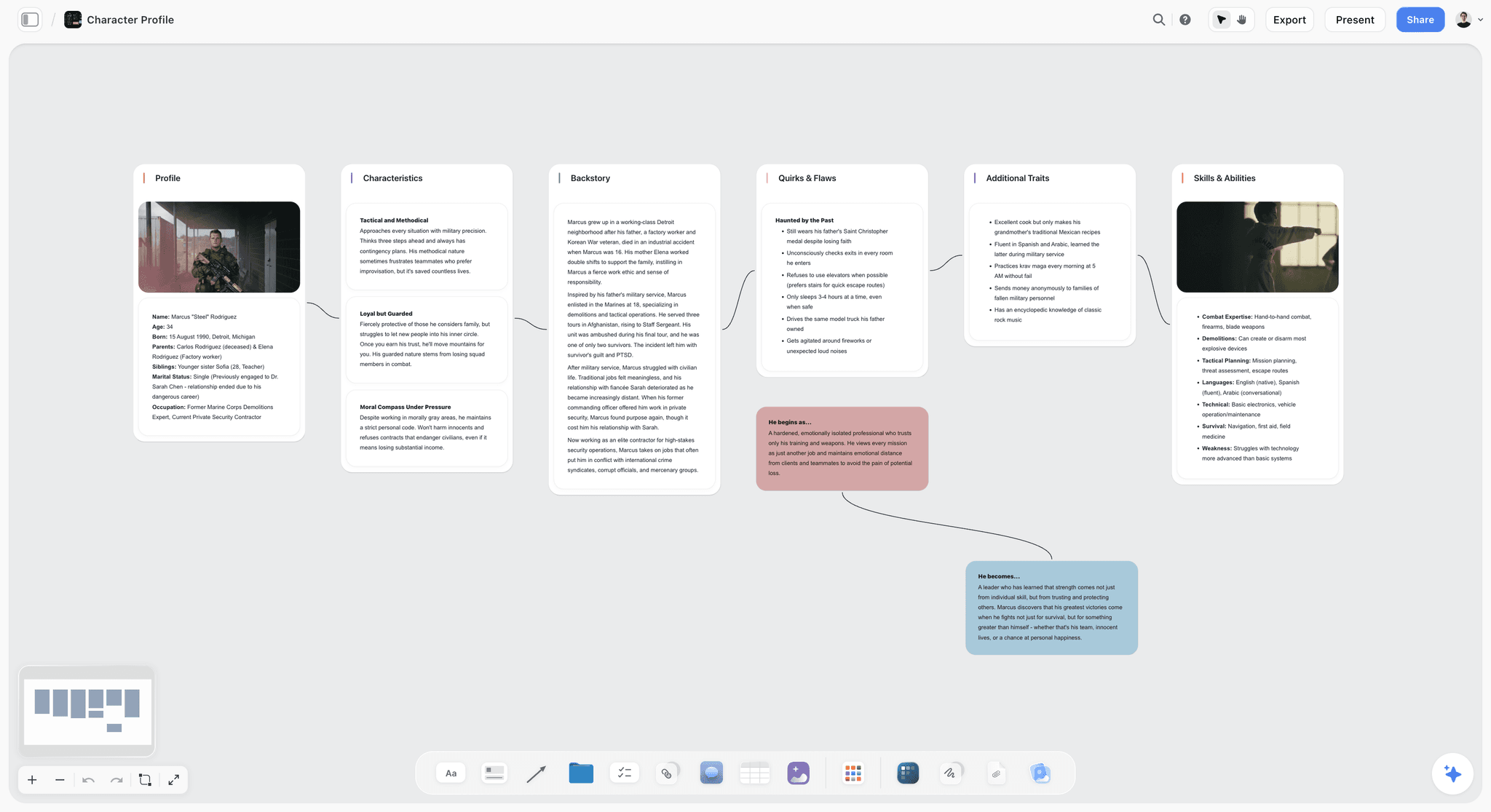
Character cards with the four-position arc grid keep want, need, and change visible across the project
Step 5: Add Visual References (Mood Board) Inside the Same Canvas
Filmmakers do not pitch in text alone. A treatment without a visual point of view forces the reader to imagine the film from prose, which means every reader imagines a different film. A treatment with 6 to 12 reference stills, framing examples, palette swatches, and tonal references gets read once and aligned on. This is non-negotiable for narrative and branded work, and increasingly expected in documentary.
The mistake is building the mood board in a separate tool. Every time the visuals live somewhere else (Pinterest, a Google Slides deck, a folder of screenshots), the AI loses access to that context and the treatment text drifts away from the visual intent. The fix is to keep the references on the same canvas as the logline, beat sheet, and character grid. Then when AI drafts the visual approach section in step six, it is looking at the same images you are looking at.
What belongs on the canvas mood board (the Filmmaking Moodboard template opens with these clusters already zoned): 3 to 5 atmosphere references that show what the world feels like, 3 to 5 framing references that show how the camera sees the world, and 2 to 4 detail references for palette, texture, and material. Caption each one with what it contributes, not what is in it ("use for the soft, lateral daylight in the practitioner scenes" beats "guy at desk"). The captions are what the AI reads, and they are also what survives when the board gets exported into the final treatment doc.
Storyflow allows direct image upload to the canvas (free plan: 20 file uploads, Plus: unlimited). Heptabase and FigJam also support images, but Heptabase's AI reads cards and notes rather than image content, and FigJam has no AI that reads the board as a whole. The combination of canvas with images and AI that uses both is the workflow advantage.
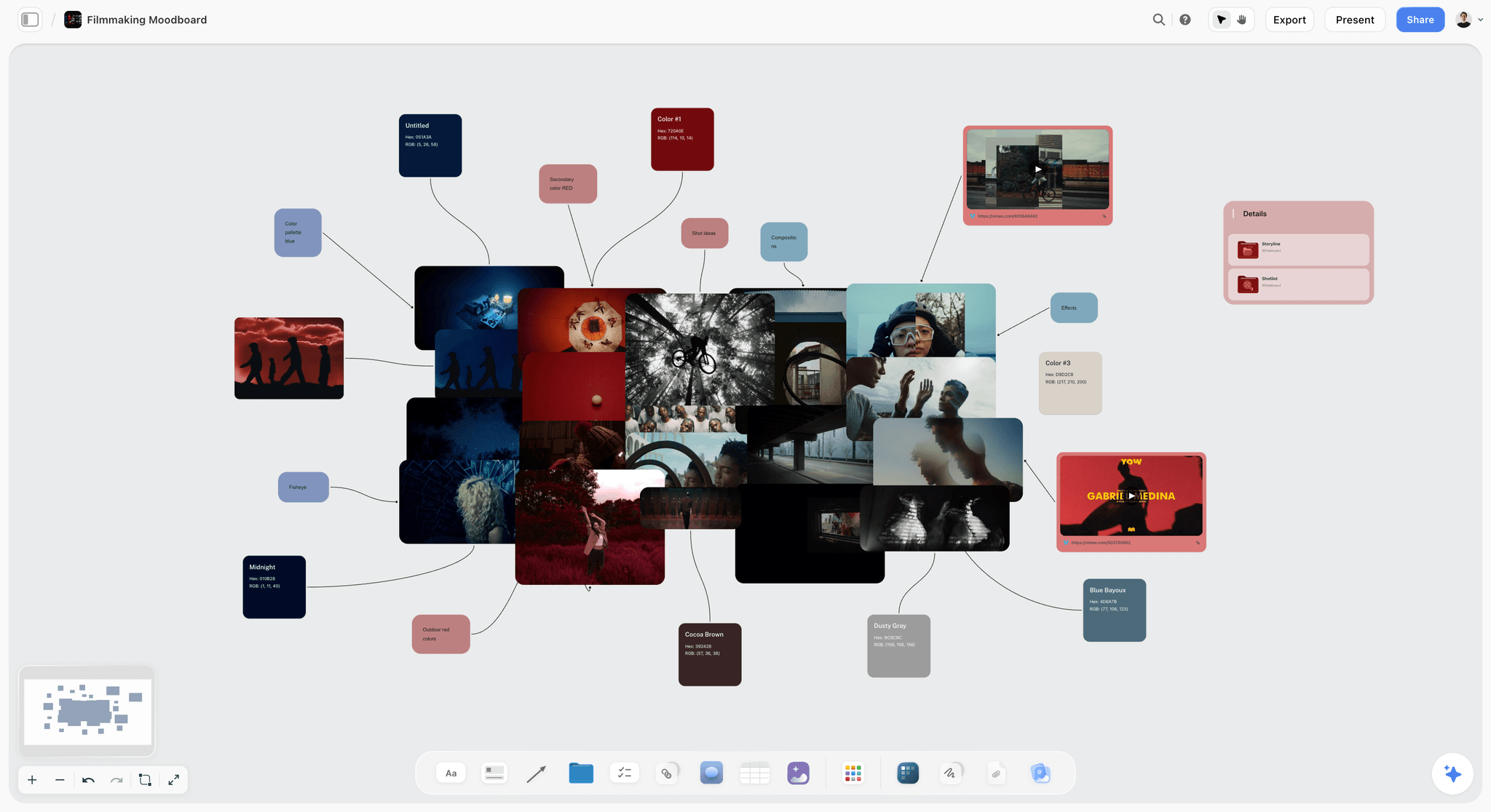
Filmmaker mood board on a Storyflow canvas: atmosphere, framing, and detail references captioned for what each contributes to the treatment
Step 6: Use AI to Draft Each Section, Not the Whole Treatment
This is the most important step in the entire process and the one most people skip. Asking AI to "write a treatment for this project" produces a serviceable, generic, eight-page document that reads like every other AI treatment. Asking AI to "draft only the synopsis section, in 220 to 280 words, in present tense, third person, using the beat sheet on this canvas and the character grid in the @Characters document, ending with the resolution" produces something usable.
Section by section is the rule. The treatment has seven parts (from the structure section above), and each part has a different job, voice, and length. AI handles each part well in isolation and badly when asked to handle them together. Here is what to ask AI for in each section:
- Logline and premise. Already done in step two. AI's job here is to polish the chosen line and write a 60 to 90 word premise paragraph that expands the logline without restating it.
- Synopsis. AI drafts a 200 to 350 word distilled story from the beat sheet, present tense, with the ending included. Multiple drafts. Pick the cleanest spine.
- Beat sheet as prose. AI converts the canvas beat sheet into 8 to 15 short prose paragraphs, one per beat. This is the most mechanical use of AI in the whole process and arguably its strongest application.
- Characters. AI drafts a 100 to 150 word bio per character from the four-position grid. Edit hard. AI tends to over-explain motivation. Cut every sentence that explains rather than describes.
- Visual approach. AI reads the captioned mood board and writes 250 to 400 words on tone, palette, framing, and reference influence. Verify it is not inventing references that are not on the board.
- Why this film, why now, why me. Do this section yourself. AI cannot fake conviction. It can polish the paragraph after you write it.
- Practical context. AI is fine for the comparables paragraph if you supply it 5 to 10 reference films. Length, format, audience, and financing details should come from you.
The pattern: AI drafts what is mechanical or interpolative, and the writer handles what requires conviction or specific knowledge. On Storyflow, @-mention the relevant Document (beat sheet, characters, mood board) and the relevant Blueprint Tactic (Save the Cat, character arcs) per query so each section is drafted with the right structural reference. On ChatGPT or Claude, paste the relevant material into each prompt every time, which is workable but slower and prone to context drift.

AI drafts one section at a time using the canvas, an @-mentioned Document, and a Blueprint Tactic

Blueprint Tactics provide reusable structural scaffolds for narrative and documentary treatments
Step 7: Polish, Cut, Test the Pitch
Treatments are usually too long on the first pass. The cutting phase has three passes. First pass: cut every adjective the AI loved (compelling, intimate, urgent, unforgettable, ultimately, ultimately again). Second pass: cut every paragraph that does not advance plot, character, or visual. Third pass: read the document aloud and remove anything that sounds like a writer trying to sound like a writer.
Then test the pitch. Send the treatment to two people: one collaborator who knows the project well, and one trusted reader who is closer to the actual audience. Ask the collaborator whether the document represents the project. Ask the trusted reader whether they understood the story and whether they wanted to see the film. The two readers answer different questions, and you need both signals before sending it to a financier.
The final polish pass is for tone. Documentary treatments should sound like the filmmaker. Narrative treatments should sound like the film's voice (a noir treatment should not read like a comedy treatment). Branded treatments should sound like the campaign idea, not like agency boilerplate. AI is useful here as a critic, less useful as a writer. Ask it to flag sentences that sound generic and rewrite only the ones it flags.
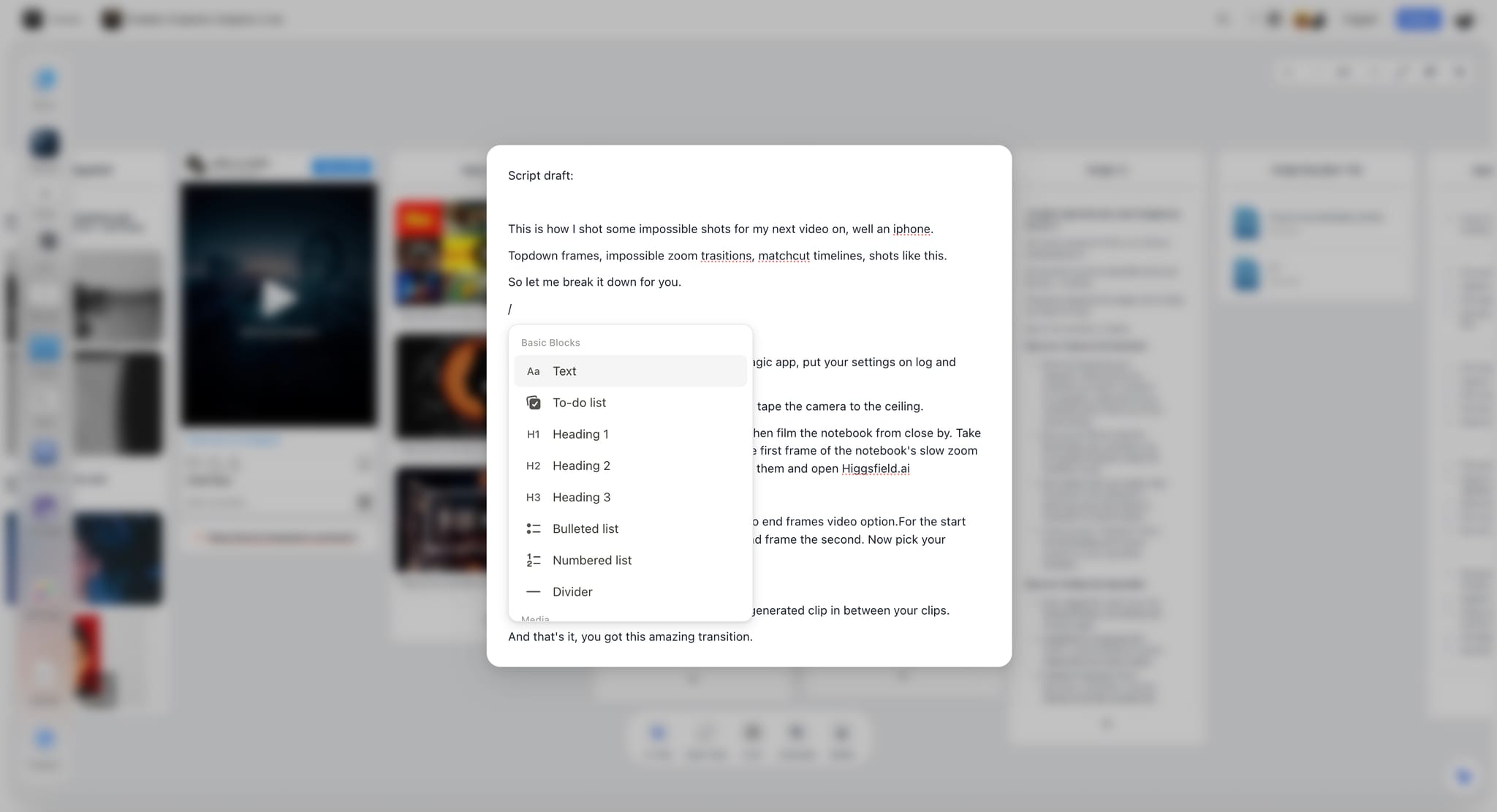
Enhanced note editing inside Storyflow, the polish-and-cut surface where the final treatment passes happen on the same canvas as the structural work
A Worked Example: Treatment for an Indie Documentary
To make the framework concrete, here is what the canvas looks like for a documentary treatment about a small-town volunteer fire department that takes in a teenage trainee after her father, a former chief, dies in a vehicle fire on the job.
The canvas opens with a one-sentence concept and a working logline. After step two, the logline is "A 17-year-old girl trains as a volunteer firefighter in the small-town crew her father served in until the day they could not save him, and the crew has to decide whether protecting her means letting her run toward fire or pulling her back from it." Three logline alternatives sit beside it for the financier conversation.
The beat sheet on the canvas uses the documentary question structure: the opening question (can a daughter inherit a father's vocation without inheriting his death), the access window (a single training year), three escalating stakes events (her first call, an internal conflict with the chief, a near-incident), the crisis (a real fire that tests the question), and a closing question that the film leaves with the audience rather than answers. Each beat is a card with a one-sentence description and a note on the kind of footage that would make it land.
The character grid has four people: the teenage trainee (external goal: certification, internal goal: closeness to her father, arc: from imitation to ownership), the chief (external goal: protect the crew, internal goal: not lose another, arc: from gatekeeping to releasing), the trainee's mother (external goal: stop her, internal goal: keep her alive, arc: from opposition to witness), and a veteran firefighter who knew her father (external goal: train her properly, internal goal: redemption, arc: from distance to mentorship). Each card has the four-position grid filled in.
The mood board has eight references: three atmosphere stills (rural America at dusk, station-house interior, mountain-road ambulance), three framing references (handheld in motion, locked-off interview style, observed proximity), and two detail references (turnout gear in low light, a faded chief's photograph on a wall). Captions explain what each contributes.
With this material on the canvas, the AI drafts the synopsis (one 280-word paragraph), the beat-sheet-as-prose (12 paragraphs of 60 to 100 words each), and the visual approach (one 350-word section). The director writes the "why this film, why now, why me" section by hand, because it is about a real attachment to the place and the family and the story. The whole document, polished and cut, lands at 11 pages, which is a normal length for a documentary treatment for a financier meeting.
Total time on the canvas, from blank to first finished draft: roughly 4 hours.
How to Pick the Right AI Tool for Treatment Writing
Not every AI tool is built for the canvas-first workflow above. Here is an honest picker.
Storyflow. Canvas-first by design. AI reads the entire active canvas plus up to 3 @-mentioned Documents and 1 Blueprint Tactic per query, which is the configuration that matches step six's section-by-section drafting. The Blueprint Tactic library includes Save the Cat, Three-Act Structure, Hero's Journey, character arc grids, and documentary structures, so the structural framework is on the canvas as a callable object rather than something you re-paste each prompt. Free tier (launching before the end of 2026): unlimited boards, unlimited cards (notes, images, links), unlimited collaboration with as many co-writers as you want, basic AI usage, and 20 file uploads. Plus ($7.99/month annual or $9.99 monthly): full 200+ Blueprint library, unlimited file uploads. Pro ($14/month annual or $19 monthly): adds AI image generation and 20x more AI than Plus. Max ($39/month annual or $49 monthly): adds 40x more AI plus Team Workspace with Permissions and Roles. Real-time multi-cursor co-editing is on the Max plan only.
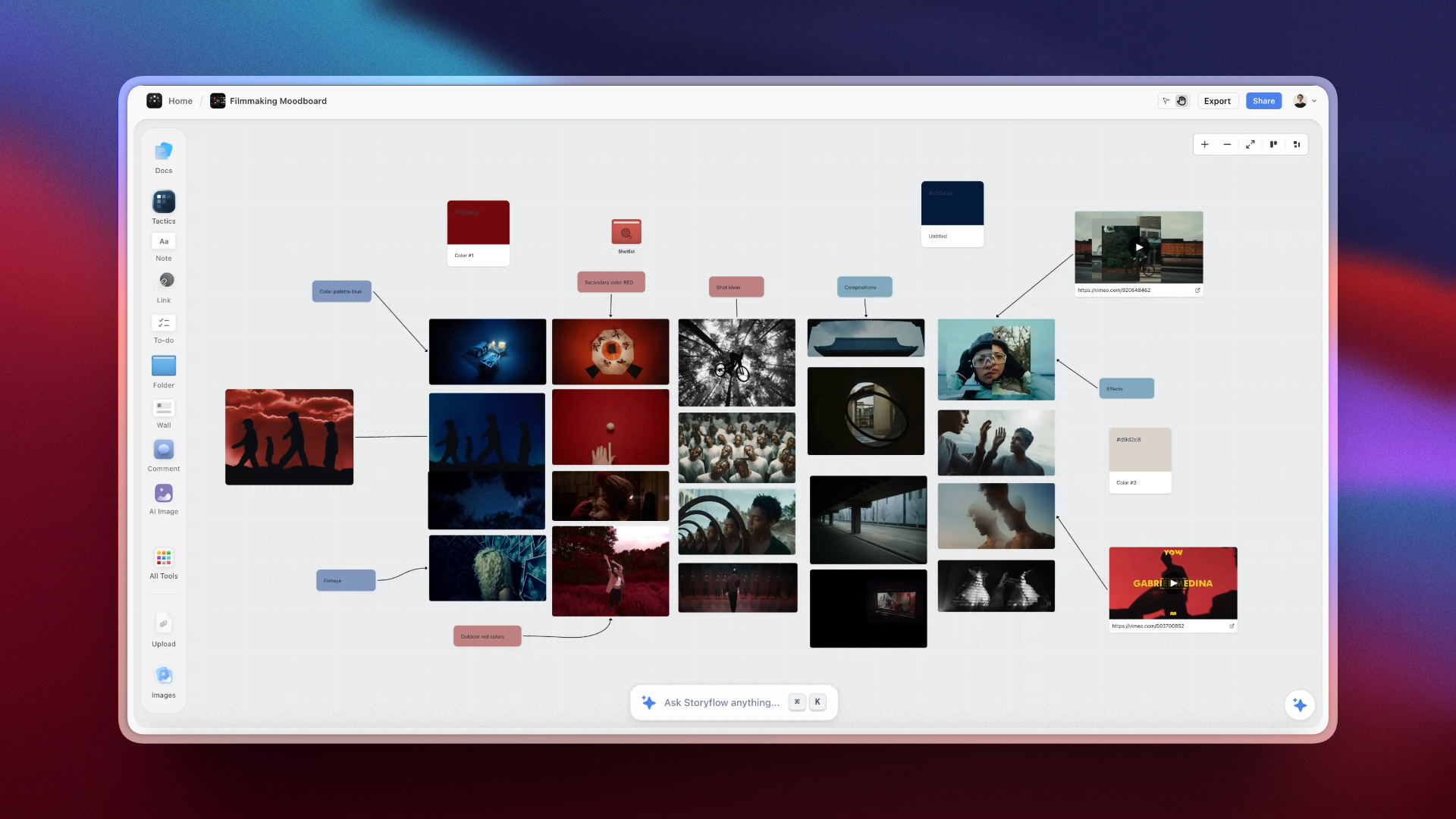
How filmmakers use Storyflow: concept, beat sheet, character grids, and mood board on one canvas with AI reading the full project
ChatGPT. Strong at paragraph polishing and rewriting flagged sentences. Blind to a canvas, so every prompt has to re-include the relevant structural material. Workable for solo writers who do not mind copy-pasting context. Pricing around $20/month for ChatGPT Plus, verify on the OpenAI site for current tiers.
Claude. Best in class for long-context drafting once you paste in a beat sheet, character notes, and references. Will hold all of that in one conversation and produce coherent section drafts. Same canvas-blindness limitation. Pricing for Claude Pro is around $20/month, verify on the Anthropic site.
Sudowrite. Strong for fiction with a focus on prose generation and revision. Less aligned with the structural-then-prose approach a treatment requires. Better for scriptwriting late-stage than treatment-stage.
Final Draft Beat Board. Industry-standard for screenplay structure, useful as a beat board in script work. Linear and document-bound, which makes it weak for the spatial step of treatment development. No native AI of the kind described above.
The honest tradeoff: Storyflow wins on the workflow described in this guide because the canvas plus section-aware AI matches the way treatments are actually built. Where Storyflow loses is the pure-prose pass. If your treatment is already structured and you just want the single best long-form drafting and rewriting on one tight section, Claude produces cleaner prose, and ChatGPT is faster for quick rewrites. Storyflow is also cloud-only, so writers with strict local-first or offline requirements should keep the structural work on the canvas and do final drafting in a local app. ChatGPT and Claude are fine standalone if you do not mind running the structural work in your head and prompting cleanly each time. Sudowrite and Final Draft are more useful at the next stage (script) than at the treatment stage.
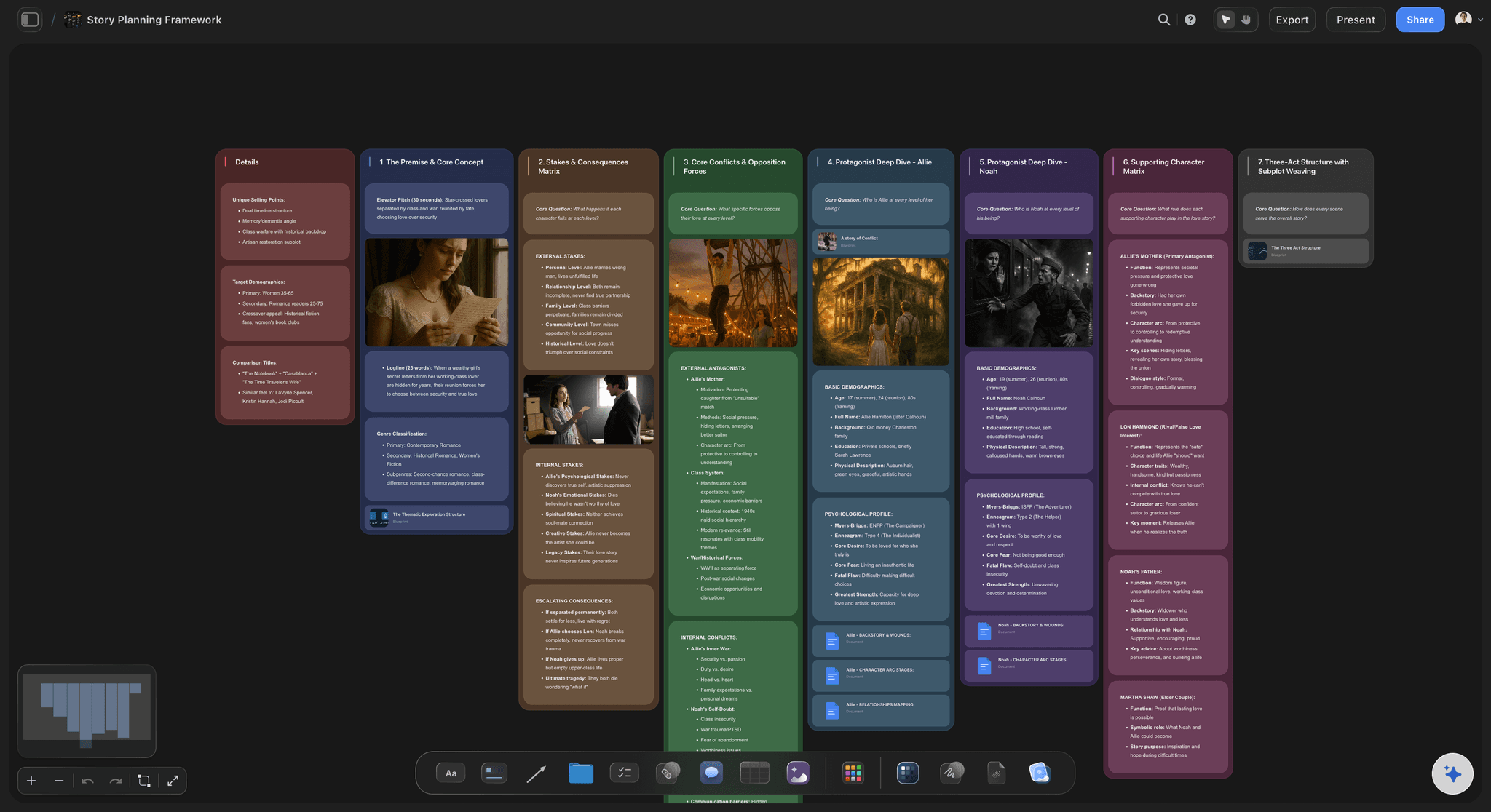
A story plan on the Storyflow canvas: concept, structure, characters, and references in one place the AI can read before it drafts
Common Mistakes Writers Make with AI Treatment Writing
These are the patterns that show up over and over in treatments where AI did more harm than good.
Mistake: Asking AI to write the whole treatment from one prompt. It feels efficient and produces a document that is uniformly generic. Every section reads at the same temperature, which is the smell test that gets a treatment rejected before page three.
Mistake: Skipping the canvas because the AI in your tool only reads selected text. The result is a treatment that drifts: the synopsis matches the logline you typed in prompt one, but the visual section matches the references you described in prompt seven, and the two no longer align. Canvas-aware AI keeps the whole project consistent because it is reading the project, not the latest message.
Mistake: Using AI for the "why this film, why now, why me" section. This section is the part of the treatment a financier reads twice. It has to sound like a person with a real reason. AI-written conviction reads as conviction-shaped wallpaper. Write it yourself, even if it takes an hour and three drafts. AI can polish, not invent.
Mistake: Letting AI handle adjectives. AI defaults to "compelling, intimate, urgent, unforgettable, beautifully observed." These words are placeholders for thinking. Cut every one of them on the polish pass.
Mistake: Trusting AI on character motivation. AI tends to over-explain why a character does what they do, which collapses the mystery a treatment is supposed to keep alive. A character should be described, not psychoanalyzed.
Mistake: Pasting in producer-facing material the AI then echoes back in the treatment. If you tell the AI "this is for HBO Max" it will start writing in HBO-pitch voice. Keep the producer context separate and edit it out of the AI prompts.
Mistake: Not testing the document on a reader. AI cannot tell you whether someone wants to see the film. Only a human reader can. Skipping this step is how generic treatments reach financiers.
Storyflow Treatment Workflow: A 4-Hour Process Most Writers Use
For writers who want a tight, repeatable process on Storyflow specifically, here is the typical 4-hour sequence from blank canvas to first finished draft.
Hour 1: Concept and logline. Open a new project (or start from the Pre-Production Board template so the zones for beats, characters, and references already exist), drop the concept paragraph in the middle of the canvas. Add a Document for the working logline. @-mention any reference material that was the original spark. Generate 15 logline variations using the AI assistant with a Blueprint Tactic for the chosen framework. Pick three. Lock one. The other two stay on the canvas as alternates.
Hour 2: Beat sheet and characters. Drop in the Save the Cat, Three-Act, or Hero's Journey Blueprint Tactic for narrative, or the documentary structure tactic for documentary. The tactic gives you a labelled scaffold. Fill the scaffold using the AI assistant, generating three options per beat and choosing the strongest. Open a Characters Document. Build a four-position grid card per character. Have the AI fill the positions from the logline and beat sheet. Edit hard.
Hour 3: Mood board and visual approach. Upload 6 to 12 reference images directly to the canvas (free tier supports 20 uploads, Plus is unlimited). Caption each one for what it contributes. Group them into atmosphere, framing, and detail clusters. Open a Visual Approach Document. Have the AI draft the visual section using the canvas as the reference source. The AI sees the captioned images, so the prose actually corresponds to the references on the board.
Hour 4: Section drafts and polish. Open a Treatment Document. Draft each section by querying the AI with the relevant @-mentioned Document and Blueprint Tactic per section, following step six's section-by-section approach. Write the "why this film, why now, why me" section by hand. Run two cutting passes. Read aloud. Send to one collaborator and one trusted reader.
For solo filmmakers and indie producers, the free tier ($0) is enough to complete this workflow with its basic AI usage. Plus ($7.99/month annual) is the right tier for anyone writing more than one treatment a month, because the unlimited file uploads remove the rationing pressure. Pro ($14/month annual) becomes worth it if you also generate AI reference images for the mood board, which can fill gaps when sourcing real references is slow. The Max tier matters mainly for teams pitching together in real time.
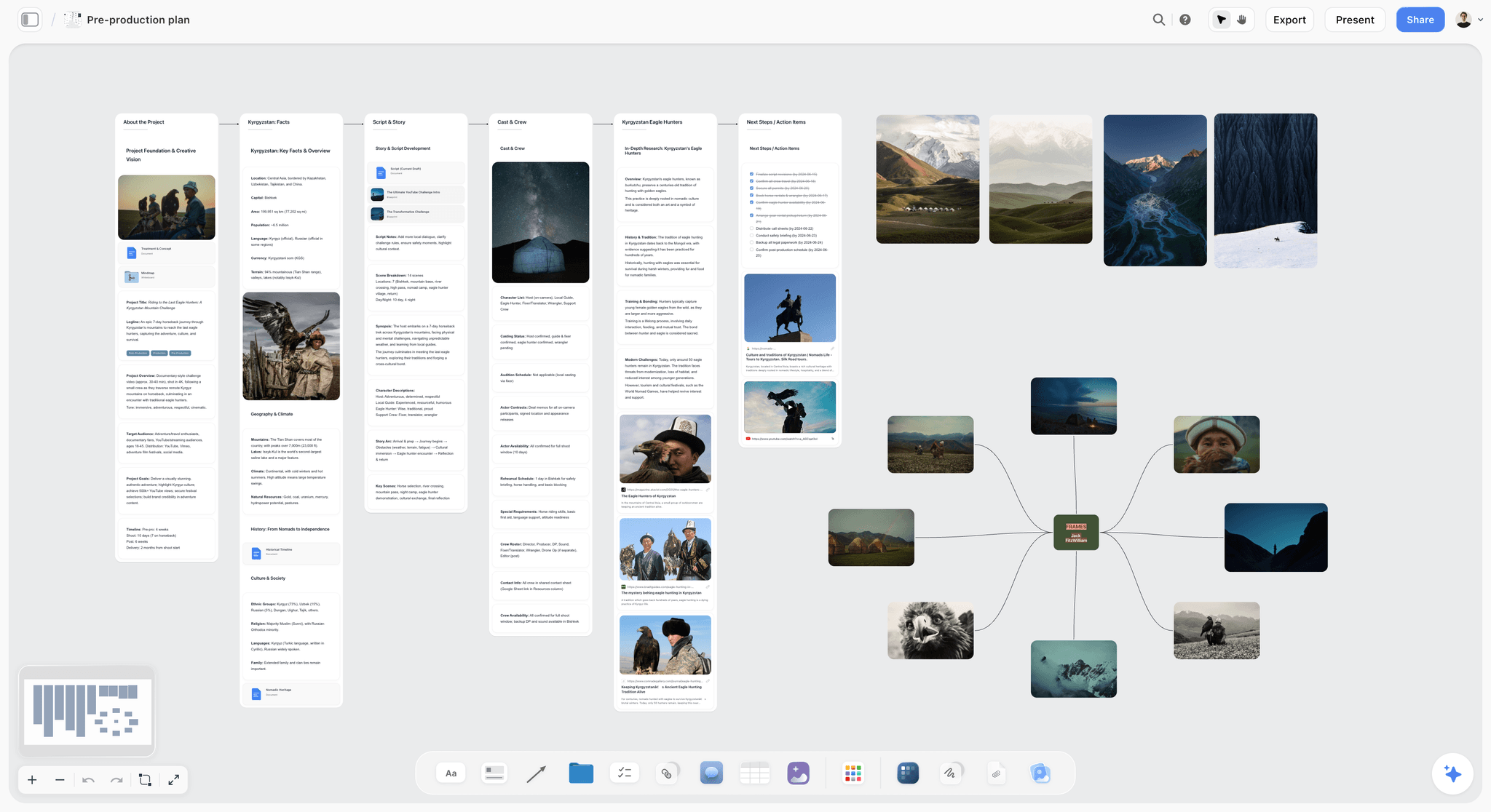
A filmmaker's pre-production plan on a Storyflow canvas: treatment, beats, references, and AI context laid out for the 4-hour writing sequence
Final Verdict: Writing a Treatment with AI in 2026
The 7-part framework holds whether the project is a documentary, a narrative feature, or a branded campaign: capture concept on a canvas, lock the logline, build the beat sheet, develop characters, add visual references, draft each section with AI that reads the full canvas, polish and test the pitch. AI is useful in this process exactly to the degree that it is grounded in your project. Hand a chatbot a sentence and it gives you a generic treatment. Hand a canvas-aware AI a structured project and it scaffolds a treatment that sounds like yours.
Test it on the project you actually have to pitch: take the treatment due next, open a Storyflow canvas, and run the 4-hour sequence end to end before you write a word in a document. If the draft that comes out sounds like your film instead of a generic one, you have your answer about whether the canvas-first workflow is worth keeping.
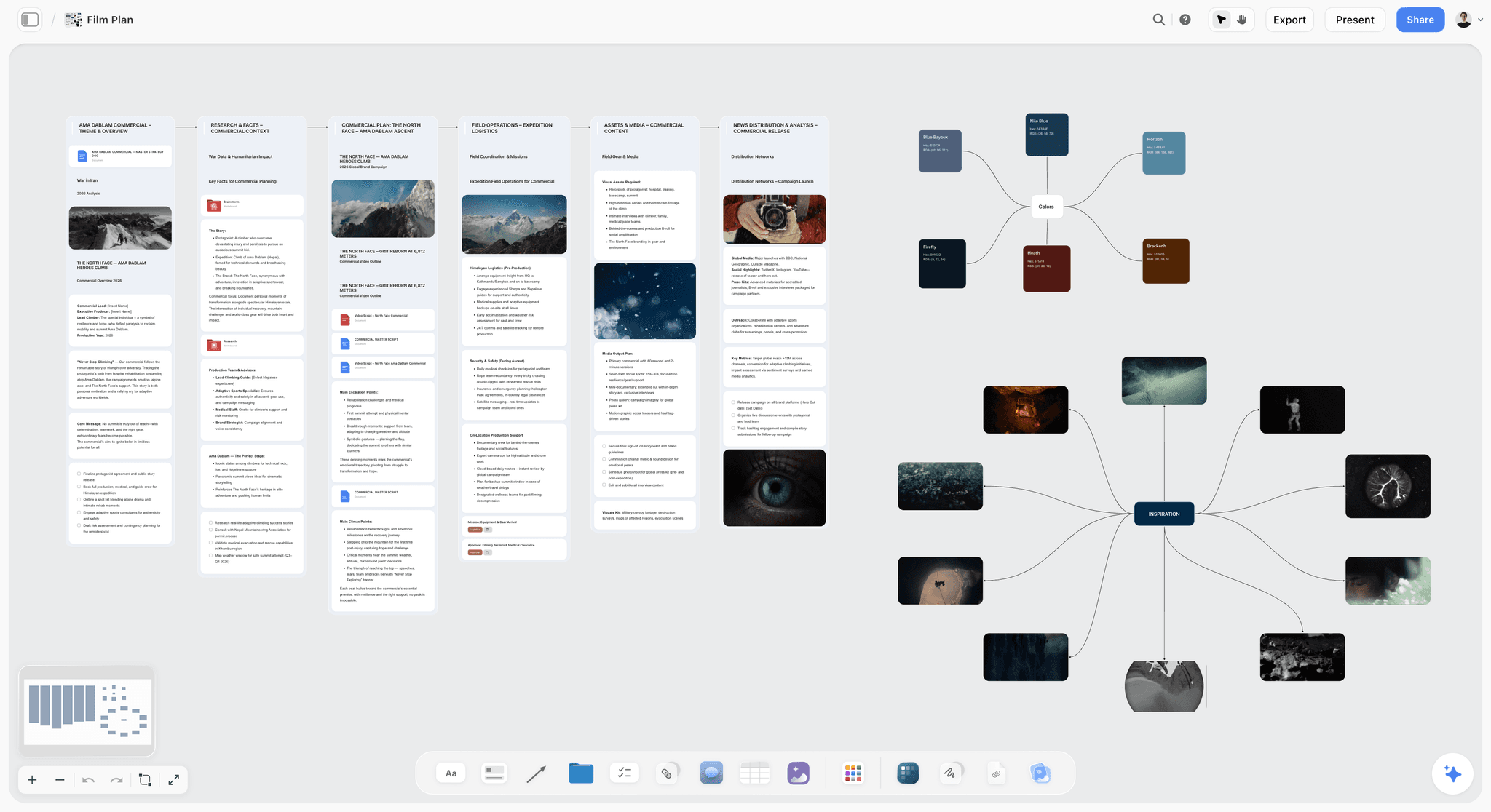
The 4-hour treatment workflow on Storyflow: blank canvas to first finished draft in one session
FAQ: Writing a Treatment with AI
How long should a treatment be?
A treatment is usually 5 to 15 pages, with the typical sweet spot at 8 to 12. Documentary treatments often run longer because they explain access and process. Branded-content treatments are usually shorter, often 3 to 6 pages. The right length is the shortest length that fully describes the story, characters, and visual approach without padding.
What's the difference between a treatment and a synopsis?
A synopsis is a single condensed paragraph or two that tells the whole story including the ending. A treatment is the full document that contains the synopsis plus logline, beat sheet as prose, characters, visual approach, and director's case. The synopsis is one section inside a treatment.
Can AI write a treatment from scratch?
AI can produce a generic treatment from a single prompt, and it will read like every other AI treatment, which is why financiers reject it. AI works well in treatment writing when it drafts individual sections from structured material on a canvas. The structural work and the conviction passages still come from the writer. The split is roughly: writer brings the why, the structure, and the voice; AI accelerates the prose around them.
What AI tool is best for documentary treatments?
For documentary specifically, the strongest workflow is a canvas tool with AI that reads the whole canvas, plus a Blueprint Tactic for documentary structure (open question, escalating stakes, crisis, revelation). Storyflow fits this configuration directly. Claude is a strong supplement for long-context drafting of the synopsis and beat-sheet-as-prose sections. Avoid tools that only operate on selected text, because documentary treatments depend on holding access, characters, and visual approach in one frame.
Should I include visual references in a treatment?
Yes, almost always. A treatment without visual references forces every reader to imagine a different version of the film. Six to twelve captioned references (atmosphere, framing, detail) align the room and dramatically increase the chance the treatment gets read past page three. Branded and narrative treatments are expected to include them. Documentary treatments increasingly are too.
How long does a treatment take to write with AI?
A first finished draft of an 8 to 12 page treatment takes about 4 hours on a canvas-first workflow with AI doing the section drafting. Without AI, the same draft is closer to 8 to 12 hours because the prose passes are slower. Polish, cuts, and reader feedback typically add another 2 to 4 hours over a day or two, regardless of AI use.
Will producers know I used AI?
Producers can spot AI-written treatments easily, but only the bad ones. The tells are uniform tone across sections, generic adjectives, over-explained motivation, and a "why this film" section that reads as conviction-shaped boilerplate. A treatment built on the canvas-first, section-by-section workflow described here does not read as AI-written, because the structural work is yours, the voice is yours, and the AI is only drafting prose around material you defined.
Table of Contents
- Key Takeaways
- Quick Answer: How to Write a Treatment with AI in 2026
- What a Treatment Actually Is (and Why Most Are Bad)
- The 7-Part Treatment Structure
- Step 1: Capture the Concept on a Canvas, Not a Page
- Step 2: Lock the Logline Before You Write Anything Else
- Step 3: Build the Beat Sheet on the Canvas
- Step 4: Develop the Characters with Arc Templates
- Step 5: Add Visual References (Mood Board) Inside the Same Canvas
- Step 6: Use AI to Draft Each Section, Not the Whole Treatment
- Step 7: Polish, Cut, Test the Pitch
- A Worked Example: Treatment for an Indie Documentary
- How to Pick the Right AI Tool for Treatment Writing
- Common Mistakes Writers Make with AI Treatment Writing
- Storyflow Treatment Workflow: A 4-Hour Process Most Writers Use
- Final Verdict: Writing a Treatment with AI in 2026
- FAQ: Writing a Treatment with AI
- Related Reading
Templates to check out for this topic


Story and writing templates you can use in Storyflow
Start your next script, novel, or world from a ready-made Storyflow board instead of an empty page. The AI reads the whole canvas, so every suggestion is grounded in your story.


See Storyflow in Action
A visual AI workspace where every feature lives inside one canvas. No tab-switching, no context lost.
Build your entire board from a single message
Type what you need in the AI chat at the bottom of your canvas. The AI adds cards, headings, and structure directly onto your board.
Use expert frameworks as AI context
Type @ in the AI chat and choose any Tactic. The AI tailors every response to that framework instead of giving generic advice.
Turn your board into a mind map in seconds
Ask the AI to restructure your canvas as a mindmap. It connects your ideas into a visual hierarchy so you can see how everything relates.
Why Storyflow Exists
Storyflow actually began as a personal tool while working on creative and research projects.
We kept running into the same problem: ideas were scattered everywhere: notes, documents, and whiteboards.
Nothing helped us see how everything connected.
So we started building a workspace designed around how ideas actually grow.
→ Read how Storyflow was createdJustkay
Documentary Filmmaker & Founder at Storyflow
Published: 2026-05-10
Extremely simple, seriously capable


See how easy it is to get started
Watch a real project come together, from a blank board to a finished plan, clicked through step by step.
Start creating with AI and become more productive
Transform your creative workflow with AI-powered tools. Generate ideas, create content, and boost your productivity in minutes instead of hours.