How to Storyboard a Music Video (Step-by-Step, 2026)
A director's step-by-step guide to storyboarding a music video: break the track into sections, choose narrative, performance, or hybrid, generate shots per section, plan sync and lip-sync, and arrange the frames in order on one board.

Category
Filmmaking
Author

Justkay
Documentary Filmmaker & Founder at Storyflow
Topics
2026-07-22
•
16 min read
•
Filmmaking- how to storyboard a music video
- music video storyboard
- music video shot list
- storyboard to the track
- music video lip-sync coverage
- narrative vs performance music video
How do you storyboard a music video?
To storyboard a music video, plan the visuals to the track rather than to a script: break the song into its sections with timecodes, decide whether the video is narrative, performance, or a hybrid, generate shot ideas for each section, plan the sync points and lip-sync coverage the picture has to hit, then arrange the frames in order on one board so you can read the whole video top to bottom. A music video storyboard is different from a film storyboard because the song is fixed and the shoot is expensive and sync-locked, so every beat is planned against a timeline you cannot change. You build and arrange the concept, references, and shot order on a visual board, then either sketch the final frames or hand them to a storyboard artist. Everything below is how to plan each section so a one-day shoot comes back with a video that cuts to the music. I have storyboarded music videos, and the lesson that took me the longest to learn is that a music video is not planned like a film. A film bends to your script; a music video bends to a finished track you do not control. The song is already three minutes and forty seconds, the drop is already at two minutes and ten, and the shoot is one expensive day where the artist, the crew, the location, and the gear are all booked to the hour. You do not get to reshoot because the chorus did not cut the way you imagined. So the whole storyboard is built backward from the track: you map the song, then map the visuals onto it, so that on the day you are capturing coverage that will cut to the music you already know by heart. This guide is the working method I use to turn a track and a concept into a storyboard a crew can shoot from. It covers listening to the song until you know its structure, choosing your approach, generating shots per section, planning the sync and lip-sync, and arranging the frames in order on a board where you can pull reference frames from other music videos. It is also honest about where a board stops and a storyboard artist or a drawing tool takes over.

Full disclosure: Storyflow is our own product, so weigh its placement with the skepticism you would apply to any tool a company recommends on its own blog. We rank it first for one job, planning the concept, references, and shot order to the track on one AI-readable canvas, and we are explicit about where Boords, a storyboard artist, and a video editor beat it.
Quick Comparison
Where music video directors actually plan the visuals to the track, and the one job each tool is best at.
| Tool | Best For | AI Features | Price |
|---|---|---|---|
| Storyflow | Concept, references, shot order | Reads the whole board | $7.99 mo annual (free plan late 2026) |
| Boords | Drawn frames + animatic | Limited | Free / ~$12 mo |
| StudioBinder | Shot lists + call sheets | Some automation | Free / paid |
| Milanote | Reference + mood | Limited | Free / ~$12.50 mo |
Why a Music Video Is Storyboarded to the Track
Watch a music video fall flat and it is rarely bad footage. It is footage that does not cut to the song: a chorus shot with too little coverage to build energy, a drop with no visual payoff because nothing was planned to land there, lip-sync that drifts because the performance was not captured to the track. None of these can be fixed in the edit, because the song is fixed and the footage you shot is all you have. The failure was not on the shoot day; it was in a storyboard that did not plan the visuals to the music.
The root difference is that a music video is scored before it is shot. In almost every other kind of filmmaking, picture comes first and sound follows; in a music video, the sound is finished and locked, and the picture has to serve it. That inverts the planning. You are not writing a story and finding a rhythm for it; you are taking a rhythm that already exists, the verses, the choruses, the build, the drop, and designing visuals that hit it. The track is the script, the storyboard, and the edit timeline all at once, and the storyboard is how you make sure the shoot delivers footage that fits it.
There is also the money and the clock. A music video is one of the most compressed shoots in filmmaking: a real budget, a booked artist, a crew on a day rate, and often a single day to get everything. You cannot call the artist back for a pickup the way you might a commercial actor. That compression is exactly why the storyboard matters more here than in a longer-form shoot. Every setup you planned is a setup you get; every one you did not plan is a moment you improvise while forty people wait. The storyboard is what turns an expensive, sync-locked day into a shot list you can actually execute, so the video comes back cutting to the track instead of fighting it.
The Anatomy of a Music Video Storyboard
Every music video storyboard that shot cleanly was built on the same parts, whether the director named them or not. It has five, and all of them hang off the track.
- The track breakdown. The song mapped into sections with timecodes, the intro, verses, choruses, bridge, drop, and outro, so every visual decision has a place on a timeline you cannot change.
- The approach, or concept. The through-line that carries the runtime, narrative, performance, or hybrid, so the shots you generate serve one idea instead of a pile of unconnected looks.
- The shots per section. The shots that fill each section of the song, marked as performance and lip-sync or narrative and insert, so you know what you are capturing when the music does each thing.
- The sync points and lip-sync coverage. The moments the picture has to hit the music, the drop, the hook, key lyrics, and the sections where you need clean lip-sync, so the edit has the frames to land the song.
- The frames in order. The reference frames and sketches arranged in the song's sequence, so you can read the whole video top to bottom and feel whether it builds.
The parts work because each one guards against a way a music video fails. The track breakdown makes sure nothing is planned in a vacuum; the approach makes sure the shots add up to a video rather than a showreel; the per-section shots make sure every part of the song has coverage; the sync plan makes sure the big moments land; and the frames in order let you feel the pacing before you spend a shoot day proving it. Because the song is fixed, the storyboard's whole job is to map visuals onto it so precisely that the edit is almost already cut before you roll.
Quick Picks: Where to Storyboard a Music Video
Best for the concept, references, and shot order to the track on one canvas: Storyflow. The surface where the track breakdown, the concept, and a wall of reference frames all live on one infinite canvas, where you can grab a frame from a YouTube or Vimeo music video straight onto the board to reference it, and where the AI reads the whole board so it can help you generate shots for a section or find the through-line. Plus is $7.99/month billed annually. The honest limit: it plans the concept, references, and shot order, but it does not draw the final frames or edit the video.
Best for drawn frames and an animatic timed to the song: Boords. If you want frame-by-frame drawings and an animatic you can play against the track, a dedicated storyboard tool is built for it. Free tier, paid from around $12/month.
Best for the shot list and production paperwork: StudioBinder. For a crewed shoot that needs a real shot list, storyboards, and a call sheet in one place, a production tool handles the logistics. Free tier, paid plans.
Best for reference and mood: Milanote. If you mainly want a board of stills and tonal references beside the writing, Milanote is built for it. Free with an item cap, paid from around $12.50/month.
The honest split: most directors plan the concept, references, and shot order to the track on a board, then either sketch the final frames themselves or hand the plan to a storyboard artist or a drawing tool. Try Storyflow to plan your music video.
Comparison Table: Where to Storyboard a Music Video
| Tool | Best for | AI on the board | Reference frames | Free tier | Starting price |
|---|---|---|---|---|---|
Storyflow | Concept, references, shot order to the track | Reads the whole board | Yes, infinite canvas | Coming late 2026 (invited collaborators join free now) | $7.99/mo annual |
Boords | Drawn frames and an animatic with audio | Limited | Yes, frame by frame | Yes, limited | ~$12/mo |
StudioBinder | Shot lists, storyboards, call sheets | Some automation | Partial | Yes | Free + paid |
Milanote | Reference and mood boards | Limited | Yes | Yes, item cap | ~$12.50/mo |
Sourcing raw references | No | Boards only | Yes | Free |
Pricing checked July 2026. Competitor prices move and are quoted per plan, so verify on each vendor's page. Storyflow is paid-only during early access, and its Free plan, which will run the whole plan-to-the-track method below, launches before the end of 2026; the paid tiers add the 200+ Story Blueprints and unlimited file uploads, with AI image generation on Pro and Max.
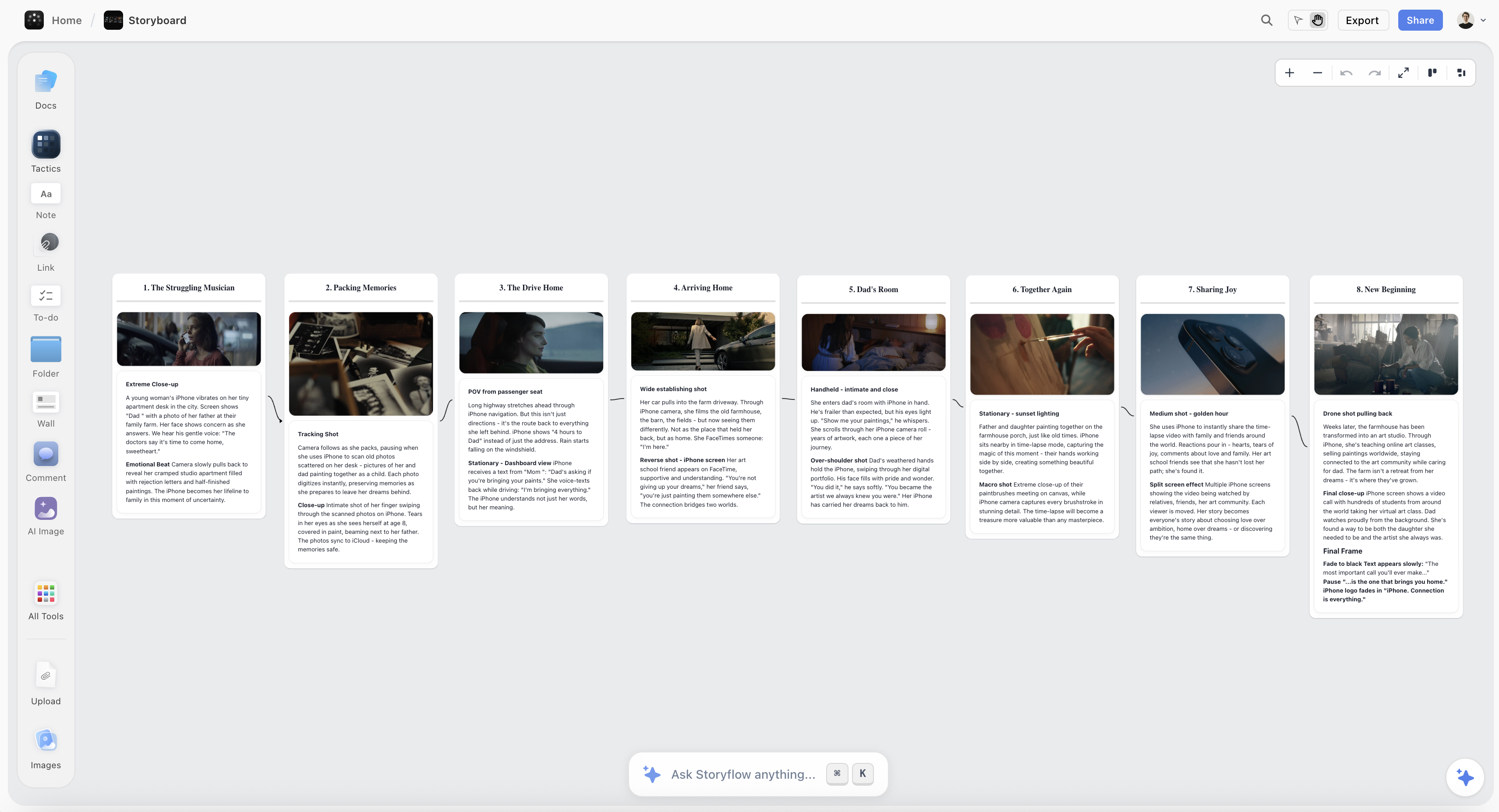
A music video storyboard on the Storyflow canvas, with the track broken into sections and reference frames arranged in the song's order
Storyboard your music video on one canvas
The track breakdown, the concept, the shots per section, and a wall of reference frames from other music videos live in one place, and the AI generates shots to the track, so you walk onto the shoot with the whole video mapped to the song.

How to Storyboard a Music Video, Step by Step
Here is the full method, from a finished track and a concept to a board a crew can shoot from. It assumes a single music video with a fixed song and one shoot day or two. Work the steps in order, because the track breakdown has to come first and every visual decision after it is mapped onto the song.
Step 1: Listen to the track until you know it cold
Before you plan a single shot, listen to the song until you know it the way the artist does. Play it on repeat, on good speakers and on earbuds, until you can feel the sections coming before they arrive, hear where the energy lifts and drops, and notice the small moments a casual listener misses, the breath before the chorus, the extra bar in the second verse, the beat where everything cuts out. This is not passive listening; it is the research phase of the whole storyboard. You cannot map visuals to a song you do not know intimately, and the directors who plan music videos that feel married to the track are the ones who lived inside it before they drew anything. Note the moments that already make you see a picture, because those instincts are the seed of the concept.
Step 2: Map the song structure with timecodes
Now turn the song into a timeline you can build on. Write out the sections in order with their timecodes: intro from zero, verse one, pre-chorus, chorus, verse two, bridge, drop, final chorus, outro, whatever the song actually does. Note the exact times so the storyboard is anchored to real seconds, not a vague sense of the shape. This breakdown is the spine of the whole board, because every shot you generate will be placed against it, and every sync point you plan will live at a timecode. A music video storyboard without a track breakdown is just a mood board; with one, it becomes a plan mapped to the song. On the canvas I lay the sections out left to right as a timeline so the whole song reads at a glance and every later decision has a place to land.
Step 3: Choose your approach: narrative, performance, or hybrid
With the song mapped, decide what kind of video this is, because it changes every shot you generate. A narrative video tells a story across the runtime, with the song as score and the artist sometimes inside the story, sometimes outside it. A performance video is built on the artist performing the track, on a stage, in a location, in a series of looks, and it lives or dies on energy and lip-sync. A hybrid cuts between a narrative and performance, the most common structure in commercial music videos, using the performance to carry the choruses and the narrative to carry the verses. Choose deliberately and tie it to the track: an emotional ballad often wants narrative, a high-energy single often wants performance or a hybrid that hits the choruses hard. The approach is the concept's backbone, and every shot in the next step should serve it rather than wander.
Step 4: Generate shot ideas section by section
Now fill the timeline with shots, working section by section rather than trying to imagine the whole video at once. For each part of the song, ask what the picture should be doing while the music does what it does: the intro sets the world, the verses build character or performance, the chorus lifts, the bridge turns, the drop pays off. Generate more shots than you need per section so you have coverage and options, and mark each one as performance and lip-sync or narrative and insert so you know what you are capturing. This is where Storyflow's AI helps, because it reads your whole board, the track breakdown, the concept, and your references, and can suggest shots for a section that fit the approach you chose, which is faster than staring at an empty chorus. Generate wide here; you will cut down when you arrange the board.
Step 5: Plan the sync points and lip-sync coverage
A music video is made or broken at its sync points, so plan them explicitly. Sync points are the moments the picture has to hit the music: the drop, the first hit of the hook, a lyric that has to land on a specific image, the beat where everything cuts out. Mark each one at its timecode and decide the shot that lands it, because these are the moments the edit is built around and the ones an audience feels. Then plan your lip-sync coverage: which sections need the artist clearly mouthing the words, and how many angles and sizes you need so the edit can cut the performance without the sync drifting. Performance-heavy videos need full lip-sync coverage of the choruses from multiple angles; narrative sections may need none. Plan this now, because on the shoot day you will play the track back and capture to it, and the storyboard tells the crew exactly which moments have to be nailed.
Step 6: Pull reference frames from other music videos
Now make the video visible by building a wall of references. Music videos are a visual conversation, and the fastest way to communicate a look to your DP, your artist, and yourself is to show it. Pull reference frames from other music videos, films, photography, and commercials that share the palette, the energy, the framing, or the lighting you are after. When the reference is a music video on YouTube or Vimeo, grab the exact frame that carries the feeling rather than linking the whole clip: in Storyflow you can pull a still from a YouTube or Vimeo video straight onto the canvas and place it beside the section it belongs to. Caption each reference with what it is doing for your video, so your collaborators read your intent and do not think you are copying the source. A storyboard with a precise reference wall is the one a DP can actually light from.
Step 7: Arrange the frames in order and pace the cuts to the track
With shots generated and references gathered, arrange everything in the song's order and read the whole video top to bottom. Lay the frames along the track timeline so each section shows its shots in sequence, then feel the pacing: a chorus usually wants more cuts and more energy than a verse, a drop wants a visual hit, a bridge often wants a held moment before the final chorus. Adjust the number and rhythm of cuts per section so the edit rhythm matches the music's rhythm, cutting fast where the track drives and letting shots breathe where it opens up. This is the payoff of building on one board: you can see the entire video as a sequence and fix a flat chorus or a rushed bridge before it costs you a shoot day. Cut the weak shots, keep the strong ones, and make sure every section builds into the next the way the song does.
Step 8: Lock the board, then shoot from it
When the board reads as a video that cuts to the track, lock it and turn it into what the shoot needs. Share the board with your DP, your producer, and the artist so everyone arrives knowing the plan, and pull the shot list and the sync plan out of it for the day. If the production wants finished, drawn frames, this is the point where you sketch them yourself or hand the locked board to a storyboard artist or a tool like Boords to draw from. On the shoot day, work the board section by section, play the track back for every performance and sync moment, and capture the coverage you planned. The storyboard is not the video, but a locked board is the difference between a compressed, expensive day that gets everything and one that runs out of time in the second verse.
Where AI Helps (and Where the Shoot Wins)
AI is genuinely useful for storyboarding a music video, but for specific jobs, and it is worth being precise so you do not lean on it for the parts that are yours.
Where it helps. An AI that reads your track breakdown, your concept, and your references can generate shot ideas for a section, suggest coverage for a chorus, and help you find the through-line when a video feels like a pile of looks. Because Storyflow's AI reads your full board plus up to 1 Tactic and 3 Documents you bring in, it works from your actual song map and references rather than generic prompts, so its suggestions fit the video you are planning. On Pro and Max, Storyflow can also generate images, which is useful for visualizing a frame you cannot find in references. It is real help for the planning.
Where it does not. AI cannot direct the artist, read the room on a shoot day, or feel whether a chorus is landing in the edit. It does not know the song the way you do after a hundred listens, and it cannot supply the taste that makes one director's video feel alive and another's feel like stock. Use AI to generate and pressure-test the plan so your attention on the day is free for the performance and the light, and bring the concept and the feel yourself. AI helps you plan the video. You direct it.
Common Music Video Storyboard Mistakes
- Not mapping the song first. Planning shots before you break the track into sections with timecodes means the visuals never truly cut to the music. Map the song first.
- No clear approach. A video that is neither committed narrative nor committed performance reads as a pile of looks. Choose narrative, performance, or hybrid and let it drive the shots.
- Ignoring the drop. The biggest moment in the song with no planned visual payoff is a wasted chorus. Plan a shot that lands every sync point.
- Thin chorus coverage. Choruses need energy and cuts, which means multiple angles and sizes. Shooting a chorus with one setup gives the edit nothing to build with.
- No lip-sync plan. Drifting sync is the fastest way to make a video look amateur. Plan which sections need clean lip-sync and how many angles.
- Pacing everything the same. A verse and a chorus cut at the same rhythm kills the build. Pace the cuts per section to the music's energy.
- Confusing a mood board with a storyboard. A wall of pretty references with no shots mapped to the track is not a plan a crew can shoot. Put the frames in the song's order.
The Bottom Line
Storyboarding a music video is not storyboarding a film. It is planning visuals to a finished, sync-locked track on an expensive day you cannot repeat: know the song cold, break it into sections with timecodes, choose narrative, performance, or hybrid, generate shots per section, plan the sync points and lip-sync coverage, and arrange the frames in the song's order so you can feel the whole video before you shoot it. The directors whose videos cut to the music are the ones whose storyboard was mapped to the track from the first decision.
The honest boundary holds. One canvas is the right home for the concept, the references, and the shot order to the track, and a storyboard artist or a drawing tool still handles the finished frames while the edit happens in Premiere, Final Cut, or DaVinci Resolve. AI can generate shots and pressure-test the plan, but knowing the song and directing the artist are yours. The song is fixed and the shoot is short, so the storyboard is how you make sure the one day you get comes back cutting to the track.
If your video is still a track and a concept rather than a board a crew can shoot, plan the concept, references, and shot order on one canvas in Storyflow and walk onto the shoot with the whole video already mapped to the song.
FAQ: Music Video Storyboards
How do you storyboard a music video?
Storyboard it to the track, not to a script: listen to the song until you know it cold, break it into sections with timecodes, decide whether the video is narrative, performance, or hybrid, generate shot ideas for each section, plan the sync points and lip-sync coverage the picture has to hit, then arrange the frames in the song's order on one board so you can read the whole video top to bottom. Because the song is fixed and the shoot is expensive and sync-locked, every visual decision is mapped onto a timeline you cannot change. Build and arrange the concept, references, and shot order on a board, then sketch the final frames or hand the plan to a storyboard artist. The goal is a board so mapped to the track that the video is almost cut before you roll.
What is a music video storyboard?
A music video storyboard is the plan that maps a video's visuals onto a finished track, section by section, so a sync-locked shoot comes back with footage that cuts to the music. It contains the track breakdown into sections and timecodes, the approach or concept, the shots for each section marked as performance or narrative, the sync points and lip-sync coverage, and the frames arranged in the song's order. Unlike a film storyboard, which serves a script you control, a music video storyboard serves a song you cannot change, so the timeline of the music is the spine of the whole plan. It is the document that turns an expensive one-day shoot into a shot list a crew can execute.
How do you match visuals to a song's structure?
Break the song into its sections first, the intro, verses, choruses, bridge, drop, and outro, with real timecodes, then design visuals for what the music is doing in each one. The intro sets the world, the verses build character or performance, the choruses lift and want more energy and cuts, the bridge turns, and the drop wants a visual payoff. Mark the sync points, the exact moments the picture has to hit the music, and plan a shot to land each one. When you arrange the frames along the track's timeline you can feel whether the edit rhythm matches the song's rhythm and fix it before the shoot. Matching visuals to structure is the whole craft of storyboarding a music video, and it starts with knowing the song's structure cold.
What is the difference between a narrative, performance, and hybrid music video?
A narrative music video tells a story across the runtime with the song as score, and the artist may be inside the story or outside it. A performance video is built on the artist performing the track, in a location or a series of looks, and it lives on energy and lip-sync. A hybrid cuts between the two, using the performance to carry the choruses and the narrative to carry the verses, and it is the most common structure in commercial music videos. Choose the approach deliberately and tie it to the track: a ballad often wants narrative, a high-energy single often wants performance or a hard-hitting hybrid. The approach is the backbone of the storyboard, because every shot you generate should serve it.
How do you plan lip-sync coverage for a music video?
Decide which sections need the artist clearly mouthing the words, then plan enough angles and sizes that the edit can cut the performance without the sync drifting. Performance-heavy sections, especially choruses, usually need full lip-sync coverage from multiple angles and shot sizes so the editor has options; narrative sections may need none. On the shoot day you play the track back and capture the performance to it, so the storyboard should mark exactly which moments need clean sync and how many setups you are giving each one. Planning this on the board means the crew knows before the day which performance moments have to be nailed, and the edit comes back with the coverage it needs.
Can AI help storyboard a music video?
Yes, for generating and pressure-testing the plan, not for supplying the taste. AI can suggest shots for a section, propose coverage for a chorus, and help you find the through-line when the video feels like a pile of looks. Because Storyflow's AI reads your full board plus up to 1 Tactic and 3 Documents you bring in, it works from your actual track breakdown and references rather than generic prompts, and on Pro and Max it can generate images to visualize a frame you cannot find in references. What it cannot do is know the song the way you do after a hundred listens, direct the artist, or feel whether a chorus is landing. Use AI to build the plan faster and bring the concept and the feel yourself.
Is Storyflow free for storyboarding a music video?
Not during early access. Storyflow's Free plan, which launches before the end of 2026, will include unlimited objects and boards, unlimited collaboration, basic AI, and 20 file uploads, which covers the whole method: the track breakdown, the concept, the shots per section, the sync plan, and a wall of reference frames on one canvas. Paid tiers start at Plus for $7.99/month billed annually ($9.99 monthly), which adds the 200+ Story Blueprints and unlimited file uploads, with Pro at $14/month and Max at $39/month for more AI and, on Pro and Max, AI image generation. There is no separate Team plan; Max is the team tier. Once it launches, the Free plan will genuinely run the full plan-to-the-track method, so you'll be able to build the board and share it with your DP and artist, then draw the final frames wherever you prefer.
Table of Contents
- Why a Music Video Is Storyboarded to the Track
- The Anatomy of a Music Video Storyboard
- Quick Picks: Where to Storyboard a Music Video
- Comparison Table: Where to Storyboard a Music Video
- How to Storyboard a Music Video, Step by Step
- Where AI Helps (and Where the Shoot Wins)
- Common Music Video Storyboard Mistakes
- The Bottom Line
- Author
- FAQ: Music Video Storyboards
- Related Reading
Templates to check out for this topic


Filmmaking templates you can use in Storyflow
Skip the blank canvas. Open one of these filmmaking boards in Storyflow and the AI builds on the structure that is already there, from research through the shot list.


See Storyflow in Action
A visual AI workspace where every feature lives inside one canvas. No tab-switching, no context lost.
Build your entire board from a single message
Type what you need in the AI chat at the bottom of your canvas. The AI adds cards, headings, and structure directly onto your board.
Use expert frameworks as AI context
Type @ in the AI chat and choose any Tactic. The AI tailors every response to that framework instead of giving generic advice.
Turn your board into a mind map in seconds
Ask the AI to restructure your canvas as a mindmap. It connects your ideas into a visual hierarchy so you can see how everything relates.
Why Storyflow Exists
Storyflow actually began as a personal tool while working on creative and research projects.
We kept running into the same problem: ideas were scattered everywhere: notes, documents, and whiteboards.
Nothing helped us see how everything connected.
So we started building a workspace designed around how ideas actually grow.
→ Read how Storyflow was createdJustkay
Documentary Filmmaker & Founder at Storyflow
Published: 2026-07-22
Extremely simple, seriously capable


See how easy it is to get started
Watch a real project come together, from a blank board to a finished plan, clicked through step by step.
Start creating with AI and become more productive
Transform your creative workflow with AI-powered tools. Generate ideas, create content, and boost your productivity in minutes instead of hours.