How to Plan a Music Video (Step-by-Step, 2026)
A step-by-step guide to planning a music video: build a concept from the song, write a treatment, break it into a shot list, and schedule the shoot around the track.

Category
Filmmaking
Author

Justkay
Documentary Filmmaker & Founder at Storyflow
Topics
2026-07-17
•
12 min read
•
Filmmaking- how to plan a music video
- music video treatment
- music video shot list
- music video concept
- music video pre-production
- plan a music video shoot
How do you plan a music video?
To plan a music video, work from the song outward: build a concept that fits the track, write a treatment that sells the vision, break it into a shot list that balances performance and narrative, and schedule the shoot around the music and the artist. A music video is not planned from a script. It is planned from a song, and every visual decision either serves the track or fights it. Here is what makes music videos different from every other kind of video. The song is the brief, and it is already finished. You are not writing a story and then filming it; you are building a visual world around a piece of music that already has its own pace, its own emotion, and its own structure. That changes everything about planning: the concept has to fit the track, the shot list has to hit the beats, and the whole shoot is timed to a song you cannot change. Plan a music video like a short film and you get visuals that ignore the music. Plan it from the song and you get a video that feels inevitable. I have directed and produced music and narrative work for years, and the difference between a music video that lands and one that feels arbitrary is almost always the plan: whether the concept genuinely fit the song, and whether the shoot was built around the track instead of bolted onto it. This guide is that planning process, the tools that hold it, and the honest places where a specialist tool or a trained eye does the job better.

Full disclosure: Storyflow is our own product, so weigh its placement with the skepticism you would apply to any tool a company recommends on its own blog. We rank it first for one job, keeping the concept, treatment, and shot list on one AI-readable canvas, and we are explicit about where StudioBinder, ShotDeck, and a video editor beat it.
Quick Comparison
Where directors actually plan a music video, and the one job each tool is best at.
| Tool | Best For | AI Features | Price |
|---|---|---|---|
| Storyflow | Concept, treatment, shot list | Reads the whole board | $7.99 mo annual (free plan late 2026) |
| Milanote | Concept + reference boards | Limited | Free / ~$12.50 mo |
| StudioBinder | Scheduling + call sheets | Some automation | Free / paid |
| ShotDeck | Film stills library | Tagging + search | Subscription |
| Notion | Treatment as a document | Notion AI | Free / paid |
Key Takeaways
- A music video is planned backward from a finished, unchangeable song, not forward from a script. Its length, structure, and emotional arc are fixed, so every visual decision serves the track.
- Work through the planning stack in order: song, concept, treatment, shot list, schedule. Each layer inherits from the one before, all rooted in the track.
- Live inside the song first and map its structure, sections, and emotional shifts. Plan without living in the track and you build visuals that ignore the music.
- Land one concept that fits this song and no other. One idea that fits the track beats ten cool ideas that do not, and a strong concept makes the shot list obvious.
- A treatment does two jobs: it gets the video greenlit and aligns everyone on one vision. Keep it visual and specific, because a vague treatment gets rejected or produces a confused shoot.
- Build the shot list in three streams (performance, narrative, visual) and map each to the song's sections. Mapping to the track is what makes the edit sync instead of fight the music.
- Schedule around the artist's availability and get the hero shots first. The artist's time is usually the tightest constraint, so protect the choruses and hero moments.
- AI drafts the plan. The director brings the vision the song deserves. Keep the concept and the look human, and never use AI-generated frames as references.
Why Music Videos Are Planned Differently
Watch a music video fall flat and it is rarely the footage. It is that the visuals and the song are two separate things that happen to be playing at the same time. The concept did not actually fit the track, the performance was not planned to the sections of the song, and the edit could not sync because the coverage was not shot with the music in mind. The plan failed upstream, and the shoot faithfully executed visuals that had nothing to do with the music.
The root difference is that a music video is planned backward from a finished, unchangeable piece of music. A film's script can flex to the production; a song cannot. Its length is fixed, its structure (verse, chorus, bridge) is fixed, and its emotional arc is fixed. So the planning is not "what story do we tell" but "what visual world fits this exact track, section by section." The song is the brief. Everything else serves it, and the videos that work are the ones where every visual decision was made in service of the music rather than in spite of it.
This is why planning a music video is not the same as storyboarding one or organizing a general video shoot. Those are pieces of it. The whole job starts with the song and flows outward to a shoot timed to the track.
The Music Video Planning Stack
Every music video that feels of a piece with its song went through the same planning stack, whether the director named it or not. It has five layers, each flowing from the one before, all rooted in the track.
- The song. The fixed brief: structure, length, emotion, and the sections you will cut to.
- Concept. The one visual idea that fits this track and no other.
- Treatment. The document that sells the concept to the artist and label.
- Shot list. The performance, narrative, and visual shots, mapped to the song's sections.
- Schedule. The shoot plan, timed around the track, the artist, and the locations.
The stack works because each layer inherits from the song. The concept fits the track's emotion; the treatment pitches that concept; the shot list breaks the concept into shots tied to the song's sections; and the schedule makes it shootable. Skip the song-first logic and the layers float free of the music, which is exactly how a video ends up feeling arbitrary. The song is the brief. Everything else serves it, and the stack is how you keep every layer accountable to the track.
Quick Picks: Where to Plan a Music Video
Best for the concept, treatment, and shot list on one canvas: Storyflow. The surface where the concept, references, treatment, and shot list live together and the AI reads the whole plan. Plus is $7.99/month billed annually. The honest limit: it does not edit to the beat or grade footage.
Best for freeform concept and reference boards: Milanote. A favorite for gathering the visual world and drafting a treatment. Free tier with an item cap, paid from around $12.50/month.
Best for scheduling and call sheets: StudioBinder. When the shoot logistics get heavy (locations, crew, artist availability), a dedicated production tool handles the schedule. Free tier, paid plans.
Best for a library of film stills to reference: ShotDeck. For pulling a specific look to reference in the treatment. Subscription.
The honest split: most directors build the concept and treatment on a board, reference stills for the look, and hand the heavy scheduling to a production tool. Try Storyflow to plan the video.
Comparison Table: Where to Plan a Music Video
| Tool | Best for | AI on the plan | Visual planning | Free tier | Starting price |
|---|---|---|---|---|---|
Storyflow | Concept, treatment, shot list | Reads the whole board | Yes, infinite canvas | Coming late 2026 (invited collaborators join free now) | $7.99/mo annual |
Milanote | Concept and reference boards | Limited | Yes | Yes, item cap | ~$12.50/mo |
StudioBinder | Scheduling and call sheets | Some automation | Partial | Yes | Free + paid |
ShotDeck | Film stills to reference | Tagging and search | No | Trial | Subscription |
Notion | Treatment as a document | Notion AI | Limited | Yes | Free + paid |
Pricing checked July 2026. Competitor prices move and are quoted per plan, so verify on each vendor's page. Storyflow is paid-only during early access, and its Free plan (which will run the whole method) launches before the end of 2026; the paid tier adds the 200+ Story Blueprints and unlimited file uploads.
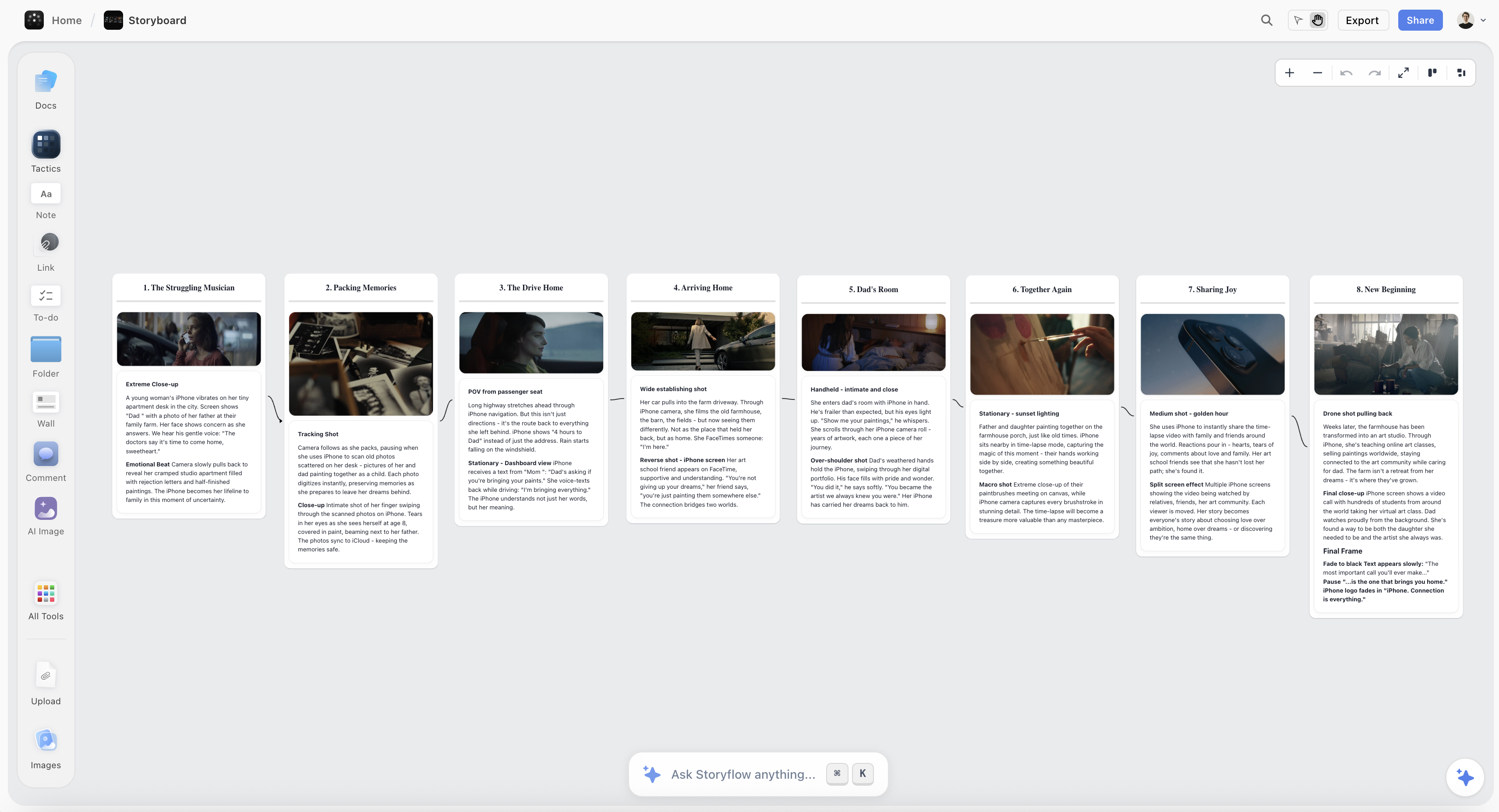
A music video plan on the Storyflow canvas, with the concept, treatment, and a shot list mapped to the song's sections
Plan your music video on one canvas
The concept, the treatment, and the shot list live in one place mapped to the track, and the AI drafts the shot list from your concept, so the shoot runs on a plan tied to the song.

How to Plan a Music Video, Step by Step
Here is the full method, from the track to a shootable plan. It assumes a single music video with a small crew and a modest budget. Scale it up for a bigger production, but keep the song-first order, because every layer inherits from the track.
Step 1: Start from the song, not a script
Before any concept, live inside the song. Listen to it many times, map its structure (intro, verses, choruses, bridge, outro), note the length of each section, and mark the emotional shifts and the moments that demand a visual. This map is the foundation, because every later decision references it: the concept fits the song's emotion, and the shot list cuts to these sections. A director who plans without living in the track first builds visuals that ignore the music. The song is fixed and finished; your job is to build a world that fits it, so the track has to come first.
Step 2: Land one concept that fits the track
Now find the concept: the single visual idea that fits this song and no other. A concept is not a list of cool shots; it is one clear idea (a performance in a decaying mansion, a single continuous take through a city at night, a narrative that mirrors the lyrics) that gives every shot a reason to exist. Test the concept against the song: does it fit the emotion, does it have room for the choruses to land, does it sustain for the full length. A strong concept makes the shot list obvious; a weak or absent one makes every shot a guess. One idea that fits the track beats ten cool ideas that do not.
Step 3: Write a treatment that sells the vision
Write the treatment: the document that sells the concept to the artist, the label, and the crew. A treatment describes the concept, the visual world, the look and tone, and how it fits the song, usually with references. It is doing two jobs: getting the video greenlit and aligning everyone on the same vision before the shoot. Keep it visual and specific, because a vague treatment gets rejected or produces a confused shoot. For the look specifically, a moodboard does the heavy lifting: see How to Create a Film Moodboard for building the visual language the treatment presents.
Step 4: Build a shot list mapped to the song
Break the concept into a shot list, and map it to the song's sections. Music video shot lists have three streams that you plan together: performance (the artist performing, usually the backbone), narrative (any story shots), and visual or abstract (texture, inserts, effects). For each, note which section of the song it covers, so you know you have coverage for every part of the track and can cut on the beat later. The shot list is where the concept becomes shootable, and mapping it to the song is what makes the edit sync instead of fight the music.
Step 5: Storyboard the key sequences
Storyboard the sequences that need it: the complex camera moves, the narrative beats, the hero shots. Not every performance shot needs a frame, but any shot where timing, blocking, or a specific move matters should be drawn, so the crew executes the vision instead of improvising it on a clock. The storyboard turns the trickiest parts of the shot list into a shared picture. For the full storyboarding method, see How to Storyboard a Music Video with AI.
Step 6: Schedule around the music and the artist
Build the schedule last, around the shot list, the artist's availability, and the locations. Group shots by setup and location so you are not relighting the same corner twice, block the artist's time efficiently (their availability is often the tightest constraint), and make sure the priority shots (the choruses, the hero moments) are captured before the day runs out. When the logistics are heavy, hand the schedule and call sheets to a dedicated tool while the creative plan stays on the board. A shoot scheduled around the track and the artist runs on a plan; one scheduled by guesswork runs on adrenaline.
Where AI Helps (and Where the Director's Vision Wins)
AI is useful for planning a music video, but for specific jobs, and it is worth being precise so you do not hand it the vision.
Where it helps. An AI that reads your plan can draft a shot list from the concept and the song's structure, find gaps (a section with no coverage), tighten the treatment's writing, and answer questions across the plan ("which shots cover the second chorus"). Because Storyflow keeps the concept, treatment, and shot list on one canvas, the AI can connect a shot to the section it serves. It is genuinely useful for organizing the plan and drafting the shootable pieces.
Where it does not. AI does not have the director's vision, and the concept, the thing that makes a music video feel inevitable rather than arbitrary, is a creative leap no model makes for you. It will draft a competent generic treatment, and generic is exactly what a music video cannot be. AI-generated frames are also a trap as references, because they represent a look no camera captured. Use AI to organize the plan and draft the shot list, and keep the concept and the look human. AI drafts the plan. The director brings the vision the song deserves.
Common Music Video Planning Mistakes
- Planning without living in the song first. Visuals built before you know the track's structure ignore the music. Map the song first.
- A weak or missing concept. Without one idea that fits the track, every shot is a guess. Land the concept before the shot list.
- A shot list not mapped to the song. Coverage that ignores the sections cannot cut to the music. Map every shot to a part of the track.
- A vague treatment. A treatment that does not sell the vision gets rejected or produces a confused shoot. Make it visual and specific.
- Forgetting performance coverage. The performance is usually the backbone; under-shooting it leaves the edit thin. Plan generous performance coverage.
- Scheduling without the artist's constraints. The artist's time is often the tightest limit. Build the schedule around it, and get the hero shots first.
- Using AI-generated frames as references. A look no camera captured sets an impossible expectation. Reference real footage.
The Bottom Line
Planning a music video is not planning a short film with a soundtrack. It is planning backward from a finished, unchangeable song: mapping the track, landing one concept that fits it, selling that concept in a treatment, breaking it into a shot list mapped to the song's sections, and scheduling the shoot around the music and the artist. The videos that feel inevitable are the ones where every visual decision served the track.
The honest boundary holds. One canvas is the right home for the concept, treatment, and shot list, and dedicated tools still win for heavy scheduling, stills reference, and the edit. AI can draft and organize the plan, but the concept and the vision stay with the director. A music video is not planned from a script. It is planned from a song, and everything else serves it.
If your next music video's plan still lives in a note and a group chat, build it on one canvas in Storyflow and plan every shot around the track.
FAQ: Planning a Music Video
How do you plan a music video?
Plan it from the song outward: map the track's structure, land one concept that fits it, write a treatment that sells the vision, break the concept into a shot list mapped to the song's sections, storyboard the key sequences, and schedule the shoot around the music and the artist. The defining difference from other video planning is that the song is a fixed, finished brief, so every visual decision serves the track rather than a script. Get the concept genuinely fitting the song and the shot list mapped to its sections, and the video feels of a piece with the music instead of bolted onto it.
What comes first when planning a music video?
The song comes first, always. Before any concept or shot, you map the track: its structure (verses, choruses, bridge), the length of each section, the emotional shifts, and the moments that demand a visual. Everything downstream references this map, because the song is fixed and your job is to build a world that fits it. Directors who skip this and jump to shot ideas end up with visuals that ignore the music. Live in the track first, then let the concept, treatment, shot list, and schedule flow from it.
What is a music video treatment?
A treatment is the document that sells your concept for the video to the artist, the label, and the crew. It describes the concept, the visual world, the look and tone, and how it all fits the song, usually with reference images and a moodboard. It does two jobs: getting the video greenlit and aligning everyone on one vision before the shoot. A strong treatment is visual and specific; a vague one gets rejected or produces a confused shoot. Think of it as the bridge between the idea in your head and a crew that can execute it, so it has to communicate the vision clearly.
How do you make a shot list for a music video?
Break your concept into three streams and map each to the song's sections: performance shots (the artist performing, usually the backbone), narrative shots (any story), and visual or abstract shots (texture, inserts, effects). For every shot, note which part of the track it covers, so you have coverage for the whole song and can cut on the beat in the edit. Plan generous performance coverage, because it carries most music videos, and mark the hero shots (usually the choruses) as priorities. Mapping the shot list to the song is what makes the edit sync with the music.
What tools do you use to plan a music video?
Directors commonly build the concept and treatment in Storyflow or Milanote, reference film stills in ShotDeck, and hand the scheduling to StudioBinder when the logistics get heavy. Storyflow is strongest when you want the concept, treatment, and shot list on one canvas so the AI can connect a shot to the song section it serves. For a full comparison of tools for the music video workflow, see The Best AI Tools for Music Video Production in 2026.
How long does it take to plan a music video?
For a single video with a modest budget, budget a few days of planning: time to live in the song and map it, land and pressure-test the concept, write and revise the treatment, build and map the shot list, storyboard the key sequences, and schedule the shoot. The concept usually takes the longest, because a weak concept sinks everything downstream and is worth getting right. Bigger productions with labels and multiple locations take longer, but the order holds: the planning time is front-loaded so the shoot runs on a plan tied to the track.
Do I need to storyboard a music video?
Storyboard the sequences that need it, not every shot. Complex camera moves, narrative beats, and hero shots benefit from being drawn so the crew executes the vision under time pressure instead of improvising. Straightforward performance coverage often does not need a frame-by-frame board. The goal is to remove uncertainty from the trickiest parts of the shoot, where timing and blocking matter most. For the full method, see How to Storyboard a Music Video with AI, which covers turning the shot list into shots.
Can AI help plan a music video?
AI can help organize and draft, but not supply the vision. It is useful for drafting a shot list from your concept and the song's structure, finding sections with no coverage, tightening the treatment, and connecting shots to song sections. What it cannot do is invent the concept, the creative leap that makes a video feel inevitable rather than arbitrary, because that is a director's judgment, not a text task. Avoid AI-generated frames as references, since they represent a look no camera captured. Use AI to organize the plan and keep the concept and the look human.
Is Storyflow free for planning a music video?
Not during early access. Storyflow is paid-only right now, with a Free plan launching before the end of 2026 that will include unlimited boards, notes, images, and basic AI, enough to cover the whole method: the song map, the concept and references, the treatment, and the shot list. Paid tiers start at Plus for $7.99/month billed annually, which adds the 200+ Story Blueprints and unlimited file uploads. You will likely pair it with a dedicated scheduling tool for a heavy shoot, but the creative planning, from concept to shot list, is designed to run fully on the Free plan once it ships.
Where does Storyflow lose for music videos?
In three places worth naming. Its AI drafts a strip board and a call sheet PDF, but it does not send call sheets, track confirmations or produce day-out-of-days and conflict reports, so a complex shoot schedule goes to StudioBinder or Movie Magic. It is not a film stills library, so referencing specific films by look pulls from a source like ShotDeck. And it does not edit or cut to the beat, so the actual edit happens in Premiere, Final Cut, or DaVinci Resolve. Storyflow is the place to plan from song to shot list and align the crew; the dedicated tools handle the schedule, the references, and the edit.
Table of Contents
- Key Takeaways
- Why Music Videos Are Planned Differently
- The Music Video Planning Stack
- Quick Picks: Where to Plan a Music Video
- Comparison Table: Where to Plan a Music Video
- How to Plan a Music Video, Step by Step
- Where AI Helps (and Where the Director's Vision Wins)
- Common Music Video Planning Mistakes
- The Bottom Line
- Author
- FAQ: Planning a Music Video
- Related Reading
Templates to check out for this topic


Filmmaking templates you can use in Storyflow
Skip the blank canvas. Open one of these filmmaking boards in Storyflow and the AI builds on the structure that is already there, from research through the shot list.


See Storyflow in Action
A visual AI workspace where every feature lives inside one canvas. No tab-switching, no context lost.
Build your entire board from a single message
Type what you need in the AI chat at the bottom of your canvas. The AI adds cards, headings, and structure directly onto your board.
Use expert frameworks as AI context
Type @ in the AI chat and choose any Tactic. The AI tailors every response to that framework instead of giving generic advice.
Turn your board into a mind map in seconds
Ask the AI to restructure your canvas as a mindmap. It connects your ideas into a visual hierarchy so you can see how everything relates.
Why Storyflow Exists
Storyflow actually began as a personal tool while working on creative and research projects.
We kept running into the same problem: ideas were scattered everywhere: notes, documents, and whiteboards.
Nothing helped us see how everything connected.
So we started building a workspace designed around how ideas actually grow.
→ Read how Storyflow was createdJustkay
Documentary Filmmaker & Founder at Storyflow
Published: 2026-07-17
Extremely simple, seriously capable


See how easy it is to get started
Watch a real project come together, from a blank board to a finished plan, clicked through step by step.
Start creating with AI and become more productive
Transform your creative workflow with AI-powered tools. Generate ideas, create content, and boost your productivity in minutes instead of hours.