How to Create a Film Moodboard (Step-by-Step, 2026)
A step-by-step guide to creating a film moodboard: lock the six visual decisions, gather references and stills, and align the director, DP, and designer before you shoot.

Category
Filmmaking
Author

Justkay
Documentary Filmmaker & Founder at Storyflow
Topics
2026-07-17
•
12 min read
•
Filmmaking- how to create a film moodboard
- film moodboard
- moodboard for a film
- cinematography moodboard
- film mood board examples
- visual language of a film
How do you create a film moodboard?
To create a film moodboard, gather references that define six visual decisions (tone, color, lighting, camera and framing, production design, and pacing), arrange them on one board, and note beside each why it is there. A film moodboard is not a wall of pretty frames. It is the visual language of the film, the thing the director, the cinematographer, and the production designer look at together so they are making the same film before the camera rolls. Here is what a film moodboard is really for. It is not about how the film looks. It is about making sure everyone sees the same film before you shoot it. A director has the film in their head, but the DP, the designer, and the colorist cannot read minds, and every gap between the film in the director's head and the film in everyone else's is a place the shoot drifts. The moodboard closes those gaps by making the look explicit and agreed, so the set is where you execute a shared vision instead of discovering you each imagined something different. I have run pre-production on documentary and narrative work for years, and the pattern is constant: the shoots that looked coherent were the ones where the moodboard aligned the departments before the day, not the ones where the look was figured out on set. Storyflow holds that process well, because the moodboard sits beside the shot list and treatment on one AI-readable canvas. This guide is that process, the tools that hold it, and the honest places where a specialist tool or a trained eye does the job better.

Full disclosure: Storyflow is our own product, so weigh its placement with the skepticism you would apply to any tool a company recommends on its own blog. We rank it first for one job, keeping references and the plan on one AI-readable canvas, and we are explicit about where a stills library like ShotDeck, an offline tool like PureRef, and a colorist's grading suite beat it.
Quick Comparison
The tools filmmakers actually use to build a moodboard, and the one thing each is best at.
| Tool | Best For | AI Features | Price |
|---|---|---|---|
| Storyflow | References + the plan | Reads the whole board | $7.99 mo annual (free plan late 2026) |
| Milanote | Freeform boards | Limited | Free / ~$12.50 mo |
| ShotDeck | Film stills library | Tagging + search | Subscription |
| PureRef | Offline reference wall | None | Pay what you want |
| Reference gathering | Algorithmic feed | Free |
Key Takeaways
- A film moodboard is not a wall of pretty frames, it is the visual language of the film. Its one job is making the director, the DP, and the designer see the same film before the camera rolls.
- Every reference should lock one of six visual decisions: tone, color, lighting, camera and framing, production design, and pacing. A frame that is not locking a decision is decoration.
- Tone is the decision every other one serves, so set it first from the script. It is the highest-leverage step, because the DP and designer inherit whatever tone you define or fail to define.
- Reference real films and stills, not vibes. "Cinematic" means nothing to a colorist, but a still from a film your DP knows communicates a grade faster than any description.
- Tag every frame with the decision it locks, or the departments have to guess. If you cannot name which of the six decisions a frame locks, it does not belong on the board.
- Cut hard: twenty decisive frames beat eighty vague ones. The strength of a moodboard is what it leaves out, because a set needs clarity, not a gallery to interpret.
- Share one board with the department heads, not five folders. Alignment only happens when the DP, designer, colorist, and editor all build from the same board.
- AI organizes the references, but the DP and director decide the look. AI-generated frames are a trap because they represent a look no camera captured and no colorist can match.
What a Film Moodboard Is (and Is Not)
A film moodboard is a curated, annotated set of visual references that defines the look and feel of a film before production. Each reference stands for a decision the moving image has to make: this is the color world, this is the quality of light, this is how the camera moves, this is the texture of the world. It is the reference the whole visual team aligns on, so the film has one coherent look instead of a different one per department.
Here is what it is not. It is not a storyboard, which sequences specific shots in order. It is not a shot list, which is the frame-by-frame plan for the day. It is not the director's private inspiration folder. A film moodboard that only lives in the director's head, or that is just beautiful frames with no notes, fails its one job: can the DP light the next scene, and the designer dress the next set, from it? If not, it is inspiration, not a moodboard.
The distinction matters on set. Inspiration says "something cinematic." A moodboard says "this color, this light, this lens feel, and here is the film it comes from." The first gets you three departments guessing. The second gets you a coherent film. For the broader concept, What is a Mood Board? The Complete Guide covers moodboards across disciplines; this guide is the film-specific method. And for how a film moodboard differs from a storyboard, see Moodboard vs Storyboard: The Complete Guide.
The Six Visual Decisions a Film Moodboard Locks
A film moodboard is stronger when you stop collecting frames by vibe and start collecting them by decision. A moving image makes six visual decisions, and every reference should be locking one of them. A frame that is not locking a decision is decoration.
- Tone and mood. The emotional register: warm and intimate, cold and clinical, dreamlike, gritty. This is the decision every other one serves.
- Color. The palette and the grade, from the production design and wardrobe on set to the final color in post.
- Lighting. Hard or soft, high or low key, motivated or stylized, the quality of light that carries most of the mood.
- Camera and framing. Lens feel, aspect ratio, how the camera moves, how tight or wide the coverage sits.
- Production design and wardrobe. The texture of the world: sets, locations, props, costume, the tactile layer the audience reads.
- Pacing and rhythm. The cutting rhythm and the energy, referenced from scenes whose pace matches the film you want.
Lock these six with a reference or a small cluster each, and the DP, designer, and editor can all build from the same visual language. A film moodboard is judged not by how striking it looks, but by how completely the departments can align to it. The six decisions are how you get that alignment on the wall instead of in an argument on set.
Quick Picks: Where to Build a Film Moodboard
Best for references and the plan on one canvas: Storyflow. The surface where the moodboard sits beside the script, the shot list, and the schedule, and the AI reads the whole plan. Plus is $7.99/month billed annually. The honest limit: it does not grade footage or replace a stills library.
Best for freeform reference boards: Milanote. A long-standing favorite for gathering and arranging film references. Free tier with an item cap, paid from around $12.50/month.
Best for a library of film stills: ShotDeck. A searchable library of cinematography stills, ideal when you want to reference specific films by look. Subscription. It is a reference source, not a board.
Best for offline reference walls: PureRef. A lightweight app filmmakers keep open on a second monitor while they work. Pay what you want, no cloud.
Best for fast reference gathering: Pinterest or a visual bookmarking tool. Quick to pull a first pile, then move the winners into a real board. Free.
The honest split: most directors reference stills from film libraries and build the decision board somewhere they can annotate and share with the departments. Try Storyflow to build the board.
Comparison Table: Film Moodboard Tools at a Glance
| Tool | Best for | AI on the board | Free tier | Starting price |
|---|---|---|---|---|
Storyflow | References plus the plan on one canvas | Reads the whole board | Coming late 2026 (invited collaborators join free now) | $7.99/mo annual |
Milanote | Freeform reference boards | Limited | Yes, item cap | ~$12.50/mo |
ShotDeck | A searchable film stills library | Tagging and search | Trial | Subscription |
PureRef | Offline reference wall | None | Yes, pay what you want | Pay what you want |
Fast reference gathering | Algorithmic feed | Yes | Free |
Pricing checked July 2026. Competitor prices move and are quoted per plan, so verify on each vendor's page. Storyflow is paid-only during early access, and its Free plan (which will run the whole method) launches before the end of 2026; the paid tier adds the 200+ Story Blueprints and unlimited file uploads.
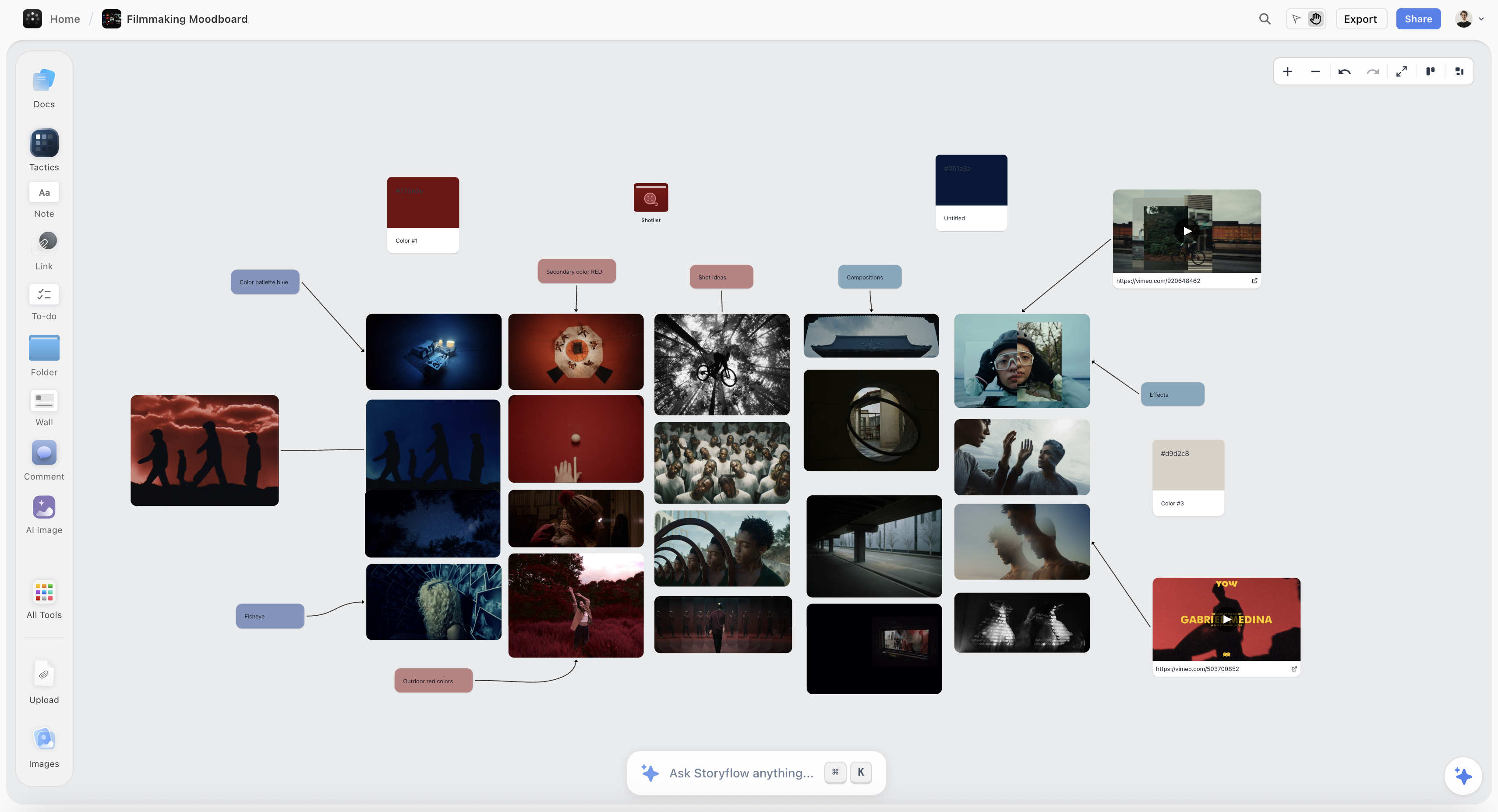
A film moodboard on the Storyflow canvas, with references grouped by tone, color, lighting, and camera beside the script
Build your film moodboard on one canvas
Gather your references and stills, tag each with the visual decision it locks, and share one board with the DP and designer, so the whole crew builds the same film before the camera rolls.

How to Create a Film Moodboard, Step by Step
Here is the full method, from script to a board the departments can build from. It assumes a short film, a music video, or a commercial with a small crew. Scale it up for a feature by building a board per sequence or look.
Step 1: Start from the script and the tone
Before gathering a single frame, decide the film's tone from the script. Read for the emotional register: is this warm and intimate, cold and tense, heightened and stylized. Write the tone in a sentence or two, because tone is the decision every reference will be judged against. A moodboard built without a tone is a folder of frames you liked; a moodboard built from a defined tone is a set of decisions that serve the story. This is the highest-leverage step, because the DP and designer inherit whatever tone you set or fail to set here.
Step 2: Gather references, including film stills
Now collect widely: film stills, photography, paintings, other music videos or commercials, your own location scouts. For film specifically, reference actual films by their look, because a still from a film a colorist knows communicates a grade faster than any description. Pull from stills libraries, films you love, and the visual world of the story. Do not curate yet; gather forty or fifty candidates into one place. The one rule is that everything lands on a single board, not scattered across a drive, a phone, and a group chat.
Step 3: Tag each reference with its decision
Go through the pile and tag every frame with the decision it locks and why: "this for the cold blue grade," "this for the handheld intimacy," "this for the single-source hard light," "this for the cutting rhythm of the chase." This is the step that turns references into a language the departments can act on. If you cannot name which of the six decisions a frame locks, it does not belong. Tagging is what separates a moodboard the DP can light from a folder they have to interpret.
Step 4: Cut to the frames that define the look
Edit hard. For each of the six decisions, keep the two or three references that state it most clearly and cut the rest. A film moodboard of twenty decisive frames beats one of eighty vague ones, because on a set the departments need clarity, not a gallery to interpret. This is uncomfortable and it should be: the strength of a moodboard is what it leaves out. A tight board says one thing per decision; a bloated board says many contradictory things and the film loses its coherence.
Step 5: Arrange the board by the six decisions
Group the survivors: tone, color, lighting, camera, production design, and pacing each get their cluster. Spatial grouping lets a department head glance at the board and find their brief instantly, the DP to lighting and camera, the designer to production design and color. If two references in one cluster disagree, a soft light and a hard light both tagged for the same scene, that is a decision you just surfaced early, on the board, instead of late, on set. Resolve it now while it is cheap.
Step 6: Share one board with the department heads
Send one link to the DP, the production designer, the colorist, and the editor, not five different folders. The point of the whole exercise is alignment, and alignment only happens when everyone builds from the same board. Walk the six decisions with the team, let each department head confirm they can work from their cluster, and resolve disagreements before the shoot. When the visual team shares one moodboard, the film has one look; when they each work from their own references, it has several.
Where AI Helps (and Where the DP's Eye Wins)
AI is useful for a film moodboard, but for specific jobs, and it is worth being precise so you do not hand it the decisions that belong to a trained eye.
Where it helps. An AI that reads your board and script can find gaps (a scene with no lighting reference, a decision with no frame), draft the notes that translate a reference into a brief, and answer questions across the board ("which references drive the night exterior look"). Because Storyflow keeps the moodboard beside the script and shot list, the AI can connect a reference to the scene it serves. It is genuinely useful for organizing and connecting the visual plan.
Where it does not. AI does not have a cinematographer's eye, and the look of a film is a craft judgment, not a text task. Whether a scene wants a hard single source or a soft wrap is a decision the DP makes from experience, and no model replaces that. Worse, AI-generated frames are a trap in a film moodboard: a generated image represents a look no camera captured and no colorist can match, so it sets an expectation the shoot cannot meet. Reference real films and real photography, and keep the visual decisions with the people who will execute them. AI organizes the references. The DP and director decide the look.
Common Film Moodboard Mistakes
- No defined tone. Without a tone from the script, the board is frames you liked, not decisions the story needs. Set the tone first.
- Referencing vibes, not films. "Cinematic" means nothing to a colorist. Reference specific films and stills whose look you actually want.
- Untagged frames. A board of untagged images makes the departments guess. Tag each frame with the decision it locks.
- Too many frames. Eighty references bury the look. Cut to the twenty that define the six decisions.
- Using AI-generated frames as references. A generated look no camera captured sets an impossible expectation. Reference real footage.
- Keeping the board in the director's head. A look only the director can see is a look the departments cannot build. Share one board.
- Confusing the moodboard with the storyboard. The moodboard locks the look; the storyboard sequences the shots. Do the moodboard first.
The Bottom Line
A film moodboard is not a folder of cinematic frames. It is the visual language of the film, six decisions locked and agreed by the director, the DP, and the designer before the shoot, so the set executes a shared vision instead of discovering three different films at once. Build it by defining the tone, gathering real references and stills, tagging each with the decision it locks, cutting to the frames that define the look, arranging by the six decisions, and sharing one board with the departments.
The honest boundary holds. A moodboard tool gathers and aligns the references; a stills library sources them, a colorist grades the film, and the DP's eye makes the look. AI can organize the references and connect them to scenes, but the visual decisions stay with the people who execute them. A film moodboard is not about how the film looks. It is about making sure everyone sees the same film before you shoot it.
If your next film's look still lives in the director's head and a scattered folder, build the moodboard on one canvas in Storyflow and align the departments before the camera rolls.
FAQ: Creating a Film Moodboard
How do you make a moodboard for a film?
Define the film's tone from the script, gather references including real film stills, tag each with the visual decision it locks, cut to the frames that define the look, arrange them by the six decisions (tone, color, lighting, camera, production design, pacing), and share one board with the department heads. The goal is alignment: the director, DP, and designer working from the same visual language before the shoot. A film moodboard is not a folder of striking frames; it is a set of agreed decisions the whole visual team can build from, which is what keeps a film's look coherent across departments.
What should a film moodboard include?
Six things, one for each visual decision a moving image makes: tone and mood references, color and grade references, lighting references, camera and framing references, production design and wardrobe references, and pacing references. Alongside the frames, include the film's tone in a sentence and a note beside each reference explaining which decision it locks and why. Real film stills are especially valuable because they communicate a look to a DP and colorist faster than any description. The frames show the language; the notes turn it into a brief each department can act on.
What is the difference between a film moodboard and a storyboard?
A film moodboard defines the look and feel of the film (tone, color, lighting, texture), while a storyboard sequences specific shots in order. The moodboard is the visual language the whole crew aligns on; the storyboard is the shot-by-shot plan drawn from the script. They are sequential and complementary: you build the moodboard first to lock the look, then storyboard the shots within that look. Confusing them is a common mistake, because a moodboard answers "what does this film look and feel like" and a storyboard answers "what happens in each shot." For the full distinction, see Moodboard vs Storyboard: The Complete Guide.
How is a film moodboard different from a photoshoot moodboard?
A film moodboard defines a moving image across a whole production (tone, camera movement, pacing, and how the look holds across scenes), while a photoshoot moodboard styles a set of still images (lighting, pose, and composition for individual frames). The film version has to account for motion, sequence, and multiple departments building to one look over days of shooting, so it locks decisions like camera movement and cutting rhythm that a stills moodboard never touches. If you are planning stills instead, see How to Create a Photoshoot Moodboard, which covers the still-image method.
What tools do filmmakers use for moodboards?
Filmmakers commonly reference film stills from a library like ShotDeck, gather in Pinterest or a bookmarking tool, and build the annotated decision board in Milanote, PureRef, or Storyflow. Storyflow is strongest when you want the moodboard on the same canvas as the script and shot list so the AI can connect a reference to the scene it serves; Milanote and PureRef are strong freeform boards; ShotDeck is the specialist stills source. For a full comparison of moodboard tools built for film, see The Best Film Moodboard Tools in 2026.
Should I reference real films in my moodboard?
Yes, referencing real films is one of the strongest things you can do, because a still from a film your DP and colorist know communicates a grade, a lighting approach, or a lens feel faster and more precisely than any description. "Shot like the night exteriors in a specific film" tells a cinematographer exactly what you mean. Pull stills that show the specific decision you want, not just films you admire generally, and note which decision each still is locking. Real references align the crew on a shared visual vocabulary that abstract descriptions never achieve.
Can AI create a film moodboard?
AI can help organize a film moodboard but should not generate its images or make its visual decisions. It is useful for finding gaps in the board, drafting the notes that translate a reference into a department brief, and connecting references to the scenes they serve. What it cannot do is have a cinematographer's eye, and AI-generated frames are actively harmful as references because they represent a look no camera captured and no colorist can match, setting an impossible expectation for the shoot. Use AI to organize real references and keep the look decisions with the director and DP.
How many images should a film moodboard have?
Aim for around twenty decisive frames, roughly two to three per visual decision, rather than a large gallery. Fewer than a dozen usually means the look is underspecified; more than thirty tends to bury the decisions in noise. The number matters less than the discipline: every frame should lock one of the six decisions and carry a note. For a feature or a project with distinct looks per sequence, build a board per look rather than one enormous board, so each set of decisions stays clear and the departments can find their brief.
Is Storyflow free for film moodboards?
Not during early access. Storyflow's Free plan, which launches before the end of 2026, will include unlimited images, notes, and shared boards plus basic AI, which will cover the whole method: gather, tag, cut, arrange, annotate, and share with the departments. Paid tiers start at Plus for $7.99/month billed annually, which adds the 200+ Story Blueprints and unlimited file uploads. The Free plan will genuinely run a full film moodboard, and because it will keep the board beside the script and shot list, the moodboard will become part of the plan rather than a separate file.
Where does Storyflow lose for film moodboards?
In two places worth naming. It is not a film stills library, so for referencing specific films by look you will pull stills from a dedicated source like ShotDeck and bring them in. And it does not grade footage, so the actual color work happens in DaVinci Resolve or a colorist's suite; the moodboard only specifies the target. Storyflow is the place to gather references and align the departments on the look; a stills library sources the references and a grading suite executes the color.
Table of Contents
- Key Takeaways
- What a Film Moodboard Is (and Is Not)
- The Six Visual Decisions a Film Moodboard Locks
- Quick Picks: Where to Build a Film Moodboard
- Comparison Table: Film Moodboard Tools at a Glance
- How to Create a Film Moodboard, Step by Step
- Where AI Helps (and Where the DP's Eye Wins)
- Common Film Moodboard Mistakes
- The Bottom Line
- Author
- FAQ: Creating a Film Moodboard
- Related Reading
Templates to check out for this topic


Filmmaking templates you can use in Storyflow
Skip the blank canvas. Open one of these filmmaking boards in Storyflow and the AI builds on the structure that is already there, from research through the shot list.


See Storyflow in Action
A visual AI workspace where every feature lives inside one canvas. No tab-switching, no context lost.
Build your entire board from a single message
Type what you need in the AI chat at the bottom of your canvas. The AI adds cards, headings, and structure directly onto your board.
Use expert frameworks as AI context
Type @ in the AI chat and choose any Tactic. The AI tailors every response to that framework instead of giving generic advice.
Turn your board into a mind map in seconds
Ask the AI to restructure your canvas as a mindmap. It connects your ideas into a visual hierarchy so you can see how everything relates.
Why Storyflow Exists
Storyflow actually began as a personal tool while working on creative and research projects.
We kept running into the same problem: ideas were scattered everywhere: notes, documents, and whiteboards.
Nothing helped us see how everything connected.
So we started building a workspace designed around how ideas actually grow.
→ Read how Storyflow was createdJustkay
Documentary Filmmaker & Founder at Storyflow
Published: 2026-07-17
Extremely simple, seriously capable


See how easy it is to get started
Watch a real project come together, from a blank board to a finished plan, clicked through step by step.
Start creating with AI and become more productive
Transform your creative workflow with AI-powered tools. Generate ideas, create content, and boost your productivity in minutes instead of hours.