The 12 Best AI Tools for Content Creators in 2026 (Tested on a Real Channel)
Content creation has four jobs: decide, plan, make, distribute. AI tools cluster almost entirely on make, which was never the bottleneck. Twelve tools ranked by how much of the real constraint they remove.

Category
AI Tools
Author

Justkay
Documentary Filmmaker & Founder at Storyflow
Topics
2026-08-26
•
20 min read
•
AI Tools- best ai tools for content creators
- ai tools for creators 2026
- ai content creation tools
- ChatGPT vs Claude for creators
- Descript vs CapCut
- ai tools for youtube creators
What are the best AI tools for content creators in 2026?
Content creation has four jobs: decide, plan, make, distribute. AI tools cluster almost entirely on make, which was never the bottleneck. Twelve tools ranked by how much of the real constraint they remove.

Full disclosure: Storyflow is our own product and we rank it third of twelve. It does none of the making: no editing, no clipping, no rendering, no publishing, no scheduling. It ranks third only because it serves the decide-and-plan half of the workflow, where a canvas the AI can read beats a chat queue for comparing ideas side by side. It is paid-only during early access, so a creator with no budget should start with ChatGPT and a physical wall; the Free plan launches before the end of 2026 and invited collaborators join free in the meantime. Its AI reads the current board, not every board you own, with extra context from @-mentioning up to one Tactic and three documents. If your bottleneck is production speed rather than direction, Descript, CapCut and Opus Clip will do more for you, and their reviews say so.
Quick Comparison
These four map onto the four jobs in a creator workflow: a general thinking partner, a long-form writing collaborator, a surface for deciding between ideas, and the production tool that saves the most measurable hours.
| Tool | Best For | AI Features | Price |
|---|---|---|---|
| ChatGPT | Angles, drafts, titles, everything in between | General model with browsing and images | Free tier / from ~$20 mo |
| Claude | Holding an argument across thousands of words | Long-context writing model | Free tier / from ~$17 mo annual |
| Storyflow | Comparing forty ideas at once instead of scrolling a list | Canvas-wide context AI | $7.99 mo annual (free plan late 2026) |
| Descript | Editing video and audio from a transcript | Studio Sound, Overdub, filler removal | Free tier / from ~$19 mo |
Key Takeaways
- Content creation has four jobs: decide, plan, make, distribute. AI tools cluster almost entirely on make, which is the job that was never the bottleneck.
- Creators who stall are rarely slow at producing. They are unsure what to produce, which is why faster production tools raise output and not results.
- ChatGPT and Claude remain the two tools worth having regardless of what you make. Descript and Opus Clip are the strongest job-specific wins.
- Storyflow ranks third because it is one of the few tools aimed at the decide-and-plan half, where the AI reads a whole board of ideas rather than answering one prompt at a time.
- Adding a tool to a workflow that has no plan makes the mess faster. The order in this list is deliberately decide, plan, make, distribute.
The Decide Gap
Every creator I know who is struggling describes the same problem in the same wrong words. They say they need to post more, or edit faster, or find a better system.
Sit with them for an afternoon and it is almost never true. They can produce. Most of them can produce far more than they publish. What they cannot do is decide.
Decide which of the eleven ideas in the notes app is the one. Decide what the video is actually about, as opposed to what it is nominally about. Decide whether this is a piece on its own or a bad version of something bigger. Decide to kill the idea they have been carrying for four months. Those decisions are unglamorous, they produce nothing visible, and they are where the entire output is determined.
Now look at what the AI tool market sells. Faster editing. Automatic clips. Generated thumbnails. Voice cloning. Script drafting. Every one of them accelerates making, which was not the constraint, and none of them touch deciding, which was.
This is the decide gap, and it explains an outcome a lot of creators have quietly experienced: adopting four AI tools, tripling raw output, and moving nothing. A pipeline with no decision at the front produces more of whatever was already unfocused.
The four jobs, in the order they actually happen:
Decide. What is worth making, out of everything you could make. Requires comparison, which requires seeing options side by side, which is why this job resists chat interfaces.
Plan. What this specific piece is: the angle, the structure, the promise to the viewer. This is where most published work is won or lost, and it takes twenty minutes that almost nobody spends.
Make. Write, film, record, edit, design. The job with the most tools and the least remaining friction.
Distribute. Package, title, thumbnail, schedule, repurpose. Genuinely improved by AI, and worth almost nothing applied to work that failed the first two jobs.
This list is ordered by how much of the real bottleneck each tool removes, not by how impressive the demo is.
At a Glance: The 12 AI Tools Compared
| Tool | Job it serves | What it actually replaces | Price |
|---|---|---|---|
ChatGPT | Decide, plan, make | A thinking partner at 11pm | Free tier / from ~$20 mo |
Claude | Plan, make | A long-form writing collaborator | Free tier / from ~$17 mo annual |
Storyflow | Decide, plan | Eleven notes apps and a wall of screenshots | $7.99 mo annual (free plan late 2026) |
Descript | Make | An editor and a transcription service | Free tier / from ~$19 mo |
Opus Clip | Distribute | Manually cutting shorts from long video | Free tier / from ~$15 mo |
CapCut | Make | A conventional video editor | Free / Pro from ~$9.99 mo |
ElevenLabs | Make | A voiceover session | Free tier / from ~$5 mo |
Canva Magic Studio | Make, distribute | A designer for routine assets | Free tier / Pro from ~$15 mo |
Midjourney | Make | Stock imagery and concept art | From ~$10 mo |
Perplexity | Decide, plan | Twenty tabs and a search rabbit hole | Free tier / from ~$20 mo |
Notion AI | Plan | A document nobody rereads | Add-on from ~$10 mo |
Riverside | Make | A studio recording setup | Free tier / from ~$15 mo |
Prices are the publicly listed rates at the time of writing and change often in this category in particular. Check before committing.
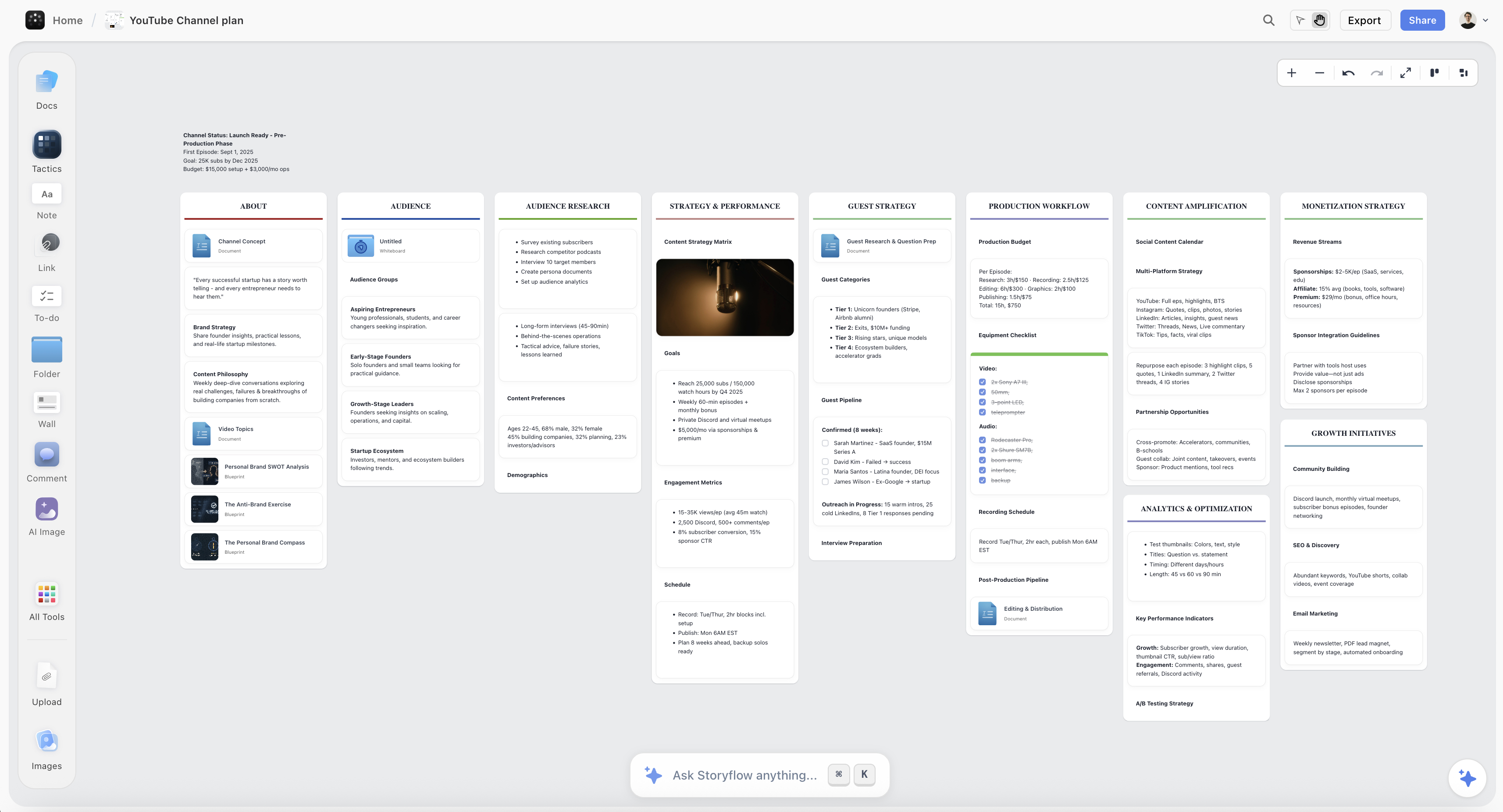
Forty content ideas grouped on a Storyflow canvas so duplicates and gaps are visible at once rather than scrolling in a list
Deciding is a comparison problem, not a chat problem
A notes app holds four hundred fragments you cannot judge, because you cannot compare what you cannot see at once. Storyflow puts the ideas on a canvas and lets the AI read the whole set: which are duplicates, which have no audience, what is missing. Paid-only during early access; the Free plan lands before the end of 2026.

How I Ranked These
I make documentaries and I run the content around them, which means I am the exact person these tools are sold to: one person, several formats, no team, and a permanent backlog of half-ideas.
Every tool below I used on real published work rather than a trial project. The test was not whether the tool did the thing, it was whether the thing it did changed the output. Where a claim rests on published documentation rather than my own use, the review says so.
Five criteria, in this order:
- Which job it serves. Decide and plan are weighted above make and distribute, for the reasons above.
- Whether it removes a real constraint or a theoretical one. A tool that halves a task you do twice a month is worth less than one that unblocks a decision you avoid weekly.
- Whether the output needs rescuing. Many AI tools produce a first draft that costs more to fix than to write. That is a negative, not a feature.
- Cost against actual usage. Creator tool subscriptions accumulate silently, and most creators are paying for at least two they stopped using.
- Whether it survives contact with a bad week. Tools that require setup and discipline get abandoned first.
Deliberately not weighted: output volume. More posts is not the goal and treating it as one is how the decide gap gets worse.
Why the Decide Job Resists Chat
There is a structural reason AI has helped so much less with deciding than with making, and it is worth understanding before you buy anything.
Deciding is comparison. You have eleven candidate ideas and you need to know which one is strongest, which two are the same idea, which three only look interesting because they are new, and which one you are avoiding because it is the hard one. That is a spatial task. You need the options in front of you at once.
A chat interface is a queue. Ideas arrive one at a time, in order, and scroll away upward. You can ask a model to compare eleven things and it will produce a paragraph about eleven things, which is a summary of a comparison rather than a comparison. Then that paragraph scrolls away too, and next week you start over, because a conversation is not a place ideas accumulate.
This is why creators end up with a notes app containing four hundred fragments and no idea which are good. The fragments were captured in a linear tool and comparison never happened.
What actually works for the decide job is a surface where every candidate is visible simultaneously, can be physically grouped, and persists between sessions. Historically that was a wall and index cards. The useful version of AI here is not a chat panel next to that wall, it is a model that can read the whole wall: which of these are the same idea, which has no audience, what is missing from this set, which one am I avoiding.
That capability is rare. Storyflow is built on it, which is why it ranks third despite doing none of the making. Perplexity attacks a different part of the same job by collapsing research time. Everything else in this list assumes the decision is already made.
Quick Picks by Job
- Best AI tool for content creators overall: ChatGPT, because it is the only one that is useful at all four jobs and the only one you will still open on a bad week.
- Best for long-form writing: Claude, which holds an argument across thousands of words better than anything else here.
- Best for deciding what to make: Storyflow, where the ideas sit on a canvas the AI can read as a set.
- Best for research before you commit: Perplexity, for the cited-answer version of a search rabbit hole.
- Best for video and podcast editing: Descript, still the biggest single time saving in this list.
- Best for repurposing long video into shorts: Opus Clip, which does one job properly.
- Best free editor: CapCut, which is genuinely good and genuinely free.
- Best for routine design output: Canva Magic Studio, for the thumbnail-and-carousel treadmill.
- Best for voiceover: ElevenLabs, with the ethical caveats stated in its review.
1. ChatGPT
ChatGPT ranks first for an unglamorous reason: it is the only tool here that is useful at every one of the four jobs, and the only one you will still open on the week when everything else feels like admin.
For deciding, it is a competent interrogator if you use it that way: give it your idea and ask it to argue that nobody cares, and the answer is frequently correct. For planning, it will outline, restructure, and pressure-test an angle. For making, it drafts, rewrites, and cuts. For distributing, it produces title variations and descriptions quickly enough that you will actually generate twenty instead of settling for your second.
Its practical advantage over specialist tools is that it has no workflow. There is nothing to set up and nothing to maintain, which is why it survives the bad weeks that kill tools requiring discipline.
Against it: it is a queue, so it is weak at exactly the comparison work the decide job needs, and everything you thought about last month has scrolled away. Its default voice is recognisable and bland, so anything published unedited reads as generated. And it is agreeable by nature, which makes it a poor judge of your own ideas unless you explicitly instruct it to be hostile.
Pricing: Free tier. Plus from around $20/month.
2. Claude
Claude is the better tool the moment the work gets long. It holds a thread across a full essay, script, or newsletter in a way that produces fewer of the contradictions and restatements that show up in long generated text.
For creators whose main output is written (newsletters, blogs, long video scripts) this is the one I reach for. It also takes editorial direction better: tell it the third paragraph is doing nothing and it will cut rather than expand.
Against it: it is a queue with the same comparison weakness as ChatGPT. It has fewer surrounding features than the OpenAI ecosystem. And for very short-form work the difference from ChatGPT is small enough that paying for both is hard to justify unless writing is your main job.
Pricing: Free tier. Paid from around $17/month annual.
3. Storyflow

Storyflow is our own product, and it does none of the making. No editing, no rendering, no clipping, no publishing, no scheduling. It ranks third because it is one of very few tools aimed at the two jobs that come before all of that.
What it does: your ideas live on a canvas instead of in a list, and the AI reads the whole canvas. That difference is the entire argument. Put forty content ideas on a board and you can ask which of these are the same idea in different words, which have no clear audience, what a set like this is obviously missing, and which three would make a coherent series rather than three isolated posts. Those are comparison questions, and they are unanswerable in a chat window because the candidates are not present at once.
Then the ideas stay. A board is not a conversation, so next month the same forty ideas are still there with your clustering intact, and the ones that survived are visibly separate from the ones that did not. For the specific creator failure of a notes app with four hundred fragments and no way to judge them, this is the fix.
Against it, plainly: it is paid-only during early access, so a creator with no budget should start with ChatGPT and a physical wall. The Free plan launches before the end of 2026; today the only genuinely free route is that anyone a paid member invites to a board joins free and can invite others. The AI reads the current board, not every board you own, with extra context from @-mentioning up to one Tactic and three documents. It will not write your script better than Claude, will not cut your video, and will not post anything. If your bottleneck is production speed rather than direction, everything below this line is a better purchase.
Pricing: Plus $7.99/month annual or $9.99 monthly. Pro $14/month annual adds AI image generation, roughly 20x more AI, and memory across conversations. Max $39/month annual adds 40x more AI and a team workspace. No free plan until late 2026.
4. Descript
Descript is the largest single time saving on this list for anyone making video or audio, and it earns fourth place only because editing was never the decide gap.
Editing by deleting words from a transcript is one of those ideas that sounds like a gimmick and turns out to change the job. Removing filler words, tightening a rambling take, and cutting a ninety-minute recording to forty is dramatically faster than a timeline, and Studio Sound turns a mediocre room recording into something publishable.
Overdub, which lets you fix a misspoken word by typing it, remains genuinely useful and slightly unsettling.
Against it: it is not a finishing tool, so complex visual edits still move to a real NLE. Performance on long projects can be heavy. And the pricing tiers around transcription hours catch people who record a lot.
Pricing: Free tier with limited hours. Paid from around $19/month.
5. Perplexity
Perplexity earns its place because it attacks the decide job from the other side: it collapses the time between "is this topic worth doing" and knowing.
The cited-answer format matters here. For a creator checking whether an angle has been covered to death, whether a claim they are about to make is actually true, or what the current state of a subject is, getting an answer with sources attached is a different activity from a search session that becomes twenty tabs and ninety minutes.
Against it: it is research, not judgment, and it will confidently summarise a topic without telling you whether you have anything to add to it. Sources still need checking, particularly on anything contested. And for creators whose work is not research-led, its value drops sharply.
Pricing: Free tier. Pro from around $20/month.
6. Opus Clip
Opus Clip does one job and does it well: take a long video, find the moments likely to work as shorts, and cut them with captions and reframing already applied.
For anyone publishing long-form and wanting a shorts presence, this is hours a week. The clip selection is better than it has any right to be, and the auto-reframing that keeps a speaker centred in vertical is the part that would otherwise be tedious.
Against it: it is distribution applied to work already made, so it multiplies whatever you gave it. Ten clips from a video with no clear point produce ten pieces with no clear point. Its virality scoring should be treated as a rough sort rather than a prediction, and its output usually needs a human pass on the hook.
Pricing: Free tier with limited minutes. Paid from around $15/month.
7. CapCut
CapCut is the best free video editor most creators will ever need, and its AI features (auto captions, background removal, auto reframe) are good enough that paying for separate tools to do them is usually waste.
For short-form especially, the template ecosystem means matching a current format takes minutes rather than an afternoon.
Against it: it is owned by ByteDance, which is a real consideration for some creators and some regions, and its regulatory position has been unstable. Templates pull work toward sameness, which is a strategic cost that does not show up in a feature list. And it is a weaker choice for long-form documentary-style editing than a proper NLE or Descript.
Pricing: Free with a genuinely capable feature set. Pro from around $9.99/month.
8. Canva Magic Studio
Canva is where the routine design treadmill goes to be survivable: thumbnails, carousels, covers, and the endless resizing of one asset into six formats.
Magic Studio adds generation, background removal, and one-click resizing, and Magic Switch turning a design into other formats is the single most useful feature for a creator publishing across platforms.
Against it: template gravity is strong, so output tends toward looking like everybody else's output, which for a creator competing on distinctiveness is a genuine strategic cost. Large projects get heavy. And the free tier is generous enough that many creators pay for Pro without needing it.
Pricing: Free tier is generous. Canva Pro from around $15/month.
9. ElevenLabs
ElevenLabs is the best synthetic voice available and the gap to second place is wide. For narration, dubbing into other languages, and fixing a single mispronounced line without a re-record, it is unmatched.
For creators making faceless or narration-led content it removes an entire production step.
Against it, and this is a strategic point rather than a technical one: a synthetic voice is a fine tool and a poor brand. Audiences form attachments to voices, and a channel built on a cloned voice is building the attachment somewhere it does not own. Use it for utility (corrections, translations, temp tracks) and think hard before using it as the identity. Voice cloning also carries obvious consent issues; clone your own voice or one you have explicit permission for.
Pricing: Free tier with limited characters. Paid from around $5/month.
10. Midjourney
Midjourney remains the strongest image model for aesthetic quality, and for creators it mostly replaces stock: thumbnails, blog headers, concept frames, moodboard material.
Its aesthetic consistency is the real advantage. A channel can develop a visual identity from it, which stock never allows.
Against it: the house style is recognisable, and audiences increasingly recognise it, which cuts against distinctiveness. Precise control remains awkward compared to designing something. And for anything requiring specific text, layout, or brand accuracy it is the wrong tool.
Pricing: From around $10/month.
11. Notion AI
Notion AI is a reasonable planning assistant for creators already running their content calendar in Notion, which is a lot of creators. It summarises, drafts, fills database properties, and answers questions across your workspace.
The workspace-wide question answering is the genuinely useful part: asking what you have already written about a topic saves real duplication.
Against it: it is an add-on cost on top of a subscription, the writing quality trails ChatGPT and Claude, and it inherits Notion's core weakness for this use case, which is that a database of content ideas is a list. Lists are where the decide job goes to die, for the reasons in the framework section above.
Pricing: Add-on from around $10/month per member on top of a Notion plan.
12. Riverside
Riverside solves a narrow problem completely: recording remote interviews at local quality, so a guest on a bad connection still sounds and looks good because each side records locally and uploads afterwards.
Its AI layer adds transcripts, clip suggestions, and show notes, which covers the immediate post-production for a podcast.
Against it: if you never record remote guests, it does nothing for you. Editing is basic next to Descript. And the price is hard to justify for occasional use.
Pricing: Free tier. Paid from around $15/month.
Recommended Stacks
Solo creator, minimum viable stack. ChatGPT, CapCut, and a decision surface. That is one paid subscription and it covers all four jobs adequately.
Long-form video creator. ChatGPT for angles, Descript for the edit, Opus Clip for shorts, Canva for thumbnails. The heaviest genuine time savings in this list.
Writer or newsletter creator. Claude for drafting, Perplexity for research, a board for the idea backlog. Video tools are irrelevant and most creator stack advice will try to sell them to you anyway.
Podcaster. Riverside for recording, Descript for editing, Opus Clip for clips, ElevenLabs only for corrections.
Creator who is producing plenty and getting nowhere. Add nothing. The problem is upstream of every tool on this list, and the fix is a session where the backlog is laid out and most of it is killed.
Tools to Avoid for This Job
Anything that auto-posts generated content on a schedule. It produces volume with no point of view, which is the exact failure mode audiences have learned to detect in the last two years.
A second AI writing tool. If you have ChatGPT or Claude, a specialist "AI content writer" is almost always a worse model behind a nicer form.
Trend-scraping tools bought before you have a position. Knowing what is trending is only actionable if you already know what you are for, and creators buy these to avoid deciding that.
Any tool whose demo is impressive and whose job you do twice a month. The subscription is monthly and the value is not.
A notes app as the idea system. A linear list of four hundred fragments is where ideas go to be forgotten, because you cannot compare things you cannot see at once.
What No Tool on This List Does
None of them give you a point of view. Every one of them will faithfully accelerate a channel that has nothing to say, and the acceleration makes that more visible rather than less.
None of them tell you to stop. The hardest creator decision is abandoning an idea you have already invested in, and no tool has an incentive to suggest it.
None of them fix inconsistency. Publishing regularly for two years is what builds most audiences, and it is a scheduling and stamina problem that survives every tool in this list.
None of them make you interesting. Distribution is competitive and production is nearly free, which means the scarce input is now judgment, and judgment is the one thing here that is still entirely yours.
The Bottom Line
The AI tool market for creators is enormous, competent, and pointed almost entirely at the wrong job. Editing, clipping, generating, resizing, and scheduling are all genuinely faster than they were two years ago, and none of that was what was stopping you.
If you want the shortest honest answer: get ChatGPT, get CapCut or Descript depending on what you make, and stop there until you can name the exact hours a third tool saves.
If you want the answer that matters more, spend an afternoon on the decide job instead. Put every idea you are carrying where you can see all of them at once. Group the duplicates, and there will be more than you expect. Kill everything you cannot name an audience for. Whatever is left is your next quarter, and you will have done more for your output than any subscription in this list.
Storyflow, which we make, exists for that afternoon: a canvas where the ideas live and an AI that can read the whole set rather than one prompt at a time. It ranks third here and not first, because ChatGPT is more broadly useful and because production tools save more measurable hours. It ranks third rather than tenth because the job it serves is the one that decides everything downstream.
Production is nearly free now. Judgment is the scarce input, and it is the part no tool on this page supplies.
FAQ: AI Tools for Content Creators
What are the best AI tools for content creators in 2026?
ChatGPT for almost everything, Claude for long-form writing, Storyflow for deciding what to make and planning it visually, Descript for video and podcast editing, and Opus Clip for turning long video into shorts. Most creators need two or three of these, not all twelve.
What is the best free AI tool for content creators?
CapCut is the strongest genuinely free tool here, and its captions, background removal, and auto-reframe cover what many creators pay separately for. ChatGPT and Claude both have usable free tiers, and Canva's free tier is generous. Storyflow is paid-only during early access, so it is not a free option today.
Do AI tools actually help creators grow?
They help with production, which is rarely the constraint. Most creators who stall are producing plenty and are unclear what they are producing or why, and adding tools to that makes the output faster without making it better. The tools that help growth are the ones that improve the decision at the front of the pipeline, and there are very few of them.
What AI tool should a creator buy first?
ChatGPT, at around $20 a month, because it is useful at all four jobs and requires no workflow to maintain. Buy the second tool only when you can name the specific task it removes and how many hours a week that is.
Is Storyflow an AI tool for content creators?
For the deciding and planning half, yes. Ideas sit on a canvas rather than in a list, and the AI reads the whole board, so you can ask which of forty ideas are duplicates, which have no audience, and what a set is missing. It does no editing, clipping, publishing, or scheduling, and it is paid-only during early access. If your bottleneck is production speed, Descript and Opus Clip will do more for you.
How many AI tools does a content creator actually need?
Two or three. One general model, one tool for whatever your main production job is, and optionally one for the decide-and-plan half. Most creators paying for six are paying for at least two they have stopped opening.
Will AI-generated content hurt my channel?
Unedited generated content reads as generated, and audiences have become good at spotting it quickly. AI used as a drafting and thinking layer under a real point of view is a different thing and is now normal practice. The line that matters in practice is whether a human made the judgments, not whether a model produced any of the words.
What is the best AI tool for repurposing content?
Opus Clip for long video into vertical shorts, since it selects moments, reframes, and captions in one pass. Descript is better when you want editorial control over which moments become clips. Canva's Magic Switch handles the format-resizing half for static assets.
How do I decide what content to make?
Get every candidate idea visible at the same time rather than scrolling a list, group the ones that are secretly the same idea, and kill the ones you cannot name an audience for. This is a comparison task, which is why it works on a wall or a canvas and fails in a notes app or a chat window. Doing it once a month is worth more than any tool in this list.
Is ChatGPT or Claude better for content creation?
Claude for long-form: it holds an argument across thousands of words with fewer contradictions and takes editorial direction better. ChatGPT for range: images, browsing, and a wider surrounding ecosystem, plus it is stronger on short-form and ideation breadth. Most creators only need one, and which one depends on whether your main output is long writing.
Are AI voice tools safe to use for a channel?
Technically yes, strategically be careful. ElevenLabs is excellent for corrections, dubbing, and temp tracks. Building a channel identity on a synthetic voice means the attachment your audience forms is to something you licence rather than own. Only clone a voice that is yours or that you have explicit permission for.
What is the biggest mistake creators make with AI tools?
Buying tools that speed up making when the problem is deciding. It is the most common pattern in this whole category: output triples, results do not move, and the creator concludes they need a better tool rather than a clearer decision.
Table of Contents
- Key Takeaways
- The Decide Gap
- At a Glance: The 12 AI Tools Compared
- How I Ranked These
- Why the Decide Job Resists Chat
- Quick Picks by Job
- 1. ChatGPT
- 2. Claude
- 3. Storyflow
- 4. Descript
- 5. Perplexity
- 6. Opus Clip
- 7. CapCut
- 8. Canva Magic Studio
- 9. ElevenLabs
- 10. Midjourney
- 11. Notion AI
- 12. Riverside
- Recommended Stacks
- Tools to Avoid for This Job
- What No Tool on This List Does
- The Bottom Line
- FAQ: AI Tools for Content Creators
- Related Reading
Templates to check out for this topic


Content and video templates you can use in Storyflow
Plan a channel, a script, and a content pipeline on the same board. Open one of these templates and let the AI build on the structure instead of starting from a blank doc.


See Storyflow in Action
A visual AI workspace where every feature lives inside one canvas. No tab-switching, no context lost.
Build your entire board from a single message
Type what you need in the AI chat at the bottom of your canvas. The AI adds cards, headings, and structure directly onto your board.
Use expert frameworks as AI context
Type @ in the AI chat and choose any Tactic. The AI tailors every response to that framework instead of giving generic advice.
Turn your board into a mind map in seconds
Ask the AI to restructure your canvas as a mindmap. It connects your ideas into a visual hierarchy so you can see how everything relates.
Why Storyflow Exists
Storyflow actually began as a personal tool while working on creative and research projects.
We kept running into the same problem: ideas were scattered everywhere: notes, documents, and whiteboards.
Nothing helped us see how everything connected.
So we started building a workspace designed around how ideas actually grow.
→ Read how Storyflow was createdJustkay
Documentary Filmmaker & Founder at Storyflow
Published: 2026-08-26
Extremely simple, seriously capable


See how easy it is to get started
Watch a real project come together, from a blank board to a finished plan, clicked through step by step.
Start creating with AI and become more productive
Transform your creative workflow with AI-powered tools. Generate ideas, create content, and boost your productivity in minutes instead of hours.