ClickUp vs Monday for Creative Project Management: The Everything App and the Grid
ClickUp is a tool you configure. Monday is a tool you adopt. Name the person who will spend a day a month gardening the tool, and this choice mostly makes itself.

Category
Productivity
Author

Justkay
Documentary Filmmaker & Founder at Storyflow
Topics
2026-08-10
•
13 min read
•
Productivity- ClickUp vs Monday
- best AI tools for creative project management
- creative project management software
- ClickUp pricing 2026
- Monday pricing 2026
- project management for creative teams
ClickUp vs Monday: which should a creative team use?
Pick ClickUp when you want one configurable app to swallow every workflow (tasks, docs, whiteboards, goals, chat) and you have someone willing to configure it. Pick Monday when you want a visual, board-driven system that non-technical creatives actually keep updated. ClickUp is $7 per user per month on Unlimited and $12 on Business, with its ClickUp Brain AI as a $9 per member add-on. Monday starts at $9 per seat per month annual on Basic, with Standard at $12 and Pro at $19. Both are generalist work platforms courting creative teams, and both carry the same hidden question: how much of your team's week should the tool itself consume? Because that is the real axis here. These two products differ less in what they can do than in what they demand from you to do it.

Full disclosure: Storyflow is our own product, so weigh its placement accordingly. It does not manage projects operationally: no workload views, no dependency chains, no client-facing status boards, so the tracking layer stays in ClickUp or Monday and Storyflow sits beneath it as the creative layer. It is also paid-only during early access while ClickUp's free tier is genuinely generous. Its structural difference is flat per-account pricing against both platforms' per-seat models.
Quick Comparison
ClickUp is a tool you configure. Monday is a tool you adopt. Name your gardener first.
| Tool | Best For | AI Features | Price |
|---|---|---|---|
| ClickUp | Depth and consolidation, if someone owns the setup | ClickUp Brain, a $9 per member add-on | $7 user mo Unlimited, $12 Business |
| Monday | Legible boards non-technical creatives keep updated | AI summaries, drafts, and automation assists | $9 seat mo Basic annual, $12 Standard, $19 Pro |
| Storyflow | Drafting briefs and structures from the creative board | AI reads the full canvas plus @-mentioned Tactics and Documents | $7.99 mo annual (free plan late 2026) |
Key Takeaways
- ClickUp's pitch is consolidation: tasks, docs, whiteboards, chat, and goals in one app, dense with features and settings. The price is configuration and cognitive load.
- Monday's pitch is legibility: colorful boards, statuses a glance can read, automations a non-engineer can build. The price is depth at the edges.
- ClickUp is a tool you configure. Monday is a tool you adopt. Creative teams without an ops person consistently do better with the second kind.
- Both charge per seat, which taxes the wide-but-shallow usage typical of creative teams (freelancers, reviewers, clients who only look).
- Both ship AI assistants (summaries, drafts, automations); neither AI reads your creative material as project context.
- Creative work is the payload these platforms track, not the thing they host: briefs, scripts, and boards live in attachments both treat as opaque.
- The switching cost between generalist platforms is high; choose for your team's actual discipline level, not for the feature matrix.
- Both platforms structure tasks, not creative substance. Storyflow holds the substance (references, drafts, directions, research) and its AI drafts the brief, the campaign structure and the script outline from it. It does not manage projects operationally, so the tracking layer stays in ClickUp or Monday.
For the ranked field, see The Best Creative Project Management Tools in 2026.
The Everything App and the Grid
ClickUp and Monday represent two answers to the same market question: what should a work platform be for teams whose work does not fit a ticket queue?
ClickUp's answer is maximalism. Every unit of work is a task in an infinitely nestable hierarchy (spaces, folders, lists, tasks, subtasks), viewable as list, board, Gantt, calendar, or timeline, decorated with custom fields, wired with automations, and accompanied by native docs, whiteboards, goals, and chat. The ambition is to be the last app your team needs. The reality on creative teams is that somebody must own the configuration, and where nobody does, ClickUp decays into an intimidating list of half-built spaces.
Monday's answer is legibility. The core object is a board: rows of items, columns of statuses, owners, and dates, colored so aggressively that a glance across the room tells you where the campaign stands. Automations are sentence-shaped ("when status changes to Done, notify..."), which means the producer builds them, not IT. The ambition is to be the app the whole team actually opens. The cost appears at the edges: deep dependency logic, complex docs, and heavy asset workflows all feel thinner than their ClickUp equivalents.
ClickUp is a tool you configure. Monday is a tool you adopt.
The test: name the person on your team who will spend a day a month gardening the tool. If a real name comes to mind (an ops lead, a producer who loves systems), ClickUp's depth converts into leverage. If the honest answer is nobody, buy the tool that survives neglect, and that is Monday.
Head-to-Head Comparison Table
| ClickUp | Monday | |
|---|---|---|
Core model | Nestable task hierarchy, many views | Visual boards of items and statuses |
Personality | Dense, configurable, maximalist | Colorful, legible, opinionated |
Setup demand | High; needs an owner | Low; producers self-serve |
Docs and whiteboards | Native, genuinely usable | Lighter, workday-grade |
Automations | Powerful, more technical | Sentence-builder, non-technical |
Dependencies and timelines | Deep | Adequate |
Price | $7 user mo Unlimited, $12 Business, Brain AI $9 add-on | $9 seat mo Basic annual, $12 Standard, $19 Pro |
Free tier | Generous for small teams | Limited |
AI | Summaries, drafts, automation assists | Summaries, drafts, automation assists |
Failure mode | Half-configured sprawl | Board sprawl with shallow depth |
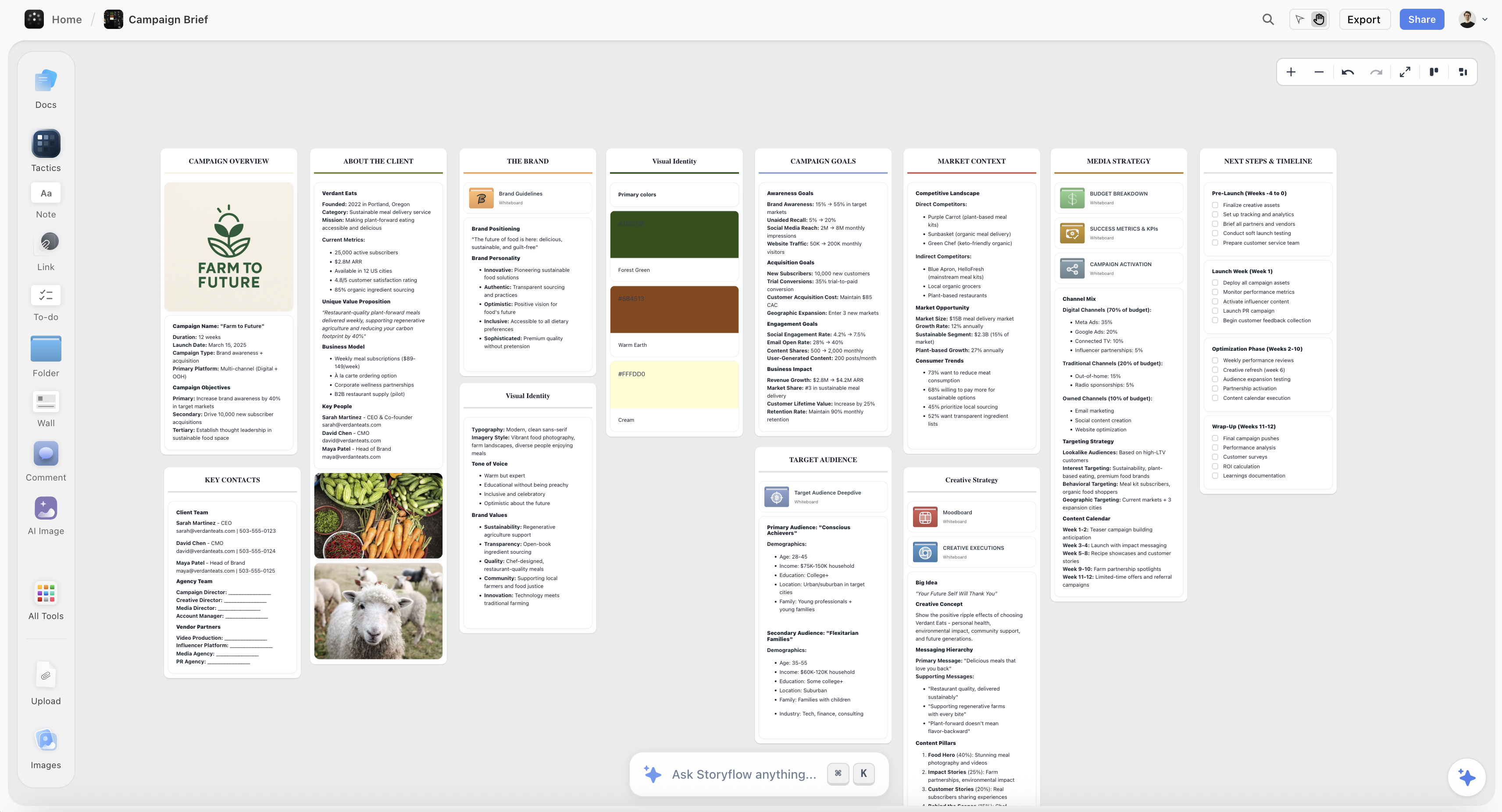
A Storyflow canvas holding campaign direction, research, and an AI-drafted brief on one board
Trackers are blind to the work itself
The card says the brief is done; whether it is any good is invisible to the platform. Storyflow's AI reads your full canvas (plus Tactics and documents you @-mention) and drafts the briefs and structures your pipeline is waiting on, at a flat account price. Paid-only during early access; the Free plan lands before the end of 2026.

Where ClickUp Wins
Consolidation is real when it lands. A team that fully adopts ClickUp genuinely cancels three other subscriptions: the task tracker, the docs tool, and the light whiteboard. For budget-conscious studios with an ops-minded owner, that consolidation at $7 per user per month is the best value in the category, with the caveat that ClickUp Brain, its AI layer, is a $9 per member add-on on top.
Depth exists when you need it. Real dependency chains, workload views, sprint points, custom statuses per space: production-heavy creative operations (post houses, agencies running dozens of concurrent jobs) eventually want this machinery, and Monday's equivalents run out sooner.
The free tier is a real runway. Small teams can run genuinely useful workflows on ClickUp free while they decide, which is not true of Monday's limited free offering.
ClickUp's honest weaknesses: the interface is dense enough that casual users (exactly who creative teams are full of) bounce, performance has historically wobbled under big workspaces, and every ClickUp horror story starts the same way: nobody owned the setup.
Where Monday Wins
Creatives actually update it. The board metaphor, the color, the drag: status updating in Monday is closer to moving a sticky note than filing a report. Tracking tools only work when updated, which makes adoption the most underrated feature in this comparison.
Producers automate without engineers. "When Design status becomes Approved, move to Copy and notify Sam": built in a minute by the person who needs it. This self-service quality spreads automation through a creative org in a way ClickUp's more technical builder rarely does.
Client-facing legibility. A Monday board shared with a client reads instantly: what is moving, what is stuck, who owns it. For agencies, that glanceability replaces a weekly status email, and no ClickUp view communicates as fast to an outsider.
Monday's honest weaknesses: per-seat costs climb quickly at the tiers teams actually need, depth runs out at complex dependency and asset workflows, and its docs and whiteboards are companions rather than replacements, so the consolidation math never quite works.
The Payload Problem, Again
Put a creative project into either platform and look at what the platform actually holds: statuses about the work, never the work.
The campaign brief, the script, the design directions, the moodboard: these live as links and attachments that ClickUp and Monday move through pipelines without reading. Their AI features inherit the same blindness, drafting status summaries from metadata while the creative substance (is the script on-brief? does the design match the direction?) stays invisible. The platforms are managers, not collaborators.
That substance is the lane where Storyflow wins for creative teams. The canvas holds the actual creative material (references, drafts, directions, research), and the AI reads the entire active board (plus up to 1 Tactic and up to 3 Documents you @-mention) to draft the work itself: the brief from the direction, the campaign structure from the notes, the script outline from the research. Its 200+ Story Blueprints (Hero's Journey, AIDA, Retention Hooks among them) structure creative deliverables the way these platforms structure tasks.
The honest accounting: Storyflow does not manage projects in the operational sense. No workload views, no dependency chains, no client-facing status boards; the tracking layer stays in ClickUp or Monday, and Storyflow sits under it as the creative layer, linked from the task. It is also paid-only during early access (the Free plan launches before the end of 2026; anyone a paid member invites to a board joins free now). One structural difference worth noting: its pricing is flat per account rather than per seat, so the freelancers and reviewers who inflate seat counts on these platforms cost nothing extra.
Pricing: What You Actually Pay
As of August 2026, and worth re-verifying because packaging shifts:
| Plan | ClickUp | Monday | Storyflow |
|---|---|---|---|
Free | Generous for small teams | Limited | Coming late 2026 (invited collaborators join free now) |
Entry paid | $7 user mo Unlimited ($9 Brain AI add-on) | $9 seat mo Basic annual, $12 Standard | $7.99 per month annual, flat per account |
Structural note | Per user | Per seat, tier jumps matter | Flat per account |
For a ten-person creative team with five occasional collaborators, the per-seat platforms price those collaborators like employees. Flat-account pricing does not. That asymmetry matters more to creative teams than to the software companies these platforms were originally shaped for.
Which Should You Choose?
Agency or studio with an ops-minded owner. ClickUp. The configuration investment pays off as consolidation and depth, and the price is right.
Creative team with no ops person. Monday. Adoption beats depth for you, and a tool the team updates is worth the seat premium over a tool the team abandons.
Small team deciding under budget pressure. ClickUp free as the trial of the everything-app life; Monday only if the free tier's limits are hit by real client-facing needs.
Video or production-heavy teams. The dependency question dominates; see the adjacent matchups Trello vs Asana for Video Production and Asana vs Monday for Video Teams.
Teams whose real chaos is the creative work, not its tracking. If statuses are fine but briefs arrive thin and directions drift, no tracker fixes that. That is the creative-layer lane above; see The Best AI Tools for Creative Project Management.
The Bottom Line
Name your gardener, then buy accordingly.
If someone owns the tool, take ClickUp. Configured well, it is the deepest and best-value consolidation play in the category.
If nobody owns the tool, take Monday. Legibility and adoption are what actually keep a creative pipeline honest, and Monday is the best in class at being updated.
And in both cases, keep the platforms honest about what they are: trackers of work, blind to the work itself. The brief, the direction, and the script deserve a surface that reads them, and that creative layer beneath the tracker is the lane we build for.
FAQ: ClickUp vs Monday for Creative Teams
Is ClickUp or Monday better for creative teams?
Run the gardener test: if someone will own the tool's configuration, ClickUp converts that labor into depth and consolidation. If nobody will, Monday's legibility survives neglect better. Feature lists matter less than this one staffing fact.
Is ClickUp really an all-in-one replacement?
Closer than anything else at its price: its docs and whiteboards are genuinely usable, and small studios do cancel other tools. The all-in-one promise fails at the same place it always does: adoption density and the missing configuration owner.
Why do creatives prefer Monday boards?
Because status updating feels physical (drag, color, done) rather than administrative. Tracking tools live or die on update discipline, and Monday's design lowers the cost of that discipline for visually-minded people.
Which has the better free plan?
ClickUp, clearly: its free tier runs real workflows for small teams. Monday's free offering is a narrow trial; budget for paid seats if Monday is the choice.
What do their AI features actually do?
Both draft summaries and status updates, assist automations, and answer questions about tasks. Both read metadata, not creative substance: neither can tell you whether the script matches the brief, because neither reads either document as context.
Can either replace a creative brief or asset workflow?
They track both; they host neither well. Briefs live better where they can be read and drafted (docs or a canvas), assets live better in dedicated review tools, and the platforms link to both. Treat them as the pipe, not the payload.
How painful is switching between ClickUp and Monday?
Mechanically manageable (importers exist), organizationally real: automations rebuild, habits reset, and history flattens. Assume a quarter of reduced tracking discipline; this is why choosing for your actual team, not the demo, matters the first time.
What about Asana or Notion instead?
Asana sits between these two (more structure than Monday, less sprawl than ClickUp) and is strongest on dependency-chained work. Notion is a workspace rather than a tracker: better docs, weaker pipeline machinery; see Notion vs ClickUp for Creative Teams.
Do per-seat prices really matter at creative-team scale?
More than in most industries, because creative teams are full of partial users: freelancers, clients, reviewers. Per-seat platforms price them like staff; audit your real ratio of daily users to occasional ones before committing.
Where does Storyflow fit against ClickUp and Monday?
Underneath either, as the creative layer: the canvas holds the actual work, and the AI (reading the full board plus @-mentioned Tactics and Documents) drafts briefs, structures, and outlines from it, at a flat account price. The tracking stays in the platform; Storyflow is paid-only during early access, with the Free plan arriving late 2026.
Table of Contents
Templates to check out for this topic


Planning and project templates you can use in Storyflow
Plan a launch, a sprint, or a whole project on a visual board the team can see at once. Open one of these templates and start from real structure.


See Storyflow in Action
A visual AI workspace where every feature lives inside one canvas. No tab-switching, no context lost.
Build your entire board from a single message
Type what you need in the AI chat at the bottom of your canvas. The AI adds cards, headings, and structure directly onto your board.
Use expert frameworks as AI context
Type @ in the AI chat and choose any Tactic. The AI tailors every response to that framework instead of giving generic advice.
Turn your board into a mind map in seconds
Ask the AI to restructure your canvas as a mindmap. It connects your ideas into a visual hierarchy so you can see how everything relates.
Why Storyflow Exists
Storyflow actually began as a personal tool while working on creative and research projects.
We kept running into the same problem: ideas were scattered everywhere: notes, documents, and whiteboards.
Nothing helped us see how everything connected.
So we started building a workspace designed around how ideas actually grow.
→ Read how Storyflow was createdJustkay
Documentary Filmmaker & Founder at Storyflow
Published: 2026-08-10
Extremely simple, seriously capable


See how easy it is to get started
Watch a real project come together, from a blank board to a finished plan, clicked through step by step.
Start creating with AI and become more productive
Transform your creative workflow with AI-powered tools. Generate ideas, create content, and boost your productivity in minutes instead of hours.