Notion vs ClickUp for Creative Teams: Which One Survives Contact With a Friday?
Notion began as documents and grew a database. ClickUp began as tasks and grew documents. Both charge a setup tax in different currencies, and the tool that wins is the one still true in six weeks.

Category
Productivity
Author

Justkay
Documentary Filmmaker & Founder at Storyflow
Topics
2026-08-09
•
15 min read
•
Productivity- Notion vs ClickUp
- best Notion alternatives
- ClickUp vs Notion for agencies
- Notion alternative for creative teams
- ClickUp pricing 2026
- Notion pricing 2026
Notion vs ClickUp for creative teams: which should you pick?
Choose Notion if your creative team's centre of gravity is documents, briefs, wikis and client-facing pages, and you want a workspace that reads well. Choose ClickUp if your centre of gravity is tracking work through stages and you need time tracking, workload and reporting without buying a second tool. Notion is $10 per user per month on Plus ($12 monthly) and $20 on Business, which now bundles Notion AI. ClickUp is $7 per user per month on Unlimited and $12 on Business, with its AI as a $9 per member per month add-on. Notion's free tier is genuinely generous for one person; ClickUp's free tier is unusually capable for a small team. Both are marketed as the tool that replaces your other tools. For a creative team the question that decides it is not what either can do, because both can do almost everything badly. It is what each one costs you to keep true.

Full disclosure: Storyflow is our own product and it is not the recommendation for either job on this page. If your problem is operational visibility, buy ClickUp: we have no workload view, no time tracking, no dependency engine and no reporting dashboards. If your problem is scattered briefs, buy Notion: we have nothing like its wiki or its public page publishing. Storyflow appears here only for the visual, spatial work both tools genuinely handle badly, and we say so in that section rather than at the top.
Quick Comparison
A creative team is doing two jobs at once: producing documents and managing work. These three cover the split, and the third row is the gap the first two share.
| Tool | Best For | AI Features | Price |
|---|---|---|---|
| Notion | Documents, wikis, client-facing pages | Workspace search and drafting, bundled on Business | $10 user mo ($20 Business, AI included) |
| ClickUp | Capacity, hours and status across projects | Status roll-ups, $9 member mo add-on | $7 user mo ($12 Business) |
| Storyflow | References and structure arranged in space | Reads the whole board, plus @-mentioned docs | $7.99 mo annual (free plan late 2026) |
Key Takeaways
- Notion began as documents and grew a database. ClickUp began as task tracking and grew documents. Every difference downstream follows from that.
- Notion is better at anything a client or a colleague will read: briefs, wikis, proposals, project pages.
- ClickUp is better at anything a manager needs to see: workload, time tracking, status roll-ups across many projects, reporting.
- Both charge a setup tax, in different currencies. Notion's is maintenance (databases somebody has to keep filling). ClickUp's is noise (features somebody has to keep turning off).
- ClickUp is meaningfully cheaper per seat and its free tier goes further for a small team, but its AI is a paid add-on where Notion's is bundled into Business.
- Neither is a visual tool. Moodboards, storyboards, layout reference and spatial thinking are second-class in both, which is the specific reason creative teams keep a third tool.
- Both tools organise the work around the creative material without holding it. Storyflow holds it: references, notes, documents and structure on one canvas, with AI that reads the whole board. It has no workload view, time tracking or dependency engine, so it sits under the tracker rather than replacing it.
For the full ranked field rather than a head-to-head, see The 12 Best Notion Alternatives in 2026. For the creative-team cut specifically, see The 14 Best Notion Alternatives in 2026.
Origin Stories, and Why They Still Decide Things
Software keeps the shape of the problem it was built for, long after it has grown features in every direction.
Notion started as a document. A page you type into, that can contain other pages, and eventually a page that can be a row in a database. The database came second, and it shows in the best way: a Notion page is genuinely pleasant to read. Typography, spacing, and embedding are good enough that a Notion page can go to a client without embarrassment. It also shows in the worst way: structure is something you impose on top of prose, so a Notion workspace drifts toward beautiful pages nobody can query.
ClickUp started as a task. A thing with a status, an assignee, a due date, and a place in a hierarchy. Documents came later, and it shows: ClickUp Docs are competent and nobody has ever called them lovely. It also shows in the best way: ClickUp knows what a workload is, what a time estimate is, and what "show me everything overdue across nine projects" means, because those questions were the product from the start.
A creative team is doing both jobs at once, and the split is usually clean: the work product is documents (briefs, scripts, treatments, proposals, decks), and the management of the work is tasks (who is doing what, by when, and is anyone drowning).
So the honest question is not which tool is better. It is which half of your work is more painful right now. If the pain is "our briefs are scattered and nobody can find the current one," that is Notion. If the pain is "I have no idea who is overloaded and three things are late," that is ClickUp.
Head-to-Head Comparison Table
| Notion | ClickUp | |
|---|---|---|
Origin shape | Document that grew a database | Task tracker that grew documents |
Docs quality | Excellent, client-presentable | Competent, functional |
Databases and views | Strong, elegant relations and rollups | Strong, more operational |
Task management depth | Adequate, not its strength | Deep: dependencies, priorities, sprints |
Time tracking | Not native, needs an integration | Native |
Workload and capacity | Weak | Native workload view |
Reporting and dashboards | Basic, improving | Strong, its clearest advantage |
Client-facing pages | Very good, publish a page as a site | Weak |
Wiki and knowledge base | Very good | Adequate |
Automations | Present, lighter | Deeper, more triggers and actions |
Visual and canvas work | Weak | Whiteboards exist, they are basic |
AI in 2026 | Bundled into Business | $9 per member per month add-on |
Free tier | Very generous for one person | Unusually capable for a small team |
Entry paid tier | Plus $10 user mo ($12 monthly) | Unlimited $7 user mo |
Mid tier | Business $20 user mo (AI included) | Business $12 user mo |
Learning curve | Gentle start, steep at database design | Steep immediately, overwhelming defaults |
Weakest at | Operational visibility across projects | Anything a client will read |
Both vendors change pricing and repackage tiers regularly. Confirm on their pricing pages before committing a budget, particularly which tier holds the feature you actually came for.
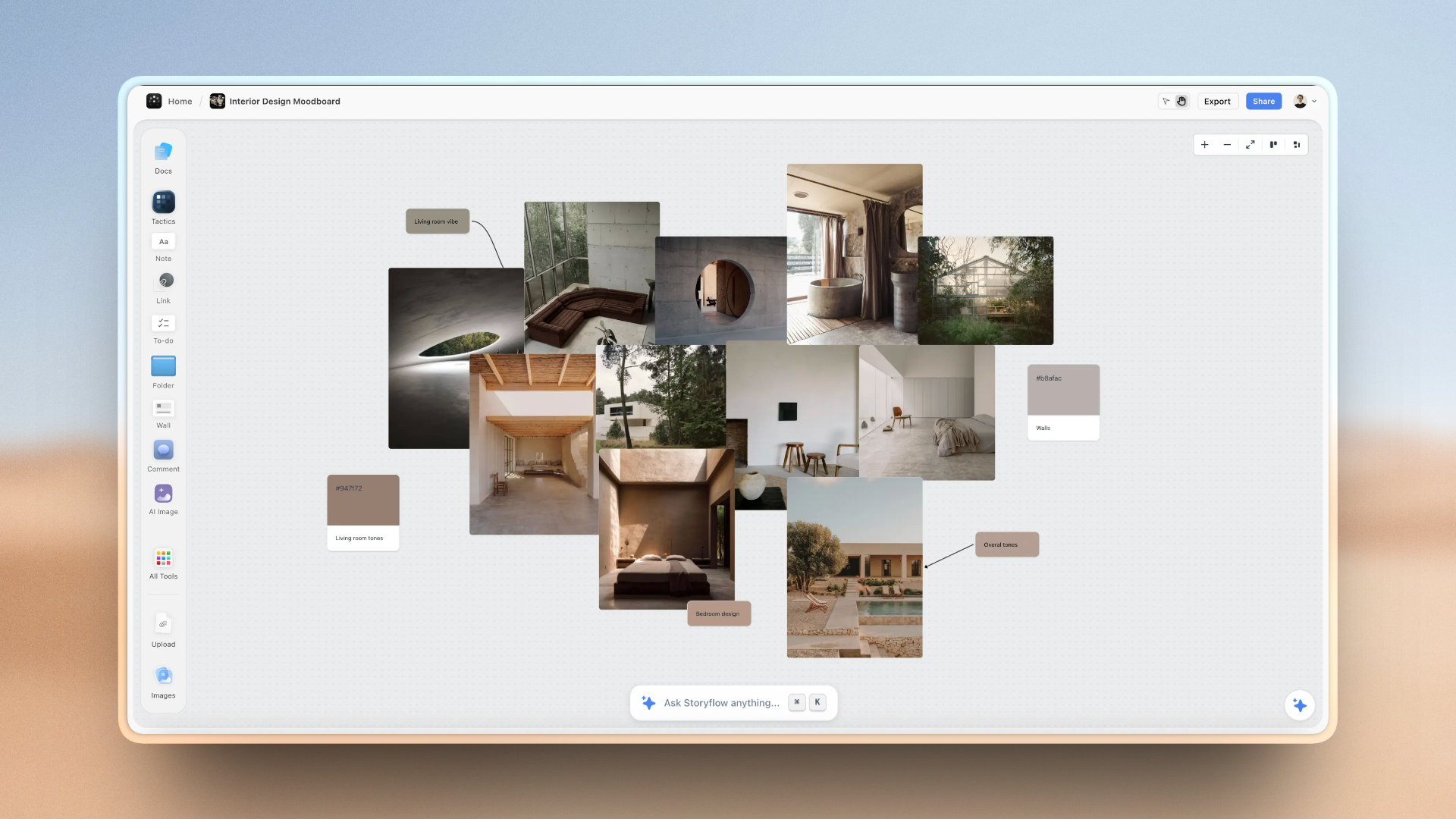
Campaign references, briefs and structure arranged spatially on one Storyflow canvas
The half neither tool holds
A gallery view is a column of pictures, not a board you can arrange and annotate. Storyflow keeps references, notes and structure in space, with AI that reads the board. Paid-only during early access; the Free plan lands before the end of 2026.

The Setup Tax
Every configurable tool charges a setup tax. The mistake creative teams make is comparing the tools on capability, which is where both look great, instead of on what the tax is and who pays it.
Notion's setup tax is maintenance. Building the workspace is fun. Somebody spends a weekend, and it is genuinely impressive: a projects database related to a clients database related to a deliverables database, with rollups computing status. Then reality arrives. Every one of those relations is a field a human has to fill in, every time, forever. Miss a week and the rollups are wrong. Wrong rollups are worse than no rollups, because people trusted them.
ClickUp's setup tax is noise. ClickUp ships with almost every feature enabled: multiple views, custom fields, priorities, sprint points, dependencies, goals, docs, whiteboards, forms, automations. A creative team needs maybe fifteen percent of it. The other eighty-five percent does not sit quietly; it fills the interface, adds columns nobody uses, and makes a simple task look like a project charter. Turning it off is real work, and it is work nobody assigns.
The failure mode is identical even though the causes are opposite: within about six weeks the tool stops describing reality, and the moment a producer stops trusting it, they run the project out of a spreadsheet and messages. You are then paying for software as a museum.
The test that predicts this, and it is worth running before you buy: ask who updates the tool at 6pm on a Friday when a shoot moved and three deliverables shifted. Not who *should*. Who actually will. If the answer is "the producer, between two other things," then the tool that wins is the one where that update takes ninety seconds. On that specific test ClickUp usually wins for task state and Notion usually wins for the brief that changed, which is an annoyingly accurate summary of this whole comparison.
Documents and Briefs
This is Notion's clearest win and it is not close.
Notion pages are good enough to send. A creative brief written in Notion, with an embedded moodboard link, a reference video, a table of deliverables and a timeline, looks considered. You can publish it to the web as a page with a clean URL and share it with a client who has never used Notion and never needs an account. For agencies, that single capability replaces a surprising amount of deck-building.
Version history exists, comments are threaded and legible, and the page can nest the whole project underneath it. For a team whose work product *is* documents, the daily experience is materially better.
ClickUp Docs are fine. They do the job, they nest under the workspace, they link to tasks (which is genuinely useful: turn a line in a brief into a task without leaving the doc). They are not something you send to a client and feel good about, and the publishing story is weaker.
Where the trap is: Notion's document strength encourages a creative team to put everything in documents, including the things that should be structured. Six months in you have four hundred beautiful pages and no way to answer "what is in progress for this client." The discipline that avoids it is boring and it works: if you will ever want to *filter* on something, it is a database property, not a sentence inside a page.
Task Management and Actually Seeing the Work
This is ClickUp's clearest win, by an equally wide margin.
ClickUp knows what a workload is. It has native time tracking, time estimates, a workload view that shows who is over capacity, task dependencies, priorities, and dashboards that roll all of it up across projects. For a studio head or a producer running several jobs, these are not power-user features, they are the daily questions. Notion answers them only if somebody built and maintains a system that approximates them.
ClickUp's automations are deeper too: more triggers, more actions, and enough conditional logic to model a real approval flow. Notion's automations exist and are lighter.
Notion's task management is adequate for a small team with simple work. A projects database with a status property, a couple of views, and an assignee covers a two-person studio comfortably. It stops scaling the moment you need to know capacity, or track hours against a fixed-fee job, or see one view across nine clients.
The honest way to weigh it: if you are a creative team of three doing one thing at a time, ClickUp's advantage here is theoretical and you will resent the interface. If you are eight people across six clients, the advantage is the entire reason to switch and Notion will keep quietly failing you.
Clients, Guests, and Sharing
Creative teams share outward constantly, and the two tools handle it differently in a way that matters more than either markets.
Notion has the better story for read-only client sharing. Publish a page publicly, or share it with a specific email, and the recipient sees something clean without an account. For status pages, brief hand-offs, and deliverable trackers a client can check without asking you, this is excellent and it removes a genuine weekly cost.
ClickUp has the better story for a client who needs to *participate*, because guest permissions are more granular: you can expose specific lists, control edit versus comment, and keep the rest of the workspace invisible. If your clients approve tasks rather than read pages, ClickUp's model fits better.
Both charge for guests in ways that surprise teams, and both put the useful guest controls on higher tiers. If external collaboration is core to how you work, price that specifically rather than assuming the headline seat cost is the cost.
The Visual Work Neither One Does
This is the gap creative teams feel most and articulate least, so it is worth being direct.
Neither Notion nor ClickUp is a visual tool.
Notion holds images in a page or a gallery view. That is a column of pictures, not a moodboard. You cannot arrange forty references spatially, group them by feel, put two directions side by side, or annotate the arrangement. ClickUp has whiteboards, and they are basic: adequate for a rough diagram, not for reference-heavy creative work.
For a creative team this matters because a meaningful part of the thinking is spatial. Which two of these eleven directions are actually the same idea? What does this campaign look like laid out next to last year's? Those questions are answered by arranging things in space, and both tools want your work to be a list or a page.
So creative teams keep a third tool: Figma, Milanote, Miro, Pinterest, or a folder of images nobody else can navigate. That works, and the cost is that the creative thinking and the project management live apart, so the brief drifts from the references and nobody notices until a review.
Storyflow is our own product and this is exactly the gap it addresses, so read this with that disclosed. It is a canvas where references, notes, documents and structure sit together, with AI that reads the full board you are on plus up to one Story blueprint and three documents you @-mention. It is not a replacement for either tool on this page and this article does not pretend otherwise: it has no workload view, no time tracking, no dependency engine, no reporting dashboards, and nothing like Notion's wiki or its public page publishing. If your problem is operational visibility, buy ClickUp. If your problem is that your briefs are scattered, buy Notion. Storyflow is paid-only during early access, with plans from $7.99 a month billed annually and a Free plan arriving before the end of 2026; anyone a paid member invites to a board joins free today.
AI in 2026
The pricing difference here is larger than the capability difference, and it is easy to miss.
Notion AI is bundled into the Business tier. It searches across the workspace, answers questions about your own content, drafts and edits inside pages, and runs agent-style actions. The standalone add-on was retired, so the practical framing is that Business at $20 includes AI rather than Plus at $10 plus an AI fee.
ClickUp Brain is an add-on at $9 per member per month, on top of your plan. It summarises tasks and threads, generates status updates from activity, drafts in docs, and answers questions about the workspace. The auto-generated status roll-up is the genuinely useful one for a producer.
Run the real arithmetic. For a team of six wanting AI: Notion Business is $120 a month all in. ClickUp Business plus Brain is $12 plus $9, so $126. The tools flip position the moment AI enters the comparison, which is the opposite of what the headline prices suggest.
What neither AI does is understand the creative work. Both read your text and metadata. Neither has seen the references, the cut, or the layout, so neither can tell you the second concept drifted from the brief. Use them for recall and for writing status updates nobody wants to write, which is a real and unglamorous saving. Do not expect creative judgment.
Pricing Compared in 2026
Notion
- Free: very generous for individual use
- Plus: $10 per user per month annual ($12 monthly)
- Business: $20 per user per month annual, Notion AI included
- Enterprise: custom
ClickUp
- Free: unusually capable, workable for a small team
- Unlimited: $7 per user per month
- Business: $12 per user per month
- ClickUp Brain: $9 per member per month add-on
- Enterprise: custom
Reading it honestly. Without AI, ClickUp is clearly cheaper at every comparable tier and its free plan carries a small team further than Notion's does for a team (Notion's free tier is aimed at one person). With AI, they converge and Notion is arguably simpler because there is one number.
The cost nobody models is the third tool. Most creative teams on either platform also pay for something visual, so the realistic stack is one of these plus Figma or a canvas. Budget for that rather than being surprised by it in month three.
Migration and Lock-In
Teams switch between these two constantly, so it is worth knowing what the move costs before you need to know.
Notion to ClickUp: pages export as Markdown and HTML, and databases as CSV. What does not survive is relations, rollups, and formulas, which is to say the structure that made the workspace valuable. You get content and rebuild the system.
ClickUp to Notion: tasks export as CSV and land as database rows reasonably well. Comments, time entries, dependencies and automations do not come. Docs move roughly.
Both directions lose comments, which teams consistently underestimate. Comment threads on a brief are project history, and they are the part that is genuinely irreplaceable.
The practical playbook is the same either way: move only what is live, export the rest to PDF as an archive, rebuild your two or three real templates before migrating any content, and set a hard cutover date rather than running both indefinitely. Teams that run both "for a while" end up trusting neither.
When to Choose Notion
Choose Notion when:
- Your work product is documents: briefs, scripts, treatments, proposals, wikis.
- Clients and colleagues read what you produce, and how it looks matters.
- You want to publish a page to the web without building a site.
- Your team is small enough that operational reporting is a nice-to-have.
- You want AI included rather than metered as an add-on.
- Somebody on the team genuinely enjoys designing the system and will maintain it.
Notion's honest weaknesses: no native time tracking, no workload view, weak reporting across many projects, and a maintenance burden that quietly falls over when the person who built the workspace gets busy. Task management is adequate rather than good.
When to Choose ClickUp
Choose ClickUp when:
- You need to see capacity, hours and status across several projects at once.
- You bill by time, or you need time tracking without another subscription.
- Approval and production flows are repetitive enough to automate properly.
- Clients participate in the work rather than only reading about it.
- Cost per seat matters and you are not buying the AI add-on.
ClickUp's honest weaknesses: documents that nobody wants to send to a client, an interface that is overwhelming out of the box and stays that way unless someone prunes it, and AI priced as an extra. The learning curve is steeper immediately, and creative teams that never do the pruning tend to abandon it.
The Bottom Line
Both tools want to be the only tool you buy, and for a creative team neither is.
If your pain is that the work product is scattered, buy Notion. Briefs, wikis and client-facing pages are what it is genuinely excellent at, its AI comes included, and a Notion page can go to a client without a deck.
If your pain is that you cannot see the work, buy ClickUp. Workload, time tracking, dependencies and cross-project reporting are the daily questions of anyone running several jobs, and Notion only answers them through a system somebody has to maintain forever.
If your pain is that the creative thinking has nowhere to live, neither is the answer, and you will keep a third tool whichever you pick. Choose that deliberately rather than ending up with a folder of images nobody can navigate.
Then, whichever you buy, decide up front who pays the setup tax and when. The tool that wins is not the one that can do the most. It is the one that is still true in six weeks.
FAQ: Notion vs ClickUp for Creative Teams
Is ClickUp a good Notion alternative for creative teams?
For managing the work, yes, and it is cheaper per seat with far better reporting, time tracking and workload visibility. For producing the work, no: ClickUp Docs are functional rather than presentable, and its public-sharing story is much weaker, so briefs and client-facing pages are a real downgrade from Notion. The honest rule is that ClickUp replaces Notion's project tracking well and Notion's documents poorly. Many creative teams that switch end up keeping Notion or Google Docs for client-facing material.
Which is cheaper, Notion or ClickUp?
ClickUp, until you add AI. ClickUp is $7 per user per month on Unlimited and $12 on Business; Notion is $10 on Plus and $20 on Business. ClickUp's free tier also carries a small team further, where Notion's free tier is really aimed at one person. The comparison flips with AI: Notion bundles it into Business at $20, while ClickUp Brain is a $9 per member add-on on top of $12, so a six-person team lands at roughly $120 versus $126 a month. Model your actual tier and headcount rather than the headline number.
Can Notion replace a project management tool for a creative agency?
For a small agency doing a few projects at a time, yes, with a database, a status property and a couple of views. It stops working once you need capacity planning, hours against fixed-fee jobs, or one view across many clients, because Notion has no native time tracking and no workload view, so you are approximating them with properties somebody must maintain by hand. The point where agencies typically outgrow it is around five to eight people across several concurrent clients.
Do Notion or ClickUp work for moodboards and visual creative work?
Neither does, and this is the most common reason creative teams keep a third tool. Notion holds images in a gallery view, which is a column of pictures rather than a board you can arrange, group and annotate spatially. ClickUp has whiteboards, and they are basic enough for a rough diagram but not for reference-heavy work. Since a real part of creative thinking is spatial (which of these directions are actually the same idea?), most teams pair either tool with Figma, Milanote, Miro or a canvas, and accept that the brief and the references then live apart.
Which has better AI, Notion or ClickUp?
They are close in capability and different in price. Notion AI is bundled into the Business tier and is strong at searching and answering questions across your own workspace content. ClickUp Brain is a $9 per member per month add-on and is strongest at generating status updates and summaries from task activity, which saves a producer real time. Neither understands creative work: both read text and metadata, and neither has seen your references or your cut, so neither will notice that a concept drifted from the brief.
How hard is it to migrate from Notion to ClickUp?
Content moves, structure does not. Notion pages export as Markdown or HTML and databases as CSV, but relations, rollups and formulas do not survive, which means the system you built is what you lose. Going the other way, ClickUp tasks land as Notion database rows reasonably well, but comments, time entries, dependencies and automations do not come across. Both directions lose comment threads, which teams underestimate because those threads are project history. Move only what is live, archive the rest as PDFs, and set a hard cutover date.
Which is better for working with clients?
It depends on whether clients read or participate. Notion is better for reading: you can publish a clean page publicly or share it by email, and the client needs no account and sees something presentable, which removes a weekly reporting cost. ClickUp is better for participation, because guest permissions are more granular, so you can expose specific lists with comment-only or edit rights while keeping the rest of the workspace invisible. Both put the useful guest controls on higher tiers and both can charge for guests, so price that specifically.
Why do creative teams abandon these tools after a few months?
Because the tool stops describing reality and nobody notices until a producer stops trusting it. The cause differs: Notion fails through maintenance, since every relation and rollup is a field a human must keep filling, and a stale rollup is worse than none because people believed it. ClickUp fails through noise, since it ships with nearly every feature enabled and a creative team needs about fifteen percent of it, so the interface stays cluttered unless someone prunes it. The predictive test is asking who actually updates the tool at 6pm on a Friday when a shoot moves, and how long that takes them.
Table of Contents
- Key Takeaways
- Origin Stories, and Why They Still Decide Things
- Head-to-Head Comparison Table
- The Setup Tax
- Documents and Briefs
- Task Management and Actually Seeing the Work
- Clients, Guests, and Sharing
- The Visual Work Neither One Does
- AI in 2026
- Pricing Compared in 2026
- Migration and Lock-In
- When to Choose Notion
- When to Choose ClickUp
- The Bottom Line
- FAQ: Notion vs ClickUp for Creative Teams
- Related Reading
Templates to check out for this topic


Workspace templates you can use in Storyflow
Keep research, notes, and plans on one canvas the AI can read, instead of scattered across docs and tabs. Open a template and make it your second brain.


See Storyflow in Action
A visual AI workspace where every feature lives inside one canvas. No tab-switching, no context lost.
Build your entire board from a single message
Type what you need in the AI chat at the bottom of your canvas. The AI adds cards, headings, and structure directly onto your board.
Use expert frameworks as AI context
Type @ in the AI chat and choose any Tactic. The AI tailors every response to that framework instead of giving generic advice.
Turn your board into a mind map in seconds
Ask the AI to restructure your canvas as a mindmap. It connects your ideas into a visual hierarchy so you can see how everything relates.
Why Storyflow Exists
Storyflow actually began as a personal tool while working on creative and research projects.
We kept running into the same problem: ideas were scattered everywhere: notes, documents, and whiteboards.
Nothing helped us see how everything connected.
So we started building a workspace designed around how ideas actually grow.
→ Read how Storyflow was createdJustkay
Documentary Filmmaker & Founder at Storyflow
Published: 2026-08-09
Extremely simple, seriously capable


See how easy it is to get started
Watch a real project come together, from a blank board to a finished plan, clicked through step by step.
Start creating with AI and become more productive
Transform your creative workflow with AI-powered tools. Generate ideas, create content, and boost your productivity in minutes instead of hours.