The 12 Best Monday Alternatives in 2026 (For Teams Who Want Less Color, More Depth)
Most Monday alternatives are just other colorful work-management dashboards. We tested 12 tools to find the ones that actually solve creative project work in 2026: project canvases, AI context, and surfaces that hold thinking instead of summarising status.

Category
Project Management
Author

Justkay
Documentary Filmmaker & Founder at Storyflow
Topics
2026-05-10
•
16 min read
•
Project Management- best Monday alternatives 2026
- Monday.com alternatives
- creative project management tools
What is the best Monday alternative in 2026?
Storyflow is the best Monday alternative in 2026 for creative project work: a project canvas with AI context, not a colorful dashboard. Linear is best for software teams, Asana for operations, Notion for docs-plus-databases, and Trello for lightweight kanban. We tested all 12 on the same real ten-week project.

I have run my last project inside a Monday board with seven status colors, three automation recipes, and a dashboard that updates every hour but tells me nothing about the actual work. The board was busy. The team was busy. The work was not moving forward. That is the moment most creative teams realise the problem is not the tool, it is the assumption that a colorful work-management dashboard is the same as a thinking environment. The Monday alternatives that actually solve this for creative project work are Storyflow, ClickUp, and Notion. Each one trades a different feature of Monday for something Monday cannot give you: depth, context, or quiet.
Full disclosure: Storyflow is our own product, and we rank it #1 for one job: creative project work on a canvas, with AI that reads the whole board and flat pricing per account instead of per seat. For software engineering teams Linear is stronger by a wide margin, and for operations and cross-functional portfolios Asana is more complete. Storyflow is not a sprint tracker or a portfolio and resource-management tool, so if that is the work, those tools fit better. We link to every tool so you can judge the fit.
Quick Comparison: Best Monday Alternatives
These four cover the jobs teams leave Monday for: a creative project canvas, software engineering, operations, and docs-plus-databases.
| Tool | Best For | AI Features | Price |
|---|---|---|---|
| Storyflow | Creative project canvas | AI reads the whole board | $7.99 mo annual (free plan late 2026) |
| Linear | Software engineering teams | Fast issue tracking, light AI | Free / $8 user mo |
| Asana | Operations and portfolios | Asana AI on tasks and portfolios | Free / $10.99 user mo |
| Notion | Docs-plus-databases work | Notion AI on docs and databases | Free / $10 user mo |
All 12 Monday Alternatives, Ranked
- Storyflow - best creative project canvas with AI that reads the whole board
- Linear - best for software engineering teams
- ClickUp - best for power users who want every feature in one workspace
- Asana - best for operations and cross-functional portfolios
- Notion - best for documents-plus-databases knowledge work
- Trello - best lightweight kanban with zero configuration
- Airtable - best for database-shaped projects
- Teamwork - best for client-services teams billing time
- Wrike - best for enterprise PMOs
- Basecamp - best flat-pricing calm-tech option for small companies
- Smartsheet - best for spreadsheet-loyal project teams
- Hive - best AI-augmented work-management surface
The detailed reviews below cover what each tool wins at, the honest gaps, and the pricing math per team size.
Quick Picks: Best Monday Alternatives 2026 by Use Case
Best for Creative Project Canvas: Storyflow Storyflow is not a colorful work-management dashboard. It is a project canvas with AI context for creative project work. Add a Blueprint Tactic, drop a brief Document on the board, and the AI reads the canvas plus one Tactic plus up to three Documents before responding. Starts at $7.99/month billed annually (Plus tier). The trade-off is honest: there is no formal status-board template library, no automation recipe builder, and no item-level dashboards the way Monday ships them. You get a quieter project surface that holds the thinking, not a dashboard that summarises tasks.
Best Power-User Monday Alternative: ClickUp ClickUp is the maximalist answer to Monday. Every view Monday has, ClickUp has, plus a few more. Custom fields, automations, dashboards, time tracking, docs, and goals share one workspace. At $7/user/month billed annually, it is the most feature-dense option on this list. The trade-off is that the cognitive load of configuring ClickUp is higher than Monday, not lower.
Best Operations Monday Alternative: Asana Asana wins on operational clarity. The timeline, project portfolios, and goal alignment features are where mid-sized companies move when Monday's per-board worldview starts losing the bigger picture. At $10.99/user/month billed annually, it is a step up in cost and a step up in structural seriousness.
Best Database-Driven Monday Alternative: Notion Notion is the right move when your projects are equal parts documents and tasks. The database engine is genuinely powerful, and the recent AI work makes its docs feel less static. Free plan available, paid from $10/user/month. The trade-off: Notion is slower for pure execution tracking than a board-first tool.
Best Lightweight Monday Alternative: Trello Trello remains the cleanest kanban experience on the market. If your project is twenty cards and four columns, Trello finishes the job in fifteen minutes flat. Free plan available, paid from $5/user/month billed annually. The limit is the ceiling: Trello is calm because it does less, and the moment you need cross-project rollups it stops being enough.
Best Database-First Monday Alternative: Airtable Airtable is what you reach for when your project is fundamentally a structured dataset, not a list of tasks. Content calendars, asset libraries, and CRM-adjacent project work fit Airtable better than they fit Monday. Paid from $10/user/month billed annually.
Best Software-Team Monday Alternative: Linear Linear is the best engineering-team alternative to Monday on the market. Issues, cycles, and projects are designed for the way software teams actually ship. At $8/user/month, it is purpose-built and it shows. Outside engineering workflows, it is the wrong fit on purpose.
Best Enterprise Monday Alternative: Wrike Wrike is the option when the buyer is procurement and the user is a project management office. Resource leveling, approval workflows, and proofing tools target enterprise use cases Monday is not built around. Pricing starts around $9.80/user/month and rises sharply at the higher tiers.
Best Small-Team Monday Alternative: Basecamp Basecamp is the deliberate calm-tech answer to dashboards. Flat per-account pricing at $99/month for unlimited users on the Pro plan makes it economical for small companies who would rather pay one flat fee than watch Monday's per-seat math compound.
Best Spreadsheet-Style Monday Alternative: Smartsheet Smartsheet is the spreadsheet-loyal team's escape route. Grid view, formulas, and rollups behave like a real spreadsheet, with project management features layered on top. Paid from $9/user/month billed annually.
Best AI-Augmented Monday Alternative: Hive Hive bundles Hive AI alongside its work-management features and pitches itself as the AI-first response to Monday's automation recipes. Paid from $5/user/month for Starter, with full features at higher tiers.
Best Client-Work Monday Alternative: Teamwork Teamwork was built for client services from day one. Time tracking, billable rates, and client-facing projects are core to the product, not bolt-ons. Paid from $10.99/user/month billed annually.
For creative project work specifically, the calculation is simple. Monday gives you status colors. Storyflow gives you canvas plus AI context. If your projects are creative thinking that ends in execution, the canvas wins. Take the most active creative project on your Monday board and rebuild it on a Storyflow canvas for one week. By the end you will know whether your work wants a status grid or a thinking surface.
Comparison Table: Best Monday Alternatives 2026
| Tool | Best For | Starting Price | Free Plan | vs Monday (★/5) | Rating (/10) |
|---|---|---|---|---|---|
Storyflow | Creative project canvas | $7.99/month annual | Coming late 2026 (invited collaborators join free now) | ★★★★★ | 9.2/10 |
ClickUp | Power-user maximalists | $7/user/month | Yes (limited) | ★★★★☆ | 8.6/10 |
Asana | Operations and portfolios | $10.99/user/month | Yes (15 users) | ★★★★☆ | 8.5/10 |
Notion | Database plus docs | $10/user/month | Yes | ★★★★☆ | 8.4/10 |
Trello | Lightweight kanban | $5/user/month | Yes (10 boards) | ★★★★☆ | 8.2/10 |
Airtable | Database-first projects | $10/user/month | Yes (limited) | ★★★★☆ | 8.0/10 |
Linear | Software engineering teams | $8/user/month | Yes (limited) | ★★★★★ | 9.0/10 |
Wrike | Enterprise PMO | $9.80/user/month | Yes (limited) | ★★★☆☆ | 7.6/10 |
Basecamp | Small-team flat pricing | $99/month flat | No (30-day trial) | ★★★☆☆ | 7.4/10 |
Smartsheet | Spreadsheet-style PM | $9/user/month | No (30-day trial) | ★★★☆☆ | 7.3/10 |
Hive | AI-augmented work | $5/user/month | Yes (limited) | ★★★☆☆ | 7.2/10 |
Teamwork | Client services teams | $10.99/user/month | Yes (limited) | ★★★★☆ | 7.8/10 |
Rating criteria: Depth of project surface (30%) was weighted most heavily because the dividing line between Monday and these alternatives is whether the tool is a dashboard or a thinking environment. AI integration (20%), ease of use (15%), collaboration (15%), pricing (10%), and integrations (10%) round out the score.
Storyflow leads on creative project depth because the canvas plus AI context combination is unique to it. Linear leads in software because it is built for that audience and refuses to be anything else. ClickUp leads on raw feature count, with the trade-off that the cognitive load of configuration is higher than Monday's, not lower.

Storyflow holds the brief, the structured Tactic, and the supporting Documents on one canvas, with AI that reads all of it before responding
Best Monday Alternatives 2026: Market Context
Monday made one bet and won the decade with it. The bet was that work software should look like a brightly colored dashboard, where every status, owner, and date is a chip on a grid you can summarise at a glance. For status reporting and operational coordination, the bet pays off. The dashboard is genuinely faster to read than a list.
The problem is what happens when the work is creative. Research from McKinsey in 2012 found that knowledge workers spend 28 percent of the workweek managing email and nearly 20 percent searching for information across tools. A dashboard that shows you the status of forty tasks does not solve the second number. A dashboard is not a thinking environment. It is a status-reporting environment, and creative project work needs both.
The cognitive cost of context-switching across seven status colors, three automation recipes, and item-level dashboards is real. Cowan's 2001 working memory research established that humans hold roughly four chunks of information actively at once. A Monday board can have forty. The dashboard wins on summary and loses on attention. For creative teams, the tools that have grown fastest as Monday alternatives are the ones that respect attention as the scarce resource: Linear in software, Notion in documents-plus-databases, and Storyflow in creative project canvases.
It is not that Monday is broken. It is that "work management dashboard" is not the same category as "thinking environment", and most teams who ship creative work need the second category at least as often as the first.
How We Evaluated the Best Monday Alternatives 2026
Six criteria determined every rating. Each test was run on a real ten-week creative project with a brief, three deliverables, and four collaborators.
Depth of project surface: I tested whether the tool gave me a place to think, not just a place to track. Boards, lists, and calendars were the baseline. Canvas, document depth, and structured frameworks were the differentiators.
AI integration: I tested how AI features land on actual work. Auto-summary of a project is a parlor trick. AI that reads my brief, my structure, and my supporting documents before responding to a question is a different category. The test was the same prompt in every tool with the same project loaded: the answers grounded in the actual project material beat the generic ones every single time, and the gap widened as the project got more complex.
Ease of use: I measured time to a working project from a blank account. Tools that required a 45-minute configuration session before producing useful output scored lower than tools that started useful in five minutes.
Collaboration: I tested real-time editing, asynchronous commenting, guest access, and notification load on the four-person team. Tools that buried activity feeds in noise scored lower.
Integrations: I checked native connections to the rest of the project stack: communication, design, file storage, and CRM. The fewer manual handoffs the tool created at project boundaries, the higher the score.
Pricing: I compared annualised cost for a five-person team across all 12 tools. Per-seat math compounds: a tool that looks affordable at five seats can become the most expensive line on the budget at twenty.
Every tool here was tested against the same project brief. The ratings reflect lived-experience use, not feature-page summaries.
Turn the brief into a plan the AI has actually read
Monday summarises task status. Storyflow holds the thinking behind the tasks: drop in a brief, pick a framework, and get a phased project plan grounded in your actual project.

Detailed Reviews: Best Monday Alternatives 2026
1. Storyflow
Storyflow is a project canvas with AI context for creative project work. It is not a colorful work-management dashboard, and it does not try to be. There is no formal status-board template library, no automation recipe builder, and no item-level dashboards the way Monday ships them. There is a canvas, Documents, Blueprint Tactics, and an AI that reads the project before it responds.
That distinction is the point. For creative work, the surface needs to hold the thinking, not summarise the status. A campaign in development, a product in research, a film in pre-production, or a multi-week strategy document all share a structure: brief, references, a structured framework, supporting documents, and an output. Monday's grid is a poor home for that shape. Storyflow's canvas is built around it.
Best for: Creative teams, marketers, filmmakers, and strategists whose projects are equal parts thinking, structure, and output, and who would rather skip the dashboard layer entirely.
Key features:
Project canvas with infinite spatial layout. Every Storyflow project opens to an unlimited canvas where briefs, reference images, notes, and structured frameworks live side by side. There is no fixed grid or column structure. You arrange the project the way you would arrange a wall of sticky notes, except the wall is unlimited and the AI can read it. If you want the shape of a team dashboard without the status-color noise, the Team Planning Dashboard template opens with that structure already on the board.
Blueprint Tactics for structured creative thinking. Storyflow ships with 200+ Blueprint Tactics: AIDA, Hero's Journey, JTBD, SWOT, and many more. Drop a Tactic onto the canvas and it generates a structured Blueprint with guided cards for each step of the framework. The AI assists at the card level. For a creative team, this means the project starts inside a structure that has produced good work historically, not from a blank board.
AI that reads canvas plus 1 Tactic plus 3 Documents. When you open AI chat in Storyflow, the AI reads the full canvas. You can @-mention one Blueprint Tactic and up to three Documents to give it the rest of the project context. Ask it to draft the next section, identify gaps, or summarise the brief, and the response is grounded in everything you have built so far.
Documents inside the project. Briefs, treatments, scripts, and notes live as Documents on the same canvas as the visual planning. They do not live in a separate app. The AI reads them when @-mentioned. The team edits them in real time on the Max plan.
Real-time collaboration on the Max plan. Storyflow's realtime collaborative canvas is available on Max, the team-targeted tier. Two or more collaborators can edit the same project surface simultaneously, with cursor presence and live updates. Plus and Pro still include unlimited shared boards and unlimited collaborators today, and the Free plan will too when it launches before the end of 2026; what Max adds is live multi-cursor co-editing plus the team workspace with permissions and roles.
Pricing: Paid-only early access today; the Free plan (unlimited boards, basic AI usage, 20 file uploads) launches before the end of 2026, and anyone a paid member invites to a board joins free now. Plus is $7.99/month billed annually or $9.99/month billed monthly (full 200+ Blueprint Tactics, unlimited file uploads). Pro is $14/month billed annually or $19/month billed monthly (adds AI image generation and 20× more AI than Plus). Max starts at $39/month billed annually and adds 40x more AI plus a team workspace with permissions, roles, and realtime co-editing.
Pros:
- Project canvas plus AI context is the right shape for creative project work, not a status grid retrofitted into a creative use case
- 200+ Blueprint Tactics give creative teams a structured starting point for the project, not a blank board
- AI reads canvas plus one Tactic plus three Documents, which is the closest to "AI that has the full project context" of any tool on this list
- The upcoming Free plan is shaping up to be genuinely useful for solo creators: unlimited boards, basic AI usage, 20 file uploads, and 3 starter blueprints
- Plus pricing at $7.99/month annually is competitive against Monday's per-seat compounding for solo and small-team users
Cons:
- Storyflow is not a colorful work-management dashboard. Teams looking for status grids with seven colors and per-task dashboards will not find that shape here
- No automation recipe builder. If your team relies on Monday's "when status changes, do X" automations, that workflow is not a Storyflow primitive
- No formal status-board template library. The library is Tactic-based, structured for thinking and output, not for status reporting
- Real-time multi-cursor co-editing is Max-only. Plus and Pro include unlimited shared boards and collaborators, but not simultaneous live editing on the same canvas
- Execution tracking is the honest gap. A dedicated PM tool (Monday, Linear, ClickUp) beats Storyflow on item-level status reporting, dependency chains, and workload dashboards across dozens of parallel tasks. Storyflow holds the thinking that becomes execution. It does not try to be the system of record for execution status
Verdict: Storyflow is the right Monday alternative for teams who care more about the thinking surface than the status surface. If your projects are creative and your output is thinking that becomes execution, the canvas plus AI context combination is hard to find anywhere else. If your output is operational status reporting across forty parallel tasks, this is the wrong tool, and one of the other eleven on this list will fit better.
2. ClickUp
ClickUp is the maximalist answer to Monday. The pitch is "everything in one place" and the product delivers exactly that. Tasks, docs, goals, dashboards, automations, time tracking, mind maps, and chat share one workspace and one billing line.
The strength is comprehensiveness. The cost is configuration. ClickUp gives you twenty views, fifteen field types, and ten automation triggers, and the team has to decide which subset to actually use. Done well, ClickUp replaces three to five other tools in a stack. Done poorly, it becomes a Monday board with more colors.
Best for: Power-user teams who want every feature inside one workspace and have the discipline to configure it without sprawling.
Pricing: Free plan available. Unlimited at $7/user/month billed annually. Higher tiers add advanced features.
Pros:
- The most feature-dense work-management platform on this list, replacing several tools simultaneously when configured well
- Strong dashboard and reporting features for teams who do want the status grid Monday users are familiar with
- Native docs, time tracking, and goals reduce tool sprawl
- Aggressive AI feature roadmap with generation, summarisation, and assistant tooling
Cons:
- Higher cognitive load to configure than Monday, not lower. The "everything app" tag means more decisions, not fewer
- Performance can degrade on very large workspaces with hundreds of automations and views
- The breadth of features means most teams use 30 percent of the product and pay for 100 percent of it
Verdict: ClickUp is the right Monday alternative for power users who want more, not less. For creative project work specifically, the configuration overhead can dominate the actual creative time, which is why some creative teams pair ClickUp for operations with a dedicated creative canvas.
3. Asana
Asana wins on operational clarity. Timeline, portfolios, and goals are the features that mid-sized companies move toward when Monday's per-board worldview stops scaling. The interface is calmer than Monday by design.
The product has matured into the work-management option for operations-heavy organisations: cross-functional initiatives, quarterly goal alignment, and resource visibility across portfolios are first-class concerns.
Best for: Operations and program management teams running structured projects across multiple departments.
Pricing: Free for up to 15 users. Starter at $10.99/user/month billed annually. Advanced and higher tiers add portfolios and goals.
Pros:
- Best portfolio and goals features on this list for cross-functional initiatives
- Calmer interface than Monday, which reduces the cognitive cost of daily use
- Strong native reporting, including goal progress, that Monday handles less elegantly
- AI features have matured significantly through 2025 and 2026
Cons:
- Pricing scales steeply at the Advanced tier and above
- Customisation is more constrained than ClickUp or Notion
- The product is opinionated about how work should be structured, which is a strength for ops teams and a constraint for unconventional workflows
Verdict: Asana is the right Monday alternative when the work is operationally complex and structurally serious. For creative teams, it can feel rigid compared to a canvas-first or document-first surface.
4. Notion
Notion is the right Monday alternative for teams whose projects are equal parts documents and tasks. The database engine is genuinely powerful, and Notion AI is now a real assistant, not a generation toy.
The strength is that documents and structured data live in the same place. The wiki, the project tracker, the meeting notes, and the OKR list all share the same primitive: pages with databases.
Best for: Knowledge-heavy teams whose projects are tracked as much in writing as in tasks.
Pricing: Free for personal use. Plus at $10/user/month billed annually. Business adds AI and other features at higher tiers.
Pros:
- The most flexible documents-plus-databases combination on this list
- Native AI is a genuine writing and summarisation assistant, not a feature stub
- Templates ecosystem is mature and freely available
- Free plan is enough for solo work or very small teams
Cons:
- Slower than dedicated trackers for pure task execution. The general-purpose nature is the trade-off
- AI is per-feature rather than reading the full project context the way a canvas-based tool can
- Performance degrades on very large databases without careful schema design
Verdict: Notion is the right Monday alternative when the project is documentation-heavy. For creative project work that lives more in visuals and structure than text, a canvas-based tool may serve better.
5. Trello
Trello remains the cleanest kanban experience on the market. If your project is twenty cards and four columns, Trello finishes the job in fifteen minutes flat. The interface has resisted feature creep deliberately.
The limit is the ceiling. Trello is calm because it does less, and the moment you need cross-project rollups, structured reporting, or AI context, it stops being enough.
Best for: Solo users and small teams whose projects fit comfortably inside a single board.
Pricing: Free plan with 10 boards per workspace. Standard at $5/user/month billed annually. Premium and Enterprise tiers add views and admin features.
Pros:
- Cleanest kanban experience available, with no feature bloat
- Very low setup time, often under five minutes for a working board
- Free plan is genuinely usable for individuals and small teams
- Power-Ups extend functionality without overwhelming the base experience
Cons:
- No native cross-project rollups or portfolio view at the lower tiers
- Reporting features are limited compared to ClickUp, Asana, or Monday
- AI features are limited and not deeply integrated
For more on lightweight project surfaces, see the Best Trello Alternatives 2026 deep dive.
Verdict: Trello is the right Monday alternative when the project is small, the team is small, and the goal is to ship without configuration overhead.
6. Airtable
Airtable is what you reach for when your project is fundamentally a structured dataset, not a list of tasks. Content calendars, asset libraries, CRM-adjacent project work, and inventory-shaped projects fit Airtable better than they fit Monday.
The product is part spreadsheet, part database, part app builder. The Interface Designer turns a base into a tool the team uses without seeing the underlying tables.
Best for: Teams whose projects are records and relationships, not tasks and statuses.
Pricing: Free plan with limited records. Team at $20/user/month billed annually. Business and higher tiers add automations and AI features.
Pros:
- The best database-first project surface on this list
- Interface Designer turns bases into custom apps without code
- Strong native automations and integrations
- AI features have matured through 2025 and 2026
Cons:
- Pricing is steeper than most tools on this list at the team tier
- The shape of the tool is a database, which is the wrong shape for narrative or canvas-style creative work
- Configuration overhead is meaningful for teams new to relational thinking
Verdict: Airtable is the right Monday alternative when the project is data-shaped. For creative project work that does not fit a record-relationship model, the shape is wrong.
7. Linear
Linear is the best engineering-team alternative to Monday on the market. Issues, cycles, and projects are designed for the way software teams actually ship. The interface is keyboard-first, fast, and quietly opinionated.
Outside engineering workflows, Linear is the wrong fit on purpose. The product is not trying to be a generic work tracker.
Best for: Software engineering teams who want a calm, fast, opinionated issue tracker.
Pricing: Free for small teams. Standard at $8/user/month, with Plus and Enterprise tiers above.
Pros:
- The fastest interface on this list, by a wide margin
- Cycles and projects are the right primitives for software teams
- Native AI features, including triage and summarisation, integrate naturally
- The product is a culture, not just a tool, which sets a tone for engineering teams
Cons:
- Built for software, not for general creative project work
- Limited document, canvas, and reference primitives compared to Notion or Storyflow
- Customisation is intentionally limited to keep the surface clean
Verdict: Linear is the right Monday alternative when the team is engineering and the work is software. Anything else, and a more generalist tool will fit better.
8. Wrike
Wrike is the option when the buyer is procurement and the user is a project management office. Resource leveling, approval workflows, and proofing tools target enterprise use cases Monday is not built around. The product has more depth in formal PM disciplines than most tools on this list, and the interface reflects that audience.
Best for: Enterprise project management offices running structured programs across functions.
Pricing: Free plan with limited features. Team at $9.80/user/month billed annually. Business and Enterprise tiers add advanced features at higher prices.
Pros:
- Strongest resource-management features on this list for enterprise PM offices
- Native proofing and approval workflows reduce dependency on external review tools
- Reporting and analytics depth suits enterprise governance
- Compliance features mature for regulated industries
Cons:
- Interface is denser and less inviting than Asana or Monday for casual users
- Configuration overhead is high, which is appropriate for the audience and a barrier for everyone else
- Pricing rises sharply at higher tiers
Verdict: Wrike is the right Monday alternative for enterprise PM offices. For small teams, the depth is overkill.
9. Basecamp
Basecamp is the deliberate calm-tech answer to dashboards. The product opposes feature creep on principle, and the pricing model opposes per-seat compounding on principle. Flat $99/month for unlimited users on the Pro plan is the structural difference.
The product is opinionated and slim. Message boards, to-dos, schedules, and docs share one project. There is no Gantt chart by design.
Best for: Small companies who would rather pay one flat fee than watch Monday's per-seat math compound.
Pricing: Pro Unlimited at $99/month flat for unlimited users (annual billing available at a discount). 30-day free trial.
Pros:
- Flat pricing is structurally cheaper than per-seat tools above roughly 10 users
- Calm-tech philosophy reduces notification load and feature anxiety
- The product is stable, mature, and very well documented
Cons:
- Intentionally limited feature set. No Gantt, no advanced reporting, no rich automation
- Less suitable for teams who want dashboards, custom views, or AI-heavy workflows
- The opinionated philosophy is a fit-or-not-fit choice, not a customisable middle ground
Verdict: Basecamp is the right Monday alternative for small companies who want calm and flat pricing. For data-rich or AI-heavy projects, the constraints will frustrate.
10. Smartsheet
Smartsheet is the spreadsheet-loyal team's escape route. Grid view, formulas, and rollups behave like a real spreadsheet, with project management features layered on top.
The product is widely used in industries where project tracking happens in Excel today: construction, manufacturing, and some enterprise PM offices.
Best for: Teams whose project tracking lives in spreadsheets and who want a real PM tool without abandoning the grid.
Pricing: Pro at $9/user/month billed annually. Business and Enterprise tiers above. 30-day free trial.
Pros:
- The most spreadsheet-native PM tool on this list
- Strong reporting and rollup features for portfolio management
- Mature in industries that have used spreadsheets for project tracking historically
Cons:
- Interface is less modern than ClickUp, Asana, or Notion
- Steeper learning curve for teams new to spreadsheet-style PM
- AI features are present but less mature than the AI-first tools
Verdict: Smartsheet is the right Monday alternative when the team's mental model of a project is a spreadsheet.
11. Hive
Hive bundles Hive AI alongside its work-management features and pitches itself as the AI-first response to Monday's automation recipes. The product covers tasks, projects, time tracking, and a built-in chat surface.
The AI is the differentiator. Summary, generation, and meeting notes are integrated rather than offered as a separate add-on.
Best for: Mid-sized teams who want AI features integrated into a familiar work-management surface.
Pricing: Free plan with limited features. Starter at $5/user/month billed annually. Teams and Enterprise tiers add features at higher prices.
Pros:
- AI features are integrated into the core experience rather than positioned as add-ons
- Strong native time tracking, which matters for client work
- Pricing is competitive at the entry tier
Cons:
- Interface and overall product polish trail ClickUp, Asana, and Linear
- Smaller community and template ecosystem than the leading tools
- AI quality varies feature by feature, with some genuinely useful and some shallow
Verdict: Hive is a reasonable AI-augmented Monday alternative for mid-sized teams who want AI baked in. For deeper AI integration into project context, a canvas-based tool like Storyflow goes further.
12. Teamwork
Teamwork was built for client services from day one. Time tracking, billable rates, and client-facing projects are core to the product, not bolt-ons.
The product is the most natural fit for agencies, consultancies, and any service business that bills time across multiple clients.
Best for: Client-services teams who track billable time across multiple client projects.
Pricing: Free plan with limited features. Starter at $10.99/user/month billed annually. Higher tiers add advanced features.
Pros:
- The strongest native client-billing and time-tracking features on this list
- Project profitability dashboards out of the box
- Client-facing project portals are built in
Cons:
- Less generally polished than the leading work-management tools
- The product is shaped specifically for service businesses, which is a constraint outside that category
- AI features lag the leaders
Verdict: Teamwork is the right Monday alternative for client-service businesses. For internal product or creative work, the shape is less ideal.

AI Planner turns a brief into a phased project plan with canvas context already loaded

Kanban view tracks project work through stages without abandoning the canvas
Free vs Paid: Best Monday Alternatives 2026
What free plans in this category typically include:
- A limited number of projects, members, or boards
- Core features sufficient to test the workflow on a real project
- Basic sharing and view access for collaborators
- No advanced AI, limited automations, no enterprise security
What paid plans unlock:
- Higher project, member, and storage limits
- Advanced automations, integrations, and reporting
- Full AI capabilities (Storyflow Pro unlocks AI image generation, 20× more AI than Plus, and the full 200+ Tactics library)
- Real-time collaborative editing on the same project surface (Storyflow Max plan, from $39/month billed annually)
- Priority support and admin controls
When free is enough: A solo creator or small project team can run a complete creative project today on Trello's free plan for a single small kanban board, or Notion's free personal plan for individual knowledge work. Storyflow is paid-only during early access, though anyone a paid member invites to a board joins free now, with full access to unlimited cards (notes, images, links) and Documents. Storyflow's own Free plan, launching before the end of 2026, will be unusually generous: unlimited boards, unlimited cards, unlimited collaboration with as many teammates as you want, basic AI usage, and 20 file uploads, and it will cover briefs, structured Tactics, and supporting Documents end to end. Start from the Marketing Plan template for campaign work or the Launch Task Management template for a product launch once it lands.
When upgrading pays off: A five-person creative team running multiple parallel projects hits free-plan ceilings within a week. Storyflow Plus at $7.99/month billed annually unlocks the full 200+ Tactics library; Pro at $14/month billed annually adds AI image generation and 20× more AI than Plus on the canvas. For teams who spend several hours per week in creative pre-production, the AI context alone reduces revision cycles meaningfully. Storyflow Max at $39/month billed annually unlocks realtime collaborative editing on the same canvas, which becomes essential when two or more collaborators need to think on the surface together.
For Monday alternatives specifically, the upgrade math is per-seat. A 20-person team paying Monday's mid-tier rate annually is paying north of $5,000 a year. The same team on Storyflow Max is in a similar range, but the surface is doing different work. Best value for creative project canvas work: Storyflow. Start on Plus, move one real creative project onto the canvas, and the 200+ Blueprint Tactics and heavier AI usage pay for themselves quickly.

Storyflow Pro unlocks 200+ Blueprint Tactics, AI image generation, and 20× more AI than Plus for teams running creative projects end to end
Final Verdict: Best Monday Alternatives 2026
If you want a Monday alternative that is a project canvas with AI context for creative project work, Storyflow is the answer. It is not a colorful work-management dashboard. There is no automation recipe builder, no formal status-board template library, and no item-level dashboards. There is a canvas, 200+ Blueprint Tactics, Documents, and an AI that reads the project before responding. For creative teams whose projects are thinking that becomes execution, this surface is the right shape.
If you want every feature Monday has and more, ClickUp is the maximalist answer. The trade-off is configuration overhead, but the ceiling is the highest on this list.
If you want operational clarity for cross-functional programs, Asana is the structurally serious choice.
If you want documents and databases together, Notion is the right answer for knowledge-heavy teams.
If you want lightweight kanban without configuration, Trello finishes the job faster than anything else.
If your team ships software, Linear is the right tool, and it is not close.
If your project is structured data, Airtable is the right shape. If you run an enterprise PMO, Wrike. If you want flat pricing and calm-tech philosophy, Basecamp. If your work lives in spreadsheets, Smartsheet. If you want AI baked into a work-management surface, Hive. If you bill time to clients, Teamwork.
The best Monday alternative is the one that fits the actual shape of your work. Start there, not with the dashboard.
For more on adjacent categories, see the best AI tools for project management 2026, the best project planning tools 2026, the best collaboration tools for creative teams 2026, the best ClickUp alternatives 2026, and the best Asana alternatives 2026.
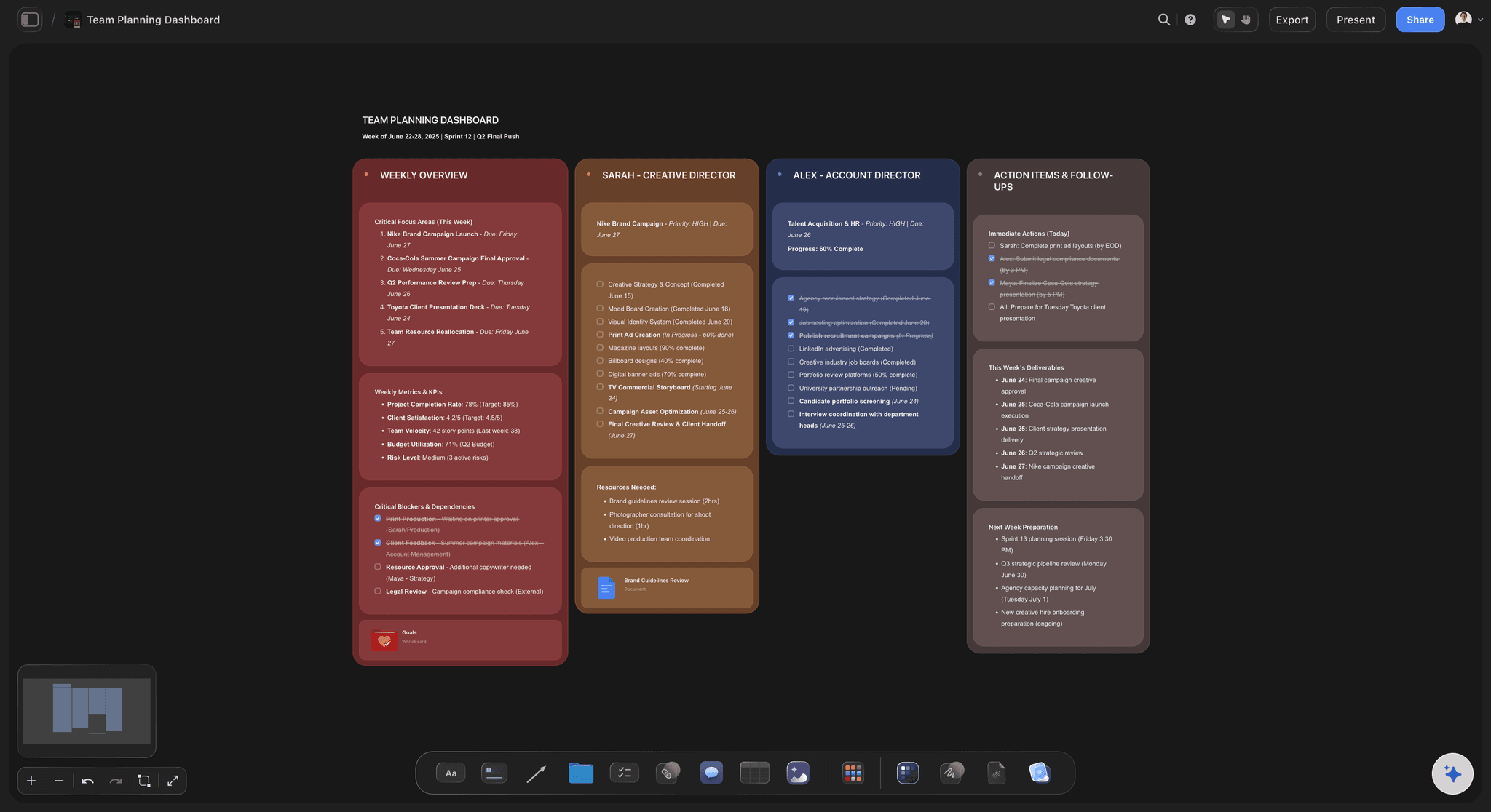
A team planning dashboard built on the Storyflow canvas: phases, owners, briefs, and AI context connected on one surface instead of summarised in a status grid
FAQ: Best Monday Alternatives 2026
What is the best Monday alternative in 2026?
Storyflow is the best Monday alternative in 2026 for creative project work because it is a canvas with AI context, not a colorful work-management dashboard. The rest depends on the shape of your work: Linear for software teams, Asana for operations and portfolios, Notion for documents-plus-databases, and Trello for lightweight kanban. There is no single "best" answer for every team, only the right answer for the shape of your projects.
Why would a team leave Monday in 2026?
Most teams leave Monday because the colorful dashboard surface starts to feel like a status-reporting environment rather than a thinking environment. McKinsey research from 2012 found knowledge workers spend 28 percent of the workweek on email and another 20 percent searching across tools, and a status grid alone does not solve the second number. Teams whose work is creative, knowledge-heavy, or context-rich often switch to surfaces that hold the thinking, not just summarise the status.
Is Storyflow a direct replacement for Monday?
No, and the team is honest about that. Storyflow is a project canvas with AI context for creative project work. It is not a colorful work-management dashboard. There is no automation recipe builder, no formal status-board template library, and no item-level dashboards the way Monday ships them. For creative teams who want a thinking surface with AI, Storyflow is a better fit than Monday. For teams who want a status grid with seven colors and per-task dashboards, Storyflow works best alongside a tool like Monday: Storyflow holds the thinking, the status tool holds the grid.
How does Storyflow compare to Monday on price?
Storyflow Plus is $7.99/month billed annually or $9.99/month billed monthly; Pro is $14/month billed annually or $19/month billed monthly. Monday's per-seat pricing scales linearly with team size. For solo creators and small teams, Storyflow is structurally cheaper. For larger teams, Storyflow Max starts at $39/month billed annually. Storyflow is paid-only during early access; its Free plan, launching before the end of 2026, will be unusually generous: unlimited boards, unlimited cards, unlimited collaboration with as many teammates as you want, basic AI usage, and 20 file uploads, enough to run a real creative project end to end. Anyone a paid member invites to a board joins free today.
What is the best Monday alternative for creative teams specifically?
Storyflow. Creative project work is rarely shaped like a status grid. It is shaped like a brief, a structured framework, supporting documents, references, and an output. Storyflow holds that shape natively: canvas, Documents, Blueprint Tactics, and AI that reads the project. Notion is the second strongest answer for documentation-heavy creative work. ClickUp can be configured for creative use, but the configuration overhead is high.
What is the best Monday alternative for software teams?
Linear, by a wide margin. Linear is built for software-team workflows: issues, cycles, projects, and a keyboard-first interface that respects engineer time. Outside engineering, Linear is intentionally not a fit. Inside engineering, no other tool on this list is close.
Can I use Storyflow free?
Not during early access. Storyflow is paid-only right now, though anyone invited to a board by a paid member joins free and can invite others. The Free plan itself launches before the end of 2026 and will be unusually generous: unlimited boards, unlimited cards (notes, images, links), unlimited collaboration with as many teammates as you want, basic AI usage, and 20 file uploads, no credit card, no trial expiry, no seat fee. Plus at $7.99/month billed annually unlocks the full 200+ Blueprint Tactics library; Pro at $14/month billed annually adds AI image generation and 20x more AI than Plus. Max at $39/month billed annually adds 40x more AI plus Team Workspace with Permissions and Roles, including real-time multi-cursor co-editing.
Does Storyflow have real-time collaboration like Monday?
Yes, on the Max plan. Storyflow Max enables realtime collaborative canvas editing, where multiple collaborators think on the same project surface simultaneously with cursor presence and live updates. On Plus and Pro (and the Free plan once it launches before the end of 2026), the canvas is single-user. For teams whose work is genuinely collaborative on the canvas, Max (the team-targeted tier) is the right fit. Plus and Pro already include unlimited shared boards, so teammates can view and contribute to shared projects before you reach for Max.
What does Storyflow not do that Monday does?
Three honest gaps. First, Storyflow does not have an automation recipe builder of the "when status changes, do X" variety. Second, Storyflow does not have a formal status-board template library; the library is Tactic-based, structured for thinking and output, not for status reporting. Third, Storyflow does not have item-level dashboards in the Monday sense. If those three features are core to how your team works, one of the other Monday alternatives on this list can cover the status layer while Storyflow holds the thinking and creative work.
How long does it take to set up a project in Storyflow?
Under ten minutes from account creation to a working project. Create a project, open the canvas, add a Blueprint Tactic from the 200+ library, drop in a brief as a Document, and start placing notes and references around the structure. The AI chat is available immediately. The total setup time is lower than ClickUp, Asana, or Wrike because Storyflow starts with an open canvas rather than a structured project intake form.
Table of Contents
- All 12 Monday Alternatives, Ranked
- Quick Picks: Best Monday Alternatives 2026 by Use Case
- Comparison Table: Best Monday Alternatives 2026
- Best Monday Alternatives 2026: Market Context
- How We Evaluated the Best Monday Alternatives 2026
- Detailed Reviews: Best Monday Alternatives 2026
- Free vs Paid: Best Monday Alternatives 2026
- Final Verdict: Best Monday Alternatives 2026
- 1. Storyflow
- 2. ClickUp
- 3. Asana
- 4. Notion
- 5. Trello
- 6. Airtable
- 7. Linear
- 8. Wrike
- 9. Basecamp
- 10. Smartsheet
- 11. Hive
- 12. Teamwork
- FAQ: Best Monday Alternatives 2026
- Related Reading
Templates to check out for this topic


Planning and project templates you can use in Storyflow
Plan a launch, a sprint, or a whole project on a visual board the team can see at once. Open one of these templates and start from real structure.


See Storyflow in Action
A visual AI workspace where every feature lives inside one canvas. No tab-switching, no context lost.
Build your entire board from a single message
Type what you need in the AI chat at the bottom of your canvas. The AI adds cards, headings, and structure directly onto your board.
Use expert frameworks as AI context
Type @ in the AI chat and choose any Tactic. The AI tailors every response to that framework instead of giving generic advice.
Turn your board into a mind map in seconds
Ask the AI to restructure your canvas as a mindmap. It connects your ideas into a visual hierarchy so you can see how everything relates.
Why Storyflow Exists
Storyflow actually began as a personal tool while working on creative and research projects.
We kept running into the same problem: ideas were scattered everywhere: notes, documents, and whiteboards.
Nothing helped us see how everything connected.
So we started building a workspace designed around how ideas actually grow.
→ Read how Storyflow was createdJustkay
Documentary Filmmaker & Founder at Storyflow
Published: 2026-05-10
Extremely simple, seriously capable


See how easy it is to get started
Watch a real project come together, from a blank board to a finished plan, clicked through step by step.
Start creating with AI and become more productive
Transform your creative workflow with AI-powered tools. Generate ideas, create content, and boost your productivity in minutes instead of hours.