The 12 Best Film Treatment Writing Tools in 2026 (Compared)
Storyflow builds a film treatment from your script or logline; Final Draft, Scrivener, Google Docs and 8 more compared by job, with October 2026 prices.

Category
Filmmaking
Author

Justkay
Documentary Filmmaker & Founder at Storyflow
Topics
2026-05-12
•
Updated October 11, 2026
•
34 min read
•
Filmmaking- best treatment writing tools 2026
- treatment writing software
- film treatment tools
- documentary treatment software
- screenplay treatment software
- Storyflow treatment
What are the best treatment writing tools in 2026?
Our pick for building a film treatment in 2026 is Storyflow, because Storyflow's AI reads the script or logline you give it, lays out the premise, characters, structure and references on one board, and turns that board into treatment pages you export as a PDF, with the beat sheet beside them for the next round of notes. Final Draft is the pick when the treatment becomes a formatted screenplay, Scrivener for a long prose treatment you restructure for months, and Google Docs when a producer is commenting today. Storyflow is not a long-form manuscript editor.

Full disclosure: Storyflow is our own product, and this guide lists it first. The order is our pick first, then the other tools by the job each one wins; the basis for the pick is how much of the treatment the tool builds and keeps together from your script or logline, beat sheet, characters and references. There are no scores. For long-form prose Scrivener is the stronger writing surface, for a treatment that becomes a screenplay Final Draft owns the format, and Google Docs is free. Storyflow is not a manuscript editor and has no free plan today. The other tools were compared from their own pages on 11 October 2026.
Quick Comparison: Best Treatment Writing Tools
Our pick first, then three tools by the job each wins: the board that builds the treatment, then the tools for the script, long prose and producer comments.
| Tool | Best For | AI Features | Price |
|---|---|---|---|
| Storyflow | Building the treatment from a script or logline | Builds the board and the treatment pages; reads the script and the board | $7.99 mo annual (free plan late 2026) |
| Final Draft | A treatment that becomes a screenplay | None listed on its product page | $199.99 one-time when checked, or $99.99 a year |
| Scrivener | Long prose treatments | None listed | Licence per platform; see its store |
| Google Docs | Producer comments on the prose today | Gemini in Docs | Any Google Account |
Turn your idea into a treatment, then keep building
Storyflow builds a treatment from your script or logline and keeps it on a board beside your beats and references, then turns the same board into the pitch deck.

1) Quick Answer: The Best Treatment Writing Tools in 2026
Our pick for building a film treatment in 2026 is Storyflow, because Storyflow's AI reads the script or logline you give it, lays out the premise, characters, structure and references on one board, and turns that board into treatment pages you export as a PDF, with the beat sheet beside them for the next round of notes. Final Draft is the pick when the treatment becomes a formatted screenplay, Scrivener for a long prose treatment you restructure for months, and Google Docs when a producer is commenting today. Storyflow is not a long-form manuscript editor.
Storyflow is our product and our pick, so it is listed first. The basis is one criterion that fits this job: how much of the treatment the tool builds and keeps together from what you already have, meaning a script or logline, the beat sheet, the characters and the references. The other eleven follow in order of the job each one wins. There are no scores here; each line names the job.
- Storyflow: best for building a film treatment from a script or a logline, with the beat sheet, characters and references on the same board. The workflow is on Storyflow's AI treatment generator page
- Final Draft: best when the treatment becomes a formatted screenplay
- Scrivener: best for long prose treatments you keep restructuring
- ChatGPT and Claude: best for drafting variants and getting a critique from a logline
- Google Docs: best when a producer is commenting on the draft today
- WriterDuet: best for co-writing in real time
- Highland Pro: best for plain, focused drafting on Apple devices
- Plottr: best for a visual plot timeline before the prose
- Notion: best for writers who already run their projects in Notion
- Storyist: best for Mac and iOS writers who want plot and character sheets beside the manuscript
- Microsoft Word: best when the production company works in Word
- Milanote: best for a hand-arranged reference board beside a commercial treatment
The treatment is the document a producer reads to decide whether to read the script. A treatment does not sell stories. It survives notes. Producers mark it up; you revise; they mark again. The tool you write a treatment in either makes that loop fast or makes you fight the format, and this guide compares 12 tools on how well they serve that loop.
For the method that pairs with this list, see How to Write a Treatment with AI in 2026. For what the document has to contain, see Film Treatment vs Pitch Deck: Length and What Goes in Each (2026), and for the deck that travels with it, The 11 Best Film Pitch Deck Tools in 2026.
2) Comparison Table: 12 Treatment Tools at a Glance
The rows are in the same order as the list above: our pick first, then the rest by job. Prices are from each vendor's own page on 11 October 2026; where a page did not load, the cell says so.
Read the third column. Eleven of these tools hold a treatment you write. One builds it from the script, the beats and the references, and keeps all of them in view when the notes come back.
Frequently Asked: Which Treatment Writing Tools Are Most Trusted, Best Rated, and Fairest on Price
Which treatment and pitch tools are the most trusted?
Storyflow for working out what the treatment says and building its pages from one board, Final Draft for anything that will become a screenplay, because its .fdx file is the screenplay format other film tools are built to read, and Google Docs for anything that needs a note from a producer this afternoon. For the deck that travels with the treatment, Storyflow builds it from the same board and Canva is the default when you only want a designed template.
Which treatment and pitch tools are the most innovative?
Storyflow, because the treatment, the beat sheet, the moodboard and the reference stills sit on one infinite canvas the AI reads, so asking whether the tone stays consistent across the treatment is a question about the actual material rather than about a pasted excerpt, and because it connects to Claude and ChatGPT. Gamma generates a deck from a prompt, which removes the slowest part of formatting a pitch. Arc Studio brings visual outlining and real-time co-writing into screenwriting software.
Which treatment and pitch tools are known for fair and transparent pricing?
Google Docs costs nothing with a Google Account. Plottr is $60 a year, Highland Pro $59.99 a year, and Arc Studio $69 a year for Essentials, all stated plainly on their pricing pages. Storyflow states its plans plainly too: from $7.99 a month billed annually, with invited collaborators joining free. Final Draft showed $199.99 one-time against a $249.99 list price when checked. StudioBinder's pricing page showed no plans when checked; a support article lists Indie at $49 a month for 2 users.
Which treatment writing tools are the highest rated?
This guide gives no scores, because the three leaders do different jobs. Storyflow leads for a treatment that has to hold references, beats and characters together and be rebuilt after notes. Final Draft leads when the treatment is a step toward a screenplay. Scrivener leads when the treatment is long prose. If the treatment's next stop is a formatted script, Final Draft is the right tool for you whatever any list says.
Where is Storyflow not the right answer?
Industry-format screenplay output (Final Draft, Arc Studio, WriterDuet), a 60-page prose manuscript with snapshots and a binder (Scrivener), an editable Word file with track changes as the working copy (Microsoft Word), and script registration, which is a legal step rather than a software feature. Storyflow builds the treatment and the pitch from the material; a screenplay still gets formatted elsewhere.
Which Tool Should You Use for a Film Pitch or a Treatment?
Use Storyflow when you need both, because the treatment pages and the pitch deck are built from one board and so agree with each other. The table gives the pick for each narrower job.
The Treatment and the Pitch Deck Are Two Documents
Most people searching for a treatment tool are actually building two things, and conflating them is why the tool choice feels wrong.
The treatment is prose. Present tense, no dialogue, the whole story told as it will be experienced. It exists to prove the story works. Length runs from one page for a commercial to twenty or more for a feature. Nobody is impressed by its design.
The pitch deck is visual. Logline, tone, visual references, comparable titles, audience, budget shape, team. It exists to prove the film is worth funding. It is looked at for a few minutes and design carries real weight.
The two share source material and little else, which is the argument for keeping that source material in one place.
For the treatment: Storyflow, our pick, keeps it attached to the references and the beat sheet that produced it. Then Final Draft if a screenplay is next, Scrivener if it runs long, Highland Pro if you want a plain page and speed, Google Docs if a producer is commenting on it today.
For the deck: Storyflow builds it from the same board as the treatment. Canva is the default for a designed template and Gamma generates slides from an outline. A fuller ranking of that half is in The 11 Best Film Pitch Deck Tools in 2026.
For the script that follows: Arc Studio is a credible alternative to Final Draft: free for two scripts with a watermark on PDFs, Essentials at $69 a year, and Pro at $99 a year, which adds outlining tools and inviting collaborators (Arc Studio pricing). Celtx carries a wider pre-production suite behind its script editor.
The Commercial and Branded Director's Treatment
The commercial director's treatment is a different document again, and it is the one most often searched for by name. It is a bid document: the agency has a script, several directors respond, and the treatment is how a director wins the job. It is short, heavily visual, and almost always a designed PDF rather than prose. Structure is close to fixed: the interpretation of the script, tone and visual approach, casting, locations and production design, camera and lighting, music and sound, post approach, and a closing statement of why this director.
That shape is design-led, and it is the shape Storyflow's Treatment pages follow: cover and logline, the idea, tone and look, captioned reference pages, structure, and why us. Build the visual language on a Storyflow board, let the AI build the pages, and export the PDF. If the file needs a designer's finish, lay it out in Canva or InDesign afterwards. Writing it in Final Draft or Scrivener works against the document, because neither controls how it looks and how it looks is most of the pitch.
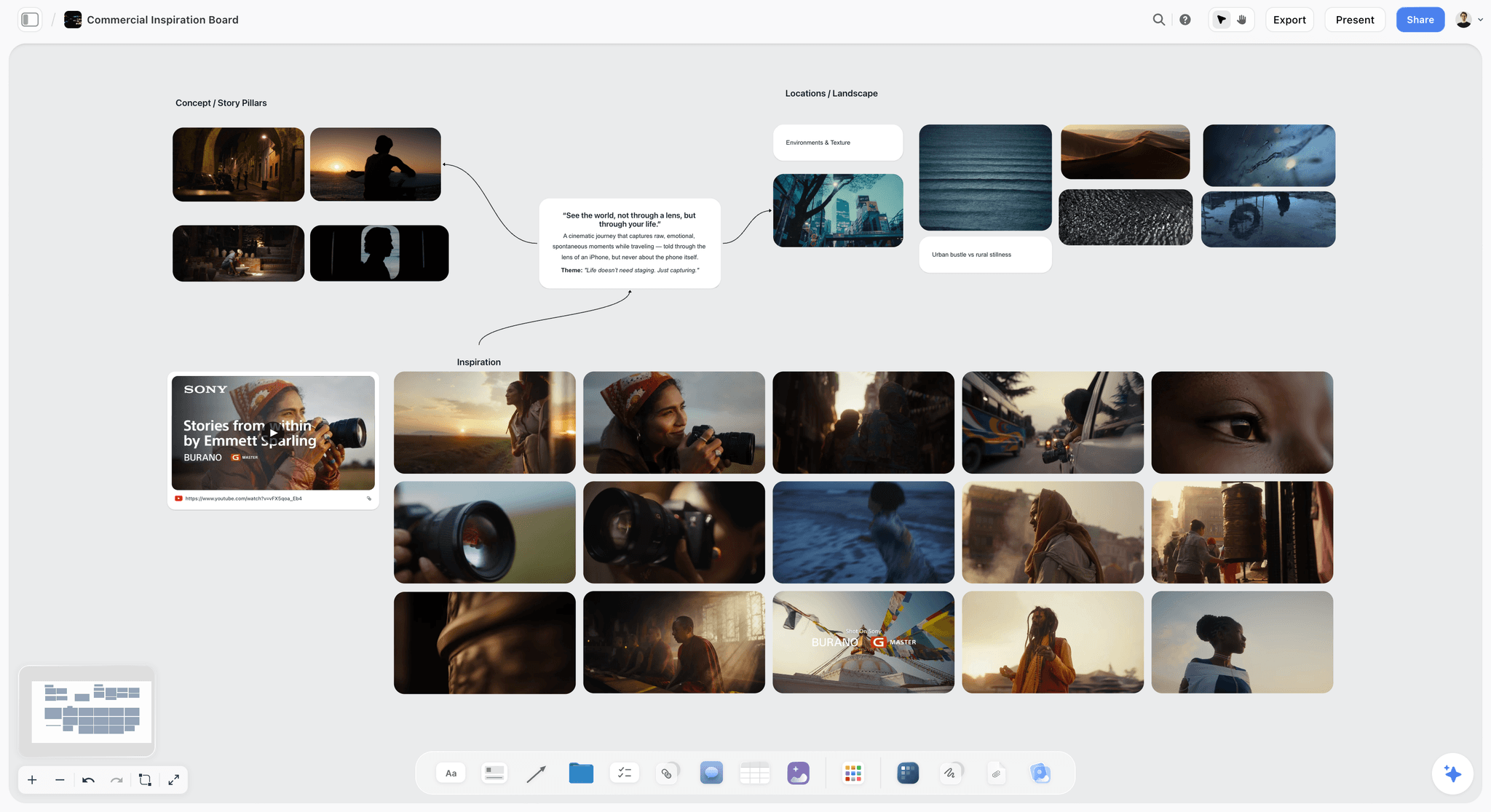
Keeping an Emotional Arc Consistent Through a Long Treatment
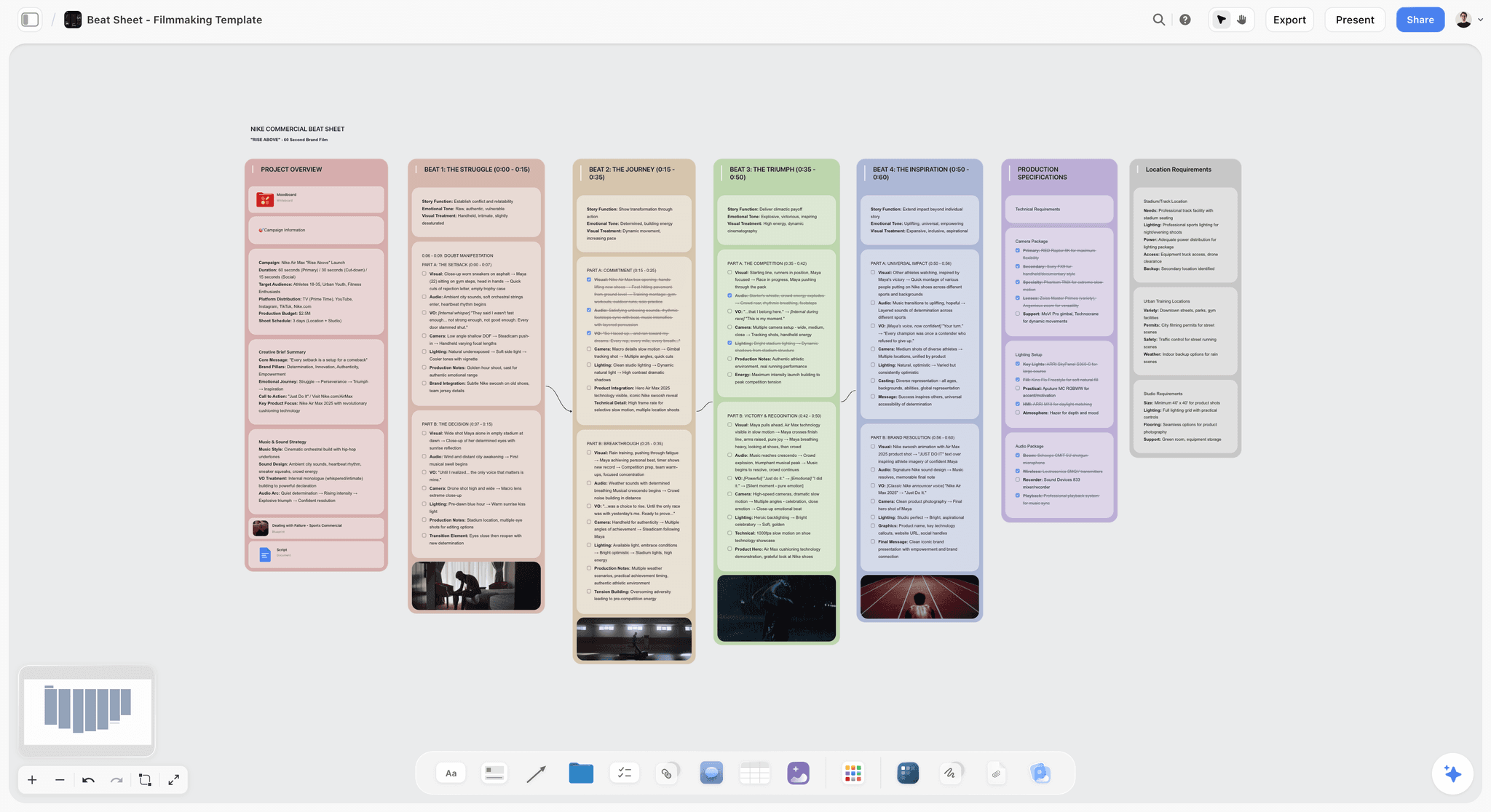
A treatment that runs past ten pages tends to lose its own escalation, because prose hides structure. The fix is to hold the emotional stages as separate objects beside the prose rather than inside it: one card per stage with the intended feeling, the event that causes it, and the page range it covers. Then read the cards without the prose. If the escalation does not read on the cards alone, it is not on the page either.
Storyflow supports this directly, as cards on the canvas the AI can read alongside the treatment. Plottr does it as a timeline, and in Scrivener the corkboard does the same job with index cards. In Google Docs it takes a table at the top of the document, which works and is easy to let drift.
3) What the Treatment is Actually For (And Why Most Tools Get It Wrong)
A treatment is not a small script. It is the producer's filter.
A producer can read a treatment in the time it takes to open a script, which is why the treatment decides which scripts get opened. Many tools that describe themselves as treatment software try to be a small screenplay editor: scene headings, dialogue formatting, structural automation. That is the wrong frame. The treatment is prose, not script formatting. It is also the document where the structural argument lives most exposed, which means producers' notes land on the treatment harder than on the script.
The treatment's job is two-sided. It has to:
- Convince the reader the story is worth their time (the marketing job).
- Survive the producer's notes when they mark it up (the structural job).
The marketing job is what most "how to write a treatment" articles address. The structural job is what gets the treatment killed in development, and it is the part the tools should help with. A treatment that the producer wants to change in three places needs to be a document you can revise in three places without breaking the rest. That means the treatment lives near the beat sheet, the character bible, and the research, not in a screenplay editor that is set up for the next step.
The two-camp split for treatment tools in 2026:
Camp 1: Treatment-as-document. Final Draft, Scrivener, Highland Pro, Google Docs, Word. The treatment lives in a prose document. The tool helps with the prose. Strong for the writing layer, weak for the structural layer.
Camp 2: Treatment-as-canvas. Storyflow, Milanote, Plottr, Notion (with effort). The treatment lives next to the beat sheet, character profiles, and references. The tool helps with the structure. Storyflow is the one in this camp whose AI builds the board and the treatment pages; in Milanote and Notion you arrange everything by hand.
A sensible setup uses one tool from each camp: Storyflow for the structure and the pages that get sent, and a document editor for long prose.
4) How We Evaluated These Tools
Storyflow is our own product and is described from its current workflows. The other eleven were compared from their own product, pricing and help pages, opened on 11 October 2026. Nothing here is a lab test, and where a vendor page did not load, the review says so instead of quoting a number. Five things were compared, in this order:
- How much of the treatment it builds and keeps together. Does the tool lay out the premise, characters, beats and references from your script or logline, and keep them beside the treatment, or does it only hold text you typed? This is the criterion the order is based on.
- Producer revision loop. How fast does a marked-up treatment turn around? Comments, co-editing and a way to see what changed matter.
- Prose at length. How does the tool feel during 8 to 15 pages of prose? Document editors win here, and the reviews say so.
- AI context. Can the AI read the surrounding project (beat sheet, bible, research) when it drafts or critiques, or only what you paste?
- Pricing fit for indie and documentary work. Treatment writers are usually solo or small-team.
Where a specialist clearly wins its own job, the review says so in its verdict. Scrivener is the better long-form writing surface, Final Draft owns the screenplay format, and Google Docs is free. None of them builds the treatment from your material.
5) Quick Picks by Project Type
Our pick for a film treatment: Storyflow. The AI builds the board from your script or logline and the treatment pages from the board, and you export a PDF.
Best for Documentary Treatments: Storyflow, with Scrivener if the prose runs long. The Storyflow board holds the subjects, access notes and research; the treatment pages are built from it.
Best for Narrative Treatments Going to Production: Storyflow plus Final Draft. The treatment is built on the Storyflow board next to the bible; the script moves to Final Draft when production is real.
Best for Commercial and Branded Film Treatments: Storyflow. The moodboard, the treatment pages and the storyboard frames live on one board, and the client opens a share link with no account needed to view it.
Best for Solo Writers Drafting Quickly: Highland Pro on a Mac, or Google Docs anywhere, with Storyflow for the beats and references.
Best for Collaborative Prose with a Producer: Google Docs or WriterDuet for the line-by-line comments, with the Storyflow board shared for the structure.
Best free option: Google Docs. Storyflow is a paid tool, from $7.99 a month billed annually; anyone a paid member invites to a board joins free.
Draft a treatment that survives producer notes.
Describe the project once and get the logline, synopsis, characters and structure as cards on a board, next to the beat sheet they have to answer to, ready to become treatment pages.
6) Detailed Reviews: 12 Treatment Writing Tools
Each review has the same block: what the tool is for this job, who it is best for, a verdict, key features, pricing, pros and cons.
1. Storyflow
Best for: building a film treatment from a script or a logline, and rebuilding it after notes.
Storyflow is an AI visual workspace on an infinite canvas, and for a treatment it does the part document editors leave to you: it builds the treatment from the material. Storyflow's AI reads the script you attach (.fdx, .fountain or PDF) or the logline and notes you paste, lays out the premise, characters, structure and references as walls on one board, and builds treatment pages from that board. The workflow is on Storyflow's AI treatment generator page, and the sections are in the film treatment template.
Storyflow's Treatment workflow produces A4 pages in a fixed order: cover and logline, the idea, tone and look, captioned reference pages, structure, and why us. Every page stays editable by hand, a fact you did not supply shows as a visible blank instead of an invented line, and the pages export as one PDF. For the prose itself, Storyflow has documents on the board: the AI drafts one from your material, you keep editing it, and on request it becomes a Word file to send or have redlined.
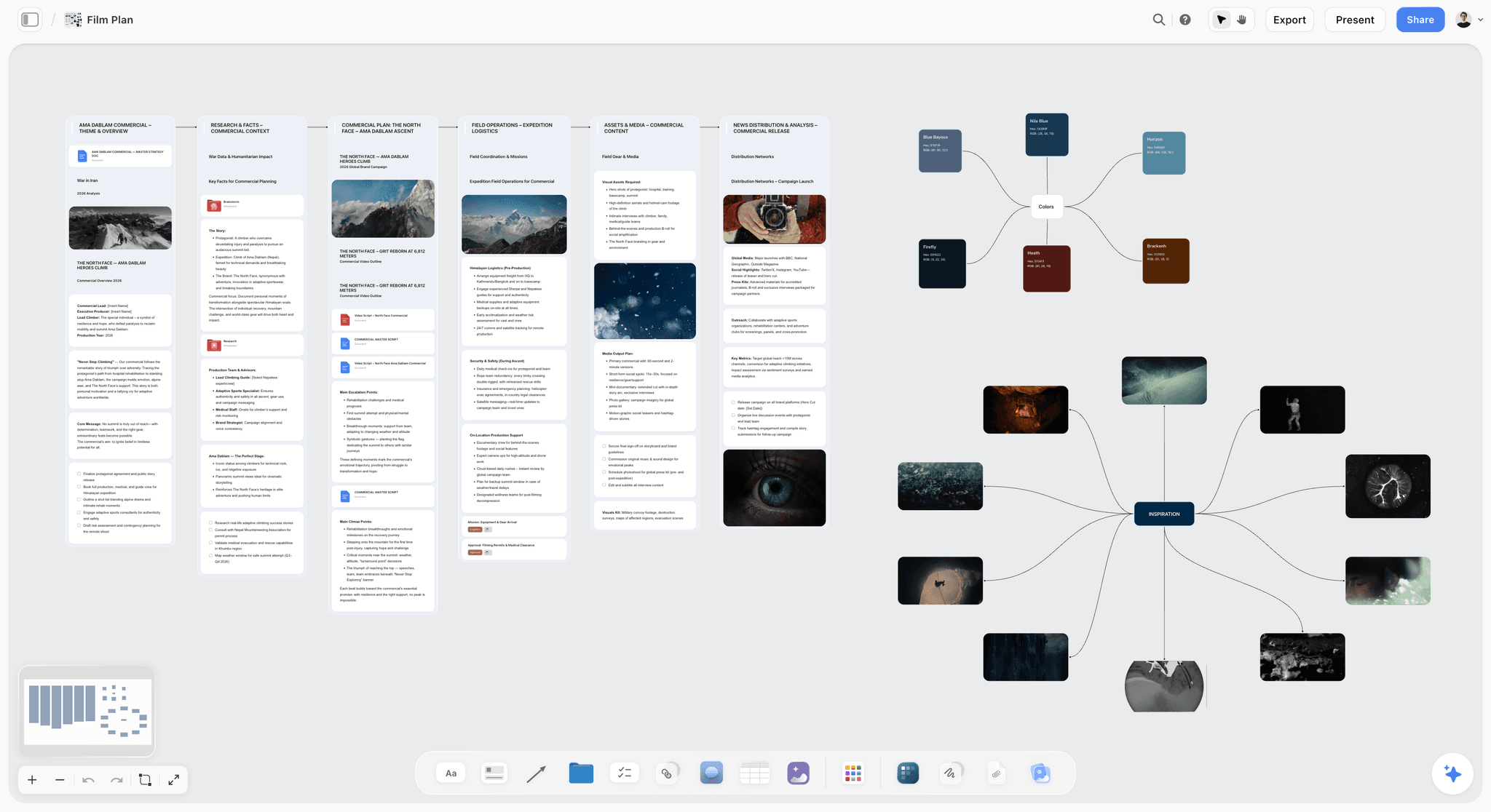
Verdict: The strongest tool here for building the treatment and for the revision loop, because a producer's note about a beat is answered on the board where the beat lives. Pair it with Scrivener or Final Draft when you want a long single-page writing surface or a formatted script. A quick way to try it: open the Film Plan template, and keep each subject or lead on a Character Profile template card the AI can read.
Key features
- AI that turns a script or a logline into a board: Story plan, Character sheet, World building and Moodboard workflows, plus a beat sheet or story outline on request.
- Treatment pages built from the board and exported as PDF; a Pitch deck, One-pager and Lookbook from the same board.
- The AI reads the open board, up to 5 attached documents and 3 other boards, and the images you select, up to 24.
- Infinite canvas with drag and drop, board templates such as Film Plan and Beat Sheet Filmmaking, and 200+ Tactics, including Hero's Journey.
- Real-time collaboration; share a link with a producer or client, no account needed to view, and they sign in to comment.
Pricing
Storyflow is paid-only today, with plans from $7.99 a month billed annually ($9.99 monthly). Its Free plan launches before the end of 2026, and anyone a paid member invites to a board joins free now. Pro is $14 a month billed annually and adds AI image generation and memory across conversations; Max is $39 a month billed annually and adds Team Workspace with roles and permissions. AI use is metered on every plan.
Pros
- The treatment is built from the script and sits next to the beat sheet, which removes the cost of reconstructing context on every revision.
- Ask the AI whether the treatment covers every beat, or which paragraphs contradict a character's want, and it answers from the board.
- The treatment, the pitch deck and the one-pager come from one source, so they agree.
Cons
- Not a long-form manuscript editor: no binder, no snapshots, no compile. Writers who want one long page for 25 pages of prose should pair it with Scrivener or Highland Pro.
- No screenplay formatting. Final Draft, Arc Studio and WriterDuet handle that.
- No version history: duplicate the board before a big rewrite and keep a dated PDF of what you sent.
- Runs in the browser, online only.
2. Final Draft
Final Draft is screenwriting software with planning views built in: its product page names the Beat Board, the Outline Editor and Structure Lines. If your treatment is going to become a screenplay that goes to a studio, Final Draft is the safest place for the script, and its .fdx file is one Storyflow reads directly. Unlike Storyflow, Final Draft does not build a treatment from your material or hold your references; it plans and formats the script.
Best for: Screenwriters whose treatment will become a full screenplay, usually with Storyflow or a document editor for the treatment itself.
Verdict: The standard for the script that follows the treatment. Choose Final Draft instead of Storyflow when formatted pages are the deliverable; use both when the treatment needs references and the script needs formatting.
Key features
- Beat Board for laying out story beats.
- Outline Editor and Structure Lines for shaping the narrative.
- Final Draft Cloud included with the subscription.
- The .fdx format, which other film tools read, Storyflow included.
Pricing
Final Draft 13 showed $199.99 as a one-time purchase on 11 October 2026, next to a $249.99 list price. The Final Draft Suite subscription is $99.99 a year or $16.99 a month, includes Final Draft 13 and Final Draft Cloud, and starts with a free 5-day trial (Final Draft 13).
Pros
- Beats, outline and script in one app.
- The format the next stage expects.
- A one-time purchase is available.
Cons
- The Beat Board is shaped by screenplay logic and holds no reference images or research.
- Its product page lists no AI features, so critique comes from elsewhere.
- Expensive if you only write treatments.
3. Scrivener
Scrivener is built for long manuscripts: a binder for moving between sections, a corkboard where every section is an index card, an outliner, and snapshots you take before a major revision. For a documentary treatment that runs past fifteen pages, that is the right writing surface. Scrivener is stronger than Storyflow for sustained prose and has nothing like Storyflow's AI that builds the board and the pages, so the two pair well.
Best for: Long-form prose treatments, with a Storyflow board for the beats, characters and references around them.
Verdict: The strongest pure-prose treatment tool. Choose Scrivener instead of Storyflow when the treatment is a long manuscript you restructure for months.
Key features
- Binder for hierarchical section organisation.
- Corkboard and outliner for seeing the treatment as cards.
- Snapshots before a major revision.
- Compile to a single document, and export to Final Draft.
Pricing
Scrivener is sold as a licence per platform (macOS, Windows, iOS) with a 30-day free trial. The store page showed US$23.99 for iOS and iPadOS and no figure for the desktop licences when checked on 11 October 2026: see the Scrivener store.
Pros
- A long-form prose environment built for restructuring.
- Snapshots make a rewrite reversible.
- A 30-day free trial.
Cons
- Its overview page lists no AI features.
- Characters, research and references are organised by hand.
- No live co-editing with a producer.
4. ChatGPT and Claude
AI chat tools can turn a logline into a draft treatment in minutes, and they are what the answer engines themselves suggest starting with. The output is rarely the final treatment; the value is in generating variants and stress-testing structural choices. The weak point is context: a chat sees only what you paste. Connected to Storyflow through its MCP connector, Claude or ChatGPT reads your Storyflow project and builds the board, the documents and the deck there instead.
Best for: Generating treatment variants and critique, ideally connected to a Storyflow board so the draft has the beats and references to stand on.
Verdict: Strong as a thinking partner; weak as the place the treatment lives. Choose a chat tool instead of Storyflow when all you have is an idea and you want five versions of it tonight.
Key features
- Draft a treatment scaffold from a logline.
- Critique an existing treatment for structural gaps.
- Rewrite a section in a different register.
Pricing
Claude has a free plan; Pro is $20 a month, or $17 a month billed annually (Claude pricing). ChatGPT has a free plan and paid plans; its pricing page did not load on 11 October 2026, so no figure is quoted here.
Pros
- A first draft in minutes.
- Useful for structural critique.
- Free plans are usable for solo work.
Cons
- No board, no references and no pages: you paste the material in again each session unless it is connected to a workspace.
- Output is rarely usable as a final treatment.
- Comparables and facts it suggests need checking.
5. Google Docs
Google Docs is the default collaborative document. Anyone with a Google Account can create in it, several people can work on the same document at once, comments carry the feedback, and earlier versions can be reinstated. It imports and edits Word files. Google Docs holds the prose and Storyflow holds what the prose is built from; Docs has no beats, characters or references beside the page.
Best for: Prose a producer is commenting on today, with the structure on a Storyflow board.
Verdict: The best free prose layer. Choose Google Docs instead of Storyflow when the only job is line-by-line comments on text that already exists.
Key features
- Live co-editing and comments.
- Version history you can reinstate.
- Imports and edits Word documents.
- Gemini in Docs drafts from your Drive, Gmail and Chat.
Pricing
Usable with any Google Account; some features are limited to Google Workspace plans (Google Docs).
Pros
- Costs nothing with a Google Account.
- Everyone can open it.
- The comment loop is fast.
Cons
- No treatment structure, beats or references.
- A long document hides its own structure.
- Its AI reads your Drive, not a story board.
6. WriterDuet
WriterDuet is cloud screenwriting software known for real-time co-writing: two writers in one script at the same time. For a writing team, that is its reason to exist. Like Final Draft and unlike Storyflow, WriterDuet is a script editor first; the treatment and its references live elsewhere.
Best for: Writing partners who co-write the script after the treatment is settled on a Storyflow board or in a document.
Verdict: A strong cloud alternative for collaborative script work. Choose WriterDuet instead of Storyflow when two people need to type in the same formatted script.
Key features
- Real-time collaborative writing.
- Screenplay formatting.
- Works in the browser.
Pricing
WriterDuet's price page did not load on 11 October 2026, so no figure is quoted here: see WriterDuet.
Pros
- Built for co-writing.
- Cloud-first.
Cons
- A script editor, not a treatment builder.
- No board for references or research.
7. Highland Pro
Highland Pro is a focused writing app for Mac, iPad and iPhone, with a navigator that maps your sections, scenes, synopses and notes, and sprints for timed writing sessions. It suits writers who want a plain page and nothing else. Highland Pro is a quieter page than Storyflow and has none of Storyflow's board, AI or collaboration.
Best for: Apple users who want a fast, distraction-free page for the prose, beside a Storyflow board for everything around it.
Verdict: Strong for the writing; nothing for the revision loop with producers. Choose Highland Pro instead of Storyflow when you write alone and only want the page.
Key features
- Navigator of sections, scenes, synopses and notes.
- Sprints for focused sessions.
- Mac, iPad and iPhone.
Pricing
$59.99 a year, or $9.99 a month, with a 30-day trial (Highland Pro).
Pros
- A focused, fast writing experience.
- Runs on Apple devices you already own.
Cons
- Apple only.
- No co-editing.
- Its page lists no AI features.
8. Plottr
Plottr is plot-and-timeline software: the story sits on a visual timeline with scenes across plot lines. It suits writers who plot before they write prose. Plottr gives you the timeline and Storyflow gives you the board, the references and the pages; Plottr does not write or lay out a treatment.
Best for: Plot-first writers and multi-thread stories, before the treatment is built in Storyflow or a document editor.
Verdict: Strong for the structural pass. Choose Plottr instead of Storyflow when a strict timeline of interwoven plot lines is the thing you need to see.
Key features
- Visual plot timeline with multiple plot lines.
- Scene cards on the timeline.
- A 30-day free trial.
Pricing
Plottr is $60 a year or $150 for a lifetime licence; Plottr Pro is $9.99 a month, $99 a year or $599 lifetime (Plottr pricing).
Pros
- A clear visual timeline.
- Affordable annual pricing.
Cons
- Not a writing surface for prose.
- No treatment pages or deck.
9. Notion
Notion is the general document and database tool many writers already run their projects in. A treatment page can sit beside a database of characters or episodes. The cost is that Notion is database-first and a treatment is prose-first. Unlike Storyflow, Notion has no canvas for references and no workflow that builds treatment pages; you build the structure yourself.
Best for: Writers already in Notion who want the treatment beside their existing wiki, with Storyflow when the treatment needs to become pages and a deck.
Verdict: An adequate generalist. Choose Notion instead of Storyflow when your whole team already lives there and the treatment is one page among many.
Key features
- Documents with database links.
- A community of templates.
- Cross-platform.
Pricing
Notion Plus is $10 per member a month billed annually ($12 monthly); Business is $20 ($24 monthly).
Pros
- Strong general-purpose notes and databases.
- Wide adoption.
Cons
- Database-first, which fights prose work.
- Templates need setup for a treatment.
10. Storyist
Storyist is a writing app for novelists and screenwriters on macOS and iOS, with manuscript and screenplay templates, index cards you can show beside the manuscript, and customisable plot, character and setting sheets. It suits writers who want a lighter setup than Scrivener. Storyist keeps sheets beside the text; Storyflow keeps a whole board, with images, and builds the pages.
Best for: Mac and iOS writers who want plot and character sheets beside the manuscript.
Verdict: Good for Apple-only solo writers. Choose Storyist instead of Storyflow when you want a traditional manuscript app with sheets attached.
Key features
- Manuscript and screenplay templates.
- Index cards beside the manuscript.
- Plot, character and setting sheets.
Pricing
No price is shown on Storyist's site when checked on 11 October 2026; see its store pages.
Pros
- Templates and sheets pre-structured.
- macOS and iOS.
Cons
- Apple only.
- No AI features listed on its home page.
11. Microsoft Word
Word is the default for treatment work in many production companies, because track changes is familiar and the file opens everywhere. Storyflow can hand Word a file: ask the AI for a Word file of the treatment to send or have redlined. What Word cannot do is build the treatment or hold what it is built from.
Best for: Production companies whose workflow is Word-based, with the treatment built on a Storyflow board first.
Verdict: Functional and universal. Choose Word instead of Storyflow as the working copy when the producer redlines in track changes.
Key features
- Track changes for producer notes.
- A universally accepted format.
- Copilot for drafting.
Pricing
Microsoft 365 Personal is $9.99 a month or $99.99 a year and includes Word and Copilot (Microsoft 365 plans).
Pros
- Producers know it.
- Reliable track changes.
Cons
- A subscription.
- No board, beats or references.
12. Milanote
Milanote is a hand-arranged visual board with a free plan: image, note and link cards for visual-first treatment work such as commercials and music videos. Unlike Storyflow, Milanote has no AI that builds the board from a script and no workflow that turns the board into treatment pages or a deck, so choose it when cost must be zero and the board is all you need.
Best for: A standalone reference board for a commercial or music video treatment.
Verdict: Good for the visual layer; nothing for the prose or the pages. Choose Milanote instead of Storyflow when you only want to pin references by hand on a free plan.
Key features
- Visual boards with image, note and link cards.
- Unlimited shared boards.
- Simple sharing with clients.
Pricing
Free with 100 notes, images or links and 10 file uploads; $9.99 per person a month billed annually or $12.50 monthly (Milanote plans).
Pros
- Clean, simple boards.
- A free plan.
Cons
- The 100-item free cap fills fast on a visual treatment.
- Not a prose tool, and no pages or deck.
Treatment Tool Pricing Compared
Prices checked on 11 October 2026 on each vendor's own page. A working treatment setup for one writer is usually one board tool and one prose tool: Storyflow Plus and Google Docs comes to $7.99 a month billed annually.
The Producer Notes Loop: A Worked Revision
The claim of this guide is that the treatment tool should make the notes loop fast. Here is one round of notes on an invented feature treatment, with where each fix happens.
The pattern: in a document, every note is a search problem. On a board, the note lands on the object it is about.
How to Write a Treatment in Storyflow, Step by Step
- Put the source on one Storyflow board: attach the script as .fdx, .fountain or PDF, or paste the logline, notes and any transcript.
- Ask Storyflow's AI to sort the notes into walls, then ask for a Story plan and a Character sheet for each lead.
- Ask for a beat sheet and read the beats without any prose. If the escalation does not read on the cards, fix it there.
- Build the Moodboard from your references and write one line of intent under each image.
- Open Export, choose Turn the board into, and pick Treatment. Edit the page plan the AI shows you, then let it build the pages.
- Share the board link with the producer. No account is needed to view it; they sign in to comment.
- After notes, change the board first, then ask the AI to update the affected page and export a dated PDF.
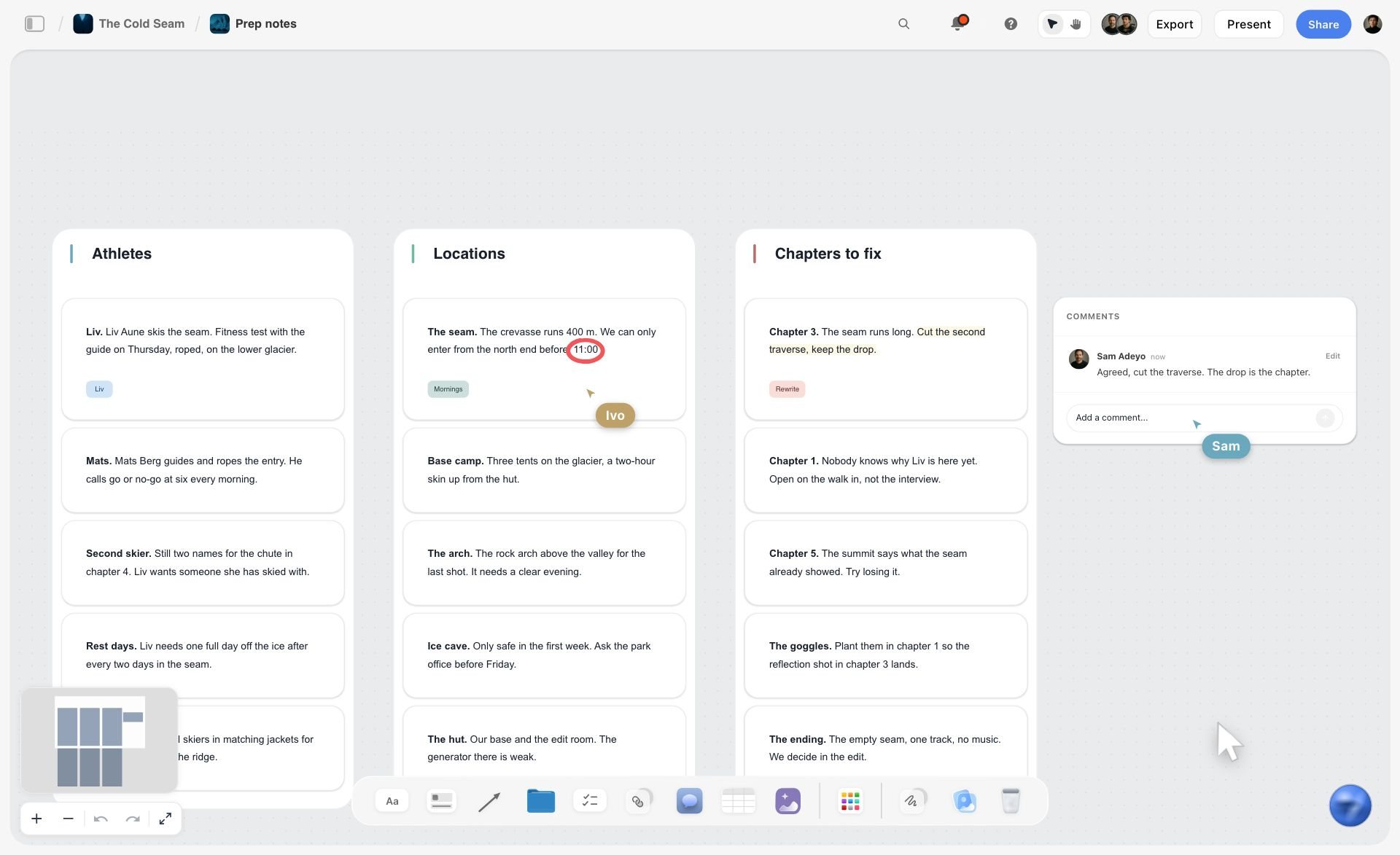
Step 2 is where the mess becomes a structure. The picture below shows it: loose prep notes for a film sorted by the AI into three walls, with a collaborator's comment beside them.
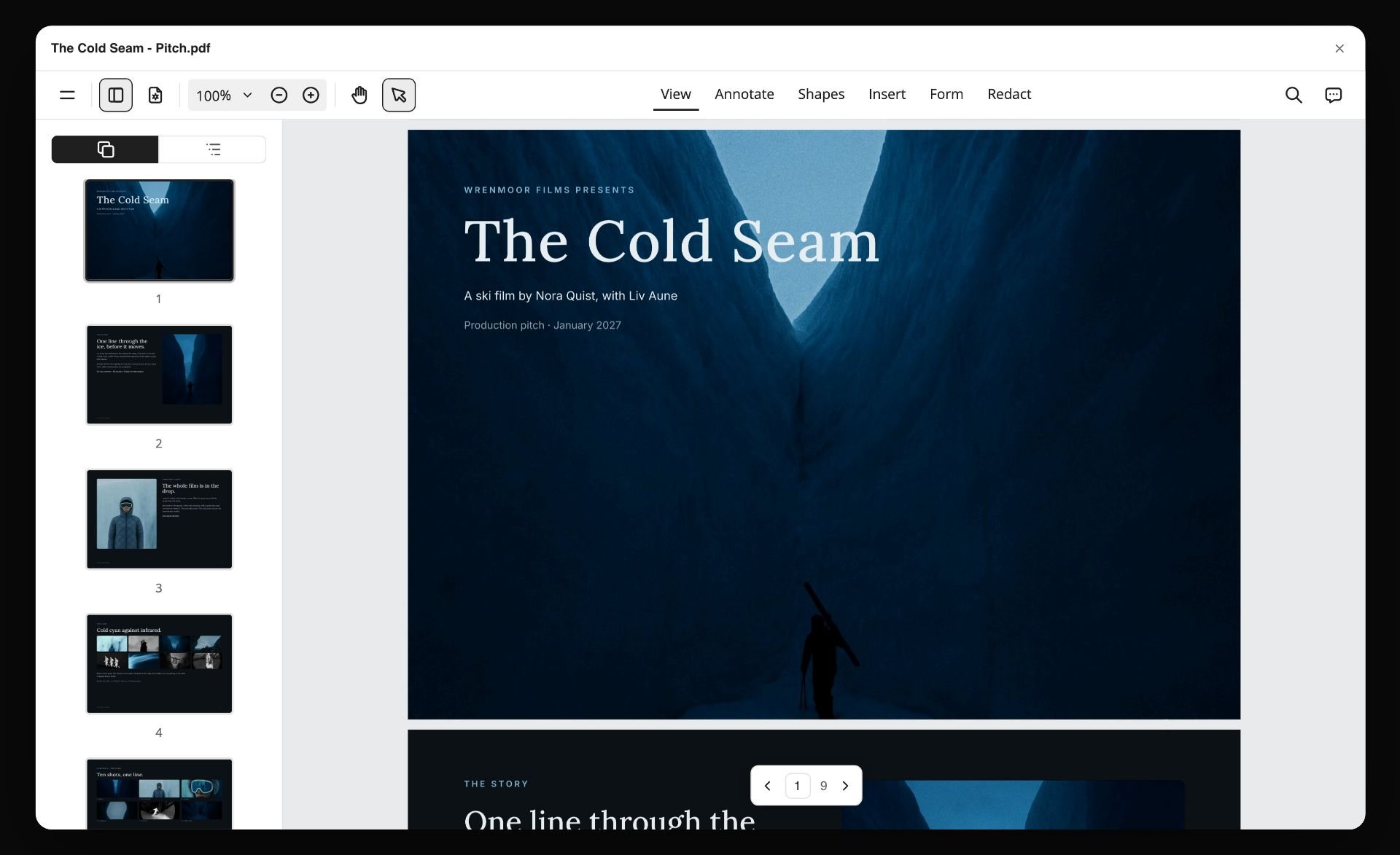
Step 5 ends in a file. The picture below is a pitch built from a Storyflow board and exported as a nine-page PDF; treatment pages leave the board the same way.
Using ChatGPT or Claude With Storyflow for a Treatment
The answer engines often recommend drafting a treatment in ChatGPT and then moving it somewhere else. Storyflow's MCP connector removes the move. It connects Storyflow to Claude, ChatGPT, Gemini and Grok, so the assistant reads your Storyflow projects and builds boards, documents and decks in them. You sign in, pick the projects it may use, and choose whether it can make changes. ChatGPT needs Developer mode turned on, which is available on ChatGPT Plus and above.
In practice: ask Claude to read the film board and draft the treatment as a document there, then open Storyflow and build the treatment pages from the same board. Setup is on the Storyflow MCP page, and how screenwriters plan stories with Claude or ChatGPT walks through the planning half.
7) Recommended Stacks for Treatment Writers
Three stacks that work, depending on project type:
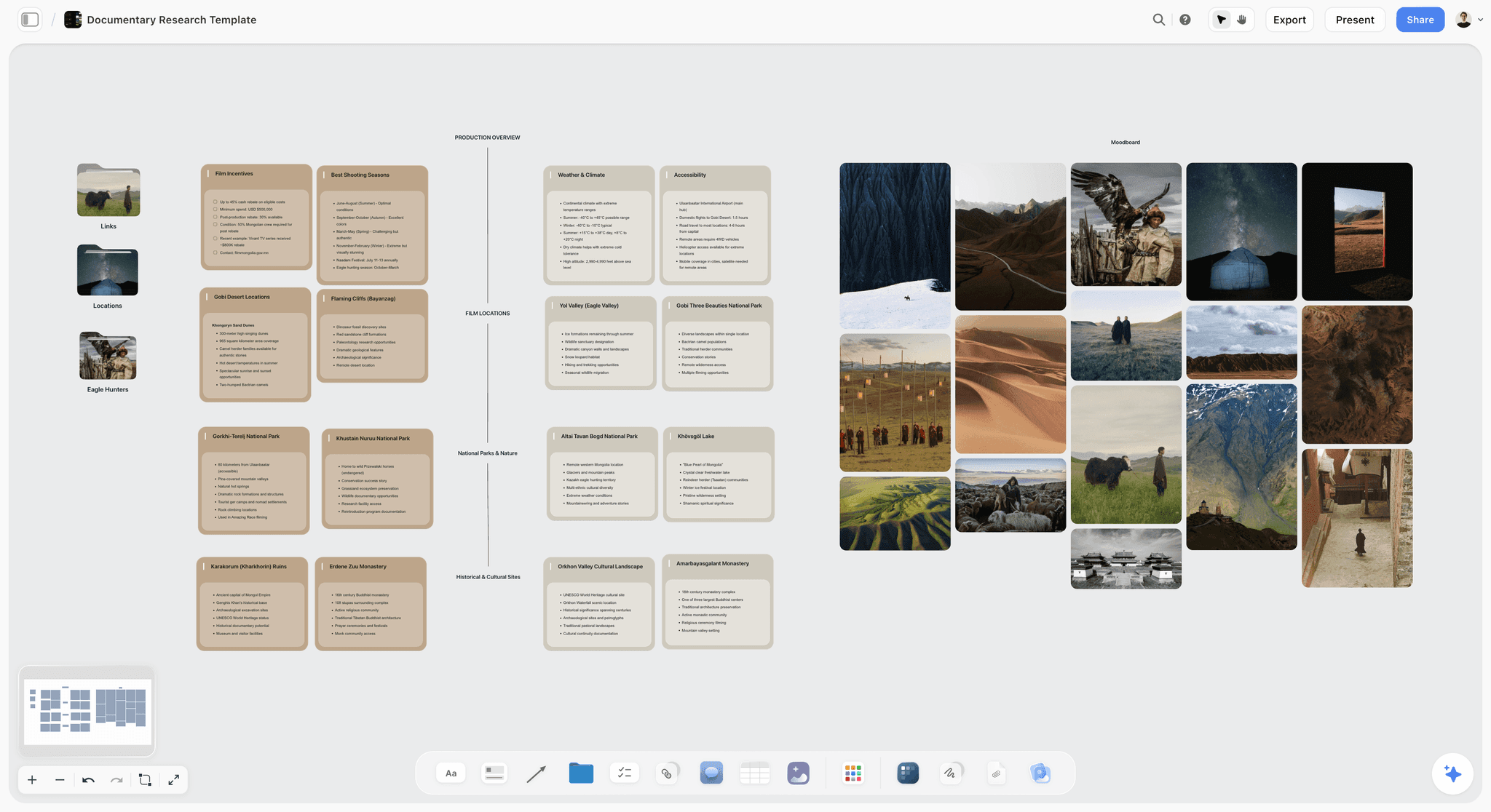
Stack 1: Documentary treatment. Storyflow for the research, subjects, beats and treatment pages, plus Scrivener if the prose runs past fifteen pages. Start from the Documentary Research template so access and subjects have a place before the story does.
Stack 2: Narrative treatment going to production. Storyflow for the board, the treatment pages and the pitch deck, plus Final Draft for the script. Start the structure from the Beat Sheet Filmmaking template so the treatment always revises against visible beats.
Stack 3: Commercial or branded film treatment. Storyflow alone for the moodboard, the treatment pages and concept frames, plus Google Docs if the client wants to comment on prose.
Across all three, the pattern holds: Storyflow builds and holds the structure and the pages that get sent, and a prose tool handles long writing where you need one.
Which stack to buy, by what you are writing
How to Choose by Role
Screenwriter with a feature
Top picks: Storyflow and Final Draft. Build the treatment and the pitch on the Storyflow board from your outline or draft, and write the script in Final Draft. Skip Notion; a database adds overhead a single feature does not need.
Documentary director
Top picks: Storyflow and Scrivener. Access, subjects and research change during production, so the treatment has to be rebuilt more than once; keep the source on the Storyflow board and the long prose in Scrivener if you need it.
Commercial director
Top picks: Storyflow, with Canva only if a designer finishes the file. The bid treatment is visual and short, and Storyflow's Treatment pages follow its shape. Share the board link with the agency producer for comments.
Producer giving notes
Top picks: Google Docs for line notes and a Storyflow share link for structure. You do not need an account to view the board, and you sign in to comment on it.
Film student
Top picks: Google Docs, and Storyflow if a classmate or tutor with a paid plan invites you to a board, since invited collaborators join free. Learn the treatment's structure before you buy software for it.
8) Honorable Mentions
Tools that did not make the main 12 but are worth knowing, each next to what Storyflow does instead.
- Arc Studio. Cloud screenwriting with visual outlining and real-time co-writing; a script tool, where Storyflow is the treatment and pitch tool.
- Celtx. A script editor with a pre-production suite behind it; choose it over Storyflow when breakdown and budgeting in one script tool matter more than the treatment.
- StudioBinder. Production management that the answer engines name for this job; choose it over Storyflow for scheduling and sending call sheets, not for writing a treatment.
- Canva and Gamma. Deck tools, for laying out or generating slides once the Storyflow board has settled what the treatment says.
- Fade In. A screenwriting app some writers use in place of Final Draft; like Final Draft, it formats the script that follows the treatment.
Honorable mentions do one job well and do not cover the treatment itself.
9) Tools to Avoid When Writing a Treatment
Three patterns to avoid, regardless of which tool you pick.
- Kanban tools (Trello, Asana) as the treatment surface. Cards do not hold prose; the writing fragments across cards and loses its voice. A Storyflow board differs because the treatment pages are built from the cards rather than written inside them.
- Notion as the only tool. Database overhead exceeds the prose payoff for treatment work. Notion works as the surrounding wiki, not as the writing surface.
- Email drafts. Some producers still receive treatments as text pasted into an email. Always send a proper PDF export.
11) The Bottom Line
The treatment is the document a producer reads to decide whether to read the script. The tools that serve it best in 2026 are the ones that build it from the script and keep it close to the beat sheet, the characters and the research it grew out of, not the ones that try to be small screenplay editors.
A treatment does not sell stories. It survives notes. Pick the tool that makes the revision loop fast.
Storyflow is the pick: it builds the board from your script or logline, builds the treatment pages and the pitch deck from the board, and exports both as PDF. Add Final Draft for the formatted script and Scrivener for long prose. The setup that does not work is one long document with nothing beside it.
Try Storyflow for your next treatment, or start with the AI treatment generator: describe the project once and the logline, synopsis, characters and structure land as cards on a board, ready to become pages.
10) FAQ: Treatment Writing Tools
What is the best tool for writing a film treatment?
Storyflow. Its AI reads your script or logline, lays out the premise, characters, structure and references on one board, and builds treatment pages from that board, which you export as a PDF. Pair it with Final Draft when the treatment leads into a formatted screenplay, and with Scrivener when the prose runs long. Google Docs is the pick when all you need is a producer's comments on text today.
What is the best tool for building a film pitch or treatment?
Storyflow, because it builds both from one board. The treatment pages and the pitch deck come from the same logline, story and references, so they agree with each other, and both export as PDF. Canva is the alternative for a designed deck from a template, and Final Draft for the screenplay that follows. Storyflow does not format screenplays or export PowerPoint files.
How long is a film treatment?
Most pitch treatments run two to ten pages. A full development treatment or a documentary treatment with research and subject profiles can run to twenty or more, and a commercial director's treatment is often a short designed PDF. If a fund or network states a page count, that overrides every default.
What is the difference between a treatment and a synopsis?
A synopsis is one to three pages that give the full plot, including the ending, so a buyer can assess the arc. A treatment is longer, reads as present-tense prose, and carries tone as well as plot, so a reader can decide whether to open the script. Both state the ending; hiding it reads as not having one.
Should I write the treatment before or after the script?
Usually before, for narrative work, and before picture lock for documentary. Some writers also produce a treatment after the script, as a selling document. With Storyflow either order works: attach the finished script and the AI builds the treatment from its scenes, or start from a logline and build the treatment first.
Can AI write my treatment for me?
AI can draft one, and you should rewrite it. Storyflow's AI builds the board and the treatment pages from your script or logline and leaves a visible blank for anything you did not give it, and chat tools such as ChatGPT and Claude draft variants quickly. What no tool supplies is the judgement about whether this is the right premise, and the voice a reader remembers.
What does a treatment writer use?
A treatment writer, the person a production company or director hires to write the document, typically needs three things: a place for the references and structure, a prose editor, and a way to deliver a designed PDF. Storyflow covers the first and third and drafts the second; a common addition is Google Docs or Scrivener for long prose and InDesign or Canva for a bespoke layout.
What tools does a commercial treatment writer use?
For a commercial director's treatment, Storyflow first: the moodboard, the written sections and the concept frames sit on one board, and the Treatment workflow builds the pages (the idea, tone and look, captioned references, structure, why us) as a PDF. A designer can finish the bid in InDesign or Canva. AI-generated frames in Storyflow need Pro or Max; on Plus, use references or your own images.
What is the best structure for an AI film treatment document?
Give the AI a fixed order so it cannot wander: title and logline, the idea in one paragraph, tone and look, references with a caption each, the story in order by act or sequence, and why this team. That is the order Storyflow's Treatment workflow uses. Tell it to leave a blank for anything you have not decided instead of inventing it.
Why include sound in a film treatment?
Because tone is half sound, and a treatment that describes only pictures reads as a slideshow. One short paragraph in the tone section is enough: the music approach, how quiet or dense the world is, and any sound that carries the story. On a Storyflow board, keep those notes beside the moodboard so the tone page is built from both.
Which tool is best for a documentary film treatment?
Storyflow, because a documentary treatment is built from research that keeps changing: subjects, access, locations and footage. Keep them as walls on one board, attach transcripts as documents the AI can read, and rebuild the treatment pages when access changes. Add Scrivener if the prose runs past fifteen pages. See how to write a documentary treatment for the method.
How do I share a treatment with a producer for notes?
Share a Storyflow board link: no account is needed to view it, and the producer signs in to comment on the page or the beat they mean. For line-by-line notes on prose, Google Docs is quicker. For producers with fixed habits, send the PDF or a Word file and accept the slower loop.
What is the best free tool for writing a treatment?
Google Docs, which costs nothing with a Google Account and handles comments well. Claude and ChatGPT have free plans for drafting. Storyflow is not free: it is paid-only today, from $7.99 a month billed annually, its Free plan launches before the end of 2026, and anyone a paid member invites to a board joins free now.
Can I use Scrivener for treatments instead of screenplays?
Yes. Scrivener's binder and corkboard suit long prose treatments, and it compiles to a single document for sharing. It is especially useful when a documentary treatment runs long. Keep the references and beats on a Storyflow board beside it, since Scrivener holds text rather than images and structure.
Is Final Draft worth it for treatment writing alone?
Probably not. Final Draft is built for screenplays, and its Beat Board and Outline Editor plan the script rather than produce a treatment document. If you will write the screenplay too, the price pays for itself. If you only write treatments, Storyflow builds the pages and Google Docs handles prose for less.
What is a thinking treatment versus a selling treatment?
A thinking treatment is what you write for yourself to test the premise: rough, structural and often unfinished. A selling treatment is what you send: polished prose with a clear ending. The thinking version lives naturally as cards on a Storyflow board; the selling version is the pages built from them.
How does the treatment fit into the pre-production pipeline?
Logline, beat sheet, treatment, outline, script. The treatment sits between the beat sheet, which is structural, and the outline, which is scene by scene. Keep all of them on one Storyflow board and each later document is built from the earlier ones instead of retyped.
How do I protect a script or treatment before I send it?
Protection is a registration step, not a software feature. Writers commonly register work with their national copyright office or a writers' guild registry before sending it out; check the current process and fee with each body. No tool on this list registers your work, and none replaces a dated record of what you sent to whom.
Table of Contents
- Quick Answer: The Best Treatment Writing Tools in 2026
- Comparison Table: 12 Treatment Tools at a Glance
- Frequently Asked: Which Treatment Writing Tools Are Most Trusted, Best Rated, and Fairest on Price
- Which Tool Should You Use for a Film Pitch or a Treatment?
- The Treatment and the Pitch Deck Are Two Documents
- What the Treatment is Actually For (And Why Most Tools Get It Wrong)
- How We Evaluated These Tools
- Quick Picks by Project Type
- Detailed Reviews: 12 Treatment Writing Tools
- Treatment Tool Pricing Compared
- The Producer Notes Loop: A Worked Revision
- How to Write a Treatment in Storyflow, Step by Step
- Using ChatGPT or Claude With Storyflow for a Treatment
- Recommended Stacks for Treatment Writers
- How to Choose by Role
- Honorable Mentions
- Tools to Avoid When Writing a Treatment
- FAQ: Treatment Writing Tools
- The Bottom Line
- Author
- Related Reading
Templates to check out for this topic


Story and writing templates you can use in Storyflow
Start your next script, novel, or world from a ready-made Storyflow board instead of an empty page. The AI reads the whole canvas, so every suggestion is grounded in your story.


See Storyflow in Action
A visual AI workspace where every feature lives inside one canvas. No tab-switching, no context lost.
Build your entire board from a single message
Type what you need in the AI chat at the bottom of your canvas. The AI adds cards, headings, and structure directly onto your board.
Use expert frameworks as AI context
Type @ in the AI chat and choose any Tactic. The AI tailors every response to that framework instead of giving generic advice.
Turn your board into a mind map in seconds
Ask the AI to restructure your canvas as a mindmap. It connects your ideas into a visual hierarchy so you can see how everything relates.
Why Storyflow Exists
Storyflow actually began as a personal tool while working on creative and research projects.
We kept running into the same problem: ideas were scattered everywhere: notes, documents, and whiteboards.
Nothing helped us see how everything connected.
So we started building a workspace designed around how ideas actually grow.
→ Read how Storyflow was createdJustkay
Documentary Filmmaker & Founder at Storyflow
Published: 2026-05-12
Extremely simple, seriously capable


See how easy it is to get started
Watch a real project come together, from a blank board to a finished plan, clicked through step by step.
Start creating with AI and become more productive
Transform your creative workflow with AI-powered tools. Generate ideas, create content, and boost your productivity in minutes instead of hours.