The 10 Best User Story Mapping Tools in 2026
A backlog is a story map with the narrative deleted. Ten tools ranked by whether they keep both axes intact and what actually survives the Jira boundary.

Category
Tools & Software
Author

Sara de Klein
Head of Product at Storyflow
Topics
2026-08-13
•
22 min read
•
Tools & SoftwareTable of Contents
- Key Takeaways
- The Backbone and the Ribs
- At a Glance: The 10 Tools Compared
- How I Ranked These
- Quick Picks by Job Type
- 1. StoriesOnBoard
- 2. Avion
- 3. Storyflow
- 4. Easy Agile TeamRhythm
- 5. CardBoard
- 6. Miro
- 7. FigJam
- 8. Mural
- 9. Featmap
- 10. Jira
- What to Actually Pay For
- Tools to Avoid for This Job
- What No Tool on This List Does
- The Bottom Line
- FAQ: User Story Mapping Tools
- Related Reading
Templates to check out for this topic


- user story mapping tools
- story map software
- story mapping Jira
- StoriesOnBoard
- Avion story mapping
- user story map template
- backlog vs story map
- release slicing
What are the best user story mapping tools in 2026?
A user story map is a two-axis artifact: the user's journey runs left to right along the top, and the stories that make each step possible stack downward in priority order. Almost every tool teams reach for preserves the first axis and quietly destroys the second, which is why so many maps end as a flat Jira backlog nobody can read a story off. StoriesOnBoard ranks first because it is purpose-built and its Jira sync runs both ways. Avion ranks second for an opinionated hierarchy that makes bad maps hard to draw. Storyflow, which is ours, ranks third as the thinking surface for the weeks before a backlog exists, and it has no Jira integration at all.

Full disclosure: Storyflow is our product, and it ranks third here rather than first. The narrow ground it wins on is the phase before a backlog exists: research, transcripts, screenshots and the emerging backbone sit on one canvas whose AI reads the whole board, so a step and the evidence for it live together. It does not win the category. Storyflow has no Jira integration of any kind (no import, no export, no issue linking, no backlog sync), no story point or estimate field, no release or sprint slicing primitive, and no backbone object, so reordering an activity does not carry its stories with it. StoriesOnBoard and Avion are purpose-built and beat it on every one of those points. Storyflow is also paid only during early access, with no free plan today.
Quick Comparison
Ten tools judged on two questions: does the tool keep both axes of a story map as real structure, and what survives the moment the map meets Jira. Almost every failure is at the second question.
| Tool | Best For | AI Features | Price |
|---|---|---|---|
| StoriesOnBoard | Teams who map and deliver in the same cadence | No meaningful AI in the mapping itself | From about $9 per user monthly, annual billing |
| Avion | Teams whose maps keep collapsing into piles | No meaningful AI in the mapping itself | From about $25 per user monthly |
| Storyflow | Thinking before the backlog exists | AI reads the full active canvas board, plus 1 Tactic and 3 Documents you @-mention | $7.99 mo annual (free plan late 2026) |
| Easy Agile TeamRhythm | Jira teams who want zero drift | None | Free for small Jira instances, then per Jira user tier |
Key Takeaways
- Jeff Patton formalised user story mapping and gave the practice its vocabulary in his 2014 O'Reilly book. The core idea is that a list is one dimensional and a product is not.
- The backbone is the sequence of things a user does, left to right. The ribs are the stories under each step, ordered top to bottom by necessity.
- Most story maps die at the Jira boundary. You import the map, Jira stores a flat list of issues, and the horizontal axis is gone within one sprint.
- Only three tools here treat the backbone as a real object that reorders with its ribs attached: StoriesOnBoard, Avion and CardBoard.
- Two way Jira sync matters more than any other feature. One way export is a snapshot, and a snapshot is stale on day two.
- Storyflow ranks third and has no Jira integration, no backlog sync, no story point field and no release slicing. It decides what the map should say, it does not run delivery.
- Miro and FigJam templates give you a picture of a story map. Nothing under those stickies knows a card belongs to a step.
- The cheapest answer for a Jira team is a Jira app, because a map inside the backlog cannot drift from it.
Build the backbone before the backlog
Put the transcripts, the screenshots and the emerging user journey on one canvas, then ask the AI which steps have no stories under them and whether the top row still reads as a sequence. Storyflow has no Jira integration, so this is the thinking surface, not the delivery system. Paid-only during early access; the Free plan lands before the end of 2026.

The Backbone and the Ribs
Ask a team where their user story map is and you get one of two answers. A photograph of a wall from a workshop nine months ago, or a Jira filter. Both mean the same thing. The map is gone.
A story map has two axes and they do completely different jobs.
The backbone is the horizontal one: the sequence of steps a user moves through, left to right, in the order they actually happen. Open the app. Find something to watch. Decide whether to watch it. Watch it. Come back tomorrow. The backbone is a narrative, and it lets somebody who was not in the room understand the product in about forty seconds.
The ribs are the vertical ones. Under each step, the stories that could make it work stack downward in order of necessity. At the top sits the thinnest thing that would work at all. Below it sit the better versions, then the nice ones, then the ones somebody suggested in a workshop and nobody wants to say no to yet.
Together the two axes give you what a backlog cannot: a horizontal cut. Draw a line across the map and everything above it is a release a user can actually complete a journey with. That is the point of the technique. Not prioritisation for its own sake, but prioritisation that still leaves a working story at the end.
A backlog is a story map with the narrative deleted.
Sort a story map by priority and you get a list. The list is not wrong. Every item is still there, still worded the same way, still estimated. What is missing is that item 4 and item 31 are the same user step and item 5 is a different one, and that the eleven items you deferred were deferred as a group because they form a coherent later slice.
That information was never stored in a field. It was stored in the shape.
So the ranking axis here is narrow. Every tool below is judged on two questions:
- Does it preserve both axes as real structure, not as an arrangement of stickies that looks correct until someone drags one?
- What happens at the Jira boundary, where the map meets the system development actually runs on?
Almost every failure in story mapping tooling is at question two. A map that cannot reach delivery gets abandoned, and a map that reaches delivery by flattening itself has already lost the thing it was for.
At a Glance: The 10 Tools Compared
| Tool | Preserves both axes | What happens at the Jira boundary | Best for |
|---|---|---|---|
StoriesOnBoard | Yes, backbone and ribs are real objects | Two way sync, changes flow both directions | Teams who map and deliver in the same week |
Avion | Yes, with an enforced goal and step hierarchy | Two way sync, opinionated field mapping | Teams who keep getting the hierarchy wrong |
Storyflow | Visually yes, structurally no | No boundary at all, there is no integration | Thinking before the backlog exists |
Easy Agile TeamRhythm | Yes, inside Jira itself | There is no boundary, it is Jira | Jira teams who want the map to be the backlog |
CardBoard | Yes, with a genuine map data model | Sync to Jira, Azure DevOps and Rally | Teams on a non Jira tracker |
Miro | No, stickies in map shaped rows | Jira Cards app, card level, not map level | Big messy discovery workshops |
FigJam | No, stickies with a template behind them | Plugin dependent, mostly manual | Design led teams already in Figma |
Mural | No, stickies plus facilitation controls | Jira integration at card level | Remote workshops with 12 people talking |
Featmap | Yes, a simple three level map model | No integration, self hosted and standalone | Teams who must self host |
Jira | No, this is where the axis dies | It is the boundary | Running delivery, not mapping it |
How I Ranked These
I came to this from documentary, where the equivalent artifact is a sequence wall: scenes pinned across the room in narrative order with alternate coverage stacked under each one. Type that wall into a shot list and the film stops being visible and becomes an inventory. Product teams do the same to themselves with a backlog, and I built the same map in all ten of these tools to find out which ones stop it.
Five criteria, in order.
1. Is the backbone a real object? The test: drag the third activity to the front and see whether every story under it moves with it. In Miro it does not, because there is no relationship between the sticky and the column it sits in.
2. Can you slice? The test: define release one, then ask the tool what is in it. A tool that models slices answers instantly. A tool that does not lets you draw a horizontal line that means nothing to anything.
3. What survives the Jira boundary? The test: rename a story in Jira, then look at the map without pressing anything. If the map still shows the old title, you have an export rather than a sync, and it will be wrong by the second sprint.
4. Can a cold stakeholder read it? The test: hand the map to somebody who missed the workshop and ask them to narrate what a user does. If they read individual cards instead of tracing the top row, the backbone is not working.
5. What does it cost per person who only looks? Most story map audiences are read only: engineers, support leads, the executive who wants to know what is in the next release. Per seat pricing for viewers quietly kills adoption.
Pricing is as of August 2026 and changes frequently. Verify with each vendor.
Quick Picks by Job Type
- Best overall: StoriesOnBoard. Real map model, real two way Jira sync, sensible reader pricing.
- Best opinionated structure: Avion. No six level nesting, no maps without goals.
- Best inside Jira: Easy Agile TeamRhythm. No boundary, because the map is the backlog.
- Best before the backlog exists: Storyflow. Research, references and the map on one canvas the AI can read.
- Best for non Jira trackers: CardBoard. Azure DevOps and Rally are first class.
- Best for the messy first workshop: Miro. Twenty people, four hundred stickies, ninety minutes.
- Best self hosted: Featmap. Open source, simple, and yours.
1. StoriesOnBoard
The verdict. The most complete purpose-built story mapping tool, and the only one where the Jira relationship is genuinely two directional in daily use.
Best for. Product teams who map and deliver in the same cadence and cannot afford the map to drift.
Pricing. Free trial available. Paid plans start at roughly $9 per user per month billed annually as of August 2026, with higher tiers required for advanced integrations and larger organisations. Read only sharing is available on paid plans, which matters more than the headline number.
Why it ranks here. StoriesOnBoard is built on a data model that knows what a story map is. Activities, steps, cards and releases are separate entities with real relationships, so the operations that break other tools are trivial. Reorder an activity and its entire rib travels with it. Drag a release line and every card above it joins that release, and the tool can tell you what that release contains, what it is estimated at, and what it leaves the user unable to do.
The Jira integration is why it takes the top slot. It is not an export. Cards are bound to Jira issues and changes propagate both ways: rename an issue in Jira and the card updates, move a card into a different release and the fix version follows. Status flows back, so the map shows progress against the shape of the product rather than a sprint burndown. That single property changes the lifetime of a map from one workshop to the life of the product.
It also handles the unglamorous things general canvases do not. Story point fields that sum per slice. Multiple maps with shared cards. Personas attached to backbone steps so the map can be filtered to one user type. Unlimited read only viewers on the right plan.
The honest criticism is that it is not a nice place to think. The structure that makes it good at holding a map makes it rigid while you are still finding the backbone. The teams I watched use it well did a first pass somewhere loose and built the real map here once the shape was known.
Strengths.
- Backbone, ribs and release slices are all first class objects with real relationships.
- Two way Jira sync, including status flowing back onto the map.
- Slice level estimation, so a release has a number and not just a boundary.
- Personas and filtering let one map serve several user types.
- Read only sharing at sensible cost for stakeholders who only ever look at the map.
Limitations.
- Rigid during early exploration, when you do not yet know the backbone.
- The interface is dense and takes a couple of sessions to get comfortable in.
- Advanced integrations sit on higher tiers, so the entry price is not the real price for a Jira team.
- No meaningful AI assistance in the mapping itself.
The trade off. It is the best tool for holding a map and one of the worst for discovering one.
2. Avion
The verdict. Opinionated in exactly the right places, which is why teams who keep producing unreadable maps should start here.
Best for. Teams whose maps keep collapsing into a two level pile of cards with no journey visible.
Pricing. Free trial available. Paid plans run from roughly $25 per user per month as of August 2026, with team and enterprise tiers above that.
Why it ranks here. Avion has an argument about what a story map is and it enforces it. Goals sit above activities, activities above steps, stories below steps. You cannot invent a fourth level of nesting to avoid a hard prioritisation conversation, which is the most common way a map degrades on a general canvas.
That constraint sounds annoying until you have watched a Miro map age six months. What starts as a clean backbone acquires sub-columns, orphan clusters off to the right, a legend, three stickies that say "discuss with legal", and eventually the top row stops being a journey. Avion's structure makes that specific decay impossible. It refuses to hold a map that does not read as a narrative.
The Jira sync is genuinely two way and the field mapping is more configurable than StoriesOnBoard's, which matters if your Jira instance was customised by someone who left. Releases map to fix versions or sprints, and the sync is reliable enough that teams run planning off the map and let Jira execute underneath.
It ranks second for two reasons. The price is roughly double per user, real money for a team of eight, and it is more prescriptive than some teams want. If your product has no linear journey, a platform with several disconnected entry points for example, Avion's insistence on a narrative backbone feels like a fight rather than a guide.
Strengths.
- Enforced goal, activity, step and story hierarchy that prevents map decay.
- Two way Jira sync with configurable field mapping.
- Release and sprint slicing that reaches the tracker properly.
- Personas and journey level views that keep the narrative readable.
- Clean, calm interface that non product people can read without training.
Limitations.
- Roughly twice the per user cost of StoriesOnBoard.
- The opinion is a constraint if your product has no single linear journey.
- Less useful as a general workshop surface, so you need something else for discovery.
- Smaller ecosystem of integrations outside the main trackers.
The trade off. You are paying for a tool that argues with you, and that is the point.
3. Storyflow
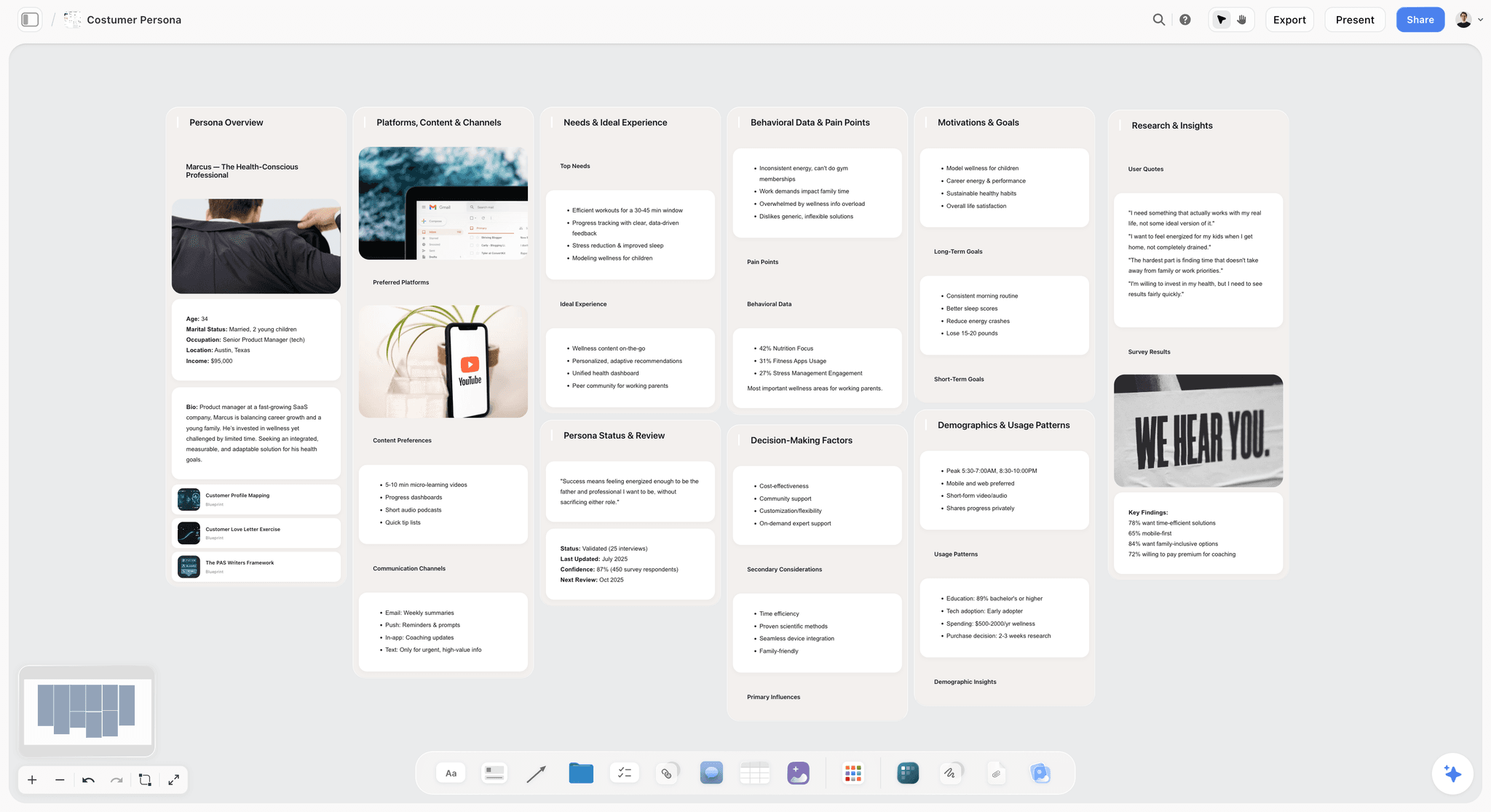

The verdict. The right surface for the weeks before a backlog exists, and the wrong surface for anything downstream of it, because there is no Jira integration of any kind.
Best for. Building the backbone out of research, references and interview evidence, while the shape is still genuinely undecided.
Pricing. Paid only during early access. Plus is $7.99 per month billed annually or $9.99 monthly, adding the 200 plus Story blueprints and unlimited file uploads. Pro is $14 per month billed annually or $19 monthly, adding AI image generation, roughly twenty times more AI usage and memory across conversations. Max is $39 per month billed annually or $49 monthly, adding forty times more AI and Team Workspace with permissions and roles. Pricing is flat per account rather than per seat, and anyone a paid member invites to a board signs up free. The Free plan launches before the end of 2026. All as of August 2026.
Why it ranks here. There is a phase before the map, and most teams do it worst. You have twelve interview transcripts, a competitor teardown, six screenshots of the current flow, an analytics export showing where people drop out, and no agreement about what the user is trying to do. A purpose-built mapping tool is not much help, because it wants a backbone and the backbone is what you are looking for.
Storyflow is a canvas, so the raw material and the emerging map share a space. The transcript quote that justifies a step lives next to the step. The screenshot of the confusing current flow sits above the column meant to replace it. When somebody asks in week three why "verify identity" is a separate activity rather than part of sign up, the evidence is two inches away.
The AI does specific work here. Storyflow's AI reads your full active canvas board, plus up to one Tactic and up to three Documents you @-mention, so you can ask about the whole map rather than one card. Which backbone steps have no stories under them. Which activities have eleven stories when their neighbours have two, usually a sign that one activity is really three. Whether the top row still reads as a sequence someone could narrate. Those are shape questions, and a card level assistant cannot answer them.
Now the part that keeps it third. Storyflow has no Jira integration. Not a limited one, not a one way export, none. Stories written on the board get retyped into the backlog by a human. There is no story point or estimate field, so a slice has no number, and no release or sprint primitive, so a horizontal line across the map is something you draw rather than something the tool understands. The backbone is not an object either: reorder an activity and you drag its cards yourself. Visually the map is correct. Structurally it is a picture of one, and StoriesOnBoard and Avion beat it on every one of those points.
Strengths.
- Research, references and the emerging map live on one surface, so the evidence for a step sits next to the step.
- Whole board AI answers shape questions: empty steps, over specified activities, whether the backbone still reads as a sequence.
- Flat per account pricing and free invited collaborators, so the many read only stakeholders cost nothing.
- Fast during the phase where the backbone changes every hour.
- 200 plus Story blueprints on Plus for the surrounding planning work.
Limitations.
- No Jira integration whatsoever. No import, no export, no sync, no issue linking. Every story is retyped by hand.
- No story point or estimate field, so a release slice cannot be summed or sized.
- No release or sprint slicing primitive. A slice line is a drawing, not a query.
- The backbone is not a real object, so reordering an activity does not carry its ribs with it.
- No personas, goals or hierarchy enforcement, so map decay is entirely on your discipline.
- Paid only during early access, with no free plan today, and shared editing with permissions and roles sits on Max at $39 per month.
The trade off. Storyflow is where you work out what the map should say. StoriesOnBoard or Avion is where it goes to live once you know.
4. Easy Agile TeamRhythm
The verdict. The map that cannot drift from the backlog, because it is drawn on top of the backlog.
Best for. Jira teams who have already lost two story maps to staleness.
Pricing. Free for small Jira instances, then priced per Jira user tier through the Atlassian Marketplace, commonly a few dollars per user per month at team scale as of August 2026. It requires an existing Jira licence, so the real cost is Jira plus the app.
Why it ranks here. Every other tool here has a boundary problem. This one has no boundary. TeamRhythm renders your Jira issues as a story map inside Jira: epics form the backbone, stories stack underneath, sprints or versions form the slices. Drag a card between swimlanes and you have changed the Jira issue, because there is nothing else to change.
That removes the entire class of failure this post is about. No export to go stale, no sync to configure, no second source of truth to update instead of the first. The map is a view, and a view cannot drift.
It ranks fourth because a view of a backlog is not the same as a mapping tool. The backbone is your epic structure, so if your epics are badly shaped, and most are, the map inherits that and you cannot fix it without restructuring Jira. Everyone who needs to see the map needs a Jira licence, exactly the wrong property for a stakeholder audience. And you cannot use it before the backlog exists, which is where mapping does most of its work.
Strengths.
- No boundary, no sync, no staleness. The map is the backlog.
- Slicing by sprint or version is real, because it is a Jira field.
- Cheap next to standalone mappers if you already run Jira.
- Retrospective and estimation features in the same app.
Limitations.
- Badly shaped epics make a badly shaped backbone.
- Every viewer needs a Jira licence, pricing out the read only audience.
- Useless for discovery, since it needs issues to exist first.
- Locked to Jira, so worthless if you change tracker.
The trade off. You give up the ability to think freely in exchange for a map that is never wrong.
5. CardBoard
The verdict. A proper story map data model with the widest tracker support, and the best answer for teams not on Jira.
Best for. Teams running Azure DevOps, Rally or a mixed estate.
Pricing. Free trial available. Paid plans run around $12 per user per month as of August 2026, with team tiers above that.
Why it ranks here. CardBoard has been building story mapping software for a long time and it shows in the model. Backbone, ribs and slices behave the way the technique describes, and the map holds up under the operations that break canvas tools.
Its distinguishing feature is breadth of integration. Jira is supported, but so are Azure DevOps, Rally and Trello, as real targets rather than a checkbox. If your organisation has three teams on three trackers, more common than vendors admit, CardBoard is often the only tool that can hold one map across them.
It ranks fifth because the sync is less immediate than StoriesOnBoard's, the interface feels a generation older than Avion's, and the per user price sits higher without a clear advantage for a Jira only team. Choose it for the tracker breadth, not the mapping.
Strengths.
- Genuine story map data model with working slices.
- Azure DevOps and Rally support that is real, not nominal.
- Collaborative editing with a sensible permission model.
- Long track record and stable behaviour on large maps.
Limitations.
- Sync is less immediate than StoriesOnBoard's two way binding.
- Interface feels dated next to Avion.
- Higher per user cost than the better Jira only option.
- Limited value as a discovery surface.
The trade off. The right pick if your trackers are plural, unnecessary if they are not.
6. Miro
The verdict. The best place to make a story map and one of the worst places to keep one.
Best for. The first workshop, where twenty people need to generate four hundred stickies fast.
Pricing. Free tier with limited boards. Paid plans start around $8 per user per month billed annually as of August 2026.
Why it ranks here. Nothing here beats Miro for the generative phase: the infinite canvas, the speed of sticky creation, the voting, the timer, the fact that everyone in your company already has an account. The story mapping templates are decent and the facilitation features are useful when a map is built by a room rather than a person.
The problem is structural and every general canvas shares it. A Miro story map is stickies arranged in the shape of a story map. Nothing underneath knows a card belongs to a step or that a row is a release. Drag one sticky and the map is silently wrong. Six months later the top row has stopped being a journey and nobody noticed the day it happened.
The Jira Cards app helps at card level: create and link issues from stickies, see status on the card. Useful, and not map level sync. Reordering the backbone tells Jira nothing, and a release line drawn across the board is a line.
Strengths.
- Unmatched for the first generative workshop.
- Voting, timers and facilitation tools that purpose-built mappers lack.
- Jira Cards app gives real card level linking and status.
- Everyone already has it, so adoption cost is zero.
Limitations.
- No underlying map model, so the structure is purely visual and silently breakable.
- No slice awareness, no estimation rollup, no release concept.
- Maps decay predictably over months without anyone noticing.
- Per user pricing for a stakeholder audience who only read.
The trade off. Run the workshop here, then move the result somewhere that knows what a map is.
7. FigJam
The verdict. A good workshop canvas for teams already living in Figma, with the same structural blindness as Miro and fewer integrations.
Best for. Design led product teams who want the map next to the flows and screens.
Pricing. Free tier available. Collab seats run roughly $5 per user per month billed annually as of August 2026, cheaper than Miro at team scale.
Why it ranks here. The argument for FigJam is proximity. If your user flows, wireframes and design system already live in Figma, having the story map one file away is worth something real, and designers will actually open it, which is not true of a tool bought for the PM.
Mechanically it is a lighter Miro: stickies, sections, templates, decent multiplayer, a small plugin ecosystem. Jira connectivity is plugin dependent and shallow, so the map is manual on both ends. It ranks seventh because it shares Miro's limitation, no map model underneath, without Miro's facilitation depth or integration breadth.
Strengths.
- Lives beside the flows and screens the map refers to.
- Cheaper per seat than Miro at team scale.
- Fast multiplayer with low friction for designers.
- Free tier is usable for a single map.
Limitations.
- No map data model, so the same silent decay as Miro.
- Jira connectivity is plugin dependent and shallow.
- Fewer facilitation controls than Miro or Mural.
- Poor fit for teams with no existing Figma presence.
The trade off. Worth it for the adjacency, not for the mapping.
8. Mural
The verdict. The strongest facilitation controls of any canvas here, wrapped around the same structural gap.
Best for. Remote mapping workshops where the hard problem is running the room, not drawing the map.
Pricing. Free tier available. Paid plans start around $12 per user per month billed annually as of August 2026.
Why it ranks here. Mural's differentiator is control of the session. Private mode, where participants add stickies without seeing each other's, produces noticeably more independent thinking during the divergent phase. Summon, timers, facilitator controls and structured voting are all better developed than Miro's equivalents.
For the job of getting a backbone out of fourteen people in ninety minutes, this is the best tool here. What happens next is the problem. Like Miro and FigJam, the map is an arrangement rather than an object, and the Jira integration operates at card level.
Strengths.
- Private mode genuinely improves divergent phases of a session.
- Best facilitator controls of any tool here.
- Solid templates for mapping and the surrounding discovery work.
- Reliable at large participant counts.
Limitations.
- No underlying story map model.
- Jira integration is card level and shallow.
- Higher per user price than Miro for a similar canvas.
- Nothing stops the map decaying after the workshop.
The trade off. Facilitate here, then move the artifact. The workshop is not the map.
9. Featmap
The verdict. Open source, self hosted, three levels deep and honest about being nothing else.
Best for. Teams with a hard self hosting requirement.
Pricing. Free and open source. Your cost is hosting and the person maintaining it, as of August 2026.
Why it ranks here. Featmap implements a simple story mapping model, milestones and goals and features arranged as a map, and runs on your own infrastructure. Where data residency or procurement rules out a hosted tool, that combination has no real competitor here.
It ranks ninth on capability rather than principle. No tracker integration, so the Jira boundary is crossed by hand, collaboration is basic, and development activity is modest enough that you may end up maintaining it. But it understands what a story map is, which puts it structurally ahead of three tools above it, and it costs nothing.
Strengths.
- Genuine map model with slice style milestones.
- Self hosted, so data never leaves your infrastructure.
- No licence cost at any team size.
- Simple enough that nobody needs training.
Limitations.
- No Jira or tracker integration at all.
- Basic collaboration compared to anything commercial here.
- Modest development activity, so you carry maintenance risk.
- No estimation, personas or reporting.
The trade off. The only serious answer if self hosting is a requirement, and a downgrade if it is not.
10. Jira
The verdict. The system every map has to reach, and the place where the second axis dies.
Best for. Running delivery. Not mapping it.
Pricing. Free for up to 10 users. Standard runs around $8 per user per month as of August 2026, with Premium above that.
Why it ranks here. Ranking Jira last on a story mapping list is not a criticism of Jira. It is the observation the whole post is built on. Jira is a strong issue tracker and it is where sprints, work in progress and releases live. Every tool above exists to reach it.
But Jira's data model is a hierarchy of issues, not a map. Epics give a crude backbone, boards give a crude slice, and the moment a map is imported it becomes a filtered list ordered by rank. The horizontal narrative is stored nowhere, because there is no field for it. A backlog is a story map with the narrative deleted, and Jira is where that deletion happens by default.
The consequence is that a Jira only team never has a story map. They have a backlog with epic labels, and when a new engineer asks what the product does, somebody opens a filter and scrolls. Add a mapping layer and the deletion stops being automatic.
Strengths.
- The genuine system of record for delivery, and non negotiable for most teams.
- Epics and versions give a crude approximation of backbone and slice.
- Enormous app ecosystem including several real story mapping layers.
- Free tier covers a small team completely.
Limitations.
- No native concept of a user journey, so the horizontal axis has nowhere to live.
- Imported maps flatten immediately and irreversibly.
- Rank ordering encourages the exact prioritisation the technique exists to prevent.
- Every viewer needs a licence.
The trade off. You are not choosing whether to use Jira, only whether anything holds the axis Jira cannot.
What to Actually Pay For
Pay for two way sync before anything else. One way export is a snapshot, and a snapshot of a backlog is wrong within a sprint. If your budget covers one paid tool here, spend it on what keeps the map and the tracker in agreement. StoriesOnBoard at roughly $9 per user is the cheapest credible version.
Pay a few dollars per Jira user for a map layer before $25 per user for a standalone tool. If your team is Jira native and your epics are reasonably shaped, TeamRhythm gets most of the value at a fraction of the cost and removes staleness rather than managing it.
Do not pay per seat for people who only read. Per seat pricing across a large read only audience turns a working practice into a tool three people log into. Check the viewer terms before the editor price. Flat per account pricing, which Storyflow uses, and unlimited readers on paid plans, which StoriesOnBoard offers, both solve this. Miro and Mural do not.
Do not pay for a discovery canvas you already have. Almost every company has Miro, FigJam or Mural somewhere. Run the first workshop on whichever one you own and spend the budget downstream.
Tools to Avoid for This Job
A spreadsheet as the story map. Rows can hold a backbone column, a priority column and every card. What they cannot show is the shape, which is the only reason the technique exists. A spreadsheet story map is an inventory with extra steps.
A Jira filter as the story map. The default failure, and invisible, because the filter genuinely contains every story. It contains no sequence, so nobody can read the product off it, and within two quarters the shared picture is gone.
A photograph of the wall. Physical mapping workshops are excellent and the photo is not the artifact. It records a decision that has already changed. If your map exists only as an image in a Slack thread, you have a memory rather than a map.
Any tool where the backbone is a text label. If the top row is stickies with no relationship to the cards below, the structure is decorative. Drag one activity to the front. If nothing follows it, the map will decay and you will not see the day it happens.
What No Tool on This List Does
None of them will tell you whether your backbone is right. The hardest judgement in story mapping is what counts as a step: too coarse and the map hides the interesting decisions, too fine and it becomes a task list with a header row. No tool here evaluates that call.
None of them will make the slice honest. A release line drawn above everything the business asked for is not prioritisation, and every tool here will let you draw it. Tools that model slices at least attach a number to the fiction.
None of them closes the gap between map and tracker without a human decision about which is the source of truth. Two way sync propagates changes. It does not decide whether the map or the backlog wins when they disagree, and teams that never decide that explicitly end up trusting neither.
And to be plain about our own: Storyflow has no Jira integration, no backlog sync, no story point field and no release slicing. If you need the map to drive delivery, it is not the tool for that half of the job.
The Bottom Line
Story mapping is not a diagramming technique. It is a decision technique, and the decision it enables, cutting a release that still leaves a user able to finish a journey, is only possible while both axes are intact.
If you run delivery off the map, buy a purpose-built tool with two way sync. StoriesOnBoard at roughly $9 per user is the best value, Avion is worth the higher price if your maps keep decaying, and Easy Agile TeamRhythm is the cheapest way for a Jira native team to make drift impossible. All three treat the backbone as a real object, and that is the whole difference.
Storyflow is not that tool and this post will not pretend otherwise. It has no Jira integration, no backlog sync, no story points and no slicing. It is good at the phase before any of that matters, when you have transcripts and screenshots and no agreement about what the user is trying to do, and the map has to be argued into existence next to the evidence for it. Do that work somewhere loose, move it somewhere structured, and check every quarter that the top row still reads as a story. A backlog is a story map with the narrative deleted, and the only defence is an artifact that keeps the sentence intact.
FAQ: User Story Mapping Tools
What is a user story map?
A user story map is a two axis picture of a product. Along the top runs the backbone: the sequence of steps a user moves through, left to right in the order they happen. Beneath each step, stories stack downward in order of necessity, forming the ribs. Horizontal lines define releases, so each release is a slice that still lets a user complete the journey. Jeff Patton formalised the practice and its vocabulary in his 2014 O'Reilly book.
Why do story maps turn back into backlogs?
Because the second axis is stored in the shape rather than in a field. Import a map into a tracker and every card survives while the sequence does not, since no issue model has a place for "this is step three of the journey". The map becomes a rank ordered list, and the list is not obviously broken, which is why nobody notices. A backlog is a story map with the narrative deleted.
What is the best user story mapping tool in 2026?
StoriesOnBoard for most teams, on the strength of a real map data model and Jira sync that runs both directions rather than exporting a snapshot. Avion is better if your maps keep decaying into unstructured piles, because its enforced goal and step hierarchy makes that decay impossible. If you are Jira native and want zero drift, Easy Agile TeamRhythm draws the map inside Jira, so there is no boundary to cross.
Can you do story mapping in Jira alone?
Not really. Jira's model is a hierarchy of issues with rank ordering, so epics give a rough backbone and versions a rough slice, but no field stores the user's journey. In practice a Jira only team has a labelled backlog rather than a map, and the shared picture the workshop produced is gone within a quarter. Adding a mapping layer such as TeamRhythm, or syncing to StoriesOnBoard or Avion, prevents that.
Is Miro good for user story mapping?
Miro is excellent for building a map and poor for keeping one. For the first workshop, where a room generates hundreds of stickies fast, nothing here beats it, and the voting and timers are useful. But a Miro map is stickies arranged in a map shape with no underlying model, so dragging one card can silently break the structure and there is no release slice concept. Build it there, then move it.
What is the difference between a story map and a roadmap?
A story map describes what a product does from the user's point of view, organised by journey and priority, with no dates. A roadmap describes when things are expected, organised by time and usually by theme. Neither replaces the other. A healthy pattern is that the roadmap's next two items are release slices lifted straight off the map, so the two artifacts share a source rather than drifting apart.
How many levels should a story map have?
Three is usually right: activities, steps and stories, with releases as horizontal slices. Some teams add a goal level above activities, which Avion enforces, and that helps when a product serves several distinct outcomes. A fourth or fifth level below stories is almost always a symptom rather than a structure, since it is how teams avoid deciding what is in and out. Nesting to postpone a prioritisation argument is the problem itself.
Does Storyflow integrate with Jira?
No. Storyflow has no Jira integration of any kind: no import, no export, no issue linking, no backlog sync. It also has no story point field and no release or sprint slicing primitive, so a slice cannot be sized or queried. It is useful for the phase before the backlog exists, where research, references and the emerging backbone sit on one canvas the AI reads as a whole. Stories move into Jira by hand.
What is the cheapest way to run story mapping properly?
If you already have Jira and reasonably shaped epics, a Jira story map app at a few dollars per user is the cheapest arrangement that does not decay, because the map is a view of the backlog and cannot go stale. If you must self host, Featmap is open source and free beyond hosting. The free tiers of Miro and FigJam will run a workshop, but the artifact has no structure underneath and rarely survives the quarter.
How often should a story map be updated?
Update it whenever the shape changes rather than on a schedule. The backbone changes rarely, perhaps a few times a year, since the user's journey is more stable than your backlog. The ribs change constantly. That asymmetry is why two way sync matters: if story level churn has to be reflected manually, the map falls behind, and once it is visibly wrong people stop opening it.
Do you need personas on a story map?
You need them once more than one type of user moves through the product differently. A single map covering an admin, an end user and a support agent will either become unreadable or quietly describe only one of them. StoriesOnBoard and Avion both support persona filtering, so one map can be viewed as three. On a general canvas you can colour code, which works until somebody adds a card without the code.
Is user story mapping still relevant with AI assisted development?
More so, because faster delivery raises the cost of building the wrong slice. Story mapping is a decision technique rather than a documentation technique, and its value is making the sequence and the cut visible before engineering starts. AI helps at the edges: generating candidate stories under a step, spotting steps with no coverage, checking the backbone still reads as a narrative. It does not decide what the backbone should be.
Templates you can use in Storyflow
Every Storyflow board starts from real structure and an AI that reads the whole canvas. Open one of these templates and make it yours.


See Storyflow in Action
A visual AI workspace where every feature lives inside one canvas. No tab-switching, no context lost.
Build your entire board from a single message
Type what you need in the AI chat at the bottom of your canvas. The AI adds cards, headings, and structure directly onto your board.
Use expert frameworks as AI context
Type @ in the AI chat and choose any Tactic. The AI tailors every response to that framework instead of giving generic advice.
Turn your board into a mind map in seconds
Ask the AI to restructure your canvas as a mindmap. It connects your ideas into a visual hierarchy so you can see how everything relates.
Why Storyflow Exists
Storyflow actually began as a personal tool while working on creative and research projects.
We kept running into the same problem: ideas were scattered everywhere: notes, documents, and whiteboards.
Nothing helped us see how everything connected.
So we started building a workspace designed around how ideas actually grow.
→ Read how Storyflow was createdSara de Klein
Head of Product at Storyflow
Published: 2026-08-13
Start creating with AI and become more productive
Transform your creative workflow with AI-powered tools. Generate ideas, create content, and boost your productivity in minutes instead of hours.