10 Best Tools to Organize Research for Writing a Book in 2026 (Tested and Ranked)
The 10 best tools to organize research for writing a book in 2026, tested on real book projects. Scrivener, Zotero, Obsidian, Notion, Storyflow and more, compared on retrieval, AI, and price.

Category
Writing
Author

Justkay
Documentary Filmmaker & Founder at Storyflow
Topics
2026-08-06
•
Updated August 6, 2026
•
15 min read
•
Writing- best tool to organize book research
- organize research for writing a book
- book research software
- Scrivener research
- Zotero for authors
- Storyflow
What is the best tool to organize research for writing a book in 2026?
The best tools to organize research for writing a book in 2026 are Scrivener, Zotero, Obsidian, Notion and Storyflow, in that order. Scrivener wins because it keeps the research and the manuscript in one project, with sources and the corkboard in the binder beside the chapters that use them. Zotero is the free standard for citation-heavy nonfiction, Obsidian is the strongest linked-notes vault, and Notion the best structured research database. Storyflow ranks fifth as the visual research canvas: its AI reads the whole board, so scattered sources become a chapter structure, though it has no citation manager and no manuscript, so it pairs with Zotero and Scrivener rather than replacing them.
Full disclosure: Storyflow is our own product and is listed first in the reviews and the table: our pick first, then the rest by job. The ranked list places it fifth. Scrivener is the better pick for research beside a manuscript, Zotero owns citations for free, and Obsidian is the stronger text-first vault. Storyflow earns its slot for one job: the visual connection layer, where characters, places, sources, and timelines sit on one canvas and the AI reads the whole board. It does no citations and no manuscripts, and the review says so. We link to every tool so you can judge the fit yourself.
How the book research tools compare on trust, innovation, ratings and pricing
Which book research brands are the most trusted?
Scrivener is the most trusted name among working authors, because it has held the same job since 2007 and keeps research and manuscript in one project file you own on disk. Zotero is the most trusted for citations, run by a non-profit out of a university rather than by a venture-backed company, which matters when a bibliography has to outlive a product. Obsidian is trusted because the vault is plain Markdown on your own machine. Storyflow is early access and has the shortest record here, which is why it sits mid-list rather than first.
Which book research tools are the most innovative?
Obsidian changed the category by making links between notes the primary structure rather than folders, and its graph view remains the clearest expression of that idea. Storyflow is the most innovative on AI, because the assistant reads the whole research board instead of one selected note, so a summary reflects the contradictions between sources rather than a single passage. DEVONthink pioneered AI-assisted classification long before it was fashionable. Zotero and Scrivener innovate least and are stronger for it, since a research archive should be boring.
Which book research tools are the most highly rated?
Scrivener, Zotero and Obsidian all sit above 4.5 out of 5 across large review counts on G2, Capterra and their own communities, which is unusually high agreement for one category. Notion rates well on flexibility and lower on speed at scale. Ratings here reward retrieval and stability rather than features, which is why the three oldest names lead.
Which book research tools have fair and transparent pricing?
Zotero is the fairest in the category: free, open source, non-profit, with paid storage only if you want sync. Obsidian is free for personal use with no feature paywall. Scrivener charges a one-time licence of around 59 US dollars rather than a subscription, which many authors consider the fairest model for a tool they will use for a decade. Notion publishes a real free tier. Storyflow is paid-only during early access, from 7.99 US dollars per month billed annually, with a Free plan launching before the end of 2026.
Which book research brands have performed consistently over the years?
DEVONthink has shipped since 2002, Zotero since 2006 and Scrivener since 2007, and all three still open archives created in their first years. Obsidian has been stable since 2020 and its Markdown vaults are readable without it, which removes the question entirely. Storyflow is early access and cannot claim that history yet.
Quick Comparison: Best Tools to Organize Book Research
These four cover the jobs writers actually pick a research tool for: composing beside the manuscript, collecting citable sources, connecting linked notes, and structuring a research database.
| Tool | Best For | AI Features | Price |
|---|---|---|---|
| Scrivener | Research and manuscript in one project | No | $59.99 one-time |
| Zotero | Citations and references | Limited | Free |
| Obsidian | Linked research vaults | Via plugins | Free / Sync $4 mo |
| Notion | Structured research databases | Yes, workspace AI | Free / $10 mo |
See the research, not just store it
Storyflow puts characters, places, sources, and timelines on one canvas, and the AI reads the whole board before answering. Flat pricing from $7.99 a month annual; invited collaborators join free.

1) Quick Answer: The Best Tool to Organize Book Research
The best tool to organize research for writing a book in 2026 is Scrivener for most authors, because it keeps the research and the manuscript in one project: sources, notes, and images sit in the binder beside the chapters that use them, and the split view lets you draft with the research open. For reference-heavy nonfiction, Zotero is the standard for citations and is free. Obsidian is the strongest linked-notes vault for writers who think in connections, and Notion is the best structured database when the research has many repeating shapes (sources, interviews, locations, characters).
The short version: the tool matters less than what it does to retrieval. A pile of sources is not research. Research is what you can find again while drafting. Every writer collects; the book gets into trouble months later, mid-chapter, when the quote, the date, or the contradiction cannot be found. The right tool is the one that keeps research retrievable at the moment of writing, not the one that makes collecting feel productive.
What does organizing book research actually involve? Three distinct jobs: collecting sources (articles, PDFs, interviews, images), connecting ideas (linking, tagging, seeing relationships), and composing structure (turning research into chapters and scenes). Most tools are excellent at exactly one of the three, which is why the typical writer ends up with a stack: one collector, one connector, one composer.
Key takeaways:
- The best overall pick is Scrivener: research and manuscript in one project, so the research is open at the moment of drafting, which is when it matters.
- A pile of sources is not research. Research is what you can find again while drafting. Judge every tool by retrieval at the keyboard, not by how pleasant collecting feels.
- Book research has three jobs: collect sources, connect ideas, compose structure. Most tools do one well; know which job you are buying for.
- For citation-heavy nonfiction, Zotero (free) is non-negotiable; pair it with any composer.
- Storyflow ranks mid-list, honestly: it is the visual research canvas with an AI that reads the whole board, strongest for worldbuilding and narrative research, and it is not a manuscript or citation tool.
- Nearly every tool here has a free plan, a trial, or a one-time price under $100; Storyflow is the exception, in paid-only early access until its Free plan lands late in 2026.
All 10 Tools, Ranked
- Scrivener: best overall, research and manuscript in one project
- Zotero: best for citations and reference-heavy nonfiction, free
- Obsidian: best linked research vault for connection-driven writers
- Notion: best structured research database
- Storyflow: best visual research canvas with AI that reads the whole board
- Milanote: best pure visual research board
- DEVONthink: best large-archive search on the Mac
- Readwise Reader: best highlight and reading pipeline
- Evernote: the capture veteran, still capable
- Google Docs and Drive: the free default that scales further than expected
For the method itself, see How to Organize Research for a Book; for the drafting side, see The 12 Best Book Writing Software Tools in 2026.
2) Comparison Table: 10 Book Research Tools
Competitor pricing is current as of August 2026 and changes often; verify on each tool's official page before buying.
Frequently Asked: Citations, Sources, and Structuring a Long Manuscript
What are the best citation tools for writers and authors?
Zotero, and it is not a close call. It is free, it captures a source from a browser in one click with the metadata intact, and it generates citations in whatever style your publisher demands. Nothing else on this list is a citation manager, and the tools that claim citation features mostly mean a formatted bibliography rather than a managed library. DEVONthink is the alternative worth knowing on a Mac when the archive is enormous and search matters more than formatting. If you are writing anything with endnotes, install Zotero first and choose the rest of your stack around it. Storyflow does not manage citations and we would not suggest it for that job.
What is the best tool for managing citations and research notes together?
Zotero plus one thinking tool, because no single tool does both well. The standard pairing among nonfiction writers is Zotero for sources and Obsidian for notes, linked by the citation key so a note can point at its source without duplicating it. The second pairing is Zotero plus Scrivener, which puts the research beside the manuscript in the same project. Notion can hold both in databases and is the weakest of the three at the moment of drafting, because a database row is not a paragraph. Anyone insisting on one tool should use DEVONthink on a Mac and accept that citation formatting will be manual.
Which writing platform has the best citation support?
Scrivener, in the practical sense that matters: it holds your research documents inside the same project as the manuscript, so a source is one click from the sentence it supports, and it exports cleanly into a publisher's workflow. It does not format citations itself, which is why the Scrivener plus Zotero pairing is close to universal among working nonfiction authors. Google Docs has the most accessible citation tool for a first-time author and the least capable one for a book. Obsidian handles citations well only with plugins, which is either fine or a dealbreaker depending on how you feel about maintaining plugins mid-project.
What is the best tool for structuring a long research paper or nonfiction book?
Scrivener is the answer for structure specifically. Its binder lets you reorder a book at the section level without touching the prose, which is the single hardest mechanical task in long-form nonfiction, and no other tool here does it as well. Obsidian suits writers who structure by connection rather than by hierarchy, where the outline emerges from the links. Storyflow suits the stage before either: when the shape is not decided yet and you need to see the whole argument spatially, with the research on the same canvas, and its AI reading across it. The honest handoff is that a book gets structured visually and written linearly, and expecting one tool to do both stages well is why people keep switching.
I am writing a nonfiction book and need to keep all my notes and sources together. What should I use?
Three tools, and it is normal rather than a failure to need three. Collect with Zotero, free, from the first source you find. Connect with Obsidian if you think in links, or Storyflow if you think spatially and want the AI to read across the material. Compose in Scrivener when the structure is settled. The mistake that costs the most is starting in the composing tool: research that begins inside a manuscript is almost impossible to reorganise once the manuscript has a shape. The second mistake is collecting into something with no export path, which is the real argument against building a book's research in Evernote.
What is the best free setup for book research?
Zotero for sources, Obsidian for notes, and Google Docs for drafting, all free, and it is a genuinely good stack rather than a compromise: the first two are the best in the category at their jobs regardless of price. The costs arrive later and are worth knowing: Obsidian Sync is around $4 a month if you write on more than one machine, Zotero storage is around $20 a year past the free allowance, and Google Docs becomes painful somewhere past forty thousand words. Scrivener at $59.99 once is the only paid tool here most authors eventually decide was worth it, and it is a one-time purchase rather than a subscription.
3) Collect, Connect, Compose: The Three Jobs of Book Research
Writers rarely abandon a research system because it cannot hold information. They abandon it because it does the wrong job well.
Collecting is gathering the raw material: PDFs, articles, interview transcripts, photos of archive documents, browser clippings. Zotero, DEVONthink, Evernote, and Readwise are collectors at heart. Collecting feels productive, which is exactly its danger.
Connecting is seeing the relationships: this interview contradicts that memoir, this location shaped that character, these four sources circle the same unanswered question. Obsidian's backlinks, Milanote's boards, and Storyflow's canvas are connectors. Connection is where a book's actual argument or story is found.
Composing is turning connected research into structure: chapters, scenes, a narrative order. Scrivener's binder is the classic composer; an outline in Notion or a structured Storyflow board can do it too.
A pile of sources is not research. Research is what you can find again while drafting. The failure mode is almost always a mismatch: a writer collects two hundred sources into a beautiful collector, then sits down to draft chapter one and discovers the collector cannot answer a composer's question: what do I have on this scene? The quote exists somewhere. Somewhere is not a retrieval system.
How to use the three jobs when choosing
- If your research is mostly documents and citations, anchor on a collector (Zotero, DEVONthink) and add a composer.
- If your book depends on seeing relationships (worldbuilding, narrative nonfiction, memoir threads), anchor on a connector (Obsidian, Storyflow, Milanote).
- If your problem is getting from research to chapters, anchor on a composer (Scrivener) and keep the collector lean.
One tool from the right column beats three tools from the wrong one. Buy for the job that is actually failing.
4) How We Evaluated These Tools
Every tool here was tested on real book-length research: a documentary-adjacent nonfiction project with interview transcripts and archive material, and a fiction worldbuilding project with locations, characters, and timelines. Judged at the keyboard, mid-draft, not during setup. Six criteria, weighted in this order.
- Retrieval at the moment of writing. With a chapter open, how fast can you find what you have on this scene, person, or claim?
- The three jobs. Which of collect, connect, compose does the tool truly do, and how honest is it about the others?
- Capture friction. How fast do a PDF, a web page, a photo, and a stray thought get in, from any device?
- AI depth. Does the AI understand your research (search it, summarize it, spot connections), or is it a generic chatbot in a sidebar?
- Longevity and lock-in. Books take years. Local files, open formats, and export quality all matter more than in most software decisions.
- Price at book scale. What does it cost across the two to four years a book actually takes?
Tools were tested for weeks inside ongoing projects, not in demos. The rankings reflect which tools still had the research retrievable when the drafting got hard.
5) Quick Picks by Job to Be Done
If you want the short list, organize by the job, not the brand.
Best for research beside the manuscript: Scrivener. The binder holds sources and chapters in one project, and the split view keeps both open.
Best for citations: Zotero. Free, open-source, and the bibliography generates itself. Reference-heavy nonfiction should not be done without it.
Best for linked notes: Obsidian. Backlinks turn a pile of notes into a map of the book's ideas, and the files stay yours, locally.
Best for structured research: Notion. When sources, interviews, and locations are database rows with properties, filters answer questions tags cannot.
Best for visual research with AI: Storyflow. The research lives on one canvas (images, notes, documents) and the AI reads all of it before answering.
Best for a huge document archive: DEVONthink. When the research is a thousand PDFs, its search and on-device AI find what filing never will.
Best free setup: Zotero for sources plus Google Docs for notes. Zero dollars, and it scales further than its reputation suggests.
Best reading pipeline: Readwise Reader. Everything you read, highlighted once, resurfaced forever.
Put one book's research on a board
Lay the interviews, places, and questions out on a Storyflow canvas and ask the AI what connects. The book's shape shows up on the board first.
6) Detailed Reviews: 10 Tools to Organize Book Research
1. Storyflow

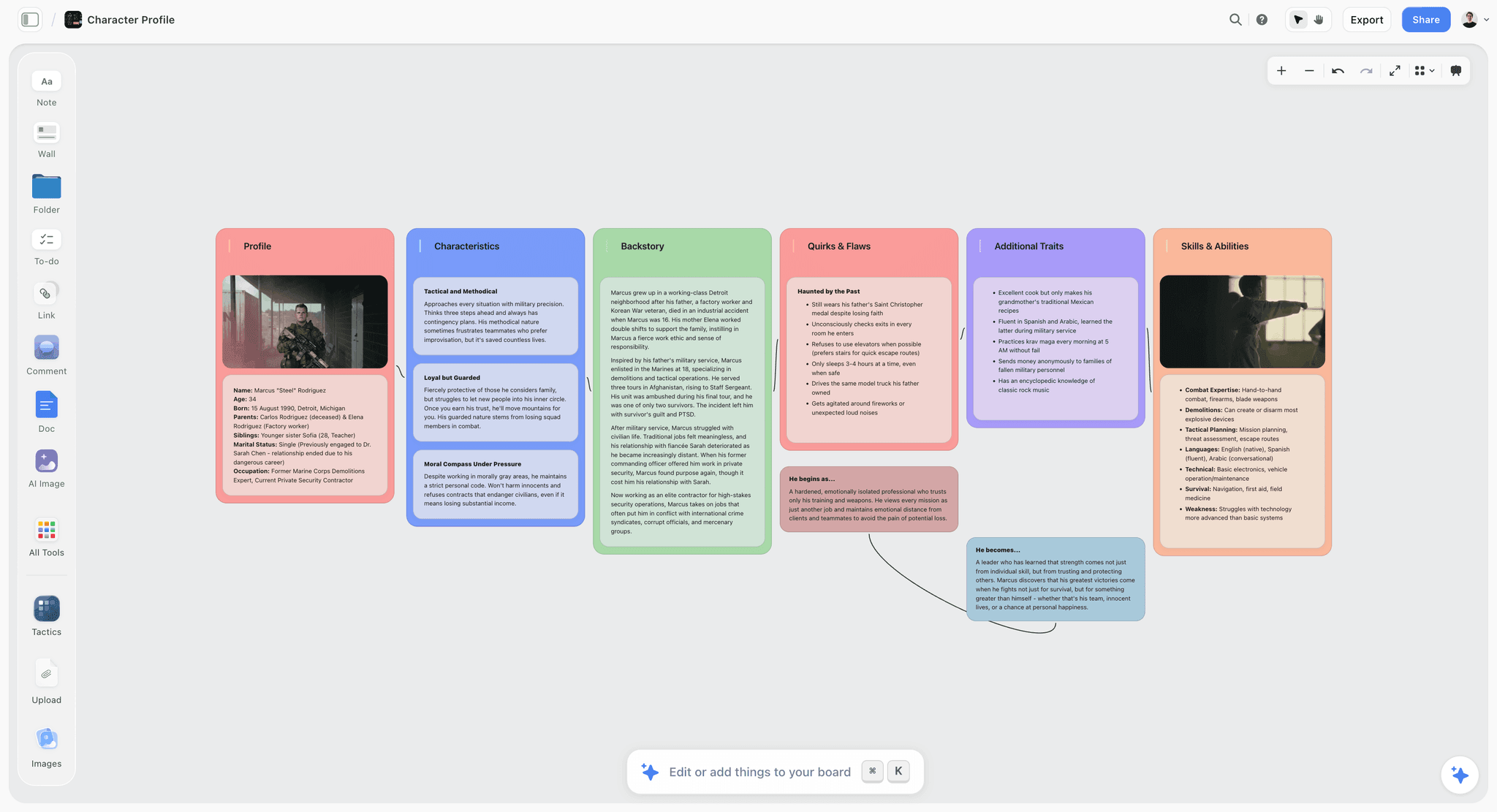
Storyflow is the visual answer to book research, and the honest middle of this list. It is an AI-powered creative workspace: an infinite canvas where interview notes, location photos, character cards, timeline fragments, and documents sit spatially, clustered the way the book actually connects them. The difference from every pinboard tool: the AI reads the entire board. Ask which sources touch the central conflict, what is known about a location, or where two accounts contradict, and it answers from your actual research, because the research is on the canvas it reads.
For worldbuilders and narrative-nonfiction writers, the spatial layout is not decoration. A wall of connected cards shows the shape of a story world or an argument in a way a folder tree never will, and moving cards around is itself a form of thinking. When the structure starts to emerge, the same canvas holds the outline beside the research that produced it.
Best for: Worldbuilding novelists, narrative nonfiction writers, and visual thinkers whose research is as much images and relationships as documents.
Verdict: The best visual research canvas with real AI depth. It is not a manuscript tool and not a citation manager, and it does not pretend to be either; the drafting happens in Scrivener or Docs, the bibliography in Zotero.
Key features
- Canvas-aware AI by default. The AI reads your full active canvas board (every card, note, and image on it), plus up to 1 Tactic and up to 3 Documents you @-mention in the AI chat.
- Research and structure on one surface. Character cards, location boards, timelines, and the emerging outline live together, so connection and composition happen in the same place.
- Start structured. The novel planner opens a board with research and story structure the AI can read, instead of a blank canvas.
- 200+ Story Blueprints. An expert-built library of narrative and creative frameworks (Hero's Journey among them), included on Plus and above.
- Unlimited shared boards, and invited collaborators join free. Anyone a paid member invites to a board signs up free today; the Max plan adds a team workspace with permissions and roles.
Pricing
Paid-only early access today: the Free plan (unlimited objects with no time limit, unlimited shared boards, a trial of Storyflow AI, and 20 file uploads) launches before the end of 2026, and until then anyone a paid member invites to a board signs up free. Plus: $7.99 per month annual or $9.99 per month monthly (adds the 200+ Story Blueprints and unlimited uploads). Pro: $14 per month annual or $19 per month monthly (adds AI image generation and 20x more AI). Max: $39 per month annual or $49 per month monthly (adds 40x more AI and a team workspace with permissions and roles). Pricing current as of August 2026.
Pros
- The AI answers from your actual research board, not from a generic prompt.
- Spatial clustering shows relationships that folder trees and tag lists hide.
- Flat account pricing (not per seat), and anyone you invite to a research board joins free.
Cons
- No citation management, no bibliography, and no footnotes; sourced nonfiction still needs Zotero.
- Not a manuscript tool: the drafting and compiling happen in Scrivener, Docs, or Word.
- Cloud-only with no offline mode, and file uploads on Free are capped at 20.
If your research keeps disappearing into folders you never reopen, take one book project and lay it out on a canvas for a week. Start a Storyflow workspace, put the characters, places, and questions on one board, and ask the AI what connects. The book's shape usually shows up before the week ends.
2. Scrivener
Scrivener has been the book writer's workhorse for two decades, and its research story is still the best argument for it. The binder holds everything: chapters, scenes, PDFs, images, web archives, interview notes. Research lives beside the manuscript, not in another app, and the split view puts a source on one side and the draft on the other. When the question is "what do I have on this scene," the answer is one click up the binder.
Best for: Authors who want research and manuscript in one project, from first note to final compile.
Verdict: The best overall tool for organizing book research, because it is also where the book gets written. Collection and linking are weaker than the specialists; composition is unmatched.
Key features
- The binder: research folders and manuscript in one hierarchy, one project file.
- Split view for drafting with a source, note, or image open beside the text.
- Collections, labels, and keywords for cross-cutting the research.
- Compile: one manuscript exported to every format a publisher wants.
- One-time purchase, files stored locally.
Pricing
$59.99 one-time for Mac or Windows (the iOS app is separate, around $23.99), with a 30-day trial counted in days of actual use. Pricing current as of August 2026.
Pros
- Research is open at the moment of drafting, which is when retrieval actually matters.
- One-time price for software that will outlast several laptops.
- Local files, no subscription, no lock-in panic.
Cons
- The learning curve is real; most writers use a fraction of it.
- No meaningful linking between research items; the binder is a hierarchy, not a network.
- No AI, and web capture is clunky compared to modern collectors.
3. Zotero
Zotero is the reference manager academia runs on, and for a reference-heavy book it is simply non-negotiable. The browser connector saves a source with its metadata in one click, PDFs attach themselves, and the bibliography writes itself in any citation style. It is free, open-source, and maintained by a nonprofit, which for a multi-year book project is a longevity argument as much as a price one.
Best for: Nonfiction authors whose books will carry citations, notes sections, or a bibliography.
Verdict: The best collector for sourced nonfiction, and free. It organizes sources, not ideas; pair it with a connector or composer.
Key features
- One-click capture of sources with full metadata from the browser.
- Automatic bibliography and footnotes in Word, Google Docs, and LibreOffice.
- PDF storage, annotation, and tags.
- Group libraries for collaborators or research assistants.
Pricing
Free. Cloud storage beyond 300 MB starts at around $20 per year. Pricing current as of August 2026.
Pros
- The citation problem disappears entirely, for free.
- Metadata capture at collection time saves painful archaeology at endnote time.
- Nonprofit stewardship and open source make it safe for decade-long projects.
Cons
- It organizes sources, not thinking; connections between ideas live elsewhere.
- The interface is functional, not pleasant.
- Fiction writers will find little here unless their research is source-heavy.
4. Obsidian
Obsidian turns research notes into a network. Every note can link to any other, backlinks are automatic, and the graph makes the shape of your research visible: which ideas are hubs, which threads are orphans. For writers who discover their book by connecting things (narrative nonfiction, memoir, argument-driven work), the vault becomes a thinking partner. Files are plain Markdown on your own disk, which is the strongest longevity story on this list.
Best for: Connection-driven writers who want a permanent, local, linked research vault.
Verdict: The best connector for text-first research. It rewards system-building energy; writers who do not want to garden a vault should look elsewhere.
Key features
- Bidirectional links and backlinks across every note.
- Local Markdown files; the vault is yours forever.
- Graph view of the research network.
- A huge plugin ecosystem, including AI and citation plugins (Zotero integration included).
Pricing
Free for personal use. Obsidian Sync is around $4 per month billed annually; publish and commercial licenses extra. Pricing current as of August 2026.
Pros
- Backlinks surface connections you did not consciously make.
- Plain text and local storage mean the research outlives every app on this list.
- The plugin ecosystem can rebuild almost any workflow, including spaced repetition and citations.
Cons
- It is a system to build, not a product to adopt; the tinkering tax is real.
- Images and visual material are second-class citizens in a text-first vault.
- Out of the box there is no AI and no capture pipeline; both arrive via setup work.
5. Notion
Notion is what research looks like when it becomes a database. Sources, interviews, characters, and locations become rows with properties: date, status, theme, chapter. Filters then answer real questions: every source touching chapter four, every interview not yet transcribed, every location in act two. For research with repeating shapes, this structure beats folders and tags, and Notion AI can search and summarize across the workspace.
Best for: Writers whose research has many items of the same kind, and co-writing teams who need one shared system.
Verdict: The best structured research database. It is a filing-and-retrieval system more than a thinking surface, and long-form drafting in it is serviceable, not pleasant.
Key features
- Databases with properties, filters, and multiple views (table, board, gallery, timeline).
- Relations between databases: sources link to chapters, interviews to people.
- Notion AI for workspace search, summarization, and drafting.
- Real-time collaboration and a capable web clipper.
Pricing
Free plan for personal use. Plus is around $10 per user per month billed annually, with full Notion AI bundled into the Business tier at around $20, as of August 2026. Verify on Notion's pricing page.
Pros
- Database filters answer questions that folders and tags cannot.
- One workspace can hold the research, the outline, and the project management.
- Strong collaboration for co-authored projects and research assistants.
Cons
- Structure has a setup tax, and over-engineering the system is the classic Notion failure.
- Everything is a page in a sidebar; spatial, visual thinking is not what it does.
- Offline behavior is still weak for a tool holding years of work.
6. Milanote
Milanote is the calmest visual research board in the category, and a longtime favorite of writers for exactly that reason. Notes, images, links, and columns arrange into elegant boards that make research feel like a pinboard wall rather than a filing cabinet. For collecting the atmosphere of a book (places, faces, fragments, references), it is one of the most pleasant tools there is.
Best for: Writers who want a beautiful visual board for research and inspiration without an AI layer.
Verdict: The best pure visual board. It arranges research beautifully and stops there: the thinking about the board stays in your head.
Key features
- Elegant boards of notes, images, links, and columns.
- Nested boards for chapters, characters, or themes.
- A good web clipper for visual capture.
- Simple sharing for feedback.
Pricing
Free tier with a card cap. Paid is around $12.50 per month, less annually, as of August 2026. Verify on Milanote's site.
Pros
- The most pleasant pure boarding experience for writers.
- Low friction: nothing to configure, no system to build.
- Great for the inspiration layer of research: mood, place, and reference.
Cons
- AI is minimal, so nothing reads or searches the board for you.
- Text-heavy research (transcripts, long documents) fits poorly on cards.
- The card cap makes the free tier a trial for book-scale research.
7. DEVONthink
DEVONthink is where enormous research archives go to become searchable. It swallows thousands of PDFs, scans, emails, and clippings into local databases, and its search and "see also" engine surface documents you forgot you had. Version 4 added on-device AI summarization and querying, which suits sensitive material. For a certain kind of nonfiction book (archives, court records, decades of correspondence), nothing else on this list is honestly adequate.
Best for: Mac-based authors with document archives in the thousands: historians, biographers, investigative writers.
Verdict: The best large-archive collector on the Mac. Overkill below a thousand documents, and Mac-only.
Key features
- Local databases that scale to tens of thousands of documents.
- Exceptional search plus AI-driven "see also" relations.
- On-device AI features for private material (v4).
- OCR, smart rules, and deep automation.
Pricing
Around $99 one-time for the standard edition, with tiered upgrades, as of August 2026. Verify on DEVONtechnologies' site.
Pros
- Handles archive sizes that break every other tool here.
- Local storage suits sensitive sources and long projects.
- Search quality that genuinely resurfaces forgotten material.
Cons
- Mac and iOS only.
- The interface and concepts take real learning.
- It organizes documents, not ideas; composition happens elsewhere.
8. Readwise Reader
Readwise Reader solves the front of the research pipeline: everything you read (articles, newsletters, PDFs, tweets, YouTube transcripts) lands in one queue, gets highlighted once, and the highlights resurface on a schedule instead of dying in a folder. For a book that begins with a year of wide reading, it quietly becomes the single most-used tool in the stack, feeding whichever vault or canvas you organize in.
Best for: Writers in the reading-heavy phase of research who lose highlights as fast as they make them.
Verdict: The best reading and highlight pipeline. It is a feeder for your research system, not the system itself.
Key features
- One reading queue for web, PDF, email newsletters, and video transcripts.
- Highlights sync out to Obsidian, Notion, and others automatically.
- Spaced resurfacing of old highlights.
- Ghostreader AI for summaries and querying documents while reading.
Pricing
Trial, then around $9.99 per month billed annually, as of August 2026. Verify on Readwise's site.
Pros
- Ends the highlights-go-to-die problem; old reading keeps coming back.
- Feeds Obsidian and Notion automatically, so the vault grows without effort.
- Excellent capture for the messy diversity of modern sources.
Cons
- It is a pipeline, not an organizer; you still need the destination system.
- Subscription cost over a multi-year book adds up.
- Book-specific structure (chapters, scenes) is not its concern.
9. Evernote
Evernote remains what it has been for fifteen years: a capable cross-platform capture drawer. The web clipper is still among the best, search inside PDFs and images still works, and notebooks-plus-tags still cover a book's worth of material. The ceiling is equally familiar: notes accumulate rather than connect, and the subscription now costs more than tools doing more.
Best for: Writers who already have years of research in Evernote and need continuity more than novelty.
Verdict: A still-capable collector kept on this list by its clipper and search. Hard to recommend starting fresh in 2026.
Key features
- Excellent web clipper and email-to-notebook capture.
- Search inside PDFs, images, and handwriting.
- Notebooks, tags, and saved searches.
- AI search and note cleanup features.
Pricing
Limited free plan. Paid plans around $14.99 per month, as of August 2026. Verify on Evernote's site.
Pros
- Capture from anywhere remains genuinely frictionless.
- Search across a decade of accumulated material still performs.
- Familiarity: for long-time users, the muscle memory is the feature.
Cons
- Ideas accumulate; they do not connect.
- Price sits above stronger tools on this list.
- Years of platform turbulence make multi-year trust a real question.
10. Google Docs and Drive
The free default, and more defensible than tool lists admit. A disciplined folder structure, one index document linking everything, and Drive's search (which reads inside PDFs and images) will genuinely carry a book. Gemini in Docs and Drive can now summarize and answer questions across files. Every collaborator already has it, every device opens it, and the price is zero.
Best for: Writers who want zero new tools, zero cost, and easy sharing with editors and collaborators.
Verdict: The best free-and-familiar option. It works on discipline rather than features; the index doc is doing the organizing, and you are maintaining the index doc.
Key features
- Drive search across documents, PDFs, and images.
- Real-time commenting and sharing every collaborator already knows.
- Gemini AI summarization and Q&A across files.
- Free at any realistic book scale.
Pricing
Free with a Google account; extra storage from around $2 per month, as of August 2026.
Pros
- Zero cost, zero onboarding, zero new accounts for collaborators.
- Search inside PDFs and images quietly outperforms its reputation.
- The editor-sharing workflow is where publishing already lives.
Cons
- No linking, no boards, no structure beyond folders and your index doc.
- Retrieval degrades exactly as the pile grows, which is when you need it most.
- The organizing system is your discipline; the tool contributes storage.
7) Which Tool Fits Which Kind of Writer?
11. Novelist / Worldbuilder
Top picks: Storyflow + Scrivener
Storyflow to build the world visually: characters, places, factions, and timelines on one canvas the AI can read and query. Scrivener to draft the manuscript with that research one screen away.
12. Nonfiction Author (Sourced)
Top picks: Zotero + Scrivener
Zotero because the citations must be right and should cost nothing. Scrivener to hold the argument's structure and the drafting. This pairing is the closest thing book writing has to a standard stack.
13. Academic Writing a Trade Book
Top picks: Zotero + Obsidian
Zotero is already in the muscle memory. Obsidian turns the literature into a linked argument map, which is precisely the step a trade book needs beyond an academic one.
14. Memoirist / Narrative Nonfiction Writer
Top picks: Obsidian + Storyflow
Obsidian for the text: memories, journals, and interviews as linked fragments that slowly reveal threads. Storyflow when the threads need to be seen: a timeline wall and the people involved, on a canvas that can answer questions about itself.
15. Biographer / Historian
Top picks: DEVONthink + Scrivener
DEVONthink for the archive: thousands of documents, searchable and related. Scrivener to compose the life or the era into chapters while the archive stays one search away.
16. Co-Writing Team / Author with an Assistant
Top picks: Notion + Google Docs
Notion as the shared research database with owners, statuses, and filters. Google Docs for drafts every collaborator and editor can live in without onboarding.
8) Honorable Mentions
A few tools that came close but did not make the main ten.
- Ulysses and Atticus: Excellent writing apps; their research stories are thinner than Scrivener's binder, which is what this list ranks.
- Mem and Reflect: Capable AI note tools; for book-scale research their organizing structures are lighter than Obsidian's vault or Notion's databases.
- Roam Research: The tool that popularized backlinks; Obsidian now covers the same ground with local files and a larger ecosystem. See The 10 Best Roam Research Alternatives.
- Airtable: A stronger database than Notion in places, but the writing-adjacent workflow (notes, clipping, drafting) is weaker for book work.
- NotebookLM: Genuinely useful for querying a fixed set of sources; as the organizing home for years of research it is not built to be the system of record.
- Microsoft OneNote: Free with a Microsoft account and genuinely good at freeform visual capture, notebooks, and handwriting on a tablet. It is left off the main list because its search and linking across a large research corpus lag Obsidian and DEVONthink, which is the job this list ranks.
These are not weak tools. Their center of gravity simply sits outside organizing a book's research.
9) Where the Dedicated Tools Still Win (An Honest Accounting)
A list that quietly ranked our own product first would not be worth your reading time, so here is the plain version.
Scrivener wins the main slot. Research beside the manuscript, at the moment of drafting, is the whole game, and Scrivener has owned that arrangement for twenty years. Storyflow does not draft or compile manuscripts and is not where your book will be written.
Zotero wins citations, unconditionally. If your book carries a bibliography, nothing else here (Storyflow included) replaces a real reference manager. There is no argument to have.
Obsidian wins text-network research and longevity. Local Markdown files linked into a vault will outlive every cloud tool on this list, ours included. For text-first connection thinking, it is the strongest choice.
DEVONthink wins the archive. At thousands of documents, its search is the only honest answer here.
So why does Storyflow rank fifth? Because one real job sits underserved between the collectors and the composers: seeing the research. Worldbuilders, memoirists, and narrative-nonfiction writers work in relationships (people, places, times, contradictions), and a spatial canvas whose AI reads the whole board answers questions the vault and the binder cannot. A pile of sources is not research. Research is what you can find again while drafting, and for visual thinkers, finding is spatial. That is the lane Storyflow holds, honestly, in the middle of a list where every specialist keeps its crown.
11) The Bottom Line
The best tool to organize research for writing a book in 2026 depends on which of the three jobs is failing. For composing research into a book, Scrivener remains the standard and the best overall pick. For collecting, Zotero owns citations for free, DEVONthink owns the archive, and Readwise owns the reading pipeline. For connecting, Obsidian is the strongest text vault and Storyflow the strongest visual canvas.
A pile of sources is not research. Research is what you can find again while drafting. Buy for retrieval at the keyboard, keep the stack to two tools, and let everything else stay simple.
And if your research is the kind you need to see (worlds, timelines, people, contradictions), that is the one lane where we would put our own product forward. Start a Storyflow workspace, open the novel planner, and put one book's research on a canvas the AI can actually read. The shape of the book tends to show up on the board before it shows up in the outline.
10) FAQ: Tools to Organize Book Research in 2026
What is the best tool to organize research for writing a book?
Scrivener is the best single tool for most authors in 2026, because it keeps research and manuscript in one project: sources sit in the binder beside the chapters that use them, and the split view lets you draft with the research open. Reference-heavy nonfiction should add Zotero for citations, and visual thinkers should consider Obsidian (linked notes) or Storyflow (AI canvas) as the connection layer.
What is the best free way to organize book research?
Zotero plus Google Docs is the strongest free stack: Zotero collects sources with citation metadata at zero cost, and Docs holds notes and drafts with search that reads inside PDFs. Obsidian is also free for personal use with local files. Storyflow is paid-only early access today; its Free plan (unlimited boards, notes, and collaboration with basic AI) launches before the end of 2026. A complete, capable research system in 2026 costs nothing until you choose convenience features.
How do novelists organize their research?
Most novelists split research into reference (how things work) and world (characters, places, timelines). Scrivener's binder holds both beside the draft, which is why it remains the default. Worldbuilding-heavy novelists increasingly add a visual layer (Storyflow or Milanote) where characters and locations live as cards on a canvas, because relationships between story elements are easier to see spatially than in folders.
Is Notion or Obsidian better for book research?
Notion is better when your research has repeating shapes (sources, interviews, locations) that benefit from database properties and filters, and when collaborators need shared access. Obsidian is better when the research is idea-driven and you want links between notes to reveal the book's structure, with local files you own forever. Structured filing versus networked thinking is the real choice, and most writers genuinely need only one of the two.
Can AI organize my book research?
AI can now search, summarize, and question research, but it organizes nothing on its own. Notion AI and Gemini answer questions across workspaces and drives; DEVONthink relates documents; Storyflow's AI reads your full canvas board (plus up to 1 Tactic and 3 Documents you @-mention) and answers from what you actually collected. The honest framing: AI has made retrieval dramatically better and collection more dangerous, because a bigger pile is now easier to justify.
How should I organize research before writing a book?
Decide the retrieval question first: mid-draft, you will ask "what do I have on X?" and the system must answer it. Practically: one capture inbox (not five), one organizing home where items get a chapter, theme, or question attached, and a weekly pass that files or deletes. The full method, including the Library and the Draft distinction, is in How to Organize Research for a Book.
What do nonfiction writers use to manage sources and citations?
Zotero is the standard: free, open-source, one-click capture with metadata, and automatic bibliographies in Word or Google Docs. EndNote persists in academia, and some writers manage citations manually in a spreadsheet, which works until the endnotes sprint at the finish. If your book will carry a notes section, adopting a reference manager in week one is the single highest-return decision on this page.
How do I organize interview transcripts for a book?
Store the full transcripts in one searchable home (Scrivener's research folder, DEVONthink, or Drive), then extract the usable moments: each strong quote or fact becomes a note tagged with person, theme, and likely chapter. The extraction step is what makes interviews retrievable; a folder of hour-long transcripts is a pile, not research. A canvas like Storyflow works well for the extracted layer, with the AI locating which interviews touch a theme.
Is Scrivener still worth it in 2026?
Yes, for the specific job of holding research and manuscript together. The one-time $59.99 price against years of subscriptions is the best deal on this list, and the binder-plus-split-view arrangement at drafting time is still unmatched. It is not worth it if you need collaboration (it is single-user by design), visual research boards, or AI; those jobs belong to other tools in this list.
Can Storyflow replace Scrivener or Zotero for book research?
No. Storyflow does not draft manuscripts, compile to publisher formats, or manage citations, and this post says so plainly. It earns its rank for a different job: the visual connection layer, where characters, places, sources, and timelines sit on one canvas and the AI answers questions from the whole board. Writers pair it with Scrivener or Docs for the manuscript, and Zotero when citations matter.
How much research should I do before starting to write a book?
Enough to know the book's question and its shape, not everything. A common working rule: research until the same core answers start repeating (saturation), then draft, and let the draft generate the next research list. Writers who wait to finish researching before writing rarely start, because collection always feels productive. The system that matters is the one that lets research and drafting run in parallel.
What is the best way to organize research for a fantasy or sci-fi novel?
Worldbuilding research fits spatial tools better than folders, because the material is relational: characters belong to factions, events sit on timelines, places hold history. A canvas (Storyflow, with the AI reading the whole board) or a linked vault (Obsidian) both work; the choice is visual versus text-first thinking. Keep the world reference separate from the plot outline, and let the draft pull from both.
Table of Contents
- Quick Answer: The Best Tool to Organize Book Research
- Comparison Table: 10 Book Research Tools
- Frequently Asked: Citations, Sources, and Structuring a Long Manuscript
- Collect, Connect, Compose: The Three Jobs of Book Research
- How We Evaluated These Tools
- Quick Picks by Job to Be Done
- Detailed Reviews: 10 Tools to Organize Book Research
- Which Tool Fits Which Kind of Writer?
- Honorable Mentions
- Where the Dedicated Tools Still Win (An Honest Accounting)
- FAQ: Tools to Organize Book Research in 2026
- The Bottom Line
- Author
- Related Reading
Templates to check out for this topic


Research templates you can use in Storyflow
Gather sources, personas, and findings on one canvas, then let the AI read across all of it. Open any of these research boards to start.


See Storyflow in Action
A visual AI workspace where every feature lives inside one canvas. No tab-switching, no context lost.
Build your entire board from a single message
Type what you need in the AI chat at the bottom of your canvas. The AI adds cards, headings, and structure directly onto your board.
Use expert frameworks as AI context
Type @ in the AI chat and choose any Tactic. The AI tailors every response to that framework instead of giving generic advice.
Turn your board into a mind map in seconds
Ask the AI to restructure your canvas as a mindmap. It connects your ideas into a visual hierarchy so you can see how everything relates.
Why Storyflow Exists
Storyflow actually began as a personal tool while working on creative and research projects.
We kept running into the same problem: ideas were scattered everywhere: notes, documents, and whiteboards.
Nothing helped us see how everything connected.
So we started building a workspace designed around how ideas actually grow.
→ Read how Storyflow was createdJustkay
Documentary Filmmaker & Founder at Storyflow
Published: 2026-08-06
Extremely simple, seriously capable


See how easy it is to get started
Watch a real project come together, from a blank board to a finished plan, clicked through step by step.
Start creating with AI and become more productive
Transform your creative workflow with AI-powered tools. Generate ideas, create content, and boost your productivity in minutes instead of hours.