The 11 Best Notion Alternatives for Creative Projects in 2026
Every Notion page starts with an empty title field, and an empty title field is a decision you have not made yet. Eleven alternatives ranked on how they handle the undecided half of creative work.

Category
Creative Tools
Author

Justkay
Documentary Filmmaker & Founder at Storyflow
Topics
2026-08-26
•
20 min read
•
Creative Tools- best notion alternatives
- notion alternative for creative projects
- is notion good for visual project planning
- Milanote vs Notion
- notion alternative for designers
- notion alternative canvas
What are the best Notion alternatives for creative projects in 2026?
Every Notion page starts with an empty title field, and an empty title field is a decision you have not made yet. Eleven alternatives ranked on how they handle the undecided half of creative work. If you are asking whether [Notion is good for visual project planning](/visual-project-planning), here is the honest answer.

Full disclosure: Storyflow is our own product and we rank it second, behind Milanote, for two reasons stated in its review: Milanote nests better and Milanote has a free tier while Storyflow is paid-only during early access. If part of why you are leaving Notion is cost, Milanote and Obsidian are the honest recommendations. Storyflow also has no relational databases, no linked views and no wiki features, so it does not replace Notion for the decided half of your work at all, and if what you liked about Notion was the databases then Coda is the answer rather than this. Its Free plan launches before the end of 2026, invited collaborators join free now, and its AI reads the current board rather than every board you own.
Quick Comparison
These four cover the real reasons people leave Notion for creative work: fragments that cannot be named yet, a board that becomes unreadable at scale, research that needs to stay attached to sources, and databases that were never quite powerful enough.
| Tool | Best For | AI Features | Price |
|---|---|---|---|
| Milanote | Notes on nested boards, no naming required | No built-in AI | Free (100 notes) / from ~$12.50 mo |
| Storyflow | Interrogating a canvas of six weeks of fragments | Canvas-wide context AI | $7.99 mo annual (free plan late 2026) |
| Heptabase | Cards, PDF annotation, arrangement separate from authoring | AI over your own cards | From ~$11.99 mo annual |
| Coda | Stronger tables, formulas and packs than Notion | Coda AI | Free tier / from ~$10 maker mo |
Key Takeaways
- Notion is excellent software and it is built on a unit that creative work resists: the page. Every page starts with an empty title field, and an empty title field is a decision you have not made yet.
- Call it the naming tax. To put a thought into Notion you must first say what kind of thought it is, and the earliest and most valuable creative material is precisely the material that cannot be named yet.
- The result is predictable: undecided work never gets a page, so it collects in one scratch page called Ideas, which becomes a graveyard nobody reopens.
- Milanote is the best straight swap for creative projects and it has a free tier. Storyflow is the pick when the board needs to answer questions back. Craft and Coda are the right answers if you actually liked Notion and wanted it done better.
- Notion is not the wrong tool. It is the wrong tool for the undecided half, and most teams only need to move that half.
The Naming Tax
Notion deserves a fair hearing before the alternatives, because the reason people leave it is usually misdiagnosed.
It is genuinely superb software. Databases that are also documents, relations between them, views that reshape the same data for different people, and a level of flexibility no competitor matches. Companies run on it. Books get written in it. It is not a toy and the people who love it are not wrong.
But watch what happens the moment you try to put something undecided into it.
You have a thought. It is half a thought: a fragment of a campaign idea, an image you saw, a suspicion that chapter four is the problem, a shape you cannot describe yet. You open Notion. You are given a cursor in an empty title field.
To proceed you must name it. And naming it means deciding what kind of thing it is, which is the exact judgment you do not yet have. Is this a note? A project? Does it belong under Campaigns or under Research? Should it be a page or a database row? Every one of those is a small act of premature classification, and premature classification is the thing early creative work is least able to survive.
So what happens instead is what happens in every Notion workspace I have seen: the undecided material does not get pages. It goes into one long scratch page called Ideas or Inbox or Braindump. And that page grows to four hundred lines, and it is never read again, because a four-hundred-line list is not something a human can compare against itself.
That is the naming tax, and it is structural rather than a settings problem. The page is Notion's atom, and a page is a container that must be named and placed. There is no way to have an unnamed, unplaced thing sitting near another unnamed, unplaced thing to see whether they are related.
A canvas is the opposite. Its atom is a thing in a position, and position carries meaning without requiring a name. Two fragments near each other are related, and you did not have to say how. Later, when it becomes clear what they are, they get named, and by then the name is a description rather than a guess.
Here is the practical version, and it is the whole test:
Is the work decided or undecided? Decided work has a shape, a name, and a next action. Notion is outstanding at it: a content calendar, a client tracker, a production database, a wiki, a CRM. Undecided work is a pile of fragments that might be a thing. Notion is structurally bad at it, and no template fixes that.
Most creative teams do not need to leave Notion. They need to stop asking it to hold the undecided half.
At a Glance: The 11 Alternatives Compared
| Tool | Atom | Best for | Free tier | Price |
|---|---|---|---|---|
Milanote | Note on a board | Undecided creative work, visual projects | Yes, 100 notes | From ~$12.50 mo |
Storyflow | Object on a canvas the AI reads | Undecided work you want to interrogate | No, paid during early access | $7.99 mo annual (free plan late 2026) |
Heptabase | Card on a whiteboard | Research-led work | Trial only | From ~$11.99 mo annual |
Craft | Beautiful document | People who liked Notion's docs, not its databases | Yes, limited | From ~$10 mo |
Obsidian | Local markdown file | Ownership and permanence | Yes, personal use | ~$50 yr commercial |
Capacities | Typed object | Structured collections of things | Yes, limited | From ~$9.99 mo annual |
Coda | Doc that is a database | Teams who wanted Notion with better tables | Yes, generous | From ~$10 maker mo |
Miro | Object on a whiteboard | Workshops and group thinking | Yes, 3 editable boards | From ~$8 member mo |
ClickUp | Task | Teams whose real problem was project management | Yes | From ~$7 user mo |
Trello | Card in a column | Teams whose real problem was Notion being too much | Yes | From ~$5 user mo |
Apple Notes | Note | Solo creatives who want to stop administering software | Yes, free | Free on Apple devices |
Prices are the publicly listed rates at the time of writing and change often. Check before committing.
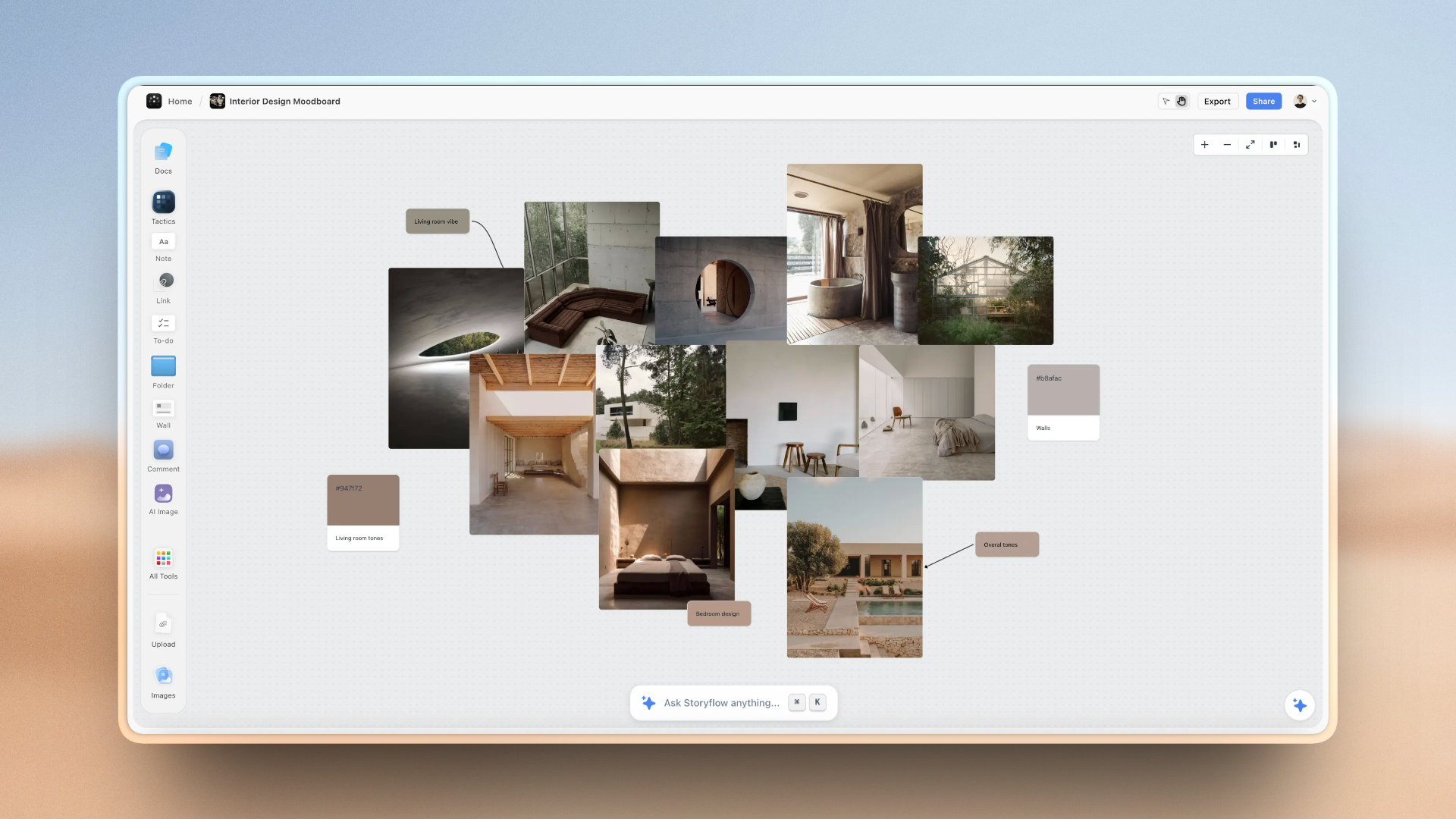
Undecided creative fragments sitting near each other on a Storyflow canvas, related by position rather than by a name and a folder
Some thoughts cannot be named yet
A page demands a title before it holds anything, which is why undecided work ends up in a scratch list nobody reopens. On a canvas, position carries the relationship and the name comes later. Storyflow adds the part a canvas alone misses: AI that reads the whole board, so a wall of fragments can be questioned. Paid-only during early access.

How I Ranked These
I ran documentary projects in Notion for two years and left for reasons I could not articulate at the time, which is why the framing above exists: it took a while to work out that the problem was the page, not the product.
Every tool below I used on real creative work rather than a trial. Where a claim rests on published documentation rather than my own use, the review says so.
Five criteria, in this order:
- How it handles undecided material. Whether a fragment can exist without being named and placed. Weighted highest, because it is the only reason to leave Notion for creative work.
- Whether structure can arrive late. Good creative tools let shape emerge; bad ones make you declare it up front.
- Media as a first-class citizen. Creative boards are mostly images, references, and video links, and Notion's handling of these is one of its weakest areas.
- Migration cost. What it takes to move, and what you lose, since Notion export quality varies by what you built.
- Honest price, including free-tier caps that arrive around the time a project gets serious.
Deliberately not weighted: template galleries. Notion's is the best in the world and it is not why anyone stays or leaves.
What Notion Is Genuinely Better At
An honest list, because a comparison that only names weaknesses is not useful and you will feel the absence of these within a week of switching.
Relational data. If two things need to be connected and queried (clients to projects to invoices to deliverables), Notion is better than everything on this list except Coda. No canvas tool comes close.
Views over the same data. A board for the producer, a calendar for the client, a table for you, all fed by one database. This is genuinely excellent and most alternatives simply cannot do it.
Being the wiki. Onboarding docs, process, brand guidelines, meeting notes. Notion is the right home for the settled knowledge of a team and you should probably keep it for that.
Free tier generosity. The personal free tier is unusually good and several tools on this list are worse deals.
Everybody already knows it. Onboarding a freelancer to Notion costs nothing. That matters more than feature comparisons for a small team.
The correct outcome for many people reading this is not migration. It is keeping Notion for decided work and adding a canvas for undecided work, which is a $10 addition rather than a two-week move.
Quick Picks by Situation
- Best Notion alternative for creative projects overall: Milanote, and it has a free tier to test the premise.
- Best when you want the board to answer back: Storyflow, where the AI reads the whole canvas rather than a prompt.
- Best for research-heavy creative work: Heptabase, where cards are real documents and arrangement is separate.
- Best if you actually liked Notion: Craft for documents, Coda for databases. Both are Notion done differently rather than repudiated.
- Best for permanence: Obsidian, because the files are yours and the format will outlive every company here.
- Best for a team that runs workshops: Miro.
- Best if the real problem was project management: ClickUp, or Trello if the real problem was too much software.
- Best if the real problem was administering tools: Apple Notes, seriously.
1. Milanote
Milanote ranks first because it is the most direct answer to the naming tax, and because you can test that claim for free.
Its atom is a note on a board, which means a fragment can exist without being classified. You drop a thought, an image, and a link near each other, and the nearness is the relationship. Nothing has to be titled, filed, or typed. Structure arrives later, when it is obvious, which is the correct order for creative work and the reverse of Notion's.
The nesting is the second reason. Boards contain boards without limit, so a campaign holds a strategy board, a moodboard, a copy board, and a production board, each of which can go deeper. That is how a creative project of real size stays legible, and it is better here than anywhere else in this list including us.
Media handling is first-class rather than tolerated: images, links, and files sit in columns that behave like a physical wall, and the web clipper is the best here for building reference libraries.
Against it: no meaningful AI, so the board holds your thinking and does nothing with it. Relational data is absent, so anything you built in a Notion database stays in Notion or moves to a spreadsheet. Collaboration is workable rather than strong. The free tier's 100-note cap is enough to evaluate properly and not to run a project.
Pricing: Free with a 100-note limit. Paid from around $12.50/month.
2. Storyflow

Storyflow is our own product and it ranks second, behind Milanote, for two reasons we should state before anything else: Milanote nests better, and Milanote has a free tier while we are paid-only during early access.
It ranks second rather than lower because it addresses the half of the naming-tax problem that a canvas alone does not solve.
Moving undecided work onto a canvas fixes the input side: fragments can exist without being named. It does not fix the output side, which is that a canvas holding six weeks of undecided material is genuinely hard to think about. You end up with a beautiful wall and the same feeling you had about the four-hundred-line Ideas page, which is that there is something in here and you cannot see it.
What Storyflow adds is that the AI reads the board. All of it, in place. Which of these fragments are the same idea in different words. What is this board actually about. What is missing from this set. Which of these three directions did I develop and which did I abandon. Those are comparison questions across everything on the canvas, and they are the questions a pile of undecided material generates. A chat panel cannot answer them, because it cannot see the pile.
Boards nest inside boards, images and links are first-class, and the Story blueprints library (200+ creative templates including frameworks like the Hero's Journey and AIDA) is there when the work needs a known shape.
Against it, plainly: paid-only during early access, so if you are leaving Notion partly to spend less, Milanote's free tier is the honest recommendation and Obsidian's is better still. The Free plan launches before the end of 2026; today the only free route is that anyone a paid member invites to a board joins free and can invite others. The AI reads the current board, not every board you own, with extra context from @-mentioning up to one Tactic and three documents. And it has no relational databases, no linked views, and no wiki features, so it is not a Notion replacement for the decided half at all. If what you liked about Notion was the databases, Coda is your answer and this is not.
Pricing: Plus $7.99/month annual or $9.99 monthly. Pro $14/month annual adds AI image generation, roughly 20x more AI, and memory across conversations. Max $39/month annual adds 40x more AI and a team workspace. No free plan until late 2026.
3. Heptabase
Heptabase is the strongest choice for creative work whose raw material is reading: documentary development, non-fiction, strategy grounded in real sources.
Its model splits authoring from arranging. A card is a real document that lives in a searchable library, and the same card can appear on many whiteboards. That means you can reorganise an argument or a structure repeatedly without ever touching the underlying material, which is a freedom Notion's page hierarchy does not offer and which matters enormously at month three.
PDF annotation feeding directly into cards is the tightest source-to-note path in this list.
Against it: the steepest learning curve here, and the model has to be understood before it pays off. It is built for understanding rather than making, so the visual side (moodboards, layout, media-heavy boards) is weak compared with Milanote. No free tier beyond the trial, and no relational data.
Pricing: From around $11.99/month annual.
4. Craft
Craft is for the very common person who is leaving Notion and, when pressed, admits they only ever used the documents.
It is the best-looking document tool in this list by a distance, and that matters more than it sounds for creative work, because a document you enjoy opening is a document you keep. Blocks nest into sub-pages, the writing experience is fast and calm, and a document shared with a client looks like something a designer made rather than a wiki page.
Against it: no relational databases, so it is not a Notion replacement for the decided half either. It is a document tool, so it has the naming tax too, just with better typography. If your problem was the page, this does not solve it.
Pricing: Free tier with limits. Paid from around $10/month.
5. Obsidian
Obsidian is the answer when the thing that finally bothered you about Notion was that your work lives on somebody else's servers in a proprietary format.
Everything is plain markdown files in a folder on your disk. For a creative project running years, that is worth more than most features: no subscription lapse, no company risk, no export anxiety. Linking between notes builds structure without a hierarchy, which partially addresses the naming tax, since a note can be created from a link before it exists. Vault-wide search is the best retrieval here.
Canvas gives you a spatial surface, though it is basic next to Milanote.
Against it: it is a configuration project, and the plugin rabbit hole has consumed more creative hours than it has saved. Collaboration is awkward. Media handling is functional rather than good, which is a real limitation for visual work.
Pricing: Free for personal use. Commercial licence around $50/user/year.
6. Capacities
Capacities is object-based rather than page-based, and for some people that single change is the fix.
Instead of pages in a hierarchy, you have typed objects: a Person, a Book, a Project, a Meeting, each with its own properties, all cross-linked. When your material genuinely is a collection of things of known kinds, this is more natural than filing pages into folders and it removes some of the classification burden.
The daily note feeds everything, so capture is low-friction.
Against it: it swaps the naming tax for a typing tax, since an object still has to be a kind of thing. For genuinely undecided material that is barely an improvement. Visual and media work is limited, and it is a young product with the roadmap risk that carries.
Pricing: Free tier with limits. Paid from around $9.99/month annual.
7. Coda
Coda is the alternative for people whose complaint about Notion was that the databases were not powerful enough, which is a real complaint and the opposite of this article's.
Its tables are genuinely stronger: better formulas, better cross-table logic, buttons that perform actions, and packs that pull in live data from other services. For a creative operation that runs on structured data (client pipelines, deliverable tracking, budget rollups) Coda does more than Notion does.
Against it: it is more Notion, not less. The naming tax is entirely intact, the interface is denser, and it is worse for anything undecided. If you are here because creative fragments have nowhere to live, this is the wrong direction.
Pricing: Generous free tier. Paid from around $10/maker/month, with free editors.
8. Miro
Miro is the canvas answer for teams rather than individuals, and if your creative work happens in sessions with other people it is the strongest option here.
Fragments live in space without names, which is the core fix. Collaboration is the best in this list at real team sizes, the template library is enormous, and Miro AI can cluster and summarise what is on a board.
Against it: frames organise a plane, they do not nest, so a long creative project becomes one very large canvas navigated by memory. It is a meeting tool at heart, so it is better at the workshop than at the eleven weeks after it. The free tier's three-editable-board limit tends to evict exactly the project you care about.
Pricing: Free tier with three editable boards. Paid from around $8/member/month annual.
9. ClickUp
ClickUp is here for the people whose Notion problem was actually a project management problem: no real assignment, no workload, no dependencies, and a database of tasks that nobody treated as a task list.
If that is you, ClickUp is a genuine upgrade. Tasks are real, assignment is real, workload views exist, proofing is built in, and per-seat pricing is among the lowest in its class.
Against it: it does nothing for undecided work, and its configurability is a liability for small creative teams, where an elaborately configured workspace reliably becomes inaccurate once its author gets busy. Do not choose it to solve a creative problem.
Pricing: Free tier. Paid from around $7/user/month.
10. Trello
Trello is for the people whose complaint about Notion was that it was too much: too configurable, too much to maintain, too easy to spend an afternoon building instead of working.
One board, columns for stages, a card per thing, and the entire state of a project visible without scrolling. No setup, no training, no owner required, which is why it is still accurate six months later when the elaborate workspace is not.
Against it: it will not hold undecided material any better than Notion, because a card also needs a name and a column. It is a pipeline, not a canvas, and it does not scale past a simple one.
Pricing: Free tier is genuinely usable. Paid from around $5/user/month.
11. Apple Notes
Apple Notes is a serious recommendation for solo creatives, and it is on this list because a real number of people leaving Notion are leaving software administration rather than a product.
It is free, already installed, instant to open, syncs without configuration, handles images and scans well, and has search that works. Paired with Freeform for a rough canvas, it covers a surprising amount of solo creative work at zero cost and zero maintenance.
Against it: no structure worth the name, no collaboration, no databases, Apple-only, and search is weak once you have a thousand notes. It is the floor, and the floor is a legitimate place to stand if the alternative is another six months of tool-building.
Pricing: Free on Apple devices.
Recommended Setups
Keep Notion, add a canvas. The correct answer for most people reading this. Notion keeps the wiki, the trackers, and the client data. Milanote or Storyflow takes the undecided half. About $10 to $12 a month and no migration.
Full move, creative studio. Milanote for everything undecided, a spreadsheet for the relational data you lose, Trello or Asana if you also need real task assignment. Expect to miss Notion's databases for a fortnight and then stop noticing.
Research-led creative work. Heptabase plus Milanote, or Heptabase alone if you can live with weaker visual boards.
You liked Notion, you just wanted it better. Craft for documents or Coda for databases. Do not move to a canvas; that is not your problem.
Permanence matters most. Obsidian, with Canvas for the spatial half. Accept weaker media handling in exchange for files that will open in twenty years.
You are tired of tools. Apple Notes and Freeform. Genuinely. The hours you get back are worth more than the features you lose.
Tools to Avoid for This Job
Another database-first tool, if the page was your problem. Coda, Airtable, and Capacities are all excellent and none of them removes the naming tax. Diagnose before you migrate.
A tool with no free tier, if cost was part of why you left. Evaluate on the free tier where one exists, because the premise ("a canvas suits my work better") is testable in an afternoon.
A migration you do all at once. Move the undecided half first and run both for a month. Most people discover they only needed to move a third of what they thought.
Any tool you will spend a fortnight configuring. The most expensive form of procrastination in this category, and the one that follows people from Notion into whatever they choose next.
A canvas for your client database. It will be worse. Some of what Notion does is genuinely best-in-class and relational data is the clearest case.
What No Tool on This List Does
None of them make the decision for you. A canvas lets a fragment exist without a name, which is a real improvement, and eventually somebody still has to decide what the fragment is.
None of them stop the graveyard. Move to a canvas and you can build a four-hundred-object board just as easily as a four-hundred-line page. What changes is whether you can see the whole thing at once, which is a precondition for editing it rather than a substitute.
None of them replace Notion's relational databases. Not one tool on this list does linked databases with multiple views properly. If you rely on that, plan to keep Notion or move to Coda.
None of them survive being the second system. If the real work is elsewhere and the new tool is a parallel copy, it goes stale in a fortnight. Whatever you pick has to become the working surface for its half.
The Bottom Line
Most Notion-alternative articles start from the assumption that Notion is bad. It is not. It is one of the best pieces of software of the last decade, and if your work has a shape you can name, you should probably stay.
The problem is narrower and more specific. Notion's unit is the page, a page has to be named before it can hold anything, and the most valuable creative material is the material that cannot be named yet. So it never gets a page, it goes in a scratch list, and the scratch list becomes a place ideas go to be forgotten.
Milanote fixes that more directly than anything else here, it nests better than any tool on this page, and its free tier lets you test the whole premise in an afternoon. Storyflow, which we make, ranks second: it adds an AI that reads the whole board so a canvas of six weeks of fragments can be questioned rather than only admired, and it costs money today where Milanote does not. Heptabase is the answer for research-led work. Craft and Coda are for people who liked Notion and wanted it done better, which is a different complaint with a different fix.
And the recommendation that will suit most people reading this is not on the list at all: keep Notion, and stop asking it to hold the half of your work that has not decided what it is yet.
FAQ: Notion Alternatives for Creative Projects
What are the best Notion alternatives for creative work?
Milanote for undecided visual work, and it has a free tier to test the premise. Storyflow when you want the board to answer questions back, since its AI reads the whole canvas. Heptabase for research-led work. Craft or Coda if you actually liked Notion and wanted its documents or its databases done better. Most people should keep Notion for the decided half rather than migrating everything.
Is Notion good for visual project planning?
Not really, and the reason is structural rather than a missing feature. Notion's atom is the page, and a page must be named and placed before it can hold anything, which is exactly what early creative material cannot survive. Its canvas-like views sit on top of a database, so a thing on a board is still a row that needs a title. For decided visual work like a content calendar it is fine, and for the undecided phase a real canvas is a different class of tool.
What is the best free Notion alternative?
Obsidian for personal use, because it is free, unlimited, and the files stay on your disk. Milanote's free tier at 100 notes is enough to test whether a canvas suits your work. Coda's free tier is generous if databases are what you want. Apple Notes with Freeform costs nothing and requires no maintenance. Storyflow is paid-only during early access and is not a free option today.
Should I move everything out of Notion?
Usually not. The strongest move is to keep Notion for decided work (wiki, trackers, client data, content calendars) and add a canvas for undecided work. That is a ten-dollar addition rather than a two-week migration, and it fixes the actual complaint. Full migrations mostly fail because the relational databases have no equivalent anywhere else.
Why does creative work feel wrong in Notion?
Because every page starts with an empty title field, and naming a thing is a decision you have not made yet when the thought is still forming. Undecided material therefore never gets its own page and collects in one long scratch page instead, which grows past the point where you can compare its contents against each other. That is a property of the page as a unit, not something a better template fixes.
Milanote or Notion for creative projects?
Milanote for anything undecided: moodboards, concepts, early structure, reference collection. Notion for anything decided and relational: schedules, client records, deliverable tracking, documentation. They are complementary rather than competing, and plenty of studios run both deliberately.
Is Storyflow a good Notion alternative?
For the undecided half, yes, and we rank it second here behind Milanote for two honest reasons: Milanote nests better and has a free tier while we are paid-only during early access. Storyflow's specific advantage is that the AI reads the whole board, so a canvas of six weeks of fragments can be interrogated rather than only looked at. It has no relational databases, no linked views, and no wiki, so it does not replace Notion's decided half at all.
What is the closest thing to Notion?
Coda is the closest on capability, with stronger tables and formulas and a similar doc-database hybrid model. Craft is the closest on documents with much better design. Both keep the page as the unit, so if the page was what bothered you, neither is far enough away.
How hard is it to migrate off Notion?
Documents export cleanly to markdown. Databases do not: relations, rollups, and views are lost, and what you get is a set of CSVs plus a folder of pages. That asymmetry is why the sensible move is to migrate documents and undecided material first and leave the databases where they are until you have a real plan for them.
Can any Notion alternative do relational databases?
Coda, properly and arguably better. Airtable, if the data is the point rather than the documents. Nothing else on this list does linked databases with multiple views in a way that will satisfy someone who used the feature seriously. This is the single strongest reason to keep Notion for part of your work.
Is Obsidian better than Notion for creative projects?
For permanence and for linked thinking, yes: local markdown files you own, and structure that emerges from links rather than being imposed by a hierarchy. For visual and media-heavy creative work, no: Milanote and Storyflow handle images and reference collection far better, and Obsidian Canvas is basic. For collaboration, Notion wins comfortably.
What should a creative team actually use?
Notion or Coda for the settled half, a canvas for the undecided half, and a real project tool if work needs assigning to people. Three tools sounds like a lot and it is fewer moving parts than one tool badly stretched across three jobs, which is what the single-workspace promise usually collapses into.
Table of Contents
- Key Takeaways
- The Naming Tax
- At a Glance: The 11 Alternatives Compared
- How I Ranked These
- What Notion Is Genuinely Better At
- Quick Picks by Situation
- 1. Milanote
- 2. Storyflow
- 3. Heptabase
- 4. Craft
- 5. Obsidian
- 6. Capacities
- 7. Coda
- 8. Miro
- 9. ClickUp
- 10. Trello
- 11. Apple Notes
- Recommended Setups
- Tools to Avoid for This Job
- What No Tool on This List Does
- The Bottom Line
- FAQ: Notion Alternatives for Creative Projects
- Related Reading
Templates to check out for this topic


Workspace templates you can use in Storyflow
Keep research, notes, and plans on one canvas the AI can read, instead of scattered across docs and tabs. Open a template and make it your second brain.


See Storyflow in Action
A visual AI workspace where every feature lives inside one canvas. No tab-switching, no context lost.
Build your entire board from a single message
Type what you need in the AI chat at the bottom of your canvas. The AI adds cards, headings, and structure directly onto your board.
Use expert frameworks as AI context
Type @ in the AI chat and choose any Tactic. The AI tailors every response to that framework instead of giving generic advice.
Turn your board into a mind map in seconds
Ask the AI to restructure your canvas as a mindmap. It connects your ideas into a visual hierarchy so you can see how everything relates.
Why Storyflow Exists
Storyflow actually began as a personal tool while working on creative and research projects.
We kept running into the same problem: ideas were scattered everywhere: notes, documents, and whiteboards.
Nothing helped us see how everything connected.
So we started building a workspace designed around how ideas actually grow.
→ Read how Storyflow was createdJustkay
Documentary Filmmaker & Founder at Storyflow
Published: 2026-08-26
Extremely simple, seriously capable


See how easy it is to get started
Watch a real project come together, from a blank board to a finished plan, clicked through step by step.
Start creating with AI and become more productive
Transform your creative workflow with AI-powered tools. Generate ideas, create content, and boost your productivity in minutes instead of hours.