
Category
Motion Design Tools
Author

Justkay
Documentary Filmmaker & Founder at Storyflow
Topics
2026-05-17
•
Updated July 2, 2026
•
13 min read
•
Motion Design Tools- best motion design planning tools 2026
- motion design tools
- motion graphics planning
- storyboard animatic tool
- Boords alternative
- Storyflow motion design
What are the best motion design planning tools in 2026?
The best motion design planning tools in 2026 are Milanote (full pre-animation canvas), Storyflow (best AI canvas for brief, moodboard, and storyboard together), Miro (collaborative planning), and Boords (storyboards and animatics). In motion design, the cheapest second to change is the one you have not animated yet.

Full disclosure: Storyflow is our own product, so here is the honest placement. We rank Milanote #1 for the full pre-animation workflow, because its visual canvas and template library are more mature, and we put Storyflow second. Storyflow is the strongest pick for one specific job: keeping the brief, moodboard, and storyboard on one canvas an AI can actually read and check against the brief. It has no animatic timing or playback the way Boords does, and it plans motion rather than animating it, so you still keyframe in After Effects afterward. We link to every tool so you can judge the fit.
Quick Comparison: Best Motion Design Planning Tools
These four cover the pre-keyframe stages motion designers plan before animating: the full canvas, an AI-readable canvas, real-time collaboration, and storyboards with animatics.
| Tool | Best For | AI Features | Price |
|---|---|---|---|
| Storyflow | Brief, moodboard, and storyboard together | Reads full canvas + @-docs and Tactics | $7.99 mo annual (free plan late 2026) |
| Milanote | Full pre-animation workflow on one canvas | Light AI | Free / $9.99 mo |
| Miro | Collaborative motion planning in real time | Standard AI | Free / $8 mo |
| Boords | Storyboards and animatics with timing | AI storyboard frames | Free / ~$15 mo |
1) Quick Answer: The Best Motion Design Planning Tools in 2026
The best motion design planning tools in 2026 are Milanote (best visual canvas for the full pre-animation workflow), Storyflow (best AI canvas for planning brief, moodboard, and storyboard together), Miro (best for collaborative motion planning), and Boords (best for storyboards and animatics). The right pick depends on which pre-keyframe stage you are working through.
In motion design, the cheapest second to change is the one you have not animated yet. A finished second of motion graphics can take hours of keyframing. Changing direction after animation has started, when the client says the pacing is wrong or the style is off, means redoing hours of work. Motion design is expensive to animate and cheap to plan. The plan is the only place a project can still afford to be wrong.
I have planned motion and title sequences for documentary work, and the rule held every time: the projects that animated smoothly were the ones where the brief, the moodboard, the style frames, and the storyboard were all locked before the first keyframe. The Before the First Keyframe framework in section 3 ranks all 12 tools by how many pre-animation stages they cover.
All 12 Motion Design Planning Tools, Ranked
- Milanote: best full pre-animation workflow on one visual canvas
- Storyflow: best AI canvas for brief, moodboard, and storyboard together
- Miro: best for collaborative motion planning
- Boords: best for storyboards and animatics
- FigJam: best for motion teams already in Figma
- Frame.io: best for style frame and animatic review
- Notion: best for the structured brief and project tracking
- Cosmos: best curated motion style references
- Pinterest: best free motion style discovery
- Are.na: best distraction-free style research
- Figma: best for designing full-fidelity style frames
- Trello: best for tracking motion project tasks
Best Motion Design Tool by Job
The overall ranking is not the answer to every question. Match the tool to the job you actually have:
- Best full pre-animation workflow on one canvas: Milanote. The calmest surface for reference and boards.
- Best AI canvas holding brief, moodboard, and storyboard together: Storyflow. The AI reads the whole board, so the brief and the boards stay in the same conversation.
- Best for collaborative motion planning: Miro.
- Best for storyboards and animatics: Boords.
For storyboards specifically, see The 12 Best Storyboarding Software in 2026. For moodboards, see The 12 Best Mood Board Tools in 2026.
2) Comparison Table: 12 Motion Design Planning Tools at a Glance
Pricing reflects publicly listed plans as of early 2026 and changes often. Ratings weigh pre-keyframe stage coverage, planning depth, collaboration, AI support, and pricing for motion designers and small studios.
3) Before the First Keyframe
Motion design has a brutal economics: animation is slow and expensive, planning is fast and cheap. Everything that happens before the first keyframe is where a project can still be changed without pain. Everything after is where changes start costing hours.
The five pre-keyframe stages:
The Brief. What the piece is for, who it is for, how long it runs, what it must communicate. The job, defined.
The Moodboard. The visual and motion direction: style references, color, type, the feel of the movement. What the piece should look and move like.
The Style Frames. A few key frames designed at full fidelity, before animation. They prove the look on a real frame so the client can approve the direction.
The Storyboard. The shot-by-shot plan: what is on screen at each moment, in what order, with what transitions.
The Animatic. The storyboard timed to a soundtrack or voiceover. It tests the pacing before a single thing is animated.
Here is the rule that decides tool choice. Every pre-keyframe stage is a checkpoint where a problem can be caught cheaply. A wrong direction caught at the moodboard costs a conversation. Caught at the style frames, it costs a few frames. Caught at the animatic, it costs a re-timing. Caught after animation, it costs hours of keyframing redone. The project that animates smoothly is the one where every checkpoint did its job.
A tool that covers more pre-keyframe stages keeps the project moving through the checkpoints in one place, instead of scattering the brief, the moodboard, and the storyboard across separate apps where the through-line breaks. The 12 tools below are ranked by how many pre-keyframe stages they cover, because the planning is where motion design is actually won.
4) How We Evaluated These Tools
Five criteria, weighted in this order:
- Pre-keyframe stage coverage. How many of the five stages, Brief through Animatic, does the tool serve? Broader coverage keeps the project coherent.
- Planning depth per stage. Within each stage, is the tool genuinely capable, or just present?
- Client review. Motion design is client-heavy. Tools that make moodboard, style frame, and animatic approval easy rank higher.
- Collaboration. Motion studios have directors, designers, and animators. Tools that keep them aligned rank higher.
- Pricing for motion designers and small studios. Most motion design is freelance or small-studio work. Per-seat pricing is marked down.
Testing covered a brand explainer, a title sequence, and a social motion piece, each planned from brief through animatic.
5) Quick Picks by Motion Design Planning Need
Best full pre-animation workflow: Milanote. Brief, moodboard, style frames, and storyboard on one canvas.
Best AI canvas for motion planning: Storyflow. The brief, moodboard, and storyboard connected on a canvas the AI reads.
Best for storyboards and animatics: Boords. Purpose-built for the storyboard and animatic stages.
Best for collaborative motion planning: Miro. Real-time planning with the whole studio.
Best for style frame and animatic review: Frame.io. Frame-accurate client feedback on the late pre-keyframe stages.
Best free motion style discovery: Cosmos and Pinterest. Curated and broad motion references at no cost.
Best cheapest working stack: Cosmos for references. Total: $0. Add Storyflow (Plus, $7.99/month billed annually) for the brief, moodboard, and storyboard.
Lock the storyboard before the first keyframe
A pacing problem caught in the storyboard costs a conversation. The same problem caught after animation costs hours of keyframing redone. Plan the shot-by-shot sequence before you open the animation tool.

6) Detailed Reviews: 12 Motion Design Planning Tools
1. Storyflow
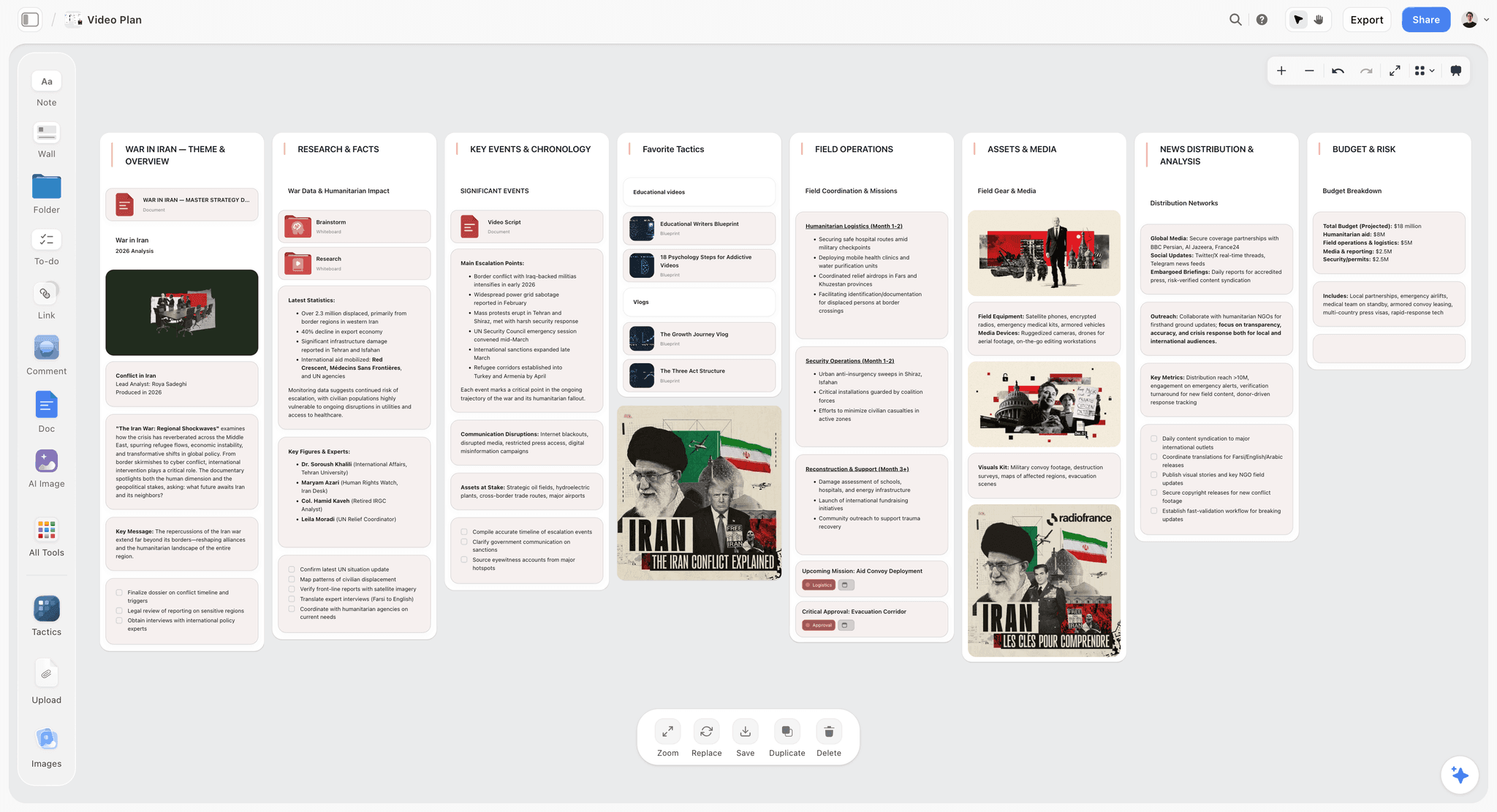
Storyflow holds the pre-keyframe stages on one canvas: the brief, the moodboard, the style direction, and the storyboard, all connected. The AI reads the full canvas, so you can ask whether the storyboard delivers what the brief asked for, or whether the style frames match the moodboard's direction. The Story Blueprints library includes brief and storyboard templates that scaffold the pre-animation work: the Storyboard template opens with the shot-by-shot structure already laid out, and the Commercial Moodboard template does the same for the style direction stage.
Best for: Motion designers who want the brief, moodboard, and storyboard connected on one AI-readable canvas.
Verdict: The strongest AI canvas for pre-keyframe planning. For animatics and review, pair it with Boords or Frame.io.
Key features
- Canvas for brief, moodboard, style direction, and storyboard.
- AI reads the full canvas plus up to 1 Tactic and 3 Documents you @-mention.
- AI checks whether the storyboard serves the brief.
- Story Blueprints library with brief and storyboard templates.
- Unlimited collaboration for directors, designers, and clients, including on the Free plan once it launches before the end of 2026.
Pricing
Free: launches before the end of 2026. Storyflow is paid-only during early access; once live, Free covers unlimited boards and cards, unlimited collaboration, basic AI, and 20 file uploads. Plus: $7.99/mo annual. Full Story Blueprints, unlimited uploads. Pro: $14/mo annual. AI image generation, 20x AI usage. Max: $39/mo annual. 40x more AI, team workspace with roles.
Pros
- Connects brief, moodboard, and storyboard in one view.
- AI checks the storyboard against the brief.
- Unlimited free collaboration for the studio and clients.
Cons
- No animatic timing or playback like Boords.
- Not an animation tool; it plans, it does not animate.
- Newer platform with a smaller template library than Milanote.
2. Milanote
Milanote covers the full pre-animation workflow on a visual canvas: the brief, the moodboard, style frame references, and the storyboard all live on freeform boards. Because motion design planning is mostly visual, a canvas that holds every stage in view is exactly right. Milanote's motion design guides have made it a standard starting point.
Best for: Motion designers who want the whole pre-animation workflow on one canvas.
Verdict: The strongest full pre-keyframe canvas in 2026. Pair it with an animatic tool for timing.
Key features
- Freeform canvas for brief, moodboard, and storyboard.
- Web clipper for motion references.
- Templates for motion design projects.
- Shareable boards with client comments.
- Column structure for the pre-animation stages.
Pricing
Free with 100 cards. Individual: $9.99/mo. Team: $49/mo flat.
Pros
- Covers brief through storyboard in one place.
- Visual canvas suits motion planning.
- Motion design templates.
Cons
- No animatic timing tool.
- The 100-card free limit fills on a full project.
- Light AI compared to canvas-AI tools.
3. Miro
Miro is the collaborative whiteboard for motion design planning workshops. The brief, the moodboard, and the storyboard run as real-time sessions where the director and designers work together. It covers brief through storyboard well and is strong when planning is a team effort.
Best for: Studios that plan motion projects collaboratively in real time.
Verdict: Strong for collaborative pre-keyframe planning. Pair it with an animatic tool.
Key features
- Infinite collaborative canvas.
- Storyboard and moodboard templates.
- Real-time editing and comments.
- Diagramming for motion flow.
Pricing
Free for 3 boards. Starter: $8/mo annual. Business: $16/mo.
Pros
- Strong real-time collaboration.
- Covers brief through storyboard.
- Familiar to most teams.
Cons
- The 3-board free limit is tight.
- No animatic timing.
- Built for general teams, not motion specifically.
4. Boords
Boords is purpose-built for the storyboard and animatic stages. It builds storyboards quickly, generates AI storyboard frames, and turns the storyboard into a timed animatic with sound. For the two pre-keyframe stages closest to animation, Boords is the specialist.
Best for: Motion designers who want strong storyboards and animatics.
Verdict: The strongest storyboard and animatic tool. Pair it with a canvas for the earlier stages.
Key features
- Fast storyboard building.
- AI storyboard frame generation.
- Animatic with timing and sound.
- Client review and approval.
Pricing
Free trial. Paid plans from roughly $15/mo.
Pros
- Best-in-class storyboard and animatic.
- AI storyboard frames speed setup.
- Strong client review flow.
Cons
- Covers only the late pre-keyframe stages.
- Light on brief and moodboard.
- Subscription pricing.
5. FigJam
FigJam, Figma's whiteboard, suits motion teams already in Figma. It handles moodboards and storyboards as whiteboard work, and bridges into Figma for style frames. For design-led motion studios, keeping planning next to the design file is convenient.
Best for: Motion teams already working in Figma.
Verdict: A solid moodboard-to-storyboard tool for Figma teams. Generic for motion specifically.
Key features
- FigJam whiteboard for moodboards and storyboards.
- Real-time collaboration.
- Bridges into Figma for style frames.
- Templates.
Pricing
Free for 3 files. Paid plans from roughly $5/mo.
Pros
- Connects planning to style frames in Figma.
- Strong collaboration.
- Mature platform.
Cons
- Generic, not motion-specific.
- 3-file free cap.
- No animatic tool.
6. Frame.io
Frame.io is the review standard, useful for the style frame and animatic stages. Style frames and animatics go up, the client comments frame-accurately, and the project moves on clear feedback. It owns the review side of the late pre-keyframe stages.
Best for: Motion designers who want frame-accurate client review of style frames and animatics.
Verdict: The strongest review tool for the late pre-keyframe stages. Not a planning canvas.
Key features
- Style frame and animatic upload.
- Frame-accurate comments.
- Version comparison.
- Editing tool integrations.
Pricing
Free tier. Paid plans from roughly $15/mo.
Pros
- Frame-accurate client feedback.
- Strong for style frame approval.
- Integrates with animation tools.
Cons
- Review only; not a planning tool.
- Covers only the late stages.
- Storage limits on lower tiers.
7. Notion
Notion holds the structured side of motion planning: the brief, the project timeline, the shot list as a database, deliverables tracking. It is strong for the Brief stage and project management, weaker as a visual moodboard or storyboard surface.
Best for: Motion designers who want a structured project plan and brief.
Verdict: A capable tool for the brief and project tracking. Pair it with a visual canvas.
Key features
- Documents for the brief.
- Databases for shots and deliverables.
- Project timeline and tracking.
- Standard AI features.
Pricing
Free for personal use. Plus: $10/mo. Business: $18/mo.
Pros
- Strong for the brief and project tracking.
- Easy to keep current.
- Large template community.
Cons
- Database feel, not visual.
- Weak for moodboard and storyboard.
- No animatic tool.
8. Cosmos
Cosmos is a curated visual discovery platform with strong motion design and animation references. Its feed favors high-quality work, which makes it a better moodboard source for motion than a general feed. It serves the Moodboard stage.
Best for: Motion designers gathering high-quality style references.
Verdict: A strong free reference tool for the moodboard stage. Pair it with a planning canvas.
Key features
- Curated visual feed with motion work.
- Collections for saved references.
- Cleaner signal than general feeds.
- Free to browse and collect.
Pricing
Free to use, with paid tiers for heavier use.
Pros
- High-quality motion references.
- Genuinely free.
- Strong creative community.
Cons
- Moodboard stage only.
- No planning or storyboard tools.
- Newer, thinner feature set.
9. Pinterest
Pinterest is the free, broad reference tool for the Moodboard stage. Its feed surfaces motion stills, style references, and color direction endlessly. It is discovery only: no annotation, no planning, and the references need moving into a planning tool to become a moodboard.
Best for: Free, broad motion style discovery.
Verdict: A capable free discovery tool. Move references into a planning tool to build the moodboard.
Key features
- Visual recommendation feed.
- Boards for organizing references.
- Browser extension for saving.
- Free with no cap.
Pricing
Free.
Pros
- Free and broad.
- Surfaces unexpected references.
- Fast to start.
Cons
- Moodboard stage only.
- No annotation or planning.
- The feed is a distraction.
10. Are.na
Are.na is the quiet, ad-free reference tool for deliberate motion style research. It organizes references into channels with no algorithmic feed, which suits considered moodboard work over a burst of broad browsing.
Best for: Motion designers who want distraction-free style research.
Verdict: A calm reference tool for the moodboard stage. Pair it with a planning canvas.
Key features
- Channels for organizing references.
- No algorithmic feed or ads.
- Connect a block to multiple channels.
- Clean interface.
Pricing
Free with a monthly block limit. Premium: roughly $7/mo.
Pros
- No attention-stealing feed.
- Deliberate research environment.
- Strong creative community.
Cons
- Moodboard stage only.
- Monthly block cap on free.
- No planning tools.
11. Figma
Figma is where motion designers build style frames: full-fidelity key frames designed before animation. It serves the Style Frames stage well, since the frames are static design work. It is not a planning canvas for the other stages.
Best for: Designing full-fidelity style frames before animation.
Verdict: The strongest tool for the style frame stage. A specialist, not a full planner.
Key features
- High-fidelity frame design.
- Component systems for consistent frames.
- Real-time collaboration.
- Plugin ecosystem.
Pricing
Free tier. Professional: roughly $16/mo.
Pros
- Excellent for designing style frames.
- Strong collaboration.
- Industry-standard design tool.
Cons
- Style frame stage only.
- Not a planning canvas.
- No moodboard or animatic tools.
12. Trello
Trello tracks the project-management side of motion design: tasks, deliverables, and stages as kanban cards. It is useful for tracking a motion project through its phases, and it does nothing for the visual pre-keyframe work.
Best for: Tracking a motion project's tasks and deliverables.
Verdict: A workable task tracker. Not a motion design planning tool.
Key features
- Kanban boards for project stages.
- Checklists and due dates.
- Power-Ups for calendar.
- Mobile apps.
Pricing
Free for personal use. Standard: $5/user/mo. Premium: $10/user/mo.
Pros
- Simple project tracking.
- Free tier is usable.
- Low learning curve.
Cons
- No visual planning.
- Brief and tracking only.
- Not motion-specific.
7) Recommended Motion Design Stacks
Stack 1: Solo Motion Designer. Storyflow (brief, moodboard, storyboard on one canvas; the Advertisement Brief template covers the brief stage for commercial work) + Cosmos (references) + Boords (animatic). Cosmos is free; Storyflow runs Plus at $7.99/month billed annually.
Stack 2: Motion Studio. Milanote or Storyflow (brief through storyboard) + Boords (storyboard and animatic) + Frame.io (style frame and animatic review). The full studio setup.
Stack 3: Design-Led Studio. FigJam (moodboard and storyboard) + Figma (style frames) + Frame.io (review). Strong if the studio already lives in Figma.
Stack 4: Cheapest Working Stack. Pinterest or Cosmos (references). Total: $0. Add Storyflow (Plus, $7.99/month billed annually) for the brief through storyboard.
The pattern across every stack: cover as many pre-keyframe stages as possible before the first keyframe. The motion projects that animate smoothly are the ones where every checkpoint, brief through animatic, did its job.
8) Honorable Mentions
- After Effects. The animation standard, for after the planning is done.
- Cavalry. A procedural motion design tool for the animation stage.
- Holdframe. A learning platform for motion designers, adjacent to the work.
- Eagle. A local reference library for motion stills.
- Google Slides. A free fallback for a simple animatic.
9) Tools to Avoid for Motion Design Planning
- An animation tool used to plan. Opening After Effects to "rough something out" turns planning into expensive animation. Plan before the first keyframe.
- A moodboard with no brief behind it. Style references with no defined job produce a beautiful piece that communicates nothing.
- Skipping the animatic. Animating without timing the storyboard first means discovering pacing problems after hours of keyframing.
- A planning process scattered across five apps. The brief, the moodboard, and the storyboard losing their through-line is how a project drifts off-brief.
11) The Bottom Line
The best motion design planning tools in 2026 are the ones that cover the pre-keyframe stages. Milanote is the strongest full pre-animation canvas. Storyflow is the best AI canvas for connecting the brief, moodboard, and storyboard. Boords owns storyboards and animatics. Frame.io owns style frame review.
In motion design, the cheapest second to change is the one you have not animated yet. Lock the brief, the moodboard, the style frames, the storyboard, and the animatic before the first keyframe. Every pre-keyframe checkpoint you pass is a problem caught cheaply. The projects that animate smoothly are the ones planned before they were animated.
For your next motion piece, generate a first storyboard with AI, then plan the pre-keyframe stages in Storyflow and lock the brief, moodboard, and storyboard before you open the animation tool.
10) FAQ: Motion Design Planning Tools
What is the best motion design planning tool in 2026?
Milanote is the strongest full pre-animation canvas. Storyflow is the best AI canvas for connecting the brief, moodboard, and storyboard. Boords is the best for storyboards and animatics. Miro is the best for collaborative planning. Most motion designers pair a planning canvas with an animatic tool.
What are the stages of motion design before animation?
The five pre-keyframe stages are the Brief (what the piece is for), the Moodboard (the visual and motion direction), the Style Frames (full-fidelity key frames), the Storyboard (the shot-by-shot plan), and the Animatic (the storyboard timed to sound). Each is a checkpoint to catch problems cheaply.
Why is planning so important in motion design?
Because animation is expensive and slow, while planning is cheap and fast. A problem caught at the moodboard costs a conversation; the same problem caught after animation costs hours of keyframing redone. The plan is the only place a motion project can still afford to be wrong.
What is a style frame in motion design?
A style frame is a single key frame designed at full fidelity before animation begins. It proves the visual direction on a real frame so the client can approve the look before any motion is created. Style frames are usually built in a design tool like Figma.
What is an animatic, and do I need one?
An animatic is the storyboard timed to a soundtrack or voiceover, so you can feel the pacing before animating. Yes, you need one for anything with timing-sensitive motion. Skipping it means discovering pacing problems after hours of keyframing. Boords is the strongest animatic tool.
What is the cheapest motion design planning setup?
Cosmos and Pinterest are free for references, and Boords has a free trial for animatics. Storyflow, which holds the brief, moodboard, and storyboard on one canvas, is paid-only during early access (Plus at $7.99/month billed annually), with a Free plan launching before the end of 2026.
Can AI help plan motion design?
Yes. AI can draft a brief, generate storyboard frames, and check that the storyboard delivers the brief. Storyflow's canvas AI reads the whole plan and can flag where the storyboard drifts from the brief. Boords generates AI storyboard frames. The AI accelerates planning; the designer still directs.
Is Milanote or Boords better for motion design?
They cover different stages. Milanote covers the full pre-animation workflow, brief through storyboard, on a visual canvas. Boords specializes in the storyboard and animatic stages, with timing and sound. Many motion designers use Milanote or Storyflow for early planning and Boords for the animatic.
What tools do motion designers use to plan projects?
Motion designers commonly use Milanote, Storyflow, or Miro for the brief, moodboard, and storyboard, Boords for animatics, Figma for style frames, and Frame.io for client review. The animation itself happens in After Effects or Cavalry, after the planning is done.
How do I keep a motion project from going over budget?
Lock every pre-keyframe stage before animating. The budget overruns in motion design come from changes made after animation has started. A planning tool that covers brief through animatic lets you catch direction problems while they still cost a conversation, not hours of work.
What is the difference between a motion design moodboard and a storyboard?
A moodboard sets the visual and motion direction: the style, color, and feel. A storyboard plans the shot-by-shot sequence: what is on screen at each moment. The moodboard answers what it looks like; the storyboard answers what happens. Both are pre-keyframe stages.
Do freelance motion designers need planning tools?
Yes. A freelancer carries the cost of every reanimation themselves. A planning tool that covers the pre-keyframe stages, so the brief, moodboard, and storyboard are all locked before animating, is what protects a freelance motion designer's hours and margin.
Table of Contents
- Quick Answer: The Best Motion Design Planning Tools in 2026
- Comparison Table: 12 Motion Design Planning Tools at a Glance
- Before the First Keyframe
- How We Evaluated These Tools
- Quick Picks by Motion Design Planning Need
- Detailed Reviews: 12 Motion Design Planning Tools
- Recommended Motion Design Stacks
- Honorable Mentions
- Tools to Avoid for Motion Design Planning
- FAQ: Motion Design Planning Tools
- The Bottom Line
- Author
- Related Reading
Templates to check out for this topic


Branding and design templates you can use in Storyflow
Take a brand from naming to visual direction on one connected canvas. Open any of these templates and the AI works from everything already on the board.


See Storyflow in Action
A visual AI workspace where every feature lives inside one canvas. No tab-switching, no context lost.
Build your entire board from a single message
Type what you need in the AI chat at the bottom of your canvas. The AI adds cards, headings, and structure directly onto your board.
Use expert frameworks as AI context
Type @ in the AI chat and choose any Tactic. The AI tailors every response to that framework instead of giving generic advice.
Turn your board into a mind map in seconds
Ask the AI to restructure your canvas as a mindmap. It connects your ideas into a visual hierarchy so you can see how everything relates.
Why Storyflow Exists
Storyflow actually began as a personal tool while working on creative and research projects.
We kept running into the same problem: ideas were scattered everywhere: notes, documents, and whiteboards.
Nothing helped us see how everything connected.
So we started building a workspace designed around how ideas actually grow.
→ Read how Storyflow was createdJustkay
Documentary Filmmaker & Founder at Storyflow
Published: 2026-05-17
Extremely simple, seriously capable


See how easy it is to get started
Watch a real project come together, from a blank board to a finished plan, clicked through step by step.
Start creating with AI and become more productive
Transform your creative workflow with AI-powered tools. Generate ideas, create content, and boost your productivity in minutes instead of hours.