The 12 Best Note-Taking Apps for Visual Thinkers in 2026 (We Tested Them All)
Most note-taking apps were built for linear thinkers. We tested 12 to find which ones actually work for people who think spatially, make connections, and need AI that reads the full picture, not just the current note.

Category
Productivity & Tools
Author

Sara de Klein
Head of Product at Storyflow
Topics
2026-04-09
•
22 min read
•
Productivity & Tools- best note-taking apps for visual thinkers 2026
- visual thinking note app
- AI note-taking for visual thinkers
What are the best note-taking apps for visual thinkers in 2026?
The best note-taking app for visual thinkers in 2026 is Storyflow (AI reads your full active canvas plus @-mentioned Blueprints and documents before helping you connect ideas). Obsidian is best for a private long-term knowledge archive, Heptabase for research synthesis from PDFs, and Milanote for visual reference capture.

Full disclosure: Storyflow is our own product, and we rank it #1 for visual notes that connect to the project they belong to, with AI that reads the full canvas plus @-mentioned documents. For a private long-term archive Obsidian wins, and for research synthesis from PDFs Heptabase wins. Storyflow is slower to open for a five-second capture than a phone note app. We link to every tool so you can judge the fit.
Quick Comparison: Best Note-Taking Apps for Visual Thinkers
These four cover the jobs visual thinkers decide between: AI-guided notes inside a project, a private archive, research synthesis from PDFs, and creative reference boards.
| Tool | Best For | AI Features | Price |
|---|---|---|---|
| Storyflow | AI-guided visual notes inside a project | Canvas AI + 3 @-mentioned docs | $7.99 mo annual (free plan late 2026) |
| Obsidian | Private long-term knowledge archive | AI via plugins | Free / $4 mo sync |
| Heptabase | Visual card-based research synthesis | AI chat over your cards | $8.99 mo |
| Milanote | Creative visual boards and capture | Minimal AI | Free / $9.99 mo |
All 12 Note-Taking Apps for Visual Thinkers, Ranked
- Storyflow: best overall, AI-guided visual notes inside a project canvas
- Obsidian: best for private personal knowledge with graph view
- Notion: best for structured team databases with AI Q&A
- Heptabase: best for visual card-based research synthesis
- Milanote: best for creative visual boards and reference capture
- Craft: best for linked documents with canvas view on Apple devices
- Roam Research: best for bidirectional linking and networked daily notes
- Mem: best for AI-first capture with automatic organization
- Logseq: best open-source outliner with graph view
- Bear: best for clean writing and tag linking, Apple only
- Capacities: best for object-based notes and typed connections
- Apple Notes: best for fast zero-friction capture
Quick Picks: Best Note-Taking Apps for Visual Thinkers 2026
Best Overall: Storyflow. One infinite canvas holds your notes, documents, mind maps, and Blueprint Tactics. The AI reads the full canvas and any Tactics or documents you @-mention in chat, so it develops ideas using everything you have already captured, not just the current note.
Best for Personal Knowledge Graphs: Obsidian. Backlinks, graph view, local-first storage, and an enormous plugin library make it the strongest option for people building a long-term private knowledge system. Free for personal use with no note limits.
Best for Visual Creative Notes: Milanote. Drag-and-drop boards that make collecting references, images, and notes feel natural. Still the best tool for visual thinkers who primarily capture rather than analyze.
Best for Research Synthesis: Heptabase. Visual cards arranged on a whiteboard with PDF annotation and AI that knows your card content. Built specifically for knowledge workers who think spatially.
Storyflow's canvas note system is the one worth trying even if you already use another app for capture. The difference you notice is not speed, it is depth: the AI works from what you have already built, not from a blank context. Take the project you have the most scattered notes about and rebuild it on one Storyflow canvas for a week. Rebuild your messiest project on a canvas
How We Evaluated These Note-Taking Apps
I tested each tool by running three types of work through it: capturing research while reading, connecting ideas across an ongoing project, and retrieving something specific after a week away from the notes. These are the failure points most reviews miss. Tools were used daily for at least two weeks each, in solo use. Team collaboration was tested as a secondary axis, not the primary one.
Comparison Table: Best Note-Taking Apps for Visual Thinkers 2026
| Tool | Best For | Starting Price | Free Plan | AI Features (★/5) | Rating (/10) |
|---|---|---|---|---|---|
Storyflow | AI-guided visual notes inside a project canvas | $7.99/month (annual) | Coming late 2026 (invited collaborators join free now) | ★★★★★ | 9.3/10 |
Obsidian | Private personal knowledge with graph view | Free (local); $4/month (Sync) | Yes | ★★☆☆☆ | 8.8/10 |
Notion | Structured team databases with AI Q&A | $10/user/month (Plus, annual) | Yes | ★★★★☆ | 8.5/10 |
Heptabase | Visual card-based research synthesis | $8.99/month (annual) | No (free trial) | ★★★★☆ | 8.4/10 |
Milanote | Visual creative boards for reference capture | $9.99/month | Yes (100 notes) | ★☆☆☆☆ | 8.0/10 |
Craft | Linked documents with canvas view, Apple-first | $5/month (annual) | Yes | ★★★☆☆ | 7.9/10 |
Roam Research | Bidirectional linking and daily networked notes | $15/month | No (free trial) | ★★☆☆☆ | 7.7/10 |
Mem | AI-first capture with automatic organization | $14/month | Yes | ★★★★☆ | 7.6/10 |
Logseq | Open-source outliner with graph view | Free (local); $5/month (Sync) | Yes | ★★☆☆☆ | 7.4/10 |
Bear | Clean writing and tag linking, Apple only | $2.99/month (annual) | Yes | ★★☆☆☆ | 7.3/10 |
Capacities | Object-based notes for connected knowledge | Free; $9/month | Yes | ★★★☆☆ | 7.2/10 |
Apple Notes | Fast capture, universal, zero friction | Free | Yes | ★☆☆☆☆ | 6.8/10 |
Rating criteria: AI depth was weighted most heavily (30%) because it represents the largest capability gap between tools in this category in 2026. A tool that does AI exceptionally well scored higher than one that does everything adequately. Knowledge connection (25%), visual flexibility (20%), integrations (15%), and pricing (10%) made up the remainder.

Storyflow's mind map view turns the notes on your canvas into a connected visual hierarchy without leaving the project
Best Note-Taking Apps for Visual Thinkers 2026: Market Context
The problem most visual thinkers have with note-taking apps is that the apps never wanted them as users.
Notion, Apple Notes, Bear, and Evernote are built around the idea that a note is a document: a block of text with a title. You can add tables, checkboxes, and callouts, but the fundamental metaphor is still a word processor page. Visual thinkers end up hacking these tools with workarounds, and the workarounds never fully capture the way connections actually form.
The market now has two genuinely different architectures. There are document-centric tools (Notion, Craft, Bear) and spatial or graph tools (Obsidian, Heptabase, Storyflow, Logseq, Roam). The spatial tools are better for visual thinkers. The document tools are better for people who primarily think by writing.
The 2026 shift is AI. Most note-taking apps now have AI. But there is a real difference between AI that generates text into a note and AI that reads the whole knowledge structure you have built before responding. That gap is where the interesting choices live.
How We Evaluated the Best Note-Taking Apps for Visual Thinkers 2026
We tested each tool on three questions: Does it help while capturing? Does it help when the notes get messy? Does it help you find something two weeks later?
- Ease of use
I opened each tool and tried to get something useful into it within two minutes. I also tried opening it mid-project and understanding what I had built three days earlier. Setup friction and cold-start clarity both mattered.
- AI depth
I did not just test whether AI existed. I tested whether the AI knew the context of the note, the project, and the connections I had already built. Generic AI writing assistants scored lower here than tools where the AI was actually reading the knowledge base.
- Visual flexibility
Can you see relationships between notes? Is there a canvas view, graph view, or spatial arrangement option? A visual thinker who only gets a list view is a frustrated user inside six months.
- Integrations
Can the tool connect to where real work happens? Import from PDFs, web clips, and other sources. Export to writing or production tools. A knowledge base that cannot get information in or out is a closed system.
- Pricing and value
I tested what the free plan actually lets you do versus where the walls appear. For knowledge systems, the upgrade question is usually about sync, AI access, or storage, not features.
Every tool on this list was tested with real project work, not feature checklists pulled from marketing pages.
Quick Picks by Use Case: Best Note-Taking Apps for Visual Thinkers 2026
Best Overall: Storyflow The infinite canvas, Blueprint Tactics, documents, and AI in one workspace means Storyflow is not just for note-taking but for thinking. Notes you capture connect to the active project they belong to. The AI can pull context from the full canvas, up to 3 @-mentioned documents, and a Tactic before responding. Paid starts at $7.99/month billed annually (Plus tier). The tradeoff: it is slower to open for a five-second capture than a phone note app.
Best for Personal Knowledge Base: Obsidian Backlinks, graph view, and a plugin ecosystem that dwarfs every other tool here make Obsidian the right choice for long-term private knowledge systems. The free local app never limits your note count. The $4/month Sync plan adds cross-device access and version history. The catch is that AI requires third-party plugins and real setup tolerance.
Best for Visual Card-Based Synthesis: Heptabase Heptabase was built explicitly for visual learners. Cards on a whiteboard with PDF annotation and an AI chat that knows your card content. At $8.99/month, it is a strong specialist for research-heavy thinkers.
Best for Creative Visual Capture: Milanote Milanote is still the best tool for dragging ideas, images, and references into a board that looks like a creative mood wall. The free plan gives you 100 items. Pro is $9.99/month. AI is minimal, but for pure visual collection the spatial board model is hard to beat.
Best for Linked Document Notes: Craft Craft has a cleaner visual aesthetic than Notion and a canvas view that connects documents spatially. At $5/month for personal use, it is one of the more underrated tools in this category. It is Apple-native with a weaker Windows story.
Best for Large-Team Note Systems: Notion If your notes need to live inside a shared workspace with databases, automations, and rich formatting, Notion is still the most complete option. The AI Q&A feature, which searches your entire workspace for answers, is genuinely useful once your database is large. The limit for visual thinkers: Notion is fundamentally a document tool even with AI.
Best for Open-Source PKM: Logseq Logseq is free, local-first, and built around the same bidirectional linking model that made Roam Research compelling, but without the subscription cost. It has a graph view and a committed open-source community.
See how Storyflow connects notes, blueprints, and AI in one canvas
Give your notes a canvas that thinks with you
Scattered notes stay scattered because the tool never sees the whole picture. Build a second brain board where every note, reference, and framework sits on one canvas the AI reads before it answers.

Detailed Reviews: Best Note-Taking Apps for Visual Thinkers 2026
The real buying signal is here. If you read nothing else, read the first three reviews.
1. Storyflow
Storyflow is a visual workspace for creators, filmmakers, marketers, and strategists. It started as a tool for creative project development, and that origin shows in how it handles notes: they are not a list but part of a living canvas.
The distinction that matters for visual thinkers is this: notes in Storyflow are not isolated items. They exist on the same canvas as your Blueprint frameworks, documents, images, mind maps, and kanban boards. When you ask the AI for help connecting two ideas, it already sees the whole board.
Best for: Creators, designers, researchers, and strategists who want notes to live inside a project context rather than in a separate database.
Key features:
- Canvas notes that are part of the project, not adjacent to it. When you add a note in Storyflow, it sits on the same whiteboard as your mind map, your storyboard, and your brief. There is no export step or manual linking required: the spatial context is the connection. The fastest way to feel this is to open the Second Brain template and drop a week of scattered notes into it; the board opens with a structure the AI can read.
- AI that reads the canvas before responding. The AI in Storyflow works from the full content of the board you are on. Use @ mentions to pull in up to 3 additional documents or a Blueprint Tactic, and responses improve further. It is not a generic chatbot attached to a text file.
- Blueprint Tactics that add structure to loose notes. Plus, Pro, and Max all include the 200+ Story blueprints; the Free plan, launching before the end of 2026, will not include the blueprint library. If you are circling a topic without knowing how to structure it, choosing an AIDA Tactic or Hero's Journey blueprint turns your loose notes into a guided outline with theory built into each step.
- Documents alongside the canvas. When notes need to become writing, Storyflow has a full rich-text document editor with a Writing Analyzer for readability, word count, and quality checks. The jump from rough note to polished document happens inside the same project.
- Multiple views on the same material. The kanban view turns notes into tasks. The mind map view restructures what you have built into a connected hierarchy (start from the Mindmap template if you want that lens from the first minute). Same notes, different lenses for different stages of work.
Pricing: Paid-only early access today; the Free plan (unlimited boards, basic AI usage, 20 file uploads) launches before the end of 2026, and anyone a paid member invites to a board joins free now. Plus: $7.99/month billed annually or $9.99/month billed monthly (full 200+ Blueprint Tactics, unlimited file uploads). Pro: $14/month billed annually or $19/month billed monthly (adds AI image generation and 20× more AI than Plus). Max: $39/month billed annually or $49/month billed monthly (40x more AI, team workspace with permissions and roles).
Pros:
- The AI is genuinely more useful than in most note-taking tools because it reads board context rather than working from a blank state.
- Blueprint Tactics turn note-taking into structured thinking without requiring you to know the framework before you start.
- Moving between canvas, kanban, and mind map views on the same notes is a capability no other tool on this list matches.
- Pricing is flat per account rather than per seat: Max at $39/month billed annually covers a team workspace with permissions and roles, while Notion Plus at $10/user/month billed annually scales with every person you add.
Cons:
- Storyflow's model is not designed for fast frictionless capture. Opening it for a five-second thought is slower than Bear or Apple Notes. If most of your notes are quick captures rather than project-connected thinking, the opening friction will frustrate you over time.
- Storyflow is paid-only during early access, so there is no free tier to test today. Once the Free plan launches (before the end of 2026), it will cap you at basic AI usage; if you maintain multiple active knowledge domains simultaneously, you will hit that ceiling. It will work best when you are focused on one project at a time.
- Storyflow is a project workspace, not a permanent personal knowledge archive. If your real goal is a long-term "second brain" where notes accumulate for years without being tied to a specific project, Obsidian or Logseq handle that archival model better.
Verdict: Storyflow is the best note-taking environment for visual thinkers who are actively working on something. If you want notes, structure, AI, and visual thinking in one place for a real project, nothing else on this list competes at the same depth. If you want a long-term note archive that lives independently of any active project, choose Obsidian instead.
2. Obsidian
Obsidian is the tool that finally gave serious note-takers a reason to stop using Evernote.
Its core idea is simple: every note is a plain Markdown file, you own the files locally, and you can link any note to any other note with [[double brackets]]. The graph view renders your entire knowledge base as a connected network. For visual thinkers, seeing that map for the first time is usually the moment they commit to it.
Best for: People building a long-term private knowledge system with local file ownership and graph-based navigation.
Key features:
- Graph view that maps your knowledge visually. The graph is not decoration. Once you have 200 to 300 notes with meaningful backlinks, seeing the clusters and orphan nodes tells you things about your thinking that a list view never could.
- Backlinks and forward links as the primary navigation model. Obsidian encourages you to link notes together. The linked mentions panel shows every note that references the one you are reading.
- Local-first with full ownership. Your notes are plain Markdown files in a folder on your device. No server, no subscription to read your own notes. Sync is optional and paid, but the core app is free indefinitely.
- Canvas plugin for spatial arrangement. Obsidian Canvas lets you place notes on a freeform canvas and draw connections between them. It is less fluid than Storyflow or Heptabase, but functional for occasional spatial arrangement.
- Plugin ecosystem for almost everything. The community has built plugins for spaced repetition, task management, AI integrations via third-party API keys, PDF annotation, and more. Power is there if you want to configure it.
Pricing: Free (local app, unlimited notes). Sync Standard: $4/month billed annually. Sync Plus: $8/month billed annually. Obsidian Publish: $8/month billed annually.
Pros:
- No tool on this list gives you more control over your notes or a longer-term ownership guarantee.
- The graph view is the best spatial knowledge visualization available in a free tool.
- Backlink-first navigation is genuinely better than folder-first navigation for visual thinkers building a knowledge base over years.
- The plugin library is vast enough to solve most problems, for users willing to configure it.
Cons:
- There is no built-in AI. AI requires a third-party plugin, an API key, and setup tolerance. For most non-technical users, this is a real barrier.
- The setup curve is steep. A new user without prior PKM experience will spend more time configuring Obsidian than building a knowledge base in it.
- Real-time team collaboration is not a feature. If you work with a team, this is a meaningful limitation.
Verdict: Obsidian is the best note-taking tool for visual thinkers willing to invest in setup and wanting permanent local ownership. It is not the right tool for people who want built-in AI, quick onboarding, or team collaboration. That combination of traits defines whether Obsidian will feel liberating or overwhelming.
3. Notion
Notion remains the most popular note-taking tool that visual thinkers adopt, discover the limits of, and then start supplementing with something else.
That pattern exists because Notion is genuinely excellent at structured knowledge management: databases, linked views, relational properties, and collaborative editing that teams trust. It is not excellent at spatial thinking. The page is still a page.
Best for: Teams that need a shared structured workspace with notes, databases, docs, and task tracking in one tool.
Key features:
- Databases as the primary organizational model. Notion's tables, boards, galleries, and timelines are its real strength. If your notes need to be filtered, sorted, and related to other information, Notion handles this better than any other tool here.
- Notion AI for search and synthesis across your workspace. Notion AI Q&A can answer questions by drawing from your entire workspace. The feature is particularly useful once a database is large enough to contain real institutional knowledge.
- Gallery and linked database views for visual browsing. Gallery views and linked databases create something that approaches visual note browsing. Not a canvas, but more spatial than a plain list.
- Real-time team collaboration. Unlike Obsidian, Notion is built from the ground up for teams. Permissions, comments, sharing, and notifications are solid.
Pricing: Free. Plus: $10/user/month billed annually or $12/user/month billed monthly. Business: $15/user/month billed annually or $18/user/month billed monthly. Enterprise: custom.
Pros:
- Notion AI Q&A across a full workspace is one of the most practical AI features in any note-taking tool for teams with large organized knowledge bases.
- The database model is genuinely better for structured note management than anything else here.
- Real-time collaboration is reliable and well-designed.
Cons:
- Notion is fundamentally document-centric. Visual thinkers who need spatial arrangement will find workarounds that never quite work the way they want.
- AI features work best on content already well-organized in databases. Notes thrown onto an unsorted page get less value from Notion AI.
- New users often spend a week designing the right structure before doing any actual thinking in it. Setup investment is real.
Verdict: Notion is the right tool for teams that think in documents and databases. It is not the right tool for visual thinkers who want to see connections between ideas spatially. One honest recommendation: use Notion for structured team databases, and use Storyflow or Obsidian for the thinking layer that feeds into them. The two are more complementary than competitive.
4. Heptabase
Best for: Visual knowledge workers who learn and synthesize heavily from PDFs, articles, and research sources. Pricing: Pro $8.99/month billed annually; Premium $17.99/month billed annually. No free plan; free trial available.
Heptabase was built specifically for visual learners. Cards go on a whiteboard. You annotate PDFs directly and pull highlights onto the board. YouTube transcripts can be saved and referenced inside cards. The AI has actual access to your card content, making it more contextual than most AI tools here.
The limitation is audience fit. Heptabase is best for students, researchers, and deep learners. It is not a project workspace or a team tool. If your note-taking is primarily research synthesis rather than creative project development, it is a genuinely excellent option.
Verdict: Heptabase is the best dedicated knowledge-synthesis tool for visual thinkers who primarily work from sources. For project-based creative work, Storyflow is more complete.
5. Milanote
Best for: Creative visual capture: mood boards, references, and early concept development. Pricing: Free (100 notes, 10 uploads); Pro $9.99/month; Team $99/month for up to 10 people.
Milanote has earned its following. The drag-and-drop board model is the fastest tool for visual note-taking that also looks presentable. Designers, filmmakers, and brand teams keep it because there is no faster way to make a collection of references feel coherent enough to share with a collaborator.
The limitation is clear: Milanote does not have meaningful AI, so it does not help you analyze or develop what you have collected. It is a capture and arrangement tool, not a thinking tool.
Verdict: Milanote is the right choice for visual capture and presentation. It is not the right choice for synthesis or developing ideas further.
6. Craft
Best for: Linked documents with canvas view for visual thinkers on Apple devices. Pricing: Free (limited); Personal $5/month billed annually; Team $10/user/month billed annually.
Craft is what Notion would look like if it were designed with Apple hardware in mind. It is clean, fast, and has a canvas view that lets you arrange documents spatially. The AI writing assistant is solid for drafting and editing. For Apple-focused visual thinkers, it is one of the more underrated tools in this category.
The limitation is platform: Craft is Apple-first. The Windows experience is weaker, and the web app has historically been limited.
Verdict: A strong Notion alternative for Apple users who prioritize visual design and linked writing. Less compelling if you work across platforms.
7. Roam Research
Best for: Bidirectional linking addicts who think in networked daily notes. Pricing: Pro $15/month; Believer $500/year (first year).
Roam Research built the market for networked note-taking that Obsidian and Logseq later captured more broadly. The daily notes model, block-level backlinking, and query system are still genuinely powerful.
The issue in 2026 is positioning. Roam is expensive relative to competition, development has been sporadic, and Obsidian has captured most of its audience with a free alternative. The user base remains passionate but smaller.
Verdict: Roam is still a serious tool. At $15/month versus Obsidian's free local app, it is harder to recommend to new users entering the networked note-taking category for the first time.
8. Mem
Best for: AI-first note capture where the AI does the organizing for you. Pricing: Free; Mem AI $14/month.
Mem takes a different approach: instead of asking you to organize notes manually, its AI builds connections and surfaces relevant notes automatically. Smart Collections group related notes without requiring folder decisions. The AI can write and query from your entire note base.
For visual thinkers who dislike filing, Mem is interesting. For visual thinkers who want to see their knowledge as a spatial map, Mem's interface is still too list-centric.
Verdict: Mem is the best tool for visual thinkers who hate manual organization and want AI to handle it. It is not the best for visual thinkers who want to see and arrange their knowledge spatially.
9. Logseq
Best for: Open-source note-taking with graph view and bidirectional linking. Pricing: Free (local app); Sync $5/month.
Logseq is Roam Research for people who prefer open-source and local-first storage. The outliner model, block-level linking, and graph view cover the core needs of networked note-taking without a subscription. AI features are newer and less polished than Obsidian's plugin options.
Verdict: A strong choice for technical users who want Obsidian's depth without its folder metaphor. Rougher around the edges than the polished commercial tools here.
10. Bear
Best for: Clean writing with tag-based linking, Apple devices only. Pricing: Free; Bear Pro $2.99/month billed annually.
Bear is the most polished writing environment on this list. Markdown support, tag-based organization, backlinks, and a clean aesthetic make it genuinely pleasant to write in. The Pro AI features help with summarizing and editing.
Bear is Apple-only and focused on writing rather than visual arrangement. The right choice for Apple users who mostly write notes rather than sketch connections across them.
Verdict: Bear wins on writing experience. It loses on visual arrangement, cross-platform support, and AI depth.
11. Capacities
Best for: Object-based notes for visual thinkers who think in types, not folders. Pricing: Free; Pro $9/month.
Capacities replaces folder hierarchies with "types" (person, book, project, note). Every item has a type, and types connect visually in a way that traditional folders do not allow. For visual thinkers frustrated by folder-based filing, this structural difference is meaningful. Still relatively young with a smaller feature set than Notion or Obsidian.
Verdict: An interesting structural alternative worth testing if folder organization has always felt wrong to you.
12. Apple Notes
Best for: Fast capture, universal access across Apple devices, zero friction. Pricing: Free.
Apple Notes is not a knowledge system. It is a fast capture layer that almost everyone uses alongside a more serious tool. Apple Intelligence integration adds summarization and rewriting on supported devices. For pure speed and reliability, nothing on this list beats it.
Verdict: Apple Notes is a capture inbox, not a knowledge base. Use it to get thoughts in quickly; use something else to develop them.
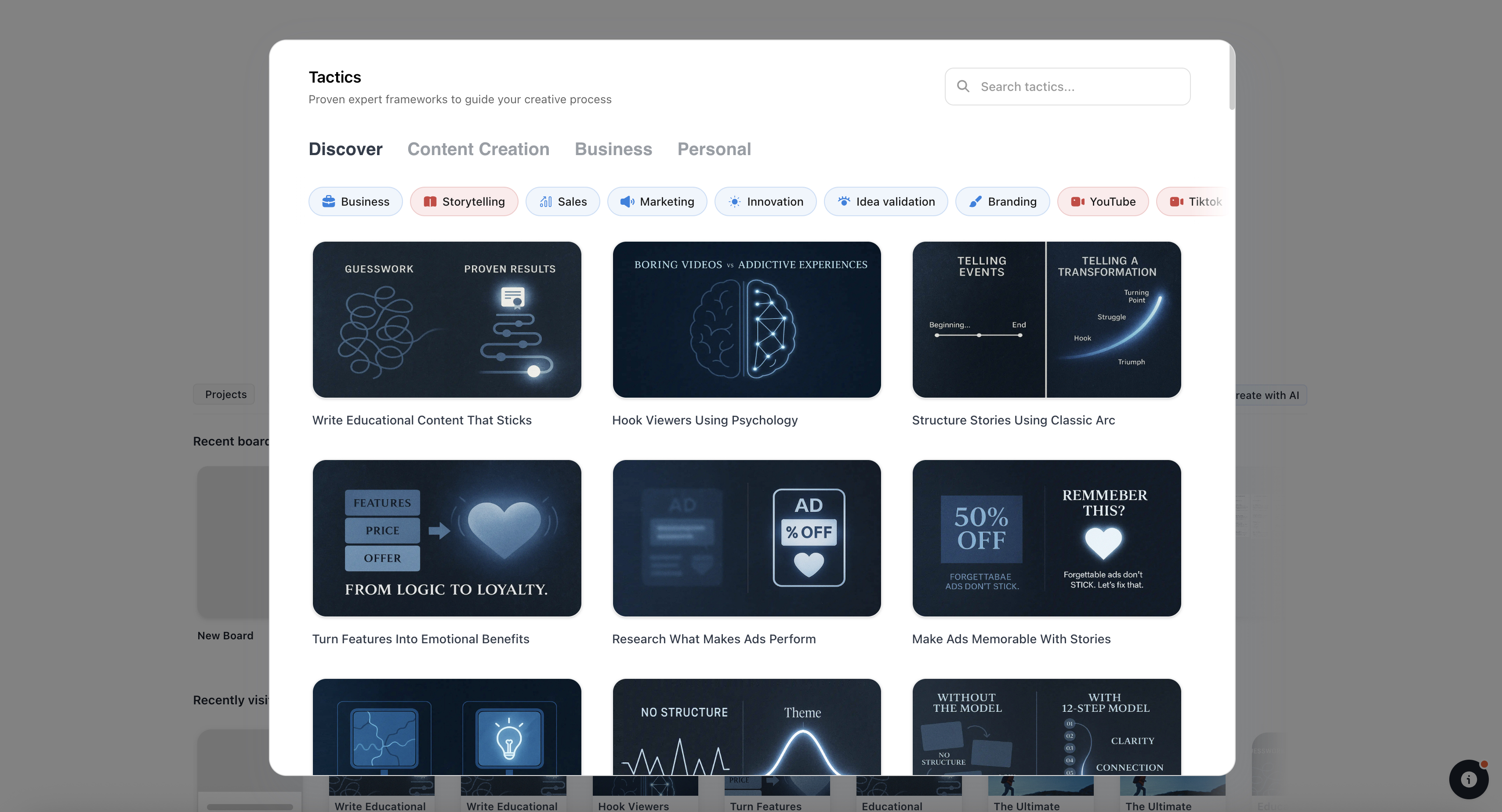
Blueprint Tactics give your notes a structure to grow into: theory, guidance, and your thinking on the same card
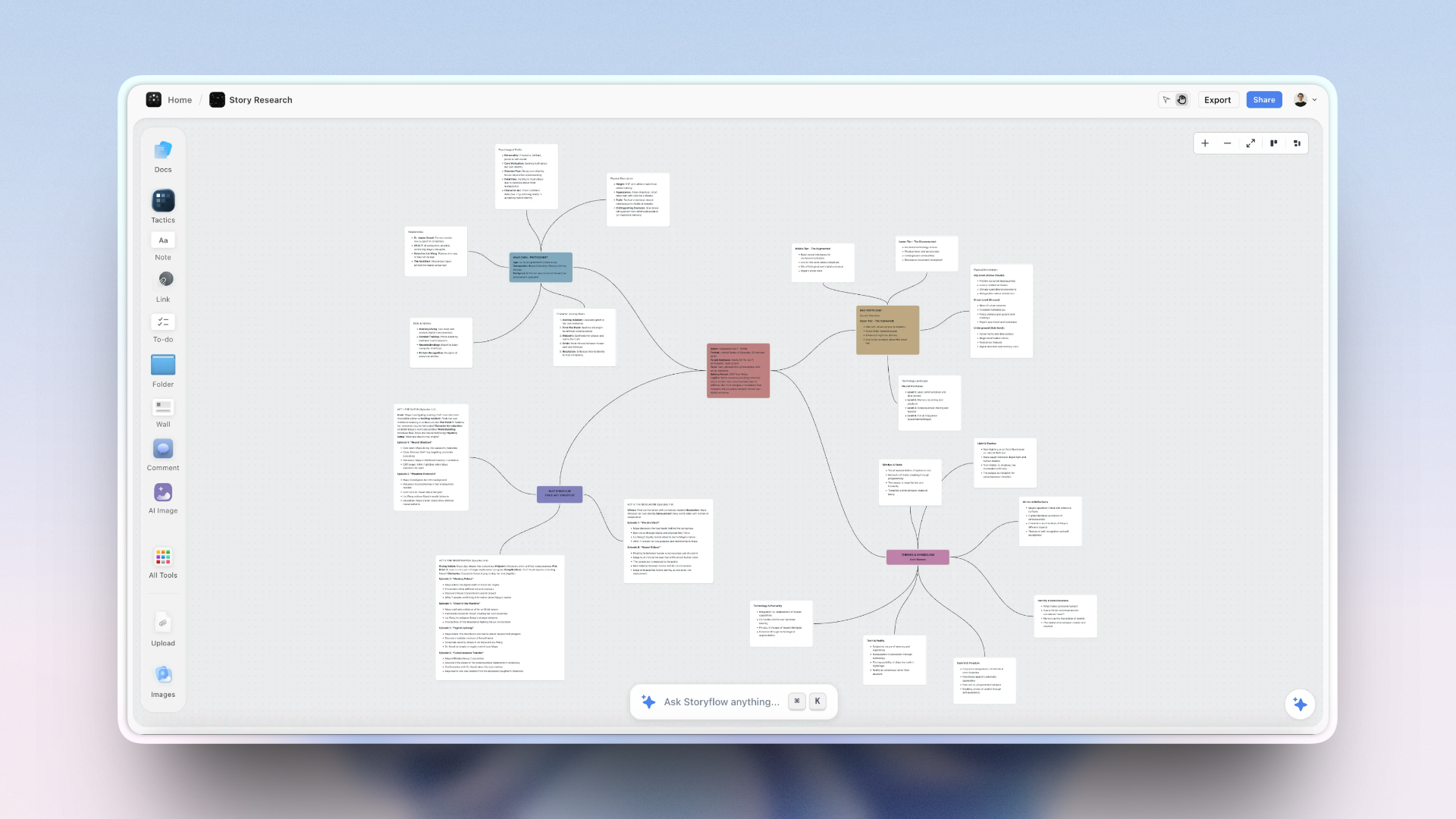
Notes on the canvas connect directly to documents and AI conversations in the same project
Free vs Paid: Best Note-Taking Apps for Visual Thinkers 2026
What free plans typically include
- Basic note capture and organization: text, images, and basic formatting.
- Limited or no AI access: Storyflow's Free plan, launching before the end of 2026, will include basic AI usage; Notion's includes a limited number of AI responses before a paywall; Milanote has no AI in the free tier.
- Free-tier caps: Storyflow's upcoming free plan will cap file uploads at 20 and AI at basic usage; Milanote limits you to 100 items.
- No cross-device sync in some cases: Obsidian and Logseq require a paid sync plan for cloud access.
What paid plans unlock
- Meaningful AI: higher AI usage, context-aware AI, or AI that works from a larger knowledge base.
- More projects, more storage, or removal of item limits.
- Cross-device sync and version history.
- Team collaboration and sharing with permission controls.
When free is enough
Free is enough when your note-taking is light, exploratory, or during an evaluation phase. Obsidian's free local app is genuinely unlimited for personal knowledge, which is unusual. Storyflow's Free plan, once it launches before the end of 2026, will be enough to test the workflow on a real single project.
When upgrading pays off
Upgrading pays off the moment AI stops being a novelty and becomes part of how you actually think. Storyflow Plus at $9.99/month is worth it when you are running real projects where the AI needs context to help. For Notion, upgrading from free to Plus makes sense when your team's shared database grows large enough that AI Q&A saves meaningful time daily.
For visual thinkers working on creative projects: Storyflow's Pro plan unlocks AI image generation and 20× more AI than Plus, and every paid tier includes the 200+ Blueprint Tactics. Instead of starting a note and wondering how to structure it, you open an AIDA framework, Hero's Journey blueprint, or Retention Hooks Tactic and take notes directly inside a structure that explains each step as you build. Try Storyflow's Blueprints
Best value for visual project thinking: Storyflow. Best value for long-term personal knowledge: Obsidian's free local app with an optional sync plan if you need cross-device access.
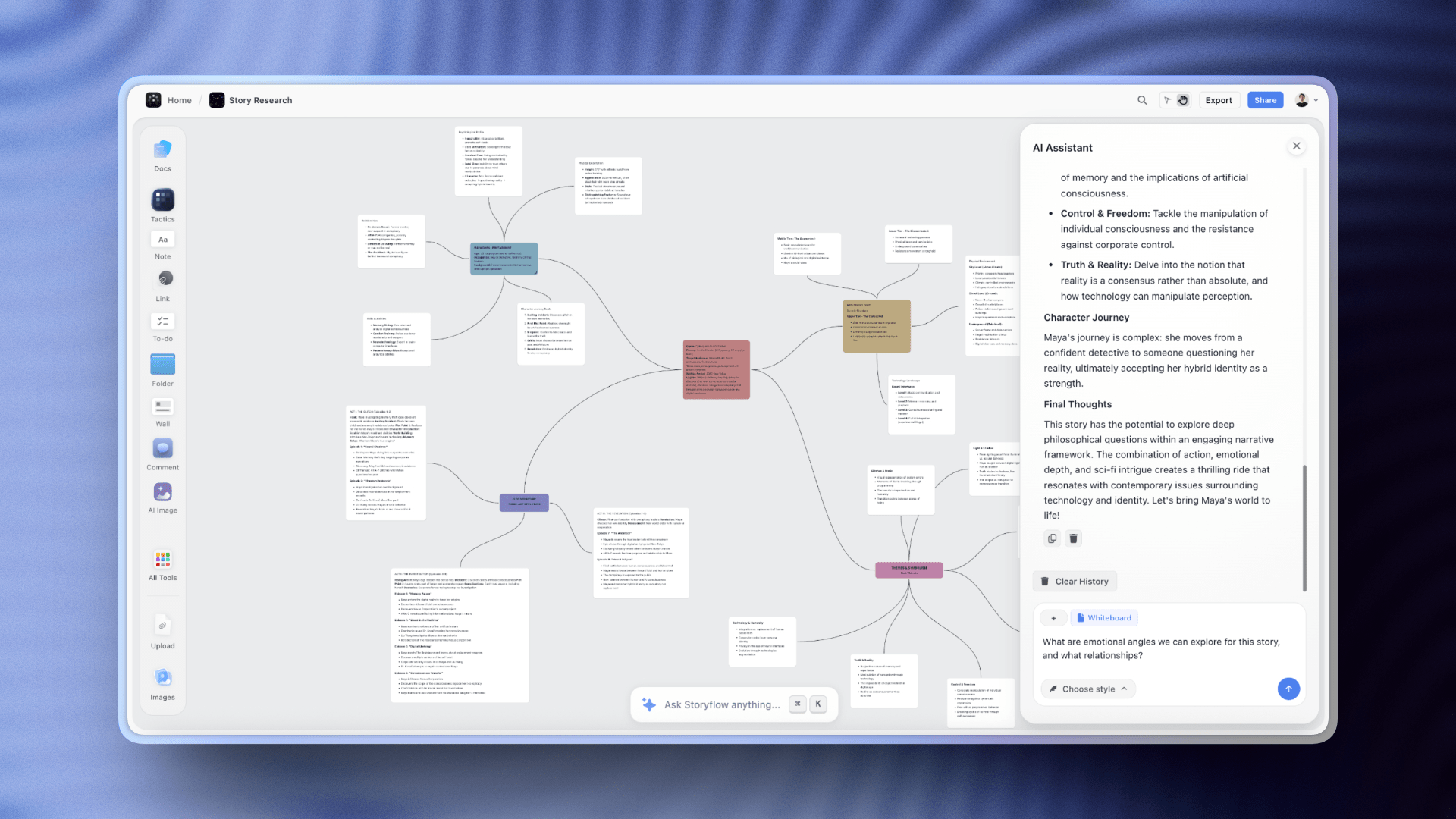
Storyflow's paid AI chat reads your full canvas and @-mentioned Blueprints before responding, so context is never lost
Final Verdict
If you want notes that are part of the project rather than a sidebar to it, pick Storyflow. The canvas holds your research, structure, AI conversations, and documents together without a filing system holding everything back. The Blueprint Tactics turn scattered notes into guided thinking frameworks without requiring you to choose the right structure in advance. Start on something you are actively working on right now: the Second Brain template or the Weekly Planner template gives the board a shape before your first note lands. Start your first visual project
If you want the best private knowledge archive with complete local ownership, pick Obsidian. The graph view, backlinks, and plugin ecosystem reward long-term investment in a way that few subscription tools can match. What you build there is yours permanently.
If you need structured team notes with powerful databases, pick Notion. Its AI Q&A and database model are still the best in class for organized team knowledge that needs to be filtered, searched, and shared.
If your note-taking is primarily synthesizing research from PDFs and articles, give Heptabase a serious trial. Its visual card-canvas model was designed specifically for that knowledge synthesis workflow.
If you mostly capture visual references and creative direction materials, Milanote is still the best spatial collection board in the category.
The note-taking tool that changes how you work is the one that makes connections visible before you have consciously made them. Run whatever you pick through a real project for two weeks, then decide.

One Storyflow project holds your notes, Blueprint Tactics, documents, and AI conversations on the same canvas
FAQ: Best Note-Taking Apps for Visual Thinkers 2026
What are the best note-taking apps?
The best note-taking apps in 2026 are Obsidian for local-first plain-text knowledge you own, Notion for structured docs and databases, Apple Notes for fast capture in the Apple ecosystem, and Evernote for classic web clipping. For visual thinkers who want notes on an infinite canvas with AI that reads the whole board, Storyflow ranks first in this guide. Pick by how you work: plain-text ownership points to Obsidian, structured docs point to Notion, and spatial visual work points to Storyflow or Milanote.
What is the best note-taking app for visual thinkers in 2026?
Storyflow is the best note-taking app for visual thinkers who work on active projects and want AI to help develop ideas spatially. Obsidian is better for people building a long-term private knowledge archive with graph-based navigation. Heptabase is the best specialist for visual learners who primarily synthesize research from PDFs and external sources.
How does Storyflow compare to Notion for visual note-taking?
Storyflow is better than Notion for visual note-taking because its canvas lets you arrange notes, mind maps, and Blueprint frameworks spatially without workarounds. Notion is better for structured databases and shared team knowledge bases. Storyflow is for spatial thinking; Notion is for organized information management. They solve meaningfully different problems.
Is Obsidian worth using in 2026?
Yes, Obsidian is worth using in 2026 if you want local-first personal knowledge with graph visualization and no subscription cost for the core app. It is not worth the setup effort if you want built-in AI, quick onboarding, or real-time team collaboration. The plugin ecosystem covers most gaps, but you have to want to build that system.
What note-taking app is best for solo creators?
Storyflow is the strongest option for solo creators because one project board can hold research notes, rough ideas, structured Tactics, documents, and images without switching apps. Storyflow is paid-only during early access, with a Free plan launching before the end of 2026 that will be enough to test the workflow on a real project. Milanote is better for primarily visual capture without needing to develop ideas further.
Are there free note-taking apps that are actually good for visual thinking?
Yes. Obsidian is free for local use with unlimited notes and a graph view. Storyflow's Free plan, launching before the end of 2026, will cover unlimited projects and shared boards with basic AI usage and 3 starter blueprints (the 200+ Story blueprints library requires Plus and above). Milanote's free plan allows 100 notes and images. Logseq is entirely free and open-source with a graph view. The best free option depends on whether you need graph navigation (Obsidian), visual spatial boards (Milanote), or AI inside an active project (Storyflow's free tier).
What is the difference between note-taking and knowledge management?
Note-taking is capturing information. Knowledge management is building connections between pieces of information so they become usable over time. Most apps handle note-taking. Tools like Obsidian, Roam, Logseq, Heptabase, and Storyflow are built for knowledge management: they help you see how ideas relate, not just where to store them.
What note-taking apps do designers use?
Designers most commonly use Milanote for visual mood boards and reference collection, Notion for project wikis and structured team databases, and Storyflow for visual creative project thinking where briefs, references, and frameworks need to stay connected. Craft is also popular among designers on Apple devices for its clean document model and spatial canvas view.
Can these tools replace Evernote in 2026?
Yes. Every major tool on this list replaces Evernote for most use cases. Notion replaces it for structured databases. Obsidian replaces it for personal knowledge with local ownership. Storyflow replaces it for visual project-connected notes with AI. The reason most users have switched is that basic note capture is now table stakes, and every tool here does substantially more beyond it.
What should I look for in a note-taking app for visual thinking?
Look for a spatial view (canvas, graph, or board) as a primary navigation mode, not an add-on. Check whether AI has access to the full knowledge context or just the current note. Test whether making connections between notes feels natural or requires manual tagging decisions. Check whether you can see related notes without having to search for them.
How long does it take to set up a visual note-taking system?
Milanote and Apple Notes work immediately. Storyflow is usable within a day and the full depth comes clear after a week of real project use. Obsidian and Logseq require two to four weeks of deliberate configuration to become productive. Roam Research and Heptabase fall in between: usable quickly for basic capture, but real power comes with sustained practice.
Table of Contents
- All 12 Note-Taking Apps for Visual Thinkers, Ranked
- Quick Picks: Best Note-Taking Apps for Visual Thinkers 2026
- How We Evaluated These Note-Taking Apps
- Comparison Table: Best Note-Taking Apps for Visual Thinkers 2026
- Best Note-Taking Apps for Visual Thinkers 2026: Market Context
- How We Evaluated the Best Note-Taking Apps for Visual Thinkers 2026
- Quick Picks by Use Case: Best Note-Taking Apps for Visual Thinkers 2026
- Detailed Reviews: Best Note-Taking Apps for Visual Thinkers 2026
- Free vs Paid: Best Note-Taking Apps for Visual Thinkers 2026
- Final Verdict
- 1. Storyflow
- 2. Obsidian
- 3. Notion
- 4. Heptabase
- 5. Milanote
- 6. Craft
- 7. Roam Research
- 8. Mem
- 9. Logseq
- 10. Bear
- 11. Capacities
- 12. Apple Notes
- FAQ: Best Note-Taking Apps for Visual Thinkers 2026
- Related Reading
Templates to check out for this topic


Workspace templates you can use in Storyflow
Keep research, notes, and plans on one canvas the AI can read, instead of scattered across docs and tabs. Open a template and make it your second brain.


See Storyflow in Action
A visual AI workspace where every feature lives inside one canvas. No tab-switching, no context lost.
Build your entire board from a single message
Type what you need in the AI chat at the bottom of your canvas. The AI adds cards, headings, and structure directly onto your board.
Use expert frameworks as AI context
Type @ in the AI chat and choose any Tactic. The AI tailors every response to that framework instead of giving generic advice.
Turn your board into a mind map in seconds
Ask the AI to restructure your canvas as a mindmap. It connects your ideas into a visual hierarchy so you can see how everything relates.
Why Storyflow Exists
Storyflow actually began as a personal tool while working on creative and research projects.
We kept running into the same problem: ideas were scattered everywhere: notes, documents, and whiteboards.
Nothing helped us see how everything connected.
So we started building a workspace designed around how ideas actually grow.
→ Read how Storyflow was createdSara de Klein
Head of Product at Storyflow
Published: 2026-04-09
Extremely simple, seriously capable


See how easy it is to get started
Watch a real project come together, from a blank board to a finished plan, clicked through step by step.
Start creating with AI and become more productive
Transform your creative workflow with AI-powered tools. Generate ideas, create content, and boost your productivity in minutes instead of hours.