The 10 Best Free Notion Alternatives in 2026 (Actually Free, Not Trials)
The best free Notion alternatives in 2026, ranked by what the free tier actually gets you. Obsidian, Storyflow, Anytype, Joplin, and 6 more, sorted into free-forever tools, free-until-you-depend-on-it tiers, and demos wearing a free badge.

Category
Productivity
Author

Justkay
Documentary Filmmaker & Founder at Storyflow
Topics
2026-07-20
•
17 min read
•
Productivity- best free notion alternatives
- free notion alternatives 2026
- notion alternatives free
- free notion alternative
- free note taking app like notion
- notion free alternative
What are the best free Notion alternatives in 2026?
The best free Notion alternatives in 2026 are Obsidian (free forever, local-first, the strongest pure note-taking tool at $0), Anytype (free local-first object database with encryption), Joplin (free, open-source, self-hostable notes), and Storyflow (the best pick for visual thinkers, with unlimited boards and AI; paid-only during early access, with a Free plan launching before the end of 2026). Obsidian, Anytype, and Joplin are free-forever tools, not trials. The catch with most lists like this is that half the entries are demos wearing a free badge, so this guide ranks tools by what the free tier actually lets you do. One honest note first: Notion's own free plan is excellent. For a single person running docs, databases, and a personal wiki, it is one of the best deals in software, and a good share of the people searching for alternatives should simply stay on it. This guide is for everyone else: those whose friction is data ownership, the doc-first shape, or a free tier limit they keep hitting. I have spent the past two years testing note-taking and canvas tools on my own documentary and product work, usually for weeks at a time, and free tiers fail in predictable ways. The tool rarely lies about its limits; the marketing page just arranges them so you read them after you have moved your notes in. For this list I did the reading first: every tool below was run on its free plan until the tier's true shape showed itself.

Full disclosure: Storyflow is our own product, and it is the one tool on this page that is not free yet, which is why it does not lead the list. Obsidian's free-forever local app genuinely wins for pure free note-taking, and Notion's own free plan is excellent enough that some readers should simply stay on it. Storyflow is paid-only during early access at $7.99/month annual; the free tier described here (unlimited boards, notes, and collaboration, with basic AI) launches before the end of 2026, and until then the only free way in is an invite from a paid member. Every tool is linked so you can check the fine print yourself.
Quick Comparison
Three genuinely free-forever choices (local-first notes, encrypted objects, task boards) plus the visual AI canvas worth knowing about for when a free plan runs out.
| Tool | Best For | AI Features | Price |
|---|---|---|---|
| Obsidian | Local plain-text knowledge, no caps | Via community plugins | Free (Sync $4 mo) |
| Storyflow | Visual thinking on unlimited boards | Basic AI on every plan (reads the whole canvas) | $7.99 mo annual (free plan late 2026) |
| Anytype | Notion-style objects, local and encrypted | Minimal | Free |
| Trello | Task boards, unlimited cards and members | Limited | Free / $5 user mo |
Comparison Table: 10 Free Notion Alternatives Compared
| Tool | Kind of Free | What Free Actually Gets You | Paid Starts At | Rating (/10) |
|---|---|---|---|---|
Storyflow | Coming late 2026 (invited collaborators join free now) | Unlimited boards, notes, images, links; basic AI; 20 uploads | $7.99/mo (annual) | 9.3/10 |
Obsidian | Free-forever | Full app, unlimited notes, local files | $4/mo (Sync, optional) | 9.1/10 |
Anytype | Free-forever | Full local-first app, encryption, P2P sync | Optional storage tiers | 8.6/10 |
Joplin | Free-forever | Full app, encryption, self-hosting | $3/mo (Joplin Cloud) | 8.4/10 |
AppFlowy | Free-forever | Full open-source app, self-hostable | Paid Cloud tiers | 8.1/10 |
Google Docs + Keep | Free-forever | Full docs and capture, real-time collaboration | Free with Google account | 7.9/10 |
Trello | Free-until-you-depend-on-it | Unlimited cards and members, 10 boards | $5/user/mo (annual) | 7.7/10 |
Miro | Free-as-demo | 3 editable boards | ~$8/user/mo (annual) | 7.4/10 |
FigJam | Free-as-demo | A few editable files | ~$3/editor/mo | 7.2/10 |
Milanote | Free-as-demo | 100 notes total | ~$12.50/mo (annual) | 7.0/10 |
Pricing is current as of July 2026; free-tier limits change often, so verify on each tool's site. Ratings score the free tier, not the tool overall: Miro is better than its 7.4 suggests, but this is a list about what $0 buys.
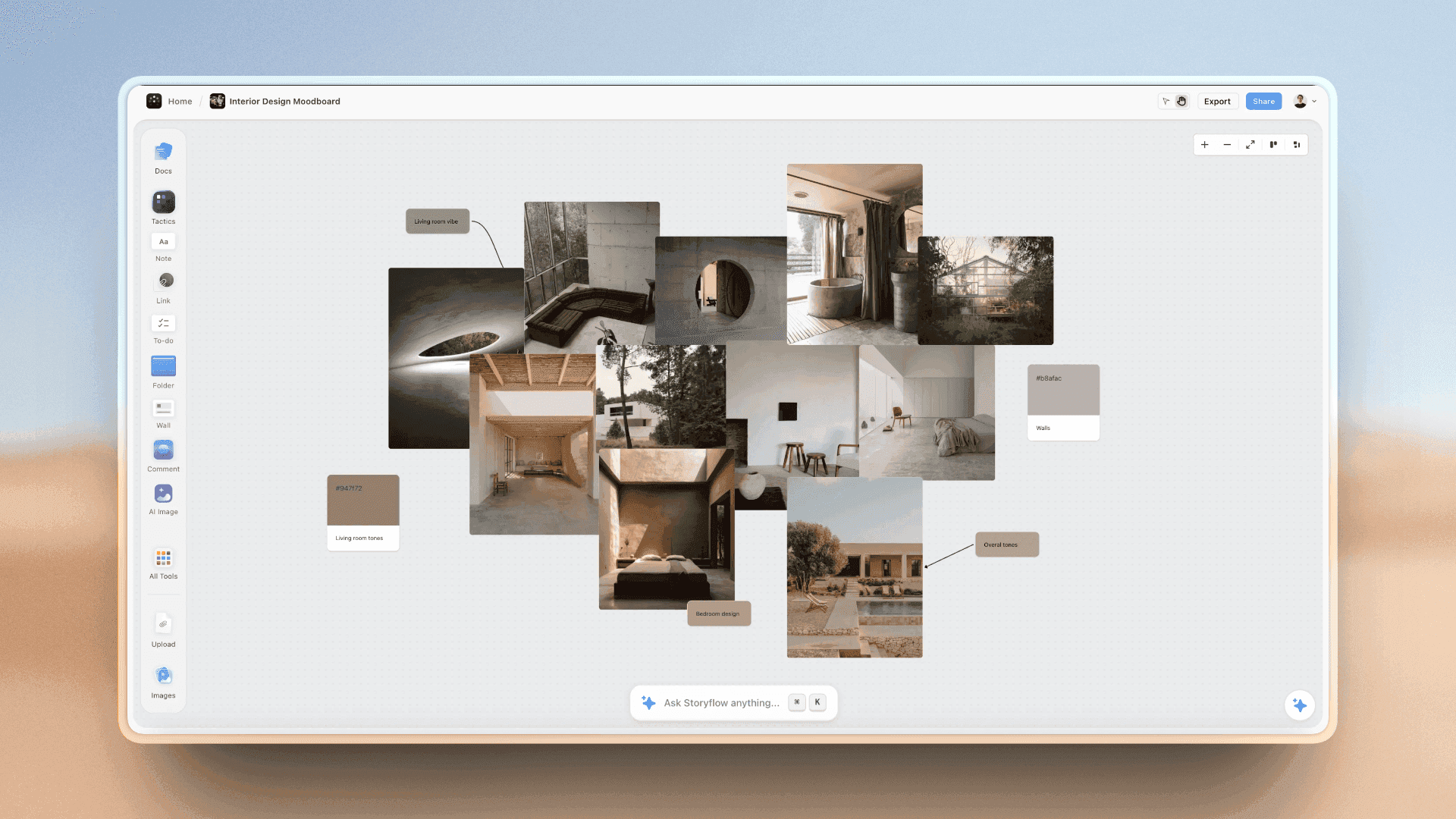
A Storyflow canvas holding notes, images, and project cards a doc-shaped tool would bury
A canvas built to be lived in, not outgrown
Storyflow keeps notes, images, links, boards, and collaboration unlimited, with AI that reads your whole canvas. It is $7.99/month annual during early access, with the free plan landing before the end of 2026. Rebuild one real project on it and see whether the shape fits.

The 10 Best Free Notion Alternatives, Ranked
- Obsidian - best free alternative overall: free forever, local, unlimited
- Storyflow - best pick for visual thinkers, with AI (paid-only during early access; Free plan coming before the end of 2026)
- Anytype - best free local-first object database, with encryption
- Joplin - best free open-source, self-hostable notes
- AppFlowy - best free open-source tool that keeps Notion's shape
- Google Docs + Keep - best free capture-and-write baseline
- Trello - best free project boards, within 10 boards
- Miro - a big-team whiteboard whose free tier is a demo
- FigJam - a design-team whiteboard whose free tier is a demo
- Milanote - a beautiful visual board capped at 100 notes
Best Free Notion Alternative by Job
The overall ranking is not the answer to every question. Match the tool to the job you actually have:
- Best free Notion alternative overall: Obsidian. Free forever, local, and unlimited.
- Best Notion alternative for visual thinkers: Storyflow. A spatial canvas rather than a page tree, with AI that will land on the Free plan before the end of 2026; paid-only during early access today.
- Best free local-first object database: Anytype.
- Best free open-source self-hostable notes: Joplin.
- Best free tool that keeps Notion's shape: AppFlowy.
The Three Kinds of Free
Every free tier in this category belongs to one of three kinds, and the kind predicts your experience better than any feature list.
Free-forever tools are complete at $0. The paid tier adds convenience (sync, storage, more AI), but the free product is the product. Obsidian, Anytype, Joplin, and AppFlowy are free-forever because their business model does not depend on converting you: the app is local or open-source, and the company sells services around it. Storyflow's upcoming Free plan, launching before the end of 2026, is built the same way, with one real cap we will get to; it is paid-only during early access today.
Free-until-you-depend-on-it tools give you genuinely useful limits that a real workflow eventually outgrows. Trello is the canonical example: unlimited cards and members, but 10 boards per Workspace. You can live inside that for a year; then the boards fill, and the upgrade prompt is standing right there. The free tier is honest; it is just designed so dependence arrives before the limit does.
Free-as-demo tools use the free tier as a tour. Miro's 3 editable boards and Milanote's 100 notes are not workspaces; they are enough room to fall in love and not enough room to live. Nothing wrong with a demo, as long as you know that going in.
The question is never whether a tool is free. It is which kind of free. That distinction is the spine of every ranking below.
Why the Free Tier Fine Print Matters More Than Features
The cost of picking the wrong kind of free is not the subscription you eventually pay. It is the migration: links break, attachments strand, structure flattens. The McKinsey Global Institute (2012) estimated that knowledge workers already spend about 19 percent of the workweek searching for information; a half-migrated workspace makes that worse for months.
So the fine print to read is not the paid price. It is what gets capped: objects (notes, cards), containers (boards, files), or capabilities (AI, sync, uploads). Object caps bite fastest, because every idea you capture spends the budget. Container caps bite slower. Capability caps leave the thinking unlimited and charge for convenience, which is the most livable kind. It is not the size of the number that matters. It is what the number is attached to.
How We Evaluated These Free Notion Alternatives
Every tool was tested on its free plan, on the same real workloads: a knowledge base of a few hundred notes, a project board, and a small shared workspace. Criteria, weighted in this order:
- Kind of Free (35%). Free-forever ranks above free-until-you-depend-on-it, which ranks above free-as-demo.
- What $0 buys (25%). How much real capacity the free plan gives: notes, boards, collaborators, AI.
- Data ownership and exit (20%). Local files, open formats, and complete export rank highest. A free tier you cannot leave is a trap with good marketing.
- Notion-replacement fit (20%). How much of the Notion job (notes, structure, projects, light databases) the tool covers, in its own shape.
Polish and team scale were weighted lightly; the free-tier user is usually one person deciding whether a tool deserves their notes at all.
Detailed Reviews: The 10 Best Free Notion Alternatives
1. Storyflow
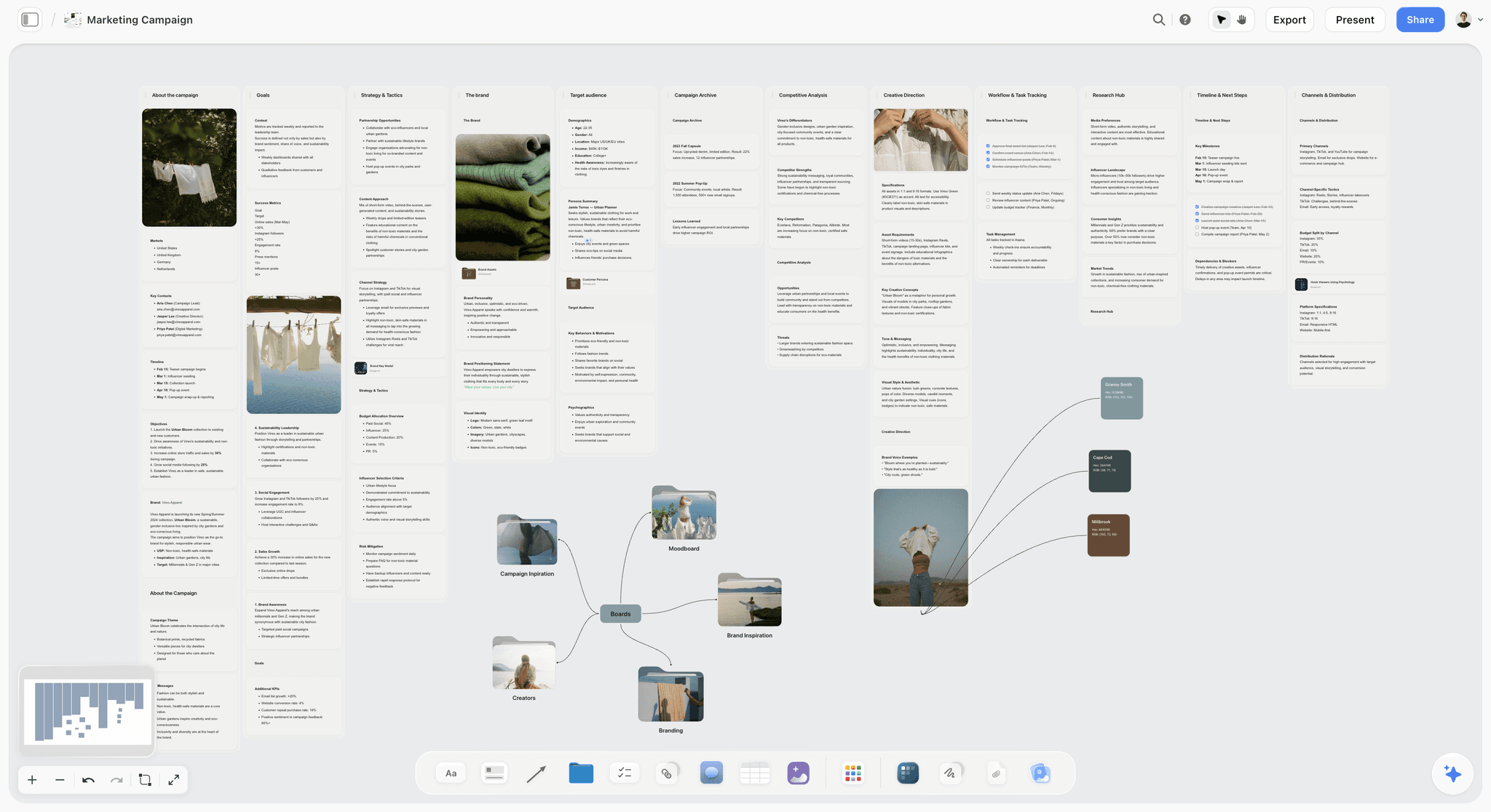
Storyflow is the best Notion alternative for visual thinkers, and its Free plan, launching before the end of 2026, will be genuinely unusual for a cloud tool: unlimited notes, images, and links, unlimited shared boards, unlimited collaboration, and basic AI usage. Storyflow is paid-only during early access today, with Plus starting at $7.99/month billed annually; anyone a paid member invites to a board joins free right now. Where Notion stacks pages in a sidebar, Storyflow puts notes, mood boards, mind maps, and project cards side by side on an infinite canvas, with an AI that reads the full active board rather than one page at a time. The Free plan will include 3 starter Story Blueprints from the 200+ library that opens on Plus.
Every other cloud tool here caps the thing you make (notes, boards) on free. Storyflow's Free plan will cap a capability instead: 20 file uploads. The thinking stays unlimited, so it will hold up as a real workspace rather than a demo, which is why a cloud tool ranks this high among the local apps.
The honest limits, and there are several: Storyflow is cloud-only, so if local-first data ownership is why you are leaving Notion, it is the wrong pick and Obsidian or Anytype should get your notes. The 20-file-upload cap will be a real ceiling for PDF- or video-heavy work; unlimited uploads require Plus ($7.99/mo billed annually, $9.99 monthly). AI usage on the Free plan will be basic, with heavier AI on paid tiers. And for finished long-form documents and team wikis, doc-shaped tools, Notion Free included, remain better.
- Kind of Free: paid-only during early access; the Free plan (one capability cap: 20 file uploads) launches before the end of 2026.
- Best for: people who left Notion because their thinking is spatial, not doc-shaped.
- Pricing: Paid-only during early access; Plus $7.99/mo annual ($9.99 monthly); Pro $14/mo annual; Max $39/mo annual; Free plan launches before the end of 2026. As of July 2026.
- The fine print: uploads are the cap; everything you type, link, or paste stays unlimited.
2. Obsidian
Obsidian is the best free Notion alternative in 2026, and it is not close for pure note-taking. The app is free forever, your notes are plain markdown files on your device, and there is no object cap, no board cap, no trial clock. The company charges for optional Sync ($4/mo billed annually) and Publish ($8/mo annual), and the free product loses nothing without them.
What you give up versus Notion is the database layer and easy collaboration. Community plugins close some of the gap (Dataview turns a folder of notes into queryable tables; the built-in Canvas plugin handles light spatial arrangement), but assembling plugins is real work, and sharing a vault is awkward. Obsidian is a personal tool.
- Kind of Free: free-forever. The local app is complete at $0.
- Best for: long-term personal knowledge you want to own outright.
- Pricing: free; Sync $4/mo annual, Publish $8/mo annual, commercial use license $50/year. As of July 2026.
- The fine print: the cost is time; plugin setup and maintenance replace the subscription.
3. Anytype
Anytype is what you pick when you want Notion's object-and-database flexibility but refuse to hand your data to a cloud. It is free, local-first, end-to-end encrypted, and syncs peer-to-peer between your devices. You build with object types the way you build with Notion databases, but the files live with you. The trade-offs: less polish, a smaller community, and AI features that lag the cloud-native tools. As a free-forever home for structured knowledge with a real privacy posture, nothing else here matches it.
- Kind of Free: free-forever. Optional paid tiers cover extra storage and vaults.
- Best for: privacy-first users who want Notion-style objects without Notion's cloud.
- Pricing: free; optional paid storage tiers. As of July 2026.
- The fine print: P2P sync means your own devices do the syncing.
4. Joplin
Joplin is the open-source workhorse of free note-taking: a complete notes app at $0, end-to-end encryption on synced notes, and the option to self-host everything. If your Notion exit is about principle (open source, no vendor, full control), Joplin is the least romantic and most dependable answer. It is a notes tool, not a workspace: no databases, no canvas, plain interface. Hosted sync is cheap: Joplin Cloud Basic is $3/mo (or $30/year) for 1 GB, Pro $6/mo for 10 GB.
- Kind of Free: free-forever. The app is complete; you pay only for hosted sync.
- Best for: open-source purists and self-hosters replacing Notion's notes layer.
- Pricing: free; Joplin Cloud from $3/mo. Self-hosting free. As of July 2026.
- The fine print: none to speak of, which is the appeal.
5. AppFlowy
AppFlowy is for the person who likes Notion's shape and dislikes its terms. It is an open-source, self-hostable tool with Notion's doc-and-database structure, free as software, with paid Cloud tiers if you would rather not host it. Of the free-forever tools here, it asks the smallest mental shift from a Notion user: same primitives, different ownership. The honest cost is polish, which noticeably lags Notion's; self-hosting is real work, and the cloud tier is the practical route. But if the requirement is "Notion, but free and ours," this is the closest match.
- Kind of Free: free-forever (open-source).
- Best for: teams and individuals who want the Notion shape without per-seat SaaS.
- Pricing: free open-source; paid Cloud tiers, verify current pricing. As of July 2026.
- The fine print: the free product is the self-managed one. Convenience is what costs.
6. Google Docs
Google Docs, with Google Keep beside it, is the free baseline nobody puts on these lists and everyone actually uses. Docs is still best-in-class real-time collaborative writing at $0; Keep is the fastest free capture on a phone. Together they cover the write-and-capture half of the Notion job, with no caps a normal person will meet. What they do not cover is structure: no databases, no linked workspace, nothing beyond folders and labels. Treat this pair as the free foundation under a structured tool, not as the system itself.
- Kind of Free: free-forever, subsidized by the Google ecosystem.
- Best for: co-writing and instant capture with zero setup.
- Pricing: free with a Google account. As of July 2026.
- The fine print: the price is living inside Google's ecosystem.
7. Trello
Trello has the most honest generous-but-bounded free plan in productivity software: unlimited cards, unlimited Workspace members, and up to 10 boards per Workspace. For task-shaped work, that is a real system at $0, and it is why refugees from Notion's databases land on a kanban board and feel relief. It is also the textbook free-until-you-depend-on-it: ten boards is plenty until your projects multiply, and by then your workflow lives in Trello and Standard ($5/user/mo annual) is the path of least resistance. Know which kind of free you are signing.
- Kind of Free: free-until-you-depend-on-it. The cap is boards, and dependence arrives first.
- Best for: replacing Notion's project tracking, not its notes.
- Pricing: free; Standard $5/user/mo annual, Premium $10/user/mo annual. As of July 2026.
- The fine print: unlimited cards make the 10-board cap easy to forget until you hit it.
8. Miro
Miro is a genuinely excellent whiteboard whose free tier is a demo: 3 editable boards. That is enough to run a workshop and understand why big distributed teams pay for it. It is not anyone's knowledge base, and it is not trying to be. Miro free will show you the appeal of canvas thinking and then stop you at the third board. For an actually free canvas today, Obsidian's Canvas plugin is the pick; Storyflow's unlimited boards will join it once its Free plan launches before the end of 2026.
- Kind of Free: free-as-demo. Three boards is a tour, not a workspace.
- Best for: evaluating whether your team should pay for a workshop-scale whiteboard.
- Pricing: free (3 editable boards); paid from ~$8/user/mo annual. As of July 2026.
9. FigJam
FigJam is the same story with a design-team accent. The free plan gives you a small number of editable files, enough to feel how nicely it sits next to Figma and not enough to live in; paid starts around $3/editor/mo, and for teams already paying for Figma the upgrade is trivial. As a free Notion alternative it is the weakest shape fit here: a workshop surface, not a knowledge home. It earns its slot because for a designer, "next to my design files" is a real answer.
- Kind of Free: free-as-demo.
- Best for: design teams whose thinking should sit beside their Figma files.
- Pricing: free plan; paid from ~$3/editor/mo, verify current limits. As of July 2026.
10. Milanote
Milanote is the most beautiful board on this list and the clearest free-as-demo: the free plan caps you at 100 notes total, across everything. A single real project (a script, a brand, a film) spends that budget in days. Past the cap, Pro is around $12.50/mo billed annually, and creatives who pay rarely regret it. But 100 notes is not a knowledge base; it is a taste. Storyflow's upcoming Free plan (launching before the end of 2026) will have no note cap at all, for a visual board you can actually stay on at $0. Milanote is the tool to pay for if the aesthetic is the point.
- Kind of Free: free-as-demo. 100 notes is the smallest object cap on this list.
- Best for: visual moodboards you already know you will pay for.
- Pricing: free (100 notes); Pro ~$12.50/mo annual. As of July 2026.
- The fine print: every note, image, and link spends the same 100-item budget.
How to Choose a Free Notion Alternative
Start from the reason you are leaving, then match the Kind of Free.
- Leaving for data ownership: go local. Obsidian for plain text, Anytype for objects, Joplin for open-source encryption.
- Leaving because Notion is doc-shaped and you think visually: Storyflow is the strongest canvas fit, with a Free plan landing before the end of 2026 (paid-only during early access now); Miro and FigJam are demos of paid ones today.
- Leaving over a free-tier limit you hit in Notion: swapping a block limit for a 100-note cap is a downgrade wearing a discount.
- Mostly need tasks: Trello free is a real system; count your future boards first.
- Mostly need co-writing: Google Docs is free and better at it than Notion.
The question is never whether a tool is free. It is which kind of free. Free-forever tools can hold your life's notes. Free-until-you-depend-on-it tools can hold a workflow if you accept the eventual bill. Free-as-demo tools should hold nothing you would grieve.
Persona-Based Recommendations
Student / Note-Taker on a Zero Budget
Top picks: Obsidian + Google Docs. Obsidian holds the permanent knowledge base at $0 with no caps; Docs handles collaborative assignments. Nothing here sends an upgrade prompt mid-semester.
Visual Thinker / Creative Planner
Top picks: Storyflow + Obsidian. Storyflow's canvas (paid-only during early access, Free plan coming before the end of 2026) holds projects, mood boards, and mind maps with AI that reads the whole board; Obsidian archives the long-term text. Milanote is prettier, but its 100-note cap makes it a demo here.
Privacy-First / Local-Only User
Top picks: Anytype or Joplin. Anytype for Notion-style objects with encryption and P2P sync; Joplin for simple encrypted notes you can self-host. Neither can change the deal underneath you.
Freelancer Managing Client Projects
Top picks: Trello + Google Docs. Trello covers client boards until the 10-board cap; Docs covers deliverables. Budget for Trello Standard the month your client list outgrows the cap.
Small Team Replacing Notion Without a Budget
Top picks: Trello + AppFlowy for right now; add Storyflow once its Free plan lands before the end of 2026. Trello's free tier allows unlimited Workspace members within 10 boards, so the whole team works at $0 today; AppFlowy is the pick if the team requires self-hosting. Storyflow is paid-only during early access, but its upcoming Free plan will allow unlimited collaboration on unlimited shared boards.
Open-Source / Self-Hosting Advocate
Top picks: AppFlowy + Joplin. AppFlowy for the Notion-shaped workspace, Joplin for notes, both open-source and self-hostable. The cost is admin time, which here is the fun part.
Honorable Mentions
Free tools that did not make the ten, with the honest reason:
- Logseq: free, open-source, local-first outliner. Excellent, but it replaces Roam better than it replaces Notion.
- ClickUp Free Forever: genuinely usable with unlimited members, but it is a project management tool with docs attached; the breadth is the friction.
- Coda: free for doc makers, with databases more capable than Notion's, but the maker-pays model fits teams evaluating a rollout more than individuals staying free.
- Notion Free itself: the elephant. For doc-shaped solo work it beats most of this list; hence the next section.
When You Should Just Stay on Notion Free
Some readers should close this tab and keep Notion. Notion Free is a complete personal workspace: pages, databases, sharing, a huge template ecosystem, all at $0 for an individual, with the paid plans mattering mostly for teams.
Stay if your work is doc-and-database shaped and you are not hitting limits, if the itch is novelty rather than friction, or if your collaborators live in Notion. A working system beats a promising one you have to rebuild.
Leave when there is a named reason: your data must be local (Obsidian, Anytype, Joplin), or your thinking is spatial and the doc primitive fights you (Storyflow). It is not the tool that makes the system work. It is the fit between the tool's shape and yours.
The Bottom Line
The best free Notion alternative in 2026 is Obsidian if the job is notes: free forever, local, uncapped, and yours. It is Storyflow if the job is visual, once its Free plan launches before the end of 2026: unlimited boards, notes, and collaboration with basic AI will be a free tier almost no cloud tool matches; Storyflow is paid-only during early access today, with Plus starting at $7.99/month billed annually. Anytype, Joplin, and AppFlowy carry the free-forever flag for privacy and open-source users, Trello and Google Docs cover tasks and writing, and Miro, FigJam, and Milanote are fine products whose free tiers are demos. If your work is doc-shaped and Notion Free is working, stay; that is the honest answer this category's marketing avoids.
The question is never whether a tool is free. It is which kind of free. If your thinking is visual and you want a canvas built to be lived in rather than outgrown, try Storyflow and rebuild one real project on it this week; it is paid-only during early access, with a Free plan landing before the end of 2026. The fine print, for once, is short.
FAQ: Free Notion Alternatives in 2026
What is the best free Notion alternative?
Obsidian is the best free Notion alternative in 2026 for pure note-taking: the app is free forever, notes are plain markdown files you own, and there are no caps. For visual thinkers, Storyflow is the strongest shape fit, with unlimited boards, unlimited collaboration, and basic AI, though it is paid-only during early access; its Free plan launches before the end of 2026. Choose by shape: text and links point to Obsidian, canvases and projects point to Storyflow.
Are free Notion alternatives actually free, or just trials?
Both exist, which is why the distinction matters. Obsidian, Anytype, Joplin, AppFlowy, and Google Docs are free-forever: complete tools you can stay on indefinitely. Miro (3 boards), FigJam, and Milanote (100 notes) are demos with a free label, built to be outgrown. Trello sits between: useful free limits a growing workflow eventually crosses. Storyflow is paid-only during early access, with a free-forever-shaped Free plan launching before the end of 2026. Check what is capped before you commit.
What is the best free Notion alternative for visual thinkers?
For a visual tool you can use free today, Milanote (100 notes) or Obsidian's Canvas plugin are the picks. Storyflow is the strongest shape fit for visual thinkers, but it is paid-only during early access; its Free plan, launching before the end of 2026, will include unlimited boards on an infinite canvas, unlimited notes, images, and links, unlimited collaboration, and basic AI that reads the whole board, with 20 file uploads as the one cap.
Is Obsidian really free forever?
Yes. The core Obsidian app is free forever for personal use, with no note limits, and your vault is plain markdown files on your own device. You pay only for optional services: Sync at $4/mo billed annually, Publish at $8/mo annual, and a $50/year commercial use license. The free app is complete, and sync can be handled free with your own cloud storage.
What does Notion's own free plan include?
Notion Free is a full personal workspace: pages, databases, sharing, and templates at $0 for individual use, with limits that mostly matter for teams. Paid plans are $10/user/mo for Plus and $15/user/mo for Business, as of July 2026. For doc-and-database shaped solo work it is genuinely one of the best free tools available, and staying on it is often the right call.
What is the catch with free note-taking apps?
The catch is always in what gets capped: objects, containers, or capabilities. Object caps (Milanote's 100 notes) run out fastest, because every idea spends the budget. Container caps (Trello's 10 boards, Miro's 3) allow real work until projects multiply. Capability caps (Storyflow's 20 file uploads, Obsidian's paid sync) leave the thinking unlimited and charge for convenience. Read what the cap is attached to before moving your notes.
Can I collaborate with a team on a free Notion alternative?
Yes, on a few of them. Trello free includes unlimited Workspace members within 10 boards, and Google Docs collaborates freely with anyone. Obsidian, Joplin, and Anytype are personal-first tools. If free team use is the requirement today, Trello and Docs are the realistic shortlist. Storyflow is paid-only during early access, though anyone a paid member invites to a board joins free now, and its Free plan (unlimited collaboration on unlimited shared boards) launches before the end of 2026.
Is there a free Notion alternative with AI?
Not today. Storyflow is paid-only during early access, with an AI that reads your full active canvas board rather than a single page; basic AI usage will be included on the Free plan when it launches before the end of 2026. Most free tiers elsewhere exclude AI or gate it behind trials, and local-first tools like Obsidian rely on community plugins you wire up yourself. Storyflow's paid tiers start at $7.99/mo annual.
What is the best free local-first Notion alternative?
Obsidian for plain-text notes, Anytype for structured objects. Obsidian stores markdown files in a local folder, with plugins that can approximate Notion databases. Anytype keeps Notion-style object types local with end-to-end encryption and free P2P sync. Joplin adds an open-source, self-hostable option with encrypted sync. All three are free-forever; pick by whether your knowledge is text-shaped or object-shaped.
What free tools replace Notion databases specifically?
Nothing free replaces Notion databases exactly, so pick by what you used them for. Task tracking maps to Trello free. Queryable note collections map to Obsidian with the free Dataview plugin. Structured object types map to Anytype. Project boards with mixed visual material map to Storyflow's canvas, though its Free plan does not launch until before the end of 2026 (paid-only during early access now). If relational databases themselves are the requirement, Notion Free remains the strongest option, and staying is reasonable.
Should I pay for Notion or switch to a free alternative?
Decide by named friction, not price. If Notion works and you are hitting team limits, $10/user/mo is cheaper than a migration. Switch when the friction is structural: data ownership points to Obsidian or Anytype, spatial thinking to Storyflow, open-source principle to AppFlowy or Joplin. Switching costs weeks of reorganizing, so a free alternative is only free if it fits your work's shape.
How do I migrate from Notion to a free alternative?
Export everything first: Notion exports markdown and CSV, which Obsidian and Joplin import well; Anytype and AppFlowy provide Notion importers; on Storyflow you paste or drop content onto boards. Migrate one active project before the archive, live in the new tool for two weeks, then commit. A staged migration protects you from discovering the wrong Kind of Free too late.
Table of Contents
- Comparison Table: 10 Free Notion Alternatives Compared
- The 10 Best Free Notion Alternatives, Ranked
- The Three Kinds of Free
- Why the Free Tier Fine Print Matters More Than Features
- How We Evaluated These Free Notion Alternatives
- Detailed Reviews: The 10 Best Free Notion Alternatives
- How to Choose a Free Notion Alternative
- Persona-Based Recommendations
- Honorable Mentions
- When You Should Just Stay on Notion Free
- The Bottom Line
- Author
- FAQ: Free Notion Alternatives in 2026
- Related Reading
Templates to check out for this topic


Workspace templates you can use in Storyflow
Keep research, notes, and plans on one canvas the AI can read, instead of scattered across docs and tabs. Open a template and make it your second brain.


See Storyflow in Action
A visual AI workspace where every feature lives inside one canvas. No tab-switching, no context lost.
Build your entire board from a single message
Type what you need in the AI chat at the bottom of your canvas. The AI adds cards, headings, and structure directly onto your board.
Use expert frameworks as AI context
Type @ in the AI chat and choose any Tactic. The AI tailors every response to that framework instead of giving generic advice.
Turn your board into a mind map in seconds
Ask the AI to restructure your canvas as a mindmap. It connects your ideas into a visual hierarchy so you can see how everything relates.
Why Storyflow Exists
Storyflow actually began as a personal tool while working on creative and research projects.
We kept running into the same problem: ideas were scattered everywhere: notes, documents, and whiteboards.
Nothing helped us see how everything connected.
So we started building a workspace designed around how ideas actually grow.
→ Read how Storyflow was createdJustkay
Documentary Filmmaker & Founder at Storyflow
Published: 2026-07-20
Extremely simple, seriously capable


See how easy it is to get started
Watch a real project come together, from a blank board to a finished plan, clicked through step by step.
Start creating with AI and become more productive
Transform your creative workflow with AI-powered tools. Generate ideas, create content, and boost your productivity in minutes instead of hours.