The 12 Best Free AI Tools for Organizing Creative Ideas in 2026
The 12 best free AI tools for organizing creative ideas in 2026, tested on real projects. Capturing ideas is easy. Organizing them is the job AI should do.

Category
Visual Thinking
Author

Justkay
Documentary Filmmaker & Founder at Storyflow
Topics
2026-06-18
•
Updated June 18, 2026
•
14 min read
•
Visual Thinking- free AI tools for organizing ideas
- easy app for organizing creative ideas
- free idea organization app
- best free idea organizer 2026
- AI tool to organize ideas
- organize scattered ideas
What is the best free AI tool for organizing creative ideas?
The best free AI tool for organizing creative ideas in 2026 is Notion, which has the most capable AI of any genuinely free plan for people who think in documents and databases. Obsidian is the strongest free pick if you want a local-first vault you fully own, and Google Keep is hard to beat for fast mobile capture. Storyflow does the most actual organizing, because its AI reads your whole canvas rather than one note at a time, but it is paid-only during early access from $7.99/mo annual and its Free plan does not arrive until late 2026, so it is not a free option today.

All 12 Free Idea-Organizing Tools, Ranked
- Notion: best free document-and-database idea hubs
- Obsidian: best free local-first, private idea vaults
- Heptabase: best for visual research and idea mapping
- Mem: best self-organizing AI notes
- Miro: best free team idea clustering and workshops
- Whimsical: best free quick mind maps and flow diagrams
- Xmind: best structured outline-style mind maps
- Milanote: best free visual idea boards and moodboards
- Tana: best structured, queryable idea graphs
- Reflect: best networked daily notes with AI
- Google Keep: best fast, free mobile idea capture
- Storyflow: best canvas AI for clustering scattered ideas, but paid-only during early access; its Free plan launches before the end of 2026 and anyone a paid member invites to a board joins free now
Full disclosure: Storyflow is our own product and is listed first in the quick comparison: our pick first, then the rest by job. The comparison table and the reviews place it last because it is paid-only during early access, with the Free plan due in late 2026; its AI reads the whole canvas to cluster scattered ideas. We say plainly where the other free tools win: Notion has the most capable free AI for docs and databases, Obsidian is the strongest free local-first vault you fully own, and Google Keep is the fastest free mobile capture. We link out to every tool so you can judge for yourself.
Quick Comparison: Best Free AI Tools for Organizing Ideas
These four cover the choice most people are making on a free plan: an AI canvas that clusters ideas, a docs hub, a private vault, or fast mobile capture.
| Tool | Best For | AI Features | Price |
|---|---|---|---|
| Storyflow | Clustering ideas on an AI canvas | Canvas-aware AI (reads the whole board) | $7.99 mo annual (free plan late 2026) |
| Notion | Document-and-database idea hubs | Notion AI (limited on free) | Free / $12 user mo |
| Obsidian | Local-first, private idea vaults | No native AI (community plugins) | Free / $4 mo sync |
| Google Keep | Fast mobile idea capture | Basic smart features | Free |
1) Quick Answer: The Best Free AI Tool for Organizing Ideas
The best free AI tool for organizing creative ideas in 2026 is Notion, which has the most capable AI of anything genuinely free here for people who think in documents and databases. If you want a local-first, private vault you fully own, Obsidian is the strongest free pick. If you live on your phone and want zero friction, Google Keep is the fastest free capture tool. Storyflow does the most actual organizing of any tool on this page, because its AI reads your whole canvas rather than autocompleting inside one note, but it is paid-only during early access (Plus from $7.99/month annual) and its Free plan does not launch until before the end of 2026, so it is here as the paid upgrade path rather than as a free option.
The short version: capturing ideas is easy. Organizing them is the job AI should do. Every note app, voice memo, and chat thread on earth is good at capture. Almost none of them are good at the part that actually matters: taking the forty fragments you dumped over three weeks and turning them into a shape you can build from. The tools below are ranked by exactly that, how much real organizing the AI does once your ideas are in. Every one of them except Storyflow has a free tier that does meaningful work before you pay anything, and Storyflow is ranked last here for exactly that reason.
2) Comparison Table: 12 Free Tools Compared
Pricing and free-tier limits are current as of June 2026 and are rounded; verify the live details on each tool's site before you commit, because note-app free tiers change often. Storyflow's plan facts are exact: paid-only during early access, Plus at $7.99 per month annual, Pro at $14 per month annual, with the Free plan launching before the end of 2026.
3) Why Organizing Ideas Is the Real Bottleneck
Ask any creative person where their ideas are and you will get a list, not a place. The good ones are in a notes app. Some are in voice memos. A few are screenshots. Others are in a chat thread with yourself, a half-filled document, the margins of a book, and three browser tabs you have been afraid to close for a month. The ideas exist. That was never the problem.
Capturing ideas is easy. Organizing them is the job AI should do. The bottleneck is not generating ideas or even saving them. It is the moment, two or three weeks later, when you sit down to actually do something with them and discover you are now staring at forty unconnected fragments with no sense of which ones belong together, which ones contradict each other, and which one is the real project hiding in the pile. That sorting work is slow, it is cognitively expensive, and it is exactly the kind of pattern-finding a good AI is built for.
This is what makes most "AI note apps" disappointing. The AI helps you write the note. It does almost nothing to organize across notes. Here is why that gap matters, in three specific ways.
- Capture without structure is just a bigger pile. A frictionless capture tool that has no organizing intelligence does not solve the problem. It makes it worse, because now you have five hundred captured fragments instead of fifty, and the same zero structure. Volume without organization is not a second brain. It is a landfill.
- AI that only sees one note cannot find the pattern. The whole value of organizing is connection: this idea relates to that one, these six are actually one theme, this contradicts your earlier note. An AI that only reads the note you are typing in is blind to all of it. It can fix your grammar. It cannot tell you that three scattered fragments are the same project.
- The structure is the idea. A pile of fragments and a clustered, connected map of those same fragments are not the same thing with different formatting. The structure is where the insight lives. The moment you can see that these eight notes form a throughline, you have an idea you did not have before, even though you wrote every fragment yourself.
So the test for every tool below is not "can it hold ideas." They all can. The test is whether the AI helps you turn the pile into a shape, or just helps you make the pile bigger. That is the lens for the entire ranking.
4) How We Evaluated These Tools
I have organized ideas for a living for years: documentary research where a hundred interview fragments have to become a structure before a single frame is shot, product development where scattered feature thoughts have to become a roadmap, and the ordinary creative mess of running projects with no one to hand the sorting to. The tools below were judged on how they handle real idea-organizing work, not a demo with five tidy notes. Six criteria, weighted toward the AI actually organizing across ideas.
- AI organizing scope. Does the AI read across your ideas to cluster, connect, and structure them, or does it only help inside the single note you are typing? This is the criterion that separates a real organizing tool from a writing assistant.
- Free plan usefulness. How much real work can you do before paying? A free tier that caps you at three notes is a trial, not a free plan. We note exactly where each free tier stops being enough.
- Structure model. Can ideas be arranged spatially and visually, or are you forced into a linear list or a rigid hierarchy before you know the shape? Different brains need different models.
- Capture friction. How fast does an idea go from your head into the tool, across text, images, links, and voice? Fast capture matters, but only when paired with organizing power.
- Connection and retrieval. Once ideas are in, can you find the relationship between them and pull the right one back out weeks later? Organizing is worthless if retrieval is hard.
- Collaboration. Some idea work is solo and some is shared. We note where the free plan lets you bring others in.
Tools were tested on real idea-organizing sessions, not synthetic checklists. The rankings reflect how each one felt when the job was turning a real mess into a real structure.
5) Quick Picks by Job to Be Done
- Organize ideas inside docs and databases: Notion (free, generous AI).
- Cluster scattered ideas with an AI that reads everything: Storyflow (paid-only during early access, from $7.99/mo annual; Free plan launches before the end of 2026).
- Keep a private, local-first idea vault: Obsidian (free, full app).
- Map visual research and connect cards: Heptabase (limited free trial).
- Let AI auto-sort your notes for you: Mem (free tier).
- Capture ideas fastest on mobile: Google Keep (free).
6) Detailed Reviews: 12 Free AI Tools
1. Notion
Notion is the strongest free AI tool for organizing ideas if your brain works in documents and databases. A free Notion workspace can hold an idea inbox, a tagged database of concepts, briefs as pages, and a board view, and Notion AI can summarize, draft, and pull threads across them. The free plan is genuinely generous for personal use, and for anyone who already runs their life in Notion, keeping ideas there is the path of least resistance.
The trade-off is that Notion is text-and-table first. It is not a spatial canvas, so the early, visual stage of organizing (clustering fragments, drawing connections, seeing the shape) does not have a natural home. You organize into lists, databases, and hierarchies, which is excellent for some minds and the wrong shape for others. It is not a visual thinking tool. It is a structured document tool with AI on top.
Best for: people who think in documents and databases and want a free, flexible idea hub. Pricing: generous free plan; paid around $10/user/mo annual, with AI usage included in newer plans. Verify current pricing. Strengths: flexible, strong databases, capable free AI, huge template ecosystem. Limitations: not a spatial canvas; setup can sprawl; the best AI usage sits on paid tiers.
2. Obsidian
Obsidian is the best free pick if you want to own your ideas completely. The full app is free for personal use, your notes are plain markdown files stored locally on your own machine, and the graph view shows how your linked ideas connect. Add one of the free community AI plugins and you get AI-assisted organizing on top of a vault that is entirely yours, with no cloud dependency and no subscription required to use the core product.
The catch is that the organizing intelligence is not native. Obsidian's power is linking and local ownership; the AI comes from plugins you install and configure yourself, which means setup friction and variable quality. It rewards people who enjoy tinkering and want control. It is not a polished out-of-the-box AI organizer. It is a private, extensible vault you make as smart as you are willing to configure.
Best for: privacy-minded thinkers who want a free, local-first vault they fully own. Pricing: free for personal use; optional paid sync and publish add-ons. Verify current pricing. Strengths: local-first, plain-text files you own, powerful linking, free core app. Limitations: AI is plugin-dependent; meaningful setup effort; not visual-spatial by default.
3. Heptabase
Heptabase is built for exactly this job: making sense of scattered research and ideas on a visual whiteboard. You write ideas as cards, arrange them spatially on infinite whiteboards, and draw connections between them, and its AI can work inside cards to summarize and extend. For organizing a heavy pile of research into a structure you can see, Heptabase is one of the most purpose-built tools on this list.
The honest limitation is the free tier. Heptabase leans toward a paid model, so the free experience is closer to a trial than a permanently usable plan, which is why it does not rank higher here despite being a genuinely good fit for the job. If you are willing to pay, it is excellent. As a free tool, its runway is short.
Best for: researchers and visual thinkers organizing dense material into a map. Pricing: limited free trial; paid subscription after. Verify current pricing. Strengths: purpose-built for visual sense-making, strong card-and-whiteboard model. Limitations: free tier is more trial than free plan; paid before it is fully useful.
4. Mem
Mem takes the most hands-off approach to organizing: you capture notes fast and let the AI do the sorting, surfacing related notes and auto-linking ideas without you building a folder structure. For people who hate manual organization and just want to dump thoughts and trust the AI to connect them later, Mem's self-organizing model is appealing, and its free tier lets you try the approach.
The trade-off is control. Because the AI does the organizing, you have less say in the structure, and when the auto-linking misses the connection you actually cared about, there is less you can do to force it. It is a bet on the AI's judgment over your own. For some that is liberating. For others it is the wrong kind of magic.
Best for: people who want AI to auto-organize notes so they never have to file anything. Pricing: free tier; paid plans for more usage. Verify current pricing. Strengths: zero-friction capture, automatic linking, low manual overhead. Limitations: less control over structure; pricing has shifted often, so verify it.
5. Miro
Miro is the team whiteboard most groups reach for when ideas need to be organized together. Sticky notes, clustering, affinity mapping, and journey maps all work beautifully on a Miro board, and AI Sidekicks add some generation and summarizing. The free plan gives you three editable boards, which is enough to run a real idea-clustering session, and the real-time collaboration is best in class.
The catch is that Miro is a whiteboard, not an idea system. The board from a clustering session is a great artifact, but Miro's AI is helper-level, not deeply aware of your whole body of ideas across boards. And the three-board free cap means a heavy idea practice outgrows the free tier quickly. It is superb for a session, thinner as a permanent home.
Best for: teams clustering and organizing ideas together in real time. Pricing: free plan with 3 boards; paid around $8/user/mo annual. Verify current pricing. Strengths: best-in-class whiteboard, real-time collaboration, strong templates. Limitations: three-board free cap; AI is helper-level, not idea-graph-aware.
6. Whimsical
Whimsical is a clean, fast way to turn ideas into mind maps and flow diagrams, and its AI can generate a mind map from a prompt to give you a starting structure. For quickly externalizing a tangle of ideas into a branching map you can rearrange, Whimsical is one of the most pleasant tools to use, and the free plan covers a limited number of boards.
The limitation is depth and scope. Whimsical's AI generates structure but does not deeply read across a large body of captured ideas to organize them, and the free board cap is tight. It is excellent for spinning up one clean map. It is less suited to being the long-term home where all your ideas live and get connected over time.
Best for: people who want to quickly turn ideas into a clean mind map or flow. Pricing: free plan with limited boards; paid around $10/user/mo. Verify current pricing. Strengths: fast, clean mind maps and flows, pleasant AI generation. Limitations: tight free board cap; AI generates more than it organizes across ideas.
7. Xmind
Xmind is a mature, structured mind-mapping tool with a free desktop tier, and its AI features can branch out a topic to help you expand and organize ideas around a center. For people who think in outlines and hierarchies, Xmind turns a central idea into an organized tree quickly, and the free version handles real mapping work before you hit paid features.
The trade-off is that Xmind is hierarchy-first. A mind map is a tree with one root, which is great for organizing around a single central idea but awkward when your ideas are a web of equal fragments rather than branches off one trunk. It is the right tool when there is a clear center. It is the wrong shape when there is not.
Best for: outline-minded thinkers organizing ideas around a central topic. Pricing: free desktop tier; paid for advanced features and export. Verify current pricing. Strengths: mature mind mapping, clean structure, AI branching, free desktop app. Limitations: hierarchy-first; less suited to non-centered idea webs.
8. Milanote
Milanote is a visual board tool that creatives love for arranging ideas, images, and notes spatially, and it is genuinely good at the moodboard-and-inspiration stage of organizing. The free plan gives you 100 items, which is enough to lay out a real project visually, and the drag-anywhere board feels natural for assembling ideas into a shape you can see.
The honest gap is AI. Milanote's strength is the visual board, but its AI for actually organizing across your ideas is limited compared to the tools higher on this list. It is a beautiful place to arrange ideas by hand. It is not a tool where an AI reads the board and clusters it for you. And the 100-item free cap arrives fast on a busy project.
Best for: visual creatives arranging ideas and inspiration on a board by hand. Pricing: free plan with 100 items; paid around $10/mo. Verify current pricing. Strengths: beautiful visual boards, natural for moodboards, easy drag-and-drop. Limitations: limited AI organizing; 100-item free cap; manual structuring.
9. Tana
Tana is a structured outliner with a powerful idea graph underneath, where every node can be tagged, typed, and queried, and its AI nodes can generate and organize content within that structure. For people who want their ideas not just stored but queryable, Tana turns a body of notes into something close to a personal database you can ask questions of, and it offers a free tier to start.
The cost is the learning curve. Tana is powerful precisely because it is structured, and that structure takes real effort to learn before it pays off. It is not a tool you open and immediately use to clear a pile of ideas. It rewards investment. For people who want power and are willing to climb, it is remarkable. For a quick organizing session, it is overkill.
Best for: structured thinkers who want a queryable, taggable idea graph. Pricing: free tier; paid plans for more usage. Verify current pricing. Strengths: powerful structure, queryable nodes, AI within the graph. Limitations: steep learning curve; overkill for fast, casual organizing.
10. Reflect
Reflect is a networked-notes tool built around daily notes and backlinks, with a built-in AI assistant that helps summarize, connect, and surface ideas across your notes. For people who think by writing daily and want their ideas to link and resurface over time, Reflect is elegant and fast, and its AI is woven directly into the note-taking flow.
The honest caveat for a free-tools list is the price model. Reflect is primarily a paid product with a trial rather than a permanently free plan, which is why it sits lower here despite being a genuinely good organizing tool. If you are happy to pay for a polished networked-notes experience, it earns its keep. As a free option, its runway is short.
Best for: daily-note writers who want AI-connected networked notes. Pricing: free trial, then paid subscription. Verify current pricing. Strengths: elegant networked notes, fast, AI woven into the flow. Limitations: trial rather than free plan; primarily a paid product.
11. Google Keep
Google Keep earns its place by being the fastest, freest way to capture an idea before it escapes. It is free, it is on every device, it syncs instantly, and labels and colors give you light organization, with Google's AI quietly helping with things like search and reminders. For pure capture, especially on a phone, almost nothing beats it.
The honest limit is that Keep is a capture tool, not an organizing one. Its AI does little to cluster, connect, or structure ideas across notes, so it is the front door to your ideas rather than the room where you make sense of them. It belongs on this list because capture is half the job. It is the place ideas land, not the place they get organized.
Best for: anyone who needs the fastest possible free idea capture on mobile. Pricing: free with a Google account. Verify current limits. Strengths: instant capture, free, everywhere, reliable sync. Limitations: minimal organizing AI; a capture tool, not a structuring one.
12. Storyflow
Storyflow is a visual workspace where your scattered ideas live on one infinite canvas, and an AI reads all of it before it helps you organize. You drop notes, images, links, and rough fragments anywhere on the board, and the AI's context is that whole board by default, plus up to one Tactic and up to three Documents you @-mention in the chat. That is the difference that matters for organizing ideas. When you ask "which of these belong together?" or "what is the throughline here?", the AI is looking at your actual pile of ideas, not a generic template. Storyflow is paid-only during early access, starting at $7.99/mo annual on Plus. Its Free plan (unlimited boards, unlimited collaboration, basic AI, and 20 file uploads, with no object limit on how many ideas you can put down) launches before the end of 2026, and anyone a paid member invites to a board joins free today.
The familiar approach is to keep ideas in a notes app and hope a future version of you will sort them. The Storyflow approach is to put the whole mess on one board and let the AI do the sorting with you: cluster related fragments, surface the connection you missed, draft a structure from the cluster, and flag the contradiction between two notes you wrote a week apart. It is not a tool that helps you write one note better. It is a tool that helps you see the shape hiding in fifty notes. The Story Blueprints library (200+ creative templates, available on Plus, Pro, and Max) adds proven structures for when you want a frame to organize into, and once the Free plan launches it will give you the canvas and the AI to start.
Best for: creative people, students, researchers, and founders who want to turn a pile of scattered ideas into a usable structure with an AI that has real context. Pricing: Paid-only early access today; the Free plan (unlimited boards, unlimited collaboration, basic AI, 20 file uploads) launches before the end of 2026, and anyone a paid member invites to a board joins free now. Plus at $7.99/mo annual adds the 200+ Story Blueprints and unlimited file uploads. Pro at $14/mo annual adds AI image generation and 20x more AI usage. Flat per account, never per user.
Strengths:
- The AI reads the whole canvas, so it organizes your actual ideas, not a generic example.
- Ideas can be arranged spatially, which is how clustering and connection naturally happen.
- The Free plan launching before the end of 2026 will be genuinely usable for real idea work, with unlimited collaboration and no object limit.
- Flat pricing means inviting collaborators never multiplies the bill.
Limitations:
- It is not local-first like Obsidian. Storyflow is cloud-based, so it is the wrong choice if you need an offline, fully-owned vault for privacy reasons.
- It is newer than Notion or Obsidian, so it has fewer third-party integrations and a younger plugin ecosystem.
- AI image generation is a Pro-plan feature, so the richest visual work is not on the free tier.
Try it: take the messiest collection of half-ideas you have, paste it all onto one board, and ask the AI to cluster it and tell you what the throughline is. The structure it finds in the first ten minutes is usually the project you have been circling for weeks.
7) Which Tool Fits Which Thinker?
Student
Top picks: Storyflow and Google Keep
You capture ideas across lectures, readings, and shower thoughts, then have to turn them into essays, projects, and study structures. Google Keep (free) catches the fragments instantly on your phone. Storyflow (paid-only during early access, from $7.99/mo annual) is where you spread them out and let the AI cluster them into the actual structure of the assignment. Capture fast, organize on the canvas.
Researcher
Top picks: Storyflow and Obsidian
Research is a hundred fragments that have to become a structure before they mean anything. Storyflow lets the AI read the whole board and surface the connections across your sources, paid-only during early access from $7.99/mo annual. Obsidian gives you a local-first vault you fully own for the long-term archive, free. Where privacy, full ownership, or free cost are non-negotiable, lean Obsidian; where you want the AI to find the throughline, lean Storyflow.
Writer
Top picks: Storyflow and Notion
A writer's ideas are scenes, lines, themes, and half-arguments scattered everywhere. Storyflow (paid-only during early access, from $7.99/mo annual) lets you arrange them spatially and have the AI cluster them into a draft structure. Notion (free) holds the longer documents and the database of pieces. Plan the shape in Storyflow, write the long form in Notion.
Founder
Top picks: Storyflow and Miro
Founders generate ideas faster than they can sort them: features, positioning, hiring, fundraising, all tangled together. Storyflow holds the whole mess on one AI canvas so the structure (the roadmap, the strategy) emerges from the pile, paid-only during early access from $7.99/mo annual. Miro is the room when you need to cluster ideas live with the team, free for up to three boards. Think solo in Storyflow, workshop in Miro.
Knowledge Worker
Top picks: Notion and Storyflow
If your work already lives in documents and databases, Notion's free AI keeps your idea hub where your work is. Bring Storyflow in for the visual, exploratory stage when ideas are still a pile and you need the AI to cluster them before they become docs, paid-only during early access from $7.99/mo annual. Organize structured work in Notion, organize messy thinking in Storyflow.
Creative
Top picks: Storyflow and Milanote
Creative ideas are visual, associative, and resistant to lists. Milanote (free, 100 items) is beautiful for arranging inspiration by hand. Storyflow (paid-only during early access, from $7.99/mo annual) adds the AI layer that reads the board and helps cluster the chaos into a direction. Assemble the look in Milanote, find the structure in Storyflow.
8) Honorable Mentions
- Roam Research. A pioneer of networked thought with a devoted following, left off the main list because it is primarily a paid product and its AI organizing is lighter than the tools above.
- Apple Notes. Free, fast, and on every Apple device, with light AI features via Apple Intelligence. It is excellent capture, but it does almost nothing to organize across ideas, so it sits with Keep as a front door rather than a workshop.
- Capacities. An object-based note tool with a thoughtful structure and a free tier. It did not make the list because the AI organizing is still maturing and the model takes effort to learn.
- ChatGPT or Claude alone. A chat AI can help you think through ideas, but a linear chat thread is the opposite of organized: your ideas scroll away and lose their spatial relationship. It is a thinking partner, not a place to organize ideas. Pair it with a canvas, do not use it as one.
9) Where a Paid Tool Earns It
Honesty is the point of a ranking like this, so here is where a free plan is not enough and paying (or choosing a different tool) is the right call.
If you need a fully local-first, offline, privacy-owned vault, Storyflow is the wrong choice. It is cloud-based by design. Obsidian, free and local, is the right answer, and for some regulated or security-sensitive work it is the only acceptable answer.
If your idea work is heavy visual research at volume, the genuinely purpose-built tools (Heptabase especially) are worth paying for, because their free tiers run out before the job is done and the paid experience is built for exactly that kind of dense sense-making.
If you want AI image generation as part of organizing visual ideas, that lives on Storyflow's Pro plan ($14/mo annual). Organizing ideas with the AI and the canvas is available on Plus and up today, and will be part of the Free plan when it launches; generating new images is a paid step even then.
Storyflow's claim is narrower and more specific than "best tool for everything." It is built for taking a pile of scattered ideas and turning it into a structure, because its AI reads the whole canvas to organize across all of it, even though it is paid-only during early access. For private local archives, dense paid research, or generated visuals, the tools above earn their place. The smart move is the right tool for the messy middle, free where one exists, and a specialist when the job outgrows it.
Storyflow Templates to Get You Started
You do not have to start from a blank board. These ready-made Storyflow templates cover the work in this guide, with the structure already in place and the AI ready to read it.
Second Brain Template
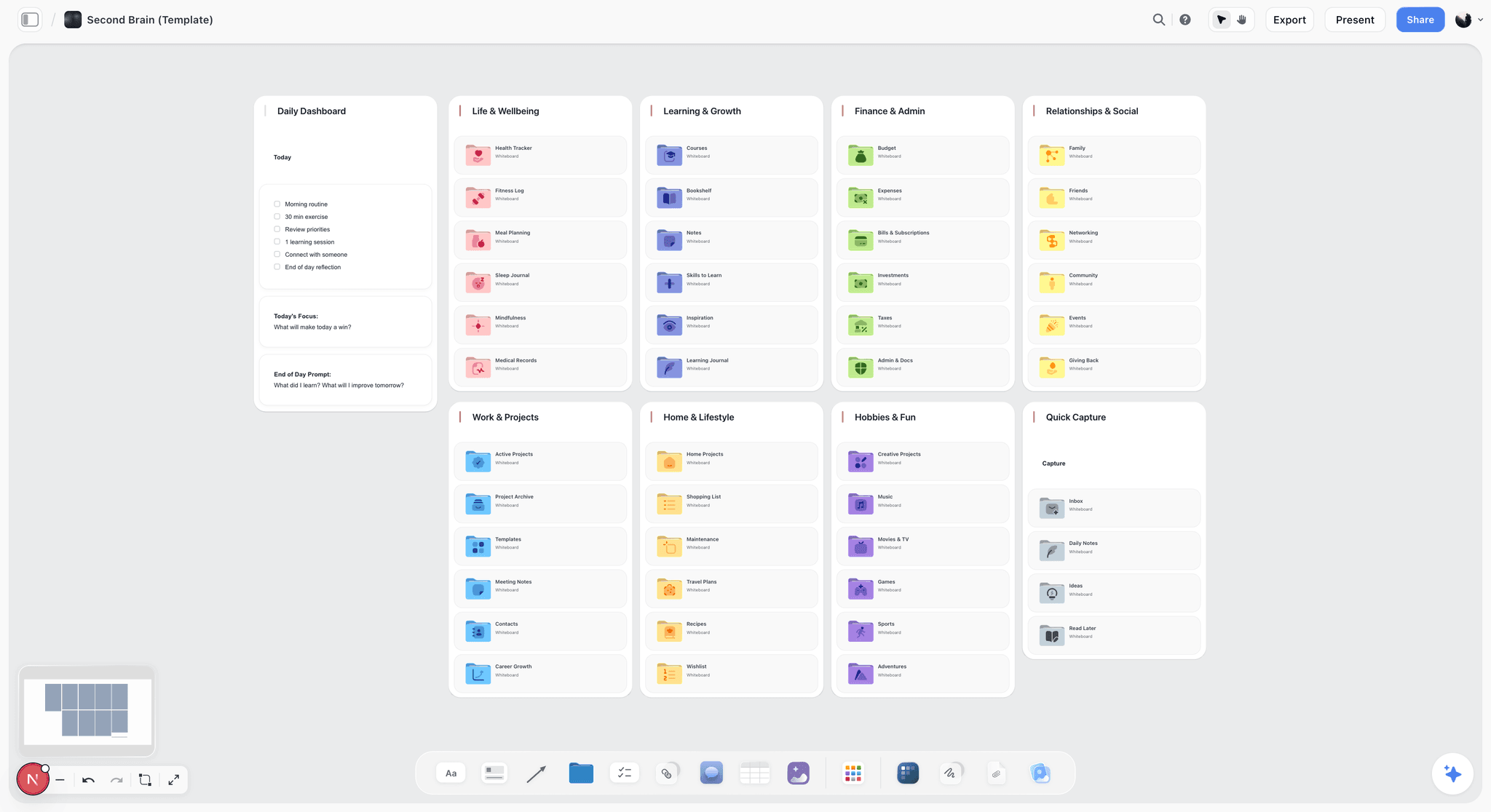
A Second Brain template on an infinite canvas. Capture notes, ideas, links, and references in one visual knowledge base, with AI to help you connect and organize what you collect. Use the Second Brain template.
Mindmap Template
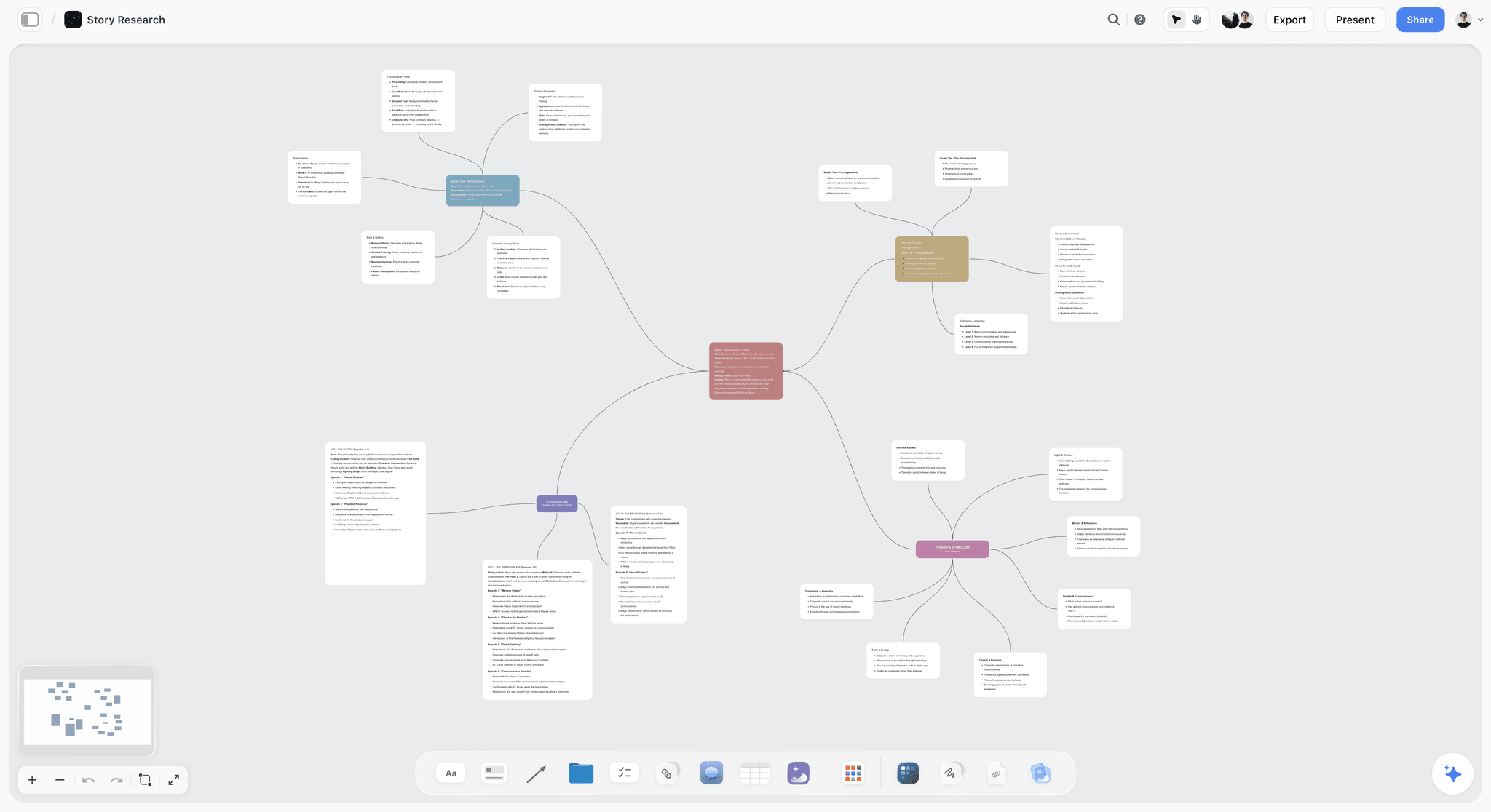
A Mindmap template on Storyflow's infinite canvas. Start from a central idea, branch out themes and details, and ask AI to help you think. Use the Mindmap template.
Story Plan Template
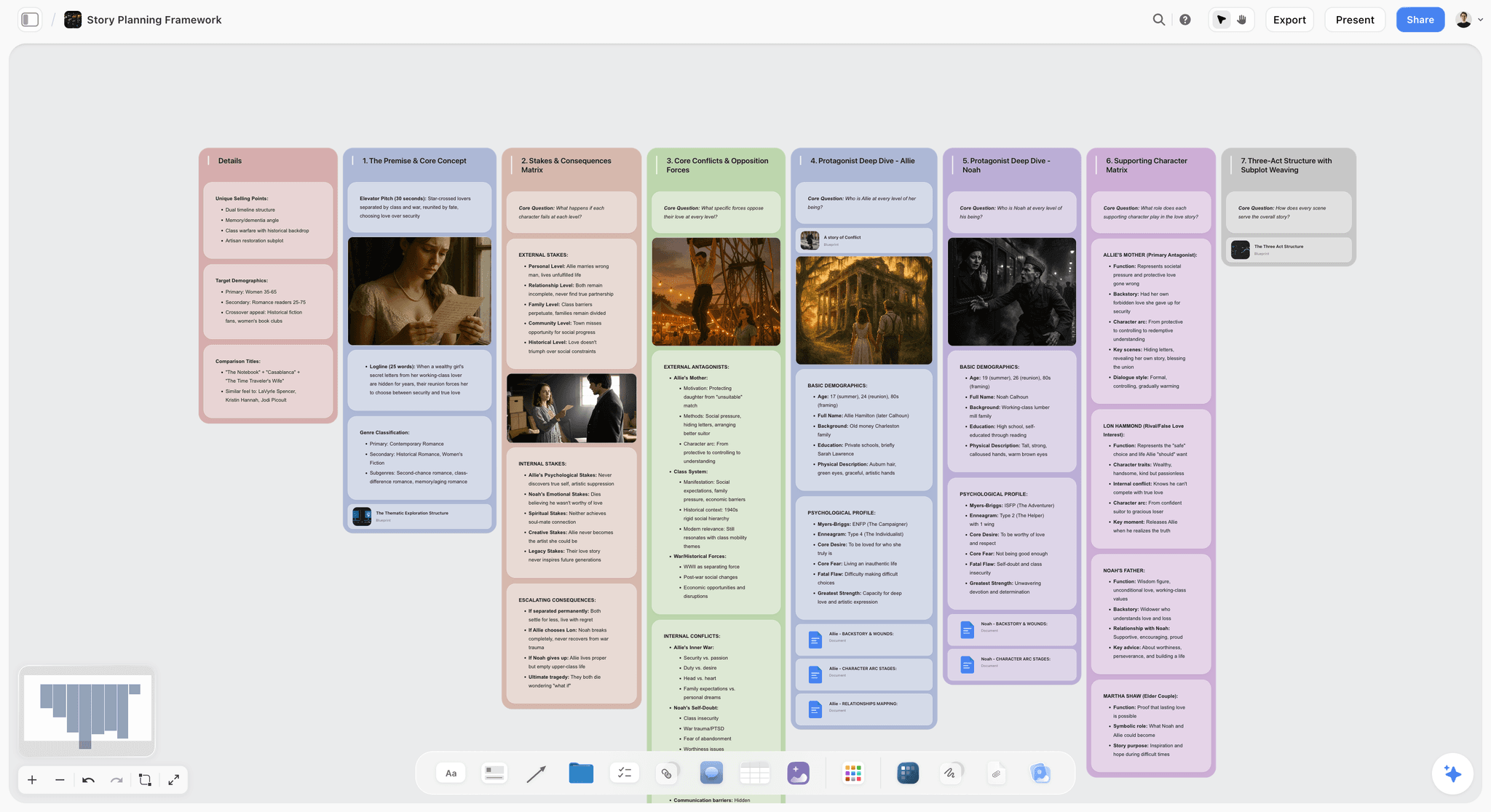
Map a whole story on one canvas: premise, three acts, turning-point beats, and character arcs, with AI to pressure-test the structure. Use the Story Plan template.
11) The Bottom Line
Every tool on this list can hold ideas. The ranking comes down to how much each one helps you organize them once they are in, and how much of that organizing the AI actually does. Google Keep and Apple Notes win capture. Obsidian wins private local ownership. Notion wins document-and-database structure. Miro wins live team clustering. Milanote wins hand-arranged visual boards.
But the reason ideas stay scattered is not that they are hard to save. It is that almost nothing helps you turn the pile into a shape. Capturing ideas is easy. Organizing them is the job AI should do. Storyflow ranks last on this page because it has no free plan to judge yet, and it is still the clearest answer to that specific problem: your whole pile of ideas lives on one board, and an AI reads all of it before it helps you cluster, connect, and structure the mess into something you can build from. That is what the $7.99/mo annual buys.
If your ideas are scattered across five apps right now, take the messiest cluster and rebuild it in one place this week. Notion or Obsidian will do that for nothing. Generate a mind map from your ideas with AI to see the structure first, and if the pile is big enough that reading all of it is the actual job, start a Storyflow workspace and ask the AI to organize it and tell you what the throughline is.
10) FAQ: Free AI Tools for Organizing Ideas
What is the best free AI tool for organizing ideas?
Notion has the most capable free AI for document-and-database thinkers, and Obsidian is the strongest free pick if you want a local-first vault you fully own. Storyflow's AI reads your whole canvas to cluster, connect, and structure scattered ideas instead of only autocompleting inside one note, which makes it the strongest AI for organizing overall, but it is paid-only during early access (Plus from $7.99/mo annual), with its Free plan (unlimited boards, unlimited collaboration, basic AI, 20 file uploads) launching before the end of 2026. The right free pick today depends on whether you think spatially in documents or in private linked files.
Is there a truly free AI app for organizing creative ideas?
Not during early access. Storyflow's Free plan, which launches before the end of 2026, will be the strongest for actually organizing a pile of ideas: unlimited boards and basic AI, with no object limit. Notion, Obsidian, Miro, Whimsical, Xmind, Milanote, Tana, Mem, and Google Keep all have genuine free tiers today, though they vary widely in how much the AI helps you organize versus just capture. For an AI that reads across all your ideas to cluster them, Storyflow will go furthest once its free plan is out, and today a paid member can invite collaborators onto the board at no extra cost.
Can AI actually organize my ideas, or just store them?
It depends entirely on how much the AI can see. An AI that only reads the single note you are typing can fix grammar and extend a sentence, but it cannot organize across your ideas because it has never seen them together. An AI like Storyflow's, which reads your whole canvas, can do real organizing: cluster related fragments, surface the connection you missed, and draft a structure from the pile. The organizing ability comes from context scope, not from the model alone. Capturing ideas is easy. Organizing them is the job AI should do, and only a tool that reads across your ideas can do it.
What is the easiest app for organizing creative ideas?
For pure ease of capture, Google Keep and Apple Notes are the simplest: open, type, done. For ease of actually organizing the captured pile, Storyflow is the most natural, because you drag ideas onto a canvas and ask the AI to cluster them rather than building folders by hand, though it is paid-only during early access. Mem is also designed to be easy by auto-organizing for you, and has a free tier. The easiest tool depends on whether your bottleneck is getting ideas in (Keep) or making sense of them once they are in (Storyflow).
Why do my ideas always end up scattered and disorganized?
Because capture and organization are two different jobs, and almost every tool is good at the first and bad at the second. You save ideas in whichever app is closest at the moment, so they pile up across notes apps, voice memos, screenshots, and chat threads. Weeks later there is no structure because nothing ever did the structuring. The fix is a tool where an AI reads across all your captured ideas and helps cluster them into a shape, so capture and organization happen in the same place instead of you doing the sorting alone.
Is Notion or Obsidian better for organizing ideas?
Notion is better if you think in documents and databases and want capable AI and a generous free tier without configuring anything. Obsidian is better if you want a local-first, private vault you fully own, with plain-text files and powerful linking, and you do not mind adding AI through free plugins. Notion is cloud-based and polished out of the box; Obsidian is local and extensible but takes setup. Both are excellent free choices, and both are document-or-text shaped rather than spatial, so a visual thinker may prefer a canvas like Storyflow.
How is Storyflow different from a regular AI note app?
Most AI note apps put the AI inside a single note, where it helps you write that one note better. Storyflow puts the AI over the whole canvas, where it reads every idea on the board and helps you organize across all of them. The difference is scope. A note-app AI can autocomplete a sentence; Storyflow's AI can cluster forty fragments, find the throughline, and draft a structure. It is not a writing assistant attached to a note. It is an organizing partner that reads your whole pile of ideas before it answers.
Do free AI idea tools include image organizing?
Some let you place and arrange images, but generating images is usually a paid feature. Storyflow lets you drop images onto the canvas and organize them spatially alongside your notes (paid-only during early access, with the Free plan launching before the end of 2026), while AI image generation is a Pro-plan feature ($14/mo annual). Milanote is strong for arranging visual inspiration by hand on its free tier. Miro and Whimsical also handle images on their free plans. If organizing existing visual ideas matters, the free canvases cover it today; if you need the AI to create new images, that is a paid step.
Can I organize ideas with a free tool solo and still collaborate later?
Yes. Today, a paid Storyflow member (Plus and up) can invite collaborators onto the same board at no extra cost, because pricing is flat per account, not per seat. Storyflow's Free plan, launching before the end of 2026, will extend that same unlimited collaboration to everyone. Miro's free plan allows real-time collaboration on up to three boards. Notion's free plan supports sharing as well. If you expect to start solo and bring people in, choose a free tier that does not penalize collaboration, or on Storyflow, invite collaborators in free once you are on a paid plan.
What is the cheapest way to organize ideas with AI long term?
If you want the AI to do the organizing today, the cheapest credible setup is Storyflow Plus at $7.99 per month annual for organizing and AI, plus Google Keep (free) for catching ideas on your phone, and because pricing is flat per account it stays predictable as you add collaborators. If you want to wait for the whole loop at $0, Storyflow's Free plan launches before the end of 2026 and will cover the organizing side; Google Keep is already free for capture today. Either way, you can run a serious idea-organizing practice without crossing $10 per month.
How do I move my ideas out of a messy notes app?
Start with one project, not your whole archive. Take the cluster of fragments for a single idea, paste them onto one Storyflow board, and ask the AI to cluster them and tell you what the throughline is. Add any images or links beside them. Within an hour you will have that project's ideas visible and structured on one surface, and you will see immediately why having them scattered across a notes app was hiding the shape. Move one project at a time and the migration never feels overwhelming.
Are these free plans going to stay free?
The core free tiers are stable, but verify before relying on one, because note-app free plans change often and some tools (Heptabase, Reflect) are really trials rather than permanent free plans. Storyflow does not have a free plan today; it is paid-only during early access, and the Free plan launching before the end of 2026 will come with unlimited boards and flat per-account pricing, so it should stay predictable once it is out. Watch for item or board caps on others: Miro's three boards, Milanote's 100 items, and Whimsical's board limit all arrive faster than you expect on a busy project, which is when a free plan quietly stops being enough.
Table of Contents
- Quick Answer: The Best Free AI Tool for Organizing Ideas
- Comparison Table: 12 Free Tools Compared
- Why Organizing Ideas Is the Real Bottleneck
- How We Evaluated These Tools
- Quick Picks by Job to Be Done
- Detailed Reviews: 12 Free AI Tools
- Which Tool Fits Which Thinker?
- Honorable Mentions
- Where a Paid Tool Earns It
- FAQ: Free AI Tools for Organizing Ideas
- The Bottom Line
- Author
- Related Reading
Templates to check out for this topic


Templates you can use in Storyflow
Every Storyflow board starts from real structure and an AI that reads the whole canvas. Open one of these templates and make it yours.


See Storyflow in Action
A visual AI workspace where every feature lives inside one canvas. No tab-switching, no context lost.
Build your entire board from a single message
Type what you need in the AI chat at the bottom of your canvas. The AI adds cards, headings, and structure directly onto your board.
Use expert frameworks as AI context
Type @ in the AI chat and choose any Tactic. The AI tailors every response to that framework instead of giving generic advice.
Turn your board into a mind map in seconds
Ask the AI to restructure your canvas as a mindmap. It connects your ideas into a visual hierarchy so you can see how everything relates.
Why Storyflow Exists
Storyflow actually began as a personal tool while working on creative and research projects.
We kept running into the same problem: ideas were scattered everywhere: notes, documents, and whiteboards.
Nothing helped us see how everything connected.
So we started building a workspace designed around how ideas actually grow.
→ Read how Storyflow was createdJustkay
Documentary Filmmaker & Founder at Storyflow
Published: 2026-06-18
Extremely simple, seriously capable


See how easy it is to get started
Watch a real project come together, from a blank board to a finished plan, clicked through step by step.
Start creating with AI and become more productive
Transform your creative workflow with AI-powered tools. Generate ideas, create content, and boost your productivity in minutes instead of hours.