The 12 Best Asana Alternatives in 2026 (For Teams Who Want More Visual)
Most Asana alternatives are Asana with more features. We tested 12 tools to find the ones that change how creative teams think about projects in 2026: a canvas with AI context, engineering trackers that earn the speed, and database-driven workspaces that fit how visual work actually happens.

Category
Project Management
Author

Justkay
Documentary Filmmaker & Founder at Storyflow
Topics
2026-05-10
•
16 min read
•
Project Management- best Asana alternatives 2026
- Asana alternative for creative teams
- visual project management tools
What is the best Asana alternative in 2026?
Storyflow is the best Asana alternative in 2026 for visual creative teams, because it replaces the list-and-Gantt task tracker with a project canvas where the brief, references, framework, and deliverables live together and the AI reads the whole board as context. For power-user feature replacement, ClickUp leads; for engineering teams, Linear is unmatched; for database-driven projects that share a workspace with docs, Notion is the right shape. The right answer depends on whether your work is operational or creative.

I have run creative projects in Asana for six years. The lists are clean, the dependencies hold up, and the timeline view is fine. Then a designer asked me where the moodboard lives, a producer asked where the brief sits, and a strategist asked how the campaign concept connects to the deliverables list. Asana could not answer any of those questions. The work was happening in five other tools, and Asana was tracking the symptoms while everyone else was managing the disease. If your team has ever closed Asana, opened Figma, opened Notion, opened Miro, then forgot which tab held the actual decision, this guide is for you. Twelve alternatives, ranked for teams who think visually and need more than a list view that pretends a creative project is a sequence of checkboxes.
All 12 Asana Alternatives, Ranked
- Storyflow: the only alternative where AI reads the full project canvas as context
- ClickUp: the most configurable feature-for-feature replacement, if you invest the setup time
- Linear: the fastest, most opinionated issue tracker for engineering teams
- Notion: connected databases hold projects, docs, and wikis in one workspace
- Monday: the most visually opinionated operational tool, boards and timelines
- Trello: the cleanest lightweight kanban when simplicity is the point
- Airtable: database-first project tracking built on relational records
- Wrike: enterprise depth in resource management and proofing workflows
- Basecamp: small-team simplicity with deliberate constraints
- Hive: native AI inside a flexible list-and-Gantt model
- Smartsheet: spreadsheet-style management with reporting depth
- Jira: engineering project management at organisational scale
Full disclosure: Storyflow is our own product, and we rank it #1 for creative project work, where the AI reads the whole canvas (brief, references, framework, deliverables) instead of a single task field. For power-user feature depth ClickUp is the stronger direct replacement, and for engineering issue tracking Linear is unmatched. Storyflow is honest about its limits: there are no native Gantt charts, portfolio dashboards, resource management, or time tracking, so operations teams tracking hundreds of deliverables should look elsewhere. We link to every tool so you can judge the fit.
Quick Comparison: Best Asana Alternatives
These four cover the jobs teams leave Asana for: creative project work with AI context, power-user feature depth, engineering issue tracking, and database-driven projects with docs.
| Tool | Best For | AI Features | Price |
|---|---|---|---|
| Storyflow | Creative project canvas with AI context | Reads full board + @-docs and Tactics | $7.99 mo annual (free plan late 2026) |
| ClickUp | Power-user customisation | ClickUp Brain task and writing AI | Free / $7 user mo |
| Linear | Engineering issue tracking | Lightweight issue AI | Free / $8 user mo |
| Notion | Database-driven projects with docs | Notion AI summarise and draft | Free / $10 user mo |
Quick Picks: Best Asana Alternatives 2026 by Use Case
Best for Creative Project Canvas: Storyflow Storyflow is the only project workspace where AI reads the entire canvas before it responds. Briefs, references, narrative frameworks, and rough plans live on one infinite board, and the AI uses all of it as context. It is not a list-and-Gantt task tracker. There are no native Gantt charts, no portfolio dashboards, no goal-cascade hierarchies. Storyflow is a project canvas with AI context for visual creative work, not an Asana feature replica. Starts at $7.99/month billed annually (Plus tier).
Best Power-User Asana Alternative: ClickUp The most direct feature-for-feature replacement, with more views, more customisation, and more configurability than Asana ships out of the box. The trade-off: configuration time. ClickUp rewards teams who are willing to invest in a setup phase. Free plan exists but the value lives in paid tiers.
Best Software-Team Asana Alternative: Linear The cleanest issue tracker in 2026 for engineering teams that found Asana too generic. Keyboard-first, opinionated about workflow, and visibly faster than its competitors. Free plan covers small teams.
Best Database-Driven Asana Alternative: Notion For teams whose projects live alongside docs, wikis, and meeting notes, Notion's connected databases make Asana feel siloed. Projects, tasks, and the strategy memo behind them all in one workspace.
Best Visual Asana Alternative: Monday Colour-coded boards, status pills, and visual timelines make Monday feel less like a spreadsheet than Asana ever has. The pricing climbs fast at scale.
Best Lightweight Asana Alternative: Trello Kanban purity. For teams with five projects and a need for clarity, Trello still does one thing better than the giants.
Best Database-First Asana Alternative: Airtable A relational database with a project management skin. For teams managing structured data alongside tasks, the model fits better than Asana ever could.
Storyflow's AI reads everything currently on your canvas board. @-mention up to three Documents and one Blueprint Tactic in the AI chat, and it has the full project context before it responds. For a creative project workspace, that context awareness is the gap Asana cannot close. If that sounds like your team, open Storyflow and rebuild your most active campaign on a canvas before you read the rest of this list.
Comparison Table: Best Asana Alternatives 2026
| Tool | Best For | Starting Price | Free Plan | vs Asana (★/5) | Rating (/10) |
|---|---|---|---|---|---|
Storyflow | Creative project canvas with AI context | $7.99/month annual | Coming late 2026 (invited collaborators join free now) | ★★★★★ | 9.2/10 |
ClickUp | Power-user customisation | $7/user/month | Yes (limited) | ★★★★★ | 8.7/10 |
Linear | Engineering issue tracking | $8/user/month | Yes (250 issues) | ★★★★★ | 8.6/10 |
Notion | Database-driven projects with docs | $10/user/month | Yes (personal) | ★★★★☆ | 8.4/10 |
Monday | Visual boards and timelines | $9/user/month | Yes (2 seats) | ★★★★☆ | 8.2/10 |
Trello | Lightweight kanban | $5/user/month | Yes (10 boards) | ★★★★☆ | 7.9/10 |
Airtable | Database-first project tracking | $10/user/month | Yes (limited) | ★★★★☆ | 7.8/10 |
Wrike | Enterprise project portfolios | $10/user/month | Yes (limited) | ★★★☆☆ | 7.5/10 |
Basecamp | Small-team simplicity | $15/user/month | No (30-day trial) | ★★★☆☆ | 7.4/10 |
Hive | AI-augmented project workflows | $5/user/month | Yes (limited) | ★★★☆☆ | 7.2/10 |
Smartsheet | Spreadsheet-style management | $9/user/month | No (30-day trial) | ★★★☆☆ | 7.0/10 |
Jira | Software engineering at scale | $7.75/user/month | Yes (10 users) | ★★★☆☆ | 6.9/10 |
Rating criteria: Visual workflow depth was weighted most heavily (25%) in 2026 because it is the clearest dividing line between Asana and a tool that improves on it. AI depth (20%), ease of use (20%), collaboration (15%), integrations (10%), pricing (10%).
The reason Storyflow tops a list of Asana alternatives is not that it does what Asana does, only better. It does not. Storyflow leads because the team that needs an Asana alternative usually needs something different in kind, not in degree, and a project canvas with AI context is the alternative most often missing from the comparison.

Storyflow holds briefs, visual references, and Blueprint Tactics on one infinite canvas, with AI that reads the full project as context
Best Asana Alternatives 2026: Market Context
The project management market in 2026 splits into three categories that sit on top of each other and almost never integrate cleanly.
The first category is the list-and-Gantt tracker. Asana, Wrike, Smartsheet, and Basecamp belong here. Tasks have owners, owners have deadlines, deadlines have dependencies, and the whole structure rolls up into a portfolio dashboard. For operations teams managing 200 deliverables across four quarters, this category is the right tool. For a creative team designing a brand campaign, it is the right tool for one part of the work and the wrong tool for everything else.
The second category is the engineering issue tracker. Linear and Jira are the leaders here. Both are built around the assumption that work is decomposable into discrete issues, that issues belong to sprints, and that sprints aggregate into versions. The model holds for software development. It collapses immediately when you try to use it for a campaign concept that has not been decomposed yet because the thinking is still happening.
The third category is the visual project canvas. Notion, Monday, Trello, and Storyflow each represent a different version of the same idea: that work has spatial and contextual properties the list-and-Gantt model erases. Notion makes the database the canvas. Monday colours the board. Trello reduces it to columns. Storyflow makes the canvas itself the project, with AI that reads the spatial layout as context.
The teams asking for Asana alternatives in 2026 fall into one of two camps. The first wants Asana with more features. ClickUp, Wrike, and Hive serve them. The second wants Asana with a different idea about what a project is. That is who the rest of this list is for.
How We Evaluated the Best Asana Alternatives 2026
Six criteria determined every rating. Here is what each test specifically involved.
Visual workflow depth: I tested whether each tool surfaces the visual properties of work, including spatial arrangement, colour-coded status, board views, canvas layout, and the ability to see project structure at a glance instead of through filters and saved views. Tools that defaulted to a list scored lower than tools where visual representation was the primary interaction.
AI depth: I tested how AI behaved inside an actual project. Did it read the project context before responding? Could it see related documents, briefs, references, and the layout of work, or was it limited to a single text field? Tools where AI was a copywriting assistant scored lower than tools where AI was a context-aware project collaborator.
Ease of use: I started a new project from scratch in each tool and ran a 12-deliverable campaign through one full sprint. Time to first task, time to first review, and friction in the daily team standup were all measured. Tools that required a configuration phase before delivering value scored lower than tools where the first hour produced real work.
Collaboration: I tested real-time editing, comment threading, guest access, and the friction of bringing a stakeholder into a single decision without granting them full account access. The scenario was a five-person team plus one external freelancer who needed to comment on three deliverables for one week.
Integrations: I checked native connections to the design, documentation, and communication tools the test team already used. A tool that required a Zapier-style middleware for every basic handoff scored lower than a tool with first-party connections to Figma, Slack, Notion, or Google Workspace.
Pricing and value: I compared what an eight-person creative team pays annually across all tools. The question was not which tool costs less but which delivers project clarity at a price a small team can actually sustain.
Every tool on this list was tested with real project work, not feature checklists from marketing pages.
Detailed Reviews: Best Asana Alternatives 2026
1. Storyflow
Storyflow is a visual AI workspace built for creators, marketers, strategists, and creative teams who need their thinking, references, and execution inside one project. It is not a list-and-Gantt task tracker the way Asana is. There are no native Gantt charts, no portfolio dashboards, no goal-cascade hierarchies, no resource management modules. Storyflow is a project canvas with AI context for visual creative work, and that focus is the entire reason it earns a place on this list.
Where Asana flattens a creative project into a list of tasks with owners and dates, Storyflow keeps the project as the project. The brief sits next to the references. The references sit next to the rough plan. The rough plan sits next to the narrative framework. The narrative framework sits next to the deliverables. The AI reads all of it before responding to any question about scope, structure, or sequencing.
That distinction matters most in the development phase of a project. In Asana, you cannot start until the work is decomposed into tasks. In Storyflow, the canvas is the place where decomposition happens, and the AI helps with the decomposition itself. By the time the project reaches the deliverables stage, you have already done the thinking visually instead of trying to reverse-engineer it from a list view.
Best for: Creative teams, content studios, marketing functions, and project leads who develop visual concepts, narrative direction, and creative briefs as part of project planning, not separately from it.
Key features:
Infinite canvas with spatial project layout. Storyflow's whiteboard lets you arrange briefs, references, plans, decks, frameworks, and rough deliverables spatially on an unlimited canvas. There is no fixed table or saved view structure. You cluster the brief in one corner, the references in another, the rough plan in the middle, and the deliverables on the right. The unlimited scale means you do not reorganise files to make room for the next phase.
Blueprint Tactics for project structure. Add a Blueprint Tactic to your canvas and it creates a structured set of guided cards that match the type of work you are doing. AIDA for marketing campaigns, Hero's Journey for narrative content, ICE prioritisation for backlog triage, SCAMPER for ideation. Each card has AI assistance that understands the framework. Storyflow ships 200+ Tactics covering creative, strategic, and operational work. For a project lead who needs the project to follow a known structure without building it from scratch, the Tactics library replaces the template-and-edit workflow.
AI chat reads the full canvas and @-mentioned context. When you open AI chat on a Storyflow board, the AI reads everything on the current canvas. @-mention up to three Documents and one Blueprint Tactic in the same chat to give it complete project context. Ask it to summarise the brief against the deliverables, identify gaps in the rough plan, or draft a positioning statement that matches the references already on the canvas. Responses arrive grounded in the project, not in a generic prompt window.
Documents connected to the board. Write briefs, treatments, scripts, or strategy memos as Documents inside the same project. They live alongside the whiteboard, not in a separate app. During AI chat, the Documents are first-class context.
Kanban view for execution tracking. Switch any whiteboard to kanban view to track deliverables through stages: Draft, In Review, Approved, Live. For teams that want a board view of execution status without losing the canvas underneath, the kanban view shares the same source data as the spatial layout.
Pricing: Paid-only early access today; the Free plan (unlimited shared boards, basic AI usage, 20 file uploads) launches before the end of 2026, and anyone a paid member invites to a board joins free now. Plus: $7.99/month billed annually or $9.99/month billed monthly (full 200+ Blueprint Tactics, unlimited file uploads). Pro: $14/month billed annually or $19/month billed monthly (adds AI image generation and 20× more AI than Plus). Max: $39/month billed annually (adds the team workspace with permissions and roles).
Pros:
- The only Asana alternative on this list where AI has complete project context before it responds, including the brief, references, framework, and current deliverables
- 200+ Blueprint Tactics covering creative, strategic, and operational work give project leads structure without templating from scratch
- Infinite canvas removes the rigid list and table assumptions that make Asana feel wrong for visual creative work
- Free plan is functional for solo project leads and freelancers: unlimited shared boards, basic AI usage, 20 file uploads
- The Max plan adds a team workspace with permissions and roles, which matters when a strategist and a designer block out a campaign on the same board
Cons:
- No native Gantt charts, no portfolio dashboards, no goal-cascade hierarchies. Operations teams managing 200 cross-functional deliverables across four quarters need a tool from a different category.
- No native time tracking, no resource management module, no workload balancing across team members. Asana's operational depth is genuinely missing here.
- The canvas-first model has a short learning curve for teams used to a list view. Project leads who want to drop tasks into a table and assign owners immediately will encounter a different mental model before the context-aware AI becomes useful.
Verdict: Storyflow is the right Asana alternative for teams whose projects are creative in nature, where the work cannot be decomposed into tasks until the thinking has happened visually first. If the project is a campaign, a content series, a brand sprint, a launch concept, or a creative deliverable that needs a brief and references and a structure, Storyflow's connected canvas with AI context wins on the dimension that matters most: clarity of the project as a whole. If the project is a portfolio of operational deliverables tracked by completion percentage and resource allocation, Asana, Wrike, or Smartsheet is the right shape. To test the difference, take the campaign you are running in Asana right now and rebuild it on a Storyflow canvas for one week. If the brief, references, and deliverables make more sense in space than in a list, the decision makes itself.
2. ClickUp
ClickUp is the most direct feature-for-feature Asana alternative on this list. Where Asana has a list view, ClickUp has fifteen views. Where Asana has custom fields, ClickUp has more custom fields. Where Asana has automations, ClickUp has deeper automations and a native AI layer. For teams who chose Asana because it was the obvious choice and now want more configurability without changing how they think about projects, ClickUp is the standard answer.
The trade-off is configuration time. ClickUp rewards teams willing to invest a real setup phase before extracting value. Out of the box, the volume of options can feel like noise. Teams that succeed with ClickUp typically have a project lead who treats the first month as a system design exercise.
Best for: Power-user project leads who want Asana with more views, more fields, more automations, and a willingness to spend the setup time required to make it sing.
Pricing: Free plan with limited features. Paid plans start at $7/user/month.
Pros:
- The most configurable list-and-Gantt tracker on this list, with native views for everything from board to calendar to timeline to mind map
- Native AI layer for task generation, summary, and writing assistance inside the project
- Genuinely competitive pricing for the depth of features included
Cons:
- Configuration burden is real. Out-of-box experience is overwhelming for non-power-users.
- Performance can degrade in larger workspaces, particularly with deeply nested folder structures.
- Visual fidelity is functional rather than elegant. ClickUp solves project management. It does not make project management feel different.
Verdict: ClickUp is the right Asana alternative when the team likes the Asana model and wants more depth inside it. For visual creative teams who want a different model entirely, the configurability is solving the wrong problem.
3. Linear
Linear is the cleanest issue tracker in 2026 for engineering teams that found Asana too generic for software work. The interface is keyboard-first, the workflow is opinionated, and the result is visibly faster than every other tool in the engineering category. For software teams shipping product, Linear has become the default.
Linear is not a creative project tool. It is built around the assumption that work is decomposable into issues, that issues belong to cycles, and that cycles aggregate into projects. For engineering, the model holds. For a marketing campaign or a content sprint, the model collapses immediately.
Best for: Software engineering teams of any size who want issue tracking, sprint planning, and roadmap management in a tool built for shipping product, not for managing operations.
Pricing: Free plan covers small teams (up to 250 issues, 10 users). Standard tier at $8/user/month, Plus tier at $14/user/month.
Pros:
- Fastest interface in the issue tracker category. Keyboard navigation and command palette work the way developers expect.
- Opinionated workflow reduces the configuration burden Asana imposes on engineering teams using a generic tracker.
- Native git integrations connect issues to pull requests automatically.
Cons:
- Not designed for non-engineering work. Trying to run a marketing project in Linear feels wrong by the third day.
- No native Gantt or timeline view at the depth Asana provides.
- Roadmap features have improved but remain less mature than the issue tracker itself.
Verdict: If your Asana migration is happening because the engineering team is tired of generic project management, Linear is the answer. For everything else, look elsewhere on this list.
4. Notion
Notion is the database-driven Asana alternative for teams whose projects live alongside docs, wikis, and meeting notes. Where Asana keeps tasks separate from the documentation that explains them, Notion lets the same workspace hold the strategy memo, the project tracker, the meeting notes, and the team wiki, with relations between them.
The trade-off is that Notion is a generalist. Teams that succeed with Notion treat it as a workspace platform, not a project management tool. The setup phase is real, the templates are abundant, and the model rewards teams who invest in structure before adopting it.
Best for: Teams who already use Notion for documentation and want their project management to live in the same connected workspace.
Pricing: Free for personal use. Plus tier at $10/user/month, Business tier at $18/user/month.
Pros:
- Connected databases make it possible to model projects, tasks, and supporting documents as a single graph
- Native AI features have improved meaningfully in 2026, with summarisation, drafting, and Q&A across the workspace
- Documentation, wikis, and project management share one workspace, removing context switching
Cons:
- Performance lags in workspaces with thousands of pages and complex relations
- Project management features are functional but less mature than the databases and documents underneath them
- The configurability that makes Notion powerful also makes it slow to onboard a new team member
Verdict: Notion is the right Asana alternative when the documentation problem and the project management problem are the same problem.
5. Monday
Monday is the most visually opinionated Asana alternative on this list. Colour-coded status pills, board views, and timeline displays make Monday feel less like a spreadsheet than Asana has ever felt. For teams that respond to visual feedback in their project tools, Monday's interface is genuinely different.
The pricing climbs fast at scale, and the depth of features past the visual layer can feel inconsistent. Monday looks like a creative tool and operates like an operational one. The mismatch surprises some teams.
Best for: Teams who want a visually colourful project tool with strong board and timeline views and are willing to pay for a polished interface.
Pricing: Free for up to 2 seats. Basic at $9/user/month, Standard at $12/user/month, Pro at $19/user/month.
Pros:
- Best visual presentation in the operational project management category
- Board, timeline, and dashboard views all feel like first-class citizens, not afterthoughts
- Strong template library for common project types
Cons:
- Pricing scales aggressively at the team and enterprise tiers
- Customisation is real but lives behind multiple settings layers
- Less mature for software engineering work than Linear or Jira
Verdict: Monday is the right Asana alternative for teams who want operational project management to look and feel less operational. The interface earns its keep.
6. Trello
Trello is the lightweight Asana alternative for teams that want kanban purity and nothing else. Cards, columns, and a clear board layout. The simplicity is the feature. For small teams managing a handful of projects without operational complexity, Trello still does one thing better than the giants do twenty.
The boundary is exactly where the simplicity stops being enough. Once a project requires dependencies, custom fields, automations, or reporting, Trello starts to creak.
Best for: Small teams, freelancers, and project leads who want a clean kanban board without the configuration burden of a full project management tool.
Pricing: Free for up to 10 boards per workspace. Standard tier at $5/user/month, Premium at $10/user/month.
Pros:
- Cleanest kanban implementation in the category
- Power-Ups system extends Trello selectively without bloating the core product
- Free tier is generous and genuinely usable for real projects
Cons:
- Hits a ceiling fast for teams managing complex multi-project portfolios
- Reporting and analytics are weak compared to Asana
- Automations are functional but less powerful than ClickUp or Monday
Verdict: Trello is the right Asana alternative when simplicity is the goal and you do not need a Gantt chart, a portfolio dashboard, or a custom field system. For more, keep reading.
7. Airtable
Airtable is the database-first Asana alternative. Where Asana models work as a list of tasks, Airtable models it as relational records with structured fields. For teams managing structured data alongside their project work, the model fits better than Asana ever could.
Airtable is a database that learned how to be a project tool, not a project tool that learned how to be a database. The distinction matters. Teams that succeed with Airtable have a structured data problem first and a project management problem second.
Best for: Teams managing structured data, content libraries, asset databases, or operational records alongside the project work that touches them.
Pricing: Free plan available. Team tier at $20/user/month, Business at $45/user/month.
Pros:
- Relational database model matches how creative and operational data actually relate
- Strong views including grid, kanban, calendar, gallery, and timeline
- Automations and scripting extensions are genuinely powerful
Cons:
- Pricing is high relative to direct Asana alternatives
- Learning curve is real for teams unfamiliar with relational data models
- Project management features are competent but not the focus
Verdict: Airtable is the right Asana alternative when the underlying problem is structured data, not project management. If the data model fits, the project tool follows.
8. Wrike
Wrike is the enterprise Asana alternative for organisations managing project portfolios at scale. Native Gantt charts, resource management, time tracking, custom request forms, and proofing workflows are all standard. For agencies and large operational teams, Wrike often wins where Asana feels too thin.
The interface density is real. Wrike rewards teams with a dedicated project management function, not teams looking for something lightweight.
Best for: Mid-market and enterprise teams managing project portfolios with formal resource allocation, time tracking, and approval workflows.
Pricing: Free for up to 5 users with limited features. Team tier at $10/user/month, Business at $25/user/month, Enterprise pricing on request.
Pros:
- Genuine enterprise depth in resource management, time tracking, and proofing
- Custom request forms make Wrike strong for agencies handling client intake
- Native Gantt and portfolio reporting are mature
Cons:
- Interface density is high. Onboarding takes weeks, not days.
- AI features are present but less differentiated than competitors
- Pricing escalates quickly past the Team tier
Verdict: Wrike is the right Asana alternative for teams whose Asana complaint is that Asana is not deep enough.
9. Basecamp
Basecamp is the small-team Asana alternative built around the philosophy that project management tools should help, not dominate. Flat-rate pricing, opinionated feature set, and a deliberately minimalist interface. For small teams that value simplicity over configurability, Basecamp earns its place by refusing to add features the others insist on.
The flat-rate pricing is genuinely different. For teams above 30 people, Basecamp can be cheaper than per-seat alternatives. For teams below 10, the per-seat pricing on the lower tier is more competitive.
Best for: Small teams and small businesses that want a project tool with deliberate constraints rather than maximum configurability.
Pricing: $15/user/month for the per-seat plan. $349/month flat for the Pro Unlimited plan.
Pros:
- Deliberately minimalist interface reduces decision fatigue
- Flat-rate pricing is generous for larger teams
- Strong asynchronous communication tools built into the project layer
Cons:
- Limited customisation by design. Teams who want flexibility look elsewhere.
- No Gantt charts or advanced timeline views
- Reporting is light compared to enterprise alternatives
Verdict: Basecamp is the right Asana alternative for small teams who treat fewer features as a feature.
10. Hive
Hive is the AI-augmented Asana alternative. The native AI layer handles task generation, summary, and writing assistance inside the project context. For teams that want AI features baked into the project tool rather than bolted on, Hive's approach is more integrated than Asana's AI add-ons.
The challenge is that AI inside a list-and-Gantt model is still constrained by the model. Hive's AI helps you write tasks faster. It does not help you think about a creative project differently. The ceiling is set by the underlying tool category.
Best for: Operational teams who want native AI features inside a flexible project tool without leaving the list-and-Gantt model.
Pricing: Free plan available. Starter tier at $5/user/month, Teams at $12/user/month.
Pros:
- Native AI features for task drafting, summary, and writing assistance
- Flexible views including kanban, Gantt, table, and calendar
- Strong native messaging and meeting features inside the project layer
Cons:
- AI is helpful but constrained by the underlying tool model
- Less mature ecosystem than Asana, ClickUp, or Monday
- Visual interface is functional rather than distinctive
Verdict: Hive is the right Asana alternative when AI inside the existing model is the priority and the team is not asking for a different model.
11. Smartsheet
Smartsheet is the spreadsheet-style Asana alternative. The grid view is the primary interface. For teams whose project tracking lives in Excel and is never going to leave Excel, Smartsheet is the cleanest path to a real project management tool without abandoning the spreadsheet model.
The trade-off is that the spreadsheet aesthetic is the entire point. Teams that want a different visual model find Smartsheet uninviting fast.
Best for: Operational teams whose existing project tracking lives in spreadsheets and who want a real tool with the same mental model.
Pricing: No permanent free plan (30-day trial). Pro tier at $9/user/month, Business at $19/user/month.
Pros:
- Spreadsheet familiarity removes the learning curve for finance, operations, and admin teams
- Strong reporting and dashboards built on the grid
- Mature integrations with enterprise tools
Cons:
- Spreadsheet aesthetic does not appeal to creative or visual teams
- Newer collaboration features feel bolted onto the grid model
- Pricing is competitive only at the Pro tier
Verdict: Smartsheet is the right Asana alternative when the team thinks in cells and wants a tool that respects that.
12. Jira
Jira is the engineering Asana alternative for teams managing software at scale. Where Linear is the lightweight modern option, Jira remains the default for organisations with formal SDLC processes, regulated environments, and a need for deep configurability across hundreds of teams.
Jira is not for creative work. It is not for marketing. It is not for operations. It is for software engineering at scale, and inside that scope, the depth is unmatched.
Best for: Large engineering organisations with formal sprint, release, and roadmap processes that need configurable workflows across many teams.
Pricing: Free for up to 10 users. Standard tier at $7.75/user/month, Premium at $15.25/user/month.
Pros:
- Deepest configurability in the engineering project category
- Mature Atlassian ecosystem with Confluence, Bitbucket, and Statuspage integrations
- Strong roadmap, release, and reporting features for large organisations
Cons:
- Configuration burden is significant
- Interface feels dated relative to Linear
- Not appropriate for non-engineering teams
Verdict: Jira is the right Asana alternative for large engineering organisations. For everyone else, the modern alternatives have caught up or surpassed it.

AI Planner converts a rough canvas into a phased project sequence with the brief and references already loaded as context

Kanban view tracks deliverables from Draft through Approved without leaving the project canvas
Why Visual Creative Teams Outgrow Asana
Three numbers explain why visual creative teams hit a wall in Asana faster than operational teams do.
McKinsey found in 2012 that knowledge workers spend nearly 28% of their workweek managing email and another 19% searching for information. The work of finding the work is the work. Creative teams hit this earlier because their projects span more tools: Figma for design, Notion for docs, Miro for early thinking, Asana for tasks, Slack for everything else. Five tools means five places to search, five context switches, and five places where the brief might be slightly out of date.
Cognitive psychologist Nelson Cowan's 2001 review of working memory put the practical limit at four items, not the seven Miller proposed in 1956. A creative project asks the team to hold the brief, the deliverables, the references, the deadline, the client feedback, and the visual direction in mind simultaneously. That is at least six. The tool has to do the holding, or the team makes worse decisions.
Stack those two findings together and the cost compounds. If a creative team carries the brief, the deliverables, the references, the deadline, the client feedback, and the visual direction across five separate tools, the searching tax from the McKinsey figure lands on every one of those items, every day. For a team of eight, the recovered time is not a rounding error. It arrives the moment the brief, references, and execution sit in one connected canvas instead of five disconnected tools.
Asana is not the cause of any of this. Asana is the tool that operational teams use to manage operational work, and it does that job well. The question is whether the creative team's work is operational work, and for most creative teams, the honest answer is that it is not.
The brief is not a task. It is the thinking that produces the tasks. A list view cannot hold the thinking. It can hold a link to the thinking, which is exactly the problem.
The references are not attachments. They are the visual context the team needs to make decisions. An attachment field cannot hold the spatial relationships between references. A canvas can.
The deliverables are not just owners and dates. They are the output of a creative process that has structure, sequence, and dependencies on the thinking that produced them. A timeline view captures the dates. It does not capture the dependency on the brief, the references, and the framework.
When the team that uses Asana for everything starts to feel like Asana is fighting them, the tool is not the problem. The category is. A list-and-Gantt tracker is the right shape for a category of work, and creative project work is a different shape.
Free vs Paid: Best Asana Alternatives 2026
Free plans across this category vary widely. Some are genuinely usable for solo work. Others exist to surface limits.
Storyflow's free plan includes unlimited projects, basic AI usage, 20 file uploads. For a solo project lead or freelancer, that covers a real working month. The AI is the same AI on the paid plans, with a usage cap rather than a feature limit. The Plus plan at $7.99/month billed annually unlocks the full 200+ Blueprint Tactics library; Pro at $14/month billed annually adds AI image generation and 20× more AI than Plus. The Max plan at $39/month billed annually adds the team workspace with permissions and roles.
ClickUp's free plan is generous on user count and basic features, but the views and automations that justify ClickUp over Asana sit in paid tiers.
Linear's free plan covers small teams up to 250 issues and 10 users. For a small engineering team starting out, this is genuinely enough.
Notion's free plan is unlimited for personal use. For team use, the limits arrive quickly and the Plus tier becomes necessary fast.
Monday's free plan is limited to 2 seats and is best understood as a trial.
Trello's free plan allows up to 10 boards per workspace and is genuinely usable for a small team.
The pattern: tools whose free plan exists to support solo and small-team work, and tools whose free plan exists to demonstrate why you need to pay. Storyflow, Trello, and Linear sit in the first group. Monday and Smartsheet sit in the second. ClickUp, Notion, and Hive sit somewhere in between.
For most creative teams of two to eight people, the realistic monthly cost across this list lands between $50 and $200 per month. Storyflow's Max plan at the lower end of this range delivers a category of feature, the canvas with AI context, that the other tools do not have at any price.

Storyflow Pro unlocks 200+ Blueprint Tactics, AI image generation, and 20× more AI than Plus for teams running multiple creative projects in parallel
Final Verdict: Best Asana Alternatives 2026
If you want a project canvas with AI context for visual creative work, Storyflow is the right answer. It is not a list-and-Gantt task tracker, and that is the point. The brief, the references, the framework, the rough plan, and the deliverables live on one infinite canvas. The AI reads all of it before responding. For creative teams, content studios, and marketing functions whose Asana frustration is that Asana flattens the work, Storyflow keeps the work visual and connected. The honest test is one week: rebuild your most active project on a Storyflow canvas and watch whether the team stops switching tabs to find the brief.
If you want Asana with more features, ClickUp is the standard answer. The configurability is real. The setup time is real. For power-user project leads who want depth, ClickUp delivers more than Asana ships out of the box.
If you want the cleanest issue tracker for engineering work, Linear is unmatched in 2026. Faster than Jira, more opinionated than Asana, and built for software shipping. For engineering teams only.
If you want database-driven projects that share a workspace with docs and wikis, Notion is the right shape. The connected databases hold the project, the strategy memo, and the meeting notes in one place.
If you want visual operational project management at scale, Monday's interface earns its keep. For teams that respond to colour and visual feedback in their project tools, Monday feels different from Asana in a way that matters.
If you want kanban and nothing else, Trello still wins on simplicity. For small teams managing a handful of projects, the lightweight model is the entire point.
If you want database-first project tracking with structured records, Airtable's relational model fits better than Asana ever could. The data shape determines the project shape.
If you want enterprise depth in resource management and proofing workflows, Wrike is the right Asana alternative. For agencies and large operational teams, the depth is genuine.
If you want a small-team tool with deliberate constraints, Basecamp's philosophy is real. Fewer features, less configuration, more focus.
If you want native AI inside a flexible project tool, Hive integrates AI more cleanly than Asana's add-on approach.
If you want spreadsheet-style management with reporting depth, Smartsheet respects the grid model that finance and operations teams already use.
If you want engineering project management at organisational scale, Jira remains the default and the configurability is unmatched.
The best Asana alternative is the one that fits the actual shape of your work. Start with what kind of work the team does, not with what features the tool ships.
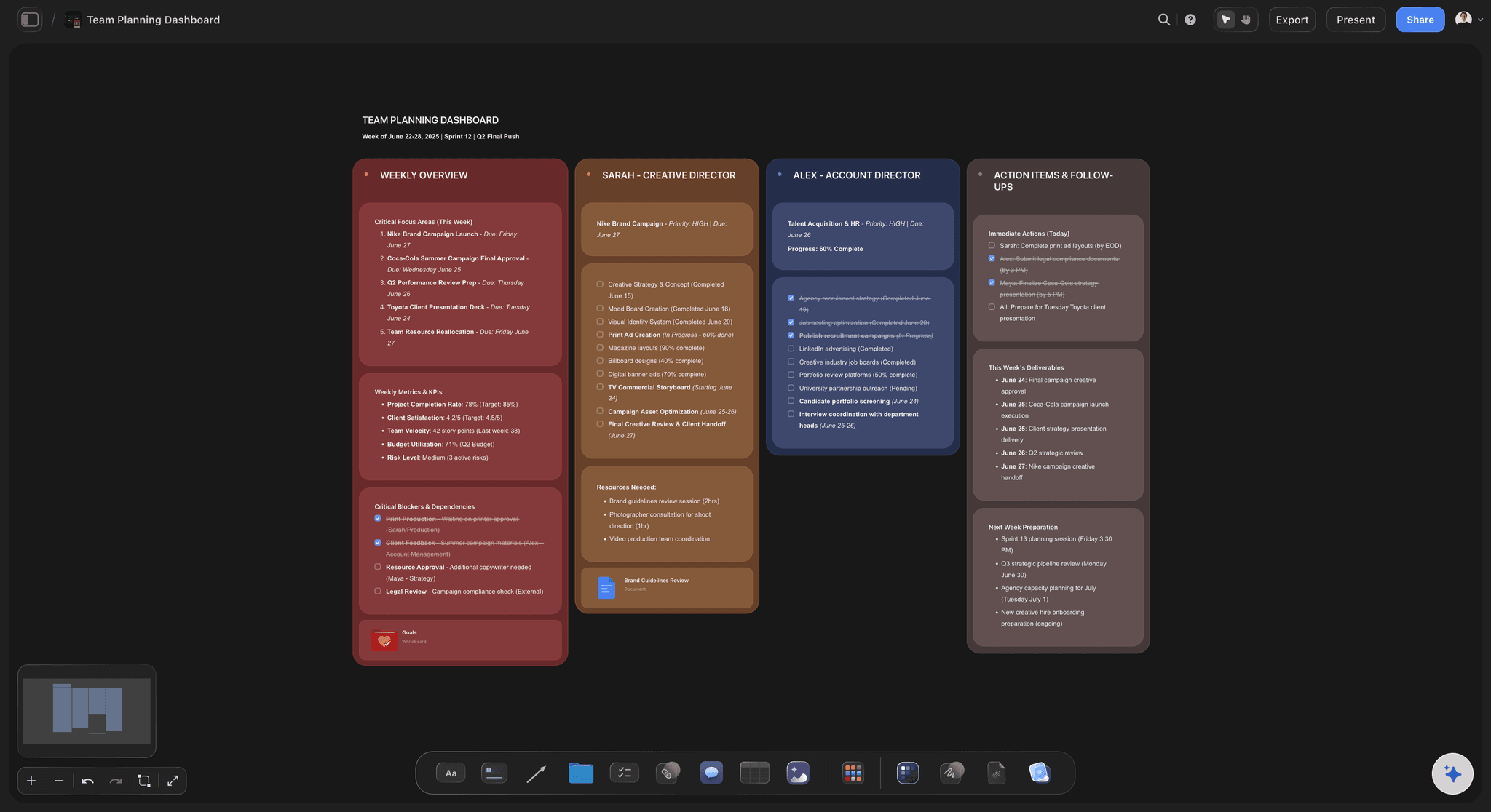
A team planning dashboard in Storyflow: project phases, owners, references, and deliverables connected on one canvas with AI reading the whole board as context
FAQ: Best Asana Alternatives 2026
What is the best Asana alternative in 2026?
Storyflow is the best Asana alternative in 2026 for visual creative teams who need a project canvas with AI context, not a list-and-Gantt task tracker. For power-user feature-for-feature replacement, ClickUp is the strongest direct alternative. For engineering teams, Linear is unmatched. The right answer depends on what kind of work the team actually does.
Why are teams leaving Asana in 2026?
Most teams leaving Asana in 2026 fall into one of two camps. The first wants more depth in features, customisation, and AI, and moves to ClickUp, Wrike, or Hive. The second wants a different model entirely, where the project is a canvas rather than a list, and moves to Storyflow, Notion, or Monday. The first group is asking for Asana with more features. The second group is asking for a different idea of what a project is.
Is Storyflow a direct Asana replacement?
No, and that is intentional. Storyflow is not a list-and-Gantt task tracker. There are no native Gantt charts, no portfolio dashboards, no goal-cascade hierarchies. Storyflow is a project canvas with AI context for visual creative work. For operational teams managing 200 cross-functional deliverables across four quarters, Storyflow is the wrong tool. For creative teams whose projects need a brief, references, structure, and deliverables connected on one canvas, Storyflow replaces the patchwork of five tools that Asana sits in the middle of.
What is the cheapest Asana alternative with real value?
Trello's free plan covers up to 10 boards per workspace and is genuinely usable for small teams. Linear's free plan covers up to 250 issues and 10 users. Storyflow's Free plan, launching before the end of 2026, will include unlimited projects, basic AI usage, 20 file uploads, which covers a real working month for a solo project lead. For paid plans, Hive starts at $5/user/month and Trello Standard at $5/user/month. Storyflow Plus at $7.99/month billed annually delivers a category of feature, the canvas with AI context, that no cheaper tool offers.
Can I move from Asana to Storyflow without losing project history?
Storyflow is a different shape from Asana, so a one-to-one migration of task history is not the goal. The migration that works is to bring the active projects into Storyflow as canvases, with the brief, references, framework, and current deliverables as canvas elements. Task-level historical data stays in Asana as an archive if you need it. Most creative teams find that the active project on the canvas is more useful than the task history was, because the canvas keeps the thinking that produced the tasks.
What Asana alternative works best for creative teams?
Storyflow is the strongest fit for creative teams in 2026 because creative project work is visual, contextual, and reference-heavy in ways the list-and-Gantt model cannot hold. The brief, the references, the framework, and the rough plan live on the canvas, and the AI reads all of it before responding. Notion is the second-strongest fit if the team's primary need is to keep documentation and project management in one workspace. Monday is the third-strongest fit if the team wants a visually opinionated operational tool.
What Asana alternative works best for engineering teams?
Linear is the clearest answer in 2026. Faster than Jira, more opinionated than Asana, and designed for software shipping. For large engineering organisations with formal SDLC processes, Jira remains the default. ClickUp is a viable middle ground for engineering teams that share workflows with non-engineering functions in the same tool.
What Asana alternative works best for marketing teams?
Storyflow is the strongest fit for marketing teams whose campaigns need a brief, visual references, and structure connected on one canvas with AI context. Monday is a strong fit for marketing operations teams who want visual boards and timelines for campaign tracking. Notion is a strong fit for marketing teams whose content lives in the same workspace as their planning. The right answer depends on whether the marketing function is primarily creative, primarily operational, or primarily content-driven.
How long does it take to set up a project in Storyflow?
Under 10 minutes from account creation to a working board. Create a project, open a whiteboard, add a Blueprint Tactic from the Tactics library, and start placing notes, references, and rough plans around it. The AI chat is available immediately. Adding a brief or strategy memo as context takes one additional step: create or upload the document, then @-mention it in the AI chat window. Setup time is lower than ClickUp or Notion because Storyflow starts with an open canvas rather than a structured project intake form.
Does Storyflow support team collaboration like Asana?
Yes. Storyflow's free plan already includes unlimited shared boards and unlimited collaboration, so a small team can work across the same projects without paying. The Max plan at $39/month billed annually adds a team workspace with permissions and roles, which is the layer agencies and larger creative teams need to control who can edit what. The difference from Asana is the unit of collaboration: in Asana, teammates collaborate on a list of tasks; in Storyflow, they collaborate on the canvas where the brief, references, and framework live, so the conversation happens around the actual thinking instead of around a checklist.
Table of Contents
- Quick Picks: Best Asana Alternatives 2026 by Use Case
- Comparison Table: Best Asana Alternatives 2026
- Best Asana Alternatives 2026: Market Context
- How We Evaluated the Best Asana Alternatives 2026
- Detailed Reviews: Best Asana Alternatives 2026
- Why Visual Creative Teams Outgrow Asana
- Free vs Paid: Best Asana Alternatives 2026
- Final Verdict: Best Asana Alternatives 2026
- 1. Storyflow
- 2. ClickUp
- 3. Linear
- 4. Notion
- 5. Monday
- 6. Trello
- 7. Airtable
- 8. Wrike
- 9. Basecamp
- 10. Hive
- 11. Smartsheet
- 12. Jira
- FAQ: Best Asana Alternatives 2026
- Related Reading
Templates to check out for this topic


Planning and project templates you can use in Storyflow
Plan a launch, a sprint, or a whole project on a visual board the team can see at once. Open one of these templates and start from real structure.


See Storyflow in Action
A visual AI workspace where every feature lives inside one canvas. No tab-switching, no context lost.
Build your entire board from a single message
Type what you need in the AI chat at the bottom of your canvas. The AI adds cards, headings, and structure directly onto your board.
Use expert frameworks as AI context
Type @ in the AI chat and choose any Tactic. The AI tailors every response to that framework instead of giving generic advice.
Turn your board into a mind map in seconds
Ask the AI to restructure your canvas as a mindmap. It connects your ideas into a visual hierarchy so you can see how everything relates.
Why Storyflow Exists
Storyflow actually began as a personal tool while working on creative and research projects.
We kept running into the same problem: ideas were scattered everywhere: notes, documents, and whiteboards.
Nothing helped us see how everything connected.
So we started building a workspace designed around how ideas actually grow.
→ Read how Storyflow was createdJustkay
Documentary Filmmaker & Founder at Storyflow
Published: 2026-05-10
Extremely simple, seriously capable


See how easy it is to get started
Watch a real project come together, from a blank board to a finished plan, clicked through step by step.
Start creating with AI and become more productive
Transform your creative workflow with AI-powered tools. Generate ideas, create content, and boost your productivity in minutes instead of hours.