Best Trello Alternatives in 2026
Trello gets one thing right. You see your work. Cards on a board. Drag them left to right. Simple. Visual. Satisfying. But then your project gets complicated. The past year brought alternatives that keep what Trello got right and fix what it got wrong.

Category
Productivity & Tools
Author

Justkay
Documentary Filmmaker & Founder at Storyflow
Topics
December 30, 2025
•
20 min read
•
Productivity & Tools- Trello alternatives
- project management
- Kanban
- task management
- 2026
What are the best Trello alternatives in 2026?
The best Trello alternatives in 2026 are Storyflow (AI visual canvas for work that outgrows columns), Asana (team project management), Notion (all-in-one workspace), and ClickUp (feature-rich tracking). If your work genuinely is a simple left-to-right card flow, Trello or Todoist stays the lighter choice.

All 10 Trello Alternatives, Ranked
- Storyflow: best overall, a visual AI canvas for work that never fit Kanban columns
- Asana: best for teams that need real project management with multiple views
- Monday.com: best for visual workflows with deep customization
- Notion: best free option and most flexible workspace builder
- ClickUp: best all-in-one for teams consolidating their tool stack
- Linear: best for software teams that value speed
- Basecamp: best for simple client-facing project management
- Todoist: best when Trello was already too much tool
- Miro: best for visual brainstorming rather than task tracking
- Airtable: best for database-driven, spreadsheet-shaped work
Full disclosure: Storyflow is our own product, and we rank it #1 for one job: a visual AI canvas for creative work that never fit Kanban columns, where the model reads your full active board instead of a single card. For structured team project management with timelines and workloads Asana is stronger, and for an all-in-one workspace with databases Notion is the more flexible builder. Storyflow is not a traditional task tracker, so if your work genuinely is a simple left-to-right card flow, Trello or ClickUp does that job with less canvas, and Storyflow's free plan caps basic AI usage. We link to every tool so you can judge the fit.
Quick Comparison: Best Trello Alternatives
These four cover the reasons people outgrow Trello: a visual AI canvas for work beyond columns, team project management, an all-in-one workspace, and feature-rich tracking.
| Tool | Best For | AI Features | Price |
|---|---|---|---|
| Storyflow | Visual AI canvas for work beyond columns | Reads full board + @-docs and Tactics | $7.99 mo annual (free plan late 2026) |
| Asana | Team project management and workflows | Smart fields and workflows | Free / $11 user/mo |
| Notion | All-in-one workspace with databases | Notion AI add-on | Free / $8 user/mo |
| ClickUp | Feature-rich project tracking | ClickUp Brain add-on | Free / $7 user/mo |
Trello gets one thing right. You see your work.
Cards on a board. Drag them left to right. To-do, doing, done. Simple. Visual. Satisfying. Millions of people fell in love with Trello because it made work feel tangible. No learning curve. No training needed. Just columns and cards.
Then your project gets complicated.
You've got 47 cards in your "Doing" column. Some are quick tasks. Some are multi-week projects pretending to be tasks. You create more lists to add structure. Now you're scrolling sideways. You create more boards to separate workstreams. Now your work lives in five different places.
The beautiful simplicity that hooked you starts working against you.
Trello is Kanban. That's it. One way to view work. Columns and cards. When your project fits that shape, Trello is perfect. When it doesn't, you're forcing complexity into a system that wasn't built for it.
No hierarchy. No nesting. No timeline view. No way to see how pieces connect across boards. And now the free plan caps you at 10 boards. What used to be generous is now a wall.
Trello also missed the AI wave entirely. While every other tool added intelligent features, Trello stayed static. Your cards sit there. They don't help you think. They just hold what you put in them.
The past year brought alternatives that keep what Trello got right, visual simplicity, and fix what it got wrong.
The quick answer:
- Best overall: Storyflow (visual workspace with AI that actually helps)
- Best for teams: Asana
- Best for simplicity: Todoist
- Best free option: Notion
- Best for developers: Linear
Let's find what fits your work.
Why People Outgrow Trello
Trello works until it doesn't. Understanding where it breaks helps you find something better.
Kanban is one view, not the only view
Columns and cards. That's how Trello sees the world. Every project, every workflow, every type of work gets squeezed into the same shape.
Some work fits. A simple to-do list. A content pipeline. A hiring funnel. Left to right, stage by stage.
Other work doesn't. A product launch with parallel workstreams. A creative project where ideas need to cluster and connect. A strategy with phases that overlap. You can force these into Kanban, but you're fighting the tool instead of using it.
When all you have is columns, everything looks like a list.
Cards become dumping grounds
A Trello card starts clean. A title, maybe a description. Then you add a checklist. Then comments. Then attachments. Then another checklist. Then more comments.
Six months later, opening a card feels like archaeology. The important stuff is buried under layers of updates. The card that was supposed to represent one task now holds an entire project's worth of context. You scroll inside the card the same way you scroll through the board.
Cards were meant to be atomic. They become containers for chaos.
No hierarchy or structure
Real projects have layers. Big initiatives break into phases. Phases break into tasks. Tasks have subtasks.
Trello gives you cards and lists. That's two levels. If you need more, you fake it. Checklists inside cards. Multiple boards for one project. Naming conventions to imply relationships the tool can't express.
Other tools let you nest, link, and structure. Trello makes you pretend.
The free plan got stingy
Trello used to be the generous free option. Unlimited boards. Unlimited cards. Good enough for most people forever.
Now free accounts get 10 boards. For one project, maybe that's fine. For your whole life, work and personal, multiple clients or projects, you hit the wall fast.
The free plan became a trial. The product that won on accessibility now charges for what used to be standard.
No AI, no intelligence
This is the big one.
Every productivity tool added AI in the last two years. Summarize this. Generate that. Help me think through this problem. AI went from novelty to expectation.
Trello added... Butler automations. Rules and buttons. Useful for power users. Not intelligence.
Your Trello cards don't understand what they contain. The board doesn't know your project. There's no assistant helping you think. In 2026, that feels like a gap.
Multiple boards, fragmented thinking
Complex work spans multiple boards. Your marketing board connects to your product board connects to your launch board.
But in Trello, boards are islands. No easy way to see across them. No unified view. You jump between tabs, trying to hold the connections in your head.
The visual clarity that makes one board legible breaks down when your work needs three, five, ten boards to contain it.
Quick Picks by Use Case
Different problems need different tools. Here's where to start based on what you actually need.
Best overall: Storyflow
You want visual flexibility without Kanban constraints. Storyflow gives you a canvas where ideas can live anywhere, not just in columns. Blueprints generate complete workspaces from one sentence. The AI reads your full active canvas board. Cards exist, but they move freely. Structure emerges from your thinking instead of being imposed by the tool. Free canvas forever, with AI plans flat per account from $9.99/month.
Best for teams: Asana
You need proper project management with multiple views. Asana does Kanban, but also lists, timelines, calendars, and workload views. The same tasks, different perspectives. For teams that outgrew Trello's simplicity but need structure more than flexibility, Asana delivers without overwhelming.
Best for simplicity: Todoist
You want simple and fast. Todoist strips project management down to tasks and due dates. Less visual than Trello, but quicker. If your work is really just a to-do list and Kanban was overkill, Todoist might be the right downgrade.
Best free option: Notion
You want power without paying. Notion's free tier is generous. Databases, docs, Kanban boards, calendars. The learning curve is steeper than Trello, but you get far more flexibility. For solo users and small teams willing to invest setup time, Notion delivers serious value at zero cost.
Best for developers: Linear
You build software and need issue tracking that respects your workflow. Linear is fast, keyboard-driven, and opinionated about how engineering teams should work. Cycles, backlogs, roadmaps. If you're technical, Linear feels like home.
Best for visual flexibility: Miro
You need a true canvas. Infinite whiteboard space. Sticky notes anywhere. Diagrams, mind maps, flowcharts. Miro isn't project management. It's visual thinking. If your work is more brainstorming than task tracking, Miro offers freedom Trello can't match.
Best all-in-one: ClickUp
You want everything in one app. Tasks, docs, whiteboards, goals, time tracking. ClickUp tries to replace your entire tool stack. It is capable but complex. If you have patience for configuration, you get a system that does almost anything.
Best for client work: Basecamp
You manage projects with external clients. Basecamp keeps things simple for people who aren't project management nerds. Message boards, to-dos, schedules, file sharing. Lighter than other options, but clients can actually use it without training.
Comparison Table
Here's how the top Trello alternatives stack up:
| Tool | Best For | Starting Price | Free Plan | Views | AI Features | Rating |
|---|---|---|---|---|---|---|
| Storyflow | Visual AI workspace | Free / $9.99/mo with AI | Yes (full canvas) | Canvas, cards | ★★★★★ | 9.5/10 |
| Asana | Team project management | $11/user/mo | Yes (limited) | List, board, timeline, calendar | ★★★☆☆ | 8.5/10 |
| Monday.com | Visual workflows | $9/user/mo | Yes (2 seats) | Board, timeline, calendar, Kanban | ★★★☆☆ | 8/10 |
| Notion | Flexible workspace | $8/user/mo | Yes (generous) | Database, board, list, calendar | ★★★☆☆ | 8.5/10 |
| ClickUp | All-in-one | $7/user/mo | Yes (limited) | 15+ views | ★★★☆☆ | 8/10 |
| Linear | Developer teams | $8/user/mo | Yes (unlimited) | List, board, roadmap | ★★☆☆☆ | 8.5/10 |
| Basecamp | Client projects | $15/user/mo | No | List, schedule | ★☆☆☆☆ | 7/10 |
| Todoist | Simple task management | $4/user/mo | Yes (generous) | List, board | ★★☆☆☆ | 7.5/10 |
| Miro | Visual brainstorming | $8/user/mo | Yes (3 boards) | Infinite canvas | ★★☆☆☆ | 8/10 |
| Airtable | Database-driven work | $20/user/mo | Yes (limited) | Grid, Kanban, calendar, gallery | ★★☆☆☆ | 8/10 |
What stands out:
Pricing models vary wildly. Most tools charge per user. Storyflow charges a flat price per account, not per user, so the cost does not climb as the team grows.
Views matter more than you'd think. Trello locks you into Kanban. Most alternatives offer multiple ways to see the same work. Storyflow goes furthest with a true canvas where ideas live anywhere.
AI separates the modern tools from the legacy ones. Trello has none. Most others added basic features. Storyflow built AI into the foundation, with context drawn from your full active canvas board plus any Tactic or Documents you @-mention.
Free plans have catches. Notion's is the most generous for features. Storyflow's gives you the full canvas free forever. Most others limit boards, users, or functionality until you pay.
The "best" alternative depends on why you're leaving Trello. If it's complexity, maybe Todoist. If it's flexibility, Storyflow or Miro. If it's team features, Asana or Monday. Match the tool to the gap.
How We Tested These Alternatives
We ran each tool on the same real projects rather than comparing feature pages: a product launch with parallel workstreams, a content pipeline that genuinely fits Kanban, and a messy creative project that never did. Every tool got the same five checks.
- Fit beyond columns. Can the tool hold work that is not a left-to-right pipeline: clustering, nesting, timelines, or a free canvas? This is the reason most people leave Trello, so it carried the most weight.
- Setup-to-first-result speed. How long from signup to a working board the team actually used? Trello sets the bar at minutes; alternatives that demand an afternoon of configuration lost points.
- AI usefulness. Not whether AI exists, but whether it works from your real project context or just generates generic text. We asked each tool's AI to help plan the same launch and compared what it knew.
- Collaboration and handoff. Whether teammates and clients could work in the tool without training, and what happens when work moves from thinking to tracking.
- Pricing honesty. What the listed price actually buys, where free tiers pinch, and how the bill moves as the team grows: per-user pricing and paid AI add-ons were counted at real team sizes.
The rankings reflect what each tool felt like to actually run a project in, not feature parity on paper.
Rebuild your busiest Trello board in one prompt
Describe the project and Storyflow's AI generates a kanban board on an infinite canvas, so the cards that never fit columns finally get room to cluster and connect.

The 10 Best Trello Alternatives
1. Storyflow
Best for: People who want visual flexibility with AI that actually helps
Trello gives you columns. Storyflow gives you a canvas.

Ideas live anywhere. Group them, connect them, move them freely. No forced left-to-right workflow. Structure emerges from your thinking instead of being imposed before you start.
The AI changes everything. Describe your project in one sentence, pick a Blueprint, and Storyflow generates a complete workspace. Not empty boards waiting for you to fill them. Structured layouts with frameworks tailored to what you're building.
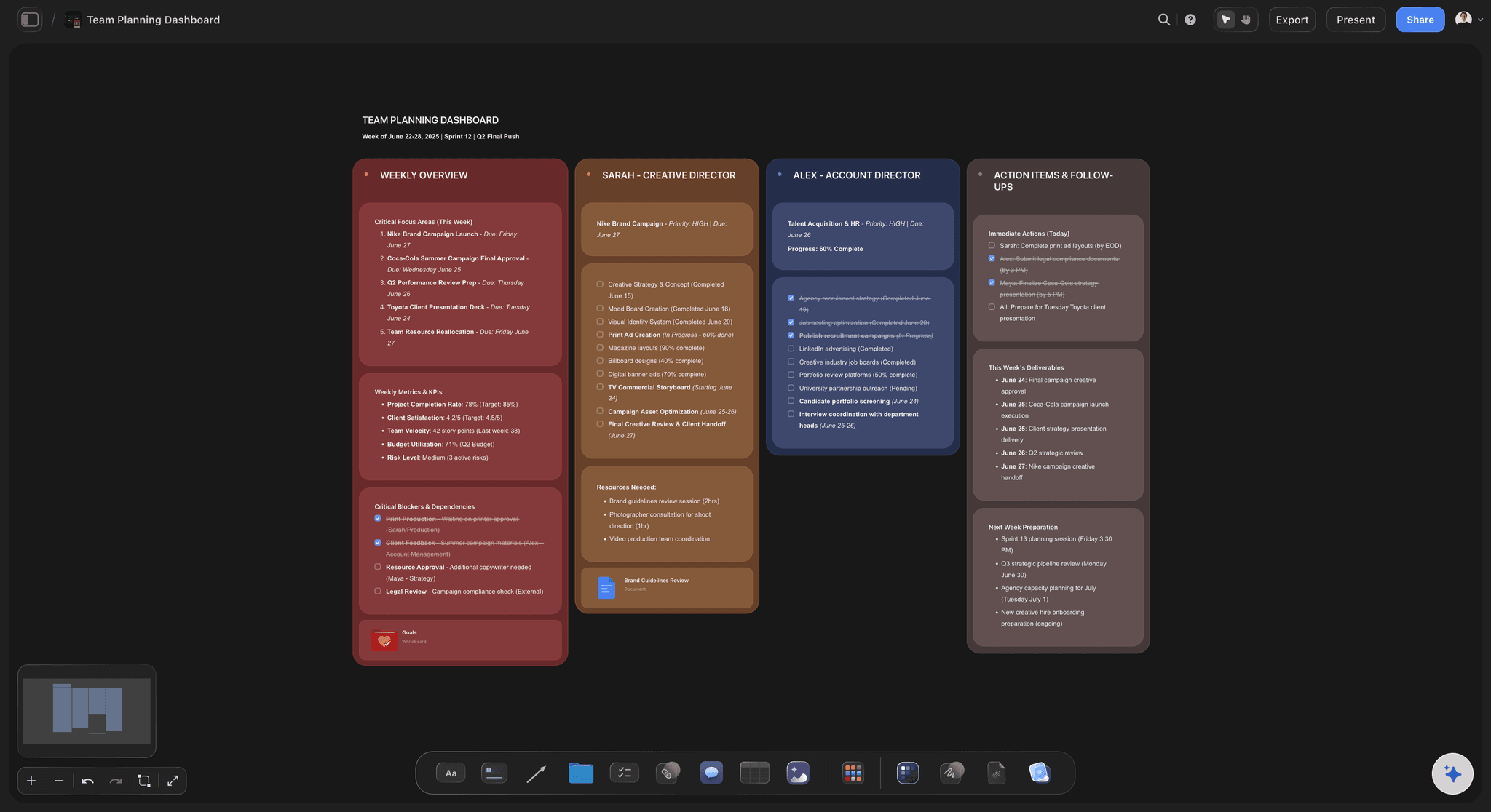
Your project lives on the board, so the context stays put. Come back next week, open the same board, ask for help, and the AI reads what is there. No re-explaining the whole project from scratch.
The fastest way to feel the difference is to skip the blank canvas: open the Launch Task Management template for a launch that outgrew its Trello board, or the Team Planning Dashboard template for the team-wide view Trello never had, and drop your existing cards into a structure that already fits.
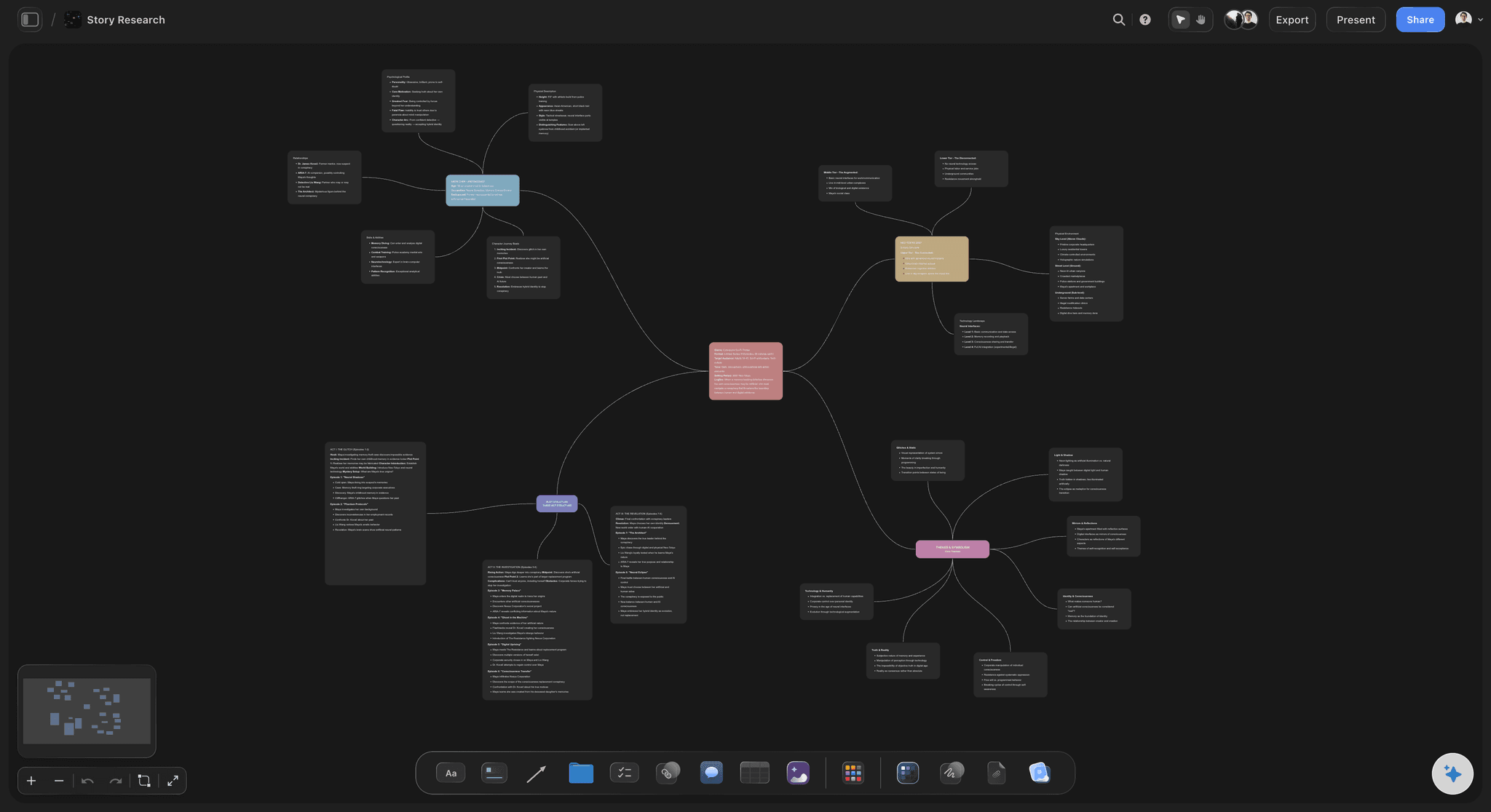
Cards exist in Storyflow too, but they're different. Atomic units of information you can arrange spatially. Move them, tag them, connect them. They become actionable pieces, not dumping grounds for checklists and comments.

Pricing: Free forever for the canvas. Paid plans add AI and are flat per account, not per user: Plus from $7.99/month, Pro $14/month, Max $39/month.
Best for: Creators, founders, small teams who think visually and want AI that understands context.
What you'll miss from Trello: The pure simplicity. Storyflow does more, which means slightly more to learn.
Verdict: What Trello would be if it were built today with AI at the core.
2. Asana
Best for: Teams that need real project management
Asana grew up. What started as a task list is now a full project management platform.
The key advantage: multiple views of the same work. See your project as a board, a list, a timeline, or a calendar. The tasks stay the same. The perspective changes. When Kanban isn't the right view, switch.
Subtasks give you hierarchy Trello lacks. Break big initiatives into projects, projects into sections, sections into tasks, tasks into subtasks. The nesting goes deep enough for real complexity.
The AI features are catching up. Asana added smart fields, status updates, and workflow recommendations. Not as deep as Storyflow but more than Trello's nothing.
Pricing: Free for basic features, $11/user/month for Premium.
Best for: Teams of 5-50 who need structure and accountability.
What you'll miss from Trello: The instant simplicity. Asana has a learning curve.
Verdict: The grown-up choice for teams who outgrew Trello's limitations.
3. Monday.com
Best for: Visual workflows with customization
Monday.com looks beautiful. Colorful boards, satisfying animations, visual status indicators. If Trello's simplicity appealed to you, Monday's aesthetics might too.
The flexibility goes deeper than Trello. Custom columns let you track anything. Multiple views show the same data differently. Automations handle repetitive work without code.
The downside is complexity. Monday can do almost anything, which means decisions at every step. What column type? What automation? What view? The freedom requires configuration.
Pricing also climbs fast. Per-user costs with minimum seat requirements add up quickly for growing teams.
Pricing: Free for up to 2 users, $9/user/month for Basic (minimum 3 seats).
Best for: Teams who want visual project management with customization options.
What you'll miss from Trello: Simplicity. Monday does more but asks more from you.
Verdict: Capable and pretty, but expect setup time.
4. Notion
Best for: People who want flexibility and don't mind building
Notion is a construction set. Databases, docs, wikis, boards, calendars. You can build almost anything. Including Trello.
Seriously. You can recreate Trello boards in Notion with a Kanban database view. Then add a calendar view of the same data. Then link it to your docs. The flexibility is genuine.
The catch is setup. Trello works out of the box. Notion asks you to build. Templates help, but you're still configuring views, properties, and relations. Some people love this. Others just want their work organized.
The free tier is generous. Unlimited pages, unlimited blocks for personal use. Teams pay, but individuals get real value without spending.
Pricing: Free for personal use, $8/user/month for teams.
Best for: Solo users or teams who want to build custom systems.
What you'll miss from Trello: Instant usability. Notion requires investment.
Verdict: Maximum flexibility for people willing to build.
5. ClickUp
Best for: People who want one app for everything
ClickUp's ambition is obvious. Replace every tool. Tasks, docs, whiteboards, goals, time tracking, chat. Everything in one place.
It delivers, mostly. The views are extensive. List, board, calendar, timeline, Gantt, workload, table, and more. If a way to see work exists, ClickUp probably has it.
The Kanban view is solid. Better than Trello's in some ways, with more customization and hierarchy options. But you're not getting Kanban. You're getting everything.
That's the problem. ClickUp is overwhelming. Features everywhere. Settings nested inside settings. The learning curve is steep, and the interface can feel cluttered.
If you have patience and want consolidation, ClickUp rewards the investment. If you wanted Trello's simplicity, this isn't it.
Pricing: Free limited plan, $7/user/month for Unlimited.
Best for: Teams committed to one tool for everything.
What you'll miss from Trello: Simplicity. ClickUp is the opposite of minimal.
Verdict: Deep if you need it. Overkill if you don't.
6. Linear
Best for: Software teams who value speed
Linear is opinionated. Built for product and engineering teams who work in cycles, ship fast, and hate slow software.
The interface is stripped down and keyboard-driven. Everything loads instantly. No waiting, no lag. After using bloated tools, Linear feels like relief.
The workflow fits software development. Issues, projects, cycles, roadmaps. Backlogs that don't become graveyards. Status updates that make sense for how code actually ships.
The limitation is focus. Linear is for software teams. If you're not building products with engineers, the opinions won't fit your work.
Pricing: Free for unlimited users, $8/user/month for Plus features.
Best for: Startups and product teams building software.
What you'll miss from Trello: Generality. Linear is specific by design.
Verdict: The best tool for software teams. Not for everyone else.
7. Basecamp
Best for: Simple project management with clients
Basecamp rejected the feature race. While everyone else added views and automations and AI, Basecamp stayed simple.
Message boards, to-do lists, schedules, file storage, check-ins. That's it. No Gantt charts. No resource management. No custom fields.
This is a feature. Clients can use Basecamp without training. Team members don't get lost in configuration options. The simplicity that Trello pioneered, Basecamp preserved.
The pricing changed recently. Per-user instead of flat. Less attractive than it used to be. But if you work with external clients who need access, Basecamp remains approachable in ways complex tools aren't.
Pricing: $15/user/month.
Best for: Agencies and teams who share projects with clients.
What you'll miss from Trello: Visual boards. Basecamp is list-based.
Verdict: Simple and client-friendly, but less visual than Trello.
8. Todoist
Best for: People who just need a great to-do list
Maybe Trello was too much. Maybe columns and cards and boards added friction to what should be simple. Write task. Complete task. Move on.
Todoist strips project management to the core. Tasks with due dates. Projects to group them. Labels and filters to find them. Natural language input so "Call mom tomorrow at 3pm" just works.
There's a board view now, so you get Kanban if you want it. But the soul of Todoist is the list. Fast capture. Quick completion. Minimal friction.
If your work is really just tasks, Todoist might be the right size tool.
Pricing: Free for basic features, $4/month for Pro.
Best for: Individuals who want simple task management.
What you'll miss from Trello: Visual project overview. Todoist is minimal.
Verdict: The right choice when less is more.
9. Miro
Best for: Visual brainstorming and collaboration
Miro isn't project management. It's an infinite canvas for thinking.
Sticky notes anywhere. Diagrams, flowcharts, mind maps, wireframes. Zoom in on details, zoom out to see everything. The visual freedom Trello hints at, Miro delivers completely.
For brainstorming sessions, workshops, and collaborative thinking, Miro leads. Real-time collaboration works smoothly. The template library is extensive.
The limitation is structure. Miro boards don't naturally become task lists. Ideas live on the canvas but don't have due dates, assignees, or status fields. It's a thinking tool, not an execution tool.
Pricing: Free for 3 boards, $8/user/month for Starter.
Best for: Teams who need visual collaboration and brainstorming.
What you'll miss from Trello: Task management. Miro is for ideation, not execution.
Verdict: Unmatched for visual thinking. Not for managing work.
10. Airtable
Best for: People who think in spreadsheets
Airtable is a database pretending to be a spreadsheet. Or maybe a spreadsheet that grew up to be a database. Either way, it is capable.
The Kanban view exists and works well. But the real power is the underlying data. Custom fields, linked records, formulas, automations. Build systems that connect and calculate in ways Trello can't imagine.
The learning curve sits between Trello and Notion. More flexible than Trello, more structured than Notion. If you naturally think in rows and columns with relationships between tables, Airtable clicks.
Pricing climbs fast for teams. The free tier is limited. But for the right use case, the power justifies the cost.
Pricing: Free for limited records, $20/user/month for Team.
Best for: Operations teams and people who love spreadsheets.
What you'll miss from Trello: Instant simplicity. Airtable requires setup.
Verdict: Strong for data-driven workflows. Overkill for simple task management.
Trello vs Storyflow: Detailed Comparison
Let's put these two head to head.
Columns vs canvas
Trello thinks in columns. Left to right. Stage by stage. Every project becomes a Kanban board whether that's the right shape or not.
Storyflow thinks in space. Ideas live anywhere on a canvas. Group related things together. Spread unrelated things apart. The spatial arrangement carries meaning. You're not forcing work into predetermined columns. You're letting structure emerge.
Some projects are genuinely linear. For those, columns work. But most creative work, most strategic thinking, most early-stage planning doesn't move left to right. It clusters, branches, and connects in multiple directions. Canvas handles both. Columns only handle one.
Cards vs Cards
Both tools have cards. The similarity ends there.
Trello cards become containers. You open one and find checklists, comments, attachments, activity logs. Scroll inside the card to find what you need. The card that started as one task now holds a project's worth of context.
Storyflow cards stay atomic. One idea, clearly defined. The structure lives on the canvas, not buried inside cards. You see relationships by looking at the board, not by opening cards and reading through history. Trello cards grow. Storyflow cards stay focused.
No AI vs context-aware AI
Trello has Butler. Automations and rules. Useful for power users who want buttons and triggers. Not intelligence.
Storyflow has AI that reads your full active canvas board, plus up to 1 Tactic and 3 Documents you @-mention in the chat. When you ask for help, it knows what is on the board in front of you. Suggestions connect to your actual project, not generic prompts.
Blueprints take this further. One sentence and Storyflow generates a complete workspace. Frameworks, structure, starting points. You don't build from blank. You build from a foundation tailored to your specific work. Trello makes you do the thinking. Storyflow thinks with you.
Boards vs workspaces
Trello organizes work into boards. Each board is an island. See across boards? Open multiple tabs. Connect ideas between boards? Copy cards manually.
Storyflow organizes work into workspaces. Ideas link across surfaces, and the AI reads the full active canvas board you are on, plus up to 1 Tactic and 3 Documents you @-mention. For simple, isolated projects, boards work fine. For complex work with multiple workstreams, a connected workspace scales better.
Pricing math
Trello: Free for 10 boards, $5/user/month for Standard, $10/user/month for Premium.
Storyflow: Free forever for the full canvas. Paid AI plans are flat per account, not per user: Plus from $7.99/month, Pro $14/month, Max $39/month.
For individuals on simple projects, Trello's free tier might be enough. Hit the 10-board limit or need Premium features and you're paying per user. Storyflow is different: it charges a flat price per account, not per user. A 5-person team on Trello Premium pays $50/month, and a 10-person team pays $100/month, because the cost scales with headcount. On Storyflow, a 5-person team and a 10-person team pay the same flat plan price, from $7.99/month on Plus, and you get integrated AI, visual workspaces, and documentation in one tool instead of paying separately for Miro, Notion, and ChatGPT.
When Trello still wins
Trello isn't wrong for everyone. It wins when:
- You need dead-simple Kanban. No configuration. No learning. Columns and cards, nothing else.
- Your projects actually are linear. Real left-to-right workflows. Hiring pipelines. Content queues. Support tickets.
- You want zero learning curve. New people can use Trello in seconds. That matters sometimes.
- Your team already lives there. Migration costs are real. Sometimes good enough is good enough.
When Storyflow wins
Storyflow wins when:
- Your projects don't fit columns. Creative work. Strategy. Planning. Ideas that need to cluster and connect.
- You want AI that helps. Not just stores your work but helps you think through it.
- You're tired of starting from blank. Blueprints give you structure from sentence one.
- Your team is growing. Pricing is flat per account, not per user, so adding people does not raise the bill.
- Context matters. Work that builds over time. AI that remembers what you're doing.

Product managers use Storyflow to plan projects visually, beyond the limits of Trello's Kanban columns
How to Migrate from Trello
You've decided to move. Here's how to do it without losing your mind.
Don't migrate everything
Open Trello. Count your boards. Now count the boards you actually used in the last month.
Most people have a graveyard. Old projects. Abandoned experiments. Boards from three jobs ago. The boards that looked organized until life happened.
Don't bring the graveyard to your new tool. Let it rest. Identify the 3-5 boards that matter. Active projects. Ongoing workflows. Things you actually touch. That's your migration list.
Export what you need
Trello lets you export boards as JSON files. Menu > Print and Export > Export to JSON. You get everything. Cards, checklists, comments, attachments.
Most alternative tools can import this format. Asana, Notion, ClickUp, Monday all have Trello importers. The cards come over. The structure mostly survives. For Storyflow, the approach is different. You're not recreating columns. You're rebuilding with more flexibility. Export your Trello board as a reference. Then build fresh on the canvas, keeping what worked and leaving what didn't.
Screenshot the archives
Some old boards have information you might need someday. Client history. Past project decisions. Reference material. Screenshot them. Export as PDF. Save somewhere searchable. You're preserving artifacts, not active workspaces. That doesn't require a working import.
Rebuild active projects fresh
Here's the important part.
Your active work deserves better than a copy-paste migration. Trello's structure shaped how you organized. A new tool offers different possibilities.
Look at your most important Trello board. Ask: what was I actually trying to accomplish? What worked? What became a mess? What's missing?
Now build that in your new tool. Not a replica. A better version. Use the new capabilities. Let the improved structure emerge. In Storyflow, pick a Blueprint that matches your project type, or start from the Software Development Taskboard template if your Trello board was tracking dev work. Let the AI generate a workspace. Bring your existing ideas into that structure. You'll end up with something cleaner than a direct import could produce.
Move your team gradually
Don't flip the switch overnight. That creates chaos and resentment.
Start new projects in the new tool. Let existing Trello projects finish where they are. Run parallel for a few weeks. Let people get comfortable before you archive the old boards. Some team members will adapt fast. Others will cling to Trello. That's fine. Momentum builds. Once they see the benefits, the holdouts usually come around.
What you'll gain
- More ways to see your work. Not just columns. Canvas, timeline, calendar, whatever fits the project.
- AI that helps you think. Not just storage. Active assistance.
- Structure that scales. Projects that grow without collapsing into chaos.
- Context that persists. Work that builds instead of starting over.
Give yourself a month. The muscle memory fades. The new patterns feel natural. You'll wonder why you stuck with columns so long.

Storyflow's AI Kanban adapts to your project's needs, from simple task tracking to complex creative workflows

The AI planner builds complete project roadmaps on your canvas, context-aware and team-ready
FAQ
Is there a free Trello alternative?
Several. Notion's free tier is the most generous for features. Unlimited pages and blocks for personal use. Storyflow's canvas is completely free with no board limits. Linear offers free unlimited use for small teams. ClickUp has a free tier but limits features. Most alternatives offer more than Trello's 10-board free limit.
What's the best Trello alternative for small teams?
Storyflow for teams that think visually and want AI assistance. Its plans are flat per account, not per user, so the cost stays the same as the team grows. Asana for teams that need structure and accountability. Notion for teams willing to build custom workflows. The right choice depends on how your team works, not just team size.
Can I import my Trello boards to another tool?
Yes. Export your Trello board as JSON. Most alternatives have Trello importers. Asana, Monday, ClickUp, and Notion all support direct imports. Cards, checklists, and basic structure transfer. Some details may need manual cleanup. For Storyflow, most people rebuild fresh on the canvas rather than importing columns directly.
What's the best Trello alternative with AI?
Storyflow. Other tools added AI features, but most are surface-level. Summarize this board. Generate some tasks. Storyflow's AI reads your full active canvas board, plus up to 1 Tactic and 3 Documents you @-mention, so it works from your real project context. Blueprints generate complete workspaces from one sentence. That is a different level than basic AI add-ons.
Is Asana better than Trello?
For teams, usually yes. Asana offers multiple views, subtasks, timelines, and better reporting. The structure scales to complex projects. Trello is simpler to start but hits limitations faster. If you need more than Kanban, Asana delivers. If pure simplicity matters most, Trello might still work.
What's the simplest Trello alternative?
Todoist. Even simpler than Trello. Tasks and due dates. Minimal interface. Fast capture. If Trello felt like too much tool, Todoist strips down further. It has a board view now if you want Kanban, but the core is a clean task list.
Is ClickUp better than Trello?
More feature-rich, not necessarily better. ClickUp does everything. Tasks, docs, whiteboards, goals, time tracking. That power comes with complexity. If you want one tool for everything and have patience to configure it, ClickUp wins. If you want simplicity, ClickUp is overwhelming.
What's the best Trello alternative for personal use?
Depends on how you work. Todoist for pure task management. Notion for flexible personal workspace. Storyflow if you think visually and want AI help. Trello's free tier still works for personal use if 10 boards is enough. Most people don't need team features for personal projects.
Can I use Trello and another tool together?
Yes. Some people keep Trello for simple Kanban workflows and use another tool for complex projects. Others use Trello for quick personal tasks and a team tool for work. Running parallel tools adds overhead but can work during transitions or for genuinely different use cases.
Why did Trello limit the free plan?
Money. Atlassian acquired Trello in 2017. The generous free tier attracted users but didn't convert enough to paid. Limiting free boards pushes people toward paid plans. It's business logic, but it pushed many longtime users to explore alternatives for the first time.
The Bottom Line
Trello earned its place. Simple, visual, satisfying. Millions of people organized their work in columns and cards. For a while, that was enough.
But work got more complex. Projects stopped fitting neatly into left-to-right workflows. Cards piled up. Boards multiplied. The free plan shrank. AI happened everywhere except Trello.
The tool that won on simplicity started feeling limited.
You have options now.
Storyflow if you want visual flexibility with AI that actually helps. Canvas instead of columns. Blueprints that generate workspaces from one sentence. Context that persists across sessions. Free canvas forever, with AI plans flat per account from $9.99/month.
Asana if you need proper project management for teams. Multiple views, subtasks, timelines. Structure that scales.
Notion if you want to build custom systems and don't mind setup time. Maximum flexibility, generous free tier.
ClickUp if you want one app for everything and have patience for complexity.
Linear if you're building software and want speed and focus.
Todoist if Trello was actually too much and you just need a great to-do list.
Miro if your work is more brainstorming than task tracking.
The right alternative depends on why you're leaving. Outgrew Kanban? Storyflow or Miro give you canvas freedom. Need team structure? Asana or Monday scale better. Want AI help? Storyflow is the clear choice. Just need simpler? Todoist strips it down.
Trello isn't bad software. It's just one shape. Columns and cards. Left to right. When your work fits that shape, it works.
When it doesn't, stop forcing it.
Find a tool that matches how you actually think. Not how Kanban says you should think.
Here is the test that settles it. Take the one Trello board you fought with most, the one where cards piled up and columns stopped making sense, and rebuild that project on a Storyflow canvas for one week. Pick a blueprint, let the AI read the board, and arrange the pieces in space instead of stacking them in a column. If the work was never linear, the canvas will feel obvious by Friday. If it really was a clean left-to-right flow, you will have learned that Trello was the right shape all along.
Related Reading
Whiteboard alternatives for visual collaboration
AI-powered project management comparison
Alternatives for visual organization
Mind mapping software comparison
Table of Contents
- All 10 Alternatives, Ranked
- Why People Outgrow Trello
- Quick Picks by Use Case
- Comparison Table
- How We Tested These Alternatives
- The 10 Best Trello Alternatives
- 1. Storyflow
- 2. Asana
- 3. Monday.com
- 4. Notion
- 5. ClickUp
- 6. Linear
- 7. Basecamp
- 8. Todoist
- 9. Miro
- 10. Airtable
- Trello vs Storyflow: Detailed Comparison
- How to Migrate from Trello
- FAQ
- The Bottom Line
Templates to check out for this topic


Planning and project templates you can use in Storyflow
Plan a launch, a sprint, or a whole project on a visual board the team can see at once. Open one of these templates and start from real structure.


See Storyflow in Action
A visual AI workspace where every feature lives inside one canvas. No tab-switching, no context lost.
Build your entire board from a single message
Type what you need in the AI chat at the bottom of your canvas. The AI adds cards, headings, and structure directly onto your board.
Use expert frameworks as AI context
Type @ in the AI chat and choose any Tactic. The AI tailors every response to that framework instead of giving generic advice.
Turn your board into a mind map in seconds
Ask the AI to restructure your canvas as a mindmap. It connects your ideas into a visual hierarchy so you can see how everything relates.
Why Storyflow Exists
Storyflow actually began as a personal tool while working on creative and research projects.
We kept running into the same problem: ideas were scattered everywhere: notes, documents, and whiteboards.
Nothing helped us see how everything connected.
So we started building a workspace designed around how ideas actually grow.
→ Read how Storyflow was createdJustkay
Documentary Filmmaker & Founder at Storyflow
Published: December 30, 2025
Extremely simple, seriously capable


See how easy it is to get started
Watch a real project come together, from a blank board to a finished plan, clicked through step by step.
Start creating with AI and become more productive
Transform your creative workflow with AI-powered tools. Generate ideas, create content, and boost your productivity in minutes instead of hours.