The 12 Best Project Planning Tools in 2026 (We Tested Them All)
Most project planning tools give you a timeline and hide the brief in another app. We tested 12 to find which ones handle dependencies without divorcing creative context from the schedule in 2026.

Category
Strategy & Planning
Author

Sara de Klein
Head of Product at Storyflow
Topics
2026-04-08
•
26 min read
•
Strategy & Planning- best project planning tools 2026
- project planning software
- Gantt and timeline tools
What are the best project planning tools in 2026?
The best project planning tool in 2026 is Storyflow for creative and strategic teams that need milestones tied to the brief, and Smartsheet for finance-heavy program offices that audit timelines like spreadsheets. The real choice comes down to one question: are you optimizing delivery mechanics or keeping creative direction attached to dates? For dependency-heavy, finance-sensitive roadmaps, Smartsheet and monday.com belong on your shortlist. For film, campaigns, and initiatives where the narrative brief and the schedule must stay in the same place, Storyflow leads because Story blueprints and board-aware AI sit inside the same canvas as your milestones.

All 12 Project Planning Tools, Ranked
- Storyflow: best for creative and strategic plans tied to visuals
- Smartsheet: best for grid-backed schedules at scale
- monday.com: best for automated delivery dashboards
- Asana: best for approvals and dependency execution
- ClickUp: best for consolidated docs and schedules
- Wrike: best for enterprise governance and views
- TeamGantt: best for a focused Gantt for small teams
- Notion: best for custom databases you design
- Airtable: best for hybrid records and calendar layers
- Linear: best for engineering roadmap clarity
- Height: best for ops and chat-native tasking
- Hive: best for agencies bundling proofing and tasks
Full disclosure: Storyflow is our own product, and we rank it #1 for one kind of plan: creative and strategic work where the milestones have to stay tied to the brief and the AI reads your whole board. For dependency-heavy, finance-sensitive schedules Smartsheet and monday.com have deeper Gantt and reporting, and for a pure focused Gantt TeamGantt is stronger. Storyflow is not a PMO reporting tool. We link to every tool so you can judge the fit.
Quick Comparison: Best Project Planning Tools
These four cover the split every planning team faces: creative and strategic plans tied to the brief, grid-backed schedules at scale, automated delivery dashboards, and approval and dependency execution.
| Tool | Best For | AI Features | Price |
|---|---|---|---|
| Storyflow | Creative and strategic plans tied to the brief | AI reads the active board + @-docs and Tactics | $7.99 mo annual (free plan late 2026) |
| Smartsheet | Grid-backed schedules at scale | AI formulas and text inside grids | Free / $9 user mo |
| monday.com | Automated delivery dashboards | AI blocks for automations and summaries | Free / $9 seat mo |
| Asana | Approvals and dependency execution | AI for status updates and workflows | Free / $10.99 user mo |
Quick Recommendations: Best Project Planning Tools 2026
We tested each tool across milestone planning, dependency moves, AI usefulness for replanning, and how well creative context survived a schedule change. Each test ran at least four working sessions per tool split between solo planning and a 3-person review loop.
- Storyflow: Best when milestones, research, and framework-guided decisions need one visual board; AI reads the active canvas and you can @-mention one Blueprint Tactic plus up to three documents for tighter prompts.
- Smartsheet: Best when leadership expects spreadsheet-grade controls plus a credible Gantt; Pro starts at $9/user/month (annual, up to 10 users), Business at $19/user/month (annual, 3+ users).
- monday.com: Best for delivery leads who need portfolio dashboards and automations without building formulas from scratch; Basic starts at $9/seat/month (annual, 3-seat minimum).
- Asana: Best for cross-functional teams that live in approvals, task dependencies, and timeline views; Starter at $10.99/user/month (annual).
Market Context: Best Project Planning Tools 2026
You feel the failure mode around week three: the Gantt is perfect, but nobody can explain why the dates moved. The schedule lives in one tab, the creative brief in another, and the risk log inside a slide nobody opens.
The market splits cleanly. Legacy schedule engines (Smartsheet, dedicated Gantt tools) optimize critical path clarity. Work OS platforms (monday.com, Wrike, ClickUp) optimize configurable delivery operations. Creative execution workspaces (Storyflow) optimize keeping the why attached to the when.
The decision variable is simple. If your plan is mostly numbers, dependencies, and owners, buy depth in timelines. If your plan is mostly judgment, narrative, and creative tradeoffs, buy depth in contextual AI and visual structure.

Timeline clusters beside notes help PMs explain why dates move without losing context
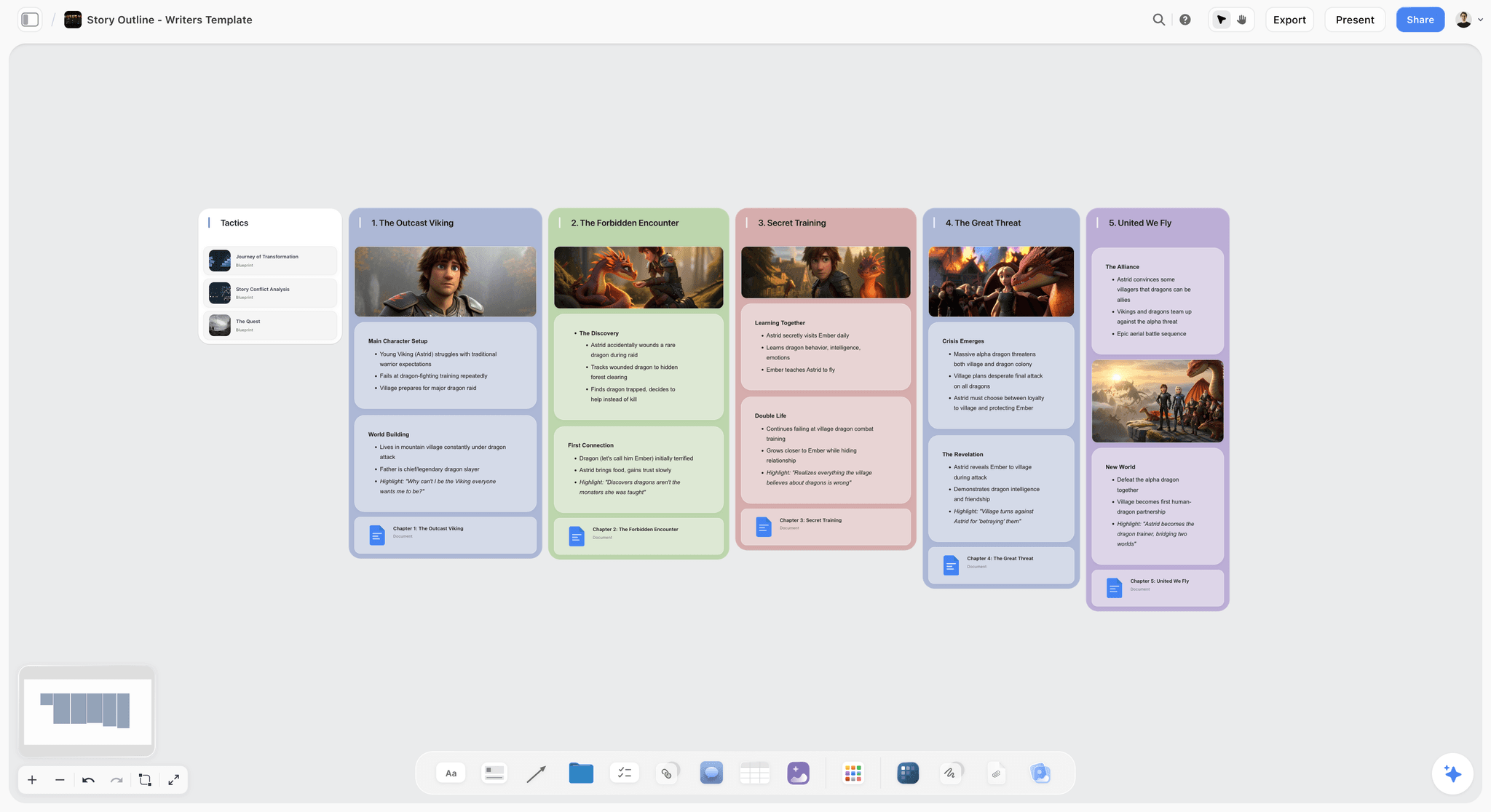
Structural planning artifacts can live next to delivery milestones on one canvas
How We Evaluated the Best Project Planning Tools 2026
- Ease of use
We stood up a realistic initiative (12 to 20 milestones, 3 dependencies, a mid-project scope change) in each product. Pass meant a new teammate could interpret the plan in under 10 minutes without a training call.
- AI depth
We stress-tested replanning prompts after a delayed milestone: did the AI reference the existing plan structure and text, or produce generic advice? For Storyflow we verified behavior against canvas context plus optional @ mentions per help-center guidance.
- Collaboration
We ran a live edit plus async comment pass. We noted whether real-time co-presence mattered versus share links and comments.
- Integrations
We traced at least three handoffs (time tracking, docs, comms). The scoring favored dependable calendar and SSO pathways over sheer marketplace count.
- Pricing and value
We modeled a 10-seat annual bill where possible and compared what you get before add-ons like AI modules. All prices verified April 2026; check vendor sites before buying.
Every tool on this list was tested with real project work, not feature checklists pulled from marketing pages.
Quick Picks by Use Case: Best Project Planning Tools 2026
Best Overall: Storyflow Storyflow combines infinite canvas elements, documents, Blueprint Tactics, and AI that reasons over the active board plus referenced context. Paid access starts at $7.99/month billed annually (Plus tier) with the full 200+ Blueprint Tactics library; Pro at $14/month annual adds AI image generation and 20× more AI than Plus. The tradeoff is that you will not get enterprise portfolio financials native the way Smartsheet or monday.com markets them.
Best for Spreadsheet-Native Gantt Teams: Smartsheet Smartsheet still wins when executives want grid logic they can audit. Pro starts at $9/user/month (annual) for up to 10 users; Business at $19/user/month (annual) means a 10-person team pays $190/month before add-ons. Limitation: creative storytelling lives elsewhere unless you force it into cells.
Best for Delivery Dashboards and Automations: monday.com monday.com's automation recipes and portfolio views make it a favorite for ops-heavy PMOs. Basic starts at $9/seat/month (annual) with a 3-seat minimum; Standard with Gantt/Timeline views is $12/seat/month (annual). Limitation: deep creative brief work still tends to sprawl into documents outside the timeline.
Best for Workflow and Approval Discipline: Asana Asana's timelines, dependencies, and approvals are hard to beat for cross-functional execution. Starter costs $10.99/user/month (annual). Limitation: strategy and ideation still want a paired tool unless you heavily customize templates.
Best All-in-One Stack: ClickUp ClickUp stacks docs, lists, Gantt, whiteboards, and automations in one login. Unlimited starts at $7/member/month (annual), with the Brain AI add-on at $9/member/month extra. Limitation: sprawl risk; governance matters or the workspace becomes noisy.
Best for Small Teams Wanting Pure Gantt: TeamGantt TeamGantt keeps scheduling approachable with a focused Gantt experience; Pro is $99/month per manager (annual) plus $7/month per collaborator. Limitation: not a full work OS; integrate for chat, docs, and financials.
Best for Creative-Producing Teams Unifying Brief + Schedule: Storyflow When the milestone and the narrative must stay coupled, Storyflow's Story blueprints (200+ on Plus and above; the Free plan launching before the end of 2026 will not include the blueprint library) give you guided theory alongside production cards. Storyflow is paid-only during early access, with unlimited boards and basic AI usage on the upcoming Free plan. Limitation: pure PMO reporting is lighter than Smartsheet.
If you are weighing Storyflow because your plans keep drifting away from the brief, map one real initiative on the canvas and run a reschedule with AI while documents are @-mentioned. -> Open a Storyflow board and test plan-plus-brief context
Comparison Table: Best Project Planning Tools 2026
| Tool | Best For | Starting Price | Free Plan | Timeline / Gantt depth (★/5) | Rating (/10) |
|---|---|---|---|---|---|
Storyflow | Creative + strategic plans tied to visuals | $7.99/month annual | Coming late 2026 (invited collaborators join free now) | ★★★★☆ | 9.4/10 |
Smartsheet | Grid-backed schedules at scale | $9/user/mo (Pro, annual) | Yes (1 user, limited sheets) | ★★★★★ | 9.0/10 |
monday.com | Automated delivery dashboards | $9/seat/mo (Basic, annual) | Yes (up to 2 seats) | ★★★★☆ | 8.9/10 |
Asana | Approvals + dependency execution | $10.99/user/mo (Starter, annual) | Yes (up to 10 users) | ★★★★☆ | 8.8/10 |
ClickUp | Consolidated docs + schedules | $7/member/mo (Unlimited, annual) | Yes (unlimited tasks) | ★★★★☆ | 8.5/10 |
Wrike | Enterprise governance + views | $10/user/mo (Team, annual) | Yes (limited users) | ★★★★☆ | 8.4/10 |
TeamGantt | Focused Gantt for small teams | $99/mo per manager (annual) | Yes (1 project limit) | ★★★★★ | 8.2/10 |
Notion | Custom databases you design | $10/user/mo (Plus, annual) | Yes (personal) | ★★★☆☆ | 8.0/10 |
Airtable | Hybrid records + calendar layers | $20/seat/mo (Team, annual) | Yes (limited records) | ★★★☆☆ | 7.9/10 |
Linear | Engineering roadmap clarity | $10/user/mo (Basic, annual) | Yes (250 issues) | ★★★☆☆ | 7.8/10 |
Height | Ops + chat-native tasking | $12/user/mo (Core, annual) | Yes (up to 10 free) | ★★★☆☆ | 7.6/10 |
Hive | Agencies bundling proofing + tasks | $12/user/mo (Teams, annual) | Yes (limited projects) | ★★★☆☆ | 7.5/10 |
Rating criteria: AI depth was weighted most heavily (30%) because it represents the largest capability gap between tools in this category in 2026. Ease of use 25%, collaboration 20%, integrations 15%, pricing 10%. A tool that does AI exceptionally well scored higher than one that does everything adequately; timeline depth shows up explicitly in the middle column so Gantt-first buyers can see the specialist leaders.
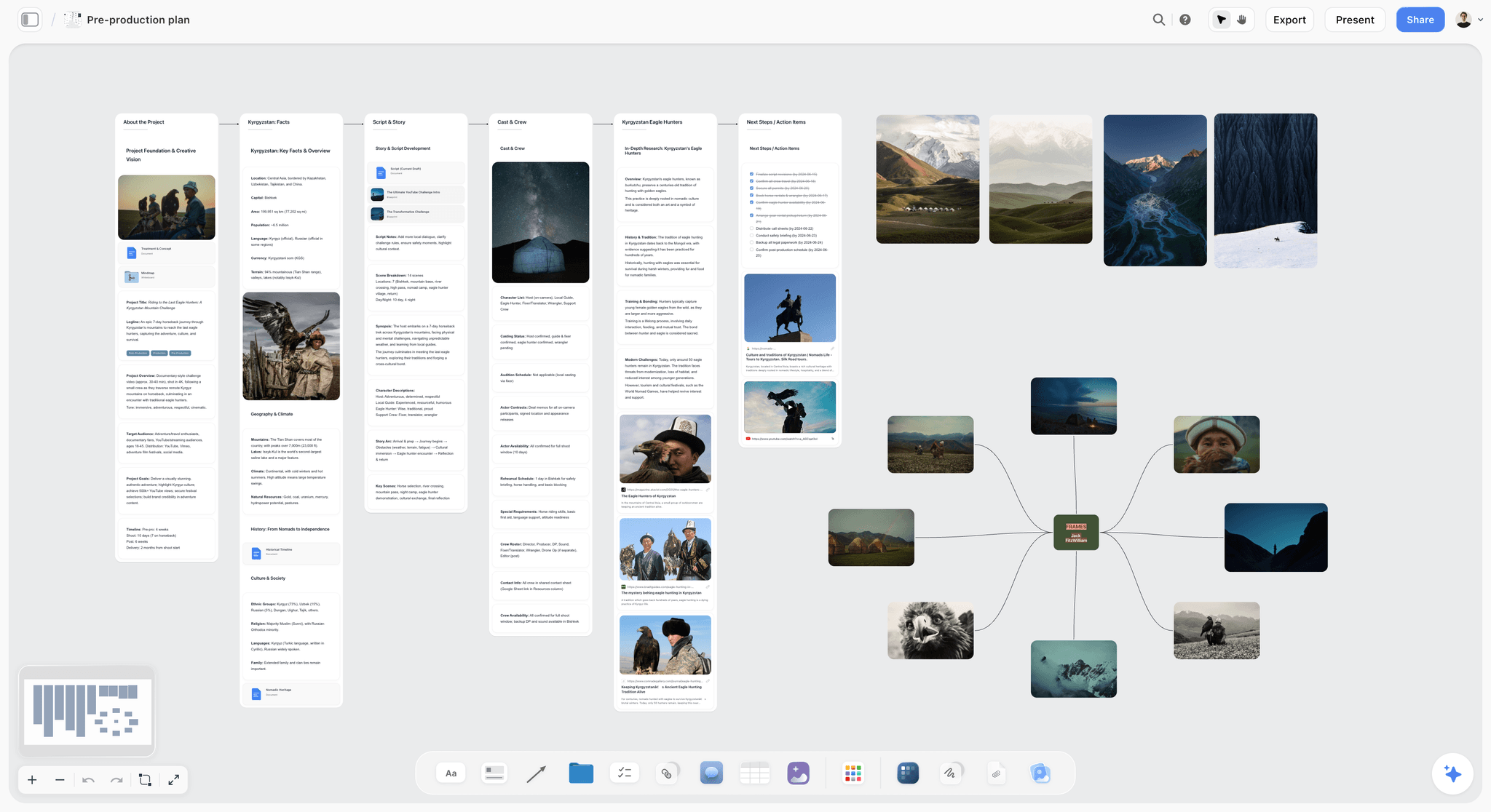
A Storyflow board can hold pre-production milestones, reference imagery, and notes so schedule changes stay tied to creative intent
Detailed Reviews: Best Project Planning Tools 2026
Storyflow remains the deepest option when your plan is not only tasks but also creative reasoning you refuse to flatten into a row of cells.
1. Storyflow - The planning layer that keeps creative context attached
Storyflow is a visual AI workspace for creators, filmmakers, marketers, and strategists. It is built around an infinite canvas where whiteboard elements, documents, files, and Blueprint Tactics coexist, with an AI assistant that works from the board you are on.
Where it wins for project planning is intimacy between the schedule story and the creative story. When a shoot week slips, you want the AI to read the board's cards and notes, not a generic chat thread. According to Storyflow's help center pattern, you can deepen prompts by @-mentioning up to one Blueprint Tactic and up to three documents inside AI chat, on top of the AI's read of the active board.
Best for: Teams and solo leads planning initiatives where briefs, references, and milestones must stay visually coupled.
Key features
- Infinite canvas with documents embedded. You can cluster milestones visually near the brief, budget notes, and imagery instead of linking out to forgotten docs. That proximity matters when you are explaining a slip to stakeholders.
- Blueprint Tactics for guided planning. The upcoming Free plan will not include the blueprint library; Plus, Pro, and Max all include the 200+ Story blueprints. Each Tactic is structured methodology you execute while you work, which reduces the "we skipped strategy" risk common in rushed timelines.
- AI that reasons over board context. The assistant can reference elements on your current canvas; you optionally add a referenced Tactic or documents for heavier context, which is how you keep proposals aligned with a fixed creative north star.
- Exports for stakeholder readouts. Help-center documentation describes exporting boards to images or PDF and sharing via links, which helps when executives want a snapshot without joining the workspace.
- Team collaboration tiering. Real-time multi-user editing on the canvas is positioned as a Team capability; solo plans still support sharing (see pricing FAQ for your contract specifics).
Pricing
Paid-only during early access, with a Free plan (unlimited projects, unlimited boards, basic AI usage, 20 file uploads) launching before the end of 2026, and anyone a paid member invites to a board joins free now. Plus: $7.99/month billed annually or $9.99/month monthly (full 200+ Blueprint Tactics, unlimited file uploads). Pro: $14/month billed annually or $19/month monthly (adds AI image generation and 20× more AI than Plus). Max: $39/month billed annually (or $49/month monthly), flat per account for team workspaces with roles.
Pros
- The AI workflow matches how creative PMs actually work: boards first, documents second, chat third.
- Blueprint Tactics turn planning sessions into teaching moments, which accelerates junior producers without extra slide decks.
- You can justify a 9.4 overall on weighted scoring because AI depth (30%) pulls ahead of tools that mostly automate status posts.
- Pricing remains predictable for solo producers who need high AI usage on paid without per-generation metering.
Cons
- Honest trade-off: a dedicated PM tool wins on execution tracking. If you measure projects by baseline variance, critical-path math, and resource utilization, Smartsheet or monday.com will track and report execution more precisely than Storyflow's creative-first surface, and you will export numbers from Storyflow rather than manage them there.
- Heavy operational PMOs may miss native earned-value tabs found in traditional PM software without pairing tools.
- Onboarding requires producers to think spatially; linear task junkies need a week of re-wiring habits.
Verdict
Pick Storyflow when the plan and the creative rationale must survive together. Skip it if you are buying software primarily to police timesheets and margins without creative artifacts in the same workspace.
2. monday.com - The work OS for visibility-obsessed delivery leads
monday.com built its reputation on boards that read cleanly in executive screenshots. For project planning, that means you can spin up portfolio views, sort by owner, and surface late milestones without exporting to a workbook every Friday.
The tradeoff is creative intimacy. monday.com can hold files and docs, yet most teams still treat it as the delivery system of record while briefs live in Slides or another doc hub. If your planning reviews are mostly variance and ownership, that split is workable. If you need the narrative beside the bars while stakeholders debate, you will keep alt-tabbing until you add a canvas tool.
Best for: PMO leads running multi-project portfolios who need automations, dashboard widgets, and permission models finance can audit.
Key features
- Portfolio boards and cross-project reporting. You mirror initiatives into leadership dashboards that answer which programs are red without opening every child board. That visibility carries monday.com through enterprise evaluations more often than novelty features do.
- Automation recipes for slip handling. Status changes can trigger notifications, child items, or Slack handoffs. Compared to spreadsheet macros, the recipes are approachable for non-engineers, which matters when PMs rotate quarterly.
- Timeline views for delivery sequencing. Dependencies and date shifts behave predictably for operational work. The view is strongest when tasks resemble recurring production pipelines rather than fuzzy research phases.
- Integration marketplace density. CRM, billing, and time tracking connectors are widely advertised; confirm your specific integrations are on the supported pathway before you promise leadership a unified stack.
- Guest and vendor access patterns. Enterprise buyers often note guest licensing and board-level controls map cleanly to contractor workflows, reducing the "just email the PDF" stage.
Pricing
Free for up to two seats. Basic costs $9/seat/month (annual), Standard $12/seat/month (annual), the Standard tier is where Timeline and Gantt views unlock. Add CRM sync, premium support, and AI bundles separately so the procurement model matches what you will really run in month six.
Pros
- Steering-committee storytelling is fast: colors, dashboards, and owners read without a training pre-read.
- Automations cut manual chasing when work slips, which is the emotional core of PM work.
- Casual contributors usually learn faster than they do in Smartsheet-heavy environments.
Cons
- Creative producers still export screenshots when they need narrative context next to the Gantt.
- Seat bundles and tier jumps can sting small teams that just exited the Free tier.
- AI assists reporting and summaries, yet it does not replace canvas-native reasoning when brief text must sit inside the planning surface.
Verdict
Choose monday.com when software is purchased to see delivery health. Pair it with Storyflow if the brief must live attached to the schedule instead of as a separate attachment everyone forgets.
3. Smartsheet - The grown-up grid for critical-path traditionalists
Smartsheet is where finance-friendly planners go when they want baseline-aware Gantt behavior without exporting to brittle Excel monsters. Cells, formulas, controlled sharing, and sheet history match how program offices already think.
The creative downside is familiar: the brief becomes another attachment unless you aggressively structure columns for narrative fields. That can work, but it rarely matches the spontaneity of a messy canvas when directors rewrite scenes or strategists pivot messaging.
Best for: Enterprises that audit timelines like financial statements and need controlled collaboration on large sheet sets.
Key features
- Critical path and dependency logic at grid scale. You can manage hundreds of rows with predecessors, lag, and baseline comparisons. Leadership trusts the output because it looks like the models they already sign.
- Baselines and variance reporting. When leadership asks why Q2 moved, Smartsheet gives you columns that answer in language PMOs respect.
- Forms, approvals, and proofing add-ons. Intake forms can create structured rows; proofing workflows help creative assets stay tethered to rows if you commit to the process (Dynamic View add-on starts at $125/month on Business).
- Bridge connectors to analytics stacks. Export and connector stories matter for organizations that warehouse project data next to ERP facts.
- AI assistance on summaries and formula work. Helpful for analysts, not a replacement for contextual brief reasoning inside a canvas.
Pricing
Pro costs $9/user/month (annual) for up to 10 users; Business is $19/user/month (annual) and requires a minimum of 3 users. Always price add-ons, Dynamic View, Resource Management, and Data Shuttle, before comparing to all-in-one vendors, as they push the total well above entry tier.
Pros
- Earned trust from finance, risk, and PMO reviewers who live in spreadsheets.
- Training investment pays off because power users can model scenarios that other SaaS tools abstract away.
- Ideal when regulators or clients expect archive-quality plan histories.
Cons
- Contributors who think visually may resist living inside wide grids during early ideation.
- Creative pivots often stall waiting for someone to update the "official" sheet row.
- Total cost climbs once premium capabilities and automation volume increase for large portfolios.
Verdict
If your culture already believes the sheet is truth, Smartsheet is still the choice that keeps leadership calm. Pair with Storyflow when creative teams need spatial freedom before the sheet hardens.
4. Asana
Best for: Cross-functional teams chaining approvals. Pricing: Personal free for up to 10 users; Starter $10.99/user/month (annual). Asana's timeline view is dependable for sequencing creative approvals with marketing, legal, and ops. AI helps summarize work, not rewrite your creative vision. A 12-person Starter stack costs $131.88/month annually, so compare against ClickUp bundles if you need docs inside the same login.
Verdict: Still the execution backbone for midsize teams who already clarified strategy elsewhere.
5. ClickUp
Best for: Teams insisting on one login for docs, whiteboards, and Gantt. Pricing: Unlimited $7/member/month (annual); Business $12/member/month (annual); Brain AI add-on $9/member/month. ClickUp replaces swiveling between four tabs, but only if someone enforces naming and space hygiene. A 10-person Business + Brain AI combo costs $210/month annually ($12 + $9 per member).
Verdict: Buy it when consolidation matters more than minimalism.
6. Wrike
Best for: Enterprises needing approvals, request forms, and structured folders. Pricing: Team $10/user/month (annual), Business $25/user/month (annual). Wrike's locked-down spaces help regulated teams. Smaller shops may feel weighed down by Business-tier governance; the Team plan is the sweet spot for 2-15 users who just need Gantt and approvals without enterprise overhead.
Verdict: Strong where governance equals speed.
7. TeamGantt
Best for: Small teams wanting uncluttered scheduling. Pricing: Pro $99/month per manager (annual) plus $7/month per collaborator; free plan covers 1 project and 40 tasks. It is the anti-ClickUp: fewer surfaces, clearer Gantt. You will bolt on comms separately.
Verdict: Ideal when Gantt fidelity beats feature breadth.
8. Notion
Best for: Teams that want a custom milestone database without vendor-imposed fields. Pricing: Plus $10/user/month (annual); Business $15/user/month (annual) with full AI and premium integrations. Notion handles creative briefs beside databases elegantly, but timeline formulas require skilled owners. Plan maintenance time or the database decays.
Verdict: Best for operations-savvy builders, not template tourists.
9. Airtable
Best for: Record-heavy initiatives crossing vendors, budgets, and crews. Pricing: Team $20/seat/month (annual); Business $45/seat/month (annual). Calendar and Gantt-like extensions exist via interfaces, yet cost scales steeply at 10+ seats, a 10-person Team plan runs $200/month, so compare against monday.com Standard before committing.
Verdict: Choose when data volume justifies the bill.
10. Linear
Best for: Product and engineering cycles prioritizing roadmaps over creative briefs. Pricing: Basic $10/user/month (annual); Business $16/user/month (annual) for private teams and advanced AI. Linear is stunning for issue flow; media producers may fight its schema.
Verdict: Perfect for eng-led planning, niche for creative producers.
11. Height
Best for: Chat-forward teams tracking tasks beside conversation. Pricing: Free for up to 10 members; Core $12/user/month (annual); Business $19/user/month (annual). Height reduces tab hopping for Slack-native PMs but Gantt depth trails Smartsheet.
Verdict: Pick if messaging is your source of truth.
12. Hive
Best for: Agencies merging proofing with tasks. Pricing: Starter $5/user/month (annual); Teams $12/user/month (annual) with unlimited members and resourcing. Resourcing views help account teams, though AI depth lags Storyflow for canvas-native reasoning.
Verdict: Solid hybrid for client services, not for solo indies on a budget.
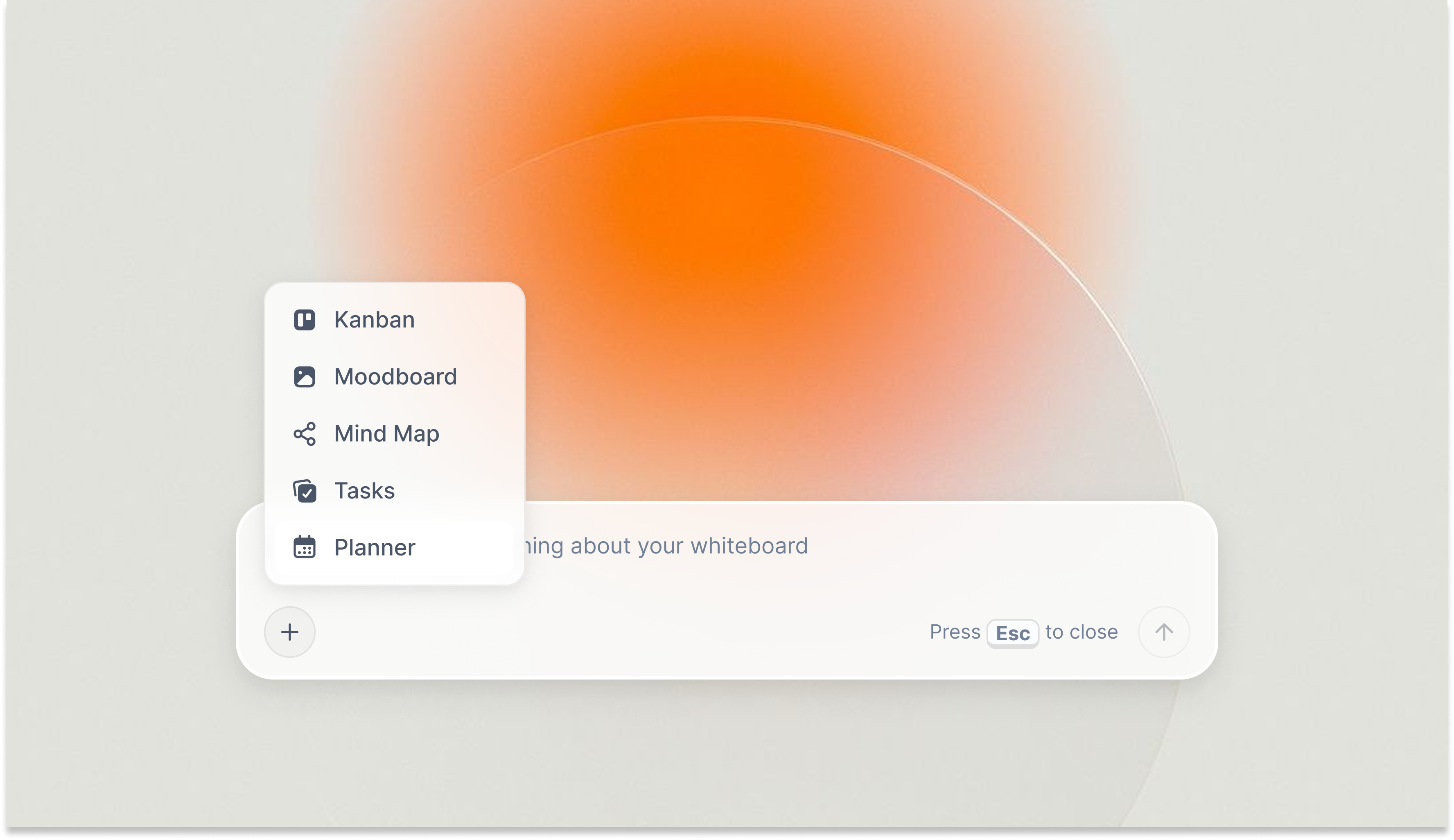
After a slip, AI can reference live board context plus @-mentioned brief documents so revised milestones stay honest to the constraints

Mind maps help teams structure initiatives before dates lock, complementing Smartsheet-style grids later
Free vs Paid: Best Project Planning Tools 2026
What free plans in this category typically include
- A narrow project or sheet cap (for example Storyflow's planned basic AI usage on its upcoming Free plan) so you can pilot without budget.
- One or two collaborator roles without advanced admin or SSO.
- Limited automation runs or formula depth; enough to learn, not enough to run an entire PMO.
- Partial AI caps; Storyflow's Free plan will give basic AI usage once it launches, while most competitors (Asana, Wrike, monday.com Basic) either omit AI entirely on free or include only minimal credits.
What paid plans unlock
- Higher limits on portfolios, baselines, and dependency chains.
- Automation volumes sufficient for daily operations, not demo-tier ceilings.
- Full AI modes or bundled assistants; on Storyflow, paid unlocks AI image generation, 20× more AI than Plus, and the full Tactic library.
- Enterprise controls: SSO, audit trails, and hour tracking connectors, typically unlocked at Business or Enterprise tiers across all tools in this category.
When free is enough
Free works when you are planning a single initiative with a small crew, proving methodology before procurement, or teaching students how Gantt logic behaves without a contract.
When upgrading pays off
Upgrade when you recreate the same manual update weekly, when AI limits block replanning during crunch, or when security reviews demand SSO. If you are screen-recording timelines for leadership because they lack licensed seats, finance should fund access.
Best value pick for AI-heavy creative project planning: Storyflow, because high AI usage on paid and Blueprint Tactics remove the consulting slide stack you used to buy separately. For sheet-first baselines without creative canvas needs, Smartsheet Business at $19/user/month (annual) often wins finance review. Upgrading Storyflow specifically buys structured guidance inside the canvas, not just another timeline view, so producers spend less time translating briefs for the team. -> Upgrade for high-volume AI planning inside your Storyflow boards

Paid Storyflow unlocks AI image generation, 20x more AI than Plus, and the full Story blueprint library so methodology sits next to the schedule you are defending in reviews
Final Verdict
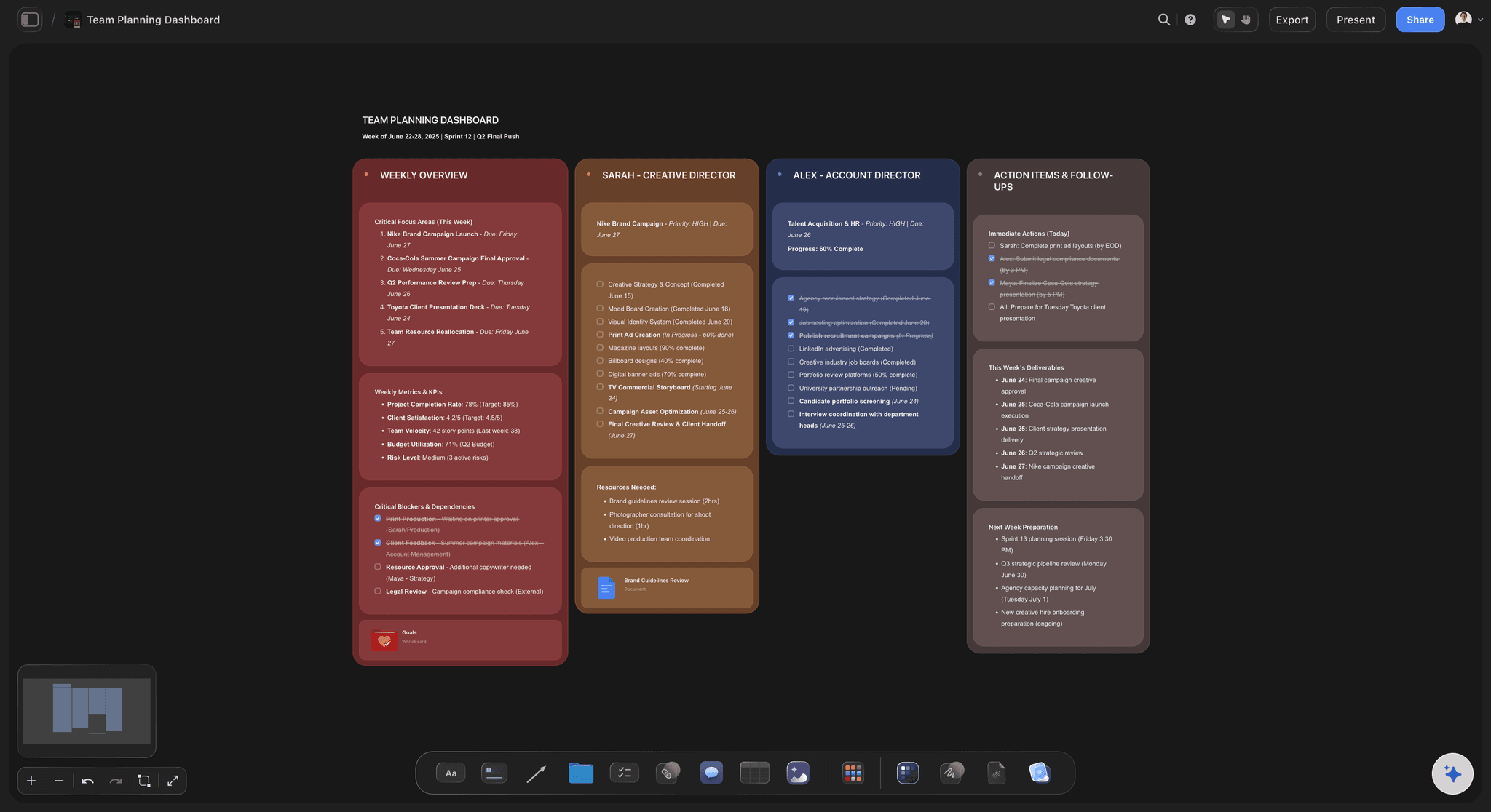
A team planning dashboard keeps decisions, owners, and notes together so the next slip does not reset collective memory
If you want spreadsheet-level baselines, variance columns, and sheet history that satisfy finance reviewers, Smartsheet remains the credibility play for program offices that treat plans like audited models.
If you want portfolio dashboards and automations that read instantly in steering meetings without building custom formulas, monday.com satisfies operations-led teams that prioritize delivery visibility.
If you want approvals, dependency discipline, and timeline views across marketing, legal, and ops, Asana stays the execution backbone once strategy is decided elsewhere.
If you want one vendor to swallow docs, chat, whiteboards, and Gantt under a single login, ClickUp is the consolidation bet when you invest in governance so the workspace does not rot.
If you want milestones tied to briefs and frameworks on the same board where AI can read your active canvas and optional @-mentioned documents, Storyflow is the pick I would run for creative programs. Import the real initiative, @-mention the brief when you replan, and see if the answers stay aligned to constraints your team actually wrote down. -> Run your next milestone review on a Storyflow canvas The best project planning stack is still the one that keeps the reasoning visible the first time someone moves a date.
FAQ: Best Project Planning Tools 2026
What is the best project planning tool in 2026?
Storyflow is the best project planning tool in 2026 for creative and strategic teams that need milestones tied to narrative context with AI that reads the active board. Smartsheet remains the best alternative when leadership demands spreadsheet-grade baselines and enterprise controls.
Is Storyflow a good project planning tool?
Storyflow is a strong project planning tool when your plan is creative or strategic and the brief must stay attached to the schedule, and a weaker fit when the plan is pure portfolio finance. It plans on an infinite canvas where milestones, references, documents, and Story blueprints sit together, and its AI reads your active board plus up to one @-mentioned Tactic and three documents to help you replan after a slip. It is not the choice for earned-value reporting or baseline variance audits; for that, pair it with Smartsheet or buy a dedicated PMO tool. Paid plans start at $7.99/month billed annually (Plus tier).
How does Storyflow compare to monday.com?
Storyflow centers creative execution: canvases, documents, and Blueprint Tactics with AI grounded in what is on the board plus optional @-mentioned context. monday.com centers delivery telemetry with automations and dashboards. monday.com wins pure PMO visibility; Storyflow wins when the brief must stay attached to the schedule.
Is Smartsheet worth it in 2026?
Yes for finance-heavy PMOs and mature program offices that audit plans weekly. No for tiny teams that only need a lightweight Gantt and will drown in sheet rules. Business at $19/user/month (annual) makes most sense for 5+ users; smaller teams often get better value from Asana Starter or ClickUp Unlimited.
What project planning tool is best for creative producers managing film or campaigns?
Storyflow fits producers who split time between creative briefs, stakeholder reviews, and date changes, because the same board holds references and milestones. Pair with Smartsheet only if external financiers force grid reporting.
Are there free project planning tools that are actually good?
Yes. TeamGantt's free plan covers 1 project and 40 tasks; Asana Personal is free for up to 10 users. Storyflow is paid-only during early access, but its upcoming Free plan, launching before the end of 2026, will be unusually generous: unlimited boards, unlimited cards (notes, images, links), unlimited collaboration with as many teammates as you want, basic AI usage, and 20 file uploads. All three have meaningful feature caps; automation, baselines, and portfolio rollups require paid tiers.
What is the difference between project planning tools and content planning tools?
Project planning focuses on milestones, dependencies, and delivery risk across any initiative. Content planning emphasizes editorial calendars, publishing cadence, and channel strategy. If you need both, run content planning in an editorial-focused stack and project planning in a timeline-first tool, or use Storyflow to visually tie them if your process blends creative and schedule decisions.
How much do project planning tools cost?
Entry paid tiers range from $5/user/month (Hive Starter) to $25/user/month (Wrike Business) when billed annually. Most mainstream SaaS tools land between $7 and $19/user/month. Enterprise quotes vary widely. Always model automation volume, AI add-ons, and viewer licenses separately, they often double the headline price.
What project planning tool works best for small teams with tight budgets?
TeamGantt Free covers 1 project (40 tasks) and Asana Personal covers up to 10 users with basic task management. Storyflow is paid-only during early access; its Free plan, launching before the end of 2026, will be unusually generous: unlimited boards, unlimited cards, unlimited collaboration with as many teammates as you want, basic AI usage, and 20 file uploads. Works when you need AI assistance and want canvases plus briefs together. All three have caps; pick based on your work shape, not your team size.
Can project planning tools replace Microsoft Project for hybrid teams?
Many cloud tools now cover core Gantt, dependencies, and baselines, but Microsoft Project still appears where heavy enterprise portfolio integration with Azure DevOps or Microsoft 365 is mandated. Match regulatory and integration requirements before switching, the migration cost is rarely zero.
Do I need a dedicated Gantt tool if I already use Notion?
Notion can emulate timelines with skilled database design, yet baseline tracking and fast dependency drags lag dedicated Gantt apps. If schedules are central, supplement Notion with TeamGantt or Smartsheet, or move creative planning to Storyflow while Notion handles knowledge docs.
Table of Contents
- Quick Recommendations: Best Project Planning Tools 2026
- Market Context: Best Project Planning Tools 2026
- How We Evaluated the Best Project Planning Tools 2026
- Quick Picks by Use Case: Best Project Planning Tools 2026
- Comparison Table: Best Project Planning Tools 2026
- Detailed Reviews: Best Project Planning Tools 2026
- Free vs Paid: Best Project Planning Tools 2026
- Final Verdict
- 1. Storyflow - The planning layer that keeps creative context attached
- 2. monday.com - The work OS for visibility-obsessed delivery leads
- 3. Smartsheet - The grown-up grid for critical-path traditionalists
- 4. Asana
- 5. ClickUp
- 6. Wrike
- 7. TeamGantt
- 8. Notion
- 9. Airtable
- 10. Linear
- 11. Height
- 12. Hive
- FAQ: Best Project Planning Tools 2026
- Related Reading
Templates to check out for this topic


Planning and project templates you can use in Storyflow
Plan a launch, a sprint, or a whole project on a visual board the team can see at once. Open one of these templates and start from real structure.


See Storyflow in Action
A visual AI workspace where every feature lives inside one canvas. No tab-switching, no context lost.
Build your entire board from a single message
Type what you need in the AI chat at the bottom of your canvas. The AI adds cards, headings, and structure directly onto your board.
Use expert frameworks as AI context
Type @ in the AI chat and choose any Tactic. The AI tailors every response to that framework instead of giving generic advice.
Turn your board into a mind map in seconds
Ask the AI to restructure your canvas as a mindmap. It connects your ideas into a visual hierarchy so you can see how everything relates.
Why Storyflow Exists
Storyflow actually began as a personal tool while working on creative and research projects.
We kept running into the same problem: ideas were scattered everywhere: notes, documents, and whiteboards.
Nothing helped us see how everything connected.
So we started building a workspace designed around how ideas actually grow.
→ Read how Storyflow was createdSara de Klein
Head of Product at Storyflow
Published: 2026-04-08
Extremely simple, seriously capable


See how easy it is to get started
Watch a real project come together, from a blank board to a finished plan, clicked through step by step.
Start creating with AI and become more productive
Transform your creative workflow with AI-powered tools. Generate ideas, create content, and boost your productivity in minutes instead of hours.