How to Plan a Livestream (Step-by-Step, 2026)
A step-by-step guide to planning a livestream: build a run of show, check your tech, brief your guests, plan engagement, and prepare backups for when things break.

Category
Content Creation
Author

Justkay
Documentary Filmmaker & Founder at Storyflow
Topics
2026-07-18
•
12 min read
•
Content Creation- how to plan a livestream
- run of show
- livestream planning
- livestream checklist
- how to prepare for a livestream
- livestream rundown
How do you plan a livestream?
To plan a livestream, build a run of show: a timed sequence of segments from intro to outro, with your tech and gear checked, your guests briefed, an engagement plan for the chat, and backups ready for when something breaks. A livestream is different from produced video because there is no edit and no second take, so the plan is the only thing standing between you and dead air. Here is what makes live different from everything else. You cannot fix a livestream in post, because there is no post. Every mistake happens in front of the audience, in real time, and the only defense is having planned for it. A produced video forgives a missed line or a technical glitch; you reshoot or cut around it. A livestream forgives nothing, so the preparation that a produced video can skip is exactly the preparation a livestream cannot. The streamers who look effortless live are the ones who planned obsessively off air. I have run live and produced video productions for years, and the live ones taught the lesson fast: the plan is the only safety net, because when something goes wrong on air, you do not get to stop and think. This guide is how to build that plan, the tools that hold it, and the honest places where a dedicated streaming or scheduling tool does the job better.

Full disclosure: Storyflow is our own product, so weigh its placement with the skepticism you would apply to any tool a company recommends on its own blog. We rank it first for one job, keeping the run of show and prep on one AI-readable canvas, and we are explicit about where a dedicated streaming tool like StreamYard or OBS beats it for going live.
Quick Comparison
Where streamers actually plan a livestream, and the one job each tool is best at.
| Tool | Best For | AI Features | Price |
|---|---|---|---|
| Storyflow | Run of show, prep, backups | Drafts the rundown | $7.99 mo annual (free plan late 2026) |
| Notion | Rundown as a database | Notion AI | Free / paid |
| Trello | Segment checklist | Add-ons | Free / paid |
| Google Sheets | Timed rundown | Add-ons | Free |
| StreamYard | Going live | Captions | Free / paid |
Key Takeaways
- A livestream has no edit and no second take, so the plan is the only safety net. Everything you would fix in a produced video has to be prevented in the preparation.
- Build the whole show as a run of show with five parts: segments, tech, guests and roles, engagement, and backups. Each part removes a specific way a stream falls apart on air.
- Break the stream into timed segments from intro to outro. A run of show is a timeline, not a script, so you are never mid-stream wondering what comes next.
- Live is when technology fails, so run a pre-flight checklist and a test stream every time. Ten minutes before going live is when a caught problem is still fixable.
- Brief guests and assign clear roles (host, moderator, producer) before the light goes red. A team scrambling for who-does-what is a visible mess on air.
- Plan audience engagement into the segments rather than hoping it happens. Interaction with the chat is the reason people watch live instead of the recording.
- Write your backups down before you need them. In the moment a guest drops or a screen share dies, you will not be able to invent the response.
- AI plans the show. You perform it live. Use it to draft the rundown and the checklists, but the presence on air stays yours.
Why Livestreams Live or Die on the Plan
Watch a livestream fall apart and it is almost never one big failure. It is a series of small unpreparednesses compounding on air: the intro runs long, the guest is not ready when you cut to them, the screen share does not work, the chat goes unanswered, and the energy drains while you scramble. None of these would matter in a produced video, because you would fix them in the edit. Live, they all happen in front of the audience, and each one bleeds viewers.
The root difference is that a livestream is a live performance with no undo. A produced video is planned so it can be edited; a livestream is planned so it never needs to be. That inverts the preparation: everything you would fix in post has to be prevented in the plan, from the pacing of segments to the moment you bring a guest on to the backup for when the tech fails. You cannot fix a livestream in post. You fix it in the plan, and the plan is what turns a live show from a high-wire act into a rehearsed performance that just happens to be live.
This is why planning a livestream is not like planning a video shoot. A shoot is planned to be captured and cut; a livestream is planned to be performed, in real time, with no safety net but the preparation itself.
The Run of Show: A Livestream Framework
Every livestream that ran smoothly was built on the same framework, whether the streamer called it that or not. It is the run of show, and it has five parts, all aimed at surviving live.
- Segments. The stream as a timed sequence, from intro to outro, so it has structure and pace instead of drift.
- Tech. The gear, software, and connections, checked before you go live, because live is when they fail.
- Guests and roles. Who is on, when, and who runs what (host, moderator, producer), so no one is scrambling.
- Engagement. The plan for the chat and the audience, because interaction is why people watch live.
- Backups. What you do when a segment dies, a guest drops, or the tech fails, so a problem is a plan, not a panic.
The framework works because each part removes a way a livestream fails on air. Segments prevent aimless drift; the tech check prevents the glitch that kills the stream; clear roles prevent the scramble; the engagement plan prevents dead chat; and backups turn the inevitable problem into a rehearsed response. You cannot fix a livestream in post, so the run of show is the whole safety net, built before you go live.
Quick Picks: Where to Plan a Livestream
Best for the run of show and prep on one canvas: Storyflow. The surface where the segment rundown, the tech checklist, the guest briefs, and the backup plans live together, with AI to draft the rundown. Plus is $7.99/month billed annually. The honest limit: it does not stream or encode; a dedicated tool goes live.
Best for a structured rundown document: Notion. If you want the run of show as a filterable database with timings and owners, Notion works well. Free plan, paid tiers.
Best for actually going live: StreamYard, OBS, or Restream. These are the streaming tools that encode and broadcast; they are the live layer, not the planning layer. Free tiers plus paid plans.
Best for a simple segment checklist: a spreadsheet. For a solo stream, a timed rundown in Google Sheets or Trello is enough. Free.
The honest split: most streamers plan the run of show and prep on a board or doc, then go live in a dedicated streaming tool. Try Storyflow to build your run of show.
Comparison Table: Where to Plan a Livestream
| Tool | Best for | AI on the plan | Visual planning | Free tier | Starting price |
|---|---|---|---|---|---|
Storyflow | Run of show, prep, backups | Drafts the rundown | Yes, infinite canvas | Coming late 2026 (invited collaborators join free now) | $7.99/mo annual |
Notion | Rundown as a database | Notion AI | Limited | Yes | Free + paid |
Trello | Segment checklist | Add-ons | Board view | Yes | Free + paid |
Google Sheets | Timed rundown | Add-ons | No | Yes | Free |
StreamYard | Going live | Captions | Studio layout | Yes | Free + paid |
Pricing checked July 2026. Competitor prices move and are quoted per plan, so verify on each vendor's page. Storyflow is paid-only during early access, and its Free plan (which will run the whole planning method) launches before the end of 2026; the paid tier adds the 200+ Story Blueprints and unlimited file uploads.
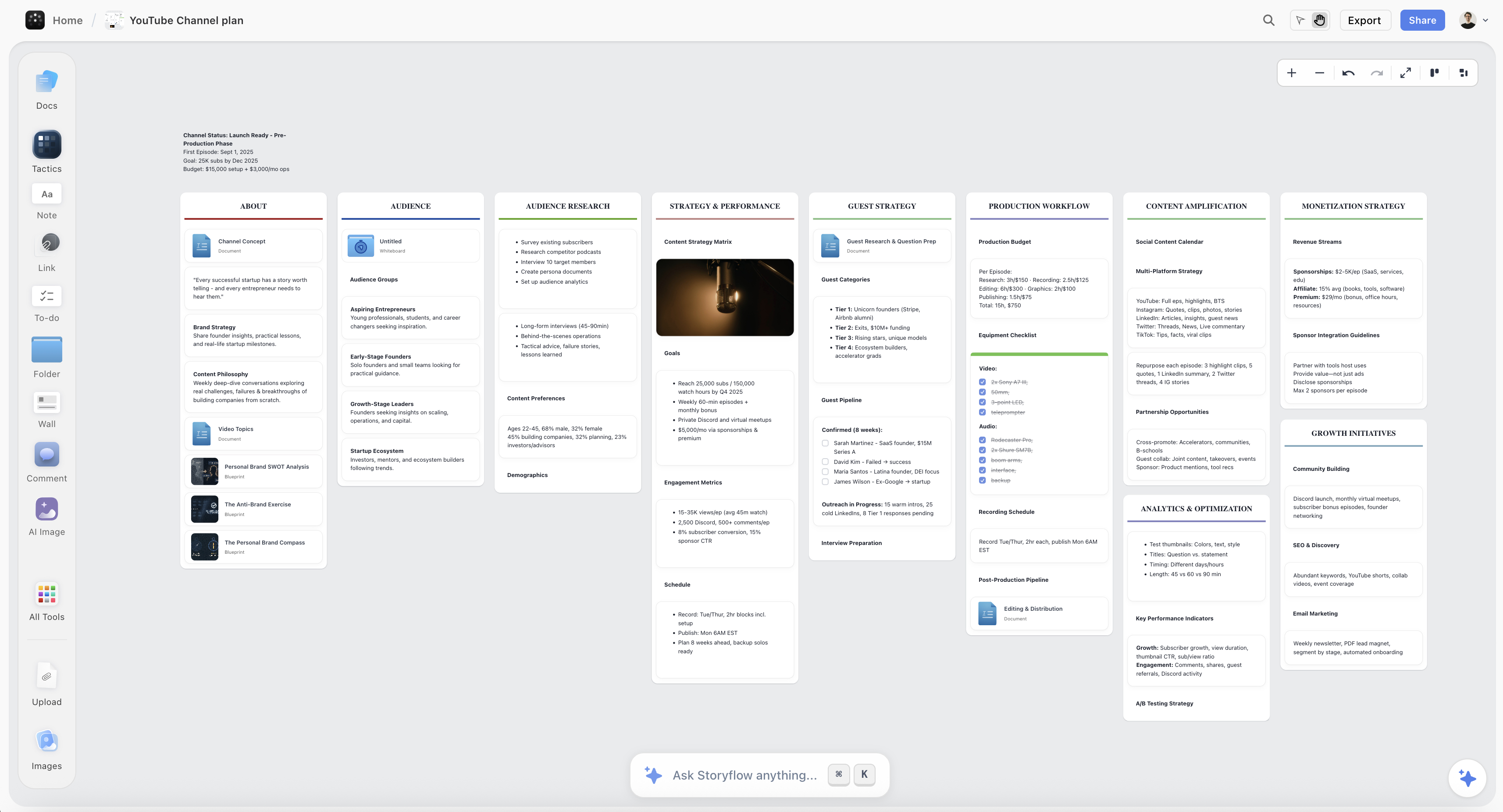
A livestream run of show on the Storyflow canvas, with timed segments, a tech checklist, guest briefs, and backup plans
Build your run of show on one canvas
The segment rundown, the tech checklist, the guest briefs, and the backup plans live in one place, and the AI drafts the run of show, so you go live on a plan instead of a hope.

How to Plan a Livestream, Step by Step
Here is the full method, from the idea to a run of show you can perform. It assumes a single livestream (a show episode, a webinar, a launch) with a small team or solo. Scale it up for a bigger production, but keep the run-of-show spine, because live has no undo.
Step 1: Define the goal and the format
Before building anything, decide what the stream is for and what shape it takes. Name the goal (grow the channel, launch a product, teach a topic, build community) and the format (solo talk, interview, Q&A, tutorial, panel), because those set everything downstream: the length, the segments, the guests, and the engagement. A stream without a defined goal drifts, and drift on air is deadly because there is no edit to tighten it. Ten minutes here spent deciding what the stream is and is not saves an hour of aimless live time.
Step 2: Build the run of show as timed segments
This is the core of livestream planning. Break the stream into segments (intro, main content blocks, guest interview, Q&A, outro) and assign each a rough time, so the stream has a spine and a pace. A run of show is a timeline, not a script: it tells you what happens when, what you cut to, and how long each part should run, so you are never mid-stream wondering what comes next. Build in flex for the parts that run long (live Q&A always does), and mark the moments you go to a guest, a screen share, or a break. The rundown is what keeps a two-hour stream from becoming two hours of drift.
Step 3: Prepare the tech and gear checklist
Live is when technology fails, so check it before you go on, every time. Build a checklist: camera, mic, lighting, encoder settings, internet (and a backup connection), the streaming software, any screen shares or media cued, and a test stream to confirm it all works end to end. The single most common way a livestream dies is a tech failure the streamer did not check for, and the fix is a boring pre-flight checklist run every time. A test stream ten minutes before going live catches the problem while you can still fix it.
Step 4: Brief guests and assign roles
If anyone else is involved, brief them and assign roles before you go live. Guests should know when they are on, what you will ask, how to join, and what to do if their connection drops. On the team side, assign roles: who hosts, who moderates the chat, who watches the tech and the clock (a producer). A guest who is unprepared or a team scrambling for who-does-what is a visible mess on air. Clear roles and briefed guests are what let a multi-person stream feel calm instead of chaotic, because everyone knows their job before the light goes red.
Step 5: Plan audience engagement
Interaction is the reason people watch live instead of a recording, so plan for it. Decide how you will bring the chat in (reading comments, taking questions, polls, shoutouts), and build those moments into the run of show rather than hoping they happen. Assign someone to moderate and surface the best comments if you can, because a host cannot both perform and read chat well. A livestream with no engagement plan becomes a monologue that might as well be recorded; one that plans interaction gives the audience the reason they showed up live.
Step 6: Build backups for when things break
Finally, plan for failure, because live guarantees it. For each likely problem, have a response ready: if a guest drops, you have a segment to fill the time; if a screen share fails, you talk through it instead; if your main connection dies, you have a backup or a graceful way to end. Write these down, because in the moment you will not be able to invent them. Backups are what separate a streamer who handles a problem smoothly from one who freezes on air. You cannot fix a livestream in post, but a planned backup lets you fix it live.
Where AI Helps Plan a Livestream (and Where Being Live Wins)
AI is useful for planning a livestream, but for specific jobs, and it is worth being precise so you do not rely on it for the live performance itself.
Where it helps. An AI that reads your plan can draft a run of show from your goal and format, generate a tech checklist, suggest engagement moments and questions for a guest, and find gaps (a segment with no time, no backup for the screen share). Because Storyflow keeps the rundown, checklist, and briefs on one canvas, the AI can help you build a complete plan faster. It is genuinely useful for the preparation.
Where it does not. AI cannot go live for you, and the live performance, reading the room, handling a curveball, riffing with the chat, is the entire value of a livestream. No plan and no model replaces presence on air; the plan just frees you to be present by removing the things you would otherwise scramble over. Use AI to build the run of show and the checklists, and bring your own presence to the actual stream. AI plans the show. You perform it live.
Common Livestream Planning Mistakes
- No run of show. A stream with no timed segments drifts, and there is no edit to tighten it. Build the rundown first.
- Skipping the tech check. Live is when gear fails. Run a pre-flight checklist and a test stream every time.
- Unbriefed guests. A guest who does not know when they are on or what you will ask is a visible mess. Brief them beforehand.
- No one on the chat. A host cannot perform and moderate well at once. Assign someone to the chat if you can.
- No engagement plan. A livestream with no interaction might as well be a recording. Plan the audience moments.
- No backups. Live guarantees problems; without a planned response you freeze on air. Write down what you do when things break.
- Treating it like a video shoot. A shoot is planned to be edited; a livestream is planned to be performed. Prepare for no undo.
The Bottom Line
Planning a livestream is not planning a video shoot. It is building a run of show for a live performance with no undo: define the goal and format, break the stream into timed segments, check the tech, brief the guests and assign roles, plan the audience engagement, and write backups for when things break. The streamers who look effortless are the ones who planned for everything off air so they could be present on it.
The honest boundary holds. One canvas is the right home for the run of show and the prep, and a dedicated tool still goes live. AI can draft the rundown and the checklists, but the live performance is yours. You cannot fix a livestream in post. You fix it in the plan, and a good plan is what lets a live show feel calm instead of chaotic.
If your next livestream is still an idea and a vague plan to wing it, build the run of show on one canvas in Storyflow and go live on a plan instead of a hope.
FAQ: Planning a Livestream
How do you plan a livestream?
Build a run of show: define the goal and format, break the stream into timed segments from intro to outro, prepare a tech and gear checklist, brief your guests and assign roles, plan how you will engage the chat, and write backups for when things break. Because a livestream has no edit and no second take, the plan is your only safety net, so everything you would fix in a produced video has to be prevented in the preparation. The streamers who look effortless live are the ones who planned the run of show obsessively off air, which is what lets them be present on it.
What is a run of show for a livestream?
A run of show is the timed rundown of your stream: the sequence of segments (intro, content blocks, guest, Q&A, outro), each with a rough time, plus the moments you cut to a guest, a screen share, or a break. It is a timeline, not a full script; it tells you what happens when and how long each part should run, so you are never mid-stream wondering what comes next. The run of show is the spine that keeps a long stream from drifting, and it is the single most important artifact in livestream planning because live has no edit to impose structure after the fact.
How do I prepare technically for a livestream?
Run a pre-flight checklist every time, because live is when technology fails. Check your camera, microphone, lighting, encoder settings, internet connection (with a backup if possible), your streaming software, and any media or screen shares you will use, then run a test stream to confirm the whole chain works end to end. The most common way a livestream dies is an unchecked tech failure, and the fix is a boring checklist run ten minutes before you go live, while there is still time to solve the problem. Never assume the setup that worked last time still works.
What tools do you need to livestream?
Two layers: a planning tool and a streaming tool. For planning the run of show, prep, and backups, use a canvas like Storyflow, a doc like Notion, or a simple spreadsheet. For actually going live, use a dedicated streaming tool like StreamYard, OBS, or Restream that encodes and broadcasts to the platform. They are separate jobs: the planning tool builds the show, and the streaming tool airs it. Most streamers plan in one place and go live in another, so do not expect a planning tool to stream or a streaming tool to plan.
How long should a livestream be?
Long enough to deliver the format and hold energy, which for most streams means anywhere from thirty minutes to a couple of hours depending on the type. A focused tutorial or launch might be thirty to sixty minutes; an interview or community stream can run longer. The deciding factor is whether you can sustain energy and structure for the length, which is exactly what the run of show protects: a well-segmented two-hour stream holds better than an unplanned thirty-minute one. Plan the length you can perform well, not the longest you can technically stay online.
How do you engage the audience during a livestream?
Plan the interaction into the run of show rather than hoping it happens. Decide how you will bring the chat in (reading comments, taking live questions, running polls, giving shoutouts) and build those moments into specific segments. If you have a team, assign someone to moderate and surface the best comments, because a host cannot both perform and read chat well. Engagement is the reason people watch live instead of the recording, so a stream that plans for it gives the audience what they came for, while one that ignores the chat becomes a monologue that might as well have been pre-recorded.
Can AI help plan a livestream?
Yes, for the preparation, not the performance. AI can draft a run of show from your goal and format, generate a tech checklist, suggest engagement moments and guest questions, and find gaps like a segment with no backup. What it cannot do is go live for you, and the live performance (reading the room, handling a curveball, riffing with the chat) is the entire point of streaming. Use AI to build the plan and the checklists so you are free to be present on air, and bring your own presence to the actual stream. It plans the show; you perform it.
Is Storyflow free for planning a livestream?
Not during early access. Storyflow's Free plan, which launches before the end of 2026, will include unlimited boards, notes, and basic AI, which will cover the whole method: the run of show, the tech checklist, the guest briefs, the engagement plan, and the backups. Paid tiers start at Plus for $7.99/month billed annually, which adds the 200+ Story Blueprints and unlimited file uploads. You will pair it with a dedicated streaming tool to actually go live, but the entire planning side, the run of show and prep, will run fully on the Free plan once it is live.
Where does Storyflow lose for livestreams?
In the live layer entirely: Storyflow does not stream, encode, or broadcast, so going live happens in a dedicated tool like StreamYard, OBS, or Restream, and it does not pull live stream analytics from the platform. Storyflow is the place to plan the run of show, the tech checklist, the guest briefs, and the backups; the streaming software airs the show and the platform reports the numbers. Used for planning, which is what it is built for, it turns a live show from an improvised high-wire act into a rehearsed run of show.
Table of Contents
- Key Takeaways
- Why Livestreams Live or Die on the Plan
- The Run of Show: A Livestream Framework
- Quick Picks: Where to Plan a Livestream
- Comparison Table: Where to Plan a Livestream
- How to Plan a Livestream, Step by Step
- Where AI Helps Plan a Livestream (and Where Being Live Wins)
- Common Livestream Planning Mistakes
- The Bottom Line
- Author
- FAQ: Planning a Livestream
- Related Reading
Templates to check out for this topic


Templates you can use in Storyflow
Every Storyflow board starts from real structure and an AI that reads the whole canvas. Open one of these templates and make it yours.


See Storyflow in Action
A visual AI workspace where every feature lives inside one canvas. No tab-switching, no context lost.
Build your entire board from a single message
Type what you need in the AI chat at the bottom of your canvas. The AI adds cards, headings, and structure directly onto your board.
Use expert frameworks as AI context
Type @ in the AI chat and choose any Tactic. The AI tailors every response to that framework instead of giving generic advice.
Turn your board into a mind map in seconds
Ask the AI to restructure your canvas as a mindmap. It connects your ideas into a visual hierarchy so you can see how everything relates.
Why Storyflow Exists
Storyflow actually began as a personal tool while working on creative and research projects.
We kept running into the same problem: ideas were scattered everywhere: notes, documents, and whiteboards.
Nothing helped us see how everything connected.
So we started building a workspace designed around how ideas actually grow.
→ Read how Storyflow was createdJustkay
Documentary Filmmaker & Founder at Storyflow
Published: 2026-07-18
Extremely simple, seriously capable


See how easy it is to get started
Watch a real project come together, from a blank board to a finished plan, clicked through step by step.
Start creating with AI and become more productive
Transform your creative workflow with AI-powered tools. Generate ideas, create content, and boost your productivity in minutes instead of hours.