How to Make a Sizzle Reel (Step-by-Step, 2026)
A step-by-step guide to making a sizzle reel that sells: the five-beat structure that hooks a buyer in the first five seconds, how to source and select your strongest clips, how to pace to music, and how to lock the beat order on one board before you open an editor.

Category
Filmmaking
Author

Justkay
Documentary Filmmaker & Founder at Storyflow
Topics
2026-07-21
•
14 min read
•
Filmmaking- how to make a sizzle reel
- sizzle reel
- sizzle reel structure
- sizzle reel vs trailer
- how long should a sizzle reel be
- pitch video
How do you make a sizzle reel?
To make a sizzle reel, build a short pitch video, usually 60 to 90 seconds, that sells one idea fast: open with a hook in the first five seconds, state the premise in a single line, stack your strongest proof and highlight moments, build the energy to a peak, and close on a clear ask. Source ruthlessly from the footage, references, and evidence you already have, keeping only the moments that sell, and cut the whole thing to a music track that drives the pace. Before you open an editor, plan the beat order on a visual board: pull reference frames from YouTube and Vimeo onto the canvas, arrange the beats in sequence, and lock the structure so the edit becomes assembly, not invention. The actual cut happens in Premiere Pro, DaVinci Resolve, or CapCut; the board is where you decide what the reel says and in what order, which is the part that decides whether it works. I have cut sizzle reels to raise money for documentaries and to win commissions, and the lesson that took the longest to sink in is that a sizzle is not a highlight of your best footage. It is an argument, made in ninety seconds, that a specific project is worth someone's money or their yes. The reels that failed were beautiful and pointless: gorgeous shots in a row with no claim underneath them. The reels that worked were built like a pitch, because that is what they are. This guide is the method I use to make one, and, just as importantly, the honest line between the part you plan on a board and the part you cut in an editor, because getting that line wrong is how first-timers waste a week in a timeline before they know what the reel is even trying to say.

Full disclosure: Storyflow is our own product, so weigh its placement with the skepticism you would apply to any tool a company recommends on its own blog. We rank it first for one job, planning the structure and clip order on one AI-readable canvas, and we are explicit that the actual cut belongs in Premiere Pro, DaVinci Resolve, or CapCut.
Quick Comparison
Where sizzle reels actually get planned and cut, and the one job each tool is best at.
| Tool | Best For | AI Features | Price |
|---|---|---|---|
| Storyflow | Structure + clip order | Reads the whole board | $7.99 mo annual (free plan late 2026) |
| Premiere Pro | The final edit | Some AI tools | Paid |
| DaVinci Resolve | Edit + color | Some AI tools | Free / paid |
| CapCut | Fast social edits | Auto-captions | Free / paid |
| Milanote | Reference mood wall | Limited | Free / ~$12.50 mo |
Why a Sizzle Reel Lives or Dies on Structure
A sizzle reel is a persuasion tool aimed at a specific person: a commissioning editor at a network, a brand client weighing an agency, a sponsor deciding whether to back a creator, a funder reading a hundred pitches this month. That person is not watching for pleasure. They are deciding, fast, whether to keep watching, and the first five seconds carry more weight than the next eighty. If the reel does not make its case in that window, the rest of your beautiful footage never gets seen, because the viewer has already moved on to the next thing on their desk.
That is why a sizzle lives or dies on structure, not on the quality of any single shot. A stunning clip in the wrong place is wasted; an ordinary clip in the right place lands. The reel has a job, to move a specific viewer from "what is this" to "I want in," and that move only happens if the beats arrive in the order that persuades. Get the order right and mediocre footage can still win a yes. Get it wrong and a reel of award-winning shots plays as a pretty screensaver that says nothing and asks for nothing.
Here is the trap that catches nearly everyone the first time. Editing software makes it easy to start assembling clips and hard to think about what the reel is arguing. You open a timeline, drop in your favorite shots, sync them to a track, and three days later you have ninety seconds of montage that looks like a sizzle and persuades no one, because you never decided what it was supposed to say. The structure is not something you find in the edit. It is something you decide before the edit, and the reels that work were structured on paper, or on a board, before a single clip touched a timeline.
The Anatomy of a Sizzle Reel
Before the tools and the steps, it helps to know exactly what you are building and how it differs from the two things people confuse it with. A sizzle reel is not a trailer and it is not a showreel, and treating it like either one is the fastest way to make a reel that misses.
A trailer promotes something that already exists and is finished. It assumes the movie or the series is made, and its job is to sell tickets or views to an audience. A sizzle reel usually sells something that does not fully exist yet: a series that has not been greenlit, a campaign that has not been shot, a partnership that has not been signed. It stitches together whatever you do have, real footage, reference clips, mockups, testimonials, numbers, to convince a decision maker that the finished thing is worth funding. A trailer sells a product to a crowd; a sizzle sells a possibility to one buyer.
A showreel, or demo reel, is a portfolio. It proves that a person or a company can do good work by showing a run of their best moments across many projects. Its job is "hire me" or "we are good at this." A sizzle is narrower and sharper: it sells one specific idea, not your general competence. You might cut clips from your showreel into a sizzle as proof, but the sizzle is organized around a single pitch with a single ask, where a showreel is organized around range.
The sizzle that sells runs on five beats, in this order. First, the hook: the first five seconds, the single most arresting moment or line you have, the thing that makes a busy person stop scrolling their inbox. Second, the premise: one clear line that says what this is, so the viewer knows what they are being pitched before the energy takes over. Third, the proof: the highlight moments and the evidence that this is real and worth backing, the access you have, the talent attached, the footage in the can, the traction or the numbers. Fourth, the build: the escalation, usually a tightening montage paced to the music, that takes the energy to a peak and makes the project feel inevitable. Fifth, the close: the landing and the ask, the title card, the one-line vision, and the specific thing you want from the viewer, whether that is a greenlight, a budget, a meeting, or a partnership. Every strong sizzle I have made or studied hits these five beats. The weak ones skip the premise or forget the ask, and a reel with no ask is a reel that got a nod and no cheque.
Quick Picks: Where to Plan a Sizzle Reel
Best for planning the structure and clip order on one canvas: Storyflow. The surface where your reference frames, your clip selects, and your five beats live together on one infinite canvas, arranged in the order the reel will play, so you can see the whole argument at a glance and lock it before you open an editor. The AI reads the whole board, plus up to 1 Tactic and 3 Documents you point it at, to help you draft the beat structure, write the voiceover or title-card lines, and flag a beat that has no clip under it. Plus is $7.99/month billed annually. The honest limit: it plans the reel and holds the structure, but it does not cut the video.
Best for the actual edit: Premiere Pro, DaVinci Resolve, or CapCut. Once the structure is locked, the cut happens in a real timeline editor. DaVinci Resolve has a genuinely capable free tier, Premiere Pro is the paid industry standard, and CapCut is the fastest route for a social-first sizzle with auto-captions. This is where the reel is actually assembled, colored, and rendered. Verify current pricing on each.
Best for sourcing the music: a licensed library like Artlist or Epidemic Sound. The track drives the pace of the entire reel, so you want a clean, licensed piece with a clear build. A subscription library gives you music you can legally use in a pitch that may end up in front of a brand's legal team. Paid, usually billed annually.
Best for a pure reference mood wall: Milanote. If all you want is a wall of reference stills and tone with no beat structure or AI, Milanote is built for that. Free with an item cap, paid from around $12.50/month.
The honest split: plan the structure and clip order on one board, source the music from a licensed library, and cut the reel in a real editor. Try Storyflow to plan your sizzle reel.
Comparison Table: Where to Plan a Sizzle Reel
| Tool | Best for | AI on the plan | Visual planning | Free tier | Starting price |
|---|---|---|---|---|---|
Storyflow | Planning structure and clip order | Reads the whole board | Yes, infinite canvas | Coming late 2026 (invited collaborators join free now) | $7.99/mo annual |
Premiere Pro | The final edit | Some AI tools | Timeline editor | No | Paid |
DaVinci Resolve | The final edit and color | Some AI tools | Timeline editor | Yes | Free + paid |
CapCut | Fast social-first edits | Auto-captions, effects | Timeline editor | Yes | Free + paid |
Milanote | A reference mood wall | Limited | Yes | Yes, item cap | ~$12.50/mo |
Artlist / Epidemic Sound | Licensed music | No | No | Trial | Paid |
Pricing checked July 2026. Competitor prices move and are quoted per plan, so verify on each vendor's page. Storyflow is paid-only during early access, and its Free plan (which will run the whole planning method) launches before the end of 2026; the paid tier adds the 200+ Story Blueprints and unlimited file uploads. No single tool does the whole job, so most people plan the structure on one board, license the music, and cut in an editor, using each tool for what it is built for.
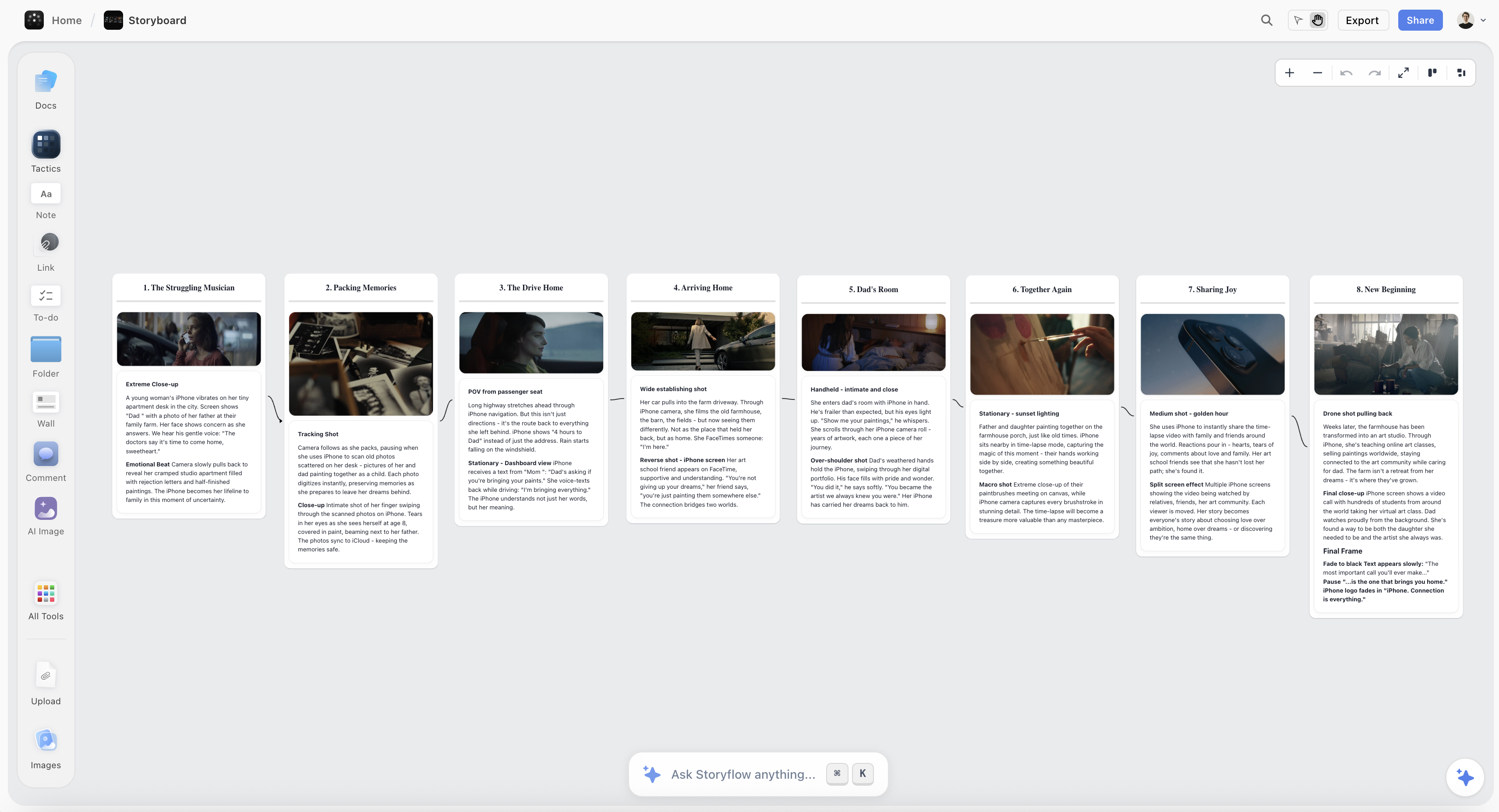
A sizzle reel plan on the Storyflow canvas, with reference frames and clip selects arranged under the five beats: hook, premise, proof, build, and close
Lock your reel's structure on one canvas
The references, the clip selects, and the five beats live in one place, and the AI drafts the beat order and flags a beat with no clip under it, so you open your editor to assemble a decided structure instead of inventing one clip at a time.

How to Make a Sizzle Reel, Step by Step
Here is the full method, from a blank page to a locked structure and a finished cut. It assumes you are making one sizzle to sell one project, whether that is a documentary series, a brand campaign, a creator's sponsorship pitch, or an event. Scale the footage up or down, but keep the order, because the value is in deciding what the reel argues before you spend time in a timeline making it look good.
Step 1: Define the pitch and the ask before any footage
Start with two sentences, not with clips. Write the premise, the single line that says what this is, and write the ask, the specific thing you want the viewer to do after ninety seconds. "A returning series that follows three rookie paramedics through their first year, and we want a development commission." "A brand film for a running shoe aimed at first-time marathoners, and we want the campaign." Everything else in the reel serves those two sentences, and if a clip does not push the viewer toward that ask, it does not belong, however good it looks. Most weak sizzles fail here, invisibly, because the maker never wrote the ask down and so the reel wanders. Decide who is watching, what you want from them, and what one line you need them to believe, and you have the brief for every other step.
Step 2: Pull references and study sizzles that sell
Before you build your own, study the shape of ones that worked. Find sizzle reels in your genre, series pitches, agency brand films, creator sponsor reels, and watch how they spend their first five seconds, how fast they cut, where the music turns, and how they land the ask. Pull the reference frames you want to learn from straight onto your board so you are working from the real thing, not a memory. In Storyflow you can grab a frame from a YouTube or Vimeo reference straight onto the canvas, so the exact moment a reel hooks you sits next to your plan as a target to match. The goal is not to copy but to reverse-engineer the structure that already sells to the buyer you are pitching, so your reel speaks the language that room already responds to.
Step 3: Choose the music first and let it set the pace
A sizzle is cut to music, so the track is not a decoration you add at the end; it is the spine you build on. Choose it early, from a licensed library so a brand's legal team never has to flag it, and pick a piece with a clear build: a quiet open you can hook over, a rise, and a peak you can land the ask on. Once you have the track, its structure becomes your structure. The hook sits over the intro, the premise lands before the first rise, the proof stacks through the build, and the close hits on the drop or the final swell. Cutting a sizzle to a track you chose last is how you end up recutting the whole thing twice. Choose the music first and the pace of the reel is already half decided.
Step 4: Source and select your strongest clips
Now gather your raw material and be ruthless about it. Pull everything you might use, your own footage, reference clips, mockups, screen recordings, testimonials, press mentions, numbers on a card, and then cut the pile down to only the moments that sell. A sizzle is short, so every second is expensive, and the discipline is subtraction: if a clip is merely good, it is out, because merely good dilutes the great. Select for moments that carry the pitch, the access no one else has, the face that makes the story, the number that proves the traction, not for the shots you are personally proud of. The reel is not a place to show everything you have; it is a place to show only what makes the buyer lean in. When in doubt, cut it, because a tight reel of ten great moments beats a loose reel of thirty good ones every time.
Step 5: Arrange the five beats on the board and lock the structure
This is the step that makes or breaks the reel, and it belongs on a board, not in a timeline. Lay the five beats out in order on one sizzle reel board, hook, premise, proof, build, close, and place your selected clips under the beat each one serves, in the sequence they will play. Now you can see the whole argument at once: whether the hook is actually your strongest five seconds, whether the premise reads before the energy takes over, whether the proof escalates or just repeats, whether the close carries the ask. Because I keep the whole plan on one infinite canvas in Storyflow, with reference frames and clip selects arranged under each beat, the AI can read the board to draft the beat structure, suggest voiceover or title-card lines, and flag a beat that has no clip under it yet. Move the cards until the order persuades, then lock it. The point of this step is that when you open your editor, you are assembling a decided structure, not discovering one clip at a time, which is the difference between a day in the timeline and a week.
Step 6: Cut to the music in your editor
Now, and only now, open Premiere Pro, DaVinci Resolve, or CapCut and build the reel from your locked board. Lay the music down first, then assemble the beats in the order you decided, cutting each clip to the track so the picture turns when the music turns. This is genuine editing work, timing, transitions, pace, color, captions, and it lives entirely in the editor; the board told you what to cut and in what order, and the timeline is where you make it feel good. Keep the board open beside the timeline as your map so you do not drift from the structure you locked. If you find yourself wanting to change the order here, go back to the board and change it there first, because reordering an argument is a board job and executing the cut is an editor job, and keeping them separate is how the reel stays coherent.
Step 7: Test it on a cold viewer and tighten to length
A sizzle is made for someone who has never seen your project, so test it on someone who has not. Show the cut to a person outside the work and watch where their attention dips, whether they understood the premise, and whether they could say what you were asking for at the end. Then tighten, because almost every first cut is too long: get it to 60 to 90 seconds, cut anything that is not carrying the pitch, and make sure the first five seconds still hook and the last five still ask. The buyer you are really pitching will give you less patience than your test viewer did, so if it drags for a friend, it is dead in the room that matters. Tighten until every second earns its place, then send it with the ask written in the email too, so the reel and the message say the same thing.
Where Storyflow Stops and the Editor Starts
Here is the honest boundary, because the tool you plan with and the tool you cut with are different choices, and blurring them is how first-timers lose a week.
Storyflow is where you plan the sizzle: the references, the clip selects, the five beats, and the order they play in, all on one canvas where you can see the whole argument and rearrange it until it persuades. It is genuinely good at that, because deciding structure is a job of seeing options side by side and moving them around, which is what an infinite canvas is for, and because the AI can read the whole board plus a Tactic and a few documents to draft the beat order and the lines and catch a beat with no clip under it. What Storyflow is not is a video editor. It does not have a timeline, it does not sync clips to music frame by frame, it does not color grade, and it does not render an MP4. Trying to cut the actual reel in a planning tool is using the wrong tool, and the reel suffers for it.
The cut belongs in Premiere Pro, DaVinci Resolve, or CapCut, full stop. Those are timeline editors built to place a clip on a beat, trim it to the frame, layer the music, add the captions, grade the picture, and export the file. When people ask whether they can just make the whole sizzle in Storyflow, the honest answer is no, and pretending otherwise would waste your time. Plan the structure and the clip order on the board, then cut the video in the editor, and never ask either one to do the other's job. The board decides what the reel says; the editor makes it say it well. Respect the split and you get a reel that is both well argued and well made, which is the only kind that wins the yes.
Common Sizzle Reel Mistakes
- No hook in the first five seconds. A slow open loses the one viewer who matters before the reel has said anything. Lead with your single most arresting moment, not with a logo or a slow fade.
- No premise. Energy with no idea underneath it is a screensaver. State what this is in one clear line before the montage takes over, so the viewer knows what they are being pitched.
- No ask at the end. A reel that does not ask for anything gets a nod and no decision. Close on the specific thing you want, a commission, a budget, a meeting, a partnership.
- Cutting before the structure is locked. Assembling clips in a timeline before you know what the reel argues is how a week disappears. Decide the beat order on a board first.
- Keeping clips because you like them. Merely good footage dilutes the great. Select ruthlessly for what sells the pitch, not for what you are proud of.
- Choosing the music last. The track is the spine, not the garnish. Pick it early and cut to its build, or you will recut the whole reel when you add it.
- Making it too long. A buyer's patience runs out fast. Keep it to 60 to 90 seconds and cut anything that is not carrying the pitch.
- Treating the planning board as an editor. Do the cut, the color, and the export in a real timeline tool. Use the board to decide structure and order, not to render the video.
The Bottom Line
A sizzle reel is not a highlight of your best footage. It is a ninety-second argument that a specific project deserves someone's money or their yes, and it lives or dies on structure, not on any single shot. Write the premise and the ask first, study the reels that already sell to your buyer, choose the music that will set the pace, and select your clips ruthlessly for what carries the pitch. Then lay the five beats out, hook, premise, proof, build, close, and lock the order before you ever open a timeline.
The honest boundary holds. Plan the structure and the clip order on one board where you can see the whole argument and move it around, and cut the actual reel in Premiere Pro, DaVinci Resolve, or CapCut, where a timeline can place a clip on a beat and render the file. The tool you plan with and the tool you cut with are different choices, and the maker who respects the difference is the one who spends a day in the edit instead of a week, because the reel was already decided before the timeline opened.
If your next pitch is still a folder of clips you have not decided how to order, plan the sizzle on one canvas in Storyflow and lock the structure before you cut.
FAQ: Sizzle Reels
What is a sizzle reel?
A sizzle reel is a short, high-energy pitch video, usually 60 to 90 seconds, that sells one specific idea to a decision maker: a series to a network, a brand campaign to a client, a creator to a sponsor, a project to a funder. It stitches together footage, reference clips, mockups, and evidence to make a busy person believe a project is worth backing, often before that project is finished or even greenlit. Unlike a video that entertains, a sizzle exists to persuade, so it is built like an argument: a hook, a premise, proof, an energy build, and a clear ask. The best ones make their case in the first five seconds and close by asking for exactly what they want.
How long should a sizzle reel be?
Most sizzle reels run 60 to 90 seconds, and shorter is usually safer than longer. The viewer is typically a commissioning editor, a brand, or a funder deciding fast among many pitches, and their patience is short, so every second has to carry the pitch. Some internal or fundraising sizzles stretch to two or three minutes when the story genuinely needs it, but that is the exception, and length is a risk, not a feature. If the reel drags for a friend watching it cold, it will lose the room that matters. Cut until every second earns its place, keep the hook in the first five seconds, and keep the ask at the end.
What is the difference between a sizzle reel and a trailer?
A trailer promotes something that already exists and is finished, selling tickets or views to a general audience. A sizzle reel usually sells something that does not fully exist yet, a series that is not greenlit or a campaign that is not shot, and it sells it to a single decision maker who can fund it. A trailer assumes the product is made and markets it to a crowd; a sizzle assembles whatever you have to convince one buyer the finished thing is worth backing. The practical result is that a sizzle leans harder on premise and proof and always ends on an ask, where a trailer ends on a release date.
What is the difference between a sizzle reel and a showreel?
A showreel, or demo reel, is a portfolio that proves a person or company can do good work by showing their best moments across many projects, with the job of "hire me" or "we are good at this." A sizzle reel is narrower: it sells one specific idea with one specific ask, not your general competence. You might lift clips from a showreel into a sizzle as proof, but the sizzle is organized around a single pitch, while a showreel is organized around range. If you are showing what you can do, that is a showreel; if you are selling one project you want funded, that is a sizzle.
What should a sizzle reel include?
A sizzle should include five beats in order: a hook in the first five seconds, a premise line that says what this is, proof and highlight moments that show it is real and worth backing, an energy build paced to music, and a close that carries a clear ask. Underneath those beats you want your strongest evidence, the access you have, the talent attached, the footage in the can, the traction or numbers, and nothing that merely looks nice without pushing the pitch. It should be cut to a licensed music track with a clear build, kept to 60 to 90 seconds, and end by asking for the specific thing you want. Anything that does not serve the premise or the ask should be cut.
How do you make a sizzle reel with no budget?
You make a no-budget sizzle from what you already have and free tools. Source from existing footage, screen recordings, reference clips, testimonials, and numbers on a card, then select ruthlessly for the moments that sell the pitch. Plan the five-beat structure on a board (Milanote's free tier handles a simple version now, or Storyflow if you are already on a paid plan), license a music track (a library trial or a properly licensed free track), and edit in DaVinci Resolve or CapCut, both of which have capable free tiers. Storyflow's Free plan, launching before the end of 2026, will run the whole planning method at no cost: references, clip selects, and beats arranged on one canvas. The budget goes into structure and selection, not into fancy footage, and a tightly argued reel of modest clips beats an expensive reel with no point.
Can AI help make a sizzle reel?
Yes, for planning the reel and pressure-testing its structure, less so for the emotional judgment of the cut. Once your references, clips, and beats are on one board, AI can draft the beat order, suggest voiceover or title-card lines, tighten the premise and the ask, and flag a beat that has no clip under it. Because Storyflow's AI reads your full canvas board, plus up to 1 Tactic and 3 Documents you point it at, it works from your actual plan rather than generic prompts, so its suggestions fit your specific pitch. What AI cannot do is feel whether the hook actually stops a busy person or whether the build lands, and it cannot cut the video for you. Use AI to structure and stress-test the plan, and bring your own judgment to the edit.
Is Storyflow free for planning a sizzle reel?
Not during early access. Storyflow's Free plan, which launches before the end of 2026, will include unlimited objects and boards, unlimited collaboration, basic AI, and 20 file uploads, which will cover planning a real sizzle: reference frames, clip selects, and the five beats arranged on one canvas for your team to see. Paid tiers start at Plus for $7.99/month billed annually ($9.99 monthly), which adds the 200+ Story Blueprints and unlimited file uploads, with Pro at $14/month and Max at $39/month for more AI and, on Pro and Max, AI image generation. There is no separate Team plan; Max is the team tier. The Free plan will genuinely run the whole planning method, so you will be able to build and lock the structure at no cost, then cut the reel in your editor of choice.
Where does Storyflow lose for a sizzle reel?
In the edit, entirely. Storyflow does not have a timeline, does not sync clips to music frame by frame, does not color grade, and does not export a video file, so the actual cut belongs in Premiere Pro, DaVinci Resolve, or CapCut. It is also not a music library and not a stock-footage source. What Storyflow does is plan the reel: it holds your references, your clip selects, and your five beats on one canvas so you can decide the structure and the order before you open an editor, with AI that reads the board to draft the beats and catch the gaps. Used for planning and deciding, which is what it is built for, it turns a vague pile of clips into a locked argument; used as a video editor, it is the wrong tool, and the honest workflow cuts the reel in a real timeline.
Table of Contents
- Why a Sizzle Reel Lives or Dies on Structure
- The Anatomy of a Sizzle Reel
- Quick Picks: Where to Plan a Sizzle Reel
- Comparison Table: Where to Plan a Sizzle Reel
- How to Make a Sizzle Reel, Step by Step
- Where Storyflow Stops and the Editor Starts
- Common Sizzle Reel Mistakes
- The Bottom Line
- Author
- FAQ: Sizzle Reels
- Related Reading
Templates to check out for this topic


Templates you can use in Storyflow
Every Storyflow board starts from real structure and an AI that reads the whole canvas. Open one of these templates and make it yours.


See Storyflow in Action
A visual AI workspace where every feature lives inside one canvas. No tab-switching, no context lost.
Build your entire board from a single message
Type what you need in the AI chat at the bottom of your canvas. The AI adds cards, headings, and structure directly onto your board.
Use expert frameworks as AI context
Type @ in the AI chat and choose any Tactic. The AI tailors every response to that framework instead of giving generic advice.
Turn your board into a mind map in seconds
Ask the AI to restructure your canvas as a mindmap. It connects your ideas into a visual hierarchy so you can see how everything relates.
Why Storyflow Exists
Storyflow actually began as a personal tool while working on creative and research projects.
We kept running into the same problem: ideas were scattered everywhere: notes, documents, and whiteboards.
Nothing helped us see how everything connected.
So we started building a workspace designed around how ideas actually grow.
→ Read how Storyflow was createdJustkay
Documentary Filmmaker & Founder at Storyflow
Published: 2026-07-21
Extremely simple, seriously capable


See how easy it is to get started
Watch a real project come together, from a blank board to a finished plan, clicked through step by step.
Start creating with AI and become more productive
Transform your creative workflow with AI-powered tools. Generate ideas, create content, and boost your productivity in minutes instead of hours.