The 10 Best Video Essay Tools in 2026 (Tested)
We tested 10 video essay tools for research, script, and storyboard. Storyflow ranks #1 for visual, canvas-first planning. Plus from $7.99/mo.

Category
YouTube
Author

Justkay
Documentary Filmmaker & Founder at Storyflow
Topics
2026-07-21
•
18 min read
•
YouTube- best video essay tools
- video essay software
- video essay planning tool
- how to plan a video essay
- video essay script tool
- video essay storyboard tool
- youtube video essay tools
- video essay app
What is the best video essay tool in 2026?
The best video essay tools in 2026 are Storyflow for visual, canvas-first planning, Notion for a relational research and script database, Descript for script-based editing, and DaVinci Resolve for the final cut. Storyflow ranks first because a video essay is won in the plan, not the timeline: the research clippings, the argument, the outline, the script, and the storyboard all sit on one infinite canvas, and the AI reads the full active board at once instead of one page at a time. It is paid-only during early access, with a Free plan (unlimited objects, no time limit) launching before the end of 2026, and paid begins at $7.99 per month billed annually on Plus. The right pick depends on which stage you are struggling with: gathering research, building the argument, writing the script, storyboarding the shots, or cutting the footage. No single tool wins for the whole pipeline, which is why this guide sorts them by the stage they own. Two ideas run through the whole list. A video essay is an argument, not just footage, so it is won or lost in the research and the outline, long before you open an editor. And the pipeline is split down the middle: planning tools and editing tools are different species, and the common mistake is trying to build the argument inside a timeline or trying to research inside Premiere. This guide is about the planning half, where the essay actually gets its shape, and it is explicit about the handoff to the edit. I have planned long-form and documentary video work for years, where a twenty-minute piece starts as hundreds of research fragments and a claim I am not yet sure I can defend, so I tested each tool on that real job, not on a demo file.

Full disclosure: Storyflow is our own product, so weigh its placement with the skepticism you would apply to any tool a company recommends on its own blog. We rank it first for one job, planning a video essay from research to a storyboarded script on one canvas, and we are explicit that the actual editing happens elsewhere, in Descript, DaVinci Resolve, or Premiere Pro, with Frame.io for review.
Quick Comparison
Where video essayists actually plan and finish a piece, and the one job each tool is best at.
| Tool | Best For | AI Features | Price |
|---|---|---|---|
| Storyflow | Visual plan-to-storyboard | Reads the whole board | $7.99 mo annual (free plan late 2026) |
| Notion | Research + script database | Notion AI (page-level) | Free / paid |
| Descript | Script-based editing | Transcribe, edit, voice | Free / paid |
| DaVinci Resolve | The final cut and color | AI tools (Studio) | Free / one-time |
All 10 Video Essay Tools, Ranked
- Storyflow: best visual, canvas-first plan where research, script, and storyboard live together and the AI reads the whole board
- Notion: best relational research and script database for a channel
- Descript: best script-based editing where the transcript is the timeline
- Milanote: best lightweight visual board for the argument and moodboard
- Scrivener: best for long-form, chaptered scripts with research beside the draft
- Google Docs: best free place to write and collaborate on the script
- Obsidian: best local-first, interlinked research notes and second brain
- DaVinci Resolve: best free, industry-grade editor for the final cut
- Premiere Pro: best industry-standard editor for the final cut
- Frame.io: best review and feedback once there is a rough cut
The ranking rewards how well a tool handles the plan-to-storyboard job this guide is about. The editors and the review tool sit lower not because they are weak, they are best-in-class at what they do, but because their job starts after the plan is done. Keep the split in mind as you read: the top of the list is where an essay gets its argument, and the bottom is where that argument becomes a finished video.
Why a Video Essay Needs More Than a Blank Timeline
Most bad video essays are not badly edited. They are badly argued. The cut is clean, the b-roll is pretty, the voiceover is warm, and twelve minutes in you still cannot say what the point was. That is not an editing failure. It is a planning failure, and no timeline can fix it, because by the time footage is on a timeline the argument is already frozen.
A video essay is a thesis delivered over time. It gathers sources, builds a claim, sequences the evidence, scripts the narration, and only then storyboards how each beat looks on screen. Skip the first four steps and open Premiere anyway, and you spend the edit discovering, expensively, that your argument has a hole in the middle. The reason people search for video essay tools is not that they cannot edit. It is that the hard part happens before the edit, and an editor is the wrong shape for it.
Three specific failures push essayists off a blank timeline and toward a dedicated planning tool.
- The argument never gets tested before the shoot. In an editor, you cannot see the whole thesis at once, so you find the weak link when you are already cutting. A planning surface lets you lay the claim and its evidence side by side and catch the gap while it is still cheap to fix.
- Research scatters across ten tabs and three apps. A single essay pulls from articles, videos, screenshots, quotes, and your own notes. Held in bookmarks and a Google Doc, the source you need at minute nine is the one you cannot find, and citations quietly go missing.
- Nobody can hold a twenty-minute argument in their head. Cowan's research (Behavioral and Brain Sciences, 2001) established that human working memory holds roughly four chunks of information at once. A video essay has dozens of beats, sources, and transitions, so the tool is not a luxury; it is the external memory the argument requires.
There is a cost underneath all three. The more sources an essay gathers, the more time you lose hunting for the one clip or quote you half-remember, and the McKinsey Global Institute (2012) estimated that knowledge workers already spend about 19 percent of the workweek just searching for information. An essay spread across tabs, folders, and a script doc pays that tax on every research question.
Zoom out and the tools split into camps. Visual-canvas tools (Storyflow, Milanote) treat the essay as a space you arrange, where sources, argument, script, and storyboard sit side by side and you see the whole piece at once. Database tools (Notion) treat it as linked records for a channel that ships many essays. Writing tools (Scrivener, Google Docs) keep the focus on the script itself. Notes tools (Obsidian) treat research as an interlinked second brain. And editors (Descript, DaVinci Resolve, Premiere Pro) plus review tools (Frame.io) take over once the plan is done. None is strictly better. Each matches a different stage.
When do you not need one? If your essay is a three-minute commentary you can hold in your head, or a talking-head take with no research and no b-roll, a script doc is enough. A planning tool earns its keep the moment your argument outgrows your memory, and not one beat before.
How We Evaluated the Best Video Essay Tools
We tested each tool on the same real workloads: a research-heavy explainer built from dozens of sources that had to be cited, a personal-argument essay that lived or died on structure, and an educational piece that had to teach a concept in a fixed order. Tools were not scored on feature lists. They were scored on whether an essay got a stronger argument and a cleaner structure out of them.
Six criteria set the rankings, in this order of weight. Argument support: can you see the whole thesis and its evidence at once, and catch a weak beat before you shoot it. Research capture: how easily sources, clips, quotes, and screenshots come in and stay findable and cited. Script fit: does the tool help turn an outline into a narration script without fighting you. Storyboard and visual planning: can you plan how each beat looks, not just what it says. AI usefulness: holding the substrate constant, how much the AI helps you research, question, and shape the argument rather than just autocomplete a sentence. Handoff honesty: how cleanly the plan exports or hands to the editor where the real cut happens.
Every tool was used hands-on for at least two weeks on genuine video essay work. The editors and the review tool were judged on their role in the essay pipeline, not as general-purpose software, where DaVinci Resolve, Premiere Pro, and Frame.io are each best-in-class. Where a competitor's pricing has shifted recently, we write "verify current pricing" rather than quote a number that may already be stale.
Quick Picks by Use Case
Best overall video essay planning tool: Storyflow. The pick when your essay is research-heavy and visual, with sources, argument, script, and storyboard you want to see and question at once. Plus is $7.99/month billed annually ($9.99 monthly). The honest limit: it is not an editor, so you cut the footage elsewhere.
Best research and script database for a channel: Notion. For creators who ship essays on a schedule and want a relational hub linking ideas, sources, scripts, and publish dates. Free for personal use; paid from about $10/user/month.
Best script-based editing: Descript. When your essay is narration-first and you want to edit the video by editing the transcript. Free tier; paid plans.
Best long-form script tool: Scrivener. For essayists writing chaptered, twenty-minute-plus scripts who want research and draft in one binder. About $59.99 one-time.
Best free editor for the final cut: DaVinci Resolve. The industry-grade editor and colorist you can use for free. Free; Studio is a one-time upgrade.
Best free starting point: Google Docs. Draft a first script for free, then move to Storyflow once the research and structure start to strain a linear doc; it is paid-only during early access, with Plus at $7.99/month billed annually and a Free plan launching before the end of 2026.
The honest split: most essayists plan and script in one tool and edit in another. Try Storyflow to plan a video essay on one canvas.
Comparison Table: Best Video Essay Tools
| Tool | Best For | Starting Price | Free Plan | Rating (/10) |
|---|---|---|---|---|
Storyflow | Visual plan-to-storyboard (AI reads the whole board) | $7.99/mo (annual) | Coming late 2026 (invited collaborators join free now) | 9.4/10 |
Notion | Relational research and script database | Free; from about $10/user/mo | Yes (free personal) | 8.7/10 |
Descript | Script-based editing (transcript is the timeline) | Free; paid | Yes (limited) | 8.6/10 |
Milanote | Visual argument board and moodboard | Free (100 items); Pro | Yes (100-item free) | 8.3/10 |
Scrivener | Long-form script with research beside the draft | About $59.99 one-time | Trial only | 8.1/10 |
Google Docs | Free, collaborative script writing | Free | Yes (free) | 8.0/10 |
Obsidian | Local-first interlinked research notes | Free (personal); Sync extra | Yes (free personal) | 7.9/10 |
DaVinci Resolve | The final cut and color | Free; Studio one-time | Yes (full free version) | 7.8/10 |
Premiere Pro | The final cut (industry standard) | Subscription | Trial only | 7.7/10 |
Frame.io | Review and feedback on a rough cut | Free tier; paid | Yes (limited) | 7.6/10 |
Prices above are the published rates at the time of writing and move often, so check the vendor's own page before you commit. The shape of each plan (free tier, subscription, or one-time licence) is more stable than the number. Rating criteria: we weighted argument support, research capture, and script fit more heavily than raw feature count, because this guide is about planning and structuring a video essay. Editors and the review tool are scored for their role in that pipeline, not as general-purpose software. On their own turf, DaVinci Resolve, Premiere Pro, and Frame.io rate far higher. Prices checked July 2026; competitor pricing marked "verify current pricing" moves often, so confirm on each vendor's page.
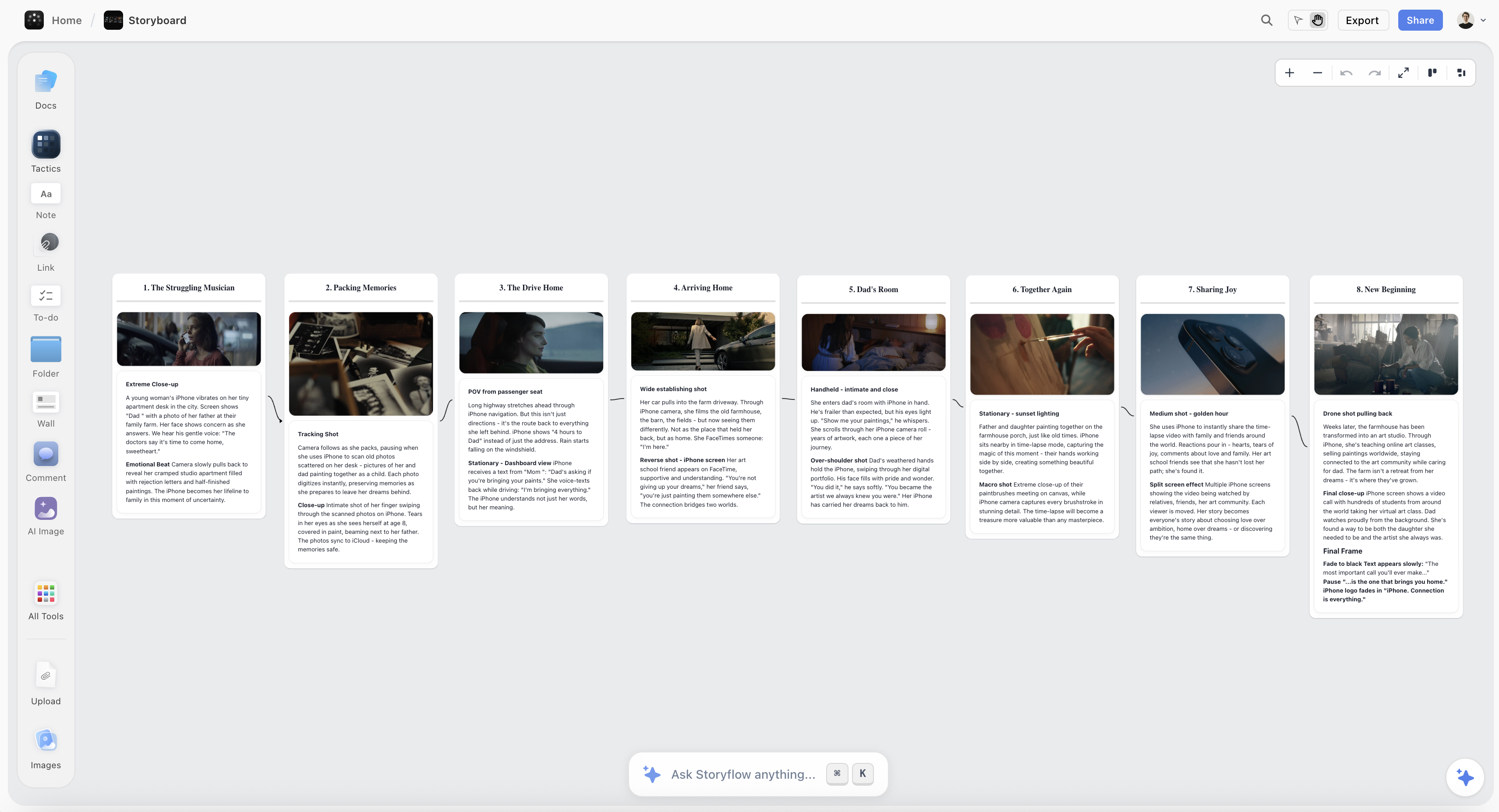
A video essay planned on the Storyflow canvas, with research clippings, an argument outline, a narration script, and a storyboard on one board
Plan your video essay on one canvas
Research clippings, the argument, the script, and the storyboard live on one board, and the AI reads the whole thing, so you catch a weak beat before you shoot it and hand a clear storyboard to your editor.

Detailed Reviews: Best Video Essay Tools
1. Storyflow (Best Visual, Canvas-First Plan)
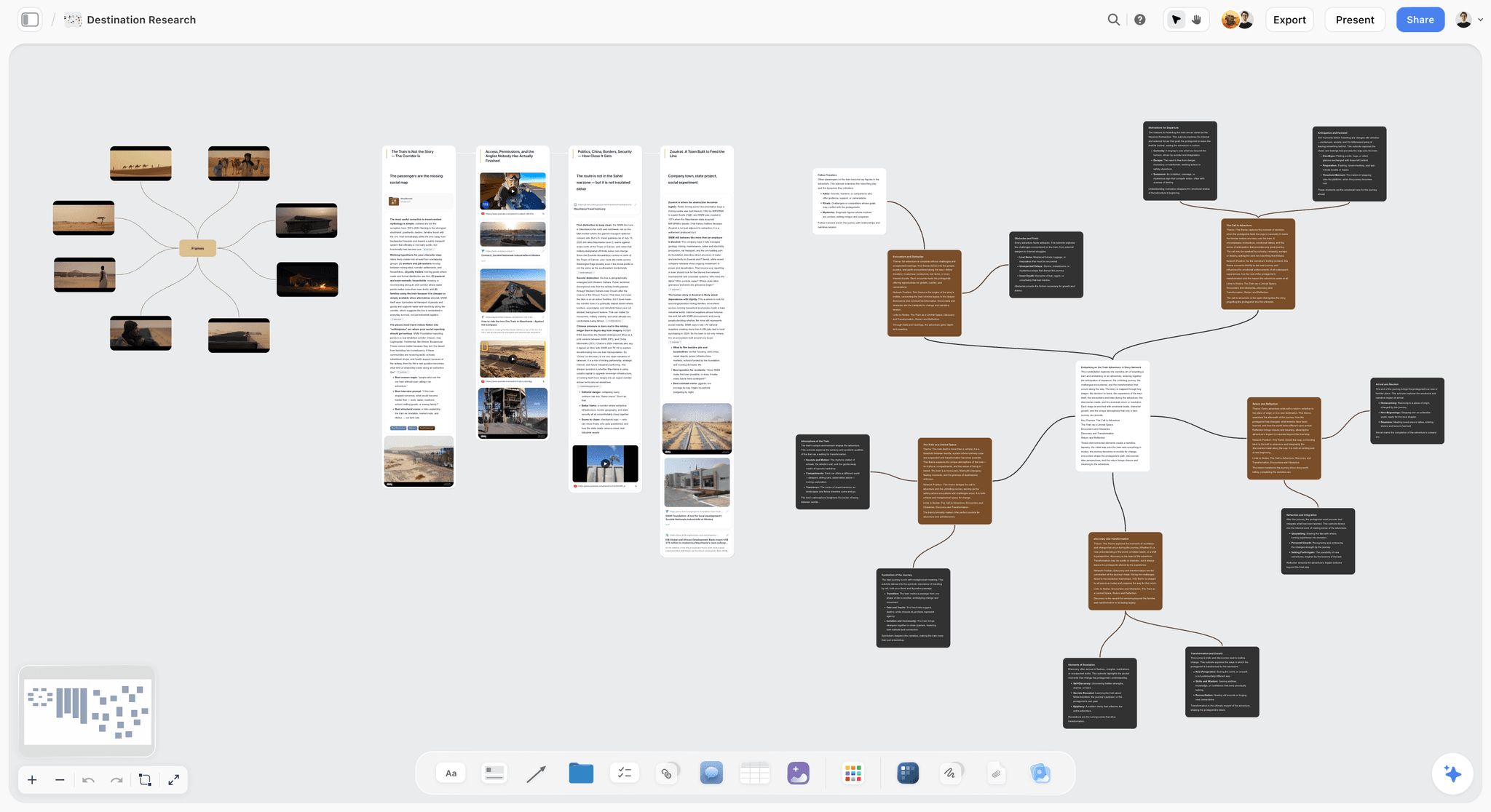
Storyflow is a visual workspace where the entire plan for a video essay lives on one infinite canvas and the AI reads the full active board by default. Research clippings, the thesis, the outline, the narration script, and the storyboard sit next to each other instead of scattered across tabs and docs, so you can see the whole argument at a glance while an AI grounds its answers in everything on the board. You can add up to 1 Tactic (a Story Blueprint) and up to 3 Documents by @-mention when you want to pull a specific framework or a full script draft in as extra grounding. The 200+ Story Blueprints on paid plans include structures made for exactly this work, like the Hero's Journey for a narrative essay, AIDA for a persuasive one, and Retention Hooks for holding a YouTube audience through a long argument. Best of all for essayists who quote footage, you can grab a frame from a YouTube or Vimeo reference straight onto the canvas, so the exact shot you are analyzing lives inside the plan instead of in a separate tab.
Best for: YouTubers, video essayists, and educators whose essays are research-heavy and visual, and anyone who wants the argument, the script, and the storyboard on one surface an AI can read whole.
Pricing: Paid-only early access today; the Free plan (unlimited objects, unlimited shared boards, unlimited collaboration, 3 starter blueprints, 20 file uploads) launches before the end of 2026, and anyone a paid member invites to a board joins free now. Plus is $7.99/month billed annually or $9.99 monthly (full 200+ Story Blueprints, more AI, unlimited uploads). Pro is $14/month annual or $19 monthly (adds AI image generation and far more AI). Max is $39/month annual or $49 monthly (adds 40x more AI plus a team workspace with permissions and roles). Max is the team-targeted tier; there is no separate Team plan. Pricing is flat per account at the solo tiers, not per seat.
Pros: The canvas matches how a video essay actually gets built, sources and argument and script visible at once, so you catch a weak beat before you shoot it. Board-aware AI answers questions from the whole plan, not one page, so it can tell you where the argument thins out or which source has no on-screen evidence yet. Grabbing frames from reference videos keeps the footage you are quoting inside the plan, and the Retention Hooks and other blueprints scaffold a structure that holds attention.
Cons: It is a planning surface, not an editor, so the actual cut, color, and audio happen in DaVinci Resolve, Premiere Pro, or Descript. It is cloud-only, with no local-first mode for privacy-strict research. And it is canvas-card-shaped, so if you only ever want to write a linear script and nothing else, a plain doc is lighter.
Verdict: The strongest tool for the half of a video essay that decides whether it works, the research, the argument, the script, and the storyboard. If your next essay is more than a talking-head take, rebuild its plan on a board for one week and the fit becomes obvious. Then hand the storyboard to your editor.
2. Notion (Best Research and Script Database)
Notion is the flexible database most creators already run their channel on. Build relational databases where essay ideas link to sources link to scripts link to publish dates, and you get a queryable production hub that stays honest as long as you keep it current. Where Storyflow wins on seeing one essay's whole argument at once, Notion wins on managing many essays as a pipeline.
Best for: YouTubers and educators who ship essays on a schedule and want a relational hub for ideas, research, scripts, and status.
Pricing: Free for personal use. Paid plans start around $10/user/month with Notion AI as an add-on. Pricing is per seat, so it scales with team size.
Pros: Relational databases are ideal for a channel: link a script to its sources, its thumbnail, and its publish date, and filter to see what is due this week. The template ecosystem is huge, including ready-made content calendars and script trackers. Notion AI helps draft and summarize on the page you are on.
Cons: It is doc-and-database-shaped, not a visual canvas, so a single essay's argument is a stack of pages rather than a space you see at once. You build the structure yourself before it becomes useful, and the AI reads the current page or database rather than a full project board.
Verdict: The strongest tool for running a channel's essay pipeline, best for creators who think in tables and ship on a cadence.
3. Descript (Best Script-Based Editing)
Descript is the tool that blurs the line between the script and the edit, and for a narration-first video essay that is a genuine superpower. It transcribes your footage, then lets you edit the video by editing the text: delete a sentence in the transcript and the corresponding video is gone. For an essayist whose piece is voiceover over b-roll, editing the words is editing the essay. This is where the plan finally becomes a video.
Best for: Video essayists whose piece is narration-led and who want to cut the video by cutting the script.
Pricing: Free tier with limits; paid plans unlock more transcription hours and features.
Pros: Text-based editing is dramatically faster for talking-head and voiceover essays, and the transcription is strong. Overdub and the AI voice tools help patch narration without a re-record. Screen recording and simple multitrack make it a capable one-stop for a certain kind of essay.
Cons: It is transcript-first, so complex visual sequencing, effects, and color grading are beyond it, and serious essayists still finish in a full editor. It is not a research or argument tool, so the plan happens before Descript, not in it. Heavy projects can get sluggish.
Verdict: The best bridge from script to screen for narration-driven essays, and the clearest example of why the plan and the edit are different jobs. Plan the argument elsewhere, then let Descript turn the script into a cut.
4. Milanote (Best Visual Argument Board)
Milanote is a clean visual board tool for arranging notes, images, and cards. For a video essay it shines on the early argument-and-mood work: drag references, quotes, and beat cards onto a board and start seeing the shape of the piece. Where Storyflow adds board-aware AI, story blueprints, and a script-to-storyboard flow, Milanote keeps things simple and elegant.
Best for: Essayists who want a simple, attractive visual board for the argument and the moodboard before scripting.
Pricing: Free plan capped at 100 notes and images; paid Pro unlocks unlimited items.
Pros: It is one of the most pleasant visual tools to actually use, excellent for the moodboard and the loose early structure of an essay, and fast to start with no setup. Dragging references and quotes into columns is a natural way to rough out an argument.
Cons: It is lighter on AI and structured, linkable data than Storyflow or Notion. The 100-item free cap arrives quickly on a research-heavy essay, and there is no methodology layer to scaffold a retention-friendly structure or a script.
Verdict: A strong, lightweight visual option, best for the mood and early-argument layer before you commit to a script.
5. Scrivener (Best Long-Form Script Tool)
Scrivener is the long-form writing tool that keeps the script and the research in one binder. For a twenty-minute-plus video essay written as a proper script, its binder holds the draft, a research folder, and a corkboard of beats, so your sources sit one click from the paragraph you are writing. Where Storyflow keeps the whole plan visual and the AI board-aware, Scrivener keeps the focus on the writing itself.
Best for: Essayists writing long, chaptered scripts who want research and draft in the same tool.
Pricing: About $59.99 one-time for macOS or Windows, with a separate iOS app. Free trial available.
Pros: The script and the research live together, which cuts context-switching on a long piece. The corkboard is a genuinely good way to reorder beats. A one-time price is rare and welcome in a subscription world.
Cons: It is not a visual canvas or a storyboard tool, so how each beat looks on screen lives elsewhere. It is not cloud-native or built for real-time collaboration, the interface feels dated, and it has no native AI to question your argument.
Verdict: The best pick when the essay is fundamentally a long written script and you want your research beside the draft.
6. Google Docs (Best Free Script Writing)
Google Docs is the universal document, and it is where most video essay scripts are born. For a first draft it can be all you need: free, collaborative, and familiar to everyone. It is honest about what it is, a place to write words rather than to build an argument or plan the visuals.
Best for: Essayists drafting a first script and creators who want simple, free, collaborative writing.
Pricing: Free with a Google account. Paid Workspace tiers add storage and admin features.
Pros: It is free, universal, and frictionless for collaboration, with comments and suggestion mode that make script feedback easy. There is no learning curve at all, and it plays nicely with a two-column script format.
Cons: There is no research canvas, no storyboard, and no structure beyond headings, so the argument is only as organized as you make it. It breaks down once an essay pulls in dozens of sources and visual beats, and there is no AI grounded in your whole project.
Verdict: The best free place to write a script, and the tool most research-heavy essays eventually outgrow for the planning stage.
7. Obsidian (Best Local-First Research Notes)
Obsidian is a local-first, plain-text notes tool with backlinks and a graph view. Essayists use it as a second brain: capture research as linked notes that live entirely on your own device, so a claim in one note connects to the source in another. Where Storyflow is cloud-native and visual, Obsidian is local, text-first, and endlessly customizable.
Best for: Research-heavy essayists who want a private, interlinked archive of sources and ideas they fully own.
Pricing: Free for personal use. Sync is an add-on subscription, and commercial use has its own license.
Pros: Full data ownership and offline access, with zero vendor lock-in, which matters for sensitive research. The backlink and graph model suits an interlinked body of sources, and the plugin ecosystem is deep, including a canvas plugin for light visual work.
Cons: You assemble the whole structure yourself, and it is text-first rather than a visual essay canvas. Native collaboration is weak, there is minimal native AI, and it does not carry you into scripting or storyboarding.
Verdict: The strongest local-first research brain, best for essayists who gather a lot of sources and want to own their notes.
8. DaVinci Resolve (Best Free Editor)
DaVinci Resolve is where the plan becomes a finished video, and it is the most generous free tool on this list. It is a full, industry-grade editor and colorist that professionals cut features on, available free with no watermark. For a video essay, this is where your storyboarded script turns into a real cut with b-roll, grade, and sound. It is not a planning tool, and it does not pretend to be.
Best for: Essayists who want a free, professional editor for the final cut, color, and audio.
Pricing: Free version is remarkably complete. DaVinci Resolve Studio is a one-time purchase that adds advanced AI and effects.
Pros: It is arguably the best free editor ever released, with color grading, Fairlight audio, and Fusion effects in one app, and the one-time Studio license avoids a subscription.
Cons: The learning curve is real, it is overkill before your plan is done, and it offers no research, argument, or script surface, so everything this guide is about happens before you open it.
Verdict: The best free editor for the final cut, and a clear reminder that the essay is won in the plan and finished here. Rated lower only because editing is not the planning job this guide ranks.
9. Premiere Pro (Best Industry-Standard Editor)
Premiere Pro is the editor much of the industry runs on, and for many essayists it is where the cut lives, especially if they are already in the Adobe ecosystem. Like Resolve, it is a finishing tool, not a planning one. It takes your storyboarded script and turns it into the polished video, with deep integrations into After Effects and the rest of Creative Cloud.
Best for: Essayists already in Adobe's ecosystem who want an industry-standard editor for the final cut.
Pricing: Subscription, sold standalone or as part of Creative Cloud. Free trial available.
Pros: It is a mature, deeply capable editor with the widest plugin and tutorial ecosystem, and its After Effects integration is unmatched for motion-heavy essays.
Cons: It is subscription-only, with no research or planning surface, so the whole plan happens outside it, and like any editor it is the wrong place to discover that your argument has a hole.
Verdict: The industry-standard editor for the final cut, best when you already live in Adobe. Rated for its role in the essay pipeline, where the plan comes first.
10. Frame.io (Best Review and Feedback)
Frame.io is a review-and-collaboration tool for video, and it enters the pipeline last, once there is a rough cut. Collaborators leave time-stamped comments directly on the video, so feedback on a video essay is precise instead of a vague email. It is not where you plan or edit, but it is where you get notes without losing your mind.
Best for: Essayists and teams who need clean, time-stamped feedback on a cut before publishing.
Pricing: Free tier with limits, plus paid plans for more storage and collaborators.
Pros: Time-stamped, frame-accurate comments make review far cleaner than screen-shared calls or email threads, version stacking keeps cuts organized, and the Adobe integration is tight for Premiere users.
Cons: It is a review layer only, with no research, planning, scripting, or editing of its own, and its value depends entirely on having collaborators.
Verdict: The best review layer for a finished cut, and the final step after the plan and the edit are done.
Persona-Based Recommendations
YouTube Video Essayist
Top picks: Storyflow, then Descript. Storyflow to build the argument, gather research, and storyboard the script on one canvas with Retention Hooks to hold the audience. Descript to cut a narration-led essay by editing the transcript. Avoid trying to structure a long argument inside your editor; it is the wrong shape for the plan.
Educator or Explainer Creator
Top picks: Storyflow or Notion. Storyflow when a lesson is visual and you want sources, script, and on-screen beats visible at once, with the AI checking your logic. Notion when you teach a series and want a relational hub linking topics, sources, and scripts. Both beat a lone doc once the material gets deep.
Research-Heavy Essayist
Top picks: Storyflow and Obsidian. Storyflow for the visual research canvas where sources, quotes, and reference frames from YouTube or Vimeo live beside the argument and the AI reads the whole board. Obsidian if you need a private, local, interlinked archive of sensitive sources. This is close to the workflow I run for documentary-style pieces.
Solo Creator on a Budget
Top picks: DaVinci Resolve and Storyflow. DaVinci Resolve edits the final cut for free, no subscription. Storyflow is paid-only during early access; Plus is $7.99/month billed annually for the plan, script, and storyboard layer, with unlimited objects and no time limit. Together they take an essay from idea to finished video for one low monthly cost.
Team or Channel with Collaborators
Top picks: Storyflow Max or Notion, plus Frame.io. Storyflow Max ($39/month annual) for a shared visual plan with a team workspace, permissions, and roles. Notion for a relational content pipeline. Frame.io on top for time-stamped review once there is a cut. Pick the planning tool by whether your team thinks in space or in tables.
Honorable Mentions
A few tools that came close but did not make the main ten.
- NotebookLM: Google's source-grounded research assistant is excellent for interrogating a pile of sources before you script, narrower than a full planning canvas but strong for the research stage.
- Otter.ai: Fast, accurate transcription for interviews and reference footage, useful upstream of the script but not a planning or editing tool.
- CapCut: A fast, free editor that suits short-form and social essays, lighter than Resolve or Premiere for long-form finishing.
- Miro or FigJam: Excellent infinite whiteboards for a visual plan, but without a story or AI layer built for a video essay's argument.
- Final Cut Pro: A strong one-time-purchase editor for Mac users, a finishing tool that competes with Resolve and Premiere rather than a planning surface.
These are not weak tools. Their fit for planning and structuring a video essay is just narrower than the ten above.
When a Simple Doc Wins
For some essays, a single document is the correct tool and buying anything else is unnecessary friction. A doc wins when your piece is a short commentary you can hold in your head; when it is a talking-head take with no research and no b-roll; when the whole thing is you and a script and nothing to storyboard; and when the argument genuinely fits on one page.
If three or more of those match, stay in the doc and write. A planning tool is external memory for an argument too big to hold, so if your essay is not that big yet, the tool is overhead, not leverage. The moment the research spills past your tabs and the structure stops fitting in your head is the moment to graduate, and not before.
The Bottom Line
The best video essay tools in 2026 depend on which stage you are struggling with. If it is the argument, the research, or the structure, Storyflow is the strongest planning pick, with the whole essay on one canvas and an AI that reads the entire board. If you run a channel, Notion keeps ideas, sources, and scripts linked. If your essay is narration-first, Descript lets you cut by editing the transcript. And when it is time to finish, DaVinci Resolve and Premiere Pro are where the real edit lives, with Frame.io for review.
Remember the two ideas that run through the list. A video essay is an argument, not just footage, so it is won in the research and the outline, long before the timeline. And the pipeline is split: you plan in one tool and edit in another, and the mistake is trying to do the plan inside an editor. Storyflow is the rare tool that holds the entire plan, research to storyboarded script, on one surface, and it hands the edit off honestly. If your next essay is more than a talking-head take, start a Storyflow workspace and plan it on a board for one week before you cut a single clip.
FAQ: Video Essay Tools
What is the best tool for planning a video essay?
Storyflow is the best tool for planning a video essay in 2026, because the research, the argument, the script, and the storyboard all live on one infinite canvas the AI reads in full. That whole-board view lets you catch a weak beat before you shoot it. Notion is strong for running a channel's essay pipeline, and Descript is best once you are turning a narration script into a cut. Storyflow is paid-only during early access, with a Free plan launching before the end of 2026, and Plus is $7.99/month billed annually.
What tools do video essayists actually use?
Most video essayists use a stack, not one tool. They plan and script in a canvas, a database, or a doc (Storyflow, Notion, Scrivener, or Google Docs), gather research in a notes tool (Obsidian or NotebookLM), then edit in Descript, DaVinci Resolve, or Premiere Pro, and review in Frame.io. The planning half and the editing half are different tools because they are different jobs.
Do I need a special tool, or can I just use Premiere?
Premiere is an editor, not a planning tool, so it is the wrong place to build an argument. You can technically outline in an editor, but you cannot see the whole thesis at once, which is exactly what a video essay needs. Plan and script in a dedicated tool like Storyflow, then hand the storyboard to Premiere or DaVinci Resolve for the cut.
Is there an AI tool for making a video essay?
Yes. Storyflow is the strongest AI-native planning option, because its AI reads your full active canvas board (plus up to 1 Tactic and 3 Documents you @-mention) rather than one page at a time, so it can question your argument and spot beats with no on-screen evidence. For the edit, Descript's AI handles transcript-based cutting and voice, and DaVinci Resolve Studio adds AI editing tools. No single AI does the whole pipeline well.
What is the best free video essay tool?
For editing, DaVinci Resolve's free version is industry-grade with no watermark. Google Docs is the simplest free way to write a script, and NotebookLM is free for research. Storyflow's own Free plan for planning (unlimited objects, no time limit, unlimited collaboration, 3 starter blueprints, and 20 file uploads) is not out yet; Storyflow is paid-only during early access, and the Free plan launches before the end of 2026. Pick by stage, not by one all-in-one.
How do I structure a video essay?
Start with the argument, not the footage. Gather your research, write the thesis in one sentence, then outline the beats that prove it, script the narration, and storyboard how each beat looks on screen. A visual canvas like Storyflow lets you see all of that at once, and its blueprints (Hero's Journey, AIDA, Retention Hooks) give you a proven skeleton to hang the argument on before you ever open an editor.
Where does the actual editing happen?
Not in a planning tool. Once your storyboarded script is done, the cut happens in a real editor: Descript for narration-first essays edited from the transcript, DaVinci Resolve for a free industry-grade cut and color, or Premiere Pro if you are in the Adobe ecosystem. Frame.io comes last for time-stamped review. This guide ranks the planning half and cedes the edit plainly.
Can I plan and edit a video essay in one tool?
Rarely well. Descript comes closest for simple narration essays, because the transcript doubles as the timeline, but it does not handle research or complex visual sequencing. For most essays you plan in one tool and finish in another, which is why the honest workflow is a visual plan (Storyflow) that hands a clear storyboard to a dedicated editor.
Table of Contents
- All 10 Video Essay Tools, Ranked
- Why a Video Essay Needs More Than a Blank Timeline
- How We Evaluated the Best Video Essay Tools
- Quick Picks by Use Case
- Comparison Table: Best Video Essay Tools
- Detailed Reviews: Best Video Essay Tools
- Persona-Based Recommendations
- Honorable Mentions
- When a Simple Doc Wins
- The Bottom Line
- Author
- FAQ: Video Essay Tools
- Related Reading
Templates to check out for this topic


Filmmaking templates you can use in Storyflow
Skip the blank canvas. Open one of these filmmaking boards in Storyflow and the AI builds on the structure that is already there, from research through the shot list.


See Storyflow in Action
A visual AI workspace where every feature lives inside one canvas. No tab-switching, no context lost.
Build your entire board from a single message
Type what you need in the AI chat at the bottom of your canvas. The AI adds cards, headings, and structure directly onto your board.
Use expert frameworks as AI context
Type @ in the AI chat and choose any Tactic. The AI tailors every response to that framework instead of giving generic advice.
Turn your board into a mind map in seconds
Ask the AI to restructure your canvas as a mindmap. It connects your ideas into a visual hierarchy so you can see how everything relates.
Why Storyflow Exists
Storyflow actually began as a personal tool while working on creative and research projects.
We kept running into the same problem: ideas were scattered everywhere: notes, documents, and whiteboards.
Nothing helped us see how everything connected.
So we started building a workspace designed around how ideas actually grow.
→ Read how Storyflow was createdJustkay
Documentary Filmmaker & Founder at Storyflow
Published: 2026-07-21
Extremely simple, seriously capable


See how easy it is to get started
Watch a real project come together, from a blank board to a finished plan, clicked through step by step.
Start creating with AI and become more productive
Transform your creative workflow with AI-powered tools. Generate ideas, create content, and boost your productivity in minutes instead of hours.