Heptabase vs Obsidian for Visual Thinking: Cards on a Wall or Links in a Vault
Heptabase shows you your thinking. Obsidian compounds it. One believes understanding is spatial; the other believes it is associative and cumulative. Recall your last breakthrough and buy that belief.

Category
Productivity
Author

Justkay
Documentary Filmmaker & Founder at Storyflow
Topics
2026-08-10
•
14 min read
•
Productivity- Heptabase vs Obsidian
- best tool to organize research
- visual thinking tools
- Heptabase pricing 2026
- Obsidian free
- note taking for researchers
Heptabase vs Obsidian: which thinking tool should you use?
Pick Heptabase when your thinking works spatially (reading, highlighting, and arranging cards on whiteboards until sources start talking to each other) and Obsidian when it works associatively (atomic notes, links, and a graph that compounds over years, in plain-text files you own). Heptabase Pro is around $8.99 per month billed annually (about $11.99 monthly). Obsidian is free for personal use, with optional paid services (Sync at $50 per year, a commercial license at $50 per year). Both are serious thinking tools with cult followings, and they disagree about something real: whether understanding comes from seeing your notes or from linking them. That disagreement is the useful one, so this comparison is organized around it rather than around feature checklists.

Full disclosure: Storyflow is our own product, so weigh its placement accordingly. For pure deep-reading research, Heptabase's highlight-to-card pipeline is the stronger instrument, and for a compounding permanent vault in files you own, Obsidian is untouchable: Storyflow is app-shaped, not local Markdown, and it is paid-only during early access while Obsidian's personal tier is free forever. Storyflow's claim is only the project step both stop at: drafting the deliverable from the board of understanding.
Quick Comparison
Heptabase shows you your thinking. Obsidian compounds it. Buy the belief that matches your breakthroughs.
| Tool | Best For | AI Features | Price |
|---|---|---|---|
| Heptabase | Highlight-to-card research on spatial whiteboards | Built in, metered in credits | Pro around $8.99 mo annual (about $11.99 monthly) |
| Obsidian | Local-first linked Markdown with 2,500+ plugins | Plugin-shaped, model choice yours including local | Free personal / Sync $50 yr / commercial $50 yr |
| Storyflow | Drafting outlines, scripts, and plans from the board | AI reads the full canvas plus @-mentioned Tactics and Documents | $7.99 mo annual (free plan late 2026) |
Key Takeaways
- Heptabase is built as a research canvas: read, highlight, drop cards on a whiteboard, and let spatial arrangement reveal how sources connect.
- Obsidian is built as a linked vault: plain-text Markdown on your device, backlinks between atomic notes, and an ecosystem of 2,500+ community plugins.
- Heptabase shows you your thinking. Obsidian compounds it. Spatial insight now, versus a linked corpus that gets more valuable every year.
- Obsidian's local-first, files-you-own guarantee is the strongest in note software; Heptabase is app-and-cloud shaped.
- Obsidian Canvas (its whiteboard plugin) is a workable taste of the spatial model, but cards-on-walls is Heptabase's whole product, not a side feature.
- Obsidian's AI is plugin-shaped (Smart Connections, Copilot, and others, varying by setup); Heptabase meters AI in credits. Neither drafts project artifacts from your boards.
- Price asymmetry is real: Obsidian's personal tier is free forever, Heptabase is subscription-only after the trial.
- Neither tool bridges the wall of understanding and the finished piece. Storyflow is built for that bridge, drafting the outline, script or plan from the clustered notes. Heptabase still wins pure deep reading, and Obsidian still wins a permanent vault in files you own.
For the wider fields, see The Best Heptabase Alternatives and The Best Obsidian Alternatives.
Cards on a Wall or Links in a Vault
The two tools encode two beliefs about how understanding happens.
Heptabase's belief: understanding is spatial. You read a paper or a chapter, highlight, and the highlights become cards. Cards go on a whiteboard. You arrange them, cluster them, draw the section of the argument you are building, and comprehension arrives through the arrangement itself: this claim sits next to that evidence, this author argues against that one, visibly. For deep reading projects (a thesis chapter, a research report, a course), the card-on-canvas workflow is genuinely strong, and nothing about it is a gimmick.
Obsidian's belief: understanding is associative and cumulative. Every idea becomes an atomic note, notes link to notes, backlinks surface connections you forgot you made, and the graph becomes a personal body of knowledge that compounds. The files are plain Markdown on your own disk (free for personal use, forever), which means your ten-year vault outlives every app subscription and pricing change in this article.
Heptabase shows you your thinking. Obsidian compounds it.
The failure modes are also beliefs colliding with reality. Heptabase users with three years of material discover that walls do not scale like graphs: hundreds of whiteboards become their own findability problem, and the spatial insight that dazzled in month one is harder to summon across a corpus. Obsidian users discover that links do not equal sight: the graph view is decorative for most people, and actually seeing an argument's shape requires the Canvas plugin, which is a taste of Heptabase rather than the meal.
The test: think about your last real breakthrough in understanding something hard. Did it come while arranging material where you could see it, or while writing and connecting notes? People reliably know which of these they are. Buy that belief.
Head-to-Head Comparison Table
| Heptabase | Obsidian | |
|---|---|---|
Core model | Cards on whiteboards | Linked Markdown notes in a local vault |
Built for | Deep reading and research projects | A compounding personal knowledge base |
Data ownership | App and cloud | Plain-text files on your device |
Price | Pro around $8.99 mo annual (about $11.99 monthly) | Free personal / Sync $50 yr / commercial $50 yr |
Spatial thinking | The whole product | Canvas plugin, capable but secondary |
Linking and backlinks | Present, secondary | The whole product |
Plugins and extensibility | Limited | 2,500+ community plugins |
AI | Built in, metered in credits | Plugin-shaped, varies by setup |
Learning curve | Gentle | Real, especially plugin culture |
Longevity of your data | Tied to the product | Outlives every app |
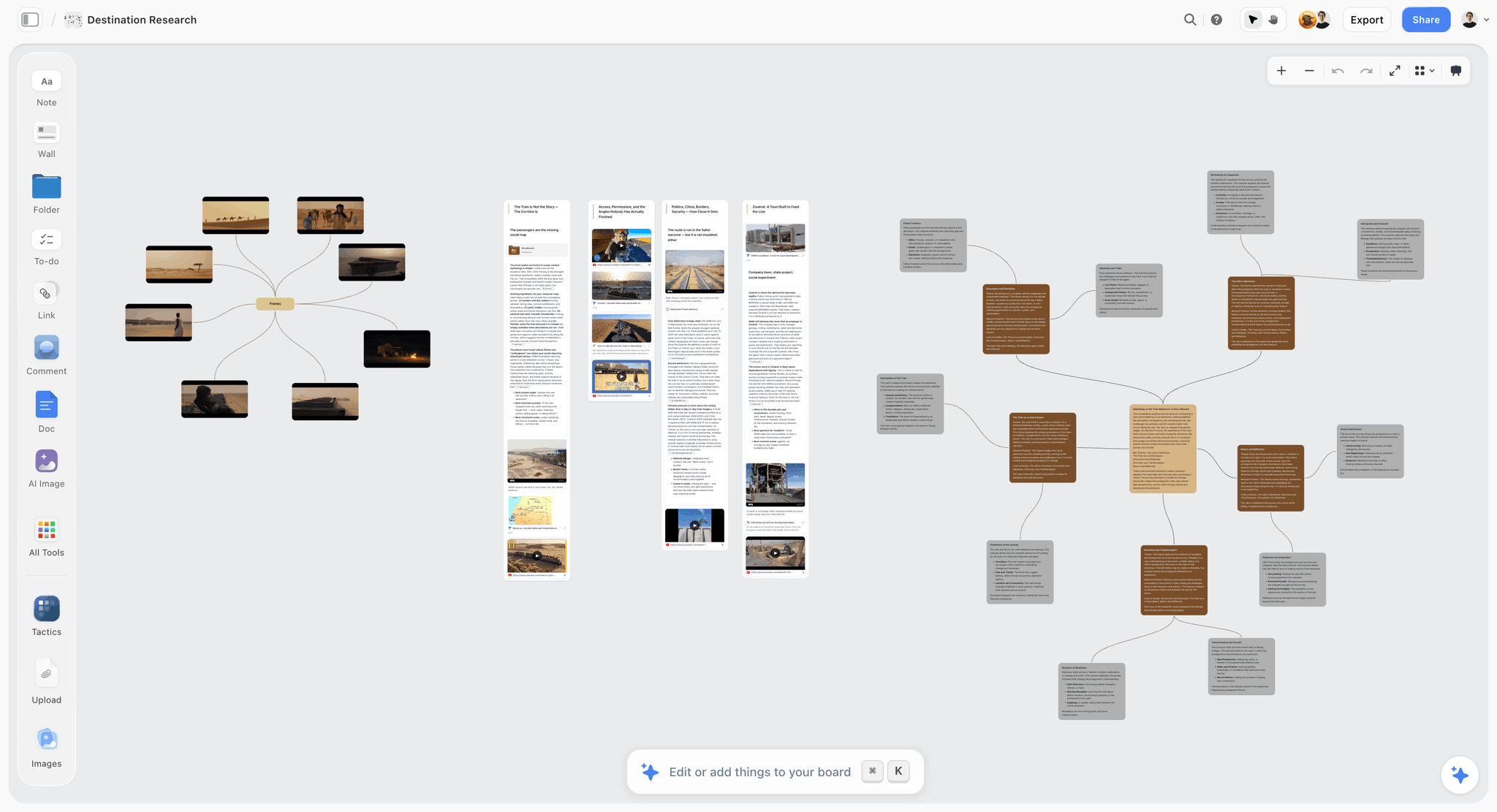
A Storyflow research canvas with cards and notes beside an AI-drafted outline
The wall holds your understanding. It does not draft what you owe
The report, the script, and the plan still start from zero in another app. Storyflow's AI reads your full canvas (plus Tactics and documents you @-mention) and drafts the artifact your board points at. Paid-only during early access; the Free plan lands before the end of 2026.

Where Heptabase Wins
The reading-to-understanding pipeline. Import a PDF, highlight, and highlights become cards that carry their source. Arrange cards on the whiteboard for the chapter you are writing. For students, researchers, and analysts, this loop is the best-designed version of "do the reading and actually build something from it" in the category.
Spatial structure is native, not bolted on. Sections of a whiteboard, nested whiteboards, mindmap views: the canvas is the data model, so visual structure never fights the tool. Obsidian Canvas, capable as it is, remains a view over a vault that is fundamentally a folder of text files.
It is learnable in an afternoon. No plugin curation, no configuration culture, no YAML. For people who bounced off Obsidian's tinkering tax, Heptabase's focus is the feature.
Heptabase's honest weaknesses: your knowledge lives in an app rather than in files you own, walls scale worse than graphs as years accumulate, extensibility is thin, and the subscription is the only tier.
Where Obsidian Wins
You own the corpus. Plain Markdown, local-first, free for personal use. A decade of thinking survives every subscription decision, business pivot, and pricing change. No other tool in this comparison (or this category) matches that guarantee, and for many users it is disqualifying for everything else.
Compounding. Backlinks, tags, and daily notes turn years of atomic notes into a queryable exocortex. The value curve slopes up with time; Heptabase's slopes up with each project and resets between them.
The plugin ecosystem is a second product. 2,500+ community plugins mean Obsidian becomes whatever its owner needs: spaced repetition, Zotero integration, task systems, AI assistants (Smart Connections, Copilot, Text Generator) with full control over which model touches your notes, including local-only inference. Nothing else here is remotely as adaptable.
Obsidian's honest weaknesses: the learning curve is real and the tinkering tax is chronic, visual thinking is a plugin rather than a belief, collaboration is essentially absent (it is a single-brain tool), and the out-of-box experience undersells what practiced users rave about.
What Neither Does With What You Built
Both tools end at the same edge, and it matters for anyone whose thinking serves projects: the understanding stays in the tool; the deliverable starts from zero.
The Heptabase wall holds the argument; the Obsidian vault holds the knowledge. Now the report has to be written, the course outlined, the video scripted, the campaign planned, and in both tools that artifact begins in another app, with you as the manual bridge carrying context across. Their AI stories do not close this gap: Heptabase's credits and Obsidian's plugins assist inside the note layer rather than drafting the project from it.
That bridge is the lane where Storyflow wins for visual thinkers whose walls become deliverables. The canvas holds cards, notes, and references like Heptabase, and the AI reads the entire active board (plus up to 1 Tactic and up to 3 Documents you @-mention) to draft the artifact the board points at: the outline from the argument wall, the script from the research, the plan from the clustered notes. Its 200+ Story Blueprints (Hero's Journey, AIDA, Retention Hooks among them) are the structural layer between a wall of understanding and a finished piece of work.
The honest accounting: for pure deep-reading research, Heptabase's highlight-to-card pipeline is still the stronger instrument, and for a compounding permanent vault in files you own, Obsidian is untouchable (Storyflow is app-shaped, not local Markdown). Storyflow is also paid-only during early access (the Free plan launches before the end of 2026; anyone a paid member invites to a board joins free now). Its claim is the project step both stop at. The direct comparisons: Storyflow vs Heptabase and Storyflow vs Obsidian as a Second Brain.
Pricing: What You Actually Pay
As of August 2026:
| Plan | Heptabase | Obsidian | Storyflow |
|---|---|---|---|
Free | Trial | Free for personal use, forever | Coming late 2026 (invited collaborators join free now) |
Paid | Pro around $8.99 mo annual (about $11.99 monthly) | Sync $50 yr, commercial license $50 yr | $7.99 per month annual, flat per account |
AI | Metered in credits | Via plugins, model costs yours | Included; Pro $14 mo annual adds 20x more |
Obsidian bends the price axis the way Freeform bends the canvas one: any subscription here must beat free-and-yours-forever. Heptabase's answer is the research workflow. Storyflow's is the drafting AI. If neither answer names your pain, Obsidian's price is unanswerable.
Which Should You Choose?
PhD student, researcher, analyst in reading-heavy work. Heptabase. The highlight-card-whiteboard loop is built for exactly your weeks, and the subscription is cheap against a thesis.
Long-horizon knowledge worker building a permanent base. Obsidian. Ownership plus compounding is the correct ten-year bet, and the learning curve amortizes to nothing.
Privacy-strict or regulated environments. Obsidian, full stop: local files, local AI options, no cloud requirement.
Team thinking together. Neither, honestly; both are single-brain tools at heart. Collaborative spatial thinking lives in the canvas category; see The Best Visual Thinking Tools.
Visual thinker whose boards keep becoming deliverables. The wall-to-artifact bridge is the third lane, with the caveats disclosed above: research depth stays with Heptabase, ownership stays with Obsidian.
The Bottom Line
Buy the belief that matches your breakthroughs.
If understanding arrives while arranging material you can see, take Heptabase. The reading-to-wall pipeline is the best research instrument in this pair, at a subscription that is cheap against the work it serves.
If understanding accumulates through years of linked notes you own, take Obsidian. Free, local, extensible, and compounding: as a decade-long bet it is untouchable.
Then notice the edge both share: the wall and the vault hold your understanding; neither drafts what you owe the world from it. The report, the script, and the plan still start somewhere, and starting them from the board you already built is the lane we build for.
FAQ: Heptabase vs Obsidian
Is Heptabase better than Obsidian?
For visual, project-scoped research: usually yes. For a permanent, compounding, files-you-own knowledge base: no. They optimize different beliefs about understanding, and the honest answer is the breakthrough test above rather than a winner.
Can Obsidian Canvas replace Heptabase?
Partially. Canvas puts notes on a spatial surface and links them, which covers casual visual thinking. What it lacks is Heptabase's reading pipeline (highlights becoming source-carrying cards) and canvas-native structure; committed spatial thinkers feel the difference within a week.
Is Obsidian really free?
For personal use, yes, fully. The paid pieces are optional services: Sync at $50 per year, Publish, and a $50 per year commercial-use license for work contexts. Many users run free forever with their own sync (iCloud, Git).
Does Heptabase work offline or own my files?
It has offline capability, but the product is app-and-cloud shaped rather than local-first, and your knowledge lives in Heptabase's format. If files-on-your-disk is a requirement rather than a preference, that requirement answers this article by itself.
Which is better for Zettelkasten?
Obsidian: atomic notes, links, and emergence are the Zettelkasten mechanics, and the plugin culture grew up around Luhmann's method. Heptabase can imitate it, but its card-on-wall model pulls toward projects rather than a permanent slip-box. See What Is a Zettelkasten?.
What does AI actually do in each?
Heptabase ships built-in AI metered in credits (summarizing, assisting on cards). Obsidian's AI arrives via plugins (Smart Connections, Copilot, Text Generator), with full control over models, including local-only inference. Neither reads a whole board and drafts the project artifact it implies; that is the gap the third lane fills.
Can I migrate between them?
Both sides export Markdown, so notes move with friction: Heptabase whiteboard arrangements flatten, and Obsidian links need re-establishing contextually. Migration is a weekend, not a catastrophe, but spatial structure is the thing that does not travel.
Which is better for students?
Heptabase for coursework-shaped studying (a wall per course, readings as cards), and it has historically offered education discounts. Obsidian for students starting a lifelong vault, if they enjoy the setup. The wider student field is in The Best Mind Mapping Tools for Students.
Is the Obsidian learning curve worth it?
If you want a permanent thinking system: yes, and the curve is mostly optional (a vault of linked notes needs no plugins). If you want a tool that helps this month's project: probably not, and that is Heptabase's opening.
What about Scrintal, Logseq, or Tana?
Scrintal is citation-grade card-and-canvas (closest Heptabase rival), Logseq is open-source outliner-plus-whiteboards (closest free Obsidian-adjacent), Tana is structured supertags for people whose cards want to be queried. The category is mapped in The Best Scrintal Alternatives and The Best Tana Alternatives.
Where does Storyflow fit between these two?
As the project canvas after the thinking: the AI reads the full board (plus @-mentioned Tactics and Documents) and drafts outlines, scripts, and plans from your arranged material, with 200+ Story Blueprints as the structure library. Heptabase keeps deep-reading research, Obsidian keeps the owned permanent vault; Storyflow is paid-only during early access with the Free plan arriving late 2026.
Table of Contents
Templates to check out for this topic


Mind mapping and ideation templates you can use in Storyflow
Map ideas in space, then ask the AI to restructure, expand, or connect them. Open any of these boards and start thinking visually instead of in lists.


See Storyflow in Action
A visual AI workspace where every feature lives inside one canvas. No tab-switching, no context lost.
Build your entire board from a single message
Type what you need in the AI chat at the bottom of your canvas. The AI adds cards, headings, and structure directly onto your board.
Use expert frameworks as AI context
Type @ in the AI chat and choose any Tactic. The AI tailors every response to that framework instead of giving generic advice.
Turn your board into a mind map in seconds
Ask the AI to restructure your canvas as a mindmap. It connects your ideas into a visual hierarchy so you can see how everything relates.
Why Storyflow Exists
Storyflow actually began as a personal tool while working on creative and research projects.
We kept running into the same problem: ideas were scattered everywhere: notes, documents, and whiteboards.
Nothing helped us see how everything connected.
So we started building a workspace designed around how ideas actually grow.
→ Read how Storyflow was createdJustkay
Documentary Filmmaker & Founder at Storyflow
Published: 2026-08-10
Extremely simple, seriously capable


See how easy it is to get started
Watch a real project come together, from a blank board to a finished plan, clicked through step by step.
Start creating with AI and become more productive
Transform your creative workflow with AI-powered tools. Generate ideas, create content, and boost your productivity in minutes instead of hours.