
Category
Knowledge Management
Author

Justkay
Documentary Filmmaker & Founder at Storyflow
Topics
2026-05-18
•
Updated May 18, 2026
•
13 min read
•
Knowledge Management- what is a zettelkasten
- zettelkasten method
- slip-box method
- atomic notes
- Niklas Luhmann
- linked note-taking
What is a Zettelkasten?
A Zettelkasten (German for 'slip box') is a personal knowledge system built from small, single-idea notes that link to each other instead of sitting in folders. Each note holds one atomic thought, carries a unique ID, and points to related notes, so the collection becomes a network you can think with. The method was made famous by Niklas Luhmann.
1) Quick Answer: What is a Zettelkasten?
A Zettelkasten (German for "slip box") is a personal knowledge system built from small, single-idea notes that link to each other instead of sitting in folders. Each note holds one atomic thought, carries a unique ID, and points to related notes through explicit links. Over time the links turn a pile of notes into a network you can think with. The method was made famous by the German sociologist Niklas Luhmann, who built a slip-box of roughly 90,000 notes over about 40 years and credited it for around 600 published articles and more than 50 books.
A Zettelkasten is not a place to store notes. It is a place where notes talk to each other. That sentence is the whole method. A folder of notes is a graveyard. A Zettelkasten is a conversation, because every note is wired to the notes around it, and the wiring is where new ideas come from.
I have run multiple documentary projects through note-heavy research, and I have watched a clean folder structure quietly fail every time the project got large. The Zettelkasten is the response to that failure. This guide covers where it came from, the principles that make it work, the three types of notes, how to start one this week, and the honest critique most enthusiastic guides skip.
For the broader category, see What is an AI Second Brain? The Complete Guide and The PARA Method With AI in 2026.
2) Where the Zettelkasten Came From
The Zettelkasten is older than Luhmann. Scholars and writers kept slip-boxes of index cards for centuries. But the modern method, the one people search for, traces to one person and one cabinet of cards.
Niklas Luhmann and the slip-box
Niklas Luhmann was a German sociologist who, over roughly four decades, built a wooden cabinet of index cards he called his Zettelkasten. The numbers are the part that gets repeated, and they are worth repeating: around 90,000 notes, around 600 published articles, more than 50 books. Luhmann was not a faster writer than his peers. He was a differently organized one.
When asked how he was so productive, Luhmann said he never forced himself to do anything he did not feel like doing, and simply did whatever was easy in the moment. That worked because the slip-box always had something easy on offer: a half-finished thread, a note that wanted a neighbor, a connection waiting to be drawn. The system removed the blank page.
The slip-box as a thinking partner
Luhmann described his Zettelkasten as a second memory and, more strikingly, as a communication partner. This is not poetic decoration. A note collection becomes a partner at the point where it starts surprising you, where you go looking for one idea and the links route you to three you had forgotten you wrote. Luhmann's underlying claim was blunt: without writing, there is no thinking. The slip-box was not a record of his thinking. It was where the thinking happened.
His numbering system is the mechanical part people obsess over. Each note got a fixed ID, and a related note could be slotted directly after it by adding a character to the end (note 21 could be followed by 21a, then 21a1). This let new notes grow between existing ones without renumbering anything. The branching ID is what turned a linear stack of cards into a web.
Sönke Ahrens and "How to Take Smart Notes"
For most of its life, Luhmann's method was an academic legend. People knew the slip-box existed and was productive, but the method was not written down as something a normal person could learn. That changed in 2017, when Sönke Ahrens published "How to Take Smart Notes."
Ahrens did the translation. He took Luhmann's practice and turned it into a learnable method, and his single most useful contribution was naming the types of notes. Before Ahrens, "take notes well" was advice. After Ahrens, there was a named workflow with distinct stages. The book has real flaws, which we cover in the critique section, but it is the reason the Zettelkasten is a 2026 search query and not a footnote in sociology.
3) The Core Principles of a Zettelkasten
Strip away the German vocabulary and the index-card nostalgia, and the Zettelkasten is five principles. Tools change. These do not.
Principle 1: Atomic notes
One note holds one idea. Not one article, not one book summary, not one meeting. One idea, small enough that you could give it a title that is a complete claim.
The reason is reuse. An atomic note can be linked into many different contexts because it is not tangled up with unrelated thoughts. A note titled "Constraints increase creative output" can connect to a note about filmmaking budgets, a note about sonnet structure, and a note about startup focus. A four-page note titled "Thoughts on my documentary" can connect to nothing, because it is about everything.
Principle 2: Unique identifiers
Every note gets a stable ID that never changes. In Luhmann's paper system this was the branching number. In a digital system it is often a timestamp or the note's title used as a permanent address.
The ID matters because links need a target that does not move. If you can rename or refile a note and break every link pointing at it, the network is fragile. A stable ID is what lets the web survive years of growth.
Principle 3: Links between notes
This is the principle that separates a Zettelkasten from every folder-based system. You connect notes, you do not file them. When you write a new note, your job is not to decide which folder it belongs in. Your job is to find the existing notes it relates to and link them.
A link is also a small act of thinking. To link note A to note B, you have to articulate why they relate, and that articulation is often a new idea. The links are not navigation. The links are the content.
Principle 4: An index, not a hierarchy
A Zettelkasten has no master folder tree. Instead it has an index: a short list of entry points into the web. The index does not try to contain every note. It points to a few hub notes, and the hub notes link onward.
This is the hardest principle for people coming from folders. There is no single correct location for a note, because the note lives in the network, not in a place. The index is a door, not a filing cabinet.
Principle 5: Write in your own words
A Zettelkasten note is never a copied quote or a highlighted passage. Luhmann insisted on rewriting every idea in his own language, because the act of rewriting is the act of understanding. If you cannot restate an idea in a sentence of your own, you do not yet have the idea, you have the author's sentence.
This principle is also the quality filter. A note you wrote in your own words is a note you understood well enough to use later. A highlighted quote is a note you will read again and still not own.
4) The Three Types of Notes
Ahrens' framework splits notes into three types by their stage in the workflow. Getting the types right is the difference between a Zettelkasten that grows and a pile of clippings that does not.
Fleeting notes
Fleeting notes are the raw capture layer. A thought in the shower, a line overheard in a meeting, a half-question while reading. You write it down fast, in whatever form, with no concern for quality.
The defining feature of a fleeting note is that it is disposable. It exists to hold an idea for a few hours until you can process it. Within a day or two, every fleeting note should either be turned into a permanent note or thrown away. A fleeting note that is still alive a week later is not a fleeting note, it is clutter.
Literature notes
Literature notes are what you write while engaging with a source: a book, a paper, a film, a podcast. For each idea worth keeping, you write a short note in your own words, with the source recorded.
The key constraint, and the one most people miss, is that a literature note is not a highlight. Highlighting is recognition, not understanding. A literature note is you restating the source's idea so that, months later, you can use the idea without rereading the source. Luhmann's whole system depended on this: he did not store books, he stored his own compressed understanding of books.
Permanent notes
Permanent notes are the Zettelkasten itself. A permanent note takes one idea, written fully in your own words, and connects it into the existing network of notes.
A permanent note is not a summary of a source. It is a claim you are making, often built from a fleeting note plus a literature note plus something you already knew. When you write a permanent note, you do three things: you state one idea atomically, you write it so it makes sense without context, and you link it to the notes it relates to. The permanent note is the only note that compounds. Everything else is scaffolding.
The workflow runs in one direction. Fleeting notes and literature notes feed permanent notes. Permanent notes feed your writing, your projects, your thinking. If your fleeting and literature notes are not regularly becoming permanent notes, your Zettelkasten is not growing, it is just collecting input.
5) How to Start a Zettelkasten Step by Step
You do not need the right app, the right numbering scheme, or the right setup to start. You need to write your first ten permanent notes. Here is the path.
- Pick one tool and stop researching tools. The tool research is procrastination. A plain folder of text files works. A linked-notes app works. Storyflow's canvas works. Pick one today and move on. We cover tool options in the next section, but the choice matters less than starting.
- Capture fleeting notes for one week. Carry one capture surface (a notes app, a card, a voice memo) and write down every idea that crosses your mind. Do not judge them. The goal is to build the habit of catching thoughts before they evaporate.
- Read one thing and write literature notes. Take one book, paper, or long article. For each idea worth keeping, write one short note in your own words with the source attached. Aim for restating, not copying.
- Turn your best captures into permanent notes. Sit down with your fleeting and literature notes. For each idea genuinely worth keeping, write a permanent note: one atomic idea, full sentences, makes sense alone. Throw the rest away. Throwing away is part of the method.
- Link every new permanent note to at least one old one. This is the step that creates the Zettelkasten. Before you save a permanent note, find one existing note it relates to and link them. If you genuinely cannot find a connection, that is a signal you are missing a note in between.
- Build a thin index. Once you have twenty or thirty permanent notes, write a few hub notes: an "entry point" note for each big theme that links to the most important notes in that theme. The index is short and points inward. It is not a table of contents for everything.
- Review weekly, not daily. Once a week, process the week's fleeting notes to zero, write a few permanent notes, and follow a couple of link trails just to see where they go. The weekly review is the heartbeat of the system.
The trap to avoid: do not spend week one designing your ID scheme and tagging taxonomy. A Zettelkasten with ten linked notes and no system beats a perfect system with zero notes. Start ugly. Refine later.
6) Common Mistakes and the Honest Critique
The Zettelkasten is genuinely powerful, and it is also one of the most over-romanticized methods in knowledge work. An honest guide names both. Here is where most attempts fail.
Mistake 1: Collecting instead of connecting
The most common failure mode is treating the Zettelkasten as a place to dump highlights and clippings. People save hundreds of articles, highlight aggressively, and feel productive. None of it compounds, because nothing is linked and nothing is rewritten. A Zettelkasten where notes do not connect is just a worse folder system. Connecting, not collecting, is the entire point.
Mistake 2: Notes that are not atomic
When notes are too big, they cannot be linked, because a four-paragraph note about three ideas does not relate cleanly to anything. The fix is discipline at the moment of writing: if a note has two ideas, it is two notes.
Mistake 3: Highlighting instead of rewriting
Highlighting feels like note-taking and is not. A library of highlights you never reread is a library of work you never did. If a literature note is not in your own words, it will not be usable later.
The honest critique: the learning curve and the procrastination trap
Here is the part most Zettelkasten guides leave out. The method has a real learning curve, and that curve has a dangerous shape. The setup feels productive. Choosing an app, designing an ID scheme, picking a tagging system, watching tutorial videos, reading three books about note-taking. All of it feels like progress, and none of it is.
The Zettelkasten can become a sophisticated form of procrastination. The system maintenance becomes the work, and the actual thinking and writing the system was supposed to support never happens. There is a real population of people who have beautiful, elaborate Zettelkasten setups and have not finished a piece of writing in a year. The method promised to make them productive. It made them organized, which is not the same thing.
Even Ahrens' foundational book draws honest criticism. Readers note that "How to Take Smart Notes" has terminological problems, that its categories are not always clearly defined, and that the book reads as if it came straight out of the author's own slip-box without enough editing. The method is real. The literature around it is not flawless.
The Zettelkasten is worth the friction only if you are doing genuine knowledge work: writing, research, sustained thinking on hard problems over months and years. If you need a to-do list or a place to keep meeting notes, a Zettelkasten is the wrong tool, and a simpler system will serve you better. The method earns its complexity only at the scale Luhmann used it.
7) Tools for a Modern Zettelkasten
Luhmann used wooden cabinets and index cards. You do not have to. The principles are tool-agnostic, but the tool you pick shapes how much friction stands between you and a linked note.
Plain text files in a folder are the purist's choice: you own the files forever, no company can change them, and they will open in any decade. Local-first linked-notes apps add backlinks and graph views on top of files you control. Both are excellent, and both put the entire job of finding connections on you. You write a note, and then you have to remember every other note it might relate to. At ten notes that is easy. At a thousand notes it is the hardest part of the method, and it is exactly where most Zettelkasten systems quietly stop growing.
Storyflow: a visual canvas for a linked-idea system

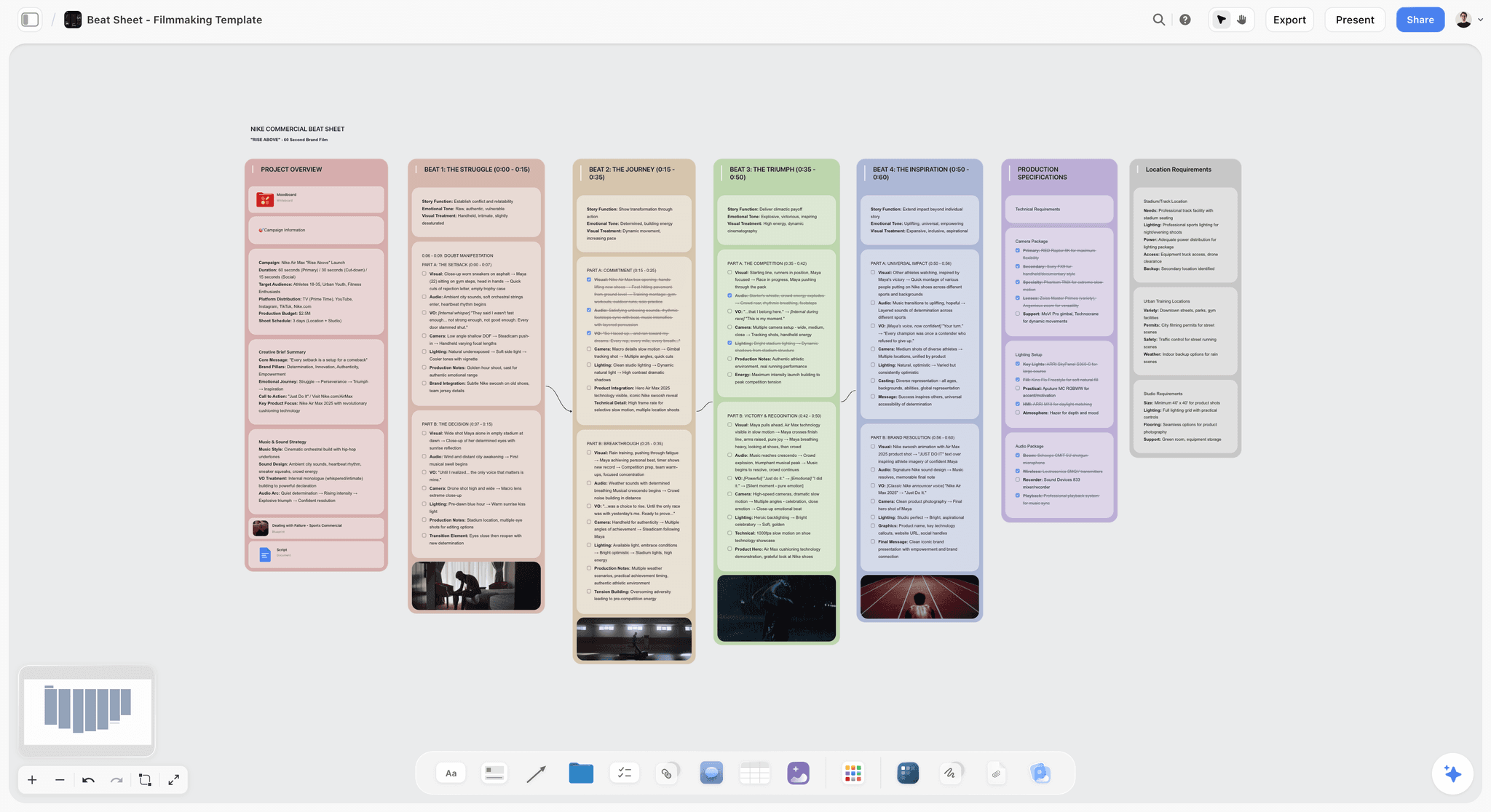
Storyflow approaches a Zettelkasten-style system from a different direction. Instead of a folder of files or a list of pages, it gives you an infinite canvas where each idea is a card you can place, move, and link in space. You see the network instead of navigating it one note at a time. For a method whose whole value is connection, seeing the connections laid out visually is a genuine advantage. A link trail you would have to click through in a text app is a path you can simply look at on the canvas.
The part that addresses the hardest Zettelkasten problem is the AI. Storyflow's AI reads your full active canvas board, plus up to 1 Tactic and up to 3 Documents you @-mention in the chat. That means when you write a new idea card, the AI has already read every note on the board, and it can surface the older notes your new idea connects to. The work of remembering a thousand notes, the work that kills most Zettelkasten systems at scale, is the work the AI does. You still write the notes and you still decide which connections are real. The AI just makes sure you never miss the connection you forgot you wrote.
Storyflow also ships a library of 200+ Story Blueprints, expert framework templates you can drop onto the canvas as structured starting points for research, planning, and idea development. The free plan is genuinely usable for this: free from late 2026, unlimited notes, images, and links, unlimited shared boards, basic AI, 20 file uploads, and unlimited collaboration. The Plus plan at $7.99/mo (annual) or $9.99/mo (monthly) unlocks the full 200+ Blueprint library, and unlimited uploads. If you want to run a linked-idea system where the AI actively surfaces connections instead of leaving you to remember them, start a Storyflow workspace and build your first twenty linked cards this week.
One honest caveat: a Zettelkasten purist who wants plain-text files they own forever may prefer a local-first app. Storyflow is cloud-based. If absolute file ownership and offline-first permanence are non-negotiable for you, a plain-text setup is the better fit, and that is a legitimate choice.
9) The Bottom Line
A Zettelkasten is a slip-box of atomic, linked notes that, at scale, becomes a network you can think with. Niklas Luhmann proved the ceiling: 90,000 notes, around 600 articles, more than 50 books, from a method whose entire secret is that a Zettelkasten is not a place to store notes, it is a place where notes talk to each other. Sönke Ahrens proved it was learnable. The five principles (atomic notes, unique IDs, links, a thin index, rewriting in your own words) are all you actually need.
The honest version: the method has a real learning curve, and the setup can quietly become the work it was supposed to support. The Zettelkasten earns its complexity only when you are doing sustained knowledge work, and it rewards starting ugly over designing perfectly. Write ten linked permanent notes this week. The system will teach you the rest.
The hardest part of a large Zettelkasten is remembering every note a new idea connects to, and that is the part a modern tool can carry. Storyflow runs a Zettelkasten-style system as a visual canvas of linked idea cards where the AI reads every note on the board and surfaces the connections you would otherwise miss. The free plan is free from late 2026 with unlimited notes and links. If you want a linked-idea system that actively helps you connect instead of just store, start a Storyflow workspace and build your first board today.
8) FAQ: Zettelkasten Questions Answered
What is a Zettelkasten in simple terms?
A Zettelkasten is a personal knowledge system made of small, single-idea notes that link to each other instead of sitting in folders. The German word means "slip box." Each note holds one atomic thought and points to related notes, so over time the collection becomes a network you can think with rather than a pile of files you have to dig through.
Who invented the Zettelkasten method?
The slip-box predates any single person, but the modern method is associated with Niklas Luhmann, a German sociologist who built a Zettelkasten of roughly 90,000 notes over about 40 years. Luhmann credited the system for his extraordinary output of around 600 articles and more than 50 books. Sönke Ahrens later turned Luhmann's practice into a learnable method in his 2017 book "How to Take Smart Notes."
What are the three types of notes in a Zettelkasten?
Fleeting notes, literature notes, and permanent notes. Fleeting notes are quick, disposable captures you process within a day or two. Literature notes are short restatements of ideas from a source, written in your own words. Permanent notes are atomic ideas, fully written and linked into the network. Fleeting and literature notes feed permanent notes, and permanent notes are the Zettelkasten itself.
How is a Zettelkasten different from regular note-taking?
Regular note-taking files notes into folders by topic. A Zettelkasten links notes to each other and has no folder hierarchy. The difference is that a folder system prioritizes collecting, while a Zettelkasten prioritizes connecting. In a folder system a note has one location. In a Zettelkasten a note lives in the web of links it belongs to, and the links are where new ideas come from.
What is an atomic note?
An atomic note is a note that holds exactly one idea, small enough that its title could be a complete claim. Atomic notes matter because they can be linked into many different contexts. A note about one idea connects cleanly to other notes. A long note about several ideas connects to nothing, because it is about everything at once.
Is the Zettelkasten method worth it?
It is worth it if you do genuine knowledge work: writing, research, or sustained thinking on hard problems over months and years. At that scale the linked network compounds and pays back the effort. It is not worth it for to-do lists, meeting notes, or simple reference storage. For those, a simpler system is faster and the Zettelkasten's complexity is pure overhead.
How many notes do I need before a Zettelkasten is useful?
A Zettelkasten starts being genuinely useful at a few hundred well-linked permanent notes, when following links begins to surface ideas you had forgotten. Before that it feels like extra work. The honest answer is that the first fifty notes are an act of faith. The trick is to start with ten linked notes rather than waiting for the perfect setup.
What is the difference between a fleeting note and a permanent note?
A fleeting note is a fast, disposable capture that exists for a few hours until you process it, and it should be deleted or converted within a day or two. A permanent note is a fully written, atomic idea, linked into the network, that stays in the Zettelkasten forever. Fleeting notes are scaffolding. Permanent notes are the building.
Can you do a Zettelkasten digitally?
Yes, and most people do in 2026. Luhmann used paper index cards, but the principles (atomic notes, unique IDs, links, an index, rewriting in your own words) translate directly to digital tools. Digital systems also make linking and searching far faster than paper. Plain text files, local-first linked-notes apps, and visual canvases like Storyflow all support a Zettelkasten-style system.
What is the biggest mistake people make with a Zettelkasten?
Collecting instead of connecting. Most people save and highlight large amounts of material and never link or rewrite it, which produces a worse folder system rather than a Zettelkasten. The second biggest mistake is treating system setup as the work: choosing apps and designing ID schemes can become a sophisticated form of procrastination that replaces the actual thinking and writing.
Is the Zettelkasten just procrastination?
It can become procrastination if the system maintenance replaces the work. Choosing an app, designing a numbering scheme, and tuning a tagging system all feel productive while producing nothing. The method only pays off when fleeting and literature notes are regularly turned into linked permanent notes and those notes feed real writing. If you are maintaining a beautiful system but not finishing anything, the Zettelkasten has become the procrastination.
Do I need a special app for a Zettelkasten?
No. A plain folder of text files satisfies every principle of the method. The app choice matters far less than the habit of writing atomic, linked permanent notes. That said, tools differ in friction. A visual canvas like Storyflow, where the AI reads every note and surfaces connections, removes the hardest part of running a large Zettelkasten, which is remembering every note a new idea might relate to.
Table of Contents
- Quick Answer: What is a Zettelkasten?
- Where the Zettelkasten Came From
- The Core Principles of a Zettelkasten
- The Three Types of Notes
- How to Start a Zettelkasten Step by Step
- Common Mistakes and the Honest Critique
- Tools for a Modern Zettelkasten
- FAQ: Zettelkasten Questions Answered
- The Bottom Line
- Author
- Related Reading
Templates to check out for this topic


Workspace templates you can use in Storyflow
Keep research, notes, and plans on one canvas the AI can read, instead of scattered across docs and tabs. Open a template and make it your second brain.


See Storyflow in Action
A visual AI workspace where every feature lives inside one canvas. No tab-switching, no context lost.
Build your entire board from a single message
Type what you need in the AI chat at the bottom of your canvas. The AI adds cards, headings, and structure directly onto your board.
Use expert frameworks as AI context
Type @ in the AI chat and choose any Tactic. The AI tailors every response to that framework instead of giving generic advice.
Turn your board into a mind map in seconds
Ask the AI to restructure your canvas as a mindmap. It connects your ideas into a visual hierarchy so you can see how everything relates.
Why Storyflow Exists
Storyflow actually began as a personal tool while working on creative and research projects.
We kept running into the same problem: ideas were scattered everywhere: notes, documents, and whiteboards.
Nothing helped us see how everything connected.
So we started building a workspace designed around how ideas actually grow.
→ Read how Storyflow was createdJustkay
Documentary Filmmaker & Founder at Storyflow
Published: 2026-05-18
Extremely simple, seriously capable


See how easy it is to get started
Watch a real project come together, from a blank board to a finished plan, clicked through step by step.
Start creating with AI and become more productive
Transform your creative workflow with AI-powered tools. Generate ideas, create content, and boost your productivity in minutes instead of hours.