The 12 Best Tools for Cinematographers in 2026 (Tested on Set)
The best tools for cinematographers in 2026, tested on set. 12 tools compared across references, lighting, camera, and previs, from ShotDeck and Cine Tracer to Set.a.light 3D and Cadrage.

Category
Filmmaking
Author

Justkay
Documentary Filmmaker & Founder at Storyflow
Topics
2026-07-10
•
16 min read
•
Filmmaking- best tools for cinematographers 2026
- cinematography tools
- cinematography software
- DP tools
- lighting design software
- director's viewfinder app
What are the best tools for cinematographers in 2026?
The best tools for cinematographers in 2026 are ShotDeck (best reference library), Cine Tracer (best lighting and camera previs), Cadrage (best director's viewfinder), and Set.a.light 3D (best lighting design). Cinematography is a craft of light, lens, exposure, and camera, and its best tools are specialized for exactly that. The one general tool a DP genuinely benefits from is the one that holds the shot plan and references they work from. For that, Storyflow is the strongest canvas, though it is not a light meter, a viewfinder, a lens or depth-of-field calculator, or an on-set diagramming tool, and does not pretend to be. The short version: a cinematographer's tools are mostly craft-specific, and this guide ranks them honestly for lighting, camera, references, and previs. It organizes them with one simple frame, The Four Lives of a Shot (Reference, Design, Capture, Review), so you can see which tool serves which moment, and it names where a shared shot-plan canvas fits for the shot list and lookbook a DP interprets. Every tool here plans a shot. None of them lights it.

Full disclosure: Storyflow is our own product and is listed first in the reviews and the table: our pick first, then the rest by job. The ranked list places it fifth, because cinematography is a craft of light, lens, and camera that specialist tools serve better. ShotDeck leads that list as the deepest searchable film-still reference library, and Cine Tracer, Cadrage, and Set.a.light 3D own the lighting previs, viewfinding, and lighting-design jobs a canvas cannot do. Storyflow is not a light meter, a viewfinder, a depth-of-field calculator, or a lighting-design tool, so its value is narrow: holding the shot plan and references the DP interprets on one shared canvas. We link to every tool below so you can judge the fit yourself.
Quick Comparison
These four are the craft specialists a cinematographer leans on most: the deepest film-still reference library, real-time lighting and camera previs, an affordable director's viewfinder, and precise 3D lighting design.
| Tool | Best For | AI Features | Price |
|---|---|---|---|
| ShotDeck | Film-still reference library | None | Monthly sub |
| Cine Tracer | Lighting and camera previs | None | ~$65 (one-time) |
| Cadrage | Director's viewfinder | None | ~$29 (one-time) |
| Set.a.light 3D | Lighting design | None | One-time license |
All 12 Tools for Cinematographers, Ranked
- ShotDeck: best film-still reference library (9.2/10)
- Cine Tracer: best lighting and camera previs (9.0/10)
- Cadrage: best director's viewfinder app (8.7/10)
- Set.a.light 3D: best lighting design and diagrams (8.5/10)
- Storyflow: best for the shot plan and references (8.3/10)
- FrameForge: best for 3D blocking and previs (8.1/10)
- Frame.io: best for dailies review (7.9/10)
- Artemis: best professional director's viewfinder (7.7/10)
- Shot Lister: best for the shot order on set (7.5/10)
- Helios: best sun-tracking and natural-light planning (7.3/10)
- Milanote: best for reference boards (7.1/10)
- Pinterest: best for gathering references (6.9/10)
Best Tool for Cinematographers by Job
The overall ranking is not the answer to every question. Match the tool to the job you actually have:
- Best film-still reference library: ShotDeck. Searchable stills by lens, lighting, and colour.
- Best lighting and camera previs: Cine Tracer.
- Best director's viewfinder: Cadrage.
- Best lighting design and diagrams: Set.a.light 3D.
- Best place to hold the shot plan and references together: Storyflow. References, shot list, and lighting notes on one canvas the AI can read.
Comparison Table: 12 Tools for Cinematographers Compared
| Tool | DP Use | Starting Price | Free Option | Phase |
|---|---|---|---|---|
Storyflow | Shot plan and references | $7.99/mo (annual) | Coming late 2026 (invited collaborators join free now) | Prep |
ShotDeck | Reference library | Monthly sub | Trial | Prep |
Cine Tracer | Lighting and camera previs | ~$65 (one-time) | No | Prep |
Cadrage | Director's viewfinder | ~$29 (one-time) | No | Scout |
Set.a.light 3D | Lighting design | One-time license | Demo | Prep |
FrameForge | 3D blocking and previs | Tiered (one-time) | Trial | Prep |
Frame.io | Dailies review | Adobe CC bundle | Trial | Shoot/Post |
Artemis | Professional viewfinder | Paid app | Trial | Scout |
Shot Lister | Shot order on set | Paid app | Trial | Shoot |
Helios | Sun tracking | Paid app | Trial | Scout |
Milanote | Reference boards | Free tier | Yes | Prep |
Reference gathering | Free | Yes | Prep |
Pricing changes often. Confirm current pricing on each site.

Storyflow canvas holding a cinematographer's shot plan and lookbook references shared with the director
Keep the shot plan and references in one shared place
Storyflow holds the shot list and lookbook references a DP works from on one canvas shared with the director, so you interpret a clear, current plan instead of scattered PDFs. Pair it with your lighting and camera specialists. Paid-only during early access; anyone a paid member invites to a board joins free.

The Four Lives of a Shot
Most DP tool guides mix craft tools with general software and blur what matters. A cinematographer's toolkit is unusually specific because the craft is specific: light, lens, exposure, camera, and the visual language of the film. The cleanest way to see it is to follow a single shot through its life. Every shot you light passes through four stages, and each stage has its own tools.
- Reference (the look comes from somewhere). Before a light goes up, the DP gathers the visual language: how other films achieved a mood, a color, a contrast ratio. ShotDeck, Milanote, and Pinterest live here.
- Design (the shot is planned before the day). Lighting is diagrammed, lenses are chosen, complex geometry is solved. Set.a.light 3D, Cine Tracer, FrameForge, Cadrage, Artemis, and Helios live here.
- Capture (the shot happens on the day). The plan meets the room. Shot Lister runs the order, and the DP reads and shapes the real light live.
- Review (the shot is judged after). Dailies and cuts get frame-accurate feedback in Frame.io, and the grade the DP supervises follows.
These are craft tools, and a DP should use the best specialist for each stage. A general tool cannot design lighting or simulate a lens. But there is one place a general tool helps across all four stages: the shot plan and references a DP interprets. A cinematographer works from a shot list and a lookbook, translating the director's intent into light and lens, and when those live in scattered PDFs and messages the DP rebuilds context constantly. The stronger approach keeps the shot plan and references on a canvas the DP and director share, visible through Reference, Design, Capture, and Review. Storyflow is the strongest tool for that shared canvas, but for the lighting design and viewfinding you use the specialists. For the reference side, see the best film moodboard tools in 2026.
How We Evaluated These Cinematography Tools
Every tool here was assessed on the DP's real craft, and on which of the Four Lives of a Shot it serves. Five criteria, weighted in this order:
- Craft fit. Does it genuinely help with light, lens, camera, or references?
- Accuracy. For previs and viewfinders, how accurate is the simulation against the real camera and lens?
- On-set usefulness. Does it hold up in prep, on the scout, and on the day?
- Reference depth. For reference tools, how deep and searchable is the library?
- Price for the value. What does it cost for the craft help it gives?
Tested across prep, scout, and shoot on real productions, with each craft tool judged on how much it helped the cinematography and the canvas on how well it held the plan across every stage.
Quick Picks by DP Need
Best for references (Reference): ShotDeck for film stills, Milanote for boards.
Best for lighting (Design): Set.a.light 3D for design, Cine Tracer for previs, Helios for natural light.
Best for framing (Design): Cadrage or Artemis as a director's viewfinder.
Best for previs (Design): FrameForge and Cine Tracer.
Best on the day (Capture): Shot Lister for the shot order.
Best for review (Review): Frame.io for dailies and cuts.
Best for the shot plan (all four stages): Storyflow, for the shot list and references the DP works from.
Detailed Reviews: The 12 Best Tools for Cinematographers
1. Storyflow
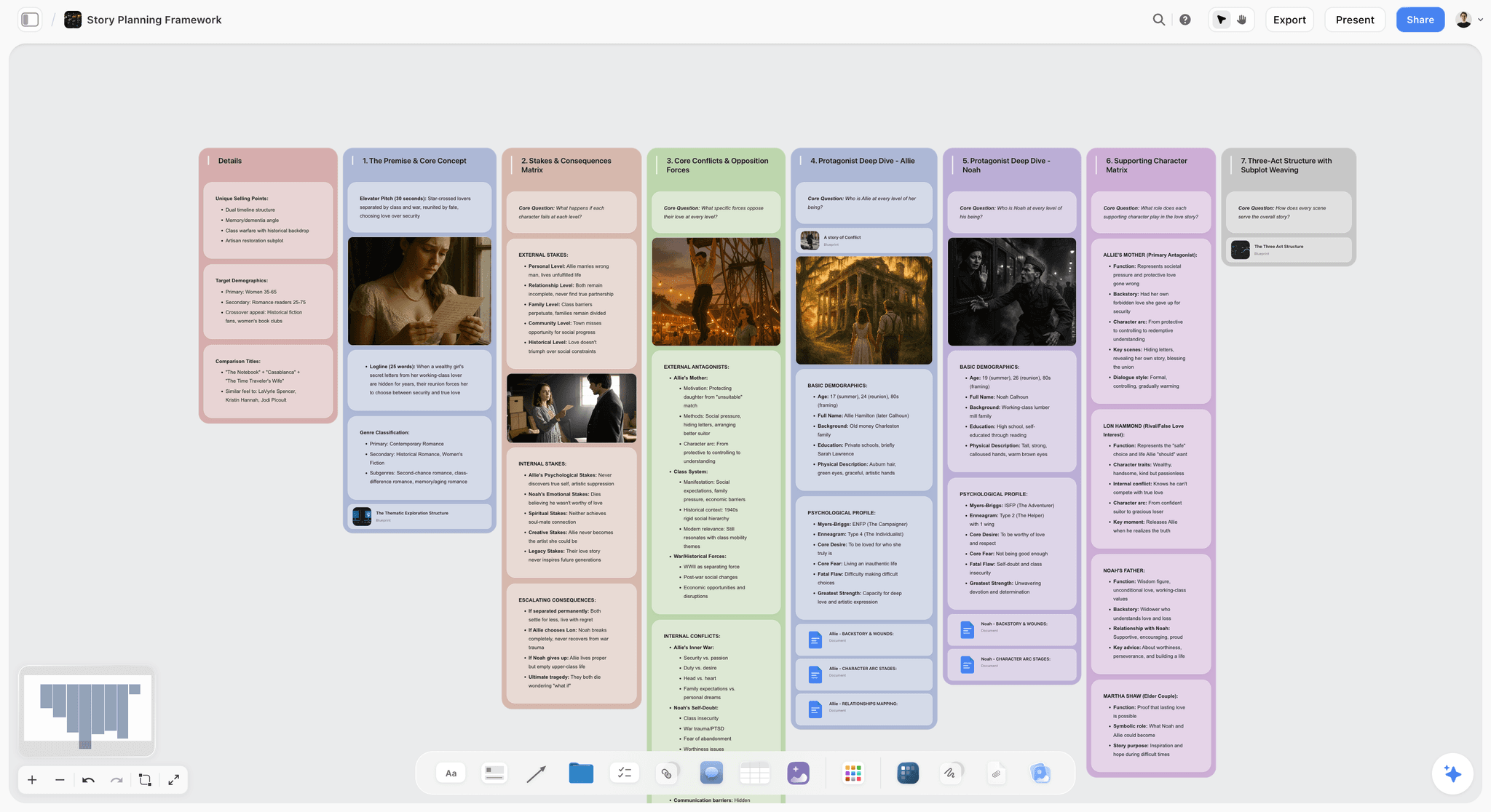
Storyflow is a visual workspace where the shot plan and references a cinematographer works from live on one canvas the DP and director share: the shot list, the lookbook references, the lighting intent, and the note behind each shot. It is the connective tissue across all Four Lives of a Shot, the plan that stays visible from Reference through Review. To be clear, it is not a light meter, a viewfinder, a lens or depth-of-field calculator, or a lighting-design tool, and for those you use the specialists. Its value is that the plan the DP interprets stays current and shared instead of scattered across PDFs and open tabs. Storyflow's AI reads the current canvas board plus up to 5 documents and 3 boards you attach, so you can ask questions across the shot plan you built.
Best for: DPs who want the shot plan, references, and lighting intent in one shared place with the director.
Who should stay on the specialists: if your immediate need is a lighting diagram, a viewfinder frame, a DoF calculation, or an on-set sun overlay, use Set.a.light 3D, Cadrage, a camera-calc app, or Helios. Storyflow holds the plan around those tools; it does not replace them.
Verdict: Not a lighting or camera tool. Use Set.a.light 3D, Cine Tracer, and Cadrage for the craft. Use Storyflow for the shot plan and references behind it. Every tool here plans a shot. None of them lights it, and Storyflow is the most honest about that.
Key features
- One canvas for the shot plan, the lookbook references, and the lighting intent.
- Project-aware AI that reads the current board plus the documents and boards you attach.
- Shared with the director so the DP interprets a clear, current plan.
- AI image generation on Pro and above for reference frames.
Pricing
Free: launching before the end of 2026. Plus: $7.99/mo annual ($9.99 monthly), adds unlimited file uploads and increased AI usage. Pro: $14/mo annual ($19 monthly), adds AI image generation. Max: $39/mo annual ($49 monthly), adds a team workspace with roles and permissions. Per account for individuals, per seat for team workspaces; anyone a paid member invites to a board joins free.
Pros
- Keeps the shot plan and references in one shared place.
- The DP interprets a current plan, not stale PDFs.
- Connects the DP's work to the director's vision.
Cons
- Not a lighting, camera, viewfinder, or depth-of-field tool.
- No on-set overlay or AR sun and shadow preview.
- Cloud-only, so it needs a connection to sync.
- Newer, general-purpose canvas rather than a film-specific on-set database.
For the wider prep toolset, see the best pre-production tools in 2026.
2. ShotDeck
ShotDeck is a massive searchable library of film stills, the single best reference source for a cinematographer building a visual language. This is the Reference stage in one tool: you search by lens, lighting style, color, and composition, then pull exact frames that communicate a contrast ratio and key direction faster than any paragraph could to a director or gaffer.
Best for: DPs sourcing references for lighting, lensing, and composition.
Who should stay on it: any DP who lives in references. Nothing else matches the depth or the film-specific filters.
Verdict: The best reference library for cinematographers. Indispensable for prep.
Key features
- Huge searchable film-still library.
- Filter by lens, lighting, color, composition.
- Boards for organizing.
- Constant additions.
Pricing
Monthly subscription. Trial available.
Pros
- Unmatched reference depth.
- Powerful cinematography filters.
- Great for building a look.
Cons
- Reference only.
- Subscription.
- Pairs with a planning tool.
3. Cine Tracer
Cine Tracer lets a DP previsualize lighting and camera in real time with gear-accurate results, squarely in the Design stage. You build a set, place real fixtures, choose a camera and lens, and see a photoreal-ish render that answers questions a lighting diagram cannot: how hard the shadows read, how the practicals balance, whether the backlight separates the subject.
Best for: DPs previsualizing lighting and camera setups. Verdict: The best lighting and camera previs tool for cinematographers.
Key features
- Real-time lighting previs.
- Camera and lens simulation.
- Photoreal-ish rendering.
- Gear-accurate.
Pricing
Around $65 one-time.
Pros
- Accurate lighting previs.
- One-time price.
- Gear-accurate.
Cons
- Requires capable hardware.
- Learning curve.
- Previs, not on-set.
4. Cadrage
Cadrage turns a phone into an accurate director's viewfinder for scouting and framing, a Design-stage tool you carry in your pocket. On a scout, you dial in the exact camera body and lens, see the real frame that combination gives you, and capture reference photos with the lens metadata attached, all for a fraction of a hardware viewfinder.
Best for: DPs framing shots on scouts. Verdict: The best affordable director's viewfinder.
Key features
- Accurate lens simulation.
- Photo capture with metadata.
- Shot organization.
- Camera and lens presets.
Pricing
Around $29 one-time.
Pros
- Accurate framing.
- One-time price.
- Fast on scouts.
Cons
- Framing only.
- Phone-based.
- Single-purpose.
5. Set.a.light 3D
Set.a.light 3D designs lighting setups in 3D, producing lighting diagrams and previews for the crew, and it is the most precise Design-stage tool for light specifically. You place gear-accurate fixtures in a virtual set, adjust power and modifiers, and export a clean overhead diagram the gaffer and grips build from, which saves real time on a lighting-heavy setup.
Best for: DPs and gaffers designing and diagramming lighting.
Who should stay on it: DPs shooting controlled studio and interior setups where the lighting plan has to be exact.
Verdict: The best lighting-design tool. Excellent for planning and communicating light.
Key features
- 3D lighting design.
- Lighting diagrams.
- Gear-accurate fixtures.
- Preview rendering.
Pricing
One-time license. Demo available.
Pros
- Precise lighting design.
- Great diagrams for the crew.
- Gear-accurate.
Cons
- Learning curve.
- Lighting-only.
- Prep tool.
6. FrameForge
FrameForge previsualizes and blocks complex shots in accurate 3D, a Design-stage tool for the shots where geometry is the problem. You build the set to scale, work out moves, sightlines, and coverage before the day, then export overhead diagrams that double as a blocking plan the crew can read. It earns its place on VFX-heavy scenes and complex camera choreography, where guessing on the day gets expensive.
Best for: DPs solving complex shots and camera geometry. Verdict: The best 3D blocking and previs for cinematographers on complex scenes.
Key features
- 3D previs and blocking.
- Camera and lens accuracy.
- Overhead diagrams.
- Shot export.
Pricing
Tiered one-time. Trial available.
Pros
- Accurate 3D blocking.
- Camera-accurate.
- Crew-friendly diagrams.
Cons
- Learning curve.
- Overkill for simple scenes.
- Prep-only.
7. Frame.io
Frame.io lets a DP review dailies and cuts with frame-accurate feedback, and it owns the Review stage. Comments attach to exact frames and timecodes, so a note about a lift in the shadows or a soft focus pull lands on the precise moment, and its camera-to-cloud path means footage reaches the DP fast enough to catch a problem before the location is struck.
Best for: DPs reviewing dailies and cuts. Verdict: A strong dailies-review tool for cinematographers.
Key features
- Frame-accurate review.
- Version management.
- Adobe integration.
- Camera-to-cloud.
Pricing
Bundled with Adobe CC; standalone tiers.
Pros
- Precise dailies review.
- Camera-to-cloud.
- Adobe integration.
Cons
- Review only.
- Best inside Adobe.
- Not a prep or craft tool.
8. Artemis
Artemis is a professional director's viewfinder app with accurate camera and lens emulation, the deeper Design-stage viewfinder for DPs who want a wide camera database. Like Cadrage it turns a phone into a viewfinder, but its coverage runs deeper and it is trusted on professional productions, so you can match the exact body and glass a rental house is holding for you.
Best for: DPs who want a professional viewfinder with a deep camera database. Verdict: A professional viewfinder, deeper than entry options.
Key features
- Accurate lens and camera emulation.
- Deep camera database.
- Photo capture with metadata.
- Shot organization.
Pricing
Paid app. Trial available.
Pros
- Professional-grade emulation.
- Deep camera database.
- Trusted by DPs.
Cons
- Higher price than entry viewfinders.
- Framing only.
- Phone-based.
9. Shot Lister
Shot Lister runs the DP's shot order on set with timing and progress tracking, the clearest Capture-stage tool on this list. On the day, it tracks what is done and shows timing against the schedule, so that live awareness of "four setups left and ninety minutes of light" is exactly what a DP needs to make cuts and protect the priority shots.
Best for: DPs and ADs running the shot list on the day.
Who should stay on it: productions that need live shot-order tracking and timing on set.
Verdict: A strong on-set shot-order tool.
Key features
- Shot list and order on set.
- Timing and progress.
- Scene organization.
- Mobile-first.
Pricing
Paid app. Trial available.
Pros
- Great on-set tracking.
- Timing awareness.
- Mobile.
Cons
- On-set only.
- Paid app.
- Not a craft or reference tool.
10. Helios
Helios tracks the sun's path for planning natural-light shoots and golden hour, a Design-stage tool for anyone shooting exteriors. Point the phone at a location and its AR overlay shows the sun's arc across the day, so you can plan which direction the light comes from at 9am versus 4pm and time a scene for the exact quality you want. On exterior and documentary work where the sun is the key light, it prevents an ugly surprise.
Best for: DPs planning natural-light and exterior shoots.
Who should stay on it: exterior and documentary DPs who plan around the sun. Sun Surveyor and Sun Seeker are strong alternatives.
Verdict: The best sun-tracking tool for natural-light planning.
Key features
- Sun path and position.
- Golden and blue hour times.
- AR sun overlay.
- Location-based.
Pricing
Paid app. Trial available.
Pros
- Accurate sun tracking.
- Great for exteriors.
- AR overlay.
Cons
- Natural light only.
- Paid app.
- Single-purpose.
11. Milanote
Milanote holds a DP's reference boards for the look and tone, a clean Reference-stage tool. You drag images, notes, and links onto a freeform board and arrange them by feel, which suits early look development where a DP and director are still finding the visual language. It stops at references, though: there is no film-specific search like ShotDeck and no project-aware AI to work across the plan.
Best for: DPs organizing reference boards. Verdict: A clean reference board tool for cinematographers.
Key features
- Visual reference boards.
- Image and note cards.
- Freeform arrangement.
- Collaboration.
Pricing
Free tier; paid for more.
Pros
- Clean reference boards.
- Easy to use.
- Good for the look.
Cons
- References only.
- No craft calculation.
- No project-aware AI.
12. Pinterest
Pinterest gathers broad visual references for a DP's look, the widest net at the Reference stage. Its discovery engine surfaces images you would not have searched for, useful at the very start of look development. The catch is that it is not film-specific: results are decorative as often as cinematographic, so a DP has to curate hard and move the keepers into a real reference tool.
Best for: DPs gathering references. Verdict: A free reference-gathering starting point.
Key features
- Visual discovery and boards.
- Huge image index.
- Recommendations.
- Free.
Pros
- Excellent discovery.
- Free and vast.
- Easy boards.
Cons
- Not film-specific.
- References need heavy curating.
- Not a craft tool.
Cinematographer Recommendations by Project
13. Narrative Feature DP
Top picks: ShotDeck + Set.a.light 3D + Storyflow
ShotDeck for references, Set.a.light 3D for lighting design, Storyflow for the shot plan shared with the director.
14. Commercial DP
Top picks: Cine Tracer + Cadrage + Storyflow
Cine Tracer for lighting previs, Cadrage for framing, Storyflow for the treatment and shot plan.
15. Documentary DP
Top picks: Helios + Storyflow + Frame.io
Helios for natural-light planning, Storyflow for the shot plan alongside the director, Frame.io for dailies.
16. Music Video DP
Top picks: ShotDeck + Cine Tracer + FrameForge
ShotDeck for stylized references, Cine Tracer for lighting looks, FrameForge for complex blocking.
17. Student / Emerging DP
Top picks: Storyflow + Cine Tracer + Pinterest
Storyflow for the shot plan (Plus, $7.99 a month billed annually), Cine Tracer for affordable lighting previs, Pinterest for references. A lean starter kit that covers all four stages on a budget.
Honorable Mentions
- pCam / Toland ASC: camera and depth-of-field calculation apps for DPs.
- Cine Meter II: phone-based light metering.
- Sun Surveyor / Sun Seeker: alternative sun-tracking and shadow-planning apps.
- DaVinci Resolve: the color grade a DP supervises in Review.
- Blender: free 3D for DIY previs.
Where a DP's Tools Still Need the DP
Honest accounting. Every tool here plans a shot. None of them lights it.
- The eye. No tool has a cinematographer's eye for a frame.
- The light on the day. Previs approximates; the real light is read and shaped live, in a Capture stage no app reaches.
- The lens choice. Tools simulate; the creative choice is yours.
- The collaboration. Serving the director's vision is human.
The right use of a DP's tools in 2026 is to reference, design, and review, and to keep the shot plan visible across all four stages. The cinematography itself stays human.
The Bottom Line
The best tools for cinematographers in 2026 are craft specialists. ShotDeck leads references, Cine Tracer and Set.a.light 3D lead lighting, Cadrage and Artemis lead viewfinding, FrameForge leads previs, and Frame.io leads review. No general tool replaces them, so follow the Four Lives of a Shot and pick the best specialist for each stage.
The one place a general tool helps is the shot plan and references a DP interprets, which live better on a shared canvas than in scattered files. Keep the craft in the specialists and the plan on a canvas the DP and director share. Every tool here plans a shot. None of them lights it. Start a Storyflow board for your shot plan, and use the craft specialists for the light and the lens.
FAQ: Tools for Cinematographers in 2026
What are the best tools for cinematographers in 2026?
ShotDeck is the best reference library, Cine Tracer the best lighting and camera previs, Cadrage the best affordable director's viewfinder, and Set.a.light 3D the best lighting-design tool. FrameForge handles 3D blocking, and Helios tracks natural light. For the shot plan and references a DP works from, Storyflow is the strongest shared canvas, though it is not a craft tool for light or lens. The kit is mostly specialists, plus one plan surface that ties them together.
What apps do cinematographers use?
Cinematographers use reference libraries (ShotDeck), lighting-design and previs apps (Set.a.light 3D, Cine Tracer), director's viewfinders (Cadrage, Artemis), camera and depth-of-field calculators (pCam, Toland ASC), sun-tracking apps (Helios, Sun Seeker), and 3D previs (FrameForge) for complex shots. Most also work from a shared shot plan and lookbook, which a canvas like Storyflow holds.
What is the best shot list app?
For running the shot order on the day, Shot Lister is the strongest dedicated app, with live timing and progress tracking on set. For building and sharing the shot list in prep, alongside the references and lighting intent behind each shot, a canvas like Storyflow holds it in one place the DP and director both see. Storyflow builds and shares the plan; Shot Lister executes it on the day.
How do DPs plan lighting?
DPs plan lighting in three moves. First they gather references that show the mood and contrast they want, usually in ShotDeck. Then they design the setup, diagramming it in Set.a.light 3D or previsualizing it in Cine Tracer, and for exteriors they plan around the sun with Helios. On the day, the DP reads and shapes the real light live, which no tool does for them.
What is the best lighting design software?
Set.a.light 3D is the best dedicated lighting-design tool, letting DPs and gaffers build setups in 3D and produce clear diagrams for the crew. Cine Tracer is excellent for real-time lighting and camera previs with gear-accurate results, and for natural-light shoots, Helios and Sun Seeker track the sun's path. The choice depends on whether you are designing studio lighting, previsualizing a look, or planning around the sun.
What is the best sun position app for filming?
Helios is a strong sun-tracking app for filmmakers, with an AR overlay that shows the sun's path across a location so you can time golden hour and plan light direction. Sun Seeker and Sun Surveyor are well-regarded alternatives DPs use for the same job. They matter most on exterior and documentary shoots where the sun is the key light, letting you schedule a scene for the exact quality of light you want before you arrive.
What is a director's viewfinder app?
A director's viewfinder app turns a phone or tablet into an accurate viewfinder that simulates how a scene will frame on a specific camera and lens, so DPs and directors can compose shots on scouts without hauling a camera. Cadrage is a strong affordable option, and Artemis is a professional-grade one with a deep camera database. They let a DP plan framing and lens choices on location, capturing reference photos with the exact lens metadata.
What is the best app for scouting locations?
A location scout combines two apps: a director's viewfinder like Cadrage or Artemis to lock framing and lens choices on site, and a sun-tracking app like Helios or Sun Seeker to plan light direction and timing. Many DPs also capture the scout into a shared shot plan like Storyflow, so framings and notes survive back to prep instead of getting lost in a camera roll.
How do cinematographers organize references?
Cinematographers gather references broadly, then curate them into a working set. ShotDeck is the deepest source of film-specific stills, searchable by lens, lighting, and color, while Milanote and Pinterest suit early, freeform look-gathering. The reference that matters is the one tied to the shot it informs, which is why many DPs move keepers onto a shared canvas like Storyflow, where a still sits next to the shot, the lens note, and the lighting intent.
How does Storyflow help cinematographers?
Storyflow holds the shot plan and references a cinematographer works from on one canvas shared with the director: the shot list, the lookbook references, and the intent behind each shot. It is not a lighting-design, viewfinder, depth-of-field, or camera-calculation tool, so it does not replace the craft specialists. Its value is keeping the plan the DP interprets visible and current across all four stages, instead of scattered across files.
What is the best free tool for cinematographers?
Fully free DP craft tools are limited because the specialists are paid, but Pinterest is free for gathering references and Milanote has a free tier for boards. Storyflow is paid-only during early access, and its Free plan launches before the end of 2026. A student DP can start with Pinterest, then add affordable one-time tools like Cine Tracer as budget allows.
Do cinematographers need previs software?
Only for shots where the geometry or lighting genuinely needs solving in advance, like complex camera moves, VFX-heavy scenes, or intricate lighting setups. Cine Tracer for lighting previs and FrameForge for 3D blocking earn their place there. For most straightforward scenes, references, a viewfinder, and a clear shot plan are enough. Reserve it for the shots where seeing it early prevents an expensive mistake.
Table of Contents
- All 12 Tools for Cinematographers, Ranked
- Comparison Table: 12 Tools for Cinematographers Compared
- The Four Lives of a Shot
- How We Evaluated These Cinematography Tools
- Quick Picks by DP Need
- Detailed Reviews: The 12 Best Tools for Cinematographers
- Cinematographer Recommendations by Project
- Honorable Mentions
- Where a DP's Tools Still Need the DP
- The Bottom Line
- Author
- FAQ: Tools for Cinematographers in 2026
- Related Reading
Templates to check out for this topic


Filmmaking templates you can use in Storyflow
Skip the blank canvas. Open one of these filmmaking boards in Storyflow and the AI builds on the structure that is already there, from research through the shot list.


See Storyflow in Action
A visual AI workspace where every feature lives inside one canvas. No tab-switching, no context lost.
Build your entire board from a single message
Type what you need in the AI chat at the bottom of your canvas. The AI adds cards, headings, and structure directly onto your board.
Use expert frameworks as AI context
Type @ in the AI chat and choose any Tactic. The AI tailors every response to that framework instead of giving generic advice.
Turn your board into a mind map in seconds
Ask the AI to restructure your canvas as a mindmap. It connects your ideas into a visual hierarchy so you can see how everything relates.
Why Storyflow Exists
Storyflow actually began as a personal tool while working on creative and research projects.
We kept running into the same problem: ideas were scattered everywhere: notes, documents, and whiteboards.
Nothing helped us see how everything connected.
So we started building a workspace designed around how ideas actually grow.
→ Read how Storyflow was createdJustkay
Documentary Filmmaker & Founder at Storyflow
Published: 2026-07-10
Extremely simple, seriously capable


See how easy it is to get started
Watch a real project come together, from a blank board to a finished plan, clicked through step by step.
Start creating with AI and become more productive
Transform your creative workflow with AI-powered tools. Generate ideas, create content, and boost your productivity in minutes instead of hours.