The 11 Best Tools for Animation Studios in 2026
Animation has no shoot day. Work goes stale instead, quietly, over months. Eleven tools ranked by which of the three staleness failures each one prevents.

Category
Animation
Author

Sara de Klein
Head of Product at Storyflow
Topics
2026-08-11
•
17 min read
•
Animation- best tools for animation studios
- animation pipeline software 2026
- ShotGrid alternatives for small studios
- Kitsu production tracker
- storyboard to animatic pipeline
- animation production tracking software
What are the best tools for animation studios in 2026?
The best tool for a small animation studio is Toon Boom Storyboard Pro, and the reason is structural rather than aesthetic: in animation the board is not a plan for the film, it is a draft of the film, and every downstream department inherits whatever the board got wrong. Autodesk Flow Production Tracking (formerly ShotGrid) is the right answer once your studio is large enough that shots outnumber the people who can remember them. Kitsu is the best open-source pipeline tracker and the best value in the category by a wide margin. Storyflow ranks third, for development and pitch work before any shot exists, and this post is explicit that it is not a pipeline tracker and has no shot status, no versioning and no render management. This ranking judges all 11 tools on one question: which of the three ways a shot goes stale does each one prevent.

Full disclosure: Storyflow is our own product and we rank it #3 here, below two tools we do not make, because animation is a pipeline discipline and Storyflow is not a pipeline tool. It has no shot status, no task assignment, no asset dependency graph, no version control, no review sessions, no render management and no integration with Maya, Harmony, Blender or Nuke. It also does not board or build animatics, so it will not replace Storyboard Pro. It earns third place for development and pitch work before production tracking is relevant.
Quick Comparison
These four cover the jobs an animation studio actually splits into: keeping the board and animatic the same artifact, answering what a revised asset breaks, shaping a show during development, and tracking production without Autodesk pricing.
| Tool | Best For | AI Features | Price |
|---|---|---|---|
| Toon Boom Storyboard Pro | Board and animatic in one connected artifact | None | Per seat licence or subscription |
| Flow Production Tracking | Asset dependency graph and shot status at scale | Light AI | Per user subscription (quote at scale) |
| Storyflow | Development, character exploration and pitch bibles | Canvas-wide context AI | $7.99 mo annual (free plan late 2026) |
| Kitsu | Capable pipeline tracking for small studios | None | Free self-hosted / hosted per user |
Key Takeaways
- Animation fails differently from live action. Nothing is lost on a shoot day, because there is no shoot day. Work goes stale instead, quietly, over months.
- A shot goes stale in three ways: it was animated against an old board, it references an asset that has since been revised, or it received a note that never reached the artist who could act on it.
- Toon Boom Storyboard Pro ranks first because in animation the board is the film in draft, and errors introduced there propagate through every department downstream at full cost.
- Autodesk Flow Production Tracking is the industry pipeline standard and is correct above a certain size, which is smaller than most studios think and larger than most indie teams admit.
- Kitsu is open source, self-hostable and genuinely capable, and it is the single most underrated tool on this list for studios under about twenty people.
- Storyflow ranks third for development, pitch bibles and the visual thinking before production. It has no shot tracking, no version control, no review sessions, no render farm integration and no asset dependency graph.
- The most expensive animation error is a board note that was correct, understood, and never written down.
Keep development visible for years, not months
Animation development runs long and cycles through commissioners. Storyflow holds character exploration, tone, world and structure on one canvas the AI can read end to end, with rejected directions kept visible so the same idea is not re-proposed in month five. Paid-only during early access; the Free plan lands before the end of 2026.

The Three Ways a Shot Goes Stale
A live action production has a day. Everything converges on it, the day happens, and afterward you have either got it or you have not. The failure mode is loud.
Animation has no day. It has eleven months, and the failure mode is silent.
A shot goes stale in three ways: it was animated against an old board, it references an asset that has since been revised, or it received a note that never reached the artist who could act on it.
Stale against the board. The board changed in week nine. The change was small and correct: a beat got two seconds shorter, an entrance moved from screen left to screen right. Layout had already started on that sequence. Nobody told layout, or somebody told layout verbally and layout was mid-shot and meant to come back to it. Three weeks later there is finished animation that reads correctly against a board that no longer exists.
Stale against an asset. The character got a revision. The rig changed, the model got new topology, the colour script shifted, the prop's scale was corrected. Six shots already in progress reference the previous version. Whether this is a catastrophe or a footnote depends entirely on whether your pipeline knows which shots depend on which assets. In a studio without that dependency graph, the answer is found by asking people, and people are wrong.
Stale against a note. The director gave a note in dailies. It was a good note, everyone in the room understood it, and it applied to a shot whose artist was not in the room. It travelled by memory through two people and arrived as a paraphrase. This is the most common of the three and the one studios most consistently underestimate, because everybody present remembers the note being clear.
Notice what these have in common. All three are propagation failures, not craft failures. The work is good. It is answering an older version of the question.
The tools below are ranked by which staleness they prevent.
At a Glance: The 11 Tools Compared
| Tool | Best for | Staleness it prevents | Pricing shape |
|---|---|---|---|
Toon Boom Storyboard Pro | The board, which is the film in draft | Board | Per seat licence |
Flow Production Tracking | Shot status and asset dependency at scale | Asset, note | Per user |
Kitsu | Open-source pipeline tracking for smaller studios | Asset, note | Free self-hosted or per user |
Storyflow | Development, pitch bibles and pre-production thinking | None directly | Flat per account |
ftrack | Review-centric pipeline tracking | Note | Per user |
Frame.io | Timecoded review outside a pipeline tool | Note | Per user |
Blender | Production animation with a built-in sequencer | Board | Free |
Clip Studio Paint | Board and asset artwork at low cost | Board | Licence or subscription |
Airtable | Tracking whatever your pipeline tool does not | Asset | Per seat |
Miro | Wall space for structure and planning sessions | None directly | Per member |
Notion | Series bibles, process docs and department wikis | Note | Per user |
How I Ranked These
I have directed animated sequences inside documentary work and spent enough time inside two small animation studios to have watched the same three failures repeat. I am not an animation pipeline TD, and where this list touches deep pipeline territory I have weighted the judgment of the people who run those pipelines above my own.
Every tool below has been used on real work.
Five criteria, weighted in this order.
1. Does a change propagate, or does somebody have to remember? This is the entire category. A tool that shows which shots depend on a revised asset is doing something no amount of diligence replaces.
2. Does the note reach the artist? Not the room. The artist. A review system where notes attach to a specific shot version and appear in the artist's own task list is structurally different from one where notes are spoken.
3. Does it fit a studio of your actual size? Pipeline tools scale down badly and spreadsheets scale up worse. Most studios run one class of tool too small for about a year longer than they should.
4. What is the total cost including the person who runs it? Pipeline tools have an administrator whether or not you hired one. A free tool that consumes half a technical director is not free.
5. Does it work for remote and freelance artists? Animation is heavily distributed, and a tool that assumes a studio LAN is a tool that will be worked around by people you cannot see.
Pricing in this category is frequently quote-based, and several vendors price differently for studios above certain headcounts. Everything below is as of August 2026 and should be verified directly.
1. Toon Boom Storyboard Pro
The verdict. In animation the board is the film in draft, and this is the tool that treats it that way.
Best for. Any studio where boards drive layout, timing and edit.
Pricing. Per-seat, sold as subscription or perpetual licence, historically in the range of several hundred dollars per year per seat with education pricing available. Verify on toonboom.com.
Why it ranks here. Storyboard Pro is first because of what it exports, not what it draws. Boards leave it as a timed sequence with camera moves, panel timing and audio, which means the board is already an animatic and the animatic is already the edit's spine. When the board changes, the animatic changes, and every department downstream is looking at a moving target rather than a stack of stills somebody has to re-time by hand.
That is a direct answer to staleness one. A studio boarding in a general drawing tool and assembling animatics separately has a manual step between the board and the timing, and manual steps are where propagation dies.
The second reason is the annotation and revision workflow. Panels carry notes, versions and status, so a board note is attached to a panel rather than to a conversation.
Strengths.
- Board and animatic in one product, with timing that stays connected.
- Camera moves, multiplane and 3D integration for previs-grade boards.
- Panel-level revision tracking and annotation.
- Export paths into Harmony, editorial and standard formats.
- The industry standard in 2D animation, so artists arrive knowing it.
Limitations.
- Per-seat licensing gets expensive fast for a growing board crew.
- Steep learning curve for artists coming from illustration tools.
- Windows and macOS only.
- Nothing about shot tracking, asset dependency or production management.
- Overkill if you board occasionally rather than continuously.
The trade off. If boards drive your production, this is the highest-leverage purchase on the list. If you make motion graphics or short-form animation where the board is a formality, it is a lot of tool.
2. Autodesk Flow Production Tracking
The verdict. The industry pipeline standard, correct above a size threshold most studios cross before they admit it.
Best for. Studios where the number of shots exceeds what any one person can hold in their head.
Pricing. Per-user subscription, historically in the range of tens of dollars per user per month with volume and studio agreements. Verify on autodesk.com.
Why it ranks here. Formerly ShotGrid, formerly Shotgun, this is the tool most of the industry's pipelines are built around, and its central value is the dependency graph: shots reference assets, assets have versions, and when a version changes the affected shots are a query rather than a conversation.
That answers staleness two directly, and staleness three substantially, because review notes attach to a specific version of a specific shot and appear in the assigned artist's task list. The note reaches the artist because the note is data, not speech.
Second rather than first because it is a tracking layer, not a creative one, and because a studio with perfect tracking and a stale board still ships stale work.
Strengths.
- Asset and shot dependency tracking that answers "what does this break" as a query.
- Review and notes attached to versions, routed into artist task lists.
- Deep integration with Maya, Nuke, Houdini and the standard DCC stack.
- Highly customizable via Python API, which large studios rely on.
- Mature, with an enormous body of pipeline knowledge around it.
Limitations.
- Genuinely expensive at studio scale.
- Requires a pipeline administrator. This is not optional.
- Considerable configuration before it is useful.
- Overkill and unaffordable for teams under roughly ten people.
- Autodesk licensing and rebranding history makes long-term planning harder.
The trade off. The correct answer above the threshold and a serious mistake below it. If you are asking whether you need it, you probably need Kitsu.
3. Storyflow
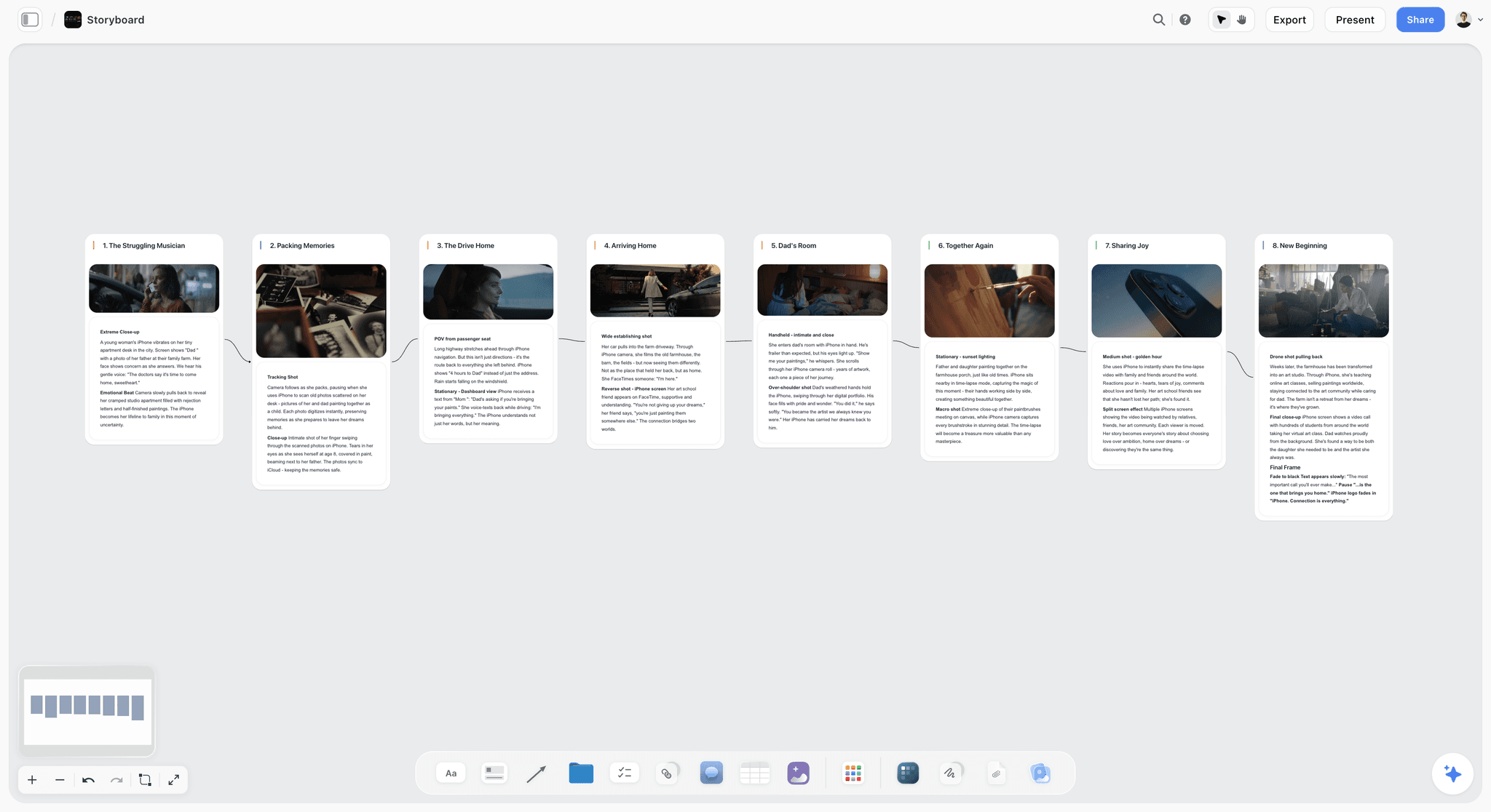
The verdict. Useful before a single shot exists, and not a pipeline tool in any sense.
Best for. Development, pitch bibles, series concepts and the visual thinking that happens before production tracking is relevant.
Pricing. Paid-only during early access. Plus is $7.99 per month billed annually or $9.99 monthly. Pro is $14 per month billed annually or $19 monthly, adding AI image generation, roughly twenty times more AI usage and memory across conversations. Max is $39 per month billed annually or $49 monthly and adds the Team Workspace with permissions and roles. Pricing is flat per account rather than per seat, and anyone a paid member invites to a board joins free. The Free plan launches before the end of 2026.
Why it ranks here. Animation studios spend an unusual proportion of their existence in development. Pitch bibles, series concepts, character exploration, tone documents, and the long stretch where a project is being shaped for a commissioner. That work is visual, iterative, and almost universally scattered across a folder of images, a deck and a conversation.
Storyflow is a canvas where the character exploration, the tone references, the world notes and the story structure sit in one spatial surface that a commissioner or a co-producer can open. The spatial arrangement carries meaning: variants in a row, the approved direction above them, the rejected branch kept visible so the same idea does not get re-proposed in month five.
The AI reads your full active canvas board by default, plus up to one Tactic and up to three Documents you @-mention, which is useful for drafting bible sections from a board that already contains the thinking.
Access shape matters for studios because development involves people you do not employ: a writer, a commissioning editor, a co-production partner. Invited collaborators join free.
Strengths.
- One surface for character exploration, tone, world and structure during development.
- Invited collaborators join free, so writers, commissioners and partners can be in it.
- Flat per-account pricing rather than per seat.
- Canvas-wide AI context for drafting bible and pitch material from the board.
- Keeps rejected directions visible, which prevents circular development.
Limitations.
- Not a pipeline tracker. No shot status, no task assignment, no dependency graph, no version control on assets.
- No review sessions, no timecoded notes, no per-version annotation.
- No render management, no DCC integration, no Maya, Harmony, Blender or Nuke connection.
- No boarding or animatic features. It will not replace Storyboard Pro.
- Newer platform, so it will not be familiar to artists arriving from a studio pipeline.
The trade off. Storyflow covers the months before production and nothing during it. A studio that buys only this will be fine in development and lost by shot forty.
4. Kitsu
The verdict. The most underrated tool on this list, and the right pipeline tracker for studios under roughly twenty people.
Best for. Small and mid-size studios that need real production tracking without Autodesk pricing.
Pricing. Open source and free if self-hosted. Hosted plans from CG-Wire at modest per-user rates. Verify on kitsu.cg-wire.com.
Why it ranks here. Kitsu does the core of what a pipeline tracker must do: assets and shots with statuses, task assignment, review with annotated notes attached to versions, and a genuinely pleasant interface that artists do not resent. It is open source, self-hostable, and has an active community with production users.
For a studio of twelve, the honest comparison is not Kitsu versus Flow Production Tracking. It is Kitsu versus a spreadsheet, and Kitsu wins that comparison so decisively that the main reason studios do not use it is that they have not heard of it.
Fourth rather than higher because self-hosting has a real cost in technical attention, and because the integration ecosystem is far smaller than Autodesk's.
Strengths.
- Free if self-hosted, with genuine production capability.
- Clean, artist-friendly interface with review and annotation built in.
- Task assignment, statuses and per-version notes.
- Open source, so you are not exposed to a vendor's pricing decisions.
- Active development and a real community.
Limitations.
- Self-hosting requires somebody technical, which is a real cost.
- Integration ecosystem is much smaller than the Autodesk stack.
- Dependency tracking is less sophisticated than Flow Production Tracking.
- Smaller talent pool of people who arrive already knowing it.
The trade off. If you have one technical person and fewer than twenty artists, this is probably the best value on this entire page.
5. ftrack
The verdict. A pipeline tracker with review at its centre, and the strongest answer to staleness three.
Best for. Studios where the review cycle is the bottleneck rather than the dependency graph.
Pricing. Per-user subscription, with Review and Studio tiers. Verify on ftrack.com.
Why it ranks here. ftrack Review is genuinely excellent: synchronized sessions where everyone is looking at the same frame, annotations that persist against a version, and notes that land in the artist's list rather than in a memory. For a studio whose staleness is mostly note-shaped, this is a more direct fix than a heavier pipeline tool.
Fifth because the tracking side, while capable, is less deeply integrated than Autodesk's, and because pricing sits close enough to Flow Production Tracking that the comparison becomes about ecosystem.
Strengths.
- Best-in-class synchronized review sessions.
- Annotations bound to versions, routed to assignees.
- Solid task and asset tracking.
- Good API and integration coverage.
- Popular in mid-size studios, so artists often know it.
Limitations.
- Per-user pricing that adds up.
- Tracking depth behind Flow Production Tracking.
- Requires configuration and an owner.
- Smaller ecosystem than Autodesk's.
The trade off. Choose it over Flow Production Tracking when review is your pain and dependency tracking is not.
6. Frame.io
The verdict. Excellent review for studios that do not want a pipeline tool, with none of the pipeline.
Best for. Boutique studios, motion graphics teams and client-facing review.
Pricing. Free tier with limits. Paid plans from around $15 per user per month. Verify on frame.io.
Why it ranks here. Frame.io gives you timecoded comments on stacked versions with almost no setup, which is a real answer to staleness three for a studio that is not going to run a pipeline tracker. It is also the right tool for client review, which pipeline tools handle poorly.
Sixth because it knows nothing about assets, dependencies or task assignment. A note lands on a version of a file, not on a shot in a production.
Strengths.
- Timecoded, frame-accurate comments with almost no setup.
- Version stacking with per-version comment history.
- Excellent for client and commissioner review.
- Deep Adobe integration.
Limitations.
- No production tracking, task assignment or dependencies.
- Per-user pricing, and reviewers count on some tiers.
- Storage limits arrive quickly with high-resolution output.
- Not built for animation-specific review needs.
The trade off. The right review layer for a studio too small for a pipeline. The wrong one for a studio that has outgrown that.
7. Blender
The verdict. A complete production animation package that costs nothing, with a sequencer good enough to hold an animatic.
Best for. Independent studios and 3D-first teams operating without licence budgets.
Pricing. Free and open source. Verify on blender.org.
Why it ranks here. Blender's Grease Pencil and Video Sequence Editor mean a small studio can board, animate and cut inside one free application. Studios have shipped genuinely good work this way, and for a founding team without capital that matters more than any feature comparison.
Seventh on a tools list because it is a creative application rather than a coordination one, and every staleness on this page is a coordination problem.
Strengths.
- Free, with a complete 2D and 3D animation toolset.
- Grease Pencil is a legitimate 2D animation pipeline in its own right.
- Sequencer handles animatics and rough edits.
- Enormous community and learning resources.
- Strong pipeline integration options via Python.
Limitations.
- No production tracking of any kind.
- The all-in-one nature means no clean departmental boundaries without a pipeline layer.
- Steep learning curve across its breadth.
- Studio-scale asset management requires building it yourself.
The trade off. The obvious creative foundation for an independent studio. Not a system for coordinating one.
8. Clip Studio Paint
The verdict. The best value drawing tool for boards and 2D assets, at a price a small studio does not have to think about.
Best for. Board artists and 2D asset production on a constrained budget.
Pricing. Perpetual licence or low-cost subscription, historically well under $100 for a perpetual EX licence with promotional pricing. Verify on clipstudio.net.
Why it ranks here. Clip Studio Paint has genuine animation and storyboard features, excellent drawing tools, and a price that makes equipping five artists a decision you make in an afternoon rather than a quarter.
Eighth because its board-to-animatic path is weaker than Storyboard Pro's, and that path is exactly where staleness one lives.
Strengths.
- Outstanding drawing tools at a very low price.
- Real animation and storyboard capability, not an afterthought.
- Perpetual licence option.
- Huge asset and brush ecosystem.
Limitations.
- Board-to-animatic workflow is weaker than Storyboard Pro's.
- Not built for studio-scale collaboration.
- Version and revision handling is file-based.
- No production tracking.
The trade off. The right drawing tool for a studio watching every pound. Not a substitute for a board pipeline.
9. Airtable
The verdict. The tracker for everything your pipeline tool does not cover, and the honest first pipeline for a studio of four.
Best for. Asset lists, delivery schedules, freelancer contracts and anything falling outside a pipeline tool's model.
Pricing. Free tier with record limits. Team plans from around $20 per seat per month billed annually. Verify on airtable.com.
Why it ranks here. Every studio has lists that no pipeline tool models well: deliverables per client, music cue sheets, freelancer contracts and rates, festival submissions. Airtable makes these records with required fields rather than spreadsheet rows that decay.
Ninth because it is generic. It will hold a shot list, and it will not tell you which shots depend on the rig you just revised.
Strengths.
- Required fields and controlled vocabularies.
- Linked records that model relationships properly.
- Automations for chasing missing deliverables.
- Cheap and immediately usable.
Limitations.
- No dependency awareness, which is the core pipeline problem.
- Per-seat pricing.
- Needs an owner to stay coherent.
- Record and attachment limits on lower tiers.
The trade off. A good complement and a poor pipeline. Studios that try to make it one usually rebuild it as Kitsu within a year.
10. Miro
The verdict. Good wall space for planning sessions, with per-member pricing that fits studios badly.
Best for. Structure sessions, retrospectives and remote workshops.
Pricing. Free tier with board limits. Paid plans from around $8 per member per month billed annually. Verify on miro.com.
Why it ranks here. Miro is genuinely good at the session: a distributed team structuring a series, mapping episodes, or running a post-mortem. The facilitation tooling is the best in the category.
Tenth because per-member pricing is a poor fit for a studio full of freelancers, and because boards created in a session tend not to be revisited, which limits their value against any staleness on this page.
Strengths.
- Best facilitation features for structured sessions.
- Enormous template library.
- Excellent for distributed workshops.
- Mature and reliable at scale.
Limitations.
- Per-member pricing punishes studios with freelance rosters.
- Boards become archaeology quickly after the session.
- No production or asset awareness.
- Performance degrades on very dense boards.
The trade off. Buy it for sessions if you run a lot of them. It is not a development or production surface.
11. Notion
The verdict. The right place for the series bible as a document, and the wrong place for it as a visual object.
Best for. Process documentation, department wikis and written show bibles.
Pricing. Generous free plan for individuals. Paid plans around $10 per user per month billed annually. Verify on notion.so.
Why it ranks here. A studio needs written institutional memory: how we name files, what our delivery spec is, what the show's rules are. Notion is very good at that and everybody already knows it.
Eleventh because animation development is visual and Notion flattens visual material into a vertical scroll, which is the specific property a character exploration needs to not have.
Strengths.
- Excellent for written documentation and wikis.
- Databases handle light tracking.
- Universally familiar.
- Strong free tier.
Limitations.
- Everything becomes a document, including the pictures.
- No production tracking with real enforcement.
- Per-user pricing for collaborators.
- Configuration is a time sink.
The trade off. Use it for the words. Use something spatial for the look.
What to Actually Pay For
Buy the board pipeline first. In animation the board is the film in draft. Money spent making board changes propagate cleanly returns more than money spent anywhere else, because every downstream department inherits the board's errors at full production cost.
Buy the tracker at the right size. Under about twenty artists, Kitsu. Above it, Flow Production Tracking or ftrack, and budget for the administrator, because you are hiring one whether or not it is in the plan.
Do not skip the review layer. Staleness three is the most common failure and the cheapest to fix. Notes attached to versions, routed to artists, in writing. Whether that is inside your pipeline tool or Frame.io alongside it matters less than that it exists.
Spend almost nothing on development tooling. A canvas at $8 a month is enough. The value is in keeping the exploration visible and the rejected branches recorded, not in the software.
Tools to Avoid for This Job
A spreadsheet as your shot tracker past about thirty shots. It works, right up until an asset is revised and nobody can answer which shots are affected. That question is the whole reason pipeline tools exist.
Verbal-only dailies. Whatever else you do, if a note is not written against a version, assume it will arrive at the artist as a paraphrase. Every studio that has suffered this knows it and half still do it.
Generic project management as a pipeline. Asana, Monday and ClickUp model tasks with owners and dates. Animation needs assets with versions and dependencies, which is a different data model, and forcing it produces a tool nobody trusts.
Two boarding tools. If half your artists board in one application and half in another, your animatic assembly is a conversion step, and conversion steps are where timing changes get lost.
What No Tool on This List Does
None of these will tell you the sequence does not work.
A pipeline tracker will tell you a shot is stale against a revised asset. A review tool will tell you a note was given and by whom. Neither will tell you that the sequence everybody has been polishing for six weeks is two beats too long and reads as flat, because that judgment requires having seen the film with fresh eyes, and nobody inside a production has those after month four.
None of them will fix the fact that animation costs are front-loaded against certainty. You commit to a board before you know whether the film works, and you find out when the animatic plays. Tools can make the animatic arrive earlier, which is genuinely valuable and is the strongest argument for a board-to-animatic pipeline. They cannot make the answer arrive before the commitment.
And none of them will keep a freelancer who has moved on to another show. Distributed animation runs on rosters of people with other commitments, and a beautifully tracked production still stalls when the only person who knows how a rig works is unavailable. That is a staffing problem wearing a pipeline costume.
The Bottom Line
Animation fails differently from live action. Nothing is lost on a shoot day, because there is no shoot day. Work goes stale instead, quietly, over months.
Choose by the staleness that keeps costing you. If finished animation keeps reading against an old board, the fix is a board-to-animatic pipeline, and that is Toon Boom Storyboard Pro. If nobody can answer which shots a revised asset breaks, you need a dependency graph, and that is Flow Production Tracking above a certain size and Kitsu below it. If good notes keep arriving as paraphrases, buy a review layer and write everything down.
Storyflow ranks third here for the months before any of that, and it is the only claim this post makes for it.
FAQ: Tools for Animation Studios
What is the best tool for a small animation studio?
Toon Boom Storyboard Pro, because the board is the film in draft and board changes need to propagate into the animatic automatically rather than through a manual re-timing step. Pair it with Kitsu for production tracking, which is open source and genuinely capable for studios under about twenty people.
Do we need ShotGrid or Flow Production Tracking?
Only once your shot count exceeds what one person can hold in their head, which is usually somewhere between thirty and eighty shots depending on complexity. Below that, Kitsu does the same core job for a fraction of the cost. Above it, budget for a pipeline administrator alongside the licences, because the tool assumes one exists.
Is Storyflow a pipeline tool for animation?
No. Storyflow has no shot status, no task assignment, no asset dependency graph, no version control and no DCC integration with Maya, Harmony, Blender or Nuke. It ranks third on this list for development and pitch work: character exploration, tone, world and structure before production tracking is relevant.
What is the best free tool for an animation studio?
Blender for creative production and Kitsu self-hosted for tracking is a genuinely capable free stack, and studios have shipped commercial work on it. The hidden cost is technical attention: self-hosting and pipeline maintenance consume real time from somebody who could be animating. Storyflow is paid-only during early access, so it does not belong in a free stack today.
Kitsu or ftrack for a mid-size studio?
Kitsu if cost is the constraint and you have a technical person, because self-hosting removes per-user pricing entirely. ftrack if your bottleneck is review, because its synchronized review sessions with version-bound annotations are stronger than Kitsu's and stronger than most of this list.
How do we stop shots being animated against old boards?
Make the board and animatic the same artifact, so a board change re-times the animatic without a manual step, and publish the animatic version number everywhere downstream. Then make it a rule that no shot starts without referencing a named animatic version. The tooling supports this; the discipline is what enforces it.
How do we track which shots depend on a revised asset?
You need a dependency graph, which means a real pipeline tracker: Flow Production Tracking, ftrack or Kitsu. This is the single capability that separates pipeline tools from spreadsheets and from general project management, and it is the reason studios eventually buy one.
What does an animation studio tool stack cost?
For a ten-person studio: Storyboard Pro seats for the board crew (the largest line), Kitsu self-hosted (free plus hosting), a review layer if Kitsu's is not enough, and a development canvas at under $10 a month. The dominant cost is board seats, which is appropriate given where the leverage is.
Can AI help an animation studio?
In development, meaningfully: exploring character and tone variations quickly, and drafting bible sections from a board that already contains the thinking. In production, much less than the marketing suggests, because animation production is a dependency and consistency problem rather than a generation problem. Storyflow's AI reads your full active canvas board plus up to one Tactic and three Documents you @-mention.
How do we handle freelance and remote artists?
Choose tools that work over the public internet without a studio LAN, and accept per-user costs for tracking access rather than leaving freelancers outside the system. A freelancer outside your tracker is a staleness incident waiting to happen, and the seat is cheaper than the reanimation.
Should we self-host our pipeline tracker?
If you have one genuinely technical person who is not fully allocated, yes: Kitsu self-hosted removes per-user pricing permanently. If you do not, no. Self-hosting failures in the middle of a delivery week cost more than years of licence fees.
What is the difference between a pipeline tool and project management software?
Data model. Project management software models tasks with owners and due dates. A pipeline tool models assets and shots with versions and dependencies, so it can answer what a change breaks. If your tool cannot answer that question, it is project management software regardless of what it is called.
How early should development work be organized?
From the first pitch. Animation development runs for years and cycles through commissioners, and the studios that suffer least are the ones who kept the rejected directions visible, so the same idea is not re-proposed in month five by somebody who joined in month three.
What is the single change worth making this quarter?
Require that every dailies note is written against a named shot version before the session ends. Not summarized afterwards, written during. Most studios discover that a meaningful share of their rework traces to notes that were understood in the room and never reached the person who could act on them.
Table of Contents
- Key Takeaways
- The Three Ways a Shot Goes Stale
- At a Glance: The 11 Tools Compared
- How I Ranked These
- 1. Toon Boom Storyboard Pro
- 2. Autodesk Flow Production Tracking
- 3. Storyflow
- 4. Kitsu
- 5. ftrack
- 6. Frame.io
- 7. Blender
- 8. Clip Studio Paint
- 9. Airtable
- 10. Miro
- 11. Notion
- What to Actually Pay For
- Tools to Avoid for This Job
- What No Tool on This List Does
- The Bottom Line
- FAQ: Tools for Animation Studios
- Related Reading
Templates to check out for this topic


Filmmaking templates you can use in Storyflow
Skip the blank canvas. Open one of these filmmaking boards in Storyflow and the AI builds on the structure that is already there, from research through the shot list.


See Storyflow in Action
A visual AI workspace where every feature lives inside one canvas. No tab-switching, no context lost.
Build your entire board from a single message
Type what you need in the AI chat at the bottom of your canvas. The AI adds cards, headings, and structure directly onto your board.
Use expert frameworks as AI context
Type @ in the AI chat and choose any Tactic. The AI tailors every response to that framework instead of giving generic advice.
Turn your board into a mind map in seconds
Ask the AI to restructure your canvas as a mindmap. It connects your ideas into a visual hierarchy so you can see how everything relates.
Why Storyflow Exists
Storyflow actually began as a personal tool while working on creative and research projects.
We kept running into the same problem: ideas were scattered everywhere: notes, documents, and whiteboards.
Nothing helped us see how everything connected.
So we started building a workspace designed around how ideas actually grow.
→ Read how Storyflow was createdSara de Klein
Head of Product at Storyflow
Published: 2026-08-11
Extremely simple, seriously capable


See how easy it is to get started
Watch a real project come together, from a blank board to a finished plan, clicked through step by step.
Start creating with AI and become more productive
Transform your creative workflow with AI-powered tools. Generate ideas, create content, and boost your productivity in minutes instead of hours.