The 11 Best Collaborative Canvas Tools in 2026 (We Tested Them All)
A shared canvas rarely dies of disagreement. It dies of sprawl, squatting, silence, or staleness. Eleven tools ranked on which canvas is still worth opening three weeks after the session that made it.

Category
Productivity
Author

Sara de Klein
Head of Product at Storyflow
Topics
2026-08-12
•
18 min read
•
Productivity- best collaborative canvas tools
- Miro vs FigJam 2026
- online whiteboard for teams
- shared canvas app
- Excalidraw alternatives
- async visual collaboration
What are the best collaborative canvas tools in 2026?
Miro is the best collaborative canvas for the live workshop and we say so plainly. This ranking asks a different question: which canvas is still worth opening three weeks later. A shared canvas rarely dies of disagreement, it dies of sprawl, squatting, silence or staleness, and sprawl is the dominant killer because an infinite canvas has infinite room for the thing nobody can find. Storyflow ranks first for this specific question because its AI reads the whole canvas, which is the only direct answer to sprawl on this list, and it has no timers, no voting and far fewer integrations than Miro. Mural is the best for facilitated sessions. If your canvas is only ever used live with a facilitator present, buy Miro or Mural and ignore this ranking.

Full disclosure: Storyflow is our own product and we rank it #1 here, so read the scope before taking that at face value. This list deliberately ranks one narrow question: which canvas is still worth opening three weeks after the session that created it. On the question most people actually mean, the live facilitated workshop, Miro is the best tool available and Mural is close behind, and we say so plainly in the article rather than burying it. Storyflow has no timers, no private voting and no facilitator controls at all; it has far fewer integrations than Miro, which matters if your canvas must reflect Jira or Confluence state; and it has no shape libraries or diagramming depth, so Lucidspark and Miro are substantially better for flowcharts and architecture diagrams. It is also cloud-only and paid-only during early access, while Excalidraw, Apple Freeform and Microsoft Whiteboard are free today. We link to every tool so you can judge the fit yourself.
Quick Comparison
These four answer different halves of the canvas question: which surface survives the four deaths between sessions, which runs the best live workshop, which sits closest to where a design team already works, and which refuses to sprawl because nobody treats it as permanent.
| Tool | Best For | AI Features | Price |
|---|---|---|---|
| Storyflow | Reading a sprawling canvas months later | Reads the whole canvas | $7.99 mo annual (free plan late 2026) |
| Miro | Live workshops, templates and integrations | Clustering and summarizing | Free tier / from ~$8 member mo |
| FigJam | Design teams already in Figma | Light, improving | Free tier / from ~$5 editor mo |
| Excalidraw | Instant, free, open source, no account | Minimal | Free, open source |
Key Takeaways
- A shared canvas rarely dies of disagreement. It dies of sprawl, squatting, silence, or staleness.
- This list ranks what happens between sessions, not during them. Miro wins the live workshop and we say so plainly; the question here is which canvas is still worth opening three weeks later.
- Sprawl is the dominant killer: an infinite canvas has infinite room for the thing nobody can find, and every tool markets the infinity as a feature.
- Storyflow ranks first for this specific question because its AI reads the whole canvas, which is the only direct answer to sprawl on this list. It has no timers, no voting, and far fewer integrations than Miro.
- If your canvas is only ever used live with a facilitator present, buy Miro or Mural and ignore this ranking.
Ask a six-month-old canvas what is actually on it
Sprawl is a reading problem, not a filing problem. When a board has outgrown what anyone can hold in their head, the cost lands on whoever arrives last. Storyflow's AI reads the whole canvas, so a new joiner can ask what has been decided and what is still open instead of spending an hour on archaeology. Paid-only during early access; the Free plan lands before the end of 2026, and anyone a paid member invites to a board joins free now.

At a Glance: The 11 Tools Compared
| Tool | Deaths it resists | Live facilitation | Price |
|---|---|---|---|
Storyflow | Sprawl and staleness | Weak, not its model | $7.99 mo annual (free plan late 2026) |
Miro | Squatting, via templates and frames | Best in class | Free tier / from ~$8 member mo |
FigJam | Silence, via Figma proximity | Strong | Free tier / from ~$5 editor mo |
Mural | Squatting, via method structure | Strongest facilitation | Free tier / from ~$12 member mo |
Excalidraw | Sprawl, by refusing to scale | Minimal | Free, open source |
Lucidspark | Staleness, via Lucidchart handoff | Good | Free tier / from ~$8 user mo |
Canva Whiteboards | Silence, if the team lives in Canva | Light | Free tier / Pro from ~$15 mo |
Apple Freeform | None especially | None | Free on Apple devices |
Microsoft Whiteboard | Silence, via Teams notifications | Light | Included with Microsoft 365 |
tldraw | Sprawl, by staying small | Minimal | Free, open source |
A shared document | Staleness, by being linear | None | Usually free |
Prices are the publicly listed rates at the time of writing and change often, particularly per-member tiers. Check before committing a team.
How I Ranked These
Six of these (Miro, FigJam, Excalidraw, Apple Freeform, a shared document, Storyflow) I have used across real projects for longer than a single session, which is the only way the four deaths become visible. Mural, Lucidspark, Canva Whiteboards, Microsoft Whiteboard, and tldraw I evaluated hands-on against the same criteria over shorter periods, and where a claim rests on published documentation rather than my own use, the review says so.
Five criteria, in this order:
- Resistance to sprawl. Can somebody arriving cold find the part that matters. Weighted highest because it is the most common death by a distance.
- Async contribution. Does the tool make a change visible to people who were not present, without depending on somebody remembering to post about it.
- Currency signalling. Can a reader tell what is decided from what is exploratory. This is what separates a canvas from a rumour.
- Restructuring cost. How expensive it is socially and mechanically to reorganise somebody else's layout, which determines whether squatting sets in.
- Honest cost per member at team size. Per-seat canvas pricing across a department is a real line item and the free tiers vary enormously in what they actually permit.
Deliberately not weighted: live facilitation features. They matter enormously and they are a different purchase, covered in the next section.
What This List Is Not Ranking
Being explicit about scope, because it changes the answer completely.
For a live, facilitated session, Miro is the best tool available and Mural is close behind. Timers, private voting, structured frames, facilitator controls that pull everyone's view to yours, and a template library covering essentially every workshop format anybody has invented. If your canvas use is a ninety-minute session with eight people and somebody steering, that is the purchase, and nothing in the ranking below should talk you out of it.
That is a genuinely different product question from the one here. A workshop canvas is consumed in the session and its afterlife barely matters; the output is usually a decision that moves elsewhere. This list is about the canvas that is supposed to keep working: the team's ongoing shared surface for a project that runs for months.
The two use cases pull in opposite directions. Workshop tools optimise for a facilitator being present, which means they assume a steering function that between sessions does not exist. The features that make a great workshop (infinite room, freedom to place anything anywhere, no imposed structure) are precisely the ones that produce sprawl when nobody is steering.
So read the ranking below as answering one question: which canvas is still worth opening three weeks after the session that created it.
Quick Picks by Situation
- Best canvas that survives between sessions: Storyflow, our own product, for reasons that are narrow and stated.
- Best live workshop canvas: Miro, and it is not close.
- Best for structured facilitation: Mural, if facilitation is a discipline your team practises.
- Best for design teams: FigJam, for proximity to the work and the lowest serious price.
- Best free canvas: Excalidraw, open source, fast, and anti-sprawl by design.
- Best for a Microsoft shop: Microsoft Whiteboard, because it is already there and Teams carries the notification.
- Best for diagram handoff: Lucidspark, which promotes cleanly into Lucidchart.
- Best anti-canvas: A shared document, when what you actually need is a decision log.
1. Storyflow
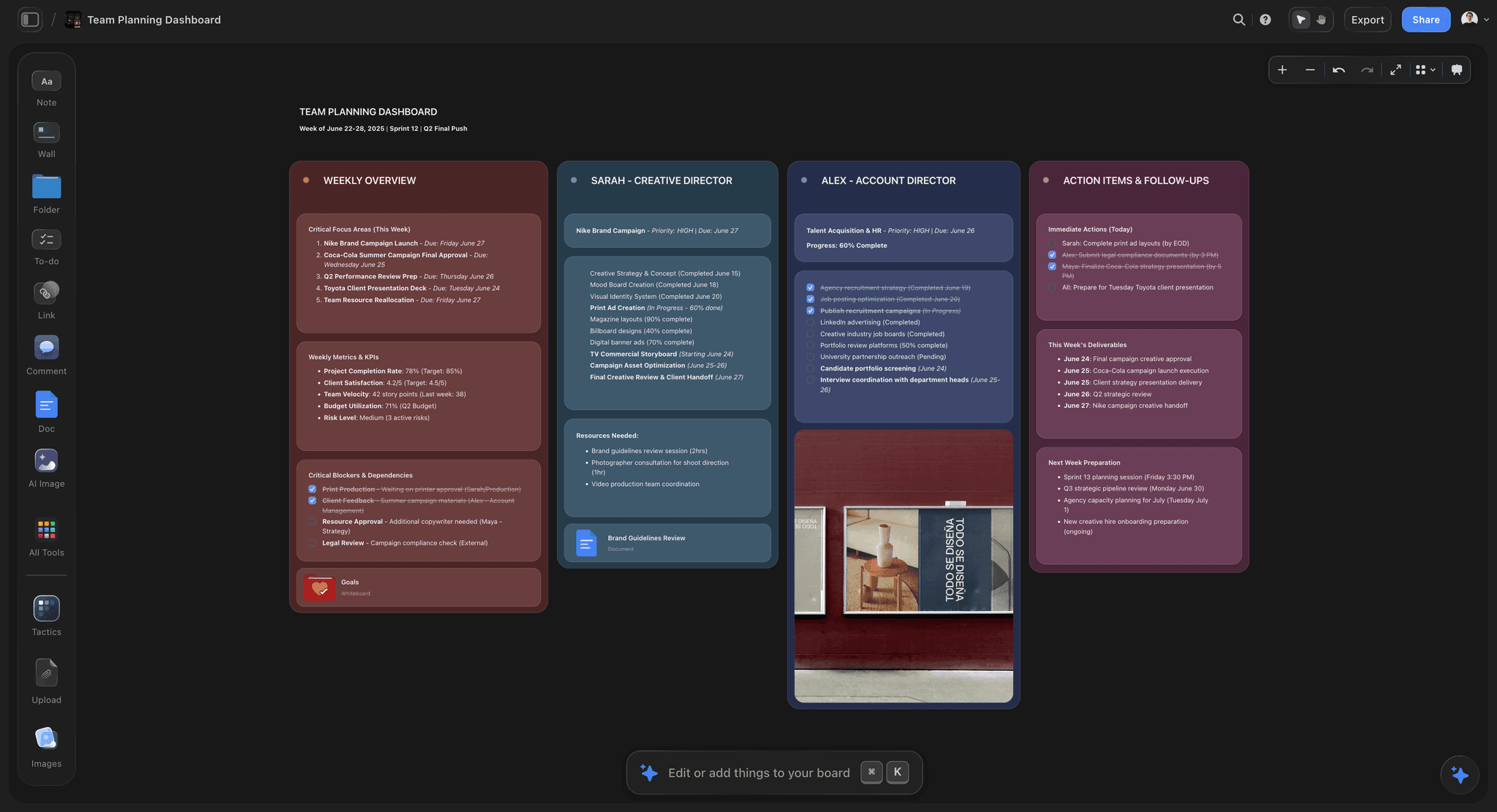
Storyflow is our own product and it ranks first on this list for one reason, which is worth stating narrowly rather than broadly: its AI reads the whole canvas, and that is the only direct answer to sprawl among these eleven tools.
Sprawl is a reading problem. A canvas with six months of accumulated work is not disorganised in a way a better folder structure would fix; it is simply larger than a person can hold in their head, and the cost falls on whoever arrives last. Every other tool here responds to that with navigation: frames, tags, links, a table of contents somebody has to maintain. Storyflow responds by letting you ask. What is on this board, what has been decided, what is unresolved, which clusters are duplicates of each other. For somebody joining a project in month four, that converts an hour of archaeology into a paragraph.
The same capability addresses staleness, which is the death nobody instruments for. Asking a canvas which of its conclusions contradict each other surfaces the region where a decision was reversed and the old version was never cleared. That is not something a canvas can tell you by looking, because a stale cluster and a current one are visually identical.
It also handles the async problem better than its feature list suggests, though indirectly: because the canvas can be summarised, a person who missed a week can catch up without anybody writing a recap. Recaps are the thing that never gets written.
For contribution, the sharing model helps on projects with rotating collaborators: anyone a paid member invites to a board signs up free and can invite others, so a freelancer touching the project for two weeks does not require a seat purchase. The Max tier adds a team workspace with roles and permissions for organisations needing managed access.
Where Storyflow loses
Four limitations, and the first is why the scope section above exists.
It is not a workshop tool. There are no timers, no private voting, no facilitator controls, no structured session frames. Miro and Mural are built around synchronous facilitated sessions and Storyflow is not. If your canvas is used live with a facilitator, buy one of those instead and do not overthink it.
It has far fewer integrations than Miro. Miro connects to Jira, Azure DevOps, Confluence, and a long tail of enterprise systems, and for teams whose canvas needs to reflect ticket state, that gap is decisive and not something the AI compensates for.
It has no shape libraries or diagramming depth. For flowcharts, architecture diagrams, swimlanes, and anything that wants proper connectors and stencils, Lucidspark and Miro are substantially better and this is the wrong tool.
It is cloud-only and paid-only during early access, with the Free plan arriving before the end of 2026. Excalidraw, Apple Freeform, and Microsoft Whiteboard are all free today, and Excalidraw is open source.
Pricing: Plus $7.99/mo annual ($9.99 monthly) for the Story blueprints library and unlimited uploads. Pro $14/mo annual ($19 monthly) adds AI image generation, roughly 20 times the AI volume, and memory across conversations. Max $39/mo annual ($49 monthly) adds roughly 40 times the AI volume plus the team workspace with roles and permissions. Plus adds no AI volume over the trial allowance, so Pro is the real entry point if the AI reading is why you are here.
2. Miro
Miro is the most capable collaborative canvas in existence and it ranks second here only because of the narrow question this list asks.
Everything it does, it does at scale: multiplayer that holds up with dozens of people, the deepest template library in the category, integrations across the enterprise stack, facilitation tooling nothing else matches, and a genuinely useful AI that clusters and summarises selections. For a live session it is the answer, as stated above.
Its relationship to the four deaths is mixed and worth being specific about. It resists squatting well, because frames and templates give people sanctioned places to work without renegotiating the layout. It is the worst offender on sprawl of anything here, and that is a direct consequence of its strengths: infinite room, every format supported, nothing discouraged. Long-running Miro boards become sedimentary. Its notification model is better than most but still weak for a surface with no linear order, so silence remains a real problem between sessions.
Pricing deserves a note: the free tier's limit on editable boards catches teams by surprise, and per-member pricing across a department adds up faster than the headline suggests.
If you are choosing one canvas for a team that does both live sessions and ongoing work, this is the defensible choice, and you should plan deliberately for sprawl by archiving boards rather than growing them.
Pricing: Free tier with limited editable boards. Paid from around $8/member/month annual.
3. FigJam
FigJam is the best value in this category and the right default for any team already working in Figma.
The proximity argument is the strong one, and it maps directly onto the silence death. Because FigJam files live in the same project tree as the design work, they appear in the same file browser, under the same permissions, in the same notifications people already read. A canvas that shows up where the team already looks gets opened; a canvas in a separate product does not. That is worth more than most feature differences.
Multiplayer is excellent, the free tier is generous, and per-editor pricing is the lowest of the serious tools here. Stickies, voting, and cursor chat cover light facilitation well enough for teams not running formal sessions.
Against it: it is a design-team tool and non-designers can treat it as foreign territory, which suppresses contribution from exactly the people whose input the canvas needed. It also inherits the general canvas weakness on currency signalling, with no way to mark a region as decided.
Pricing: Free tier. Paid from around $5/editor/month, separate from and cheaper than Figma design seats.
4. Mural
Mural is Miro's closest competitor and differs in one consistent way: it is more opinionated about method.
Where Miro is a canvas that supports workshops, Mural is a workshop practice that uses a canvas. Facilitator controls are stronger, including summoning participants' views, and the templates are built around named methods rather than general shapes. For organisations where facilitation is a trained discipline, that opinionation is an advantage and it genuinely resists squatting, because the method supplies the structure instead of the first person to arrive.
Between sessions it has the same weaknesses as Miro, with a slightly smaller integration surface and a slightly higher per-member price.
Choose it over Miro when your team runs formal facilitated sessions as a practice. Choose Miro when you want the more flexible general canvas.
I evaluated this hands-on on test sessions rather than a long-running engagement, so weight the facilitation judgment from practitioners above mine.
Pricing: Free tier. Paid from around $12/member/month.
5. Excalidraw
Excalidraw earns fifth place by refusing to do most of what this category does, and that refusal is the feature.
It opens instantly with no account, draws in a deliberately rough hand-drawn style, supports live collaboration, and is open source with a self-hostable option. There are no templates, no facilitation apparatus, no integrations to speak of, and very little to configure.
The relevant consequence is that Excalidraw boards do not sprawl, because nobody treats them as permanent. They are used for one diagram, one explanation, one architecture sketch, and then they are done. That is a healthier relationship with a canvas than most teams have with Miro, and it sidesteps three of the four deaths by not inviting the behaviour that causes them.
The hand-drawn aesthetic also does real work: it signals draft, which keeps people editing rather than treating the diagram as finished.
It is not a team's ongoing shared surface and does not try to be. For engineering teams especially, it is frequently the only canvas that actually gets used.
Pricing: Free and open source, with a paid Excalidraw Plus tier for teams.
6. Lucidspark
Lucidspark is the brainstorming canvas in the Lucid family, and its distinguishing advantage is what happens after the messy stage.
Ideas explored in Lucidspark promote into Lucidchart, where they become proper diagrams with real connectors, layers, and stencils. That pathway addresses staleness in a way nothing else here does: the canvas is explicitly the draft, and the diagram is explicitly the record, so nobody has to guess which one is current. The separation is the product.
Enterprise administration, permissions, and compliance are stronger than most of this list, which matters in regulated organisations.
Against it: outside the Lucid ecosystem the argument weakens considerably, the interface is more corporate than creative, and for teams not producing formal diagrams the promotion pathway is a feature they will never use.
I evaluated this hands-on rather than across a long engagement.
Pricing: Free tier. Paid from around $8/user/month.
7. Canva Whiteboards
Canva's whiteboard is a competent canvas whose real argument is the same proximity logic as FigJam's, applied to a different population.
For marketing teams, agencies, and educators who already live in Canva, the whiteboard sits next to the assets, the brand kit, and the decks, and it converts into a presentation in one step. That last part is genuinely useful: the gap between a messy canvas and something presentable is where a lot of teams lose an afternoon.
It is lighter on facilitation than Miro and lighter on structure than Mural, and it inherits Canva's page-oriented instincts, which sit awkwardly with infinite-canvas thinking. For a team not already in Canva there is little reason to choose it.
Pricing: Free tier. Pro from around $15/month, team pricing above.
8. Apple Freeform
Freeform is free, genuinely pleasant, and available on every Apple device, and for informal collaboration inside an Apple-only group it is a reasonable default.
Pencil input on iPad is excellent, the canvas is fast, and sharing through iCloud is frictionless for people already in that ecosystem. For two or three people sketching something out, it is more than sufficient and costs nothing.
It resists none of the four deaths in any deliberate way. There is no structure, no notification model worth the name, no currency signalling, and no cross-platform access, which alone disqualifies it for most teams. Treat it as a personal and small-group tool rather than a team canvas.
Pricing: Free on Apple devices.
9. Microsoft Whiteboard
Microsoft Whiteboard is included with Microsoft 365, which for a large number of organisations makes it the canvas that is actually available.
Its genuine advantage is the silence death: because it is integrated with Teams, a canvas can surface in the channel where the work is already discussed, and notifications ride on infrastructure people already read. That is a real answer to the async-contribution problem and it is one most standalone canvases cannot match.
The canvas itself is behind Miro and FigJam on nearly every dimension: fewer templates, weaker facilitation, less polished multiplayer. But it is already licensed, already approved by IT, and already in front of everyone, and those three facts beat a better product that requires a procurement conversation.
Pricing: Included with Microsoft 365.
10. tldraw
tldraw is a small, fast, open-source canvas that has become the thing developers embed when a product needs a whiteboard inside it.
As a standalone canvas it is pleasant and minimal, in the same spirit as Excalidraw. Its distinctive position is as an SDK: if you are building software that needs a canvas surface, this is the most common answer, and its AI experiments around generating interfaces from sketches are genuinely interesting.
For a team choosing a collaborative canvas to work in, it is thinner than the alternatives and its collaboration story is less mature. Included because a meaningful share of people searching this category are developers looking to embed rather than teams looking to adopt, and the answer for that group is different.
Pricing: Free and open source, with commercial licensing for embedding.
11. A Shared Document
The honest eleventh entry is that a large share of teams reaching for a canvas would be better served by a document, and the reason is the fourth death.
Documents are linear, which sounds like a limitation and is actually a currency mechanism. Text has an order, a most-recent-edit, and a top. A decision log with dated entries answers "what is current" instantly, which no canvas on this list does natively. Comments thread properly, notifications are mature, and everyone already knows how to read one.
The trade is real: documents cannot express spatial relationships, adjacency, or the kind of thinking that only works when twenty things are visible at once. That is exactly what canvases are for and why they exist.
The practical recommendation is to run both deliberately: the canvas for thinking, a short document for what was decided. Most canvas failures are a canvas being asked to serve as the minutes, and it is bad at that job in a way that quietly poisons trust in everything else on the board.
Pricing: Usually free, or included with the workspace you already have.
What to Actually Pay For
Pay for the live session or the between-session problem, not both from one tool. They pull in opposite directions, and teams that buy one tool for both usually get a workshop tool that sprawls.
Do not pay per member for people who will only ever view. Check viewer pricing carefully. Several tools here charge for editors only, and departments routinely buy seats for people who open a board twice a quarter.
Pay attention to the free tier's real limit. Miro's cap on editable boards and Milanote-style item caps catch teams mid-project. The free tier that matters is the one you hit in month three, not the one in the comparison table.
Do not pay for diagramming you are not doing. Lucidspark and Miro both carry substantial diagramming capability that most creative teams never touch.
Spend the free fix first. Archive boards on a schedule and keep a dated decision log beside the canvas. Those two habits prevent sprawl and staleness better than any purchase.
Tools to Avoid for This Job
Google Jamboard. Google discontinued it at the end of 2024. If your organisation still has boards there, they need migrating rather than maintaining, and any guide still recommending it is out of date.
A canvas as the decision record. Covered above and worth repeating because it is the most common structural mistake in this category. Canvases look equally confident about current and abandoned material.
A second canvas tool "just for this project." Fragmentation is worse than any feature gap. The canvas that gets opened is the one the team already has open.
An infinite board that is never archived. Sprawl is not an accident, it is the default outcome of infinite room plus time. Archiving is a practice, not a feature.
What No Tool on This List Does
None of them tell you the canvas is stale. Storyflow gets closest, because you can ask it which conclusions on a board contradict each other, and that is a prompt somebody has to think to write. No tool proactively flags that a region describes a reversed decision, and stale regions look identical to current ones.
None of them solve squatting. Reorganising a colleague's structure is a social act, not a technical one. Every tool here makes it mechanically trivial and none makes it socially comfortable, which is why early structures persist long past their usefulness.
None of them make async contribution happen. Notifications help, and proximity helps more, but the underlying fact is that contributing to a canvas alone, unprompted, with nobody watching, is a behaviour almost nobody has. Teams that get async canvas contribution have a ritual, not a tool.
The Bottom Line
Collaborative canvas tools are compared on what happens during the session, which is the part that already works. Put eight people on a Miro board with a facilitator and a timer and you will have a good ninety minutes on almost any tool in this category.
What decides whether the canvas was worth adopting is the other twenty-three hours of the day, and the four weeks after. That is where boards sprawl past navigability, ossify around somebody's early structure, go silent because nobody knows they changed, and quietly go stale while still looking authoritative.
Storyflow ranks first here because sprawl is a reading problem and it is the only tool on this list that lets you read a whole canvas by asking. That is a narrow claim, and the same review lists no timers, no voting, far fewer integrations than Miro, and no real diagramming. Miro remains the better purchase for anyone whose canvas use is fundamentally the live session, and we would rather say that plainly than pretend otherwise.
Then do the two free things: archive on a schedule, and keep the decisions somewhere linear.
A shared canvas rarely dies of disagreement. It dies of sprawl, squatting, silence, or staleness.
FAQ: Collaborative Canvas Tools
What is the best collaborative canvas tool in 2026?
For a live facilitated workshop, Miro, and it is not close. For a canvas that has to stay useful between sessions, Storyflow, which is our own product, because its AI reads the whole canvas and sprawl is fundamentally a reading problem. For design teams, FigJam is the best value and the proximity to existing work matters more than features.
What is the best free collaborative canvas?
Excalidraw, which is open source, instant, and self-hostable. Apple Freeform is free and good inside an Apple-only group. Microsoft Whiteboard is included with Microsoft 365, which for many organisations makes it the canvas that is actually available. Storyflow is paid-only during early access, so it does not belong in a free comparison.
Miro or FigJam?
FigJam if your team already works in Figma, because the canvas appears where people already look and the per-editor price is lower. Miro if you run facilitated sessions, need the template library, or depend on enterprise integrations like Jira and Confluence. Both are good; the deciding factor is usually where the rest of your work lives.
Why do shared whiteboards stop being used?
Four reasons: sprawl (the board grew past the point anyone can navigate), squatting (one person's early structure became everyone's cage), silence (nobody knows when it changes so nobody contributes async), and staleness (it describes decisions that were later reversed with no way to tell). Sprawl is the most common by a wide margin.
Is an infinite canvas actually useful?
For thinking, yes, and it is the whole point: some problems only become tractable when forty things are visible at once. For a record, infinity is a liability, because there is always room for one more thing and no pressure to remove anything. Use the infinity for exploration and keep the conclusions somewhere linear.
How do you stop a collaborative canvas becoming a mess?
Archive on a schedule rather than growing one board forever, keep a dated decision log beside the canvas so currency lives somewhere linear, and give the board an explicit owner whose job includes reorganising. The first two cost nothing and prevent two of the four deaths.
Is Storyflow a good collaborative canvas?
For the between-sessions problem, yes, and that is why we rank it first here: its AI reads the whole canvas, which directly answers sprawl and helps surface staleness. For live facilitated sessions it is the wrong tool, with no timers, no voting, and no facilitator controls, and Miro or Mural should be the purchase. It also has far fewer integrations and no real diagramming.
What is the difference between a whiteboard and a canvas tool?
In practice the terms are used interchangeably. Where a distinction is drawn, whiteboard implies the session-oriented use (a workshop, a sketch, a diagram) and canvas implies an ongoing surface a project lives on. The distinction matters because the two use cases reward opposite features.
Do collaborative canvases work for remote teams?
For live sessions, very well, and better than a physical whiteboard because everyone has equal access to the surface. For async work they underperform documents, because canvases have no linear order and therefore weak notification and currency models. Remote teams generally need both.
How many people can work on one canvas?
Technically dozens on the mature tools. Practically, useful simultaneous editing tops out around eight to ten before it becomes chaos, and beyond that you want a facilitator and structured frames rather than a free-for-all. The limit is attention, not software.
What happened to Google Jamboard?
Google discontinued it at the end of 2024. Teams still holding boards there should migrate rather than maintain, and any comparison still listing it as a current option has not been updated.
What is the single change worth making to how our team uses a shared canvas?
Keep a short dated decision log next to the canvas. Most canvas problems are a thinking surface being asked to double as the record, and it is bad at that in a way that eventually makes people distrust everything on the board.
Table of Contents
- Key Takeaways
- The Four Deaths of a Shared Canvas
- At a Glance: The 11 Tools Compared
- How I Ranked These
- What This List Is Not Ranking
- Quick Picks by Situation
- 1. Storyflow
- 2. Miro
- 3. FigJam
- 4. Mural
- 5. Excalidraw
- 6. Lucidspark
- 7. Canva Whiteboards
- 8. Apple Freeform
- 9. Microsoft Whiteboard
- 10. tldraw
- 11. A Shared Document
- What to Actually Pay For
- Tools to Avoid for This Job
- What No Tool on This List Does
- The Bottom Line
- FAQ: Collaborative Canvas Tools
- Related Reading
Templates to check out for this topic


Templates you can use in Storyflow
Every Storyflow board starts from real structure and an AI that reads the whole canvas. Open one of these templates and make it yours.


See Storyflow in Action
A visual AI workspace where every feature lives inside one canvas. No tab-switching, no context lost.
Build your entire board from a single message
Type what you need in the AI chat at the bottom of your canvas. The AI adds cards, headings, and structure directly onto your board.
Use expert frameworks as AI context
Type @ in the AI chat and choose any Tactic. The AI tailors every response to that framework instead of giving generic advice.
Turn your board into a mind map in seconds
Ask the AI to restructure your canvas as a mindmap. It connects your ideas into a visual hierarchy so you can see how everything relates.
Why Storyflow Exists
Storyflow actually began as a personal tool while working on creative and research projects.
We kept running into the same problem: ideas were scattered everywhere: notes, documents, and whiteboards.
Nothing helped us see how everything connected.
So we started building a workspace designed around how ideas actually grow.
→ Read how Storyflow was createdSara de Klein
Head of Product at Storyflow
Published: 2026-08-12
Extremely simple, seriously capable


See how easy it is to get started
Watch a real project come together, from a blank board to a finished plan, clicked through step by step.
Start creating with AI and become more productive
Transform your creative workflow with AI-powered tools. Generate ideas, create content, and boost your productivity in minutes instead of hours.