The 10 Best Tabletop RPG Campaign Tools in 2026
A campaign runs at three tempos: prep alone over weeks, the table live in four hours, and the bible between sessions. Buy for the tempo, not for the campaign.

Category
Tools & Software
Author

Sara de Klein
Head of Product at Storyflow
Topics
2026-08-14
•
25 min read
•
Tools & SoftwareTable of Contents
- Key Takeaways
- The Three Tempos of a Campaign
- At a Glance: The 10 Tools Compared
- How I Ranked These
- Quick Picks by Job Type
- 1. Obsidian
- 2. World Anvil
- 3. Foundry VTT
- 4. Owlbear Rodeo
- 5. LegendKeeper
- 6. Storyflow
- 7. Roll20
- 8. Kanka
- 9. Notion
- 10. The Paper GM Binder
- What to Actually Pay For
- Tools to Avoid for This Job
- What No Tool on This List Does
- The Bottom Line
- FAQ: Tabletop RPG Campaign Tools
- Related Reading
Templates to check out for this topic


- tabletop rpg campaign tools
- best campaign manager for dnd
- virtual tabletop vs campaign wiki
- obsidian for ttrpg notes
- world anvil vs legendkeeper
- foundry vtt vs roll20
- gm prep tools
- worldbuilding wiki
What are the best tabletop RPG campaign tools in 2026?
There is no single best tool for running a tabletop RPG campaign, and every disappointing recommendation you have read failed for the same reason: a campaign runs at three different speeds and no product is good at all three. Obsidian ranks first because it is the only tool here that is excellent at both slow prep and instant retrieval, and it costs nothing. World Anvil is the strongest purpose built campaign wiki if you want structure handed to you. Foundry VTT is the best thing to have open during the session, and Owlbear Rodeo is the best thing to have open when you did not prepare. Most GMs need two tools, not one.

Full disclosure: Storyflow is our product, and it ranks sixth here rather than first. Its genuine claim is narrow: prep tempo spatial work, meaning faction relationships and clue webs you can see as one picture instead of six wiki pages. It is not a campaign bible and not a virtual tabletop. It has no dice roller, no character sheets, no initiative tracker, no maps or fog of war, no integration with any VTT, no random generators or tables, and no full text search across boards, which is the exact capability the campaign bible depends on. It is also cloud only, so a venue with bad wifi is a real problem. Obsidian ranks first in this article and deserves to.
Quick Comparison
Ten tools sorted by which campaign tempo they serve, because prep, the table and the campaign bible are three different jobs and no product is good at all three.
| Tool | Best For | AI Features | Price |
|---|---|---|---|
| Obsidian | The campaign bible and slow prep | None built in; local plugins only | Free for personal use; Sync about $4 mo |
| World Anvil | A structured worldbuilding wiki with prompts | Limited assistive features | Free tier; paid roughly $5 to $12 mo |
| Foundry VTT | Running the session with maps, lighting and dice | None core; community modules vary | About $50 once, GM only |
| Storyflow | Spatial prep: faction webs and clue maps | AI reads your full active canvas board | $7.99 mo annual (free plan late 2026) |
Key Takeaways
- A campaign runs at three tempos: prep happens alone over weeks, the table happens live in four hours, and the bible gets consulted between sessions. Buying one tool for all three is the mistake.
- The single most common question a GM asks their own notes is "what did I name that innkeeper in session six". A tool that cannot answer that in ten seconds has failed at the job you will actually use it for most.
- A virtual tabletop and a wiki are different products. Roll20, Foundry and Owlbear Rodeo run the game. Obsidian, World Anvil, LegendKeeper and Kanka hold the world. Neither replaces the other.
- Obsidian is free, local, and searches thousands of notes instantly. Nothing here beats it at the bible tempo, and it is the only entry that keeps working when the internet does not.
- Foundry VTT costs about $50 once as of August 2026, GM only, which beats any subscription VTT over a two year campaign.
- Storyflow ranks sixth. It is good at one narrow slice of prep, faction relationships and clue webs laid out spatially, and it has no dice roller, no character sheets and no maps.
- Prep that survives contact with players is prep about situations rather than scripted scenes, and the shape of your tool quietly pushes you one way or the other.
See the shape of your campaign, not just the pages
Lay six factions, their grudges and every route to the same revelation out on one canvas, then ask the AI what collides if the party stalls a week. Paid-only during early access; the Free plan lands before the end of 2026.

The Three Tempos of a Campaign
Every tool review in this category goes wrong at the same point, which is treating "running a campaign" as one activity. It is three, and they have almost nothing in common.
Prep tempo. You are alone, it is Tuesday, the session is Sunday, and you are wandering. This work is slow, associative and sprawling. You follow one thread into another, connect a rumour to a faction to a location, and half of what you write will never be used. Prep wants space, linking and no structure imposed too early.
Table tempo. Four hours, five people looking at you, and someone has just asked what the guard captain's name is. This tempo wants the opposite of prep: one screen, big text, zero clicking. Navigating a folder tree while a table waits is a tax paid in attention, and attention at the table is the whole product.
Bible tempo. It is Wednesday, session eleven is over, and you need to know what you promised in session six. This is a retrieval problem and nothing else. The question is almost never "where is my beautiful note about the elven succession" and almost always "what did I name that innkeeper".
Buy for the tempo, not for the campaign. Once you sort by tempo, the arguments people have about these tools stop being arguments. Obsidian losing to Roll20 at the table is not a criticism of Obsidian. World Anvil being slow to fill in is a wiki behaving like a wiki.
It also explains the most expensive mistake in the hobby's tooling: paying for one large product, usually a subscription VTT with campaign features bolted on, and expecting it to serve all three. It will do the table well and the other two badly, and you will slowly stop prepping in it without noticing.
One more distinction, because the comparison posts blur it constantly. A virtual tabletop is software for running the game: a map, tokens, fog of war, dice, initiative. A wiki or notes tool holds the world. Roll20, Foundry VTT and Owlbear Rodeo are the former. Obsidian, World Anvil, LegendKeeper, Kanka, Notion and Storyflow are the latter.
The 10 tools below are ranked by which tempo they serve and how honestly they serve it.
At a Glance: The 10 Tools Compared
| Tool | Tempo it serves | What it actually is | Usable with no internet |
|---|---|---|---|
Obsidian | Bible, then prep | Local markdown notes with links | Yes, fully |
World Anvil | Bible | Purpose built worldbuilding wiki | No |
Foundry VTT | Table | Self hosted virtual tabletop | Yes, on a local network |
Owlbear Rodeo | Table | Lightweight browser virtual tabletop | No |
LegendKeeper | Bible, then prep | Campaign wiki with linked maps | No |
Storyflow | Prep | AI canvas for spatial planning | No, cloud only |
Roll20 | Table | Browser virtual tabletop | No |
Kanka | Bible | Free campaign manager with entity types | Only if self hosted |
Notion | Bible | General database and docs | Partially, with caching |
Paper GM binder | Table | Printed pages in a ring binder | Yes, always |
How I Ranked These
I come from documentary, where you cannot script the shoot. You prepare people, places and questions, then the thing that happens is not the thing you planned, and the work is staying oriented while it changes under you. Running a campaign is the same discipline with dice. I have run and prepped campaigns in every tool on this list, some of them for years.
Five criteria, in order.
1. Which tempo does it serve, and is it honest about it? The test: open the tool twenty minutes before a session starts. If it helps, it serves the table. If it feels like a chore, it does not, whatever the marketing page says.
2. Can it answer the innkeeper question in under ten seconds? Full text search across everything you have ever written, from a phone, mid sentence, while five people watch. Most tools here are surprisingly bad at this.
3. Does it survive the players going sideways? The test: they skip the middle of your plan and go straight at the villain. Can you re orient in thirty seconds, or is your material organized in a sequence that has just become fiction?
4. Does it work when the venue wifi does not? This criterion eliminates more tools than any other and almost nobody weights it before their first dead session.
5. What happens when the campaign ends? Export, file ownership and portability. Campaigns outlive tools, and a decade of worldbuilding trapped in a service you stopped paying for is a real loss.
Pricing is as of August 2026 and changes frequently. Verify with each vendor.
Quick Picks by Job Type
- Best overall for the bible: Obsidian. Free, local, instant search, yours forever.
- Best worldbuilding wiki: World Anvil. Structure handed to you, with prompts.
- Best at the table: Foundry VTT. One payment, deep automation, your own machine.
- Best when you did not prep: Owlbear Rodeo. Drop a map, play in ninety seconds.
- Best looking campaign wiki: LegendKeeper. Linked maps and a wiki people enjoy using.
- Best for spatial prep: Storyflow. Faction relationships and clue webs as a picture.
- Best free campaign manager: Kanka. A generous free tier and real entity types.
- Best if you already live in it: Notion. Weak retrieval speed, strong at everything else.
1. Obsidian
The verdict. The best campaign bible on this list, and it is free, local and searches faster than anything else here.
Best for. Bible tempo first, prep tempo second. Any campaign expected to run longer than a year.
Pricing. Free for personal use. Sync is roughly $4 per month billed annually, Publish roughly $8 per month, and a commercial licence is about $50 per user per year, all as of August 2026.
Why it ranks here. Criterion two decides this category and Obsidian wins it outright. Type three letters into the search bar and it returns every mention across thousands of notes instantly, because the notes are plain markdown files sitting on your own disk. No page load, no server, no spinner while a table waits. The innkeeper question takes four seconds.
The backlink behaviour is what makes it good at prep as well. Write the name of a tavern inside a session note and the tavern's own page now knows it was mentioned there. After a year that accretion is the campaign: open any NPC and see every session, faction and location that touched them, without ever having maintained an index. Nobody files anything and the filing happens anyway.
It is also the only entry that fully satisfies criterion four. Your vault is a folder. It works with the wifi off, in a basement, on a plane, and it will still open in ten years when the app is gone, because a markdown file is a text file.
The honest cost is that Obsidian gives you nothing on day one. No campaign structure, no NPC template, no prompts. GMs who want the tool to tell them how to organize a world will bounce off it.
Strengths.
- Instant full text search across an entire campaign, offline.
- Backlinks build the index of the world without any filing discipline.
- Plain markdown files you own, on your own disk, permanently.
- Free for personal use with no feature gate on the core app.
Limitations.
- Zero structure out of the box, which is a real barrier for new GMs.
- Sync across devices costs money or requires you to configure your own.
- No maps, tokens, dice or anything the table needs.
The trade off. Obsidian will never help you run the session. It will make sure you never lose the campaign.
2. World Anvil
The verdict. The most complete purpose built worldbuilding wiki, and the only one that actively asks you questions about your world.
Best for. Bible tempo, for GMs who want structure supplied rather than invented.
Pricing. Free tier with article limits. Paid tiers commonly run from roughly $5 to $12 per month billed annually depending on level, as of August 2026.
Why it ranks here. World Anvil's genuine advantage is the prompts. Its article templates ask about a settlement's water supply, a religion's heresies, an organization's succession, and those questions produce world detail you would not have written unprompted. For a certain kind of GM this is transformative and no general notes app replicates it.
It also handles the thing every generic tool fails at, which is player facing versus GM facing content on the same page. You can publish an article to your players with the secrets hidden, from the same source of truth you prep from. Maintaining two versions of a world by hand is how continuity errors happen, and this removes it.
The timeline and chronicle features are the strongest in this comparison. If your campaign has three hundred years of backstory that matters, World Anvil models it properly rather than as a list of dates in a document.
It ranks second rather than first for two reasons. Search is server side and slower than local, so criterion two costs you seconds you do not have. And the interface is dense: the same structure that helps a worldbuilder can bury a GM who just wanted to note four NPCs before Sunday.
Strengths.
- Article prompts generate world detail you would not have thought to write.
- Player facing and GM facing versions of the same article, properly separated.
- Best timeline and historical chronology handling on this list.
- Free tier is genuinely usable for a single campaign.
Limitations.
- Interface density is high and the learning curve is real.
- Search is slower than local search, which matters at table tempo.
- Cloud only, so a dead connection is a dead bible.
- Export exists but leaving with a complex world is not painless.
The trade off. If you want to be asked good questions about your world, pay for this. If you want to type fast and find things faster, use Obsidian.
3. Foundry VTT
The verdict. The best virtual tabletop for a long campaign, and the pricing model is the reason.
Best for. Table tempo, for a GM willing to spend an afternoon on setup.
Pricing. Roughly $50 as a one time purchase for the software licence as of August 2026. Only the GM buys it and players join free. Self hosting is free; managed hosting services run roughly $5 to $10 per month.
Why it ranks here. Foundry is bought once. Over a campaign that runs two years, that is the difference between about $50 and several hundred, and no subscription VTT closes that gap with features.
What you get for the setup effort is automation depth. Modules cover lighting and vision, automated effects, audio, and system support well beyond the obvious games. A well configured Foundry table handles dynamic lighting so players see exactly what their characters see, and that single feature changes how dungeon exploration feels more than any other software capability here.
It also partly satisfies criterion four, which almost nothing else at table tempo does. Run the server on your own laptop at the physical table and everyone connects over the local network with no internet at all. For in person groups with bad venue wifi that is the answer, and it is not widely enough known.
The costs are honest ones. You are a system administrator now: hosting, updates, and modules that break when the core version moves. Module conflicts are the characteristic Foundry failure and they surface at the worst moment.
Strengths.
- One time purchase, GM only, which wins on a long campaign.
- Deepest automation and dynamic lighting available here.
- Runs on a local network with no internet, at a physical table.
- Enormous module ecosystem covering many game systems.
Limitations.
- Real setup and maintenance burden, including module conflicts.
- Updates can break a working table configuration.
- Hosting is a decision you have to make and pay for or run yourself.
- Journals are adequate for prep and no substitute for a real wiki.
The trade off. Pay once, then accept that you are running a small server for your friends.
4. Owlbear Rodeo
The verdict. The fastest path from no preparation to a map on the table, and it does not pretend to be anything else.
Best for. Table tempo, for groups who want a shared map and nothing more.
Pricing. The free tier is genuinely usable. Paid plans run around $6 per month as of August 2026 for extra storage and features.
Why it ranks here. Owlbear Rodeo answers the question every heavy VTT answers badly: combat has started unexpectedly and you need a map in front of five people right now. Open a browser tab, drag an image in, share a link. No accounts, no downloads. Ninety seconds.
That restraint is a design position, not a missing roadmap. There is no automation to configure, no module list to maintain and no rules engine to fight when your table plays loose with initiative. For groups who mostly play in person and want a shared battle map on a tablet in the middle of the table, everything Foundry adds is overhead.
It is also the best of the three virtual tabletops here for a GM who prepares situations rather than scripted scenes. When the players go somewhere you did not build, improvising a map costs you nothing. A heavily automated scene you spent an hour lighting is a sunk cost that quietly pressures you to steer them back toward it.
It ranks fourth because the ceiling is low by design. If your group wants automated attacks and vision, this is the wrong product and Foundry is the right one.
Strengths.
- Fastest setup of any virtual tabletop here, by a wide margin.
- Players join by link with no account and no install.
- Free tier covers a normal in person campaign.
- Works well on a tablet laid flat on a physical table.
Limitations.
- No rules automation, character sheets or initiative depth.
- Cloud only, so venue wifi is a hard dependency.
- Not a campaign bible and does not try to be.
- Asset storage on the free tier runs out on a long campaign.
The trade off. You give up automation and get back every minute you would have spent configuring it.
5. LegendKeeper
The verdict. The campaign wiki people actually keep updating, largely because using it is pleasant.
Best for. Bible tempo, for GMs who want maps and wiki pages to be the same object.
Pricing. No permanent free tier. Roughly $8 per month billed annually after a free trial, as of August 2026.
Why it ranks here. LegendKeeper's central idea is that a map pin and a wiki page should be the same thing. Drop a pin on your world map, it becomes a page, and clicking through a map is how you and your players navigate the world. For campaigns where geography carries meaning, and most fantasy campaigns are geography campaigns, that is the correct primary interface.
The editing experience is the other reason it ranks here. It is fast and has almost none of the friction that makes people abandon a campaign wiki in month three. That sounds like a soft criterion until you count how many half filled worlds and abandoned databases exist. The tool you keep updating beats the more capable tool you do not.
It ranks fifth for one structural reason: it is cloud only with no free tier, so criterion four fails outright and there is no cost free way to park a campaign between arcs. Search is good but server side, so it loses the ten second test to Obsidian.
Strengths.
- Map pins and wiki pages are the same object, which fits how campaigns think.
- Editing friction is low enough that the wiki stays current.
- Granular player visibility that is genuinely presentable.
- Clean linking between entities without plugin work.
Limitations.
- No free tier at all, so parking a campaign still costs money.
- Cloud only, with no offline access to your own world.
- Smaller ecosystem and fewer integrations than World Anvil.
- Not built for spatial relationship work beyond geography.
The trade off. You pay monthly for a wiki you will actually maintain, which is worth more than a free one you abandon.
6. Storyflow
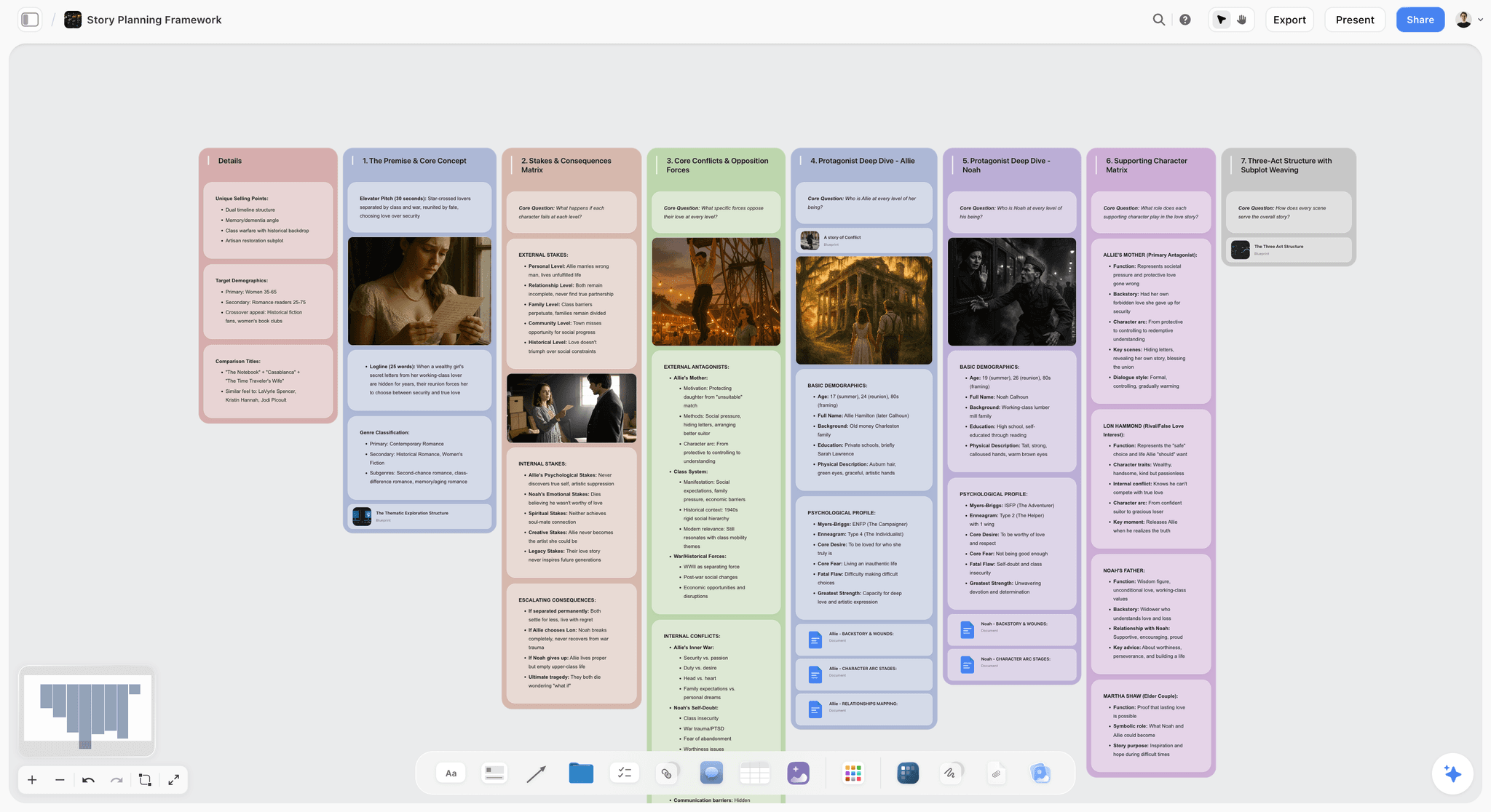
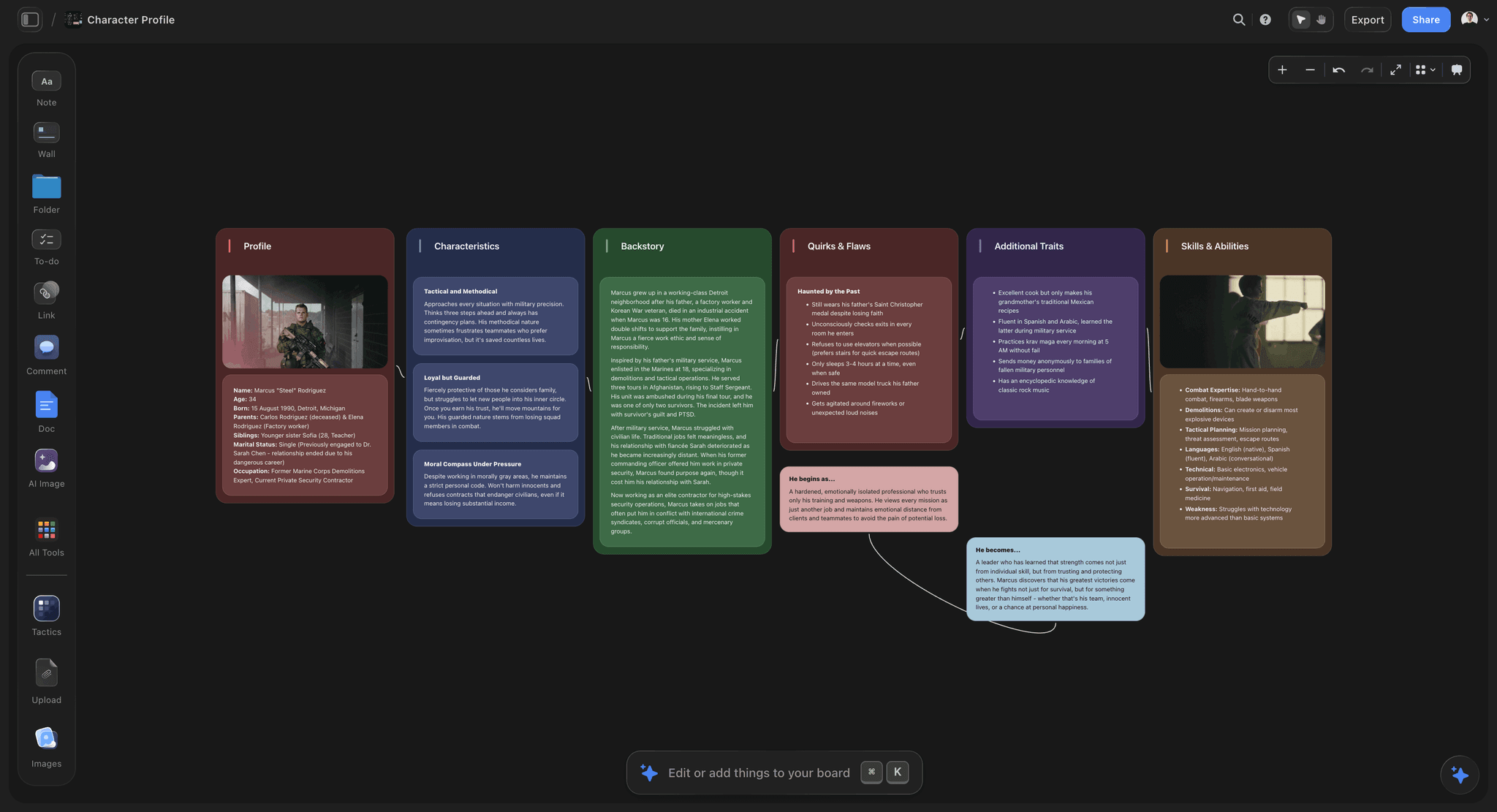
The verdict. Ours, and it serves exactly one of the three tempos. For laying out faction relationships and clue webs as a picture it beats every wiki here, and it is not a campaign bible and not a virtual tabletop.
Best for. Prep tempo, specifically the parts of prep that are about relationships between things rather than descriptions of things.
Pricing. Paid only during early access. Plus is $7.99 per month billed annually or $9.99 monthly, adding 200 plus Story blueprints and unlimited file uploads. Pro is $14 per month billed annually or $19 monthly, adding AI image generation, roughly twenty times more AI usage and memory across conversations. Max is $39 per month billed annually or $49 monthly, adding forty times more AI and Team Workspace with permissions and roles. Pricing is flat per account rather than per seat, and anyone a paid member invites joins free. The Free plan launches before the end of 2026.
Why it ranks here. Two prep problems are genuinely spatial and every wiki here handles them badly. The first is faction politics. Six factions with grudges, debts, alliances and one secret shared between two of them is a graph, and a graph flattened into six wiki pages is a graph you can no longer see. On a canvas the whole thing is one picture, and the answer to who reacts if the players burn the warehouse is visible rather than reconstructed.
The second is the mystery. A clue web is nodes and edges by definition: three routes to the same revelation, which scene each clue sits in, and which clue is load bearing. Laying that out spatially is how you notice that everything funnels through one NPC who might plausibly die, which is the most common way an investigation scenario collapses.
The AI reads your full active canvas board by default, plus up to one Tactic and up to three Documents you @-mention. Pointed at a faction board, you can ask which faction has no reason to care about the players yet, or where two threads collide if the party stalls a week. A page based wiki cannot answer those, because it never sees the whole board.
Buy for the tempo, not for the campaign. Ranking Storyflow above Obsidian or World Anvil would be dishonest, because the tempo you spend the most hours in is bible tempo, and Storyflow does not serve it: there is no full text search across boards, so it fails the innkeeper test that decides this category.
Strengths.
- Faction relationships and clue webs stay visible as one picture instead of scattering across pages.
- Whole board AI answers structural questions about the shape of your prep.
- Invited collaborators join free, so a co GM costs nothing.
- Fast to rearrange when the players force a rewrite between sessions.
Limitations.
- No dice roller, no character sheets, no initiative tracker. Nothing for running the session.
- No maps, no tokens, no fog of war, and no integration with any virtual tabletop.
- No full text search across boards, which is the exact capability the bible tempo needs.
- No random generators, no name tables, no encounter tables.
- Cloud only, so a venue with bad wifi is a real problem and there is no offline vault.
- No published campaign or RPG specific blueprints, so the structure is yours to build.
The trade off. It makes the shape of your prep visible, then hands the session and the archive to other tools.
7. Roll20
The verdict. The default browser virtual tabletop, easiest to start with and the most expensive way to run a long campaign.
Best for. Table tempo, particularly for groups new to virtual tabletops or playing licensed content.
Pricing. Free tier is playable. Plus runs roughly $6 per month and Pro roughly $10 per month as of August 2026, plus purchased content.
Why it ranks here. Roll20 is where most groups meet a virtual tabletop for the first time, and the on ramp deserves credit. Nothing to install, nothing to host, character sheets for a long list of systems, and players join by link. When one of your five players is not technical, that matters more than any feature comparison.
The licensed content marketplace is a real advantage. Buying an adventure with maps, tokens and monster entries already placed removes hours of preparation, and no self hosted tool matches that convenience.
It ranks below Foundry for two reasons. Cost over time, since a subscription across a two year campaign passes a one time purchase and keeps going. And the automation, which is capable but slower in a browser than Foundry's equivalent in large scenes.
The dependency that matters most is criterion four. Roll20 is entirely cloud based, so if the venue wifi dies, your maps, tokens and character sheets die with it.
Strengths.
- Zero setup for the GM and no install for players.
- Large library of officially licensed adventures with content pre placed.
- Character sheets for a wide range of systems, maintained for you.
- Free tier is enough to run a real campaign.
Limitations.
- Subscription cost exceeds a one time purchase on any long campaign.
- Cloud only, so no session without a working connection.
- Automation is shallower than Foundry and slower in heavy scenes.
- Journal and handout tools are not a usable campaign bible.
The trade off. You pay monthly for someone else to handle hosting, updates and character sheets, which for many groups is a fair deal.
8. Kanka
The verdict. The most generous free campaign manager, with real entity types instead of blank pages.
Best for. Bible tempo on no budget, for GMs who want structure without a subscription.
Pricing. Free tier is genuinely generous. Paid tiers start around $5 per month as of August 2026. Kanka can also be self hosted, which is rare in this category.
Why it ranks here. Kanka gives you typed entities out of the box: characters, locations, organizations, families, items, events, quests, journals. Each type has appropriate fields and relationships are first class, so an NPC page knows the organization it belongs to without you designing a schema first.
That is the specific gap between Obsidian and World Anvil, and Kanka sits in it for free. New GMs who found Obsidian's empty vault paralysing and World Anvil's interface overwhelming tend to land here and stay.
The relationship map is the feature worth naming: it draws connections between entities as a diagram, the closest thing to spatial faction work available inside a wiki. It is less flexible than a real canvas, since it renders what you already entered rather than letting you think on it, but it is free and it lives with your notes.
It ranks eighth because performance on a large campaign is noticeably slower than local notes, and the interface is functional rather than pleasant. Self hosting fixes the offline problem and adds an administration burden most GMs do not want.
Strengths.
- Typed entities and first class relationships with no setup work.
- Relationship map draws connections between what you have entered.
- Free tier covers a full campaign without limits that bite quickly.
- Self hosting is available for GMs who want their own copy.
Limitations.
- Slower than local notes once a campaign gets large.
- Interface is utilitarian and does not encourage long prep sessions.
- Cloud only unless you take on self hosting yourself.
- Search is adequate rather than fast at table tempo.
The trade off. Structure and relationships for nothing, at the cost of speed and polish.
9. Notion
The verdict. Excellent at everything except the one thing this job needs most, which is finding a name in ten seconds.
Best for. Bible tempo for a GM who already runs the rest of their life in Notion.
Pricing. Free personal tier. Paid plans from roughly $10 per user per month as of August 2026.
Why it ranks here. Notion's databases model a campaign well. An NPC table with relations to locations, factions and sessions gives you filtered views no plain notes app produces: every NPC in this city, every thread introduced but unresolved, every quest the party accepted and abandoned. That unresolved threads view is the most useful thing you can build in Notion for a campaign, and it takes ten minutes.
The session log pattern is the other strong use. One page per session with a relation to every entity that appeared, and after twenty sessions you have a chronicle that answers what happened when without extra filing.
It ranks ninth despite that because of criterion two. Search is server side, page loads have latency, and the gap between four seconds and fifteen seconds is the gap between answering a player and telling them to hold on.
There are also more RPG campaign templates for Notion than for anything else here, which cuts both ways. The good ones save a weekend. The elaborate ones create a maintenance obligation you will abandon by session eight, and an abandoned structure is worse than none.
Strengths.
- Database relations produce views a notes app cannot, including unresolved threads.
- Session logs build a real chronicle with no extra work.
- Huge template ecosystem, including strong campaign starts.
- Already open if you use it for everything else.
Limitations.
- Search and page load latency fail the ten second test at the table.
- Offline support is partial and unreliable for prep on the move.
- Elaborate templates create maintenance debt that kills the habit.
- No maps, dice or anything the session itself needs.
The trade off. The best structured thinking tool here and the worst at the retrieval speed this job actually runs on.
10. The Paper GM Binder
The verdict. Beats every tool on this list at table tempo, and loses to all of them everywhere else.
Best for. Table tempo, absolutely, in person, forever.
Pricing. A binder, dividers and printer ink. Call it $20 once as of August 2026, plus paper.
Why it ranks here. The binder satisfies criterion four perfectly and criterion one better than any software. One page per session, laid flat, big text, no clicking, no screen between you and five faces. Nothing crashes, nothing updates, nothing needs wifi.
The physical affordances are underrated. You can hold three pages open at once, which no tablet does. You can hand a printed handout across the table and watch a player hold a real object. You can write a name in the margin the instant you invent it, which is the fastest capture method available and the reason improvised NPCs survive at all.
It ranks tenth for the obvious reason: it fails the innkeeper question completely. A paper archive of forty sessions is not searchable.
The correct use is not binder versus software. It is a binder as the table layer over a digital bible. Print the current session, the active NPCs and the map before you leave the house. That is the cheapest reliability upgrade in the hobby, and the reason the binder is on this list rather than treated as nostalgia.
Strengths.
- Never fails, never updates, never needs a connection.
- Multiple pages visible at once, which no screen manages.
- Margin notes are the fastest capture method that exists.
- No screen between you and the players.
Limitations.
- Not searchable, which fails the most common question a GM asks.
- Does not sync, back up or survive a spilled drink.
- Reprinting after every change is a real recurring chore.
- Useless for online play.
The trade off. Print the session, keep the campaign digital, and stop losing sessions to venue wifi.
What to Actually Pay For
Pay for the table tool, not the prep tool. The table is where five people's evening is on the line. If you play online, Foundry at about $50 once is the highest value purchase in this article for any campaign expected to last more than a year. If you play in person and only need a shared map, Owlbear Rodeo's free tier plus a printed session page is a complete answer at zero cost.
Do not pay for a bible until Obsidian has failed you. A year with it will tell you precisely what you are missing. GMs who pay for a wiki first usually discover in month three that what they wanted was structure, which is a Kanka question, or prompts, which is a World Anvil question.
Pay for a wiki when the pleasure of using it decides it. LegendKeeper at roughly $8 per month is not buying capability Obsidian lacks. It is buying the likelihood that you keep it updated, which for many GMs is the actual constraint.
Pay for a prep canvas only if your prep is relational. Faction politics and investigations earn it. If your prep is mostly locations and NPC descriptions, a wiki does that better and cheaper.
Do not stack subscriptions. Two paid tools is a reasonable ceiling. A VTT, a wiki, a notes app and a canvas is $40 a month for a game you play four hours a week.
Tools to Avoid for This Job
One tool for all three tempos. Every large product in this space eventually adds journals, or notes, or a battle map, and each addition is worse than the dedicated tool.
A campaign wiki as your table reference. Whatever holds your world is not what should be open during play. Page loads, folder trees and search latency are attention taken from the table. Extract what you need into one page before the session starts.
An elaborate template you did not build. The forty page campaign template with eleven linked databases is a maintenance obligation, and you will abandon it around session eight, leaving your campaign in a half filled structure harder to search than a plain folder of notes.
Scripted scene prep. Any tool that encourages a linear sequence of planned scenes is quietly betting your players do what you expect. Prep situations instead: who wants what, what is already in motion, and what happens if nobody interferes.
A cloud only stack with no printed fallback. If your maps, notes and character sheets live behind one connection, one dead router ends the session.
What No Tool on This List Does
None of them will make your notes findable if you never wrote the name down. The innkeeper problem is a capture problem before it is a search problem, and the only fix is writing the name the moment you invent it, in whatever is nearest, including a margin.
None of them will tell you whether your prep is good. A canvas shows that six factions are connected and a wiki holds what each one wants. Whether any of it is interesting when a player pokes it is judgment.
None of them, including Storyflow, searches everything you have written at the speed the table demands. Storyflow has no full text search across boards at all, which is a genuine gap and the direct reason it ranks sixth rather than higher. Obsidian solves it by being plain files on your own disk.
None of them survives a group that stops meeting. Scheduling is the actual reason campaigns end, and no tool here has ever put four adults in the same room on a Sunday.
The Bottom Line
A campaign is not one activity, and the tool advice in this hobby has been bad mostly because it pretends otherwise. Prep happens alone over weeks and wants sprawl and linking. The table happens live in four hours and wants one screen, big text and zero clicking. The bible happens between sessions and wants search, because the question is always what you named that innkeeper.
Start with Obsidian for the bible, because it is free, instant and yours permanently. Add a virtual tabletop only for the tempo it serves: Foundry if the campaign is long and you play online, Owlbear Rodeo if you want a map in ninety seconds. Print the current session before you leave the house.
Everything after that is optional. World Anvil if you want a world that asks you questions, LegendKeeper if maps are how you think, Kanka if you want structure for nothing, Storyflow if your prep is factions and clue webs and you need the whole shape at once. Buy for the tempo, not for the campaign.
FAQ: Tabletop RPG Campaign Tools
What is the best tool for running a tabletop RPG campaign?
There is no single answer, because a campaign runs at three tempos and no tool serves all three. For the campaign bible, where you spend the most hours, Obsidian ranks first: free, local, and searches thousands of notes instantly. For running the session you need a virtual tabletop, and Foundry VTT is the strongest for a long campaign. Most GMs end up with two tools, one for the world and one for the table.
What is the difference between a virtual tabletop and a campaign wiki?
A virtual tabletop is software for playing the game: maps, tokens, fog of war, dice and initiative. Roll20, Foundry VTT and Owlbear Rodeo are virtual tabletops. A campaign wiki holds the world: NPCs, factions, locations, history and session notes. Obsidian, World Anvil, LegendKeeper, Kanka and Notion are wikis or notes tools. They are different products with different jobs, and articles that rank them against each other are comparing a camera to an edit suite.
Do I need a virtual tabletop if I play in person?
Usually not, but a shared map is worth having. Plenty of in person groups run everything on paper and minis and never miss the software. If you want digital maps at a physical table, Owlbear Rodeo on a tablet laid flat is the lowest friction option and its free tier covers it. Foundry suits in person play too, because you can run the server on your own laptop over a local network, independent of the venue's wifi.
Is Obsidian good for TTRPG campaign notes?
Yes, and it is the best option here for the campaign bible. Notes are plain markdown files on your own disk, so search returns results instantly with no page load, the capability that matters most during a session. Backlinks mean an NPC page accumulates every session and location that mentioned it without you filing anything. The cost is no structure on day one, so new GMs who want a template supplied often prefer Kanka or World Anvil.
Is World Anvil worth paying for?
It is worth it if you want to be asked questions about your world. Its article prompts produce detail you would not have written unprompted, its timeline handling is the best on this list, and it separates player facing from GM facing content on one article, which prevents the continuity errors of maintaining two versions by hand. It is not worth it if you want fast capture and fast retrieval, because search is server side.
Roll20 or Foundry VTT, which should I pick?
Pick Roll20 if you want zero setup, officially licensed adventures with content already placed, and a group where not everyone is technical. Pick Foundry if the campaign will run longer than a year, because roughly $50 once beats a subscription over that span, and because its automation and dynamic lighting are deeper. Foundry also runs on a local network with no internet, which matters at a physical table. The cost of Foundry is that you become the person who maintains it.
What is the best free setup for a new GM?
Obsidian for the campaign bible, Owlbear Rodeo's free tier for maps, and a printed page for the session in front of you. That is a complete, genuinely free stack with no trial period and no feature gate that bites at session ten. If you want more structure than an empty Obsidian vault, Kanka's free tier gives you typed entities and relationships at no cost. Add a paid tool only after a year, when you can name what is missing.
How do I organize campaign notes so I can find things during a session?
Optimize for retrieval, not for beauty. Give every named thing its own note titled with the name, because search matches titles first and the question is almost always a name. Keep session notes as one page each, dated, mentioning every entity that appeared, so links accumulate automatically. Before each session, extract what you actually need onto one page or one printed sheet. Navigating a folder tree while five people wait is the failure this prevents.
How much should I prep for a session?
Prep situations rather than scripted scenes, a widely held view in the hobby and the advice that changed my own prep most. Write down who wants what, what is already in motion, and what happens if nobody interferes. That material works whichever direction the players take, whereas a planned sequence of scenes is a bet on their behaviour. Practically, a list of names, one clear situation and two things that happen anyway is enough for four hours.
Does Storyflow replace a campaign wiki?
No, and it should not be used as one. Storyflow has no full text search across boards, which is the single capability the campaign bible depends on, plus no dice roller, no character sheets, no initiative tracker and no maps. It serves the prep tempo, specifically the relational parts: faction politics and clue webs laid out spatially so you can see the whole structure at once. Pair it with Obsidian or a wiki for the archive, and a virtual tabletop for the session.
What happens to my campaign if the tool shuts down?
Decide this before you have three years of history in it. Obsidian is safest because the notes are plain markdown files on your own disk and will open in any text editor forever. Foundry and Kanka can be self hosted, which gives you a copy under your control. Cloud only services including World Anvil, LegendKeeper, Roll20 and Storyflow keep your data on their servers, so check the export path and use it periodically.
What is the biggest tooling mistake GMs make?
Buying one large product and expecting it to serve prep, the table and the archive. It will do the table adequately and the other two badly, and you will drift away from prepping in it without noticing why. Buy for the tempo, not for the campaign. The second biggest mistake is a cloud only stack with no printed fallback, which turns one dead router into a cancelled session.
Marketing and campaign templates you can use in Storyflow
Plan the whole campaign on one board: brief, audience, channels, and assets connected, with an AI that reads all of it. Open a template and start from real structure.


See Storyflow in Action
A visual AI workspace where every feature lives inside one canvas. No tab-switching, no context lost.
Build your entire board from a single message
Type what you need in the AI chat at the bottom of your canvas. The AI adds cards, headings, and structure directly onto your board.
Use expert frameworks as AI context
Type @ in the AI chat and choose any Tactic. The AI tailors every response to that framework instead of giving generic advice.
Turn your board into a mind map in seconds
Ask the AI to restructure your canvas as a mindmap. It connects your ideas into a visual hierarchy so you can see how everything relates.
Why Storyflow Exists
Storyflow actually began as a personal tool while working on creative and research projects.
We kept running into the same problem: ideas were scattered everywhere: notes, documents, and whiteboards.
Nothing helped us see how everything connected.
So we started building a workspace designed around how ideas actually grow.
→ Read how Storyflow was createdSara de Klein
Head of Product at Storyflow
Published: 2026-08-14
Start creating with AI and become more productive
Transform your creative workflow with AI-powered tools. Generate ideas, create content, and boost your productivity in minutes instead of hours.