10 Best Game Design Document & Worldbuilding Tools in 2026 (Tested and Ranked)
The 10 best game design document and worldbuilding tools in 2026, tested on real projects. Storyflow, Milanote, Notion, World Anvil, Nuclino and more compared on AI, living docs, and price.

Category
Visual Thinking
Author

Justkay
Documentary Filmmaker & Founder at Storyflow
Topics
2026-06-16
•
Updated June 16, 2026
•
16 min read
•
Visual Thinking- best game design document tool
- GDD tool 2026
- worldbuilding tool
- World Anvil alternative
- AI game design document
- Storyflow
What is the best game design document and worldbuilding tool in 2026?
The best GDD and worldbuilding tool in 2026 is Storyflow if you want the document to stay alive, because its AI reads the whole canvas and keeps the design, the world, and the references connected as the project changes. For deep worldbuilding wikis, World Anvil is the standard, Milanote is the most beautiful visual GDD, Nuclino is the fastest lightweight wiki, and Notion is the most flexible all-in-one. A GDD is only useful while the team still opens it, so the right tool keeps the document and the world living and worth opening.

All 10 GDD and Worldbuilding Tools, Ranked
- Storyflow: keeps the GDD and the world alive on an AI canvas
- Milanote: a beautiful visual game design document
- Nuclino: a fast, lightweight design wiki
- Notion: a flexible all-in-one GDD database
- World Anvil: deep worldbuilding wikis and lore
- Confluence: studio-wide GDD wikis
- Miro: visual GDD workshops on a board
- Google Docs: a simple starting GDD
- Campfire: novelist-style worldbuilding modules
- arcweave: branching narrative and GDD
Full disclosure: Storyflow is our own product, and we rank it #1 for one job: keeping the game design document and the world alive on a canvas the AI can read as the project changes. For deep worldbuilding wikis with lore templates, World Anvil is stronger, and for a purely beautiful static GDD, Milanote looks better. Storyflow is newer, canvas-shaped rather than long-form-wiki-shaped, and cloud-only, so if your team wants a deeply hyperlinked lore wiki, World Anvil or Nuclino fit better. We link to every tool so you can judge the fit.
Quick Comparison: GDD & Worldbuilding Tools
These four cover the jobs people switch GDD tools for: a living canvas GDD, a beautiful visual GDD, a fast wiki, and a flexible all-in-one.
| Tool | Best For | AI Features | Price |
|---|---|---|---|
| Storyflow | A GDD and world that stay alive | Canvas-aware AI reads the whole GDD | $7.99 mo annual (free plan late 2026) |
| Milanote | A beautiful visual GDD | Light AI on visual boards | Free / $12.50 mo |
| Nuclino | A fast, lightweight design wiki | AI writing assist in the wiki | Free / $6 mo |
| Notion | A flexible all-in-one GDD | Notion AI in docs and databases | Free / $10 mo |
1) Quick Answer: The Best GDD and Worldbuilding Tool
The best game design document and worldbuilding tool in 2026 is Storyflow if you want the GDD to stay alive, because its AI reads the whole canvas and keeps the design, the world, and the references connected as the project changes. For deep worldbuilding wikis, World Anvil is the standard, Milanote is the most beautiful visual GDD, Nuclino is the fastest lightweight wiki, and Notion is the most flexible all-in-one.
The short version: most game design documents are born in a Google Doc and die there. The doc starts as the source of truth, the project changes, nobody updates it, and by month three it describes a game that no longer exists. A GDD is only useful while the team still opens it. The world has the same problem: the lore lives in scattered notes nobody can navigate. The right tool is the one that keeps the document and the world living, visual, and worth opening.
What is a game design document? A game design document (GDD) is the living reference that defines a game's vision, mechanics, systems, story, and world, so a team can build the same game from the same understanding. Knowledge-base tools like Nuclino and visual workspaces like Milanote both publish GDD templates, a sign of how central the document is to actually shipping a game.
Key takeaways:
- The best overall pick is Storyflow for a GDD that stays alive, because its AI reads the whole canvas and keeps the design and the world connected. For deep worldbuilding, World Anvil is the standard; for a beautiful visual GDD, Milanote.
- A GDD is only useful while the team still opens it, and most GDDs rot in a linear doc nobody updates.
- For a fast lightweight wiki, Nuclino; for flexibility, Notion; for studios, Confluence.
- For visual GDD workshops, Miro; for branching narrative, arcweave; for novelist-style worldbuilding, Campfire.
- Storyflow is honest about its limits: it is not a game engine and not a dialogue-scripting tool. For building and scripting, use Unity, Unreal, Twine, or articy:draft.
- Storyflow's Free plan, which launches before the end of 2026, will cover unlimited boards, images, and collaboration, so a full GDD and world is testable before paying.
For the broad category, see The Best Game Design Tools in 2026 and The Best Tools for Worldbuilding in 2026.
2) Comparison Table: 10 GDD & Worldbuilding Tools
Rating criteria: tested on real game-planning workflows in 2025 and 2026, from concept and GDD through worldbuilding and a living team reference. Pricing is current as of June 2026 and competitor prices change often; verify current pricing on each tool's official page before buying.
3) The Dead Document Problem: Why Most GDDs Rot
Almost every game starts with good intentions and a fresh Google Doc titled "GDD". For a week, it is the source of truth. Then development starts, the design changes, the doc does not, and within a month it describes a game that no longer exists. The team stops opening it, and the GDD becomes a graveyard for the original plan.
A GDD is only useful while the team still opens it. A design document that nobody reads is not documentation; it is archaeology. The same rot hits the world: the lore, the factions, the timeline, and the map live in scattered notes and a few people's heads, and nobody can navigate the world they are supposedly building.
The dead document problem has three causes.
- Linear docs hide the structure. A game is a web of systems, mechanics, and lore that reference each other. A long linear document flattens that web into a scroll nobody can hold in their head.
- The doc and the work drift apart. When the GDD lives separately from the references, the art, and the decisions, updating it is a chore, so it does not get updated.
- The world has no home. Worldbuilding is visual and relational (maps, factions, timelines, characters), and a text document is the wrong shape for it, so the world fragments.
A GDD is only useful while the team still opens it.
Here is the framework this article is built on. GDD and worldbuilding tools fall into two camps. Document tools are built to write the thing down: Google Docs, Confluence, and to a degree Notion are excellent at capturing text, and a team needs one.
But a document tool cannot keep a GDD alive. It cannot show the web of systems visually, connect the design to the world, or read the whole thing and tell you what changed. That requires a living canvas: a visual workspace that holds the design, the world, and the references together and stays worth opening. A GDD is only useful while the team still opens it, and the reason most rot is that they live in document tools built for writing, not for keeping a complex game coherent. The fix is not a longer doc. It is a canvas the team actually returns to.
4) How We Evaluated These Tools
Every tool here was tested on real game-planning work in 2025 and 2026: an indie game concept, a worldbuilding bible, and a small-team GDD. No synthetic demos. Six criteria, weighted in this order.
- Living vs dead. Does the document stay current and worth opening, or does it rot into a stale monolith?
- Visual structure. Can it show the web of systems, lore, and references spatially, or only as linear text?
- AI depth. Is there an AI that reads the whole design and world and does real work, or is everything written by hand?
- Worldbuilding depth. How well does it handle maps, timelines, factions, and characters?
- Collaboration. How well does a team build and reference the same document and world together?
- Price and free tier. What does it cost at real usage, and is the free plan genuinely usable?
Tools were judged across a whole concept-to-bible workflow, not in a quick demo. The rankings reflect whether each tool is a document tool, a living canvas, or a deep worldbuilding wiki.
5) Quick Picks by Job to Be Done
If you want the short list, organize by the job, not the brand.
Best for a GDD that stays alive: Storyflow. The AI keeps the design, the world, and the references connected.
Best deep worldbuilding wiki: World Anvil. Maps, timelines, and a true world database.
Best beautiful visual GDD: Milanote. The calmest visual document.
Best fast lightweight wiki: Nuclino. Quick, linked, and clean.
Best flexible all-in-one: Notion. Docs, databases, and a wiki together.
Best for studios: Confluence. The enterprise GDD wiki.
Best for branching narrative: arcweave. Story flows plus a GDD.
6) Detailed Reviews: 10 GDD & Worldbuilding Tools
1. Storyflow
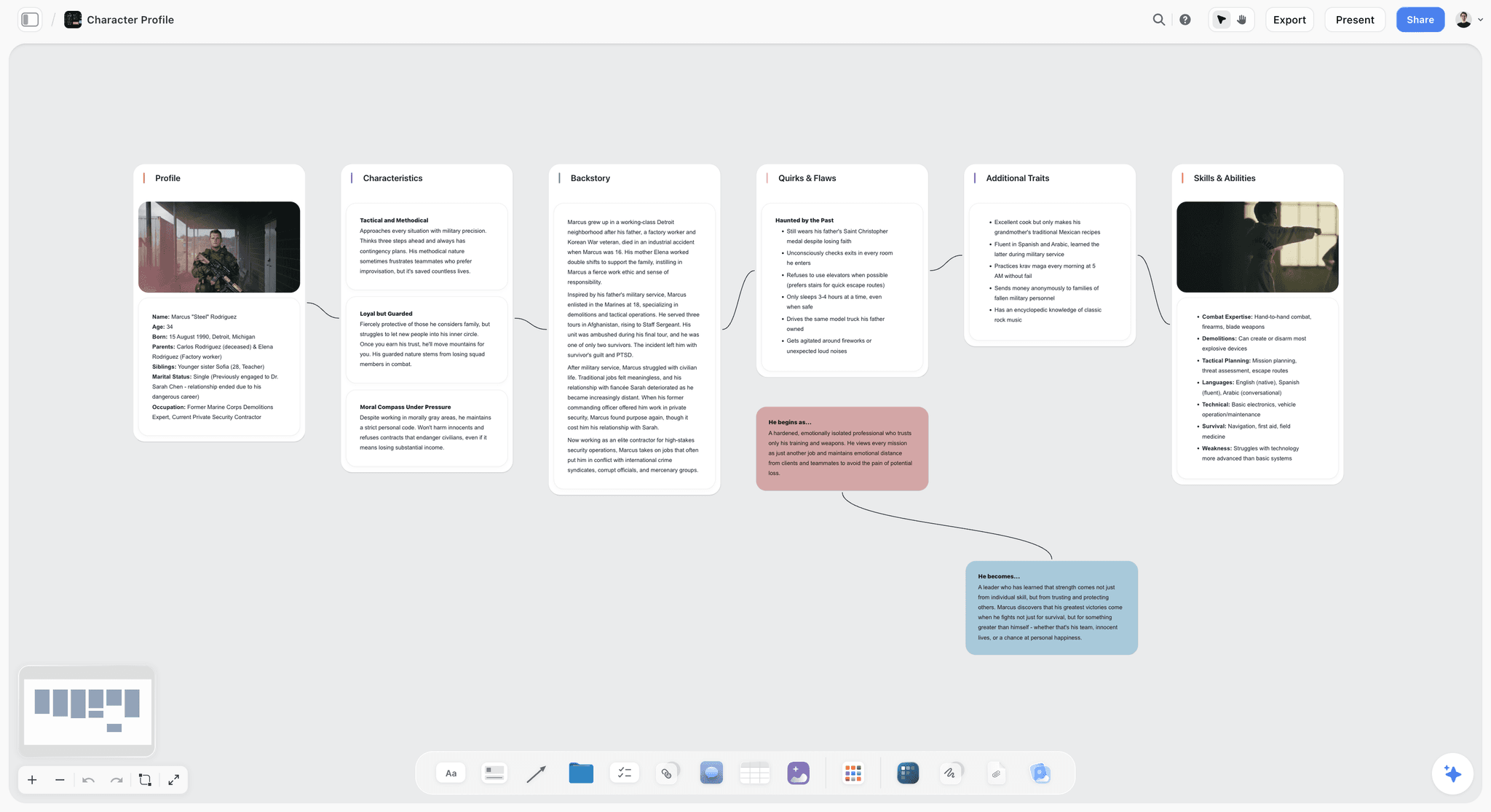
Storyflow is the tool to pick when your problem is not writing the GDD but keeping it alive. It is an AI-powered visual creative workspace: an infinite canvas of cards, notes, and documents where the AI reads the whole board. For a game maker, that means the mechanics, the systems, the story, the world, the maps, and the references all live on one canvas, and the AI helps you keep them connected as the design changes.
The difference shows up in month three. With a document tool, the GDD is stale and nobody opens it. In Storyflow, you ask the AI to read the canvas and update the systems overview, summarize what changed, or check the world for contradictions, and it does, because the AI reads every card, note, and reference on the board. A GDD is only useful while the team still opens it, and Storyflow is built to make the document and the world worth opening.
Best for: Solo developers and small studios whose GDDs start strong and rot into stale Google Docs.
Verdict: The strongest tool for a living, visual GDD and world. It is not a game engine or a dialogue scripter, so for building and scripting you will still use Unity, Unreal, or articy:draft.
Key features
- Canvas-aware AI by default. The AI reads your full active canvas board (every card, note, and reference on it). You can ground it further by @-mentioning up to 1 Tactic and up to 3 Documents in the AI chat.
- Board by prompt. Generate a starting GDD structure or a worldbuilding outline from a prompt, then refine it with your own design.
- Structured cards and documents. A board can hold the mechanics, the systems, the story, the world, and the references together, not just a linear doc.
- 200+ Story Blueprints. An expert-built template library covering creative and strategic frameworks, included on the Plus tier and above.
- Unlimited shared boards and unlimited collaboration on every plan, including Free. The Max plan adds a team workspace with permissions and roles.
Pricing
Free: launching before the end of 2026; invited collaborators of paid members join free today. Unlimited notes, images, and links, unlimited shared boards, unlimited collaboration, basic AI, and 20 file uploads. The Free plan does not include the 200+ Story Blueprints library. Plus: $7.99 per month annual or $9.99 per month monthly (adds the 200+ Story Blueprints, unlimited uploads). Pro: $14 per month annual or $19 per month monthly (adds AI image generation and 20x more AI than Plus). Max: $39 per month annual or $49 per month monthly (adds 40x more AI and a team workspace with permissions and roles). Pricing current as of June 2026.
Pros
- The AI keeps the GDD and the world current, which is the step document tools leave to discipline nobody has.
- One canvas holds the design, the world, and the references, so the game stays coherent as it changes.
- The Free plan is genuinely usable on a real project: unlimited boards, unlimited cards, unlimited collaboration, forever.
Cons
- It is not a game engine. For building the game, use Unity, Unreal, or Godot.
- It is not a dialogue or branching-narrative scripter. For that, use Twine, Ink, or articy:draft.
- For the deepest worldbuilding wiki with maps and timelines, World Anvil is more specialized. AI image generation is Pro and above, and the platform is cloud-only.
If your GDD keeps rotting, rebuild one stalled project's design and world on a Storyflow canvas. Start a Storyflow workspace and ask the AI to keep the document alive as the design changes.
2. Milanote
Milanote is the most beautiful visual workspace, and it runs a dedicated game-design template hub with GDD, brainstorming, moodboard, worldbuilding, and level-design boards. For a visual GDD that is a pleasure to build, it is hard to beat.
Best for: Game makers who want a beautiful, visual GDD and worldbuilding board.
Verdict: The best pick for a beautiful visual GDD. Lighter on AI and deep wiki structure.
Key features
- A dedicated game-design template hub (GDD, worldbuilding, level design).
- An elegant, low-friction visual canvas.
- Boards for moodboards, characters, and systems.
- A genuinely generous free tier.
Pricing
Free tier with a card limit. Paid plans are around $12.50 per month, less when billed annually. Pricing current as of June 2026; verify on Milanote's site.
Pros
- One of the most beautiful visual GDD tools.
- Purpose-built game-design templates.
- A free tier that is genuinely useful.
Cons
- AI is light, so every card is placed by hand.
- Weaker than World Anvil for deep wiki worldbuilding.
- It holds the design but does not reason about it.
3. Nuclino
Nuclino is a fast, lightweight wiki that game teams use as a clean GDD. It links pages into a navigable knowledge base without the bloat of heavier tools.
Best for: Teams who want a fast, linked GDD wiki.
Verdict: The best lightweight GDD wiki. Less visual than a canvas.
Key features
- Fast, linked wiki pages.
- A clean, distraction-free interface.
- Real-time collaboration.
- Graph and board views of linked content.
Pricing
Free tier. Paid plans start around $6 per user per month. Pricing current as of June 2026; verify on Nuclino's site.
Pros
- Fast and clean for a linked GDD.
- Low friction to keep current.
- Genuinely good for team knowledge.
Cons
- Less visual than a true canvas.
- Lighter worldbuilding features than World Anvil.
- Wiki-shaped, not spatial.
4. Notion
Notion is the flexible all-in-one many teams use for the GDD, the task board, and the wiki together. Databases make it strong for systems, items, and quest tracking.
Best for: Teams who want the GDD, databases, and wiki in one workspace.
Verdict: The most flexible all-in-one GDD. Setup-heavy and document-shaped.
Key features
- Flexible pages, databases, and a wiki.
- Notion AI for writing and summarizing.
- Databases for systems, items, and quests.
- A huge template ecosystem, including GDDs.
Pricing
Free tier. Paid plans start around $10 per user per month. Pricing current as of June 2026; verify on Notion's site.
Pros
- Unmatched flexibility for design and databases.
- Notion AI handles writing well.
- Huge GDD template library.
Cons
- Document-and-database shaped, not a spatial canvas.
- Setup friction is real.
- The world fragments across pages without discipline.
5. World Anvil
World Anvil is the dedicated worldbuilding platform, with a wiki, interactive maps, timelines, and family trees. For deep, navigable worlds, it is the standard.
Best for: Worldbuilders who need maps, timelines, and a deep world wiki.
Verdict: The best deep worldbuilding wiki. Heavier and less GDD-focused.
Key features
- A structured worldbuilding wiki.
- Interactive maps and timelines.
- Templates for characters, factions, and lore.
- A large worldbuilding community.
Pricing
Free tier. Paid plans start around $7 per month. Pricing current as of June 2026; verify on the World Anvil site.
Pros
- The deepest worldbuilding structure here.
- Interactive maps and timelines are excellent.
- A strong community and templates.
Cons
- More world wiki than game design document.
- Can feel heavy for a fast GDD.
- The interface has a learning curve.
6. Confluence
Confluence is Atlassian's wiki, and bigger studios use it as the studio-wide GDD and knowledge base, often beside Jira. It is built for organizational documentation.
Best for: Studios who need an enterprise GDD wiki beside Jira.
Verdict: The best studio-wide GDD wiki. Corporate and document-shaped.
Key features
- Structured wiki spaces and pages.
- Tight integration with Jira.
- Permissions and governance for studios.
- AI features for writing and search.
Pricing
Free tier. Paid plans start around $6 per user per month. Pricing current as of June 2026; verify on Atlassian's site.
Pros
- Strong for studio-wide documentation.
- Integrates with Jira for production.
- Governance and permissions for teams.
Cons
- Corporate and document-shaped, not visual.
- Overkill for a solo dev or small team.
- The world and the design stay as text.
7. Miro
Miro is the team whiteboard for visual GDD sessions, system maps, and level brainstorming. For a collaborative, visual design session, it scales well.
Best for: Teams running visual GDD and system-mapping workshops.
Verdict: The best team whiteboard for visual GDD work. Boards can sprawl and stay flat.
Key features
- Infinite canvas with templates.
- System maps, flows, and brainstorms.
- AI Sidekicks for summaries and clustering.
- Real-time collaboration at scale.
Pricing
Free tier with limited boards. Paid plans start around $8 per user per month. Pricing current as of June 2026; verify on Miro's site.
Pros
- The deepest collaboration for visual GDD sessions.
- Great for system maps and flows.
- AI Sidekicks add genuine help.
Cons
- Boards sprawl and can be hard to maintain as a GDD.
- Per-user pricing adds up for teams.
- More workshop tool than a living document.
8. Google Docs
Google Docs is where most GDDs begin, and for a simple, collaborative starting document it is fast and free. It is also where most GDDs go to rot.
Best for: Solo devs and teams writing a quick first GDD.
Verdict: The best simple starting GDD. The classic dead-document trap.
Key features
- Fast, free, collaborative documents.
- Comments and version history.
- Gemini AI for writing assistance.
- Universally familiar.
Pricing
Free; Google Workspace from around $6 per user per month. Pricing current as of June 2026; verify on Google's site.
Pros
- Fast, free, and universally known.
- Real-time collaboration and comments.
- A fine place to start.
Cons
- Linear and text-only, so the structure hides.
- The classic place GDDs rot once development starts.
- No worldbuilding structure at all.
9. Campfire
Campfire is a modular worldbuilding and writing tool popular with novelists, and it works well for narrative-heavy game worlds. You add modules for characters, maps, timelines, and lore.
Best for: Narrative designers building a deep story world.
Verdict: A strong novelist-style worldbuilding tool. Less GDD-focused, more story-world.
Key features
- Modular panels for characters, maps, and timelines.
- Relationship and lore tracking.
- Strong for narrative-heavy worlds.
- A writing-focused workflow.
Pricing
Free tier with module-based pricing. Pricing current as of June 2026; verify on the Campfire site.
Pros
- Excellent for narrative and character-driven worlds.
- Modular, so you pay for what you use.
- Strong relationship and lore tools.
Cons
- More story-world than game design document.
- Module pricing can add up.
- Lighter on systems and mechanics.
10. arcweave
arcweave is built for game narrative and design, combining a visual flow editor for branching stories with a connected GDD. It sits closer to game development than a generic wiki.
Best for: Narrative designers building branching stories and a GDD together.
Verdict: A strong narrative-and-GDD tool. Narrower outside branching narrative.
Key features
- A visual flow editor for branching narrative.
- A connected game design document.
- Variables and logic for interactive stories.
- Collaboration for narrative teams.
Pricing
Free tier. Paid plans start around $6 per month. Pricing current as of June 2026; verify on the arcweave site.
Pros
- Purpose-built for game narrative and GDD.
- The branching flow editor is genuinely good.
- Closer to development than a generic wiki.
Cons
- Narrower outside branching narrative.
- Less general worldbuilding depth than World Anvil.
- A smaller ecosystem.
7) Which Tool Fits Which Kind of Game Maker?
1. Solo Indie Developer
Top picks: Storyflow + Milanote
Storyflow to keep the GDD and world alive with AI as the design changes. Milanote for the beautiful visual moodboards and level boards alongside it.
2. Small Studio
Top picks: Storyflow + Notion
Storyflow for the living design canvas and the world. Notion for the databases, the task tracking, and the team wiki.
3. Narrative Designer / Worldbuilder
Top picks: World Anvil + Storyflow
World Anvil for the deep world wiki, maps, and timelines. Storyflow to connect the world to the game's systems and keep the design coherent.
4. Tabletop / TTRPG Creator
Top picks: World Anvil + Storyflow
World Anvil for the navigable world players explore. Storyflow for the design of the rules, the encounters, and the campaign structure on one canvas.
5. Game Design Student
Top picks: Storyflow + Milanote
Storyflow for the GDD and the design reasoning a portfolio is judged on. Milanote for the beautiful visual boards that present the concept.
6. Game Writer
Top picks: arcweave + Storyflow
arcweave for the branching narrative and dialogue flows. Storyflow to hold the story bible, the world, and the design context the narrative lives in.
8) Honorable Mentions
A few tools that came close but did not make the main ten.
- articy:draft: A powerful game-narrative and data tool; deep but heavier and more technical.
- Twine and Ink: Excellent interactive-narrative scripting; the writing engine, not the GDD.
- Obsidian: A local-first linked-notes tool beloved for worldbuilding; great for solo, lighter for teams.
- Trello and Jira: Strong production trackers; the task board, not the design document.
- LegendKeeper and Kanka: Solid worldbuilding wikis; close to World Anvil with different strengths.
These are not weak tools. Their audience or core job is simply different from a living GDD and worldbuilding canvas.
9) Where the Dedicated Tools Still Win (An Honest Accounting)
A ranking that put an AI canvas at the top and pretended the specialist tools were beaten would not be worth reading. Here is the honest accounting of where the dedicated tools win, and where Storyflow is the wrong choice.
Unity, Unreal, and Godot win on the game. Building, scripting, and shipping the actual game are theirs, full stop. Storyflow plans the game; it does not build it.
World Anvil wins on deep worldbuilding. For interactive maps, timelines, and a true world database, it is purpose-built and more specialized than a general canvas.
Twine, Ink, and articy:draft win on branching narrative. For interactive dialogue and story logic, the narrative engines are the right tools.
So why does Storyflow rank first? Because the most common unsolved problem for game makers is not building, scripting, or wiki depth, all of which have excellent dedicated tools. It is the middle: keeping the GDD and the world alive, visual, and coherent as the design changes. A GDD is only useful while the team still opens it, and Storyflow is the only tool here whose AI reads the whole design and world and keeps it worth opening. Pair it with an engine and a narrative tool and the whole workflow is covered.
11) The Bottom Line
The best game design document and worldbuilding tool in 2026 depends on which part of the work you are missing. For deep worldbuilding, World Anvil wins. For a beautiful visual GDD, Milanote; for a fast wiki, Nuclino; for flexibility, Notion; for studios, Confluence; for branching narrative, arcweave.
But the most common unsolved problem is the middle: keeping the GDD and the world alive, visual, and coherent as the design changes. A GDD is only useful while the team still opens it. That is why Storyflow ranks first: its AI reads the whole design and world and keeps it worth opening, then keeps the systems, the lore, and the references on one canvas.
If your GDD keeps rotting, rebuild one project's design and world on a canvas. Start a Storyflow workspace and ask the AI to keep the document alive as the design changes.
10) FAQ: GDD & Worldbuilding Tools in 2026
What is the best game design document tool in 2026?
For a GDD that stays alive as the design changes, Storyflow is the best pick, because its AI reads the whole canvas and keeps the design and world connected. For deep worldbuilding, World Anvil is the standard, Milanote is the most beautiful visual GDD, Nuclino is the fastest lightweight wiki, and Notion is the most flexible all-in-one. The right choice depends on whether your gap is keeping it living, worldbuilding depth, or flexibility.
Is there a free GDD or worldbuilding tool?
Yes. Milanote, Nuclino, Notion, World Anvil, Confluence, Miro, Campfire, and arcweave all have free tiers, and Google Docs is free. Storyflow's Free plan, which launches before the end of 2026, will be the strongest for a living GDD: unlimited boards, unlimited cards, unlimited collaboration, and basic AI. Most makers start free and only pay once the project is real.
What is a game design document?
A game design document (GDD) is the living reference that defines a game's vision, mechanics, systems, story, and world so a team can build the same game from the same understanding. A good GDD is less a one-time spec and more a document the team keeps opening and updating. The best modern GDDs are visual and linked rather than a single long text file, which is why so many teams move off plain Google Docs.
What do game studios actually use for GDDs?
It varies by size. Solo devs and small teams often use Notion, Milanote, or a Google Doc; bigger studios use Confluence beside Jira. The recurring problem at every size is the GDD rotting once development starts. The newer move is to add an AI canvas like Storyflow that reads the design and world and keeps the document current, so it stays worth opening instead of becoming stale.
How do I write a game design document?
Start with the one-line vision: what the game is and why it matters. Then layer in the pillars, the core loop and mechanics, the systems, the story and world, the art direction, and the scope. Keep each part short and linked rather than burying it in prose. Storyflow helps here by reading the whole design and drafting or updating sections, and by keeping the world and the systems connected so the document does not drift from the game.
Milanote vs Notion for a GDD: which is better?
Milanote is better for a beautiful, visual GDD with moodboards and spatial boards. Notion is better when you need databases for systems, items, and quests alongside the document. Many teams use Milanote or Storyflow for the visual design and world and Notion for the structured databases and task tracking. The choice depends on whether your GDD is more visual or more database-driven.
What is the best worldbuilding tool?
World Anvil is the standard for deep worldbuilding, with a structured wiki, interactive maps, timelines, and family trees. Campfire is strong for narrative-heavy, novelist-style worlds, and Obsidian is beloved for local-first linked worldbuilding. For connecting the world to the game's design and keeping both coherent, Storyflow holds the world and the systems on one canvas the AI can read.
What is the difference between a GDD and a worldbuilding bible?
A game design document defines how the game works: vision, mechanics, systems, scope, and the plan to build it. A worldbuilding bible defines the world the game takes place in: lore, factions, history, geography, and characters. They overlap but answer different questions, how it plays versus where it happens, and strong projects keep both, ideally connected so the design and the world stay consistent.
Can AI write a game design document?
AI can draft and maintain a GDD, but it should not invent your game. Storyflow's AI reads your canvas and can draft sections, summarize what changed, and check the design and world for contradictions, which keeps the document current. The vision, the mechanics, and the creative decisions are yours; the AI removes the documentation drudgery that causes GDDs to rot. See our guide to building a story bible with AI for the related workflow.
Can Storyflow build my game?
No, and it does not try. Storyflow is a planning canvas: it keeps the GDD, the world, and the references alive and coherent. It does not build, script, or run a game. For that, use a game engine like Unity, Unreal, or Godot, and a narrative tool like Twine or articy:draft for branching dialogue. Storyflow's job is the design and the world those tools then implement.
World Anvil vs Campfire for worldbuilding: which is better?
World Anvil is better for structured, navigable worlds with interactive maps, timelines, and a deep wiki, which suits games and tabletop campaigns. Campfire is better for narrative-heavy, character-driven worlds in a novelist-style modular workflow. For a game specifically, World Anvil's structure usually wins, and pairing it with Storyflow connects the world to the game's systems.
How is Storyflow different from a normal GDD tool?
A normal GDD tool writes the document down and stops there; keeping it current is left to discipline nobody has. Storyflow's AI reads the whole design and world and helps keep it living, visual, and coherent as the project changes. The trade-off is honest: it is a planning canvas, not a game engine, a wiki platform, or a narrative scripter, so you pair it with Unity or Unreal, World Anvil, and arcweave.
Table of Contents
- Quick Answer: The Best GDD and Worldbuilding Tool
- Comparison Table: 10 GDD & Worldbuilding Tools
- The Dead Document Problem: Why Most GDDs Rot
- How We Evaluated These Tools
- Quick Picks by Job to Be Done
- Detailed Reviews: 10 GDD & Worldbuilding Tools
- Which Tool Fits Which Kind of Game Maker?
- Honorable Mentions
- Where the Dedicated Tools Still Win (An Honest Accounting)
- FAQ: GDD & Worldbuilding Tools in 2026
- The Bottom Line
- Author
- Related Reading
Templates to check out for this topic


Story and writing templates you can use in Storyflow
Start your next script, novel, or world from a ready-made Storyflow board instead of an empty page. The AI reads the whole canvas, so every suggestion is grounded in your story.


See Storyflow in Action
A visual AI workspace where every feature lives inside one canvas. No tab-switching, no context lost.
Build your entire board from a single message
Type what you need in the AI chat at the bottom of your canvas. The AI adds cards, headings, and structure directly onto your board.
Use expert frameworks as AI context
Type @ in the AI chat and choose any Tactic. The AI tailors every response to that framework instead of giving generic advice.
Turn your board into a mind map in seconds
Ask the AI to restructure your canvas as a mindmap. It connects your ideas into a visual hierarchy so you can see how everything relates.
Why Storyflow Exists
Storyflow actually began as a personal tool while working on creative and research projects.
We kept running into the same problem: ideas were scattered everywhere: notes, documents, and whiteboards.
Nothing helped us see how everything connected.
So we started building a workspace designed around how ideas actually grow.
→ Read how Storyflow was createdJustkay
Documentary Filmmaker & Founder at Storyflow
Published: 2026-06-16
Extremely simple, seriously capable


See how easy it is to get started
Watch a real project come together, from a blank board to a finished plan, clicked through step by step.
Start creating with AI and become more productive
Transform your creative workflow with AI-powered tools. Generate ideas, create content, and boost your productivity in minutes instead of hours.