The 11 Best Research Tools for Journalists in 2026
Your research tool stores documents. Your editor asks about facts. Eleven tools ranked across gather, verify and connect, with source protection treated as decisive.

Category
Research
Author

Sara de Klein
Head of Product at Storyflow
Topics
2026-08-10
•
18 min read
•
Research- best research tools for journalists
- best tool to organize research for writing a book
- investigative journalism software
- Obsidian for journalists
- how to organize interview transcripts
- source protection notes app
What are the best research tools for journalists in 2026?
The best research tool for a journalist depends on which of the three jobs is currently failing, and for most long form work the failing job is connection rather than storage. Storyflow ranks first for that job, because it is the only tool here where a claim, its source and the three other claims it contradicts can sit next to each other on a surface an AI reads whole. Obsidian is the correct answer whenever a source needs protecting, and this post recommends it over Storyflow without qualification in that case. Zotero owns citation management. DEVONthink owns the large document corpus. This ranking judges all 11 tools on one uncomfortable fact: your research tool stores documents, and your editor asks about facts.

Full disclosure: Storyflow is our own product, and we rank it #1 here for one job only: connecting claims and surfacing contradictions across a whole corpus. It is the wrong tool for any story where a source could be harmed, because it is cloud-only with no local-first or self-hosted option, and this post recommends Obsidian over it without qualification in that case. Storyflow also has no citation management, no transcription, no OCR and no corpus-scale full-text search. Zotero, Otter, DEVONthink and DocumentCloud own those. We link to every tool so you can judge the fit.
Quick Comparison
These four cover the three jobs research actually splits into, plus the constraint that outranks all of them: synthesis, source protection, provenance, and corpus-scale search.
| Tool | Best For | AI Features | Price |
|---|---|---|---|
| Storyflow | Connecting claims and spotting contradictions | Canvas-wide context AI | $7.99 mo annual (free plan late 2026) |
| Obsidian | Local-first notes for sensitive material | Plugin-dependent | Free / sync from ~$4 mo |
| Zotero | Citation and source management | None | Free / storage from ~$20 yr |
| DEVONthink | Thousands of documents, searched locally | Similarity engine | One-time ~$99-199 |
Key Takeaways
- Journalistic research has three jobs: gather, verify and connect. Almost every tool on the market is built for gather, which is the job that was never hard.
- Verification is a property of a fact, not of a document. A tool that stores a 40 page PDF has stored 200 claims with one provenance record between them.
- Storyflow ranks first for the connection job only. For source protection it is the wrong tool, and Obsidian is the right one, because Storyflow is cloud only with no local-first mode.
- If a source could be harmed by disclosure, the tool decision is a security decision, and it outranks every convenience feature in this article.
- DocumentCloud is free, built by and for journalists, and consistently overlooked by reporters outside investigative desks.
- The most common research failure in long form work is not a missing document. It is two documents that contradict each other, both filed, neither compared.
- McKinsey Global Institute (2012) put knowledge worker search time at roughly 19 percent of the working week. On a two year investigation that is months.
Find the two documents that disagree
The failure in long-form research is rarely a missing document. It is two filed documents that contradict each other and were never compared. Storyflow reads the whole board of claims at once, so the conflict surfaces before your editor finds it. Cloud-only, so keep protected sources in a local-first tool.

The Three Jobs, and the Fact Problem
Ask a reporter what their research system is and they will describe storage. Folders, a notes app, a drive full of PDFs, a recorder full of interviews.
Storage was never the hard part. Three jobs run through any serious piece of research, and they get progressively harder.
Gather. Collect documents, transcripts, records, images and links. This is solved, cheap, and where almost all tooling effort has gone. A modern reporter's problem is never too little material.
Verify. Establish that a specific claim is true, and record how you know. This is where the tooling market quietly fails, and the reason is structural.
Your research tool stores documents. Your editor asks about facts.
A 40 page council report is one object in your folder and roughly 200 claims in your notes. When your editor asks where the figure on page 3 came from, the document is not the answer. The answer is the specific line, its page, its date, and whether anything else in your material contradicts it. Almost every tool on this list treats the document as the atomic unit, which means the verification work has to be reconstructed by hand every time.
Connect. Notice that the thing the councillor said in March contradicts the minutes from January, and that the contractor named in both appears in a third document you filed under something else entirely.
This is where long form journalism is actually won, and it is the job humans do worst, because it exceeds working memory. Cowan (Behavioral and Brain Sciences, 2001) put working memory at roughly four chunks. An investigation has hundreds.
The most common research failure in long form work is not a missing document. It is two documents that contradict each other, both filed, neither compared.
One more constraint governs everything above it. If a source could face consequences for talking to you, where your notes live is a security question before it is a productivity question, and it changes the ranking completely. That case is called out explicitly throughout.
At a Glance: The 11 Tools Compared
| Tool | Best for | Job it serves | Source protection |
|---|---|---|---|
Storyflow | Seeing claims that contradict each other | Connect | Weak, cloud only |
Obsidian | Sensitive material and long term notes | Connect, verify | Strong, local first |
Zotero | Citations and source metadata | Verify | Moderate, local option |
DEVONthink | Large document corpora and search | Gather, connect | Strong, local first |
Otter.ai | Interview transcription at speed | Gather | Weak, cloud only |
NotebookLM | Questioning a bounded document set | Verify | Weak, cloud only |
DocumentCloud | Publishing and annotating primary documents | Verify | Moderate, journalism specific |
Airtable | Structured records, people and timelines | Connect | Weak, cloud only |
Descript | Interview transcripts you will also publish | Gather | Weak, cloud only |
Notion | The story bible and the running draft | Gather | Weak, cloud only |
Google Docs | Collaborative drafting with an editor | None directly | Weak, cloud only |
How I Ranked These
I research documentaries, which is journalism with a camera and the same evidentiary standards. My work involves long interview corpora, public records, and the specific misery of discovering in the edit that two interviewees said incompatible things about the same afternoon. Over the last two years I have run real projects through every tool here.
Five criteria, in order.
1. Can a claim carry its own provenance? Not the document, the claim. Can the sentence "the contract was signed in March" hold a link to the page it came from, the date you obtained it, and how confident you are?
2. Does it surface contradictions? The test I ran on every tool: load a corpus containing two documents that disagree, then ask the tool a question whose answer depends on noticing. Most tools cannot, because they read one document at a time.
3. What happens to a source if the tool is compromised or subpoenaed? Cloud only tools store your notes on somebody else's infrastructure under somebody else's jurisdiction. For most stories that is fine. For some it is disqualifying.
4. Does it survive a two year timeline? Long investigations outlive tool subscriptions, laptop replacements and enthusiasm. Proprietary formats with no export are a liability.
5. Cost to a freelancer. Most reporters are not expensing an enterprise stack.
Pricing is as of August 2026 and changes frequently. Verify with each vendor.
Quick Picks by Job Type
- Best for connecting material and spotting contradictions: Storyflow. Whole canvas AI over a board of claims rather than one document at a time.
- Best when a source needs protecting: Obsidian. Local first, plain text, encryptable. Use this and do not compromise.
- Best citation management: Zotero. Free, open source, and it will outlive most tools here.
- Best large document corpus: DEVONthink. Local, fast, and its similarity search genuinely finds things you did not ask for.
- Best interview transcription: Otter.ai. Fast and cheap, with real privacy caveats.
- Best for questioning a bounded set of documents: NotebookLM. Grounded answers with citations back to the source.
- Best for primary documents you will publish: DocumentCloud. Free, built for journalism.
1. Storyflow
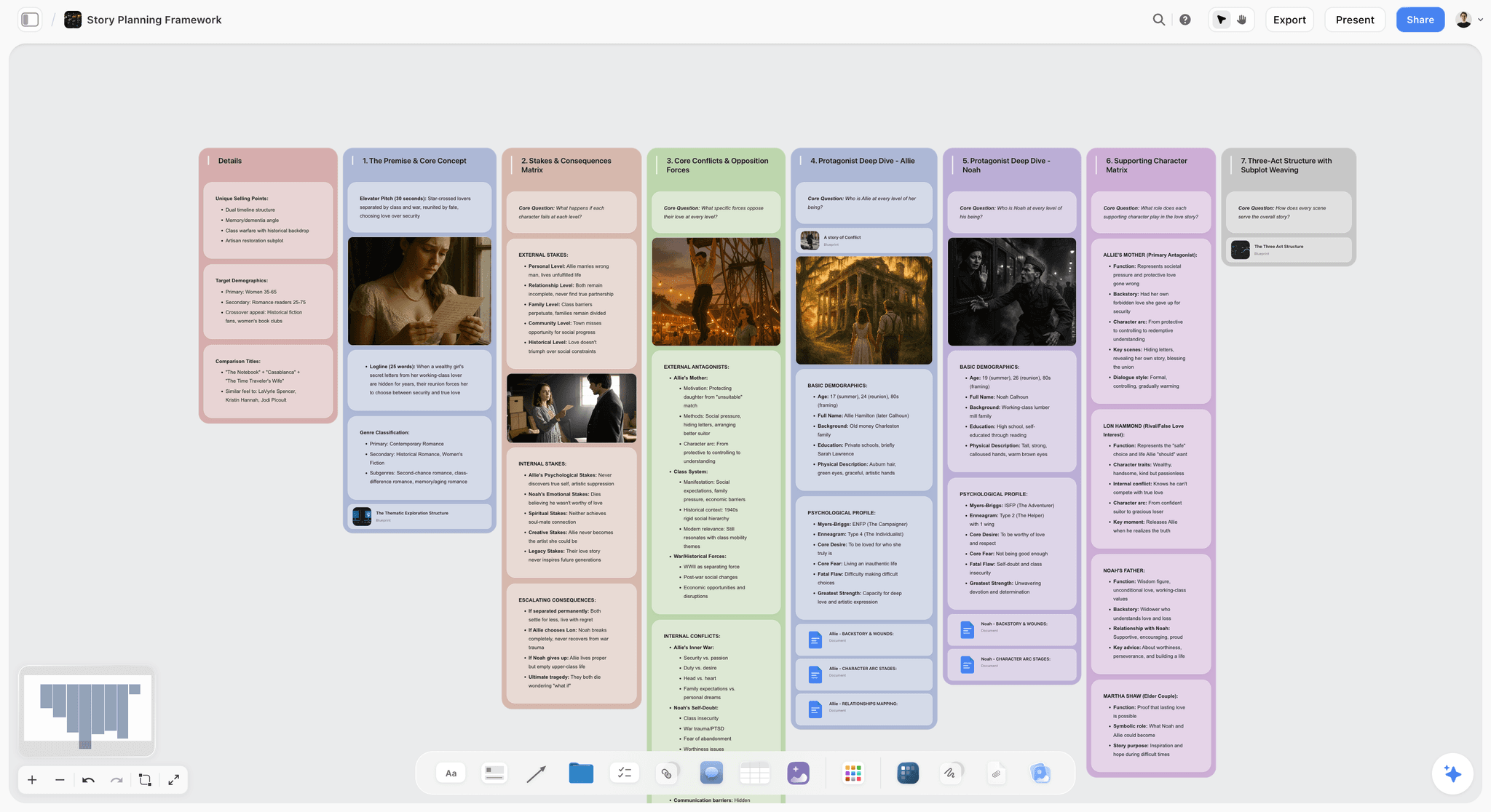
The verdict. The only tool here that can look at a whole board of claims at once, which is what noticing a contradiction actually requires.
Best for. Long form and investigative work where the difficulty is synthesis rather than storage.
Pricing. Paid only early access today. Plus is $7.99 per month billed annually or $9.99 monthly, with 200 plus Blueprint Tactics and unlimited file uploads. Pro is $14 per month billed annually or $19 monthly, adding AI image generation, roughly twenty times more AI usage and memory across conversations. Max is $39 per month billed annually or $49 monthly, adding Team Workspace with permissions and roles. Pricing is flat per account rather than per seat, and anyone a paid member invites joins free. The Free plan launches before the end of 2026.
Why it ranks here. The connection job fails for a mechanical reason: contradictions live between documents, and almost every research tool reads one document at a time.
Storyflow's AI reads your full active canvas board by default, plus up to one Tactic and up to three Documents you @-mention. On a board where each claim is its own object with a source note attached, that means you can ask whether anything on the board disagrees with a given claim, and the answer is computed across the whole surface. In testing on a corpus containing two deliberately incompatible timelines, it identified the conflict, which no single document summarizer did, because neither document was individually wrong.
The second advantage is spatial. Investigations have shape: a timeline, a network of people, a money trail. Those are two dimensional structures, and forcing them into a linear document destroys the thing you are trying to see. Arranging claims by date along one axis and by actor along another is how reporters have worked on physical walls for a century, and it works for the same reason now.
Flat per account pricing also means an editor or a collaborating reporter joins free rather than costing a seat, which matters for freelancers on shared investigations.
Strengths.
- Whole board AI context, so contradictions between distant material can surface.
- Spatial arrangement matches the actual shape of a timeline or a network.
- Claims can be first class objects with their own source notes.
- Invited collaborators join free.
- Handles documents, images and text on one surface.
Limitations.
- Cloud only, with no local first or self hosted option. If a source could be harmed by disclosure, do not use it for that material. Use Obsidian. This is the most important sentence in this review.
- No citation management. Zotero owns that and Storyflow does not attempt it.
- No transcription. Otter or Descript handle interviews.
- No OCR, so scanned documents need processing elsewhere first.
- Not a full text search engine over thousands of PDFs. DEVONthink is far better at corpus scale.
- Newer platform, so no journalism specific templates and no established export path into publishing systems.
The trade off. Storyflow is the synthesis surface for material that is safe to store in the cloud. It is not a secure notes system, and this post does not pretend otherwise.
2. Obsidian
The verdict. The correct answer whenever a source could be harmed. Also an excellent long term notes system.
Best for. Sensitive material, and research that must outlive any company.
Pricing. Free for personal use, including commercial use by individuals as of August 2026. Sync is roughly $4 to $8 per month and Publish around $8 per month, both optional.
Why it ranks here. Obsidian stores plain Markdown files in a folder on your machine. That single design decision produces most of its advantages: the vault can live on an encrypted volume, it can be kept off any network entirely, it is readable in fifty years without Obsidian, and there is no company holding your notes when a subpoena arrives.
For journalism involving whistleblowers, criminal matters, or reporting in jurisdictions with weak press protections, this is not a preference, it is the requirement, and every convenience feature elsewhere in this article is subordinate to it.
Its bidirectional links and graph view also serve the connection job genuinely well, though the graph is more useful as a browsing aid than as an analytical one. Where it loses to Storyflow is that its AI story depends on community plugins, and asking a question across the whole vault is not a native capability.
Strengths.
- Local first plain text, so the security posture is under your control.
- No vendor lock in whatsoever.
- Free for individuals, including professional use.
- Backlinks make relationships explicit and durable.
- Enormous plugin ecosystem.
Limitations.
- Whole corpus AI requires plugins and configuration rather than working out of the box.
- Graph view looks more analytically useful than it is.
- Setup and plugin management is a real time cost.
- Collaboration is genuinely poor, which matters on team investigations.
- Text first, so visual and spatial arrangement is limited.
The trade off. If any part of your story involves a person at risk, start here and accept the friction.
3. Zotero
The verdict. Boring, free, and it will outlive most of the companies on this list.
Best for. Managing sources, citations and bibliographic metadata.
Pricing. Free and open source. Paid storage tiers start around $20 per year.
Why it ranks here. Zotero solves a narrow problem completely: capturing a source with its metadata intact, storing the PDF, and producing a citation in any format. Its browser connector captures a page and its provenance in one click, which is exactly the habit that saves you at fact check.
For journalists the underused feature is the notes and tags layer attached to each item, which is the closest thing to per claim annotation any dedicated citation manager offers.
It ranks third because it is a library, not a thinking surface. Zotero will tell you what you have and where it came from. It will never tell you that two items disagree.
Strengths.
- Free, open source, and institutionally durable.
- Browser connector captures provenance at the moment of collection.
- Excellent metadata handling and citation output.
- Local storage option keeps material off third party servers.
Limitations.
- No synthesis or connection capability.
- Interface is dated.
- Free cloud storage is small, though local storage is unlimited.
- Weak for non document sources such as interviews.
The trade off. Install it, use the connector, and stop thinking about citations forever.
4. DEVONthink
The verdict. The right tool once the corpus is large enough that you cannot remember what is in it.
Best for. Thousands of documents, searched and cross referenced locally.
Pricing. One time purchase, roughly $99 to $199 depending on edition, as of August 2026. Mac and iOS only.
Why it ranks here. DEVONthink is a local document database with unusually good search, OCR for scanned material, and a similarity engine that suggests related documents you did not ask for. On a large public records corpus that suggestion feature is the closest thing to an automated connection tool that predates the current AI wave, and it still works.
It is local first, which puts its security posture close to Obsidian's, and it is a one time purchase rather than a subscription, which suits a two year investigation.
It ranks fourth because it is Mac only, the interface is genuinely intimidating, and it organizes documents rather than claims.
Strengths.
- Excellent search and OCR over very large local corpora.
- The see also suggestion engine surfaces genuine connections.
- Local first, one time purchase, no subscription.
- Handles mixed media well.
Limitations.
- Mac and iOS only.
- Steep learning curve and a dense interface.
- Expensive up front.
- Document level rather than claim level.
The trade off. Above roughly a thousand documents this becomes the strongest option on the list for gather and search.
5. Otter.ai
The verdict. Fast, cheap transcription with a privacy profile you must think about consciously.
Best for. Getting interviews into text quickly.
Pricing. Free tier with monthly minute limits. Paid plans start around $17 per user per month as of August 2026.
Why it ranks here. Transcription changed research more than any other recent tooling shift. A two hour interview that used to cost four hours to transcribe is now searchable in minutes, and searchable interviews are qualitatively different material.
Otter is fast, cheap and accurate enough on clear audio. Its speaker separation is good and its search across a transcript library is genuinely useful.
The caveat is unavoidable: your interviews are processed and stored on Otter's infrastructure. For a routine story that is fine. For a confidential source it is not, and local transcription with Whisper is the alternative that keeps the audio on your machine.
Strengths.
- Fast and inexpensive.
- Good speaker separation.
- Search across a transcript library.
- Usable free tier.
Limitations.
- Cloud processing and storage, which is disqualifying for sensitive interviews.
- Accuracy degrades on accents, crosstalk and poor audio.
- Automated summaries should never be trusted as a record.
- Minute limits are consumed quickly by long interviews.
The trade off. Excellent default, with a hard exception for confidential sources.
6. NotebookLM
The verdict. The best tool for interrogating a bounded set of documents, with citations back to the source.
Best for. Asking questions of a specific corpus you have uploaded.
Pricing. Free tier available. Higher limits come with paid Google plans as of August 2026.
Why it ranks here. NotebookLM's discipline is its virtue: it answers only from the documents you give it, and it cites the passage. For a reporter reading a 300 page filing under deadline, that is a real capability, and the grounding meaningfully reduces the invention problem that makes general chatbots unusable for this work.
It ranks sixth because the notebook is a bounded box rather than a workspace. It answers questions about documents you thought to upload, and it will not help you notice that a document in a different notebook contradicts this one. Google's data handling also puts it firmly outside the sensitive source category.
Strengths.
- Answers grounded in your documents with passage level citations.
- Genuinely fast for large filings under deadline.
- Free tier is usable.
Limitations.
- Bounded to one notebook, so cross corpus connection does not happen.
- Cloud only, Google infrastructure, unsuitable for sensitive material.
- No spatial or structural view of the material.
- Still requires verification of every quoted passage.
The trade off. A fast reading assistant, not a research system.
7. DocumentCloud
The verdict. Free, journalism specific, and consistently overlooked outside investigative desks.
Best for. Annotating primary documents and publishing them alongside a story.
Pricing. Free for verified journalists and news organizations.
Why it ranks here. DocumentCloud, run as part of MuckRock, does something no general tool does: it hosts primary source documents in a form readers can inspect, with annotations and highlights attached to specific passages, embeddable in a published story.
That serves the verification job directly, both for you and for your reader, and the annotation model is close to claim level rather than document level. Its OCR and full text search across an uploaded corpus are solid.
It ranks seventh only because it is document publishing infrastructure rather than a thinking surface, and access requires verification as a journalist.
Strengths.
- Free for journalists.
- Passage level annotation that publishes with the story.
- Good OCR and full text search.
- Built by people who understand the work.
Limitations.
- Requires verification to access.
- Documents are intended for eventual publication, so it is the wrong home for sensitive material.
- Not a synthesis or notes tool.
The trade off. If you handle primary documents and are not using it, that is probably an oversight.
8. Airtable
The verdict. The right shape for people, dates and money, which is most of what an investigation is made of.
Best for. Structured records: who, when, how much, from where.
Pricing. Free tier available. Paid plans start around $20 per seat per month billed annually as of August 2026.
Why it ranks here. A large part of investigative research is fundamentally tabular. A table of payments with dates, amounts, payer and payee, linked to a table of people, linked to a table of companies, is a far better instrument for spotting a pattern than any quantity of prose notes.
Airtable's linked records make that structure easy to build without a database background, and a filtered view answering "every payment to this entity, sorted by date" is often the moment a story becomes clear.
It ranks eighth because everything unstructured dies in it. Interview nuance and documentary ambiguity do not fit in cells.
Strengths.
- Linked records make relationships between entities queryable.
- Filtered views expose patterns quickly.
- Approachable without database skills.
- Free tier handles a decent sized project.
Limitations.
- Cloud only, so unsuitable for sensitive material.
- Forces structure onto material that may not have it yet.
- Per seat pricing.
- Poor for narrative and nuance.
The trade off. Build the table for the part of the story that has numbers. Keep everything else out of it.
9. Descript
The verdict. Otter's alternative when the audio will also be published.
Best for. Interviews that become podcast or video output as well as text.
Pricing. Free tier available. Paid plans start around $19 per user per month as of August 2026.
Why it ranks here. If your interview is both research material and publishable audio, Descript covers both in one pass: transcribe, search, then cut the audio by editing the transcript. For broadcast and podcast journalists that removes a whole step.
It ranks below Otter for pure research because it is more product than a reporter needs when the only goal is searchable text, at a higher price.
Strengths.
- Transcription and audio editing in one tool.
- Editing by transcript is dramatically faster.
- Good filler word removal and audio cleanup.
Limitations.
- Cloud based with the same source protection caveat.
- More expensive than transcription alone.
- Overkill if you never publish the audio.
The trade off. The right pick only if the recording has a second life as output.
10. Notion
The verdict. The story bible. Fine for organizing, weak for thinking.
Best for. Story planning, contact lists, and the running outline.
Pricing. Free personal tier. Paid from roughly $10 per user per month as of August 2026.
Why it ranks here. Notion is a reasonable home for the administrative half of a long project: the contact database with last contact dates, the outline, the to do list, the pitch and its status. Those are real jobs and it does them adequately.
It ranks tenth for research specifically because it is a document store with a database attached, and it has no meaningful capability for either verification or connection. Its search across a large workspace is also notably weak, which is a serious flaw in a research context.
Strengths.
- Good for the administrative layer of a project.
- Contact and source tracking with dates.
- Free tier is sufficient.
Limitations.
- Weak search at scale.
- No verification or connection capability.
- Cloud only.
- Encourages tidiness over thinking.
The trade off. Use it for project management, not for the research itself.
11. Google Docs
The verdict. Where the draft lives, because that is where your editor is.
Best for. Collaborative drafting and the editing pass.
Pricing. Free with a Google account. Workspace plans start around $7 per user per month.
Why it ranks here. Editors work in Google Docs. Suggestion mode, comments and version history are genuinely good, and fighting your desk about this is a losing argument.
It is last for research because it does nothing on any of the three jobs. It is included because pretending journalists draft anywhere else would be dishonest, and because one practice matters: a fact check draft where every claim carries an inline comment naming its source is the single most effective verification habit in this article, and it costs nothing.
Strengths.
- Universal, free, and where your editor already is.
- Suggestion mode and version history are excellent.
- Inline comments are a workable per claim provenance layer.
Limitations.
- No research capability at all.
- Cloud only, Google infrastructure.
- Degrades badly on very long documents.
The trade off. Draft here. Research elsewhere. Put the source in a comment on every contestable sentence.
What to Actually Pay For
Pay nothing until you know which job is failing. Zotero, Obsidian, DocumentCloud and NotebookLM are free, and between them they cover gather, verify and a decent share of connect. A reporter can run a serious investigation on a zero cost stack, and many do.
Pay for transcription, because it converts hours into minutes. Otter at roughly $17 per month is the clearest return on this page for anyone doing interview heavy work. The exception is sensitive sources, where local Whisper transcription is the correct answer and also free.
Do not pay for two overlapping stores. The most common wasteful stack is Notion plus Obsidian plus a folder of PDFs, where all three hold some material and none is authoritative. Pick the home for research and let the others be the draft and the admin.
Tools to Avoid for This Job
A general purpose chatbot for factual research. It will produce confident, fluent, unsourced claims, and in journalism an unsourced claim is not a lead, it is a liability. Grounded tools that cite the passage are a different category.
Any cloud tool for material that could identify a source at risk. This includes the AI transcription services, the cloud notes apps, and Storyflow. The convenience is real and it is not worth a person's safety.
A single folder of PDFs named by date. It is a gather solution with no verify and no connect, and it is what most reporters actually have.
Automated interview summaries as a record. Useful for orientation, unusable as evidence. Every quote goes back to the audio.
What No Tool on This List Does
None of them will tell you a document is a forgery, or that a source is lying fluently. Verification is a human judgment supported by tools, never performed by them.
None of them will replace the fact check. A tool that surfaces a contradiction has done you a favour; it has not established which side of it is true.
None of them, including Storyflow, will connect claims you never separated from their documents. The whole board AI can compare claims that exist as objects on the board. It cannot compare two sentences buried on page 30 of two different PDFs. Pulling the contestable claim out and writing its source next to it is the work, and no software does it for you.
The Bottom Line
Journalistic research fails at connection far more often than at storage, and the market has spent a decade building better storage.
Install Zotero and use the browser connector, because provenance captured at collection is provenance you never have to reconstruct. Use DocumentCloud if you handle primary documents and are eligible, because it is free and built for this. Transcribe with Otter unless the source is at risk, in which case run Whisper locally.
And if a source could be harmed by disclosure, keep that material in Obsidian on an encrypted volume and accept every inconvenience that comes with it. That recommendation stands above everything else in this article, including our own product.
But for the ordinary, dominant case, where the material is safe to store and the problem is that you have three hundred claims and no way to see which two disagree, the missing capability is a surface that can be questioned as a whole. That is the narrow ground on which Storyflow ranks first here.
FAQ: Research Tools for Journalists
What is the best tool to organize research for a long story or a book?
For most long form work the answer is a tool that lets you see claims next to each other rather than one that stores documents well, because the difficulty in long projects is synthesis rather than retrieval. Storyflow ranks first here for that job, since its AI reads the full canvas and can surface contradictions between distant material. If any source needs protecting, use Obsidian instead, because it is local first and Storyflow is cloud only.
What is the best free research tool for journalists?
Zotero for citations and source metadata, Obsidian for notes, DocumentCloud for primary documents if you are a verified journalist, and NotebookLM's free tier for questioning a bounded document set. That combination costs nothing, covers most of the work, and is more durable than most paid alternatives because none of it depends on a single company staying in business.
How should journalists protect confidential sources in their notes?
Keep the material local and encrypted, which in practice means a local first tool such as Obsidian or DEVONthink on an encrypted volume, and transcription performed locally with Whisper rather than a cloud service. Cloud tools store your notes on infrastructure that can be compromised or compelled, and that includes every AI tool in this article. The decision should be made at the start of the story, not after something goes wrong.
Can AI tools be trusted for journalistic research?
Grounded tools that answer only from documents you supply and cite the passage, such as NotebookLM, are usable as reading assistants provided every quoted passage is verified against the original. General chatbots are not, because they produce fluent unsourced claims. The genuinely useful application of AI here is not answering questions, it is noticing that two pieces of your own material disagree.
What is the difference between a notes app and a research tool?
A notes app stores what you wrote. A research tool has to hold what you wrote, where it came from, and how it relates to everything else you have. The provenance and relationship layers are what most notes apps lack, which is why reporters using one usually end up with a second system for sources and a third for the timeline.
How do you keep track of where every fact came from?
Attach the source at the moment of capture, not later, because reconstructing provenance at fact check is where days disappear. The most reliable low tech version is an inline comment on every contestable sentence in the draft naming the document, page and date. Zotero's browser connector automates the capture side for anything you find online.
Obsidian or Notion for journalism?
Obsidian for anything sensitive or long lived, because it is local first plain text with no vendor holding your material and no lock in. Notion for the administrative layer, meaning contacts, pitch status and the outline, where its databases are genuinely convenient. The security difference is decisive rather than a matter of taste, so if you can only run one and your work involves sources at risk, run Obsidian.
Does Storyflow replace Zotero?
No. Zotero manages citations, bibliographic metadata and the source library, which Storyflow does not attempt at all. Storyflow sits at the synthesis layer, where claims pulled out of those sources get arranged and compared. Most reporters running both use Zotero as the library of record and a canvas as the place where the argument gets built.
What is DocumentCloud and should I be using it?
DocumentCloud is a free platform for journalists to upload, OCR, annotate and publish primary source documents, run as part of MuckRock. If your reporting involves public records, filings or leaked documents that will eventually be shown to readers, it is the standard tool and it is free to verified journalists. It is deliberately built for documents that will become public, so it is the wrong place for sensitive material.
How do you spot contradictions across a large research corpus?
Separate claims from their documents, so that the atomic unit in your system is a statement with a source attached rather than a 40 page PDF. Then arrange those claims along the dimension the story turns on, usually time or actor, because contradictions become visible when incompatible statements are adjacent. This is what the physical wall of index cards was always doing, and whole corpus AI is the first tooling that automates the comparison rather than just the storage.
Is automatic transcription accurate enough for quotes?
Not for publication. Automatic transcription is accurate enough to search, orient and locate the moment, and every quote that reaches print should be checked against the audio. Accuracy degrades sharply with accents, crosstalk and poor recording conditions, and the errors tend to be plausible rather than obvious, which is the dangerous kind.
How do you organize research for a book rather than an article?
The difference is duration rather than volume, so favour durability over convenience: plain text or exportable formats, a citation manager whose data you own, and a structure that will still make sense to you in two years. The specific risk in book length work is that your own early notes become unreadable to you, which is why writing one sentence of context alongside each captured source pays off far more than any tool choice.
What should a journalist do first if their research is a mess?
Do not migrate tools. Take the current story only, pull the contestable claims out into a single surface with their sources attached, and arrange them by date. Most of the feeling of a research mess is the absence of a claim layer rather than a storage problem, and rebuilding it for one story takes an afternoon and shows you immediately whether the tooling is actually the issue.
What is the single change worth making on the next story?
Put the source in an inline comment on every contestable sentence as you draft, rather than reconstructing it at fact check. It costs seconds per sentence, it makes the fact check pass trivial, and it repeatedly catches the claim you believed but cannot actually source.
Table of Contents
- Key Takeaways
- The Three Jobs, and the Fact Problem
- At a Glance: The 11 Tools Compared
- How I Ranked These
- Quick Picks by Job Type
- 1. Storyflow
- 2. Obsidian
- 3. Zotero
- 4. DEVONthink
- 5. Otter.ai
- 6. NotebookLM
- 7. DocumentCloud
- 8. Airtable
- 9. Descript
- 10. Notion
- 11. Google Docs
- What to Actually Pay For
- Tools to Avoid for This Job
- What No Tool on This List Does
- The Bottom Line
- FAQ: Research Tools for Journalists
- Related Reading
Templates to check out for this topic


Research templates you can use in Storyflow
Gather sources, personas, and findings on one canvas, then let the AI read across all of it. Open any of these research boards to start.


See Storyflow in Action
A visual AI workspace where every feature lives inside one canvas. No tab-switching, no context lost.
Build your entire board from a single message
Type what you need in the AI chat at the bottom of your canvas. The AI adds cards, headings, and structure directly onto your board.
Use expert frameworks as AI context
Type @ in the AI chat and choose any Tactic. The AI tailors every response to that framework instead of giving generic advice.
Turn your board into a mind map in seconds
Ask the AI to restructure your canvas as a mindmap. It connects your ideas into a visual hierarchy so you can see how everything relates.
Why Storyflow Exists
Storyflow actually began as a personal tool while working on creative and research projects.
We kept running into the same problem: ideas were scattered everywhere: notes, documents, and whiteboards.
Nothing helped us see how everything connected.
So we started building a workspace designed around how ideas actually grow.
→ Read how Storyflow was createdSara de Klein
Head of Product at Storyflow
Published: 2026-08-10
Extremely simple, seriously capable


See how easy it is to get started
Watch a real project come together, from a blank board to a finished plan, clicked through step by step.
Start creating with AI and become more productive
Transform your creative workflow with AI-powered tools. Generate ideas, create content, and boost your productivity in minutes instead of hours.