
Category
Knowledge Management
Author

Justkay
Documentary Filmmaker & Founder at Storyflow
Topics
2026-05-18
•
Updated May 18, 2026
•
15 min read
•
Knowledge Management- best knowledge management tools 2026
- knowledge management software
- team knowledge management
- personal knowledge management
- knowledge base tools
- PKM tools
What is the best knowledge management tool in 2026?
There is no single best knowledge management tool, because the category covers two jobs. For a team wiki, Notion is the best all-around pick and Confluence is the best at scale. For a personal knowledge system, Obsidian is best for control and longevity, with Tana and Capacities as structured alternatives. For customer-facing teams, Guru. For research synthesis, NotebookLM. Most people run one team tool and one personal tool side by side.

All 12 Knowledge Management Tools, Ranked
- Notion: best for an all-around team workspace and wiki
- Storyflow: best for knowledge seen and connected, AI reads the whole board
- Confluence: best for large org wikis with governance
- Obsidian: best for local-first personal knowledge
- Guru: best for support and customer-facing teams
- NotebookLM: best for synthesizing documents and research
- Tana: best for structured personal knowledge
- Capacities: best for object-based personal knowledge
- Coda: best for a doc-database hybrid for ops teams
- Slite: best for a small-team knowledge base with AI
- Microsoft Loop: best for knowledge inside the Microsoft 365 stack
- Mem: best for AI-organized personal notes
Full disclosure: Storyflow is our own product, and we rank it #2 here, behind Notion. For an all-around team workspace and wiki Notion is the stronger pick, and for a governed large-org wiki Confluence is stronger. Storyflow is not a company-wiki tool: it has no deep folder governance or hundreds of structured reference pages, so for a static knowledge base pair it with Confluence. Where Storyflow wins is project-shaped knowledge on a visual canvas an AI reads end to end. We link to every tool so you can judge the fit.
Quick Comparison: Best Knowledge Management Tools
These four cover the two jobs knowledge management splits into: an all-around team workspace, a visual AI canvas, a governed large-org wiki, and a local-first personal system.
| Tool | Best For | AI Features | Price |
|---|---|---|---|
| Notion | All-around team workspace and wiki | Notion AI searches across connected sources | Free / $10 user/mo |
| Storyflow | Knowledge seen and connected on a canvas | Reads full board + @-docs and Tactics | $7.99 mo annual (free plan late 2026) |
| Confluence | Large org wikis with governance | Structured wiki; lighter native AI | Free / $5.42 user/mo |
| Obsidian | Local-first personal knowledge | AI via community plugins, not native | Free / Sync $4 mo |
1) Quick Answer: The Best Knowledge Management Tools in 2026
The best knowledge management tools in 2026 are Notion (best all-around team workspace), Storyflow (best when knowledge needs to be seen and connected, not just filed), Obsidian (best local-first personal knowledge system), Confluence (best for large org wikis with governance), and NotebookLM (best for research and document synthesis). There is no single best knowledge management tool, because knowledge management splits into two jobs that no product does equally well: running a team wiki the whole company trusts, and running a thinking system one mind, or one project, actually uses.
The short version: if you want a company wiki, pick Confluence or Notion. If you want knowledge that lives on a visual canvas an AI can read end to end, pick Storyflow. If you want a local-first personal knowledge system, pick Obsidian, Capacities, or Tana. If your knowledge lives in a Microsoft shop, Loop. Most people in 2026 run a team tool and a thinking tool side by side, because the wiki the company trusts and the system one person thinks in are rarely the same shape.
For the deeper personal-knowledge case, see The 10 Best AI Second Brain Apps in 2026 and What Is an AI Second Brain? The Complete Guide.
2) Comparison Table: 12 Knowledge Management Tools Compared
Pricing verified on each tool's official pricing page in May 2026. Pricing and AI limits change often; re-verify before buying.
3) What Knowledge Management Actually Means in 2026
Knowledge management is one phrase covering two jobs that pull in opposite directions. Most "best knowledge management tools" lists ignore this and rank a company wiki next to a personal note app as if a buyer would choose between them. A buyer would not. They serve different people solving different problems.
Team knowledge management is about a single source of truth a whole company can trust. The onboarding doc, the engineering runbook, the support macros, the policy library. It needs permissions, version history, governance, and search that works when 200 people contribute. Confluence, Guru, and Slite live here.
Personal knowledge management, or PKM, is about one mind. The reading notes, the half-formed ideas, the connections between projects, the thinking that has not become a deliverable yet. It needs speed, low friction, and a structure that matches how one person thinks. Obsidian, Capacities, Tana, and Mem live here. The "second brain" concept, popularized by Tiago Forte, is the PKM idea most people have heard of.
There is a useful way to test any tool: run it against the four jobs of knowledge management.
- Capture. How fast can knowledge get in? A tool with high capture friction loses knowledge before it is ever stored.
- Organize. Does structure get imposed up front, or can it emerge? Document trees impose; canvases and graphs let it emerge.
- Retrieve. Can you find a thing six months later? Search quality and AI retrieval decide this.
- Share. Can the right knowledge reach the right person, with the right permissions?
A team wiki must nail organize, retrieve, and share. A personal system must nail capture and retrieve. No tool is excellent at all four for both audiences, which is why the honest answer is almost always two tools, not one. That phrase will come back, because it is the single most useful thing this article can tell you.
McKinsey Global Institute (2012) estimated that knowledge workers spend roughly 19% of the working week, just over an hour a day, searching for and gathering internal information. That number is why the retrieve job matters more than any other. A tool that captures everything but cannot surface it on demand has not solved knowledge management. It has only relocated the problem.
4) How We Evaluated These Tools
Every tool here was used on real work, not synthetic demos: a documentary research archive, a small-team operations wiki, a personal idea system maintained over months, and a customer-facing knowledge base. Six criteria, weighted in this order.
- Retrieval quality. Can you find a specific piece of knowledge months later, by search or by AI? This is the job most tools quietly fail.
- Capture friction. How many steps and seconds between having a thought and storing it. High friction means knowledge never enters the system.
- Organization model. Document tree, graph, database, or canvas. Each fits a different kind of knowledge; none fits all of it.
- Collaboration and governance. Permissions, roles, version history, and whether the wiki stays trustworthy at scale.
- AI depth. Whether the AI genuinely reads your knowledge and grounds answers in it, or just generates generic text in a sidebar.
- Pricing transparency at real scale. What the tool costs when the team is real and the knowledge base is large.
Tools were rated on whether they actually held a body of knowledge that stayed findable and trustworthy over time, not on feature checklists.
5) Quick Picks by Use Case
If you want the short list, organize by the job in front of you.
Best all-around team workspace: Notion. It is the most flexible single tool, serving as wiki, database, and project hub for teams that want one surface.
Best for knowledge you need to see and connect: Storyflow. When knowledge is the thinking behind real projects, a visual canvas with an AI that reads the whole board beats a folder of flat documents you have to go find. Its Free plan, arriving before the end of 2026, will make it easy to test.
Best for creators, marketers, and solo founders: Storyflow. Research, references, and ideas live as a connected visual map, and the context-aware AI surfaces the links between them.
Best large-organization wiki: Confluence. Built for governance, permissions, and the reality of hundreds of contributors. Less pleasant for small teams.
Best personal knowledge system: Obsidian. Local-first, plain-text Markdown, and a plugin ecosystem that lets you shape it to your thinking. Capacities and Tana are strong structured alternatives.
Best for support and customer-facing teams: Guru. Verification workflows keep customer-facing answers current, and it surfaces knowledge inside the tools agents already use.
Best for research and document synthesis: NotebookLM. Upload sources, ask questions grounded only in those sources, and get cited answers. The strongest tool for turning a pile of documents into understanding.
Best for Microsoft-stack teams: Microsoft Loop. If your knowledge already lives in Teams, Outlook, and SharePoint, Loop is the path of least resistance.
Best doc-database hybrid: Coda. For operations teams whose knowledge is half document, half structured data.
6) Detailed Reviews: 12 Knowledge Management Tools in 2026
1. Storyflow
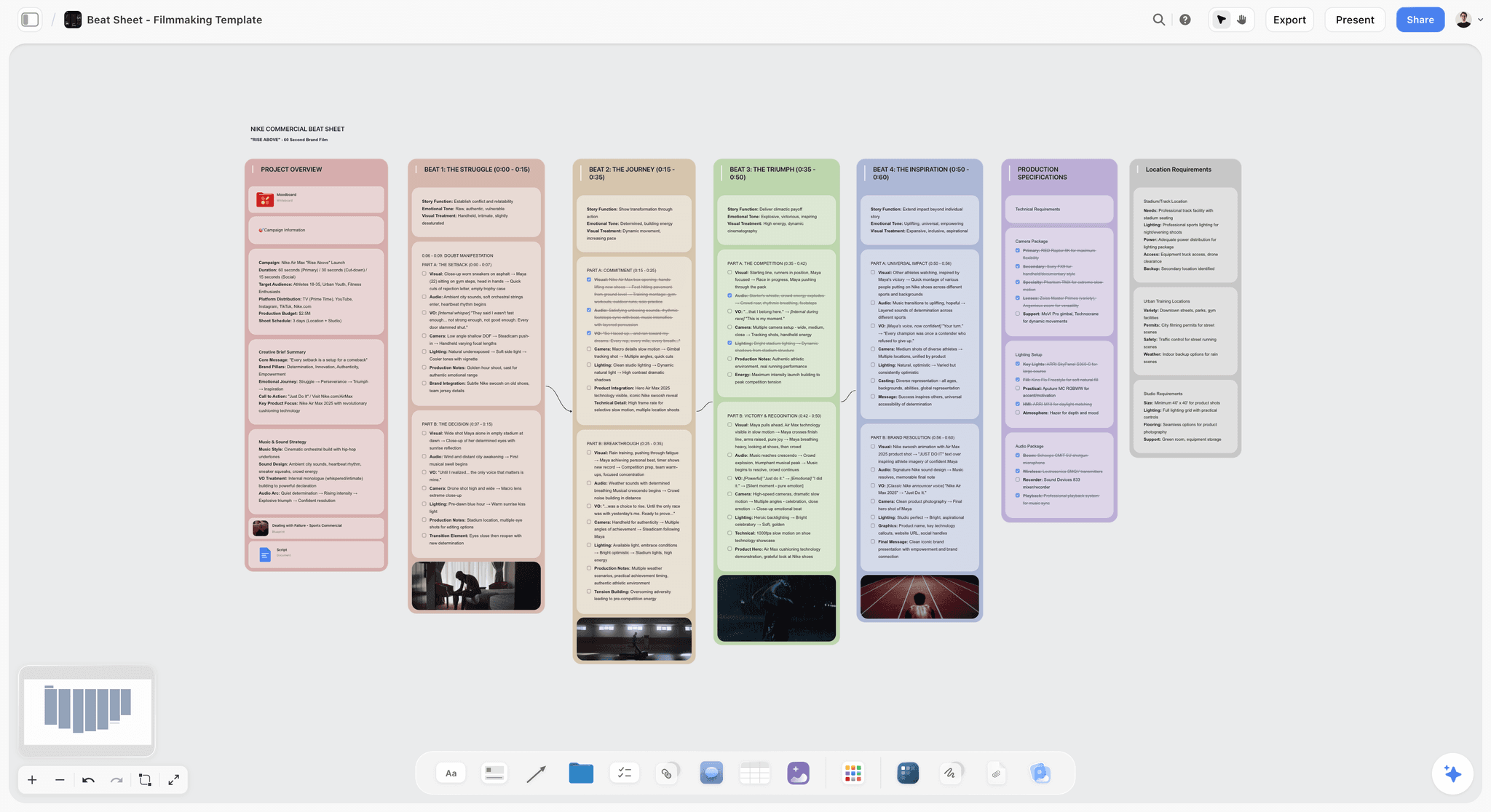
Most knowledge management tools store information as flat documents you then have to go find. Storyflow does the opposite. Your knowledge lives on a visual canvas, and a context-aware AI reads all of it at once and surfaces the connections between pieces. That is what knowledge management is actually for: not filing things away, but seeing how they relate and pulling the right piece back when you need it. If your knowledge is the thinking behind real projects, Storyflow is the tool that treats it that way.
Best for: Filmmakers, content creators, marketers, solo founders, researchers, and small teams who want their research, references, and ideas as a connected visual map an AI can read end to end.
Verdict: Our number 2 pick, and the best choice for anyone whose knowledge is project-shaped rather than wiki-shaped. It lands behind Notion only because Notion covers the widest range of team use cases. For seeing knowledge and having AI connect it, Storyflow is the strongest tool on this list, and its Free plan, arriving before the end of 2026, will let you prove that to yourself at no cost.
Key features
- Infinite visual canvas with structured cards. Notes, images, and links sit in space where you can see them all at once. Structure emerges from the material instead of being forced into a folder tree before you understand what you have.
- AI that reads the whole board. The context-aware AI reads your full active canvas, plus up to 1 Tactic and up to 3 @-mentioned Documents. It grounds every answer in your actual project knowledge and surfaces connections you would otherwise miss, instead of generating generic text in a sidebar.
- 200+ Story Blueprints. A library of expert framework templates on paid plans, so a project starts from a proven structure rather than a blank canvas.
- Unlimited boards on every plan. Unlimited notes, images, links, unlimited shared boards, and unlimited collaboration, with the Free plan arriving before the end of 2026.
Pricing
The Free plan arrives before the end of 2026 with unlimited notes, images, and links, unlimited shared boards, basic AI usage, 20 file uploads, and unlimited collaboration. Plus is $7.99/month annual or $9.99/month monthly and adds the 200+ Story Blueprints, and unlimited uploads. Pro is $14/month annual or $19/month monthly and adds AI image generation and 20x more AI than Plus. Max is $39/month annual or $49/month monthly and adds 40x more AI plus a team workspace with permissions and roles. That Free plan will be one of the most generous in this entire list.
Pros
- A visual canvas shows a project's knowledge spatially, so you see how every piece connects at a glance. A document tree can never do this.
- The AI reads the whole active board, so answers are grounded in your real knowledge and surface connections you would otherwise miss.
- 200+ Story Blueprints give you proven structures to build on instead of a blank page.
- The Free plan, arriving before the end of 2026, will be genuinely usable, with unlimited boards and unlimited collaboration.
Cons
- For a large company wiki with deep folder governance and hundreds of structured reference pages, pair Storyflow with a dedicated wiki like Confluence: let the canvas hold the thinking and the wiki hold the static records.
Take your most active project and rebuild it in Storyflow this week. Start at storyflow.so.
2. Notion
Notion is the most flexible knowledge management tool in 2026, equally usable as a personal system and a team wiki. It is the default pick when you want one surface to hold documents, databases, and project work.
Best for: Small to mid-size teams, startups, and individuals who want a single tool covering wiki, notes, and project tracking.
Verdict: The strongest all-around tool. It loses to Confluence on large-org governance and to Obsidian on local-first privacy.
Key features
- Pages, databases, and wikis in one workspace, with a block model that mixes text, tables, and embeds.
- Notion AI, bundled into Business and Enterprise tiers as of early 2026, can search across connected sources including Slack and Drive.
- Verified pages, page analytics, and a wiki layer for designating a source of truth.
- Templates for almost every knowledge management use case.
Pricing
Free for individuals and small teams. Plus is $10/user/month annual or $12/user/month monthly. Business is $18/user/month annual or $24/user/month monthly and bundles Notion AI. Enterprise is custom. As of early 2026, Notion folded AI into Business and Enterprise rather than selling it as a standalone add-on.
Pros
- The most versatile single tool. One surface for notes, wikis, and databases.
- Generous free plan with unlimited pages and blocks.
- Cross-source AI search is genuinely useful once knowledge lives in Notion.
Cons
- Flexibility becomes sprawl. Large Notion workspaces decay into unsearchable mazes without discipline.
- Performance lags on very large databases.
- Governance is lighter than Confluence for organizations that need strict permissions.
3. Confluence
Confluence is the wiki built for large organizations. It is the pick when the knowledge base has hundreds of contributors and the priority is governance, not aesthetics.
Best for: Mid-size to large companies, engineering organizations, and teams already using Jira.
Verdict: The strongest large-org wiki. Heavier than small teams need, and the small-team experience is its weakest point.
Key features
- Spaces, page trees, and templates built for structured documentation at scale.
- Advanced permissions, page restrictions, and audit history for governance.
- Deep Jira integration tying documentation to engineering work.
- Whiteboards and databases added to compete with Notion-style flexibility.
Pricing
Free for up to 10 users. Standard is roughly $5.42/user/month, Premium roughly $10.44/user/month, both billed annually. Enterprise is custom. Data Center licensing for self-hosting starts in the tens of thousands per year. Marketplace add-ons for diagrams and reporting are billed separately.
Pros
- Governance and permissions depth no personal-KM tool can match.
- Scales to hundreds of contributors without losing structure.
- Jira integration is unmatched for engineering teams.
Cons
- Overkill and unpleasant for small teams.
- The interface feels dated next to Notion and Slite.
- Real cost climbs once Marketplace add-ons enter the picture.
4. Obsidian
Obsidian is the strongest personal knowledge management tool in 2026. It is the pick for anyone who wants local-first, plain-text notes they fully own.
Best for: Individual knowledge workers, researchers, writers, and privacy-conscious users building a long-term personal system.
Verdict: The best PKM tool for control and longevity. Not a team wiki, and it does not pretend to be.
Key features
- Local Markdown files. Your knowledge is plain text on your own disk, readable without Obsidian.
- Bidirectional linking and a graph view for surfacing connections.
- Over 2,600 community plugins, plus Canvas and the Bases database feature.
- As of February 2026, Obsidian is free for commercial use; the old commercial license requirement was removed.
Pricing
The core app is free for all use. Sync is $4/month annual or $5/month for encrypted multi-device sync. Publish is $8/month annual or $10/month for publishing notes to the web. Students and nonprofits get 40% off the paid add-ons.
Pros
- True local-first ownership. No vendor lock-in; files outlive the app.
- The plugin ecosystem lets you shape the tool to your thinking.
- Free core with no feature gates is genuinely rare.
Cons
- Collaboration is weak; it is built for one person, not a team.
- Setup friction is real. A useful Obsidian vault takes plugin tuning.
- No native AI of NotebookLM's depth; AI arrives through plugins of varying quality.
5. Guru
Guru is the knowledge management tool built for customer-facing teams. It is the pick when the priority is keeping support and sales answers verified and current.
Best for: Support teams, sales teams, and operations teams who need trusted answers inside their daily tools.
Verdict: The strongest tool for customer-facing knowledge. Expensive, and its best AI features sit behind the Enterprise tier.
Key features
- Verification workflows that flag knowledge for periodic review so cards do not go stale.
- Browser extension and integrations that surface answers inside Slack, the helpdesk, and the CRM.
- AI-powered search across the knowledge base.
- Knowledge Agents for AI chat and research, gated to Enterprise.
Pricing
No free plan; a free trial is available. Starter is around $25/seat/month with a 10-seat minimum, putting the floor near $250/month. Builder adds AI search and automation. Enterprise is custom and unlocks Knowledge Agents.
Pros
- Verification workflows solve the stale-knowledge problem better than any competitor.
- Surfacing answers inside existing tools cuts capture and retrieve friction for agents.
- Genuinely strong for the support and sales use case it targets.
Cons
- Expensive, with a 10-seat minimum that prices out small teams.
- The headline AI features (Knowledge Agents) are Enterprise-only.
- Narrow. Outside customer-facing teams, the value drops sharply.
6. NotebookLM
NotebookLM is Google's research and synthesis tool. It is the pick when the job is turning a stack of documents into understanding, not maintaining a permanent wiki.
Best for: Researchers, students, analysts, and anyone synthesizing many sources into grounded answers.
Verdict: The strongest research-grounded AI tool in 2026. It is a synthesis layer, not a knowledge base you build over years.
Key features
- Upload sources (PDFs, docs, links, video) and ask questions answered only from those sources, with citations.
- Audio and Video Overviews that turn sources into narrated summaries.
- Deep Research and a large context window for working across many documents at once.
- Free tier with 100 notebooks and 50 sources per notebook.
Pricing
The free tier is genuinely generous: 100 notebooks, 50 sources each, 50 daily chats. NotebookLM Plus ships through Google AI Plus at $9.99/month in the US with higher limits. Google AI Pro is $19.99/month for heavier use.
Pros
- Source-grounded answers with citations reduce hallucination risk.
- The free tier is enough for most individual research work.
- Audio Overviews are a genuinely useful way to absorb dense material.
Cons
- It is a synthesis tool, not a long-term knowledge base. Notebooks are project-scoped.
- No real organization or wiki layer for evolving team knowledge.
- Google ecosystem tie-in, with the usual questions about longevity of Google products.
7. Tana
Tana is the structured personal knowledge tool that pairs an outliner with a database. It is the pick for PKM users who want their notes to carry real structure.
Best for: Power users, knowledge workers, and people who outgrew flat note apps and want queryable structure.
Verdict: The most powerful structured PKM tool in 2026. The learning curve is steep, and that filters out casual users.
Key features
- Supertags turn any node into a typed object with fields, making notes queryable.
- Outliner-first editor with live queries and command nodes.
- AI features with monthly credits, including model selection on the Pro tier.
- Meeting and daily-note workflows.
Pricing
Free tier with 500 monthly AI credits and the core editor. Plus is $8/month annual or $10/month monthly. Pro is $14/month annual or $18/month monthly with more AI credits and unlimited workspaces.
Pros
- Supertags give notes database-grade structure without leaving the outliner.
- Live queries turn a personal vault into something you can interrogate.
- Strong for people whose knowledge benefits from typed structure.
Cons
- Steep learning curve. Casual users bounce off the structure model.
- Not local-first; cloud-based, unlike Obsidian.
- Built for individuals; weak as a team wiki.
8. Capacities
Capacities is the object-based personal knowledge tool. It is the pick for PKM users who want structure that is gentler than Tana but richer than a flat note app.
Best for: Individuals who think in objects (people, books, ideas, projects) and want each to be a first-class thing.
Verdict: The most approachable structured PKM tool. Less powerful than Tana, more pleasant to live in.
Key features
- Everything is a typed object, with each object type getting its own structure and view.
- Daily notes, calendar, and graph view tying objects together.
- AI assistant on the Pro tier.
- Clean, calm interface that lowers the cost of daily use.
Pricing
Free plan with unlimited notes and objects and 5 GB media storage. Pro is $9.99/month annual or $11.99/month monthly with the AI assistant and unlimited storage. A Believer tier at $14.99/month adds early beta access.
Pros
- Object model is intuitive and lowers daily friction.
- Generous free tier covers a lot of personal use.
- Calm design makes it a tool people actually keep using.
Cons
- Less query power than Tana for advanced structured workflows.
- Not local-first; cloud-based storage.
- Individual-focused; no team knowledge base.
9. Coda
Coda is the doc-database hybrid. It is the pick for operations teams whose knowledge is half written documentation and half structured data and workflow.
Best for: Operations teams, project leads, and teams that want documents that behave like apps.
Verdict: The strongest doc-database hybrid for ops work. Less of a pure wiki than Notion or Confluence.
Key features
- Docs that combine text, tables, buttons, and automations into interactive workflows.
- Packs that integrate external tools like Slack and Calendar into a doc.
- Maker billing, where only document creators pay and editors and viewers are free.
- Templates for trackers, OKRs, and team hubs.
Pros
- The doc-as-app model fits operations knowledge that mixes text and process.
- Maker billing keeps costs down for teams with many viewers.
- Strong automation inside documents.
Pricing
Free for unlimited doc makers with core functionality. Pro is $10/doc maker/month annual or $12 monthly. Team is $30/doc maker/month annual or $36 monthly. Enterprise is custom.
Cons
- Less of a clean wiki than Notion or Confluence; better at workflows than at reference docs.
- Complexity climbs as docs grow into apps.
- Search and navigation across many docs is weaker than a dedicated wiki.
10. Slite
Slite is the small-team knowledge base with AI search built in. It is the pick for teams that want a focused wiki without Confluence's weight.
Best for: Small to mid-size teams who want a clean, dedicated knowledge base and nothing more.
Verdict: The most focused small-team wiki in 2026. It does one job well and resists scope creep.
Key features
- Clean document editor built specifically for knowledge base content.
- Ask, an AI assistant that answers questions from your knowledge base.
- Knowledge management features like doc verification and decision tracking.
- Enterprise search across connected tools on the higher tier.
Pricing
No free plan; a 14-day trial is available. Standard is $8/user/month annual or $10/month monthly with 30 AI questions per user per month. Knowledge Suite is $25/user/month with enterprise search, SSO, and higher AI limits, requiring at least 10 users.
Pros
- Focused. It is a knowledge base, not a kitchen sink, and that clarity helps adoption.
- Clean editor and good search make knowledge easy to retrieve.
- AI answers grounded in your own docs.
Cons
- No free plan, unlike most competitors here.
- Less flexible than Notion; if you want databases and project tracking, look elsewhere.
- Smaller ecosystem and integration library.
11. Microsoft Loop
Microsoft Loop is the collaborative knowledge layer inside Microsoft 365. It is the pick when your organization already lives in Teams, Outlook, and SharePoint.
Best for: Teams committed to the Microsoft 365 stack who want knowledge that flows between Microsoft apps.
Verdict: The path of least resistance for Microsoft shops. Outside that ecosystem, there is no reason to choose it.
Key features
- Loop components: portable blocks of content that stay in sync across Teams, Outlook, and Word.
- Loop workspaces for organizing pages and components around a project.
- Copilot integration for AI assistance across Microsoft 365.
- Storage tied to OneDrive and SharePoint.
Pricing
Loop has no separate price. Personal use is available in preview at no cost. Full workspace creation requires a Microsoft 365 plan such as Business Standard, Business Premium, or E3 and E5. Microsoft 365 commercial pricing updates take effect July 2026.
Pros
- Native integration with the Microsoft 365 stack removes friction for those teams.
- Loop components keep knowledge in sync rather than duplicated.
- No extra cost if you already pay for Microsoft 365.
Cons
- Still maturing; less polished than dedicated wikis.
- Locked to the Microsoft ecosystem.
- Weak as a structured long-term wiki compared to Confluence.
12. Mem
Mem is the AI-organized personal note tool. It is the pick for individuals who want capture to be effortless and let AI handle the filing.
Best for: Individuals who hate manual organization and want notes that sort themselves.
Verdict: The most hands-off personal KM tool. Mem 2.0 is promising, but the pricing and roadmap are still unsettled.
Key features
- AI-driven organization; notes connect and surface without manual folders or tags.
- Fast capture across desktop, mobile, and the web.
- Mem 2.0, released in early 2026, is a significant rebuild over version 1.0.
- AI chat that answers questions from your notes.
Pricing
Mem is currently free for personal and collaborative use. Mem 2.0 is free during its alpha and beta phases. Paid pricing has historically pointed to roughly $10/month for individuals, but the company has not finalized 2.0 pricing. Verify current pricing before committing.
Pros
- The lowest organization friction of any tool here; AI does the filing.
- Fast capture keeps knowledge from being lost at the door.
- Mem 2.0 is a genuine step up over the original.
Cons
- Pricing and roadmap are unsettled, which is a real risk for a tool meant to hold years of knowledge.
- Hands-off organization means less control for users who want structure they can see.
- Individual-focused; not a team wiki.
7) Recommendations by Persona
13. Solo PKM User / Knowledge Worker
Top picks: Storyflow + Obsidian
Storyflow when your knowledge is project-shaped and you want to see how every piece connects, with an AI that reads the whole canvas. Obsidian for the permanent plain-text system you own outright. If you want database-grade structure inside the personal system, swap Obsidian for Tana or Capacities. NotebookLM is the add-on for synthesizing a defined stack of sources into cited answers.
14. Small Team (Under 20 People)
Top picks: Storyflow + Notion
Storyflow when the team's knowledge is the thinking behind active projects: research, references, and ideas on a shared visual canvas the AI can read, with unlimited collaboration on every plan. Notion if you want one flexible surface for the wiki, docs, and light project tracking. Both avoid Confluence's weight at small scale.
15. Support / Operations Team
Top picks: Guru + Coda
Guru for customer-facing knowledge that stays verified and surfaces inside the helpdesk and CRM. Coda for the operational side, where knowledge is half documentation and half workflow.
16. Large Enterprise
Top picks: Confluence + Microsoft Loop
Confluence for the governed company wiki with real permissions and audit history. Microsoft Loop if the organization is already committed to the Microsoft 365 stack and wants knowledge flowing between Teams and Outlook.
17. Researcher / Academic
Top picks: Storyflow + NotebookLM
Storyflow for laying out sources, quotes, and arguments on a canvas where the AI reads the whole board and surfaces connections across them. NotebookLM for synthesizing a defined stack of papers into grounded, cited answers. Obsidian is the strong local-first alternative for permanent literature notes. See AI Second Brain for PhD Students for the deeper research workflow.
18. Solo Founder / Creative Running Projects
Top picks: Storyflow + Notion
Storyflow for the visual canvas where a project's research, references, and ideas live as a connected map the context-aware AI reads end to end. This is the natural home for project knowledge, and its Free plan will cover a solo founder fully once it arrives before the end of 2026. Notion for the flat reference docs and the lightweight company wiki. The canvas holds the thinking; the wiki holds the records.
8) Honorable Mentions
A few tools that came close but did not make the main twelve.
- Anytype. Local-first, object-based personal knowledge with encryption. A strong Obsidian alternative for privacy-focused users; narrower ecosystem.
- Logseq. Open-source, outliner-based PKM with local Markdown. Excellent for daily-notes and journaling workflows.
- Document360. A polished knowledge base built specifically for public help centers and product documentation.
- Bloomfire. Enterprise knowledge management focused on search and discovery across large content libraries.
- Nuclino. A lightweight team wiki with a clean interface; simpler and cheaper than Confluence.
- Heptabase. Visual, card-based personal knowledge tool for researchers who think on a canvas.
- Reflect. A fast, networked note app with built-in AI, aimed at individuals.
These are not weak tools. Their audience or use case is narrower than the main list.
9) Where Knowledge Management Tools Fail
Honest accounting matters. Knowledge management tools fail in predictable ways, and naming them saves you from blaming the wrong thing.
The graveyard problem. Most knowledge bases become write-only. People add documents and never read them. A 2012 McKinsey estimate put information-searching at 19% of the work week; a knowledge base that is not searched does not fix that, it adds to it. The fix is cultural, not a tool: someone has to own retrieval quality.
Organization is imposed too early. Document trees force you to decide where a thing goes before you understand it. Knowledge that does not fit the folder structure gets dropped. Graph tools and canvas tools delay that decision, which is why personal knowledge often survives better outside a strict tree.
The tool is the wrong shape for the knowledge. A wiki is great for stable reference material and bad for evolving project thinking. A canvas is great for one project's research and bad for a 500-page company handbook. The wiki the company trusts and the system one person thinks in are rarely the same shape, and forcing one tool to do both is the most common knowledge management mistake.
AI is treated as a substitute for capture. AI can retrieve and synthesize knowledge, but it cannot read what was never captured. NotebookLM only knows the sources you upload. Storyflow's AI only reads the canvas you built. No AI fixes an empty or stale knowledge base.
Migration cost is underestimated. Moving a knowledge base between tools is brutal, and the threat of it keeps teams on tools they have outgrown. This is the strongest argument for plain-text, portable formats like Obsidian's Markdown: the knowledge outlives the app.
If your knowledge management is failing, the tool is usually not the first thing to fix. Ownership of retrieval quality is.
11) The Bottom Line
The best knowledge management tool in 2026 depends on which of the two jobs you are solving. For a team wiki, Notion is the best all-around pick and Confluence is the best at scale, with Slite the cleanest small-team option and Guru the strongest for customer-facing knowledge. For a local-first personal knowledge system, Obsidian is the best for control and longevity, with Tana and Capacities the strongest structured alternatives and NotebookLM the best for research synthesis. For Microsoft shops, Loop is the path of least resistance.
But for most people, knowledge management is not really a filing problem. It is a connecting problem. The point is not to store a document and never see it again, it is to see how your knowledge relates and pull the right piece back when it matters. That is why Storyflow is our number 2 pick overall: it keeps knowledge on a visual canvas you can see at a glance, and an AI reads the whole board and surfaces the connections for you. If your knowledge is the thinking behind real projects, that beats a folder of flat documents every time.
The mistake to avoid is forcing one tool to do both jobs. The wiki the company trusts and the system one person thinks in are rarely the same shape. Many people in 2026 run a team wiki and a thinking tool side by side, and that is not a failure of the market. It is the right answer.
If your work is project-shaped, take your most active project and rebuild it in Storyflow this week. Storyflow is paid-only during early access from $7.99 a month billed annually, and anyone a paid member invites to a board joins free, so the test costs little to run. Start at storyflow.so.
10) FAQ: Knowledge Management Tools in 2026
What is the best knowledge management tool in 2026?
There is no single best knowledge management tool, because the category covers two different jobs. For a team wiki, Notion or Confluence. For a personal knowledge system, Obsidian, Capacities, or Tana. For customer-facing teams, Guru. For research synthesis, NotebookLM. Most people run one team tool and one personal tool, because the wiki a company trusts and the system one person thinks in are rarely the same shape.
What is the difference between team and personal knowledge management?
Team knowledge management is about a shared source of truth: a wiki the whole company can trust, with permissions, governance, and version history. Personal knowledge management, or PKM, is about one mind: capturing ideas, notes, and connections with low friction. Team KM optimizes for organize and share; personal KM optimizes for capture and retrieve.
What is the best free knowledge management tool?
For personal use, Obsidian's free core is the strongest; it has no feature gates. NotebookLM's free tier is generous for research. Notion's free plan is excellent for small teams. Storyflow's Free plan, which launches before the end of 2026, will be the strongest free option for visual project knowledge: unlimited boards, unlimited notes and links, basic AI, and unlimited collaboration.
Is Notion good for knowledge management?
Yes, Notion is one of the best all-around knowledge management tools, especially for small and mid-size teams. Its weakness is that flexibility becomes sprawl: large Notion workspaces decay into unsearchable mazes without discipline. For strict governance at hundreds of contributors, Confluence is stronger.
Notion or Confluence for a company wiki?
Confluence for large organizations that need governance, advanced permissions, and Jira integration. Notion for small to mid-size teams that want a flexible, pleasant workspace covering wiki, docs, and light project tracking. As a rough line, Confluence wins past roughly 100 contributors; Notion wins below it.
Is Obsidian a knowledge management tool?
Yes, Obsidian is one of the best personal knowledge management tools. It stores plain-text Markdown files locally, supports bidirectional linking and a graph view, and has over 2,600 plugins. It is built for one person, not a team, so it is a personal knowledge system rather than a company wiki.
How is NotebookLM different from a wiki?
NotebookLM is a research and synthesis tool, not a permanent knowledge base. You upload a set of sources and ask questions answered only from those sources, with citations. A wiki is where evolving team knowledge lives over years. NotebookLM is where you turn a defined stack of documents into understanding for a specific question.
Where does Storyflow fit?
Storyflow is our number 2 pick because it treats knowledge the way knowledge actually works: as connected thinking, not flat files. Your research, references, and ideas live on a visual canvas you can see at a glance, and a context-aware AI reads the whole board and surfaces the links between pieces. It is the strongest choice when your knowledge is project-shaped. For a large structured company wiki with deep folder governance, pair Storyflow with a dedicated wiki like Confluence: the canvas holds the thinking, the wiki holds the static records.
Can AI replace a knowledge management system?
No. AI improves retrieval and synthesis, but it can only work with knowledge that was captured. NotebookLM only knows the sources you upload; Storyflow's AI only reads the canvas you built. AI makes a good knowledge base far more useful, but it cannot fix an empty or stale one.
How much do knowledge management tools cost in 2026?
Personal tools range from free (Obsidian core, NotebookLM, Capacities free tier) to around $8 to $15 per month. Team tools are per-user: Confluence Standard is roughly $5.42/user/month, Notion Plus is $10/user/month annual, and Guru starts near $25/seat with a 10-seat minimum. Storyflow is $7.99/month annual at the Plus tier. Re-verify pricing on each official page, as AI limits and tiers change often.
Why do most knowledge bases fail?
Most knowledge bases become write-only: people add documents and never read them. The cause is rarely the tool. It is the absence of someone who owns retrieval quality, plus organization structures imposed too early, plus treating AI as a substitute for capture. Fixing those is cultural work, not a software purchase.
Do I need a knowledge management tool at all?
If your knowledge fits in your head or a single notes app, no. You need a knowledge management tool when knowledge has to outlive memory, be found by someone else, or connect across many projects. A solo creator may only need a personal tool. A growing team needs a shared wiki the moment "ask the one person who knows" stops scaling.
Table of Contents
- Quick Answer: The Best Knowledge Management Tools in 2026
- Comparison Table: 12 Knowledge Management Tools Compared
- What Knowledge Management Actually Means in 2026
- How We Evaluated These Tools
- Quick Picks by Use Case
- Detailed Reviews: 12 Knowledge Management Tools in 2026
- Recommendations by Persona
- Honorable Mentions
- Where Knowledge Management Tools Fail
- FAQ: Knowledge Management Tools in 2026
- The Bottom Line
- Author
- Related Reading
Templates to check out for this topic


Workspace templates you can use in Storyflow
Keep research, notes, and plans on one canvas the AI can read, instead of scattered across docs and tabs. Open a template and make it your second brain.


See Storyflow in Action
A visual AI workspace where every feature lives inside one canvas. No tab-switching, no context lost.
Build your entire board from a single message
Type what you need in the AI chat at the bottom of your canvas. The AI adds cards, headings, and structure directly onto your board.
Use expert frameworks as AI context
Type @ in the AI chat and choose any Tactic. The AI tailors every response to that framework instead of giving generic advice.
Turn your board into a mind map in seconds
Ask the AI to restructure your canvas as a mindmap. It connects your ideas into a visual hierarchy so you can see how everything relates.
Why Storyflow Exists
Storyflow actually began as a personal tool while working on creative and research projects.
We kept running into the same problem: ideas were scattered everywhere: notes, documents, and whiteboards.
Nothing helped us see how everything connected.
So we started building a workspace designed around how ideas actually grow.
→ Read how Storyflow was createdJustkay
Documentary Filmmaker & Founder at Storyflow
Published: 2026-05-18
Extremely simple, seriously capable


See how easy it is to get started
Watch a real project come together, from a blank board to a finished plan, clicked through step by step.
Start creating with AI and become more productive
Transform your creative workflow with AI-powered tools. Generate ideas, create content, and boost your productivity in minutes instead of hours.