The 10 Best Notion Alternatives for Photographers in 2026
A shoot is decided before the shutter clicks, and a photographer needs to see it, not read it. The 10 best Notion alternatives for photographers in 2026, ranked on seeing the shoot before the shoot, from Storyflow and Milanote to Trello and Airtable.

Category
Photography
Author

Justkay
Documentary Filmmaker & Founder at Storyflow
Topics
2026-07-21
•
20 min read
•
PhotographyTable of Contents
- Comparison Table: 10 Notion Alternatives for Photographers Compared
- The 10 Best Notion Alternatives for Photographers, Ranked
- How We Evaluated These Tools
- Detailed Reviews: 10 Notion Alternatives for Photographers
- Quick Picks by Photographer Need
- The Bottom Line
- Author
- FAQ: Notion Alternatives for Photographers
- Related Reading
Templates to check out for this topic


What is the best Notion alternative for photographers in 2026?
The best Notion alternatives for photographers in 2026 are Storyflow (best for planning a shoot visually with AI that reads your whole board), Milanote (best for moodboards and reference walls), Trello (best free kanban for tracking shoots from inquiry to delivery), and Airtable (best relational database for client and booking records). If your Notion has become a stack of tidy pages that describe shoots you can no longer see, start with Storyflow: your moodboard, shot list, location scouting, and pose references live on one canvas the AI can read end to end. Notion is genuinely good software. The databases are deep, the templates are endless, and photographers who run their studio like a small business get real mileage from it: client records, contracts, invoicing notes, a searchable archive of past jobs. None of that is the problem. The problem is that a shoot is a visual thing, and Notion asks you to read it. A shoot is decided before the shutter clicks. You choose the light, the frame, the pose, the wardrobe, and the location in your head long before the camera comes out of the bag, and a photographer needs to see that decision, not read a bulleted description of it. I speak from the field, not from a spec sheet. I am Justkay, a documentary filmmaker and the founder of Storyflow, and I have planned real shoots the slow way: moodboards pasted into a doc, shot lists in a table, location photos in a separate folder, none of them in the same eyeline. This guide ranks 10 alternatives on one question that matters to a working photographer: how well does each tool let you see the shoot before the shoot, and carry a job from inquiry to delivered gallery without losing the picture in your head?

Full disclosure: Storyflow is our own product, and we rank it #1 for one specific job: planning a shoot visually (moodboard, shot list, poses, locations) on a canvas the AI can read. It is not a client-gallery or proofing tool, so Pixieset and Pic-Time win delivery, and it is not a booking or invoicing CRM, so HoneyBook and Studio Ninja win that. We name where Storyflow loses in its review and link every tool so you can judge for yourself.
Quick Comparison
These four cover the photographer's real choice: a canvas that plans the shoot, a moodboard wall, a free pipeline, and a client database.
| Tool | Best For | AI Features | Price |
|---|---|---|---|
Storyflow | Moodboard, shot list, poses, locations in one view | Canvas-wide AI + AI image generation | Free / $9.99 mo |
Milanote | Moodboards and reference walls | No built-in AI | Free (100 notes) / ~$12.50 mo |
Trello | Free kanban inquiry-to-delivery pipeline | Standard AI | Free / $5 user mo |
Airtable | Client and booking records | Standard AI | Free / from ~$20 mo |
Comparison Table: 10 Notion Alternatives for Photographers Compared
| Tool | Best For | Photographer Fit | Starting Price | Free Plan | Rating (/10) |
|---|---|---|---|---|---|
Storyflow | Visual shoot planning with canvas-aware AI | Moodboards, shot lists, poses, locations in one view | $7.99/mo (annual) | Coming late 2026 (invited collaborators join free now) | 9.3/10 |
Milanote | Moodboards and reference walls | Excellent for visual capture, weak on tracking | ~$12.50/mo (annual) | Yes (100 notes) | 8.9/10 |
Trello | Free kanban shoot pipeline | Great inquiry-to-delivery tracker, not visual planning | $5/user/mo | Yes | 8.5/10 |
Airtable | Client and booking database | Strong records, poor creative front end | From ~$20/mo | Yes | 8.3/10 |
ClickUp | Studio and second-shooter task tracking | Good for teams, heavy for solo shooters | $7/user/mo (annual) | Yes | 8.1/10 |
Coda | Doc-database hybrid for studio ops | Better archive than Notion, not visual | From ~$10/user/mo | Yes | 8.0/10 |
Craft | Beautiful shoot briefs and client docs | Polished writing, no pipeline or canvas | ~$10/user/mo (annual) | Yes | 7.9/10 |
Obsidian | Local-first vault you own | Text-first, wrong shape for visual work | Free (Sync $4/mo) | Yes | 7.7/10 |
Google Sheets | Free booking and shot-list grid | Universal and free, purely textual | Free | Yes | 7.4/10 |
Capacities | Object-based notes and references | Interesting for tagging shoots, still text-first | ~$10/mo (annual) | Yes | 7.2/10 |
Pricing changes often, so verify the live price on each tool's site before buying. Storyflow's prices are exact: paid-only during early access, with Plus at $7.99/mo annual ($9.99 monthly), Pro at $14/mo annual, Max at $39/mo annual, billed per account not per user; a Free plan launches before the end of 2026. Ratings reflect fit for a photographer's real job of planning and running shoots, not general workspace quality.
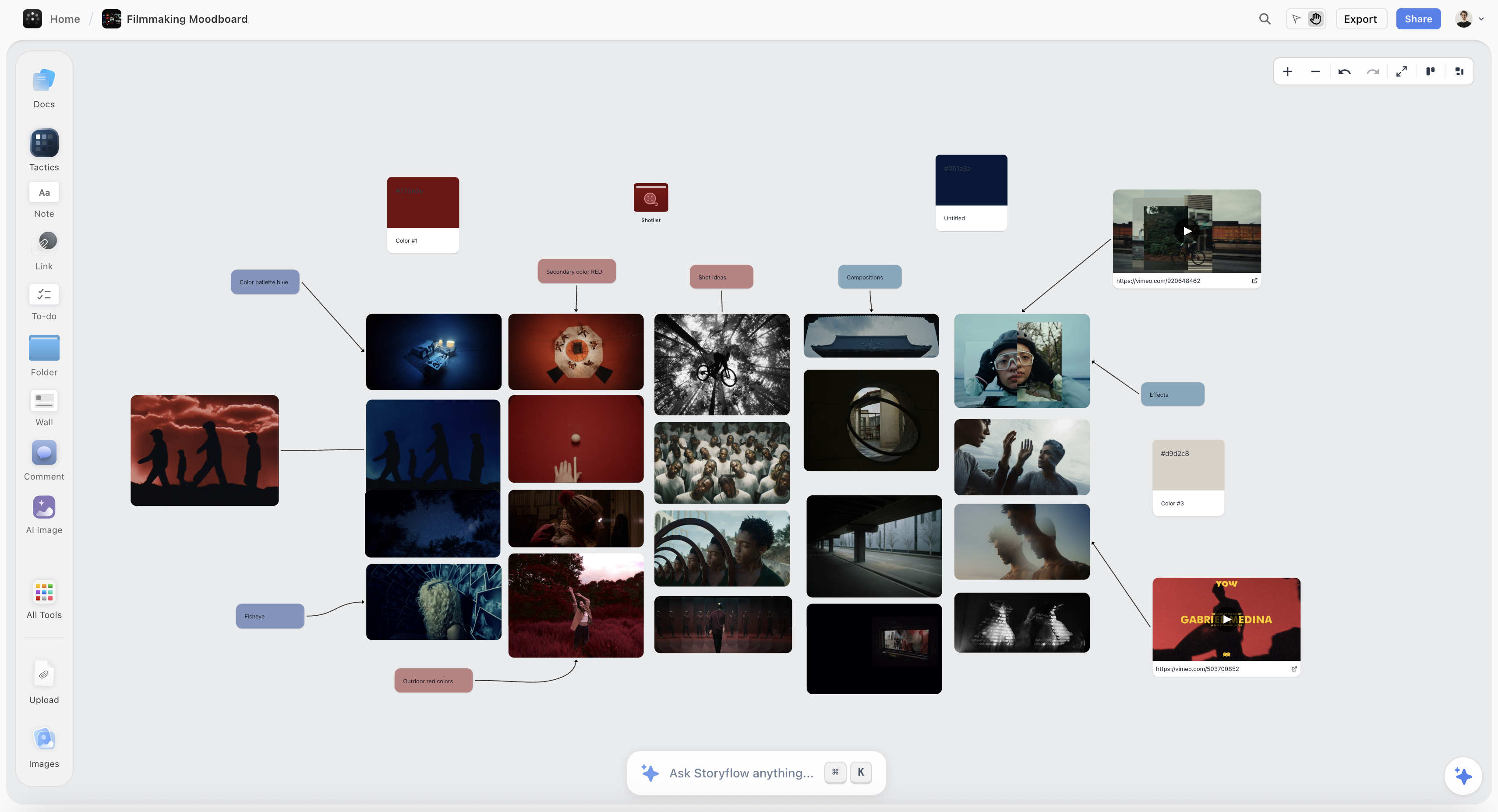
A shoot planned on one Storyflow canvas: moodboard, shot list, poses, and locations the photographer can see before the shoot day
See the shoot before the shoot
Storyflow puts your moodboard, shot list, poses, and locations on one canvas the AI reads, so you walk onto set with the frames already planned. Free plan with unlimited boards. No credit card.

The 10 Best Notion Alternatives for Photographers, Ranked
- Storyflow - best for planning the whole shoot visually, with AI that reads the entire board
- Milanote - best for moodboards and per-shoot reference walls
- Trello - best free kanban for tracking jobs from inquiry to delivery
- Airtable - best relational database for clients, bookings, and shot logs
- ClickUp - best task tracking for studios and second shooters
- Coda - best doc-database hybrid for studio operations
- Craft - best for beautiful shoot briefs and client-facing documents
- Obsidian - best local-first vault for photographers who own their notes
- Google Sheets - best free grid for booking calendars and shot lists
- Capacities - best object-based notes for tagging shoots and subjects
How We Evaluated These Tools
I planned and ran the same real workload through each tool: a portrait session, a wedding timeline, a product catalog shoot, and a small commercial job with a client, a stylist, and a second shooter. Tools were judged on how far a shoot travels inside them, from the first inquiry email to the delivered gallery, not on feature counts. Five criteria:
- Shoot planning and moodboards (30%). Can you build the look of the shoot in the tool: pull in reference images, wardrobe, color, lighting diagrams, and arrange them in space so you can see the shoot as a whole? This is the criterion Notion loses on hardest, because a page scrolls and a shoot does not.
- Shot lists and poses (25%). Can a moodboard become an ordered, checkable shot list and pose plan that you can actually run on set, next to the references that inspired each frame?
- Client tracking (20%). Can you follow a job through its stages: inquiry, booked, shot, culled, edited, delivered, and hold the client details, contract notes, and deadlines somewhere reliable?
- Collaboration (15%). Can a second shooter, an assistant, a stylist, or the client see the plan and the shot list without a screen-share, and can the client approve a look before the day?
- Price for a solo shooter (10%). Most photographers pay alone or for a tiny team, so per-seat pricing and steep tier jumps matter more here than in a corporate tool category.
Records-first tools (Airtable, Google Sheets, Coda) were judged mainly on the tracking job, because that is the job they claim, and the visual planning gap is noted rather than penalized as a surprise.
Detailed Reviews: 10 Notion Alternatives for Photographers
1. Storyflow


Storyflow is an infinite canvas where the whole shoot lives in one eyeline: reference images, wardrobe and color palettes, lighting notes, the shot list, pose ideas, location photos, and the client timeline, arranged in space instead of stacked in page sections. This is the core reason it beats Notion for photographers. A shoot is a spatial, visual thing, and Storyflow lets you plan it the way you will actually shoot it, seeing the frames next to each other before anyone is on set.
The AI is what turns that board from a pretty wall into a planning partner. It reads the entire active canvas by default, so when you ask it to draft a shot list from your moodboard, group your references by lighting setup, or suggest poses that match the mood you have pinned, it answers from the actual images and notes on the board, not from a blank prompt. You can also @-mention up to 1 Tactic and up to 3 Documents to pull in a specific brief or client note. On Pro and above, Storyflow can generate images with AI, which is useful for sketching a pose or lighting reference when you cannot find the exact frame to pin. The 200+ Story Blueprints library (real templates like Hero's Journey, AIDA, and Retention Hooks) helps most for the storytelling side of a shoot, sequencing a wedding day or a brand narrative, rather than the technical shot sheet.
For a working photographer the payoff is on the day itself. You walk onto set with the moodboard, the ordered shot list, and the pose references living in one board you can open on a tablet, and every frame you planned is visible next to the reference that inspired it. The client saw the same board and approved the look, so the shoot is a confirmation of a decision already made, not an improvisation you are hoping lands.
Key features
- Infinite visual canvas holding moodboards, shot lists, poses, locations, and timeline together
- AI that reads the entire active board, plus up to 1 Tactic and 3 @-mentioned Documents
- AI image generation on Pro and above for pose and lighting reference sketches
- 200+ Story Blueprints for sequencing shoots and brand narratives (Plus and above)
- Real-time collaboration so clients, stylists, and second shooters see the same plan
- Unlimited boards, notes, images, and links coming to the Free plan before the end of 2026
Pricing
Paid-only during early access: Plus at $7.99/mo annual ($9.99 monthly) for the full 200+ Blueprints library and unlimited file uploads; Pro at $14/mo annual adds AI image generation and far more AI; Max at $39/mo annual adds 40x more AI and a Team Workspace. A Free plan (unlimited boards, notes, images, links, and collaboration, basic AI, 3 starter blueprints, 20 file uploads) launches before the end of 2026. Billed per account, not per user.
Pros
- Plans a shoot the way you shoot it: visual, spatial, everything in one view
- AI works from your actual references, not a generic prompt
- Flat per-account pricing, so adding a second shooter or a client does not multiply the bill
- Invited collaborators join a paid member's board free, so a second shooter or client costs nothing extra
- Client can view and approve the look before the shoot day
Cons
- Not a client-gallery or proofing tool. Delivery, favoriting, and print sales still live in Pixieset or Pic-Time, and Storyflow does not try to replace them.
- Not a booking or invoicing CRM. If you need contracts, questionnaires, and automated invoices, HoneyBook or Studio Ninja owns that layer, not Storyflow.
- Newer and smaller than Notion, with far fewer third-party integrations and a shorter track record.
- Not a relational database. Genuinely data-shaped tracking (a queryable log of every client, session, and payment) fits Airtable or Notion better.
2. Milanote
Milanote is the tool that feels most like a photographer's pinboard: drag in test shots, reference frames, wardrobe screenshots, and color swatches, and push them around a board until the shoot has a shape. For pure moodboarding and per-shoot reference walls, it is the most pleasant experience on this list, and its templates for creative briefs and storyboards fit photography work naturally.
Where it stops short is tracking and AI. The free tier caps at 100 notes, which a busy shoot schedule burns through in a couple of jobs, and there is no canvas-aware AI to turn a moodboard into a shot list or suggest poses from your references. Milanote gathers the look beautifully, then the shot planning, the client tracking, and the delivery all happen somewhere else.
Key features
- Drag-and-drop boards for moodboards and reference walls
- Templates for creative briefs, storyboards, and shot planning
- Clean image-first layout that reads like a physical wall
- Web clipper for pulling references from anywhere
Pricing
Free with a 100-note cap; Pro around $12.50/mo billed annually for unlimited notes and uploads.
Pros
- Best-in-class feel for visual moodboarding
- Photography-friendly templates out of the box
- Genuinely fast to build a reference wall
Cons
- 100-note free cap is tight for active shooters
- No canvas-aware AI to develop the plan
- No client-tracking or booking stages
3. Trello
Trello is the cleanest way to track a shoot from inquiry to delivery on a free plan. Lists become stages (Inquiry, Booked, Shot, Culling, Editing, Delivered), cards become jobs, and a drag moves each client forward. For a solo photographer who mostly needs to know what stage every booking is in, the free tier is arguably the best zero-dollar pipeline you can get, and the calendar Power-Up gives you a booking view.
The trade-off is that Trello does not help you plan the actual shoot. A card holds a checklist and a description, not a spatial moodboard or a pose wall, and its AI is standard rather than reference-aware. Trello is excellent at answering "where is this job?" and useless at answering "what does this shoot look like?"
Key features
- Kanban lists for booking and production stages
- Cards with checklists, due dates, and attachments
- Calendar and timeline views via Power-Ups
- Simple automation with Butler
Pricing
Free plan with unlimited cards; paid from $5/user/mo.
Pros
- Best free tool for pure shoot-stage tracking
- Dead simple, no learning curve
- Calendar Power-Up doubles as a booking view
Cons
- No visual moodboard or pose planning
- Cards are shallow for creative work
- AI is generic, not reference-aware
4. Airtable
Airtable is the pick for photographers who think in records. If your studio runs on data (clients linked to sessions linked to invoices and delivery dates), Airtable's relational bases beat both Storyflow and Notion for that layer. Views flip between grid, kanban, and calendar, and automations can nudge a job from booked to shot to delivered, which makes it a strong back office for a high-volume shooter.
The catch is that Airtable is a database with even less creative front end than Notion. Your shoot lives as rows, references live as attachments in a cell, and nothing about a grid helps you see the shoot or turn a look into a pose plan. Pricing also jumps hard after the free tier once you need more records and attachment space.
Key features
- Relational bases linking clients, sessions, and invoices
- Grid, kanban, calendar, and gallery views
- Automations for stage changes and reminders
- Attachment fields for reference images
Pricing
Free plan with record and storage limits; paid from around $20/mo.
Pros
- Best relational tracking of clients and bookings
- Flexible views over the same data
- Solid automation for a busy studio
Cons
- No spatial moodboard or visual shoot planning
- References are trapped in cells, not on a wall
- Pricing climbs steeply past the free tier
5. ClickUp
ClickUp is the strongest choice once a shoot becomes a team job. When a session turns into tasks with owners and deadlines (a second shooter, a retoucher, an album designer, a studio manager), ClickUp holds the machine together, and its Free Forever tier is genuinely usable for a small studio tracking who does what by when.
The cost is that ClickUp treats a shoot as tasks, so the moodboard and the shot list are attachments to a to-do rather than the center of the work. Solo photographers usually find it heavy for the planning stage, where you want to see the shoot, not assign it. It manages the production of a shoot well and helps you picture it not at all.
Key features
- Tasks with owners, due dates, and dependencies
- Multiple views: list, board, calendar, Gantt
- Docs and checklists attached to tasks
- Free Forever tier for small teams
Pricing
Free Forever plan; Unlimited from $7/user/mo annual.
Pros
- Strong task tracking for studios and shoot crews
- Usable free tier
- Good for retouching and delivery handoffs
Cons
- Content and references are attachments, not the focus
- Heavy for a solo shooter's planning
- No spatial moodboard view
6. Coda
Coda is a genuinely stronger doc-database engine than Notion in several ways: its tables, formulas, and buttons make a studio operations doc feel more like a small app. For a photographer who wants a single living document that tracks bookings, pricing, and packages with real logic behind it, Coda handles the back office cleanly.
The honest limit is that Coda improves the archive job, not the shoot-planning job. It is still page-shaped and text-first, so a moodboard is an embedded image rather than a wall you arrange, and its AI reads the doc rather than a visual slate. If Notion's databases feel underpowered for your studio ops, Coda is the upgrade; if your problem is seeing the shoot, Coda is the same shape as the tool you are leaving.
Key features
- Powerful tables with formulas and buttons
- Docs that behave like lightweight apps
- Templates for project and client tracking
- Packs to connect other services
Pricing
Free tier; paid from around $10/user/mo.
Pros
- Stronger database logic than Notion
- Good for studio operations docs
- Flexible for building custom trackers
Cons
- Still text and page-first, not visual
- No spatial moodboard or pose wall
- Overkill for photographers who just want to plan a shoot
7. Craft
Craft is the most beautiful writing surface here, and for photographers who send polished client-facing documents (shoot briefs, wedding-day timelines, pricing guides, welcome packets), that polish is a real asset. Documents look designed without effort, the mobile apps are excellent for capturing notes on location, and its AI helps draft copy inside the doc.
Craft is a document tool through and through, so it inherits the same limitation Notion has for photographers: it is page-shaped, with no shoot-planning canvas and an AI that sees only the document it is in. It is a lovely place to write the brief once you know the shoot; it does not help you decide the shoot in the first place.
Key features
- Elegant, design-forward documents
- Strong mobile apps for on-location capture
- In-document AI writing assistance
- Easy sharing of client-facing docs
Pricing
Free tier; paid around $10/user/mo annual.
Pros
- Best-looking client documents on this list
- Great for briefs, timelines, and pricing guides
- Excellent mobile capture
Cons
- No visual shoot planning or moodboard
- AI sees one document, not your slate
- No client-tracking pipeline
8. Obsidian
Obsidian is the pick for photographers who want to own their notes outright. Every note is a plain markdown file on your own device, linked notes build a personal knowledge base of techniques, lighting recipes, and client history over years, and the plugin ecosystem can approximate almost any workflow. For a photographer who treats their craft notes as a permanent, private library, it is exceptional and outlives any subscription.
The honesty: Obsidian is a text vault, which is close to the wrong shape for visual shoot planning. Arranging reference frames in space is not what it is built for, collaboration is not native, and AI arrives through plugins rather than as a project-aware assistant. It stores what you know about photography beautifully; it does not help you see the next shoot.
Key features
- Local-first markdown notes you fully own
- Backlinks that build a personal knowledge base
- Deep plugin ecosystem
- Optional paid Sync across devices
Pricing
Free local app; Sync from $4/mo annual.
Pros
- You own your files forever
- Great for a long-lived craft knowledge base
- Works fully offline
Cons
- Text-first, poor for spatial moodboards
- Collaboration is not native
- AI is plugin-dependent, not slate-aware
9. Google Sheets
Google Sheets is the free, universal baseline that a huge number of photographers actually run on: a booking calendar tab, a shot-list tab, a client-contact tab, all shared with a link. It costs nothing, everyone already knows it, and for a straightforward shot list you can check off on set, a shared sheet genuinely works.
The limit is that a sheet is the least visual tool imaginable, which for a visual job is telling. References live in another folder, the moodboard lives in your head, and there is no way to see the shoot, only to read its rows. It is the scattered, textual baseline this list is trying to graduate you from, kept honest by being free and everywhere.
Key features
- Free grids for bookings, shot lists, and contacts
- Real-time sharing with anyone via a link
- Filters and simple formulas
- Works on any device
Pricing
Free with a Google account.
Pros
- Free and universally known
- Easy to share with clients and assistants
- Fine for a basic shot list
Cons
- No visual moodboard or references
- Purely textual, wrong shape for a visual shoot
- No project structure beyond tabs
10. Capacities
Capacities is an interesting object-based note tool: instead of loose pages, everything is a typed object (a Person, a Project, an Image), which for a photographer means you could model Clients, Shoots, and Locations as reusable objects and connect them. For someone who loves structure and tagging, it is a fresher take than Notion's databases.
Still, Capacities is text-first at heart. Objects and links are powerful for organizing what a shoot involves, but arranging references in space to see the look is not its strength, and its AI is not reading a visual slate. It is a thoughtful way to catalog your shoots and subjects, closer to a smart archive than a planning canvas.
Key features
- Object-based notes (typed Persons, Projects, Images)
- Links and backlinks between objects
- Daily notes and tagging
- Clean, focused interface
Pricing
Free tier; paid around $10/mo annual.
Pros
- Structured, reusable objects for clients and shoots
- A fresher model than Notion databases
- Good for tagging and connecting subjects
Cons
- Text-first, not a spatial moodboard tool
- No slate-aware AI for planning
- Smaller ecosystem and younger product
Quick Picks by Photographer Need
- Best for planning the whole shoot visually: Storyflow (paid-only early access; Free plan arrives before end of 2026)
- Best for moodboards and reference walls: Milanote
- Best free tracker from inquiry to delivery: Trello
- Best client and booking database: Airtable
- Best for studio and second-shooter tasks: ClickUp
- Best doc-database for studio operations: Coda
- Best for polished client briefs and timelines: Craft
- Best local-first vault you own: Obsidian
- Best free shot-list grid: Google Sheets
- Best object-based catalog of shoots: Capacities
The Bottom Line
Notion did not fail you, and you did not fail Notion. The tool is a text archive, and a shoot is a visual thing, and the mismatch shows up the moment you try to see a shoot inside a scrolling page. A shoot is decided before the shutter clicks, and a photographer needs to see that decision, not read a description of it.
Storyflow ranks first because it rebuilds shoot planning around seeing: the moodboard, shot list, poses, locations, and client timeline on one canvas, and AI that reads all of it to draft your shot list and suggest poses from your own references. Storyflow is paid-only during early access, with a Free plan generous enough to plan a real shoot arriving before the end of 2026. Milanote wins the moodboard, Trello wins free tracking, Airtable wins the client database, and Pixieset or Pic-Time still own delivery, because no planning tool hands the gallery to your client for you.
Take the test that convinced me: open your last shoot in Notion and ask whether you can see it, or only read it. If it is a wall of text describing a visual job, plan your next shoot on a Storyflow canvas and run it from moodboard to shot list to set. One shoot will make the difference obvious.
FAQ: Notion Alternatives for Photographers
What is the best Notion alternative for photographers?
Storyflow is the best Notion alternative for photographers in 2026, because it replaces text pages with a visual canvas: your moodboard, shot list, poses, locations, and client timeline sit in one view, and the AI reads the whole board to draft shot lists and suggest poses from your actual references. Storyflow is paid-only during early access, with Plus at $7.99/mo billed annually and a Free plan arriving before the end of 2026. Milanote, Trello, and Airtable lead for moodboards, free tracking, and client databases.
Why do photographers switch away from Notion?
Because a shoot is visual and Notion is textual. You capture references, wardrobe, and locations, then Notion asks you to read them down a page instead of seeing them arranged in space the way you will shoot. The look of the shoot lives in your head, not on the screen, and Notion AI works on the page you have open rather than your whole plan. Photographers switch when they want to see the shoot before the shoot.
What is the best free Notion alternative for photographers?
For tracking jobs, Trello has the best fully free pipeline: unlimited cards, stages from inquiry to delivered, and a calendar view, usable today. Google Sheets is the free fallback for a plain shot list, though it shows you nothing visual. Storyflow is paid-only during early access; its Free plan, launching before the end of 2026, will offer unlimited boards, notes, images, and links, plus basic AI and 20 file uploads at $0 with no credit card, for actually planning a shoot.
Can I plan a photoshoot in Notion?
You can, and its databases will happily hold a shot list and client details. The weakness is visual: Notion stacks references down a scrolling page rather than letting you arrange frames, wardrobe, and lighting in space, so you never see the shoot as a whole. A shoot is decided by seeing it, which is why a canvas tool like Storyflow or Milanote fits the planning stage better than a doc.
What do photographers use for moodboards?
Milanote and Storyflow are the two strongest moodboard tools for photographers. Milanote is the most pleasant pure pinboard for arranging references and wardrobe. Storyflow goes further by keeping the moodboard on the same canvas as your shot list and poses, and its AI can read the board to turn the mood into an ordered shot list. Pinterest is common for gathering, but it does not become a plan.
How do photographers track clients and bookings without Notion?
Airtable is the strongest pick, modeling clients, sessions, and invoices as linked records with kanban and calendar views. Trello is the simplest free option for stage tracking from inquiry to delivery. Dedicated photography CRMs like HoneyBook and Studio Ninja handle contracts and invoicing that none of these general tools do. Storyflow covers the creative plan, then pairs with one of these for the business records.
Is Storyflow a client gallery or proofing tool?
No, and this is a real limitation to plan around. Storyflow handles the planning side of a shoot: moodboards, shot lists, poses, locations, and collaboration. Delivering final images, letting clients favorite selects, and selling prints belong in Pixieset or Pic-Time. The clean workflow is to plan and shoot with Storyflow, then deliver the finished gallery through a dedicated proofing platform.
Do I need a photography CRM if I use Storyflow?
If you need contracts, questionnaires, automated invoices, and payment tracking, yes. Storyflow plans and runs the creative side of a shoot, but it is not a booking or invoicing CRM, so HoneyBook or Studio Ninja handles that layer. A lot of photographers run both: the CRM for the business paperwork, Storyflow for the visual plan the shoot is actually built on. Each tool does the job it is shaped for.
What is the best tool for shot lists?
Storyflow is the strongest because your shot list lives next to the references that inspired each frame, and the AI can draft the list from your moodboard, then reorder it by lighting setup or location. Trello and Google Sheets give you a checkable list but no visual link to references. A shot list you can run next to its inspiration beats a bare checklist on the day.
Can a second shooter or client see my plan?
Yes, with the right tool. Storyflow offers real-time collaboration, so a second shooter, stylist, or client can open the same board, see the moodboard and shot list, and approve the look before the shoot. Trello and Airtable also share well for tracking. Notion shares pages fine, but it shares text, so collaborators read the plan rather than seeing the shoot you have in mind.
How much does Storyflow cost compared to Notion?
Storyflow starts at Plus, $7.99/mo billed annually ($9.99 monthly), Pro is $14/mo annual, and Max is $39/mo annual, billed per account not per user. Notion's paid plans run $10/user/mo for Plus and $15/user/mo for Business. For a solo photographer the totals are close; if you add a second shooter or an assistant, Storyflow's flat per-account pricing means the extra people do not multiply your bill.
Can I use Storyflow and Notion together?
Yes, and for a photographer with real studio operations it is a strong setup. Plan and run the shoot in Storyflow, where the moodboard, shot list, and poses live on one canvas the AI can read, and keep Notion as the archive: client database, contract records, pricing wiki, and a searchable log of past jobs. Move the visual shoot-planning stage out of Notion first, since that is where a page fails a shoot.
Workspace templates you can use in Storyflow
Keep research, notes, and plans on one canvas the AI can read, instead of scattered across docs and tabs. Open a template and make it your second brain.


See Storyflow in Action
A visual AI workspace where every feature lives inside one canvas. No tab-switching, no context lost.
Build your entire board from a single message
Type what you need in the AI chat at the bottom of your canvas. The AI adds cards, headings, and structure directly onto your board.
Use expert frameworks as AI context
Type @ in the AI chat and choose any Tactic. The AI tailors every response to that framework instead of giving generic advice.
Turn your board into a mind map in seconds
Ask the AI to restructure your canvas as a mindmap. It connects your ideas into a visual hierarchy so you can see how everything relates.
Why Storyflow Exists
Storyflow actually began as a personal tool while working on creative and research projects.
We kept running into the same problem: ideas were scattered everywhere: notes, documents, and whiteboards.
Nothing helped us see how everything connected.
So we started building a workspace designed around how ideas actually grow.
→ Read how Storyflow was createdJustkay
Documentary Filmmaker & Founder at Storyflow
Published: 2026-07-21
Start creating with AI and become more productive
Transform your creative workflow with AI-powered tools. Generate ideas, create content, and boost your productivity in minutes instead of hours.
Ask Storyflow to