The 11 Easiest Digital Whiteboards for Brainstorming in 2026 (Tested)
Nobody abandons a whiteboard because it lacks features. They abandon it because too much happened between deciding to think and being able to think. Eleven whiteboards timed against the three gates that stand between a person and their first idea.

Category
Brainstorming
Author

Justkay
Documentary Filmmaker & Founder at Storyflow
Topics
2026-08-26
•
18 min read
•
Brainstorming- easy digital whiteboard for brainstorming
- easiest online whiteboard
- free whiteboard no account
- best whiteboard for brainstorming
- digital whiteboard brainstorming session
- whiteboard tool blank canvas
What is the easiest digital whiteboard for brainstorming in 2026?
The easiest digital whiteboard for brainstorming in 2026 is Excalidraw: one URL, no account, and you are drawing in under ten seconds. tldraw is a close second, FigJam is easiest for teams already inside Figma, and Miro is the one to pick when the board has to outlive the session. Nobody abandons a whiteboard because it lacks features. They abandon it because too much happened between deciding to think and being able to think. Three gates sit between a person and their first idea: the account gate, the setup gate, and the blank gate, and most reviews measure the first two while ignoring the third, which is the one that actually kills sessions. Storyflow is the only tool here that attacks the blank gate directly, because its AI reads the board and fills it from a sentence, and it is also the slowest to start because it is paid-only during early access.

Full disclosure: Storyflow is our own product and we rank it fifth of eleven, behind four tools that beat it comprehensively on the two things this article weights most. It is paid-only during early access, so it fails the account gate worse than anything else here: Excalidraw is a URL and this is a subscription. Its Free plan launches before the end of 2026 and does not exist today, and the only genuinely free path right now is that anyone a paid member invites to a board joins free. Its AI reads the current board, not every board you own, with extra context from @-mentioning up to one Tactic and three documents. It earns fifth place for one reason: it is the only tool here designed around the blank canvas rather than around entry speed. If you want a bare surface to sketch on for four minutes, Excalidraw is the correct choice and we say so in its review.
Quick Comparison
These four cover the three gates that decide whether a brainstorm happens: getting to a canvas without an account, getting to a first mark without setup, and getting a first move when the board is empty.
| Tool | Best For | AI Features | Price |
|---|---|---|---|
| Excalidraw | Opening a canvas with no account at all | None, deliberately | Free, open source / Excalidraw+ from ~$6 user mo |
| tldraw | Quick sketching with the best default feel | None core | Free / paid team tiers |
| FigJam | Design teams with the account already in place | Sticky generation and clustering | Free tier / from ~$5 editor mo annual |
| Storyflow | Filling a blank canvas from one sentence | Canvas-wide context AI | $7.99 mo annual (free plan late 2026) |
Key Takeaways
- Nobody abandons a whiteboard because it lacks features. They abandon it because too much happened between deciding to think and being able to think.
- Three gates sit between a person and their first idea: the account gate, the setup gate, and the blank gate. Most reviews measure the first two and ignore the third, which is the one that actually kills sessions.
- Excalidraw is the fastest cold start in this category: one URL, no account, drawing in under ten seconds. tldraw is a close second.
- Storyflow is the only tool here that attacks the blank gate directly, because its AI reads the board and fills it from a sentence. It is also the slowest to start, since it is paid-only during early access.
- The easiest whiteboard for a team is usually the one your team is already signed into. Adoption beats capability by a wide margin at this end of the market.
The Cold Start Clock
Watch somebody open a digital whiteboard to brainstorm and time it. Not the demo, the real thing: a person with a vague problem and forty minutes.
What you will see, almost every time, is that the tool is not the bottleneck and neither is the person. The bottleneck is the interval between "I should think about this" and "there is a thought on the screen." Call it the cold start.
That interval has three gates, and they are worth separating because different tools fail at different ones.
Gate one: the account. Can you get to a canvas without signing up. Most cannot. Some cannot get to a canvas without a work email, a team invite, and an admin approving a seat. Each step loses people, and the loss is worst for the exact use case this article is about, which is the unplanned solo brainstorm that happens because somebody had a thought at 9pm.
Gate two: the setup. Once you are on a canvas, how long before you are making rather than configuring. Choosing a template, picking a frame size, naming a board, inviting people, deciding whether this is a "project" or a "space" are all setup. It feels like progress and it is not.
Gate three: the blank. The canvas is open, it is empty, and you have nothing. This is the gate almost every whiteboard review ignores, and it is the one that ends the session. An infinite canvas is infinitely intimidating, and the tools that are fastest through gates one and two are frequently the worst at gate three, because speed of entry is exactly what a bare rectangle is good at.
Ranking whiteboards by feature count answers a question nobody has. Ranking them by total cold start answers the question people actually ask, which is: can I be thinking in a minute, and will the canvas give me anything back when I am stuck.
That is what this list measures.
At a Glance: The 11 Whiteboards Compared
| Tool | Account needed to start | Time to first mark | Helps with the blank canvas | Price |
|---|---|---|---|---|
Excalidraw | No | Under 10 seconds | No, deliberately | Free, open source / Excalidraw+ from ~$6 user mo |
tldraw | No | Under 10 seconds | No | Free / paid tiers for teams |
FigJam | Yes | Around 1 minute | Templates and light AI | Free tier / from ~$5 editor mo annual |
Miro | Yes | 1 to 2 minutes | Large template library, Miro AI | Free (3 editable boards) / from ~$8 member mo annual |
Canva Whiteboards | Yes | Around 1 minute | Templates and Magic Studio | Free tier / Pro from ~$15 mo |
Microsoft Whiteboard | Yes, Microsoft account | Around 1 minute | Templates | Free with a Microsoft account |
Padlet | Yes | Around 1 minute | Format presets, AI recipes | Free (3 padlets) / from ~$8 mo |
Lucidspark | Yes | 1 to 2 minutes | Templates, Collaborative AI | Free (3 boards) / from ~$9 user mo |
Whimsical | Yes | Around 1 minute | Strong defaults, AI diagrams | Free tier / from ~$10 editor mo |
Mural | Yes | 1 to 2 minutes | Facilitation templates, Mural AI | Free tier / from ~$9.99 member mo |
Storyflow | Yes, and paid | 2 to 3 minutes | Yes, this is the whole point | $7.99 mo annual (free plan late 2026) |
Prices are the publicly listed rates at the time of writing and change often, particularly per-editor tiers with annual minimums. Check before committing.

A brainstorm on a Storyflow canvas where the AI has read the existing fragments and extended them into clusters in place
The blank canvas is the part worth solving
Getting to a canvas is a solved problem. Getting a first move when the board is empty is not. Storyflow's AI reads what is already on the board and extends it in place, so a fragment becomes twelve directions arranged in space rather than a list in a chat panel. Paid-only during early access; the Free plan lands before the end of 2026.

How I Ranked These
I run documentary productions, which means most of my brainstorming happens alone, late, with a half-formed idea and no patience. That is the test case here, not a facilitated workshop with a trained facilitator and a prepared template.
Every tool below I opened cold on a laptop with no existing account where an account was optional, and timed to the first real mark. Then I ran the same actual problem through each one: a documentary structure I was genuinely stuck on. Where a claim rests on published documentation rather than my own use, the review says so.
Five criteria, in this order:
- Gate one, the account. Whether a canvas is reachable without signing up, and how heavy the signup is when it is required. Weighted highest because it is the only gate that stops a session before it starts.
- Gate two, the setup. Seconds from canvas to first mark, with no template chosen and nothing named.
- Gate three, the blank. Whether the tool gives you anything when you have nothing. Templates count partially. A canvas that reads what is already there and extends it counts fully.
- Return cost. What it takes to reopen the board tomorrow and still understand it. Easy tools are frequently easy to leave and hard to come back to.
- Honest price at the point it stops being free, including the board and file caps that quietly end the free tier.
Deliberately not weighted: shape libraries, connector routing, and integration counts. None of them have ever been the reason a brainstorm did or did not happen.
The Blank Gate Is Where Sessions Die
Gates one and two are solved problems. Excalidraw solved them years ago and several tools have matched it.
Gate three is not solved, and it is where the honest failure lives.
Here is the shape of it. You open a clean canvas because you want to think about something loose: what this film is actually about, what the campaign is for, why the product feels wrong. The canvas is perfect and empty. You write the problem in the middle. Then you sit there.
What you needed was not a drawing surface. You needed a first move.
The category's standard answer is templates, and templates are a partial answer at best. A template gives you named boxes, which helps when the thinking is a known shape (a SWOT, a retro, a user journey) and hurts when it is not, because now you are filling in someone else's structure instead of finding yours. Most people brainstorming a genuinely open problem do not know which template they need, and choosing one is itself gate-two setup with a decision attached.
The second answer, newer, is a chat panel bolted to the side of the canvas. That helps more than a template and less than it sounds, because the model cannot see the board. You describe what is on the canvas to a text box that is eight pixels away from the canvas, which is an absurd amount of retyping to reach a thought you already had.
The version that works is the one where the canvas is the context. The model reads what is on the board (the fragment you already wrote, the two references you pasted, the three notes you moved into a cluster) and extends it in place. You get twelve directions on the board in fifteen seconds, and eight of them are wrong, and the two that are not are enough to get you moving. The value is not that the AI is right. It is that a bad first move beats a blank canvas by an enormous margin, and every writer, designer, and director already knows this from the page.
Storyflow is built around that, which is why it ranks where it does despite being the slowest tool here to get into. Miro AI, Mural AI, Lucidspark's Collaborative AI, and FigJam's AI all now do a version of it, mostly as sticky-note generation from a prompt, which is genuinely useful and stops short of reading the whole board.
Quick Picks by Situation
- Easiest whiteboard overall, no account, no setup: Excalidraw. One URL, one click, drawing.
- Easiest for a quick sketch you will throw away: tldraw, with the best default drawing feel in the category.
- Easiest inside a design team: FigJam, because the account already exists and nobody has to be onboarded.
- Easiest inside a company on Microsoft 365: Microsoft Whiteboard, for the same reason.
- Easiest for a facilitated group workshop: Mural, which is built around running a session rather than owning a canvas.
- Easiest for a classroom or a group that is not technical: Padlet, which is the least intimidating surface here.
- Best when the blank canvas is the actual problem: Storyflow, the only one that reads the board and fills it.
- Best free tier that does not run out in a week: Excalidraw, since it has no cap to run out of.
1. Excalidraw
Excalidraw ranks first because it does the single most important thing in this category better than anything else: it gets out of the way completely.
You open excalidraw.com and you are on a canvas. No account, no workspace, no project, no template picker, no modal explaining what is new. The hand-drawn rendering style is doing quiet psychological work here too, because a wobbly rectangle reads as a thought rather than a deliverable, and people edit thoughts more freely than they edit deliverables.
For the unplanned solo brainstorm, this is the correct tool and it is not close. Timed cold, first mark on the canvas in under ten seconds.
It is also open source, which means the free tier has no ceiling to hit. Excalidraw+ adds accounts, saved workspaces, and team sharing for those who need persistence.
Against it: it does nothing about gate three, and this is a deliberate design position rather than an oversight. There is no template library worth the name, no AI that extends your thinking, and the canvas will happily stay empty for as long as you let it. Persistence without Excalidraw+ is browser-local, which has lost people work. It is a sketching surface, not a place a long project lives.
Pricing: Free and open source. Excalidraw+ from around $6/user/month for accounts and team features.
2. tldraw
tldraw matches Excalidraw on cold start and beats it on feel. The drawing engine is the best in this list: strokes land where you expect, shapes snap without fighting you, and the whole thing has a responsiveness that makes sketching pleasant rather than tolerable.
Like Excalidraw, no account is required to open a board and start, which puts it in the small group of tools that clear gate one entirely.
Against it: it is the least project-shaped tool here. Boards are ephemeral by default, organisation is minimal, and returning to something you made three weeks ago is not what it is designed for. Gate three is unaddressed. It is also the least familiar name to a non-technical team, which matters when you are trying to get five people onto the same surface in the next two minutes.
Pricing: Free to use. Paid tiers for teams and for the developer SDK.
3. FigJam
FigJam is the easiest whiteboard in the world for people who already have Figma open, and a fairly ordinary one for everybody else. That sentence is the whole review.
Inside a design org, gate one does not exist. The account is there, the team is there, permissions are already correct, and a designer can put a board in front of five colleagues in under a minute. The canvas itself is warm and playful in a way that lowers the stakes, stamps and cursor chat make group sessions feel alive, and the sticky-note handling is excellent.
It has moved on gate three too. FigJam's AI will generate a set of stickies from a prompt and cluster existing ones into themes, and the clustering in particular is the more useful half, because sorting fifty stickies is the part of a workshop that everybody hates.
Against it: outside a design team it is a strange thing to ask people to sign up for, and Figma's seat model has been repeatedly restructured, so budget for it changing again. The free tier caps files. For a solo late-night brainstorm it is heavier than it needs to be.
Pricing: Free tier with file limits. Paid FigJam seats from around $5/editor/month annual; check current Figma seat structure before committing a team.
4. Miro
Miro is the category default and the most capable tool on this list, and neither of those facts makes it the easiest.
What it genuinely wins: the template library is enormous and good, the collaboration is solid at real team sizes, integrations reach everything, and there is no brainstorming format it cannot host. If your session has a defined shape (an affinity map, a retro, an impact-effort grid, a Lean Canvas) Miro has a well-made version of it and you will be running in a minute.
Miro AI has also improved gate three meaningfully: generate stickies from a prompt, cluster and summarise what is on the board, turn a cluster into a document.
Against it: cold start is slow. Account, workspace, board, and a UI with enough surface area to be genuinely intimidating to somebody who opened it to think for ten minutes. The free tier's three-editable-board limit arrives faster than people expect and turns into a filing problem. And the sheer capability works against the loose end of brainstorming, because a board that can become anything invites you to decide what it is before you have decided anything else.
Pricing: Free tier with three editable boards. Paid from around $8/member/month annual.
5. Storyflow
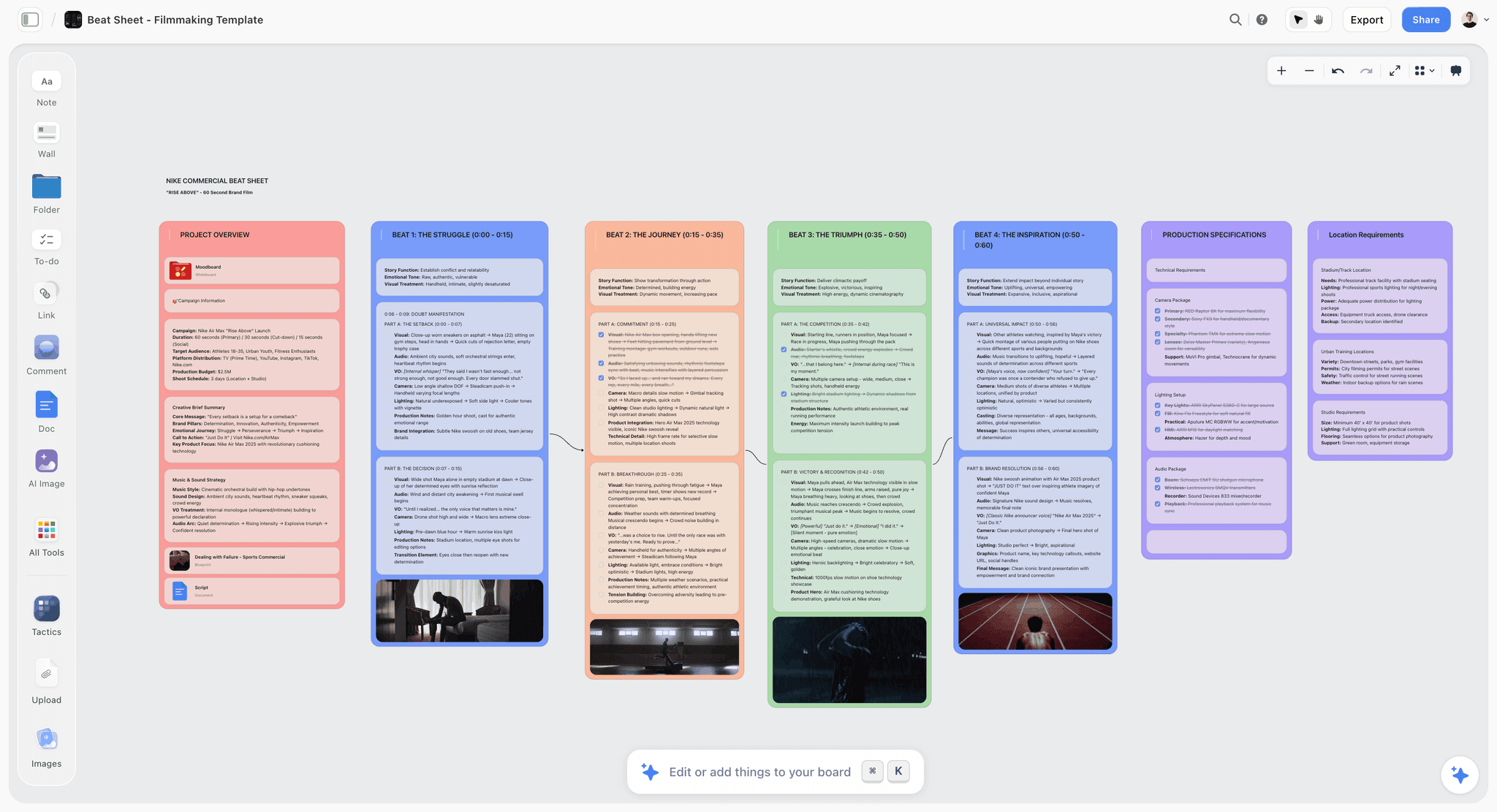
Storyflow is our own product, and it is the slowest tool on this page to get into. It is also the only one built for gate three rather than gates one and two, so it ranks fifth: a real answer to the hardest gate, behind four tools that beat it comprehensively on the two easy ones.
What it does: the AI reads the current board. Not a prompt you retype, not a description of the board, the board. Write "documentary about a town that lost its industry" in the middle of an empty canvas, ask for angles, and you get a cluster of directions arranged in space, each one editable, positioned where an idea belongs rather than in a chat log you scroll. Paste three references and ask what they have in common and it answers from what is actually there. When you are stuck at 40 minutes, ask what the board is missing, and the answer is about your board.
The second thing that matters for brainstorming specifically is that ideas do not evaporate at the end. The cluster stays on the canvas, it can be dragged into a structure, and the structure becomes the plan. Most brainstorming tools end at the sticky notes; this one is designed for what happens the following week. The Story blueprints library (200+ creative templates, including frameworks like the Hero's Journey and AIDA) sits behind the same canvas when the thinking needs a known shape.
Against it, plainly: it is paid-only during early access, so it fails gate one worse than anything else here. Excalidraw is a URL and this is a subscription. The Free plan launches before the end of 2026 and does not exist today; the one genuinely free path right now is that anyone a paid member invites to a board signs up free and can invite others. The AI reads the current board, not every board you own, and extra context comes from @-mentioning up to one Tactic and three documents. If what you want is a bare surface to sketch on for four minutes, this is the wrong purchase and Excalidraw is the right one.
Pricing: Plus $7.99/month annual or $9.99 monthly. Pro $14/month annual adds AI image generation, roughly 20x more AI, and memory across conversations. Max $39/month annual adds 40x more AI and a team workspace with roles and permissions. No free plan until late 2026.
6. Canva Whiteboards
Canva's whiteboard is underrated for exactly one reason: an enormous number of people already have a Canva account, which means gate one is already cleared for a marketing team, a school, a nonprofit, and roughly every solo creator on earth.
The canvas is competent, the template library is huge, and the unique advantage is what happens after the brainstorm: the board can become a deck, a social post, or a document without leaving the product. For a marketing brainstorm that has to produce something visible by Friday, that continuity is worth more than canvas purity.
Magic Studio handles a version of gate three, generating and expanding content on the board.
Against it: it is a design tool that grew a whiteboard, and it feels like it. Large boards get heavy, the canvas is less precise than the specialists, and the interface pushes toward making something polished, which is the opposite of what early brainstorming wants.
Pricing: Free tier is generous. Canva Pro from around $15/month.
7. Whimsical
Whimsical is the tidiest tool here, and tidiness is a real feature. Its defaults are strong enough that whatever you make looks deliberate: connectors route sensibly, spacing is handled, and there is very little visual decision-making between you and the diagram.
That makes it excellent for the half of brainstorming that is structural rather than divergent. Flows, sitemaps, decision trees, and mind maps come out clean and fast, and the AI can generate a first-pass diagram or mind map from a prompt, which is a genuine gate-three assist for structured thinking.
Against it: the same opinionated defaults constrain messy divergent work. Free tier board limits arrive quickly. And it is a poor fit for a canvas that wants images, references, and mixed media rather than boxes and arrows.
Pricing: Free tier with board limits. Paid from around $10/editor/month.
8. Mural
Mural is the facilitator's tool, and if a named human is running your session it is arguably the best choice here.
Its differentiators are all about running a group rather than owning a canvas: timers, private mode so people write without anchoring on each other, summon-to-view that drags everyone's viewport to yours, voting, and a large library of genuinely well-designed workshop methods rather than generic templates. Private mode in particular fixes the single most common failure in group brainstorming, which is that the first idea said out loud shapes every idea after it.
Against it: for a solo brainstorm it is heavy and unnecessary, most of the value being facilitation machinery. The interface is dense, and cold start is comparable to Miro without Miro's ubiquity.
Pricing: Free tier. Paid from around $9.99/member/month.
9. Lucidspark
Lucidspark is the brainstorming half of the Lucid suite, and its strongest argument is what sits next to it: work that starts as loose stickies here can move into Lucidchart when it becomes a real diagram, which is a handoff that most whiteboards do not have.
Sorting is its stand-out feature. Collaborative AI clusters stickies into themes, and Lucid has spent longer on that specific problem than most competitors, so the grouping is usable rather than decorative. For a session that generates a hundred notes and then has to make sense of them, that matters more than the canvas.
Against it: it is enterprise-shaped, cold start is slow, and the free tier's three-board limit is restrictive. Outside an organisation already on Lucid, there is little reason to pick it over Miro.
Pricing: Free tier with three boards. Paid from around $9/user/month.
10. Microsoft Whiteboard
Microsoft Whiteboard ranks tenth on capability and considerably higher on the only metric that matters inside a Microsoft 365 company: nobody has to be asked for anything.
No procurement, no new seat, no security review, no explaining to a colleague what this tool is. It is in Teams, it opens in a meeting, and every person on the call is already licensed. In an enterprise, that beats a better product with a purchase order attached, every time.
The canvas is basic but adequate: sticky notes, ink, shapes, images, a small template set, and reasonable real-time collaboration.
Against it: it is well behind the specialists on canvas quality, template depth, and AI assistance. Outside the Microsoft ecosystem there is no reason to choose it, and inside it, expect a functional session rather than a good one.
Pricing: Free with a Microsoft account, included with Microsoft 365.
11. Padlet
Padlet is the least intimidating surface in this list, which is a serious advantage with a group that does not want to learn a tool.
It is closer to a shared wall than an infinite canvas, and that constraint is the point: contributors get a box to type in rather than a plane to get lost on, links and images unfurl into cards automatically, and people who would freeze in front of Miro will happily post to a Padlet. For classrooms, community groups, and cross-functional gatherings where half the room is not technical, participation rates are the metric and Padlet wins it.
Against it: it is not really a whiteboard. Spatial arrangement is limited, it does not scale to complex structured thinking, and free-tier padlet limits arrive quickly.
Pricing: Free tier with three padlets. Paid from around $8/month.
What to Actually Pay For
Do not pay for a solo brainstorming canvas. Excalidraw and tldraw are free, fast, and better at the unplanned session than anything with a bill attached. Paying here buys persistence and collaboration, not thinking.
Pay for the account you already have. If your company is on Figma, Microsoft 365, or Canva, the marginal cost of the whiteboard is zero and the adoption cost is also zero. That combination beats a better canvas nobody signs into.
Pay for facilitation only if a person is facilitating. Mural's timers, voting, and private mode are worth real money when somebody is running the room and nothing at all when they are not.
Pay for AI only if it reads the board. Sticky-note generation from a text prompt is a thin feature you can get from any chat window. AI that reads what is already on the canvas and extends it is a different thing and it is the only version that changes gate three.
Do not pay for template libraries. Every tool here has hundreds and the count has never once been the reason a session worked.
Tools to Avoid for Brainstorming
A document. The blank page in a doc is the same blank gate with less spatial freedom and an implicit demand for full sentences. Early ideas are fragments, and fragments look like failure in a document.
A chat window on its own. You can brainstorm with a chat model and the output arrives as a scrolling list, which is the wrong shape for ideas that need to be compared side by side. The list also disappears upward.
Google Jamboard. It was shut down at the end of 2024. If a colleague suggests it, they are working from an old bookmark, and the migration paths point at FigJam and Miro.
Any tool that requires an admin to approve a seat before the session. The brainstorm is happening now. Whatever needs a ticket has already lost.
Whatever your team refuses to open. The best canvas in this list is worthless against the second-best canvas your colleagues are already signed into.
What No Tool on This List Does
None of them make you generate. They make generation cheaper. The tools that address gate three lower the cost of a bad first idea, which matters enormously, and none of them supply judgment about which ideas are worth keeping.
None of them stop the loudest person setting the frame. Mural's private mode is the closest thing to a fix and it only works if the facilitator uses it. Every other tool in this list will faithfully record whatever the first speaker anchored the group onto.
None of them survive the week on their own. A brainstorm produces a board, and boards get abandoned. Whether ideas turn into anything is decided by what happens on Monday, and only a couple of these tools are designed for the board to still be the working surface then.
The Bottom Line
Every whiteboard on this list can host a brainstorm. The differences are almost entirely in what happens in the sixty seconds before one starts, and in the ten minutes where it stalls.
Excalidraw wins the first sixty seconds outright, and it does so by refusing to do anything else. No account, no setup, no ceremony, and a hand-drawn style that gives people permission to be rough. For the unplanned solo session, which is most sessions, it is the right answer and it costs nothing.
The ten-minute stall is a harder problem and mostly an unsolved one. Templates are a partial answer that works when you already know the shape. A chat panel that cannot see your canvas is a worse answer than it appears. The version that helps is AI that reads what is already on the board, and Storyflow is built entirely around that at the cost of being the slowest tool here to enter, because it is paid-only until the Free plan lands later in 2026.
For a team, the honest recommendation overrides all of this: use the whiteboard attached to the account your colleagues already have. FigJam in a design org, Microsoft Whiteboard in a Microsoft org, Canva in a marketing team. A slightly worse canvas that five people open beats a better one that two people log into.
And if you take one thing from the cold start clock: the reason your last brainstorm did not work is probably not the tool you used. It is that you spent the first four minutes choosing one.
FAQ: Easy Digital Whiteboards for Brainstorming
What is the easiest digital whiteboard for brainstorming?
Excalidraw. Open excalidraw.com and you are drawing in under ten seconds with no account, no template picker, and no setup. tldraw is an equally fast second. If you need the board to still be useful next month, or you want help when the canvas is blank, the answer changes.
What is the best free whiteboard for brainstorming?
Excalidraw, because it is open source and has no free-tier ceiling to hit. Miro, FigJam, Mural, Lucidspark, and Padlet all have free tiers with board or file caps that arrive faster than people expect. Microsoft Whiteboard is free for anyone with a Microsoft account. Storyflow is paid-only during early access, so it is not a free option today.
Can I use a digital whiteboard without creating an account?
Yes. Excalidraw and tldraw both open a working canvas with no signup at all. Every other tool in this list requires an account, and several require a workspace on top of it. That difference is the single largest factor in whether a spontaneous brainstorm actually happens.
How do I brainstorm when the canvas is blank?
Write the problem in the middle of the board first, badly. Then get any first move onto the canvas rather than the right one: a template, three references pasted from anywhere, a bad idea you already know you will delete. Tools with canvas-aware AI (Storyflow, Miro AI, Mural AI, FigJam AI) can produce that first move for you, and the point is not that the suggestions are correct, it is that editing beats generating for almost everybody.
Is Miro or FigJam easier for brainstorming?
FigJam is easier to get into and Miro is more capable once you are there. If your team is already in Figma, FigJam wins on adoption alone. If your session has a defined format and needs a good template, Miro's library is significantly deeper.
Is Storyflow a good whiteboard for brainstorming?
For the blank-canvas half of the problem, yes, and it is the only tool here designed around it: the AI reads the current board and extends it in place instead of answering a prompt in a side panel, and the resulting cluster stays on the canvas as the start of a plan. For the "I want to sketch something in the next ten seconds" half, no. It is paid-only during early access, which makes it the slowest cold start on this page. Excalidraw is the better answer to that question.
What replaced Google Jamboard?
Google shut Jamboard down at the end of 2024 and pointed users toward third-party whiteboards, principally FigJam and Miro. For a like-for-like simple experience, FigJam is the closest fit; for a free replacement with no account, Excalidraw is.
What is the best whiteboard for a remote team brainstorm?
Mural if somebody is facilitating, because private mode, timers, and voting solve the group-dynamics failures that canvas quality cannot. Miro if the session has a known format and the team is already on it. FigJam if the team is a design team. In all three cases, the account everybody already has matters more than the feature comparison.
Do I need AI in a brainstorming whiteboard?
Only the kind that can see the board. AI that generates sticky notes from a text prompt duplicates what any chat window already does. AI that reads the fragments and references already on the canvas and extends them in place is a different capability, and it is the only one that addresses the reason sessions stall.
How long should a brainstorming session be?
Shorter than most people run them, and the tail is where the value is. The first ten minutes produce obvious ideas, the middle produces variations on them, and the interesting material usually arrives after the point where the group has run out and is uncomfortable. A timer helps for exactly that reason, which is why facilitation tools include one.
Should I use a whiteboard or a mind map for brainstorming?
A whiteboard for divergent thinking, where you do not yet know the shape and things need to move around freely. A mind map once a centre exists and everything hangs off it. Most real sessions start on a free canvas and become a mind map on their own once the centre becomes obvious, which is an argument for a tool that does both rather than a strict choice.
Is a physical whiteboard better than a digital one?
For a group in one room with a short session, often yes: no accounts, no cursors, no latency, and the social permission to write badly is higher. Digital wins on persistence, remote participation, and everything after the session, which is where most physical whiteboard output dies as a photograph nobody opens.
Table of Contents
- Key Takeaways
- The Cold Start Clock
- At a Glance: The 11 Whiteboards Compared
- How I Ranked These
- The Blank Gate Is Where Sessions Die
- Quick Picks by Situation
- 1. Excalidraw
- 2. tldraw
- 3. FigJam
- 4. Miro
- 5. Storyflow
- 6. Canva Whiteboards
- 7. Whimsical
- 8. Mural
- 9. Lucidspark
- 10. Microsoft Whiteboard
- 11. Padlet
- What to Actually Pay For
- Tools to Avoid for Brainstorming
- What No Tool on This List Does
- The Bottom Line
- FAQ: Easy Digital Whiteboards for Brainstorming
- Related Reading
Templates to check out for this topic


Mind mapping and ideation templates you can use in Storyflow
Map ideas in space, then ask the AI to restructure, expand, or connect them. Open any of these boards and start thinking visually instead of in lists.


See Storyflow in Action
A visual AI workspace where every feature lives inside one canvas. No tab-switching, no context lost.
Build your entire board from a single message
Type what you need in the AI chat at the bottom of your canvas. The AI adds cards, headings, and structure directly onto your board.
Use expert frameworks as AI context
Type @ in the AI chat and choose any Tactic. The AI tailors every response to that framework instead of giving generic advice.
Turn your board into a mind map in seconds
Ask the AI to restructure your canvas as a mindmap. It connects your ideas into a visual hierarchy so you can see how everything relates.
Why Storyflow Exists
Storyflow actually began as a personal tool while working on creative and research projects.
We kept running into the same problem: ideas were scattered everywhere: notes, documents, and whiteboards.
Nothing helped us see how everything connected.
So we started building a workspace designed around how ideas actually grow.
→ Read how Storyflow was createdJustkay
Documentary Filmmaker & Founder at Storyflow
Published: 2026-08-26
Extremely simple, seriously capable


See how easy it is to get started
Watch a real project come together, from a blank board to a finished plan, clicked through step by step.
Start creating with AI and become more productive
Transform your creative workflow with AI-powered tools. Generate ideas, create content, and boost your productivity in minutes instead of hours.