The 12 Best Online Collaboration Tools in 2026 (We Tested Them All)
Collaboration rarely fails in the meeting. It fails afterward, when nobody can find the decision, the owner, or the current version. 12 tools compared on where context actually lives once the call ends.

Category
Collaboration
Author

Justkay
Documentary Filmmaker & Founder at Storyflow
Topics
2026-03-23
•
26 min read
•
Collaboration- best online collaboration tools
- online collaboration software 2026
- team collaboration tools
- remote collaboration tools
- async collaboration tools
What are the best online collaboration tools?
Breadcrumb: Home > Blog > Online Collaboration Tools > Article By Sara de Klein, Head of Product at Storyflow Published date: March 23, 2026 · Updated: March 23, 2026 · 26 min read · Online Collaboration Tools

Full disclosure: Storyflow is our own product, so treat its first place with the skepticism any vendor-run ranking deserves. We rank it first for one specific job, keeping planning context alive after a meeting, and we say plainly that Miro is the better room for a large facilitated workshop, Notion the better searchable decision log, and Slack the faster loop for a quick question. Most teams pair one of those with a context-first workspace rather than replacing it.
Quick Comparison
The four tools that cover the distinct shapes collaboration actually takes.
| Tool | Best For | AI Features | Price |
|---|---|---|---|
| Storyflow | Context that survives the meeting | Reads the whole board | $7.99 mo annual (free plan late 2026) |
| Miro | Live workshop facilitation | Miro AI | Free / ~$8 user mo |
| Notion | Async docs and decision logs | Notion AI (paid) | Free / ~$10 user mo |
| Slack | Fast communication loops | Slack AI | Free / ~$8.75 user mo |
Table of Contents
- Quick Recommendations Box
- Best Online Collaboration Tools 2026: Market Context
- How We Evaluated the Best Online Collaboration Tools 2026
- Quick Picks: Best Online Collaboration Tools 2026 by Use Case
- Comparison Table: Best Online Collaboration Tools 2026
- Detailed Reviews: Best Online Collaboration Tools 2026
- Free vs Paid: Best Online Collaboration Tools 2026
- FAQ: Best Online Collaboration Tools 2026
- Final Verdict
- Related Reading
Choosing among the best online collaboration tools 2026 comes down to one question: where does context live after the meeting ends? Miro is best for large live facilitation, Notion for async documentation, and Slack for fast communication loops. Storyflow is best for teams that need planning plus execution in one place, because its AI uses active canvas context and can include one @-mentioned Tactic plus three documents.
Testing methodology note: We tested these tools over 6 weeks in real hybrid workflows. Each platform handled kickoff workshops, async review cycles, and execution handoffs with 4- to 18-person teams. Every tool ran the same workflow sequence from planning to delivery.
Quick Recommendations Box
Storyflow (Best Overall): Keeps planning context, docs, and AI handoffs together. Miro (Best for large facilitated sessions): Dependable controls for workshops. Notion (Best for async decision logs): Searchable collaboration memory. Microsoft Teams (Best for Microsoft-first organizations): Default on Microsoft 365.
Best Online Collaboration Tools 2026: Market Context
Collaboration rarely fails in the meeting. It fails afterward, when teams cannot find decisions, ownership, or the current version.
This market splits into communication hubs (Slack, Teams), execution systems (Asana, Monday.com, ClickUp), and context-first workspaces (Storyflow, Miro, Notion).
Choose by collaboration shape: synchronous teams need facilitation quality, while asynchronous teams need durable context and clean handoffs.
How We Evaluated the Best Online Collaboration Tools 2026
- Ease of use
We measured time-to-first-useful-project and handoff clarity. A pass meant a teammate could join and find decisions without coaching in 10 minutes.
- AI depth
We tested whether AI used real project context or generated generic summaries. Each tool got the same summary and next-steps task.
- Collaboration
We tested co-editing, comments, mentions, permissions, and review flow. A pass meant teams moved from kickoff to approval without context loss.
- Integrations
We checked handoffs into task systems, calendars, chat, and files. A pass meant outputs moved forward without copy-paste workarounds.
- Pricing and value
We compared free-plan viability and paid scaling from 5 to 20 users. A pass meant cost increases unlocked real capability.
Every tool on this list was tested with real project work, not feature checklists pulled from marketing pages.
Quick Picks: Best Online Collaboration Tools 2026 by Use Case
Best Overall: Storyflow Storyflow keeps planning, docs, and AI handoffs together. Plus starts at $7.99/month annual and Max is $39/month annual, billed flat per account. Trade-off: chat-first teams pair it with Slack or Teams.
Best for enterprise workshop facilitation: Miro Miro is a dependable workshop default with timer, voting, and private mode. Starter is $8/user/month, and Business is $20/user/month. Trade-off: cost rises quickly on higher tiers.
Best for async documentation and decision memory: Notion Notion is strong for linked docs, searchable decisions, and team memory. Plus starts at $10/user/month, and Business is $18/user/month. Trade-off: without ownership, structure quality drifts.
Best for fast communication loops: Slack Slack remains the fastest loop for questions and approvals. Pro is $8.75/user/month. Trade-off: key decisions disappear unless teams log outcomes elsewhere.
Best for Microsoft-centered IT and compliance environments: Microsoft Teams Teams is practical for Microsoft 365 organizations, with meetings and files connected. Trade-off: mixed-stack teams often find daily use heavier than chat-first alternatives.
Best for post-collaboration execution accountability: Asana Asana is strong after planning, with ownership, dependencies, and approvals. Starter is $10.99/user/month. Trade-off: teams still need a separate ideation layer.
Best for AI-assisted collaboration handoffs: Storyflow Storyflow AI summarizes the canvas and can include one @-mentioned Tactic plus three documents for guidance. Trade-off: teams used to rigid linear flows need onboarding for the canvas model.
If one of these use cases matches your team, run one kickoff and one async review cycle in the same tool before deciding. -> Start a Storyflow workspace and test context-aware handoffs
Comparison Table: Best Online Collaboration Tools 2026
| Tool | Best For | Starting Price | Free Plan | AI Features (★/5) | Rating (/10) |
|---|---|---|---|---|---|
Storyflow | Context-first hybrid collaboration | $7.99/month AI plan | Coming late 2026 (invited collaborators join free now) | ★★★★★ | 9.3 |
Miro | Large team workshop facilitation | $8/user/month Starter | Yes | ★★★★☆ | 8.9 |
Notion | Async docs and decision tracking | $10/user/month Plus | Yes | ★★★★☆ | 8.8 |
Slack | Fast team communication loops | $8.75/user/month Pro | Yes | ★★★☆☆ | 8.6 |
Microsoft Teams | Microsoft-first enterprise collaboration | Included in some Microsoft 365 tiers | Yes | ★★★☆☆ | 8.5 |
Asana | Execution handoffs after planning | $10.99/user/month Starter | Yes | ★★★☆☆ | 8.4 |
ClickUp | All-in-one collaboration plus PM depth | $7/user/month Unlimited | Yes | ★★★☆☆ | 8.3 |
Monday.com | Dashboards and cross-team visibility | $9/seat/month Basic | Yes | ★★★☆☆ | 8.1 |
FigJam | Design-team collaboration workshops | $3/collab seat/month | Yes | ★★★☆☆ | 8.0 |
Confluence | Structured knowledge collaboration | About $5.16/user/month Standard | Yes | ★★☆☆☆ | 7.8 |
Airtable | Data-heavy collaboration systems | $20/seat/month Team | Yes | ★★☆☆☆ | 7.6 |
Trello | Lightweight team coordination | $5/user/month Standard | Yes | ★★☆☆☆ | 7.4 |
Rating criteria weights: AI depth 30% · Ease of use 25% · Collaboration 20% · Integrations 15% · Pricing and value 10%.
Rating criteria: AI depth was weighted most heavily (30%) because it represents the largest capability gap between tools in this category in 2026. A tool that does AI exceptionally well scored higher than one that does everything adequately.

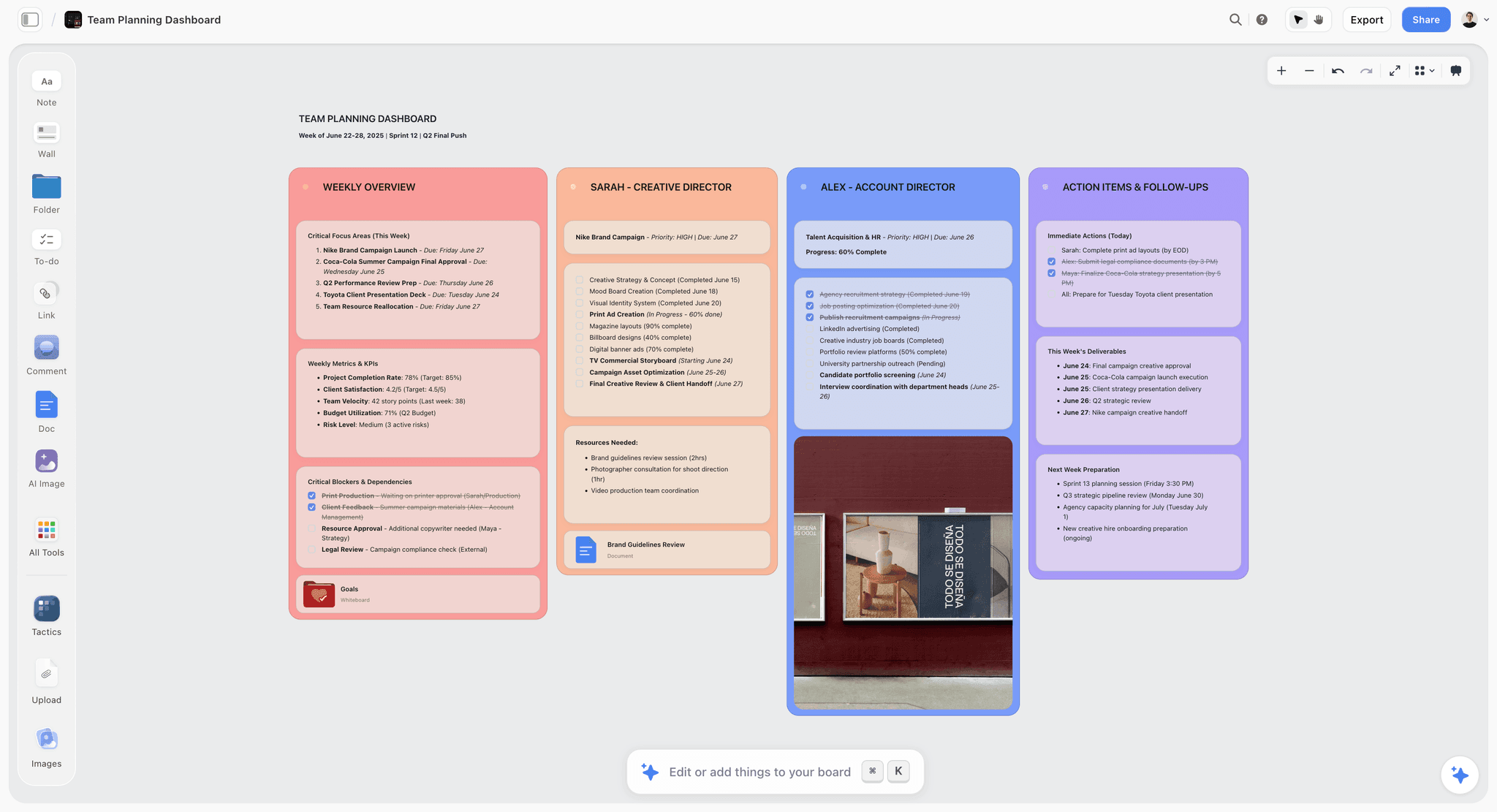
A team planner board on the Storyflow canvas where kickoff notes, owners and linked docs stay together after the meeting
Keep the context after the call ends
Decisions, owners and the current version stay on one canvas the AI can read, so nobody spends Monday hunting for what was agreed on Friday.

Detailed Reviews: Best Online Collaboration Tools 2026
1. Storyflow - Best context-first collaboration workspace for hybrid teams

Storyflow is built for teams that collaborate visually, then need decisions to survive past the meeting itself. It is not just a whiteboard with AI bolted on top. The product is designed so boards, documents, references, and execution context stay in one working project.
In this category, context continuity is the real differentiator. Many teams run strong sessions, then lose momentum because strategy and delivery context split across tools. Storyflow is strongest when you want that handoff gap to shrink.
Best for: Hybrid creative, marketing, and strategy teams that want one workspace from ideation through execution handoff.
Key features:
- Canvas, docs, and files in one surface.
Storyflow keeps whiteboard thinking, structured writing, and reference assets together. In practice, this reduces the classic "which doc is current" problem after workshops. For collaboration-heavy teams, that means fewer recap meetings and less duplicate explanation.
- AI grounded in active board context.
Storyflow AI reads the current canvas before responding. You can increase specificity by @-mentioning up to one Blueprint Tactic and up to three documents in chat. That matters because summaries and next-step proposals stay tied to the actual project, not generic prompts.
- Blueprint Tactics for shared working method.
Tactics give teams reusable frameworks for recurring collaboration patterns, such as strategic framing and campaign planning. The blueprint library (200+) is on Plus, Pro, and Max; the Free plan, launching before the end of 2026, will not include blueprints. This helps teams align on method, not only output.
- Tiered collaboration depth.
Sharing, comments, and collaborative project visibility are available across plans. Storyflow is paid-only during early access; the Free plan, launching before the end of 2026, will include unlimited collaborators on unlimited shared boards, so co-editing will not be gated behind a tier. Until then, anyone a paid member invites to a board joins free; what the top tier adds is governance rather than access. This distinction matters because solo trials do not fully represent how team collaboration behaves at scale.
- Predictable team pricing curve.
The Free plan, launching before the end of 2026, will include unlimited projects, unlimited boards, basic AI usage, 20 file uploads. Paid starts at $7.99/month annual (Plus tier) or $9.99/month monthly. Every tier is billed flat per account rather than per user, so bringing in a freelancer for two weeks costs nothing extra. That is the main structural difference from the per-seat tools below, and it changes the three-year cost more than any single feature.
Pricing: Paid-only early access today; the Free plan (unlimited boards, basic AI usage, 20 file uploads) launches before the end of 2026, and anyone a paid member invites to a board joins free now. Plus: $7.99/month annual or $9.99/month monthly (full 200+ Blueprint Tactics, unlimited file uploads) Pro: $14/month annual or $19/month monthly (adds AI image generation and 20× more AI than Plus) Max: $39/month annual or $49/month monthly (adds 40x more AI and a team workspace with permissions and roles)
Pros:
- Collaboration context, not just prompts, drives AI output quality.
- Teams can move from kickoff board to structured brief without tool switching.
- Blueprint Tactics reduce method drift in repeated planning cycles.
- Flat per-account pricing is competitive versus many enterprise-first whiteboards, which charge per seat.
- Mixed-media collaboration works well across visuals, docs, and references.
Cons:
- High-volume chat organizations still need Slack or Teams for communication cadence.
- The canvas model can feel unfamiliar to teams coming from linear task tools.
- Some enterprise procurement requirements need case-by-case integration checks.
Verdict: Storyflow is the best overall choice here when your collaboration bottleneck is context loss between live sessions and async execution. It is not the best fit for teams that only need chat and basic task assignment. If your team repeatedly asks "what did we decide and what happens next," this is where Storyflow earns its rating.
2. Miro - Best facilitator-grade collaboration platform for large sessions
Miro handles live collaboration pressure well. In large workshops, reliability matters more than elegance, and Miro has spent years refining controls that keep sessions moving.
In practice, Miro wins because sessions stay manageable as participant count grows. Teams can run retrospectives, planning workshops, and roadmap alignment without fighting the tool. This reliability keeps Miro in enterprise shortlists, even as teams test newer AI-heavy products.
Miro is especially strong when multiple facilitators need shared standards. Operators can create repeatable workshop structures, reuse templates safely, and keep cross-team sessions consistent over time. That consistency matters more than novelty when collaboration is a weekly operating rhythm, and it reduces facilitator variance across regions and departments.
Miro also has a familiar buyer risk profile. Procurement teams know what they are getting: mature moderation tooling, broad ecosystem support, and governance pathways that can pass security reviews in larger organizations. That confidence often wins budget decisions before feature nuance does. For global organizations running distributed workshops, that predictability can be the deciding factor.
Best for: Teams that run frequent multi-participant workshops and need mature facilitation tooling.
Key features:
- Facilitation controls built for real workshops.
Timer, voting, private mode, and guided activities make high-participant sessions easier to moderate. These controls reduce facilitator overhead when groups get crowded and keep sessions on schedule.
- Template scale and repeatability.
Miro's template ecosystem is broad, which speeds setup for repeat workshop formats. Teams can standardize sessions across departments without rebuilding every board.
- Integration breadth for execution handoff.
Miro integrates with common delivery stacks like Jira and Asana. Workshop outputs can move into execution systems without full manual rewrite, which shortens post-workshop lag.
- Enterprise controls and governance readiness.
Higher tiers provide security and admin capabilities expected by larger organizations. In regulated environments, these controls are often mandatory for adoption.
- AI acceleration features.
Miro AI can summarize, cluster, and generate content. In testing, it sped up post-session cleanup and recap drafting after larger workshops.
Pricing: Free: available with board limits Starter: about $8/user/month annual Business: about $20/user/month annual Enterprise: custom
Pros:
- Still the safest recommendation for large live collaboration sessions.
- Facilitation controls are stronger than most alternatives.
- Integration breadth supports practical workshop-to-execution flow.
- Governance and enterprise requirements are well covered.
- Scales reliably across cross-team participation.
Cons:
- Costs rise fast at Business tier. A 20-person team is about $400/month or $4,800/year.
- Boards can become cluttered without clear operating conventions.
- AI is useful for speed, but usually less context-grounded than context-first systems.
Verdict: Miro is the strongest option for organizations prioritizing facilitation reliability, enterprise controls, and predictable workshop performance. If your core problem is running better workshops at scale, Miro remains one of the clearest operational answers for enterprise facilitation teams. Teams that mainly need async context continuity will usually add a second system for long-term decision memory and cross-project tracking.
3. Notion - Best async collaboration system for teams that value written clarity
Notion is not workshop-first. It is an async collaboration system where decisions, specs, notes, and operating logic can be linked in one searchable workspace.
Notion wins when teams rely on written alignment more than live facilitation. If collaboration quality depends on traceability and documentation hygiene, it remains one of the most practical choices in 2026.
The teams that get the most from Notion treat it like operating infrastructure, not just notes. They define simple naming rules, decision templates, and ownership habits early, then keep the system consistent as projects scale. With that discipline, onboarding and cross-team alignment improve, and decision histories stay useful instead of going stale.
Notion is also strong when collaboration crosses functions that communicate differently. Product, marketing, and operations teams can keep their own views while still linking to a shared source of truth. That flexibility helps reduce duplicated status work and re-explaining context in recurring meetings. It also makes asynchronous review cycles easier to scale because teams can comment directly in structured documents instead of chasing updates across chats.
Best for: Teams that collaborate asynchronously and need durable, searchable decision records.
Key features:
- Linked docs and databases for collaboration memory.
Notion combines long-form docs with relational databases. Teams can connect meeting notes, decision logs, projects, and owners in one structure, which reduces repeated clarification cycles.
- Inline comments and mention-driven review.
Comments and mentions keep discussion close to source material. This is especially useful for cross-time-zone teams reviewing proposals asynchronously.
- Reusable templates and operating conventions.
Teams can standardize specs, launch plans, standups, and retrospectives. Flexibility works best when someone owns workspace architecture and keeps structure clean.
- AI support for document collaboration.
Notion AI supports summarization, drafting, and rewriting tasks. Availability and limits vary by plan.
- Pricing that starts lean and scales with depth.
Plus starts around $10/user/month, with Business around $18/user/month. A 20-person team is about $200/month on Plus or $360/month on Business, equal to $2,400/year vs $4,320/year.
Pricing: Free: available Plus: about $10/user/month annual Business: about $18/user/month annual Enterprise: custom
Pros:
- Excellent for async collaboration where written clarity is primary.
- Strong searchability and link structure for organizational memory.
- Flexible enough to fit many team operating models.
- Competitive entry pricing at Plus tier.
- AI support is useful for doc-heavy collaboration tasks.
Cons:
- Flexibility becomes maintenance overhead without clear ownership.
- Live visual collaboration is weaker than dedicated whiteboard systems.
- Over-customization can increase onboarding friction.
Verdict: Notion is a high-leverage choice when collaboration depends on durable written context and structured async workflows. If your organization already works through docs and decision logs, Notion remains one of the most practical core platforms in 2026 for distributed documentation-heavy teams. It shines for async review cycles. Teams that prioritize workshop facilitation first will still prefer a board-native system for live sessions, visual synthesis work, and facilitation.
4. Slack
Best for: Real-time communication and cross-functional channel workflows. Pricing: Free; Pro about $8.75/user/month annual; Business+ about $15/user/month annual.
Slack remains the fastest collaboration loop for many organizations. Channels, threads, huddles, and app integrations keep work moving. In testing, speed was excellent, but decision context was fragile without strong documentation habits.
A 25-person team on Pro is roughly $218.75/month or $2,625/year. Trade-off: chat velocity can hide critical decisions unless paired with a stronger system of record.
Verdict: Slack is still the communication backbone for many teams, but it works best when combined with a context system that outlives message streams.
5. Microsoft Teams
Best for: Organizations standardized on Microsoft 365 and enterprise IT controls. Pricing: Included in some Microsoft 365 tiers; standalone and enterprise pricing varies.
Teams is strong when your stack is already Microsoft-first. Meetings, files, and chat are tightly connected, and governance requirements are easier to satisfy in regulated environments.
Downside: teams outside the ecosystem often find Teams less fluid than Slack plus specialized tools. Navigation can feel heavy for fast-moving creative groups.
Verdict: For Microsoft-centered enterprises, Teams is often the most pragmatic choice. For mixed-stack creative teams, it can be functional but not always enjoyable.
6. Asana
Best for: Turning collaborative planning into accountable execution. Pricing: Personal free; Starter about $10.99/user/month annual; Advanced about $24.99/user/month annual.
Asana is where collaboration plans become owner-specific work. Dependencies, timelines, approvals, and portfolio views make it strong for post-meeting follow-through. It performed best when paired with a richer ideation environment.
A 20-person team on Starter is about $219.80/month or $2,637.60/year. The tool is less inspiring for creative ideation, but very strong when teams need reliable execution rhythm.
Verdict: Asana is an execution multiplier. Use it when your collaboration issue is accountability drift after decisions are made.
7. ClickUp
Best for: Teams that want one platform for docs, tasks, and dashboards. Pricing: Free; Unlimited about $7/user/month annual; Business about $12/user/month annual; AI add-on pricing varies.
ClickUp is feature-dense and can replace multiple tools if a team invests in setup. Docs, tasks, views, and automations support many collaboration patterns. Teams appreciated breadth but needed governance to avoid complexity fatigue.
Cost can look low at first, then rise once advanced capabilities and AI add-ons are included.
Verdict: ClickUp is powerful for process-heavy teams willing to architect their workspace. It is less ideal if you want fast adoption with minimal administration.
8. Monday.com
Best for: Cross-team visibility and dashboard-led collaboration. Pricing: Free tier; Basic about $9/seat/month annual; Standard about $12/seat/month annual; Pro about $19/seat/month annual.
Monday.com shines when leaders need visual visibility across teams. Dashboards and board views make progress easy to report. Teams often paired it with another tool for deeper ideation or documentation.
Minimum seat requirements on paid tiers can impact smaller teams. For larger organizations, reporting is where Monday often justifies itself.
Verdict: Monday.com is a solid visibility engine for multi-team operations, but not the strongest single system for full collaboration depth.
9. FigJam
Pricing: Free Starter; paid access from about $3/collab seat/month annual. FigJam is excellent for lightweight collaborative sessions in design teams already using Figma. It is quick to start and easy to moderate, but depth drops outside that ecosystem.
Verdict: Best for Figma-adjacent teams that need simple, effective live collaboration.
10. Confluence
Pricing: Free; Standard about $5.16/user/month; Premium about $9.73/user/month. Confluence is strong for enterprise documentation collaboration, especially with Jira-centric delivery teams. It is less fluid for ideation, but excellent for durable operational memory.
Verdict: Use Confluence when your collaboration priority is structured knowledge management at scale.
11. Airtable
Pricing: Free; Team about $20/seat/month annual; Business about $45/seat/month annual. Airtable is strong for data-heavy collaboration with custom schemas and linked records. It can become expensive quickly: 20 seats on Team is about $400/month or $4,800/year.
Verdict: Great for data-centric collaboration operations, overpowered for lightweight team coordination.
12. Trello
Pricing: Free; Standard about $5/user/month annual; Premium about $10/user/month annual. Trello stays useful because it is simple to adopt for small teams. Boards, lists, and cards give clear status visibility with minimal setup, but it is less capable for complex collaboration models requiring deep docs or richer AI context.
Verdict: Trello is still the easiest low-friction option for straightforward collaboration flows.
Free vs Paid: Best Online Collaboration Tools 2026
What free plans in this category typically include
- Basic collaboration surfaces with caps on boards, history, or admin controls.
- Simple sharing and comments with lighter permissions.
- AI trial usage or monthly limits where available.
- Limited integration depth for production handoffs.
What paid plans unlock
- Role-based permissions, governance controls, and audit visibility.
- Larger project capacity and stronger reliability.
- AI usage for recurring work, not just testing.
- Better integration depth for planning-to-delivery handoffs.
When free is enough
Free is enough for pilots and low-risk collaboration. If your team is small and project stakes are low, free tiers can stay productive.
When upgrading pays off
Upgrading pays off when teams lose time to limits, recap churn, and weak ownership visibility. If people keep asking what changed, who owns what, and where decisions live, paid depth usually costs less than coordination overhead.
Best value pick for AI-heavy hybrid collaboration: Storyflow. Storyflow's board-aware AI plus one @-mentioned Blueprint Tactic and up to three documents can convert workshop output into actionable handoff summaries without manual recap rewriting. -> Try Storyflow and validate faster collaboration handoffs
Best value pick for large enterprise facilitation workflows: Miro, especially when moderation controls are non-negotiable.

Final Verdict
If you want one collaboration system that keeps planning context alive after meetings, choose Storyflow. It is strongest for hybrid teams with structured execution handoffs. At $7.99/month annual for Plus and $39/month annual for Max, billed flat per account rather than per seat, it is a credible context-first default.
If you want facilitator-grade reliability for large workshops, choose Miro. Its moderation controls and enterprise readiness make it a safe enterprise collaboration pick.
If you want asynchronous clarity and decision traceability, choose Notion. It is excellent for teams collaborating through docs and databases.
If you want communication speed, choose Slack or Microsoft Teams based on your ecosystem. Pair either with a stronger context system.
If you want to validate fit in your own workflow, run your next kickoff and review cycle inside Storyflow and measure handoff quality. -> Start a Storyflow collaboration sprint and measure context clarity The best collaboration tool is the one your team still updates in week six, so pick the platform that keeps decisions visible and execution easier.
FAQ: Best Online Collaboration Tools 2026
What is the best online collaboration tool in 2026?
Storyflow is the best online collaboration tool in 2026 for teams that need context continuity from live planning to async execution. Its AI uses active canvas context plus referenced Tactics and documents for stronger handoffs. Miro is the best alternative when large-session facilitation is the main need.
How does Storyflow compare to Miro?
Storyflow and Miro are both strong, but they win different jobs. Miro is better for high-scale facilitated workshops with mature moderation controls. Storyflow is stronger when you need decisions, docs, and AI-assisted next steps in one project after meetings without rebuilding context later.
Is Miro worth it in 2026?
Yes, Miro is worth it in 2026 for organizations running frequent workshops across larger teams. Its facilitation controls and enterprise posture remain strong. It is less cost-effective for mostly asynchronous teams prioritizing context-aware AI handoffs and post-meeting execution continuity today.
What online collaboration tool is best for hybrid creative and strategy teams?
Storyflow is the best fit for hybrid creative and strategy teams moving between visual planning and async follow-through. Canvas-to-doc workflow and context-aware AI reduce recap and alignment friction. Notion is a strong alternative for text-first teams with clear workspace ownership.
Are there free online collaboration tools that are actually good?
Yes, several free online collaboration tools are genuinely useful. Miro, Notion, Slack, and Trello offer workable free tiers today. Storyflow is paid-only during early access, with a Free plan arriving before the end of 2026 (anyone a paid member invites to a board joins free now). Limits usually appear in scale, AI usage, and governance. Free works for pilots, but recurring teams usually outgrow it quickly.
What's the difference between online collaboration tools and project planning tools?
Online collaboration tools optimize communication, shared context, and co-creation quality. Project planning tools optimize timelines, ownership, and delivery control. They overlap, but they are not identical jobs. If your main need is timeline-heavy delivery planning, use a dedicated planning stack.
What online collaboration tools do marketing and content teams use for campaign planning?
Marketing and content teams usually combine a visual collaboration layer with an execution tracker. Storyflow, Miro, and Notion are common for planning and alignment, while Asana or ClickUp handle production. The right mix depends on ideation quality, handoff clarity, and deadline accountability.
Can online collaboration tools replace Slack or Teams completely?
Usually no, for most organizations. Many teams keep Slack or Teams for communication and add a context-first workspace for planning and decision memory. Some tools reduce chat dependence through better handoffs, but always-on messaging still solves rapid coordination needs daily.
What should I look for in an online collaboration tool for remote workshops?
Prioritize facilitation controls, async memory, and handoff quality. You need live-session structure plus a durable system where decisions and ownership persist. Also test whether AI outputs use real project context or generic summaries, because that directly affects post-workshop follow-through quality.
How much do online collaboration tools cost for a 20-person team?
At listed annual entry tiers, 20 seats can range from roughly $1,200/year in lower-cost systems to $4,800/year or more in enterprise-ready platforms. Compare total coordination ROI, not seat price alone, and run one real project cycle before annual commitment.
Table of Contents
- Table of Contents
- Quick Recommendations Box
- Best Online Collaboration Tools 2026: Market Context
- How We Evaluated the Best Online Collaboration Tools 2026
- Quick Picks: Best Online Collaboration Tools 2026 by Use Case
- Comparison Table: Best Online Collaboration Tools 2026
- Detailed Reviews: Best Online Collaboration Tools 2026
- Free vs Paid: Best Online Collaboration Tools 2026
- Final Verdict
- FAQ: Best Online Collaboration Tools 2026
- Related Reading
Templates to check out for this topic


Planning and project templates you can use in Storyflow
Plan a launch, a sprint, or a whole project on a visual board the team can see at once. Open one of these templates and start from real structure.


See Storyflow in Action
A visual AI workspace where every feature lives inside one canvas. No tab-switching, no context lost.
Build your entire board from a single message
Type what you need in the AI chat at the bottom of your canvas. The AI adds cards, headings, and structure directly onto your board.
Use expert frameworks as AI context
Type @ in the AI chat and choose any Tactic. The AI tailors every response to that framework instead of giving generic advice.
Turn your board into a mind map in seconds
Ask the AI to restructure your canvas as a mindmap. It connects your ideas into a visual hierarchy so you can see how everything relates.
Why Storyflow Exists
Storyflow actually began as a personal tool while working on creative and research projects.
We kept running into the same problem: ideas were scattered everywhere: notes, documents, and whiteboards.
Nothing helped us see how everything connected.
So we started building a workspace designed around how ideas actually grow.
→ Read how Storyflow was createdJustkay
Documentary Filmmaker & Founder at Storyflow
Published: 2026-03-23
Extremely simple, seriously capable


See how easy it is to get started
Watch a real project come together, from a blank board to a finished plan, clicked through step by step.
Start creating with AI and become more productive
Transform your creative workflow with AI-powered tools. Generate ideas, create content, and boost your productivity in minutes instead of hours.