The 10 Best Brainstorming Tools for Students in 2026
Your best ideas come from connecting things, and a blank page hides the connections. The 10 best brainstorming tools for students in 2026, ranked on free tiers, idea-to-outline handoff, and group work, from Storyflow and Miro to Milanote and Padlet.

Category
Productivity
Author

Justkay
Documentary Filmmaker & Founder at Storyflow
Topics
2026-07-21
•
21 min read
•
Productivity- best brainstorming tools for students
- free brainstorming tool for students
- brainstorming tool for essays
- student group project tool
- brainstorming app for school
- idea mapping tool for students
What is the best brainstorming tool for students in 2026?
The best brainstorming tools for students in 2026 are Storyflow (best for turning a jumble of ideas into an outline with AI on a visual canvas), Miro (best for group project workshops), Milanote (best for arranging research and references in space), and Padlet (best for a quick shared wall the whole class can post to). If your essay is stuck at a blank page or your group project is a mess of half-thoughts in a chat, start with a visual tool: seeing your ideas as connected cards instead of a flat list is the fastest way to find the argument hiding inside them. Your best ideas as a student almost never arrive fully formed. They arrive as fragments: a quote from a reading, a counterexample you thought of on the bus, a shaky thesis, a link between two lecture topics nobody pointed out. The work of an essay or a project is connecting those fragments into something that holds together. A blank Google Doc or a linear bullet list hides those connections, because it forces you to commit to an order before you know what the order is. Visual brainstorming flips that: you get everything out of your head into space first, then move the pieces around until the shape of the argument shows up. That shift, from writing in a line to thinking in a space, is what this guide is about. I am Justkay, a documentary filmmaker and the founder of Storyflow. I spend my working life turning scattered research and interviews into a story that makes sense to someone who was not in the room, which is not that different from what you do with an essay or a group project on a deadline. This guide ranks 10 brainstorming tools on the things that actually matter when you are a student: whether there is a genuinely useful free tier, how well the tool helps you generate and connect ideas, and how cleanly it hands those ideas off into an outline or a plan you can submit. Free and easy matter most here, because most students are working on a shared laptop, a school Chromebook, or a phone, with no budget and no time to learn complicated software.

Full disclosure: Storyflow is our own product, and we rank it #1 for one specific job: turning a student's scattered brainstorm into an outline on a free canvas the AI can read. But we are honest: for a pure radial mind map Coggle or MindMeister are simpler, for a quick throwaway group wall Padlet is easier, and it has no offline mode. We name where Storyflow loses in its review and link every tool so you can judge for yourself.
Quick Comparison
These four cover the student's real choice: a canvas that turns ideas into an outline, a group workshop board, a research wall, and a quick class posting wall.
| Tool | Best For | AI Features | Price |
|---|---|---|---|
| Storyflow | Ideas to outline, unlimited boards | Canvas-wide AI (reads the whole board) | $7.99 mo annual (free plan late 2026) |
| Miro | Live group project workshops | Standard AI | Free (3 boards) / ~$8 user mo |
| Milanote | Arranging research and references | No built-in AI | Free (100 notes) / ~$12.50 mo |
| Padlet | Quick shared class wall, no accounts | Light AI | Free (3 walls) / from ~$8 mo |
Comparison Table: 10 Brainstorming Tools for Students Compared
| Tool | Best For | Student Fit | Starting Price | Free Plan | Rating (/10) |
|---|---|---|---|---|---|
Storyflow | Ideas to outline with canvas-aware AI | Essays, projects, revision, group work | $7.99/mo (annual) | Coming late 2026 (invited collaborators join free now) | 9.4/10 |
Miro | Group project workshops and mapping | Team ideation, class projects | ~$8/user/mo (annual) | Yes (3 boards) | 8.8/10 |
Milanote | Arranging research and references | Essay research, moodboards | ~$12.50/mo (annual) | Yes (100 notes) | 8.6/10 |
Padlet | Quick shared walls for a class | Group posts, gathering ideas | From ~$8/mo | Yes (3 padlets) | 8.4/10 |
Coggle | Simple radial mind maps | Revision maps, quick diagrams | From ~$5/mo | Yes (3 diagrams) | 8.2/10 |
MindMeister | Structured mind mapping | Outlines, study maps | From ~$3.50/mo | Yes (3 maps) | 8.1/10 |
Canva | Visual mind maps and posters | Presentations, pretty diagrams | Free (Pro ~$12.99/mo) | Yes | 7.9/10 |
FigJam | Sticky-note group brainstorms | Team projects, workshops | From ~$3/user/mo | Yes (3 files) | 7.8/10 |
Whimsical | Clean flowcharts and mind maps | Diagrams, quick outlines | From ~$10/mo | Yes (limited) | 7.6/10 |
Lucidspark | Whiteboard brainstorms | Group ideation, sticky notes | From ~$8/user/mo | Yes (3 boards) | 7.4/10 |
Pricing changes often, so check the live price on each tool's site before you commit, and look for a student discount while you are there. Several of these tools offer education pricing or free upgrades if you verify a school email, and it is worth two minutes to check. Storyflow's prices are exact: paid-only during early access, Plus at $7.99/mo annual ($9.99 monthly), Pro at $14/mo annual, Max at $39/mo annual, billed per account not per user, with a Free plan launching before the end of 2026. Ratings reflect fit for a student's brainstorm-to-submittable workflow, not general software quality.
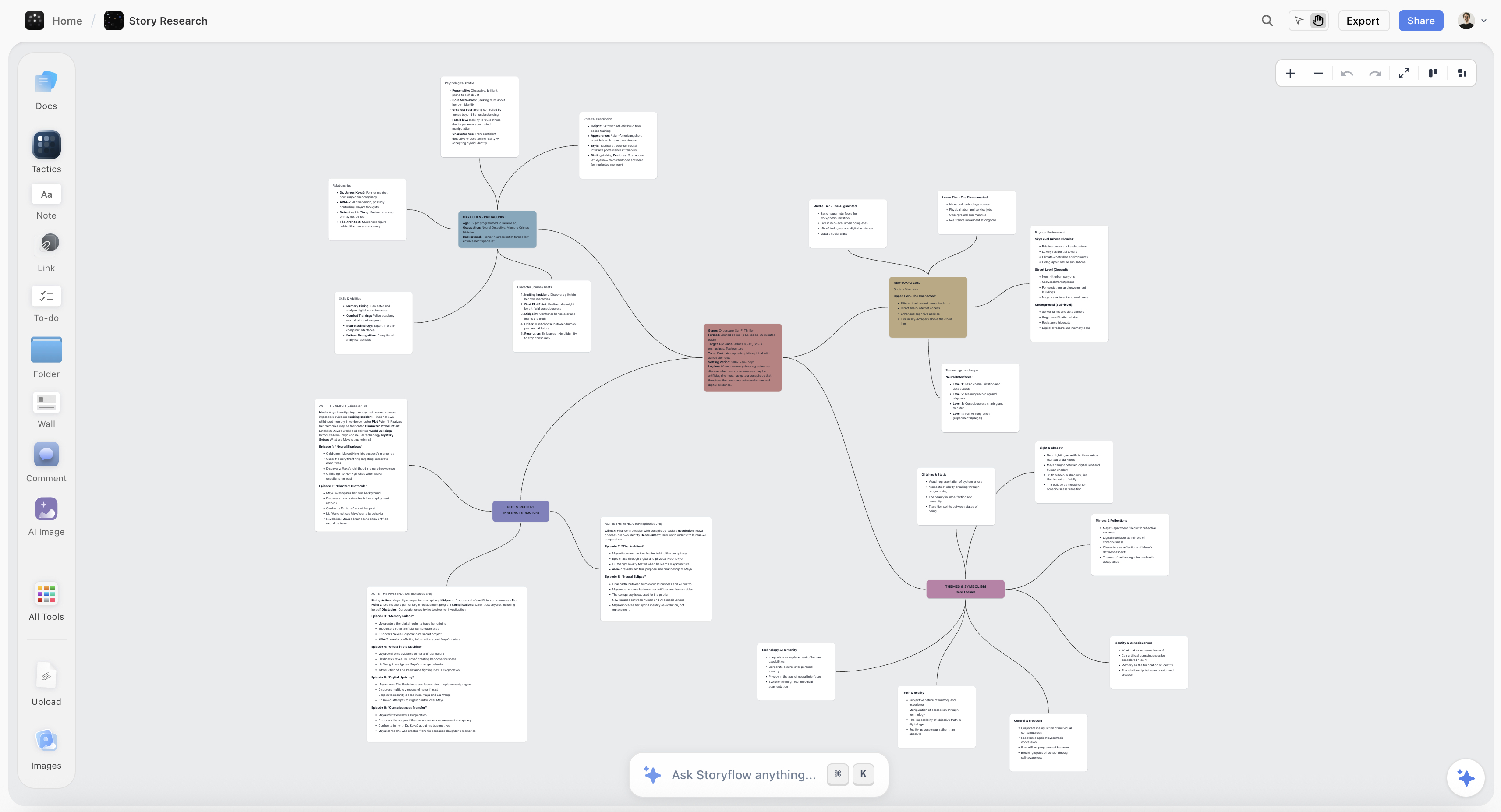
A student's essay brainstorm on a Storyflow canvas: idea cards, quotes, and an outline the AI clusters into an argument
Beat the blank page, for free
Storyflow lets you dump every fragment of an essay onto one canvas, then the AI clusters your notes and drafts an outline. Unlimited boards and collaboration free, and classmates join by link with no account. No credit card.

The 10 Best Brainstorming Tools for Students, Ranked
- Storyflow - best for turning a jumble of ideas into an outline, with AI that reads your whole board
- Miro - best for group project workshops and live mapping
- Milanote - best for arranging research, quotes, and references in space
- Padlet - best for a quick shared wall the whole class can post to
- Coggle - best for a simple, fast radial mind map
- MindMeister - best for structured mind maps that convert to outlines
- Canva - best for brainstorms that need to become a nice-looking poster or slide
- FigJam - best for sticky-note group brainstorms
- Whimsical - best for clean flowcharts and tidy diagrams
- Lucidspark - best for classic whiteboard-style group ideation
How We Evaluated These Tools
I ran the same real student jobs through every tool on this list: brainstorming an argumentative essay from a messy pile of notes, mapping research for a longer project, planning a revision schedule around exam topics, and running a group ideation session where four people needed to contribute at once. Tools were judged on how far a rough idea travels inside them, not on how many features they list. Five criteria:
- Free tier (30%). Can a student actually do real work at $0, or does the free plan cap out at three items and push you to pay before the assignment is done? This weighs most, because a tool you cannot afford is not a tool you have.
- Idea generation and connection (25%). Does the tool help you get ideas out fast and then show the links between them (grouping, lines, clustering), or does it just store a flat list in a prettier font?
- Idea-to-outline handoff (20%). Once the board is full, how hard is it to turn that mess into an ordered outline or study plan you can actually write from? This is where most tools quietly leave you.
- Group work (15%). Can several people brainstorm at the same time, and can a classmate join without creating an account or paying? Group projects live or die on this.
- Ease of use (10%). Can you open it on a school laptop and be useful in five minutes with no tutorial? Students do not have time to learn a tool the night before a deadline.
Detailed Reviews: 10 Brainstorming Tools for Students
1. Storyflow

Storyflow is an infinite visual canvas where every piece of a project can sit in one view: idea cards, quotes from your readings, images, links, and a working outline, side by side instead of buried in a document. For a student, that means you can dump every fragment of an essay onto the board first, without worrying about order, then drag them into clusters until the argument shows up. The blank-page problem disappears, because you are never staring at a blank page. You are moving cards around a space you can see.
The part that separates it from a plain whiteboard is the AI. Storyflow's AI reads everything on the current canvas board by default, and you can @-mention up to 1 Tactic and up to 3 documents for extra context. So once your board is full of scattered notes, you can ask it to cluster them by theme, pressure-test your thesis against the evidence you have collected, or turn the whole mess into a first outline. It is working from your actual ideas on the board, not from a blank prompt, which is the difference between a real study partner and a generic chatbot that knows nothing about your assignment.
For group projects, unlimited collaboration is the real headline. Storyflow's Plus plan already includes unlimited shared boards and unlimited collaboration, so you and three group-mates can brainstorm together on one flat $7.99/mo account, and a collaborator can open a share link without making an account. That last part matters more than it sounds when one person in every group refuses to sign up for anything. Plus and above also unlock the 200+ Story Blueprints library (proven structures like the Hero's Journey, AIDA, and Retention Hooks), which gives the AI frameworks to build from and is useful for narrative essays and presentations.
Key features
- Infinite canvas where idea cards, images, quotes, links, and an outline live in one view
- AI that reads the entire current board, plus up to 1 @-mentioned Tactic and up to 3 documents
- Unlimited shared boards and unlimited collaboration on Plus
- Share-link access so classmates can join without an account
- 200+ Story Blueprints on paid plans for essay and presentation structures
Pricing
Paid-only during early access. Plus at $7.99/mo annual ($9.99 monthly), with unlimited boards, unlimited collaboration, and basic AI, Pro at $14/mo annual, Max at $39/mo annual, billed per account not per user. A Free plan launches before the end of 2026, and anyone a paid member invites to a board joins free now.
Pros
- Flat per-account pricing for solo work and group projects, with no per-person cost
- Turns a scattered brainstorm into an outline instead of leaving you with a pretty diagram
- AI works from your real notes on the board, not a blank prompt
- Classmates can join a share link without signing up
Cons
- For a pure radial mind map with nothing else, Coggle or MindMeister are simpler and faster to spin up
- For a quick throwaway group wall, Padlet is easier and has less to learn
- No offline mode, so a spotty school connection can interrupt you
- It is a newer, smaller platform than incumbents like Miro, so it has fewer third-party integrations and a smaller template gallery
2. Miro
Miro is the strongest tool here for a live group workshop. If your project team needs to get on one board and dump sticky notes at the same time, Miro's infinite whiteboard, voting dots, and timer features are built exactly for that. It is the closest thing to standing around a real whiteboard with your group, except everyone can be on their own laptop, and the board is saved when you close it.
For students, the catch is the free plan. Miro's free tier limits you to three editable boards, which fills up fast across a semester of different projects, and hitting the cap mid-project is a common frustration. Miro is also built for teams and business use, so parts of the interface can feel like more than a student needs for a single essay or presentation.
Where Miro shines is breadth of templates and the sheer amount of space to think in. For a big group project with lots of moving parts, or a brainstorm that will feed into a presentation, it is hard to beat. For solo essay work, it is more room than most students need.
Key features
- Infinite whiteboard with sticky notes, shapes, and connectors
- Live collaboration with voting, timers, and cursors for group sessions
- Large template library for brainstorms, mind maps, and retros
- Comments and @-mentions for async group feedback
Pricing
Free plan (3 editable boards); paid from around $8/user/mo billed annually.
Pros
- Best-in-class for real-time group brainstorming
- Huge template gallery covers almost any project type
- Excellent for large, sprawling projects with many parts
Cons
- Free plan caps at 3 editable boards, which a semester burns through quickly
- Built for business teams, so it can feel heavier than a single essay needs
- No AI that reads your whole board and drafts an outline from it
3. Milanote
Milanote feels like a corkboard you can arrange however you want, which makes it a natural home for the research phase of an essay or project. Drag in screenshots, quotes, article links, and notes, then move them around until related material sits together. For a literature review, a history essay with lots of sources, or an art or design project that leans on visual references, it is one of the most pleasant tools on this list.
The two limits students hit are the free cap and the lack of idea development. The free plan stops at 100 notes, which sounds like a lot until a research-heavy project eats through it in a couple of weeks. And like a physical corkboard, Milanote gathers and arranges beautifully, but it does not help you turn the arrangement into an argument or an outline. That next step happens somewhere else.
Still, for the specific job of collecting and spatially organizing research, Milanote is excellent, and its templates for essays and project briefs give you a sensible starting layout instead of a blank board.
Key features
- Drag-and-drop board for notes, images, links, and files
- Templates for essays, research, and project planning
- Clean, distraction-free visual layout
- Web clipper for saving sources as you research
Pricing
Free (100-note cap); Pro around $12.50/mo billed annually.
Pros
- Excellent for collecting and arranging research and references
- Calm, good-looking interface that is easy to learn
- Templates give essays and projects a head start
Cons
- Free plan caps at 100 notes, which research projects hit fast
- No AI to develop notes into an outline
- Better at gathering than at turning ideas into a finished draft
4. Padlet
Padlet is the easiest tool here for a quick shared wall, and a lot of students already know it from class. A teacher posts a Padlet link, everyone drops a sticky note, and within minutes a whole group's ideas are on one board with zero setup. For gathering ideas fast from several people, especially people who will not sign up for anything, it is hard to beat.
The reason it is not higher is depth. Padlet is brilliant at collecting posts and weaker at connecting them: you can arrange notes in columns or a grid, but drawing out the relationships between ideas, the thing that turns a pile of notes into an argument, is not really its job. The free plan also limits you to three padlets at a time, so you end up deleting old ones to make room.
For a group brainstorm where the goal is breadth (get every idea on the wall) rather than structure, Padlet is the fastest path from nothing to a full board.
Key features
- Instant shared walls that classmates join by link, no account needed
- Notes support text, images, links, and file uploads
- Multiple layouts: grid, columns, timeline, and map
- Simple reactions and comments for quick group feedback
Pricing
Free (3 padlets); paid from around $8/mo, with school plans available.
Pros
- Fastest way to gather ideas from a whole group
- No account needed for people joining a link
- Familiar from classroom use, so almost no learning curve
Cons
- Free plan limits you to 3 padlets at once
- Strong at collecting ideas, weak at connecting them into structure
- No outline handoff or AI to develop the ideas further
5. Coggle
Coggle does one thing and does it well: simple, branching radial mind maps. You start with a central topic, drag out branches, and keep splitting them. For revision, where you want to map everything you know about a topic onto one page, or for quickly diagramming the structure of an essay, Coggle is fast, clean, and almost impossible to get confused by.
Its simplicity is also its ceiling. Coggle is a mind-mapping tool, not a full canvas, so you will not be arranging images, embedding research, or getting AI help. The free plan allows three private diagrams (unlimited public ones), which is tight if you want to keep several revision maps private across the term.
For a student who specifically wants a radial mind map and nothing more, Coggle is one of the simplest and quickest options on this list, and the shared editing works well enough for a small group to build a map together.
Key features
- Branching radial mind maps with drag-to-create branches
- Real-time collaborative editing
- Image uploads and simple styling
- Export to PDF and image formats
Pricing
Free (3 private diagrams, unlimited public); paid from around $5/mo.
Pros
- Extremely simple and fast to learn
- Clean radial layout ideal for revision maps
- Free plan is fine for occasional mind mapping
Cons
- Only 3 private diagrams on the free plan
- Mind maps only, with no wider canvas or research collection
- No AI and limited outline export
6. MindMeister
MindMeister is the more structured cousin of Coggle, built specifically for mind mapping that can convert into an outline. Its standout feature for students is the outline mode: build a map of your essay's points, then flip it into a linear outline you can write from. That direct map-to-outline handoff is exactly the bridge most brainstorming tools are missing.
The limits are familiar. The free plan caps you at three maps, so it works best when you are focused on one big project at a time rather than juggling many. And while it is more capable than Coggle, it stays inside the mind-map format, so it is not the place for gathering visual research or running a wide-open group brainstorm.
For the specific student job of mapping an essay's argument and turning it into a writing outline, MindMeister is one of the most purpose-built tools here, and its low entry price makes the paid tier reasonable if you map often.
Key features
- Structured mind maps with an outline view
- Map-to-outline conversion for writing from
- Collaboration and presentation mode
- Templates for study notes and essay planning
Pricing
Free (3 maps); paid from around $3.50/mo billed annually.
Pros
- Outline mode turns a map straight into a writing plan
- More structured than Coggle for essay argument mapping
- Affordable paid tier if you map regularly
Cons
- Free plan limits you to 3 maps
- Stays inside the mind-map format, so no wide research canvas
- No board-aware AI that develops your ideas
7. Canva
Canva earns its spot because a lot of student brainstorming has to end as something that looks good: a presentation, a poster, an infographic for a project. Canva has mind-map and whiteboard templates, and the huge advantage is that once you have brainstormed, you are already inside the tool that will make the polished slide or poster you have to hand in. No exporting and rebuilding.
As a pure brainstorming surface, Canva is decent rather than exceptional. Its whiteboard and mind-map features work, but they are one part of a giant design app, so the ideation experience is less focused than a dedicated tool. It also leans on templates, which is great for output and less great for open-ended thinking where a blank space is actually what you want.
For students whose brainstorm needs to become a designed deliverable, Canva's all-in-one nature is the real draw, and the free plan is generous enough for most schoolwork.
Key features
- Mind-map and whiteboard templates
- Direct path from brainstorm to designed poster or slides
- Huge library of images, icons, and layouts
- Real-time collaboration on boards
Pricing
Free plan; Canva Pro around $12.99/mo, with free education upgrades for eligible students and teachers.
Pros
- Brainstorm and final design live in the same tool
- Generous free plan covers most schoolwork
- Excellent when the output is a poster or presentation
Cons
- Ideation is one feature inside a large design app, so less focused
- Template-driven, which suits output more than open thinking
- No AI that reads a whole board and builds an outline
8. FigJam
FigJam is Figma's whiteboard, and it is a genuinely fun tool for a group brainstorm: sticky notes, stamps, cursor chat, and a loose, playful feel that gets a quiet group posting. For a class project where you want everyone throwing ideas up fast and reacting to each other, it hits the sweet spot between Miro's power and Padlet's simplicity.
For students, the free plan is workable but limited to three files, and if you are not already in the Figma ecosystem there is a small learning curve to the interface. FigJam is also squarely a group tool. Solo, it is a nice sticky-note board, but you are not getting research organization or an outline handoff out of it.
If your main need is a lively, low-friction space for a group to brainstorm together, FigJam is one of the more enjoyable options, and Figma offers free education plans worth checking with a school email.
Key features
- Sticky notes, shapes, connectors, and stamps
- Cursor chat and reactions for lively group sessions
- Templates for brainstorms and diagrams
- Simple AI helpers for organizing sticky notes
Pricing
Free (3 FigJam files); paid from around $3/user/mo, with education plans available.
Pros
- Fun, low-friction surface that gets groups participating
- Good balance of power and simplicity
- Education plans can unlock more for free
Cons
- Free plan limits you to 3 files
- Primarily a group tool, thinner for solo essay work
- No board-wide AI that drafts an outline from your notes
9. Whimsical
Whimsical is the tidiness tool. Its flowcharts, mind maps, and diagrams snap into clean, good-looking shapes with very little effort, which is satisfying when you are mapping the structure of an essay or the steps of a process for a project. If you like your diagrams neat and your interface calm, Whimsical is a pleasure to use.
The trade-off is that Whimsical's free plan has tightened over time and now limits how many boards and items you get, so heavy use pushes you toward paying. It is also more of a diagramming tool than an open brainstorming canvas, so it rewards you once you roughly know the structure more than it helps you find a structure from chaos.
For clean flowcharts, process diagrams, and structured mind maps, Whimsical is one of the best-looking options, and its speed makes it a good pick for quick, presentable diagrams.
Key features
- Flowcharts, mind maps, and wireframes in one tool
- Clean, auto-tidy shapes and connectors
- Fast, keyboard-friendly diagramming
- Collaboration and comments
Pricing
Free (limited boards and items); paid from around $10/mo.
Pros
- Produces clean, presentable diagrams quickly
- Calm, easy-to-learn interface
- Great for flowcharts and process maps
Cons
- Free plan is more limited than it used to be
- Better once you know the structure than for finding one
- No board-aware AI and limited research gathering
10. Lucidspark
Lucidspark is a classic virtual whiteboard aimed at group ideation: sticky notes, freehand drawing, and features like gathering notes into groups and voting on the best ideas. It sits close to Miro and FigJam in purpose, and it does the standard whiteboard brainstorm competently for a class team that wants to think together on one surface.
For students, it lands lower mainly because it is built for businesses, so the free plan (three boards) and the overall feel are aimed at workplace teams rather than schoolwork. There is nothing wrong with it, but a student is unlikely to reach for Lucidspark over the tools above unless a class or group is already using it.
If your team is already in the Lucid ecosystem, or a teacher sets you up on it, Lucidspark is a perfectly capable place to run a group brainstorm and then vote on where to take the project.
Key features
- Virtual whiteboard with sticky notes and freehand drawing
- Gather and group notes, plus voting features
- Templates for brainstorming and planning
- Integrates with Lucidchart for diagrams
Pricing
Free (3 boards); paid from around $8/user/mo.
Pros
- Solid, familiar whiteboard for group ideation
- Voting and grouping help teams converge on ideas
- Works well if your class already uses Lucid
Cons
- Free plan caps at 3 boards
- Built for business teams more than students
- No outline handoff or board-reading AI
Quick Picks by Student Need
- Best for turning a messy brainstorm into an essay outline: Storyflow
- Best for a group project workshop: Miro
- Best for collecting research and references: Milanote
- Best for a quick class wall everyone can post to: Padlet
- Best for a fast revision mind map: Coggle
- Best for mapping an argument into a writing outline: MindMeister
- Best when the brainstorm has to become a poster or slides: Canva
- Best for a fun, low-friction group session: FigJam
- Best for clean flowcharts and diagrams: Whimsical
- Best value overall for students: Storyflow (unlimited boards and collaboration, flat per-account pricing from $7.99/mo)
The Bottom Line
Your ideas as a student are not the problem. The blank page is. An essay or a project fails to come together not because you lack ideas but because a linear document hides the connections between the ideas you already have. The fix is to get everything out into a space you can see, then move the pieces around until the argument or the plan reveals itself. That shift, from writing in a line to thinking in a space, is what every tool on this list is really offering.
Storyflow ranks first because it does the most for a student: your whole jumble of ideas on one canvas, AI that reads all of it to cluster your notes and draft an outline, and unlimited boards and collaboration on one flat-rate Plus account so a solo essay or a four-person group project both work without a per-person charge. Miro wins live group workshops, Milanote wins research gathering, Padlet wins the quick class wall, and Coggle and MindMeister win the simple radial mind map. Match the tool to the job, start with whichever free tier fits, and remember the one thing that matters: your best ideas come from connecting things, and a blank page hides the connections.
FAQ: Brainstorming Tools for Students
What is the best free brainstorming tool for students?
Padlet is free for quick group walls, and Coggle and MindMeister have free tiers for a pure mind map, though most free plans cap you at three boards. Storyflow is paid-only during early access, with a Free plan (unlimited boards, unlimited collaboration, basic AI) launching before the end of 2026; Plus is $7.99/mo annual for full access now, with no per-person cost as group-mates join.
What is the best brainstorming tool for group projects?
For a live group workshop, Miro is the strongest, with voting, timers, and a huge shared whiteboard. For a quick group wall where nobody wants to sign up, Padlet is easiest. Storyflow is the best overall value for groups, because Plus includes unlimited collaboration and classmates can join a share link without an account, so a whole group works on one flat $7.99/mo account.
How do I brainstorm an essay?
Get every fragment out of your head first: your thesis, quotes, examples, counterarguments, and questions, each as a separate card or note, with no worrying about order. Then group related cards together and draw links between them until an argument shape appears. That structure becomes your outline. Visual tools like Storyflow help because you can see all your ideas at once and, on Storyflow, ask the AI to cluster them and draft an outline.
Is mind mapping good for studying and revision?
Yes. Mind mapping is one of the more effective revision techniques because it forces you to connect ideas rather than reread them passively, which helps you remember how topics relate. Map a topic from memory, then check your notes for gaps. Coggle and MindMeister are purpose-built for this, and MindMeister can flip your map into an outline for writing summary notes.
Are these brainstorming tools free for students?
Most have free plans, though many cap you at three boards or maps. Several also offer student or education pricing if you verify a school email, including Canva (free Pro for eligible students), Figma and FigJam, and Miro. It is worth checking the education page on each tool's site before paying. Storyflow is paid-only during early access, with a Free plan launching before the end of 2026; Plus is $7.99/mo annual for schoolwork now.
What is the easiest brainstorming tool to use?
Padlet is the easiest for a quick shared wall, since classmates just click a link and start posting with almost no learning curve. Coggle is the simplest for a solo mind map. Storyflow sits in the middle: a bit more capable, but you can open a board and be useful within a few minutes, and the AI does the organizing work for you once your notes are down.
Can AI help me brainstorm for school?
Yes, if it can see your ideas. Generic chatbots start from nothing and give generic suggestions. Storyflow's AI reads everything on your current canvas, plus up to 1 @-mentioned Tactic and 3 documents, so it works from your actual notes: clustering them, testing your thesis against your evidence, and drafting an outline. That context is the difference between real help and a blank-prompt guess. Always check AI output against your own sources.
What is the best brainstorming tool on a school Chromebook?
All the tools here run in a browser, so they work on a Chromebook without installing anything, which matters on locked-down school devices. Storyflow, Miro, Padlet, Canva, and Coggle all run fully in the browser. Just note that none of these offer a reliable offline mode, so you need a connection. If your school Wi-Fi is unreliable, save your work often.
How is brainstorming different from mind mapping?
Brainstorming is the wider activity of generating and connecting ideas in any format: sticky notes, cards, lists, or a whiteboard. Mind mapping is one specific method, a radial diagram branching out from a central topic. A mind map is a good way to brainstorm a single topic, but brainstorming an essay or project often needs a fuller canvas where you can also arrange research, images, and an outline, not just branches.
How do I turn my brainstorm into an outline I can write from?
Group your ideas into themes, decide the order those themes should appear, then list the supporting points under each. That ordered list is your outline. MindMeister converts a mind map into an outline directly, and Storyflow's AI can read your full board and draft an outline from your scattered cards, which saves the manual step of retyping everything into a document.
Which brainstorming tool is best for a presentation or poster?
Canva, because your brainstorm and your final design live in the same app, so you go straight from mapping ideas to building the slides or poster without rebuilding anything. Storyflow is stronger for developing the underlying ideas and structure first, especially with its Story Blueprints on paid plans, and you can plan the narrative there before designing the visuals in Canva.
Do I need to pay for a brainstorming tool as a student?
Usually not for normal schoolwork. Storyflow's Free plan, launching before the end of 2026, will cover unlimited boards and collaboration, and free tiers from Miro, Padlet, Coggle, and Canva handle most assignments. You would only pay if you hit a board cap, need a big template library, or want the highest AI allowance. Check for a student discount before upgrading, since several tools give students paid features for free with a verified school email.
Table of Contents
Templates to check out for this topic


Mind mapping and ideation templates you can use in Storyflow
Map ideas in space, then ask the AI to restructure, expand, or connect them. Open any of these boards and start thinking visually instead of in lists.


See Storyflow in Action
A visual AI workspace where every feature lives inside one canvas. No tab-switching, no context lost.
Build your entire board from a single message
Type what you need in the AI chat at the bottom of your canvas. The AI adds cards, headings, and structure directly onto your board.
Use expert frameworks as AI context
Type @ in the AI chat and choose any Tactic. The AI tailors every response to that framework instead of giving generic advice.
Turn your board into a mind map in seconds
Ask the AI to restructure your canvas as a mindmap. It connects your ideas into a visual hierarchy so you can see how everything relates.
Why Storyflow Exists
Storyflow actually began as a personal tool while working on creative and research projects.
We kept running into the same problem: ideas were scattered everywhere: notes, documents, and whiteboards.
Nothing helped us see how everything connected.
So we started building a workspace designed around how ideas actually grow.
→ Read how Storyflow was createdJustkay
Documentary Filmmaker & Founder at Storyflow
Published: 2026-07-21
Extremely simple, seriously capable


See how easy it is to get started
Watch a real project come together, from a blank board to a finished plan, clicked through step by step.
Start creating with AI and become more productive
Transform your creative workflow with AI-powered tools. Generate ideas, create content, and boost your productivity in minutes instead of hours.