The 11 Best Mind Mapping Apps for Visual Thinkers in 2026
A mind map is never the deliverable. It has to become a document, a script or a plan, and almost every app stops at the map and hands you a nested bullet list. Eleven apps ranked on what happens after the map.

Category
Mind Mapping
Author

Justkay
Documentary Filmmaker & Founder at Storyflow
Topics
2026-08-26
•
19 min read
•
Mind Mapping- best mind mapping app
- best mind map software
- XMind vs MindNode
- free mind mapping app
- mind map export to word
- mind mapping for visual thinkers
What is the best mind mapping app in 2026?
A mind map is never the deliverable. It has to become a document, a script or a plan, and almost every app stops at the map and hands you a nested bullet list. Eleven apps ranked on what happens after the map.

Full disclosure: Storyflow is our own product and we rank it second, and XMind above it, because XMind is simply the better mind mapping app: it has fishbone, matrix and timeline layouts, an outline mode, and keyboard-driven branching at a speed Storyflow does not match. Storyflow ranks second for one structural reason, that the map sits on the canvas where the project already lives so there is no export step to destroy it. It is paid-only during early access, so a visual thinker with no budget should use Obsidian Canvas or Coggle, both of which are free and both of which its review recommends. The Free plan launches before the end of 2026, invited collaborators join free now, and the AI reads the current board rather than every board you own.
Quick Comparison
These four cover the only difference that still matters in this category: what happens when you stop mapping. Two close the gap with a strong export chain, and two close it by keeping the map on the same surface as the work.
| Tool | Best For | AI Features | Price |
|---|---|---|---|
| XMind | Word, PowerPoint and markdown with structure intact | Light | Free tier / from ~$59.99 yr |
| Storyflow | Map, references and plan on one canvas | Canvas-wide context AI | $7.99 mo annual (free plan late 2026) |
| Obsidian Canvas | Nodes that are real notes in files you own | Via community plugins | Free personal / ~$50 yr commercial |
| MindNode | Calm defaults and keyboard-fast branching | Light | Free tier / from ~$2.99 mo |
Key Takeaways
- A mind map is never the deliverable. It has to become a document, a script, a plan, a deck, or a decision, and almost every mind mapping app stops at the map.
- Call it the map-to-make gap. You spend forty minutes producing something genuinely useful, then export it, and what arrives on the other side is a nested bullet list with every spatial relationship stripped out.
- The tools that close the gap do it in one of two ways: a strong export chain that preserves structure into the tool where you write, or no export at all, because the map already lives on the same surface as the work.
- XMind has the best export chain and is the safest recommendation. Storyflow and Obsidian Canvas close the gap by removing the handoff entirely. MindNode makes the cleanest maps.
- Radial mind maps are for one centre. If your thinking has three centres, you do not want a mind map, you want a canvas, and forcing it is why so many maps feel wrong halfway through.
The Map-to-Make Gap
Watch what actually happens to a mind map after it is made.
You start with a problem in the middle. Branches grow. Twenty minutes in, the thing genuinely works: you can see the shape of the argument, the clusters that formed by themselves, the branch that is obviously the real subject and the two that are padding. This is the mind map doing its job, and its job is real. Radial structure suits early thinking because it lets you go deep on one strand without committing to an order.
Then you have to do something with it.
The map is not the deliverable. Nobody is paid for a mind map. It has to become a script, a proposal, a chapter outline, a project plan, a deck, or a decision written down somewhere. So you export.
And what arrives is a nested bullet list.
Every spatial relationship, gone. The fact that two branches on opposite sides were the same idea, gone, because indentation cannot express "these are far apart and related." The visual weight you gave the important branch, gone. The colour coding, gone or meaningless. What you have is an outline, and an outline is a fine thing that is not what you made.
That is the map-to-make gap, and it is where most mind mapping value leaks out. The forty minutes of thinking were real. The transfer destroyed most of the artefact, so what you actually carry forward is whatever you happened to remember while retyping.
There are only two honest ways to close it.
Close it with the export chain. Make the handoff so good that structure survives: real Word and PowerPoint export with heading levels intact, markdown that lands cleanly in the tool where you write, OPML into an outliner. XMind is the strongest here and it is why it ranks first.
Close it by removing the handoff. Keep the map on the same surface as the work, so there is nothing to export. The branches become the sections. The map turns into the plan by being edited rather than by being converted. Obsidian Canvas does this because the nodes are your actual notes. Storyflow does it because the map sits on the canvas where the project lives.
Every tool below is ranked on which of those it does, because everything else about mind mapping apps has been solved for a decade.
At a Glance: The 11 Apps Compared
| App | Export chain | Map lives with the work | Multiple centres | Price |
|---|---|---|---|---|
XMind | Best in class: Word, PPT, PDF, markdown | No | Limited | Free tier / from ~$59.99 yr |
Storyflow | Not needed, same canvas | Yes | Yes | $7.99 mo annual (free plan late 2026) |
Obsidian Canvas | Not needed, nodes are your notes | Yes | Yes | Free personal / ~$50 yr commercial |
MindNode | Clean markdown, OPML, PDF | No | Limited | Free tier / from ~$2.99 mo |
Whimsical | Reasonable, into its own docs | Partial | Yes | Free tier / from ~$10 editor mo |
Scapple | Straight into Scrivener | Partial | Yes, by design | One-off ~$18 |
Heptabase | Cards move between whiteboards | Yes | Yes | From ~$11.99 mo annual |
Miro | Weak, image and CSV | Partial | Yes | Free (3 boards) / from ~$8 member mo |
MindMeister | Into MeisterTask, otherwise thin | No | No | Free (3 maps) / from ~$3.50 mo |
Milanote | Weak, PDF and image | Yes | Yes | Free (100 notes) / from ~$12.50 mo |
Coggle | Thin, PDF and image | No | No | Free tier / from ~$5 mo |
Prices are the publicly listed rates at the time of writing and change often. Check before committing.
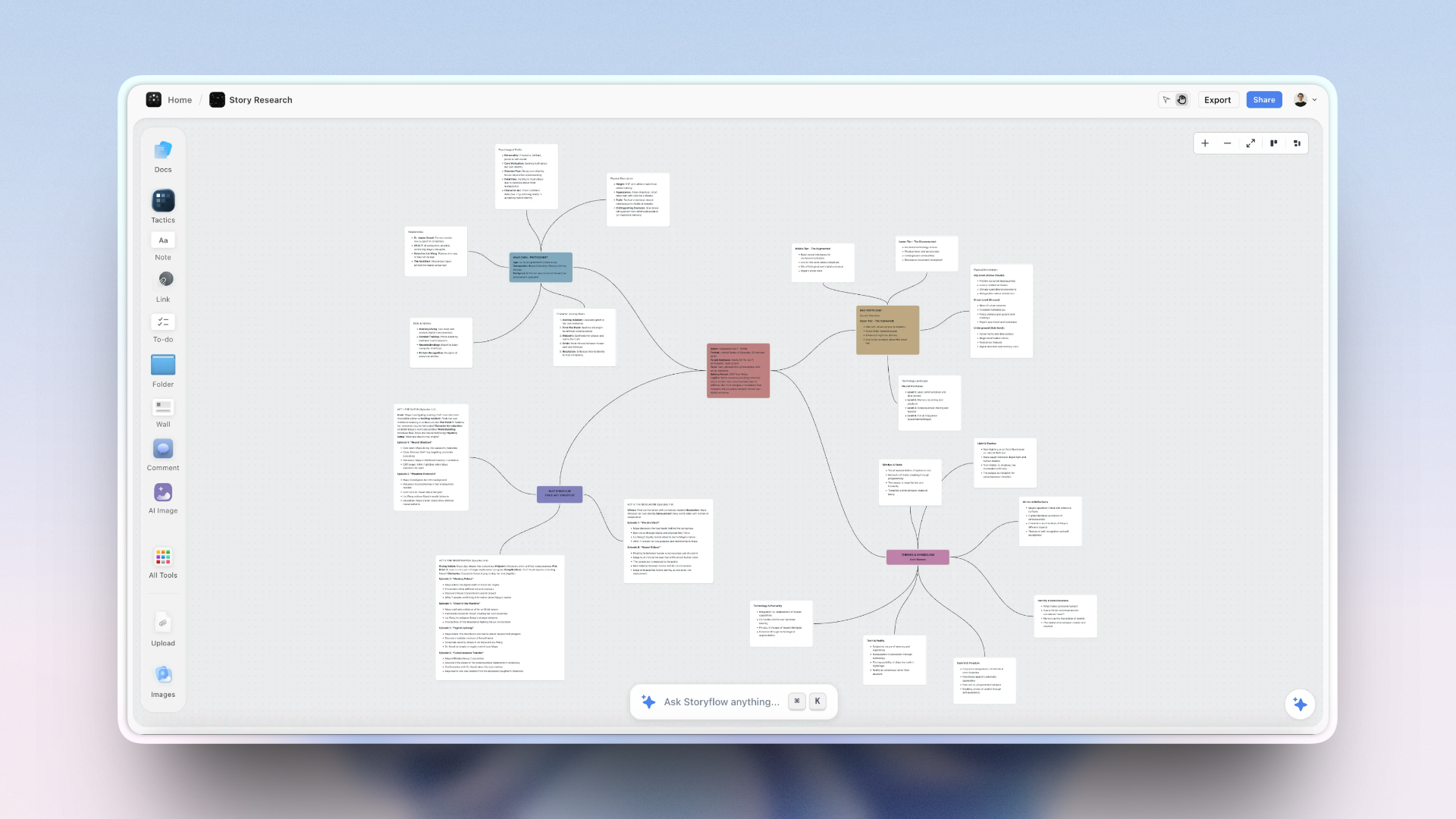
A mind map sitting on the same Storyflow canvas as the references and the draft, so branches become sections without an export
The map should not need exporting
Exporting a mind map strips out every spatial relationship that made it useful, and what survives is whatever you remembered while retyping. In Storyflow the map is already on the canvas where the project lives, so a branch becomes a section by being edited. XMind is the better mapper; this is the better place for a map that has to become work.

How I Ranked These
I make documentaries, and a documentary structure is the exact shape a mind map is good at and the exact thing that has to become something else: a treatment, then a script, then a schedule. The gap is where I have lost the most work.
Every app below I used on real projects rather than tutorials, and specifically tested the handoff: make a real map, then get it into the tool where the writing happens, and see what survives. Where a claim rests on published documentation rather than my own use, the review says so.
Five criteria, in this order:
- What survives the handoff, or whether a handoff is needed at all. Weighted highest for the reasons above.
- Speed of mapping. Keyboard-driven branch creation, because a tool you have to click through interrupts the thinking it exists to serve.
- Whether it tolerates more than one centre, since real problems frequently have two or three and a radial map is built for one.
- Whether the map is still legible in a month, which is a search and structure question.
- Honest cost, including free-tier map caps and the difference between annual and monthly rates.
Deliberately not weighted: styling options and clip-art libraries. Nobody has ever thought better because of a gradient.
When Not to Use a Mind Map
Worth saying plainly, because a lot of frustration in this category is people using the wrong shape.
A mind map has one centre. Everything hangs off it, and the structure is a tree. That is exactly right when your thinking genuinely radiates from a single subject: planning a talk, breaking down a topic, exploring one question, revising a subject.
It is wrong when the material has several centres, which is more often than the format's popularity suggests. A film has a story, a look, a schedule, and a budget, and none of those is a child of the others. A campaign has an audience, a message, a set of channels, and a calendar. Forcing four peers into one tree means three of them become branches of the one you happened to type first, and the map starts to feel wrong around the twenty-minute mark without it being obvious why.
The tell is simple: if you find yourself creating a branch called "Other" or "Misc," or duplicating the same node under two parents, the material has more than one centre and you want a canvas rather than a map.
This is not a criticism of mind mapping. It is the reason several tools in this list are canvases that can hold a map, rather than mappers, and why they rank where they do.
Quick Picks by Situation
- Best mind mapping app overall: XMind, for the export chain and the maturity, at a genuinely reasonable annual price.
- Best when the map must become the plan: Storyflow, where there is no export because the map is already on the working canvas.
- Best free and permanent: Obsidian Canvas, where nodes are your own markdown files.
- Best-looking maps: MindNode, the calmest and fastest mapper on Apple platforms.
- Best for writers: Scapple, at around $18 once, feeding straight into Scrivener.
- Best for a team session: Miro, accepting that the map will end at the map.
- Best cheap web option: Coggle or MindMeister, both fine and both thin on the handoff.
- Best for research-led thinking: Heptabase, where the map is made of real documents.
1. XMind
XMind ranks first because it is the most complete answer to the gap that does not require changing how you work.
Its export is genuinely best in class here. Word with heading levels preserved, PowerPoint with one slide per branch, PDF, markdown, and OPML, all of which arrive with structure intact rather than flattened. If your map has to become a document, this is the shortest honest path in the category.
The mapping itself is mature and fast: keyboard-driven so branches appear as fast as you can think, multiple structures beyond the radial tree (org charts, timelines, fishbone, matrix), and an outline mode that lets you switch between spatial and linear views of the same content. That outline mode is quietly the most useful feature here, because it lets you check whether the thinking survives being made linear before you commit to exporting it.
Against it: the interface is dense and dated next to MindNode. The free tier is limited and the paid version is a real annual cost. And it is a mapper, so multi-centre work is awkward and the map still lives apart from wherever you actually write.
Pricing: Free tier with limits. Paid from around $59.99/year.
2. Storyflow

Storyflow is our own product and it ranks second for one structural reason: it closes the gap by not having one.
The map is not in a mapping app. It is on the canvas where the project lives, next to the references, the notes, and the draft. So there is no export step, and the thing that usually destroys the artefact never happens. A branch becomes a section by being dragged and renamed. A cluster becomes a board. The map turns into the plan by being edited in place.
The second part is that the AI reads the whole canvas, which changes what a map is for. Once branches exist, you can ask which of these are the same idea in different words, what this map is missing, and which branch is actually the subject rather than a child of it. Those are questions about the whole tree at once, and they are exactly the questions a map generates and cannot answer. It also handles multiple centres, because a canvas does not require one root.
Against it, plainly: it is not a dedicated mind mapping app and XMind is better at making maps. There is no fishbone, no org chart, no matrix structure, no outline mode, and no keyboard-driven branch creation at XMind's speed. If what you want is a fast, beautiful radial map exported to Word, XMind is above this for good reason. It is also paid-only during early access, so a visual thinker on no budget should use Obsidian Canvas or Coggle. The Free plan launches before the end of 2026; today the only free route is that anyone a paid member invites to a board joins free. The AI reads the current board, not every board you own, with extra context from @-mentioning up to one Tactic and three documents.
Pricing: Plus $7.99/month annual or $9.99 monthly. Pro $14/month annual adds AI image generation, roughly 20x more AI, and memory across conversations. Max $39/month annual adds 40x more AI and a team workspace. No free plan until late 2026.
3. Obsidian Canvas
Obsidian Canvas closes the gap the same way and does it free, which is why it ranks immediately behind us despite being the plainer tool.
The nodes on the canvas are your actual markdown notes. That is the whole trick: the map is not a picture of your thinking, it is made of your thinking. Open a node and you are editing the note itself. Rearrange the map and you have rearranged your understanding of how the notes relate, permanently, in files on your disk.
There is no export because the material never left. And vault-wide search means a map from four months ago is still findable by its contents rather than by remembering where you put it.
Against it: the canvas is basic. No auto-layout, no radial mapping conventions, no styling worth mentioning, so it is a spatial arrangement rather than a mind map in the traditional sense. It is a personal tool, so collaboration is awkward. And Obsidian generally is a configuration project that eats time.
Pricing: Free for personal use. Commercial licence around $50/user/year.
4. MindNode
MindNode makes the best-looking maps in this list and is the fastest to think in on Apple platforms, and both of those matter more than they sound.
Its defaults are calm and correct. Branches lay themselves out sensibly, the visual weight is right without adjustment, and there is essentially no styling decision between you and the map. Keyboard-driven creation is excellent, and the iPad and Apple Pencil experience is the best here.
Exports to markdown and OPML are clean, which covers the handoff into most writing tools reasonably.
Against it: Apple-only, which ends the discussion for a lot of people. It is a mapper, so multi-centre work is not its business. And it has moved to a subscription, which for a tool this focused feels steeper than it did as a one-off.
Pricing: Free tier with limits. Paid from around $2.99/month.
5. Whimsical
Whimsical's mind maps are fast, tidy, and sit next to flowcharts, wireframes, and docs in the same product, which partially closes the gap without a real export.
Its AI can generate a first-pass mind map from a prompt, which is a genuine assist when you know the shape and want a scaffold rather than a blank centre.
The tidiness is the appeal: strong defaults mean maps come out looking deliberate with no fiddling, which keeps you thinking rather than styling.
Against it: the handoff into its own docs is reasonable and the handoff out is ordinary, so if you write elsewhere you are back in the gap. Free-tier board limits arrive quickly. And its opinionated neatness constrains genuinely messy exploration.
Pricing: Free tier with board limits. Paid from around $10/editor/month.
6. Scapple
Scapple is the anti-mind-map, deliberately, and it is the best eighteen dollars in this category for anyone who writes.
It has no imposed structure at all. Double-click anywhere to make a note, drag notes together to connect them, and there is no root, no hierarchy, and no auto-layout. That makes it the honest answer to the multi-centre problem: material with three centres just sits there with three centres.
The handoff is its second argument. It comes from the makers of Scrivener, and notes move into a Scrivener project directly, which for a writer is the gap closed completely.
Against it: it is deliberately primitive, ugly by most standards, and offers no collaboration, no cloud sync, and no mobile. Desktop only, one-off purchase, and entirely unbothered about all of this.
Pricing: One-off, around $18.
7. Heptabase
Heptabase is the strongest option when the map needs to be built out of real material rather than out of phrases.
Its nodes are cards, and cards are full documents that live in a searchable library and can appear on many whiteboards. So a map is an arrangement of things you actually wrote, and rearranging the map never touches the underlying material. For research-led thinking, that separation is worth a great deal.
Against it: it is not a mind mapping app and does not pretend to be. No radial layout, no auto-arrange, no mapping conventions. The learning curve is the steepest here, and there is no free tier beyond a trial.
Pricing: From around $11.99/month annual.
8. Miro
Miro is the right answer when the map is being made by several people at once, and the wrong answer for almost everything after that.
Its mind map feature is competent, the collaboration is the best here at real team sizes, and a group session producing a shared map works well.
Against it, on this article's criterion: the handoff is the weakest of any tool in this list. Export is an image or a flat CSV, so a map made in Miro effectively stays in Miro, which for a team artefact is often acceptable and for a map that has to become a document is the gap at its widest. The free tier's three-editable-board limit also applies.
Pricing: Free tier with three editable boards. Paid from around $8/member/month annual.
9. MindMeister
MindMeister is the established web-based mapper: collaborative, browser-native, and easy to hand to somebody who has never used a mind mapping tool.
Its distinctive handoff is into MeisterTask, so a map can become a task list in one step. For teams already in that ecosystem, that is a real and specific closing of the gap.
Against it: outside MeisterTask the export is thin. The free tier is three maps, which is restrictive. It is a strict radial mapper, so multi-centre material has nowhere to go, and it feels dated next to MindNode and Whimsical.
Pricing: Free tier with three maps. Paid from around $3.50/month.
10. Milanote
Milanote is on this list because a great many people use it for map-shaped thinking, and because it closes the gap by keeping the map with the work.
It is not a mind mapping app. There is no auto-layout, no radial structure, and no branch conventions. What it has is a nested board model that is the best in this list for creative projects, so a map made here sits next to the references and the notes, and the whole thing stays legible for months.
Against it: as a mapper it is manual work. Export is PDF or image, so if the map has to become a document elsewhere, the gap is wide. No AI. Free tier caps at 100 notes.
Pricing: Free with a 100-note limit. Paid from around $12.50/month.
11. Coggle
Coggle is the simplest tool here and it earns its place by being genuinely free and genuinely usable in about ten seconds.
Browser-based, no install, live collaboration on the free tier, and maps that look good with no effort. For a student, a one-off session, or somebody who wants to try mind mapping before spending anything, it is the right first stop.
Against it: thin on everything past the map. Export is PDF or image, structure does not survive, there is no multi-centre support, and the free tier caps private diagrams. It is a mapper and only a mapper.
Pricing: Free tier. Paid from around $5/month.
Recommended Setups
Your map has to become a document. XMind, and use its outline mode to sanity-check the structure before exporting to Word.
Your map has to become a project. Storyflow or Milanote, so the map and the plan are on the same surface and nothing is exported.
You are a writer. Scapple plus Scrivener. Eighteen dollars, no subscription, and the handoff is a drag.
You want it free and permanent. Obsidian Canvas. The nodes are your notes and the files are yours.
You are on Apple hardware and want it to feel good. MindNode, and accept that the handoff is markdown.
You are mapping with other people. Miro or MindMeister for the session, then rebuild the useful part somewhere that exports. Annoying, and less annoying than losing it.
Tools to Avoid for This Job
Any mapper whose only export is an image. Your forty minutes of thinking becomes a PNG that nothing can read, including you in three months.
A mind map for material with several centres. If you are making a branch called "Other," the shape is wrong and a canvas is the fix.
A mind map as a deliverable for someone else. They are excellent thinking artefacts and poor communication artefacts, because the reader does not have the traversal order in their head. Convert to a document before sharing.
An app you have to click through to add a branch. Mapping speed has to keep up with thinking speed or the tool interrupts the thing it exists to serve. Keyboard-driven creation is not a luxury here.
A subscription for something you do twice a year. Coggle's free tier or Scapple's one-off price covers occasional use completely.
What No Tool on This List Does
None of them make the map true. A well-structured map of a bad understanding looks exactly like a well-structured map of a good one, and the radial layout is quietly persuasive in a way that makes weak branches look substantial.
None of them tell you which branch is the real subject. That is the most valuable judgment in mapping and it stays yours. Tools that read the whole map can prompt the question; answering it is not something software does.
None of them survive being a second system. A map that is a parallel copy of a plan held elsewhere goes stale in a fortnight. Either the map feeds the work or it should not exist.
None of them fix a linear problem. If the thinking is genuinely sequential (a process, a timeline, a schedule), a radial map actively obscures it, and no export makes that better.
The Bottom Line
Mind mapping apps have been feature-complete for years. Branch creation, auto-layout, styling, collaboration, and templates are solved almost everywhere, which is why comparing them on features tells you nothing.
The one difference that still matters is what happens when you stop mapping. A mind map is a thinking artefact, nobody is paid for one, and it has to become a document, a plan, or a decision. Most apps hand you a nested bullet list at that moment and throw away the spatial structure that was the whole reason you used the format.
XMind closes that gap with the best export chain in the category and is the safest recommendation for anyone whose maps become documents. MindNode is the nicest place to do the thinking if you are on Apple hardware. Scapple, at around $18 once, is the writer's answer and the honest one for multi-centre material.
Storyflow, which we make, closes the gap by removing it: the map is on the canvas where the project lives, so it becomes the plan by being edited rather than converted, and the AI can read the whole map back to you. It is a worse mapper than XMind and it costs money today where Obsidian Canvas does not, and both of those are stated in its review.
And before you pick anything: check whether your material has one centre. If it has three, no mind mapping app on this page is the right tool, and the map is going to feel wrong at minute twenty for a reason that has nothing to do with the software.
FAQ: Mind Mapping Apps
What is the best mind mapping app in 2026?
XMind for most people, because its export chain preserves structure into Word, PowerPoint, and markdown, and that handoff is where mind mapping value usually leaks away. MindNode if you are on Apple hardware and want the fastest, cleanest mapping experience. Storyflow or Obsidian Canvas if you want the map to become the work without an export step.
What is the best free mind mapping app?
Obsidian Canvas for personal use, since it is free, unlimited, and the nodes are markdown files you own. Coggle is the simplest genuinely free web option with live collaboration. XMind, MindNode, MindMeister, and Whimsical all have free tiers with real caps. Storyflow is paid-only during early access and is not a free option today.
What happens to a mind map after you make it?
Usually it gets exported into a nested bullet list, which strips out every spatial relationship that made it useful, and the value of the session becomes whatever you remembered while retyping. That is the map-to-make gap, and the two ways to avoid it are a tool with a structure-preserving export (XMind) or a tool where the map already sits on the surface where the work happens.
XMind or MindNode?
XMind for the handoff and for structural variety: better exports, an outline mode, and layouts beyond the radial tree. MindNode for the experience: cleaner maps, faster to think in, and the best iPad and Apple Pencil support here. If the map must become a Word document, XMind. If the map is where the thinking happens and markdown is enough, MindNode.
Is Miro good for mind mapping?
For a group making a map together, yes, and its collaboration is the best here. For anything after the session, no. Export is an image or a flat CSV, so the map effectively stays in Miro, which is the widest version of the map-to-make gap in this list.
Is Storyflow a mind mapping app?
Not a dedicated one, and XMind makes better maps. It has no fishbone or matrix layouts, no outline mode, and no keyboard-driven branch creation at XMind's speed. It ranks second here for one structural reason: the map sits on the canvas where the project already lives, so there is no export to destroy it, and the AI can read the whole map and answer which branches are duplicates or what is missing. It is paid-only during early access.
When should I not use a mind map?
When the material has more than one centre, which is more common than the format suggests. A film has a story, a look, a schedule, and a budget, and none is a child of the others. The tell is creating a branch called "Other" or duplicating a node under two parents. At that point you want a canvas, not a tree.
Can AI generate a mind map for me?
Several tools will, and the useful version is as a scaffold rather than an answer: a first-pass map of a known topic saves the blank-centre problem. The more valuable use is the other direction, a model reading a map you already made and telling you which branches are the same idea and what is missing, which is a comparison across the whole tree and slow to do by hand.
What is the difference between a mind map and a concept map?
A mind map is radial with one centre and a tree structure, so relationships are all parent-to-child. A concept map is a network with many nodes and labelled relationships between any of them, which suits material where the connections themselves matter. If you keep wanting to say how two branches relate, you are making a concept map and the mind map format is fighting you.
Do mind maps actually help you think?
For single-centre exploration, yes, and the mechanism is that radial structure lets you go deep on one strand without committing to an order, which is what an outline forces you to do too early. The failure is treating the map as an output, since it is a thinking artefact and a poor communication one, because the reader does not have your traversal order in their head.
What is the best mind mapping app for teams?
Miro or MindMeister for making the map together, both of which handle live collaboration well. Neither closes the handoff, so plan on rebuilding the useful part somewhere that exports properly. Whimsical is a reasonable middle ground if the team also needs flows and wireframes.
Is a paid mind mapping app worth it?
Only if you map often and the maps have to become something else. If you map occasionally, Coggle's free tier or Scapple at around $18 once covers it completely. The thing worth paying for is the handoff, not the mapping, which every tool in this category solved a decade ago.
Table of Contents
- Key Takeaways
- The Map-to-Make Gap
- At a Glance: The 11 Apps Compared
- How I Ranked These
- When Not to Use a Mind Map
- Quick Picks by Situation
- 1. XMind
- 2. Storyflow
- 3. Obsidian Canvas
- 4. MindNode
- 5. Whimsical
- 6. Scapple
- 7. Heptabase
- 8. Miro
- 9. MindMeister
- 10. Milanote
- 11. Coggle
- Recommended Setups
- Tools to Avoid for This Job
- What No Tool on This List Does
- The Bottom Line
- FAQ: Mind Mapping Apps
- Related Reading
Templates to check out for this topic


Mind mapping and ideation templates you can use in Storyflow
Map ideas in space, then ask the AI to restructure, expand, or connect them. Open any of these boards and start thinking visually instead of in lists.


See Storyflow in Action
A visual AI workspace where every feature lives inside one canvas. No tab-switching, no context lost.
Build your entire board from a single message
Type what you need in the AI chat at the bottom of your canvas. The AI adds cards, headings, and structure directly onto your board.
Use expert frameworks as AI context
Type @ in the AI chat and choose any Tactic. The AI tailors every response to that framework instead of giving generic advice.
Turn your board into a mind map in seconds
Ask the AI to restructure your canvas as a mindmap. It connects your ideas into a visual hierarchy so you can see how everything relates.
Why Storyflow Exists
Storyflow actually began as a personal tool while working on creative and research projects.
We kept running into the same problem: ideas were scattered everywhere: notes, documents, and whiteboards.
Nothing helped us see how everything connected.
So we started building a workspace designed around how ideas actually grow.
→ Read how Storyflow was createdJustkay
Documentary Filmmaker & Founder at Storyflow
Published: 2026-08-26
Extremely simple, seriously capable


See how easy it is to get started
Watch a real project come together, from a blank board to a finished plan, clicked through step by step.
Start creating with AI and become more productive
Transform your creative workflow with AI-powered tools. Generate ideas, create content, and boost your productivity in minutes instead of hours.