The 10 Best Information Architecture Tools in 2026
Most IA tools draw the tree. Almost none help you decide which tree. Ten information architecture tools ranked by which stage of the work they honestly serve.

Category
Tools & Software
Author

Sara de Klein
Head of Product at Storyflow
Topics
2026-08-13
•
22 min read
•
Tools & SoftwareTable of Contents
- Key Takeaways
- The Tree and the Pile
- At a Glance: The 10 Tools Compared
- How I Ranked These
- Quick Picks by Job Type
- 1. Optimal Workshop
- 2. Octopus.do
- 3. Storyflow
- 4. FlowMapp
- 5. Figma and FigJam
- 6. Maze
- 7. Slickplan
- 8. Miro
- 9. Screaming Frog SEO Spider
- 10. Whimsical
- What to Actually Pay For
- Tools to Avoid for This Job
- What No Tool on This List Does
- The Bottom Line
- FAQ: Information Architecture Tools
- Related Reading
Templates to check out for this topic


- information architecture tools
- website architecture tool
- sitemap builder
- card sorting tool
- tree testing tool
- IA wireframes
- site structure planning
What are the best information architecture tools in 2026?
The best information architecture tools in 2026 are Optimal Workshop for deciding the structure, Octopus.do for building and exporting the sitemap, and Storyflow for the messy grouping work that happens before a tree exists. FlowMapp is the most complete purpose built IA suite, Figma owns the handoff into wireframes, and Screaming Frog is how you find out what your current structure actually is. The split matters because information architecture is two jobs wearing one name: deciding the structure, and documenting the structure. Almost every product sold as an IA tool only does the second one.

Full disclosure: Storyflow is our product, so here is the honest boundary. It ranks third, not first, and it wins on one narrow ground: the pile stage, before a hierarchy is decided, where content items need to sit unplaced, provisional or in an unnamed group while people argue. What it genuinely cannot do for this job: no sitemap export of any kind, no XML, no CSV of routes, no page tree primitive (groups are visual clusters with no parent and child relationship), no site crawl or URL import, no card sorting study mode and no agreement analytics, no tree testing and therefore no success rate, directness or first click metrics, and no wireframing or design handoff. Octopus.do, FlowMapp and Slickplan beat it outright on sitemaps, Optimal Workshop and Maze beat it outright on research, and Figma owns the wireframe handoff. Storyflow is paid only during early access.
Quick Comparison
Information architecture is two jobs wearing one name: deciding the structure, and documenting it. These four tools sit at different points on that line, so read the column for the stage you are actually in.
| Tool | Best For | AI Features | Price |
|---|---|---|---|
| Optimal Workshop | Deciding the tree with card sorting and tree testing | No AI. Statistical analysis: similarity matrices, dendrograms, success and directness scores | Free tier with limits, paid commonly from about $199 mo annual |
| Octopus.do | Building and shipping the sitemap | Light AI page suggestions; site crawl import does the heavy lifting | Free for one small project, paid about $10 to $25 mo |
| Storyflow | The pile stage: grouping and naming before the tree exists | AI reads your full active canvas board plus 1 Tactic and 3 Documents you @-mention | $7.99 mo annual (paid only, free plan late 2026) |
| Figma and FigJam | Turning the agreed tree into wireframes | AI search and generation aimed at design, not at structure | Free Starter, full editor seats about $16 mo annual |
Key Takeaways
- IA is the work of turning a pile into a tree. Most tools only let you draw a tree you have already decided, which is the easy half.
- Optimal Workshop ranks first because card sorting and tree testing are the only methods here that produce evidence for a structure rather than an opinion about one.
- The word "sitemap" means two files: the IA diagram humans argue over, and the sitemap.xml crawlers read. Octopus.do, FlowMapp and Slickplan produce both. Nothing else here does.
- Tree testing is the cheapest study in UX: 15 tasks, 50 participants, results inside a day, run on a text only hierarchy before a single wireframe exists.
- Storyflow ranks third for the pile stage and has no sitemap export, no XML, no page tree primitive, no crawl import and no tree testing analytics. It is not a sitemap tool.
- Screaming Frog gives you the pile in twenty minutes. You cannot restructure a 400 page site you have never inventoried.
- The most expensive IA mistake is drawing a beautiful tree from your org chart. Users do not know your departments.
Sort the pile before you draw the tree
Storyflow gives you a canvas with no structural opinion: cluster 200 content items, rename a group three times, leave the awkward eleven unplaced, and ask the AI which clusters overlap. Then take the decision to a sitemap tool and export the XML. Paid-only during early access; the Free plan lands before the end of 2026.

The Tree and the Pile
Every information architecture project starts as a pile: 340 existing pages nobody has audited, a content inventory spreadsheet with a half empty column called "keep?", sixty sticky notes from a stakeholder workshop, and a set of section names that mean four different things depending on who says them.
The deliverable is a tree. One parent per child, labelled in words users recognise, deep enough to be organised and shallow enough to be navigable, with URLs a developer can build.
The actual work is the transformation between those two states. Everything else is drawing.
Most IA tools draw the tree. Almost none help you decide which tree.
That is not a criticism of the drawing tools. Octopus.do producing a 200 page hierarchy in an afternoon with clean XML on the way out is genuinely valuable, and it ranks second for exactly that. The problem is that teams buy a sitemap tool, open it, and face the blank first node. A page tree is a shape that only accepts an answer, so you type the answer you already had, which came from the org chart, the old site, or whoever spoke loudest at kickoff.
The pile stage has its own methods, and they are older than any of these products.
Card sorting. Participants group your content items and name the groups. Open sorts let people invent the category names, which is where you learn the vocabulary users actually have. Closed sorts test whether your proposed categories hold real content. Hybrid sorts allow both, and the categories people add are usually the ones you missed.
Affinity grouping. The same instinct applied to research notes rather than page titles. Clusters form, get named, and the names become candidate sections. It is deliberately loose because the point is to discover a structure, not record one.
Content inventory. Unglamorous and non negotiable. Every URL, its owner, its traffic, its last update, and a keep or kill decision. Half the arguments in an IA project evaporate once somebody proves 180 of the 340 pages had under 20 visits last year.
Then there is a third stage nearly every team skips, and it catches the expensive mistakes.
Tree testing. You strip the structure back to text: no visual design, no search box, no merchandising. Participants get plain language tasks ("you want to know whether your policy covers a rental car") and click down until they think they have arrived. You get a success rate per task, a directness score showing whether people wandered, and a first click breakdown showing which label absorbed the wrong traffic. Structures that look rational as a diagram routinely score under 40 percent on the task the business cares most about, and the failure is almost always a label rather than a shape. You do not need to redraw the tree. You need to stop calling it "Solutions".
One last thing about the word sitemap, because it is why two sets of tools appear under one search. An IA sitemap is a diagram humans argue over, and its outputs are a PDF, a PNG or a shareable link. An XML sitemap is a machine file at yoursite.com/sitemap.xml listing URLs for crawlers. Any tool claiming sitemap export without valid XML is producing a picture.
The ten tools below are ranked by which stage they honestly serve, and whether they hand off cleanly to the next.
At a Glance: The 10 Tools Compared
| Tool | Stage it serves | Sitemap export | Card sort or tree test | Price signal |
|---|---|---|---|---|
Optimal Workshop | Deciding the tree | None | Both, with full analytics | Research budget |
Octopus.do | Drawing and shipping the tree | XML, CSV, PDF, PNG | No | Cheap |
Storyflow | The pile, before the tree | None of any kind | Grouping only, no analytics | Cheap, paid only |
FlowMapp | The tree plus flows | XML, CSV, PDF | No | Mid |
Figma and FigJam | Handoff into wireframes | None | Manual sort only | Mid, per editor |
Maze | Validating the tree fast | None | Both, lighter analytics | Research budget |
Slickplan | Sitemap plus content planning | XML, CSV, HTML | No | Cheap |
Miro | Workshop grouping with a room | None | Manual sort with voting | Mid |
Screaming Frog | Inventorying the existing pile | Generates XML | No | One licence a year |
Whimsical | Fast tree sketch into wireframe | None | No | Cheap |
How I Ranked These
I come from documentary, where the same problem has a different name: you finish a shoot with 60 hours of transcript, which is a pile, and deliver a 52 minute structure, which is a tree. I have since run IA on rebuilds from a 40 page studio site to a 900 page publisher, and built the same structure in every tool here.
Five criteria, in order.
1. Does it support the pile, or only the tree? The test: can you put an item somewhere provisional, in two places at once, or in a group with no name yet. A page tree says no to all three, which is correct at the documentation stage and harmful before it.
2. Does it produce evidence or just an artifact? The test: can you say why the structure is this rather than a defensible alternative, and cite a number. Agreement matrices and tree test success rates are evidence. A neat diagram is not.
3. Does the sitemap actually leave the tool? Valid XML, a CSV a developer can turn into routes, a PDF a client can annotate. A screenshot is not an export.
4. Can it ingest the existing site? Rebuilds far outnumber greenfield builds, and typing 340 existing pages by hand is where IA projects quietly die.
5. How clean is the handoff into wireframes? How many steps between "the tree is agreed" and "this node is a screen with a layout". That seam is where IA gets silently rewritten by whoever opens the design file first.
Pricing is as of August 2026 and changes frequently. Verify with each vendor.
Quick Picks by Job Type
- Best for deciding the structure: Optimal Workshop. Card sorting and tree testing with analysis that survives a stakeholder meeting.
- Best sitemap builder: Octopus.do. Fastest tree in the category, with real XML and CSV on the way out.
- Best for the pile stage: Storyflow. Grouping and naming before a hierarchy exists.
- Best full IA suite: FlowMapp. Sitemap, user flows, personas and content planning in one project.
- Best handoff into wireframes: Figma. Because that is where the wireframes already are.
- Best fast validation: Maze. Tree testing a product team will actually run in a sprint.
- Best content inventory: Screaming Frog. The pile on screen in twenty minutes.
1. Optimal Workshop
The verdict. The only tool here that turns the pile into an evidenced tree rather than a confident guess.
Best for. Card sorting, tree testing, and the analysis that lets you defend a structure to people who preferred a different one.
Pricing. A free tier exists with hard limits on studies and participants. Paid plans are commonly quoted from roughly $199 per month billed annually for an individual researcher, with team and enterprise pricing above that, as of August 2026.
Why it ranks here. Optimal Workshop is four products mapped onto the stages in the framework. OptimalSort runs open, closed and hybrid card sorts, Treejack runs tree tests, Chalkmark runs first click tests on a static image, and Reframer holds qualitative notes.
It takes first place for the analysis rather than the collection. Anyone can run a card sort with index cards. What you cannot do on a table is generate a similarity matrix across 60 participants, or a dendrogram showing which items clustered at what agreement threshold. That output changes meetings, because it replaces "I think it belongs under Products" with "31 of 52 participants put it under Support, and none used the word Products".
Treejack is the underrated half. A tree test costs an afternoon of task writing and a day of waiting, and the results are unambiguous. I have watched a navigation everyone in the room liked score 38 percent on the one task the business cared about, and the fix was renaming a single label.
It ranks first with a real caveat: Optimal Workshop produces no sitemap. You get a validated structure as data, and draw it elsewhere.
Strengths.
- Open, closed and hybrid card sorts with participant level data, not just totals.
- Similarity matrices and dendrograms that show agreement rather than asserting it.
- Treejack success, directness and first click metrics on a text only hierarchy.
- The output survives a stakeholder challenge, which no diagram does.
Limitations.
- Expensive relative to everything else here, and priced for research teams rather than a solo designer.
- No sitemap diagram and no XML export.
- Recruiting participants is your problem unless you buy a panel.
The trade off. You pay research money to stop guessing, then draw the result in a tool costing a tenth as much.
2. Octopus.do
The verdict. The fastest way to get a real, exportable sitemap out of a decision you have already made.
Best for. Building and sharing a structure with a client, then shipping it to developers as XML and CSV.
Pricing. A free plan covers a single small project. Paid plans commonly run from roughly $10 to $25 per month depending on projects and collaborators, as of August 2026.
Why it ranks here. Octopus.do is a page tree primitive done properly. You type, press Tab to go a level deeper, press Enter for a sibling, and a 120 page structure exists in under an hour. Nodes carry page type, notes and status, and the tree stays legible at a width where a general diagramming tool has become spaghetti.
Two things push it above the generic canvases. It imports an existing site, so a rebuild starts from what is actually there. And the export is genuine: valid XML for search, CSV a developer can turn into routes, plus PDF and PNG for the deck. The gap between "we agreed the structure" and "the structure is in the repo" is where IA decisions get quietly changed, and a clean CSV closes it.
The framework tells you what it does not do. It is a tree tool all the way down: no place for an undecided item, no way to hold something in two groups while you argue, no research instrument of any kind. Open it before the pile is sorted and it will help you document your first instinct.
Strengths.
- Keyboard driven tree building, genuinely faster than any canvas here.
- Real XML, CSV, PDF and PNG export, not a screenshot.
- Imports an existing site so rebuilds start from reality.
- Shareable live link clients can review without an account.
Limitations.
- No card sorting, no tree testing, no research output at all.
- The page tree shape forces a decision before you have made one.
- Weak for anything that is not a hierarchy, including cross links and flows.
The trade off. Perfect once you know the answer, unhelpful while you are still finding it.
3. Storyflow
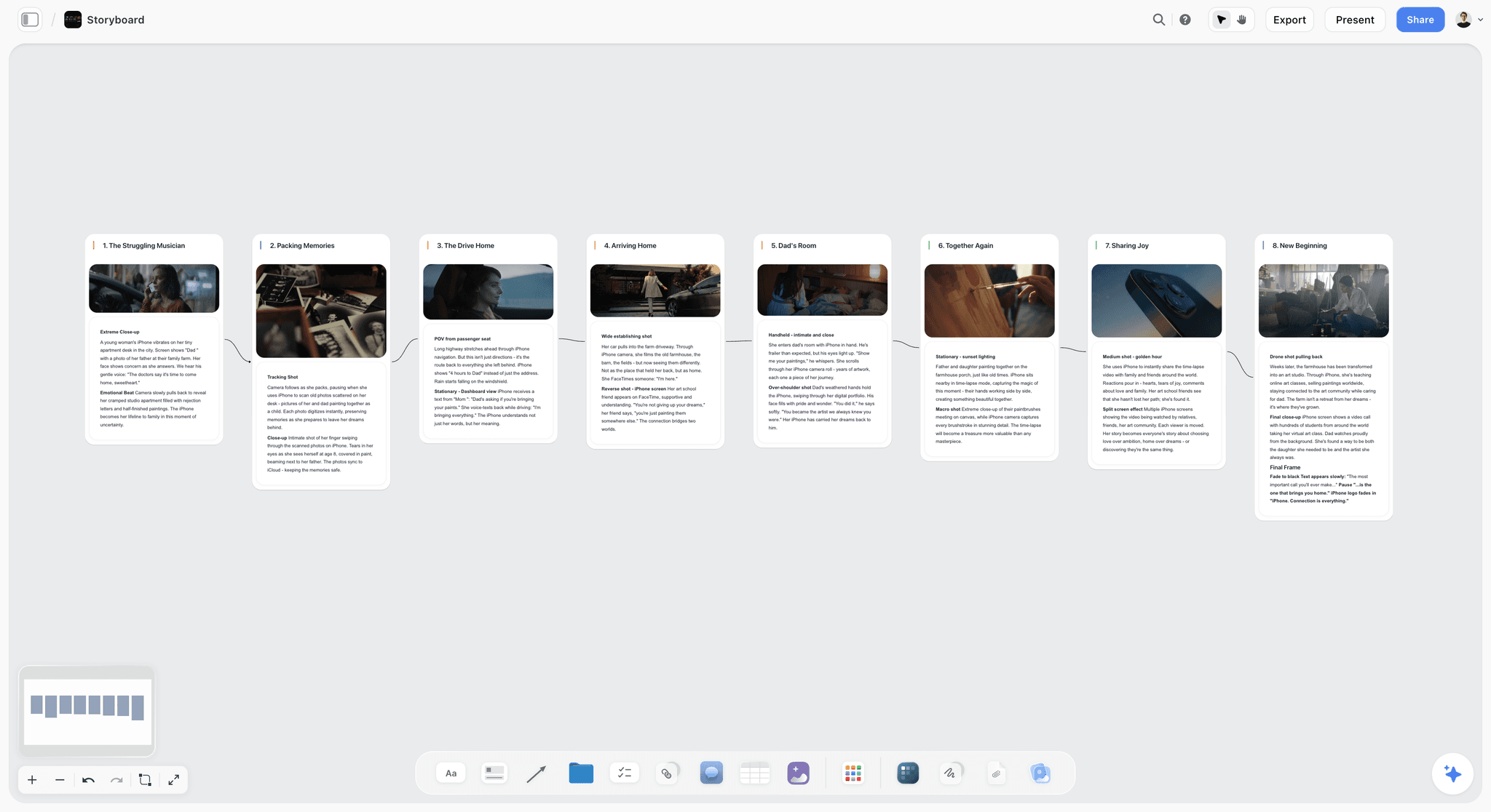

The verdict. Honest at the pile stage, where content gets grouped and named before anyone commits to a hierarchy, and not a sitemap tool in any sense.
Best for. Card sorting by hand, affinity grouping a content audit, and arguing about section names on a surface that lets an item sit nowhere in particular.
Pricing. Paid only during early access. Plus is $7.99 per month billed annually or $9.99 monthly, adding 200 plus Story blueprints and unlimited file uploads. Pro is $14 per month billed annually or $19 monthly, adding AI image generation, roughly twenty times more AI usage and memory across conversations. Max is $39 per month billed annually or $49 monthly, adding forty times more AI and Team Workspace. Pricing is flat per account rather than per seat, and anyone a paid member invites joins free. The Free plan launches before the end of 2026.
Why it ranks here. Storyflow is ours, and it ranks third because it does one of the three stages well and neither of the other two at all.
The pile stage needs a surface with no opinion about structure. You dump 200 content items onto a board, cluster them, name the clusters, split one when it turns out to be two things, and leave eleven stubborn items in the corner under "no idea yet" for a week. A page tree cannot express any of that, because it requires every node to have exactly one parent from the moment it exists. A canvas can, which is the specific reason a wall of sticky notes has outlived every product that tried to replace it.
The AI changes the work rather than decorating it. Storyflow's AI reads your full active canvas board, plus up to one Tactic and up to three Documents you @-mention, so you can ask about the grouping as a whole: which clusters overlap, which labels are doing two jobs, which items were never placed. Asking for three alternative groupings of the same 200 items is useful because the failure mode of manual affinity mapping is that the first arrangement becomes the only one anyone considers.
Now the part that matters more here than any of the above. Storyflow has no page tree primitive: a group is a visual cluster, not a parent node with children. It exports no sitemap of any kind, no XML, no CSV of routes. It cannot crawl or import an existing website, so a 340 page inventory arrives by paste or by hand. It runs no card sorting study and computes no agreement data, and no tree tests, so no success rate, no directness, no first click analysis. Real time multiplayer collaboration sits on the Max tier via Team Workspace rather than the cheaper plans. If your job this week is "produce the sitemap", the tool you want is two rows above this one.
Strengths.
- No structural opinion, so items can sit unplaced, provisional, or in an unnamed group for as long as the argument takes.
- Whole board AI answers questions about the grouping itself, including overlaps and unplaced items.
- Research context, quotes, screenshots and rejected names live beside the clusters.
- Flat per account pricing with free invited collaborators, so stakeholders cost nothing to include.
Limitations.
- No sitemap export, no XML, no CSV of routes. Nothing structured leaves the board.
- No page tree primitive. Groups are visual clusters with no parent and child relationship and no depth enforcement.
- No site crawl or URL import, so an existing site is inventoried elsewhere and pasted in.
- No card sorting study mode and no agreement analytics: no similarity matrix, no dendrogram, no participant level data.
- No tree testing, so no success rate, directness or first click metrics. No wireframing and no design handoff either.
The trade off. Storyflow is where you decide there is a section called Support. Octopus.do is where that becomes /support with eleven children and an XML file.
4. FlowMapp
The verdict. The most complete purpose built IA suite, and the right pick when the sitemap is not the only deliverable.
Best for. Agencies producing a structure, user flows, personas and a content plan for the same client project.
Pricing. A free plan covers a single project. Paid plans commonly run from roughly $19 per month for a solo user to around $49 per month for teams, as of August 2026.
Why it ranks here. FlowMapp bundles artifacts that usually live in four tools: a visual sitemap, a user flow builder, customer journey maps, personas, and content planning where each page node carries its copy brief, meta description and owner. For an agency that bundle is the pitch: one link goes to the client and holds the whole strategy phase.
Content planning earns its place. A sitemap with 90 nodes is a promise that somebody will write 90 pages, and that becomes real when each node gets an owner, a word count and a status. Teams that keep structure and content debt in separate files discover in week nine that 40 pages were never assigned.
Export covers XML, CSV and PDF, so the handoff is real, and flows sit alongside the tree. That matters because a hierarchy answers "where does this live" and a flow answers "how does someone get through this", and shipping only the first leaves developers to invent the second.
It ranks fourth on speed and focus. Octopus.do builds a tree faster and feels lighter for the sitemap alone. And like everything in this half of the list, FlowMapp operates entirely at the tree stage: no card sorting and no tree testing, so the structure it documents is the one you brought in with you.
Strengths.
- Sitemap, user flows, journey maps and personas in a single client facing project.
- Page level content planning with owner, brief and status on the node.
- XML, CSV and PDF export, plus client commenting without seats for every reviewer.
Limitations.
- No card sorting and no tree testing, so no evidence for the structure.
- Slower than Octopus.do for the pure sitemap job.
- Several modules go unused on a small project you still pay for.
The trade off. Buy it for the bundle. If you only need the tree, the tool above is cheaper and faster.
5. Figma and FigJam
The verdict. Where information architecture stops being information architecture, which makes it the most important tool here that is not an IA tool.
Best for. The handoff, where the agreed tree becomes wireframes and screens.
Pricing. A free Starter tier exists. Professional full editor seats run roughly $16 per editor per month billed annually, with cheaper collaborator and dev seats, and FigJam is available standalone at a lower per editor rate, as of August 2026.
Why it ranks here. The query "tools for creating information architecture wireframes" is two requests joined by a hyphen, and the second half has one honest answer. Once a node becomes a screen with a layout, you are wireframing, and wireframing lives in Figma for most product and web teams.
What Figma does uniquely well is keep the tree and the screens in one file. Put the sitemap on the first page, link each node to the frame that realises it, and the structure stops being a PDF nobody reopens. Teams that keep the sitemap in a separate tool end up with two structures within a month, and the one in Figma always wins because it is the one people are looking at.
FigJam covers the workshop end with sticky notes, voting and a card sorting template. That is a workshop instrument, not a card sorting study: you get an arrangement, not a similarity matrix.
It ranks fifth because it does nothing to help you decide. Figma has no page tree primitive, no sitemap export, no XML and no crawl import, and a sitemap built there is connected rectangles a developer reads by looking at them.
Strengths.
- The tree and the wireframes in one file, which is the only way both stay current.
- Components and auto layout make navigation variants cheap to test visually.
- FigJam handles the workshop end with sticky notes and voting.
- Universal in product teams, so no adoption argument to win.
Limitations.
- No sitemap export, no XML, no page tree primitive.
- No card sorting analytics and no tree testing.
- Rectangles and arrows get unmanageable past roughly 150 nodes.
The trade off. Not an IA tool, and the one you hand off to regardless, so move the tree there once it is agreed.
6. Maze
The verdict. Tree testing and card sorting a product team will actually run inside a sprint, with lighter analysis than the category leader.
Best for. Validating a proposed structure quickly, especially when the prototype is already in Figma.
Pricing. A free plan covers limited studies and responses. Paid plans commonly start around $99 per month billed annually, with organisation pricing above that, as of August 2026.
Why it ranks here. Maze added card sorting and tree testing blocks to a platform built around unmoderated testing, and the integration is the point. You can run a tree test on the proposed hierarchy, then a first click test on the Figma prototype implementing it, in one study with the same participants.
Speed is the real argument. Optimal Workshop is a research instrument whose analysis rewards a researcher. Maze is a product team instrument, and that matters behaviourally: a study taking half a day to set up gets run, and one taking three days gets scheduled for after launch. I would rather a team ran a shallower tree test on the actual structure than a perfect one on a structure that shipped six weeks ago.
It ranks sixth because the analysis genuinely is shallower. Card sort output is closer to a summary than to participant level agreement data, and for a serious open sort across 60 people that matters. Maze does have its own recruitment panel, which removes the main blocker to running anything at all.
Strengths.
- Tree testing and card sorting inside a tool product teams already use.
- Figma integration means structure and screens get validated in one study.
- Built in participant recruitment.
- Fast enough to fit in a sprint, which decides whether it happens.
Limitations.
- Card sort analysis is less deep than Optimal Workshop.
- No sitemap of any kind, so you draw the structure elsewhere.
- Unmoderated only, so you get the what without the why.
The trade off. Less rigorous than the leader, and far more likely to actually get run.
7. Slickplan
The verdict. A solid sitemap builder whose crawl import and content planning make it the practical pick for a rebuild.
Best for. Restructuring an existing site where the inventory matters as much as the diagram.
Pricing. Paid plans commonly start around $11 per month for a single user, rising with collaborators and projects, as of August 2026. A trial is available.
Why it ranks here. Slickplan has been doing this a long time and it shows in the unglamorous parts. It imports an existing site by crawl, so a 300 page inventory arrives as a tree instead of a weekend. It exports XML, CSV and HTML, and includes a content planner where each page carries its copy plus a diagram builder for flows outside the hierarchy.
It lands seventh rather than second on feel. Octopus.do is faster to build in and cleaner to share, and FlowMapp bundles more for a similar price. What Slickplan offers over both is a crawl plus content workflow aimed at the rebuild case, which is most cases. Same limitation as everything in this half of the list: Slickplan documents structures, it does not evaluate them.
Strengths.
- Crawls an existing site into an editable tree.
- XML, CSV and HTML export covering most handoff needs.
- Content planning attached to page nodes.
- Diagram builder for flows that are not hierarchies.
Limitations.
- No card sorting and no tree testing.
- Interface is more dated than Octopus.do or FlowMapp.
- Per project limits on lower tiers bite for agencies.
The trade off. The pragmatic rebuild tool, still only the documentation half of the job.
8. Miro
The verdict. The best room for a card sorting workshop, and a poor place to keep the result.
Best for. Running a live grouping session with a dozen stakeholders and getting a decision out of it.
Pricing. A free plan with a three board limit. Starter runs roughly $8 per member per month billed annually and Business roughly $16, as of August 2026.
Why it ranks here. Miro is unmatched when fourteen people need to move the same objects at once. Card sorting templates, sticky notes, dot voting, a visible timer, and private mode so people commit before seeing each other's answers.
Private mode matters more than it sounds: an open group sort without it measures who spoke first, not what people think. Storyflow has no timer, no voting and no private mode, which is why Miro outranks it for the workshop specifically.
It falls to eighth for what happens after the session. The board becomes a photograph of a moment: 200 stickies in loose clusters, no hierarchy, no export a developer can use. Structures that stay in Miro get rebuilt from scratch by whoever needs them next, which is how the same IA gets decided twice.
Strengths.
- Card sorting templates plus dot voting, timers and private mode for a real session.
- Handles a large group without falling over.
- Enormous template library including IA and content audit starters.
- Everyone has already used it, so no training.
Limitations.
- No sitemap export, no XML, no page tree primitive.
- No card sort analytics. You get an arrangement, not agreement data.
- Per member pricing gets expensive once stakeholders need edit rights.
The trade off. Excellent for the two hours of the workshop, and the wrong home for the output.
9. Screaming Frog SEO Spider
The verdict. The fastest way to see what your pile currently is, and the least discussed IA tool in the category.
Best for. Content inventory, crawl depth analysis, and finding the pages nobody remembered existed.
Pricing. Free for crawls up to 500 URLs. A licence runs roughly £199 per year, about $250, as of August 2026.
Why it ranks here. Every IA project on an existing site should begin here, and most begin with a workshop instead. Point it at a domain and twenty minutes later you have every URL, its title, its word count, its status code, its depth from the homepage and its internal link count. Export to a spreadsheet, join it to analytics, and the content inventory is a fact rather than a recollection.
The IA specific reading is crawl depth. Sort by depth and you will find pages five and six clicks from the homepage carrying real traffic, which is direct evidence the current tree is wrong for people already arriving. Orphan pages, meaning URLs with no internal links pointing at them, are the purest expression of the pile: content that exists and belongs nowhere.
It ranks ninth only because it draws nothing and decides nothing. Note that the XML sitemaps it generates are the machine file, not the IA diagram.
Strengths.
- Complete URL inventory with titles, depth, status and internal links in minutes.
- Crawl depth analysis gives hard evidence about the existing structure.
- Orphan page detection finds content that belongs nowhere.
- Free tier of 500 URLs covers most small sites entirely.
Limitations.
- Draws nothing. No diagram and no design output.
- Desktop application with a dense, technical interface.
- Nothing about the target structure, only the current one.
The trade off. It tells you what you have. Every other tool here assumes you already know.
10. Whimsical
The verdict. The quickest path from a rough tree to a rough wireframe, for teams who want one file rather than two tools.
Best for. Small sites and product features where structure and first screens get sketched in the same session.
Pricing. A free tier covers a small number of boards. Paid runs roughly $10 per editor per month billed annually, as of August 2026.
Why it ranks here. Whimsical is fast in a way that changes behaviour. Flowcharts, mind maps and wireframes share one canvas, the wireframe components are deliberately low fidelity, and a tree plus three page sketches takes about twenty minutes. For a ten page site that is the entire IA phase, and it is proportionate.
Mind map mode is the closest thing here to a bridge between the stages. It is looser than a page tree, so you can branch without committing to depth, and it converts into something structural once the shape settles. For a solo designer that beats starting in a page tree.
It ranks last because it does not scale and does not export. Past roughly 80 nodes the canvas becomes hard to reason about, and the fidelity ceiling means work moves to Figma the moment anything needs to look real.
Strengths.
- Tree, flow and wireframe in one file with almost no setup cost.
- Low fidelity wireframes keep conversations about structure rather than styling.
- Mind map mode allows branching before depth is decided.
- Cheap and pleasant enough that people use it unprompted.
Limitations.
- No sitemap export, no XML, no crawl import.
- Degrades past roughly 80 nodes.
- No research capability of any kind.
The trade off. Right sized for a small site, and outgrown by a real one.
What to Actually Pay For
Pay for one tree test before anything else. A single Treejack or Maze study costs less than a week of redesign and is the only line item here that can stop a wrong structure from shipping. If the budget allows exactly one purchase, buy validation, not a nicer diagram.
Pay for a sitemap tool once the site passes about 60 pages. Below that, Whimsical or a Figma page is fine. Above it, the keyboard speed and CSV of Octopus.do or Slickplan pays for itself on the first handoff.
Buy Screaming Frog if you restructure sites for a living. Roughly £199 per year against manually inventorying a 400 page site is not a close decision, and the free 500 URL tier covers small client sites outright.
Do not buy a research platform for one project. Optimal Workshop at roughly $199 per month is correct for a team running studies continuously and hard to justify for one rebuild. For a single project, Maze's lower tier or a moderated sort with eight users on a call gets most of the signal.
Do not pay twice for the same stage. Miro and FigJam do the same workshop job, Octopus.do and Slickplan the same sitemap job. Most teams pay for two tools serving one stage and nothing for another.
Tools to Avoid for This Job
Presentation software as the sitemap. A structure in Slides or PowerPoint cannot be exported and gets duplicated the moment two people need to edit it. It also caps your thinking at whatever fits on a 16 by 9 slide, roughly 30 nodes.
The org chart as the tree. The most expensive IA failure, and it survives because it is politically easy. Users do not know Support and Success are different departments, and will not guess which one owns the returns policy. If your top level navigation matches your leadership team's reporting lines, you have documented your company, not designed a website.
The CMS page tree as the design surface. Building structure directly in WordPress admin feels efficient and is not, because the CMS enforces one parent per page from the first node and offers nowhere to hold an undecided item. It also mixes structure with publishing state, so the tree becomes whatever happens to be live.
A spreadsheet as the only IA artifact. An inventory belongs in a spreadsheet and a structure does not. Sixteen items under one parent and three under another look identical in indented text and wrong instantly in a tree.
A mega menu as a substitute for deciding. When a structure cannot be agreed, the compromise is exposing everything at once, which hands the failure to users.
What No Tool on This List Does
None of them will name your sections. Labelling is the highest leverage decision in information architecture and every tool here treats a label as a text field. Card sorting surfaces the vocabulary users have and tree testing proves a label fails, but the writing is judgment and stays judgment.
None of them will resolve the politics. A large share of bad structures are accurate diagrams of an unresolved argument about who owns what.
None of them will keep the sitemap current after launch. Every structure here is accurate on the day it is exported and drifts from that day on, because pages get added in the CMS and nobody reopens the IA tool.
And none of them, including Storyflow, will turn a canvas of clusters into a sitemap. Storyflow has no page tree primitive, no XML, no CSV of routes, no crawl import and no tree testing analytics, so the structure you decide there leaves as a picture and gets retyped into Octopus.do, FlowMapp or Slickplan. That retyping is real work and this post is not going to pretend otherwise.
The Bottom Line
Information architecture is two jobs and the tooling market only sells one of them well. Most IA tools draw the tree. Almost none help you decide which tree. Octopus.do, FlowMapp, Slickplan, Whimsical and Figma are all documentation tools, they are good ones, and every structure they produce is exactly as good as the thinking that arrived with you.
So buy in that order. Crawl the existing site with Screaming Frog so the pile is a fact. Group and name it somewhere with no structural opinion, which is where Storyflow ranks third and is genuinely useful, or in Miro if the session needs a room and a timer. Then run one tree test in Treejack or Maze, because a 38 percent success rate on your most important task is information you want before the wireframes exist.
Only then open the sitemap tool. Octopus.do will draw the whole thing in an hour and hand a developer valid XML and a CSV. Storyflow will not, and does not claim to: no export, no XML, no page tree, no crawl, no tree testing. It holds the argument. Something else has to hold the answer.
FAQ: Information Architecture Tools
What are the best information architecture tools in 2026?
Optimal Workshop is strongest overall because card sorting and tree testing produce evidence for a structure rather than an opinion about one. Octopus.do is the best sitemap builder, with fast tree entry and real XML, CSV and PDF export. FlowMapp is the most complete suite for agencies, Storyflow is honest at the grouping stage before a hierarchy exists, Figma is where the tree becomes wireframes, and Screaming Frog inventories the site you already have.
What is the best tool for creating a sitemap?
Octopus.do, for the visual sitemap most people mean by the word. Tree entry is keyboard driven, so a 120 page structure takes under an hour, and the export includes valid XML, CSV a developer can turn into routes, plus PDF for client review. Slickplan is the better pick when restructuring an existing site, because it crawls the live site into an editable tree.
What is card sorting and which tool should I use?
Card sorting is a research method where participants group your content items and name the groups, revealing the vocabulary users actually have. Open sorts let people invent names, closed sorts test your proposed categories, and hybrid sorts allow both. OptimalSort is strongest because it produces similarity matrices and participant level agreement data. Miro, FigJam and Storyflow can run a sort as a workshop, but compute no agreement analytics.
What is tree testing and is it worth doing?
Tree testing gives participants a text only version of your hierarchy, with no design and no search, and asks them to find things. You get a success rate per task, a directness score showing whether people wandered, and a first click breakdown revealing which label absorbed the wrong traffic. It is the cheapest study in UX: a day of setup, a day of waiting, and it runs before any wireframe exists.
Is Figma good for information architecture?
Figma is essential to the project and weak at the IA itself. It has no page tree primitive, no sitemap export, no XML and no crawl import, and it gets unmanageable past roughly 150 nodes. What Figma owns is the handoff: once the tree becomes screens, keeping the structure in the same file as the wireframes is the only reliable way both stay current.
Can I do information architecture in Miro?
Run the workshop in Miro and keep the structure elsewhere. Miro is excellent for a live card sorting session with a dozen stakeholders because it has templates, dot voting, timers and private mode, and private mode matters because an open group sort otherwise measures who spoke first. After the session the board is 200 stickies with no hierarchy, no export and no analysis.
What is the difference between a sitemap and an XML sitemap?
They share a name and serve different audiences. An IA sitemap is a diagram humans argue over, and its useful outputs are a PDF, a PNG or a shareable link. An XML sitemap is a machine file at yoursite.com/sitemap.xml listing URLs with last modified and priority attributes for crawlers. Octopus.do, FlowMapp, Slickplan and Screaming Frog produce valid XML. Canvas and diagramming tools produce neither.
What is the best free information architecture tool?
Screaming Frog's free tier, which crawls up to 500 URLs, is the most valuable free thing here because it gives you a complete inventory of an existing site in twenty minutes. Octopus.do and FlowMapp both have free plans covering one small project. Miro's free plan allows three boards, enough for a card sorting workshop. Storyflow is paid only during early access, so it does not belong in a free stack today.
How many participants do I need for a card sort?
Aim for 30 or more on a quantitative open card sort, because agreement patterns stabilise around there and smaller samples produce clusters that look meaningful and are noise. For a qualitative sort where you are listening to reasoning, 8 to 12 moderated sessions surface most vocabulary problems. Tree testing needs 50 or more per structure, because small samples make a 60 percent and a 75 percent success rate look the same.
Should I build the sitemap before or after wireframes?
Before, and validate it before too. A wireframe is a proposal about a single page and a sitemap is a proposal about the relationships between all of them, so building screens first means the structure gets inferred from whichever pages happened to be designed first. The sequence that works is inventory, group, decide, tree test, then wireframe. The exception is a small feature inside an existing product.
Does Storyflow export a sitemap?
No. Storyflow has no sitemap export of any kind, no XML, no CSV of routes and no page tree primitive, so groups on the board are visual clusters rather than parent and child nodes. It cannot crawl or import an existing website, and it runs no card sorting analytics or tree tests. It is useful before the tree is decided, and the structure then gets built in Octopus.do, FlowMapp or Slickplan.
How do I audit the information architecture of an existing website?
Crawl it with Screaming Frog, export every URL with its depth from the homepage, status code and internal link count, then join that to analytics so each page carries its traffic. Read three things: pages at depth four or deeper that still get real traffic; orphan pages with no internal links, which is content belonging nowhere; and sections where internal linking contradicts the navigation.
Templates you can use in Storyflow
Every Storyflow board starts from real structure and an AI that reads the whole canvas. Open one of these templates and make it yours.


See Storyflow in Action
A visual AI workspace where every feature lives inside one canvas. No tab-switching, no context lost.
Build your entire board from a single message
Type what you need in the AI chat at the bottom of your canvas. The AI adds cards, headings, and structure directly onto your board.
Use expert frameworks as AI context
Type @ in the AI chat and choose any Tactic. The AI tailors every response to that framework instead of giving generic advice.
Turn your board into a mind map in seconds
Ask the AI to restructure your canvas as a mindmap. It connects your ideas into a visual hierarchy so you can see how everything relates.
Why Storyflow Exists
Storyflow actually began as a personal tool while working on creative and research projects.
We kept running into the same problem: ideas were scattered everywhere: notes, documents, and whiteboards.
Nothing helped us see how everything connected.
So we started building a workspace designed around how ideas actually grow.
→ Read how Storyflow was createdSara de Klein
Head of Product at Storyflow
Published: 2026-08-13
Start creating with AI and become more productive
Transform your creative workflow with AI-powered tools. Generate ideas, create content, and boost your productivity in minutes instead of hours.