The 12 Best Fade In Alternatives in 2026 (Tested by a Filmmaker)
The best Fade In alternatives in 2026, tested by a filmmaker. 12 tools compared by the reason people switch, from Final Draft and WriterDuet to the free options and the canvas for development and AI.

Category
Filmmaking
Author

Justkay
Documentary Filmmaker & Founder at Storyflow
Topics
2026-07-10
•
15 min read
•
Filmmaking- best Fade In alternatives 2026
- Fade In alternative
- Fade In vs Final Draft
- free Fade In alternative
- Fade In replacement
- screenwriting software alternatives
What are the best Fade In alternatives in 2026?
The best Fade In alternatives in 2026 are Final Draft (best industry standard), WriterDuet (best for collaboration), Arc Studio (best modern writer with structure), and Storyflow (best for development and AI). Fade In is a beloved screenwriting tool because it delivers professional formatting at a one-time price across every platform. Nobody leaves Fade In because it is bad. They leave for the one thing it does not do. That one thing is almost always the industry-standard Final Draft file, real-time collaboration, a zero-cost option, or deeper structure and AI. This guide names the best pick for each. Think of it as The Four Exits. Every writer who leaves Fade In walks out one of four doors: the Standard Exit (you need Final Draft files a pipeline expects), the Collaboration Exit (you co-write live), the Free Exit (your budget is zero), or the Development Exit (you want the structure, beats, and AI Fade In does not have). Name your exit and the shortlist collapses from twelve tools to two or three. The dedicated screenwriters replace Fade In's formatting; Storyflow adds the development and AI it lacks. I am a working documentary filmmaker, and I have written and developed projects in Fade In and most of the tools below. These rankings reflect the honest reasons writers walk out one of the Four Exits, and where each tool catches them on the other side.

Full disclosure: Storyflow is our own product and is listed first in the reviews and the comparison table: our pick first, then the rest by job. The ranked list places it fourth. Final Draft leads that list because it is the industry-standard .fdx file that production offices, agents, and competitions actually require, and Storyflow does not format screenplay pages at all. Storyflow earns its spot for the development and AI stage Fade In lacks, laying out beats, characters, and research on a canvas the AI reads, but it is cloud-only and its screenwriting ecosystem is thinner than Final Draft's. For the pages you still pair it with a real formatter like Fade In or Final Draft. We link to every tool so you can judge the fit.
Quick Comparison
These four cover the reasons writers leave Fade In: the industry-standard file, live collaboration, modern structure, and the development plus AI stage.
| Tool | Best For | AI Features | Price |
|---|---|---|---|
| Final Draft | Industry-standard production file | Beat Board and reports | ~$199 (one-time) |
| WriterDuet | Real-time co-writing | Outline panel | Free / paid |
| Arc Studio | Modern writer with structure | Story maps and beat board | ~$99/yr |
| Storyflow | Development and structure on a canvas | Canvas AI reads the whole board | $7.99 mo annual (free plan late 2026) |
All 12 Fade In Alternatives, Ranked
- Final Draft: best industry standard (9.0/10)
- WriterDuet: best for real-time collaboration (8.9/10)
- Arc Studio: best modern writer with structure (8.7/10)
- Storyflow: best for development and AI (8.5/10)
- Highland 2: best Fountain writing for Mac (8.3/10)
- Celtx: best browser suite (8.1/10)
- Trelby: best free cross-platform writer (7.9/10)
- Beat: best free Mac writer (7.7/10)
- Scrite: best free modern writer (7.5/10)
- Slugline: best distraction-free Apple writer (7.3/10)
- Scrivener: best for organizing a large project (7.1/10)
- Google Docs: best free collaborative writing (6.8/10)
Best Fade In Alternative by Job
The overall ranking is not the answer to every question. Match the tool to the job you actually have:
- Best Fade In alternative overall: Final Draft. Still the industry standard the pages get read in.
- Best for real-time collaboration: WriterDuet.
- Best modern writer with structure tools: Arc Studio.
- Best for development and AI before the pages: Storyflow. Structure and beats on one board the AI reads. It does not output formatted screenplay pages.
Comparison Table: 12 Fade In Alternatives Compared
| Tool | Replaces (Fade In strength) | Starting Price | Free Option | Real-Time |
|---|---|---|---|---|
Storyflow | Development and AI | $7.99/mo (annual) | Coming late 2026 (invited collaborators join free now) | Yes (canvas) |
Final Draft | Professional formatting | ~$199 (one-time) | Trial | Yes (Collabowriter) |
WriterDuet | Professional formatting | Free / paid | Yes | Yes |
Arc Studio | Formatting and structure | ~$99/yr | Yes | Yes |
Highland 2 | Fountain writing | Free tier | Yes | No |
Celtx | Writing suite | ~$15/mo | Yes | Yes |
Trelby | Free formatting | Free | Yes | No |
Beat | Free Mac formatting | Free | Yes | No |
Scrite | Free modern writing | Free | Yes | Partial |
Slugline | Distraction-free writing | ~$49.99 (one-time) | Trial | No |
Scrivener | Project organization | ~$59.99 (one-time) | Trial | No |
Google Docs | Collaborative writing | Free | Yes | Yes |
Pricing changes often. Confirm current pricing on each site.
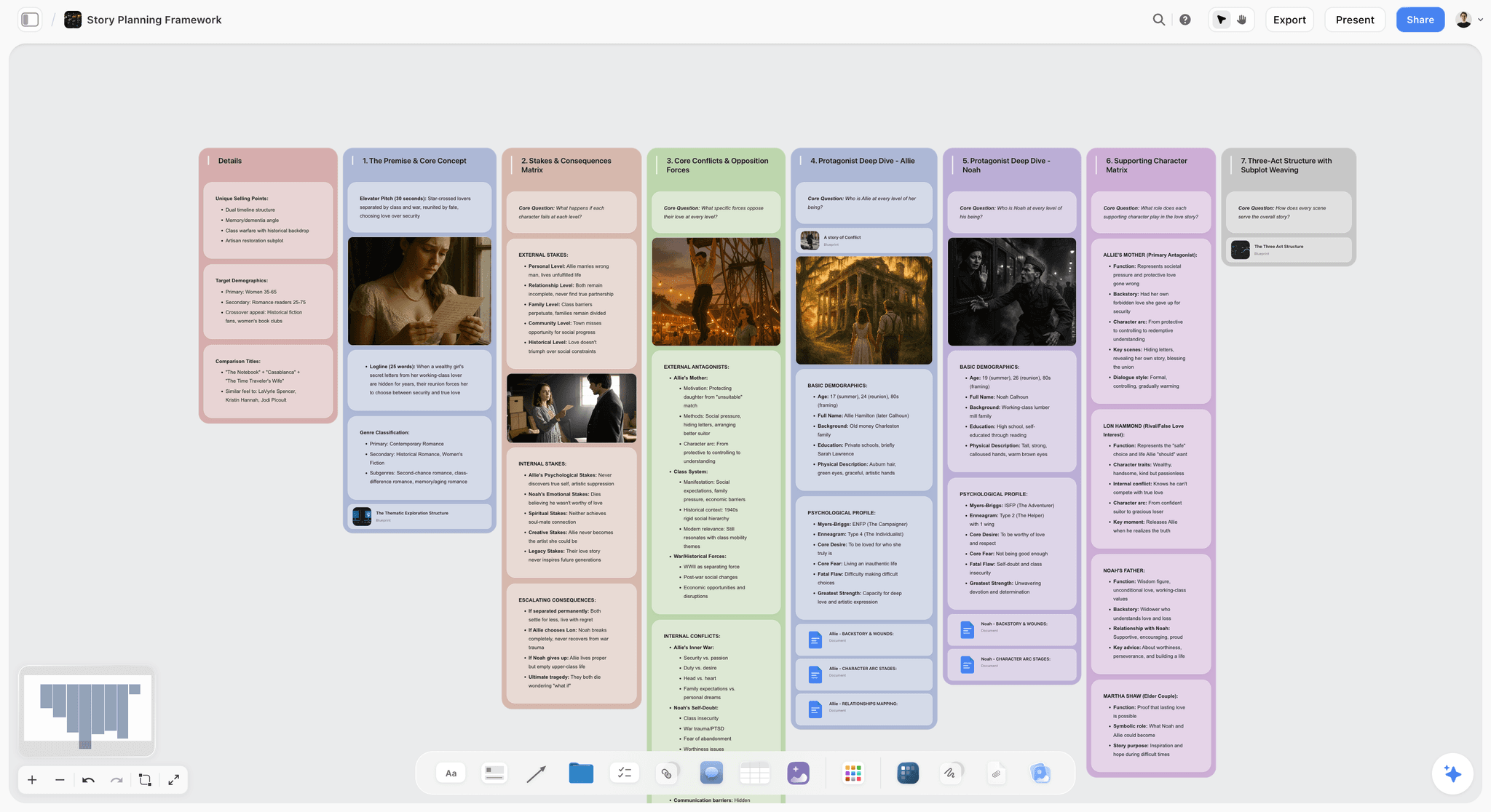
Storyflow canvas developing structure, beats, and characters with AI, before formatting the pages in a screenwriter
Add the development and AI Fade In does not have
Storyflow develops structure, beats, and characters on a canvas the AI reads, with 200+ blueprints, then you format the pages in Fade In or Final Draft. The best of both, and free to start.

Why People Look for Fade In Alternatives
Fade In is a genuinely good, affordable screenwriter, so the reasons people seek alternatives are specific. Each one is one of the Four Exits.
The Standard Exit: they need Final Draft itself. Some production offices, agencies, and screenwriting competitions still name Final Draft in their submission rules. Fade In exports to Final Draft format, but writers who deliver into those pipelines often want the application everyone else in the room is running, not just a compatible file.
The Collaboration Exit: they want to write live with someone. Fade In's collaboration is lighter than WriterDuet's or Arc Studio's. Writing partners in different cities and rooms who draft together in real time look for a tool built collaboration-first, where two cursors move in the same script at once.
The Development Exit: they want structure and AI. Fade In is a clean formatter with outlining, but writers who want story maps, structural analysis, or an AI that reads the whole project add a development tool alongside it. This is the exit that has grown fastest, because Fade In has no AI at all.
The Free Exit: their budget is zero. Fade In is affordable but not free. Writers on no budget look to Trelby, Beat, or Scrite for the pages; Storyflow's Free plan for the development is not out yet, launching before the end of 2026.
The honest answer depends on which exit is yours. Standard Exit: Final Draft. Collaboration Exit: WriterDuet or Arc Studio. Free Exit: Trelby or Beat. Development Exit: Storyflow, because it develops structure and beats on a canvas the AI reads before you format in a screenwriter. Storyflow is not a page formatter, so for the pages you still want Final Draft, WriterDuet, or Fade In itself. For the full comparison, see the best screenwriting software in 2026.
How We Evaluated These Fade In Alternatives
Every tool here was assessed on how well it replaces the Fade In strength people want an alternative for. Five criteria, weighted in this order:
- Formatting quality. Does it produce professional output like Fade In?
- Price model. Does it match Fade In's value, or offer a reason to pay more?
- Collaboration. Does it add the real-time collaboration Fade In lacks?
- Structure and AI. Does it add the development tools Fade In does not have?
- Migration. How easily can you move scripts from Fade In?
Tested by rebuilding a Fade In project across the alternatives. Tools were judged on how well they serve the specific reason someone leaves Fade In.
Quick Picks by Exit
Standard Exit (you need the industry standard): Final Draft.
Collaboration Exit (you write live with someone): WriterDuet or Arc Studio.
Free Exit (your budget is zero): Trelby, Beat, or Scrite.
Development Exit (you want structure and AI): Storyflow.
Lateral move (another one-time affordable writer, not really an exit): Highland 2 or Slugline.
Detailed Reviews: The 12 Best Fade In Alternatives
1. Storyflow

Storyflow replaces the development-and-AI side Fade In does not have: structure, beats, character arcs, and research on a canvas the AI reads, before you format the pages. To be clear, it is not a page formatter, so for the screenplay pages you still use Fade In, Final Draft, or WriterDuet.
Best for: Writers who want development tools and AI Fade In lacks.
Verdict: Not a page formatter. Use Fade In or Final Draft for the pages. Use Storyflow for the development and AI Fade In does not have.
Why it ranks here: this is the Development Exit, the only one Fade In cannot close on its own, because Fade In has no AI. Storyflow is a visual canvas where you lay out beats, character arcs, and research, then ask an AI that reads the whole board which scenes carry your central conflict. On a documentary I can pin interview notes and a beat outline on one canvas and have the AI reason across them before a page is formatted. It is here because: it does a different job, not the same job worse.
Key features
- AI that reads your canvas. It reads your full active board, plus up to 1 Tactic and 3 documents you @-mention in the chat.
- 200+ Story Blueprints for structure on Plus, Pro, and Max.
- Beats, characters, and research on one board.
- Unlimited boards and collaboration, even on the upcoming free plan.
Pricing
Flat per account, not per user, paid-only during early access: Plus $7.99/mo annual ($9.99 monthly), Pro $14/mo annual ($19 monthly), Max $39/mo annual ($49 monthly). No per-seat or volume pricing. The Free plan launches before the end of 2026.
Pros
- The AI and structure Fade In lacks entirely.
- Develops the story before you touch the pages.
- A genuinely usable free plan for the development stage is coming before the end of 2026.
Cons
- Not a page formatter. You still format the actual screenplay in Fade In, Final Draft, or WriterDuet.
- Cloud-only. There is no local-first or offline mode for privacy-sensitive work.
- Newer to screenwriting specifically, so the screenwriting-focused ecosystem (submission integrations, plugins, genre-specific templates) is thinner than Final Draft's or Fade In's.
For the AI screenwriting angle, see the best AI tools for screenwriters in 2026.
2. Final Draft
Final Draft replaces Fade In with the industry standard, the format many production pipelines expect, now with real-time co-writing.
Best for: Writers who need the industry-standard file.
Verdict: The industry-standard Fade In alternative. The default many pipelines expect.
Why it is here: this is the Standard Exit, and nothing removes its friction as cleanly. Final Draft is the application agencies, studios, and competitions name in their submission rules, and recent versions added Collabowriter real-time co-writing. You pay for the name, but if your script must land in a Final Draft file, it guarantees it.
Key features
- Industry-standard formatting.
- Collabowriter collaboration.
- Beat Board.
- Reports.
Pricing
Around $199 one-time.
Pros
- Industry standard.
- Real-time co-writing.
- Deep tools.
Cons
- Much more expensive than Fade In.
- Heavier.
- Dated interface.
3. WriterDuet
WriterDuet replaces Fade In with a collaboration-first screenwriter.
Best for: Writing partners and rooms.
Verdict: The best collaborative Fade In alternative.
Why it ranks here: this is the Collaboration Exit in its purest form. Two writers in different cities type in the same script and watch each other's cursors, with automatic version history. Fade In's collaboration is lighter and turn-based, which is why writers' rooms default to WriterDuet. A solo writer gets less from it than from a focused formatter.
Key features
- Real-time collaborative writing.
- Version history.
- Outline panel.
- Import and export.
Pricing
Free for 3 scripts; Pro paid.
Pros
- Seamless collaboration.
- Free tier.
- Reliable.
Cons
- Subscription for full features.
- Solo writers get less.
- Writing-focused.
4. Arc Studio
Arc Studio replaces Fade In with a modern writer that adds story maps and structure.
Best for: Writers who want modern writing plus structure.
Verdict: The best modern Fade In alternative with structure.
Why it ranks here: Arc Studio takes the Collaboration Exit and adds the structure most formatters skip. The script sits on one side and a beat board beside it, so you move story beats without leaving the page. It is subscription-only with a smaller ecosystem, but for modern co-writing plus light structure in one window, it is the sharpest all-in-one pick here.
Key features
- Script and story maps.
- Structure beside the script.
- Real-time collaboration.
- Modern interface.
Pricing
Free tier; Pro around $99/yr.
Pros
- Modern and fast.
- Structure tools.
- Collaboration.
Cons
- Subscription.
- Smaller ecosystem.
- Screenwriting-focused.
5. Highland 2
Highland 2 replaces Fade In with a Fountain-based Mac writer at a similar value.
Best for: Mac writers who like plain text.
Verdict: A strong Fountain-based Fade In alternative for Mac.
Why it ranks here: this is a lateral step, not a true exit. Highland 2 writes in Fountain, so scripts stay plain-text and future-proof, and it feels fast and calm. It is Mac-only with no live collaboration, but for a plain-text alternative to Fade In on Apple hardware, it is the closest match in spirit.
Key features
- Fountain-based writing.
- The Bin for revisions.
- Clean interface.
- Free tier.
Pricing
Free tier; Pro paid.
Pros
- Plain-text, future-proof.
- Fast and pleasant.
- Free tier.
Cons
- Mac-only.
- No real-time collaboration.
- Fountain learning curve.
6. Celtx
Celtx replaces Fade In with a browser suite that adds breakdown and scheduling.
Best for: Writers who want writing plus light production.
Verdict: A suite Fade In alternative for small teams.
Why it ranks here: Celtx is the pick when you want not just collaboration but light production. Alongside cloud scriptwriting it adds breakdown, scheduling, and budgeting, so a small crew moves from script to shoot plan in one tab. The editor is lighter than Fade In's, but for writing plus scheduling in one tool it earns its place.
Key features
- Cloud scriptwriting.
- Breakdown and scheduling.
- Collaboration.
- Free tier.
Pricing
From around $15/mo. Limited free tier.
Pros
- Writing plus production.
- Browser-based.
- Free tier.
Cons
- Script tool lighter.
- Subscription.
- Dated feel.
7. Trelby
Trelby replaces Fade In with a free cross-platform writer.
Best for: Writers who want free formatting on Windows or Linux.
Verdict: The best free Fade In alternative for non-Mac users.
Why it ranks here: this is the Free Exit for Windows and Linux writers. Trelby is free and open-source, produces correct industry formatting, and includes a name database and clean import and export. The interface is dated and there is no Mac build or collaboration, but if your budget is zero on Windows or Linux, it gives you professional pages for nothing.
Key features
- Standard formatting.
- Name database.
- Import and export.
- Free and open-source.
Pricing
Free and open-source.
Pros
- Free.
- Correct format.
- Cross-platform (not Mac).
Cons
- No Mac version.
- Dated.
- No collaboration.
8. Beat
Beat replaces Fade In with a free Mac writer.
Best for: Mac writers who want free formatting.
Verdict: The best free Fade In alternative for Mac.
Why it ranks here: Beat is the Free Exit for Mac writers. It writes in Fountain, shows a live outline, and exports to Final Draft, so a zero-budget Mac writer can hand a collaborator a .fdx file. It is free, open-source, and genuinely pleasant, with honest limits: Mac-only, solo, and a small Fountain learning curve.
Key features
- Fountain-based writing.
- Outline view.
- Final Draft export.
- Free and open-source.
Pricing
Free and open-source.
Pros
- Free.
- Pleasant.
- Plain-text.
Cons
- Mac-only.
- Solo.
- Fountain learning curve.
9. Scrite
Scrite replaces Fade In with a free modern cross-platform writer.
Best for: Writers who want a free modern screenwriter.
Verdict: The best free modern Fade In alternative.
Why it ranks here: Scrite is the Free Exit for writers who want a modern interface, not a dated one. It is free, open-source, and cross-platform, pairing standard formatting with a structure view. The community is smaller and collaboration is partial, but for a writer on no budget who cares how the tool feels, it is the most contemporary free pick.
Key features
- Standard formatting.
- Structure view.
- Cross-platform.
- Free and open-source.
Pricing
Free and open-source.
Pros
- Free and modern.
- Cross-platform.
- Structure tools.
Cons
- Smaller community.
- Newer.
- Partial collaboration.
10. Slugline
Slugline replaces Fade In with a distraction-free Apple writer at a one-time price.
Best for: Apple writers who want a calm one-time writer.
Verdict: A calm one-time Fade In alternative for Apple.
Why it ranks here: Slugline is another lateral move, for writers who want the calmest possible page. It writes in Fountain, syncs through iCloud, and has some of the best typography and outline navigation of any screenwriter. The limit is that same focus: Apple-only, solo, minimal, no collaboration. For a distraction-free surface on Apple hardware, it is the most beautiful tool here.
Key features
- Fountain-based writing.
- Outline navigator.
- Clean typography.
- iCloud sync.
Pricing
Around $49.99 one-time.
Pros
- Beautiful and calm.
- One-time price.
- Plain-text.
Cons
- Apple-only.
- Solo.
- Minimal features.
11. Scrivener
Scrivener replaces Fade In for writers who want organization plus scriptwriting.
Best for: Writers organizing a large or research-heavy project.
Verdict: A strong organizer Fade In alternative, script formatting secondary.
Why it ranks here: Scrivener is a partial Development Exit for writers whose real problem is organizing a large, research-heavy project. Its corkboard, outliner, and research storage are the best here for holding a sprawling manuscript together, but its scriptwriting mode is secondary, with weaker formatting and no collaboration. For long-form work that includes scripts it is excellent; for clean pages, it is the wrong shape.
Key features
- Corkboard and outliner.
- Research storage.
- Scriptwriting mode.
- One-time purchase.
Pricing
Around $59.99 one-time.
Pros
- Great organization.
- One-time price.
- Flexible.
Cons
- Script formatting secondary.
- Learning curve.
- No collaboration.
12. Google Docs
Google Docs replaces Fade In for free collaborative writing, with manual formatting.
Best for: Writers who want free collaboration.
Verdict: The free collaborative Fade In alternative, with manual formatting.
Why it is here: Google Docs is a Free Exit and a Collaboration Exit at once, but not really a screenwriter. It is free, universal, and its live collaboration is smoother than most paid tools, so an early draft moves fast between writers. The catch is formatting: you fight the margins by hand and the output is not production-standard. For a first pass it works; for delivery, you move to a real formatter.
Key features
- Free collaboration.
- Screenplay templates.
- Comments.
- Universal.
Pricing
Free with a Google account.
Pros
- Free and collaborative.
- Universal.
- Easy sharing.
Cons
- Manual formatting.
- Not production-standard.
- No script features.
Which Fade In Alternative Should You Choose?
Match each section to your exit: a formatter for the pages, and Storyflow where development helps.
13. You Need the Industry Standard
Top picks: Final Draft + Storyflow
Final Draft for the standard file, Storyflow for development and AI. See the best final draft alternatives in 2026 for the reverse comparison.
14. You Want Collaboration
Top picks: WriterDuet or Arc Studio + Storyflow
WriterDuet or Arc Studio for the co-written pages, Storyflow for the shared development.
15. You Want Free
Top picks: Trelby or Beat + Storyflow
Trelby or Beat for free formatting, Storyflow (Plus at $7.99/month annual; Free plan launching before the end of 2026) for development. See the best free screenwriting software in 2026.
16. You Want Development and AI
Top picks: Storyflow + Fade In
Storyflow for structure, beats, and AI, Fade In (or another formatter) for the pages. The best of both.
17. You Want Another Affordable One-Time Writer
Top picks: Highland 2 or Slugline
Highland 2 or Slugline for a one-time, affordable writer like Fade In, on Apple platforms.
Who Should Stay on Fade In
Not everyone reading this should switch. If you write mostly solo, control your own delivery pipeline, and want professional pages at a one-time price on any operating system including Linux, Fade In is already the tool most of these alternatives are trying to become. Stay if none of the Four Exits describe you: you do not need the Final Draft application, you do not co-write live, your budget is not zero, and you are happy developing structure inside your outline. The honest move is not to abandon a good tool. It is to add the one thing it lacks. Nobody leaves Fade In because it is bad. They leave for the one thing it does not do.
Honorable Mentions
- Movie Magic Screenwriter: the other legacy formatter.
- Storyist: Mac and iOS writing.
- KIT Scenarist: free feature-rich writing.
- Fountain: the free plain-text format behind several tools.
- Sudowrite: AI writing to pair with a formatter.
Where Fade In Alternatives Still Need You
Honest accounting. Alternatives replace tools, not the writing.
- The reason you switch. Pick the alternative for what you actually need.
- The migration. Moving scripts between tools takes effort.
- The habit. A new tool takes time to learn.
- The story. No tool writes the screenplay. That is you.
The right way to leave Fade In in 2026 is to replace the specific strength you need with the best tool for it. The writing stays human.
The Bottom Line
The best Fade In alternatives in 2026 depend on which of the Four Exits you are taking. Final Draft is the Standard Exit, WriterDuet and Arc Studio are the Collaboration Exit, and Trelby and Beat are the Free Exit. Storyflow is the strongest for the Development Exit, the AI and structure Fade In does not have. Fade In is a great-value formatter, so the best alternative fixes your specific reason for leaving. Nobody leaves Fade In because it is bad. They leave for the one thing it does not do.
The move that changes the most is to name your exit and get the best tool for it. Start a Storyflow board for the development and AI, and pair it with the formatter that fits your budget and pipeline.
FAQ: Fade In Alternatives in 2026
What is the best Fade In alternative in 2026?
It depends on which of the Four Exits you are taking. For the Standard Exit, Final Draft; for the Collaboration Exit, WriterDuet or Arc Studio; for the Free Exit, Trelby or Beat. For the Development Exit, Storyflow is the strongest because it develops structure and beats on a canvas the AI reads, though it is not a page formatter. The best alternative fixes your specific reason for leaving.
Is there a free Fade In alternative?
Yes. Trelby is free and open-source on Windows and Linux, Beat is free on Mac, and Scrite is a free cross-platform screenwriter. Google Docs is free for collaborative writing with a template, and Storyflow's Free plan, launching before the end of 2026, will cover development. A complete free stack is one of those formatters for the pages plus Storyflow's free plan for structure, which together do more than Fade In for zero cost.
Is Fade In better than Final Draft?
For value, yes: Fade In offers professional formatting at a one-time price a fraction of Final Draft's, and it is cross-platform including Linux. Final Draft's advantages are being the industry standard many pipelines expect, plus Collabowriter and a large ecosystem. If you control your own pipeline, Fade In is excellent; if you deliver to offices that require Final Draft files, Final Draft is worth the higher cost.
What is the best Fade In alternative for collaboration?
WriterDuet is the best for real-time collaborative screenwriting, with a smooth co-writing experience and version history. Arc Studio also offers real-time collaboration with modern structure tools, and Final Draft's Collabowriter adds it to the industry standard. For collaborating on story development rather than the pages, Storyflow adds a shared canvas. Fade In's collaboration is lighter, so any of these upgrades live co-writing.
How does Storyflow compare to Fade In?
They cover different stages. Fade In is a page formatter: professional screenplay pages with outlining. Storyflow is a development canvas: structure, beats, character arcs, and research with an AI that reads the whole board. It is not a formatter, so it does not replace Fade In's pages. The common workflow is to use both: Storyflow to develop the beats with AI, then Fade In to format the pages affordably.
Does Fade In export to Final Draft format?
Yes. Fade In exports to Final Draft (.fdx) and Fountain, so you can write affordably in Fade In and still deliver a Final Draft file to a production office or collaborator that requires one. This is part of what makes Fade In such good value: you get the compatibility of the industry standard without the price. If you switch tools later, check that the new one also exports .fdx.
How do I move my scripts off Fade In?
Export your scripts from Fade In in Final Draft (.fdx) or Fountain format, then import them into your new screenwriter. All the major alternatives, Final Draft, WriterDuet, Arc Studio, and the free tools, accept these formats. For development material, move structure and beats to a canvas like Storyflow. Because Fade In exports standard formats, your scripts move cleanly to whichever alternative fits.
Is Fade In discontinued?
No. Fade In is still sold and updated by its developer and remains available for Windows, Mac, Linux, iOS, and Android as of 2026. The confusion comes from its quiet release cadence: it does not market as loudly as Final Draft, so writers assume it stalled. It did not. If you like Fade In, you can keep using it for years, and the reasons to add an alternative are about capability gaps, not abandonment.
What is the cheapest Fade In alternative?
The cheapest alternatives are free. Trelby on Windows and Linux, Beat on Mac, and Scrite across platforms are all free, open-source page formatters, and Google Docs is free for collaborative writing with a template. For the development side, Storyflow is paid-only during early access, with Plus at $7.99/month annual and a Free plan launching before the end of 2026. The cheapest complete stack today pairs a free formatter with Storyflow Plus, which still does more planning than Fade In alone.
Can I open Fade In files in Final Draft?
Yes, by exporting first. Fade In saves to Final Draft (.fdx) and Fountain, both of which Final Draft opens directly, so you can hand a Final Draft user a file they can edit. Final Draft cannot open Fade In's native format, so always export to .fdx before sending. This two-way compatibility lets writers develop affordably in Fade In and still deliver to Final Draft users.
Does Fade In have AI?
No. Fade In is a clean page formatter with outlining, and it includes no AI writing, structural analysis, or assistant that reads your project. This is the most common reason writers add a second tool in 2026, the Development Exit. If you want AI that understands your beats, pair Fade In with a development tool: Storyflow's AI reads your full canvas board plus up to 1 Tactic and 3 documents you @-mention, then you format the pages in Fade In.
Does Storyflow replace Fade In?
No, and it does not try to. Storyflow is a development canvas for structure, beats, character arcs, and research, with an AI that reads the whole board. It does not produce formatted screenplay pages, so it cannot replace Fade In's core job. The two are complementary: develop the story in Storyflow, then format the pages in Fade In. Storyflow is paid-only during early access (Plus at $7.99/month annual), with a Free plan launching before the end of 2026 so you'll be able to test the pairing without adding cost.
Table of Contents
- All 12 Fade In Alternatives, Ranked
- Comparison Table: 12 Fade In Alternatives Compared
- Why People Look for Fade In Alternatives
- How We Evaluated These Fade In Alternatives
- Quick Picks by Exit
- Detailed Reviews: The 12 Best Fade In Alternatives
- Which Fade In Alternative Should You Choose?
- Honorable Mentions
- Where Fade In Alternatives Still Need You
- The Bottom Line
- Author
- FAQ: Fade In Alternatives in 2026
- Related Reading
Templates to check out for this topic


Templates you can use in Storyflow
Every Storyflow board starts from real structure and an AI that reads the whole canvas. Open one of these templates and make it yours.


See Storyflow in Action
A visual AI workspace where every feature lives inside one canvas. No tab-switching, no context lost.
Build your entire board from a single message
Type what you need in the AI chat at the bottom of your canvas. The AI adds cards, headings, and structure directly onto your board.
Use expert frameworks as AI context
Type @ in the AI chat and choose any Tactic. The AI tailors every response to that framework instead of giving generic advice.
Turn your board into a mind map in seconds
Ask the AI to restructure your canvas as a mindmap. It connects your ideas into a visual hierarchy so you can see how everything relates.
Why Storyflow Exists
Storyflow actually began as a personal tool while working on creative and research projects.
We kept running into the same problem: ideas were scattered everywhere: notes, documents, and whiteboards.
Nothing helped us see how everything connected.
So we started building a workspace designed around how ideas actually grow.
→ Read how Storyflow was createdJustkay
Documentary Filmmaker & Founder at Storyflow
Published: 2026-07-10
Extremely simple, seriously capable


See how easy it is to get started
Watch a real project come together, from a blank board to a finished plan, clicked through step by step.
Start creating with AI and become more productive
Transform your creative workflow with AI-powered tools. Generate ideas, create content, and boost your productivity in minutes instead of hours.